instrument cluster AUDI A8 2012 User Guide
[x] Cancel search | Manufacturer: AUDI, Model Year: 2012, Model line: A8, Model: AUDI A8 2012Pages: 300, PDF Size: 75.06 MB
Page 80 of 300
78 Warm and cold
(D Note
To avoid damage to the heating e lements
in the seats, do not kneel on the seats or
place heavy loads on a small area of the
seat .
Setup
The climate control system setup is accessed
through the MMI.
.. Se lect: I CARI function button > Car systems
control button > AC.
Rear cabin settings*
When this function is selected, all settings for
the rear can be adjusted through the climate
contro l system in the cockpit . The climate
control system settings cannot be adjusted in
the rear seat at the same time. This function
switches off after a certain period of time or
when one of the dials in the cockp it is press
ed.
Auto recirculation*
The sensitivity level of the automatic reci rcu
l ation mode can be set at various leve ls from
off to sensitive . The recirculation mode 1...,1 is
controlled on automatically. You must press
the ~ button if fog forms on the w indows.
Footwell temperature
You can adjust the footwell temperat ure so
that it is cooler or warmer.
AC mode
The strength of the airflow can be adjusted to
light, med ium or strong .
Windshield heat*
When the defroster~ is switched on and the
Auto setting is selected, the windshield de
froster is controlled automatically.
Solar roof*
When the ignit io n is off, so lar-powered park
ing vent ilation may switch on, as long as
- there is sufficient sunlight, -
the outside temperature is not too low,
- t he center vents are open,
- the sunroof is closed or tilted and
- recirculation mode
1...,1 (climate control sys-
tem) and
Auto (MMI) are selected .
Parking ventilation is contro lled automatically
i n the
Auto sett ing.
~ Steering wheel heating
Applies to vehicles: with heated steering wheel
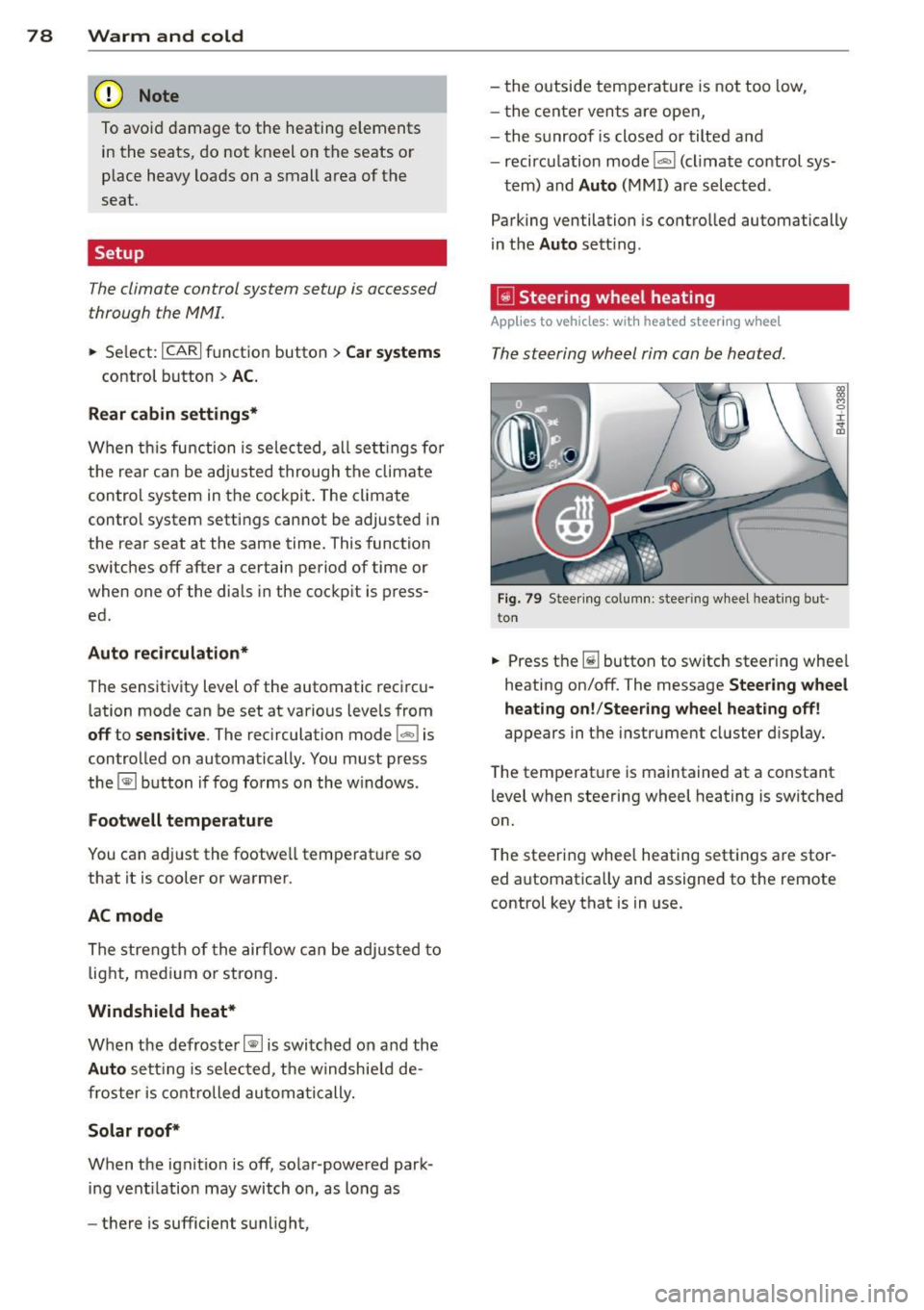
The steering wheel rim can be hea ted .
Fig . 79 Stee ring column : steeri ng wheel heati ng but
t on
.. Press the~ button to switch steer ing whee l
heating on/off. The message
Steering wheel
heating on! /Steering wheel heating off!
appears in t he instrument cluster display.
The temperat ure is maintained at a constant
level when steering wheel heating is switched
on.
T he steering wheel heating settings are stor
ed automatically and assigned to the remote control key that is in use.
Page 82 of 300
80 On the road
the stored position as soon as you switch on
the ignition.
Starting and stopping
the engine
Starting the engine
This button switches on the ignition and
starts the engine.
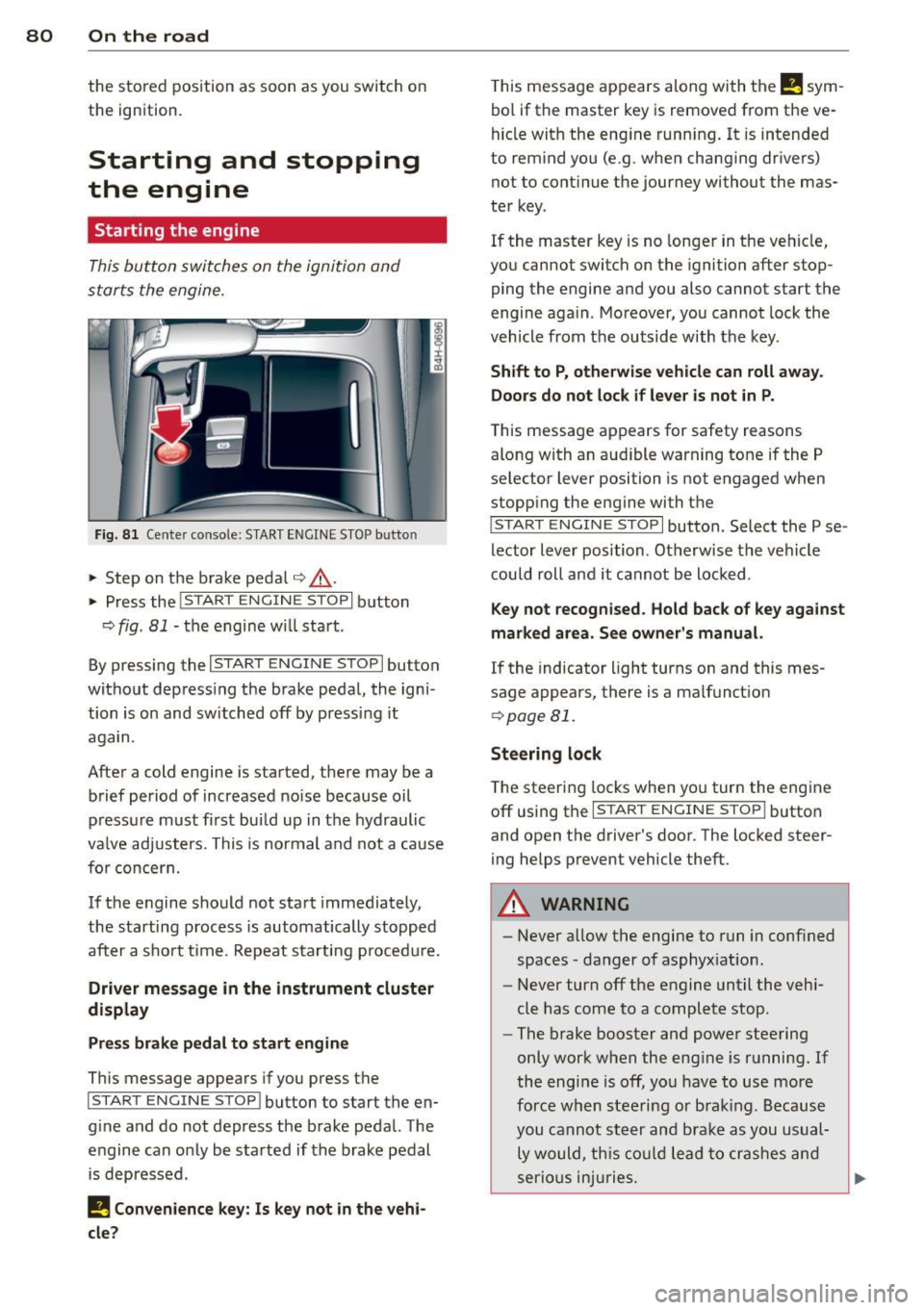
Fig. 81 Center console: S TART ENGINE S TOP b utto n
• Step on the brake pedal¢.&_ .
• Press the
!START E NGIN E STOPI button
¢
fig . 81 -the engine will start .
By pressing the
I START ENGIN E STOP I button
without depress ing the brake pedal, the igni
tion is on and switched off by pressing it
again.
After a cold engine is started, there may be a
brief period of increased noise because oil
pressure must fi rst bui ld up in the hydraulic
va lve adjusters. This is normal and not a cause
for concern.
If the engine should not start immediately,
the starting process is automatically stopped
after a sho rt time . Repeat sta rting p rocedu re.
Driver message in the instrument cluster
display
Press brake pedal to start engine
This message appears if you press the
I STAR T ENGIN E ST OP ! button to start the en
g ine and do not depress the brake pedal. The
engine can only be started if the brake pedal
is depressed.
I! Convenience key: Is key not in the vehi
cle?
T his message appears along with the I! sym
bol if the master key is removed from the ve
hicle with the eng ine running.
It is intended
to remind you (e.g . when changing drivers)
not to continue the journey without the mas
ter key.
If the maste r key is no longer in the vehicle,
you cannot switch on the ignition after stop
ping the engine and you also cannot start the
engine again . Moreover, you cannot lock the
vehicle from the outside with the key.
Shift to P, otherwise vehicle can roll away.
Doors do not lock if lever is not in P.
T his message app ears for safety reasons
along with an aud ible warning tone if the P
selector lever position is not engaged when
stopp ing the engine wi th the
I S TART ENGIN E STOP I button. Select the P se
lector lever position . Otherwise the vehicle
could roll and it cannot be locked .
Key not recognised. Hold back of key against
marked area. See owner's manual.
If the indicator light turns on and this mes
sage appears, there is a malfunct ion
¢ page Bl.
Steering lock
The steering locks when you turn the engine
off using the
I STAR T ENGINE ST OP I button
and open the driver 's door. The locked steer
ing helps prevent vehicle theft.
A WARNING
-
- Never allow the engine to run in conf ined
spaces -danger of asphyxiat ion .
- Never turn off the engine until the vehi
cle has come to a complete stop .
- The brake booster and power steering
only work when the engine is running.
If
the engine is off, you have to use more
force when steering or brak ing. Because
you cannot steer and brake as you usual
ly would, this could lead to crashes and
serio us injuries.
Page 84 of 300
82 On the road Requirem ent : The message
Key not recog
nized. Hold b ack of key against marked area.
See owner 's manual.
must appear and the in
dicator light
m must sw itch on.
• Hold the master key vertica lly in the loca
tion indicated y>l} q fig .
82.
• Press the brake pedal~ A in Starting the
engine on page 80.
.. Press the !~S _T _A_ R_T_ E_N_ G_ I_ N _E_ S_T_ O_ P~ I button.
The eng ine will start .
• Drive to your author ized Audi dealer imme
diately to have the malfunct ion corrected .
@ Tips
You can view the message again by press
ing the !START ENGINE STOP I button.
Electromechanical
parking brake
Operation
The electromechanical parking broke replaces
the hand broke.
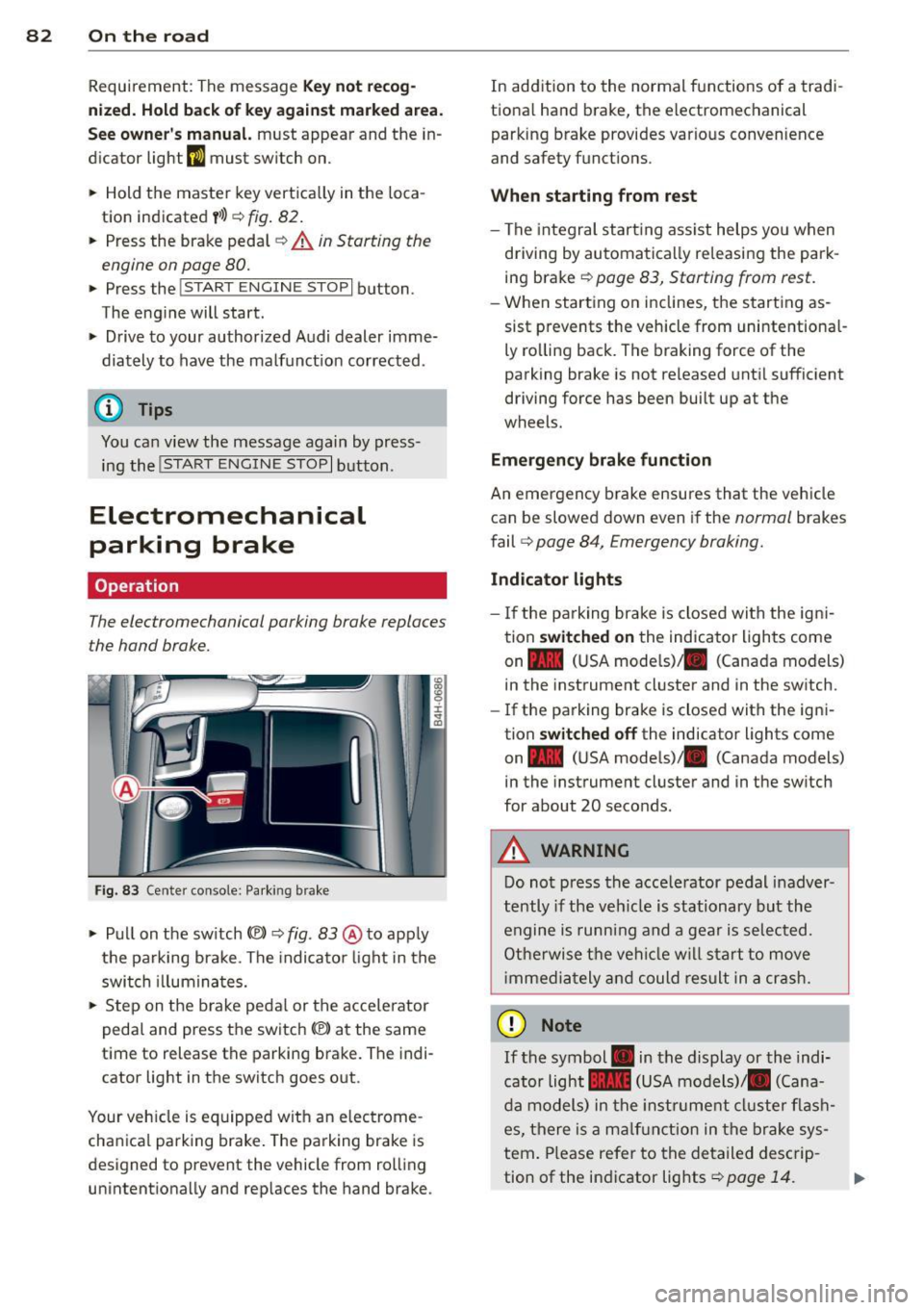
Fig . 83 Ce nter console: Parking brake
• Pull on the switch(®) ~ fig. 83 @ to app ly
the parking brake . The indica tor light in the
switch illuminates.
• Step on the brake pedal or the accelerator
pedal and press the switch(®) at the same
t ime to release the parking brake. The indi
cator light in the switch goes out .
Your vehicle is equipped wit h an electrome
cha nica l parking brake. The parking brake is
designed to prevent the vehicle from rol ling
unintentionally and rep laces the hand brake . In
addition to the normal functions of a tradi
tiona l hand brake, the electromechanical
parking brake provides var io us convenience
and safety functions .
When starting from rest
-The integral start ing ass ist helps you when
driving by automatically releasing the park
ing brake
~ page 83, Starting from rest .
-When starting on inclines, the starting as
sist prevents the vehicle from unintentiona l
ly rolling back. The braking force of the
parking brake is not released until sufficient
driving force has been built up at the
wheels.
Emergency brake function
An emergency brake ensures that the vehicle can be slowed down even if the
normal brakes
fail
q page 84, Emergency broking.
Indicator lights
-If the parking brake is closed with the ign i
tion
switched on the indicator lights come
on - (U SA mode ls)/ . (Canada models)
in the instrument cluster and in the switch.
- If the parking brake is closed with the igni
tion
switched off the indicator lights come
on - (USA mode ls)/ . (Canada models}
in the instrument cluster and in the sw itch
for about 20 seconds .
A WARNING
Do not press the acce lerator pedal inadver
tently if the vehicle is stationary but the
engine is running and a gear is selected.
Otherwise the vehicle will start to
move
immedia tely and could result in a crash.
(D Note
If the symbol . in the display or the indi
cator light .. (USA models)/ . (Cana
da models) in the instrum ent cluster flash
es, there is a malfunction in the brake sys
tem. Please refer to the detailed descrip-
tion of the indicator lights
~ page 14. ll-
Page 87 of 300
Cruise control
Switching on
The cruise control system makes it possible to
drive at a constant speed starting at 20 mph
(30 km/h).
0
f
~
0
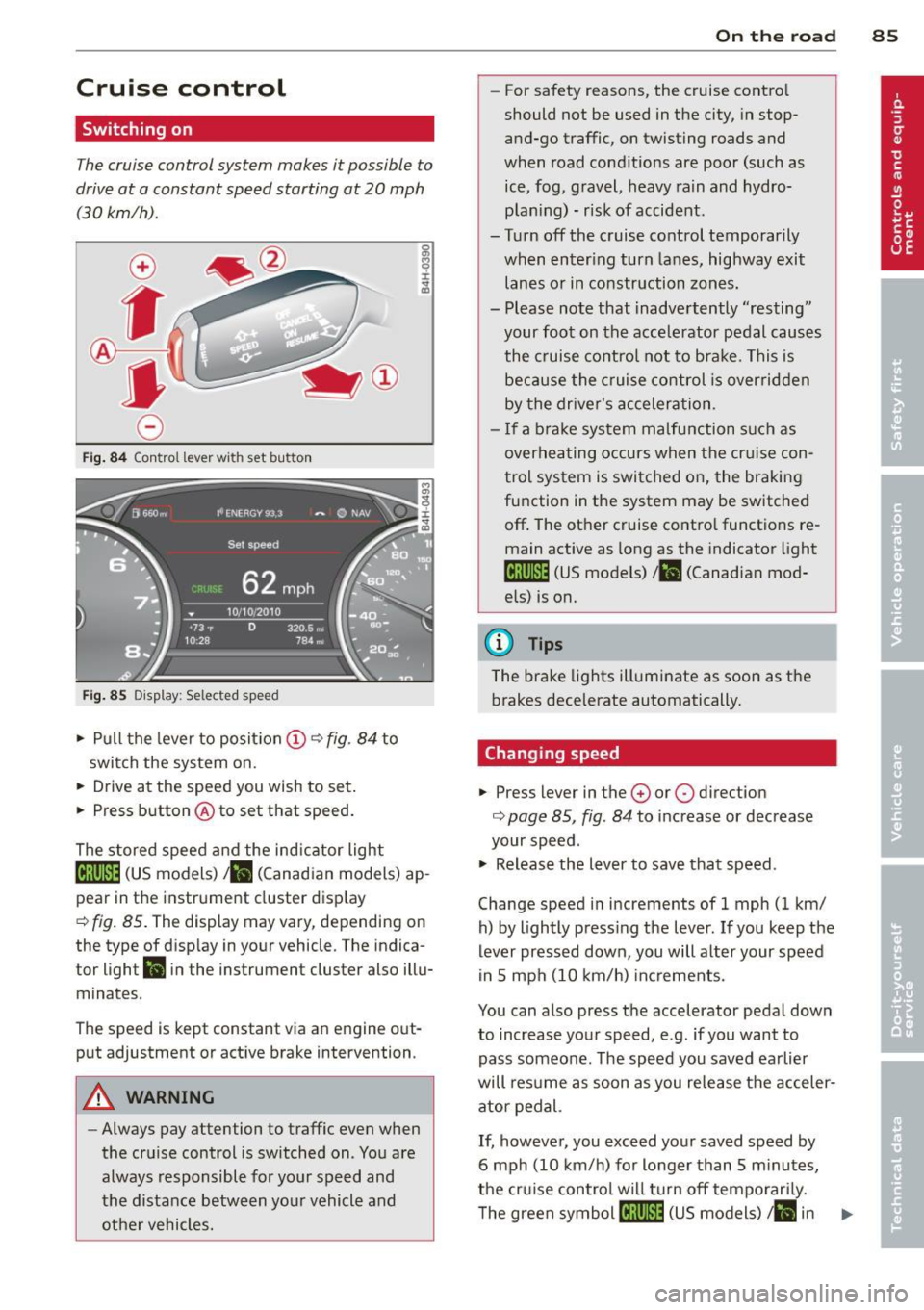
Fig . 84 Control lever with set button
Fig . 85 D isplay: Selected speed
.,. Pull the lever to position (D ~ fig . 84 to
swit ch the system on .
.,. Drive at the speed you wish to set.
.,. Press button @to set that speed.
The stored speed and the ind icator light
[lj;(i)~1ij (US models) 1 11 (Canad ian models) ap
pear in the instrument cluster display
¢ fig. 85. The display may vary, depending on
the type of disp lay in your vehicle. The indica
tor light
Ill in the instrument cluster also illu
minates.
The speed is kept constant via an engine out
put adjustment or active brake intervention.
A WARNING
-Always pay attention to traffic even when
the cruise control is switched on . You are
always responsible for your speed and
the distance between your vehicle and other vehicles.
On the road 85
-For safety reasons, the cruise control
should not be used in the city, in stop
and-go traffic, on twisting roads and
when road conditions are poor (such as ice, fog, gravel, heavy rain and hydro
plan ing) - risk of accident .
- Turn off the cruise control temporarily
when enter ing turn lanes, highway exit
lanes or in construction zones.
- Please note that inadvertently ''resting"
your foot on the accelerator pedal causes
the cruise control not to brake. This is
because the cruise control is overridden
by the driver's acceleration .
- If a brake system malfunction such as
overheating occurs when the cr uise con
trol system is switched on, the braking
function in the system may be switched
off . The other cruise contro l functions re
main active as long as the indicator light
tij;[i)~1ij (US models) 111 (Canadian mod
els) is on.
(D Tips
The brake lights illuminate as soon as the brakes decelerate automatically.
Changing speed
.,. Press lever in the 0 or 0 direction
¢ page 85, fig . 84 to increase or decrease
your speed .
.,. Release the lever to save that speed.
Change speed in increments of 1 mph (1 km/ h) by lightly press ing the lever. If you keep the
lever pressed down , you will alter your speed
in 5 mph (10 km/h) increments.
You can also press the accelerator pedal down
to increase your speed, e.g. if you want to
pass someone. The speed you saved earlier
will resume as soon as you release the acceler
ator pedal.
If, however, you exceed your saved speed by
6 mph (10 km/h) for longer than 5 m inutes,
the cruise control wil l turn off temporarily.
The green symbol
[ljlIJll (US models) ill in ..,_
Page 91 of 300
Audi adaptive cruise control and braking guard 89
@ is located in front o f that veh icle, the sys
tem wi ll not react to the stationary vehicle.
Audi adaptive cruise
control
Description
Applies to vehicles: with Audi adaptive cruise co ntrol
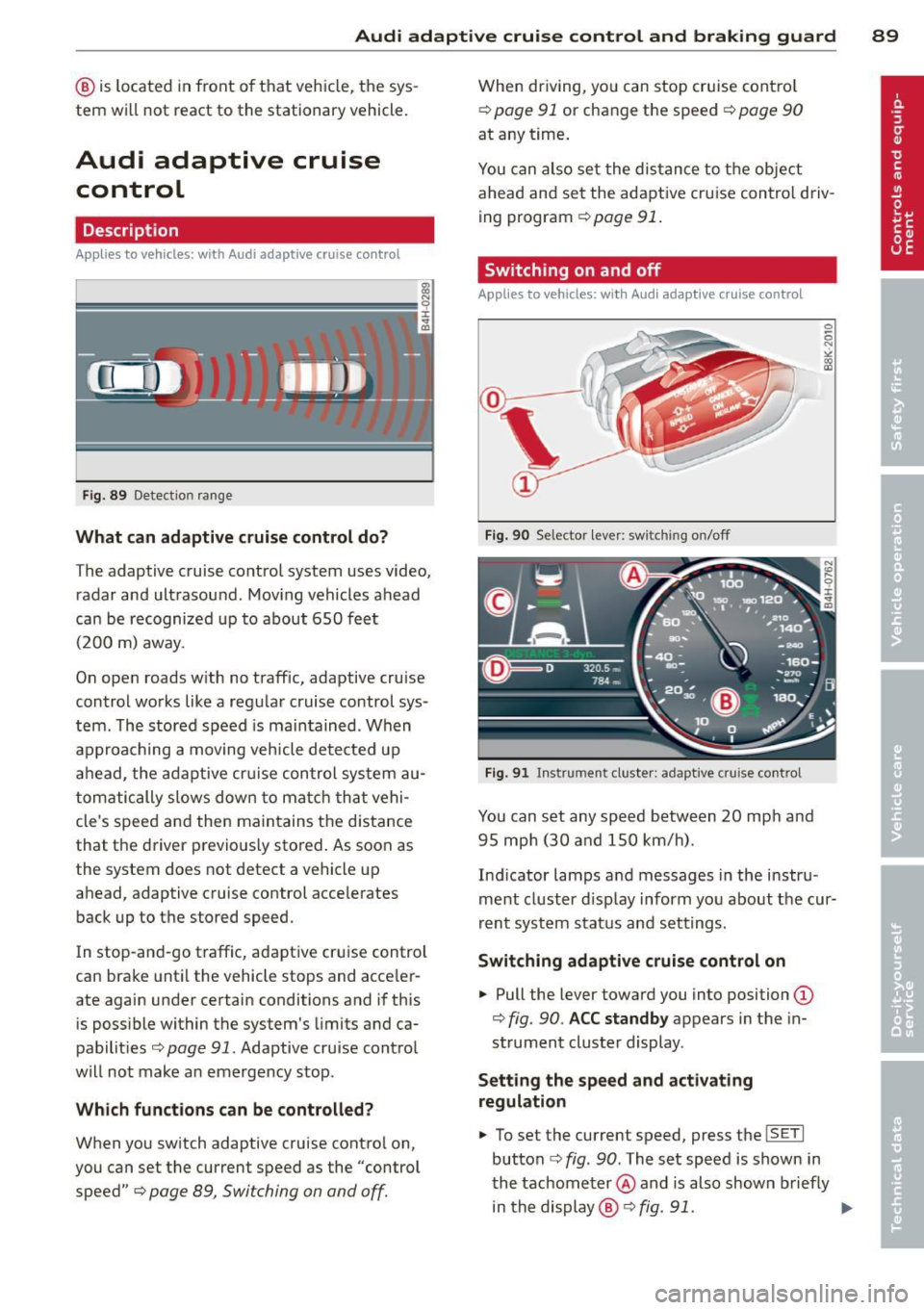
Fig . 8 9 Detection ra nge
What can adaptive cruise control do?
The adaptive cruise co ntrol system uses video,
radar and ultrasound . Mov ing vehicles ahead
can be r ecognized up to about 650 fe et
(200 m) away.
On ope n roads w ith no traff ic, adaptive cruise
contro l works like a reg ular cruise control sys
tem. The stored speed is ma in tained . When
approaching a moving veh icle detected up
ah ead, the adap tive cr uise control sys tem au
tom atically s lows dow n to matc h that vehi
cle's speed and the n main tains t he d istance
that the driver p revio usly sto red. As soon as
the system does not detect a vehicle up
ahead, adaptive cruise control acce lerates
back up to t he stored speed.
I n stop-an d-go t raffic, adapt ive cr uise contro l
can bra ke until the vehicle stops and acce le r
ate again under certain conditions and if this
is poss ible within the system's limits and ca
pabilit ies
c> page 91. Adaptive cru ise cont ro l
will not make a n emerge ncy stop .
Which functions can be controlled?
When you switch adaptive cruise contro l on,
you can set the current speed as the "control speed"
c> page 89, Switching on and off.
When driving, yo u can stop cruise cont ro l
c> page 91 or change the speed c> page 90
at any time .
You can also set the dis tan ce to the object
ahead and se t the adapt ive cr uise control d riv
ing program
c> page 91 .
Switching on and off
Applies to vehicles: with Audi adaptive cruise control
Fig. 90 Selector lever: switching o n/off
Fig . 91 Instrument cluste r: adaptive cru ise control
You can set any sp eed between 20 mp h and
9 5 mp h (3 0 and 150 km/h).
Ind icator lamps a nd messages in the i nstru
ment cluster d isp lay inform yo u about t he cur
r ent syst em stat us and sett ing s.
Switching adaptive cruise control on
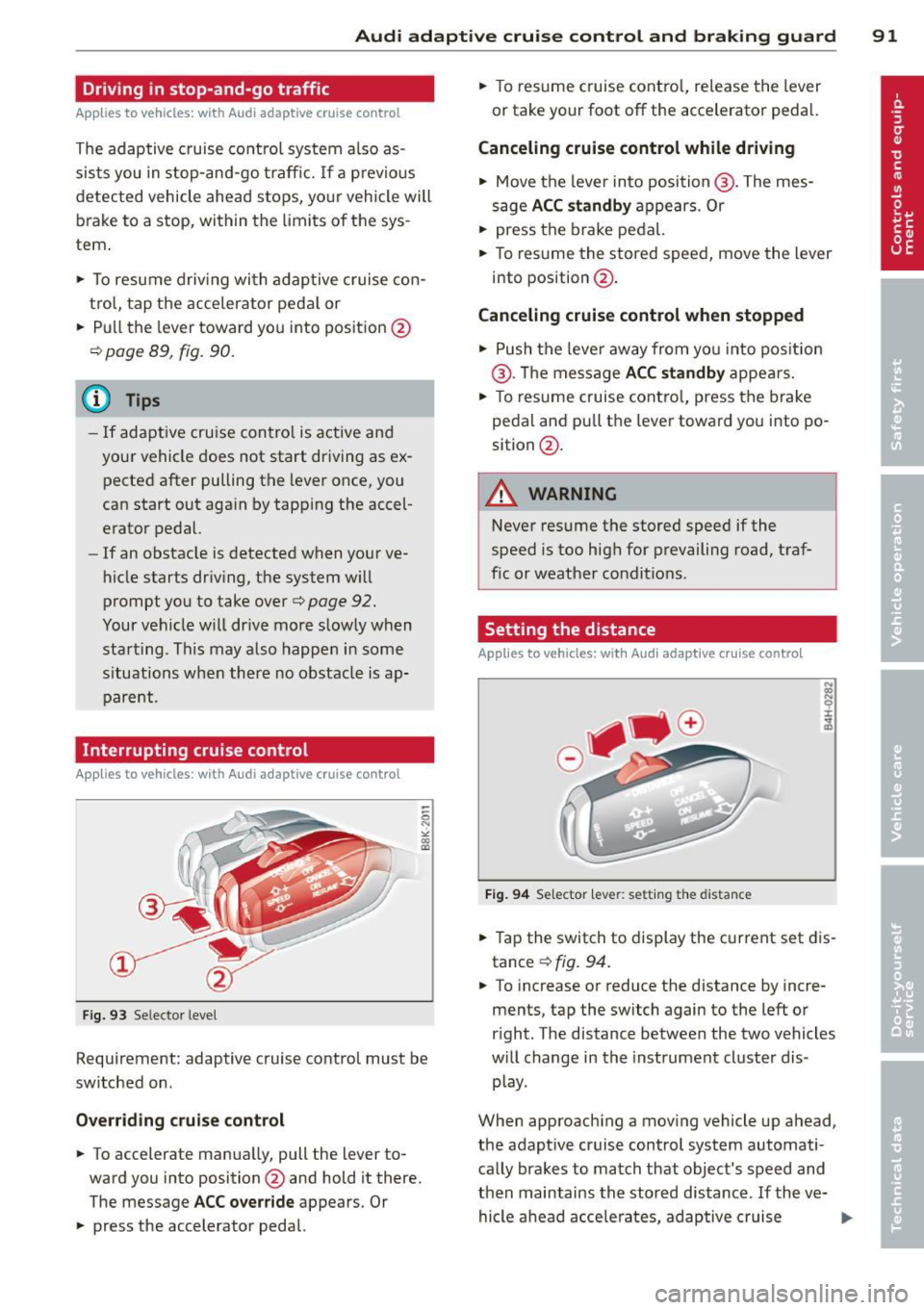
... Pull the lever toward you into position (D
c> fig. 90. ACC standby appears in the in
strument cluster display.
Setting the speed and a ctivating
regulation
... To set the current speed, press the ISETI
button c> fig . 90. The set speed is shown in
t he tachome ter @ and is also shown briefly
in th e display @
c> fig. 91 . ..,..
Page 93 of 300
Audi adaptive cruise control and braking guard 91
Driving in stop-and-go traffic
Applies to vehicles: with Audi adaptive cruise control
The adaptive cruise control system also as
sists you in stop-and -go traffic. If a previous
detected vehicle ahead s tops, yo ur vehicle will
brake to a stop, within the limits of the sys
tem .
.,. To resume driv ing with adap tive cruise con
tro l, tap the accelerator peda l or
.,. Pull the lever toward you into position @
¢ page 89, fig. 90.
(D Tips
-If adaptive cru ise contro l is active and
your vehicle does not start driving as ex
pected after pulling the lever once, you
can start out aga in by tapping the accel
erator pedal.
- If an obstacle is detected when your ve
hicle starts dr iv ing, the system w ill
prompt you to take over
¢ page 92.
Your vehicle w ill drive more slowly when
starting. This may also happen in some
s ituations when there no obstacle is ap
parent.
Interrupting cruise control
Ap plies to vehicles: with Audi adaptive cruise control
Fig. 93 Selecto r level
Requirement: adaptive cruise control must be
switched on .
Overriding crui se control
.,. To accelerate manua lly, pull the lever to
ward you into position @and hold it there.
The message
ACC override appears. Or
.,. press the accelerator pedal. .,.
To resume cruise contro l, release the lever
or take your foot off the accelerator pedal.
Canceling cruise control while driving
.,. Move the lever into position @. The mes
sage
ACC standby appears . Or
.,. press the brake pedal.
.,. To resume the stored speed, move the lever
into position @ .
Canceling cruise control when stopped
.,. Push the lever away from you into pos ition
@ . Th e message
ACC standby appears.
.,. To resume cruise control, press the brake
pedal and pu ll the lever toward you into po
sition @.
A WARNING
-
Never resume the stored speed if the
speed is too high for prevailing road, traf
fic or weather conditions.
Setting the distance
App lies to vehicles: with Audi adapt ive cr uise contro l
Fig. 94 Selector lever: setting th e dista nce
.,. Tap the switch to display the current set dis
tance
¢ fig. 94 .
.,. To increase or reduce the distance by incre
ments, tap the switch again to the left or
right. The distance between the two vehicles
w ill change in the instrument cluster dis
play.
When approaching a moving vehicle up ahead,
the adapt ive cruise control system automati
cally brakes to match that object's speed and
then maintains the stored distance . If the ve-
hicle ahead accelerates, adaptive cruise ..,.
Page 94 of 300
92 Audi adaptive cruise control and braking guard
control will also accelerate up to the stored
speed.
The higher the speed , the greater the distance
in yards (meters)¢ .&.. T he
Distance 3 setting
is recommended .
The distances p rov ided are spec ified values.
Depending on the driving situation and the
how the vehicle ahead is dr iving, the actual
distance may be more or less than these tar
get distances .
The various symbols for the time increments
appear briefly in the info rmation line @
¢ page
89, fig. 91 when you change the set
tings .
c:::,_c:::, ___ Distance 1: This setting corre-
sponds to a distance of 92 feet/28 meters
when traveling at 62 mph ( 100 km/h), or a
time interval of
1 second.
c:::, __ c:::, __ Distan ce 2: Thi s setting corre
sponds to a dis tance of 118 feet/36 meters
when traveling at 62 mph ( 100 km/h), or a
time interva l of 1.3 seconds.
c:::, ___ c:::,_ Distance 3: This setting corre-
sponds to a distance of 164 feet/SO meters
when traveling at 62 mph ( 100 km/h), or a
time interva l of 1.8 seconds.
c:::, ____ c:::, Distance 4: This setting corre-
sponds to a distance of 210 feet/64 meters
when traveling at 62 mph ( 100 km/h), or a
time interval of 2.3 seconds.
.&_ WARNING
Following other vehicles too closely in
creases the risk of collisions and serious
personal injury.
- Setting short distances to the traffic ahead reduces the t ime and distance
available to br ing your vehicle to a safe
stop and makes it even more necessary
to pay close attention to traffic.
- Always obey applicable traffic laws, use
good judgment, and select a safe follow
ing distance for the traffic, road and
weather conditions .
(D Tips
-Distance 3 is set automatically each time
you switch the ignition on.
- Your standard settings are automatically
stored and assigned to the remote con
tro l key being used.
Selecting the driving mode
Applies to veh icles: w ith Audi adapt ive cr uise contro l
.,. Select the desired driving mode in dr ive se
lect
¢ page 103 .
@ Tips
Your settings are automatically stored and
assigned to the remote control key being
used.
Prompt for driver intervention
Applies to vehicles : w it h Audi ada ptive cr uise cont ro l
Fig. 95 Instrument cluster: request for driver inte rven
tio n
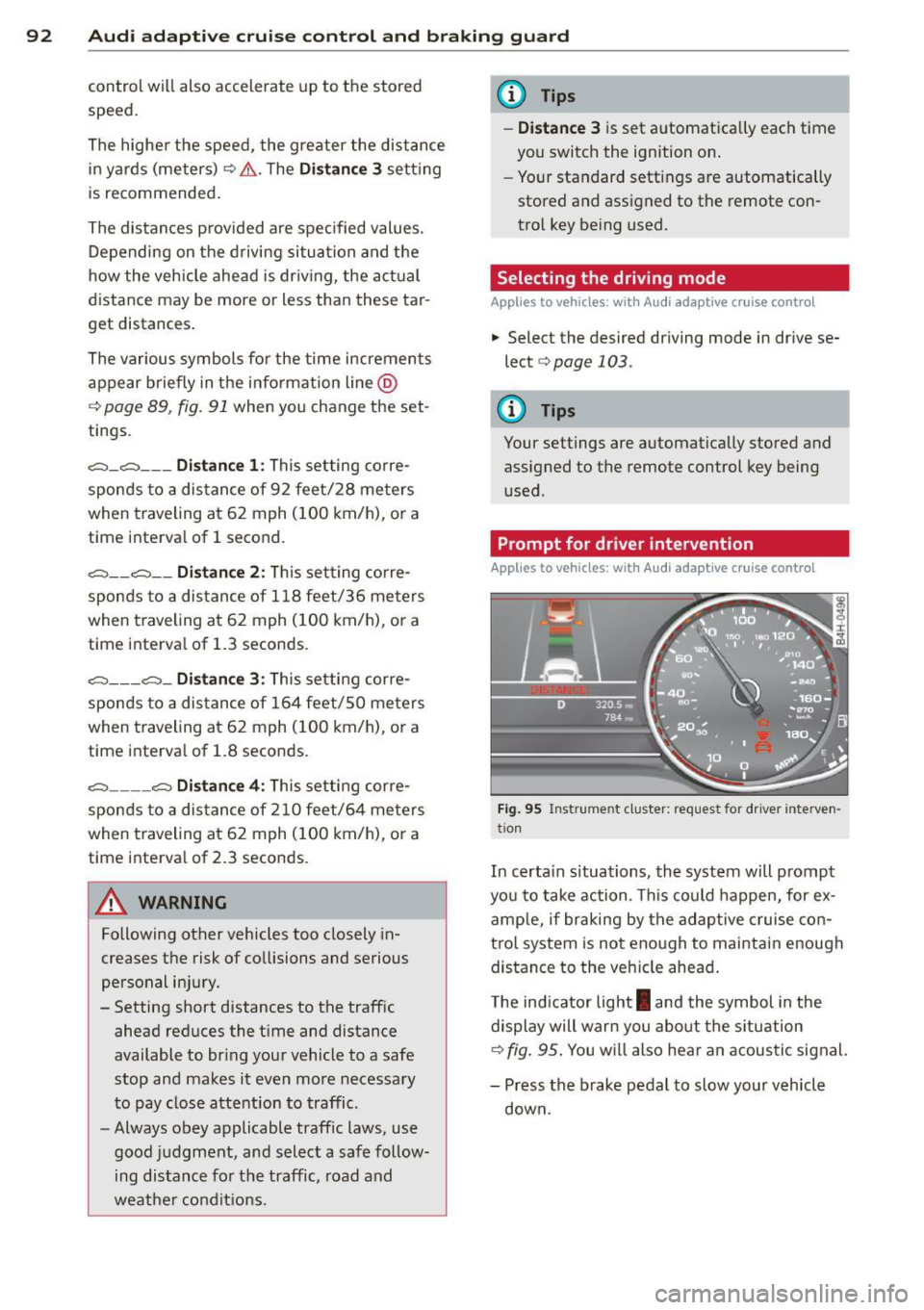
In certa in s ituations, the system will prompt
yo u to take action . Thi s could happen, for ex
amp le, if braking by the adaptive cruise con
trol system is not enough to maintain enough
distance to the veh icle ahead .
The indicator light
I and the symbol in the
display will warn you about the situa tion
¢fig.
95. You w ill also hear an acoustic signal.
- Press the brake pedal to slow your vehicle
down.
Page 95 of 300

Audi adaptive cruise control and braking guard 93
Audi braking guard
Description
Applies to vehicles: with Audi adaptive cruise control
Fig. 96 Instrument cluster: approach warning
Audi braking guard uses radar sensors and a
video camera. It also functions within the lim
its of the system when adaptive cruise control
is switched off.
What can Audi braking guard do?
When detected in time, the system can assess
situations when a vehicle ahead brakes sud
denly or if your own vehicle is traveling at a
high speed and approaching a vehicle up
ahead that is moving more slowly . Audi brak
ing guard does not react if it cannot detect
the situation.
The system advises you of various situations:
- The
distance warning is given if you are too
close to the vehicle ahead for a long time. If
the vehicle ahead brakes sharply, you will not be able to avoid a collis ion. The indicator
light
I i n the display comes on .
- The
approach warning is given when a de
tected vehicle up ahead in your lane is mov
i ng much more slowly than you are or if it
brakes sharply . When this warning is given,
it may only be possible to avoid a collision
by swerving or braking sharply. The indicator
light
I and indicator in the display will warn
you about the danger
c::> fig . 96. You will a lso
hear an acoustic signal.
If you do not react fast enough or do not react
at all to the situation, Aud i braking guard will
11
This is not ava ilable in som e coun tri es.
intervene by braking and the message braking
guard intervention
will appear.
- If a coll is ion is imminent, the system wi ll
first provide an
acute warning by briefly and
sharply applying the brakes.
- If you do not react to the acute warning,
braking guard can brake with increas ing
force within the limits of the system. This
reduces the vehicle speed in the event of a
collision.
- The system can initiate complete dece lera
tion shortly before a collision
1>. Full deceler
ation at high speeds occurs only in vehicles
with adaptive cruise control and side assist
(pre sense plus).
- If the Audi braking guard senses that you
are not braking hard enough when a colli
sion is immi nent, it can increase the braking
force.
- The pre sense functions also engage when a
collision is imm inent
c::> page 185 .
Which function s can be controlled?
You can switch Audi braking guard and the
distance/approach warning on or off in the
MMI c::> page 94, Settings in the MMI.
A WARNING
Lack of attention can cause collisions, oth
er accidents and serious personal injuries .
The Audi braking guard is an assist system
and cannot prevent a collision by itself.
The driver must always intervene. The driv
er is always responsib le for braking at the
correct time.
- Always pay close attention to traffic,
even when the Audi braking guard is
switched on. Be ready to intervene and
be ready to take complete control when
ever necessary. Always keep the safe and
legal distance between your veh icle and
veh icles up ahead.
- Audi brak ing guard works within limits
and will not respond outside the system
lim its, for example when approaching a
Page 98 of 300
96 Audi la ne a ssis t
Audi lane assist
Lane assist
Description
Appl ies to vehicles: with lane assist
Lane assist helps you keep your vehicle in your
lane .
Lane assist detects lane marker lines within
the limits of the system using a camera in the
windshield. If you are approaching a detected
lane marker line and it appears likely that you
will leave the lane, the system will warn you
with a light vibration . Lane assist is operable
when the line marki ng the lane is detected on
at least one s ide of the vehicle .
The system will not warn you before cross ing
a lane ma rker line if you have activated the
turn signal. In t his case, it assumes tha t you
a re cha nging lanes intent ionally.
The system is designed for driv ing on free
ways and expanded highways and thus works
on ly at speeds of 40 mph (65 km/h) o r more .
.&_ WARNING
-Lane ass ist will not keep your vehi cle in
yo ur lane. The system only warns the
dr iver w hen the vehicle is leaving the
lane . The driver is always responsib le for
keeping the vehicle in the lane .
- The camera is not able to detect all lane
boundary lines and in some cases might
also detect lane structures or objects as
boundary lines. This can lead to incorrect
warnings or warnings that fail to go off
at all .
- The camera's visibility can be impaired by
vehicles ahead of you, for instance, or by
rain, snow, heavy spray or light shin ing
in to the camera lens. This can cause lane
a ssist to fa il to detec t bou ndary lines.
- Activating and deactivating
Applies to
vehicles: with lane assist
Fig. 9 7 Turn signal lever: Lane-ass ist button
Fig . 98 W ind shi eld: Lane assist camera viewing win
dow
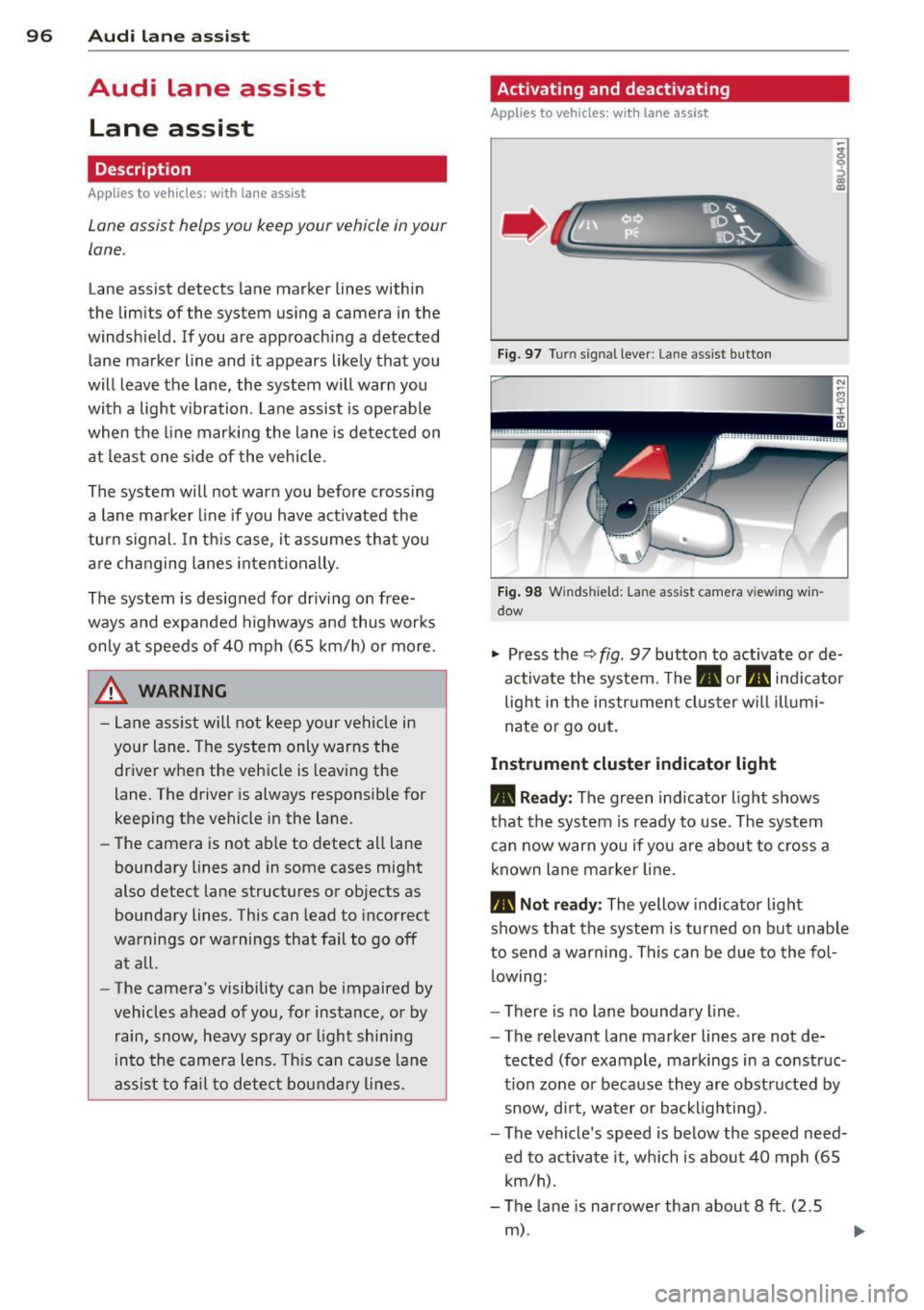
"' Press the q fig . 97 button to activate or de
activate the system. The. or. indicator
light in the instr ument cluster w ill illumi
nate or go out.
Instrument cluster indicator light
• Ready : The green indicator light shows
that th e system is ready to use . Th e system
can now warn you if yo u are about to cross a
known lane mar ker line.
• Not r ead y: The yellow indicator light
shows that the system is t urned on bu t unable
to send a warning . This can be due to the fol
lowing :
- There is no lane boundary line .
- The relevant lane marker lines are not de-
tected (for example, markings in a construc
tion zone or because they are obst ructed by
snow, d irt, water or backlighting) .
- The vehicle's speed is below the speed need·
ed to activate it, wh ich is about 40 mph (65
km/h).
- The lane is narrower than about 8
ft . (2.5
m) .
Page 99 of 300

-The curve is too sharp.
(0 Tips
Make sure the camera's field of view
c::> fig. 98 is not obstructed by stickers, de
posits or anything e lse . For information on
cleaning, refer to
c::> page 205.
Lane assist display in the instrument
cluster
App lies to vehicles: with la ne ass ist
Fig. 99 Instrument cluste r: lane ass ist is switched on
and is wa rning
Fig. 100 Instrument clus ter: lane assist is switched on
but not ready to provide warn ings
You can call up the lane assist display using
the buttons in the mult ifunct ion steer ing
wheel
c::> page 23.
When lane assist is switched on, the system
indicates which lines are detected by display
ing solid lines on the left and/or right side of
your vehicle:
Audi lane assist 97
White line(s) Lane assist is switched on and
ready to provide warnings on
the side that is indicated
Red line
(left or right)
c::> fig. 99.
Lane assist is warning you
that you are about to leave
your lane
c::> fig. 99 .
Gray line(s} Lane assist is switched on but
is not ready to provide warn
ings
c::> fig. 100 .
Messages in the instrument cluster
display
When the lane assist turns off automatically,
the instrument cluster indicator goes out and
one of the follow ing messages appears o n the
display:
Audi lane assist: currently unavailable. No
camera view
This message appears if the camera is no lon
ger functional after the system has continous
ly failed to detect the lane markings. This
could happen if :
- The camera field of view
c::> page 96, fig. 98
is dirty or covered in ice. Clean the area on
the windshield.
- The camera field of v iew is fogged over . Wait
until the fog has cleared before switching
lane assist on .
- The system has been unable to detect the
lanes for an extended period of time due to
road conditions such as lanes covered in
snow . Sw itch lane ass ist back on when the
lines are more visible .
Audi lane assist: Currently unavailable
A temporary malfunction is preventing lane
assist from operating. Try switching lane as
sist on again later.
Audi lane assist: System fault!
Drive to your authorized Audi dealer soon to
have the malfunctio n corrected.