sport mode AUDI A8 2012 User Guide
[x] Cancel search | Manufacturer: AUDI, Model Year: 2012, Model line: A8, Model: AUDI A8 2012Pages: 300, PDF Size: 75.06 MB
Page 113 of 300
To shift from N to D when traveling at speeds
be low S km/h, press the brak e pedal and se
lect the D se lector lever position
~ .& .
Unde r certain conditions such as driving in the
mountains or when towing a trailer , it may be
helpful to switch to manual mode temporarily
to sh ift
manually to adapt to the driv ing con
ditions
r:=:> page 112.
S -Sport
The 5 position can be selected fo r sporty driv
ing. Upshifting at a higher RPM makes full use
of the engine's power.
You can only select the S selector lever posi
tion when Dis engaged . Move the selector
l ever back to engage the 5 selector lever posi
tion. To select the D sel ector lever position
again when 5 is engaged, move the selector
lever back
r:=:> .&.
The 5 selector lever position engages auto
matica lly when you select the dynamic mode
in Audi drive se lect .
A WARNING
-Never engage R or P wh ile driving. It
could cause a crash.
-
- Power is still transmitted to the whee ls
when the engine is running at idle. To
prevent the vehicle from "creeping", you
must keep your foot on the brake in all
selector lever positions except P and N
when the eng ine is running. Do not inad
vertent ly press the accelerator pedal
when the vehicle is stationary . Otherwise
the vehicle will start to move immediate
ly. This cou ld happen even if the parking
brake is activated .
- Before opening the hood, select the P se
lector lever position and set the parking
brake. This reduces the risk of a crash . A l
ways read and follow the applicable
warnings
r:=:> page 213, Engine compart
ment.
- Never get out of the driver's seat when
the engine is running.
Automatic Transmission 111
-If you must get out of the vehicle , move
the selector lever secure ly into the P po
sition and apply the parking brake firmly.
@ Tips
- If you unintentionally shift into the N se
lector lever position while driving, take
your foot off the accelerator pedal and
wa it for the engine to slow down until it
is idling before you sh ift into Dor 5.
Driving tips
The gears shif t automa tically.
Starting from a stop
.. Press and hold the brake pedal.
.. Start the engine
r:=:>page 80.
.. Press the b utton on the s elector lever and
select the D, 5 or R se lector lever position
r:=:> page 109 .
.. Wait a moment until the transmiss ion
shifts . You will notice a slight movement
when the gear engages .
"" Release the brake peda l and press the accel
erator pedal
r:=:> &, .
Stopping temporarily
.. Press the brake pedal to stop the veh icle,
for example at a traffic light. Do not press
the acce lerator pedal when doing this.
"" To prevent the vehicle from rolling when
you start driving, set the parking brake
when stopp ing on large inclines
r:=:> &, .
.,. Th e parking brake will release automatica lly
and the vehicle will start moving once you
press the acce lerato r pedal.
Parking
If the selector lever is not in the P position
when you open the driver's door, the vehicle
could roll . The message
Transmission: Car
may roll! Shift to park!
appears .
.. Press and hold the bra ke peda l¢ &, .
"" Set the park ing brake.
.. To engage the P se lector lever position,
press the button on the selector lever and
shift into the P position
r:=:> page 109 .
Page 115 of 300
The transmission temperature has increased
significantly due to the sporty driving manner. Drive in a less sporty manner until the tem
perature returns to the normal range and the
indicator light switches of.
[O] Gearbox malfunction: you can continue
driving
There is a system ma lfunction in the transmis
sion. You may continue driving. Drive to your
authorized Audi dealer or qualified repair fa
cility soon to have the malfunction corrected .
[O];lij Gearbox malfunction: you can contin·
ue driving in D only until engine is off
There is a system malfunction in the transmis
sion . The transmission is switching to emer
gency mode. If you turn the engine
off, you
will not be able to select any other selector
l ever positions after starting the engine again.
Drive to your authorized Audi dea ler or quali
fied repai r facility immediately to have the
malfunction corrected.
[O] Gearbox malfunction: you can continue
driving {limited functionality)
There is a system ma lfunction in the transmis
sion. The transmission is switching to emer
gency mode. This mode only shifts into cer
tain gears or will not longer shift at all. The
engine may sta ll. Drive to your authorized Au
di dealer or qualified repa ir facility immedi
ately to have the malfunction corrected.
[o]tlij Gearbox malfunction: no reverse gear
(you can continue driving)
There is a system malfunction in the transmis
sion. The transmission is switching to emer
gency mode. This mode only shifts into cer
tain gears or will not longer shift at all. You
cannot engage the reverse gear. Drive to your
author ized Audi dealer immediately to have
the malfunction corrected.
[O] Vehicle may roll! Cannot shift to P. Please
apply parking brake
- The parking lock was released using the
emergency release
r=:> page 113. Or
Automatic Transmission 113
- The parking brake cannot engage automati
cally . Drive to your authorized Audi dea ler or
qualif ied repair facility immediately to have
the malfunction corrected.
[O] Gearbox malfunction: Stop and shift to P
Do not continue dr iving. Select the P selector
lever position and see your authorized Aud i
dealer or qualified repair facility for assis
tance .
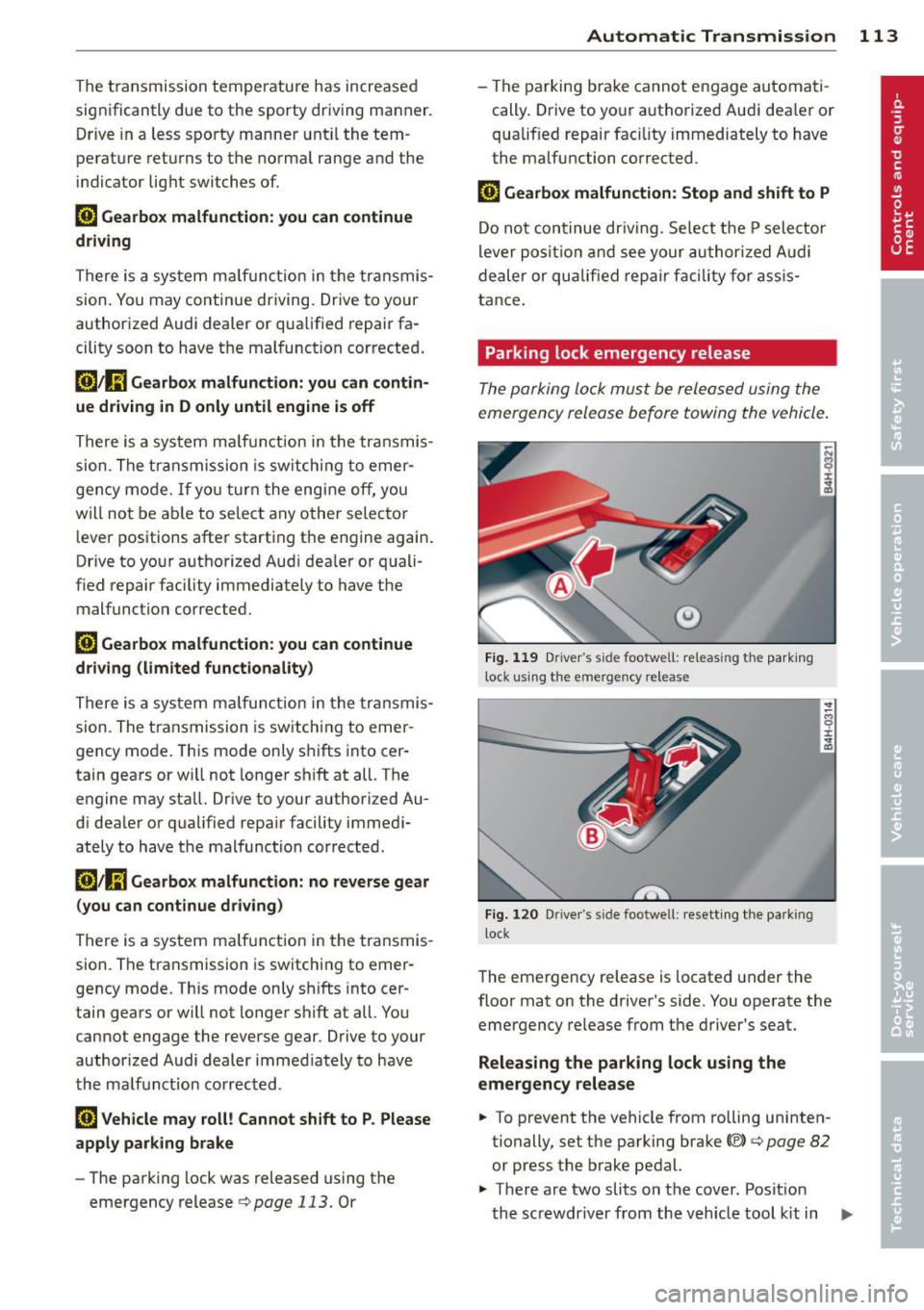
Parking lock emergency release
The parking lock must be released using the
emergency release before towing the vehicle.
Fig. 119 Driver 's side footwell: releas ing the park ing
lock using the emergency release
.------------------ -~
Fig. 120 Dr iver"s side footwel l: resett ing the parking
l ock
8 ±
~
The emergency release is located under the
floor mat on the driver's side. You operate the
emergency release from the driver's seat.
Releasing the parking lock using the
emergency release
.. To prevent the vehicle from rolling uninten
tionally, set the parking brake©
r=:> page 82
or press the brake pedal.
.,. There are two slits on the cover. Posit ion
the screwdriver from the veh icle tool kit in
Ill-
Page 118 of 300

116 Advanc ed Parking S ystem
Rear vi ew cam era co ve ra ge area
The MM I display shows the area covered by
the rear view camera
c::> fig. 123 @ . Objects
that are not in the area covered @are not
shown on the MMI display.
We recommend that you p ractice park ing with
the rear view camera in a t raffic -free location
or parking lot to become familiar with the sys
tem, the orientation lines, and their function.
When doing th is, there sho uld be good light
and weather conditions.
In the MMI disp lay, objects or vehicles appear
closer or further away if:
- you are driving in reverse gear from a level
surface onto an incline, or a downward
s lope,
- you are d riving in reverse gear toward pro
truding objects,
- the vehicle is carrying too much load in the
rear.
The accuracy of the orientation lines and blue
surfaces dim inishes if:
- the adaptive air suspension/sport* is faulty, the vehicle is lifted or dynamic mode is se
lected
c::> page 103,
- the rear view camera does not provide a reli
able image, for examp le, in poor visibility
cond it ions or if the lens is dirty,
- the image on the screen is not visible due to
sun glare and reflect ion.
Car in g for the rear view came ra lens
The rear view camera is located above the rear
license plate bracket . For the parking system
to operate, the lens
c::> fig . 124 must be kept
clean:
- Dampen the lens with a household alcohol
based glass cleaner, and then wipe the lens
clean with a dry cloth
c::> CD.
- Remove snow with a hand brush and ice
preferably with a de-icing spray
c::> (D .
A WARNING
,-
- Senso rs have blind spots in which objects
cannot be detected . Pay special attention to small children and animals because
the sensors cannot always detect them.
- The parking system cannot replace the
driver's attention. The driver alone is re
sponsible for parking and similar driving maneuvers.
- Always keep your eyes on the vehicle 's
surroundings, us ing the rear view mirror
as well.
- Do not allow yourself to be distracted
from traffic by the rear view camera p ic
tures.
- If the position and the installation angle
of the camera has changed, for example,
after a rear end col lis ion, do not continue
to use the system for safety reasons .
H ave it checked by a qualified dea le rship.
(D Note
- Low obstacles a lready s ignaled by a
warning can disappear from the system's detection range as they are approached
and w ill not cont inue to be signaled. Ob
jects such as ba rr ier chains, trailer draw
bars, thin painted vert ica l poles or fen
ces may not be detected by the system,
posing risk of damage .
- N ever use warm or hot water to remove
snow or ice from the rear view camera
lens - this could ca use the lens to crack!
- When cleaning the lens, never use prod
ucts that are abrasive.
Page 171 of 300
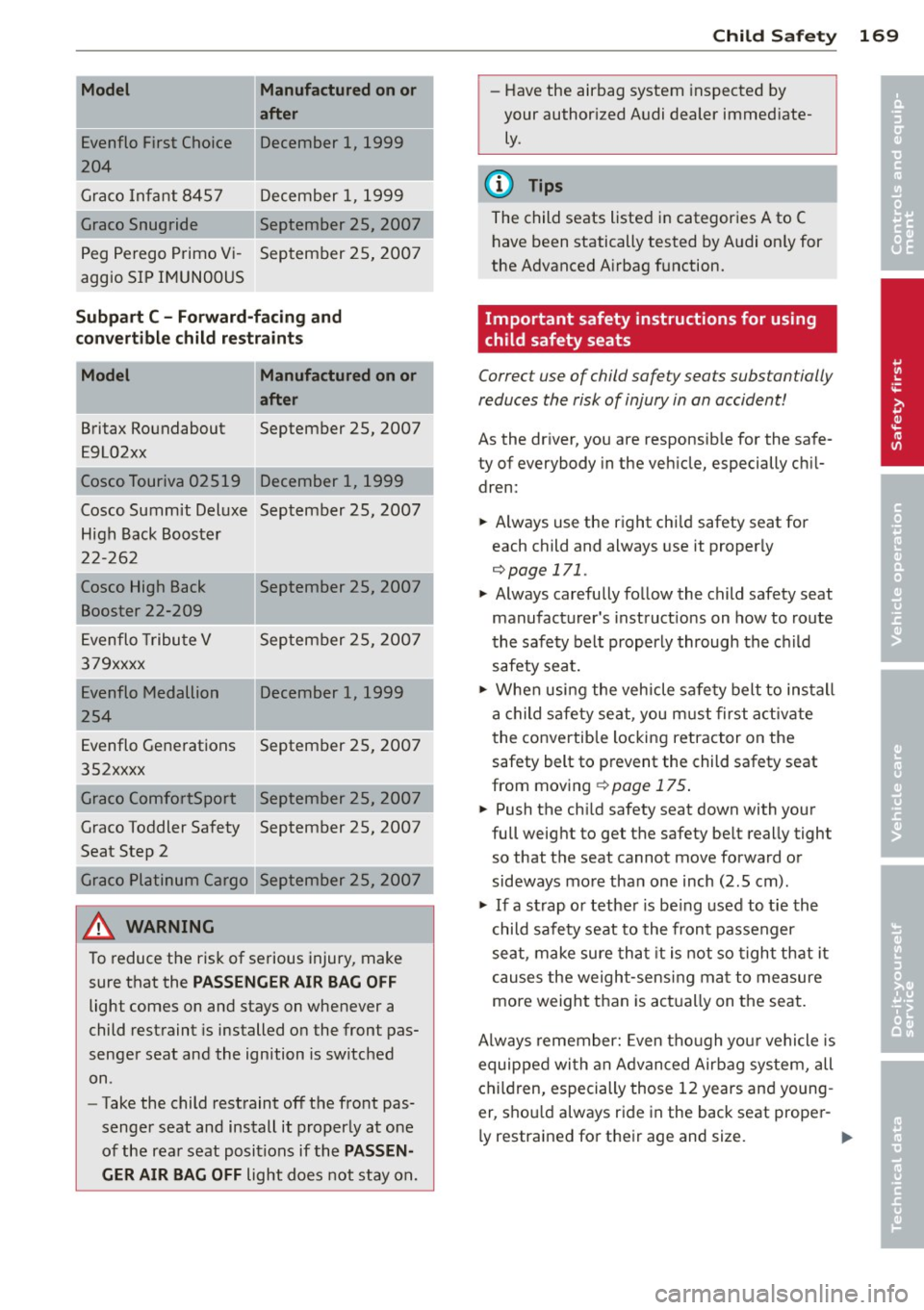
-Model Manufactured on or
a fter
Evenflo First Choic e December 1, 1999
1204
Gra co Infant 8457 December 1, 1999
Graco Snug ride September 25, 2007
Peg Perego Primo Vi -September 25, 2007
aggio SIP IMUN00US
Subpart C -Forward -fa cing and
c on vert ible child restraint s
Model Manufactured on or
after
Britax Roundabout September 25, 2007
E9L02xx
Cosco Touriva 02519 December 1, 1999
Cosco Summit Deluxe September 25, 2007
High Back Booster
2 2-262
! Cosco High Back September 25, 2007
Booster 22-209
E venflo Tribu te V September 25, 200 7
379xxxx
Evenflo Medallion December 1, 1999
254
Evenflo Generations September 25, 2007
352xxxx
Graco ComfortSport September 25, 2007
Graco Toddler Safety September 25, 2007
Seat Step 2
Graco Platinum Cargo September 25, 2007
&_ WARNING
To reduce the risk of serious injury, make sure that the
PASSENGER AIR BAG O FF
light comes on and stays on whenever a
child restraint is installed on the front pas
senger seat and the ignition is switched
on.
- Take the child rest raint off the front pas
senger seat and install it properly at one
of the rea r seat posi tions if the
PASSEN
GER AIR BAG OFF
light does not stay o n.
Child Sa fet y 169
-Have the airbag system inspected by
your author ized Audi dealer immed iate
ly.
(D Tips
The child seats listed in categories A to C have been statically tested by A udi on ly for
the Advanced A irbag function.
Important safety instructions for using
child safety seats
Correct use of child safety seats substantially
reduces the risk of injury in an accident!
As the dr iver, you are responsib le for the safe
ty of everybody in the veh icle, especially ch il
dren:
... Always use the r ight chi ld safety seat for
each child and always use it properly
¢ page 171 .
... Always carefully fo llow the child safety seat
manufactu rer's inst ruct io ns on how to route
th e safety belt properly through the child
safety sea t .
... When usi ng the vehicle safe ty belt to install
a child safety se at, you m ust first activate
t he conve rtible locking retractor on the
safety belt to prevent the child safety seat
from mov ing
¢ page 175.
... Push the ch ild safety seat down with your
full weight to get the safety be lt really tight
so that the seat cannot move forward or
sideways more than one inch (2 .5 cm) .
... If a strap o r tethe r is be ing used to tie the
child safety seat to the front passenger
seat , make sure tha t it is not so tigh t that it
causes the weigh t-sens ing ma t to measure
more weight than is act ually on the seat.
Always remember: Even tho ugh you r vehicle is
equippe d wi th an Advanced Airbag system, all
children, especially those 12 years and young
er, s hou ld always ride in the back seat prope r-
l y restrained for thei r age and size.
ll>
•
•
Page 188 of 300

186 Audi pre sen se
The sensors can be displaced by impacts or
damage to the bumper, whee l housing and
underbody. This can affect the function of
the Audi pre sense system. Have your au
thorized Audi dealer check to make sure
that the system is working properly .
@ Tips
-Certain Audi pre sense functions are not
available when ASR is sw itched off (sport
mode) or w hen driv ing in reverse.
- The Audi pre sense functions may not be
available if there is a malfunction in the
ESC system or the airbag control mod
ule.
- The Audi pre sense front/plus functions
are not available if the re is a ma lfunction
i n the adapt ive cru ise control* system
¢page 94.
- The Audi pre sense rear/plus functions
are not available if there is a ma lfunction
i n the Aud i side assis t* system
¢ page 94 .
Page 191 of 300
@ Tips
-ABS and ASR on ly work correctly when
all four wheels are equ ipped with identi
cal t ires. Different tire s iz es can lead to a
reduct ion in eng ine power.
- You may hear noises when the systems
described are working.
- If the indicator light
D] or m (USA
models) ;£1 (Canada models) appears,
there may be a malfunction¢
page 19,
c> page
18 .
Switching on and off
ESC
turn s on au tomatically when you s tart
the engine .
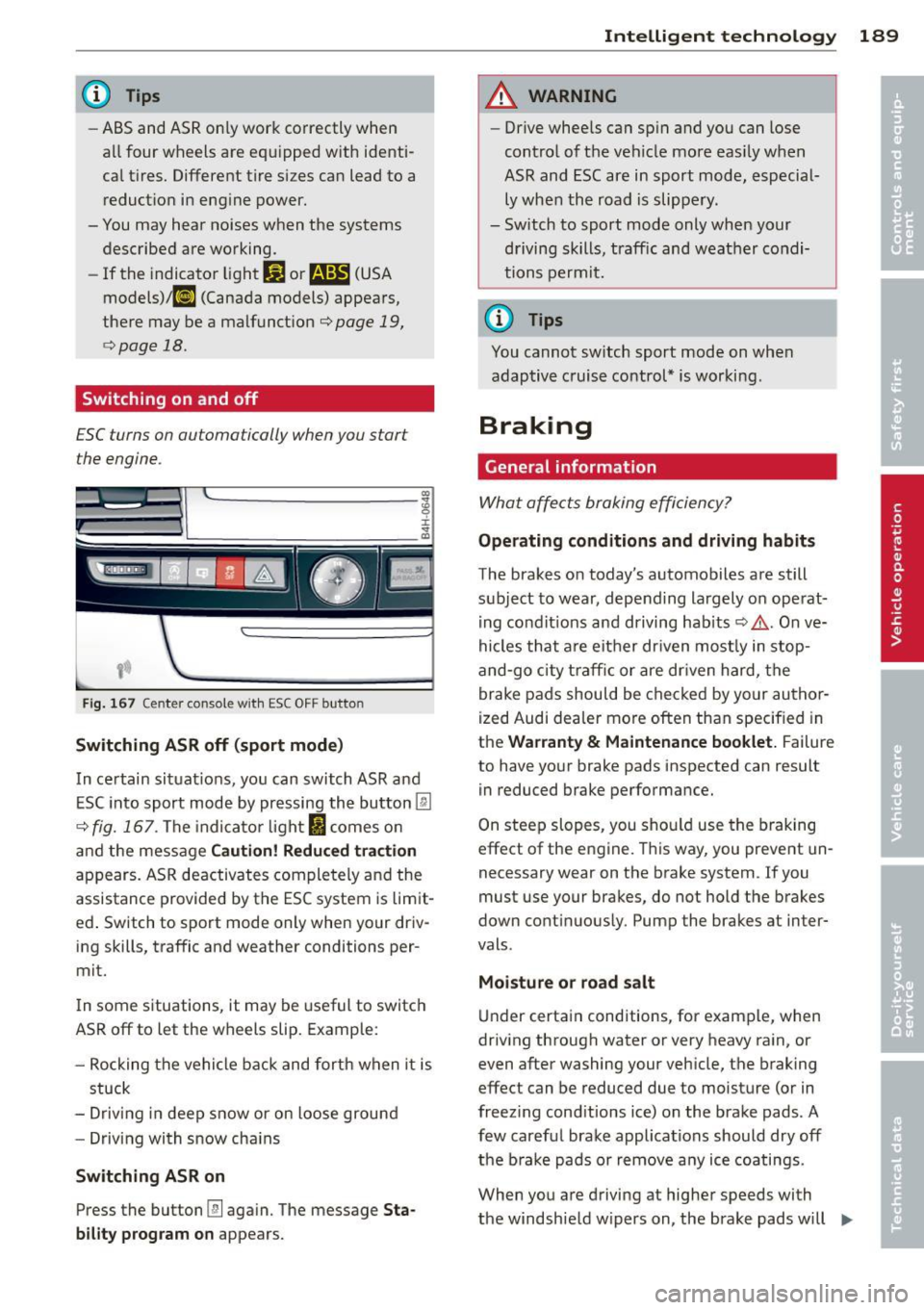
Fig. 167 Cen te r con sol e wit h ES C OF F but ton
Switching ASR off (sport mode )
In certain sit uat ions, you can switch ASR and
ESC in to sport mode by pressing the bu tton
[ru
c> fig. 167 . The indicator light I comes o n
and the message
Cauti on! R edu ced t ra cti on
appears. ASR deactivates completely and the
assistance provided by the ESC system is lim it
ed . Switch to sport mode only when your driv
ing skills, traffic and weathe r conditions per
mi t.
I n some s ituations, it may be useful to switc h
ASR off to let the wheels slip. Example:
- Rocking the vehicle back and forth when it is
stuck
- Driv ing in deep snow or on loose ground
- Driving with snow cha ins
Switching ASR on
Press the button [fil again. The message Sta
bility program on
appears.
Intelligen t technolog y 189
A WARNING
-Drive whee ls can sp in and you can lose
control of the vehicle more eas ily when
ASR and ESC are in sport mode, especial
ly whe n the road is slippe ry .
- Sw itch to sport mode only when your
driving skills, traff ic and weather condi
tions permit.
(D Tips
You cannot sw itch sport mode on whe n
adaptive cruise control* is working .
Braking
General information
What affects braking efficiency?
Operating cond itions and driving h abits
The brakes o n today's automobiles are still
subject to wear, depend ing largely on operat
i ng condit ions and driving habits ¢&, . On ve
hicles that a re either dr iven most ly in stop
and-go c ity t raff ic or are dr iven hard, the
brake pad s should be checked by yo ur author
i zed Audi dealer more often than specified in
the
Warranty & Maintenance booklet. Failure
to have your brake pads inspected can result in reduced brake performance.
On steep slopes, you sho uld use the braking
effect of the eng ine . T his way, you prevent un
necessary wear on the brake system . If you
must use your brakes, do not hold the br akes
down cont inuous ly . Pump the brakes a t in ter
vals .
Moisture o r ro ad sa lt
Under certa in conditions, for example, when
driv ing through water or very heavy ra in, or
even after washing your veh icle, the braking
effec t can be reduced due to moisture (or in
freez ing cond itions ice) on the brake pads . A
few carefu l brake applications should dry off
the b ra ke pads or remove a ny ice coatings.
When you are driving a t higher speeds with
the windsh ie ld w ipers on , the brake pads will
IJJJ,
Page 201 of 300

Trailer towing Driving with a trailer
General information
Your Audi was designed primarily for passen
ger transportation .
If you plan to tow a trai ler, p lease remember
that the addit ional load will affect durab ility,
economy and performance .
Trailer towing not on ly places more stress on
the vehicle, it also calls for more concentra
tion from the driver.
F or this reason, a lways fo llow the operating
and d riving instr uctions provided and use
common sense.
(D Note
If you are going to tow a trai ler, you must
activate the trailer operat ion mode
~ page 199, Operating instructions.
Technical requirements
Trailer hitch
Use a weight-carrying hitc h co nforming to the
gross trailer we ight. The hitch must be suita
b le for your veh icle and trailer and must be
mounted secure ly on the veh icle's chassis at a
technically sound location . Use only a trailer
hi tch wit h a removab le ball moun t. A lways
check with t he trail er hitch ma nufactur er to
make sure tha t you are using the corre ct
hi tch.
Do not use a bumper hitch.
The hitc h must be installed in such a way that
i t does not interfere with the impac t-absorb
i ng bumpe r sys tem. No mod ifica tio ns should
be made to the vehicle exh aust a nd brake sys
tems . From time to time, check that a ll hitch
mo unt ing bolts remain securely fastened.
W hen you are not towing a trail er, remove the
traile r hitch ball mount. Th is prevents the
hi tch from causing damage sho uld your ve hi
cle be str uck from behind ¢& .
Trailer towin g 199
Trailer brakes
If your trailer is equippe d wi th a br akin g sys
tem, check to be s ure that i t conforms to all
r egulations .
T he trailer hy draul ic brak e sys tem mus t not be
direc tly connec ted to the vehi cle' s h ydraulic
brake system .
Safety chains
Always use safety chains between your veh icle
and the tra ile r.
Trailer lights
Trai ler lights must meet all regu lations. Be
su re to check with your Audi dealer for cor rect
wir ing, swi tches and relays .
Mirrors
If you are unable to see the traffic behind you
us ing the reg ular o utside mirrors, then you
must insta ll extended mirrors. It is imp ortant
that you
always have clea r v is ion to the rear.
A WARNING ...__ -
Afte r removing the trailer hitch, do not
stor e it i n yo ur v ehicl e. In cas e o f sudden
b ra king, the hitch co uld fly forwar d and in
ju re you or your p ass en ger s.
Operating instructions
Fi g. 168 MM I dis pl ay: tow ing mode on
Ma ximum trailer weight
A trai ler fo r you r vehicle is limited to a typical
class 1 or class 2 tra iler.
ll>
Page 276 of 300

2 7 4 Emergency situations
@ Tips
Check carefully to make sure the hook-up
is secure before moving the car up the flat
bed truck ramp.
Vehicle transport
Whenever you have your vehicle transported,
be sure to note the following:
(D Note
Mount the tie-down chains/cables over the
running surface (circumference) of the
tires. Never secure the vehicle by the axle,
the suspension struts or the front or rear
towline eye. For technical reasons, the
pressure in the suspension struts may
change during the transport and this will
adversely affect vehicle handling.
Lifting vehicle
Lifting with workshop hoist and with
floor jack
The vehicle may only be lifted at the lifting
points illustrated.
Fig. 215 Front lift in g po int
Fig. 216 Rear lifti ng point
.,. Read and heed WARNING ¢ _&.
.,. Activate the vehicle jack mode in the MMI :
!CARI function button > Car systems control
button
> Servicing & checks > Air susp.:
jack mode
> On.
.,. Locate lifting points ¢ fig . 215 and
¢fig. 216 .
.,. Adjust lifting arms of workshop hoist or
floor jack to match veh icle lifting points .
.,. Insert a rubber pad between the floor jack/
wo rkshop hoist and the lifting points.
The vehicle jack mode must be act ivated so
that the automat ic adjustment of the Adap
tive Ai r Suspens ion does not make it more dif
ficult to raise the vehicle with the floor jack.
If you must lift your vehicle with a floor jack
to work underneath, be sure the vehicle is
safely supported on stand s intended for this
purpose.
Front lifting point
The lifting point is located on the floor pan re
i nforcement about at the same level as the
jack mounting point
¢ fig. 215 . Do not lift
the vehicle at the vertical sill reinforcement.
Rear lifting point
The lifting point is located on the vertical rein
forcement of the lower sill for the on-board
jack
¢fig. 216.
Lifting with vehicle jack
Refer to ¢page 262.
A WARNING ,= -
-To reduce the risk of serious injury and
veh icle damage.
- Always lift the vehicle only at the spe
cia l workshop hoist and floor jack lift
points illustrated
¢ fig . 215 and
¢ fig. 216 .
-Failure to lift the vehicle at these
points could cause the vehicle to tilt or
fall from a lift if there is a change in ve
hicle weight distribution and balance.
This might happen, for example, when heavy components such as the eng ine
block or transmission are removed .
Page 279 of 300
designated seating position) and luggage
weight~&. .
Gros s Axle W eight Rating
The G ross Axle Weight Rating is the maximum
l oad tha t can be applied at each axle of the
vehicle
q .&. .
Vehicle capacit y weight
The vehicle capac ity we ight (max. load) is list
ed either on the dr iver's side B-pillar or inside
the fuel filler flap.
Roof weight
The max imum perm issible roof weight is 220
lb (100 kg ).
The roof weight is made up of
the we ight of the roof rack system and the
weight of the object be ing transported
q page 69, Loading the roof rack .
.&, WARNING
- T he ac tual Gross Axle Weight Rat ing at
the front and rear axles shou ld not ex
ceed the permiss ible weights, and their
combination must not exceed the Gross
Vehicle Weight Rat ing .
- Exceeding permissib le weight ratings can
result in vehicle damage, accidents and
personal injury.
CD Note
- The vehicle capacity weight figures apply
when the load is distributed evenly in the
vehicle (passengers and luggage). When
transporting a heavy load in the luggage
compartment, carry the load as near to
the rear axle as possib le so that the veh i
cle's handling is not impa ired.
- Do not exceed the maximum permissible
axle loads or the maximum gross vehicle
weight. Always remember that the vehi
cle's handling will be affected by the ex
tra load. Therefore, adjust you r speed ac
cord ingly.
- Always observe loca l regu lations.
-
G ene ral in formation 2 77
Dimensions
The specifications refer to the basic model.
Differences may occur depending on the mod
el type and options ordered, for example, tire
sizes.
CD Note
When driving up steep ramps, on rough roads, over curbs, etc. it is important to re
member that some parts of your vehicle,
such as spoilers or exhaust system compo nents, may be close to the ground . Be
careful not to damage them .
•
•
Page 287 of 300

A
Accessories .................. ... ... 282
AC (automatic climate control) ... .. .. .. 76
Adaptive air suspension/sport ......... 103
adaptive cruise control Stop-and-go traffic ................. 91
Adaptive cruise control . . . . . . . . . . . . . . . . 87
Messages . . . . . . . . . . . . . . . . . . . . . . . . . 94
Request for driver intervention . . . . . . . . 92
Sensoren/Kamera reinigen .......... 205
Adaptive Light (defective) ... .......... 21
Adding Engine coolant .............. ... ... 228
Eng ine oil ........................ 225
Windshield washer fluid ............ 234
Additives Engine oil .. ................. .. ... 225
Adjustable steering column ............ 79
Adjusting Air distribution (automatic climate con-
trol) . . . . . . . . . . . . . . . . . . . . . . . . . . . . . . 77
Front seats . . . . . . . . . . . . . . . . . . . . . . . . 54
Instrument illumination ............. 47
Steer ing column .............. ...... 79
Temperature (automatic climate control) 77
Airbag system . . . . . . . . . . . . . . . . . 142, 161
Advanced Airbag System ............ 146
Advanced Airbag System components . 149
Care ........................ ..... 155
Ch ildren ......................... 167
Ch ild restra ints ............... ..... 168
Components (front airbags) . ... .. .. . 149
Danger of fitting a child seat on the front
passenger seat .................... 144
Disposal . . . . . . . . . . . . . . . . . . . . . . . . . 155
Front airbags . . . . . . . . . . . . . . . . 146, 147
How do the front airbags work? ... .. . 151
How many airbags does my vehicle
have? ... ..... ........... ...... .. 149
H ow the Advanced Airbag System com-
ponents work together ............. 150
I mportant safety instructions on the
knee airbag system .......... ... .. . 159
Important things to know ... ... .. .. . 142
Knee airbags ...................... 157
Monitoring . . . . . . . . . . . . . . . . . . . . . . . 153
PASSENGER AIR BAG OFF light ...... . 153
Index 285
Repairs .......................... 155
Safety instructions .. .............. . 155
Side a irbags ... .. .. ............... 160
Side curtain airbags ................ 163
Warning/indicator lights ............. 18
Warning/Indicator lights .......... . 153
Weight-sensing mat ... .. ..... ..... 167
When must the system be inspected? 153
Aircraft Transporting your vehicle ........... 274
Alloy wheels .. .... .. ............... 208
All Wheel Drive ..................... 191
Winter tires ...................... 250
Ambience lighting ................... 46
Anti-freeze
refer to Engine coolant ............ . 227
Anti-lock braking system ............. 187
Warning/ind icator lights ............. 19
Anti-slip regulation ................. 187
Anti-theft systems Electronic immobilizer ............... 29
Audi braking guard
refer to b rak ing guard ............... 87
Audi drive select
refer to drive select 103
Audi Service Repair Manuals and Litera-
ture .............................. 280
AUTO Automat ic climat e control ............ 76
Automatic headlights ............... 43
Auto Lock . . . . . . . . . . . . . . . . . . . . . . . . . . 30
Automatic belt retractor ............. 137
Automat ic car wash ................. 204
Automatic climate control Air vents . . . . . . . . . . . . . . . . . . . . . . . . . . 77
Automatic recirculation .............. 78
Operation . . . . . . . . . . . . . . . . . . . . . . . . . 76
Setup ............................ 78
Automatic climate control system
synchronizing . . . . . . . . . . . . . . . . . . . . . . 77
Automat ic transmission (t iptronic) ..... 109
Emergency mode .................. 112
Kick-down ... ..................... 112
Manual shifting .. .. . .. .. ..... ..... 112
Parking lock emergency release ...... 113
Se lector lever positions ............. 109
Automatic wipers .................... 48
•
•