lights AUDI A8 2012 Owner's Manual
[x] Cancel search | Manufacturer: AUDI, Model Year: 2012, Model line: A8, Model: AUDI A8 2012Pages: 300, PDF Size: 75.06 MB
Page 45 of 300
Clear vision Lights
Switching the headlights on and off
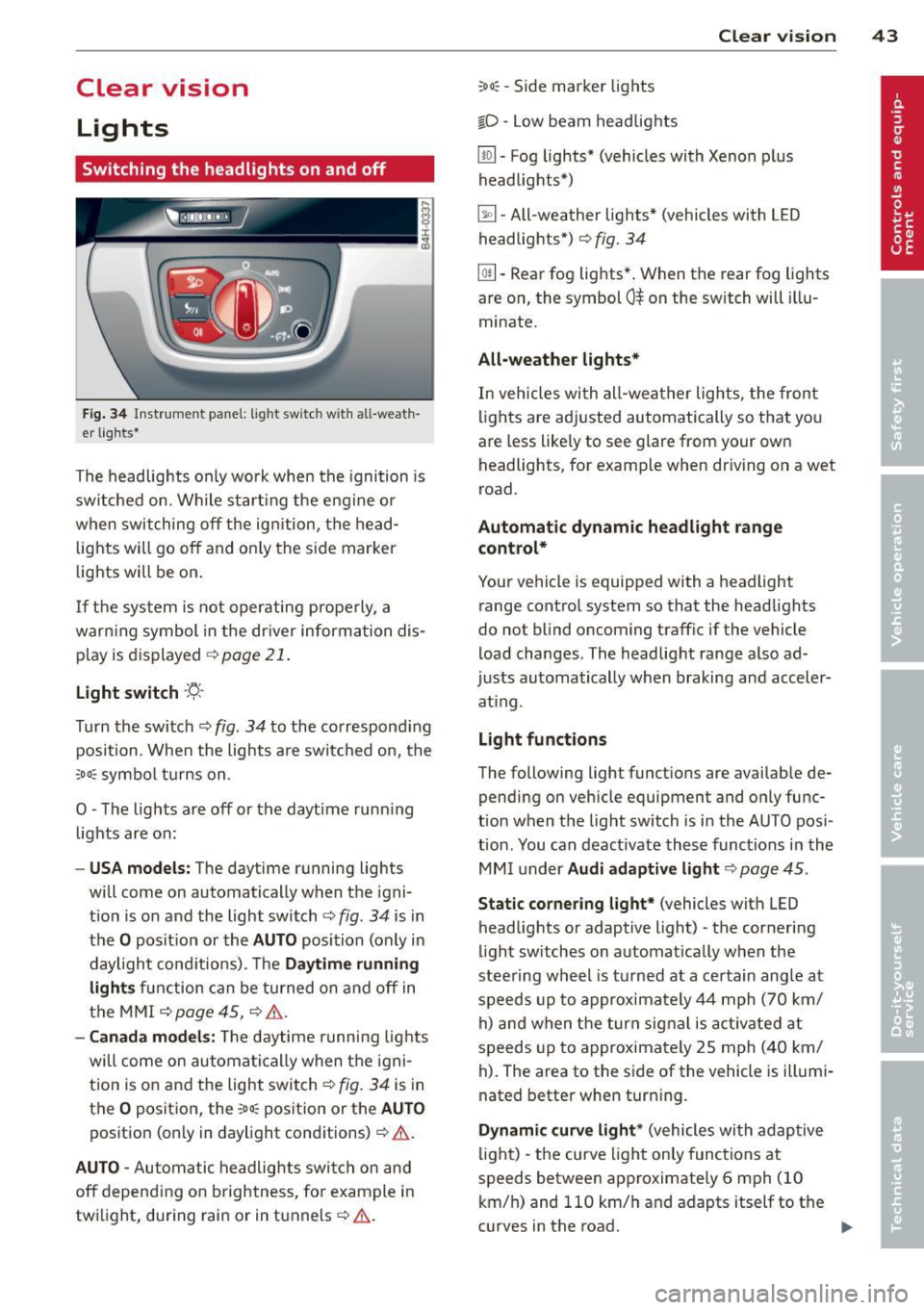
Fig . 34 Instrument pane l: lig ht sw itc h wit h all -weath
er lights•
The headlights only wo rk when the ignition is
switched on. Wh ile start ing the eng ine o r
when switching off the ign ition, the head
lights will go off and on ly the side marker
lights will be on .
If the system is not operating p rope rly, a
war ning symbol in the dr iver information dis
p lay is d isplayed
c::> page 21 .
Light switch ·'t!- -
Tu rn the switch c::> fig . 34 to the correspond ing
position . When the lights a re switched on, the
oD o: symbo l tu rns on .
0 -The lig hts are off or the dayt ime runn ing
lights are on:
- USA models: The day time running ligh ts
will come on automatically when the igni
t ion is on and the light switch
c::> fig . 34 is in
the
O posit ion or the AUTO position (only in
daylight cond itions). The
Daytime running
light s
function can be turned on and off in
the MMI
c::> page45, c::>A .
-Ca nada model s: The daytime running lig hts
will come on automa tically when the igni
t ion is on and the light switch
c::> fig . 34 is in
the
O position, the : Do: pos ition or the AUTO
position (only in daylight conditions) c::> A .
AUTO -Automatic headlights swi tch on and
off depend ing o n brightness, for example i n
tw ilight, during rain or in tunnels
c::> &. .
:Do: -Side marke r lights
io -Low beam headlights
Clear vi sion 43
lm -Fog lights* (vehicles with Xenon p lus
headlights *)
~ -All-weather lights * (vehicles with L ED
headligh ts*)
c::> fig. 34
@TI -Rear fog lights* . When the rear fog lights
are on, the symbol
0$ on the switch will illu
minate .
All-weather lights*
In vehicles wi th all -wea ther lights, the front
lights are adjusted au tomat ically so that you
are less like ly to see glare from your own
headlights, for example when dr iving on a wet
ro ad.
Automatic dynamic headlight rang e
control*
Your vehicle is equipp ed with a headlight
range contro l system so that the headlights
do no t blind oncoming traff ic if the vehicle
load changes. The headlig ht range a lso ad
justs automatically when braking and acceler
at ing .
Light function s
The following light funct ions are availab le de
pend ing on vehicle equipment and on ly func
t ion when t he light switch is in the AU TO posi
tion . You can deactivate these functions i n the
MM I under
Audi adapt ive light c::> page 45 .
Static corner ing light* (vehicles with L ED
headlights or adaptive light) -the cornering
ligh t sw itches on automat ica lly w hen the
stee ring wheel is turned at a ce rtain angle at
speeds up to approxima tely 44 mph (70 km/
h) and when the turn sig nal is act ivate d at
speeds up to approximately 25 mph (40 km/
h) . The area to the side of the veh icle is illumi
nated bette r when tur ning .
Dynamic curve light * (vehicles with adap tive
light) -the curve ligh t only functions at
speeds betwee n approximately 6 mph (10
km/ h) and 110 km/h and adapts itself to the
curves in the road.
Ill>
Page 46 of 300
44 Clear vision
Highway light function* (vehicles with LED
headlights) -this function adapts the lighting
for highway driving based on vehicle speed.
.&_ WARNING
- Automatic headlights are only intended
to assist the driver. They do not relieve
the driver of his responsibility to check
the headlights and to turn them on man
ually according to the current light and
visibility conditions. For example, fog
cannot be detected by the light sensors.
So always switch on the headlights §.0
under these weather conditions and
when driving in the dark.
- Crashes can happen when you cannot see the road ahead and when you cannot be
seen by other motorists. Always turn on
the headlights so that you can see ahead
and so that others can see your car from
the back.
- Please observe legal regulations when
using the lighting systems described.
(D Note
The rear fog lights should only be turned
on in accordance with traffic regulation, as
the lights are bright for following traffic.
@ Tips
- The light sensor* for automatic dynamic
headlight range control* is located in the
rear view mirror mount. You should
therefore not apply any stickers to the
windshield in this area in order to pre
vent malfunctions or failures .
- In the event of a light sensor malfunc
tion, the driver is notified in the instru
ment cluster display¢
page 21 .
- You will hear a warning tone if you open
the driver door when the exterior lights
are switched on.
- In cool or damp weather, the inside of
the headlights, turn signals and tail
lights can fog over due to the tempera
ture difference between the inside and
outside. They will clear shortly after switching them on. This does not affect
the service life of the lighting.
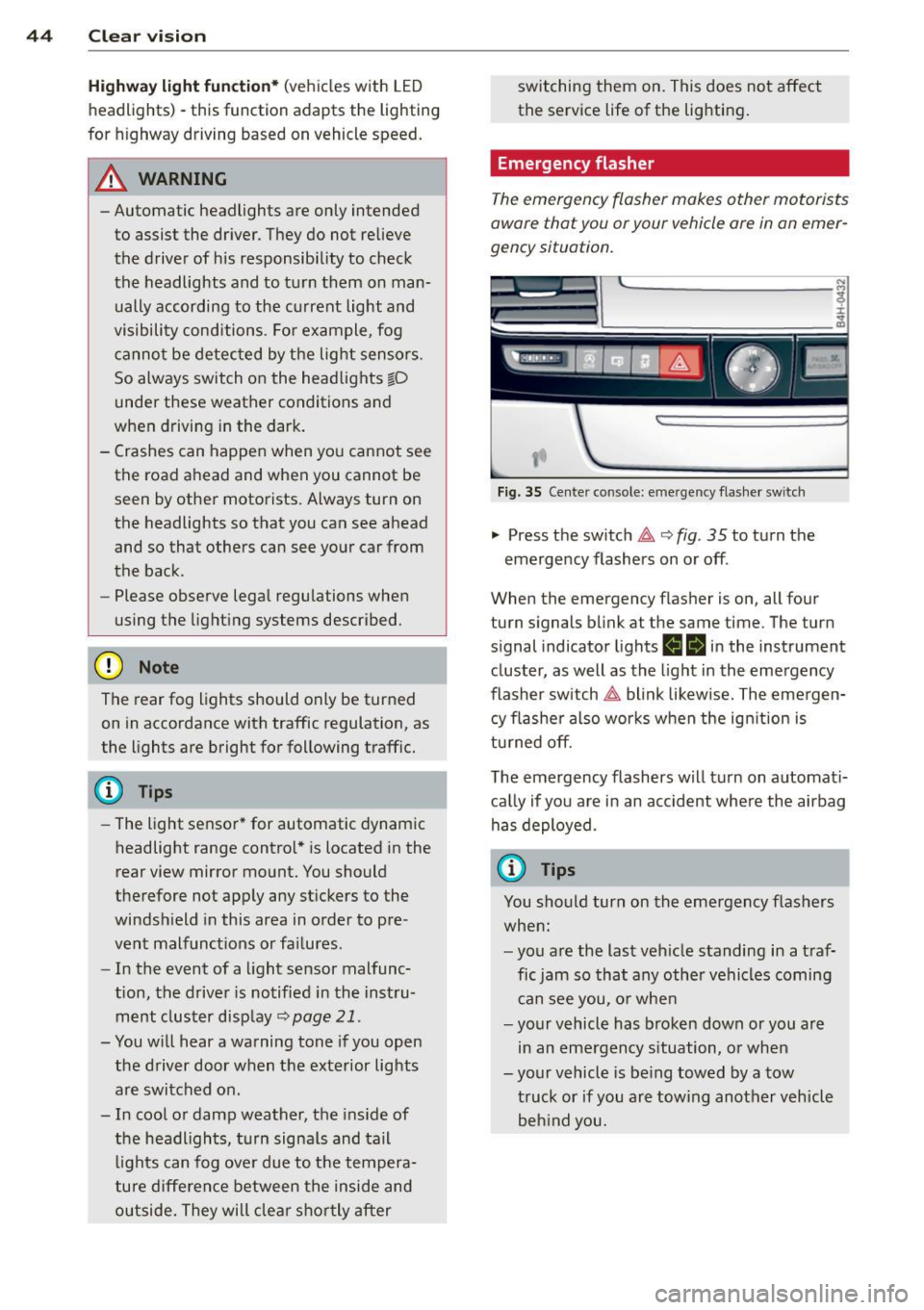
Emergency flasher
The emergency flasher makes other motorists
aware that you or your vehicle ore in an emer
gency situation.
,--~
,_'
. ;.' --- --~-.sc-
Fig. 35 Center console: emergency flasher switch
.,. Press the switch 11 ¢ fig. 35 to turn the
emergency flashers on or off .
When the emergency flasher is on, all four
turn signals blink at the same time. The turn
s ignal ind icator lights
ea in the instrument
cluster, as well as the light in the emergency
flasher switch
11 blink likewise. The emergen
cy flasher also works when the ignition is
turned off.
The emergency flashers will turn on automati
cally if you are in an accident where the airbag
has deployed.
(D Tips
You should turn on the emergency flashers
when:
- you are the last vehicle standing in a traf
fic jam so that any other vehicles coming
can see you, or when
- your vehicle has broken down or you are
in an emergency situation, or when
-your vehicle is being towed by a tow
truck or if you are towing another vehicle
behind you.
Page 47 of 300
Adjusting the exterior lighting
The settings are adjusted in the MMI.
• Se lect: ICARI f u nct ion button> Car systems
control button > Vehicle sett ings > E xterior
lighting .
Automatic headlights
You can a djust the fo llow ing settings in the
Automatic headl ights men u:
Headlight s activation time -You can adjus t if
the hea dlights sw itch on
Early , Med . or Late
according to the sensitivity of the light se nsor .
Audi adaptive light* -You can sw itch adaptive
l ig ht
On a n d Off .
Daytime running lights
USA models :
You can switch the dayt ime ru n
ni ng lights
on and off .
Canada models:
The function ca nnot be
turned off. It is activated a utomat ica lly each
time the ignition is switc hed o n. This menu
item is shown "gr eyed out" .
Coming home, Leaving home
The coming home function illuminates the
area outside the vehicle when yo u switc h the
i gn it io n off and open the driver's door. To tur n
the function o n, select
Lights when leaving
car > On .
The leav ing home function illuminates the
area outside the vehicle when yo u unl ock the
ve hicle. To turn th e f unc tion on, select
Lights
when unlocking car > On .
The com ing home and leaving home fu nctions
only operate whe n it is da rk a nd the light
sw itch is in the
AUTO p os itio n.
Clear vision 45
Turn signal and high beam lever
The lever on the left side of the steering col
umn is used to operate the turn signals and
the high beam as well as th e headlight flash
er.
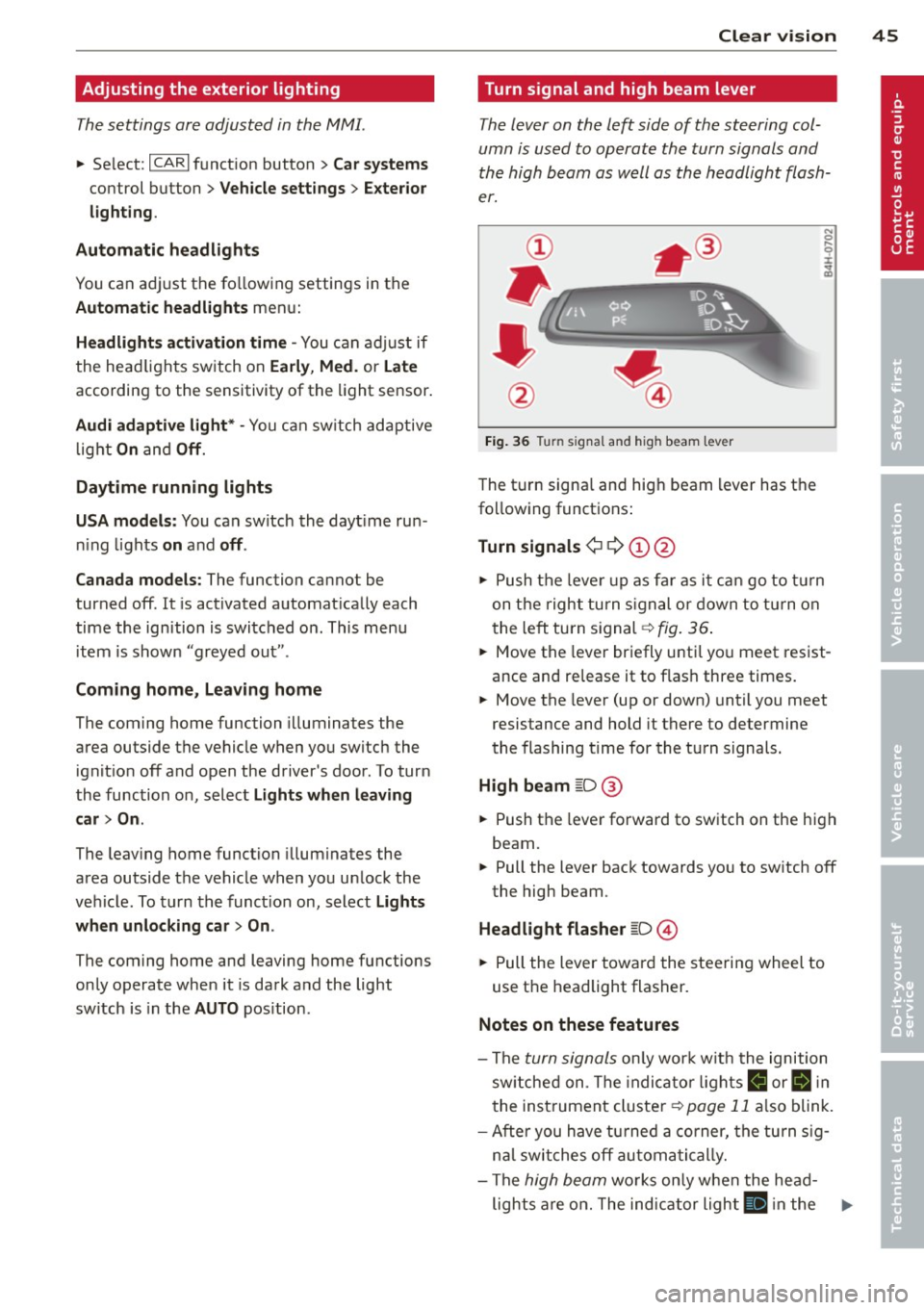
Fig. 36 Turn signal and high beam lever
The t urn signa l and hig h beam lever has t he
fo llow ing funct ions :
Turn signals ¢ Q ©@
N 0 ,._
± .. a,
• Pu sh t he leve r up as fa r as i t can go t o tur n
on t he righ t turn s igna l or d own to t urn on
t he le ft turn s ignal -=>
fig. 36 .
• Move the leve r br iefly u ntil yo u meet res ist
ance and release it to f lash three times.
• Move the lever (up or down) until you meet
resistance and hold it there to determine
the flashing t ime for the tu rn signals.
High beam ~D @
• Push t he leve r forward to sw itch on the hig h
beam.
• Pull the lever bac k towards yo u to sw itch off
the high beam.
Headlight flasher ~D ©
• Pull the lever towar d the stee rin g wheel to
use t he headlight flasher .
Notes on these features
-The turn signals o nl y wor k w ith t he ignition
sw itche d on. T he indi ca tor light s
R or II in
t he inst rumen t cluste r¢
page 11 also blink .
- Afte r yo u h ave t urned a corner, the tu rn s ig -
n al swi tches off au tom atic a lly .
- The
hig h beam wo rks o nly w he n the he ad-
lights a re on . The ind ic a tor ligh t
II in the .,,.
Page 48 of 300
46 Clear vis ion
instrument cluste r illuminates when the
high beams are on.
- T he
headlight flash er works only as long as
yo u hold the lever - even if there are no
l ights turned on . The ind icator light
Bl in
the instrument cluster i lluminates when you
use the headlight flasher.
A WARNING
Do not use the high beam or headlight
flasher if you know that these could blind
oncoming traffic.
Interior lights
Front and rear interior lighting
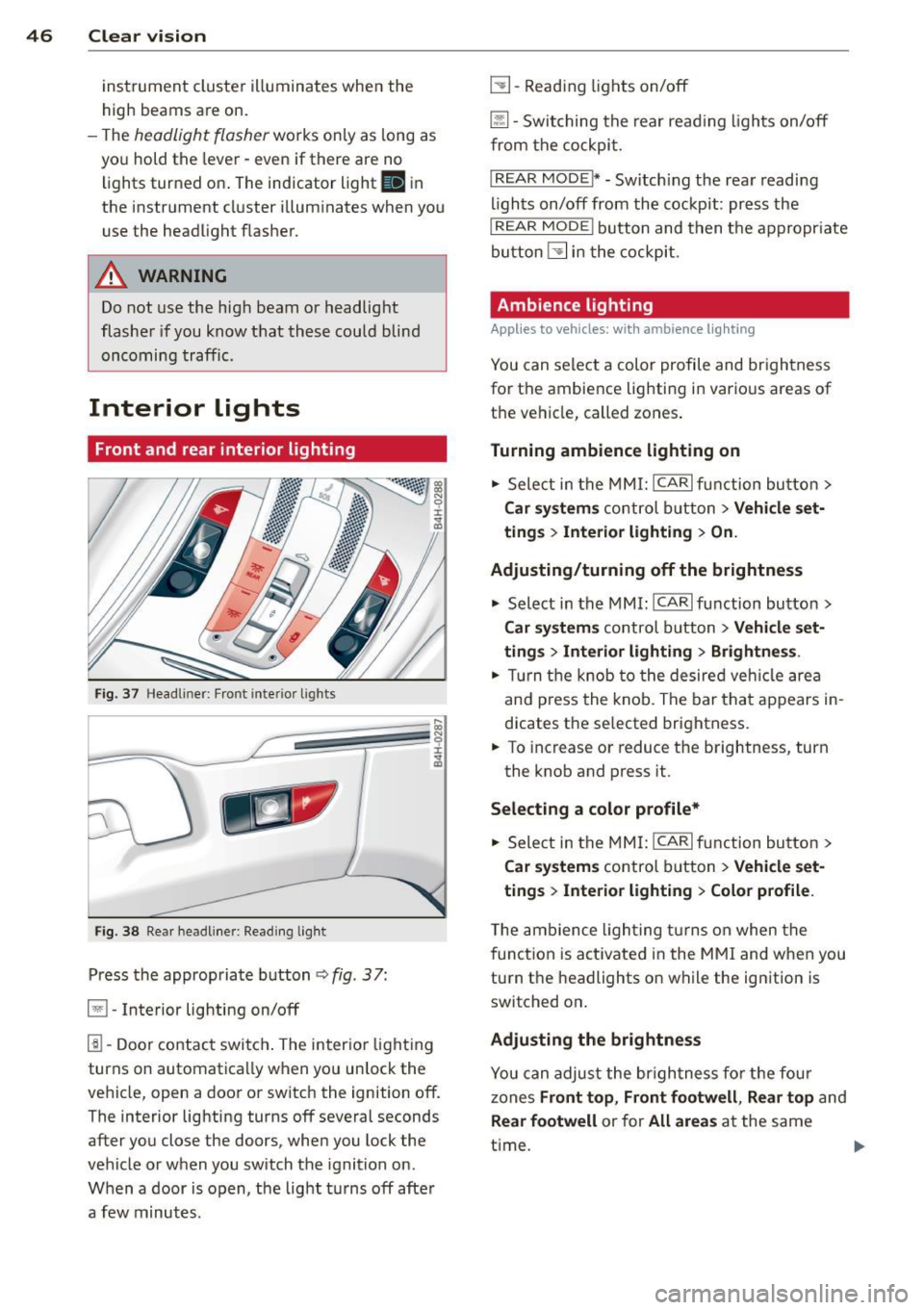
Fi g. 37 Headl iner: Front in te ri or lig hts
F ig . 3 8 Re ar headli ne r: Rea din g lig ht
Press the appropriate b utton q fig . 3 7:
El -Interior lighting on/off
1!1-Door contac t switch . The inter ior light ing
turns on automatica lly when you unlock the
vehicle, open a door or switch the ignition off.
The interior lighting turns off several seconds after you close the doors , when you lock the
vehicle or when you switch the ignition on .
When a door is open, the light t urns off afte r
a few minutes .
L:!l-Read ing lights on/off
~ - Switching the rear read ing lights on/off
from the cockpi t.
IREAR MODEt* - Sw itch ing the rea r readi ng
lights on/off from the cockpit : pr ess the
I REAR MODE i button and t hen t he appropriate
button
L:!l i n t he cockpit .
Ambience lighting
Applies to vehicles: with ambience lighting
You can select a color profile and br igh tness
for the ambience light ing in various areas of
t h e ve hicle, called zones .
Turning ambience lighting on .,. Sele ct in the
M MI: ICAR lfun ction bu tton>
Car sy stem s control b utton > Vehicle set
ting s
> Interior lighting > On.
Ad justing/turning off the brightness
.,. Select in the
MMI: ICA Rlfunction button>
Car sy stem s control b utton > Vehicle set
ting s
> Interior lighting > Brightne ss .
.,. Tur n the knob to the desired veh icle area
and p ress the knob. The bar that appears in
dicates the selected brightness .
.,. To increas e or reduce the brightness, turn
the knob and press it .
Select ing a color p rofile*
.,. Select in the
MMI: ICAR lfunction button>
Car sy stem s control b utton > Vehicle set
ting s
> Interior lighting > Color profile .
T he ambience ligh ting tu rns on when the
f unct ion is act ivated in the
MMI and w hen you
turn the headlights on while the ign ition is
switched on .
Adjusting the brightness
You can adjus t the br igh tness fo r the fou r
zones Front top , Front footwell , Re ar top and
Rear footwell or for All areas at the same
t ime . ..,.
Page 49 of 300
Selecting a color pr ofile
You can select from the Iv ory , Polar and Ru
b y/ Pol ar
color profiles .
(D Tips
The settings are automa tically sto red and
assigned to the remote con tro l key that is
in use.
Instrument illumination
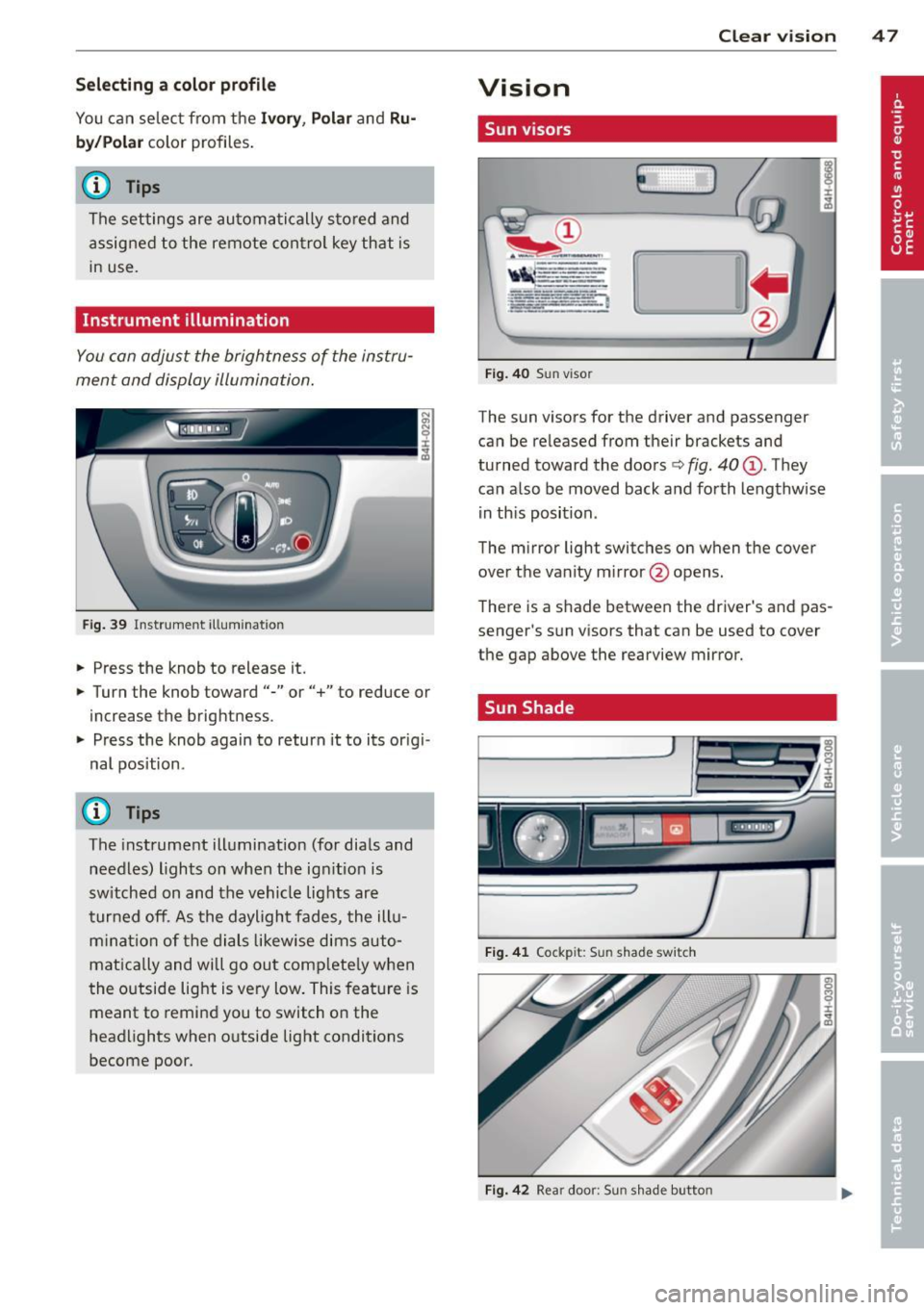
You con adjust the brightness of the instru
ment and display illumination .
Fig . 39 In strument ill um ination
• Press the knob to release it.
• Turn the knob toward"-" or"+" to reduce or
increase the brigh tness .
• Press the knob again to return it to its or igi
nal position .
Q Tips
The instrument illumination (for dials and
needles) lights on when the ig nitio n is
sw itched on and the vehicle lig hts are
turned off. As the daylight fades, the ill u
m ina tion of the dials likewise dims auto
mat ica lly and will go out com plete ly when
t he o utside light is very low . This fea ture is
meant to remind you to switch on the
headlights when o utside light conditions
become poor. Clear vi
sion 4 7
Vision
Sun visors
E J
Fig . 4 0 Sun viso r
The sun visors for the driver and passenger
can be re leased from their bracke ts and
turned toward the doors
c:> fig. 40 (D . They
can a lso be moved back and forth lengthwise
in th is position .
The m irror light switches on when the cover
over the vanity m irror @opens.
T here is a shade between the dr iver 's and pas
senge r's s un visors that can be used to cover
the gap above the rearview mirror.
. Sun Shade
Fi g. 41 Cock pit: Sun shad e swit c h
Fig. 4 2 Rear doo r: S un s had e butto n
Page 51 of 300
windshield wipers react to moisture on the
windshield. You can deactivate rain sensor
mode in the MMI, which will then activate in
termittent mode. Select:
ICARI function but
ton
> Car systems control button > Driver as
sist > Rain sensor> Off.
In intermitten t
mode, you can adjust the interval time using
the switch @.
@-Slow wiping
@-Fast wiping
©-Single wipe. If you hold the lever in this
position longer, the wipers switch from slow
wiping to fast wiping.
® -Clean the windshield . The wipers wipe
one time after several seconds of driving to
remove water droplets. You can switch this
function off by moving the lever to position ®
within 10 seconds after the afterwipe. The af
terwipe function is reactivated the next time
you switch the ignition on.
Cleaning the headlights. The headlight wash
er system* only functions when the lights are
sw itched on. The headlights and the night vi
sion system camera* are cleaned automatical ly the first time the lever is press in position
® and every 8 times it is pressed after that.
They are also cleaned every time you hold the lever in position @for longer than 8 seconds .
A WARNING
- The rain sensor is only designed to assist
and support the driver.
It remains entire
ly the driver's responsibility to monitor
outside weather conditions and to man
ually activate the wipers as soon as rain
or drizzle reduces visibility through the
windshield.
- The windshield must not be treated with
water-repellent materials. They can in
crease glare under poor visibility condi·
tions such as wetness, darkness, or when
the sun is low on the horizon. In addi
tion, they can cause the windshield wip
ers to chatter.
- Properly functioning windshield wiper
blades are required for a clear view and
Clear vision 49
safe driving ¢ page 50, Replacing
windshield wiper blades.
(D Note
- In the case of frost, check whether the
windshield wiper blades are frozen to the windshield. Switching on the wind
shield wipers can damage the wiper
blades!
- Prior to using a car wash, the windshield
wiper system must be switched off (lever
in position @). This helps to prevent un
intentional switching on and damage to
the windshield wiper system.
- Do not use the wipers to clear a frosted
window . Using the wipers as a conven
ient ice scraper will destroy the wiper
blades.
@ Tips
- The windshield wipers are switched off
when the ignition is off . Activate the
windshield wipers after the ignition is
switched back on by moving the wind
shield wiper lever to any position.
- Worn or dirty windshield wiper blades
result in streaking. This can affect the
rain sensor function. Check your wind
shield wiper blades regularly.
- The washer fluid nozzles of the wind
shield washer system are heated at low
temperatures when the ignition is on.
- When stopping temporarily, e.g. at a
traffic light, the set speed of the wind
shield wipers is automatically reduced by
one speed.
Page 59 of 300
Armrest
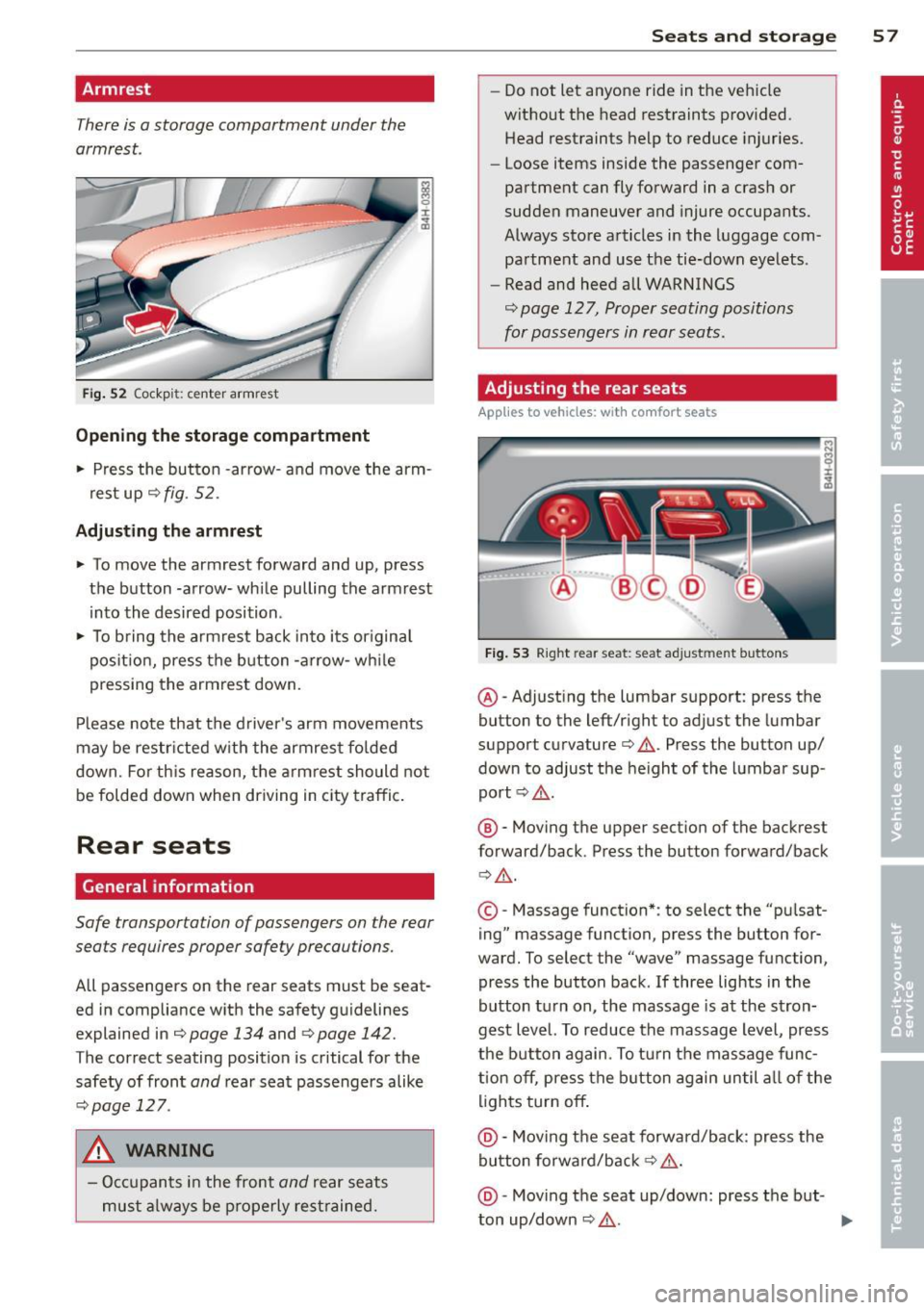
There is a storage compartment under the
armrest .
Fig. 52 Cockp it: ce nter armrest
Opening the storage compartment
.. Press the button -arrow- and
move the arm
rest up¢
fig. 52.
Adjusting the armrest
.. To
move the armrest forward and up, press
the button -arrow- while pulling the armrest
into the desired position .
.. To bring the armrest back into its or igina l
position, press the button -arrow- while
pressing the armrest down.
Please note that the driver's arm movements
may be restricted w ith the armrest folded
down. Fo r this reason, the armrest should not
be folded down when driving in city traffic.
Rear seats
General information
Safe transportation of passengers on the rear
seats requires proper safety precautions.
All passengers on the rear seats must be seat
ed in compliance with the safety guidelines
explained in
¢page 134 and qpage 142.
The correct seating position is critical for the
safety of front
and rear seat passengers alike
¢page 127.
A WARNING
- Occupants in the front
and rear seats
must always be properly restrained.
-
Seats and storage 57
- Do not let anyone ride in the vehicle
without the head restraints provided.
Head restraints help to reduce injuries .
- Loose items inside the passenger com
partment can fly forward in a crash or
sudden maneuver and injure occupants.
Always store articles in the luggage com
partment and use the tie-down eyelets.
- Read and heed all WARNINGS
¢ page 127, Proper seating positions
for passengers in rear seats.
Adjusting the rear seats
App lies to vehicles: wit h co mfort seats
Fig. 53 Right re ar seat: seat adjustment buttons
@ -Adjust ing the lumbar support: press the
button to the left/right to adjust the lumbar
support curvature¢ &.. Press the button up/
down to adjust the height of the lumbar sup
port ¢&,. .
@ -Moving the upper section of the backrest
forward/back. Press the button forward/back
Q &_ .
©-Massage function* : to select the "pu lsat
ing" massage function, press the button for
ward. To select the "wave" massage function,
press the button back. If three lights in the
button turn on, the massage is at the stron
gest level. To reduce the massage level, press
the button again. To turn the massage func
tion
off, press the button again until all of the
lights turn
off .
@ -Moving the seat forward/back: press the
button forward/back ¢ &,. .
@ -Moving the seat up/down: press the but-
ton up/down ¢ &,. . ..,_
Page 60 of 300
58 Seats and storage
© -Switching front passenger seat adjust
ment on/off: this function must be activated
in the MMI ¢
page 60, ¢& .To switch front
passenger seat adjustment on, press the but
ton. You can now adjust the front passenger
seats us ing the buttons @ and @. If you do
not press the buttons @ or@ , front passen
ger seat adjustment switches
off automatica l
ly after approximate ly ten seconds.
& WARNING
- T he power adjustment for the individ ual
seats also works with the ignition . For
this reason, children should never be left
unattended in the vehicle -th ey could be
injured!
- Exercise caution when adjusting the
seats. Uns upervised or careless seat ad
justment can p inch fingers or hands
causing injur ies.
- Vehicles with a pass through in the cen
ter console have seat ing for four. The
long center console between the two
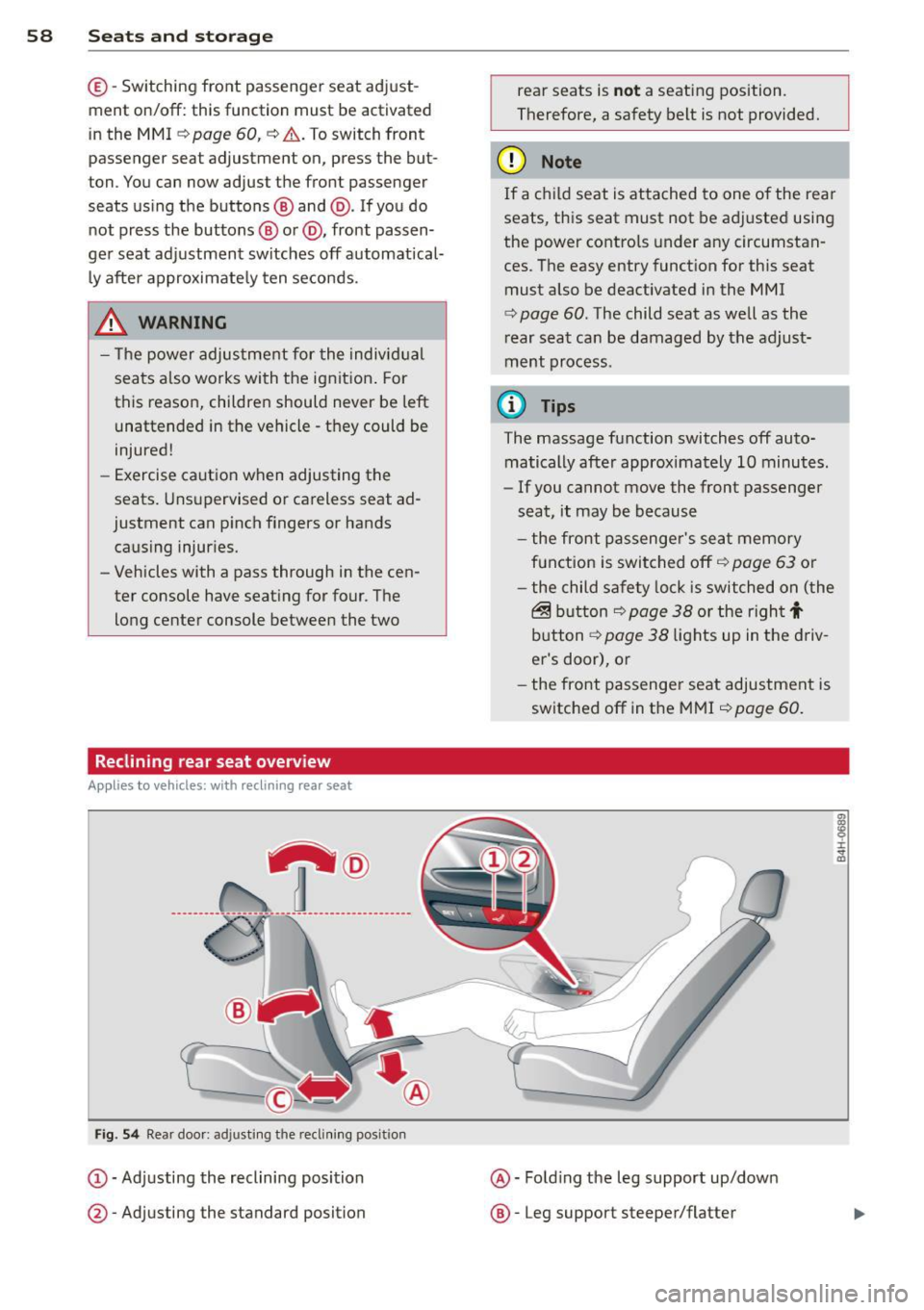
Reclining rear seat overv iew
Applies to vehicles: with reclining rear seat
----------------- T ® ------ -
Fi g. 54 Rear doo r: ad justi ng the recli ning posit ion
(D -Adj usting the reclining posi tion
@ -Adjusting the standard position rear seats is
n
ot a seat ing position.
Therefore, a safety belt is not provided.
(D Note
If a child seat is attached to one of the rea r
seats, this seat must not be adj usted using
the power controls under any circumstan
ces. The easy entry funct ion for this seat
must also be deactivated in the MMI
¢
page 60 . The child seat as well as the
r ear seat can be damaged by the adjust
ment process.
© Tips
The massage function switches off auto
matically after approximately 10 minutes.
- If you cannot
move the front passenger
seat, it may be because
- the front passenge r's seat memory
f u nction is swi tched off ¢
page 63 or
- the child safety lock is switched on (the
@ b utton ¢ page 38 or t he righ t t
button ¢ page 38 lights up in the d riv
er's door), or
- the front passenger seat adjustment is
switched
off in the MMI ¢ page 60.
@ -Fold ing the leg support up/down
@ -Leg support steeper/flatter
i :c ., a,
Page 61 of 300
©-Leg support forward/back
@ -Adjusting the display
Operating the reclining rear seat
Ap plies to vehicles : wit h recl in ing rea r seat
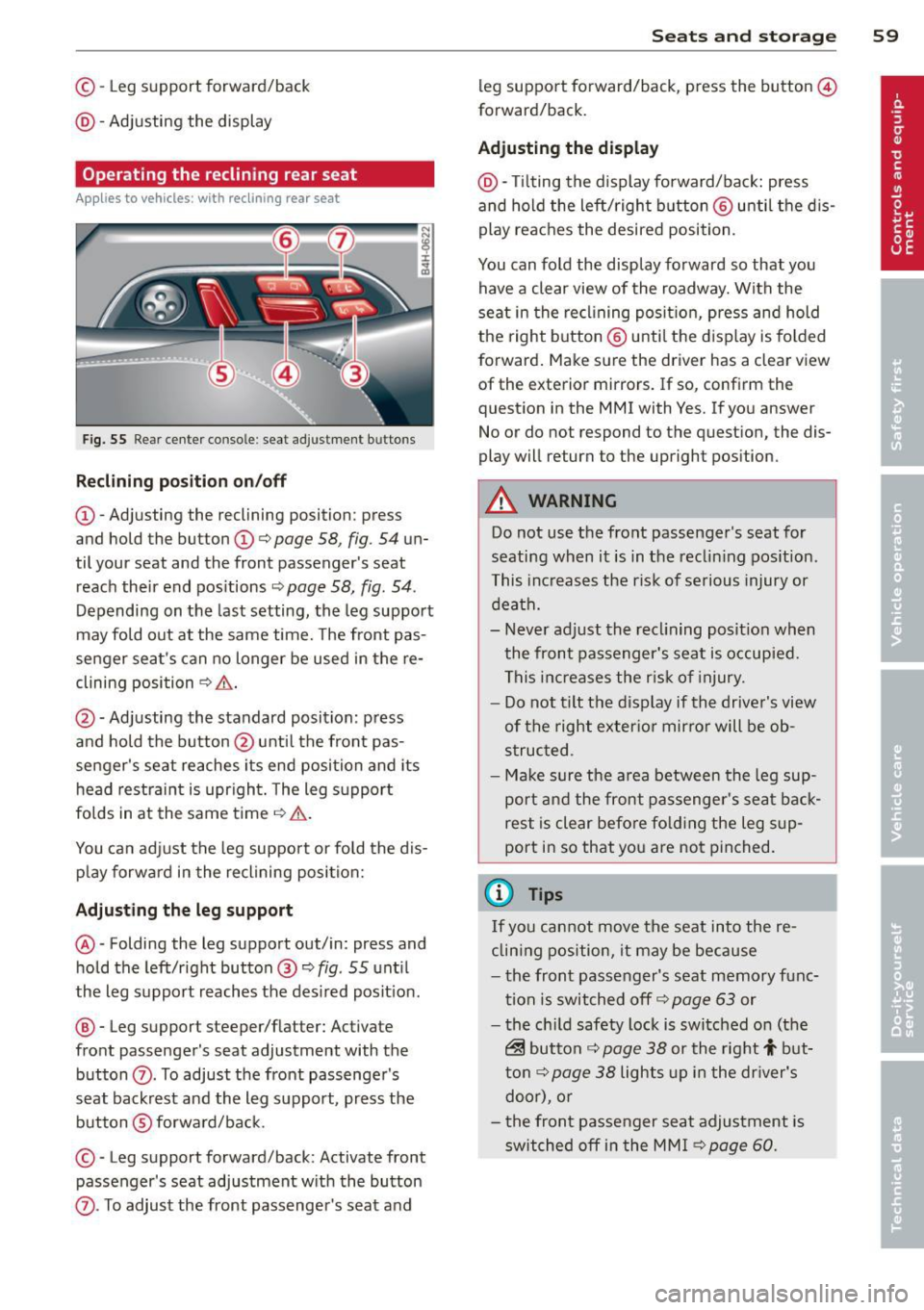
Fig. 55 Rear ce nter console : seat adjustment buttons
R eclining po sition on /off
@ -Adjusting the reclining position: press
and hold the button@c:>
page 58, fig . 54 un
til your seat and the front passenger's seat
reach their end pos itions ¢
page 58, fig. 54.
Depending on the last setting, the leg support
may fold out at the same time. The front pas
senger seat 's can no longer be used in the re
clining position
¢ & .
@ -Adjusting the standard position: press
and hold the button @ unt il the front pas
senger's seat reaches its end position and its
head restra int is upr ight . The leg s upport
folds in at the same time
¢ .&, .
You can adjust the leg support or fold the dis
p lay forward in the reclining position:
Adju sting th e leg support
@ -Folding the leg support out/in: press and
hold the left/right button@¢
fig. 55 unt il
the leg support reaches the des ired posit ion .
@ -Leg support steeper/flatter: Activate
front passenger's seat adjustment with the
button
(Z) . To adjust the front passenger's
seat backrest and the leg support, press the button ®forwa rd/back.
© -Leg support forward/back: Activate front
passenger's seat adjustment w ith the button
Sea ts a nd s to rage 59
leg support fo rward/back, p ress the button @
forward/back.
Adju sting the d ispl ay
@ -Tilting the display forward/back: press
and hold the left/right b utton @ unti l the d is
play reaches the desired position.
You can fold the display forward so that you have a clear view of the roadway. With the
seat in the recl ining posit ion, press and hold
the right button @ unti l the display is folded
forward . Make sure the driver has a clear view
of the exterior mirrors. If so, confirm the
question in the MMI with Yes. If you answer
No or do not respond to the question, the dis
play will return to the upright position.
.&_ WARNING
Do not use the front passenger 's seat for
seating when it is in the reclin ing pos ition .
This increases the risk of serious injury or
death.
- Never adjust the recl ining posit ion when
the front passenger's seat is occupied.
This inc reases the r isk of injury.
- Do not t ilt the display if the driver's view
of the right exter io r mirro r will be ob
s truc ted .
- Ma ke sure the a rea between the leg sup
port and the front passenger's seat back
rest is clear before fo lding the leg sup
port in so that you are not pinched.
(D Tips
If you cannot move the seat into the re
clin ing position, it may be because
- the front passenger's seat memory func
tion is switched off c:>
page 63 or
- the ch ild safety lock is switched on (the
~ button c:> page 38 or the right t but
t on¢
page 38 lights up in the dr iver's
door), o r
- t he front passe nger seat adjustment is
switched off in the MM I c:>
page 60.
Page 83 of 300

CD Note
-Avoid high engine rpm, fu ll throttle and
heavy engine loads unti l the engine has
reached operating temperature -other
wise you risk engine damage.
- T he engine cannot be started by pushing
or towing the veh icle.
- If the engine has been under heavy load
for an extended period, heat builds up in
the engine compartment after the en
gine is switched off -there is a risk of
damag ing the engine . Allow the eng ine
to run at idle for about 2 m inutes befo re
swit ching it off.
@ Tips
- If you open the dr iver's door w ith the ig
nit ion on, a buzzer sounds and the mes
sage
Igniti on i s on appears in the instru
ment cluster disp lay. Switch the ign it ion
off .
-If you leave the vehicle with the ignit ion
swi tched on, the ignition will switch off
after a certain period of time. Please
note that e lectrica l equipment such as
exter ior lights wi ll switch off as well
when that happens .
Stopping the engine
... Bring your vehicle to a comple te stop .
... Move the selector lever to the P or N posi
t ion .
... Press the !START E NGIN E STOPI button
Q page 80, fig. 81 .
Emergen cy off
If necessary, the engine can be swi tched off
with the selector lever in the R, Dor S posi
tions . The eng ine stops if you press the
I START E NGIN E STOP I button at speeds be low
6 mph (10 km/h).
_& WARNING
- Never turn off the eng ine unt il the vehi
cle has come to a complete stop.
On th e road 81
- The brake booster and power steering
only work when the engine is running. If
the engine is off, you have to use more
force when steering or braking . Because
you cannot s teer and brake as you usual
ly would, th is could lead to crashes and
serious injuries.
- For safety reasons , you sho uld a lways
park your vehicle with the selector lever
in P . Otherwise, the vehicle could inad
vertently roll away.
- After the eng ine has been switched off,
the radiator fan can cont in ue to run for
up to 10 minutes -even with the igni tion
switched off .
It can also switch on again
after some time if the coolant tempera
ture rises as the result of a heat b uildup
or if the engine is hot and the engine
compartment is additionally heated by
the sun's rays .
~
CD Note
Do not stop the eng ine immediately after
hard or extended driving. Keep the engine
running for approximate ly two minutes to
prevent excess ive heat bu ild -up .
Starting the engine if there is a
malfunction
It may not be possible to start the engine un
der certain circumstances , for example if the
battery in the vehicle key is drained, if inter
ference is affected the key or if there is a sys
tem malfunction.
ij
:c
---- -~
Fig . 82 Center co nsole/m aste r key : star ting the engine
I
if th ere is a malfun ction Ill>