starting AUDI A8 2012 Owner's Manual
[x] Cancel search | Manufacturer: AUDI, Model Year: 2012, Model line: A8, Model: AUDI A8 2012Pages: 300, PDF Size: 75.06 MB
Page 203 of 300

drive at the maximum permissible speed. Re
duce your speed even more if load, weather or
wind condit ions are unfavorable -part icularly
when going downhill.
Reduce vehicle speed
immediately if the trail
er shows the slightest sign of swaying .
Do not
try to stop the swaying by accelerating.
Observe speed limits . In some areas, speeds
for vehicles towing trailers are lower than for
regular vehicles .
A lways apply brakes early. When driving
downhill, shift into a lower gear to use the en
gine braking effect to slow the vehicle . Use of
the brakes a lone can cause them to overheat
and fail.
Coolant temperature
The coolant temperature gauge c:> page 10
must be observed carefully. The coo lant tem
perature can increase if you drive on long in
clines in a low gear at high engine speeds. Re
duce your speed immed iate ly if the L EDs in
the top part of the display turn on.
F or more information about indicator lights,
refer to.
i::> page 15.
A WARNING
Anyone not properly restrained in a mov
ing vehicle is at a much greater risk in an
accident . Never let anyone r ide in your car
who is not properly wear ing the restra ints
provided by Aud i.
Trailer towing tips
Important to know
Your veh icle hand les different ly when tow ing
-
a trailer because of the addit ional weight and
d ifferent weight distribution . Safety, perform
ance and economy will greatly depend on how
carefully you load your trailer and operate
your ng .
Before you actually tow your trailer, practice
turning, stopp ing and back ing up in an area
away from traffic. Keep practicing until you
Trailer towing 201
have become completely familiar with the way
your vehicle-trai ler combination behaves and
responds .
Backing up is difficult and requires practice .
Backing up with a t railer generally requires
steering action opposite to that when backing
up your vehicle without a tra iler.
Maintain a greater distance between your ve
hicle and the one in front of you . You wi ll need
more room to stop. To compensate for the
trailer, you w ill need a larger than normal
turning rad ius.
When passing, remembe r that you cannot ac
ce lerate as fast as you norma lly would be
cause of the added load. Make sure you have
enough room to pass. After passing, allow plenty of room for your trailer before chang
ing lanes again.
Avoid jerky starts, sharp turns or rapid lane changes.
(D Tips
- Do not tow a trailer during the break-in
period of your vehicle.
- If you tow a trailer, your Audi may re
quire more frequent maintenance due to
the extra load
c:> page 280.
Parking on a slope
Do not park on a slope with a trailer. If it can
not be avoided, do so only a~er doing the fol
lowing:
When parking:
.,. App ly the foot brake.
.,. Have someone p lace chocks under both the
vehicle and the trailer wheels .
.,. With chocks in place, slowly release the
brakes until the wheel chocks absorb the
load.
.,. Turn the wheels towards the curb .
.,. Apply the parking brake .
.,. Select the P selector lever posit ion .
When restarting after parking:
.,. Apply the foot brake.
•
•
Page 233 of 300

Have the battery checked when you take your
vehicle in for service. Yo u are well advised to
replace a battery that is older than 5 years .
W ith certa in types o f airbag deployment, the
battery is disconnec ted from the vehicle elec
trica l system for safety reasons
c::> &. in Re
pair, care and disposal of the airbags on
page 156.
Disconn ecting the battery terminal s
Some vehicle functions (power w indow regu
l ators, for example) are lost if the battery ter
minals are disconnected . These functions have
to be re learned after the battery terminals are
connec ted again. To prevent this, the battery
should only be disconnected from the vehicle
e lectrical system when absolutely necessary
for repairs .
Vehicles not driven for long period s
If you do not drive your vehicle over a period
of several days or weeks, electrical compo
nents are gradually cu t back or switched off .
This reduces energy consumption and main
tains starting capability over a longer per iod
c::> page 192. Some of the convenience func
tions may not operate, s uch as the inte rior
lights o r the power sea t adjustment . T he con
ve nience fun ct ions wi ll be available again
when yo u switch on the ignition and start the
engine.
Winter operation
During the winter mont hs, ba ttery capaci ty
t ends to decrease as tempe rat ures d rop . Th is
is because more powe r is also consumed while
starting , and the headlights, rear window de
fogger, etc., are used more oft en.
Avoid unnecessary power cons umption, par
ticularly in c ity t ra ff ic or when t raveling on ly
short distances. Let your a uthorized Audi
dealer check the capac ity of the vehicle bat
tery before winter sets inc::>
page 233. A well
charged battery w ill not only prevent starting
problems whe n the weather is cold, but will
also last longer .
Checkin g and fillin g 231
(D Tips
If your vehicle is left standing for seve ral
weeks at extremely low temperatures, the
vehicle battery shou ld be removed and
stored where it w ill not freeze. This will
prevent it from be ing damaged and having
to be replaced .
Working on the battery
Be especially careful when working on or near
the battery.
The battery is located in the l uggage compart
ment under the floor. Before you check any
th ing in the luggage compartment,
read and
h eed all WARNINGS
c::> &_ .
Always heed the safety warnings , when work
ing on the vehicle battery or the vehicle e lec
trical system to prevent injury.
The following WARNINGS are very
important when working on the battery:
Al ways heed the follo wing WARNING SYM
BOLS and safety precautions when working on the battery.
@
®
Always wear eye protection.
Battery acid contains sulfuric acid.
Always w ear glove s and eye prot ec
tion .
No
- sparks
-flames
- smoking .
When a battery i s charged, it produ
ce s hydrogen gas wh ich i s ex plosive
and could cause per sonal injury .
Always keep the battery well out of ]
reach of children .
_& WARNING ~
Whenever working on the battery o r on
the electrical system, there is the risk of injury, accident and even fire . Read and
heed the following WARNINGS:
•
•
Page 235 of 300
Battery charging
Starting the engine requires a well charged battery .
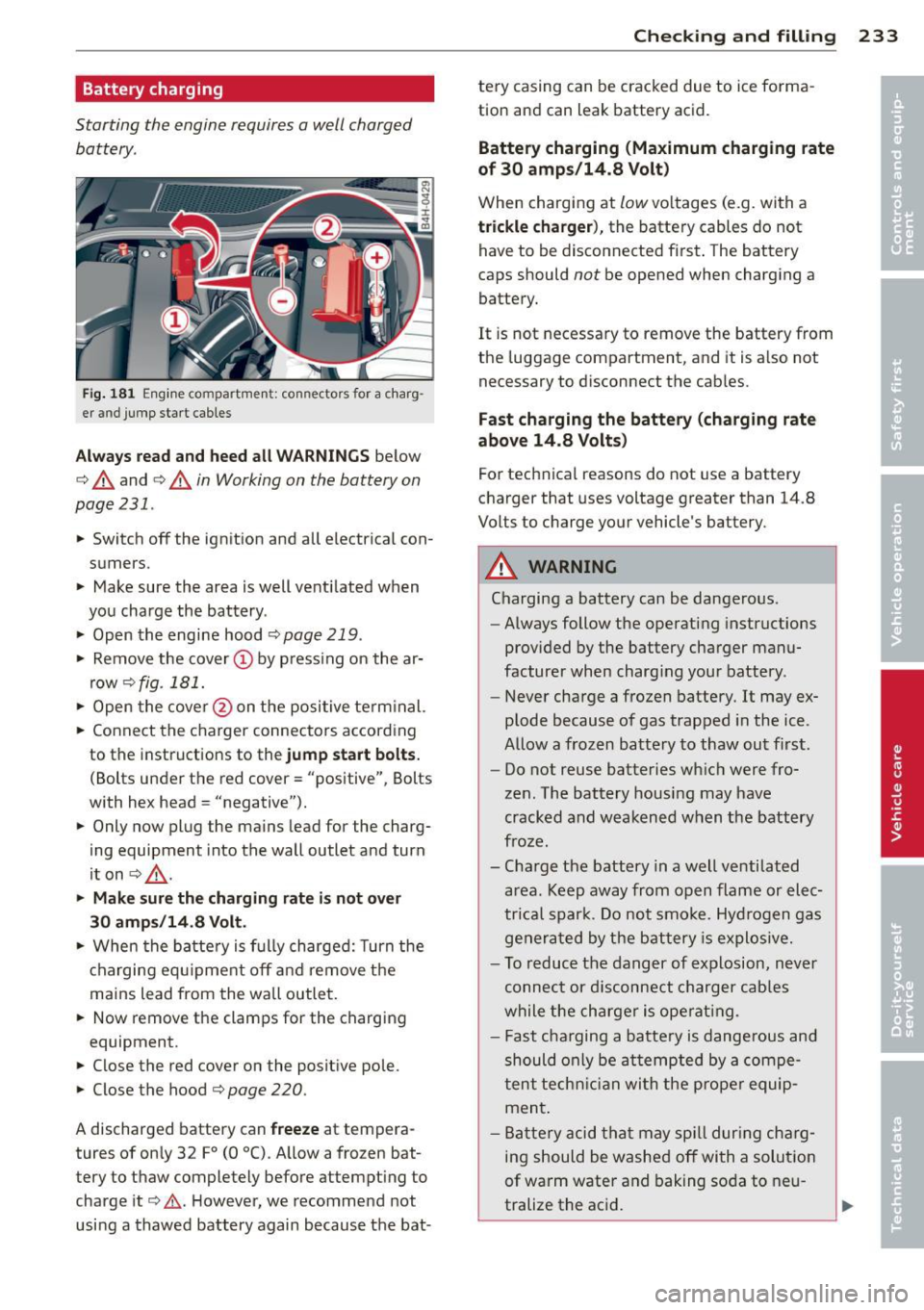
Fig. 181 Eng ine co mpa rtmen t: connectors for a charg
er a nd jump sta rt cab les
A lwa ys re ad and heed all WARNING S below
c:> &. and c:> &. in Working on the battery on
page 231 .
.. Switch off the ignit ion and all electrical con
sumers .
.. Make sure the area is well ventilated when
you charge the battery .
.. Open the engine hood
c:> page 219 .
.. Remove the cover (D by p ress ing on the ar
row
c:> fig . 181.
.. Open the cove r@ on the positive term inal.
.. Connect the charger connectors according
to the instructions to the
jump start bolt s.
(Bolts under the red cover= "positive", Bolts
with hex head = "negative").
.. Only now plug the mains lead for the charg
ing equipment into the wall outlet and turn
it on
c:> 8_ .
.. Ma ke sur e t he ch arging rat e is no t over
30 amp s/14 .8 Volt .
.. When the batte ry is f ully charged: Turn the
charging equ ipment off a nd remove the
mains lead from the wall outlet.
.. Now remove the clamps for the charging
equipment.
.. Close the red cover on the positive pole .
.. Close the hood
c:> page 220 .
A discharged battery can freeze at tempera
tures of on ly 32
F0 (0 °C) . A llow a fro zen bat
tery to thaw completely before attempt ing to
charge it
c:> .&. . However, we recommend not
using a thawed battery again because the bat -
Checking and fillin g 233
tery casing can be cracked due to ice forma
tion and can leak battery acid.
Battery charging (Maximum charging rate
of 30 amps /14.8 Volt )
When charging at low voltages (e.g. with a
trickle cha rger ), the battery cables do not
have to be disconnected f irst . The battery
caps should
not be opened when charging a
battery.
It is not necessary to remove the battery from
the luggage compartment, and it is a lso not
necessary to disconnect the cab les.
Fast ch arging the batte ry (charging rat e
a bove 14.8 V olt s)
For technica l reasons do not use a battery
charger that uses voltage greater than 14.8
Volts to charge your vehicle's battery .
A WARNING
-
Charging a battery can be dangerous .
- Always follow the operating instructions
provided by the battery charger manu
facturer when charg ing your battery .
- Never charge a frozen battery. It may ex
plode because of gas trapped in the ice .
Allow a frozen battery to thaw out first.
- Do not reuse batteries wh ic h were fro
zen. The battery housing may have
cracked and weakened when the battery
froze.
- Cha rge the battery in a well ventilated
area . Keep away from open flame or elec
trical spar k. Do not smo ke. Hyd rogen gas
generated by the battery is explos ive .
- To reduce the danger of explosion, never
connect or d isconnect charger cab les
while the charger is ope rat ing .
- Fast cha rging a batte ry is dange rous and
should only be at tempted by a compe
tent techn ic ian wi th the prope r equip
ment .
- Ba ttery acid that may spi ll dur ing charg
ing should be washed off with a solution
of warm water and baking soda to neu
tralize the ac id.
Page 272 of 300

2 70 Emergency situations
Emergency situations
General
This chapter is intended for trained emer
gency crews and working personnel who
have the necessary tools and equipment to
perform these ope rations.
Starting by pushing or
towing
Q;) Note
Vehicles w ith an automatic transmission
cannot be started by pus hing o r tow ing.
Starting with jumper
cables
If necessary, the engine can be started by
connecting it to the battery of another vehi
cle.
If the engine should fail to start because of a
discharged or weak battery, the battery can be
connected to the battery of
another vehicle,
using a
pair of jumpe r cables to start the en
g ine .
Jumper cables
Use only jumper cables of sufficiently large
cross section to carry the starter current safe
ly. Refer to the manufacturer's specif ications.
Use only jumper cables with
insulated termi
na l clamps which are distinctly marked:
plus(+) cable in most cases colored red
minu s(-) cable
in most cases colored black .
A WARNING
Batteries contain electricity, acid, and gas.
Any of these can cause very serious or fatal
inju ry. Follow the instructions below for
safe handling of your veh icle's battery.
- Always shield you r eyes and avoid lean
ing over the battery whenever possible.
- A discharged battery can freeze at tem
peratures just be low 32 °F (0 °C). Before connecting a
jumper cable, you must
thaw the frozen battery complete ly, oth
erwise it could explode.
- Do not allow battery acid to contact eyes
or skin . Flush any contacted area with
water immediately .
- Improper use of a booster battery to start a vehicle may cause an explosion.
- Vehicle batteries generate explosive gas
es. Keep sparks, flame and lighted ciga
rettes away from batteries.
- Do not try to jump start any vehicle with a low acid level in the battery.
- The vo ltage of the booster battery must
also have a 12-Volt rating. The capacity
(Ah) of the booster battery should not be
lower than that of the discharged bat
tery . Use of batteries of d ifferent voltage
or substantially different "Ah" rating
may cause an exp losion and personal in
jury.
- Never charge a frozen batte ry. Gas trap
ped in the ice may cause an explosion.
- Never charge or use a battery that has
been frozen. The battery case may have
be weakened.
- Use of batter ies of different voltage or
substantially different capacity (Ah) rat
ing may cause an exp losion and injury.
The capacity (Ah) of the booster battery
should not be lower than that of the dis
charged battery.
- Before you check anything in the engine
compartment, always read and heed a ll
WARNINGS¢
page 213, Engine com
partment.
«I) Note
-Applying a higher voltage booster bat
tery will cause expensive damage to sen
sitive electronic components, such as
contro l units, relays, rad io, etc .
- There must be no electrical contact be
tween the vehicles as otherwise current
could already start to flow as soon as the
positive(+) terminals are connected. ..,_
Page 273 of 300
@ Tips
- The discharged battery must be properly
connected to the vehicle's electrical sys
tem. When jump start ing or charging the
battery, never connect the negative
ground cable to the battery negative post because the battery manager sys
tem must be able to detect the battery's
state of cha rge. A lways connect the neg
ative g round cab le to the negative
gro und post o f the battery manage r con
trol uni t.
Use of jumper cables
Make sure to connect the jumper coble
clomps in exactly the order described below!
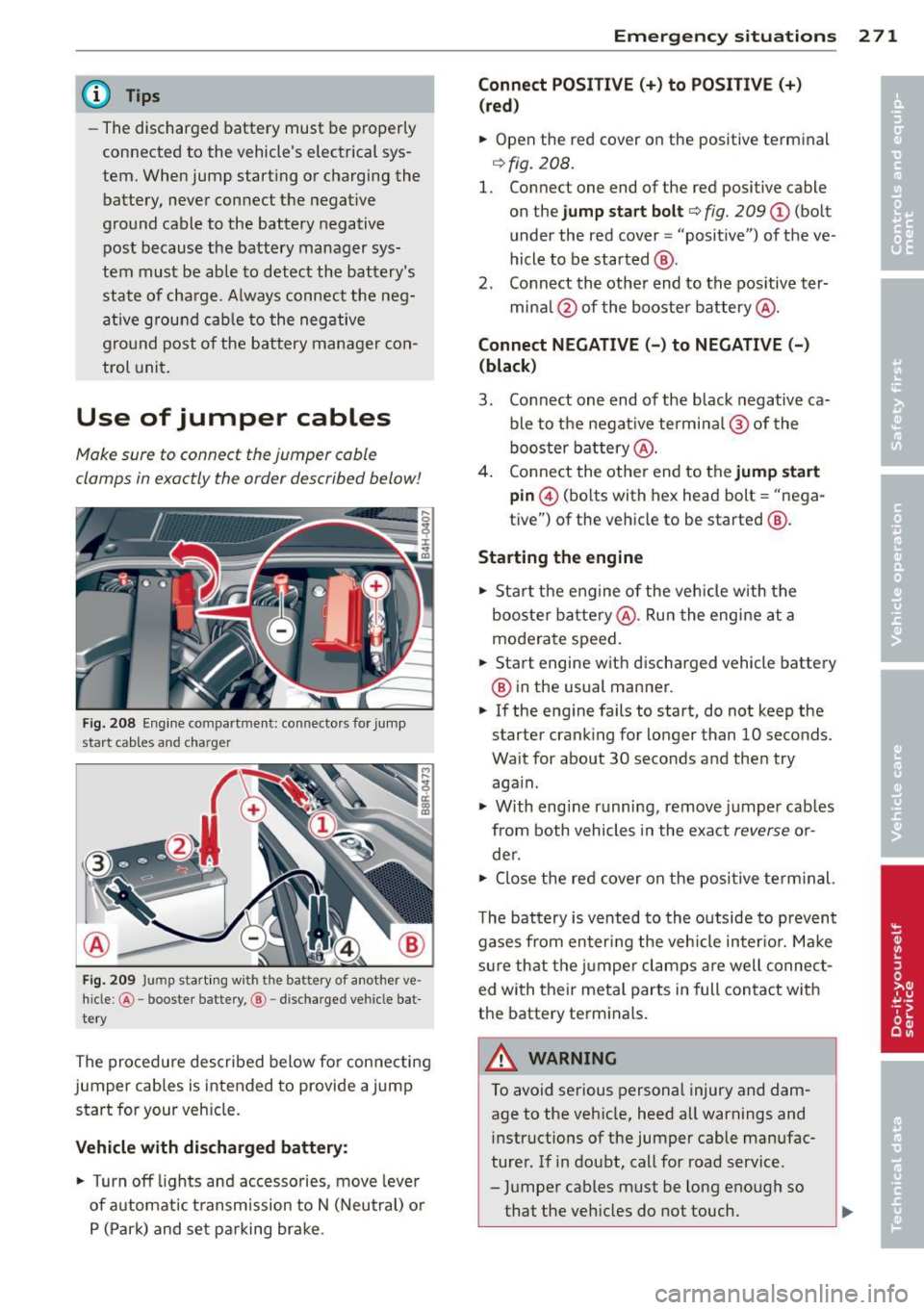
Fig. 2 08 Engine compartment: connecto rs for jump
start cables and charger
Fi g. 209 Jump start ing w ith the battery of another ve
hicle: @-booste r batte ry, @ -discharged vehicle bat
te ry
The procedure described below fo r connecting
jumper cab les is intended to provide a jump
start for your veh icle.
Vehicle with discharged batt ery:
.. Turn off lights and acc esso ries, move leve r
of automat ic t ransm ission to N (Neutral) o r
P (Park) and set pa rking brake .
Emergenc y situ ation s 2 71
Connect POSI TIVE(+) to POSITIVE (+ )
(red )
.. Open the red cover on the positive terminal
¢fig. 208.
1. Connect one end of the red positive cable
on the
jump sta rt bolt ¢ fig. 209 (D (bolt
under the red cover = "positive") of the ve
hicle to be started @.
2. Co nnect th e other end to the pos itive ter-
mina l@ of the booster battery @.
Connect NEGATIVE( -) to NEGATIVE(-)
(black )
3. Connect one end of the black negative ca ble to the negat ive termina l@ of the
booster b attery @.
4 . Connect the othe r end to the
jump start
pin @ (bolts with hex head bolt = "nega
tive") of the vehicle to be started @.
Starting the engine .. Sta rt the engine of the veh icle w ith the
booste r ba ttery @. Ru n the engine at a
moderate speed .
.. Start engine wit h discha rged vehicle battery
@ in the usual manner .
.. If the eng ine fails to start, do not keep the
starter cranking for longer than 10 seconds.
Wait for about 30 seco nds a nd the n try
aga in .
.. With engi ne runni ng, remove j umper cab les
from both vehicles in the exact
reverse o r
de r .
.. Close the red cover on the positive term inal.
T he battery is vented to th e outside to p revent
gases from en ter ing the veh icle in ter io r. Ma ke
s ur e th at the j umper clamps are well connec t
ed with their meta l parts in full con ta ct w ith
the battery term inals.
A WARNING
To avoid se rious personal injury and dam
age to the veh icle, heed all warnings and
instructions of the jumper cable man ufac
turer. If in doubt, call for road service .
- J umper cables m ust be long enough so
that the veh icles d o not touch.
-
Page 278 of 300
2 76 Genera l in formati on
General information
Explanation of
technical data
Some of the technical data listed in this man
ual requires further explanation .
The technical data for your vehicle is listed in
the charts starting on
r:::> page 2 78. This sec·
tion provides general information, notes and restrictions wh ich apply to this data .
Vehicle identification
The key data is given on the vehicle identifica·
tion number (VIN) plate and the vehicle data
sticker .
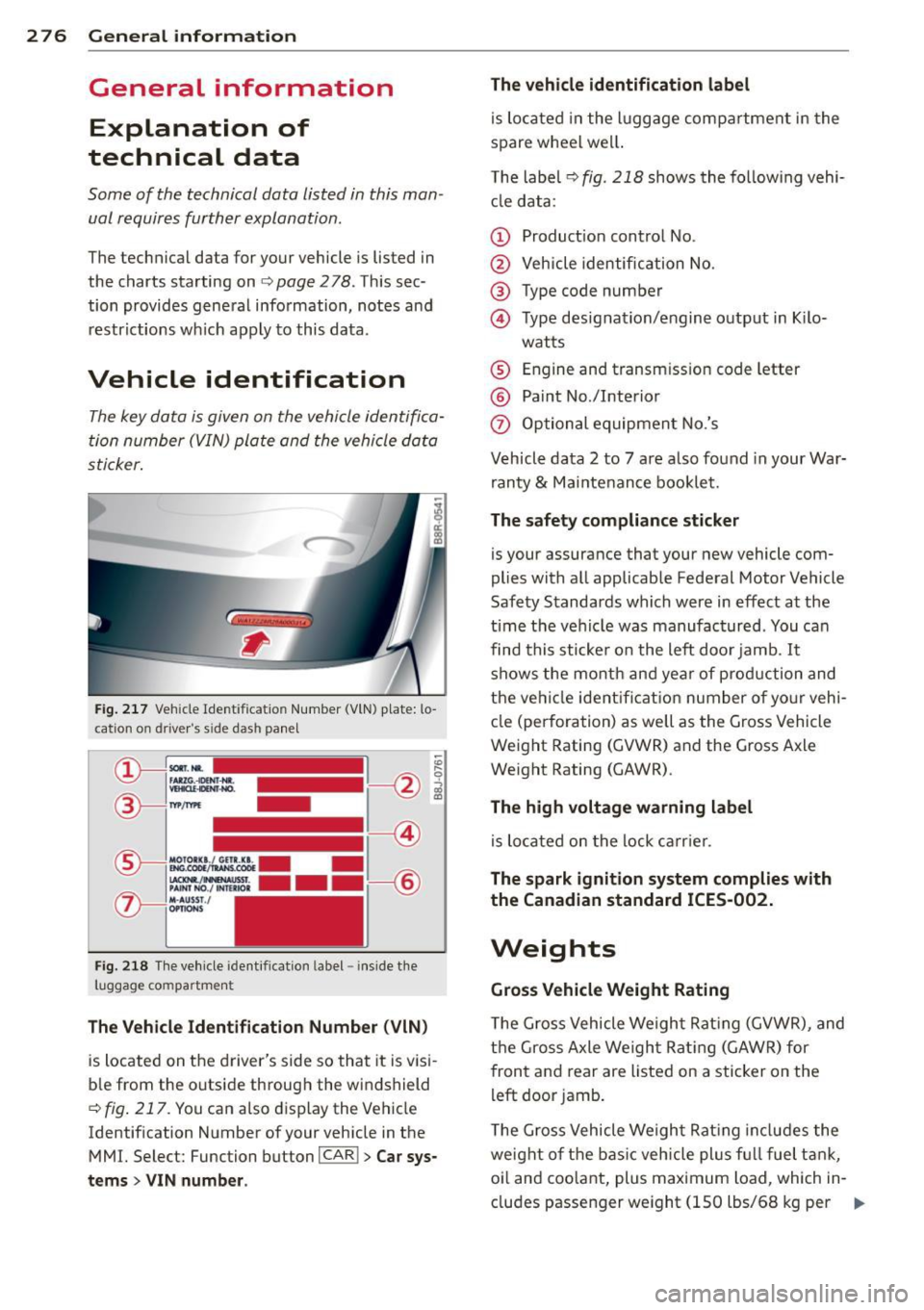
Fig. 2 17 Veh icle Ide ntific atio n Number (V lN) p late: lo
cation on driver's sid e das h panel
Fig . 2 18 The ve hicle identi fication label -inside the
luggage co mpa rtmen t
The Vehicle Iden tification Numb er (VIN )
is located on the driver's side so that it is vis i
b le from the outside through the windshield
r:::> fig . 217 . You can a lso display the Vehicle
Identification Number of your vehicle in the
MMI. Select: Function button
I CAR ! > Car s ys
t e ms
> V IN numb er. The
vehicl e identification labe l
is located in the luggage compartment in the
spare wheel wel l.
T he labe l¢
fig. 218 shows the fo llowing vehi
cl e data :
(D Product ion control No .
@ Vehicle identification No.
® Type code number
@ Type designation/engine output in K ilo·
wat ts
® Engine and transmission code letter
@ Paint No./Interior
(f) Optional equipmen t No.'s
Vehicle data 2 to 7 are also found in your War·
ran ty
& Ma intenance booklet.
The safety compliance stick er
is your assurance that your new vehicle com
plies with all applicable Federal Motor Vehicle
Safety Standards which were in effect at the
time the vehicle was manufac tured . You can
find this sticker on the left door jamb .
It
shows the month and year of production and
the ve hicl e ident ificat ion number of yo ur vehi ·
cle (perforation) as well as the G ross Vehicle
Weight Rating (GVWR) and the Gross Axle
Weight Rating (GAWR) .
The high volta ge warning label
is loca ted on the lock ca rr ier .
The spark ignition s ystem complies w ith
the Canadian standard ICES -002.
Weights
Gr oss V ehicl e Weight Rating
The Gross Vehicle Weight Rat ing (GVWR), and
t h e Gross Axle Weight Rating (GAWR) for
front and rear are Listed on a sticker on the
left door jamb .
T he Gross Vehicle Weight Rat ing includes the
weight of the bas ic vehicle plus fu ll fuel tank,
oi l and coo lant, plus maximum load , wh ich in·
eludes passenger weight (lSO lbs/68 kg per
Ill>
Page 285 of 300
Technical Modifications
Our guidelines must be complied with when
technical modifications are made.
Always consult an authorized Audi dealer be
fore starting work on any modifications.
This will he lp ensure that vehicle function,
performance and safety are not impaired
¢ .&..
Attempting to work on electronic components
and the software used with them can cause
malfunctions. Beca use of the way electronic
components are interconnected with each
other, such malfunctions can also have an ad
verse affect on other systems that are not di rectly involved. Th is means that you r isk both
a substantial reduction in the operational
safety of you r vehicle and an inc reased wea r of
vehi cle parts¢ _&..
Author ized Audi dealers w ill perform th is
wo rk in a professiona l and competent ma nner
or, in spec ial cases, refer you to a p rofessional
company that specializes in such mod ifi ca
tions .
_& WARNING t= -
Improper repairs and modifications can
change the way vehicle systems wo rk and
cause damage to the veh icle and ser ious
personal injury.
(D Note
If emergency repairs must be performed
elsewhere, have the veh icle examined by
an authorized A udi dealer as soon as possi
ble.
Con sumer In formation 283
Declaration of
Compliance, Telecom
munication or
Electronic Systems
Radio Frequency Devices and Radiocommuni
cation Equipment User Manual Notice.
The manufacturer is not responsib le for any
radio or TV interference caused by unauthor
ized modifications to this equipment.
Device s
The following devices each comply wi th FCC
Part 15 .19, FCC 15.2 1 and RSS -Gen Issue 1:
- Adaptive cru ise control
- Aud i side assist
- Cell phone package
- Convenience key
- Electron ic immobilizer
- Homelink ® universa l remote control
- Remo te control key
FCC Part 15.19
This device complies with part 15 of the FCC
Ru les. Operation is subject to the fo llow ing
two conditions:
(1) This device may not cause harmful in ter
fere nce, and
(2) this device must accept any interference
received, including interference that may
cause undes ired operation .
FCC Part 15.21
CAUTION:
Changes or mod ifi cat ions not expressly ap
proved by the p arty responsible for compli
ance could vo id the user's autho rity to ope rate
the equipment .
RSS-Gen Issue 1
Operation is subject to the fo llow ing two con
d it ions:
(1) this device may not cause interference,
and
•
•
Page 289 of 300
Convertible locking retractor .... .. .. . 17 5
How do I prop erly install a child safety
seat in my vehicle? ....... ... .. .. .. .
169
Infant seats . . . . . . . . . . . . . . . . . . . . . . 171
Instal ling .. ............. .... .. ... 175
Instal ling a child restraint us ing the
L A T C H system .... .. ... ... .. .. .. .. .
18 1
LATCH system ................... .. 181
Lower ancho rages ........ .. .. .. .. . 179
M ounti ng and releas ing the anchorage
hook . ..... .. .. ... ..... ... .. .. ...
181
Safety instructions ..... ... .. .. .. .. . 169
C leaning and protection .............. 203
Alcantara (synthet ic suede) . .. .. .. .. . 2 12
Cooler . .. .. .... ........... .. .. ... 213
Eng ine compartment ... ... .. .. .. .. . 213
Exhaust tail p ipes . ..... ... .. .. .. .. . 209
Fabrics and fabric coverings . ... .. .. . 209
Instrument panel .................. 210
Interior .......................... 209
Leather . . . . . . . . . . . . . . . . . . . . . . . . . . 211
MMI disp lay/controls ............. .. 209
Plastic and v inyl .... ... ... .. .. .. .. . 206
Plastic pa rts ...................... 210
Safety belts . . . . . . . . . . . . . . . . . . . . . . 2 12
tr im str ips . ............. .... .. ... 207
Trim str ips .... .. ..... ... .. .. .. ... 20 6
Climate controls ............ ...... ... 75
C lock ... .... .. .. .. .. .... .. . .. .. .. .. 25
C losing
Panor amic su nroof ........ .. .. .. .. ..
4 1
Sliding/ tilting sun roof .. ... .. .. .. .. .. 4 0
Sun shade (panoramic sunroof) ... .. .. 42
Cold ti re i nflat ion p ressu re ... .. .. .. .. .
239
Coming home ............. .... .. .... 45
Compact spare tire . ..... ... .. .. .. .. .
258
Compartments ................... ... 7 1
Compass in the mirro r ... ... .. .. .. .. .. 52
Comp lian ce .. ............. .... .. ... 283
Consumer Information . . . . . . . . . . 132, 280
Consumption (fue l) . . . . . . . . . . . . . . . . . . 24
Contact ing N HTSA ................ ..
132
Conven ience key ........... .... .. .... 32
Starting the engine ................. 80
Stopping the engine (START ENGINE
STOP button) ......................
81 Inde
x 287
Switching the ignition on .... ... .. .. . 80
U nl ocking and locking vehicle . ... .. .. . 32
Conve rtib le child safety seats ......... 172
Convertible locking retractor
Activati ng ........................
177
Deact ivating ...... ........... ..... 178
U sing to secure a child safety seat 1.75, 17 7
Coolant
refer to Eng ine coolant ............. 227
Cooler ... .. .. .... ... .. .. ..... ... .. . 72
Cleaning . ... .... .. . .. .. ..... ... .. 213
Operation . . . . . . . . . . . . . . . . . . . . . . . . . 72
Cooling mode (automa tic climate cont rol) 76
Cornering light .. .. ................. 103
C ruise cont ro l
Changing speed .... . .. ..... ... .. .. .
85
Presetting your speed .. ..... ... .. .. . 86
Switch ing off .. .. ............... .. . 86
Switching on . .. .. ................. . 85
Cu pholder . . . . . . . . . . . . . . . . . . . . . . . . . . 71
D
Data .............................. 278
Data recorder . . . . . . . . . . . . . . . . . . . . . . 187
Date disp lay . ..... ... .. .. ..... ... .. . 25
Daytime runn ing lights .............. .. 43
Declarat ion of compliance
Adaptive cruise control .............
283
Audi side ass ist .............. .... . 283
Cell phone package . . . . . . . . . . . . . . . . 283
Convenience key .................. . 283
Electronic immob ilizer .......... .. .. 2 83
Homel in k® uni versal remote control .. 283
Remote con tro l key ... ...... ... .. .. 283
DEF
What does this mean when it appears in
t h e tr ip odometer display? ...........
25
Defective light bulb warning ........... 21
Defrosting (windows) .. .. ..... ... .. .. . 77
Del uxe a utomat ic cl imate control .. .. .. . 76
Determ ining correct load limit ........ 243
Digi tal compass . . . . . . . . . . . . . . . . . . . . .
52
Dimens ions ... .. .. .. . .. .... ...... .. 277
Dimming the rearview mirror .. ... .. .. . 51
Dista nce . .. .. .. .. .. ............... . 24
Door/rear lid warning ............ .. .. .
23
•
•
Page 290 of 300

288 Index
Doors
M echanical child safety lock .. .... .. .. 37
Power child safety lock . . . . . . . . . . . . . . 38
Driver information system
CD/radio display . . . . . . . . . . . . . . . . . . . . 23
Door/r ear lid warning . . . . . . . . . . . . . . . 23
Exterior temperature display ....... .. 23
On-board computer . . . . . . . . . . . . . . . . . 24
Driver seating position ............... 125
drive select .. .. . .......... .. .. .... . 103
adaptive a ir suspension/sport ........ 103
Adaptive dampers ................. 103
Cornering light ........... .. .. .... . 103
Dynamic steering .................. 103
Safety belt tensioner ............... 103
Sport differential .......... ... .... . 103
Driving safely . . . . . . . . . . . . . . . . . . . . . . 124
Driving through water ............... 196
Driving time . . . . . . . . . . . . . . . . . . . . . . . . 24
Duplicate key . . . . . . . . . . . . . . . . . . . . . . . 28
Dynam ic steering . . . . . . . . . . . . . . . 22, 103
E
Easy entry feature .......... .... .... .. 79
Einparkhilfe Sensoren/Kamera reinigen ...... .... 205
Elect rical accessories (sockets) . . . . . 64, 70
E lectromechanical park ing brake
Emergency braking . . . . . . . . . . . . . . . . . 84
Operation . . . . . . . . . . . . . . . . . . . . . . . . . 82
Parking .................... ..... .. 83
Releasing and closing ..... .. .. .. .. . . 82
Starting assist ........... .. .. .... .. 83
Starting from rest .......... .. .... .. 83
Starting
off with a tra iler . . . . . . . . . . . . . 83
Warning/indicator lights ..... .. .. .. . . 15
E lectronic different ial lock ( EDL) .. .... . 187
Warning/indicator lights ... .. .. .. .. . . 19
Electronic immobilizer . . . . . . . . . . . . 25, 29
Electronic power control (EPC)
warning/indicator light ..... .... ..... 20
Electronic speed limiter ......... .... .. 27
Electronic Stability Control (ESC) .. ..... 187
Warn ing/indicator lights ....... .. .. .. 18 Emergency
actuation
Doors ... ..... .. .. .............. .. 34
Parking lock ... .. ................. 113
Power sunroof . .. ............. .... . 40
Rear lid ... .... .. ............. .... . 37
Emerg ency braking ................... 84
Emergency flasher ................. .. 44
Warning/ind icator lights ........ .. .. . 22
Emergency operation Panoramic sunroof ... .......... .. .. . 42
Sun shade (roof) ................... 42
Emergency starting ................ . 270
Emergency towing .. ............ .. .. 272
Emergency warning triangle .......... 256
En ergy management ................ 192
Engine Compartment ..................... 221
Coolant ... .. .. .. .. ... ........ .. .. 227
Data ..... .... .. ............. .... 278
starting ......... .. .............. .. 80
Starting with jumper cables ......... 270
Stopping . ..... .. .. .............. .. 81
Engine compartment ................ 221
Closing the hood . ... .......... .. .. 220
Opening the hood ............. .... 219
Safety instructions ................ . 219
Working in the engine compartment .. 219
Engine coolant ..................... 22 7
Adding coolant . .. ... .......... .. .. 228
Check ing the engine coolant level ..... 227
Expansion tank ... ................. 227
Malfunction symbol ................. 15
Radiator fan ... .. ............. .... 229
Temperature gauge ............ .... . 10
Engine oil ...... .. .. .............. . 222
Adding ......... .. .............. . 225
Additives . ..... .. ............. .... 225
Changing . .. .. .. ............. .. .. 226
Checking oil level .... .......... .. .. 225
Checking the engine oil level ....... .. 224
Consumption .. ................... 225
I ndications and conditions requiring ex-
tra checking . ...... .. ...... ....... 224
Indicator light ... ............. .... . 17
Oil consumpt ion .. ............. .... 223
Oil grad es ..... .. ................ . 222
Oil level symbol . . . . . . . . . . . . . . . . . . . . 20
Page 292 of 300
29 0 Index
Glove compartment (cooled) ... .. .... . . 71
Gross Veh icle Weight Rating (GVWR) ... 276
H
Headlights
Clean ing system ....... ..... .. .. .. .. 48
Defective . . . . . . . . . . . . . . . . . . . . . . . . . 21
H ead light range control . . . . . . . . . 21, 43
Washer reservoir .................. 234
Head restraints . . . . . . . . . . . . . . . . . 61, 128
Adjusting .. .......... .... .... .... 128
Heated exterior mirrors . . . . . . . . . . . . . . . . . . . . 51
rear window . . . . . . . . . . . . . . . . . . . . . . . 77
seats .. .. .... ........ ...... ... .. .. 77
windshield washer spray nozzles .. .... 48
Heating ..... ................ ..... .. 75
H eavy clothing and safety belts ... .. ... 137
High beam . .. ..................... .. 45
High voltage warning label ... ... .. ... 276
H omelink ® universal remote control . . . 121
Hood (release lever) ................. 219
H orn . .. .. .. .. . .......... .. .. .. .. .. . 8
How are child restraint system anchors re
lated to child safety . . . . . . . . . . . . . . . . . 178
How many airbags does my vehicle have? 149
H ow often should I check my t ire pres-
sures? ............................ 242
H ow safety belt pretensioners work . ... 140
Hydroplaning . .. . ...... ... .. .. .... . 246
I
Immobilizer . . . . . . . . . . . . . . . . . . . . . . . . 25
Important things to do before driving . . 124
Improperly worn safety belts . .... .... . 140
I ndicator lights
refer to Warning/ind icator lights .... . . 11
Infant seats . ................ ... ... 171
Installing chi ld safety seats
Safety belts . . . . . . . . . . . . . . . . . . . . . . 17 5
I nstall ing the upper tether strap on the
anchorage ... ... .. ..... ... .. .. .... . 183
Instruments Ad justing the lighting . ........ ...... 47 Instruments and controls
Genera l illustration . . . . . . . . . . . . . . . . . . 8
Instrument cluster .......... ... .. .. . 10
Interior l ighting
Amb ience light ing ................. . 46
Front and rear ... ... .. ..... ... .. .. . 46
Intermittent (w indshield w ipers) ....... 48
J
Jack 257
Jump-starting ..... ... .. ..... ... .. .. 270
Jumper cables . .. .. .......... ...... . 271
K
Key ........... ... .. ................ 28
Battery replacement master key . . . . . . . 29
E mergency key . .. ............. .. .. . 28
K ey replacemen t . . . . . . . . . . . . . . . . . . . 28
Mas ter key . . . . . . . . . . . . . . . . . . . . . . . . 28
Mechan ica l key ... ... .. ..... .... . .. . 29
Valet key . . . . . . . . . . . . . . . . . . . . . . . . . . 28
K ick-down (automatic transmission) .... 112
Knee a irbags .... .. ... .......... .... 157
Description .... ................... 157
How they work . . . . . . . . . . . . . . . . . . . . 158
Important safety instructions .. .. .. .. 159
L
Lane assist
Activat ing and deactivating ........... 96
Description . . . . . . . . . . . . . . . . . . . . . . . . 96
Instrument cluster ind icator lig ht .. .. . 96
Kamerabereich rein igen ......... .... 205
Messages . ...... ............. .... . 97
Notes on instrument cluster disp lay ... . 96
Setting the steering wheel vibration ... . 98
Setting the warning point .... ... .. .. . 98
Lane Change Assistant
refer to side assist . . . . . . . . . . . . . . . . . . 99
LATCH .... ... .. .. .. ... ....... ... .. 178
Description .. .. ............ ....... 179
Gu idance fixtures for lower ancho rages 180
Installing a c hild restra int ........... 181
Loca tion . . . . . . . . . . . . . . . . . . . . . . . . . 179
Mounting and releasing the anchorage
hook ... .. .... .. .. ... .. ... ... .. .. 181