remote control AUDI A8 2013 User Guide
[x] Cancel search | Manufacturer: AUDI, Model Year: 2013, Model line: A8, Model: AUDI A8 2013Pages: 318, PDF Size: 79.34 MB
Page 65 of 318
@ Tips
If you cannot move the seat into the re
clining position, it may be because
- the front passenger's seat memory func
tion is switched off¢
page 66 or
- the child safety lock is switched on (the
@ button
¢ page 40 or the right t but
ton ¢
page 40 lights up in the driver's
door), or
- the front passenger seat adjustment is
switched off in the MMI
¢ page 63.
Massage function remote control
Applies to vehicles: with reclining rear seat and massage
fu nct ion
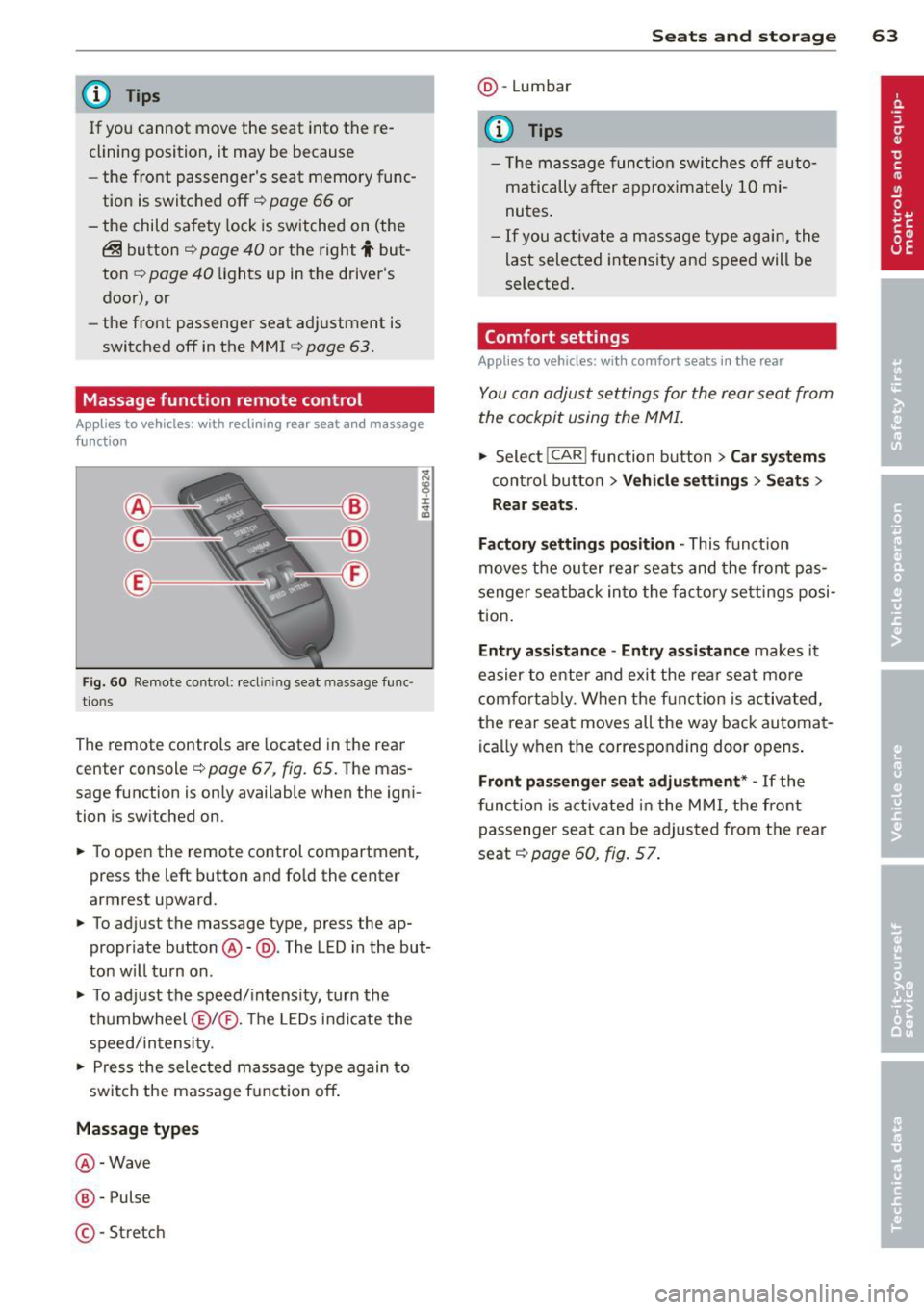
F ig. 60 Remote control: reclin ing seat massage func
t ions
The remote controls are located in the rear
center console ¢
page 67, fig. 65. The mas
sage function is only available when the igni
tion is switched on.
.,. To open the remote control compartment,
press the left button and fo ld the center
armrest upward .
.,. To adjust the massage type, press the ap
propriate button @-@ . The LED in the but
ton w ill turn on .
.,. To adjust the speed/intensity, turn the
thumbwheel @I® . Th e LED s indicate the
speed/intensity .
.,. Press the selected massage type again to
switch the massage funct ion off .
Massage types
@-Wave
@-Pulse
©-Stretch
Seats and storage 63
@-Lumbar
(D Tips
- Th e massage function switches off auto
matically after approximately 10 mi
nutes .
-If you activate a massage type again, the
last selected intensity and speed will be
selected.
Comfort setting s
Applies to vehicles: wit h co mfort seats in the rear
You can adjust settings for the rear seat from
the cockpit using the MMI.
.,. Select I CAR I function button > Car systems
control button > Vehicle settings > Seats >
Rear seats.
Factory settings position -
This function
moves the outer rear seats and the front pas
senger seatback into the factory settings posi
tion.
Entry as sistance -Entry assistance makes it
easier to enter and exit the rea r seat more
comfortab ly. When the function is activated,
the rear seat moves all the way back automat
ically when the corresponding door opens .
Front passenger seat adjustment * -If the
function is activated in the MMI, the front
passenger seat can be adjusted from the rear
seat ¢
page 60, fig. 5 7.
Page 67 of 318
Seat memory
Description
Applies to vehicles: with memory function
The memo ry function a llows you to quick ly
and eas ily s to re and re ca ll persona l seating
p rofi les for the driver, fron t passenger an d
ou ter rea r seats* . The memory f unction is op
erated throug h the master key and the memo
ry buttons in the driver 's/front passenger's
doors and the rear doors*.
The drive r's seating profi le is stored and as
signed to t he master key each t ime the vehicle
i s locked. The seating p rofile is recalled auto
mat ica lly when the veh icle is unlocked. If two
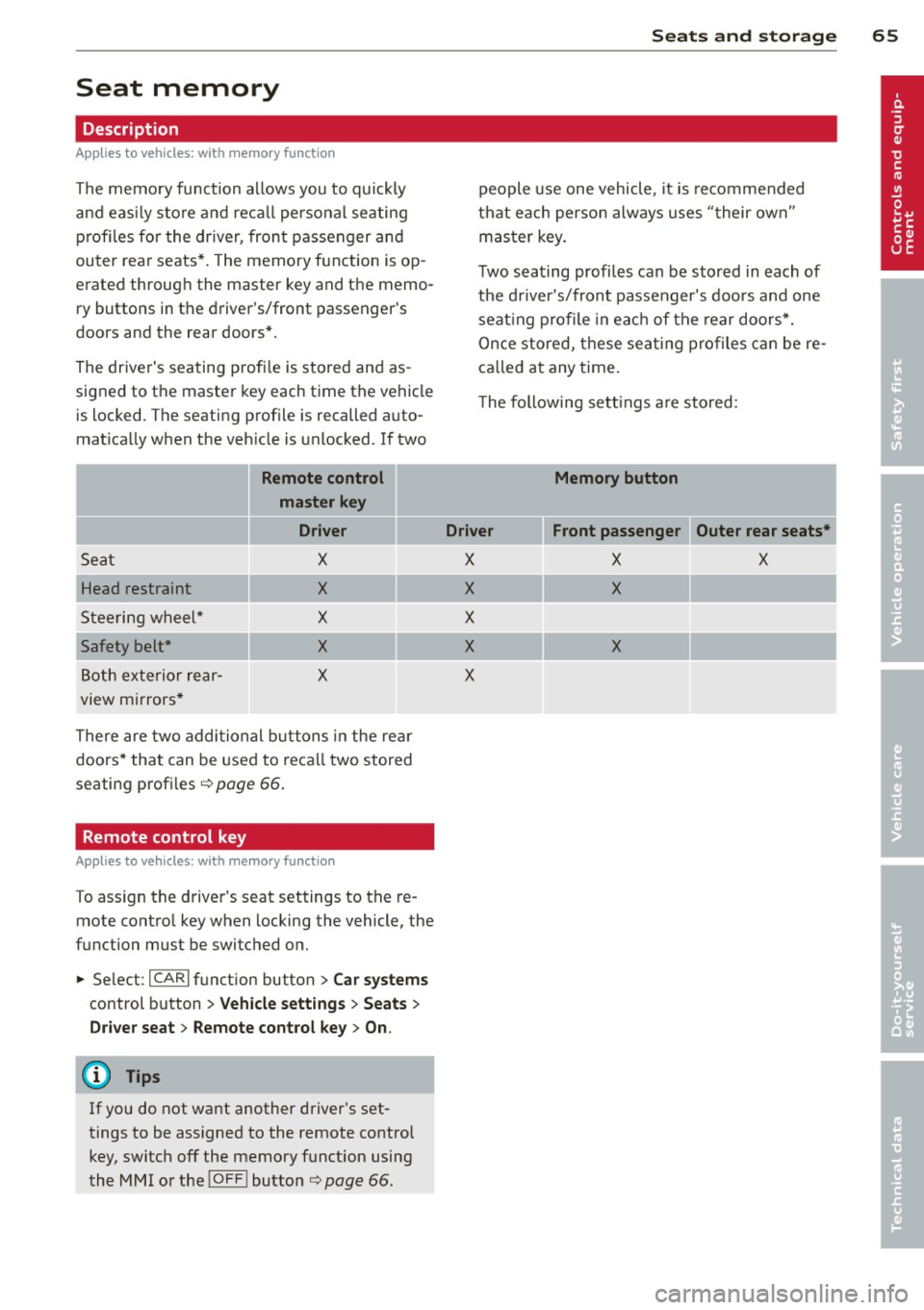
Remote control
master key
Driver
Seat X
Head restraint X
Steeri ng w heel* X
Safety belt * X
Both exterior rear-X
view mirrors *
There are two addi tio nal buttons in the re ar
doors * that can be use d to reca ll two stored
seating profi les
¢page 66.
Remote control key
Appl ies to vehicles: with memory function
To assign the d river 's seat settings to the re
mote contro l key when locking the vehicle, the
function must be switc hed on.
~ Se lect: I CAR I f u nct ion button > Car systems
control button > Vehicle setting s > Seats >
Driver seat > Remote control key > On.
(D Tips
If you do n ot want another driver's set
tings to be assigned to the remote control
key, switch off the memory f unction using
the MMI o r the
IOF FI button¢ page 66.
Seats and storage 65
people use one vehicle, it is recommended
t h at each perso n always use s "their own"
mas ter key.
T wo sea ting profiles can be stored in each of
the d river 's/front passenger's doors and one
seat ing p rofile in ea ch of t he rear doors*.
Once stored , these sea ting pro files c an be re
ca lled at any time.
T he following se tt ings a re stored:
Memory button
Driver Front passenger Outer rear seats*
X X X
X X
X
X X
X
Page 69 of 318
Full-length center
console
Overview
Applies to vehicles: with full-le ngth center console
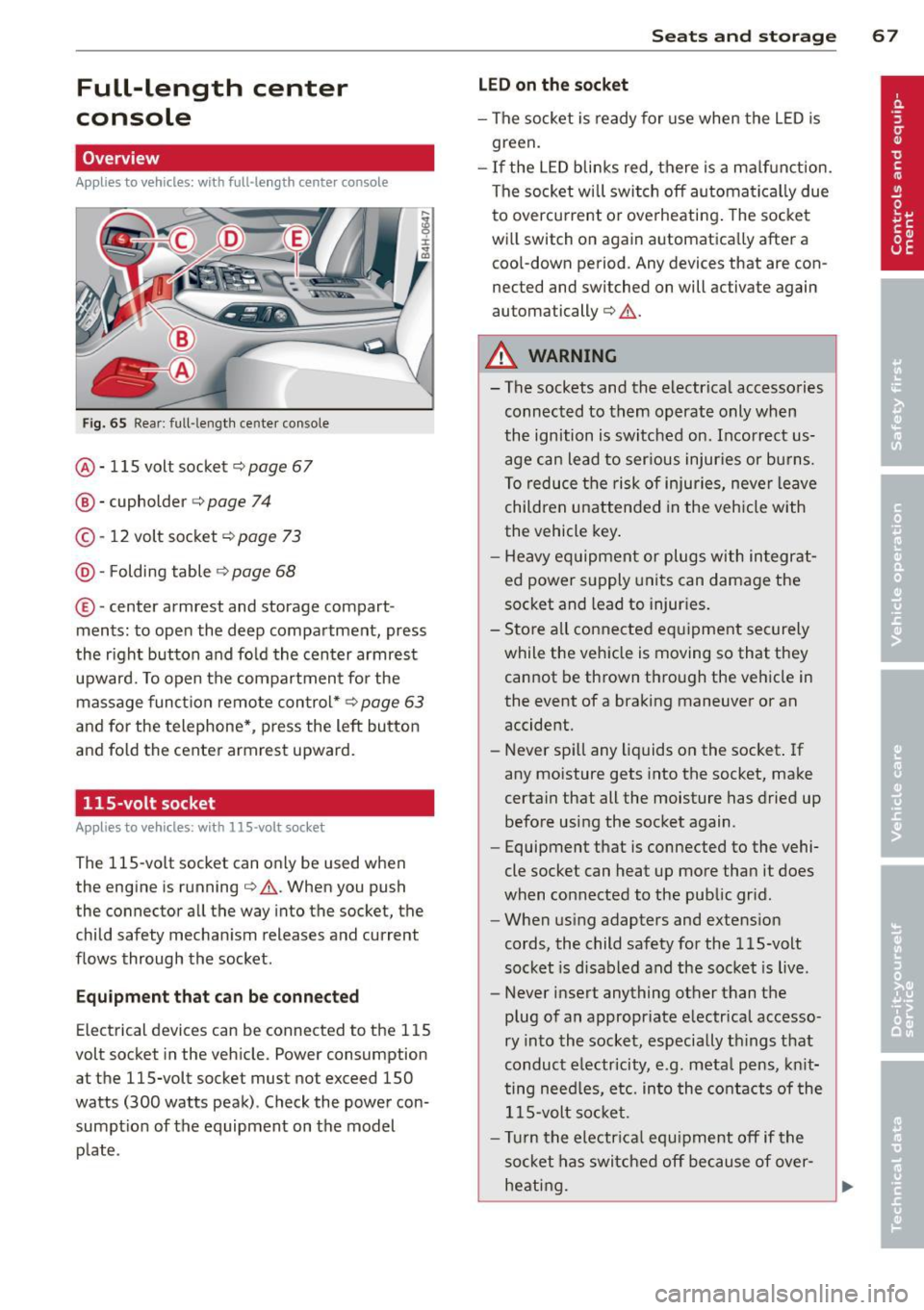
Fig. 65 Rear: full -lengt h center console
@ · 115 volt socket c::> page 67
@ · cupholder c::> page 74
© -12 volt socket c::> page 73
@· Folding table c::> page 68
© ·center armrest and storage compart
ments : to open the deep compartment, press
the r ight button and fold the center armrest
upward. To open the compartment for the
massage function remote control*
c::> page 63
and for the telephone*, press the left button
and fold the center armrest upward.
115-volt socket
Applies to vehicles: with 115-volt socket
The 115-vo lt socket can on ly be used when
the engine is running
c::> .&. . When you push
the connector all the way into the socket, the
child safety mechanism releases and current
flows through the socket.
Equipment that can be connected
Electrical devices can be connected to the 115
volt socket in the vehicle. Power consumption
at the 115-volt socket must not exceed 150
watts (300 watts peak) . Check the power con
sumpt ion of the equipment on the model
plate .
Seats and storage 67
LED on the socket
-The socket is ready for use when the LED is
green.
- If the LED blinks red, there is a malfunction.
The socket wi ll switch off automatically due
to overcurrent o r overheating . The socket
will switch on again automatica lly after a
cool-down period . Any devices that are con
nected and switched on will activate again
automatically
c::> .&. .
A WARNING
-- The sockets and the-electrical accessories
connected to them operate only when
the ignition is switched on. Incorrect us
age can lead to ser ious injuries or burns.
To reduce the risk of injuries, never leave
children unattended in the veh icle with
the vehicle key.
- Heavy equipment or plugs with integrat
ed power supply units can damage the
socket and lead to injuries.
- Store all connected equipment securely
while the vehicle is moving so that they
cannot be thrown through the vehicle in
the event of a braking maneuver or an
accident.
- Never spill any liquids on the socket . If
any moisture gets into the socket, make
certain that all the moisture has dried up before using the socket again .
- Equipment that is connected to the vehi·
cle socket can heat up more than it does
when connected to the public gr id.
- When using adapters and extension
cords, the child safety for the 115-volt
socket is disabled and the socket is live .
- Never insert anything other than the
plug of an appropriate electrical accesso
ry into the socket, especially things that
conduct e lectricity, e.g. meta l pens, knit
ting need les, etc. into the contacts of the
115-volt socket.
- Turn the electrical equ ipment off if the
socket has switched off because of over
heating.
Page 80 of 318
78 Warm and cold
Warm and cold Climate controls
Description
The climate control system warms, cools and
adds humidity to the air in the vehicle interior.
It is the most effect ive when the windows and
sunroof* are closed . If the temperature inside
the parked vehicle becomes very warm, open ing the window briefly will speed up the cool
ing process.
I n all heating mode functions except
defrost,
the blower on ly switches to a higher speed
once the engine coolant has reached a certain
temperature.
Condensation from the cooling system can
drip and form a puddle of water under the ve
hicle. This is normal and does not mean there
is a leak.
Pollutant filter
The pol lutant filter removes pollutants such
as dust and pollen from the air.
The air pollutants filter must be changed at
the intervals spec ified in you r Warranty
&
Maintenance booklet, so that the air condi
tioner can properly work.
I f you drive your vehicle in an a rea with high
a ir po llution, the fi lter may need to be
changed more frequent ly than specified in
your Aud i Warranty
& Maintenance booklet. If
in doubt, ask your authorized Audi Service Ad
visor for advice .
Key coded settings
The climate control settings are a utomat ically
stored and assigned to the remote control key
that is in use.
A WARNING
Reduced visibility is dangerous and can
cause accidents. -
- For safe driving it is very important that
all windows be free of ice, snow and con
densation.
- Comp letely familiarize yourself with the
proper use and funct ion of the heat ing
and ventilation system and especially how to defog and defrost the windows.
- Never use the windshield wiper/washer
system in freez ing weather unt il you
have warmed the windshield first, using
the heating and ventilation system. The
washer solution may freeze on the wind sh ie ld and reduce visib ility.
(D Note
- If you suspect that the air conditioner has been damaged, switch the system
off to avoid further damage and have it
inspected by a qualified dealership.
- Repairs to the Audi air conditioner re
quire special technical know ledge and
special tools. Contact an authorized Aud i
dea ler fo r assistance.
@ For the sake of the environment
By reducing the amount of fuel you use,
you also reduce the amount of pollutants
emitted into the air.
(D Tips
- Keep the air intake s lots (in fro nt of the
w indshield) free from ice, snow and de
bris in order to maintain the proper func
tion of the climate control system.
- T he energy management system may
switch the seat heating* or rear window
defroster off temporari Ly . These systems
are available again as soon as the energy
balance has been restored.
- Air escapes through vents under the rear
window. When placing items of clothing
on the luggage compartment cover, en
sure that the openings are not covered.
Page 83 of 318
(D Note
To avoid damage to the heating elements in the seats, do not kneel on the seats or
place heavy loads on a small area of the
seat.
Setup
The climate control system setup is accessed
through the MMI.
• Se lect: ICARI function button > Car systems
control button > A/C.
Rear cabin settings*
When this function is selected, all sett ings for
the rear can be adjusted through the climate
control system in the cockpit . The climate
control system settings cannot be adjusted in
the rear seat at the same time. This function
switches off after a certain period of time or
when one of the dials in the cockp it is press
ed .
Auto recirculation*
The sensitivity level of the automatic recircu
l ation mode can be set at various levels from
off to sensitive. The recirculation mode l"""I is
controlled on automatically. You must press
the ~ button if fog forms on the w indows .
Footwell temperature
You can adjust the footwe ll temperature so
that it is cooler or warmer.
A/C mode
The strength of the airflow can be adjusted to
light, medium o r strong .
Windshield heat*
When the defroster~ is switched on and the
Auto settin g is selec ted, the windshie ld de
froster is controlled automatically.
Solar roof*
Park ing vent ilation is controlled automat ically
in the
auto setting .
Warm and cold 81
When the ignition is off, solar-powered park
ing ventilation may switch on, as long as
- t here is sufficient sunlight,
- the outside temperatur e is not too low,
- the sunroof is closed or tilted and
-auto (MMI) is selected.
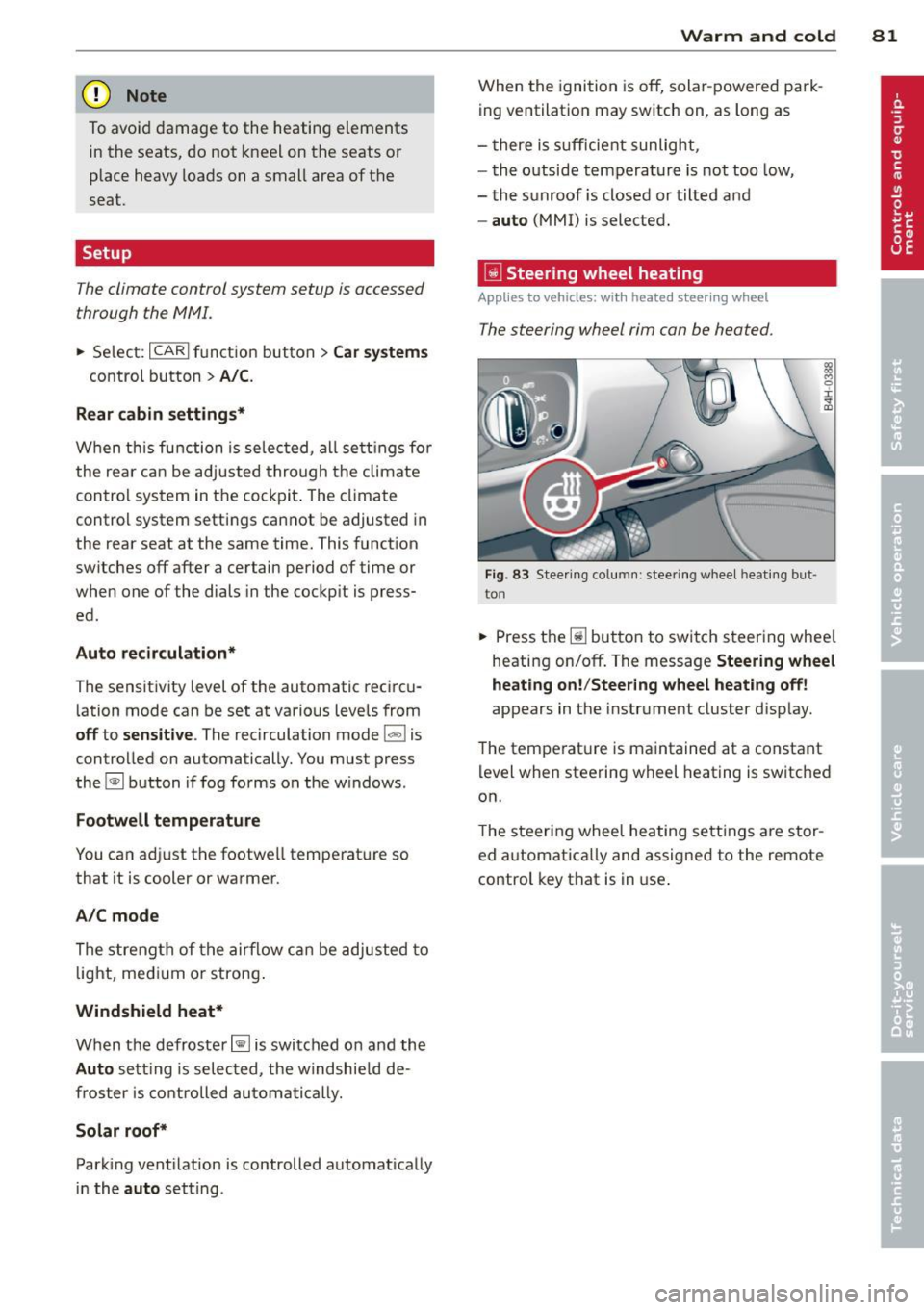
~ Steering wheel heating
App lies to vehicles: with heated steering wheel
The steering wheel rim can be heated .
Fig. 83 Steering column: steering wheel heating but ·
ton
~ 0
± ... CD
• Press the~ button to switch steering whee l
heating on/off. The message
Steering wheel
heating on! /Steering wheel heating off!
appears in the instrument cluster disp lay.
The temperature is maintained at a constant
level when steering wheel heating is switched
on.
T he steering wheel heating settings are stor
ed a utomatically and assigned to the remote
control key that is in use .
Page 86 of 318

84 On th e road
Stopping the engine
• Bring your vehicle to a complete stop.
• Move the selecto r lever to the P or N posi
t ion .
• Pre ss the I START ENGINE STOP I button
¢ page 83, fig. 85.
When you s top and the Sta rt- Stop -Sys tem*
turns off the engine, the ignit ion remains on .
Press the
I STAR T ENGINE ST OP I button to
switch the ignition off during a stop phase.
Steering lock
The stee ring lo cks w hen you t urn the engine
off using the
I S TART ENGINE STOP I button
and open the dr iver's door . The locked steer
ing helps prevent vehicle theft .
Emergency off
If necessary, the eng ine ca n be sw itched off
with the selector lever in the R, Dor S pos i
tions . The eng ine stops if you press the
I START ENGINE STOP ! button at speeds be low
6 mph (10 km/h) .
A WARNING
-Never turn off the engine before the ve
hicle has come to a complete stop. The
full function of the brake booster and the power steering is not quara nteed. You
must use more force to turn or b rake if
necessary. Because you cannot stee r and
brake as you usua lly would, th is could
lead to c rashes and serious injur ies.
- For safety reasons, you shou ld always
par k your vehicle with the se lector lever
in P. Otherwise, the ve hicle co uld i nad
vertent ly roll away .
- After the engine has been switched off,
the radia tor fan can continue to run fo r
up to 10 min utes -even with the ign it ion
switched off. It can a lso switch on again
after some time if the coolant tempera
ture rises as the result of a heat buildup
or if the engine is hot and the engine
compartment is addit ionally heated by
the su n's rays.
(D Note
Do not stop the eng ine immediately after
hard or extended driving . Keep the eng ine
runn ing for approximate ly two minutes to
prevent excess ive heat bu ild-up.
Driver message in the instrument
cluster display
Ignition i s on
This message appears and a warning tone
sounds if you open the driver's door when the
ignition is sw itched on.
Press brake pedal to start eng ine
This message appears if you press the
I START ENGINE STOPI button to start the en
gine and do not depress the brake pedal. The
engine can only be started if the brake pedal
is depressed .
!!I Is key in the vehicle ?
If the indicator ligh t turns on and the mes
sage appears, the remote control key was re
moved from the vehicle whi le the engine was
runn ing . If the ignition key is not in the veh i
cle you will not be able to switch on the igni
tion or restart the engine after it has bee n
switched off . You will also not be able to lock
the ve hicle from the outs ide .
Shift to P , othe rwise v ehicle can roll away.
Doors do not lock if le ver is not in P .
This driver message appears for safety rea
sons if the transmission has not been shifted
to the P position when you switc h the ignition
off . Move the selector lever to the P position.
O therwise the vehicle is not p rotected from
r o ll ing a nd ca nnot be locked.
rJl Ke y i s not recognized . Hold back of ke y
aga inst marked area. See owner's manual.
If the indicator light turns on and this mes
sage appears, there is a malfunct ion
¢ page 85.
Tu rn off ignition before leaving c ar
Page 100 of 318
98 Audi adapti ve cruise control and bra king gu ard
then maintains the stored distance. If the ve
hicle ahead accelerates, adaptive cruise con
trol will also acce lerate up to the stored
speed.
The higher the speed, the greater the distance
in yards (meters)¢ ,&. T he
Di sta nc e 3 setting
is recommended .
The distances p rov ided are specified values.
D epending on the driving situation and the
how the vehicle ahead is driving, the actual
distance may be more or less than these tar
get distances.
The various symbols for the time increments
appear briefly in the information line@
¢
page 95, fig. 98 when you change the set
tings.
~ -~ --- Dis tance 1 : This setting corre
sponds to a distance of 92 feet/28 meters
when traveling at 62 mph (100 km/h), or a
time interva l of 1 second.
~ -- ~-- Dista nc e 2: This setting corre
sponds to a distance of 1 18 feet/36 meters
when traveling at 62 mph (100 km/h), or a
time interva l of 1.3 seconds.
~ --- ~-Dis ta nce 3: This setting corre
sponds to a distance of 164 feet/SO meters
when traveling at 62 mph (100 km/h), or a
time interva l of 1.8 seconds.
~---- ~ Dista nce 4 : This setting corre
sponds to a distance of 210 feet/64 meters
when traveling at 62 mph (100 km/h), or a
time interva l of 2 .3 seconds.
A WARNING
Following other vehicles too closely in
creases the risk of collisions and serious
personal inju ry.
- Setting short distances to the traffic
ahead reduces the t ime and distance
available to br ing your vehicle to a safe
stop and makes it even mo re necessa ry
to pay close attention to traffic.
- Always obey applicable traffic laws, use
good judgment, and select a safe follow- ing distance for the traffic, road and
weather conditions.
(D Tips
- Distan ce 3 is set automatically each time
you switch the ignition on .
- Your standard settings a re automatically
stored and assigned to the remote con
tro l key being used.
Selecting the driving mode
Applies to vehicles: with Aud i adapt ive cru ise control
.. Select the desired driving mode in drive se
lect¢
page 109 .
(D Tips
Your settings are automatically stored and
assigned to the remote control key being
used.
Prompt for driver intervention
Applies to vehicles: with Aud i adapt ive cru ise contro l
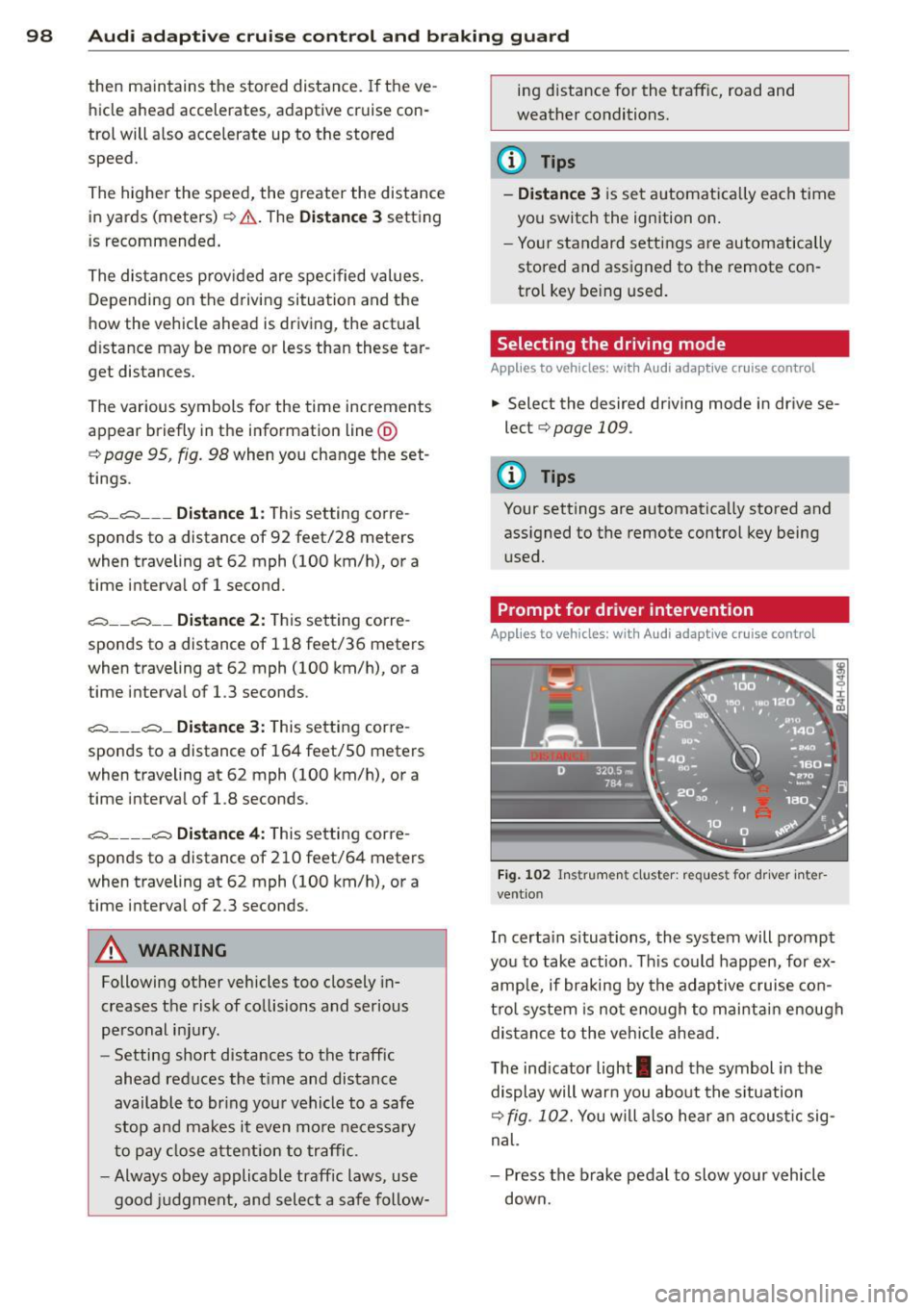
Fig. 1 02 In strument cluster: request for driver inte r
vent ion
In certa in situations, the system will prompt
you to take action . Th is could happen, for ex
amp le, if braking by the adaptive c ruise con
tro l system is not enough to mai nta in enough
dis tance to the veh icle ahead .
The ind icator light
I and the symbol in the
display will warn you abo ut the s ituation
¢
fig. 102. You will also hea r an acous tic sig
nal.
- Press the brake pedal to slow your vehicle
down.
Page 102 of 318
100 Audi adaptive cruise control and braking guard
(end of a traffic jam or vehicle that has
broken down in traffic).
- Always remember that the radar sensor
for the braking guard works only within
defined detection and range limits that
may prevent the proper detection of oth
er vehicles.
- The radar sensor's function and range
can be reduced by rain, snow and heavy
spray. Moving vehicles up ahead may not
be promptly detected or may not be de
tected at all.
- Reflective surfaces including crash barri
ers or tunnel entrances may impair the
function of the radar sensor.
(D Tips
- You can cancel the braking with increas
ing force that is initiated by the system
by braking yourself, by accelerating no
ticeably or by swerving.
- Braking guard error messages
r::> page 100.
-Keep in mind that braking guard can
brake unexpectedly . Always secure any
cargo or objects that you are transport
ing to reduce the risk of damage or in
jury.
Settings in the MMI
Applies to vehicles: with Audi adaptive cruise control
• Select: ICARI function button > Car systems
control button > Driver assist > Audi brak
ing guard.
System -
Switch braking guard On and Off.
When you switch the ignition on, the message
Audi braking guard off appears if the system
is switched off.
Early warning -The distance and approach
warnings in the display can be switched
On/
Off.
Tips
- Your settings are automatically stored
and assigned to the remote control key being used at the time the settings are
made.
- If you switch the ESC to sport mode,
braking guard switches off automatically
~page 200.
- Switch braking guard off when you are
loading the vehicle onto a vehicle carrier,
train, ship or other type of transporta
tion. This can prevent undesired warn
ings from the braking guard system.
Messages
Applies to vehicles: with Aud i adapt ive cru ise contro l
ACC unavailable
ACC and braking guard: unavailable
The system cannot detect moving vehicles up
ahead correctly and is switched off. The sen
sors have been displaced or are not working
properly. The Audi pre sense functions may al
so be affected. Drive to your authorized Audi
dealer or authorized Audi service facility im
mediately to have the malfunction corrected.
ACC: unavailable at this time. No sensor vi
sion
ACC and braking guide: unavailable at this
time. No sensor vision
This message appears if the sensor view is ob structed, for example by leaves, snow, heavy
spray or dirt . Clean the sensors
r:> page 93,
fig. 93.
ACC: unavailable at this time. Incline too
steep
The road exceeds the maximum possible an
gle for proper adaptive cruise control opera
tion. Adaptive cruise control is switched off .
ACC: only selector lever positions D, S or M
available
Select the D, Sor M selector lever position.
ACC: unavailable at this time. Parking brake
set
The adaptive cruise control system switches
off automatically if the parking brake is set. .,.
Page 106 of 318
104 Audi lane assist
Setting the warning point and steering
wheel vibration
Applies to vehicles: with lane assist
You can adjust individual settings in the MMI.
.. Se lect: ICARI function button> Car systems
control button > Driver assist > Audi lane
assist .
Setting the warning point
Early: With this setting, a warning is provided
before a wheel touches the detected lane
boundary line . The warning depends on the
angle in which the veh icle is approaching the
line. The distance at which the warning is giv
en increases as the angle becomes sharper. If
you dr ive towa rd a boundary line at a very
sha rp angle, the warning will come just before
a wheel touches the line.
Medium : With this setti ng, the warn ing po int
is adapted to the course of the road, the lane
width and the speed. You wi ll sti ll be warned
if you cross slightly over a dotted line when
driving on curves.
Late : This setting has the same properties as
medium. You will only be warned once a
wheel crosses a detected line.
Setting the steering wheel vibration
The steering wheel v ibration can be set to
Low , Medium or Strong . Selecting each of the
settings will cause the steering wheel to vi
b rate so you can check the strength of the vi
bration in that setting.
(D Tips
Your settings are automatically stored and
assigned to the remote contro l key being
used .
Page 110 of 318
108 Audi side assist
- Side assist is not active wh ile you are
making the adjus tment.
- Your settings are automatica lly sto red
and ass igned to the remote control key
being used.
Driver messages
App lies to vehicles: with side assist
If side ass ist switches off by itse lf, t he LED in
the butto n tur ns off a nd a message will ap
pea r in the instr ume nt cl uster d is p lay:
Audi side assist : Currently unavailable. No
sensor vision
The radar se nsors' vision is affected. Do not
cover the area in front of the senso rs wi th bike
wheels, stickers, dirt or other objects. Clean
the area in front of the sensors, if necessary
c::;, page 106, fig. 111 .
Audi side assist : Currently unavailable
Side assis t ca nno t be swi tched o n tem porar ily
beca use there is a mal function (for exam ple,
the battery cha rge leve l may be too low) .
Audi side assist: System fault!
The system cannot guara ntee that it w ill de
t e ct ve hicl es co rrec tly a nd it is sw itche d off .
The senso rs have been displaced o r a re faulty.
H ave the sy stem che cke d by an au thor ized
Au di d ealer o r au thoriz e d Au di Service Fac ilit y
s o on.
Audi side assist : Unavailable when towing .
Side assist switches off aut omatically whe n a
factory -insta lled trailer h itch is connected to
the el ectrical connector on the trailer. There is
no guara ntee the system will switc h off whe n
usi ng a retrofi tt ed traile r h itch . Do not use
side assis t when towing a tra iler .