light AUDI A8 2013 Repair Manual
[x] Cancel search | Manufacturer: AUDI, Model Year: 2013, Model line: A8, Model: AUDI A8 2013Pages: 318, PDF Size: 79.34 MB
Page 100 of 318
98 Audi adapti ve cruise control and bra king gu ard
then maintains the stored distance. If the ve
hicle ahead accelerates, adaptive cruise con
trol will also acce lerate up to the stored
speed.
The higher the speed, the greater the distance
in yards (meters)¢ ,&. T he
Di sta nc e 3 setting
is recommended .
The distances p rov ided are specified values.
D epending on the driving situation and the
how the vehicle ahead is driving, the actual
distance may be more or less than these tar
get distances.
The various symbols for the time increments
appear briefly in the information line@
¢
page 95, fig. 98 when you change the set
tings.
~ -~ --- Dis tance 1 : This setting corre
sponds to a distance of 92 feet/28 meters
when traveling at 62 mph (100 km/h), or a
time interva l of 1 second.
~ -- ~-- Dista nc e 2: This setting corre
sponds to a distance of 1 18 feet/36 meters
when traveling at 62 mph (100 km/h), or a
time interva l of 1.3 seconds.
~ --- ~-Dis ta nce 3: This setting corre
sponds to a distance of 164 feet/SO meters
when traveling at 62 mph (100 km/h), or a
time interva l of 1.8 seconds.
~---- ~ Dista nce 4 : This setting corre
sponds to a distance of 210 feet/64 meters
when traveling at 62 mph (100 km/h), or a
time interva l of 2 .3 seconds.
A WARNING
Following other vehicles too closely in
creases the risk of collisions and serious
personal inju ry.
- Setting short distances to the traffic
ahead reduces the t ime and distance
available to br ing your vehicle to a safe
stop and makes it even mo re necessa ry
to pay close attention to traffic.
- Always obey applicable traffic laws, use
good judgment, and select a safe follow- ing distance for the traffic, road and
weather conditions.
(D Tips
- Distan ce 3 is set automatically each time
you switch the ignition on .
- Your standard settings a re automatically
stored and assigned to the remote con
tro l key being used.
Selecting the driving mode
Applies to vehicles: with Aud i adapt ive cru ise control
.. Select the desired driving mode in drive se
lect¢
page 109 .
(D Tips
Your settings are automatically stored and
assigned to the remote control key being
used.
Prompt for driver intervention
Applies to vehicles: with Aud i adapt ive cru ise contro l
Fig. 1 02 In strument cluster: request for driver inte r
vent ion
In certa in situations, the system will prompt
you to take action . Th is could happen, for ex
amp le, if braking by the adaptive c ruise con
tro l system is not enough to mai nta in enough
dis tance to the veh icle ahead .
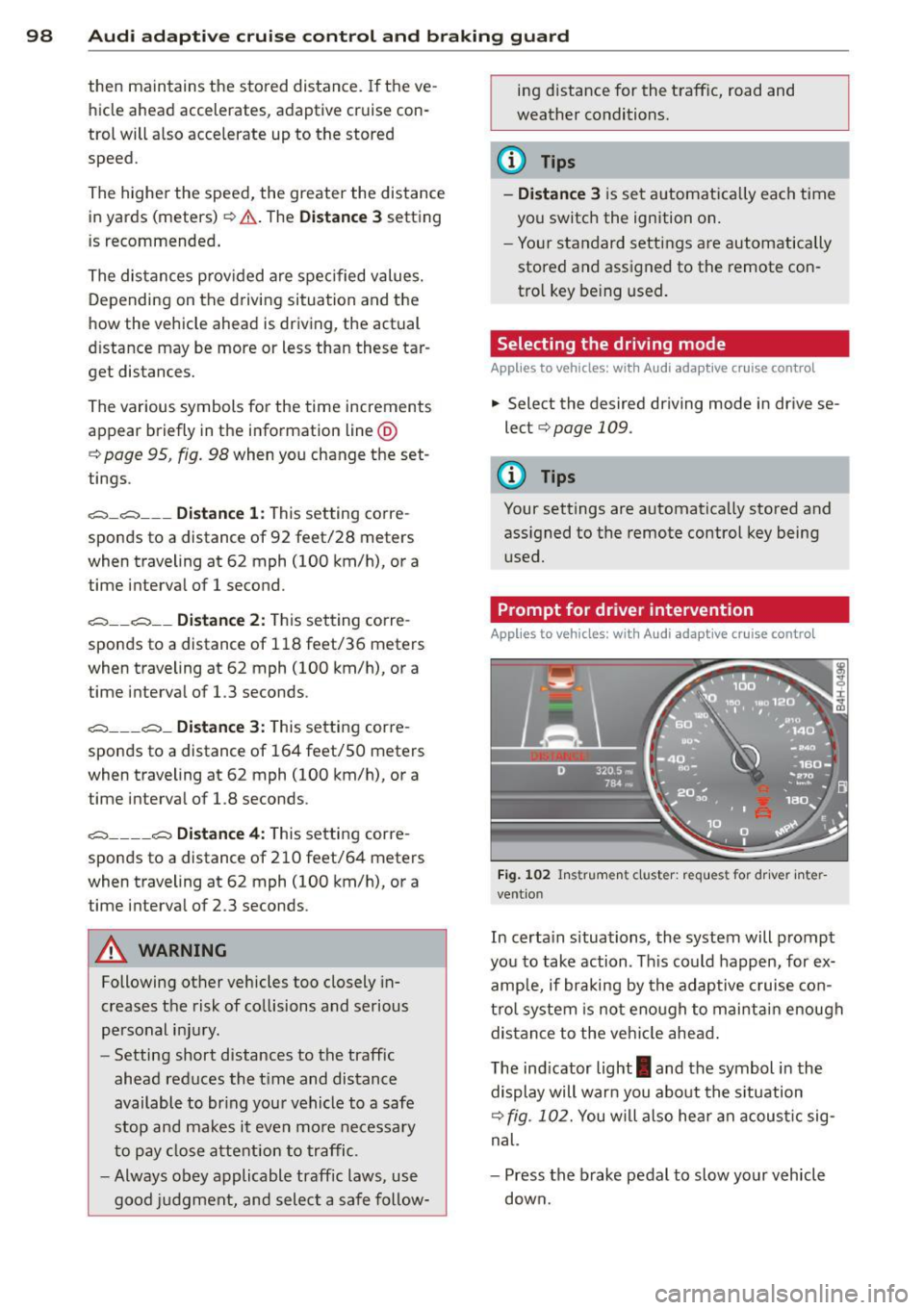
The ind icator light
I and the symbol in the
display will warn you abo ut the s ituation
¢
fig. 102. You will also hea r an acous tic sig
nal.
- Press the brake pedal to slow your vehicle
down.
Page 101 of 318
Audi adaptive cruise control and braking guard 99
Audi braking guard
Description
Applies to vehicles: with Audi adaptive cruise control
Fig. 103 Instrumen t cl uste r: ap proac h warn ing
Braking guard uses radar sensors and a video
camera . It a lso functions within the lim its of
the system whe n adapt ive cruise control is
switched off .
What can braking guard do? When detected in time, the system can assess
situations when a vehicle ahead brakes sud
denly or if y our own veh icle is traveling at a
high speed and approaching a veh icle up
ahead that is moving more slowly . Bra king
g ua rd does not react if i t cannot detect th e
si tuation.
The system advises you of va rious situations:
- The distance warning is given if you are too
close to the vehicle ahead for a long time. If
the vehicle ahead brakes sharply, you will not be able to avoid a col lisio n. The indicator
light
I i n the display comes on .
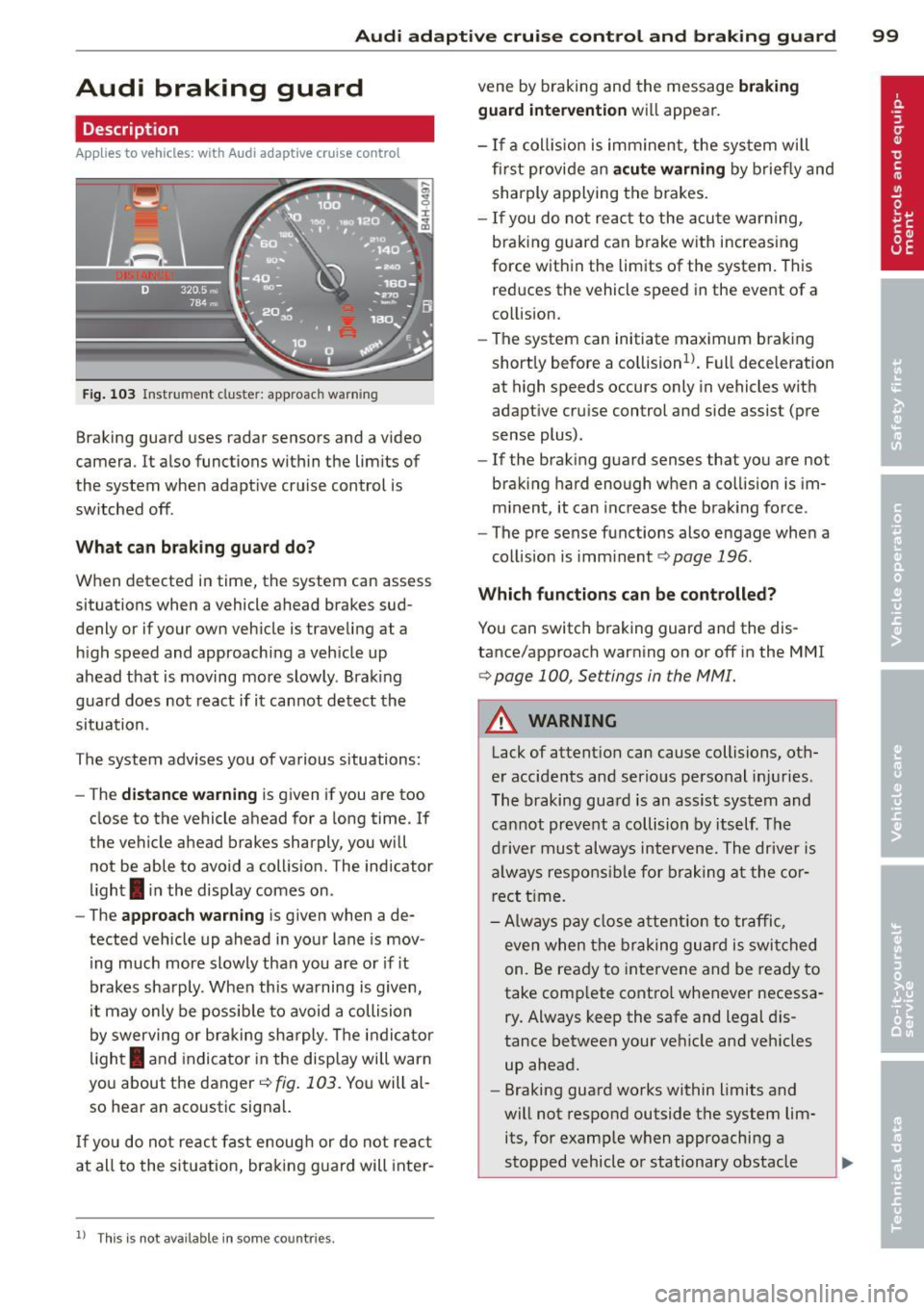
- The approach warning is g iven when a de
tected vehicle up ahead in yo ur lane is mov
i ng much more slowly tha n you are o r if it
b rakes sha rply . When this wa rning is given,
i t may only be possib le to av oid a collision
by swerving or br aking sh arply . Th e ind ic a tor
li gh t
I and indicator in the disp lay will warn
yo u about the danger
c::> fig . 103 . You will al
so hear an acoustic sig na l.
If yo u do not re act fast enoug h or do not re act
at all to the situat io n, braking g uard will inte r-
11
Thi s is not ava ilable in som e coun tri es.
vene by braking and the message braking
guard intervention will appea r.
- If a coll is ion is im minen t, the sy st em w ill
first provi de an acute warning by brie fly and
shar ply a pplying the brakes.
- If you do not re act t o the acu te war ning,
bra king g uard can brake w ith increas ing
force w ith in the lim its of the system. T his
red uces the vehicle speed in the event of a
co llision.
- The system can initiate maximum brak ing
short ly before a co llision
ll. Full dece leration
at high speeds occurs only in vehicles with
adapt ive cr uise control and side assist (pre
sense plus).
- If the brak ing g uard senses that yo u are not
braki ng hard enough w hen a co llision is im
m inent, it can inc rease t he b ra ki ng fo rce .
- The pre sense functions also engage whe n a
col lision is imm inent
c::> page 196 .
Which function s can be controlled?
You can switc h braking guard an d the dis
tance/approach warning on or off in the M MI
c::> page 100, Settings in the MMI.
&_ WARNING
Lack of attent ion can cause collisions, ot h
e r accidents and serio us pe rsonal inj uries .
Th e braking gua rd is an assist system and
ca nnot pr ev en t a collisi on by its elf . T he
dr iver must always in tervene. The drive r is
al way s res pons ible f or br aki ng a t the cor
rect t ime.
- Always pay clos e att ention to traffic ,
e v e n w hen the bra king g uard is swi tched
on. Be ready t o intervene and be ready to
take comp lete contro l whenever necessa
ry. Always keep the sa fe and legal dis
tanc e between your ve hicle an d veh icles
up ahead.
- Braking guard works wi thin limits and
wi ll not respo nd outside t he system lim
its, for e xamp le w hen approaching a
stopped vehicle o r stationary obstacle ..,.
Page 104 of 318
102 Audi la ne ass is t
Audi lane assist
Lane assist
Description
Appl ies to vehicles: with lane assist
Lane assist helps you keep your vehicle in your
lane .
Lane assist detects lane marker lines within
the limits of the system using a camera in the
windshield. If you are approaching a detected
lane marker line and it appears likely that you
will leave the lane, the system will warn you
with a light vibration . Lane assist is operable
when the line marking the lane is detected on
at least one s ide of the vehicle .
The system will not warn you before cross ing
a lane marker line if you have activated the
turn signal. In t his case, it assumes tha t you
a re changing lanes intent ionally.
The system is designed for driv ing on free
ways and expanded highways and thus works
on ly at speeds of 40 mph (65 km/h) o r more.
.&_ WARNING
- Lane ass ist will not keep your vehi cle in
yo ur lane. The system only warns the
dr iver w hen the vehicle is leaving the
lane. The driver is always responsib le for
keeping the vehicle in the lane.
- The camera is not able to detect all lane
boundary lines and in some cases might
also detect lane structures or objects as
boundary lines. This can lead to incorrect
warnings or warnings that fail to go off
at all.
- The camera's visibility can be impaired by
vehicles ahead of you, for instance, or by
rain, snow, heavy spray or light shin ing
in to the camera lens. This can cause lane
assist to fa il to detec t bou ndary lines.
- Activating and deactivating
Applies to
vehicles: with lane assist
Fig. 104 Turn s igna l lever: Lane assist button
Fig . 105 Windsh ield: Lane assist camera viewing win
dow
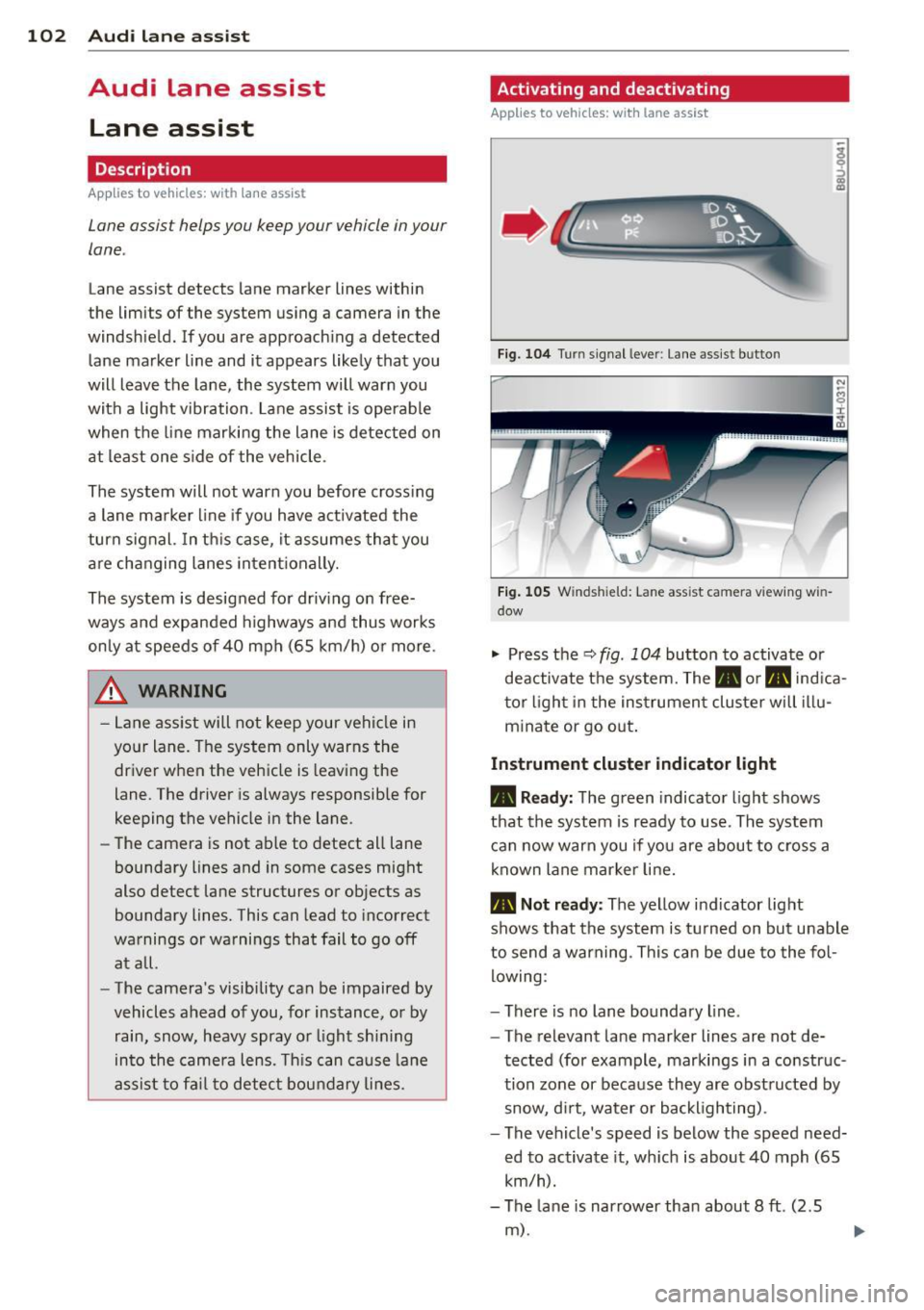
"' Press the q fig. 104 button to activate or
deactivate t he system. The • or. ind ica
t or l ight in the instrument cluster will il l u
m inate or go o ut.
Instrum ent cluster indicator light
• Re ady:
The green indicator light shows
that th e system is ready to use . Th e system
can now warn you if yo u are about to cross a
known lane mar ker line.
• Not ready: The yellow indicator light
shows that the system is t urned on bu t unable
to send a warning . This can be due to the fol
lowing :
- There is no lane boundary line .
- The relevant lane marker lines are not de-
tected (for example, markings in a construc
tion zone or because they are obst ructed by
snow, d irt, water or backlighting) .
- The vehicle's speed is below the speed need·
ed to activate it, wh ich is about 40 mph (65
km/h).
- The lane is narrower than about 8
ft. (2.5
m) .
Page 106 of 318
104 Audi lane assist
Setting the warning point and steering
wheel vibration
Applies to vehicles: with lane assist
You can adjust individual settings in the MMI.
.. Se lect: ICARI function button> Car systems
control button > Driver assist > Audi lane
assist .
Setting the warning point
Early: With this setting, a warning is provided
before a wheel touches the detected lane
boundary line . The warning depends on the
angle in which the veh icle is approaching the
line. The distance at which the warning is giv
en increases as the angle becomes sharper. If
you dr ive towa rd a boundary line at a very
sha rp angle, the warning will come just before
a wheel touches the line.
Medium : With this setti ng, the warn ing po int
is adapted to the course of the road, the lane
width and the speed. You wi ll sti ll be warned
if you cross slightly over a dotted line when
driving on curves.
Late : This setting has the same properties as
medium. You will only be warned once a
wheel crosses a detected line.
Setting the steering wheel vibration
The steering wheel v ibration can be set to
Low , Medium or Strong . Selecting each of the
settings will cause the steering wheel to vi
b rate so you can check the strength of the vi
bration in that setting.
(D Tips
Your settings are automatically stored and
assigned to the remote contro l key being
used .
Page 111 of 318
Audi drive select Driving settings
Introduction
Aud i drive select makes it possible to experi
ence different types of vehicle settings in one
veh icle. The driver can select th ree
Comfort,
Auto
and Dynamic modes in the MMI to
switch between a sporty and a comfortable
driving mode.
You can also adjust the setting according to
your preferences in the
individual mode. For
examp le, you can combine settings such as a
sporty engine tuning with comfortab le steer
ing.
A WARNING
Improper use of the Audi drive select can
cause collisions, other acc idents and seri
ous personal injury .
Description
The vehicle setup in each mode depends on
the vehicle's features. The engine, transm is
sion, steering, reve rsible safety belt tension
ers and adaptive air suspension are always in
volved.
Engine and transmission
Depending on the mode, the engine and the
tra nsmission respond quicker or in a more bal
anced manne r to acce lerator pedal move
ments. In the sporty dynamic mode, the
transmission shifts at higher RPMs .
Air suspension
The adaptive air suspension/adaptive air sus
pension sport*
( Air suspension in the MMI) is
an electronically con trolled air suspension and
damping sys tem. They are adjusted depend
ing on the selected driving mode, the drive r's
steering, braking and acceleration input and
the road s urface, vehicle speed and load. A
sporty setting is generally used in vehicles
with adaptive air suspension sport*.
Audi drive select 109
The vehicle clearance varies depending on the
selected mode and the speed .
T he hig hway setting is activated automatically
when you drive above 75 mph (120 km/h) for
more than 30 seconds in the
auto or dynamic
mode. The ground clearance is increased auto
matically if the speed drops below 44 mph
(70 km/h) for more than 120 seconds.
Steering
The steering adapts in terms of steering effort
and steering ratios . Indirect stee ring that
moves easily, like the steering in comfort
mode, is best suited to long drives on a high
way . In contrast, dynamic mode provides
sporty, direct steer ing .
The following applies to vehicles with dynamic steering* : the steering ratio changes based on
vehicle speed in order to ma inta in optimum
steering effort for the driver at all times. This
sets the steering to be less sens itive at higher
speeds in order to provide improved vehicle
control. At reduced speeds, however, steer ing
is mo re direct in order to keep the steering ef
fort as minimal as possible when the driver is
maneuvering the vehicle. At low and average
speeds, dynamic steering additiona lly pro
vides more responsive steering performance.
Sport differential*
As a component of the all whee l dr ive system
(quattro ®)
<:!) page 203, the Sport differen
tia l* distributes the driving power to the rear
axle depending on the situation . The distribu
tion of power varies depending on the select
ed mode, from balanced (comfort) to agile
(dynamic). The goal is a high level of agility
and ability to accelerate on curves . The vehicle
is very responsive to steering.
Curve light*
The curve light adapts to driving on curves.
The pivoting act ion and the lighting are also
adapted to the mode.
Adaptive cruise control*
The behavior when accelerating can be adjust
ed from comfortab le to sporty, depending on .,..
Page 113 of 318
Audi drive select 111
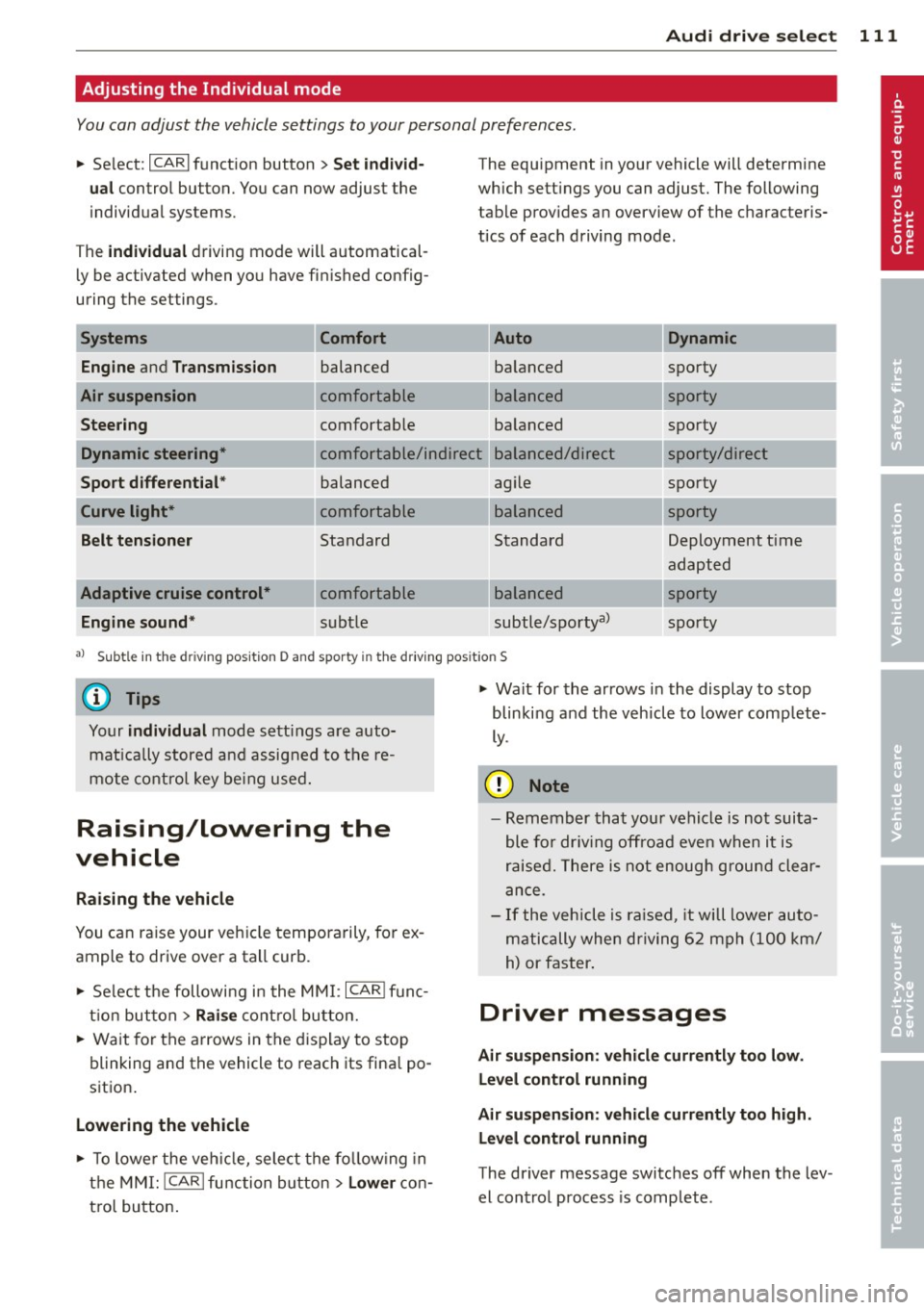
Adjusting the Individual mode
You can adjust the vehicle settings to your personal preferences.
"Se lect: ICARlf unction button> Set individ·
ual
control button. You can now adjust the
individual systems.
The
individual driving mode will automatical
ly be activated when you have finished config
uring the settings .
Systems Comfort
Engine
and Transmission balanced
Air suspension comfortable
Steering comfortable The equipment
in your vehicle will determine
which settings you can adjust. The following
table provides an overview of the characteris
tics of each driving mode.
Dynamic
balanced sporty
---~-
sporty
balanced
Dynamic steering* comfortable/ind ire ct balanced/direct sporty
sporty/direct
sporty
Sport
differential *
Curve light*
Belt tensioner
Adaptive cruise control* Engine sound* balanced
comfortable
Standard
comfortable
subtle agile
---~· balanced
Standard
---~· balanced
subtle/sportyal
sporty
Deployment t ime
adapted
sporty
sporty
al Subt le in the d riving position D and sporty i n the driving pos itio n S
© Tips
Your individual mode settings are auto
matically stored and assigned to the re
mote control key being used.
Raising/lowering the
vehicle
Raising the vehicle
You can raise your veh icle temporarily, for ex
ample to drive over a tall curb.
" Select the following in the MMI: ICARI func
tion button >
Raise control button.
" Wait for the arrows in the display to stop
blinking and the vehicle to reach its final po
sition .
Lowering the vehicle
" To lowe r the vehicle, select the following in
the MMI: ICARlfunction button>
Lower con
t rol button. "
Wait for the arrows in the display to stop
blinking and the vehicle to lower comp lete
ly.
(D Note
- Remember that your vehicle is not suita
ble for driv in g offroad eve n when it is
raised. There is not enough ground clear
ance.
- If the vehicle is raised, it will lower auto
matically when driving 62 mph (100 km/
h) or faster.
Driver messages
Air suspension: vehicle currently too low.
Level control running
Air suspension: vehicle currently too high.
Level control running
The driver message switches off when the lev
el control process is complete .
Page 114 of 318
112 Night vision assistant
Night vision assistant
Description
Applies to vehicles: with night v isio n ass istant
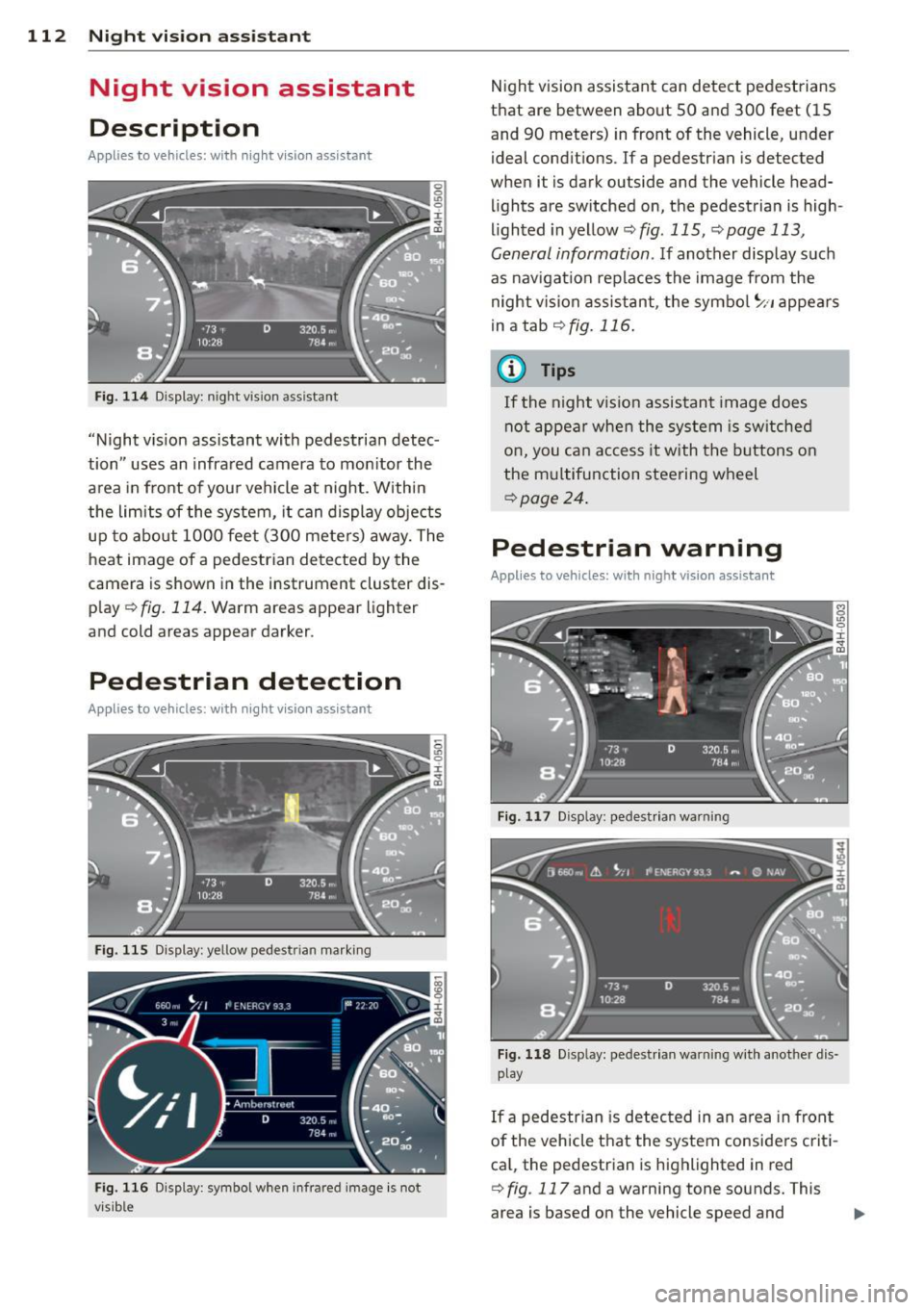
Fig. 114 Display: n ight vis ion assistant
"Night vis ion assistant with pedestrian detec
tion" uses an infrared camera to monitor the
area in front of you r vehicle at night. Within
the limits of the system, it can display objects
up to about 1000 feet (300 meters) away. The
heat image of a pedestrian detected by the
camera is shown in the instrument cluster dis
p lay ¢
fig. 114. Warm areas appear lighter
and cold areas appear darker.
Pedestrian detection
Applies to vehicles: with nig ht v isio n ass istant
Fig. 115 Display: yellow pedestr ian marking
Fig. 116 Display: symbol when infrared image is not
visib le
Night vision assistant can detect pedestrians
that are between about 50 and 300 feet (15
and 90 meters) in front of the vehicle, under
ideal conditions.
If a pedestrian is detected
when it is dark outside and the vehicle head
lights are switched on, the pedestrian is high
lighted in yellow¢
fig. 115, ¢page 113,
General information.
If another display such
as navigation replaces the image from the
night vision assistant, the symbo l
~11 appears
in a tab
¢fig . 116 .
(D Tips
If the night v ision assistant image does
not appear when the system is switched
on, you can access it with the buttons on
the multifunction steering wheel
¢page 24.
Pedestrian warning
Applies to vehicles: wit h night vision assistant
Fig. 117 D isp lay: pedestrian warning
Fig. 118 Disp lay: pedestr ian warning w ith another dis
play
If a pedestr ian is detected in an area in fron t
of the vehicle that the system considers criti
ca l, the pedestrian is highlighted in red
¢
fig . 117 and a warning tone sounds. This
area is based on the vehicle speed and
Page 115 of 318
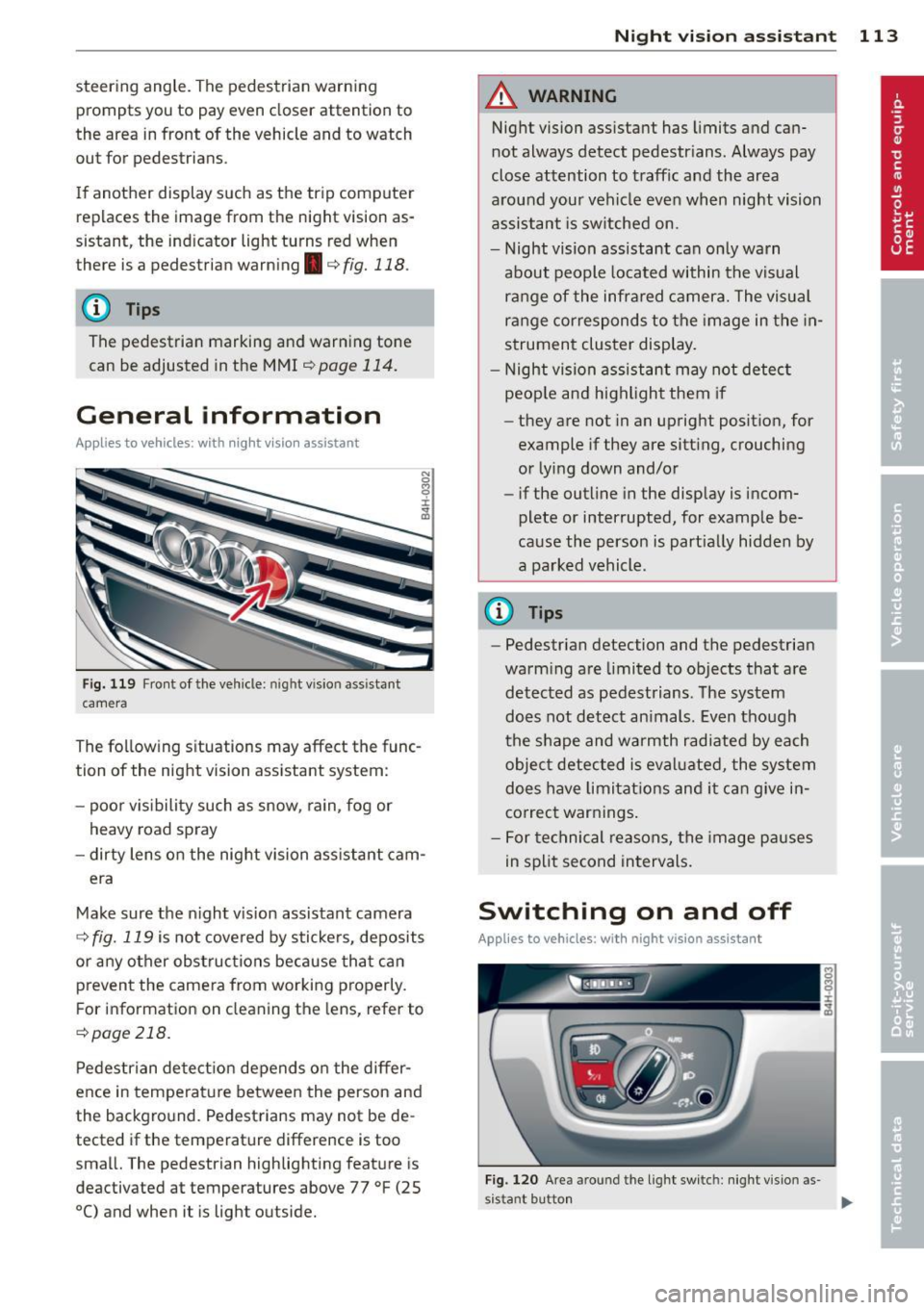
steering angle. The pedestrian warning prompts you to pay even closer attention to
the area in front of the vehicle and to watch
out for pedestrians.
If another display such as the trip comp uter
replaces the image from the night vision as
sistant, the indicator light turns red when
there is a pedestrian warn ing .
c:> fig. 118 .
@ Tips
The pedestrian marking and warning tone
can be adjusted in the MMI
r=>poge 114.
General information
Applies to vehicles: with night v isio n ass istant
N 0
8 :i:
~
Fig. 119 Fron t of the veh icle: night vision ass istant
camera
The following situations may affect the func
tion of the night vision assistant system:
- poor v is ib ility such as snow, rain, fog or
heavy road spray
- dirty lens on the night vision assistant cam-
era
Make sure the night vision assistant camera
i::> fig. 119 is not cove red by stickers, deposits
or any other obstructions because that can
prevent the camera from working properly.
F or information on cleaning the lens, refer to
c:> page 218.
Pedestrian detection depends on the differ
ence in temperature between the person and
the background. Pedestrians may not be de
tected if the temperature difference is too
sma ll. The pedestrian highlighting feature is
deactivated at temperatures above 77 °F (25
0
() and when it is light outside.
Night vision assistant 113
A WARNING
Night vision assistant has limits and can
not always detect pedestr ians . Always pay
close attention to traffic and the area
around your vehicle even when night vision
assistant is switched on.
- Night vision assistant can only warn
about people located within the visual
range of the infrared camera. The visual
range corresponds to the image in the in
strument cluster display.
- Night vision assistant may not detect
peop le and highlight them if
- they are not in an upright posit ion, for
example if they are sitt ing, crouching
or lying down and/or
- if the outline in the display is incom
plete or interrupted, for example be
cause the person is part ially hidden by
a parked vehicle .
@ Tips
-Pedestrian detection and the pedestrian
warm ing are limited to objects that are
detected as pedestrians. The system
does not detect an imals. Even though
the shape and warmth radiated by each
object detected is evaluated, the system
does have limitations and it can give in
correct warnings .
- For technical reasons, the image pauses
in split second intervals.
Switching on and off
Applies to vehicles: wit h night vision assistant
Fig . 120 Area around th e ligh t sw itch: night vis ion as·
s istant button .,.
Page 116 of 318
114 Night vision assistant
• Switch the ignition on and turn the light
sw itch to the
AUTO position or tD .
• To sw itch night vision ass istant on, press
the~ ,, button
c> fig. 120 . The image from
the night vision camera appea rs in the in
strument cluster display .
• Press the button~ -, aga in to switc h night vi
s ion assistant off .
Settings in the MMI
Appl ies to vehicles: with night v isio n ass istant
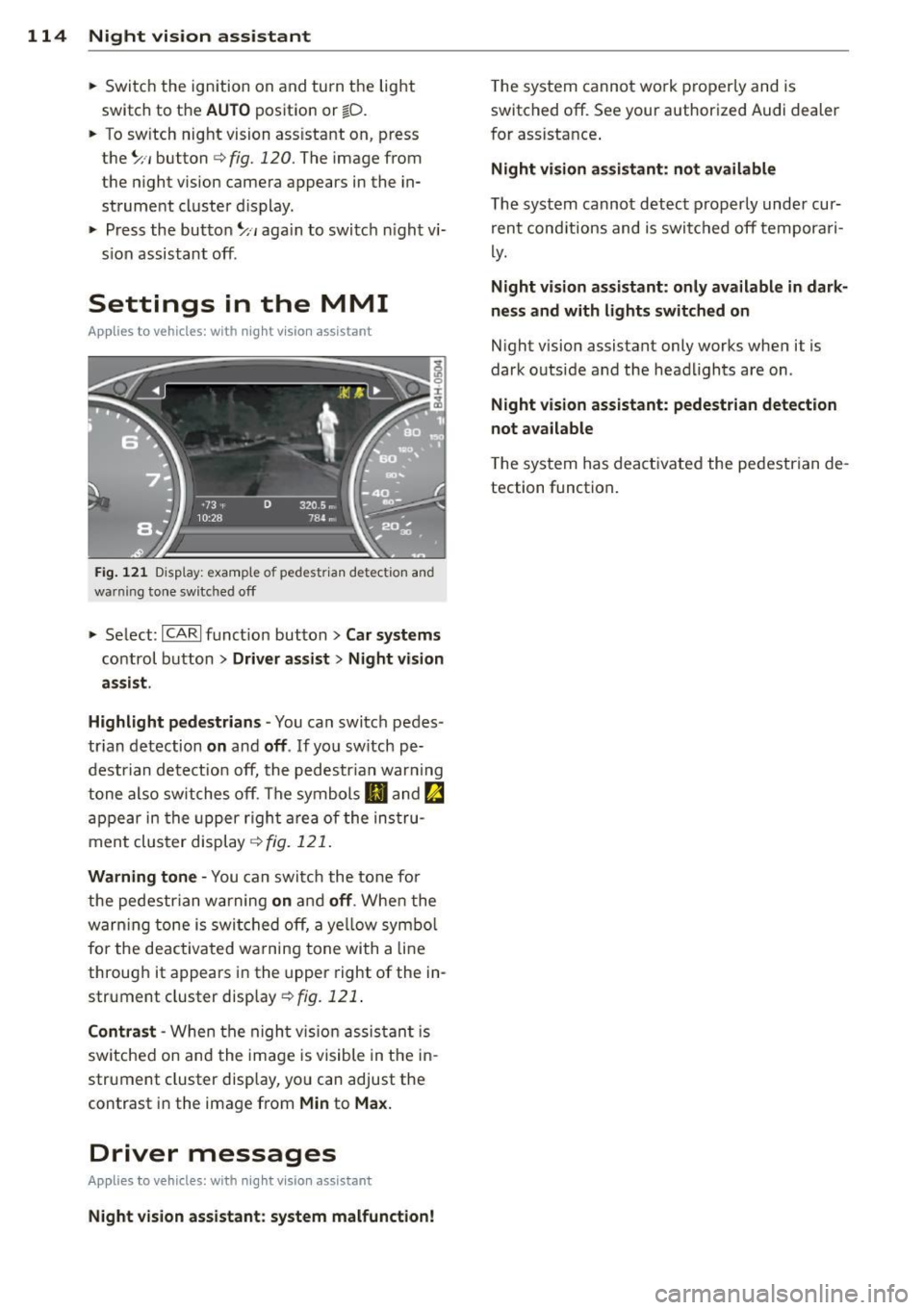
Fig. 121 Disp la y: examp le of pede strian detect ion and
warn ing tone switc hed off
• Select : I CARI funct ion button > Car systems
control button > Driver assist > Night vision
assist.
Highlight pedestrians -
You can switch pedes
tr ian detection
on and off . If you sw itch pe
destrian detection off, the pedestr ian war ning
tone also switches off. The symbols
IJ and ~
appear in the upper right area of the instru
ment cluster display
c> fig. 121.
Warning tone -You can switch the tone for
the pedestrian warning
on and off . When the
warn ing tone is switched off, a ye llow symbol
for the deactivated wa rning tone with a line
through it appears in the upper right of the in
strument cluster display
c> fig. 121 .
Contrast -When the night vis ion assistant is
sw itched on and the image is visible in the in
strument cluster display, you can adjust the
contrast in the image from
Min to Max.
Driver messages
Appl ies to veh icles: with night visi on ass istant
Night vision assistant: system malfunction!
The system cannot work properly and is
switched off. See your authorized Audi dealer
for assistance .
Night vision assistant: not available
The system cannot detect properly under cur
rent cond itions and is switched off temporari
ly.
Night vision assistant: only available in dark
ness and with lights switched on
Night vision assistant only works when it is
dark outside and the headlights are on.
Night vision assistant: pedestrian detection
not available
T he system has deactivated the pedestrian de
tection function.
Page 118 of 318
116 Automatic Transmission
Selector lever lock
The selector lever lock prevents you from se
l ecting a position unintentionally, causing the
vehicle to roll. When engaging some selector lever positions, you must press the button on
the selector lever<=>
fig. 123 and/or press the
brake pedal.
You must press the brake pedal to engage a
selector lever position when the engine is run
n ing while the vehicle is stationary. The ar
rows¢
fig. 124 indicate when you need to
press the button on the selector lever.
The selector lever does not lock if you shift
from D to R within one second . This allows
you to "rock" the vehicle to free it when it is
stuck.
P - Park
The whee ls are locked in this position. Only
shift into park when the vehicle is stationary
¢ & .To engage the P selector lever position,
press the button on the selector lever and
shift into the P position.
You can only shift out of park when the eng ine
is running and you are pressing the brake ped
al. Press the button on the selector lever to
release the park ing lock and select the des ired
selector lever posit ion.
P engages automatically when you switch the
engine off while D, Sor R is engaged or in
manual mode.
If you switch the engine off when N is engag
ed, the transmission remains in N for approxi
mately 30 minutes and then Pis engaged.
You must use the emergency release proce
dure to release the parking lock before towing
the vehicle
¢ page 120.
R - Reverse
The reverse gear is engaged in this position.
Only select reverse when the vehicle is sta
tionary and the engine is running at idle speed
¢ & .To engage the R se lector lever position,
press the button on the selector lever, press the
brake pedal and move the selector lever
into the R position.
T he back-up lights turn on when you select
the R selector lever position while the engine
is running .
N -Neutral
The transmission is in idle in this position. To
engage the N selector lever position , press
the button on the selector lever and shift int o
the N position.
If you switch the engine off when N is engag
ed, the transmission remains in N for approxi
mately 30 min utes and then Pis engaged.
You cannot select the N position when the ig
nition is switched off . When driving through
an automat ic car was h, first select the N posi
tion and then switch the engine off
¢page 216.
The vehicle cannot be locked when the selec
tor leve r is in the
N position.
D/S - Position for driving forward
In the D/S pos ition, the transmission can be
operated either in the normal mode Dor in
the sport mode S. You can only select the S se
lector lever position when Dis engaged. Move
the selecto r lever back to engage the S selec
tor lever position. To select the D selector lev
er position again when S is engaged, move the
selector lever back¢& . To shift from
N to D
when traveling at speeds below 1 mph (2km/
h), press the brake pedal and select the D se
lector lever position ¢
&.
In the normal mode D, the transmission auto
matically selects the suitable gear ratio.
It de
pends on engine load, vehicle speed and driv
ing style.
Select the
sport mode S for sporty driving.
T he vehicle makes full use of the engine's
power. Shift ing may become noticeab le when
acce lerat ing.
The S selector lever position engages auto
matically when yo u select the dynamic mode
in Audi drive select.
...