Media AUDI A8 2014 User Guide
[x] Cancel search | Manufacturer: AUDI, Model Year: 2014, Model line: A8, Model: AUDI A8 2014Pages: 314, PDF Size: 78.47 MB
Page 40 of 314
38 Openin g and clo sing
• Pull the button C:5 in the driver's door
¢
fig. 25 briefly . Or
• Press the handle in the luggage compart
ment lid ¢
fig. 26.
Clos ing th e lu ggag e compartm ent lid
• Pull the luggage compartment lid down and
allow it to drop gently. The lid is then closed
automatically ¢.&_ .
The settings in the MM I determ ine if the lug
gage compartment lid can be opened using
the handle ¢
page 34.
A WARNING
-After closing the luggage compartment
lid, a lways pull up on it to make sure that
it is properly closed. Otherwise it could
open suddenly when the veh icle is mov
ing .
- To help prevent poisonous exhaust gas
from being drawn into the vehicle, al
ways keep the luggage compartment lid
closed while driving. Never transport ob
jects large r than those which fit com
pletely into the luggage area, because
then the luggage compartment lid can
not be fu lly closed.
- Never leave your vehicle unattended es
pecially with the luggage compartment
lid left open . A child cou ld crawl into the
car thro ugh the luggage compartment
and pull the lid shut, becom ing trapped
and unable to get out. To reduce the risk
of personal injury, never let ch ildren play
in or around your vehicle. Always keep
the luggage compartment lid as we ll as
the vehicle doors closed when not in use.
(i) Tips
When the veh icle is locked, the luggage
compa rtment lid can be un locked sepa
rately by pressing the button
C:5 on the
maste r key. W hen the luggage compart
ment lid is closed again, it locks automati
cally.
Power opening/closing luggage
compartment lid
Applies to vehicles: with power opening/closing luggage
compartment lid
The luggage compartment lid can open and
close electrically .
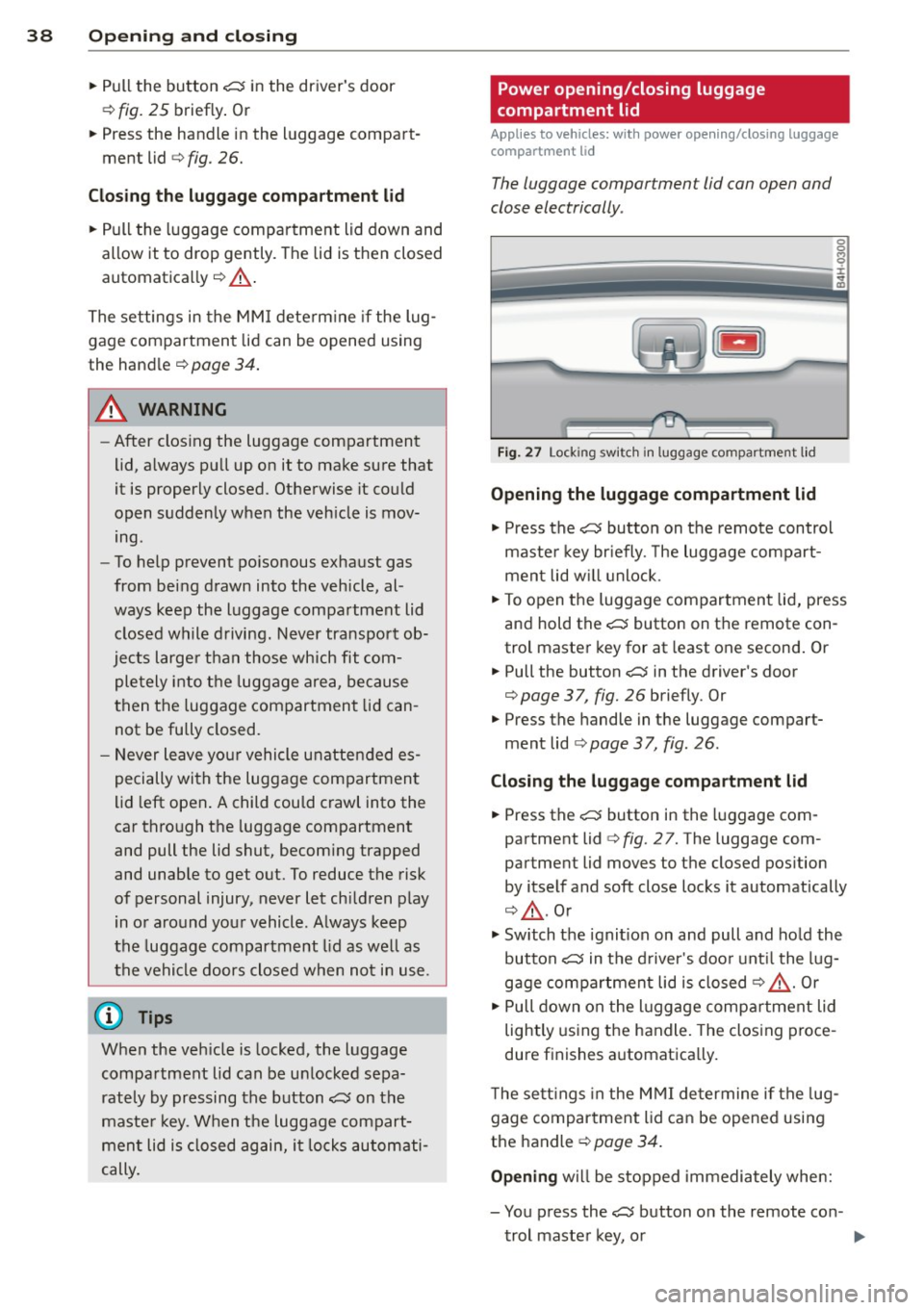
Fig. 27 Lock ing sw itc h in luggage compartment l id
Opening the luggage compartment lid
• Press the C:5 button on the remote control
maste r key br iefly. The luggage compart
ment lid w ill unlock .
• To open the luggage compartment lid, press
and hold the
C:5 button on the remote con
trol master key for at least one second . Or
• Pull the button C:5 in the driver's door
¢
page 37, fig. 26 briefly. Or
• Press the handle in the luggage compart
ment lid
¢ page 37, fig . 26.
Closing th e luggage compartment lid
• Press the C:5 button in the luggage com
partment lid
c:> fig. 27. The luggage com
partment lid moves to the closed pos ition
by itself and soft close locks it automatically
c:> .&_ . Or
• Switch the ignit ion on and pull and ho ld the
button
C:5 in the d river 's doo r unt il the lug
gage compartment lid is closed¢.&_. Or
• Pull down on the l uggage compar tment lid
lightly us ing the handle. The closing proce
dure f inishes a utomatica lly.
T he sett ings in the M MI determine if the lug
gage compartment lid can be opened using
the handle ¢
page 34.
Opening will be stopped immediately whe n:
- You press the
C:5 button on the remote con -
trol master key, o r
Page 41 of 314
-You press the e:5 button in the luggage
compartment lid, or
- You push the handle in the luggage com
partment lid, or
- You pull the
e:5 button in the driver's door ,
or
- When something blocks the luggage com
partment lid or makes it difficult for the lid
to move.
If you press one of the buttons e:5 now, the
luggage compartment lid will either open or
close, depending on its angle .
If you pull lightly on its handle, the luggage
compartment lid will close.
Closing will be stopped immediately when :
- You p ress the
e:5 button in the luggage
compartment lid, or
- You push th e handle in the luggage com
partment lid, or
- You release the
e:5 button on the driver's
door, or
- When something blocks the luggage com
partment lid or makes it difficult for the lid
to move.
If you press one of the buttons
e:5 now, the
luggage compartment lid will either close or
open, depending on its angle.
If you pull lightly on its handle, the luggage
compartment lid will close.
You can manually stop the automatic open ing/closing of the luggage compartment lid.
The automatic closing process begins if you push down on the luggage compartment lid.
A WARNING
-After closing the luggage compartment
lid, always pull up on it to make sure that
it is properly closed. Otherwise it could
open suddenly when the vehicle is mov
ing.
- To help prevent poisonous exhaust gas from being drawn into the vehicle, al
ways keep the luggage compartment lid closed while driving. Never transport ob-
Opening and closing 39
jects larger than those which fit com
pletely into the luggage area, because
then the luggage compartment lid can not be fully closed.
- Never leave your vehicle unattended es
pecially with the luggage compartment
lid left open . A child could crawl into the
car through the luggage compartment
and pull the lid shut, becoming trapped
and unable to get out. To reduce the risk
of personal injury, never let children play
in or around your vehicle. Always keep
the luggage compartment lid as well as
the vehicle doors closed when not in use.
- Never close the luggage compartment
lid inattentively or without checking
first . Although the closing force of the
luggage compartment lid is limited, you
can still seriously injure yourself or oth
ers .
- Always ensure that no one is within
range of the luggage compartment lid
when it is moving, in particular close to the hinges and the upper and lower
edges - fingers or hands can be pinched.
- Never try to interfere with the luggage
compartment lid or help it when it is be
ing opened or closed automatically.
(D Tips
- If there is a mechanical problem with au
tomatic closing for the luggage compart
ment lid or there is an obstruction, it
opens again immediate ly. Check to see
why the luggage compartment lid could
not be closed before attempting to close
it again.
- The following applies to vehicles equip
ped with the Convenience key* feature: if
the remote control key is left in the lug
gage compartment, luggage compart
ment will automatically unlock itself af
ter you lock the vehicle. This prevents
you from unintentionally locking your
key in the luggage compartment.
- When the vehicle is locked, the luggage
compartment lid can be unlocked sepa
rately by press ing the button
e:5 on the
Page 45 of 314
.. Leave the master key with the service per
sonnel for park ing and keep the mechanica l
key w ith you.
When the "valet parking" feature is activated:
- the un locking button for the luggage com
partment lid~ in the d river's door is inac
t ive
- the button~ on the master key is inactive
- the opening handle in the luggage compart-
ment lid is inactive .
The vehicle can be driven and locked and un locked with the master key . Access to the lug
gage compartment is blocked .
When the valet parking function is switched on, the message
Valet parking activated ap
pears in the instrument cluster display when
you switch the ign it ion on .
Sliding/tilting sunroof
Operation
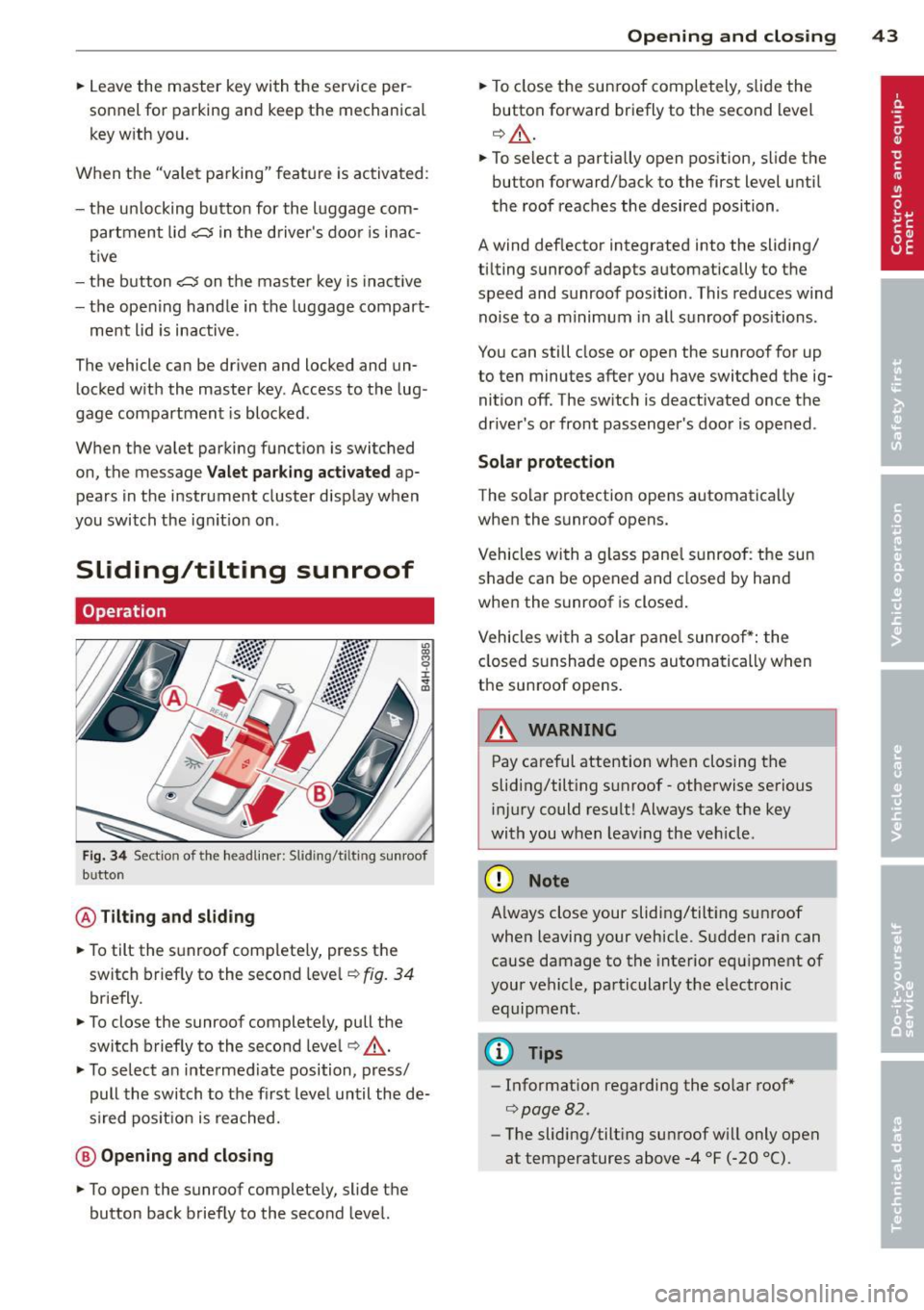
Fig. 34 Sectio n of the headliner: Slid ing/t ilting sunroof
b utto n
@ Tilting and sliding
.. To tilt the sunroof complete ly, press the
switch briefly to the second leve l¢
fig. 34
briefly.
.. To close the sunroof completely, pull the
switch brief ly to the second leve l¢ ,&. .
.. To select a n intermediate position, press/
pull the switch to the first level until the de
s ir ed pos it ion is reached.
@ Opening and closing
.. To open the sunroof completely, slide the
button back briefly to the second level.
Opening and closing 43
.. To close the sunroof completely, slide the
button forward briefly to the second level
¢ ,&. .
.. To select a partially open position, slide the
button forward/back to the first level until
the roof reaches the desired position .
A wind deflector integrated into the sliding/
t ilting sunroof adapts automatically to the
speed and sunroof pos ition . This reduces wind
noise to a minimum in all sunroof positions .
You can still close or open the sunroof for up
to ten minutes after you have switched the ig nition off . The sw itch is deactivated once the
driver's or front passenger's door is opened .
Solar protection
The solar protection opens automatically
when the sunroof opens.
Vehicles with a glass pane l sunroof : the sun
shade can be opened and closed by hand
when the sunroof is closed.
Vehicles with a solar pane l sunroof*: the
closed sunshade opens automatically when
the sunroof opens.
A WARNING
-Pay careful attention when closing the
sliding/tilt ing sunroof -otherwise serious
injury could result! Always take the key
with you when leav ing the veh icle .
(D Note
-
Always close your sliding/tilting sunroof
when leaving your vehicle. Sudden rain can
cause damage to the interior equipment of
your vehicle, particularly the electronic equipment .
@ Tips
-Information regarding the so lar roof*
¢page 82 .
-The sliding/tilt ing sunroof w ill only open
at temperatures above -4 °F
(-20 °() .
Page 58 of 314

56 Clear vis ion
Dimming the mirrors
Fig. 51 Automat ic d imming rea rv iew mirror
.. To dim the rearview mirror and both exterior
mirrors, press the @button . The diode @
turns on. The rearview and exter ior mirrors
dim automatically when light sh ines on
them, for example from head lights on ave
hicle to the rea r.
.&_ WARNING
Electrolyte fl uid can leak from au tomatic
dimmi ng mirrors if the glass is broken.
Electrolyte fl uid can irritate sk in, eyes and
respiratory system.
- Repeated or prolonged exposure to elec
t ro lyte can cause irritation to the resp ira
tory system, especially among people
with asthma or other respiratory cond i
tions. Get fresh air immediately by leav
ing the vehicle or, if that is not possible,
open windows and doors all the way .
- If electrolyte gets into the eyes, flush
them thoroughly with large amounts of
clean water for at least 15 m in utes;
med ica l attent ion is recommended.
- If electrolyte contacts sk in, f lush affect
e d area w ith clean water for at least 15
min utes and then w ash affec ted area
with soap and water; medical at tention
is recommended. Thoroughly wash af
fected clothing and shoes before reuse.
- If swa llowed and person is conscious,
rinse mouth w it h wate r fo r at leas t 15
minutes. Do not induce vomiting unless
instructed to do so by medical professio
nal. Get medical attention immediately.
.
(D Note
Liqu id e lectrolyte leaking from broken mir
ror glass w ill damage any plastic surfaces
i t comes in contact with. Clean up spilled
electrolyte immediately with clean water
and a sponge .
@ Tips
-Switching off the dimming function of
the inside rear view mirror also deacti
vates the automatic dimming function of
the exter ior mir ro rs .
- Automatic d imm ing for the mirror on ly
operates properly if the sun shade* for
the rear w indow is not in use or the light
st riking the inside m irror is not hinde red
by ot he r objects.
- The automatic dimming m irrors do not
dim when the interior lighting is tu rned
on or the reve rse gear is selected .
Digital compass
Switching the compass on and off
Applies to vehicles: with digital compass
The compass direction is shown in the rear
view mirror .
l
Fig. 52 Rearv iew mirro r: Digital compass activated
.. To switch the compass on or off, press and
hold the b utton @ until the compass dis
p lay in the m irror ¢
fig. 52 appears o r disap
pea rs.
The dig ital compass on ly works when the igni
t ion is on . The directions are indicated with
abbrev iat ions:
N (nor th), NE (no rtheast), E
(east) , SE (southeas t), S (so uth), SW (so uth
west),
W (west), NW (northwest) .
Page 86 of 314

84 On the road
the stored position as soon as you switch on
the ignition.
Starting and stopping
the engine
Starting the engine
This button switches on the ignition and
starts the engine.
Fig. 85 Cente r console: START ENGINE S TOP b utton
Sw itching the i gni tion on /off
~ To switch the ignition on/off, press the
I START
ENGINE STOPI button. Do not press
the brake pedal while do ing this . D iesel
vehicles are preheated wh ile the ignition is
switched on.
Starting the engine
~ Press the brake pedal Q &,.
~ Press the I START ENGINE STOPI button
Q fig. 85 . The engine will start.
~ It is possible that there w ill be a slight delay
when start ing the engine for diesel vehicles
i n colder temperatures . T herefore, yo u m ust
hold the brake pedal down until the engine
sta rts . The indicator lamp
& il luminates
when the eng ine is preheated.
I f the engine does not sta rt immedia tely, the
starting process is automatica lly stopped af
ter a short time. Repeat starting proced ure.
Start -Stop -System *:
Note the information on Q page 88, Start
Stop-System.
A WARNING ,-
- Never allow the engine to run in conf ined
spaces -danger of asphyx iat ion.
- Never turn off the engine until the vehi
cle has come to a complete stop.
- The brake booster and power steering
only work when the engine is running. If
the engine is off, you have to use more
force when steering or brak ing. Because
you cannot steer and brake as you usual
ly would, th is cou ld lead to crashes and
ser io us inju ries.
(D Note
- Avo id h igh engine rpm, full throttle and
heavy eng ine loads until the eng ine has
reached operating temperature -other
w ise you risk engine d amage.
- T he engine cannot be started by pushing
o r towing the vehicle.
(1) Tips
- After a co ld e ngine is started, there may
be a brief pe riod of inc reased noise be
cause oil pressure must first build up i n
t he hydraulic valve adjusters. This is nor
ma l and not a cause for conce rn.
- If you leave the veh icle with the ignition
switched on, the ignit ion w ill switch off
afte r a certain period of time. Please
note that electrical eq uipment such as
exterior lights will sw itch off as well
when that happens.
Stopping the engine
~ Bring your vehicle to a complete stop.
~ Move the selector lever to the P or N posi
tion.
~ Pr essthelS TART ENGINE STO Plbutton
Q page 84, fig. 85.
When you stop and the Start-Stop-System*
turns off the engine, the ignition remains on .
Press the I START
ENGINE STOPI button to
swi tch the ignition off d uring a stop phase.
IJII-
Page 89 of 314

Emergency brake function
An emergency brake ensures that the vehicle
can be slowed down even if the
normal brakes
fail
c::> page 88, Emergency broking.
Ind icator light s
-If the par king b rake is closed w ith the igni
t ion
s wit ched on the indicator lights come
on - (USA models)/ . (Canada models)
in the instrument cluster and in the switch.
- If the par king brake is closed w ith the igni
tion
s witc hed off the indicator lights come
on - (USA models)/ . (Canada models)
in the instr ument cluster and in the switch
for about 20 seconds.
A WARNING
Do not press the accelerator peda l inadver
tently if the vehicle is stat ionary but the
eng ine is running and a gear is selected.
Otherw ise the vehicle will start to move
immediately and cou ld result in a crash.
(D Note
If the symbol . in the display or the ind i
cato r light
1111 (USA models) . (Cana
da models) in the instrument cluster flash
es, the re is a malfunction in the bra ke sys
tem. Please refer to t he detai led descr ip
t ion of the indicator lights¢
page 14.
- If the indicato r light - (USA mod-
els) . (Canada mode ls) or
IIJ t ur ns
on, there may be a malfunction in the
parking brake
r=> poge 15.
@ Tips
-You can apply the pa rking brake at any
time -even w ith the ignition swi tched
off. The ignition must be on and the
brake pedal must be pressed in order to
release the parking brake.
- Occasiona l noises when the parking
brake is applied and re leased are norma l
and are not a ca use for concern.
- When the vehicle is parked, the parking
brake goes through a se lf-test cycle at
On th e ro ad 87
regular inte rva ls. Any associated noises
are normal.
· Parking
.. Press the brake pedal to stop the veh icle.
.. Pull the switch(®) to set the parking brake.
.. Select the P selector lever posit io n
c::> poge 116.
.. Tu rn the engine off c::> .&_ .
.,. When on inclines o r declines, tur n the steer
ing wheel so that your veh icle w ill ro ll into
t he c urb if it beg ins to move.
A WARNING
-==
- When you leave your vehicle -even if on-
ly briefly -always take the ignition key
with you. This applies particularly when
children remain in the vehicle. Otherwise
the children cou ld start the engine, re
lease the parking brake or operate elec
trical equipment (e.g. powe r wi ndows).
T here is the r is k of an accident.
- When the veh icle is locked, no one -par
ticularly not children should rema in in
the vehicle. Locked doors ma ke i t mo re
diff icult for emergency wo rke rs to ge t in
to the veh icle -putt ing lives at risk.
Starting from rest
The starting assist function ensures that the
parking broke is released automatically upon starting.
Stopping and applying park ing brake
.. Pull the sw itch(®) to apply the parking
brake .
Starting and automatic ally releasing the
parking brake
.. When you sta rt to dr ive as usual, the park
ing brake is automatically released and your
veh icle begi ns to move.
When stopping at a traffic signal or stopping in city traff ic, the parking brake can be ap-
plied . The vehicle does not have to be he ld
IJ>-
Page 120 of 314
118 Automatic Transm iss ion
& WARNING
-Never e ngag e R or P w hile driving. It
could cause a crash .
-
-Power is sti ll t ransmitted to the whee ls
when the engine is r unning at idle . To
prevent the vehicle from "creeping", you
must keep your foot on the brake in all
selector lever positions except P and N
when the eng ine is running. Do not inad
vertent ly press the accelerator pedal
when the veh icle is stationary . Otherwise
the vehicle will s tart to move immediate
ly. This cou ld h appen even if the parking
brake is activa ted .
- Be fore opening the hood, select the P se
le ctor lever position and set the par king
brake. This red uces the risk of a crash. Al
ways read and follow the applicable
wa rnings
<=)page 231.
-Never get out of the driver's seat when
the engine is running.
- If you mus t get out of the vehicle, move
the se lector lever securely into the P po
sit ion an d apply the park ing brake .
(D Tips
-If you u nin ten tio nally shift into the N se
l ector lever posi tion while dr iv ing, ta ke
your foot off the acce lerator pedal and
wait for the e ngine to slow down until it
i s idling before you shift into Dor S.
Driving tips
The gears shi~ automatically .
Starting from a stop
"" Press and ho ld the brake pedal.
"" Sta rt the eng ine
c:> page 8 4.
"" Press the but ton on the se lector lever and
select the D, S or R selecto r leve r pos it ion
c:> page 116 .
""Wait a moment until the transmission
shifts. You w ill not ice a slight movement
when the gear engages .
"" Re lease the brake pedal and press the accel
erator pedal¢ ,& .
Stopping temporarily
""Press the brake pedal to s top the ve hicle, for
examp le a t a traffic light . Do not press the
accelerato r peda l when doing this.
"" To prevent the vehicle from ro lling when yo u
start dr iving, set the parking brake when
stopping on large incl ines
c:> ,& .
"" The parking brake will release automat ica lly
and the vehicle will start mov ing once you
press the acce lerator pedal.
Parking
If the se lector lever is not in the P position
whe n you open the driver's door, the ve hicle
could roll. The message
Transmission: Car
may roll! Shift to park!
appears .
"" Press and hold the brake pedal¢ ,& .
"" Set the park ing brake.
"" To engage the P se lector lever position,
press the button on the selector leve r and
shift into the P posit ion
c:> page 116 .
Under certa in conditions suc h as dr iv ing in the
mountains or when towing a trailer, it may be
helpful to switch to manual mode tempo rari ly
to shift
manually to adapt to the driving con
di tions
c:> page 119.
On slopes, activate the parki ng bra ke first and
then move the selecto r leve r to the P position .
T his prevents too much st ress from be ing
pla ced o n the locking mec hanism.
& WARNING
R ead an d fol low all WAR NING S ¢.&. in Se
lecting a selector lever position on
page 118.
- The vehicle can also roll when the engine
is stopped.
- Do not press t he acceler ator pe dal when
chan ging the se lector leve r posi tion
while the veh icle is stationary and t he
engine is running . This cou ld result in a
crash.
- Never engage R o r P while driving .
It
could cause a crash.
- Power is still transmitted to the wheels
when the engine is runn ing at idle. To
IJJ,,
Page 121 of 314
prevent the vehicle from "creeping", you
must keep your foot on the brake in all
selector lever positions except P and N
when the eng ine is running . Do not inad
vertently press the accelerator pedal
when the veh icle is stationary . Otherwise
the vehi cle will s tart to move immediate
ly, even if the park ing brake is set. This
cou ld result in a crash.
- Do not ride the brakes or p ress the brake
peda l too often or too long when dr iv ing
down a hill. Constant braking causes the
brakes to overheat and substant ially re
duces b raking performance, increases
braking distance or ca uses comp lete fail
ure of the brake system.
Hill descent control
The hill descent control system assists the
driver when driving down declines.
H ill descent control is activated when these
lector lever is in D/S and you press the brake
pedal. The transmission automatically se lects
a gear that is suitab le for the incline . Hill de
scent control tries to maintain the speed ach ieved at the time of brak ing, within physical
a nd techn ical limitations.
It may st ill be nec
essary to adjust the speed with the brakes.
H ill descent control switches off once the de
cline levels out or you press the accelerator
pedal.
Hill descent control is also activated when the
speed is set by starting the cru ise contro l sys
tem
r:::;, page 91.
A WARNING
H ill descent control can not overcome
phys ical limitations, so it may not be able
to main tain a constant speed under a ll
condi tions. Always be re ady to app ly the
br akes.
Automatic Tra nsmi ssi on 119
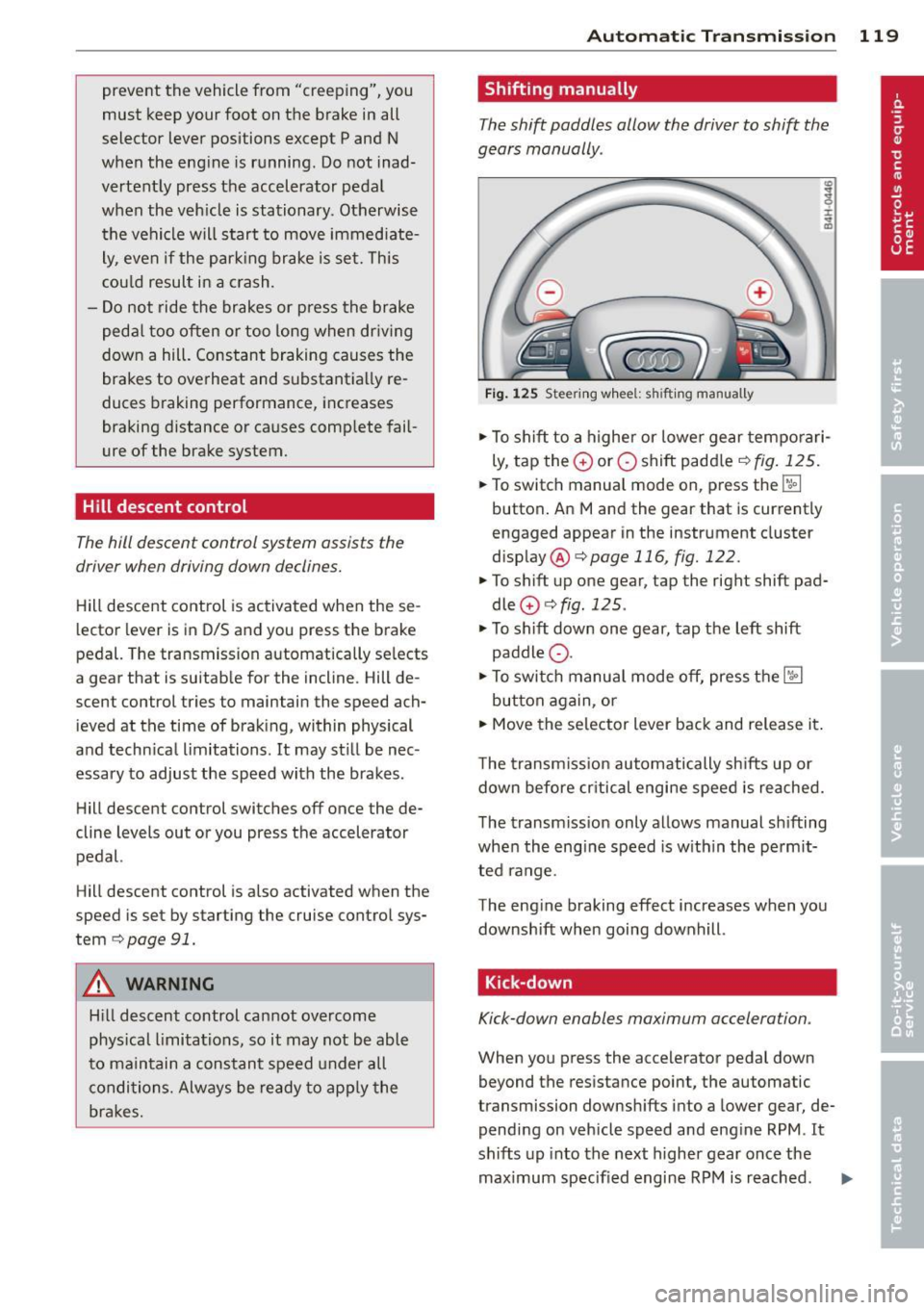
Shifting manually
The shift paddles allow the driver to shift the
gears manually .
Fig . 12 5 Steer ing w hee l: s hifting manually
.,.. To shift to a h igher or lowe r gear tempo rari
ly, tap the
0 or 0 shift paddler:::;, fig. 125 .
.. To switch manua l mode on, press the~
button . An Mand the gear that is currently
engaged appear in the inst rument cluster
disp lay @ ¢
page 116, fig. 122.
.. To shift up one gear, tap the righ t shift pad
dle
0 r:::;, fig . 125 .
.. To sh ift down one gear, tap the left shift
paddle Q.
.. To switc h manua l mode off, press the~
button aga in, or
.. Move the selector lever back and release it .
T he transm iss ion automatically sh ifts up or
down before cr itical engine speed is reached.
The transm iss ion only allows manual sh ifting
whe n the eng ine speed is w ith in the pe rmit
ted range .
The eng ine braking effect increases when you
downshift when going downhill .
Kick-down
Kick-down enables maximum acceleration .
When you press the accelerator pedal down
beyond the resistance point, the automatic
transmission downsh ifts into a lower gear, de
pending on veh icle speed and eng ine RPM .
It
shifts up into the next higher gear once the
maximum specified engine RPM is reached . ..,.
Page 122 of 314
![AUDI A8 2014 User Guide 120 Automatic Transmission
8_ WARNING
Please note that the wheels could spin on
slick or slippery roads when kick-down is
active .
Transmission malfunction
[O] Transmission: plea se](/img/6/57613/w960_57613-121.png "AUDI A8 2014 User Guide 120 Automatic Transmission
8_ WARNING
Please note that the wheels could spin on
slick or slippery roads when kick-down is
active .
Transmission malfunction
[O] Transmission: plea se")
120 Automatic Transmission
8_ WARNING
Please note that the wheels could spin on
slick or slippery roads when kick-down is
active .
Transmission malfunction
[O] Transmission: plea se press the brake ped
al and select the position again
Press the brake pedal and select the des ired
selector lever posit ion again . You can then
continue dr iving .
[O] Transmission hot: please modify driving
style
The transmission temperature has increased
significantly due to the sporty driving manner.
Drive in a less sporty manner until the tem
perature returns to the normal range and the
indicator light switches of.
[O] Gearbox malfunction: you can continue
driving
There is a system ma lfunction in the transmis
sion. You may continue driving. Drive to your
authorized Audi dealer or qualified repair fa
cility soon to have the malfunction corrected.
l'i]Jffl Gearbox malfunction: you can contin
ue driving in D only until engine is off
There is a system ma lfunction in the transmis
sion. The transmission is switching to emer
gency mode. If you turn the engine off, you
will not be able to select any other selector
lever positions after starting the engine again.
Drive to your authorized Aud i dealer or quali
fied repair facility immediately to have the
malfunction corrected.
[O] Gearbox malfunction: you can continue
driving (limited functionality)
There is a system ma lf u nction in the transmis
sion. The transmission is switching to emer
gency mode. Th is mode only shifts into cer
tain gears or will not longer shift at all. The
engine may stall. Dr ive to your authorized
Aud i dealer or qualified repair facility immedi
ately to have the malfunction corrected.
[O]/jj'j Gearbox malfunction: no reverse gear
(y ou can continue driving)
The re is a system malfunction in the transmis
s ion. The transm ission is swi tching to emer
gency mode. This mode on ly shifts into cer
tain gears or will not longer shift at al l. You
cannot engage the reverse gear . Dr ive to your
authorized Aud i dea ler immediately to have
the malfunction corrected.
[O] Vehicle may roll! Cannot shift to P. Please
apply parking brake
-The parking lock was re leased using the
emergency release
¢page 121. Or
- The parking brake cannot engage automati
cally. Drive to your authorized Audi dea ler or
qualified repair facility immediately to have
the malfunction corrected.
[O] Gearbox malfunction: Stop and shift to P
Do not continue dr iving . Select the P selector
lever position and see your author ized A udi
dealer or qualified repair faci lity for assis
tance.
Page 134 of 314

132 Parking systems
Adjusting the display and the warning tones
App lies to vehicles: with advanced park ing system wit h
rea r view camera/top v iew camera syste m
The display and warning tones can be adjust
ed in the Infotainment.
.. Se lect : ICAR !function button> Car systems
control button > Driver assist> Parking aid.
Display
On* -
optical display is shown for the parking
system plus, rear view camera image is shown
for parking system plus with rear view cam
era*.
Off -when the park ing system is switched off,
on ly audible signa ls are given.
Warning tones
Front volume -
Volume for the fro nt area
Rear volume -Volume for the rear area
Front frequency -Frequency for the front area
Rear frequency -Frequency for the rear area
Music volume while parking -When the park
ing system is turned on, the volume of the au
d io/v ideo source is lowered .
The newly adjusted value is briefly heard from
the signal generator .
(D Tips
-The warning tones can a lso be adjusted
directly from the visual display or the
rear view camera* image . S imply press
the
Settings cont rol button .
- Changed settings are activated when the
parking system is switched on again.
- The settings are automatically stored
and ass igned to the remote control key
that is in use .
Error messages
App lies to vehicles: with advanced park ing system with
rea r view camera/top v iew camera syste m
There is an error in the system if the LED in
the
P •1A b utton is blinking and you hear a con- t
in uous alarm for a few seconds after switch
ing on the parking system or when the park
ing system is already activated. If the error is
not corrected before you switch off the ign i
t ion, the LED in the
P' "A button will blink the
next t ime you sw itch on the parking system by
shifting into reverse .
If a sensor is faulty, the!¾ symbol will appear
in front of/behind the vehicle in the Infota in
ment display . If a rear sensor is faulty, only
obstacles that are in the front detection a rea
are shown . If a front sensor is fau lty, on ly ob
stacles that are in the rear area are shown.
Peripheral cameras*
There is also a system error if:
- the
'(l.Q ,, symbol appears i n the display and
the corresponding display area is shown in
blue. The camera is not work ing in this area.
- all segments around the vehicles are red or
if no segments are displayed.
Drive to your authorized A udi dealer or au
thorized repair facility immediately to have
the malfunction corrected .
Trailer hitch
Applies to vehicles: with adva nced parking sys te m with
rear view camera/top view camera system
For vehicles us ing the trailer socket, the park
ing system rear sensors do not turn on when
yo u shift into reverse gear or when you press
the
P 1JA button. This results in the following re
strictions:
T he re is no distance warning for the rear. The
front sensors remain activated. The visua l dis
play switches to the trailer towing mode . The
rear view camera image will not show the ori
entation lines and the blue surfaces.
(D Tips
Trailer hitches that are not installed at the
factory may ca use the parking system to
malfunction or they may restrict its func
tion.