lane assist AUDI A8 2014 User Guide
[x] Cancel search | Manufacturer: AUDI, Model Year: 2014, Model line: A8, Model: AUDI A8 2014Pages: 314, PDF Size: 78.47 MB
Page 108 of 314
106 Audi side assist
Audi side assist
Lane Change Assistant
Description
App lies to vehicles: wit h side ass ist
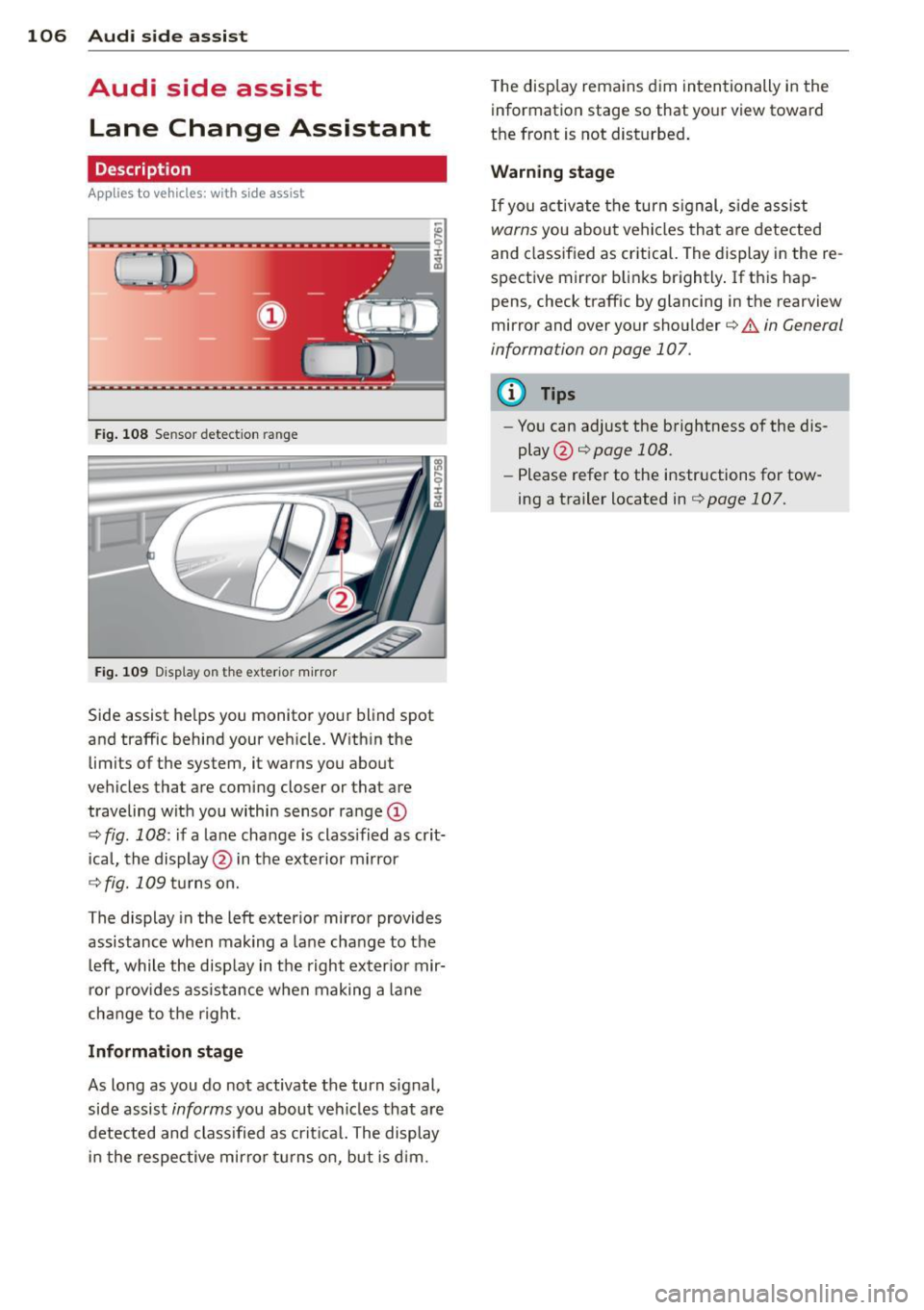
Fig . 108 Sensor detection range
Fig. 109 Display on the exterio r mirror
Side assist he lps you monitor your blind spot
and traffic behind your veh icle. Within the
limits of the system, it warns you about
vehicles that are coming closer or that are
traveling wit h you within sensor range
(D
c:> fig . 108: if a lane change is class ified as crit
ical, the display @ in the exterior mirror
¢ fig.109turnson.
The display in the left exterior mirror provides
assistance when mak ing a lane change to the
le ft, while the display in the right exter ior mir·
ror provides assistance when making a lane
cha nge to the right.
Information stage
As long as you do not activate the turn signal,
side assist
informs you about vehicles that are
detected and class ified as critical. The display
in the respective mirror turns on, but is d im. T
he display remains dim intentionally in the
information stage so that your view toward
the front is not disturbed .
Warning stage
If you activate the turn signal, s ide ass ist
warns you about vehicles that are detected
and classified as critical. The display in the re
spective mirror blinks brightly . If this hap
pens, check traffic by glancing in the rearview
mirror and over your shoulder c:>
.&. in General
information on page 107.
(D Tips
- You can adjust the brightness of the dis
play @c:>
page 108.
-Please refer to the instructions for tow·
ing a trailer located in
¢ page 107.
Page 109 of 314

General information
Applies to vehicles: with side assist
®
©
Fig . 110 Dr iving situations
AUDI
Fi g. 111 Rear of t he ve hicle: positio n of t he se nsors
Side assist functions at speeds above approx i
mately 19 mph (30 km/h).
@ Vehicl es th at ar e approaching
In certain cases, a vehicle will be classified as
cr itical for a lane change even if it is still
somewhat far away. The fas ter a vehicle ap
p roaches, the sooner the display in the exteri
or m irror will t urn on.
@ V ehicles traveling with you
Vehicles traveling w ith you are indicated in the
exterior m irror if they are classified as cr itical
for a lane change. All vehicles detec ted by
side assist are indicated by the time they en
ter your "blind spot", at the latest.
Audi side assist 10 7
© Vehicle s left behind
If you s low ly pass a vehi cle that s ide assist has
detected (the difference in speed between the
vehicle and you r vehicle is less than 9 mph or
15 km/h), the display in the exterio r mir ror
turns on as soon as the vehicle enters your blind spot.
T he disp lay will not t urn on if you quickly pass
a vehicle that side assist has detected (the dif
ference in speed between the veh icle and your
vehicle is greater than 9 mph or 15 km/h).
Functi onal limitations
The radar sensors are designed to detect the
left and right adjacent lanes when the road
lanes are the normal width. In certain situa
tions, the d isp lay in the exterior mirror may
turn on even though there is no veh icle locat
ed in the area that is cr itical for a lane change.
For example:
- if the lanes are narrow or if your are dr iving
on the edge of your lane.
If this is the case,
the system may have detected the vehicle in
another lane that is
not adjacent to your
current lane .
- if you a re driving through a curve. Side assist
may react to a vehicle that is one lane ove r
from the adjacent lane.
- if side assist reacts to other objects (such as
high or d isp laced guard rails) .
- In poor weather conditions. The side assist
functions are l imited .
Do not cover the radar sensors
c> fig. 111 with
stickers, depos its, bicycle wheels or other ob
jects, because this will affect the funct ion. Do
not use s ide ass ist when towing a trailer. For
i nformation on cleaning, refer to
c> page 216 .
_&. WARNING
-Always pay attention to traffic and to t he
area a round your ve hicl e. S ide assist can
not replace a driver's attention. T he driv
er a lone is always responsible for lane
changes and similar driving mane uvers.
Page 110 of 314

108 Audi side assist
-Improper reliance on the side assist sys
tem can cause collisions and serious
personal injury:
- Never rely only on side assist when
changing lanes.
- Always check rear view mirrors to make
sure that it is safe to change lanes.
- Side assist cannot detect all vehicles un
der all conditions- danger of accident!
- Please note that side assist indicates
there are approaching vehicles, or
vehicles in your blind spot, only after
your vehicle has reached a driving speed of at least 19 mph (30 km/h).
- In certain situations, the system may not
function or its function may be limited.
For example:
- if veh icles are approaching or being left
behind very quickly . The display may
not turn on in time.
- in poor weather conditions such as
heavy rain, snow or heavy mist .
- on very wide lanes, in tight curves or if
there is a rise in the road surface.
Vehicles in the adjacent lane may not
be detected because they are outside
of the sensor range.
(D Note
The sensors can be displaced by impacts or
damage to the bumper, wheel housing and
underbody . This can affect the system.
Have your authorized Audi dealer or au
thorized Audi Service Facility check their
function.
@ Tips
- If the window glass in the driver's door
or front passenger's door has been tint ed, the display in the exterior mirror may
be misinterpreted.
- For Declaration of Compliance to United
States FCC and Industry Canada regula
tions¢
page 295.
Activating and deactivating
Applies to vehicles: with side assist
Fig. 112 Driver 's doo r: Side ass ist butto n
.. Press the button c> A in General informa
tion on page
107to switch the system on/
off. The LED in the button turns on when
side assist is switched on.
Adjusting the display brightness
Applies to vehicles: wit h side assist
The brightness setting can be adjusted via the
MMI.
.. Select: !CAR I function button> Car systems
control button > Driver assist > Audi side
assist .
The display brightness adjusts automatically
to the brightness of the surroundings, both in
the information and in the warning stage. In
very dark or very bright surroundings, the dis
play is already set to the minimum or maxi
mum level by the automatic adjustment . In
such cases, you may notice no change when
adjusting the brightness, or the change may
only be noticeable once the surroundings
change.
Adjus t the brightness to a level where the dis
play in the informa tion stage will not disrupt
yo ur view forward. If you change the bright
ness, the display in the exterior mirror will
briefly show the brightness leve l in the infor
mation stage. The brightness of the warning
stage is linked to the brightness in the infor
mation stage and is adjusted along with the
information stage adjustment .
Page 201 of 314
Intelligent technology Notice about data
recorded by vehicle
control modules
Your vehicle is not equipped with an Event Da
ta Recorder (EDR), installed by some manu
facturers for the express purpose of capturing
data for retrieval after an accident or crash
event. EDR's are sometimes called "crash re
corders".
Some state laws restrict the retr ieval or down
loading of data stored by EDR's that were in
stalled in a vehicle for the express purpose of
retrieving data after an accident or crash
event without the owner's consent.
Although your vehicle is not equipped with an
EDR, it is equipped with a number of electron
ic control modules for various vehicle systems
such as, for examp le, engine function, emis
sion control, as well as for the airbags and
safety belts.
These electronic control modules also record
vehicle-related data during norma l vehicle op
eration for diagnostic and repair purposes.
The recording capacity of the electronic con
trol modules is limited to data (no sound is re
corded) and only a small amount of data is ac
tually recorded over a very limited period of
time and stored when a system fault or other
condition is sensed by a control unit. Some of
the data then stored may relate to vehicle
speed, direction, braking as we ll as restraint
system use and performance in the event of a
crash or other condition. Stored data can only be read and downloaded with special equip
ment.
Electronic Stabilization
Control (ESC)
Description
ESC helps to improve road holding and vehicle
dynamics to help reduce the probability of
skidding and loss of veh icle control. It works
only when the engine is running. ESC detects
Intelligent technology 199
certain difficult driving situations, including
when the vehicle is beginning to spin (yaw)
out of control and helps you to get the veh icle
back under control by se lectively braking the
wheels, and/or reducing engine power and
providing steering ass istance to help hold the
vehicle on the driver's intended course. The in
dicator light
JjJ in the instrument cluster
blinks when ESC is taking action to help you
control the vehicle.
ESC has limitations .
It is important to remem
ber that ESC cannot overcome the laws of
physics.
It will not always be able to help out
under all conditions you may come up against.
For example, ESC may not always be able to
help you master situations where there is a
sudden change in the coefficient of friction of
the road surface. When there is a section of dry road that is suddenly covered with water,
slush or snow, ESC cannot perform the same
way it would on the dry surface. If the vehicle
hydroplanes (rides on a cushion of water in
stead of the road surface), ESC will not be
able to help you steer the vehicle because con
tact with the pavement has been interrupted
and the vehicle cannot be braked or steered .
During fast cornering, particularly on winding
roads, ESC cannot always deal as effectively
with difficult driving situations than at lower
speeds. When towing a trailer, ESC is not able
to help you regain control as it would if you
were not tow ing a trailer.
A lways adjust your speed and driving style to
road, traffic and weather conditions. ESC can
not override the vehicle's physical limits, in
crease the available traction, or keep a vehicle
on the road if road departure is a result of
driver inattention. Instead, ESC improves the
poss ibility of keeping the vehicle under con
trol and on the road dur ing extreme maneu
vers by using the driver's steering inputs to
help keep the vehicle going in the intended di
rection. If you are traveling at a speed that
causes you to run off the road before ESC can
provide any assistance, you may not experi
ence the benefits of ESC.
•
•
Page 305 of 314

l
Jack . ..... .. .. ..... ..... ... .. .. ... 270
J ump-starting ..... ..... ... .. .. .. .. . 283
Jumper cables ............. .... .. .. . 284
K
Key ... .. .. .. .. .. .. .. .... ... .. .. .... 31
Battery replacement master key ... .. .. 32
E mergency key . . . . . . . . . . . . . . . . . . . . . 31
Key not recogni zed . . . . . . . . . . . . . . . . . . 86
Key replacement . . . . . . . . . . . . . . . . . . . 31
Master key . . . . . . . . . . . . . . . . . . . . . . . . 31
Mechanical key . . . . . . . . . . . . . . . . . . . . . 32
Valet key . . . . . . . . . . . . . . . . . . . . . . . . . . 3 1
K ick-down (automat ic transm ission) . .. . 119
Knee airbags ... .. .. .. .... ... .. .... . 16 8
Description ... .. .. .. .... ... .. .. ... 168
H ow they work . .. ..... ... .. .. .. .. . 170
Important safety instructions . .. .. .. . 170
L
Lane assist
Activating and deactivating ... .. .. .. . 103
C leaning the camera area .. .. .. .. .. . 217
Descr ipt ion . ............. .... .. ... 103
Instrument cluster indicato r light . .. . 103
M essages .. ... .. .. ...... .. .. .. .. . 104
Notes on instrumen t cluster display .. . 103
Sett ing the steer ing wheel vib rat ion .. . 105
Sett ing t he war ning po in t .. .. .. .. .. . 105
Lane Change Ass istant
refer to S ide ass ist . ....... .. .. .. .. . 106
L A T CH .... .. .. .... .. .... ... .. .. ... 190
Description . ............. .... .. .. . 191
Guidance fixtures for lower anchorages 192
Instal ling a chi ld restraint .. .. .. .. .. . 193
Locat ion . . . . . . . . . . . . . . . . . . . . . . . . . 191
Mount ing and releasing the ancho rage
hook .. .. .. .... ... ... ..... .. .. .. . 193
Leather cleaning/protection . .. .. .. .. . 219
L eaving home .. ........... .. .. .. .... 48
Lifting jack .. ... .. .. ...... .. .. .. .. . 275
Lifting vehicle . .... ..... ... .. .. .. ... 287
L ight
Ambie nce lighting . . . . . . . . . . . . . . . . . . 50
Com ing/ Leaving home .. ... .. .. .. .. .. 4 8
Inde x 303
Daytime runn ing lights . ..... ... .. .. . 46
Emergency flashe rs .. ... .... ... .. .. . 47
Exterior lig hting . ... . .. ... .... ... .. . 46
Head light range control ............ . 46
Hig h beam .. .. .. .... ............. . 48
Hig h beam assist ................... 49
Low beam ... .. .. .. . .. .... .... .. .. . 46
Rea r fog lights . ......... ........... 46
S ide mar ker lig hts .. . .......... .... . 46
T urn s ignals . .. .. .... ........... .. . 48
Light/rain senso r
Head lights .. .. .. .. . .. .... .... .. .. . 46
Intermittent (w indshie ld w ipers) ...... 53
Senso r defec tive . . . . . . . . . . . . . . . . . . . . 22
Load ing the roof rack ............ .... . 73
Locking Luggage compartment l id .... ... .. .. . 37
Power loc king switch . ... .... ... .. .. . 36
Remote contro l .. .... ............. . 35
U sing the key .. .. .. ............... . 36
Low beams ....... ... .. .. ..... ... .. . 46
Lower unive rsal a nc horages (Canada) 190
Luggage compartment
Luggage compartment net . . . . . . . . . . . 70
Pass-through w ith ski sack ........... 71
Stow ing luggage ........ .......... 141
T ie-downs . . . . . . . . . . . . . . . . . . . . . . . . . 70
Luggage compartment lid Automat ic operation ........... .. .. . 38
Emergency re lease ............. .... . 40
Movement-act ivated open ing ....... .. 40
Open ing and closing .. .. ...... .... .. 37
Lumbar support Front seats . . . . . . . . . . . . . . . . . . . . . . . . 60
Rear seats . .. .. .. .. ............... . 61
M
Maintenance .. .. .. ................. 292
Malfunc tion Ind ic a tor Lamp (M IL)
Massage function 2
0 ,29
Front seats . . . . . . . . . . . . . . . . . . . . . . . . 60
Rea r seats ... .. .. .. . .. .... .... .. .. . 61
Reclining rear seat ............... .. . 64
Matte finish paint clean ing ....... .. .. 216
Mechan ica l key . ..... . .. .. ..... ... .. . 32
•
•