rear view mirror AUDI A8 2014 User Guide
[x] Cancel search | Manufacturer: AUDI, Model Year: 2014, Model line: A8, Model: AUDI A8 2014Pages: 314, PDF Size: 78.47 MB
Page 110 of 314

108 Audi side assist
-Improper reliance on the side assist sys
tem can cause collisions and serious
personal injury:
- Never rely only on side assist when
changing lanes.
- Always check rear view mirrors to make
sure that it is safe to change lanes.
- Side assist cannot detect all vehicles un
der all conditions- danger of accident!
- Please note that side assist indicates
there are approaching vehicles, or
vehicles in your blind spot, only after
your vehicle has reached a driving speed of at least 19 mph (30 km/h).
- In certain situations, the system may not
function or its function may be limited.
For example:
- if veh icles are approaching or being left
behind very quickly . The display may
not turn on in time.
- in poor weather conditions such as
heavy rain, snow or heavy mist .
- on very wide lanes, in tight curves or if
there is a rise in the road surface.
Vehicles in the adjacent lane may not
be detected because they are outside
of the sensor range.
(D Note
The sensors can be displaced by impacts or
damage to the bumper, wheel housing and
underbody . This can affect the system.
Have your authorized Audi dealer or au
thorized Audi Service Facility check their
function.
@ Tips
- If the window glass in the driver's door
or front passenger's door has been tint ed, the display in the exterior mirror may
be misinterpreted.
- For Declaration of Compliance to United
States FCC and Industry Canada regula
tions¢
page 295.
Activating and deactivating
Applies to vehicles: with side assist
Fig. 112 Driver 's doo r: Side ass ist butto n
.. Press the button c> A in General informa
tion on page
107to switch the system on/
off. The LED in the button turns on when
side assist is switched on.
Adjusting the display brightness
Applies to vehicles: wit h side assist
The brightness setting can be adjusted via the
MMI.
.. Select: !CAR I function button> Car systems
control button > Driver assist > Audi side
assist .
The display brightness adjusts automatically
to the brightness of the surroundings, both in
the information and in the warning stage. In
very dark or very bright surroundings, the dis
play is already set to the minimum or maxi
mum level by the automatic adjustment . In
such cases, you may notice no change when
adjusting the brightness, or the change may
only be noticeable once the surroundings
change.
Adjus t the brightness to a level where the dis
play in the informa tion stage will not disrupt
yo ur view forward. If you change the bright
ness, the display in the exterior mirror will
briefly show the brightness leve l in the infor
mation stage. The brightness of the warning
stage is linked to the brightness in the infor
mation stage and is adjusted along with the
information stage adjustment .
Page 126 of 314
124 Parking systems
If the distance to an obstacle remains con
stant, the volume of the distance warning
gradually drops after about four seconds (this
does not apply in the continuous tone range).
Rear view camera
The rear view camera is located above the rear
license plate bracket. Make sure that the lens
for the parking system¢
fig. 131 is not cov
ered by deposits or any other obstructions be
cause this can affect the function of the park
ing system. For information on cleaning, refer
to
¢ page 216.
The rear view camera coverage area includes
(D ¢ fig. 130. Only this area is shown in the
Infotainment display. Objects that are outside
of this area@are not displayed.
The accuracy of the orientation lines and the blue surfaces is reduced if the adaptive air
suspension" is faulty, if the vehicle is lifted or
if the
dynamic mode is activated¢ page 110.
A WARNING
-Always read and follow the applicable
warnings¢ .&.
in General information on
page 122.
- If the position and the installation angle
of the rear view camera was changed, for
example, after a collision, do not contin
ue to use the system for safety reasons.
Have it checked by your authorized Audi
dealership or authorized repair facility.
- Only use the rear view camera to assist
you if it shows a good, clear picture. For
example, the image may be affected by
the sun shining into the lens, dirt on the
lens or if there is a system fault.
- Use the rear view camera only if the lug
gage compartment lid is completely
closed. Make sure any objects you may
have mounted on the luggage compart
ment lid do not block the rear view cam
era .
- The camera lens enlarges and distorts
the field of vision. The object appears both altered and inaccurate on the
screen. -
In certain situations, people or objects in
the display appear closer or further
away:
- objects that do not touch the ground,
such as the bumper of a parked vehicle,
a trailer hitch or the rear of a truck. Do
not use the help lines in this case.
- If driven from a level surface onto an
incline, or a downward slope.
- If driven toward protruding objects.
-If the vehicle is carrying too much load
in the rear.
{[) Note
-Always read and follow the applicable
warnings
c::> (D in General information on
page 122.
- The orange colored orientation lines in
the Infotainment display show the vehi
cle path depending on the steering
wheel angle. The front of the vehicle
front swings out more than the rear of
the vehicle. Maintain plenty of distance
so that your outside mirror or a corner of
your vehicle does not collide with any ob stacles.
Page 129 of 314

long side of the blue surface so that there is
suff icient space from the obstacle. The sur
face must not be touch ing. You will also need
to start turning the steer ing whee l much ear
lier. The blue curve
¢ fig . 13 7 must not to uch
the obstacle and should have sufficient room .
@ Tips
The left or right orientation lines and sur
faces will be displayed, depend ing on the
turn signa l bei ng used.
Peripheral cameras
Introduction
Applies to vehicles: with top view camera system
In addit ion to the functions from the sensors
¢ page 123, Sensors,¢ page 125 , Visual dis
play,
this parking system conta ins peripheral
cameras. Depending on the ve hicle equip
ment, you are assis ted by various views such
as peripheral view, corner views at the front
and rear of the veh icle, and views d irectly in
fro nt of o r behind the vehicle.
General information
App lies to vehicles: with top view camera system
Fig. 138 Loca tion of per ipheral came ras
Depending on the vehicle equ ipment, the pe
riphera l cameras are fou nd i n the radiator
grille, in the luggage compartment lid and on both exterior mirrors ¢
fig. 138 . Make sure
that the lenses are no t covered by deposits or
any other obstructions as it may impair the
sys tem. For information on cleaning, refer to
¢ page 216.
P arking sys tems 127
In the to p view mode, b lack corners are
shown in the ve hicle silhouette . Objects in
these areas are outside of the camera 's field
of view and are not detected .
T he accuracy of the orientation lines and the
bl ue surfaces is reduced if the adaptive air
suspension * is faulty, if the vehicle is lifted or
if the
dynamic mode is activated ¢ page 110.
A WARNING
- Always read and follow the applicable
warn ings ¢
& in General information on
page 122.
- If the position or the installat io n angle
of a camera was changed , after a colli
sion for example, do not continue to use
the system fo r safety reaso ns. Have i t
checked by you r author ized Audi dealer
sh ip .
- Keep in mind tha t the image in the dis
pl ay is distorte d if the exterior mirror
housing has bee n manually a dju sted .
- Use the
rear mode and the c orner view
( rear )
mode only when the luggage com
partment lid is fu lly closed . Otherwise
the image in the disp lay will be d istort
ed .
- T he vehicle surro undings are shown us
ing the came ra images. The veh icle im
age is shown by the system. Objects and
obstacles above the camera are not d is
p layed.
- Camera lenses enlarge and distort the fie ld of vision . T he objects appear both
altered and inaccurate on the sc reen.
(D Note
- Always read and follow the ap plicable
warnings
¢(Din General information on
page 122.
- The Infotainment d isp lay shows the di
rection in which the rear of the vehicle is
traveling based on the steer ing whee l
ang le . The front of the vehicle front
swings out more than the rear of the ve
hicle . Maintain plenty of d istance so that
IJJ,,
Page 130 of 314
128 Parking systems
your outside mirror or a corner of your
vehicle does not collide with any obsta
cles.
@ Tips
If the 8/o;iJ/c:::::5 symbol appears in the
disp lay and the respectiv e display area is
grayed out, then the power exter ior mir
rors were folded in or the dr iver's door/
front passenger's door/luggage compart
ment lid was opened.
Switching on or off
App lies to vehicles: with top view camera system
Fi g. 139 Center consol e: P
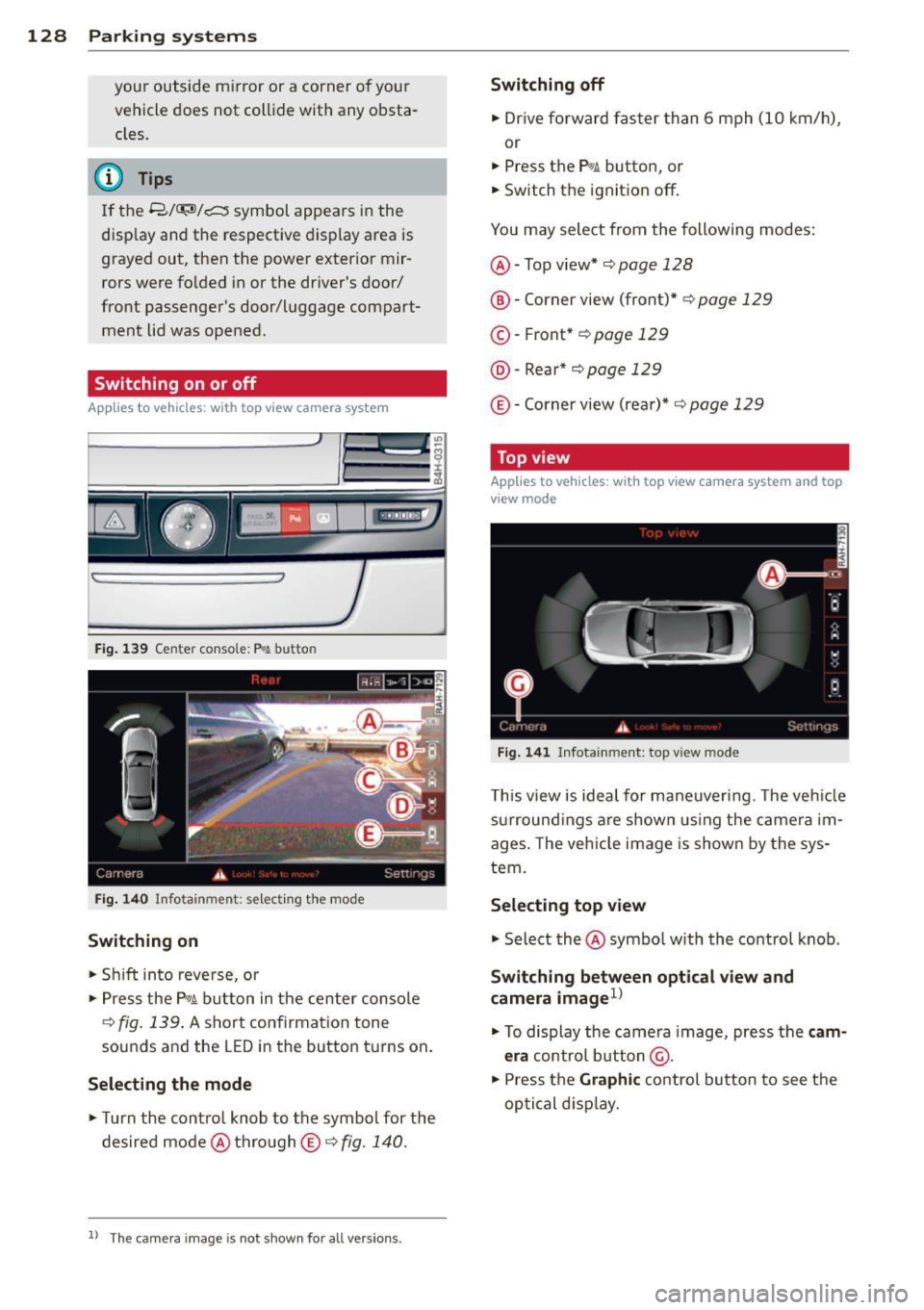
Switching on
• Shift in to reve rse, or
> Press the P, qi b utton in the center console
¢
fig . 139 . A short confirmat ion tone
sounds and the LED in the button turns on .
Selecting the mode
• Turn the contro l knob to the symbol for the
desired mode @thro ugh
© ¢fig. 140.
ll Th e c am era im age is n ot s hown fo r all ve rsi on s.
Switching off
• Dr ive fo rward faster than 6 mph (10 km/ h),
or
• Press the
P, JJi button, or
• Switch the ignition off .
You may select from the following modes:
@ -Top view* ¢
page 128
@-Corner view (front)* ¢ page 129
© -Front * ¢ page 129
@ -Rea r* ¢
page 129
© -Corner view (rear)* ¢ page 129
Top view
Applies to vehicles : w it h top v iew camera system and top
v iew mode
F ig . 14 1 In fota inm ent : top v iew m ode
This view is idea l for maneuver ing. The veh icle
surround ings a re shown us ing the camera im
ages . The vehicle image is shown by the sys
tem.
Selecting top view
"' Select the@symbo l w ith th e control knob .
Switching between optical view and
camera imagel)
"'To display the came ra image, press the c am
era
control button @.
"' Press the
Graphi c control button to see the
optical d isp lay.
Page 282 of 314

280 Fuses and bulbs
Luggage compartment fuse assignment
Fig. 23 2 Luggage compartment: fuse pa nel with plas tic bracket
Fuse panel @ (black )
No. Equipment Amps
No. Equipment Amps
11 Dynam ic steer ing 5
E SC button, da ta logger, di· 12
Selector lever,
BCM-2
5
1 agnostic connector, BCM · 1,
5 13 Audi s ide ass ist 5
adap tive light ing system
14 Engine control modu le
5
2 Networking gateway
5
15 Sta rter 40
3 adap tive air s usp ension 5
4 Parking system
5 16 Left headlight/Headlight
10/5
range control system
5 Steering colum n leve r 5
6
Suspension contro l system
5
sensor
Fu se panel @ (red)
No. Equipment Amps
7 Bel
t tensione rs, airbag con-
5
trol module
Heated washe r fl uid no zzles, 1
Left reversible be
lt tens ioner
2S
2 Right revers
ible belt ten -
25
sioner
H ome link (garage door
Starter diagnos is, DC/DC
8 opener), nig ht vision system 5
3 co
nverter (S tart-Stop-Sys·
5
con trol mod ule, sport diffe r-
tern)
ent ia l, ionizer
9
Electromechan ica l park ing
5
brake contro l modu le 4
DC/DC converter (Start-
7,5
Stop-System)
5 Image proce ssing 7,5
10 Rear seat heating, coo
ler, in·
5
terior rearview mirror
Page 283 of 314
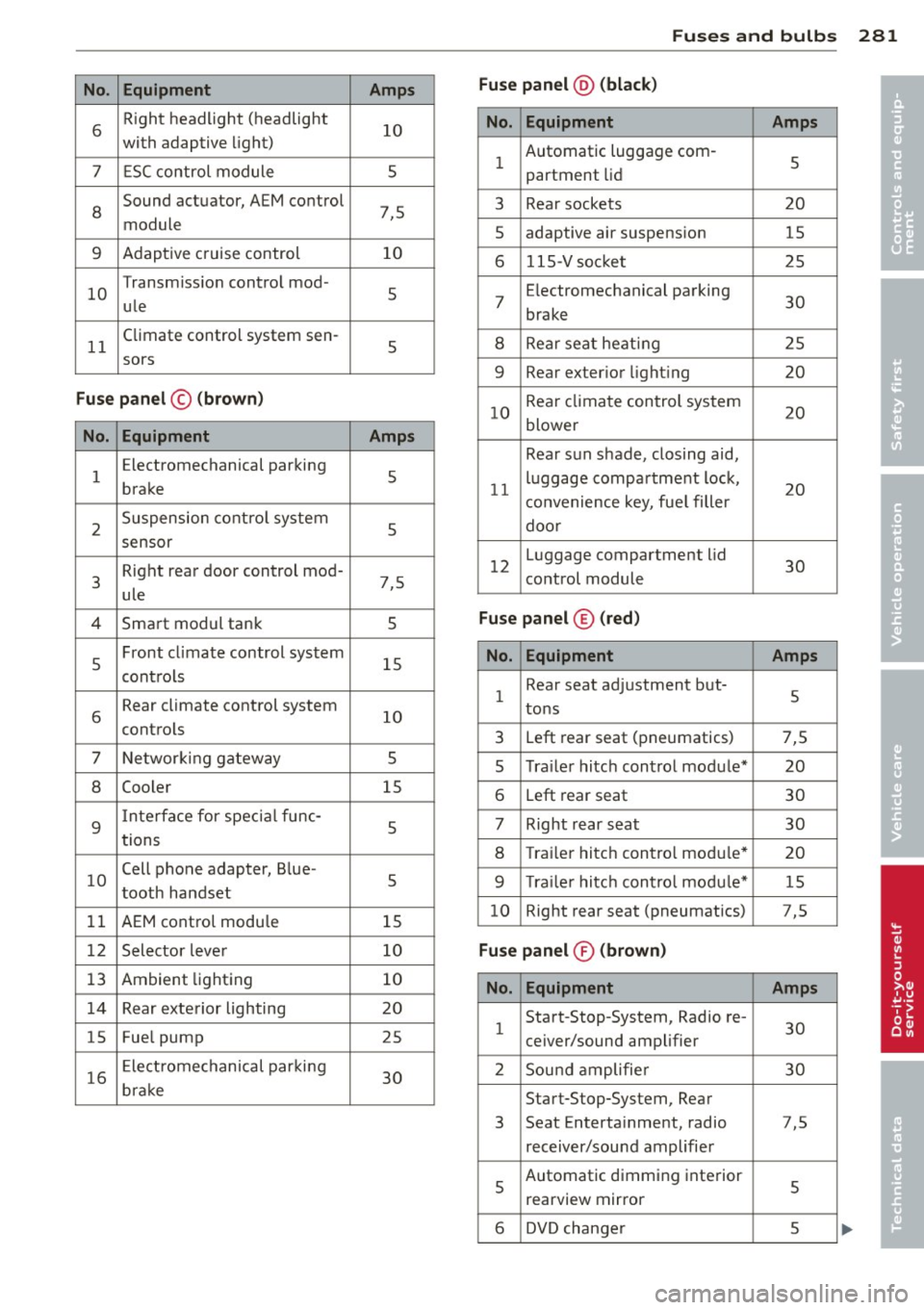
Fuses and bulb s 281
No . Equ ipment Amps Fus
e pan el@ (bla ck)
•
6 R
ight headlight (headlight
10
with adaptive light)
7 ESC control module 5 No. Equipment Amps
1 Automatic luggage com
-
5
partment lid
•
8
Sound actuator, AEM control
7,5
module 3 Rear
sockets 20
5 adaptive air suspension
15
9 Adaptive cruise control 10
6 115-Vsocket 25
10 Transmiss
ion control mod-
5
ule 7 E
lectromechanical parking
30
brake
11 Climate control
system sen-
5
8 Rear seat heating 25
sors
9 Rear exterior lighting 20
Fuse pan el© (bro w n)
No. Equipment Amps
10 Rear climate control system
20
blower
1 E
lectromechanical parking
5
brake
2 Suspension control system
5 Rear
sun shade, closing aid,
11 luggage
compartment lock,
20
convenience key, fue l filler
door
sensor
3 Right rear door
control mod-
7,5
ule 12
Luggage compartment
lid
30
control module
4 Smart modul tank 5
Fuse panel ® (red)
5 Front
climate control system
15
contro ls
6 Rear climate control
system
10
controls N o. Eq uipm ent Amps
1 Rear
seat adjustment but-
5
tons
3 Left rear seat (pneumatics) 7,5
7 Networking gateway 5
5 Tra
iler hitch control module* 20
8 Cooler
15
6 Left rear seat 30
9
Interface for specia l func-
5
tions 7 Right rear seat
30
8 Trailer hitch contro l module*
20
10 Cell phone
adapter, Blue-
5
tooth handset
9 T ra iler hitch control modu le* 15
11 AEM control modu le 15 10
Right rear
seat (pneumatics) 7,5
12 Selector lever 10
Fuse pan el® (bro wn)
13 Ambient lighting
10 No. Equipment Amps
14 Rear exterior lighting 20
15 Fuel
pump
25 1 Start-Stop-System,
Radio re-
30
ceiver/sound amplifier
16 Electromechanical parking
30
brake 2 Sound amplifie
r 30
Start-Stop-System, Rear
3 Seat
Entertainment, radio 7,5
receiver/sound amplifier
5 Automatic dimming interior
5
rearview mirror
6 DVD changer 5
Page 302 of 314
300 Index
Defrosting (windows) ......... .. .... .. 81
Deluxe automatic climate control . . . . . . . 80
Determining co rrect load limit ... ..... 257
D iese l fue l ..... ........... .... .... . 223
Diesel particulate filter . . . . . . . . . . 21,208
Digita l compass ............ ... .... .. 56
Dimensions .... ............. .. .... . 290
Dimming the rearview mirror .. .. ...... 56
Disp lays
C leaning ... ................ ..... . 218
Distance
. ... .......... ...... ... .. .. 25
Door/rear lid warning . . . . . . . . . . . . . . . . .
24
Doors
Mechanical child safety lock . ..... .. .. 41
Power child safety lock ........ .... . . 41
Driver information system
CD/radio display . . . . . . . . . . . . . . . . . . . . 24
Door/rear lid warning . . . . . . . . . . . . . . . 24
Efficiency program . . . . . . . . . . . . . . . . . . 26
Exterior temperature display ..... .. .. 24
On-board computer . . . . . . . . . . . . . . . . . 25
Driver seating position
drive select
adaptive air suspension/sport ... .. .. .
Ad . d
apt,ve ampers ......... ... .. .. .
Curve light . ... . ...... ... .. .. .. .. .
D . t . ynam,c s eering ....... .. .. .. .. .. .
Eng ine sound ............ .. .. .. .. .
Safety belt tensioner ....... ... .... .
Sport differential .......... ... .... .
Drive select .. ... .. ..... ... .. .. .. .. .
Driving safely .. ........... .. .. .... . 136
110
110
110
110
110
110
110
110
135
Driving through water ........ .. .. .. . 209
Driving time . . . . . . . . . . . . . . . . . . . . . . . . 25
Duplicate key . . . . . . . . . . . . . . . . . . . . . . . 31
Dust filter
refer to Pol lutant filter (automatic A/C
system) .... ................ ..... .. 79
Dynamic steering . . . . . . . . . . . . . . . 22, 110
E
Easy entry feature ............ .. .... .. 83
EDL
refer to E lectronic differentia l lock ... . 199 Efficiency
program . . . . . . . . . . . . . . . . . . . 26
Fuel economy messages . . . . . . . . . . . . . 26
Other equ ipment ................. .. 26
E lectr ica l accessories (sockets) . . . . . 68, 74
Electromechanical parking brake Emergency braking ............... .. 88
Operation . . . . . . . . . . . . . . . . . . . . . . . . . 86
Parking ... .. .. .. .. ........... .. .. . 87
Re leas ing and closing .............. . 86
Starting assist ... ............. .. .. . 87
Starting from rest ................ .. 87
Starting
off with a trailer ............. 88
Warning/indicator lights ........ ... .. 15
E lectronic differential lock .......... .. 199
Warning/ind icator lights ........ .... . 18
Electronic differential lock (EDL)
Warning/ind icator lights . ............ 19
E lectronic immobilizer . . . . . . . . . . . . 27, 32
E lectronic power control (EPC)
warning/indicator light . . . . . . . . . . . . . . 20
Electronic speed limiter ............. .. 30
E lectronic Stabilization Contro l (ESC) . .. 199
Warning/indicator lights ............ . 18
Emergency actuat ion
Doors ........ .. ............. ... .. 37
Luggage compartment lid .......... .. 40
Parking lock ..... ................ . 121
Power sunroof .................. .. . 44
Emergency brak ing . ... .......... .. .. . 88
Emergency flasher . ................ .. 47
Warning/ind icator lights ..... ... .. .. . 23
Emergency operation
Panoramic sunroof ............. .. .. . 45
Sun shade (roof) .............. .... . 4S
Emergency starting ................ . 283
Emergency towing ...... ........... . 285
Emergency warn ing triangle ...... .... 269
Energy management
Engine 204
Compartment .. .. ..... ........... . 233
Coolant ...... ... .. .............. . 239
Data ....... .. .. .. ........... .... 291
Start-Stop-System ............. .. .. . 88
starting ....... .. .. .............. .. 84
Starting with jumper cables ...... ... 283
St .
opping .. .... .. .. .............. .. 84
Page 306 of 314
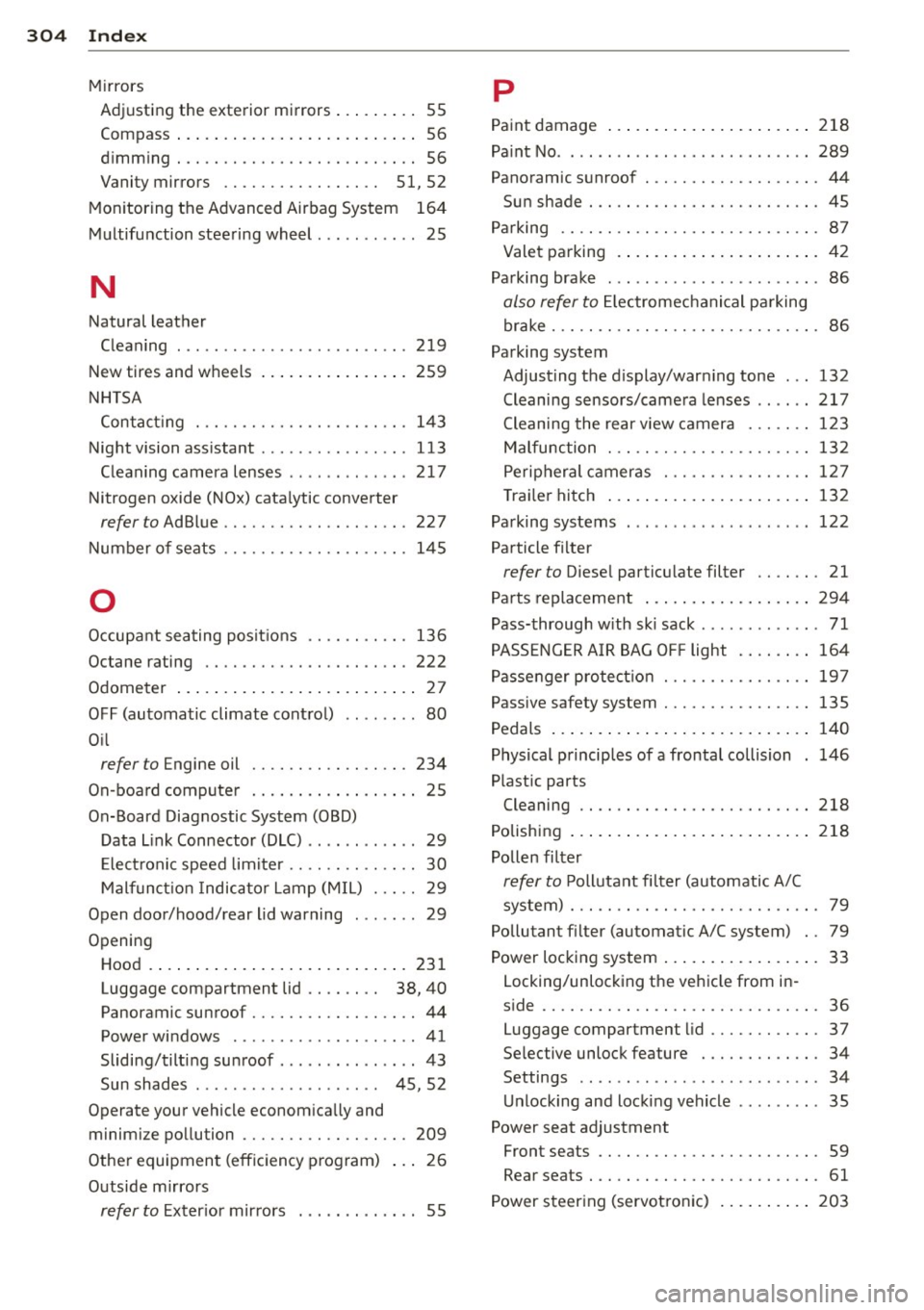
304 Index
Mirrors Adjusting the exterior mirrors ..... .. .. 55
Compass ... ... ... ...... .... ..... .. 56
d' . 1mming ................ .. .. .... .. 56
Vanity mirrors . . . . . . . . . . . . . . . . .
51, 52
Monitoring the Advanced Airbag System 164
Multifunction stee ring wheel ..... .. .... 25
N
Natural leather
Cleaning
New tires and wheels
NHTSA Contact ing
Night vision ass istant ........ ... .. .. .
C lean ing camera lenses . ... .. .. .. .. .
Nitrogen oxide (NOx) cata lytic converter
refer to Ad Blue ........... .. .. .... .
219
259
143 113
2 17
227
Number o f seats ......... .. .. .. .. .. . 145
0
Occupa nt sea ting pos it io ns .. .. .. .. .. . 136
Octane rating ............. .. .. .. ... 222
Odometer .... .. .. ..... ... .. .. .... .. 2 7
OFF (automatic climate contro l) . . . . . . . . 80
O il
refer to Engine oil ........ .. .. .... . 234
On-board compute r . . . . . . . . . . . . . . . . . . 2 5
On-Board Diagnostic System (OBD)
Data L ink Connector (DLC) ...... .. .. ..
29
Elec tron ic speed lim iter . . . . . . . . . . . . . . 30
M alfunc tion I ndicator Lamp (M IL) . . . . . 29
Open door/hood/rear lid warning . . . . . . . 29
Opening
Hood . ..... ... . ...... ... .. .. .... .
231
Luggage compartment lid . . . . . . . . 38, 40
Panoramic sunroof ........ .. .. .... .. 44
Power windows . .......... ... .. .. .. 41
Sliding/tilting su nroof ...... ... .. ... . 43
Sun shades . . . . . . . . . . . . . . . . . . . . 4 5, 52
Operate your vehicle econom ica lly and
minim ize po llution ......... .. .. .... .
209
Other equipmen t (effic iency p rogram) 2 6
Outside mi rrors
refer to Exter ior mirrors . . . . . . . . . . . . . 55
p
Pa int damage ..... ... .. ..... .... . .. 2 18
Pa int No . ..... .. .. .. ... .. ... ..... .. 289
Panoramic s unroof . ............. .. .. . 44
Sun shade . .... .. .. ........... .... . 45
Parking .. .. .. .. . .............. .. .. . 87
Valet pa rking .... .. ... ..... ... .. .. . 42
Pa rking brake . .. .. .......... ...... .. 86
also refer to El ectromec hanical pa rking
brake . .. .. .. .. .. .. ........... .. .. .
86
Parking system
Adjusting the d isplay/war ning tone ...
132
Cleaning sensors/came ra lenses ...... 217
Cleaning the rear view camera . .. .. .. 123
Malfunction ... .. ............. .... 132
Peripher al c ameras . ........... .. .. 12 7
Tra ile r hitch ..... ... .. ..... .... . .. 132
Pa rking systems ... ... .. .. ... ..... .. 122
Particle fi lter
refer to Diese l particu late filter .. .. .. . 21
Pa rts replacement ... .... .... ... .. .. 294
Pass-through w ith sk i sack ..... .... ... . 71
PASSENGER AIR BAG OFF light . ... .. .. 164
Passenger protect io n .............. .. 19 7
Passive safety system .............. .. 135
Pedals ... .. .... .. .. ... ..... ... .. .. 140
Physical p rinciples of a frontal collision 146
Plastic parts
Cleaning .. .... .. ............. ....
218
Polishing ... .... .. .. .... .... ... .. .. 218
Pollen filter
re fer to P oll utant fi lter (automatic A/C
system) . .. .... .. ............. .... .
79
Pollutant filter (automatic A/C system) . . 79
Power locking system .... ..... ... .. .. . 33
Locking/unlock ing the ve hicle from in -
s ide .. .... .... .. ............. .... .
36
Luggage compartment lid ....... .... . 37
Selective unlock feature ...... .. .. .. . 34
Settings . . . . . . . . . . . . . . . . . . . . . . . . . . 34
U nlocking and loc king vehicle .. ... ... . 35
Power seat adjustment
Front seats . . . . . . . . . . . . . . . . . . . . . . . .
59
Rear seats . . . . . . . . . . . . . . . . . . . . . . . . . 61
Power steer ing (servot ronic) ... ... .. .. 203