seats AUDI A8 2014 User Guide
[x] Cancel search | Manufacturer: AUDI, Model Year: 2014, Model line: A8, Model: AUDI A8 2014Pages: 314, PDF Size: 78.47 MB
Page 68 of 314

66 Seats and storage
Seat memory
Description
Applies to vehicles: wit h memory fu nctio n
The memory function allows you to quickly
and eas ily store and recall personal seating
p rofiles for the dr iver, front passenger and
outer rear seats*. The memory function is op
erated through the master key and the memo ry buttons in the driver's/front passenger's
doors and the rear doors*.
The driver's seating profi le is stored and as
signed to the master key each time the vehicle
is locked . The seating profile is recalled auto
matically when the vehicle is unlocked. If two
Remote control
master key
Driver
Seat X
Head restraint X
Steering wheel* X
Safety belt* X
Both exterior rear-X
view mirrors*
There are two additional buttons in the rea r
doors* that can be used to recall two stored
seating profiles
r:=;,page 67.
Remote control key
Appl ies to vehicles: with memory function
To assign the driver's seat settings to the re
mote contro l key when locking the vehicle, the
function must be switched on .
.. Se lect :
I CAR I function button > Car systems
control button > Vehicle settings > Seats >
Driver seat > Remote control key> On.
@ Tips
If you do not want another driver's set
tings to be assigned to the remote control
key, switch off the memory function using
the MMI or the
! OF F! button r:=;, page 67. people
use one vehicle, it is recommended
that each person always uses "their own"
master key.
Two seating profiles can be stored in each of
the driver's/front passenger's doors and one
seat ing profile in each of the rear doors*.
Once stored, these seat ing profiles can be re
ca lled at any time.
T he following sett ings are stored:
Memory button
Driver Front passenger Outer rear seats*
X
X X
X X
X
X
X
X
Page 69 of 314
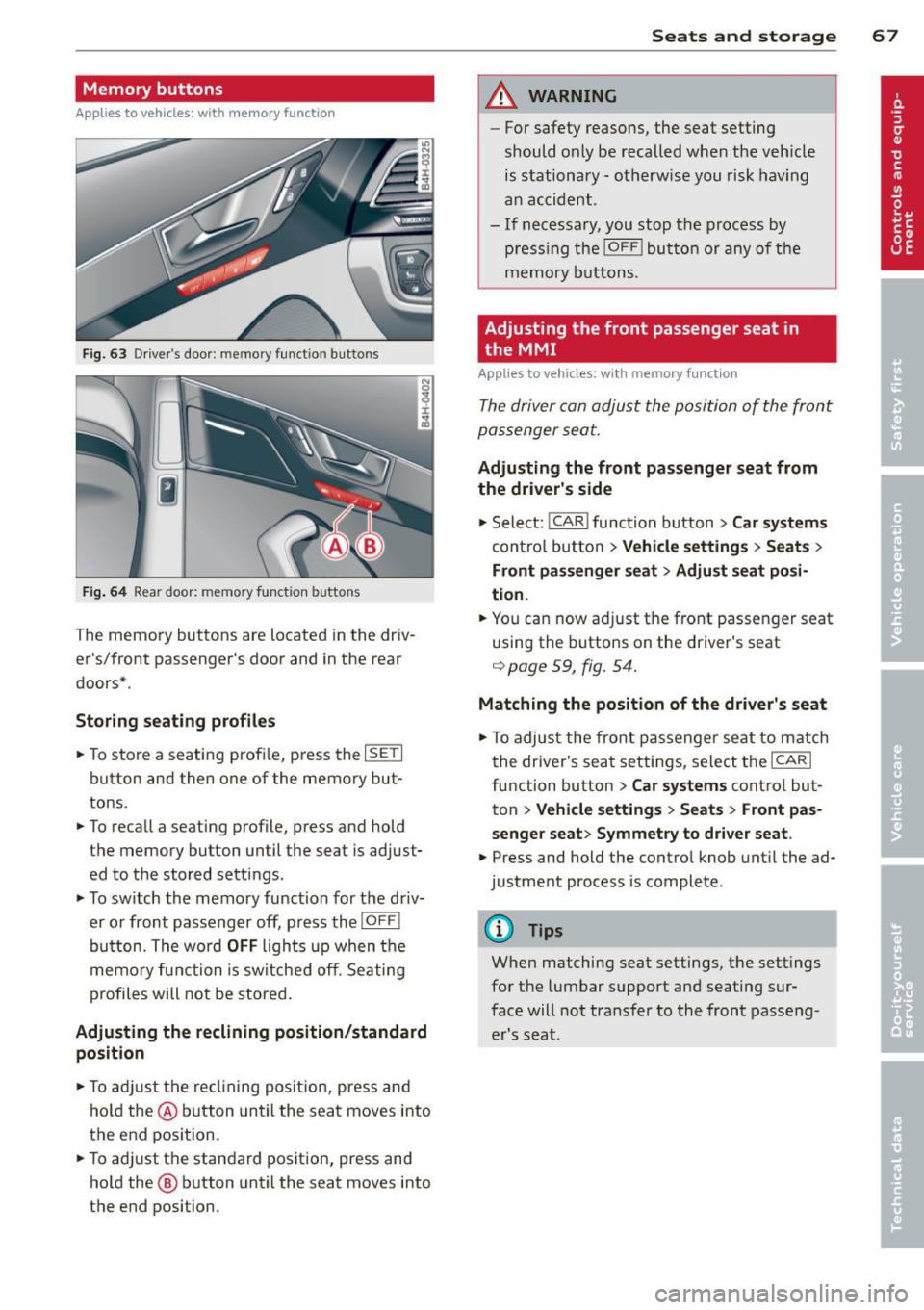
Memory buttons
Applies to vehicles: with memory function
Fig . 63 D river's door: memory function buttons
Fig. 64 Rear door: memory fun ction buttons
The memo ry buttons are located in the dr iv
er 's/fr ont passenger's door and in the rear
doors* .
Storing seating profiles
.. To s tore a seating profi le, press the ISETI
button and then one of the memo ry but
tons .
.. To recall a seating p rof ile, p ress and hold
the memory button until the seat is adj ust
ed to t he stored settings.
.. To switch the memo ry function for the d riv
er o r front passenger off, p ress th e
IOFFI
button. The word OFF ligh ts up when the
memo ry fu nctio n i s sw itche d off . S eating
p rofi les will not be s tore d.
Adjusting the reclining position/standard
position
.. To adju st the re clining posit io n, press and
hol d the @ button until the seat move s into
the end position .
.. To a dju st the stan dard pos it ion, press and
hold the @ button until the sea t moves into
the end position. Seats and storage 67
A WARNING
-
For safety reasons, the seat setting
should o nly be recalled w hen the veh icle
is stationary -otherw ise you risk hav ing
a n accid ent.
- If necessa ry, you stop the process by
press ing the
!OF F! button or any of the
m emory buttons.
Adjusting the front passenger seat in
the MMI
Applies to vehicles: with memory function
The driver can adjust the posi tion of the front
passenger seat.
Adjusting the front passenger seat from
the driver's side
.. Sele ct: !CAR I func tion butt on> Car systems
con trol bu tton > Vehicle settings > Seat s >
Front passenger seat > Adjust seat posi
tion .
.. You ca n now ad just t he front passen ger seat
using the buttons on the driver's seat
<=> page 59 , fig. 54.
Matching the position of the driver's seat
.. To adjus t the front passenge r se at to m atch
t he driver's seat settings, se lec t th e
ICARI
function button > Car systems cont ro l but
ton
> Vehicle settings > Seats > Front pas
senger seat > Symmetry to driver seat .
.. Press and hold the contro l knob until the ad
justment process is complete .
@ Tips
When matching seat settings, the settings
for the lumbar support and seating sur
face will no t tra nsfer to the front passe ng
e r's seat.
Page 70 of 314
68 Seats and storage
Full-length center
console
Overview
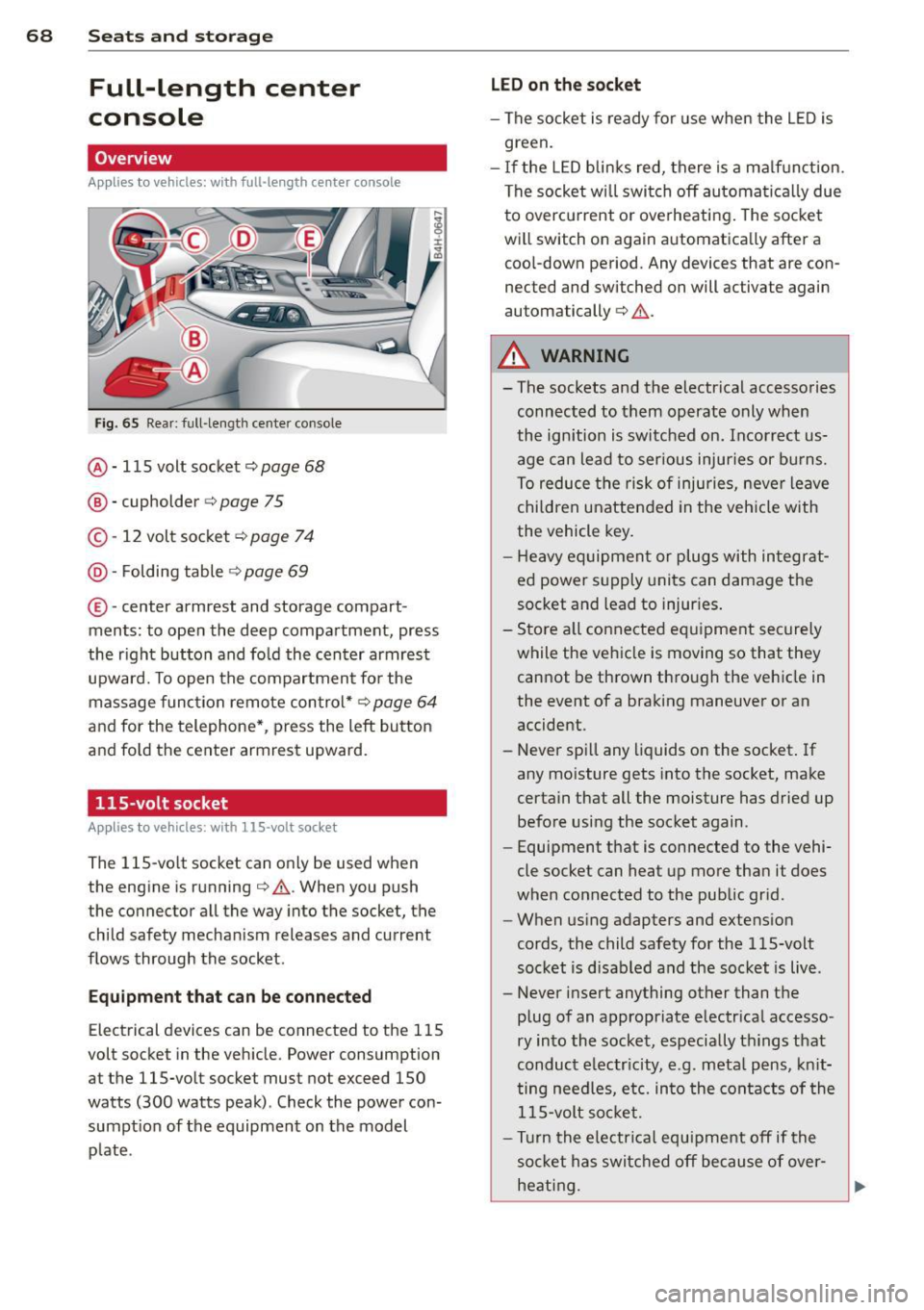
Appl ies to vehicles: with full-len gth ce nter console
Fig. 65 Rear: full -length center console
@ · 115 volt socket ¢ page 68
@ · cupholder <=> page 75
© · 12 volt socket c:> page 7 4
@ · Folding table ¢ page 69
® ·center armrest and storage com part ·
ments: to open the deep compartment, press
the r ight button and fo ld the center armrest
upward. To open the compartment fo r the
massage func tion remote con trol*
c:> page 64
and fo r the telephone* , press the left button
and fo ld the center armrest upward.
115-volt socket
App lies to vehicles: with 115 -vo lt socket
The 115-vo lt socket can only be used when
the engine is running¢
A. When you push
the connector all the way into the socket, the
child safety mechan ism releases and current
flows through the socket .
Equipm ent that can be conn ected
Electrical devices can be connected to the 115
volt socket in the veh icle. Power consumption
at the 115-volt socket must not exceed 150
watts (300 watts peak) . Check the power con·
sumpt ion of the equipment on the model
p late .
LED on th e socket
- The socket is ready for use when the L ED is
green.
- If the LED blin ks red, there is a ma lf u nction.
The socket wi ll swi tch off automa tica lly due
to overcu rrent or overheating. The socke t
will switch on again automatica lly after a
coo l-down period. Any devices that are con
nected and switched on will activate again
automatically
c:> A .
A WARNING
-
- The sockets and the electr ical accessories
connec ted to them operate only when
the ignition is switched on. Incorrect us
age can lead to ser ious injuries or burns.
To reduce the risk of injuries, neve r leave
chi ldren unattended in the veh icle with
the vehicle key .
- H eavy equipment or plugs with in tegrat
ed power s upply units can damage the
socket and lead to injur ies .
- Sto re a ll connected e quipment securely
while the veh icle is moving so that they
cannot be thrown through the veh icle in
the event of a braking maneuver or an
accident.
- Never sp ill any liquids on the socket . If
any mo isture gets into the socket, make
certain that all the moisture has dried up before using the socket again.
- Equipment that is connected to the vehi·
cle socket can heat up more than it does
when connected to the public gr id .
- When us ing adapters and extens ion
cords, the child safety for the 115-volt
socket is d isabled and the socket is live.
- Never insert anything other than the
p lug of an appropriate e lectr ical accesso·
ry in to the socket, especially th ings that
conduct e lectr icity, e.g . meta l pens, kn it
ting needles, etc. in to the cont acts of the
1 15-volt so cket.
- Turn the electrical equ ipment off if the
socket has switc hed off because of over·
heat ing.
Page 72 of 314
70 Seats and storage
Luggage compartment
Tie-downs and luggage compartment
net
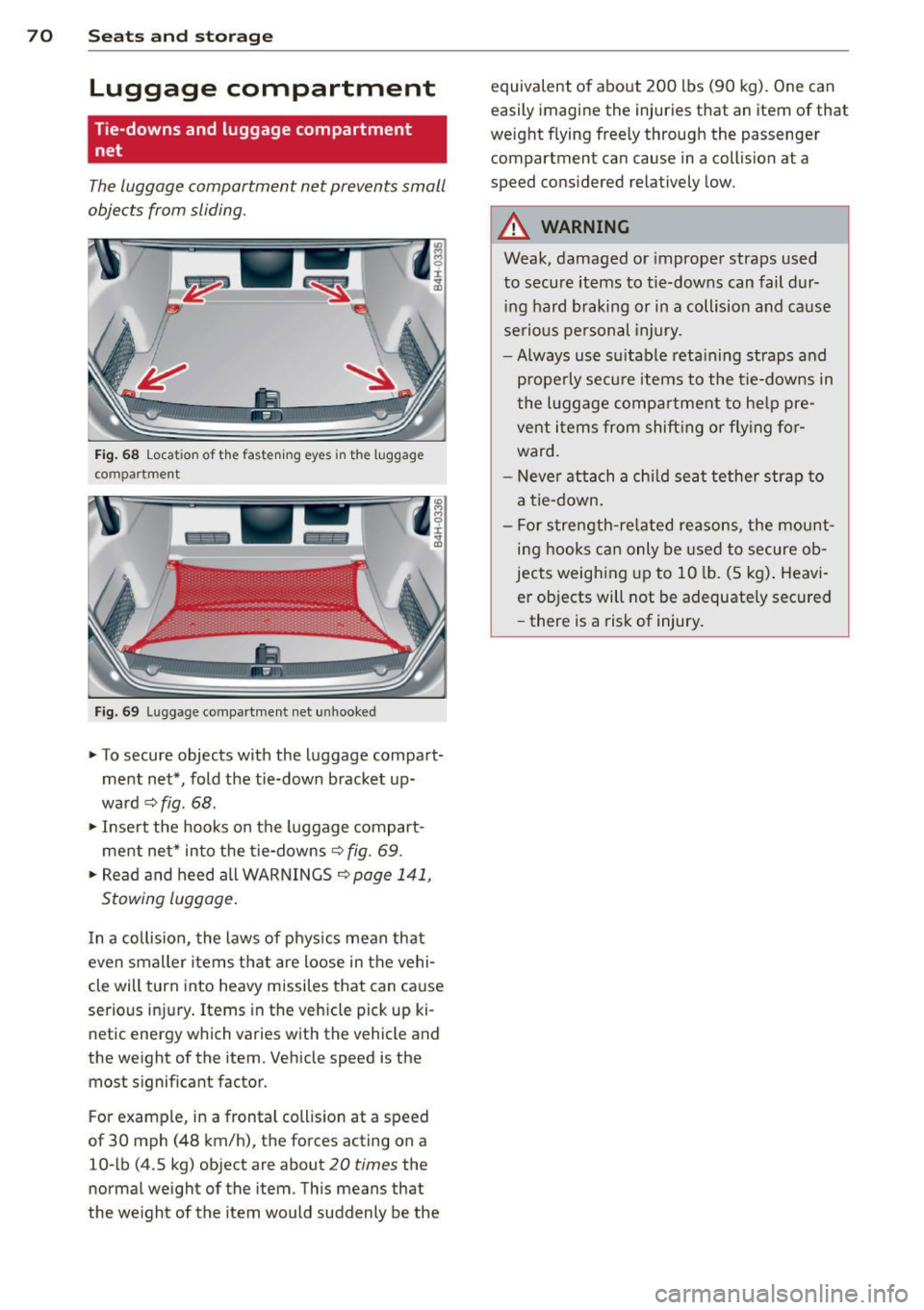
The luggage compartment net prevents small
objects from sliding.
Fi g. 68 Loca tion of the fasten ing eyes in the lu ggag e
compartment
Fig. 69 Lu ggage compartme nt net un hooke d
"To secure objects with the luggage compart
ment net", fold the tie-down bracket up
wa rd
~ fig . 68 .
"Inse rt the hooks on the luggage compart
ment ne t* into the tie-downs
9 fig. 69 .
"Read and heed all WAR NINGS 9 page 141,
Stowing luggage .
In a collis ion, the laws of phys ics mean that
even smaller items that are loose in the vehi
cle will turn into heavy missiles that can ca use
serious in jury . Items in the vehicle pick up ki
netic energy which varies w ith the vehicle and
the weight of the item . Vehicle speed is the
most signif icant factor.
F or example, in a frontal coll is ion at a speed
of 30 mph (48 km/h), the forces acting on a
10- lb (4 .5 kg) object are about
20 times the
normal weight of the item . This means that
the we ight of the item would suddenly be the equivalent of about 200 lbs (90 kg). One can
easily imagine the injuries that an
item of that
weight flying freely through the passenger compartment can cause in a collis ion at a
speed considered relatively low .
A WARNING
-Weak, damaged or imprope r straps used
to secure items to tie-downs can fail dur in g hard braking or in a collision and cause
se rio us personal injury.
- Always use su itable reta ining straps a nd
p roperly secu re items to the tie-downs in
the l uggage compa rtment to he lp pre
vent i tems from shift ing or fly ing fo r
ward.
- Never at tach a chi ld seat tether strap to
a t ie -down.
- For s trength-re lated reasons, the mou nt
ing hooks can only be used to secure ob
jects weighing up to 10 lb. (5 kg) . Heavi
er objects will not be adequately sec ured
- there is a risk of injury.
Page 73 of 314
Pass-through with ski
sack
Preparing the pass-through
Applies to vehicles: with pass-through and ski sack
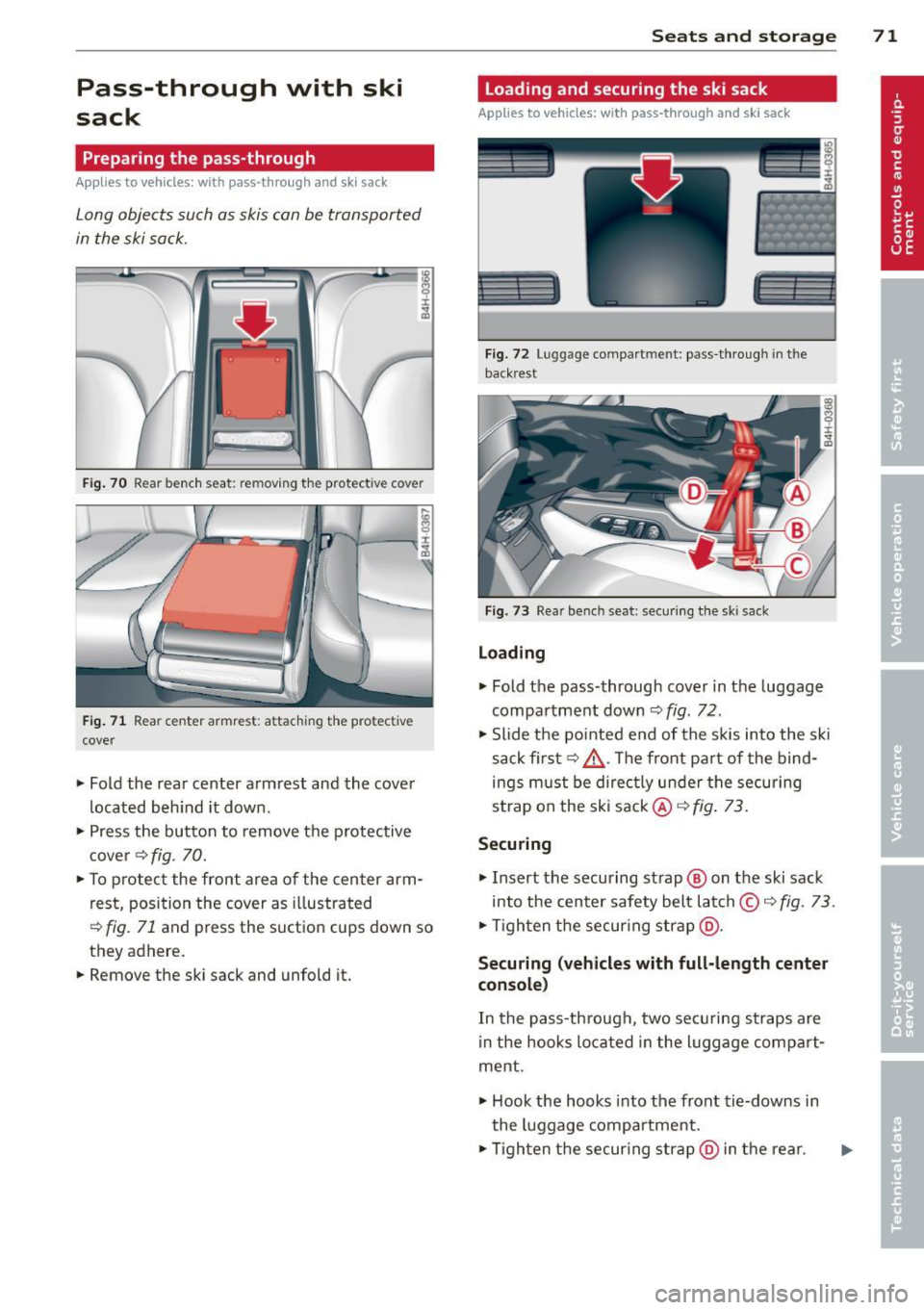
Long objects such as skis can be transported
in the ski sack.
Fig. 70 Rear bench seat: removing the protect ive cover
Fig. 71 Rear center armrest: attaching the protective
cover
~ Fold the rear center armrest and the cover
located behind it down.
~ Press the button to remove the protective
cover ¢
fig. 70.
~ To protect the front area of the center arm
rest, position the cover as illustrated
¢
fig. 71 and press the suction cups down so
they adhere.
~ Remove the ski sack and unfold it.
Seats and storage 71
Loading and securing the ski sack
Applies to vehicles: with pass -through and ski sack
--~ --
·-- --· ----~-
Fig. 72 Luggage compartment: pass-through in th e
backrest
Fig. 73 Rear bench seat: sec uring the sk i sack
Loading
~ Fold the pass-through cover in the luggage
compartment down
c:;, fig. 72.
~ Slide the pointed end of the skis into the ski
sack first¢ ,&.. Th e front pa rt of the bind
ings must be directly under the securing
strap on the ski sack@¢
fig. 73.
Securing
~ Insert the securing strap @ on the ski sack
into the center safety belt latch ©
c:> fig. 73.
~ Tighten the securing strap@.
Securing (vehicles with full-length center
console)
In the pass-through, two securing straps are
in the hooks located in the luggage compart
ment .
~ Hook the hooks into the front tie-downs in
the luggage compartment .
~ Tighten the securing strap @in the rear.
Page 74 of 314
7 2 Seats and storage
& WARNING
- The ski sack is intended only for the
transportation of skis and other light ob
jects . To reduce the risk of serious per
sonal in jury, never t ransport heavy or
poin ted objects in the ski sa ck.
- When brak ing rapidly or during an acci
dent, the load could be displaced and
ca use i njury to occupants.
- Sharp edges on the load must be cove red
for protect ion. Always fasten the belt
ti gh tly around the sac k and its contents
¢ fig . 73.
-For safety reasons, do not t ransport
more than two pairs of skis in the ski
sac k.
- You m ust sec ure the ski sack with t he
st rap a fter loading.
- Make su re a ll objects that you are trans
porting in the pass-through are secured.
Otherwise they cou ld slide around during
sudden braking maneuvers and cause in
jury.
@ Tips
- Never stow the sk i sack away whe n it is
still wet or damp (for examp le, sn ow
melt ing from sk is) . Allow it to dry com
plete ly before stowing it away .
- Position skis in the ski sack with the pointed ends facing t he front and ski
po les w ith the pointed ends facing the
rear.
Roof rack
Description and mounting locations
Additional cargo can be carried wi th a roof
luggage rack .
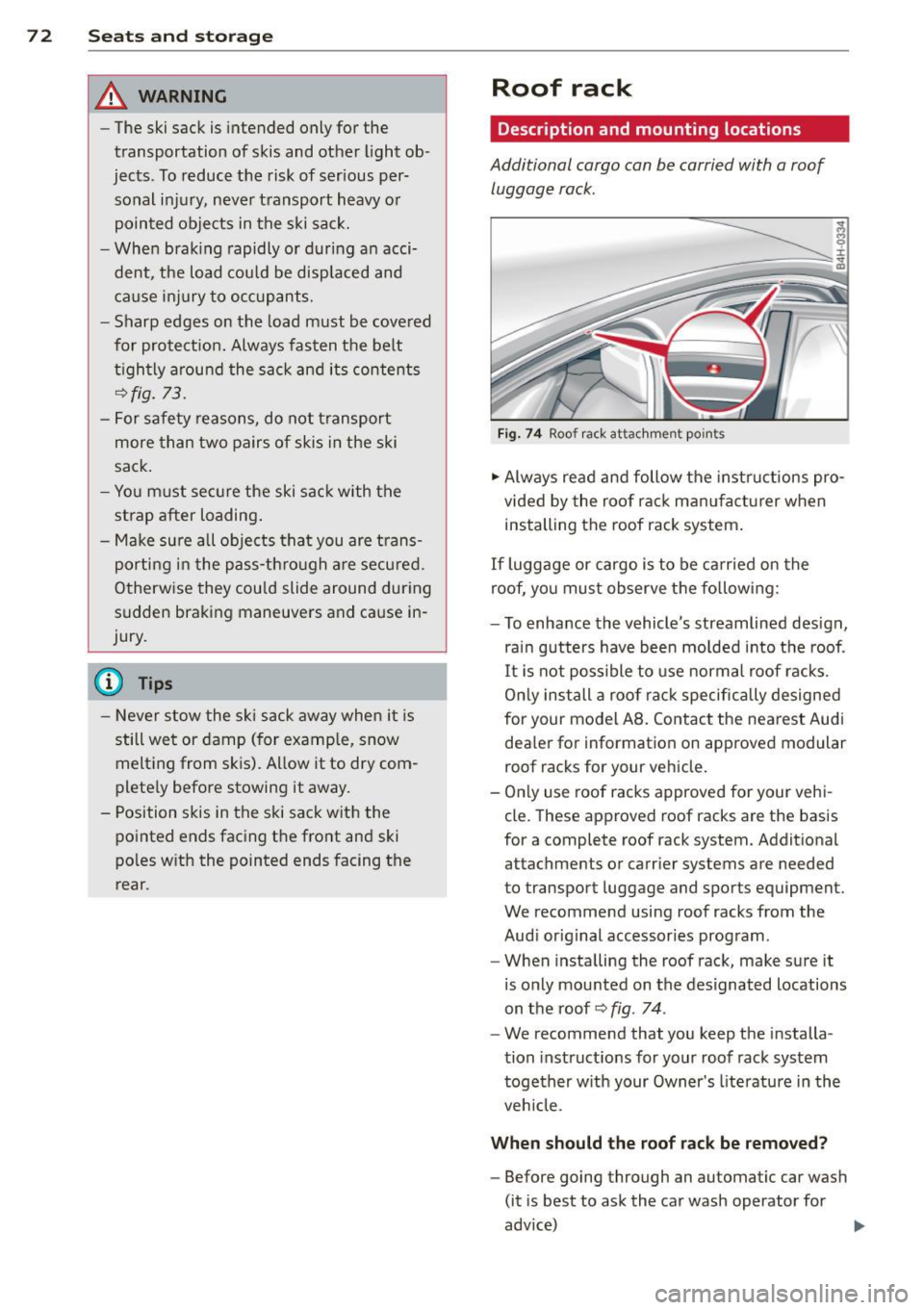
Fig . 74 Roo f ra ck attac hment po ints
.. Always read and follow the instr uct ions pro
vided by the roof rack ma nufacturer when
i nstall ing the roof rack system .
If luggage or cargo is to be ca rried on the
roof, yo u mus t observe the follow ing:
- To enhance the vehicle 's streamlined design,
ra in gutters have been mo lded i nto t he roof .
I t is not poss ible to use normal roof ra cks.
O nl y install a roof ra ck specific ally designed
for your model AB . Contac t the nea re st Audi
dea ler for information on approved modular
roof racks for your v ehicle.
- On ly use roof racks approved for your vehi
cl e. These approved roof racks are the basis
fo r a complete roof rack system. Addition al
a tta chmen ts or carr ier systems are needed
t o transpor t luggage and spor ts equipment.
We recommend using roof rack s from the
Aud i original accessories prog ram.
- When insta lling the roof rack, make sure it
is o nly mounted on the designated locations
on the roof~
fig. 74 .
-We recommend that you keep the i nstalla
tion instruct ions for your roof rack system
together w ith your Owner's literature in the
ve hicle.
When should the roof rack be removed?
- Before go ing through an au tomatic car wash
(it is best to ask the ca r wash operator for
adv ice)
...
Page 76 of 314
7 4 Seats and storage
- Never exceed the maximum perm issible
load carrying capacity of the roof o f your
vehicle, the permissible axle weights and
the permissible total weight of your veh i
cle
c::, page 289, Weights .
@ For the sake of the environment
As a result of the increased wind resist
ance created by a roof rack, your vehicle is
using fuel unnecessarily. So remove the
roof rack after using it.
12-volt sockets
Applies to vehicles: 12-volt soc kets
Electrical accessories can be connected to ev
ery 12-volt socket.
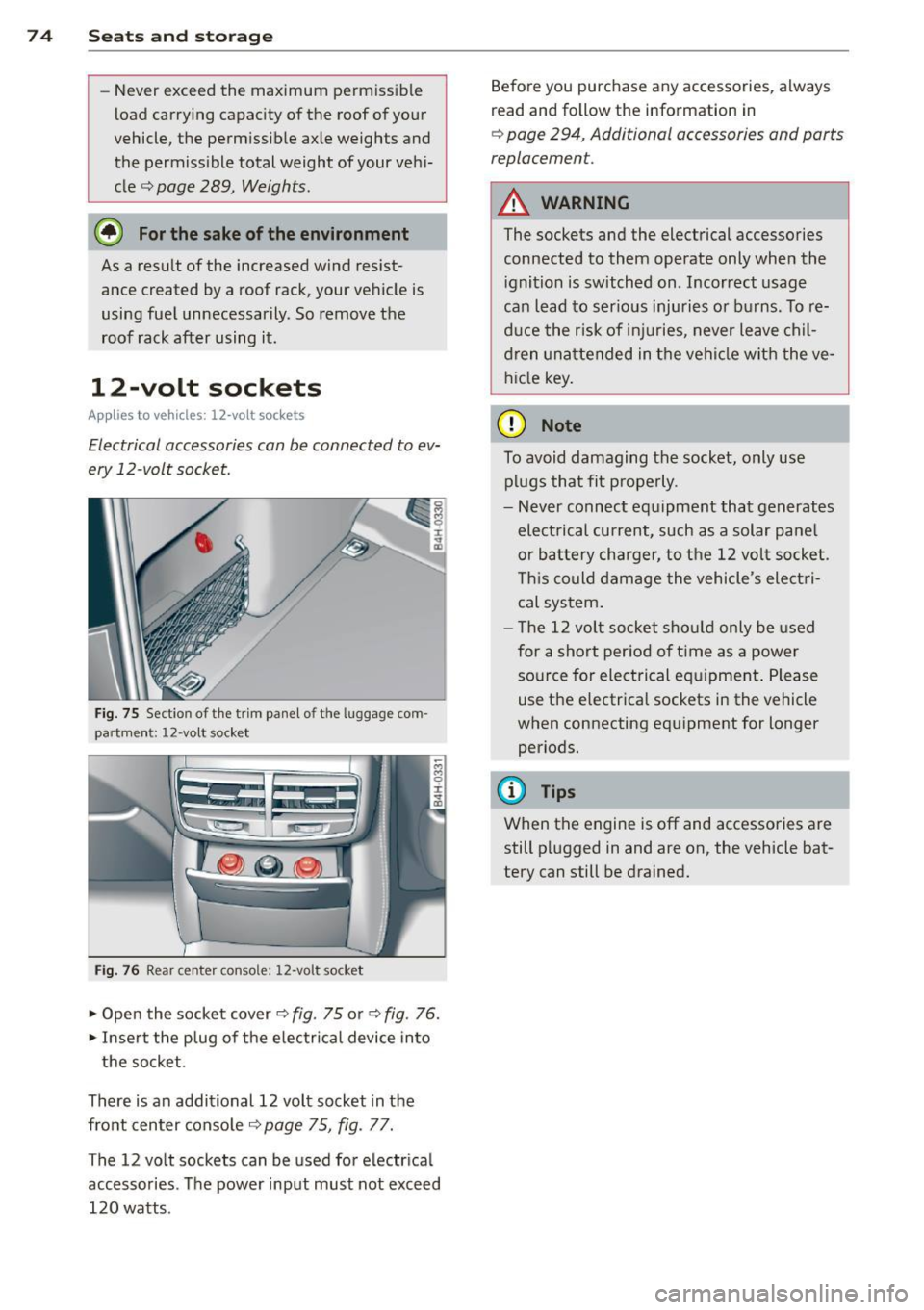
Fig. 75 Sect io n of the trim panel o f th e luggage com
part ment : 12 -vol t socket
Fig. 76 Rear center conso le: 12-vo lt socket
... Open the socket cover c::, fig . 75 or c::, fig . 76 .
... Inse rt the p lug of the e lectrical device into
the socket.
There is an additional 12 vo lt socket in the
fro nt center console
c::> page 75, fig. 77.
The 12 volt sockets can be used for electr ica l
accessories . Th e power input must not exceed
120 watts . Before you purchase any accessories
, always
read and follow the information in
c::, page 294, Additional accessories and parts
replacemen t.
A WARNING
The sockets and the electrical accessories
connected to them operate only when the
i gnition is switched on . Incorrect usage
ca n lead to ser ious injuries or burns. To re
duce the risk of inj uries, never leave ch il
dren unattended in t he vehicle with the ve
hicle key .
(D Note
To avoid damaging the socket, only use
plugs that fit p roperly.
- Never connect equ ipment that generates
elect rical current, such as a solar panel
or battery charger, to the 12 vol t socket .
T his could damage the vehicle 's elect ri
cal sys tem .
- The 12 volt socket shou ld only be used
for a short per iod of t i me as a power
so urce for electrical equ ipment . Please
use the electrical sockets in the vehicle
when connecting equipment for longer periods.
@ Tips
When the engine is off and accessories are
still plugged in and are on, the vehicle bat
tery can still be drained.
Page 77 of 314
Storage
(upholder
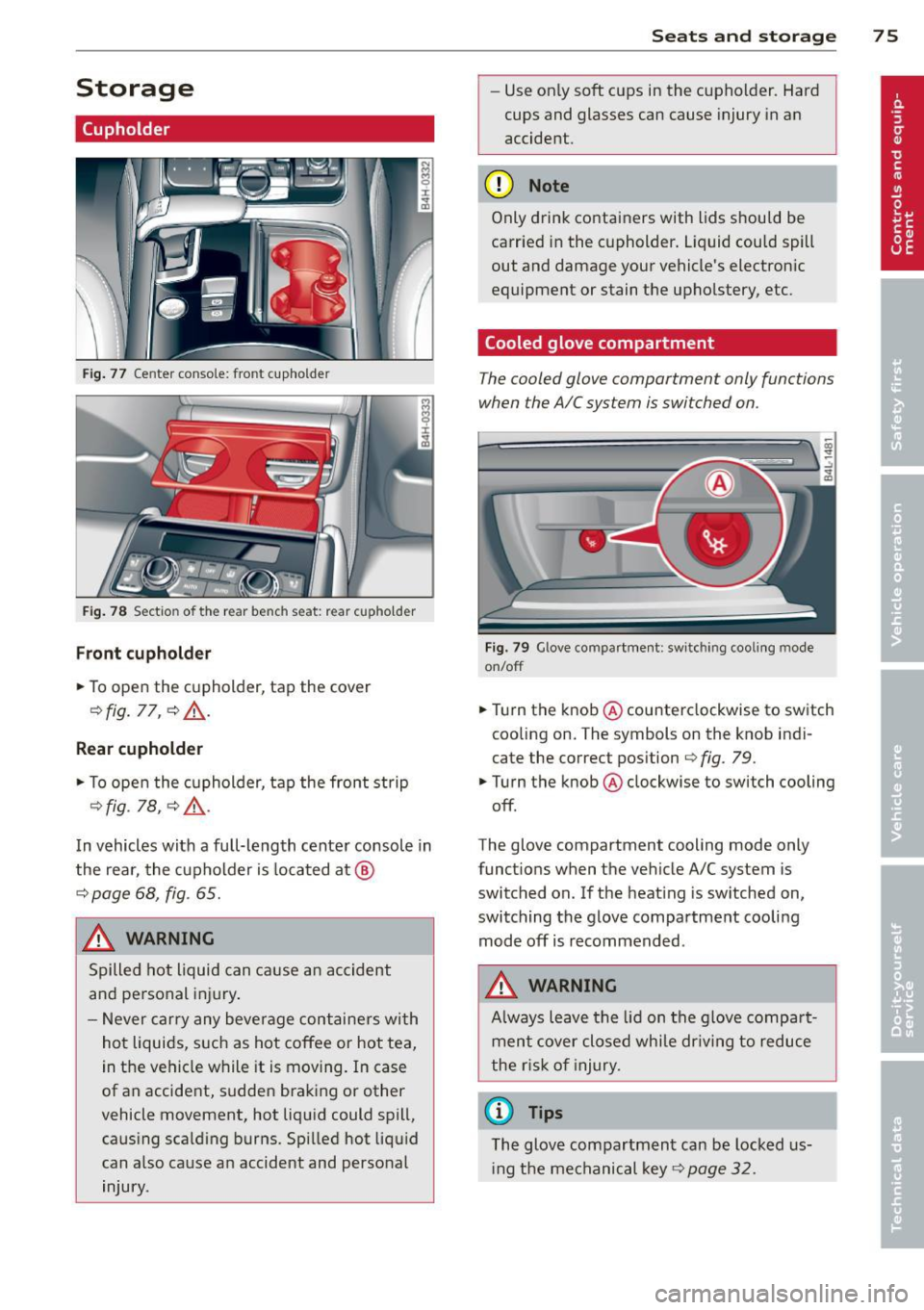
Fig. 77 Center console: front cupho lder
Fig. 78 Section of the rear bench seat: rear cupholder
Front cupholder
.,. To open the cupholder, tap the cover
Q fig . 77, Q &,.
Rear cupholder
.,. To open the cupholder, tap the front strip
Q fig. 18, QA .
In vehicles with a full-length center console in
the rear, the cupholder is located at @
Qpage 68, fig. 65.
A WARNING
Spilled hot liquid can cause an accident
and personal injury .
- Never carry any beverage containers with
hot liquids, such as hot coffee or hot tea,
in the vehicle while it is moving. In case
of an accident, sudden braking or other
vehicle movement, hot liquid could spill, causing scalding burns. Spilled hot liquid
can also cause an accident and personal
injury.
Seats and storage 75
-Use on ly soft cups in the cupholder. Hard
cups and glasses can cause injury in an
accident.
(D Note
Only drink containers with lids should be
carried in the cupholder. Liquid could spill
out and damage your vehicle's electronic
equipment or stain the upholstery, etc.
Cooled glove compartment
The cooled glove compartment only functions
when the AIC system is switched on.
Fig. 79 Glove compar tment: switching cooling mode
on/off
.,. Turn the knob@ counterclockwise to switch
cooling on. The symbols on the knob indi
cate the correct position
~ fig. 79 .
.,. Turn the knob @ clockwise to switch cooling
off .
The glove compartment cooling mode only
functions when the vehicle A/C system is
switc hed on. If the heating is switched on,
switching the glove compartment cooling mode off is recommended .
A WARNING
Always leave the lid on the glove compart
ment cover closed while dr iving to reduce
the risk of injury.
a) Tips
The glove compartment can be locked us
i ng the mechanical key
Q page 32.
Page 78 of 314

76 Seats and stor age
Addit ional storage
There are a variety of storage compartments
and fasteners in various places in the vehicle.
- Storage compartments in the doors
- Net in the front passenger footwell
- Eyeglasses compartment in the headliner (near the rearview mirror)
- Storage compartments under the center
armrests
- Compartments* on the back of the front
seat backrests
- Garment hooks over the rear doors
- Compartment in the center console with
pass-through)* (rear)
- Compartment behind the rear center arm
rest (in vehicles without the pass-through*
or cooler*)
- Bag hooks in the luggage compartment
A WARNING
-When driving, do not leave any hard ob
jects on the rear window shelf or allow
your pet to sit on the shelf. They could
become a hazard for vehicle occupants in
the event of sudden braking or a crash .
- Always remove objects from the instru
ment panel. Any items not stored could
slide around inside the vehicle while driv
ing or when accelerating or when apply
ing the brakes or when driving around a
corner.
- When you are driving make sure that
anything you may have placed in the cen
ter console or other storage locat ions
cannot fall out into the footwells. In case
of sudden braking you would not be able
to brake or accelerate.
- Any articles of clothing that you have
hung up must not interfere with the driv
er's view. The coat hooks are designed
only for lightweight clothing. Never hang
any clothing with hard, pointed or heavy
objects in the pockets on the coat hooks.
During sudden braking or in an accident -
especially if the airbag is deployed - these objects could injure any passen
gers
inside the vehicle.
- To reduce the risk of personal injury in an
accident or sudden stop, always keep the
glove compartment closed while driving.
- Read and follow all WARNINGS
c:> page 173, Important safety instruc
tions on the side airbag system.
- Hang clothes in such a way that they do
not impair the driver's vision.
- The coat hooks must only be used for
lightweight clothing. Do not leave any
heavy or sharp edged objects in the pock
ets which may interfere with the side cur
tain airbag deployment and can cause personal injury in a crash.
- Do not use coat hangers for hanging clothing on the coat hooks as this can in
terfere with proper deployment of the
side curta in airbags in an acc ident.
- Do not hang heavy objects on the coat
hooks, as they could cause personal in
jury in a sudden stop.
@ Note
Objects located on the rear shelf that rub
against the rear window could damage the
heating wires for the rear window defog
ger .
(D Tips
-A vent slot is located between the shelf
and the rear window. Do not block the
vent with any items you may place on the
rear window she lf.
- Do not place bulky items on the rear win
dow shelf as they could restrict or block
the driver's vision in the rear view mirror.
Cooler
Introduction
App lies to vehicles: wit h coo ler
Please clean the cooler before using it for the
first time
c:> table on page 218 .
You can only switch on the cooler if ...
Page 79 of 314
- the temperature in the luggage compart
ment is below 131 °f (55 °C). The cooler
switches off automatically if the tempera
ture in the luggage compartment exceeds 131 °f (55 °C) . Once the temperature falls
below 131 °f (55 °C) again, the cooler
switches on aga in automat ically .
- t he battery is adequately charged . The cool
er switches off automatically if the vehicle
battery voltage falls below a minimum lev
el. This prevents the batte ry from discha rg
i ng . The cooler switches back on again auto
matically when the battery voltage increases
again (e.g . after starting the engine).
The cooler cools to 42.8 °f
(+ 6 °C) and the
freezer cools to 21.2 °f (- 6 °C) in opt imum
cooling cond itions . Th e cooling performance
is affected by the temperature in the luggage
compartment. The temperature inside the
cooler will be higher if the luggage compart ment is hot.
A WARNING
To avoid putting the occupants at any risk, please observe the following safety rules:
- The maximum capacity is 2.5 kg (5.5
lbs.).
- Never overload the cooler. This could cause injury in the event of a collision or
sudden braking.
- The coo ler lid must always be kept closed
while you are driving. Make sure the re
taining catch is securely engaged . The
contents of the coo ler could be thrown
forward into the passenger compart
ment in the event of a collision or under
sudden braking - risk of injury!
- Inflammable liquids, gas canisters, etc.
must not be stored in the cooler -risk of
exp losion! This also includes any prod
ucts that might emit volatile or inflam
mable gases.
- Liquids will freeze at temperatures at or
below 32 °f (0 °C) and may cause glass
bottles to burst!
Seats and storage 77
(D Note
-The venti lation openings for the cooler
are located on the back pane l trim in the
luggage compartment and
must be kept
clear at all t imes.
- If the cooler is not functioning properly, switch it off to prevent further damage.
Have it checked by a qualified workshop .
Operation
Applies to vehicles: wit h coo ler
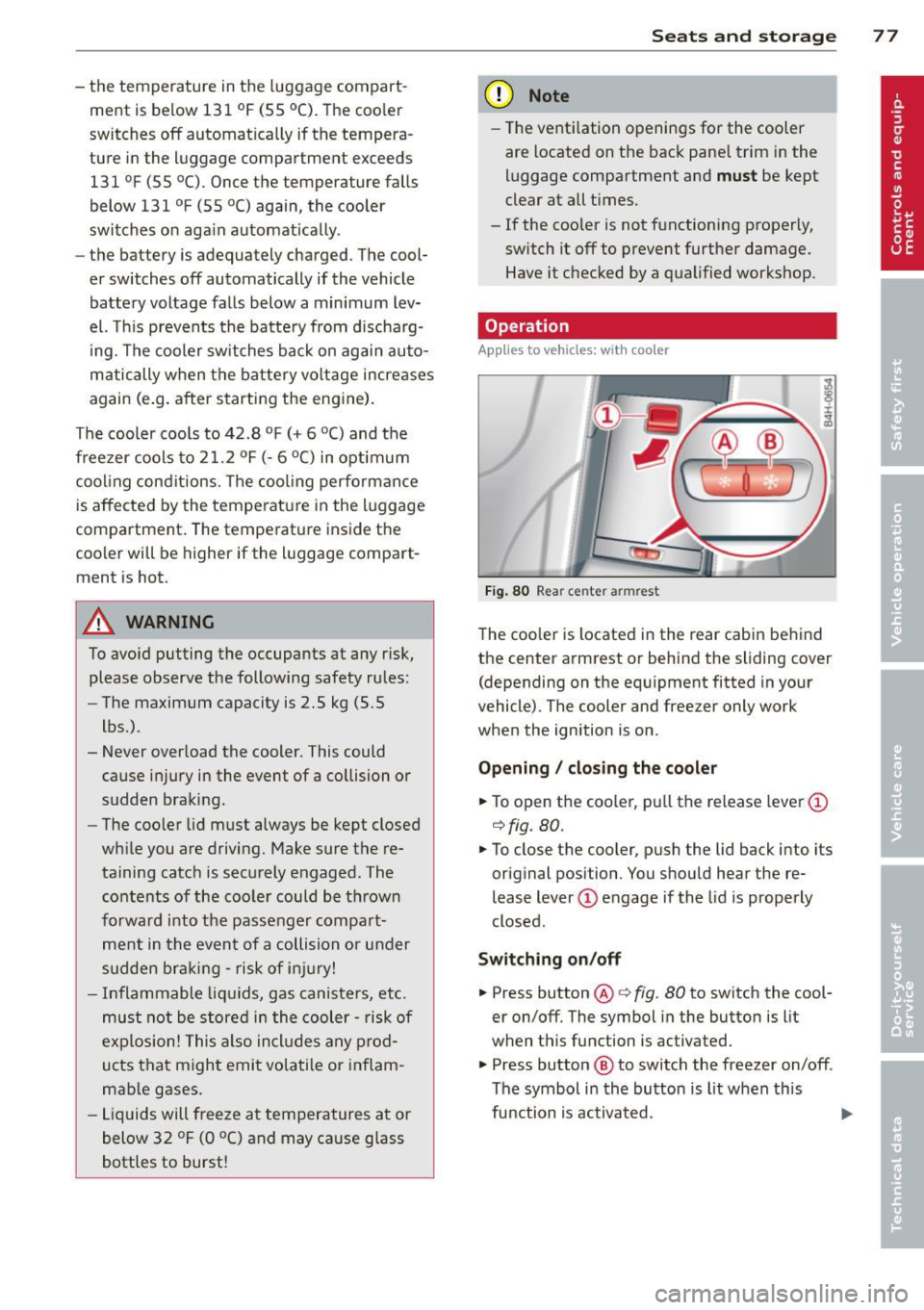
Fig. 80 Rear ce nter ar mrest
The cooler is located in the rear cabin behind
the center armrest or behind the sliding cover (depending on the equipment fitted in your
vehicle) . The cooler and freezer only work
when the ignition is on .
Opening / closing the cooler
.,. To open the cooler , pu ll the release lever@
c:!> fig. 80.
.,. To close the cooler, push the lid back into its
original position . You should hear the re
lease lever(!) engage if the lid is properly
closed.
Switching on /off
.,. Press button @ r:!> fig. 80 to switch the cool
er on/off. The symbol in the button is lit
when this function is activated .
.,. Press button
@ to switch the freezer on/off .
The symbol in the button is lit when this
function is activated .