center console AUDI A8 2015 User Guide
[x] Cancel search | Manufacturer: AUDI, Model Year: 2015, Model line: A8, Model: AUDI A8 2015Pages: 312, PDF Size: 79.18 MB
Page 76 of 312

7 4 Seats and storage
12-volt sockets
Applies to vehicles: 12-volt socke ts
Electrical accessories can be connected to ev
ery 12-volt socket.
Fig. 78 Section of the trim panel of the luggage com
partment: 12-volt socket
Fig . 79 Rear center console: 12-volt socket
.. Open the socket cover¢ fig. 78 or¢ fig . 79 .
.. Insert the plug of the electrical device into
the socket .
There is an additional 12 volt socket in the
front center console¢
page 74, fig. 80.
The 12 volt sockets can be used for electrical
accessories. The power input must not exceed
120 watts.
Before you purchase any accessories, always
read and follow the information in
<::> page 292, Additional accessories and parts
replacement.
A WARNING
The sockets and the electrical accessories connected to them operate only when the
ignition is switched on. Incorrect usage
can lead to serious injuries or burns. To re
duce the risk of injuries, never leave chil- dren
unattended in the vehicle with the
ve
hicle key.
(D Note
To avoid damaging the socket, only use plugs that fit properly .
-Never connect equipment that generates
electrical current, such as a solar panel
or battery charger, to the 12 volt socket.
This could damage the vehicle's electri
cal system.
- The 12 volt socket should only be used
for a short period of ti me as a power
source for electrical equipment. Please
use the electrical sockets in the vehicle
when connecting equipment for longer periods.
(D Tips
When the engine is off and accessories are
still plugged in and are on, the vehicle bat
tery can still be drained .
Storage
'(upholder
Fig. 80 Center console: front cupholder
Fig. 81 Section of the rear bench seat: rear cupholder Ill>
Page 77 of 312

Front cupholder
• To open the cupholder, tap the cover
¢ fig. 80, ¢ _&.
Rear cupholder
• To open the cupholder, tap the front strip
¢fig. 81, ¢ _&.
In vehicles with a full-length center console in
the rear, the cupholder is located at@
¢ page 68, fig . 68.
_& WARNING
Spilled hot liquid can cause an accident
and personal injur y.
- Never carry any beverage containe rs with
hot liquids, such as hot coffee or hot tea,
in the vehicle while it is moving . In case
of an accident, sudden braking or other
vehicle movement, hot liqu id could spill,
caus ing scald ing burns . Spill ed hot liquid
can also cause an accident and personal
injury.
- Use only soft cups in the cupholder. Hard
cups and glasses can cause injury in an
acc ident.
(D Note
On ly drink containers with lids should be
carried in the cupho lder. Liquid could spill
out and damage your veh icle's electronic
equ ipment or sta in the upholstery, etc.
Cooled glove compartment
The cooled glove compartment only functions
when the A/C system is switched on.
Fig. 82 Glove compa rtment: switc hing cooling mode
on/off
Seats and storage 75
• Turn the knob @counterclockwise to switch
cooling on. The symbols on the knob indi
cate the correct pos ition
<=> fig. 82.
• Turn the knob@clockwise to switch cooling
off.
The glove compartment cooling mode only
functions when the vehicle A/C system is
switc hed on. If the heating is switched on,
switc hing the glove compartment cooling
mode off is recommended .
_& WARNING
Always leave the lid on the glove compart
ment cover closed while dr iving to reduce
the risk of injury.
© Tips
The glove compartment can be locked us
in g the mechanical key
¢page 32.
Additional storage
There are a var iety of storage compartmen ts
and fasteners in various places in the veh icle.
- Storage compartments in the doo rs
- Net in the front passenger footwell
- Eyeglasses compartment in the headliner
(near the rearview mirror)
- Storage compartments under the center
armrests
- Compartments* on the back of the front
seat backrests
- Garment hooks over the rear doors
- Compartment in the center console with
pass-through)* (rear)
- Compartment behind the rear center arm
rest (in vehicles without the pass-through*
or cooler *)
- Cell phone holder* in the right rear door
- Bag hoo ks in the luggage compartment
_& WARNING
-=
-When driving, do not leave any hard ob-
jects on the rear w indow shelf or allow
your pet to sit on the she lf . They cou ld
Page 82 of 312

80 Warm and cold
airflow and air distribution a re controlled au
tomatically.
Adjusting the temperature
Temperatures between 60 °F (+16 °() and
84
°F (+28 °C) can be set. Outside of this
r ange,
lo or hi wi ll appear in the climate con
trol system disp lay. At both of these settings,
the climate control system runs continuously
at maximum cooling or heating power. There
is no temperature regulation.
~ Adjusting the airflow
You can adjust the airflow manually to suit
your needs . To have the airf low regulated au
tomatically, press the
! AUTO ! button.
~ Adjusting the air distribution
You can manually se lect the vents where the
air will flow. To have the air distribution regu
lated automa tically, press the
IAUTOI button .
~ I lil* Adjusting Seat heating/
ventilation*
Pressing the button switches the seat heat
ing/ventilation on at the highest setting ( level
3). The L EDs indicate the temperature leve l.
To reduce the temperature, press the button
again. To switch the seat heating/ventilation
off, press the button repeatedly until the LED
turns off.
After 10 minutes, the seat heating/venti lation
automatically switches from level 3 to level 2.
I n vehicles without the four zone automatic
climate contro l*, buttons in the rear center
console control the seat heating for both out
er rear seats*.
~ Switch the defroster on/off
The winds hield and s ide windows are defrost
ed or cleared o f condensation as quickly as
possible. The maximum amo unt of air flows
mainly from the vents below the windshield.
Recirculation mode switches off. The tempera
ture should be set to 72
°F (22 °C) or higher.
The temperature is controlled automatically.
The
IAUTOI button switches the defroster off.
~ Switching rear window heater on/off
T he rear window heater only operates when
the engine is running. It switches off auto
matically after 10 to 20 minutes, depending
on the outside temperature.
T o prevent the rear window heater from
switching off automatically , press and hold
the~ button for more than 2 seconds. This
r ema ins stored until the ignition is switched
off.
I SYNC I Synchronization*
When synchronization is switched on, the set
tings for the driver's side are applied to the
front passenger's side (except for seat heat
ing/ventilation*). The rear seat is a lso
synchronized in vehicles with the 4-zone de
luxe automatic cl imate control system*. Syn
chronization switches off if the sett ings are
adjusted on the front passenger's side or in
the rear*.
You can synchronize the settings in a row by
pressing and holding a knob. For example, to
apply the settings for the front passenger's s ide to the driver's side, press and hold the
knob on the front passenger's side.
Air vents
You can open or close the center and rear
vents in the cockpit and the vents in the rear
center console and door pillars using the
ridged thumbwheels. The levers adjust the di
rection of the airflow from the vents.
,&. WARNING
- Do not use the recirc ulation mode for ex
tended periods of time . The windows
could fog up since no fresh air can enter
the vehicle. If the windows fog up, press
the air recircu lation button again imme
diately to sw itch off the air recirculation
function or select defrost.
- Individuals w ith reduced sensitivity to
pain or temperature could deve lop burns
when using the seat heating function. To reduce the risk of injury, these indiv idu-
als shou ld not use seat heating . .,..
Page 87 of 312

Starting the engine if there is a
malfunction
It may not be possible to start the engine un
der certain circumstances , for example if the
battery in the vehicle key is drained , if inter
ference hos affected the key or if there is a
system malfunction.
i :c _ ____ ;&
Fig. 89 Center console/master key : starting the engine
if th ere is a m alfunction
Requirement : The message Key not re cog
nized. Hold b ack of key against marked area.
See owner's manual.
must appear and the in
dicator light
II must switch on .
"' Hold the master key vert ica lly in the loca
tion indicated
y >>) c::> fig. 89.
"' Press the brake pedal i=:> A in Starting the
engine on page 83 .
"'Press the j ~s_T_A_R_T_E_N_G _I_N _E_ S_T_O_P~I button . The
engine will start .
"' Drive to your au thor ized Audi dealer imme
diately to have the malfunct ion corrected .
(D Tips
You can view the message again by press
ing the
! START ENGINE STOP I button.
On the road 85
Electromechanical
parking brake
Operation
The electromechanical parking broke replaces
the hand broke.
Fig. 90 Center co nsole: Parking b rake
"' Pull on the switch © i=:> fig. 90 ® to apply
the parking brake. The indicator lights in the
switch and. (USA models)/ . (Cana-
da models) in the instrument cluster illumi
nate .
"' With the ignition switched on, step on the
brake peda l or the accelerator pedal and
press the switch <®lat the same time to re
lease the parking brake . The indicator lights
in the switch and. (USA mode ls)/ . (Can
ada models) in the instrument cluster go
out .
Your vehicle is equipped with an electrome
chanical parking brake. The parking brake is
designed to prevent the vehicle from rolling unintentionally and replaces the hand brake.
In addit ion to the normal functions of a tradi
tiona l hand brake, the electromechanical
parking brake provides vario us convenience
and safety functions .
When starting from rest
-The integral start ing assist helps you when
driving by automatically re leasing the park
i ng brake
i=:> page 86, Starting from rest.
- When start ing on inclines , the starting as-
sist prevents the vehicle from unintentiona l-
ly rolling back. The braking force of the
parking brake is not re leased until sufficient
111>
Page 91 of 312

The@j indicator light appears in the informa
tion line in the instrument cluster display
<:!)fig. 92 .
Engine automatically restarts
The stop phase is interrupted in the following
situations, for examp le. The engi ne restarts
without any action by the driver.
- Th e interior temperature varies from the
temperatu re selected in the A/C system.
- The windshield is being defrosted
r::!) page 81 .
-The brake pedal is pressed several times in a
row.
- The battery charge level becomes too low.
- High power consumption .
Switching the ignition off automatically
To prevent the battery from draining, the igni
tion will switch off
automatically when all of
the following conditions have been met:
- The vehicle has al ready been driven.
- The eng ine has been turned off by the Start-
Stop-System*.
- The driver's door is opened.
- The driver's seat belt is removed .
- The brake pedal is not pressed down.
- The vehicle is stationary .
In this case, the activated low beam will be re
placed by the side marker lights. The side
marker lights will switch off after approxi
mately 30 minutes or when you lock the vehi
cle .
If the Start-Stop System has
not turned off
the engine or if you have switched the Start
Stop system off manually, the ignition w ill
not
be automatically switched off and the engine
will cont inue to run
r::!) .&. .
A WARNING
Never allow the engine to run in confined
spaces - danger of asphyxiation.
(D Tips
If you shift into the D, N or S positions af
ter shift ing into reverse, the veh icle must
On the road 89
be driven faster than 6 mph (10 km/h) in
order for the engine to switch off again.
Switching the Start-Stop-System on/off
manually
App lies to vehicles: wit h Start -Stop -System
If you do not wish to use the system, you can
switch it off manually.
Fig. 93 Center console: Start -Stop -System button
.,. To switch the Sta rt-Stop-System off/on
manually, p ress the
ICA.> ••I button. The L ED in
the button turns on when the system is
sw itched off.
(D Tips
If you switch the system off during a stop
phase, the engine will start again auto
ma tically .
Messages in the instrument cluster
display
Applies to vehicles: wit h Start-Stop-Syste m
Start-Stop system deactivated: Please re
start engine manually
This message appears when specific condi
tions are not met during a stop phase and the
Start-Stop-System will
not be able to restart
the engine. If the Dor R selector lever posi
tions were engaged, P will be selected auto
matically . The engine must be started with
the
I START ENGINE ST OP ! button.
Start-Stop system: System fault! Function
unavailable
There is a malfunction in the Start-Stop-Sys
tem. Drive the vehicle to an authorized repair .,.
Page 124 of 312
122 Parking systems
If the distance to an obstacle remains con
stant, the volume of the distance warning
gradually drops after about four seconds (this
does not apply in the continuous tone range).
Rear view camera
The rear view camera is located above the rear
license plate bracket. Make sure that the lens
for the parking system
c:> fig. 132 is not cov
ered by deposits or any other obstructions be
cause this can affect the function of the park
ing system. For information on clean ing, refer
to
c:> page 214.
The rear view camera coverage area includes
(D ¢fig . 131. Only this area is shown in the
Infotainment display. Objects that are outside
of this area @are not displayed.
The accuracy of the orientation lines and the
blue surfaces is reduced if the adaptive air
suspens ion* is faulty, if the vehicle is lifted or
if the
dynamic mode is activated c;, page 108.
A WARNING
-Always read and follow the applicable
warnings
c:> &. in General information on
page 120.
- If the position and the installation angle
of the rear view camera was changed, for
example, after a collision, do not contin
ue to use the system for safety reasons.
Have it checked by your authorized Audi
dealership or authorized repair facility.
- Only use the rear view camera to assist
you if it shows a good, clear picture. For example, the image may be affected by
the sun shining into the lens, dirt on the
lens or if there is a system fault.
- Use the rear view camera only if the lug
gage compartment lid is completely
closed. Make sure any objects you may
have mounted on the luggage compart
ment lid do not block the rear view cam
era.
- The camera lens enlarges and distorts
the field of vision . The object appears
both altered and inaccurate on the
screen. -
In certain situations, people or objects in
the display appear closer or further
away:
- objects that do not touch the ground,
such as the bumper of a parked vehicle,
a trailer hitch or the rear of a truck. Do
not use the help lines in this case.
- If driven from a level surface onto an
incline , or a downward slope.
- If driven toward protruding objects.
-If the vehicle is carrying too much load
in the rear.
(D Note
-Always read and follow the applicable
warnings
c:> 0 in General information on
page 120.
- The orange colored orientation lines in
the Infotainment display show the vehi cle path depending on the steering
wheel angle. The front of the vehicle
front swings out more than the rear of
the vehicle. Maintain plenty of distance
so that your outside mirror or a corner of
your vehicle does not collide with any ob
stacles.
Switching on/off
Applies to vehicles : with parking system pl us with rear
v iew camera
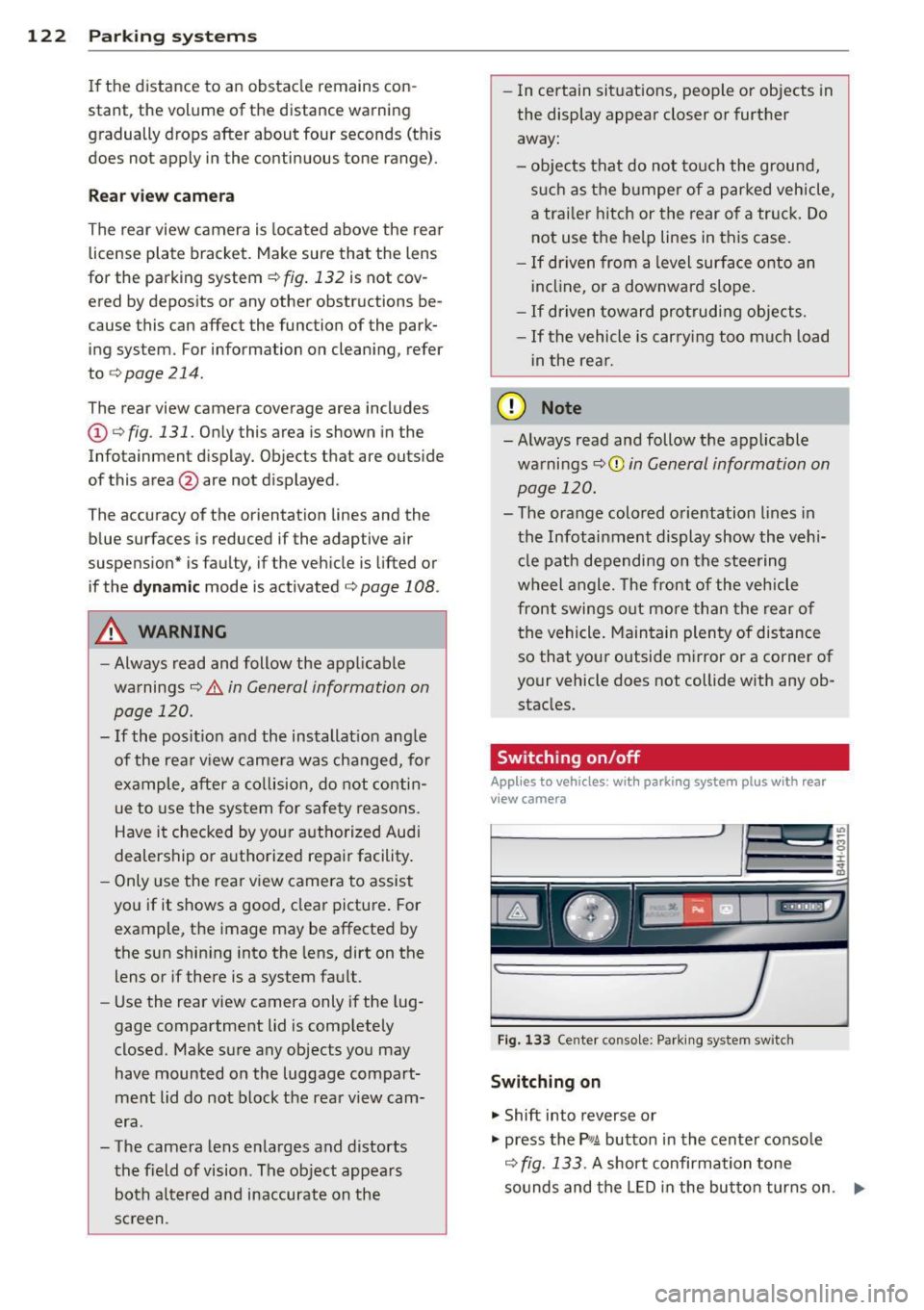
Fig . 133 Center console: Parking system sw itch
Switching on
.,. Shift into reverse or
.,. press the
PwA button in the center console
c:> fig. 133 . A short confirmation tone
sounds and the LED in the button turns on. .,..
Page 128 of 312
126 Parking systems
Switching on or off
Applies to vehicles: with top view camera system
Fig. 139 Center console: f¼! button
Fig . 140 Infotainment: se lect ing the mode
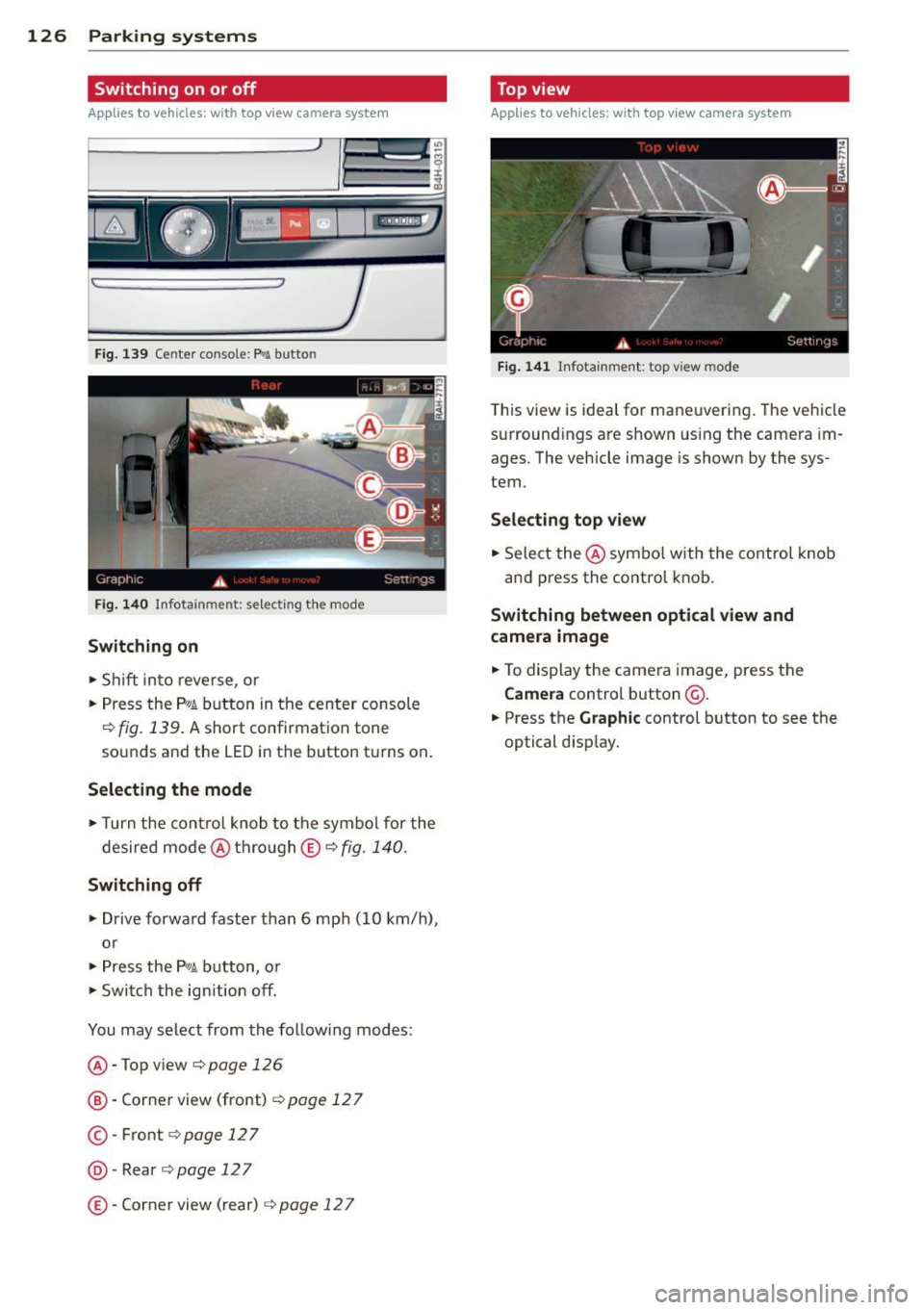
Switching on
• Shift into reverse, or
• Press the
P,01 button in the center console
¢ fig. 139. A short confirmation tone
sounds and the LED in the button turns on .
Selecting the mode
• Turn the cont rol knob to the symbol for the
desired mode @thro ugh
© ¢fig. 140.
Switching off
• Drive forward faster than 6 mph (10 km/h),
or
• Press the
P,#A button, or
• Switch the ignition off.
You may select from the follow ing modes:
@ -Top view¢ page
126
@-Corner view (front) ¢ page 12 7
©-Front ¢page 127
@-Rear ¢page 127
©-Corner view (rear) c:;, page 12 7
Top view
Applies to vehicles: w ith top view camera system
Fig. 141 Infotainment: top view mode
T his view is ideal for maneuvering. The vehicle
surround ings are shown using the camera im
ages. The vehicle image is shown by the sys
tem.
Selecting top view
• Select the @symbo l with the control knob
and press the control knob.
Switching between optical view and
camera image
• To display the camera image, press the
Camera control button @.
• Press the
Graphic control button to see the
optical disp lay.
Page 168 of 312

166 Airbag system
Other things that can affect Advanced
Airbag performance
Changing the vehicle's suspension system can
change the way that the Advanced Airbag Sys
tem performs in a crash. For example, using
tire-r im combinations not approved by Aud i,
lowering the vehicle, changing the stiffness of
the suspension, including the sp rings, suspen
sion struts, shock absorbe rs etc. can change
the forces that are measured by the a irbag
sensors a nd sent to the electron ic control
un it. Some suspension changes ca n, for exam
p le, increase the force levels measured by the
sensors and make the airbag system deploy in
crashes in which it would not dep loy if the
changes had not been made. Other kinds of
changes may reduce the force levels meas
ured by the sensors and prevent the airbag
from deploying when it should .
A WARNING
Changing the vehicle 's s uspension includ
ing use of unapproved tire-rim combina
tions can change Advan ced Airbag per
formance and increase the risk of serio us
personal injury in a crash.
- Never install suspens io n components
t hat do not have the same performance
characteristics as the components origi
nally installed on your vehicle .
- Never use tire-rim combinat ions that
have not been approved by A udi.
A WARNING
-
Items stored between the safety belt
buckle and the center console can cause
the sensors in the buckle to send the
wrong informat ion to the electronic con
trol modu le and prevent the Advanced A ir
bag System from work ing properly.
- Always make sure that nothing can inter-
fere w ith the safety belt buckles and that
they are not obstructed .
Knee airbags
Description of knee airbags
The knee airbag system can provide supple
mental protection to properly restrained
front seat occupants.
Fig . 169 Dr iver's knee airbag
T he driver knee airbag is in the ins trument
pane l underneath the steering wheel
¢fig. 169, the airbag for the passenger is at
about the same height in the instrument pan
el underneath the glove compartment.
T he knee airbag offers addi tional protection
to the driver 's and passenger's knees and up
per and lower thigh areas and supplements
the protection provided by the safety belts.
If the front airbags dep loy, the knee a irbags
also dep loy in frontal collisions w hen the de
ployment threshold stored in the control unit
is met
¢ page 160, More important things to
know about front airbags .
In addition to their normal safety f unction,
safety belts help keep the driver or front pas
senger in position in a fronta l collision so that
the a irbags can provide supplemental protec
t ion .
The airbag system is not a substitute for your safety belt . Rather, it is part of the overa ll oc
cupant restra int system in your vehicle. A l
ways remember that the a irbag system can
only he lp to protect you if you are wearing
you r safety belt and wearing it properly. This
is why you should always wear your safety
belt, no t jus t because the law requires you to
do so
¢page 143, General notes. .,.