emergency towing AUDI A8 2015 Owners Manual
[x] Cancel search | Manufacturer: AUDI, Model Year: 2015, Model line: A8, Model: AUDI A8 2015Pages: 312, PDF Size: 79.18 MB
Page 6 of 312
4 Table of contents
Do-it-yourself ser vice . . . . . . . . .
266
What do I do now? . . . . . . . . . . . . 266
Trunk escape hand le . . . . . . . . . . . . . . 266
Emergency warning triangle . . . . . . . . 266
Vehicle tool kit . . . . . . . . . . . . . . . . . . . 267
Changing a wheel . . . . . . . . . . . . . . . . . 269
Fuses and bulbs . . . . . . . . . . . . . . . 276
Fuses . . . . . . . . . . . . . . . . . . . . . . . . . . . 276
Bulbs .. .. .. ... .... ...... ... ... .. 280
Emergency situations . . . . . . . . . 281
General . . . . . . . . . . . . . . . . . . . . . . . . . 281
Start ing by push ing or tow ing . . . . . . . 281
Starting with jumpe r cables . . . . . . . . 281
Use of jumper cab les . . . . . . . . . . . . . . 28 2
E mergency towing with comme rcial
tow truck . . . . . . . . . . . . . . . . . . . . . . . 283
Lifting vehicle . . . . . . . . . . . . . . . . . . . . 285
Technical data . . . . . . . . . . . . . . . . . 28 7
Technical Data . . . . . . . . . . . . . . . . . 287
Vehicle identification . . . . . . . . . . . . . . 287
Weights . . . . . . . . . . . . . . . . . . . . . . . . 287
D imensions. . . . . . . . . . . . . . . . . . . . . . 288
Capacities . . . . . . . . . . . . . . . . . . . . . . . 288
Gasoline engines . . . . . . . . . . . . . . . . . 289
Di esel eng ine . . . . . . . . . . . . . . . . . . . . 289
Consumer Information . . . . . . . 290
Warranty coverages . . . . . . . . . . . . . . . 290
Operating your vehicle outside the U.S.A . o r Canada . . . . . . . . . . . . . . . . . 290
Audi Service Repair M anuals and
Li terature . . . . . . . . . . . . . . . . . . . . . . . 290
M aintenance . . . . . . . . . . . . . . . . . . . . . 290
Additional accessories, modifications
and parts replacement . . . . . . . . . . . . 292
Declaration of Compliance,
Telecommunication or Electronic
Systems . . . . . . . . . . . . . . . . . . . . . . . . 293
Inde x . . . . . . . . . . . . . . . . . . . . . . . . . . 295
Page 25 of 312

Instrument s and warning /indicator lights 23
I--: Sport differential
IIJ Sport differential: system fault
There is a malfunction with the sport differen
tial.
Drive to your authorized Audi dea ler immedi
ately to have the malfunction corrected.
IIJ Sport differential: overheating
The transmission temperature has increased
sign ificantly due to the sporty dr iving manner .
D rive in a less sporty manner until the tem
perature returns to the normal range and the
indicato r light switches of .
.&_ WARNING
-
Contact your authorized Audi dealer or a
qualified workshop if the sport different ial
is faulty or ma lfunctioning. The repa ir
must be performed by trained personnel
using the correct oil in order to ensure
safety.
¢ Q Turn signals
The indicator light blinks when you use either
turn signal.
Whenever you use the left Nor the right a
turn signal, the indicator light blinks. When
you use the emergency flashers, both indica
tor lights flash .
If one of the turn signal light bulbs burn out,
the turn signal will blink tw ice as fast as nor
mal. Carefully drive to your authorized Audi
dealer immediately to have the malfunct ion
corrected. The indicator light does not indi
cate a malfunction if a turn signa l on the trail
er or on the vehicle fails in trailer towing
mode.
(D Tips
For more information on the turn signals,
refer to¢
page 48.
Driver information
display
Overv iew
Fig . 4 Drive r info rmation system in the inst rument
cluster
Fig. 5 Display: examp le of the info rmat ion lin e
The driver information system contains infor
mation @ that is displayed on tabs @
¢ fig. 4. The following content is possible de
pending on vehicle equipment:
@
®
Tab Content
1 Vehicle
functions :
On-board computer ¢ page 25
Efficiency program*¢ page 26
Digital speedometer
Cruise control*¢
page 90
Adaptive cruise control and braking
guard* ¢
page 92
Audi active lane ass ist* <=> page 101
Display darkened ...
Page 49 of 312

_& WARNING
-Automatic headlights are only intended
to assist the driver . They do not relieve
the driver of his responsibility to check
the headlights and to turn them on man
ually according to the current light and
visibility conditions. For example, fog
cannot be detected by the light sensors.
So always switch on the headlights
io
under these weather conditions and
when driving in the dark.
- Crashes can happen when you cannot see
the road ahead and when you cannot be
seen by other motorists. Always turn on
the headlights so that you can see ahead
and so that others can see your car from
the back.
- Please observe legal regulations when
using the lighting systems described.
(D Note
The rear fog lights should only be turned
on in accordance with traffic regulation, as
the lights are bright for following traffic.
(D Tips
- The light sensor* for automatic dynamic
headlight range control* is located in the
rear view mirror mount. You should
therefore not apply any stickers to the
windshield in this area in order to pre
vent malfunctions or failures.
- In the event of a light sensor malfunc
tion, the driver is notified in the instru
ment cluster display ~
page 22.
- You will hear a warning tone if you open
the driver door when the exterior lights
are switched on.
- In cool or damp weather, the inside of
the headlights, turn signals and tail
lights can fog over due to the tempera
ture difference between the inside and
outside. They will clear shortly after
switching them on. This does not affect
the service life of the lighting. Clear vision 4
7
Emergency flasher
The emergency flasher makes other motorists
aware that you or your vehicle are in an emer
gency situation .
Fig. 41 Center consol e: eme rge ncy flash er sw itc h
.,. Press the switch&..~ fig. 41 to turn the
emergency flashers on or off.
When the emergency flasher is on, all four
turn signals blink at the same time. The turn
signal indicator lights
B DI in the instru
ment cluster, as well as the light in the emer
gency flasher switch &.. blink likewise. The
emergency flasher also works when the igni
tion is turned off.
The emergency flashers will turn on automati
cally if you are in an accident where the airbag
has deployed.
@ Tips
You should turn on the emergency flashers
when:
- you a re the last vehicle standing in a traf
fic jam so that any other vehicles coming
can see you, or when
- your vehicle has broken down or you are
in an emergency situation, or when
- your vehicle is being towed by a tow
truck or if you are towing another vehicle
behind you.
Adjusting the exterior lighting
The settings ore adjusted in the MMI.
.,. Select: !CAR ! function button> Car systems
control button > Vehicle settings > Exterior
lighting. ..,.
Page 117 of 312

,....,
N ,....,
N
0 J:
'SI: ,...., \!) 1.1'1 ,...., 1.1'1 ,....,
Selector lever lock
The selector lever lock prevents you from sel ecting a position unintentionally, causing the
vehicle to roll. When engaging some selector lever positions, you must press the button on
the selector lever
c:> fig. 124 and/or press the
brake pedal.
You must press the brake pedal to engage a
selector lever position when the engine is run
ning while the vehicle is stationary. The ar
rows
c:> fig. 125 indicate when you need to
press the button on the selector lever.
The selector lever does not lock if you shift
from D to R within one second. This allows
you to "rock" the vehicle to free it when it is
stuck.
P- Park
The whee ls are locked in this position. Only
shift into park when the vehicle is stationary
c:> &. To engage the P se lector lever position,
press the button on the selector lever and
shift into the P position .
You can only shift out of park when the engine is running and you are pressing the brake ped
al. Press the button on the selector lever to
release the parking lock and select the desired
selector lever pos it ion .
P engages automatically when you switch the
engine off while D, Sor R is engaged or in
manual mode .
If you switch the engine off when N is engag
ed, the transmission remains in N for approxi
mately 30 minutes and then Pis engaged.
You must use the emergency release proce dure to release the parking lock before towing
the vehicle
c:> page 119.
R -Reverse
The reverse gear is engaged in this position .
Only select reverse when the vehicle is sta
tionary and the engine is running at idle speed
c:> &. To engage the R selector lever position,
press the button on the selector lever, press
Automatic Transmission 115
the brake peda l and move the selector lever
into the R position.
T he back-up lights turn on when you select
the R selector lever position wh ile the engine
is running .
N -Neutral
The transmission is in idle in this pos it ion . To
engage the N selector lever posit ion, press
the button on the selector lever and shift into
the N position.
If you switch the eng ine off when N is engag
ed, the transmission remains in N for approxi
mately 30 minutes and then Pis engaged.
You cannot select the N position when the ig
nition is switched off. When driv ing through
an automat ic car wash, first select the N posi
tion and then switch the engine off
c:> table on
page 216.
The veh icle cannot be locked when the selec
tor lever is in the N position.
D/S - Posit ion for driv ing forward
In the D/S position, the transmission can be
operated either in the normal mode D or in
the sport mode S . You can only select the S se
lector lever position when Dis engaged. Move
the selector lever back to engage the S selec
tor lever position. To select the D selector lev
er position again when Sis engaged, move the
selector lever back
c:> .&. . To shift from N to D
when traveling at speeds below 1 mph (2km/
h), press the brake peda l and select the D se
lector lever position
c:> .&. .
In the normal mode D, the transmission auto
matically selects the suitable gear ratio.
It de
pends on engine load, vehicle speed and driv
ing style.
Se lect the
sport mode S for sporty driving.
The vehicle makes fu ll use of the engine's
power. Shift ing may become noticeab le when
accelerat ing.
The S selector lever position engages auto
matically when you select the dynamic mode
in Audi drive select.
liJI,
Page 121 of 312
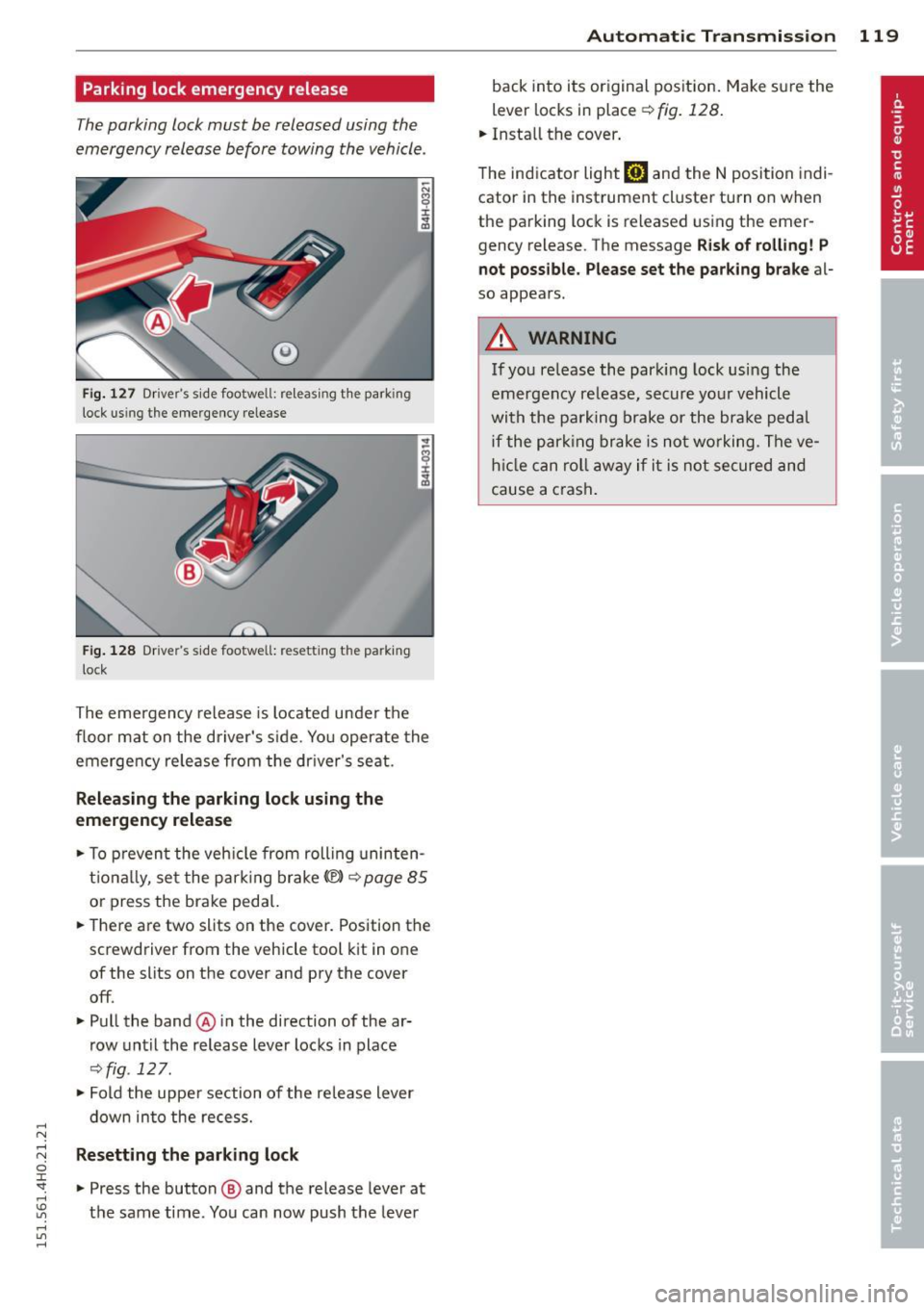
Parking lock emergency release
The parking lock must be released using the
emergency release before towing the vehicle .
®
Fig. 127 Driver's s ide footwell: re lea sing t he park ing
lock us ing the emergency release
Fig. 128 Driver's s ide footwell: resettin g th e pa rk ing
lock
The emergency release is located under the
f loor mat on the driver's s ide. You operate the
emergency re lease from the driver's seat.
Releasing the parking lock using the
emergency release
.,. To prevent the vehicle from rolling uninten
tionally, set the parking brake
«e)) q page 85
or press the brake peda l.
.,. There are two slits on the cover. Position the
screwdriver from the vehicle tool kit in one
of the slits on the cover and pry the cover
off .
.,. Pull the band@ in the direction of the ar
row until the release lever locks in place
qfig . 127 .
.,. Fold the uppe r section of the re lease lever
down into the recess.
Resetting the parking lock
.,. Press the button @ and the release lever at
t h e same time . You can now push the lever
Automatic Transmission 119
back into its original position. Make sure the
lever locks in place ~
fig. 128.
.,. Install the cover .
T he indicator light
mJ and the N position indi
cator in the instrument cluster turn on when
the parking lock is released using the emer
gency release. The message
Risk of rolling! P
not possible. Please set the parking brake
al
so appears .
.&_ WARNING
If you release the park ing lock using the
emergency release, secure your vehicle
with the parking brake or the brake pedal
i f the parking brake is not working. The ve
hicle can roll away if it is not secured and
cause a crash .
Page 283 of 312

.... N .... N
0 J:
'SI: .... \!) ..,.,
.... ..,., ,....,
Emergency situations
General
This chapter i s intended for trained emer
gency crews and working personnel who have the necessary tools and equipment to
perform these operations.
Starting by pushing or
towing
(D Note
Ve hicles w ith an au tomatic tra nsmission
cannot be started by pus hing o r tow ing.
Starting with jumper
cables
If necessary, the engine can be started by
connecting it to the battery of another vehi
cle.
If the engine shou ld fail to start because of a
discha rged o r wea k battery, the battery can be
connected to the battery o f
another vehicle,
using a
pair of jumper cables to start the en
g ine.
Jumper cables
Use only jumper cables of sufficiently la rge
c ross section to carry the starter c urrent safe
l y. Refer to the man ufacturer's specifications.
Use only jumper cables with
insulated te rm i
na l clamps wh ic h are d istinctly marked:
plus(+) cable i n mos t cases co lore d red
minu s(-) cable
in most cases colored black .
A WARNING
Batterie s contain e lec tricity, ac id, an d gas.
A ny of these can cause ve ry ser io us or fatal
inju ry. Follow the instructions below f or
safe han dling of your veh icle's b attery .
- Alway s shield you r eyes and avoid lean
ing over the bat te ry whenever possib le.
- A dis ch arged battery c an free ze at tem
peratures ju st be low 32 °F ( 0 °C ). Befo re
Emergency situations 281
connecting a jumpe r cab le, you must
thaw the fr ozen battery c omp lete ly, ot h
erwise it could explode.
- Do not allow battery acid to contact eyes
or skin. Fl ush any contacted area with
wate r immediately.
- Improper use of a booster battery to start a vehicle may cause an explosion.
- Vehicle batter ies genera te exp losive gas
es. Keep spar ks, flame and lighted c iga
rettes away from batte ries.
- Do not try to jump start any ve hicle w ith
a low ac id leve l in the battery.
- The vo ltage of the booste r batte ry m ust
a lso have a 12-Vol t rating. T he capacity
(Ah) of the booster battery sho uld not be
lowe r tha n that of the discharged bat
tery . Use of batte rie s of d iffe ren t voltage
or substantially diffe rent "Ah" rat ing
may c au se an exp losion and persona l in
JU ry.
- N ever cha rge a fro zen battery. Gas trap
pe d in the ice may cause a n ex plosion.
- Never cha rge or use a batte ry tha t h as
been fr ozen. T he battery case may have
be weakened.
- Us e of b atter ies of differe nt voltage or
sub stant ia lly diffe ren t ca pa city (Ah) ra t
i ng may c ause an ex plosion an d injury .
Th e capac ity (Ah) of the booster bat tery
should not be lower than that of the dis
charged batte ry .
- Before you chec k any thing in the engine
compa rtment, always read and hee d all
WARNINGS¢
page 22 8.
(D Note
- App lyin g a higher vo ltage booster ba t
t ery w ill cause expens ive damage to se n
sit ive e lectronic com ponents, such as
cont ro l units, relays, rad io, etc.
- The re must be no electrical contact be
tween the vehicles as ot herwise c urrent
co uld a lready start to f low as soon as the
p o sit ive(+) term inals a re connected. ..,. •
•
Page 285 of 312
-When connecting jumper cables, make
sure that they cannot get caught in any
moving parts in the eng ine compart
ment .
- Before you check anything in the engine
compartment, always read and heed all
WARNINGS ¢
page 228.
(D Note
Improper hook-up of jumper cables can r u
in the generator.
- Always connect POSITIVE( +) to POSI
TIVE(+), and NEGATIVE(-) to NEGATIVE
( - ) gro und post of the battery manager
control unit .
- Check that all screw plugs on the battery
cells a re screwed in firmly . If not, tighten
pl ugs p rior to connecting clamp on nega
tive battery term inal.
- Please note that the procedure f or con
nect ing a jump er cable as desc ribed
above appl ies spec ifically to the case of
you r vehi cle be ing jump started. When
you are giv ing a jump star t to an othe r ve
hi cle, do
not connec t the negat ive (-) ca
ble to the negat ive (-) terminal on the
discharged battery @¢
fig. 236. In
stead, securely connect the negative( -)
cable to e ithe r a solid metal component
that is firmly bolted to the engine block
or to the e ng ine block itse lf. If the bat
te ry tha t is being charged does not vent
to the outside, escaping batte ry gas
could igni te and exp lode!
Emergency towing
with commercial tow truck
General hints
Your Audi requires special handling for tow
tng.
The follow ing information is to be used by
commercia l tow tr uck operators who know
h ow to ope rate thei r equipme nt safe ly.
Emergenc y situ ation s 283
-Ne ver tow your Audi. Towing will cause
damage to the engine and tran smission.
- Never wrap the safety chain s or w inch ca
ble s around the brake lines.
- To prevent unnece ssary damage , your Audi
must be transported with a flat bed tru ck.
- To load the vehicle on to the fl at bed , use
the towing loop found in the vehicle tools
a nd attach to the front or rear anchora ge
¢ page 283 and ¢ page 284 .
_& WARNING
A vehicle being towed is not safe for pas
sengers. Never allow anyo ne to ride in a
vehicle be ing towed, for any reason.
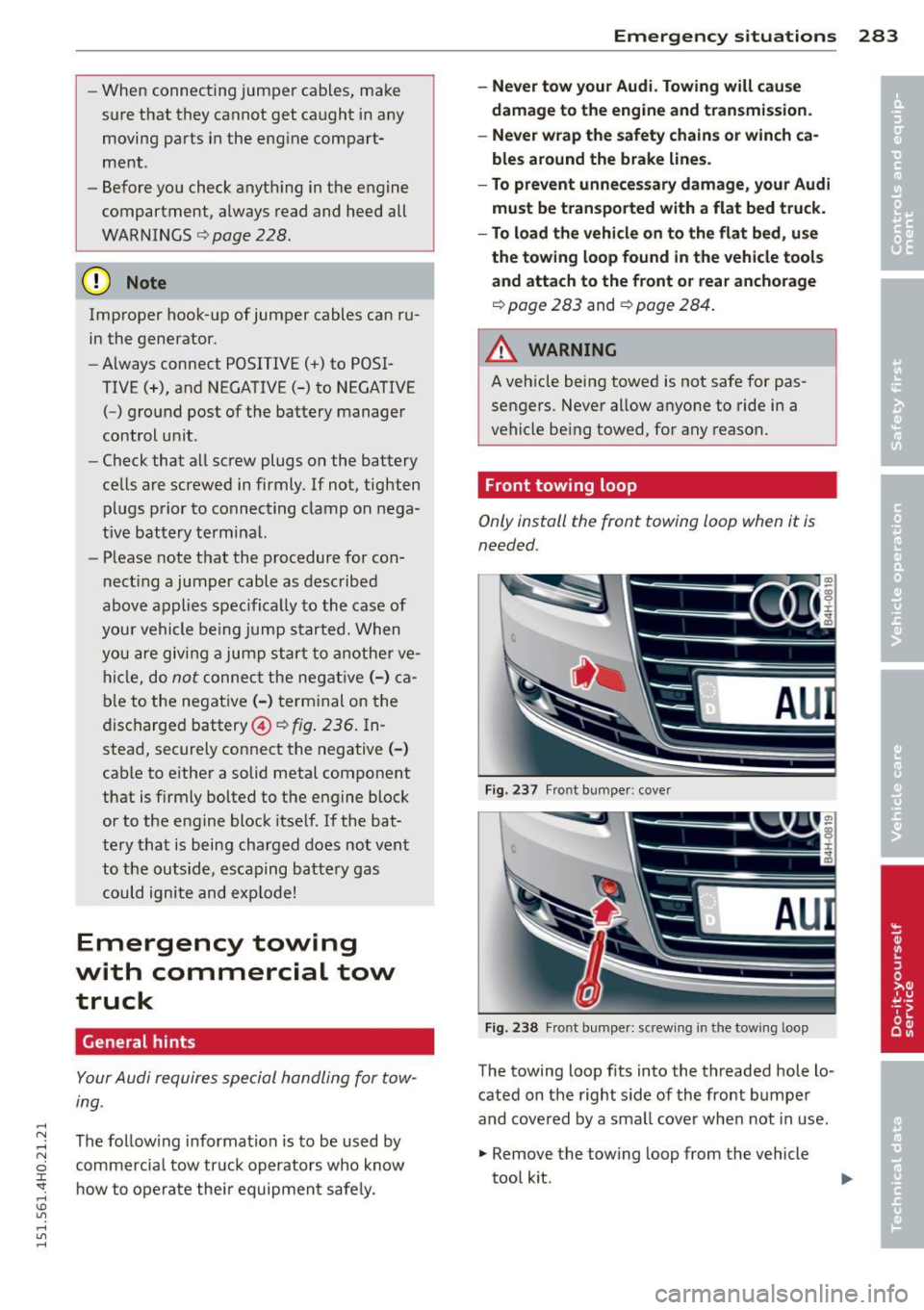
Front towing loop
Only install the front towing loop when it is
needed.
Fig. 237 Fr ont bu mpe r: cove r
Fig. 238 Fr ont bu mpe r: sc rew ing in t he tow ing loop
-
The towing loop f its into the threaded hole lo
cated on the right s ide of the front bumpe r
and cove red by a sma ll cove r when not in use .
.. Remove the tow ing loop from the vehicle
too l kit .
Page 286 of 312
284 Emergency situations
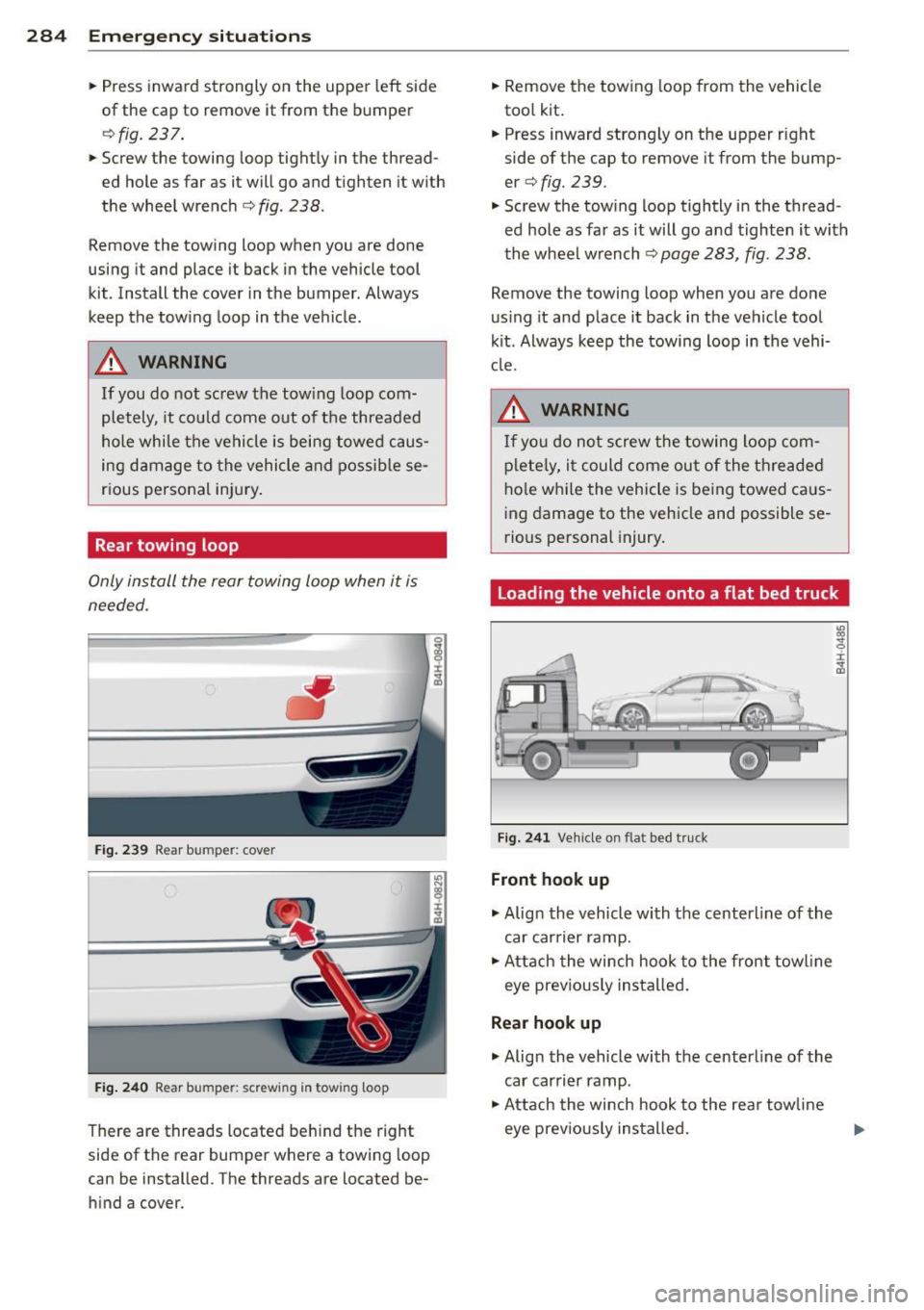
• Press inward strongly on the upper left side
of the cap to remove it from the bumper
¢ fig . 237 .
• Screw the towing loop tightly in the thread
ed hole as far as it will go and tighten it with
the wheel wrench
¢ fig . 238 .
Remove the towing loop when you are done
using it and place it back in the vehicle tool
kit . Install the cover in the bumper. Always
keep the towing loop in the vehicle.
A WARNING
If you do not screw the tow ing loop com
pletely, it could come out of the threaded
hole while the vehicle is being towed caus
ing damage to the vehicle and possible se
rious personal injury.
Rear towing loop
Only install the rear towing loop when it is
needed.
Fig . 239 Rear bum per: cover
Fig. 240 R ear bum per: screw ing in towin g loop
There are threads located behind the right
side of the rear bumper where a towing loop
can be installed . The threads are located be
hind a cover.
-
• Remove the towing loop from the vehicle
tool kit.
• Press inward strong ly on the upper right
side of the cap to remove it from the bump
er¢
fig. 239.
• Screw the towing loop tightly in the thread
ed hole as far as it will go and tighten it with
the wheel wrench ¢
page 283, fig. 238.
Remove the towing loop when you are done
using it and place it back in the vehicle tool
kit . Always keep the towing loop in the vehi
cle.
A WARNING
If yo u do not screw the towing loop com
pletely, it could come out of the threaded
hole while the vehicle is being towed caus
ing damage to the vehicle and possible se
rious personal injury.
Loading the vehicle onto a flat bed truck
Fig. 241 Vehicle on fla t bed truck
Front hook up
• Align the vehicle with the centerline of the
car carrier ramp.
• Attach the winch hook to the front towl ine
eye previously installed.
Rear hook up
• Align the vehicle with the centerline of the
car carrier ramp .
• Attach the winch hook to the rear tow line
eye prev iously installed.
-
Page 300 of 312
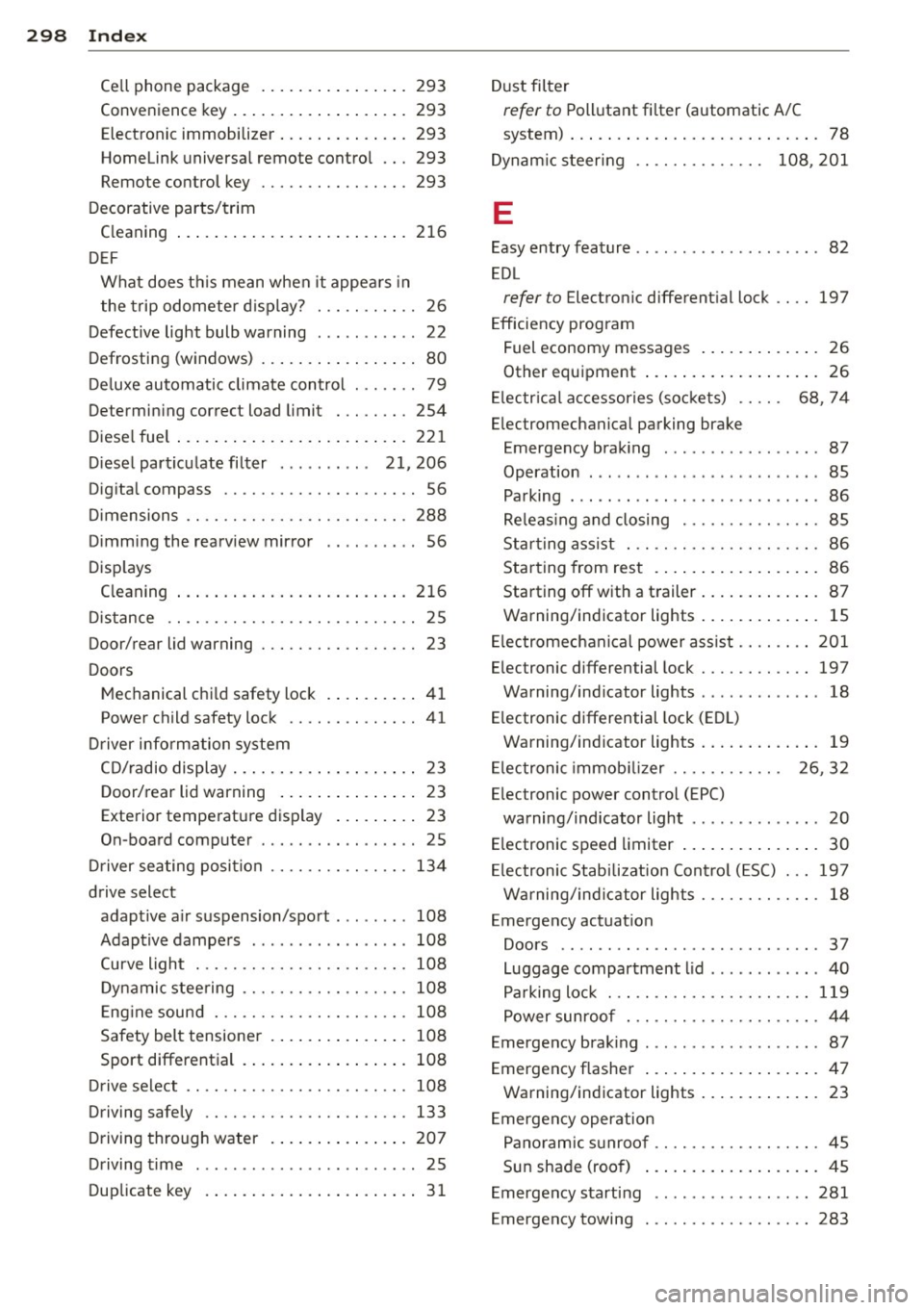
298 Index
Cell phone package 293
Conveni enc e key ....... ... .. .. .... . 293
Electronic immobilizer .... ... .. .... . 293
Home link unive rsal remote con tro l ... 293
Remo te con trol key ......... .. .. .. . 293
Deco rativ e parts/trim
C leaning .... .. .. ..... ... .. .. .... . 216
D EF
What does this mean when it appea rs in
the trip odometer d isplay? . .. .. .. .. .. 26
Defective light bulb warning . . . . . . . . . . . 22
Defrosting (w indows) .. ... .. .. .. .. ... . 80
D eluxe automatic clima te control . . . . . . . 79
De term in ing co rrec t lo ad limit . .. .. ... 254
Di ese l fue l ... ... .. ..... ... .. .. .... . 22 1
Diesel par ticu late filter . . . . . . . . . . 21, 206
Dig ita l compass .... ......... .. .. .. .. 56
Di mensions .. .. . .. ..... ... .. .. .. .. . 288
Dimming the rearv iew mirror .......... 56
Disp lays
C leaning ... ... ... .... ... .. .. .... . 216
Di stance . . . . . . . . . . . . . . . . . . . . . . . . . . . 25
Door/re ar lid wa rning . . . . . . . . . . . . . . . . . 23
D oors
M echanical chi ld safety lock .. .... .. .. 41
Power child safety lock .... .. .. .... .. 41
Driver info rm ation system
CD/radio display . . . . . . . . . . . . . . . . . . . . 23
D oor/rear lid warning . . . . . . . . . . . . . . . 23
Exterior temperature disp lay ..... .. . . 23
On-board computer . . . . . . . . . . . . . . . . . 25
Dr iver seating posi tion ...... .. .. .. .. . 134
drive select adaptive a ir suspension/spo rt .. ... ... 108
Adaptive dampe rs . . . . . . . . . . . . . . . . . 108
Curve light ... ... ..... ... .. .. .. .. . 108
D ynamic stee ring .. ... .... .. .. .. .. . 108
E ng ine sound . ...... ..... .... .. .. . 108
Safety b elt tensioner . ... .. .. ... ... . 10 8
Sport differen tia l ...... ... .. .. .... . 108
Drive select ...... .. ... .... .. .. .. .. . 108
Driving safely .... .. ... .... .. .. .. .. . 133
D riving through water . ... .. .. .. .. .. . 20 7
Driving t ime ........... .... .... ..... 25
Dup licate key . . . . . . . . . . . . . . . . . . . . . . . 31 D
ust filter
ref er to Poll utant fi lt e r (automatic A/C
system) ... .. .. .. .. ... ..... ... .. .. . 78
Dynam ic steer ing . . . . . . . . . . . . . . 108, 201
E
Easy entry feature . . . . . . . . . . . . . . . . . . . . 82
EDL
refer to E lectronic different ia l lock .... 197
Efficiency program Fuel economy m essages . . . . . . . . . . . . . 26
Oth er equipment ... ... ..... ... .. .. . 26
El ectr ica l ac cessories (so ckets ) . . . . . 68, 74
Elec tromechan ic a l parking brake
Emergency brak ing ............... .. 87
Operation . . . . . . . . . . . . . . . . . . . . . . . . . 85
Pa rking ... .. .. .. .... ...... .... ... . 86
Re leas ing and closing . ....... .... .. . 85
St arti ng assist . .. ... ... .... ..... .. . 86
Star ting from rest .. .... .... ... .. .. . 86
Starting off with a t railer ..... .... . .. . 87
Warning/indicator lights ..... ... .. .. . 15
El ectromechan ical power assist .... .... 201
Elec tronic differen tial lock . ....... .... 197
Warning/ind icator lights . ............ 18
E lectronic differential lock (ED L)
Warning/ind icator lights ..... ... .. .. . 19
El ectronic immob ilizer . . . . . . . . . . . . 26, 32
Elec tronic power control (EPC)
warning/ind icator light . . . . . . . . . . . . . . 20
E lectronic spe ed limiter .. ..... ... .. .. . 30
El ectronic Stab ilizat ion Con trol (E SC) . .. 19 7
Warning/ind icator lights ........ .. .. . 18
Emergency actuat ion
Doors ........ .. .. ........ ...... .. 37
Luggage compartment lid .... ...... .. 40
Pa rking loc k ... .. ... ... .... ..... .. 119
Power sunroof . .. ........... .. .. .. . 44
Emergency brak ing .... .. .. ... ..... .. . 87
Emergency flasher .... .. ..... .... . .. . 47
Warning/indicator lights ..... ... .. .. . 23
E mergency operation
P a noramic s unroo f ....... .... ...... . 45
S un shade (roo f) .... .. ..... ... .. .. . 45
E mergency start ing ..... ........... . 281
Eme rgency towing . ....... ..... ..... 283