brakes AUDI A8 2016 User Guide
[x] Cancel search | Manufacturer: AUDI, Model Year: 2016, Model line: A8, Model: AUDI A8 2016Pages: 302, PDF Size: 75.68 MB
Page 98 of 302
Audi adaptive cruise control and braking guard
Audi braking guard
Description
Applies to: vehicles w ith Aud i adapt ive c ru ise co ntro l
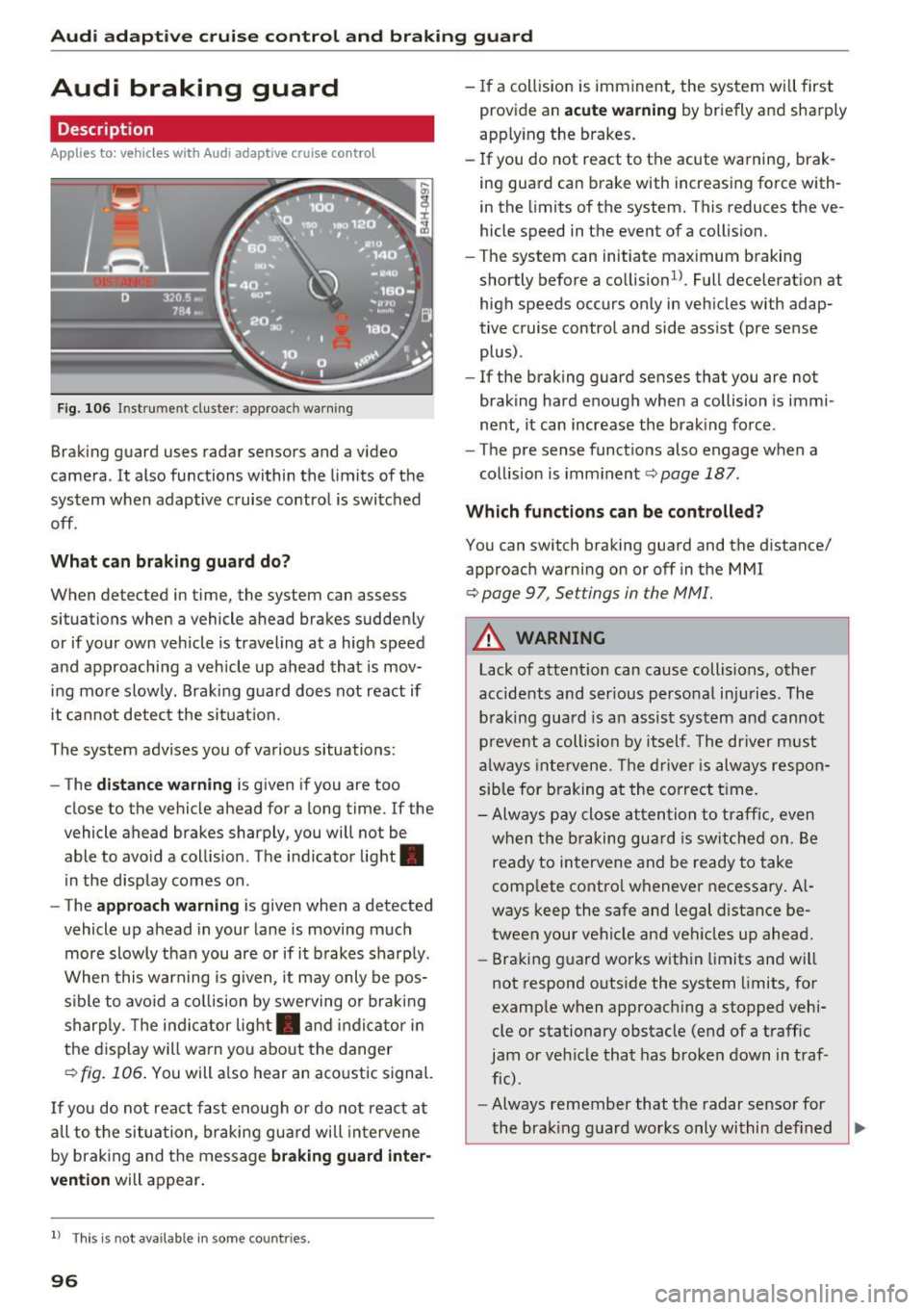
Fig. 106 Instrument cluster : approac h warning
Braking guard uses radar sensors and a video
camera. It also functions within the limits of the
system when adaptive cruise control is switched
off .
What can braking guard do?
When detected in time, the system can assess
situations when a vehicle ahead brakes suddenly
or if your own vehicle is traveling at a high speed
and approaching a vehicle up ahead that is mov
ing more slowly. Braking guard does not react if
it cannot detect the situat ion.
The system advises you of various situations:
- The
distance warning is given if you are too
close to the vehicle ahead for a long time. If the
vehicle ahead brakes sharply, you will not be
able to avo id a coll is ion. The indicator light.
in the display comes on.
- The
approach warning is given when a detected
vehicle up ahead in your lane is moving much
more slowly than you are or if it brakes sharply.
When this warning is g iven, it may only be pos
sible to avo id a collision by swerving or braking
sharp ly. Th e indicator light. and indicator in
the display will warn you about the danger
qfig. 106. You will also hear an acoustic signal.
If you do not react fast enough or do not react at
all to t he situation, braking guard will intervene
by braking and the message
braking guard inter
vention
will appear.
l) Thi s is not available in some countries.
96
-If a collision is imminent, the system will first
provide an
acute warning by briefly and sharply
app ly ing the brakes.
- If you do not react to the acute warning, brak
ing guard can brake with increasing force with
in the limits of the system. This reduces the ve
hicle speed in the event of a collision.
- The system can initiate maximum braking
shortly before a co llision
1
) . Full deceleration at
high speeds occurs only in vehicles with adap
tive cruise control and side assist (pre sense
plus) .
- If the braking guard senses that you are not
braking hard enough when a collision is immi
nent, it can increase the braking force .
- The pre sense functions also engage when a
collision is imminent
qpage 187.
Which functions can be controlled?
You can switch braking guard and the distance/
approach warning on or off in the MMI
¢ page 9 7, Settings in the MMI.
A WARNING
Lack of attention can cause collisions, other
accidents and serious personal injuries. The
braking guard is an assist system and cannot
prevent a collision by itself . The driver must
always intervene. The driver is always respon
sible for braking at the correct time.
- Always pay close attention to traffic, even
when the braking guard is switched on. Be
ready to intervene and be ready to take
comp lete control whenever necessary. Al
ways keep the safe and legal distance be
tween your vehicle and veh icles up ahead.
- Braking guard works within limits and will
not respond outside the system limits, for
example when approaching a stopped vehi
cle or stationary obstacle (end of a traffic
jam or vehicle that has broken down in traf
fic).
- Always remember that the radar sensor for
-
the brak ing guard works only within def ined ..,.
Page 117 of 302
to move immediately, even if the parking brake is set. Th is could result in a crash.
- Do not ride the brakes or press the brake
peda l too often or too long when driving
down a hill. Constant braking causes the
brakes to overheat and substantially re
duces braking performance, increases brak
ing distance or causes complete failure of
the brake system.
Hill descent control
The hill descent control system assists the driver
when driving down declines.
Hill descent control is activated when the selec
tor lever is in D/S and you press the brake pedal.
The transm iss ion automatically selects a gear
that is suitable for the incl ine. Hill descent con
trol tries to mainta in the speed achieved at the
time of brak ing, within physical and technical
limitations. It may st ill be necessary to ad just the
speed with the brakes .
H ill descent contro l switches off once the decline
l eve ls out or yo u press the accelerator pedal.
H ill desce nt control is also act ivated when the
speed is set by starting the cruise control system
¢ page 88.
& WARNING
Hill descent contro l cannot overcome physical
limitations, so it may not be able to mai ntain
a constant speed under a ll conditions . Always
be ready to apply the brakes.
Aut oma tic tr ansm iss ion
Shifting manually
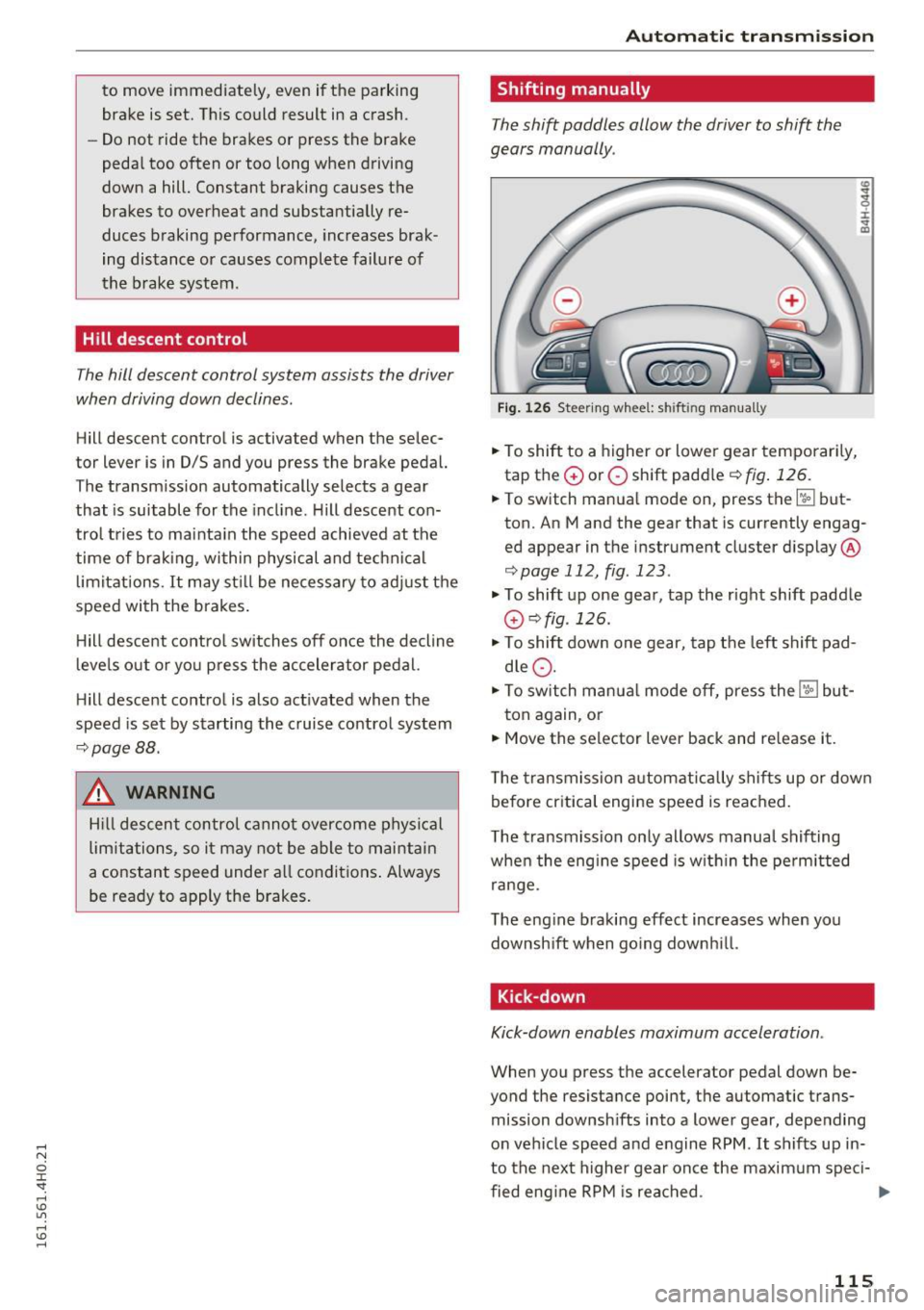
The shift paddles allow the driver to shift the
gears manually .
Fig. 126 Steering whee l: sh ift in g man ually
.. To shift to a higher or lowe r gear temporar ily,
tap the
G) or O shift paddle ¢ fig . 126.
:i:
"' CD
.. To switch manual mode on, press the~ but
ton. An M and the gear that is currently engag
ed appear in the instrument cluster display @
¢page 112, fig . 123 .
.., To shift up one gear, tap the right shift paddle
G) ¢fig .126.
.., To shift down one gear, tap t he left shift pad
d le
Q .
.., To switch manua l mode off, press the~ but-
ton again, or
.. Move the selector lever back and re lease it.
T he transmission automatically sh if t s up or down
before critica l engine speed is reached .
T he transmission on ly allows manual shifting
when the eng ine speed is w ith in the pe rm itted
range.
The eng ine braking effect increases when you
downsh ift when go ing downh ill.
Kick -down
Kick-down enables maximum acceleration .
When you press the accelerator pedal down be
yond the resistance point, t he automatic trans
mission downsh ifts into a lower gear, depe nding
on vehicle speed and e ngine RPM .
It shifts up in
to the next higher gear once the maxim um speci-
fied eng ine RPM is rea ched . ...,
115
Page 192 of 302
Smart Technology
shared, please see your contract with the
wireless te lecommunications provider and the
"About Audi connect" tab in your vehicle's
MMI:
! MENUI button> Audi connect> About
Audi connect.
Electronic Stabilization
Control (ESC)
Description
ESC helps to improve road holding and vehicle
dynamics to help reduce the probability of skid
ding and loss of vehicle control. It works only
when the engine is running. ESC detects certain
difficult dr iving situations, including when the
veh icle is beginn ing to spin (yaw) out of contro l
and helps you to get the vehicle back under con
trol by se lectively braking the wheels, and/or re
ducing engine power and providing steering as
sistance to help hold the vehicle on the driver's
intended course. The indicator light
GI in the in
strument cluster blinks when ESC is taking action
to help you control the vehicle.
ESC has limitations. It is important to remember
that ESC cannot overcome the laws of physics. It
will not always be able to help out under all con
ditions you may come up against . For example,
ESC may not always be able to help you master
situations where there is a sudden change in the
coefficient of friction of the road surface. When
there is a section of dry road that is suddenly cov
ered with water, slush o r snow , ESC cannot per
form the same way it wou ld on the dry surface. If
the vehicle hydrop lanes (rides on a cushion of wa
ter instead of the road surface), ESC wi ll not be
able to he lp you steer the vehicle because contact
with the pavement has been interrupted and the
vehicle cannot be braked or steered. During fast cornering, part icularly on w inding roads, ESC
cannot always deal as effective ly w ith difficult
driving situat ions than at lower speeds . When
towing a trailer, ESC is not able to help you re
ga in control as it would if you were not towing a
trai ler.
Always adjust your speed and driving sty le to
road, traffic and weather conditions. ESC cannot
override the vehicle's physical limits, increase the
190
available traction, or keep a vehicle on the road if
road departure is a result of driver inattention.
Instead, ESC improves the possib ility of keeping
the vehicle under control and on the road during extreme maneuvers by using the driver's steering
inputs to help keep the vehicle going in the in
tended direction . If you are traveling at a speed
that causes you to run off the road before ESC
can provide any assistance, you may not exper i
ence the benefits of ESC.
ESC is switched on all the time. In certa in s itua
tions when you need less traction, you can sw itch
off ASR by press ing the button above
~ page 192, fig. 186 the selector lever. Be sure
to switch ASR on again when you no longer need
l ess traction.
The following systems are integrated in the ESC:
Anti-lock braking system (ABS)
ABS prevents the wheels from locking up when
braking. The vehicle can still be steered even dur
i ng hard braking . Apply steady pressure to the
brake pedal. Do not pump the pedal. A pulsing in
the brake pedal indicates that the system is help
i ng you to brake the vehicle.
Brake assist system
The brake assist system can decrease braking dis
tance. It increases braking power when the dr iver
presses the brake pedal quickly in emergency sit
uations. You must press and hold the brake pedal
u nt il the situation is over. In vehicles with adap
tive cruise control*, the brake assist system is
more sensitive if the d ista nee detected to the ve
hicle ahead is too sma ll.
Anti-slip regulation (ASR)
ASR reduces engine powe r when the dr ive wheels
begin to spin and adapts the force to the road
cond itions. This makes it easier to start, acceler
ate and drive up hills.
Electronic differential lock (EDL)
The EDL brakes wheels that are spinning and
transfers the drive power to the other wheels.
This function is not available at higher speeds .
Page 194 of 302

Smart Technology
Switching on and off
ESC turns on automatically when you start the engine.
Fig. 186 Center console w it h ESC O FF but ton
ESC level s
Sport mode on
The following situations are exceptions where it
may be useful to switch on sport mode to allow
the wheels to spin:
- Rocking the vehicle to free it when it is stuck
- Driving in deep snow or on loose ground
- Dr iving with snow chains
Sport mode off
Behavior
The ESC and ASR stabilization functions The full stabilization function of the ESC
are limited ¢
A:,.. and ASR is ava ilable again .
Operation Press the 00 button. Press
the[!] button again.
Indicator II turns on. II turns off .
lights
Driver mes- Stabilization control (ESC): Sport Warn- Stabilization control (ESC): On
sages ing! Reduced stability
A WARNING
You should only switch sport mode on if your
dr iv ing abilities and road condit ions perm it .
- The stabilization function is limited when
sport mode is sw itched on. The driving
wheels cou ld spin and the vehicle could
swerve, espec ially on s lick o r sli ppery road
s urfac es.
Sport mode cannot be sw itched on if t he
cruise cont rol system* or the adaptive cru ise
cont rol* is switched on.
Braking
What affects braking efficiency?
New brake pads
During the first 250 miles (400 km), new brake
pads do not possess the ir full braking effect, they
have to be "broken in" first ¢
.1:,.. The break-in pe
riod can be considerably longe r fo r vehicles with
192
ceramic brake rotors*. You can compensate for
this slightly reduced braking power by push ing
harder on the brake pedal. Avoid heavy braking
lo ads during the break-in period.
Operating conditions and driving habits
The brakes on today's automobiles are still sub
j ect to wear, depending large ly on operating con
ditions and driving habits¢,& . On vehicles that
are either driven mostly in stop-and-go city traf
fic or are driven hard, the brake pads should be
checked by your authorized Audi dealer more of
ten than specified in the
Warranty & Mainte
nance booklet .
Failure to have your brake pads
inspected can result in reduced brake perform
ance.
On steep slopes, you should use the brak ing ef
fect of the engine. T his way, you prevent unnec
essary wea r on the brake system. If you mus t use
your brakes, do not hold the brakes down contin-
u ously. Pump th e brakes at intervals. ..,.
Page 195 of 302

Operating noi se
Noises may occur when braki ng depend ing on the
speed, braking force and outside cond itions s uch
as temperature and humidity.
Due to the na ture of t he mate ria ls used in ce ram
ic bra ke rotors*, noises m ay become mo re appa
ren t at low speeds.
Effect of wat er and road salt
In ce rtain situat ions, for example after driving
through water, in heavy ra in, afte r ove rnig ht con
densat ion or after washing your car, the braking
effe ct can be red uced by moisture or ice on the
b rake rotors and brake pads. The brakes must be
dried first w ith a few careful brake applications .
At highe r speeds and with t he windsh ie ld wipers
turned o n, the bra ke pads p ress against the bra ke
rotors for a short amount of time . This occ urs at
regular intervals without the driver noticing and
provides for better bra ke response time under
wet conditions.
The effectiveness of the brakes can be reduced
when the vehicle is dr iven on a salt-covered road
and the brakes are not used. L ikewise, you clean
off accumu lated salt coat ing from brake discs
and pads with a few cautious applications of the
brake
c::> ,& .
Due to their sur face characteristics, ceramic
brake rotors* absorb mo isture in such condit ions.
This can cause a temporary reduction in braking
force compared to dry brakes. You can compen
sate for this by pressing the brake peda l harder.
Cor rosion
There may be a tendency for dirt to b uild up on
the brake pads and corros ion to form on the discs
if the car is not driven regularly or only for short
tr ips with little use of the brakes.
If the brakes are not used frequently, or if corro
sion has formed on the discs, it is adv isable to
clean off the pads and discs by brak ing firmly a
few t imes from a moderately high speed
c::> ,& .
Sma rt Technology
Faults in the brake system
If you s hou ld notice a sudden increase in br ake
peda l travel, then one of the two bra ke circu its
may have fai led
c::> ,& .
Low brake fluid level
Malfunctions ca n occu r in the brake system if the
brake fluid level is too low . T he brake flu id leve l
is monitored elect ronically.
Brake boost er
The brake booster works w ith vacuum pressure
wh ich is created only when the engine is runn ing
c::> ,& .
Brake lining wear status
Brake lining wear may be checked by visua l in
spect ion of the cond ition of the brake pads
t hr ough the openings in the wheel. If necessary,
the wheel may be removed for t his inspection
c::> page 259, Replacing wheels .
.8_ WARNING
-New b rake p ads don't h ave the bes t stop
p ing power an d must be "broken-in" during
the initial 250 miles (400 km) . The break-in
pe riod can be considerably longer for
veh icles with ceramic brake rotors*. You can
compensate for this by pressing the brake
pedal more firmly. This also applies late r
when new pads are installed.
- You shou ld perform braking maneuvers for
the purpose of cleaning the brake system only i f road co ndit ions pe rmit . Other road
users m ust not be put at r is k -you may
cause an ac cident!
- Before descending a steep g rade, reduce
speed and sh ift transmission into a lower
gear o r lower dr iving range. Do not r ide the
b ra kes or hold the pe dal down too long or
too often. This cou ld cause the b rakes to ge t
hot and dimin ish b raking effic iency .
- Do not " ride the bra kes" by rest ing you r foot
on the pedal when you do no t intend to
brake. This may cause the brakes to over
heat, premature wear and increased stop
p ing distance.
193
Page 196 of 302
Smart Techn olo gy
- Under certain climatic and operating condi
tions such as passing through water, driving
in heavy rain or after washing the vehicle,
the effectiveness of the brakes can be re
duced . In w inter, ice can accumulate on the
brake pads, linings, discs and drums . Care
fully apply brakes fo r a tes t. Brakes w ill dry
and ice coatings wi ll be cleaned off after a
few careful brake applications .
- Driving for an extended pe riod of time on
salt-covered roads witho ut using your
brakes can also affect bra king efficiency.
Clean off accumulated salt coating from
brake discs and pads with a few carefu l
brake applications.
- If you damage the front spoiler, or if you in
stall a different spoiler, be sure the air flow
to the front brakes is not obstructed. Other
wise the brake system could overheat reduc
ing the effectiveness of the entire brake sys
tem.
- Failure of one brake circuit will impair the
braking capability result ing in an increased
stopp ing distance. Avoid driving the vehicle
and have it towed to the nea rest Aud i dealer
or qualified workshop.
- Never let the vehicle roll to a stop with the
engine shut off.
- If the brake booster is not working, the
brake pedal must be pressed considerably
harder to make up for the lac k of booster
assistance.
Electromechanical power
assist, dynamic steering
The electromechanical power assist helps the
driver when steering.
Power steering adapts electronically based on
the vehicle speed.
Ind icator light s and messages
• Stee ring defective! St op th e ve hicle
If th is ind icator light turns on and stays on and
this message appears, the power steer ing may
have fa iled.
194
Do not continue driving. See your authorized
Audi dealer or other qualified repair facility for
ass istance .
,Ion Steering : System faul t You can c ontinue
dri ving
If the indicato r light turns on and the message
appears, the steeri ng may be more diff icult to
move o r more sensitive than usu a l. T he steer ing
whee l may also be at an angle when driving
straight.
D rive slowly to your a uth orized Aud i dea ler or
qualified wo rkshop to have the malfunct ion cor
rected.
1;r,ij D ynamic steering : Init ializing
If this driver message appears and the indicator
light is flashing on the instrument panel, dynam
i c steer ing* is being re initialized . After starting
the engine, t he steering wheel w ill move slightly.
Re- initializa tion might be necessary if the steer
i ng whee l was moved hard to the left and right
while the vehicle was not moving . The display
goes out as soon as initialization is comp lete .
D rive slowly to your a uth orized Aud i dea ler or
qualified wo rkshop to have the mal func tion cor
rected.
.&_ WARNING
Have the dynamic steering * system malfunc
tion repaired as soon as possible by an au
thorized Audi dealer or qualif ied workshop -
risk of acc ident!
(D Tips
If the . or ,Ion indicator light only stays on
for a short time, you may continue driving.
- The dynamic steering* stabi lity systems are
not ava ilable in the event of a system mal
function.
- For additiona l information on dynamic
steering *, refer to~
page 106 .
Page 201 of 302

Driving through water on
roads
Note the following to avoid vehicle damage when
driving through water, for example on flooded
roads:
- The water must not be any higher than the bot
tom of the vehicle body.
- Do not drive faster than wa lking speed.
A WARNING
After driving through water, mud, slush, etc.,
the brakes may be slow to take effect because
of wet brake rotors and pads . Dry the brakes
first by brak ing carefully to restore the full
brak ing effect.
([) Note
-Vehicle components such as the engine,
transm ission, suspension or electrical sys
tem can be severely damaged by driving
th rough water.
- Always switch off the Sta rt-Stop-System*
whe n driving through water¢
page 85 .
(D Tips
-Check the depth of the water before driving
through it.
- Do not stop the veh icle, dr ive in reverse or
switch the eng ine off when dr iving through
wa ter .
- Keep in mind that oncoming ve hicles may
create waves that raise the water level and
make it too deep for your vehicle to drive
th rough safely.
- Avo id driving through salt water because it
can cause corrosion.
Driving and the envir onment
Economical and environ
mentally-friendly driving
General
Your personal style of driving will determine the
economy of your vehicle, as well as exhaust and
nois e levels .
Fuel economy, e nv ir onmental impact, and wear
o n your eng ine, brakes and tires large ly depend
on three factors:
- your personal driving style
- operat ing cond itions
- technical limitations
If you anticipate what you need to do next and
drive economically, you can easily cut your fuel
consumption by 10-15 percent. Th is section will
give you some tips on how you can help the envi
ronment and your pocketbook .
(D Tips
The consumption estimates as published by
ENVIRONMENTAL PROTECTION AGENCY
(EPA) and Transport Canada may not corre
spond to your actual consumption on the
r oad, which w ill vary depending upon vehicle
l oad and speed, road and weather conditions,
trip length , etc.
Drive smoothly and keep a lookout ahead
Vehicles use the most fuel when they are acceler
ating.
.,. Avoid unnecessary accelerat ing and braking .
Vehicles use the most fuel when they are acceler at ing . If you anticipate what is going to happen
next, you w ill need to brake less and, thus, accel
erate less. Let the vehicle coast whenever possi
ble - for example when you see that the next traf
fic lig ht is red.
199
Page 205 of 302
Trailer load distribution
Be sure the load in the trailer is held securely in
p la ce to prevent it from sh ifting forward, back
ward or sideways.
Never allow a passenger to ride in a trailer¢.&.
in Driving instructions on page 204.
Engine cooling system
Towing a trailer makes the engine work harder . It
is important that the cool ing system's perform
ance is up to the addit ional load. Make sure that
the cooling system has enough fluid.
Tire pressure
When towing a trailer, inflate the tires of your
veh icle to the cold tire pressure listed under "Full
load " on the label located on the driver's side B
pillar (vis ible when the door is open). Inflate
trailer tires to trailer and tire manufacturers'
specif ications.
Lights
Check to make sure both vehicle and trailer lights
are working proper ly.
Safety chains
Be sure trailer safety chains are properly connect
ed from the trailer to the hitch on the vehicle.
Leave enough slack in the chains to permit turn
in g corners . When you install safety cha ins, make
sure they wi ll not drag on the road when you are
driving.
The chains should cross under the trailer tongue
to prevent it from dropping in case of separat ion
from the hitch.
Adjusting the Audi drive select
Make sure the vehicle is on a level surface before
hitching up the trailer and before adjusting the
tongue we ight. The vehicle must be in
auto or
comfort driving mode and not ra ised
¢ page 106, 9Q) .
Make sure that the vehicle is lowered. In Info
tainment, select:
I CARI function button > lower
control button .
Trailer mode
If you must drive under poor road conditions, you
can raise the vehicle
after coupling the trailer or
after adjusting the tongue weight¢ page 108.
(D Note
-Changes in temperature or load can affect
the height of the vehicle.
- Always select auto or comfort mode. Other
w ise, the tong ue load specified for your ve
hicle will no longer be applicable .
Driving instructions
Driving with a trailer always requires extra care
and consideration.
T o obtain the best possible handling of veh icle
and trailer, p lease note the following:
.,. Do not tow a loaded trailer when your car itself
is not loaded.
.,. Be especially careful when passing other
vehicles.
.,. Observe speed limits.
.,. Do not drive at the maximum permissible
speed .
.,. Always apply brakes early.
.,. Monitor the temperature gauge.
Weight distribution
Towing a loaded tra iler with an empty car results
in a highly unstab le distribution of weight . If this
cannot be avoided, drive at very low speeds only
to avoid the risk of losing steering control.
A "balanced" rig is easier to operate and control.
This means that the tow vehicle shou ld be loaded
to the extent possib le and permissib le, while
keeping the trailer as light as possible under the
cir cumstances . Whenever poss ible, transfer
some cargo to the luggage compartment of the
tow veh icle while observing tongue load require
ments and vehicle load ing conside rations.
Speed
The higher the speed, the more difficult it be
comes for the driver to control the r ig. Do not
drive at the maximum permissible speed. Reduce
your speed even more if load, weather or wind .,._
203
Page 206 of 302
Trailer mod e
conditions are unfavorable - particularly when
going downhill.
Red uce veh icle speed
imm ediatel y if the tra ile r
shows the s lightest sign of swaying.
Do not try
to stop the sway in g b y accele rating .
Observe speed lim its . In some areas, speeds for
ve hicl es towing tra ilers are lower than for reg ula r
veh icles.
A lways apply brakes early . When dr iving down
h ill , sh ift into a lower gear to use the engine
b raking effect to slow the veh icle. Use of the
brakes a lone can cause them to overheat and fail.
Air suspension*
When driving with a tra iler, activate the trailer
mode of the air suspension . Switch the air sus
pens ion tra iler mode on when you a re towing a
tra ile r. This will limit the regulat ion by the air
suspens ion while driving . Select in the MM I:
ICARI function button > (Car )* sys tem s control
button >
Vehicle setting s > Air su sp .: to wi ng >
On .
Coolant temperature
The coolan t temperature gauge¢ page 10 must
be observed carefully. The coo lant temperature
can increase if you drive on long inclines in a low
gear at high engine speeds. Reduce your speed
immed iate ly if the LEDs in the top part of the dis
p lay turn on.
For more information about indicator lights, re
fer to.
¢page 15.
A WARNING
Anyone not properly restrained in a moving
vehicle is at a much greater risk in an acci
dent. Never let anyone ride in your car who is
not properly wearing the restraints provided
by Audi.
Trailer mode notes
Important to know
Your vehicle hand les different ly when towing a
trai ler because of the additiona l weight and dif
ferent weight distr ibut ion. Safety, performance
204
-
and economy will g reatly depend on how carefu l
l y you load your trai ler and operate your rig .
Befo re yo u actually tow yo ur t railer, pract ice
turning, stopping and backing up in an area away
from traffic. Keep practicing unti l you have be
come complete ly familiar with the way your vehi
cle-tra iler combination behaves and responds .
Backing up is diff icult and requ ires practice.
Backing up with a trailer genera lly req uires steer
ing action opposite to that when backing up your
vehicle witho ut a trailer .
Maintain a greater distance between yo ur vehicle
and the one in front of you. You will need more
room to stop . To compensate for the trailer, you
will need a larger than normal turning radius .
When passing, remember tha t you canno t accel
erate as fast as you normally wou ld because of
the added load . Make sure you have enough room
to pass. After passing, allow p lenty of room for
your trailer before changing lanes again.
Avoid jerky starts, sharp turns or rapid lane changes.
(D Tips
- Do not tow a trailer du ring the break-i n pe ri
od of your vehicle.
- If you tow a tr aile r, your A udi may requi re
more frequent ma intenance due to the ex
tra load ¢
page 281.
Parking on a slope
Do not park on a slope with a trailer . If it cannot
be avoided, do so only after doing the following:
When parking:
.,. App ly the foot brake.
.,. Have someone p lace chocks unde r both the ve
hicle and the trailer wheels .
.,. With chocks in place, slowly release the brakes
until the wheel chocks abso rb the load .
.,. Turn the whee ls towards the curb.
.,. App ly the parking brake .
.,. Select the P selector lever posit ion.
Page 209 of 302
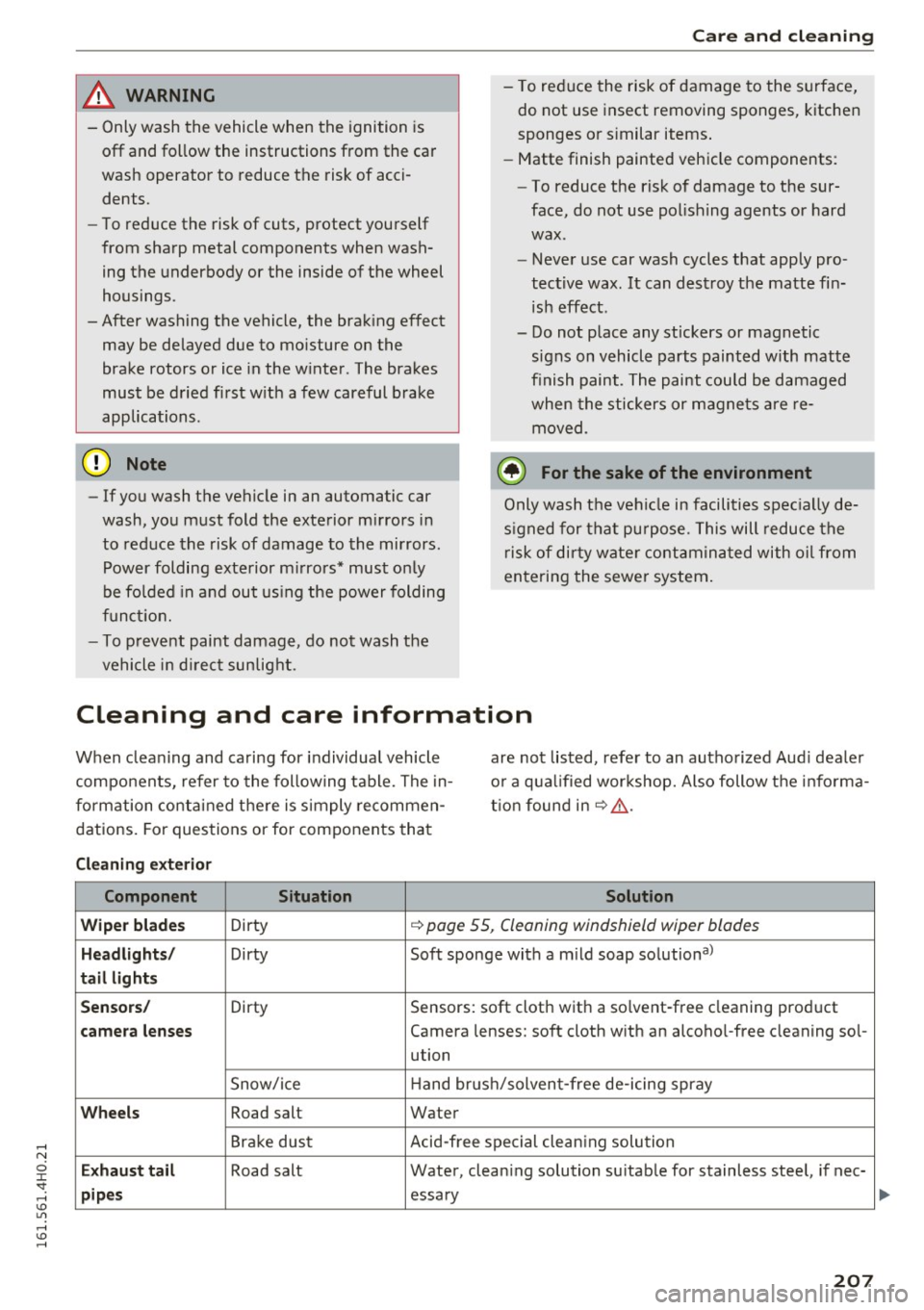
& WARNING
-Only wash the vehicle when the ignition is
off and follow the instructions from the car
wash operator to reduce the risk of acci
dents.
- To reduce the risk of cuts, protect yourself
from sharp metal components when wash
ing the underbody or the inside of the wheel
housings.
-After washing the vehicle, the braking effect
may be delayed due to moisture on the
brake rotors or ice in the winter . The brakes
must be dried first with a few careful brake
applications.
{[) Note
-If you wash the vehicle in an automatic car
wash, you must fold the exterior mirrors in
to reduce the risk of damage to the mirrors.
Power folding exterior mirrors* must only
be folded in and out using the power folding
function.
- To prevent paint damage, do not wash the
vehicle in direct sunlight.
-
Care and cleaning
-To reduce the risk of damage to the surface,
do not use insect removing sponges, kitchen
sponges or similar items.
- Matte finish painted vehicle components:
- To reduce the risk of damage to the sur-
face, do not use polishing agents or hard
wax.
- Never use car wash cycles that apply pro
tective wax. It can destroy the matte fin
ish effect.
- Do not place any stickers or magnetic
signs on vehicle parts painted with matte
finish paint. The paint could be damaged
when the stickers or magnets are re
moved .
@ For the sake of the environment
Only wash the vehicle in facilities specially de
signed for that purpose. This will reduce the
risk of dirty water contaminated with oil from
entering the sewer system.
Cleaning and care information
When cleaning and caring for individual vehicle
components, refer to the following table. The in
formation contained there is simply recommen
dations. For questions or for components that are not
listed, refer to an authorized Audi dealer
or a qualified workshop. Also follow the informa
tion found in
~ ,&. .
Cleaning exterior
Component Situation Solution
Wiper blades
Dirty ~ page 55, Cleaning windshield wiper blades
Headlights/ Dirty Soft sponge with a mild soap solution a>
tail lights
Sensors/
Dirty Sensors: soft cloth with a solvent-free cleaning product
camera lenses Camera lenses: soft cloth with an alcohol-free cleaning sol-
ution
Snow/ice Hand
brush/solvent-free de-icing spray
Wheels Road salt Water
Brake dust Acid-free special cleaning solution
Exhaust tail Road salt
Water, cleaning solution suitable for stainless steel, if nee-
pipes essary
207