change time AUDI A8 2016 User Guide
[x] Cancel search | Manufacturer: AUDI, Model Year: 2016, Model line: A8, Model: AUDI A8 2016Pages: 302, PDF Size: 75.68 MB
Page 94 of 302
Audi adaptive cruise control and braking guard
Audi adaptive cruise
control
Description
A pplies to: ve hicles w ith Aud i adapt ive cruise co ntro l
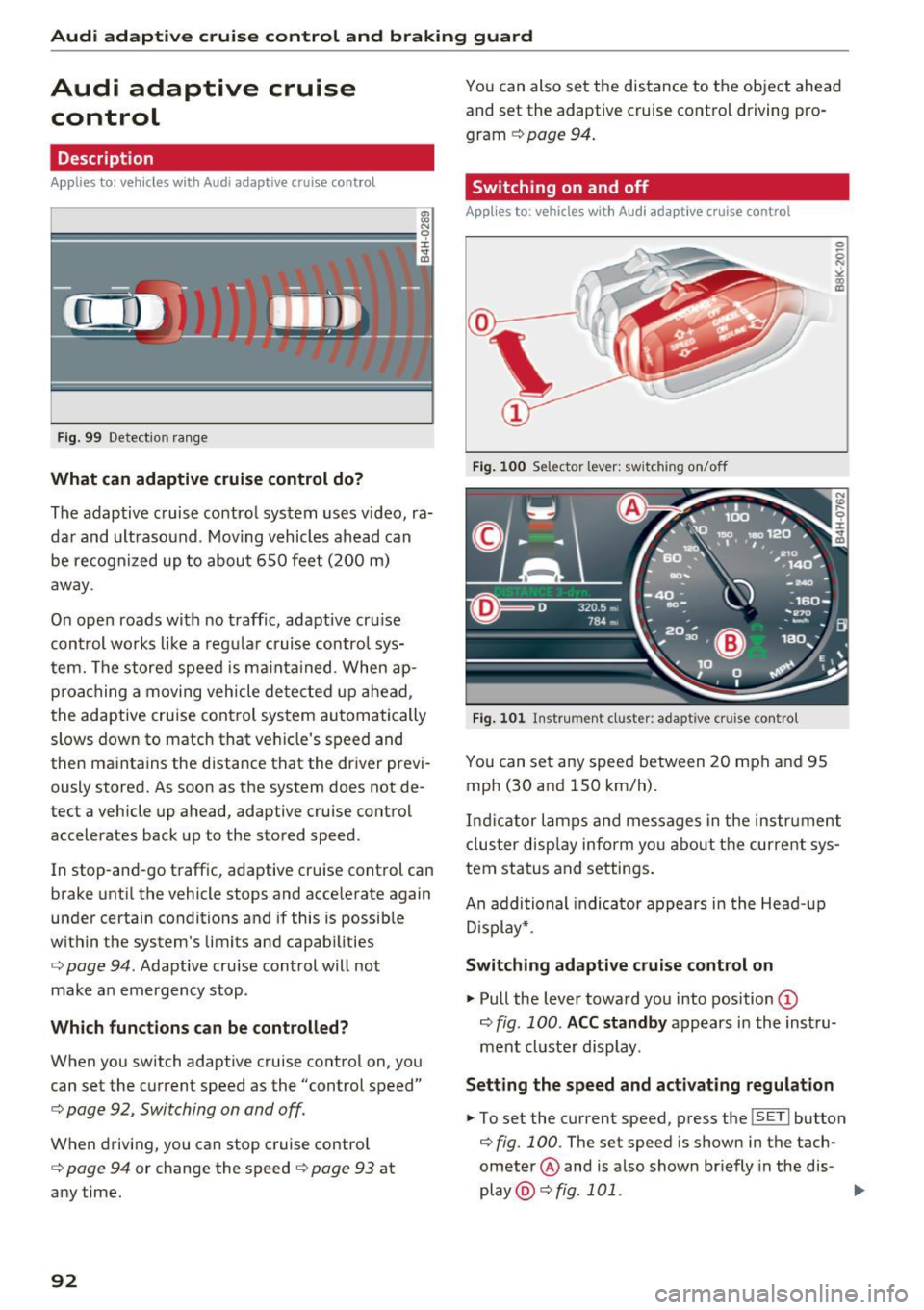
F ig. 99 Detection range
What can adaptive cruise control do?
The adaptive cruise control system uses video, ra
dar and ultrasound . Moving vehicles ahead can
be recognized up to about 650 feet (200 m)
away .
On open roads with no traffic, adaptive cru ise
control works like a regular cruise control sys
tem. The stored speed is ma inta ined. When ap
proaching a moving vehicle detected up ahead,
the adaptive cruise cont rol system automatically
slows down to match that vehicle's speed and
then maintains the distance that the driver previ ously stored. As soon as the system does not de
tect a vehicle up ahead, adaptive cruise control
accelerates back up to the stored speed.
In stop-and-go traffic, adaptive cruise control can
brake until the vehicle stops and accelerate again
under certain conditions and if this is possible
within the system's limits and capabilities
¢ page 94 . Adaptive cruise control will not
make an emergency stop .
Which functions can be controlled?
When you switch adaptive cruise control on, you
can set the current speed as the "control speed"
¢ page 92, Switching on and off.
When driving, you can stop cruise control
¢ page 94 or change the speed ¢ page 93 at
any time.
92
You can also set the distance to the object ahead and set the adaptive cruise control driving pro
gram
¢ page 94.
Switching on and off
Applies to : vehicles wit h Audi ada ptive c ru ise control
Fig. 100 Selector lever: switch ing on/off
Fig. 101 Instrument cluste r: adapt ive cruise control
You can set any speed between 20 mph and 95
mph (30 and 150 km/h) .
Indicator lamps and messages in the instrument
cluster display inform you about the current sys
tem status and settings.
An additional indicator appears in the Head-up
D isplay* .
Switching adaptive cruise control on
.,. Pull the lever toward you into position ©
¢fig. 100 . ACC standby appears in the instru
ment cluster display.
Setting the speed and activating regulation
.,. To set the current speed, press the ISETI button
¢ fig. 100. The set speed is shown in the tach
ometer @ and is also shown br iefly in the dis-
play @¢
fig. 101 . ..,.
Page 97 of 302
Audi adaptive cruise control and braking guard
The distances provided are specified values . De
pending on the driving situation and the how the
vehicle ahead is driving, the actual distance may
be more or less than these target distances.
The various symbols for the time increments ap
pear briefly in the information line@~
page 92,
fig. 101 when you change the settings.
~-~ --- Distance 1: This setting corresponds
to a distance of 92 feet/28 meters when travel
ing at 62 mph (100 km/h), or a time interval of 1
second.
~ -- ~-- Distance 2: This setting corresponds
to a distance of 118 feet/36 meters when travel
ing at 62 mph (100 km/h), or a time interval of
1.3 seconds .
~--- ~-Distance 3: This setting corresponds
to a distance of 164 feet/SO meters when travel
ing at 62 mph (100 km/h), or a time interval of
1.8 seconds.
~ ---- ~ Distance 4: This setting corresponds
to a distance of 210 feet/64 mete rs when travel
ing at 62 mph (100 km/h), or a time interval of
2 .3 seconds.
.&_ WARNING
Following other vehicles too closely increases
the risk of col lisions and ser ious personal in
jury.
- Setting short distances to the traffic ahead
reduces the t ime and distance available to
bring your vehicle to a safe stop and makes
it even more necessary to pay close atten
tion to traffic.
- Always obey applicable traffic laws, use
good judgment, and select a safe following
distance fo r the traffic, road and weather
con ditions.
(0 Tips
-Distance 3 is set automatically each time
you switch the ignition on.
- Your standard sett ings are automatically
stored a nd assigned to the remote control
key being used.
Selecting the driving mode
Applies to: vehicles with Audi adaptive cruise control
• Select the desired driving mode in drive select
~page 106.
(D Tips
Your settings are automatically stored and as
signed to the remote control key being used.
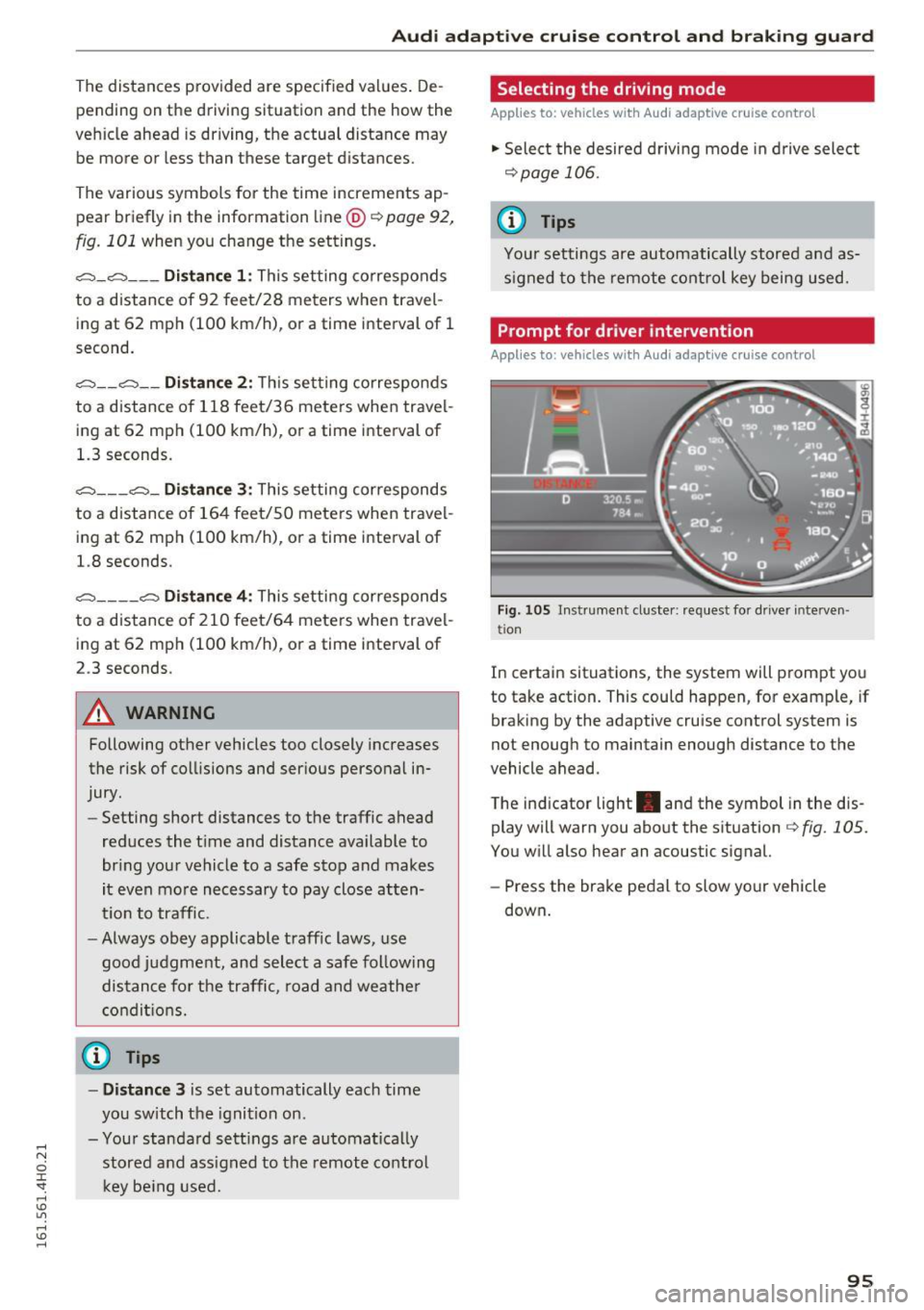
Prompt for driver intervention
Applies to: vehicles with Audi adaptive cruise control
Fig . 105 Instrument cluste r: request for driver interve n
tio n
In certain situations, the system will prompt you
to take action. This could happen, for example, if
braking by the adaptive cruise control system is
not enough to maintain enough distance to the
vehicle ahead.
T he ind icator light . and the symbol in the dis
play will warn you about the situation~
fig. 105.
You will also hear an acoustic signal.
- Press the brake pedal to slow your vehicle
down .
95
Page 101 of 302
Audi active lane assist Lane assist
Description
Applies to: veh icles with act ive lane assist
Active lane assist helps you keep your vehicle in
your lane .
Active lane assist detects lane marker lines with
in the limits
of the system using a camera in the
windshield. If you are approaching a detected lane marker line and it appears likely that you
will leave the lane , the system will warn you by
means of correct ive steering . T he dr iver can over
ride the correct ive steering at any time. If the ve
h icle crosses a line, the drive r is also warned by a
light
vibration in the steering wheel. The vibra
tion warning must be switched on in the MMI for
this to happen. Active lane assist is operable
when the line marking the lane is detected on at
least one side of the vehicle.
The system is designed for driv ing on freeways
and expanded highways and thus works only at
speeds of 40 mph (65 km/h) or more.
Applies to vehicles with side assist* : If you acti
vate your turn signal when active lane assist is
ready and when activated side assist has class i
fied a lane change as critical because of vehicles
traveling alongside you or coming closer, there
will be noticeable corrective steering just before
you leave the lane . Th is is done to try to keep
your veh icle in the lane .
Applies to vehicles without side assist*: when the
system is ready, it does not warn you if you acti
vate your turn signal before driving across a lane marker line. In th is case, it assumes that you are
changing lanes intent ionally.
If the vehicle is also equipped with Audi adaptive
cru ise control*, the corrective steering w ill be
more spec ific in regard to the driving situation .
I n addition to the lane marker lines, the system
can also take into acco unt other objects such as
guard rai ls. If they are detected in close prox imi
ty to the vehicle, Audi active lane assist helps
prevent the vehicle from driv ing too close to
them. There is also passing assistance . The sys-
Audi act ive lane ass ist
tern does not provide any corrective steering if it
detects that you are passing another vehicle .
A WARNING
--The system warns the driver that the vehicle
is leaving the lane using correct ive steering.
The driver is always responsible for keeping
the vehicle within the lane.
- The system can assist the dr iver in keeping
the vehicle in the lane, but it does not steer
by itself . Always keep your hands on the
steer ing wheel.
- Corrective steering may not occur in certain
situations, such as during heavy braking .
- The camera does not recognize all lane
marker lines. Correct ive steering can only
take place on the side of the vehicle where
lane marker lines are detected.
- Other road structures or objects could poss i
b ly be identified un intentionally as lane
marker lines. As a result, co rrective steering
may be unexpected or may not occ ur.
- The camera view can be restricted, for ex
ample
by vehicles driving ahead or by rain,
snow, heavy spray or light shining into the
camera. This can result in active lane ass ist
not detecting the lane marker lines or de
tect ing them incorrectly .
- Unde r certain condit ions such as r uts in the
road, a banked roadway or crosswinds, the
correct ive steer ing alone may not be enough
to keep the vehicle in the lane.
- For safety reasons, active lane assist must
not be used when there are poor road and/
or weather conditions such as slippery roads, fog, gravel, heavy rain, snow and the
potential for hydrop lan ing . Using active lane
assist u nder these condit ions may i ncrease
the risk of a crash.
99
Page 105 of 302
General information
Applies to: vehicles with side assist
®
®
©
Fig. 113 D riving sit u atio ns
AUD I
Fig. 114 Rear of the vehicle: position of the senso rs
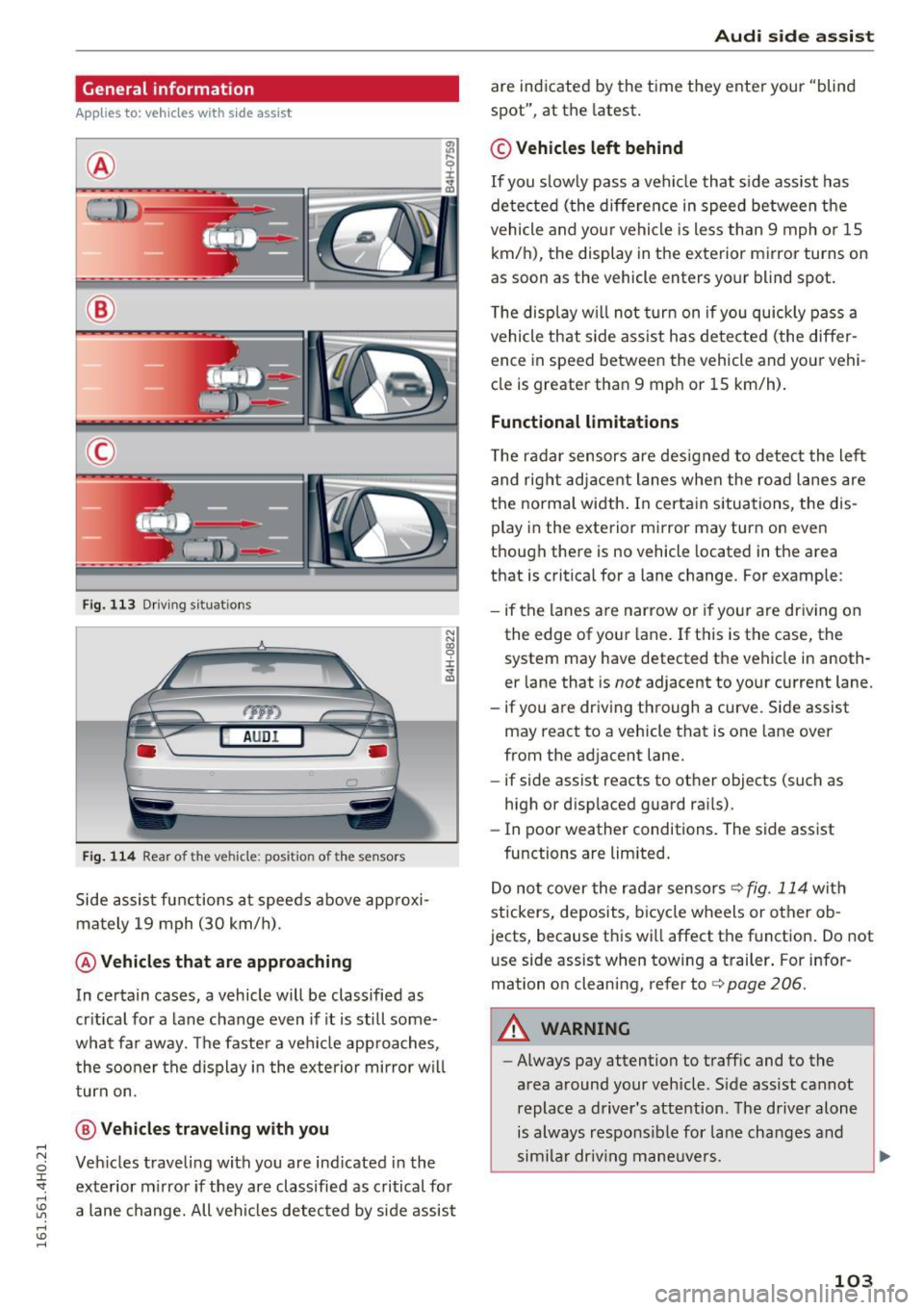
S ide a ssist fu nctions a t speeds above app roxi
ma tely 19 mph (30 km/h).
@ Vehicles that are approaching
N N
~
:i: .,. a,
In ce rtain cases, a vehicle will be classified as
cr itica l for a lane change even if it is still some
what far away. The faste r a ve hicle app roaches,
t he soo ner the d isplay in the exterio r mirror w ill
t urn on.
@ Vehicles traveling with you
Ve hicles traveli ng w ith you are ind icated i n the
exte rior m irro r if they are classified as critical for
a lane change. All vehi cles detec ted by side assist
Aud i side assist
are indicate d by the time they ente r your "blind
spot", at the latest.
© Vehicles left behind
If you s low ly pas s a vehi cle that s ide ass ist has
de te cted ( the differe nce in speed between t he
vehicle and you r vehicle is less than 9 mph or 15
km/h), the display in the exterior mirror turns on
as soon as the vehicle enters your blind spot.
T he disp lay w ill not turn on if you quickly pass a
vehicle th at side ass ist h as de te cte d (t he differ
ence in speed between the vehicle and your vehi
cle is greater tha n 9 mp h or 15 km/h).
Functional limitations
The radar se nsors are des igned to detect the le ft
and right adj ace nt lane s when the ro ad l anes are
the normal width . In certa in situations, the dis
play in the exterior mirror may turn on eve n
though there is no vehicle located in the area
that is critical for a lane change. For example:
- if the lanes a re narrow or i f yo ur are dr iv ing on
the edge of you r lane. If t his is the case, the
system may have detected th e vehicle in anoth
er lane that is
not adjacent to your cu rrent lane.
- if you are dr iv ing through a curve. Si de assist
may react to a vehicle that is one lane over
from the adjacent lane.
- if side assist reacts to ot her objects (such as
high or disp laced guard ra ils).
- In poor weather conditions. The side assist
fu nctions a re limited .
D o no t cover the r adar senso rs
c> fig. 114 wit h
stickers, deposits, b icycle wheels or other o b
jects, because th is wi ll affect the f unction . Do not
u se side assist when towing a t railer . For infor
mation on cleaning, refer to
c> page 206.
A WARNING
- Always pay attention to traffic and to the
area around your veh icle. S ide assist cannot
replace a driver' s attention. The driver alone
is always respo nsib le for la ne cha nges and
s im ila r dr iv in g ma neuve rs.
103
Page 106 of 302
Audi side assist
-Improper reliance on the side assist system
can cause collisions and serious personal in
jury:
- Never rely only on side assist when chang
ing lanes.
- Always check rear view mirrors to make
sure that it is safe to change lanes.
- Side assist cannot detect all vehicles under
all conditions- danger of accident!
- Please note that side assist indicates there
are approaching vehicles, or vehicles in your blind spot, only after your vehicle has
reached a driving speed of at least 19 mph
(30 km/h).
- In certain situations, the system may not
function or its function may be limited. For
example:
- if vehicles are approaching or being left
behind very quickly . The display may not
turn on in time .
- in poor weather conditions such as heavy
rain, snow or heavy mist .
- on very wide lanes, in tight curves or if
there is a rise in the road surface . Vehicles
in the adjacent lane may not be detected
because they are outside of the sensor
range.
(D Note
The sensors can be displaced by impacts or damage to the bumper, wheel housing and
underbody . This can affect the system . Have
your authorized Audi dealer or authorized
Audi Service Facility check their function.
(D Tips
-If the window glass in the driver's door or
front passenger's door has been tinted, the
display in the exterior mirror may be misin
terpreted.
- For Declaration of Compliance to United
States FCC and Industry Canada regulations
c::> page 284.
104 Activating and deactivating
App
lies to : vehicles with side assist
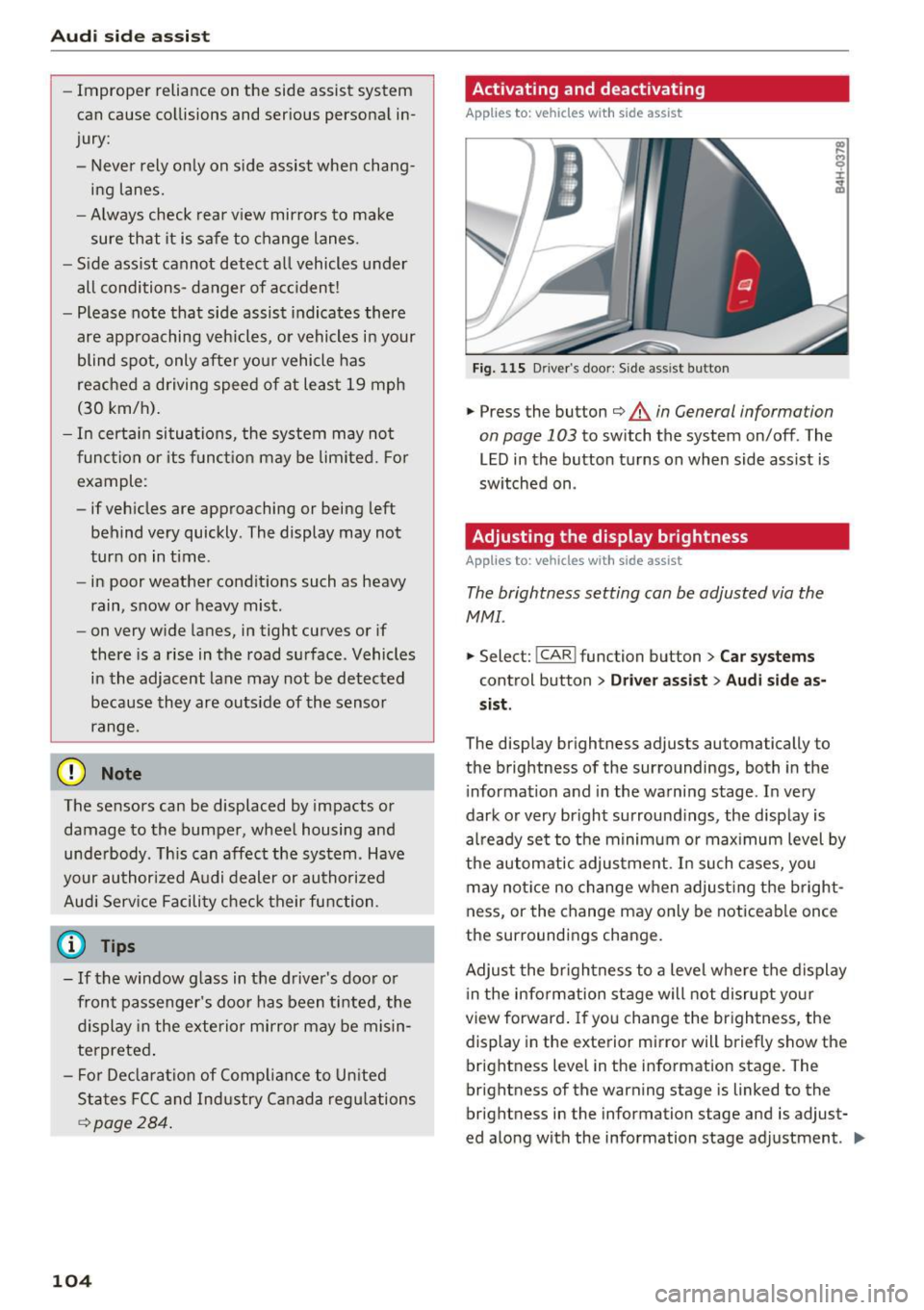
Fig. 115 D riv er's doo r: Side ass ist butto n
.,.. Press the button c::> &. in General information
on page 103
to switch the system on/off . The
LED in the button turns on when side assist is
switched on .
Adjusting the display brightness
Applies to: vehicles wit h side assist
The brightness setting can be adjusted via the
MMI.
.,.. Select: I CAR I function button > Car systems
control button > Driver assist> Audi side as
sist .
The display brightness adjusts automatically to
the brightness of the surroundings, both in the
information and in the warning stage . In very
dark or very bright surroundings, the display is
already set to the minimum or maximum level by
the automatic adjustment. In such cases, you may notice no change when adjusting the bright
ness, or the change may only be noticeable once
the surroundings change.
Adjust the brightness to a level where the display
in the information stage will not disrupt your
view forward. If you change the brightness, the
display in the exterior mirror will briefly show the
brightness level in the information stage. The
brightness of the warning stage is linked to the
brightness in the information stage and is adjust
ed along with the information stage adjustment . .,,.
Page 108 of 302
Audi drive select
Audi drive select
Driving settings
Introduction
Aud i drive select makes it possib le to experience
d ifferent types of veh icle sett ings in one veh icle.
The driver ca n select three
Comf ort, Aut o and
Dyn am ic modes in the MMI to switch between a
sporty and a comfortable driving mode.
You can a lso adjust the setting accord ing to your
p references in the
indi vidual mode. For example,
you can combine settings such as a sporty engine tuning with comfortable steering.
A WARNING
Improper use of the Audi drive select can
cause collisions, other accidents and serious
personal injury.
Description
-
The follow ing systems are affected by drive se
lect:
Engine and t ransm is sion
Depending on the mode, the engine and the
transmission respond quicker or in a more ba l
anced manner to accelerator pedal movements.
In the sporty dynamic mode, the transmission
shifts at h igher RPMs.
Air suspe nsion
The adaptive air suspension/adaptive air suspen
sion sport*
(Air suspension in the MMI) is an
electronically controlled air suspens ion and
damping system . They are adjusted depending
on the se lected dr iving mode, the driver's steer
ing, b raking and acceleration input and the road
surface, vehicle speed and load. A spo rty setting
is gene rally used in veh icles with adaptive air sus
pens ion sport*.
The vehicle clearance va ries depending on these
lected mode and the speed .
The highway setting is activated automatically
when yo u drive above 75 mph (120 km/h) for
mo re than 30 seconds in the
au to or dynamic
106
mode. The ground clea rance is increased auto
matically if the speed drops below 44 mph (70
km/h) for more than 120 seconds.
Steering
The steering adapts in terms of steering effort
and steering rat ios. Indirect stee ring that moves
easily, like the steering in com fort mode, is best
suited to long drives on a highway. In contrast,
dynamic mode provides sporty, direct steering .
The following app lies to veh icles with dynamic
steering*: the steering ratio changes based on
vehicle speed in order to maintain optimum
steering effort for the dr iver at a ll times . This
sets the steering to be less sensitive at higher
speeds in order to provide improved vehicle con
trol. At reduced speeds, however, steering is more d irect in order to keep t he steering effort as
min imal as possible whe n the dr iver is maneuve r
i ng the vehicle. A t low and ave rage speeds, dy
namic steeri ng addit ionally prov ides more re
spons ive steering performance.
Sport differential*
As a component of the all whee l dr ive sys tem
(quattro)
~ page 195, the Sport differe ntia l*
dist ributes t he d riving powe r to the rear axle de
pend ing on the s ituation. The distr ib ution of
power va ries depending on the selected mode,
from ba lanced (comfort) to agile (dynamic). The
goal is a high level of agility and ability to accel
erate on curves. The vehicle is very responsive to
steering.
Cur ve light *
The curve light adapts to driving on curves . The
pivoting action and the lighting are also adapted
to the mode.
Adapt ive cruise control*
The behavio r whe n accelerating ca n be adjusted
from comfortable to sporty, depending on the
drive select mode. Adaptive cruise contro l also
responds to the driving behavior of the vehicle
ahead in a more conservative or sporty manner . ..,_
Page 120 of 302
Parking systems
Parking systems
General information
Applies to: vehicles with park ing system plus/rear view cam
era/peripheral cameras
Depending on your vehicle 's equipment , various
parking aids will help you when parking and ma
neuvering.
The
parking system plus with rear view camera
assists you when parking by audibly and visually
indicating objects detected
in front of and behind
the vehicle . The rear view camera shows the area
behind the vehicle in the Infotainment display.
This display assists you when you are cross or parallel parking
r:!) page 119.
The peripheral cameras assist you with parking
and maneuvering. You are aided by various cam
eras depending on the vehicle equipment lev
el r:!)
page 122. In addition, you are assisted by
the functions from the sensors
c> page 119, Sen
sors,
¢ page 121, Visual display.
A WARNING
-
- Always look for traffic and check the area
around your vehicle by looking at it directly
as well. The parking system cannot replace
the driver's attention. The driver is always
responsible for safety during parking and
for all other maneuvers.
- Please note that some surfaces, such as
clothing, are not detected by the system.
- Sensors and cameras have b lind spots in
wh ich peop le and objects cannot be detect
ed . Be especially cautious of children and
animals.
- The sensors can be displaced by impacts or
damage to the radiator gr ille, bumper,
wheel housing and the underbody. The park
ing systems may become impaired as a re
sult. Have your authorized Audi dealer or
qualified workshop check their function .
- Make sure the sensors are not covered by
stickers, deposits or any other obstructions as it may impair the sensor function. For in
formation on cleaning, refer to
I:!) page 206.
118
(D Note
- Some objects are not detected by the sys
tem under certain circumstances:
-Objects such as barrier chains, trailer draw
bars, vertical poles or fences
- Objects above the sensors such as wall ex
tensions
- Objects with specific surfaces or struc
tures such as chain link fences or powder
snow.
- If you continue driving closer to a low-lying
object, it may disappear from the sensor
range. Note that you will no longer be
warned about this obstacle.
(D Tips
-The system may provide a warning even
though there are no obstacles in the cover
age area in some situations, such as:
- certain road surfaces or for long grass.
- externa l ultrasonic sources e.g. from
cleaning vehicles .
- heavy rain, snow or thick vehicle exhaust .
- We recommend that you practice parking in
a traffic-free location or parking lot to be
come familiar with the system . When doing
this, there should be good light and weath
er conditions.
- You can change the volume and pitch of the
signals as well as the display¢
page 128.
- Please refer to the instructions for towing a
trailer
¢page 128.
-What appears in the infotainment display is
somewhat time-delayed.
Page 130 of 302
Parking systems
Adjusting the display
and the warning tones
Applies to: ve hicles with parking system plus wit h rea r view
camera/top v iew camera system
The display and warning tones con be adjusted in
the Infotainment.
~ Se lect: ICARI function button> Car systems
contro l button > Driver assist > Parking aid.
Display
On* -
rear view camera image is shown for park
ing system plus with rear view camera*.
Off -when the parking system is sw itched on, on
ly audible signals are given.
Warning tones
Front volume -
Volume for the front area
Rear volume -Volume for the rear area
Front frequency -Frequency for the fron t area
Rear frequency -Frequency for the rear area
Music volume while parking -When the parking
system is turned on, the volume of the aud io/vid
eo source is lowered .
The newly adjusted value is briefly heard from
the signal generator.
(D Tips
- The warning tones can also be adjusted di
rectly from the visua l display or the camera
i mage. Simp ly press the
Settings contro l
button .
- Changed settings are act ivated when the
parking system is switched on aga in.
- The settings are automat ically stored and
ass igned to the remote control key that is in
use.
Error messages
Applies to: veh icles w ith parking system plus with rear view
camera/top v iew camera system
There is an error in the system if the LED in the
P, YA button is blinking and you hear a continuous
a larm for a few seconds after switching on the
parking system or when the parking system is al-
128
ready activated. If the error is not corrected be
fore you switch off the ignition, the LED in the
Po/A
button will blink the next time you switch on the
parking system by shifting into reverse.
If a sensor is faulty, the~ symbol will appear in
front of/behind the vehicle in the Infotainment display. If a rear sensor is faulty, only obstacles
that are in the front detect ion area are shown. If
a front sensor is faulty , only obstacles that are in
the rear area are shown .
Peripheral cameras*
There is also a system error if :
- the~" symbol appears in the display and the
corresponding display area is shown in blue.
The camera is not working in this area.
- all segments around the vehicles are red or if
no segments are disp layed.
D rive to your authorized Aud i dealer or author
iz ed repair facility immediately to have the mal
function corrected.
Trailer hitch
Applies to: vehicles with parking system plus with rear view
camera/top view camera system
For vehicles using the trailer socket, the parking
system rear sensors do not turn on when you
shift into reverse gear or when you press the
P,YA
button. This resu lts in the following restrictions:
There is no distance warning for the rear. The
front sensors remain activated . Th e visual display
switches to the tra iler tow ing mode . The rear
view camera image will not show the orientation
lin es and the blue surfaces.
(D Tips
Trailer hitches that are not installed at the
factory may cause the parking system to mal
function or they may restrict its function .
Page 146 of 302
Safety belts
A WARNING
Always read and heed all WARNINGS and oth
er important informat ion
c:> page 140 .
(D Tips
You can also adjust the height of the front
seats to change the position of the safety
belts.
Improperly worn safety belts
Incorrectly posit ioned safety belts can cause se
vere injuries.
Wearing safety belts improperly can cause seri
ous injury or death. Safety belts can only work
when they are correctly positioned on the body.
Improper seating positions reduce the effective
ness of safety belts and will even increase the
risk of injury and death by moving the safety belt
to cr it ica l areas of the body . Improper seating
positions also increase the risk of serious injury
and death when an airbag deploys and strikes an
occupant who is not in the correct seating posi
tion. A driver is responsible for the safety of all
vehicle occupants and especia lly for children.
Therefore:
... Never permit anyone to assume an incorrect
sitting position in the vehicle whi le traveling
c:> & .
A WARNING
Improperly worn safety belts increase the risk
of serious personal injury and death whenever
a vehicle is being used.
- Always make sure that all vehicle occupants
are correctly restrained and stay in a correct
seat ing pos ition whenever the veh icle is be
ing used.
- Always read and heed all WARNINGS and
other important information
c:> page 140.
144
Belt tensioners
' How safety belt pretensioners work
In front, side and rear-end collisions above a
particular severity and in a rollover, safety belts
are tensioned automatically.
Rever sible safety belt tensioners
The safety belts on the front seats are equipped
with power reversible tensioners. The following
functions are available when the driver's/front
passenger 's safety belts are fastened:
- Automatic tensioners: at the start of a drive,
the safety belts automatically adjust to the
passenger after a certain time period or vehicle
speed. To switch the automatic tensioners off,
select the following in the MMI:
!CARI function
button
> Car systems > Vehicle settings >
Seats > Driver's seat or Passenger's seat > Au
tomatic belt tensioner
> Off.
-In certa in driving situations , the safety belts
may tighten with a reve rsib le tensioning func
tion
c:> page 187.
- Th e safety be lts may also tighten with this re-
vers ible tensioning funct ion in minor collisions.
Pyrotechnic safety belt pretensioners
The safety belts are equipped w ith safety belt
pretensioners . The system is activated by sensors
i n front, side and rear-end collisions of great se
verity and in a rollover. This tightens the belt and
takes up belt slack
c:> .&. in Service and disposal of
safety belt pretensioner on page 145.
Taking up
the slack helps to reduce forward occupant
movement during a collision.
A WARNING
- It is possible for the pretensioners to deploy
incorrectly.
- The pyrotechnic system can only provide protection for one collision. If the pyrotech
nic pretens ioners deploy, the pretensioning
system must be replaced.
(1) Tips
The pyrotechnic safety belt pretensioners can
only deploy once. ..,_
Page 192 of 302
Smart Technology
shared, please see your contract with the
wireless te lecommunications provider and the
"About Audi connect" tab in your vehicle's
MMI:
! MENUI button> Audi connect> About
Audi connect.
Electronic Stabilization
Control (ESC)
Description
ESC helps to improve road holding and vehicle
dynamics to help reduce the probability of skid
ding and loss of vehicle control. It works only
when the engine is running. ESC detects certain
difficult dr iving situations, including when the
veh icle is beginn ing to spin (yaw) out of contro l
and helps you to get the vehicle back under con
trol by se lectively braking the wheels, and/or re
ducing engine power and providing steering as
sistance to help hold the vehicle on the driver's
intended course. The indicator light
GI in the in
strument cluster blinks when ESC is taking action
to help you control the vehicle.
ESC has limitations. It is important to remember
that ESC cannot overcome the laws of physics. It
will not always be able to help out under all con
ditions you may come up against . For example,
ESC may not always be able to help you master
situations where there is a sudden change in the
coefficient of friction of the road surface. When
there is a section of dry road that is suddenly cov
ered with water, slush o r snow , ESC cannot per
form the same way it wou ld on the dry surface. If
the vehicle hydrop lanes (rides on a cushion of wa
ter instead of the road surface), ESC wi ll not be
able to he lp you steer the vehicle because contact
with the pavement has been interrupted and the
vehicle cannot be braked or steered. During fast cornering, part icularly on w inding roads, ESC
cannot always deal as effective ly w ith difficult
driving situat ions than at lower speeds . When
towing a trailer, ESC is not able to help you re
ga in control as it would if you were not towing a
trai ler.
Always adjust your speed and driving sty le to
road, traffic and weather conditions. ESC cannot
override the vehicle's physical limits, increase the
190
available traction, or keep a vehicle on the road if
road departure is a result of driver inattention.
Instead, ESC improves the possib ility of keeping
the vehicle under control and on the road during extreme maneuvers by using the driver's steering
inputs to help keep the vehicle going in the in
tended direction . If you are traveling at a speed
that causes you to run off the road before ESC
can provide any assistance, you may not exper i
ence the benefits of ESC.
ESC is switched on all the time. In certa in s itua
tions when you need less traction, you can sw itch
off ASR by press ing the button above
~ page 192, fig. 186 the selector lever. Be sure
to switch ASR on again when you no longer need
l ess traction.
The following systems are integrated in the ESC:
Anti-lock braking system (ABS)
ABS prevents the wheels from locking up when
braking. The vehicle can still be steered even dur
i ng hard braking . Apply steady pressure to the
brake pedal. Do not pump the pedal. A pulsing in
the brake pedal indicates that the system is help
i ng you to brake the vehicle.
Brake assist system
The brake assist system can decrease braking dis
tance. It increases braking power when the dr iver
presses the brake pedal quickly in emergency sit
uations. You must press and hold the brake pedal
u nt il the situation is over. In vehicles with adap
tive cruise control*, the brake assist system is
more sensitive if the d ista nee detected to the ve
hicle ahead is too sma ll.
Anti-slip regulation (ASR)
ASR reduces engine powe r when the dr ive wheels
begin to spin and adapts the force to the road
cond itions. This makes it easier to start, acceler
ate and drive up hills.
Electronic differential lock (EDL)
The EDL brakes wheels that are spinning and
transfers the drive power to the other wheels.
This function is not available at higher speeds .