service AUDI A8 2016 User Guide
[x] Cancel search | Manufacturer: AUDI, Model Year: 2016, Model line: A8, Model: AUDI A8 2016Pages: 302, PDF Size: 75.68 MB
Page 43 of 302

-The buttons for the power sun shades * in the
side windows.
- The button for the front passenger's seat ad
justment*.
A WARNING 1=
- Always take the vehicle key with you when
leaving the vehicle, even for a short period
of time. This applies particularly when chil
dren rema in in the vehicle . Otherwise the
children could start the engine or operate
electrical equipment such as power win
dows. The power windows a re functional un
ti l the driver's door or passenge r's door has
been opened.
- Pay ca reful attention when closing the win
dows.
It could cause injury by pinching.
- When locking the veh icle from outside, the
vehicle must be unoccupied since the win dows can no longer be opened in an emer
gency.
@ Tips
- Using the switches © and @, the driver can
also operate the power sunshades* in the
side windows.
- After tu rning the ignition off you can st ill
open and close the w indows for app roxi
ma tely 10 minutes. The powe r windows are
not switched off until the driver's door or
passenger's door has been opened.
What to do after a malfunction
-
The one -touch open and close function must be
reactivated if the battery has been disconnected .
.,. Pull and hold the power w indow switch unt il
the window is fully closed.
.,. Release the switch and then pull it again for at
least one second.
Openin g an d clos ing
Valet parking
The valet parking feature protects the luggage
compartment from unauthorized access.
Fig. 36 Valet parking button
With "valet parking" act ivated, the luggage com
partment lid cannot be opened .
.,. Remove the mechanical key
c::> page 31.
.,. Open the glove compartment and activate
c::> fig. 36 the "valet parking" feature by press
ing the
!VA LE T I button. The indicator light in
the switch illumina tes.
.,. Close the glove compartment and lock it with
the mechanical key.
.,. Leave the master key with the service personnel
for parking and keep the mechanical key with
you .
When the "valet parking" feature is activated:
- the unlocking button fo r the luggage compart
ment lid~ in the driver's door is inactive
- the button~ on the master key is inactive
- the opening handle in the luggage compart-
ment lid is inactive.
The vehicle can be driven and locked and un
locked with the master key . Access to the lug
gage compartment is b locked.
When the valet parking function is switched on,
the message
V ale t p arki ng activat ed appears in
the instrument cluster d isp lay when you switch
the ignition on.
4 1
Page 51 of 302

.... N
cluster illuminates when the high beams are
on.
- The
headlight flash er works only as long as you
hold the lever -even if there are no lights
turned on. The indicator light
& in the instru
ment cluster illum inates when you use the
headlight flasher.
A WARNING
Do not use the high beam or headlight flasher
if you know that these could bl ind oncoming
traffic.
High beam assist
App lies to: vehicles with high beam assist
The high beam assist automatically switches the
high beams on or off, depending on the sur
roundings and traffic conditions.
Fig. 45 Turn s ignal and h igh bea m lever : Turning on and
off the high beam assist
Activating high beam assist g
,.._ 0 ± .,. a,
Requirement:
The light switch must be in the AU
TO pos ition, the low beam headlights must be on
and the high beam assist must be switched on in
the Infota inment ~
page 47 .
.. Press the lever forwards (Din order to activate
the high beam assist. The indicator light
II
turns on in the instrument cluster display and
the high beams switch on or off automatically.
T he ind icator light
B turns on if the high
beams were switched on.
Switching the high beams on/off manually
a Requirement: High beam ass ist is activated . J:
'SI: ....
If the high beams did not switch on/off automat
ica lly when expected, you may instead switch
them on/off manually:
.. To switch the high beams on manually, press
the lever forwards (D. The indicator light
II
turns on.
.. To switch the high beams off manually, pull the
lever backwards @. The high beam assist is de
activated.
Operating the headlight flasher
.. To operate the flashers while the high beam as
sist is active and the high beams are switched
off, pull the lever into position@. The high
beam ass ist will remain active.
Messages in the instrument cluster display
Headlight assist: System fault
Drive to your authorized Audi dealer immediate ly
to have the malfunction corrected. You can still
switch the high beams on or off manually .
Headlight assist: Unavailable . No camera view
The camera view is blocked, for example by a
sticker or debris.
The sensor is located between the interior rear
view m irror and the windshield. Therefore, do not
place any stickers in this area on the windshield .
Service setting
There is a different sensitivity setting for servic
ing. This setting can be activated by pressing and
ho lding the button on the interior rearview mir
ror for more than 18 seconds. The LED next to
the button blinks three times. If you have acci dentally selected th is service function, the origi
nal sens itiv ity will be automat ically restored the
next t ime you sw itch the ignition on.
A WARNING
High beam assist is only intended to assist
the driver. The driver is still responsible for
controlling the headlights and switching the
high beams on and off manua lly depending
on traffic, lighting and visibility conditions.
Fail ure to intervene manually may lead to r isk
Ill>-
49
Page 57 of 302
..... N
0 J:
'SI: .....
the windshield wipers to chatter.
- Properly functioning windshield wiper
blades are required for a clear view and safe
driving
c=> page 55, Replacing windshield
wiper blades.
- In the case of frost, check whether the
windshield wiper blades are frozen to the
windshield. Switching on the windshield
wipers can damage the wiper blades!
- Prior to using a car wash, the windshield wiper system must be switched off (lever in
position @). This helps to prevent uninten
tional switching on and damage to the
windsh ield wiper system.
- Do not use the wipers to clear a frosted win dow . Using the wipers as a convenient ice
scraper will destroy the wiper blades.
@ Tips
- The windshield wipers are switched off
when the ignition is off. Activate the w ind
sh ield wipers afte r the ignit ion is switched
back on by moving the windshield wiper lev
er to any position.
- Worn or dirty windshield wipe r blades result
in streaking . This can affect the rain sensor
function. Check your windshield wipe r
blades regu larly .
- The washer fluid nozzles of the windshield
washer system are heated at low tempera
tures when the ignition is on.
- When stopping temporarily, e.g. at a traffic
light, the set speed of the windshield wipers
is automatically reduced by one speed.
Cleaning windshield wiper blades
Clean the windshield wiper blades when they be
gin to leave streaks. Use a soft cloth and glass
cleaner to clean the windshield wiper blades.
.,. Place the windshield wiper arms in the service
position. Refer to
c=> page 55.
.,. lift the wiper arm away from the front window .
Lights and Vision
A WARNING
Dirty windshield wiper blades can impair your
view. This can lead to accidents .
Replacing windshield wiper blades
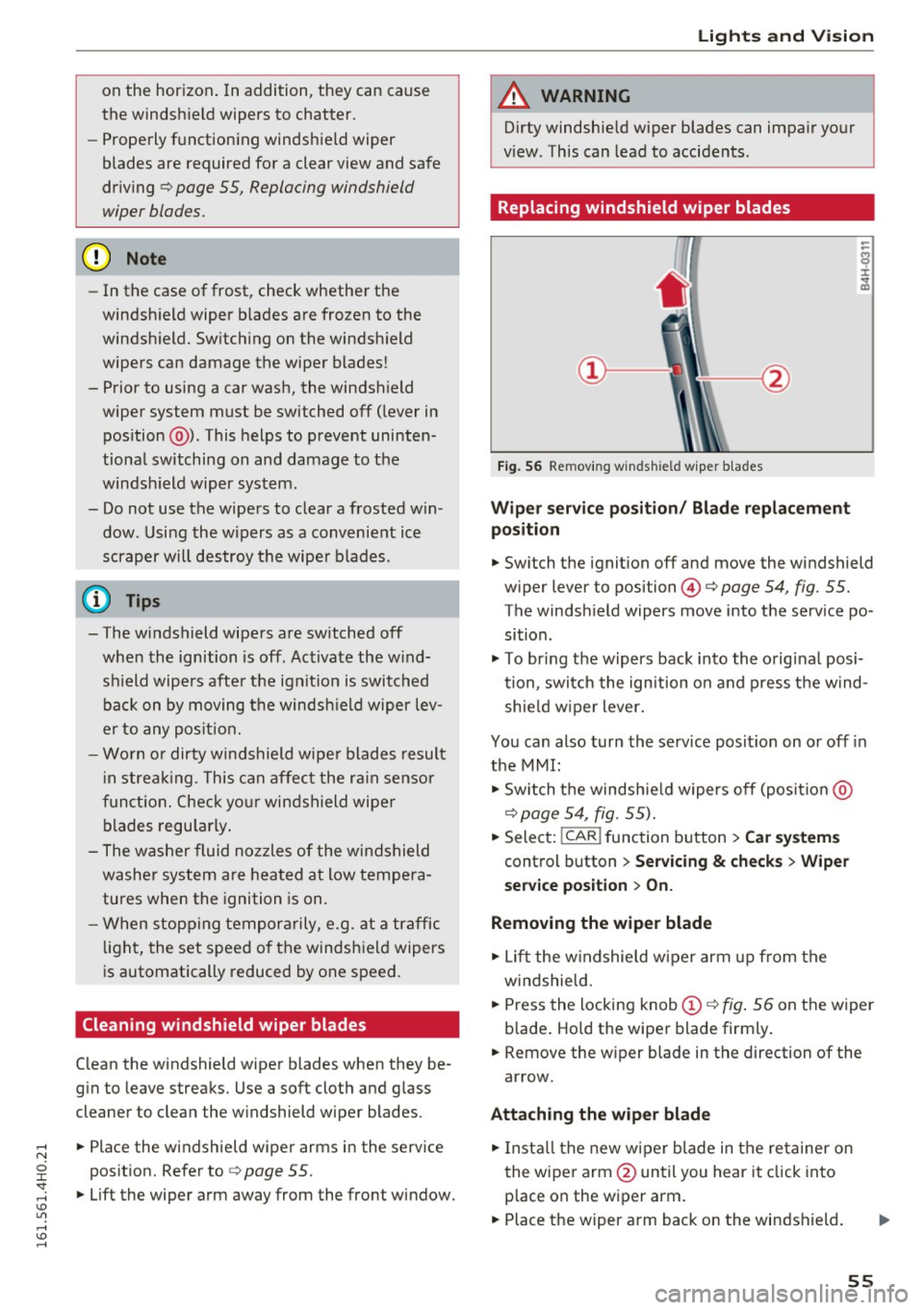
Fig. 56 Remov ing w indsh ield wiper blades
Wiper service position/ Blade replacement
position
.,. Switch the ignition off and move the windshield
wiper lever to position@¢
page 54, fig. 55.
The windsh ield wipers move into the service po
sition .
.,. To bring the wipers back into the original posi
tion, switch the ignition on and press the wind
shie ld wiper lever.
You can also turn the service posit ion on or off in
the MMI:
.,. Switch the windshie ld wipers off (posit io n @
c=> page 54, fig. 55).
.,. Select: !CAR ! function button > Car systems
control button > Servicing & checks > Wiper
service position > On.
Removing the wiper blade
.,. Lift the windshie ld wiper arm up from the
w indshie ld .
.,. Press the locking knob
(D c=> fig. 56 on the wiper
b lade . Hold the wiper blade firmly .
.,. Remove the w iper blade in the direction of the
arrow.
Attaching the wiper blade
.,. Install the new wiper blade in the re tainer on
the wiper arm @until you hear it click into
p lace on the wiper arm .
.,. Place the wiper arm back on the windshield. ..,.
55
Page 58 of 302
Lights and Vision
.. Turn the service position off.
_& WARNING
For your safety, you should replace the wiper
blades once or twice a year. See your author
ized Audi dealer for replacement blades.
- The windshield wiper blades must only be
folded away when in the serv ice position!
Otherwise, you risk damaging the paint on
the hood or the windshield wiper motor.
- You should not move your vehicle or press
the windshield wiper lever when the wiper
arms are folded away from the windshield.
The windshield wipers would move back in
to their original position and could damage
the hood and windshield.
- To help prevent damage to the wiper sys
tem, a lways loosen blades which are frozen
to the windshield before operating wipers.
- To help prevent damage to wiper blades, do
not use gasoline, kerosene, paint thinner, or
other solvents on or near the w iper blades.
- To help prevent damage to the wiper arms
or other components, do not attempt to move the wipers by hand.
(D Tips
- Commercial hot waxes applied by automat ic
car washes affect the cleanability of the
windsh ield.
- You can also use the serv ice position, for ex
ample, if you want to protect the windsh ield
from icing by us ing a cover.
- You cannot activate the service position
when the hood is open.
56
Digital compass
Switching the compass on and off
Applies to: vehicles with digital compass
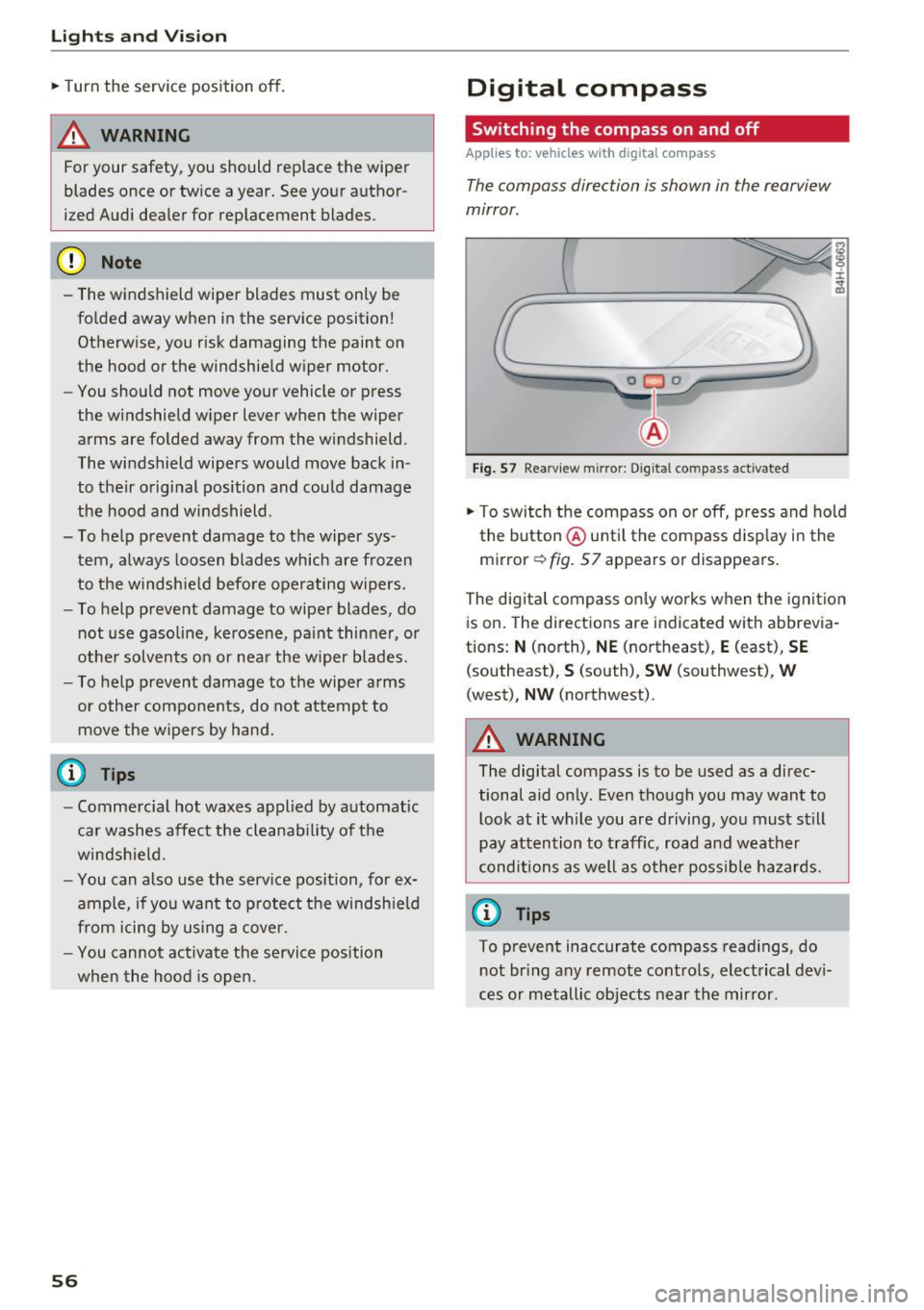
The compass direction is shown in the rearview
mirror.
[ j
Fig . 57 Rearv iew m irror: Digital compass activated
the button @until the compass display in the
mirror
c:!:> fig. 57 appears or disappears.
The dig ital compass only works when the ignit ion
is on. The directions are indicated with abbrevia
tions:
N (north), NE (northeast), E (east), SE
(southeast), S (south), SW (southwest), W
(west), NW (northwest).
_& WARNING
The digital compass is to be used as a direc
tional aid only. Even though you may want to
look at it while you are driving, you must still
pay attention to traff ic, road and weather
conditions as well as other possible hazards.
(0 Tips
To prevent inaccurate compass readings, do
not bring any remote controls, electrical devi
ces or metallic objects near the mirror.
-
Page 78 of 302
Warm and cold
Warm and cold
Climate control system
Description
The climate control system warms, cools and
adds humidity to the air in the veh icle inter ior. It
is the most effective when the windows and sun
roof* are closed . If the temperature inside the
parked vehicle becomes very warm, opening the
window briefly will speed up the cooling process.
I n all heating mode functions except
defrost, the
b lower only switches to a higher speed once the
engine coolant has reached a certain tempera
ture .
Condensat ion from the cooling system can drip
and form a puddle of water under the veh icle.
This is normal and does not mean there is a leak.
P ollutant filt er
The po llutant filte r removes pollutants such as
dust and pollen from the a ir.
The air pollutants filter must be changed at the intervals specif ied in your Warranty
& Mainte
nance booklet, so that the a ir cond it ione r can
properly work.
If you drive your vehicle in an area with high air pollut ion, the filter may need to be changed
more frequently than specified i n your Aud i Wa r
ranty
& Maintenance booklet. If in doubt, ask
your author ized Audi Service Advisor for advice.
Key cod ed setting s
The climate control settings are automatically
stored and assigned to the remote contro l key
that is in use .
.8, WARNING
Reduced visib ility is dangerous and can ca use
accidents.
- For safe dr iv ing it is very impo rtan t that a ll
windows be free of ice, snow and condensa
t ion .
76
- Complete ly familiarize yourself with the
proper use and function of the heating and
ventilation system and espec ially how to de
fog and defrost the wi ndows .
- Never use the windshield wiper/washer sys
tem in freezing weather until you have
warmed the windshield first, using the heat ing and vent ilation system. The washer solu
tion may freeze on the windshield and re
duce visibi lity.
(D Note
- If you suspect that the air conditioner has
been damaged, sw itch the system off to
avoid further damage and have it inspected
by a q ualified dealership.
- Repa irs to the Aud i air cond itioner requ ire
special techn ica l know ledge and spec ial
tools. Contact an a uthorized Audi dealer fo r
assistance.
@ For the sake of the environment
By reduc ing the amo unt of fuel you use, you
also red uce the amount of pollutants emitted
into the a ir.
(D Tips
- Keep t he a ir intake slots (in front of the
windshield) free from ice, snow and debr is
in orde r to maintain the prope r funct ion of
the climate control system .
- The energy management sys tem may sw itch
the seat heating* o r rea r window defroster
off temporarily. These systems are available
again as soon as the energy balance has
been restored.
- Air escapes through vents under the rear
window. When placing items of clothing on
the luggage compartment cover, ensure
that the openings are not covered.
Page 93 of 302
Audi ada pti ve c ruise contr ol and br akin g gu ard
-For safety reasons, do not use adapt ive
cruise contro l when driv ing on roads with
many curves, when the road surface is in
poor condit ion and/or in bad weather (such
as ice, fog, gravel, heavy rain and hydroplan
ing) . Us ing the system under these condi
t ions could result in a collision .
- Switch adaptive cruise contro l off tempora
rily when driving in turn ing lanes, on ex
pressway exits or in const ruc tion zones. This
preven ts the vehicle from accelerating to
the set speed when in these situat ions .
- T he adapt ive cr uise con trol system will no t
br ake by i tself if you pu t your foot on the ac
celerator peda l. Doing so can override the
speed and distance regulation.
- Whe n approaching stat ionary obje cts such
as stopped traffic, adapt ive cruise control
will not respo nd and braking guard will have
limited function .
- The adaptive cruise control system and
brak ing guard do not react to peop le, ani
ma ls, objects crossing the road or oncom ing
objects.
- The function of the radar sensors can be af
fected by reflective objects such as guard
rai ls, t he entrance to a tunnel, heavy rain or
ice.
- Never follow a veh icle so closely that you
cannot stop your vehicle safely . The adap
t ive cr uise control cannot slow or brake the
vehicle safely when you follow another veh i
cle too close ly. Always remember th at the
au tom atic b raking function ca nnot br ing the
vehicle to a sudden or emergency stop un
der these conditions .
- T o preven t unintended operation, alw ays
switch AC C off when i t is not be ing used.
(D Note
The sensors can be displaced by impacts o r
damage to the bumper, whee l housing and
underbody. That co uld affect the adaptive
cru ise con trol sys tem and braking guard.
Have your a uthorized Audi dea ler or author·
ized Aud i Service Facility check their function.
In curves
Applies to: vehicles with Audi adapt ive cruise control
F ig. 9 7 Exampl e: d ri ving into a curve
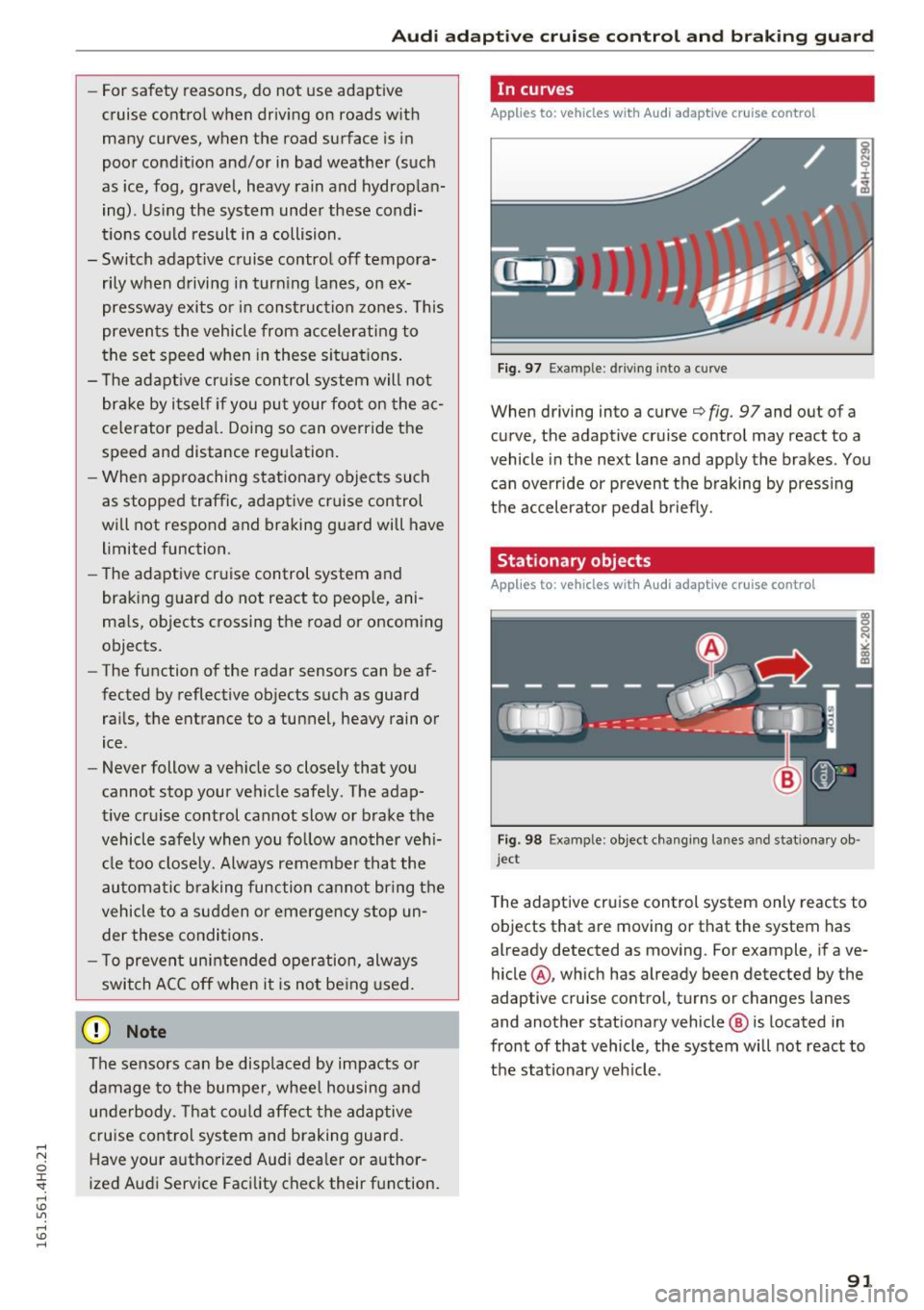
When driving into a curve¢ fig. 97 and out of a
curve, the adaptive cruise control may react to a
vehicle in the next lane and apply the brakes . You
can override or prevent the b raking by press ing
the accelerator pedal briefly.
Stationary objects
Applies to: vehicles with Audi adaptive cruise control
Fig. 98 Exa mple : object changing la nes a nd s tatio nary ob ·
j e ct
T he adaptive cruise control system only reacts to
objects that are moving or that the system has
already detected as moving. For example, if ave
hicle @, which has already been detected by the
adaptive cruise control, turns or changes lanes
and another stat ionary vehicle @ is located in
front of that vehicle, the system will not react to
t h e stationary veh icle.
91
Page 106 of 302
Audi side assist
-Improper reliance on the side assist system
can cause collisions and serious personal in
jury:
- Never rely only on side assist when chang
ing lanes.
- Always check rear view mirrors to make
sure that it is safe to change lanes.
- Side assist cannot detect all vehicles under
all conditions- danger of accident!
- Please note that side assist indicates there
are approaching vehicles, or vehicles in your blind spot, only after your vehicle has
reached a driving speed of at least 19 mph
(30 km/h).
- In certain situations, the system may not
function or its function may be limited. For
example:
- if vehicles are approaching or being left
behind very quickly . The display may not
turn on in time .
- in poor weather conditions such as heavy
rain, snow or heavy mist .
- on very wide lanes, in tight curves or if
there is a rise in the road surface . Vehicles
in the adjacent lane may not be detected
because they are outside of the sensor
range.
(D Note
The sensors can be displaced by impacts or damage to the bumper, wheel housing and
underbody . This can affect the system . Have
your authorized Audi dealer or authorized
Audi Service Facility check their function.
(D Tips
-If the window glass in the driver's door or
front passenger's door has been tinted, the
display in the exterior mirror may be misin
terpreted.
- For Declaration of Compliance to United
States FCC and Industry Canada regulations
c::> page 284.
104 Activating and deactivating
App
lies to : vehicles with side assist
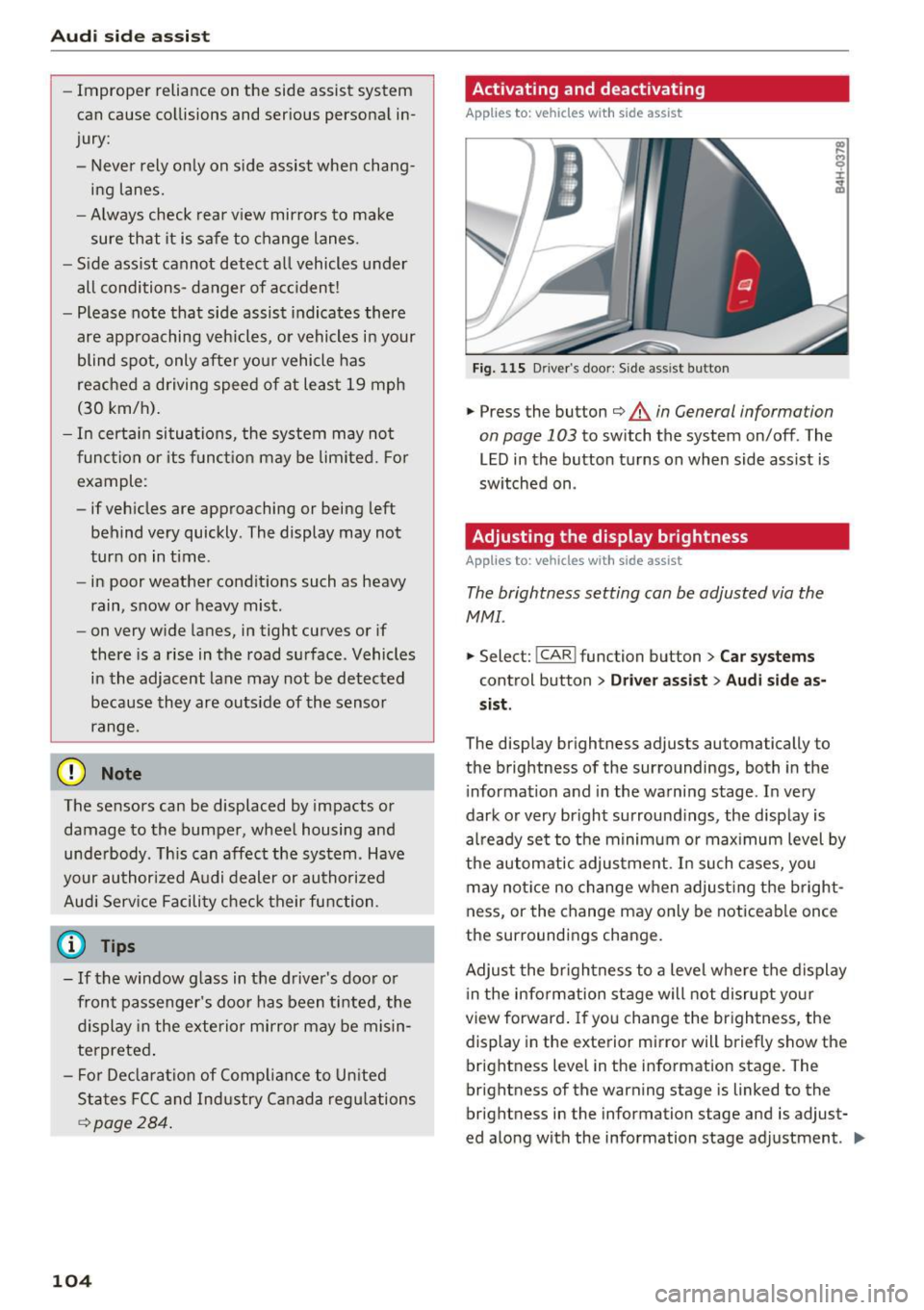
Fig. 115 D riv er's doo r: Side ass ist butto n
.,.. Press the button c::> &. in General information
on page 103
to switch the system on/off . The
LED in the button turns on when side assist is
switched on .
Adjusting the display brightness
Applies to: vehicles wit h side assist
The brightness setting can be adjusted via the
MMI.
.,.. Select: I CAR I function button > Car systems
control button > Driver assist> Audi side as
sist .
The display brightness adjusts automatically to
the brightness of the surroundings, both in the
information and in the warning stage . In very
dark or very bright surroundings, the display is
already set to the minimum or maximum level by
the automatic adjustment. In such cases, you may notice no change when adjusting the bright
ness, or the change may only be noticeable once
the surroundings change.
Adjust the brightness to a level where the display
in the information stage will not disrupt your
view forward. If you change the brightness, the
display in the exterior mirror will briefly show the
brightness level in the information stage. The
brightness of the warning stage is linked to the
brightness in the information stage and is adjust
ed along with the information stage adjustment . .,,.
Page 107 of 302
@ Tips
-Side assist is not active whi le you are ma k
i ng the ad justment .
- Your settings are automatically stored and
ass igned to the remote control key being
u sed.
Driver messages
A ppl ies to: ve hicl es w ith si de assis t
If side ass ist switches off by itself, the LED in the
button turns off and a message will appear in the
i nstr ument cluster d isp lay :
Audi side assist: Cur rently una vailable . No sen
sor vision
The rada r senso rs' vision is affected . Do not cover
the area in front of the senso rs with b ike wheels,
stickers, dirt o r other ob jects . Clean the area in
front of the sensors, if necessary
c:> page 103,
fig . 114.
Audi side assist: Currently unavailable
Side assist c an not be swi tched o n tempo rarily be
cause there is a mal function (for exam ple, the
battery charge level may be too low) .
Audi side assist: System fault!
The system cannot guarantee that it w ill detec t
ve hicles co rrectly and it is swi tched off . The sen
s ors have bee n disp laced or are fa ulty. Have the
sy stem checked by an authorized Audi de aler or
au thor ized Au di Service Facility soon.
Audi side assist: Unavailable when towing .
Side assist sw itches off automatically when a fac
tory-installed trailer hitch is connected to the
e lectr ical connector on the trailer . Th ere is no
g ua rantee the syste m will sw itch off when usi ng
a retrofitted tra ile r hitc h. D o not use s ide assist
when towing a t railer.
Aud i side assist
105
Page 146 of 302
Safety belts
A WARNING
Always read and heed all WARNINGS and oth
er important informat ion
c:> page 140 .
(D Tips
You can also adjust the height of the front
seats to change the position of the safety
belts.
Improperly worn safety belts
Incorrectly posit ioned safety belts can cause se
vere injuries.
Wearing safety belts improperly can cause seri
ous injury or death. Safety belts can only work
when they are correctly positioned on the body.
Improper seating positions reduce the effective
ness of safety belts and will even increase the
risk of injury and death by moving the safety belt
to cr it ica l areas of the body . Improper seating
positions also increase the risk of serious injury
and death when an airbag deploys and strikes an
occupant who is not in the correct seating posi
tion. A driver is responsible for the safety of all
vehicle occupants and especia lly for children.
Therefore:
... Never permit anyone to assume an incorrect
sitting position in the vehicle whi le traveling
c:> & .
A WARNING
Improperly worn safety belts increase the risk
of serious personal injury and death whenever
a vehicle is being used.
- Always make sure that all vehicle occupants
are correctly restrained and stay in a correct
seat ing pos ition whenever the veh icle is be
ing used.
- Always read and heed all WARNINGS and
other important information
c:> page 140.
144
Belt tensioners
' How safety belt pretensioners work
In front, side and rear-end collisions above a
particular severity and in a rollover, safety belts
are tensioned automatically.
Rever sible safety belt tensioners
The safety belts on the front seats are equipped
with power reversible tensioners. The following
functions are available when the driver's/front
passenger 's safety belts are fastened:
- Automatic tensioners: at the start of a drive,
the safety belts automatically adjust to the
passenger after a certain time period or vehicle
speed. To switch the automatic tensioners off,
select the following in the MMI:
!CARI function
button
> Car systems > Vehicle settings >
Seats > Driver's seat or Passenger's seat > Au
tomatic belt tensioner
> Off.
-In certa in driving situations , the safety belts
may tighten with a reve rsib le tensioning func
tion
c:> page 187.
- Th e safety be lts may also tighten with this re-
vers ible tensioning funct ion in minor collisions.
Pyrotechnic safety belt pretensioners
The safety belts are equipped w ith safety belt
pretensioners . The system is activated by sensors
i n front, side and rear-end collisions of great se
verity and in a rollover. This tightens the belt and
takes up belt slack
c:> .&. in Service and disposal of
safety belt pretensioner on page 145.
Taking up
the slack helps to reduce forward occupant
movement during a collision.
A WARNING
- It is possible for the pretensioners to deploy
incorrectly.
- The pyrotechnic system can only provide protection for one collision. If the pyrotech
nic pretens ioners deploy, the pretensioning
system must be replaced.
(1) Tips
The pyrotechnic safety belt pretensioners can
only deploy once. ..,_
Page 147 of 302
-The safety belt pretensioners do not dep loy
in minor fronta l, side and rear -end co lli
s ions .
- A fine dust is released when the pyrotechnic
safety belt pretensioners deploy. This is nor
mal and is not caused by a fire in the vehi
cle.
- The relevant safety requirements must be
observed when the veh icle or components
of the system are scrapped. A qualified
dealersh ip is familiar w ith these regulations
and will be pleased to pass on the informa
tion to you .
- Be sure to observe all safety, environmental
and other regu lations if the veh icle or indi
v idual parts of the system, particularly the
safety be lt o r airbag, a re to be disposed . We
recommend yo u have your author ized Audi
dealer perform this serv ice for you.
Service and disposal of safety belt preten
sioner
The safety belt pretens ioners are parts of the
safety belts on your Audi. Insta lling, removing,
servic ing or repa iring of belt p retensioners can
damage the safety belt system and prevent it
from wor king cor rect ly in a collision .
T here are some important things you have to
know to make sure that the effectiveness of the
sys tem w ill not be impaired and that discarded
components do not cause injury or pollute the
e nvironment.
_& WARNING
-
Improper care, serv icing and repa ir proce
dures can increase the risk o f personal injury
and death by preventing a safety be lt preten
sioner from activating when needed or acti
vating it unexpectedly :
- The be lt pretensioner system can be activat
ed only once . If belt pretensioners have
been activated, the system must be re
placed .
- Never repair, adjust, or change any parts of
the safety belt system.
- Safety belt systems including safety belt
pretens ioners cannot be repaired. Specia l
Safet y be lts
procedures are required fo r removal, instal
lation and disposal of this system.
- For any wo rk on the safety belt system, we
strong ly recommend that you see yo ur au
thor ized Audi dealer or qualified techn ician
who has an Audi approved repa ir manual,
tra ining and special equipment necessary .
(® For the sake of the environment
Undeployed airbag modules and pretension
ers might be classified as Perchlorate Materi
al -special handling may apply, see
www .dtsc .ca .gov/hazardouswaste/perchlo
r ate . When the vehicle or parts of the re
strain t system including ai rbag modu les safe
ty belts with p re tensioners are scrapped, all
applicable laws and regu lations mus t be ob
se rved . Your authorized Audi dealer is familiar
with these requirements and we recommend
that you have your dealer perform this service
for you.
145