towing AUDI A8 2016 User Guide
[x] Cancel search | Manufacturer: AUDI, Model Year: 2016, Model line: A8, Model: AUDI A8 2016Pages: 302, PDF Size: 75.68 MB
Page 120 of 302
Parking systems
Parking systems
General information
Applies to: vehicles with park ing system plus/rear view cam
era/peripheral cameras
Depending on your vehicle 's equipment , various
parking aids will help you when parking and ma
neuvering.
The
parking system plus with rear view camera
assists you when parking by audibly and visually
indicating objects detected
in front of and behind
the vehicle . The rear view camera shows the area
behind the vehicle in the Infotainment display.
This display assists you when you are cross or parallel parking
r:!) page 119.
The peripheral cameras assist you with parking
and maneuvering. You are aided by various cam
eras depending on the vehicle equipment lev
el r:!)
page 122. In addition, you are assisted by
the functions from the sensors
c> page 119, Sen
sors,
¢ page 121, Visual display.
A WARNING
-
- Always look for traffic and check the area
around your vehicle by looking at it directly
as well. The parking system cannot replace
the driver's attention. The driver is always
responsible for safety during parking and
for all other maneuvers.
- Please note that some surfaces, such as
clothing, are not detected by the system.
- Sensors and cameras have b lind spots in
wh ich peop le and objects cannot be detect
ed . Be especially cautious of children and
animals.
- The sensors can be displaced by impacts or
damage to the radiator gr ille, bumper,
wheel housing and the underbody. The park
ing systems may become impaired as a re
sult. Have your authorized Audi dealer or
qualified workshop check their function .
- Make sure the sensors are not covered by
stickers, deposits or any other obstructions as it may impair the sensor function. For in
formation on cleaning, refer to
I:!) page 206.
118
(D Note
- Some objects are not detected by the sys
tem under certain circumstances:
-Objects such as barrier chains, trailer draw
bars, vertical poles or fences
- Objects above the sensors such as wall ex
tensions
- Objects with specific surfaces or struc
tures such as chain link fences or powder
snow.
- If you continue driving closer to a low-lying
object, it may disappear from the sensor
range. Note that you will no longer be
warned about this obstacle.
(D Tips
-The system may provide a warning even
though there are no obstacles in the cover
age area in some situations, such as:
- certain road surfaces or for long grass.
- externa l ultrasonic sources e.g. from
cleaning vehicles .
- heavy rain, snow or thick vehicle exhaust .
- We recommend that you practice parking in
a traffic-free location or parking lot to be
come familiar with the system . When doing
this, there should be good light and weath
er conditions.
- You can change the volume and pitch of the
signals as well as the display¢
page 128.
- Please refer to the instructions for towing a
trailer
¢page 128.
-What appears in the infotainment display is
somewhat time-delayed.
Page 192 of 302
Smart Technology
shared, please see your contract with the
wireless te lecommunications provider and the
"About Audi connect" tab in your vehicle's
MMI:
! MENUI button> Audi connect> About
Audi connect.
Electronic Stabilization
Control (ESC)
Description
ESC helps to improve road holding and vehicle
dynamics to help reduce the probability of skid
ding and loss of vehicle control. It works only
when the engine is running. ESC detects certain
difficult dr iving situations, including when the
veh icle is beginn ing to spin (yaw) out of contro l
and helps you to get the vehicle back under con
trol by se lectively braking the wheels, and/or re
ducing engine power and providing steering as
sistance to help hold the vehicle on the driver's
intended course. The indicator light
GI in the in
strument cluster blinks when ESC is taking action
to help you control the vehicle.
ESC has limitations. It is important to remember
that ESC cannot overcome the laws of physics. It
will not always be able to help out under all con
ditions you may come up against . For example,
ESC may not always be able to help you master
situations where there is a sudden change in the
coefficient of friction of the road surface. When
there is a section of dry road that is suddenly cov
ered with water, slush o r snow , ESC cannot per
form the same way it wou ld on the dry surface. If
the vehicle hydrop lanes (rides on a cushion of wa
ter instead of the road surface), ESC wi ll not be
able to he lp you steer the vehicle because contact
with the pavement has been interrupted and the
vehicle cannot be braked or steered. During fast cornering, part icularly on w inding roads, ESC
cannot always deal as effective ly w ith difficult
driving situat ions than at lower speeds . When
towing a trailer, ESC is not able to help you re
ga in control as it would if you were not towing a
trai ler.
Always adjust your speed and driving sty le to
road, traffic and weather conditions. ESC cannot
override the vehicle's physical limits, increase the
190
available traction, or keep a vehicle on the road if
road departure is a result of driver inattention.
Instead, ESC improves the possib ility of keeping
the vehicle under control and on the road during extreme maneuvers by using the driver's steering
inputs to help keep the vehicle going in the in
tended direction . If you are traveling at a speed
that causes you to run off the road before ESC
can provide any assistance, you may not exper i
ence the benefits of ESC.
ESC is switched on all the time. In certa in s itua
tions when you need less traction, you can sw itch
off ASR by press ing the button above
~ page 192, fig. 186 the selector lever. Be sure
to switch ASR on again when you no longer need
l ess traction.
The following systems are integrated in the ESC:
Anti-lock braking system (ABS)
ABS prevents the wheels from locking up when
braking. The vehicle can still be steered even dur
i ng hard braking . Apply steady pressure to the
brake pedal. Do not pump the pedal. A pulsing in
the brake pedal indicates that the system is help
i ng you to brake the vehicle.
Brake assist system
The brake assist system can decrease braking dis
tance. It increases braking power when the dr iver
presses the brake pedal quickly in emergency sit
uations. You must press and hold the brake pedal
u nt il the situation is over. In vehicles with adap
tive cruise control*, the brake assist system is
more sensitive if the d ista nee detected to the ve
hicle ahead is too sma ll.
Anti-slip regulation (ASR)
ASR reduces engine powe r when the dr ive wheels
begin to spin and adapts the force to the road
cond itions. This makes it easier to start, acceler
ate and drive up hills.
Electronic differential lock (EDL)
The EDL brakes wheels that are spinning and
transfers the drive power to the other wheels.
This function is not available at higher speeds .
Page 204 of 302
Trail er mode
Trailer mode
Driving with a trailer
General information
Your Audi was designed primarily for passenger
transportation.
If you plan to tow a trailer, please remember that
the additional load will affect durability, econo
my and performance.
Trailer towing not only places more stress on the
vehicle, it also calls for more concentration from the driver.
For this reason, always follow the operating and
driving instructions provided and use common
sense.
(D Note
If you are going to tow a trailer, you must ac
tivate the trai ler operation mode
¢ page 202, Operating instructions.
Technical requirements
Tr ailer hitch
Use a weight-carrying hitch conforming to the
gross trailer weight. The hitch must be suitable
for your veh icle and trailer and must be mounted
securely on the vehicle's chassis at a
technically
sound
location . Use only a trailer hitch with a re
movable ball mount . Always check w ith the t rail
er h itch man ufact urer to make sure that you are
using the co rrect hitc h.
Do not u se a bumper hitch .
The hitch must be installed in such a way that it
does not interfere with the impact-absorbing
bumper system . No mod ificat ions should be
made to the vehicle exhaust and brake systems .
F rom t ime to t ime, check that a ll hitch mo unt ing
bolts rema in securely fastened.
When you are not tow ing a traile r, remove the
tra iler hitch ball mount. This prevents the hitch
from caus ing damage should your vehicle be
struck from behind
¢ ,&. .
202
Trailer b rakes
If your trailer is equipped with a braking system,
check to be sure that it co nforms to all regu la
tions.
The tra iler hydrau lic brake system must not be
directly connected to the vehicle's hydrau lic
brake system .
Safety chains
Always use safety chains between your vehicle
and the tra iler.
Trailer light s
Trailer lights must meet all regulations. Be sure
to check with your Aud i dealer for correct wir ing,
switches and relays .
Mirror s
If you are unable to see the traffic behind you us
ing the regular outside mirrors, then you
must in
stall extended mirrors . It is important that you
always have clear vision to the rear.
A WARNING
Afte r remov ing the tra iler hitch, do not sto re
i t in you r vehicle. In case of s udden braking,
the hitch could fly fo rwa rd and injure you or
your passengers.
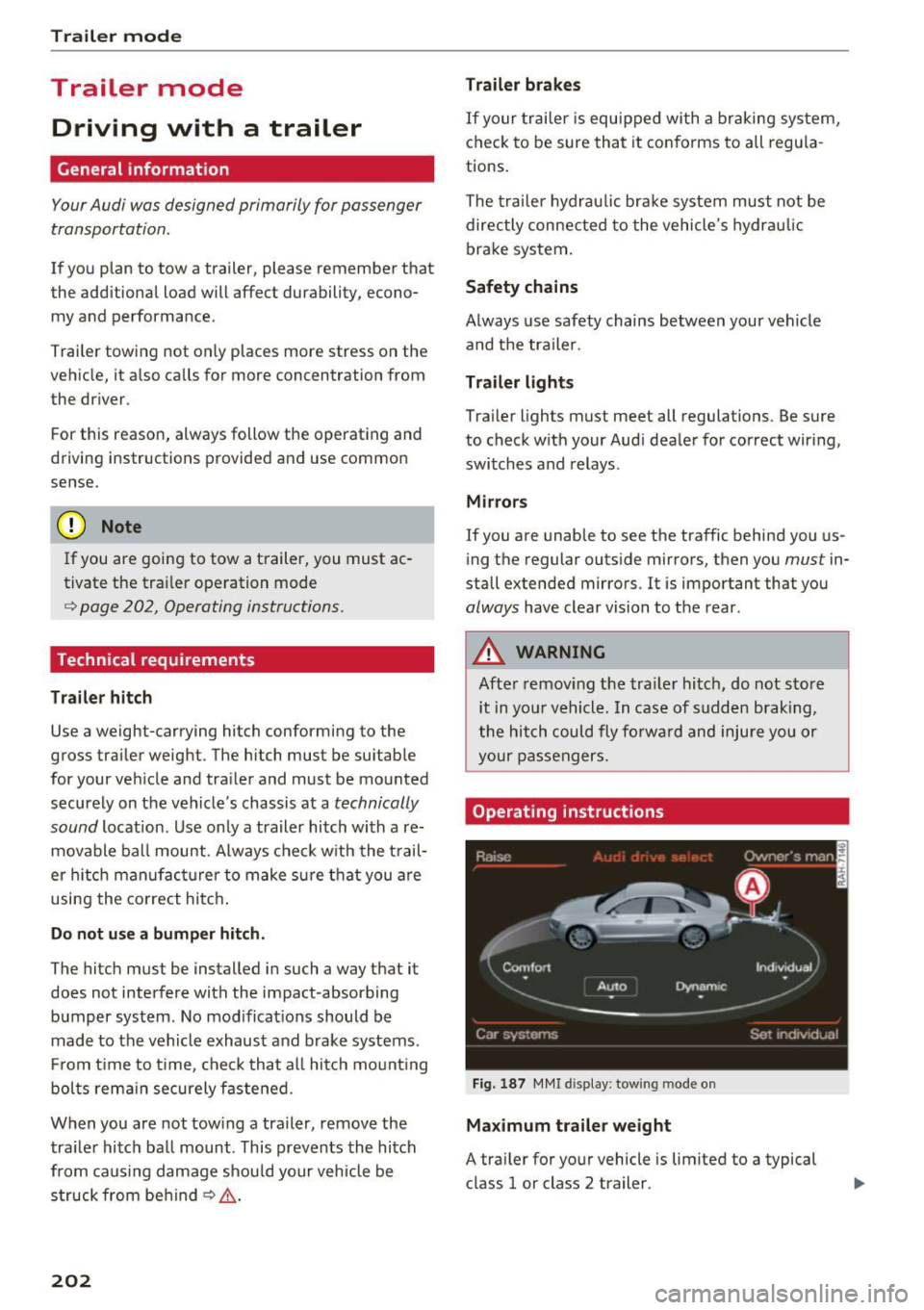
Operating instructions
Fig. 1 87 MMI d ispl ay: tow ing mode o n
Maximum traile r weight
A tra iler for your vehicle is lim ited to a typical
class 1 or class 2 trailer.
Page 205 of 302
Trailer load distribution
Be sure the load in the trailer is held securely in
p la ce to prevent it from sh ifting forward, back
ward or sideways.
Never allow a passenger to ride in a trailer¢.&.
in Driving instructions on page 204.
Engine cooling system
Towing a trailer makes the engine work harder . It
is important that the cool ing system's perform
ance is up to the addit ional load. Make sure that
the cooling system has enough fluid.
Tire pressure
When towing a trailer, inflate the tires of your
veh icle to the cold tire pressure listed under "Full
load " on the label located on the driver's side B
pillar (vis ible when the door is open). Inflate
trailer tires to trailer and tire manufacturers'
specif ications.
Lights
Check to make sure both vehicle and trailer lights
are working proper ly.
Safety chains
Be sure trailer safety chains are properly connect
ed from the trailer to the hitch on the vehicle.
Leave enough slack in the chains to permit turn
in g corners . When you install safety cha ins, make
sure they wi ll not drag on the road when you are
driving.
The chains should cross under the trailer tongue
to prevent it from dropping in case of separat ion
from the hitch.
Adjusting the Audi drive select
Make sure the vehicle is on a level surface before
hitching up the trailer and before adjusting the
tongue we ight. The vehicle must be in
auto or
comfort driving mode and not ra ised
¢ page 106, 9Q) .
Make sure that the vehicle is lowered. In Info
tainment, select:
I CARI function button > lower
control button .
Trailer mode
If you must drive under poor road conditions, you
can raise the vehicle
after coupling the trailer or
after adjusting the tongue weight¢ page 108.
(D Note
-Changes in temperature or load can affect
the height of the vehicle.
- Always select auto or comfort mode. Other
w ise, the tong ue load specified for your ve
hicle will no longer be applicable .
Driving instructions
Driving with a trailer always requires extra care
and consideration.
T o obtain the best possible handling of veh icle
and trailer, p lease note the following:
.,. Do not tow a loaded trailer when your car itself
is not loaded.
.,. Be especially careful when passing other
vehicles.
.,. Observe speed limits.
.,. Do not drive at the maximum permissible
speed .
.,. Always apply brakes early.
.,. Monitor the temperature gauge.
Weight distribution
Towing a loaded tra iler with an empty car results
in a highly unstab le distribution of weight . If this
cannot be avoided, drive at very low speeds only
to avoid the risk of losing steering control.
A "balanced" rig is easier to operate and control.
This means that the tow vehicle shou ld be loaded
to the extent possib le and permissib le, while
keeping the trailer as light as possible under the
cir cumstances . Whenever poss ible, transfer
some cargo to the luggage compartment of the
tow veh icle while observing tongue load require
ments and vehicle load ing conside rations.
Speed
The higher the speed, the more difficult it be
comes for the driver to control the r ig. Do not
drive at the maximum permissible speed. Reduce
your speed even more if load, weather or wind .,._
203
Page 206 of 302
Trailer mod e
conditions are unfavorable - particularly when
going downhill.
Red uce veh icle speed
imm ediatel y if the tra ile r
shows the s lightest sign of swaying.
Do not try
to stop the sway in g b y accele rating .
Observe speed lim its . In some areas, speeds for
ve hicl es towing tra ilers are lower than for reg ula r
veh icles.
A lways apply brakes early . When dr iving down
h ill , sh ift into a lower gear to use the engine
b raking effect to slow the veh icle. Use of the
brakes a lone can cause them to overheat and fail.
Air suspension*
When driving with a tra iler, activate the trailer
mode of the air suspension . Switch the air sus
pens ion tra iler mode on when you a re towing a
tra ile r. This will limit the regulat ion by the air
suspens ion while driving . Select in the MM I:
ICARI function button > (Car )* sys tem s control
button >
Vehicle setting s > Air su sp .: to wi ng >
On .
Coolant temperature
The coolan t temperature gauge¢ page 10 must
be observed carefully. The coo lant temperature
can increase if you drive on long inclines in a low
gear at high engine speeds. Reduce your speed
immed iate ly if the LEDs in the top part of the dis
p lay turn on.
For more information about indicator lights, re
fer to.
¢page 15.
A WARNING
Anyone not properly restrained in a moving
vehicle is at a much greater risk in an acci
dent. Never let anyone ride in your car who is
not properly wearing the restraints provided
by Audi.
Trailer mode notes
Important to know
Your vehicle hand les different ly when towing a
trai ler because of the additiona l weight and dif
ferent weight distr ibut ion. Safety, performance
204
-
and economy will g reatly depend on how carefu l
l y you load your trai ler and operate your rig .
Befo re yo u actually tow yo ur t railer, pract ice
turning, stopping and backing up in an area away
from traffic. Keep practicing unti l you have be
come complete ly familiar with the way your vehi
cle-tra iler combination behaves and responds .
Backing up is diff icult and requ ires practice.
Backing up with a trailer genera lly req uires steer
ing action opposite to that when backing up your
vehicle witho ut a trailer .
Maintain a greater distance between yo ur vehicle
and the one in front of you. You will need more
room to stop . To compensate for the trailer, you
will need a larger than normal turning radius .
When passing, remember tha t you canno t accel
erate as fast as you normally wou ld because of
the added load . Make sure you have enough room
to pass. After passing, allow p lenty of room for
your trailer before changing lanes again.
Avoid jerky starts, sharp turns or rapid lane changes.
(D Tips
- Do not tow a trailer du ring the break-i n pe ri
od of your vehicle.
- If you tow a tr aile r, your A udi may requi re
more frequent ma intenance due to the ex
tra load ¢
page 281.
Parking on a slope
Do not park on a slope with a trailer . If it cannot
be avoided, do so only after doing the following:
When parking:
.,. App ly the foot brake.
.,. Have someone p lace chocks unde r both the ve
hicle and the trailer wheels .
.,. With chocks in place, slowly release the brakes
until the wheel chocks abso rb the load .
.,. Turn the whee ls towards the curb.
.,. App ly the parking brake .
.,. Select the P selector lever posit ion.
Page 252 of 302
Wheels
-Always make sure that the total load being transported -
including the weight of a trail
er hitch and the tongue
weight of a loaded trailer -
does not make the vehicle
heavier than the vehicle's
Gross Vehicle Weight Rating.
Determining correct load
limit
Use the example below to calcu late the total weight of the pas
sengers and luggage or other
things that you plan to transport
so that you can make sure that
your vehicle will not be overload ed .
Steps for Determining Correct
Load Limit
1 . Locate the statement "THE
COMBINED WEIGHT O F OCCU
PANTS AND CARGO SHO ULD
NEV ER EXCEED XXX KG OR XXX
LBS"on your vehicle's placard
(tire inflation pressure label)
¢ page 246, fig . 207 .
2. Determine the combined
weight of the driver and passengers that will be riding in
your vehicle .
250
3. Subtract the combined weight
of the driver and passengers
from
"XXX" kilograms or "XXX"
pounds shown on the sticker
¢ page 246, fig . 207 .
4. The resu lting fig ure equals the
available amount of cargo and luggage load capacity . For ex
ample, if the "XXX" amount
equals
1400 lbs. and there will
be five
150 l bs . passengers in
your vehic le, the amount of
available cargo and luggage load capac ity is
650 lbs .
(1400-750 (S x 150) = 650
lbs.)
5. Determine the combined
weight of luggage and cargo
being loaded on the vehicle .
That weight may not safely ex
ceed the available cargo and luggage load capacity calcu lat
ed in Step 4.
6 . If your vehicle will be towing a
trailer, load from your trailer
w ill be transferred to your ve
hic le. Consu lt th is manua l to
determine how this reduces
the available cargo and lug
gage load capacity of yo ur vehi-
cle.
~
Page 261 of 302
Replacing wheels
Before changing a wheel
Observe the following precautions for your own
and your passenger's safety when changing a
wheel.
.,. After you experience a tire failure, pull the car
well away from moving traffic and try to reach
level ground before you stop¢.,&. .
.. All passengers should
leave the car and move
to a safe location (for instance, beh ind the
guardrail) ¢.,&. .
.,. Engage the
parking brake to prevent your vehi
cle from rolling unintentionally ¢.,&. .
.. Move
selector lever to position P ¢ .,&. .
1> lfyou are towing a trailer, unhitch the trailer
from your vehicle.
.,. Take the
jack and the spare tire out of the lug
gage compartment,
¢page 257.
..&, WARNING
You or your passengers could be injured wh ile
changing a wheel if you do not follow these
safety precautions:
- If you have a flat tire, move a safe distance
off the road. Turn off the engine, turn the
emergency flashers on and use other warn
ing devices to alert other motorists.
- Make sure that passengers wa it in a safe
place away from the vehicle and well away
from the road and traffic.
- T o help prevent the vehicle from moving
sudden ly and possibly slipping off the jack,
always fully set the parking brake and block
the wheel diagonally opposite the wheel be
ing changed. When one front wheel is lifted
off the ground, plac ing the Automatic
Transmission in "P" (Park) will
not prevent
the vehicle from moving.
- Before you change a wheel, be sure the
ground is level and firm . If necessary, use a
sturdy board under the jack .
- Always store the vehicle tool k it, the jack
and the replaced tire in the luggage com
partment ¢
page 135.
Emergency assistance
{!) Tips
Before changing the wheel, you must activate
the jacking mode, so that the automat ic con
tro ls for the Adaptive Air Suspension do not
make it more difficult to lift the vehicle with
the jack ¢
page 261 .
Changing a wheel
When you change a wheel , follow the sequence
described below step-by-s tep and in exactly tha t
order .
l. Activate the vehicle jack mode ¢ page 261 .
2. Remove the decorative wheel cover*. For
more details see also¢
page 260, Decora
tive wheel covers
or¢ page 260, Wheels
with wheel bolt caps .
3. Loosen the wheel bolts¢ page 260.
4. Locate the proper mounting point for the
jack and align the jack below that point
¢ page 261 or¢ page 262.
5. Raise the car with the jack¢ page 261 or
¢page 262.
6. Remove the wheel with the flat tire and then
install
the spare ¢ page 263.
7. Tighten all wheel bolts lightly .
8.
Lower the vehicle with the jack .
9. Use the wheel bolt wrench and
firmly tighten
all wheel bolts<=>
page 260.
10. Replace the decorative wheel cover*.
11. Deactivate the vehicle jack mode in the MMI :
I CAR! function button > Car systems contro l
button
> Servicing & checks > Air susp.: jack
mode > Off.
The vehicle jack mode switches off automatically
at speeds above 10 km/h .
..&, WARNING
Always read and follow all WARNINGS and in
formation
¢ .&. in AB: Raising the vehicle on
page 262
and ¢ page 264.
259
Page 273 of 302
Emergency situations
General
This chapter is intended for trained emergency
crews and working personnel who have the nec
essary tools and equipment to perform these
ope rations.
Starting by pushing or
towing
(D Note
Veh icles with an automatic transmission can
not be started by pushing or towing.
Starting with jumper
cables
If necessary, the engine can be started by con
necting it to the battery of another vehicle .
If the engine shou ld fail to start because of a dis
charged or weak battery, the battery can be con
nected to the battery of
another vehicle, using a
pair of jumpe r cables to start the engine.
Jumper cables
Use only jumper cables of suffic iently large cross
section
to carry the starter current safely. Refer
to the manufacturer's specifications.
Use only jumper cables with
insulated term inal
clamps which are dis tinct ly marked :
plus(+) cable in most cases colored re d
minus( -) cable
in most cases colored blac k.
A WARNING
Batteries contain electricity, acid, and gas.
Any of these can cause very serious or fatal in
jury. Follow the instructions below for safe
handling of your vehicle's battery.
- Always shield your eyes and avo id leaning
over the battery whenever poss ible.
- A discharged battery can freeze at tempera
tures just below 32 °F (0 °C) . Before con
necting a jumper cable, you must thaw the
Emergency situations
frozen battery completely, otherwise it
could explode .
- Do not allow battery acid to contact eyes or
skin. Flush any contacted area with water immediately.
- Improper use of a booster battery to start a
vehicle may cause an exp losion.
- Vehicle batteries generate exp losive gases.
Keep sparks, flame and lighted cigarettes
away from batteries.
- Do not try to jump start any vehicle with a
low acid level in the battery .
- The vo ltage of the booster battery must also
have a 12-Volt rating. The capacity (Ah) of
the booster battery should not be lower
than that of the discharged battery. Use of
batter ies of different voltage or substantial
ly different "Ah" rating may cause an exp lo
sion and personal injury .
- Never charge a frozen battery. Gas trapped
in the ice may cause an explosion.
- Never charge or use a battery that has been
frozen . The battery case may have be weak
ened .
- Use of batter ies of different voltage or sub
stantially different capacity (Ah) rating may
cause an exp losion and injury. The capac ity
(Ah) of the booster battery should not be
lowe r than that of the discharged battery.
- Before you check anything in the eng ine
compartment, always read and heed all
WARNINGS
r::!)page 220.
(D Note
-Applying a higher voltage booster battery
will cause expensive damage to sensitive
electronic components, such as control
units, relays, radio, etc.
- Th ere must be no electrical contact between
the vehicles as otherwise current could al
ready start to flow as soon as the positive
(+) terminals are connected.
(D Tips
- The discharged battery must be properly
connected to the vehicle's e lectrica l system. ..,.
271
Page 275 of 302
(D Note
Im pro per hook-u p of jum per cables can ru in
the gene ra tor.
- Always connect P OSITI VE( +) to POS ITI VE
( + ), and NEGATIVE( -) to NEGATIVE( -)
ground post of t he battery manager contro l
u nit .
- Check that a ll sc rew p lugs on the battery
ce lls a re sc rewed in firmly . If not, t igh ten
pl ugs p rio r to connecting clamp on negative
batte ry te rminal.
- Please note t hat the procedure fo r con nect
i ng a jumper cab le as desc ribe d above ap
p lies specifica lly to the case of yo ur vehicle
being jump s tarte d. W hen you are giv ing a
ju mp s ta rt to an othe r vehicl e, do
not con
n ect t he nega tive (- ) ca b le t o t he nega tive
(-) t ermin al on the di scharged battery @
c> fig . 23 1. Instead, securely connec t the
negative (-) cable to either a solid metal
com ponent that is f irm ly bolted t o the e n
gine block o r to t he engine bloc k itsel f. If
the batt ery that is be ing c ha rge d d oes not
vent to the outs ide, escap ing batte ry gas
could ignite and e xplode!
Towing with a tow truck
General hints
Your Audi require s speci al handling f or towing.
Th e follow ing informat ion is to be used by com
mercia l tow tr uck o pera tors who know how to op
e rat e the ir equip men t sa fely.
- Never tow your Audi. Towing will cause dam
age to the engine and transmission .
- Never wrap the safety chains or winch cables
around the brake lines.
- To prevent unnecessary damage, your Audi
must be transported with a flat bed truck.
- To load the vehicle on to the flat bed, use the
towing loop found in the vehicle tools and at
tach to the front or rear anchorage
¢page273 and ¢pag e 274 .
Emergency situations
A WARNING
-A ve hicle being towe d is not safe for passen-
ge rs. Neve r allow a nyo ne to ride in a vehicle
b eing towed, for any reason.
Front towing loop
Only install the front towing loop when it is
needed .
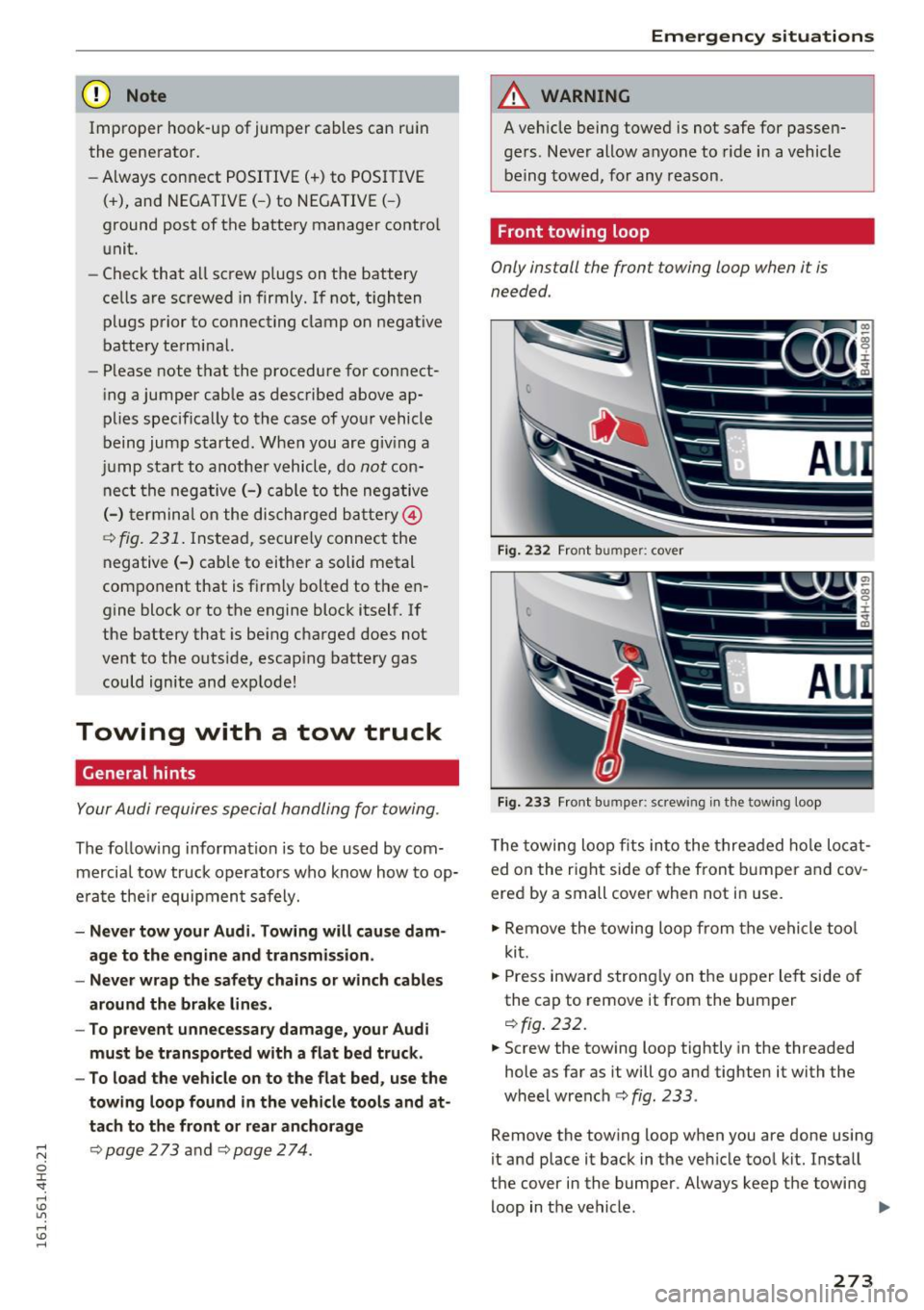
Fig. 232 Front bumper: cover
Fig. 233 Front bumper: screwing in th e towing loo p
The towing loo p fits in to the thre aded hole locat
ed o n the r ig ht side o f the fron t bumper a nd cov
ered by a small cover when not in use.
" Re move the towing loo p from the vehi cle too l
ki t.
" Press inward s tron gly on the up per left si de of
the cap to remove it from the bum per
¢ fig . 232.
" Screw the towing loop tightly in the threaded
hole as far as it will go and tighten it with the
wheel wrench
<=> fig . 233.
Remove the towing loop when you are done using
it and place it back in the ve hicle too l kit. Insta ll
the cover in the bumper . Always keep the towing
loop in the vehicle . ..,.
273
Page 276 of 302
Emerg ency s it u ation s
_& WARNING
If you do not screw the towing loop complete
ly, it could come out of the threaded hole
wh ile the vehicle is be ing towed causing dam
age to the vehicle and poss ible serious per
sonal injury.
Rear towing loop
Only install the rear towing loop when it is need
ed .
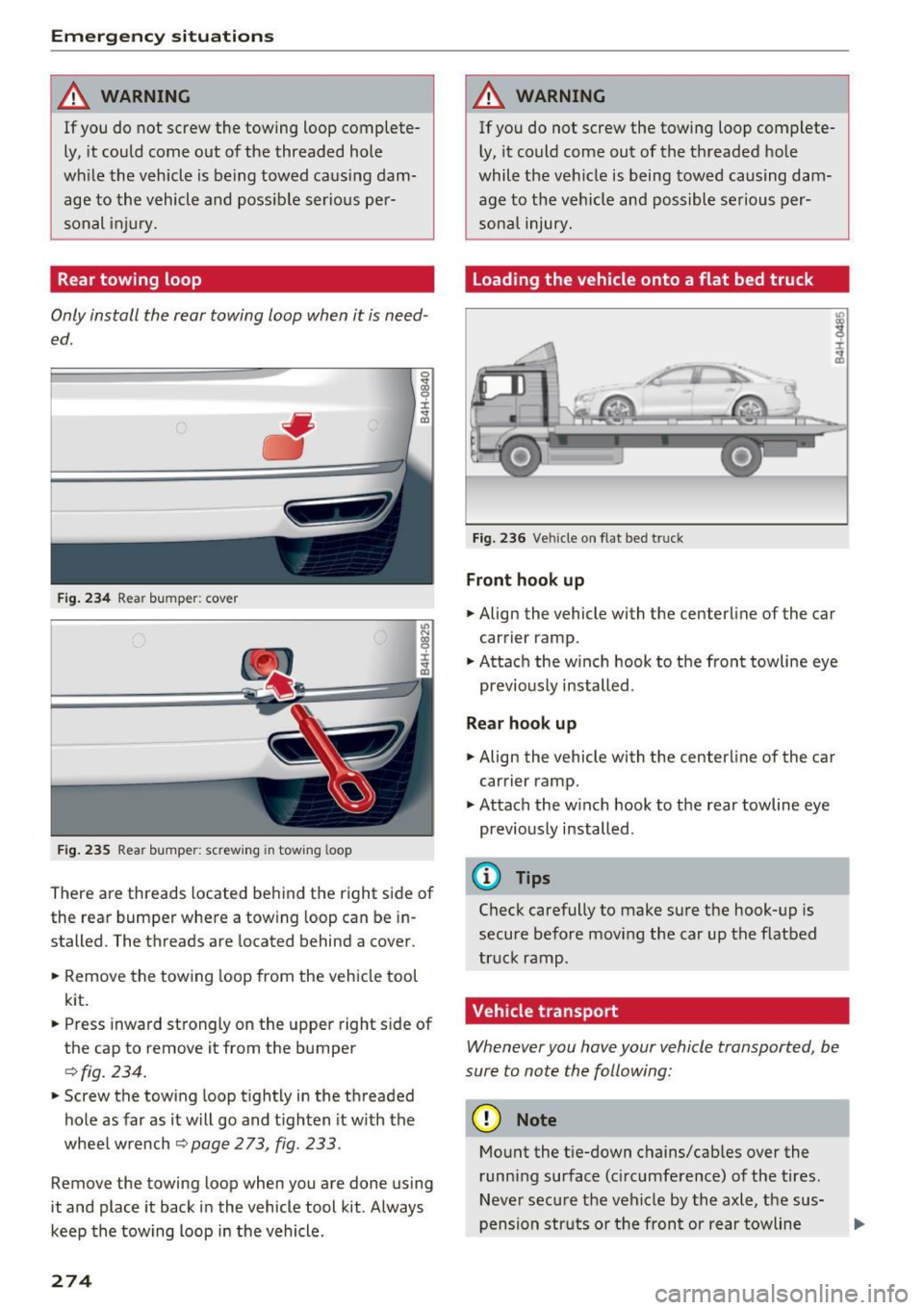
Fig . 234 Rea r bumper: cover
Fig . 235 Rear bumper: screwing in tow ing loop
There are threads located behind the right side of
the rear bumper where a tow ing loop can be in
stalled. The threads are located behind a cover.
" Remove the towing loop from the veh icle tool
kit.
" Press inward strongly on the upper right side of
the cap to remove it from the bumper
¢fig. 234.
"Screw the towing loop t ightly in the threaded
hole as far as it will go and t ighten it w ith the
whee l wrench
¢ page 273, fig . 233 .
Remove the towing loop when you are done us ing
it and place it back in the vehicle tool kit . Always
keep the towing loop in the vehicle .
274
_& WARNING
If you do not screw the towing loop complete
ly, it could come out of the threaded hole
while the vehicle is being towed causing dam
age to the veh icle and possible serious per
sonal injury.
Loading the vehicle onto a flat bed truck
Fig. 236 Ve hicle on flat bed t ruck
Fron t hook up
" Align the vehicle with the centerline of the car
carrier ramp .
.,. Attach the w inch hook to the front towline eye
previously installed .
Rear hook up
.,. Align the vehicle with the centerline of the car
carrier ramp .
.,. Attach the winch hook to the rear towline eye
previously installed .
@ Tips
Check carefully to make sure the hook-up is
secure before moving the car up the flatbed
tr uck ramp .
Vehicle transport
Whenever you hove your vehicle transported, be
sure to note the following:
(D Note
Mount the t ie-down chains/cab les over the
runn ing surface (c ircumference) of the tires .
Never secure the vehicle by the axle, the sus
pension str uts or the front or rear towline