change wheel AUDI A8 2017 User Guide
[x] Cancel search | Manufacturer: AUDI, Model Year: 2017, Model line: A8, Model: AUDI A8 2017Pages: 354, PDF Size: 88.68 MB
Page 113 of 354
0 co .... N ,..... N .... 0 0 :c '
movements, the driver's braking and accelera
tion, and as the road surface, vehicle speed and load. A sporty setting is generally used in vehicles
with adaptive air suspension sport*.
The vehicle ground clearance depends on the
mode selected and the speed. When you are in
the auto or dynamic mode, the highway setting is
activated when you drive above 75 mph (120 km/
h) for more than 30 seconds. The ground clear
ance is increased automatically if the speed
drops below 44 mph (70 km/h) for more than 120 seconds .
Steering
The power steering adapts. Indirect steering that
moves easily as in comfort mode is especially
suited to long drives on a highway. The dynamic
mode provides sporty, direct steering .
Applies to: vehicles with dynamic steering
The steering ratio changes based on vehicle
speed in order to maintain optimum steering ef
fort for the driver at all times . This sets the steer
ing to be less sensitive at higher speeds in order
to provide improved vehicle control. At reduced
speeds, steering is more direct in order to keep
the steering effort as minimal as possible when
the driver is maneuvering the vehicle. At low and
average speeds, dynamic steering* additionally
provides more responsive steering performance.
Sport differential*
As a component of the all wheel drive system
(quattro)
~ page 130, the sport differential dis
tributes the driving power to the rear axle de
pending on the situation. The distribution of
power varies from balanced (comfort) to sporty
(dynamic) depending on the selected mode. The
goal is a high level of agility and ability to accel
erate on curves. The vehicle is very responsive to
steering .
Cornering light*
The cornering light adapts the high beams to the
direction of the curve depending on the speed.
The pivoting action and the lighting also adapt to
the mode .
Assist
Adaptive cruise control*
The behavior when accelerating can be adjusted
from comfortable to sporty, depending on the
drive select mode. Adaptive cruise control also
responds to the driving behavior of the vehicle
ahead in a more conservative or sporty manner.
Engine sound*
The engine sound adapts to the current mode
and can be subtle to sporty.
(D Note
- Make sure there is enough clearance above
and below the vehicle when parking. The
height of the vehicle can change once it is
parked due to temperature fluctuations,
changes to the load conditions and changes
to the driving modes, which can affect clear
ance.
- When transporting the vehicle on a car car
rier, train, ship or by other means, only tie
the vehicle down at the running surface of
the tires, which is the outer circumference.
Securing the vehicle at the axle compo
nents, suspension struts or towing eyes is
not permitted because the pressure in the
air suspension struts can change during
transport. The vehicle may not be secured
sufficiently if this happens.
@ Tips
- In some models, the maximum vehicle
speed can only be reached in the auto and
dynamic modes.
- The S selector lever position automatically
engages if the dynamic mode is selected.
- In vehicles that have dynamic steering*, op
erating noise is heard when starting or stop
ping the engine. This does not indicate a
problem.
111
Page 116 of 354

Parking systems
Parking systems
General information
Applies to: vehicles with parking system plus/rearview cam
era/peripheral camera
Depending on your vehicle's equipment , various
parking aids will help you when parking and ma
neuvering.
The
parking system plus assists you when park
ing by audibly and visually indicating objects de
tected in front of and behind the vehicle
¢page 115.
The rearview camera shows the area behind the
vehicle in the Infotainment system display. This
display assists you when you are cross or parallel parking
¢ page 116. The parking system plus
functions are also available
¢ page 115.
The peripheral cameras give various views to
help you when parking or maneuvering
¢ page 119. The parking system plus functions
are also available
¢page 115.
& WARNING
-Always look for traffic and check the area
around your vehicle by looking at it directly
as well. The parking system cannot replace
the driver's attention. The driver is always
responsible when entering or leaving a park
ing space and during similar maneuvers .
- Please note that some surfaces , such as
clothing, are not detected by the system .
- Sensors and cameras have blind spots in
which people and objects cannot be detect
ed . Be especially cautious of small children
and animals .
- The sensors can be displaced by impacts or
damage to the radiator gr ille, bumper,
wheel housing and the underbody . The park
ing system may be impaired as a result.
Have an authorized Audi dealer or author
ized Audi Service Facility check their func
tion .
- Make sure the sensors are not obstructed by
stickers, deposits or other materials. If they
are, the sensor function could be impaired.
For additional information on cleaning, see
c:> page 306.
114
(D Note
-Some objects are not detected or displayed
by the system under certain circumstances:
- Objects such as barrier chains, trailer draw
bars, vertical poles or fences
- Objects above the sensors such as wall ex
tensions
- Objects with certain surfaces or structures
such as chain link fences or powder snow
- If you continue driving closer to a low ob
ject, it may disappear from the sensor range. Note that you will no longer be
warned about th is obstacle.
(D Tips
- The system may provide a warning even
though there are no obstacles in the cover
age area in some situations, such as:
- certain road surfaces or when there is tall
grass.
- external ultrasonic sources such as from cleaning vehicles .
- in heavy rain, snow, or thick vehicle ex
haust.
- We recommend that you practice parking in
a traffic -free location or parking lot to be
come familiar with the system . When doing
this, there should be good light and weath
er conditions.
- You can change the volume and pitch of the
signals as well as the display¢
page 124.
-Please refer to the instructions for towing a
trailer located in
¢page 124.
-What appears in the infotainment display is
somewhat time-delayed.
- The sensors must be kept clean and free of
snow and ice for park aid to operate .
Page 119 of 354
C) C0 ....
"' " "' .... 0 0 :r
the display appear closer or farther away:
- For objects that do not touch the ground,
such as the bumper of a parked vehicle, a
trailer hitch or the rear of a truck. Do not
use the orientation lines in this case.
- If driven from a level surface onto an in
cline, or a downward slope.
- If driven toward protruding objects.
- If the vehicle is carrying too much load in
the rear.
- The accuracy of the orientation lines and
blue surfaces decreases when the vehicle is
raised/lowered ¢
page 110.
(D Note
-Always read and follow the applicable warn
ings
c:> © in General information on
page 114 .
-The orange-colored orientation lines in the
Infotainment display show the vehicle path based on the steering wheel angle . The
front of the vehicle swings out more than
the rear of the vehicle. Maintain plenty of
distance so that an exterior mirror or a cor
ner of the vehicle does not collide with any
obstacles.
Switching on/off
Applies to: vehicles with rearv1ew camera
Switching on
"'Shif t into reverse, or
"' Press the
p,,,A button in the center console
c:>page 115, fig. 131. A short conf irmation
tone sounds and the LED in the button turns
on.
Switching between the rearview camera and
optical display
"' Press the Graphic contro l button ®
c:, page 117, fig. 136 to see the optical display .
"' Press the
Rear view control button to see the
. . rearv,ew camera image.
Switching off
"'Drive faster than 6 mph (10 km/h), or
"' Press the
P'"A button, or
Parking systems
"'Sw itch the ignition off.
@ Tips
- The visual display in the left part of the dis
play should help you detect the critical vehi
cle areas.
- You can change the volume and pitch of the
signals as well as the display ¢
page 124.
Perpendicular parking
Applies to: vehicles with rearview camera
This view may be used when parking in a garage
or in a parking space.
Fig. 136 Infota inment system: a iming at a park ing space
Fig. 137 Infotainment system: aligning the vehicle
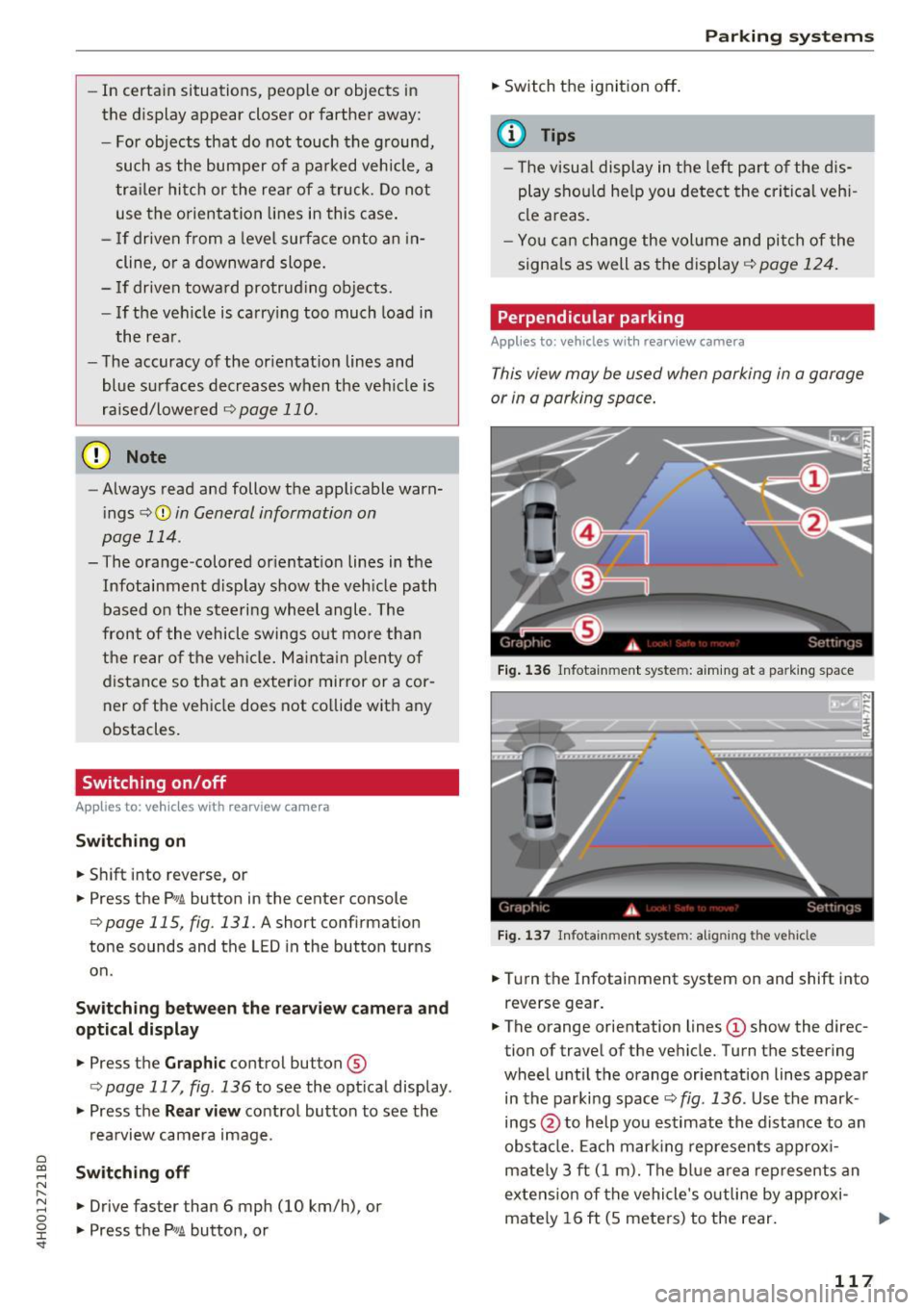
"'Turn the Infotainment system on and shift into
reverse gear.
"' The orange orientation lines
(D show the direc
tion of travel of the ve hicle. Turn the steering
wheel until the orange orientation lines appear
in the parking space
c:> fig. 136. Use the mark
ings @to help you estimate the distance to an
obstacle. Each marking represents approxi
mately 3 ft (1 m). The blue area represents an
extension of the vehicle's outline by approxi
mately 16 ft (S meters) to the rear.
117
Page 125 of 354
.. Turn the Infotainment system on and shift into
reverse gear. The parking system is turned on
and the
Cross park ing view is displayed.
.. Press the control button on the Infotainment
unit @¢
page 118, fig. 138. The Para llel pa rk
ing
view is displayed .
.. Back up and align your vehicle so the blue area
@ borders on the rear end of the vehicle be
hind you or on the parking space line¢.,&.
in
General information on page 119, ¢(Din Gen
eral information on page 119 .
The blue area
rep resents an extension of the vehicle's outline
by approximately 16 ft (5 meters) to the rear .
The long s ide of the blue area should be on the
curb. The entire b lue area must f it into the
parking space .
.. With the vehicle stopped, turn the steering
wheel to the r ight as far as it w ill go .
.. Back into the parking space until the b lue curve
¢
fig . 151 touches the cu rb ¢.,&. in General in
formation on page 119, ¢(Din General infor
mation on page 119.
Stop the vehicle .
.. With the vehicle stopped, turn the steering
whee l to the left as far as it will go.
.. Continue to back into the parking space until
the vehicle is parked parallel to the curb¢
/A
in General information on page 119, ¢(Din
General information on page 119.@
repre
sents the rear bumper . At the very latest, stop
the vehicle when the red o rie ntation line@
bo rders an object . Keep an eye on the front of
you r vehicle while doing this.
Parking next to obstacles
If there is an obstacle (such as a wall) next to the
parking space, pos ition the vehicle so t here is
mo re space on that side. Position the long s ide of
the blue area so that there is s ufficient space
from the obje ct. The area must not be on the ob
stacle . You will also need to start tu rning the
steering whee l earlier. The blue curve
¢
page 118, fig . 139 must n ot touch the obsta
cle, but rather there should be enough distance.
@ Tips
C)
~ The left or right orientation lines and surfaces
"' ~ w ill be displayed, depending on the turn sig-
8 na l being used. 0 :r
Trailer mode
Applies to : vehicles wit h peripheral cameras a nd tra iler hitch
This view assists you in positioning the vehicle in
front of a trailer .
Fig. 15 2 In fotainment system: rear mo de
Requirement: the trailer mode m ust be selected
¢page 121, Rear .
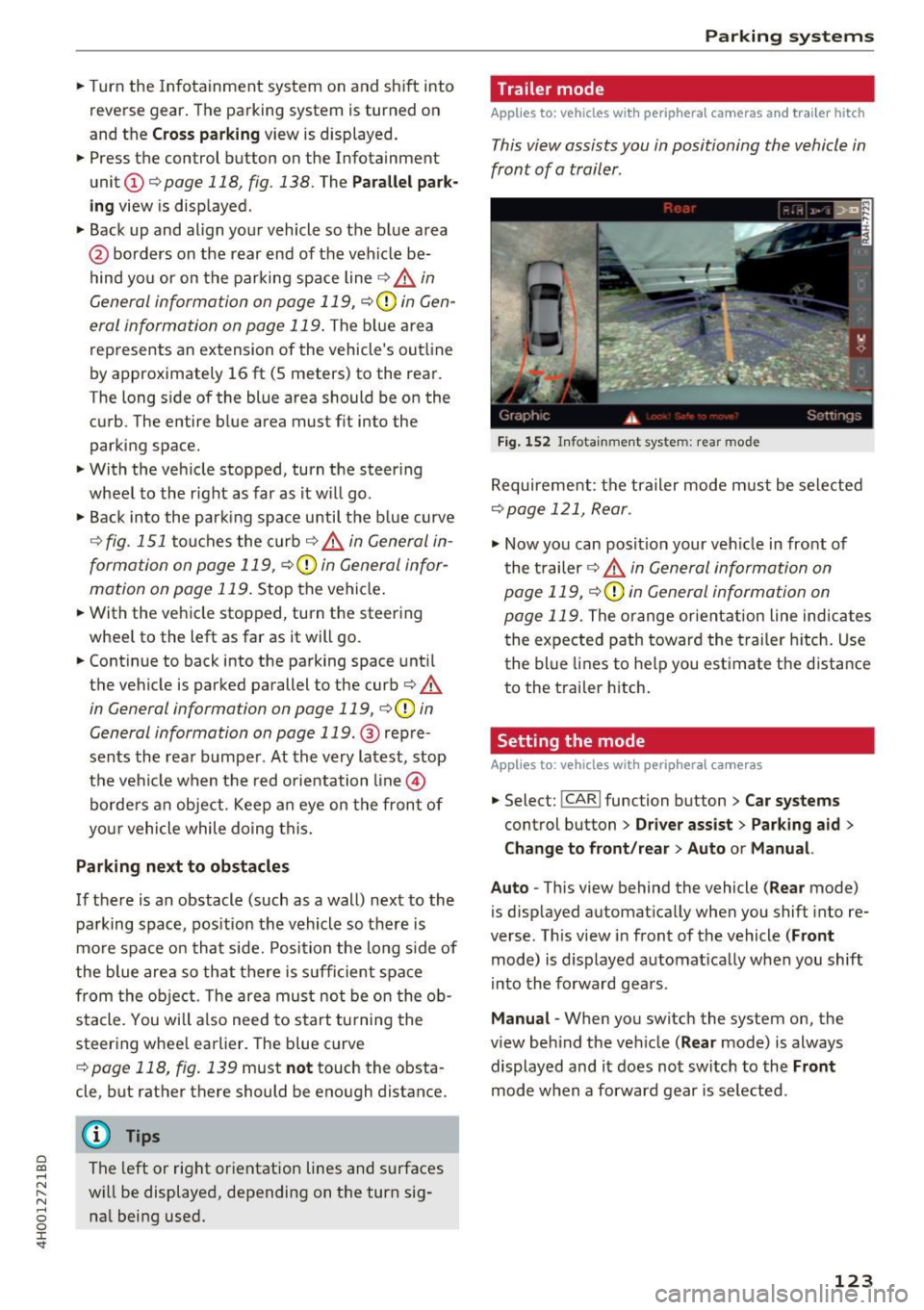
.,. Now yo u can posit ion your ve hicle in front of
the t railer
¢ .,&. in General information on
page 119,
¢ (Din General information on
page 119.
The orange orient ation line indicates
the expected path toward the trailer h itch. Use
the blue lines to help you est imate the distance
to the trailer hitch.
Setting the mode
Applies to : vehicles wit h peripheral ca meras
.,. Select: !CAR ! function button> Car systems
control button > Driver assi st > Pa rking aid >
Change to front /re ar > Auto or Manual.
Auto -
This view behind the vehicle (Rear mode)
is d isplayed automat ically when you shift into re
verse. Th is view in front of the vehicle
( Front
mode) is d isplayed automat ica lly when you shift
i n to the forward gea rs.
Manu al -When you switch the system on, the
view beh ind the ve hicle
(Rear mode) is always
displayed and it does not switch to the
Front
mode when a forward gear is se lected .
123
Page 218 of 354
Audi pre sense
Audi pre sense Preventative passenger
protection
A pp lies to: ve hicles w ith Audi p re se nse
Pre sense can initiate steps to protect vehicle oc
cupants in certain dangerous situations. The
fu nctions described a re available depending on
ve hicle equi pment:
Audi pre sense basic
The fo llow ing funct ions can be triggered in cer
tain driving situations:
- Tighten ing of the safety belts (for examp le,
during heavy braking): the front safety belts
have reversible belt tensioners. If a coll is ion
does not occur, the safety belts loosen slightly
and are ready to trigger again.
- Closing the w indows and the sunroof*
The function of the pre sense basic is activated at
a speed of 20 mp h (30 km/h) or higher. The de
p loyment time is adapted in the drive select dy
namic mode.
Audi pre sense front (vehicles with adaptive
cru ise control*)
Pre sense front contains the f unctions of pre
sense basic. In add ition, the likelihood of a rear
end collis ion with the vehicle ahead is also calcu
lated, withi n the limits of the system. If the risk
of a collision is detected, the following functions
can t rigge r:
- Audi braking gua rd¢
page 99
- Tensioning of the safety belts
- Closing the windows and the sunroof *
Audi pre sense rear (vehicles with side
a ss ist* )
Pre sense rear contains the functions of p re sense
basic. In addition, the li ke lihood of a rear-end
col lision from the vehicle be hind is a lso ca lculat
ed, w ith in the lim its of the system .
If the risk of a
collis ion is detected, the following functions can
tr igger:
- Tens ioning of the safety be lts
- Closing the windows and the sunroof *
216
- Adjusting the seats: the settings for the powe r
head restrains, the upper sections of the backr
ests and the pne umatic side bolsters* change
on the front seats and the outer rear seats*. If
a collision does not occur, the seat sett ings
that were previously used are restored .
Audi pre sen se plus
Pre sense plus contains the f unctions of p re
sense front and pre sense rear.
Error message
Audi pre sense : Unavailable
Preventative passenger protection is not ava ila
ble. Drive to yo ur autho rized Aud i dea le r o r au
t h ori zed Aud i Service Facility immedia tely to have
t h e malfunct ion corre cte d.
.&_ WARNING
Pr e sense canno t overcome natura l phys ica l
l aws . It is a system designed to assist and it
cannot prevent a co llision. Do not let t he in
creased sa fety provided tempt you into tak ing
risks . T his could inc rease your ris k of a colli
sion.
- The system can dep loy inco rrectly.
- Please note that the sensors do not always
detect a ll objects. Th is increases the r is k of
a co llision.
- Pre sense does not react to peop le or ani
mals or objects that a re c rossing the vehi
cle's path or are difficu lt to detect
¢page 94.
- Ref lective objects such as gua rd ra ils o r the
entrance to a tunne l, heavy rain and ice can
affect the funct io n of the radar sensors a nd
t he system 's ability to de tect a collision risk.
(D Note
The sensors can be d isplaced by impacts or
damage to the bumper , wheel housing a nd
underbody . Pre sense can be impaired by this .
Have an autho rized Aud i deale r or autho rized
A udi Service Fac ility ch eck their f unct io n. .,..
Page 241 of 354
0 co .... N ,..._
N .... 0 0 :c '
whenever the ignition is switched on.
A WARNING
- If the PASSENGER AIR BAG OFF light does
not go out when an adult is sitting on the
front passenger seat after taking the steps described above, make sure the adult is
properly seated and restrained at one of the
rear seating positions.
- Have the airbag system inspected by your
Audi dealer before transporting anyone on
the front passenger seat.
{D) Tips
If the weight-sensing mat in the front passen
ger seat detects an empty seat, the front air
bag on the passenger side will be turned off,
and the
PASSENGER AIR BAG OFF light will
stay on.
Repair, care and disposal of the airbags
Parts of the airbag system are installed at many
different places on your Audi. Installing, remov
ing, servicing or repairing a part in an area of the
vehicle can damage a part of an airbag system
and prevent that system from working properly in a collision .
There are some important things you have to
know to make sure that the effectiveness of the
system will not be impaired and that discarded
components do not cause injury or pollute the
environment.
A WARNING
Improper care, servicing and repair proce
dures can increase the risk of personal injury
and death by preventing an airbag from de
ploying when needed or deploying an airbag
unexpectedly:
- Never cover, obstruct, or change the steer
ing wheel horn pad or airbag cover or the in
strument panel or modify them in any way.
- Never attach any objects such as cup holders
or telephone mountings to the surfaces cov
ering the airbag units.
Airbag system
-For cleaning the horn pad or instrument
panel, use only a soft, dry cloth or one mois
tened with plain water. Solvents or cleaners
could damage the airbag cover or change
the stiffness or strength of the material so
that the airbag cannot deploy and protect properly.
- Never repair, adjust, or change any parts of
the airbag system.
-All work on the steering wheel, instrument panel, front seats or electrical system (in
cluding the installation of audio equipment,
cellular telephones and CB radios, etc.) must be performed by a qualified technician
who has the training and special equipment
necessary.
- For any work on the airbag system, we
strongly recommend that you see your au
thorized Audi dealer or qualified workshop.
- Never modify the front bumper or parts of
the vehicle body.
- Always make sure that the side airbag can
inflate without interference:
- Never install seat covers or replacement
upholstery over the front seatbacks that
have not been specifically approved by
Audi.
- Never use additional seat cushions that
cover the areas where the side airbags in
flate.
- Damage to the original seat covers or to
the seam in the area of the side airbag
module must always be repaired immedi
ately by an authorized Audi dealer.
- The airbag system can be activated only
once. After an airbag has inflated, it must
be replaced by an authorized Audi dealer or
qualified technician who has the technical
information, training and special equipment
necessary.
- The airbag system can be deployed only
once. After an airbag has been deployed, it
must be replaced with new replacement
parts designed and approved especially for
your Audi model version. Replacement of complete airbag systems or airbag components must be performed by qualified work-
shops only. Make sure that any airbag
Ill-
239
Page 242 of 354
Airbag syste m
service action is entered in your Audi War
ranty
& Maintenance book let under AIRBAG
REPLACEMENT RECORD.
- For safety reasons in severe accidents, the
alternator and starter are separated from
the vehicle battery with a pyrotechnic circuit interrupter.
- Work on the pyrotechnic circuit interrupt
er must only be performed by a qualified
dea ler· risk of an accident!
- If the veh icle or the circuit interrupter is
scrapped, all applicab le safety precautions
must be followed .
@ For the sake of the environment
Undeployed airbag modu les and pretension
ers might be classified as Perch lorate Materi
al -special handling may apply, see
www .dtsc.ca.gov/hazardouswaste/perchlo
rate. When the vehicle or parts of the re
straint system including airbag modules and
safety belts w ith pretensioners are scrapped,
all applicable laws and regulations must be
observed. Your authorized Audi dealer is fa
m iliar with these requirements and we recom
mend that you have your dealer perform this
serv ice for you .
Other things that can affect Advanced
Airbag performance
Changing the vehicle's suspension system can
change the way that the Advanced Airbag System
performs in a crash. For example, using t ire-r im
comb inat ions not approved by Audi, lower ing the
veh icle, chang ing the st iffness of the suspens ion,
including the springs, suspension struts, shock
absorbers etc. can change the forces that are
measured by the airbag senso rs and sent to the
electronic contro l unit. Some suspension changes
can, for example, increase the force levels meas
ured by the sensors and make the airbag system
deploy in crashes in which it would not deploy if
the changes had not been made. Other kinds of changes may reduce the force levels meas ured by
the sensors and prevent the airbag from deploy ing when it should .
240
A WARNING
Changing the vehicle's suspension including
use of unapproved tire-rim comb inations can
change Advanced Airbag performance and in
crease the r isk of serious personal injury in a
crash.
- Never insta ll suspension components that
do not have the same performance charac
ter istics as the components origina lly ins tal
led on you r vehicle.
- N ever use tire-r im combinations that have
no t been approved by Aud i.
A WARNING
It ems stored between the safety belt buckle
and the center conso le can cause the sensors
in the buckle to send the wrong information
to the electronic contro l module and prevent
the Advanced A irbag System from working
proper ly.
- Always make sure that nothing can interfere
with the safety belt buckles and that they
are not obstructed.
Knee airbags
Description of knee airbags
The knee airbag system can provide supplemen
tal protection to properly restrained front seat
occupants.
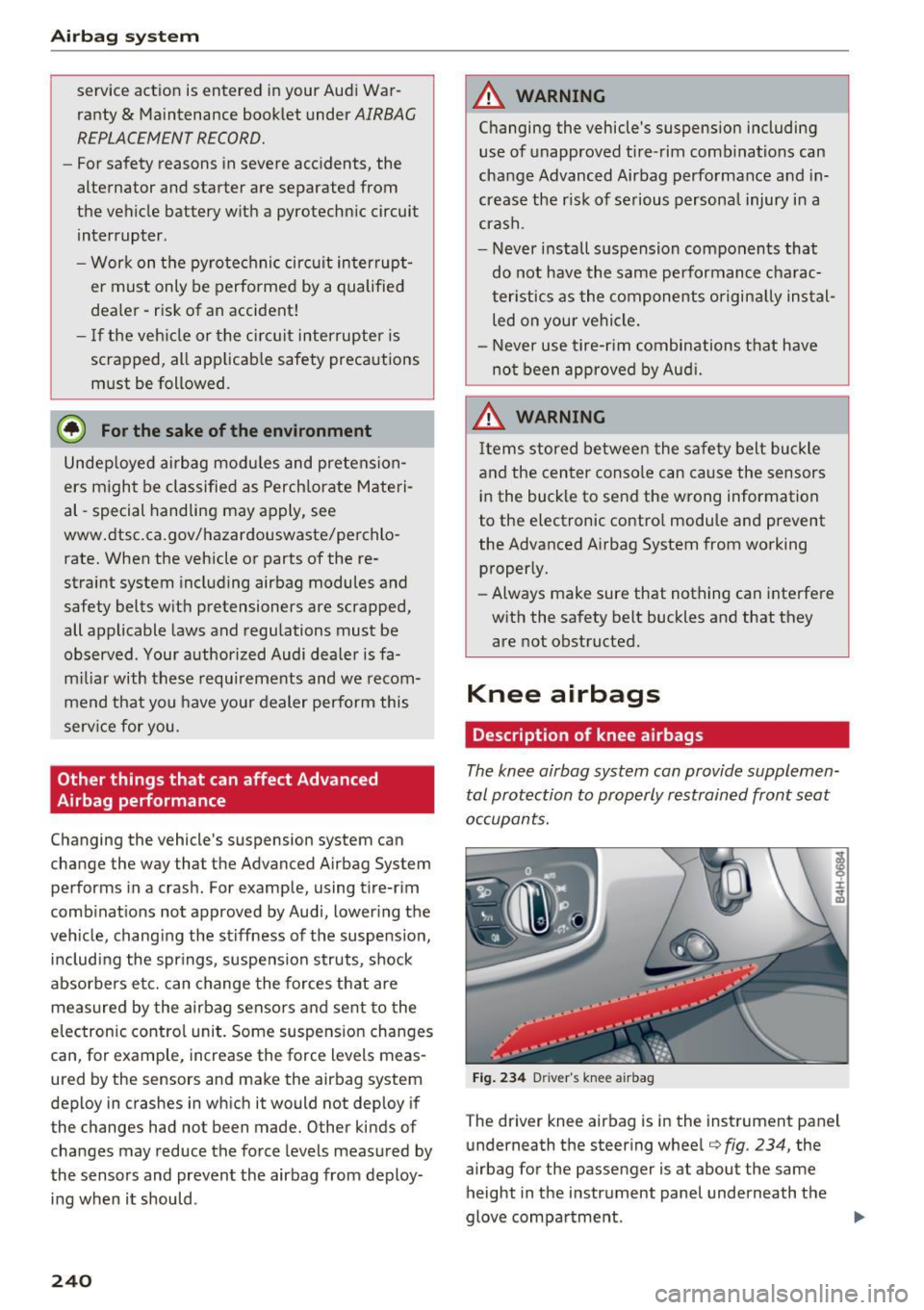
Fig . 234 D river 's knee a irbag
The driver knee airbag is in the instrument panel
underneath the steering wheel~
fig. 234, the
airbag for the passenger is at about the same height in the instrument panel underneath the
glove compartment . ..,_
Page 290 of 354

Wheels
"XL" "xl" "EXTRA LOAD" or "RF" I I I
on the sidewall.
Rim
means a metal support for a tire
or a tire and tube assembly upon
which the tire beads are seated.
Rim diameter
means nominal diameter of the
bead seat . If you change your
wheel size, you w ill have to p ur
chase new tires to match the new rim diameter .
Rim size designation
means rim diameter and width.
Rim width
means nomina l distance between
rim flanges.
S idewall
means that portion of a tire be
tween the tread and bead .
Speed rating (letter code)
means the speed at which a tire is
designed to be driven for extend
ed periods of time. The rat ings
range from 93 mph (150 km/h)
to 186 mph (298 km/h)
¢ table
on page 284.
You may not find
this information on all tires be
cause it is not requ ired by law.
28 8
The speed rating letter code,
where applicable, is molded on
the tire sidewall and ind icates the
maximum permissible road
speeds
¢ .&. in Winter tires on
page 298.
Tire pressure monitoring system*
means a system that detects
when one or mo re of a vehicle's
tires are underinflated and illum i
na tes a low tire pressure warning
telltale .
Tread
means that portion of a tire that
comes into contact w ith the road .
Tread separation
means pulling away o f the tread
from the t ire carcass .
Treadwear indicators (TWI)
means the projections within the
principal grooves designed to give
a visua l indication of the deg rees
of wear of the tread. Se e
¢ page 292, Treadwear indicator
for more information on measur-
ing tire wear. .,.
Page 296 of 354
Wheels
A WARNING
Always adapt the tire pressure
to your driving style and vehicle load.
-Overloading can lead to loss of vehicle control and increase
the risk of an accident. Read and follow the important safe
ty precautions inc:::> page 295,
Tires and vehicle load limits.
-The tire must flex more if the
tire pressure is too low or if
the vehicle speed or load are
too high. This heats the tire up
too much. This increases the
risk of an accident because it
can cause the tire to burst and
result in loss of vehicle con
trol.
-Incorrect tire pressure in creases tire wear and has a
Tire pressure table
Please note that the information
contained in the following table
was correct at the time of print ing, and the information is sub
ject to change . If there are differ
ences between this information
and the tire pressures specified
on the label on the driver's side 8- pillar, always follow the specifica-
294
negative effect on driving and
braking behavior, which in
creases the risk of an accident.
(D Note
Replace lost valve caps to re
duce the risk of damage to the
tire valves.
@ For the sake of the environment
Tire pressure that is too low in
creases fuel consumption.
(D Tips
Audi recommends using the
tire pressure specified for a normal load c:::>
table on
page 295
or for a full load
when the vehicle is partially
loaded.
tion on the 8-pillar label c:::>
page 293, fig. 267.
Make sure that the tire designa
tion on your tire matches the des ignation on the tire pressure label
and the tire pressure table.
The following table lists recom- mended tire pressures in cold ..
Page 303 of 354

C) C0 ....
"' " "' .... 0 0 :r
Temperature grades apply to tires that are properly inflated and not over or underinflat
ed .
Tire Pressure Monitoring
System (AS, S8)
(D General notes
A ppl ies to: AS, 58
Each t ire, including the spare (if provided),
should be checked monthly when cold and inflat
ed to the inflation pressure recommended by the
veh icle manufact urer on the vehicle placard or
tire inflation pressure label. (If your vehicle has
tires of a different size than the size indicated on
the vehicle placard or tire inflation pressure la
be l, you should determine the proper tire infla
tion pressure for those tires).
As an added safety feature, your veh icle has been
equipped with a tire pressure monitoring system
(TPMS) that illuminates a low tire pressure te ll
tale when one or more of your tires is significant
ly under-inflated . Accordingly, when the low tire
pressure telltale illuminates, you should stop and
check your tires as soon as possible, and inflate
them to the proper pressure . Driving on a signifi
cantly under-inflated tire causes the tire to over
heat and can lead to tire failure. Under-inflation
also reduces fuel efficiency and tire tread life,
and may affect the vehicle's handling and stop
ping ability .
Please note that the TPMS is not a substitute for
p roper tire maintenance, and it is the driver's re
sponsib ility to ma intain correc t tire p ressure,
even if under-inflation has not reached the level
to trigger illumination of the TPMS low tire pres
sure telltale.
Your veh icle has also bee n eq uipp ed w ith a TPM S
mal function indicator to indicate when the sys
tem is not operat ing properly. The TPMS mal
function indicator is combined with the low tire
pressure telltale. When the system detects a
malfunction, the telltale will flash for approxi
mately one mi nute and then remain cont inuously
illuminated . This sequence will continue upon
Wheels
subsequent vehicle start-ups as long as the mal
function exists .
When the malfunction indicator is illuminated ,
the sys tem may not be able to detect or signal
low tire pressure as intended . TPMS malfunctions
may occur for a variety of reasons, including the
i nsta llation of replacement or alternate tires or
whee ls on the vehicle that prevent the TPMS
from functioning properly. Always check the
TPMS malfunction telltale after replac ing one or
more tires or wheels on your vehicle to ensure
that the replacement or a lternate tires and
whee ls allow the TPMS to continue to function
properly.
If the Tire Pressure Monitoring System
indicator appears
Applies to: A8, 58
The tire pressure indicator in the instrument
cluster informs you if the tire pressure is too low
or if there is a system malfunction.
Fig. 269 I n strument cluste r: indicator light with messa ge
Using the ABS sensors, the tire pressure monitor
ing system compares the tire tread c ircumfer
ence and vibration characteristics of the individu
al tires.
If the press ure changes in one or more
tires, this is indicated in the instrument cluster
display with an indicator light
[I] and a message.
If only one tire is affected, the location of that
tire will be indicated.
T he tire press ures must be stored in the Infotain
ment system again each time the pressures
change (switching between partial and full load
pressure) or after changing or replacing a tire on
your vehicle
c:> page 302. The tire pressure moni
toring system only monitors the tire pressure you have stored . Refer to the t ire pressure label for ..,.
301