seats AUDI A8 2017 User Guide
[x] Cancel search | Manufacturer: AUDI, Model Year: 2017, Model line: A8, Model: AUDI A8 2017Pages: 354, PDF Size: 88.68 MB
Page 66 of 354
Seats and storage
-Net in the front passenger footwell
- Glasses holder in the headliner (near the rear-
view mirror)
- Storage compartments under the center arm
rest
- Compartments* on the backrests of the front
seats
- Garment hooks above the rear doors
- Compartment behind the rear center armrest
(on vehicles without a pass-through* or refrig
erator*)
- Cell phone holder* in the right rear door
- Bag hooks* in the luggage compartment
A WARNING
- When driving, do not leave any hard objects
on the rear window shelf or allow your pet
to sit on the shelf. They could become a haz
ard for vehicle occupants in the event of
sudden braking or a crash.
- Any articles of clothing that you have hung
up must not interfere with the driver's view.
The coat hooks are designed only for light
weight clothing . Never hang any clothing
with hard, pointed or heavy objects in the
pockets on the coat hooks. During sudden
braking or in an accident -especially if the
airbag is deployed -these objects could in
jure any passengers inside the vehicle.
- To reduce the risk of personal injury in an
accident or sudden stop, always keep the glove compartment closed while driving.
- Read and follow all WARNINGS
~ page 244, Important safety instructions
on the side airbag system.
- Hang clothes in such a way that they do not
impair the driver's vision.
- The coat hooks must only be used for light
weight clothing. Do not leave any heavy or
sharp edged objects in the pockets which
may interfere with the side curtain airbag
deployment and can cause personal injury in
a crash .
- Do not use coat hangers for hanging cloth
ing on the coat hooks as this can interfere
with proper deployment of the side curtain
airbags in an accident.
64
- Do not hang heavy objects on the coat
hooks, as they could cause personal injury in
a sudden stop.
(D Note
Objects on the rear shelf that rub against the
rear window can damage the rear window de
fogger wires .
(D Tips
-A vent slot is located between the shelf and
the rear window. Do not block the vent with
any items you may place on the rear window
shelf .
- Do not place bulky items on the rear window
shelf as they could restrict or block the driv
er's vision in the rear view mirror.
Roof rack
App lies to : vehicles wit h roof rack
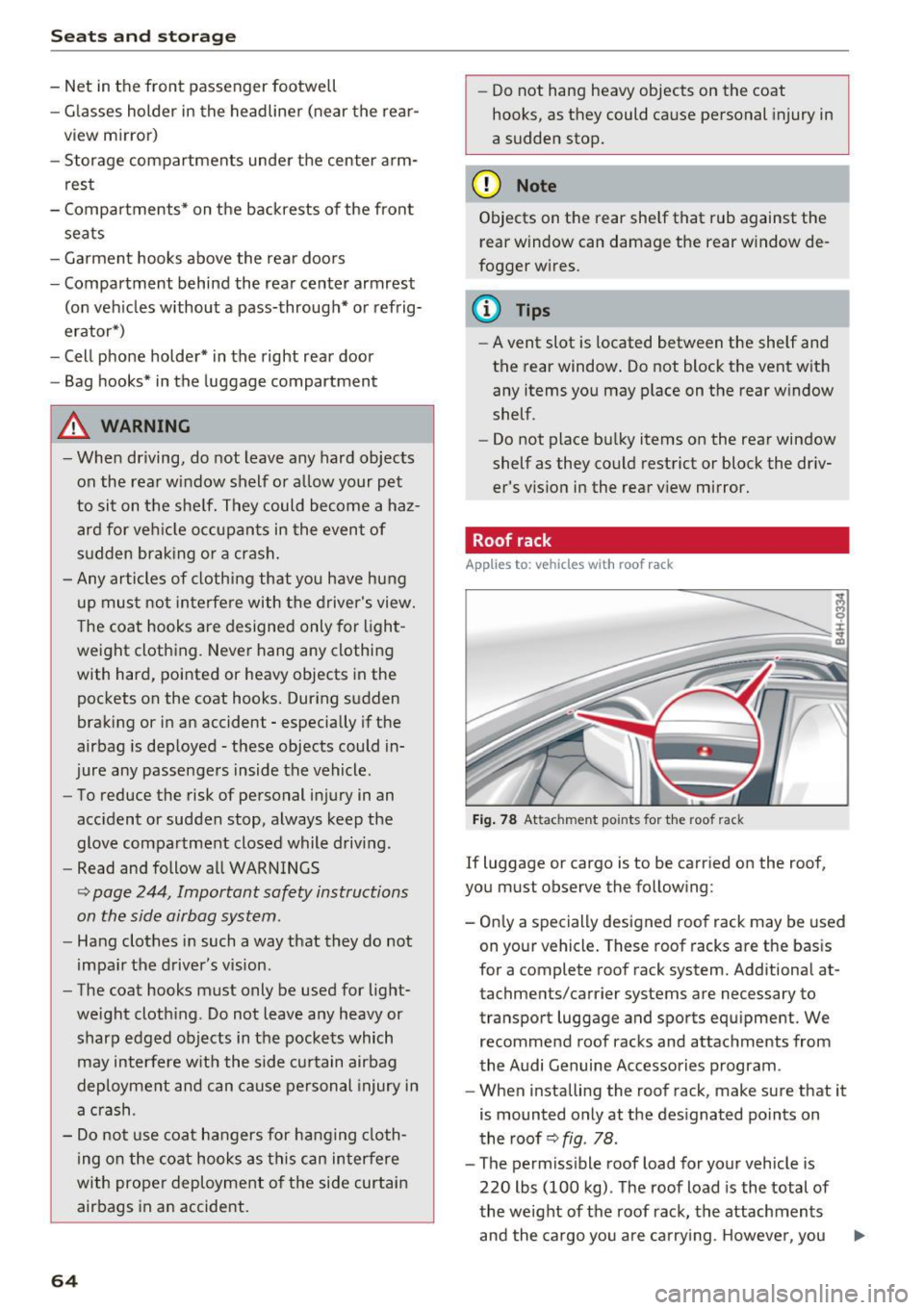
Fig. 78 Attachment po ints for the roof rack
If luggage or cargo is to be carried on the roof,
you must observe the following:
- Only a specially designed roof rack may be used
on your vehicle. These roof racks are the basis
for a complete roof rack system. Additional at
tachments/carrier systems are necessary to
transport luggage and sports equipment. We
recommend roof racks and attachments from
the Audi Genuine Accessories program .
- When installing the roof rack, make sure that it
is mounted only at the designated points on
the roof ~
fig. 78 .
-The permissible roof load for your vehicle is
220 lbs (100 kg) . The roof load is the total of
the weight of the roof rack, the attachments
and the cargo you are carrying . However, you ..,.
Page 67 of 354
C) C0 ....
"' ,-...
"' .... 0 0 :r
er system being used. For the permitted axle
l oad and the permitted total vehicle weight, re
fer to¢
page 333.
A WARNING
-Follow the installat ion instructions provided
with the roof rack system. If you do not se
c ur e the roof rack system and objects on the
roof correctly, they co uld come loose from
t he ve hicl e a nd cau se a n acci den t.
- Us ing a roof rac k system increases th e risk
of an accide nt, because it changes the dr iv
ing chara cteristics by s hift ing t he center of
grav ity an d /or the in cre asi ng the surface
area exposed to win d. Adapt your driving
and speed to the c urrent conditions.
@) Note
Ma ke sure th at the open lugg age compar t
ment lid an d the t ilting/sliding sunroof* do
no t come into contac t wi th objects on the
roof .
@) For the sake of the environment
Your veh icle w ill use mo re fuel d ue to the in
creased wind resistance . So
remove t h e roof
rack after using it.
Luggage compartment
General information
& WARNING
Read and follow the important safety precau
tions in~
page 213, Storing cargo correctly.
Seats and storag e
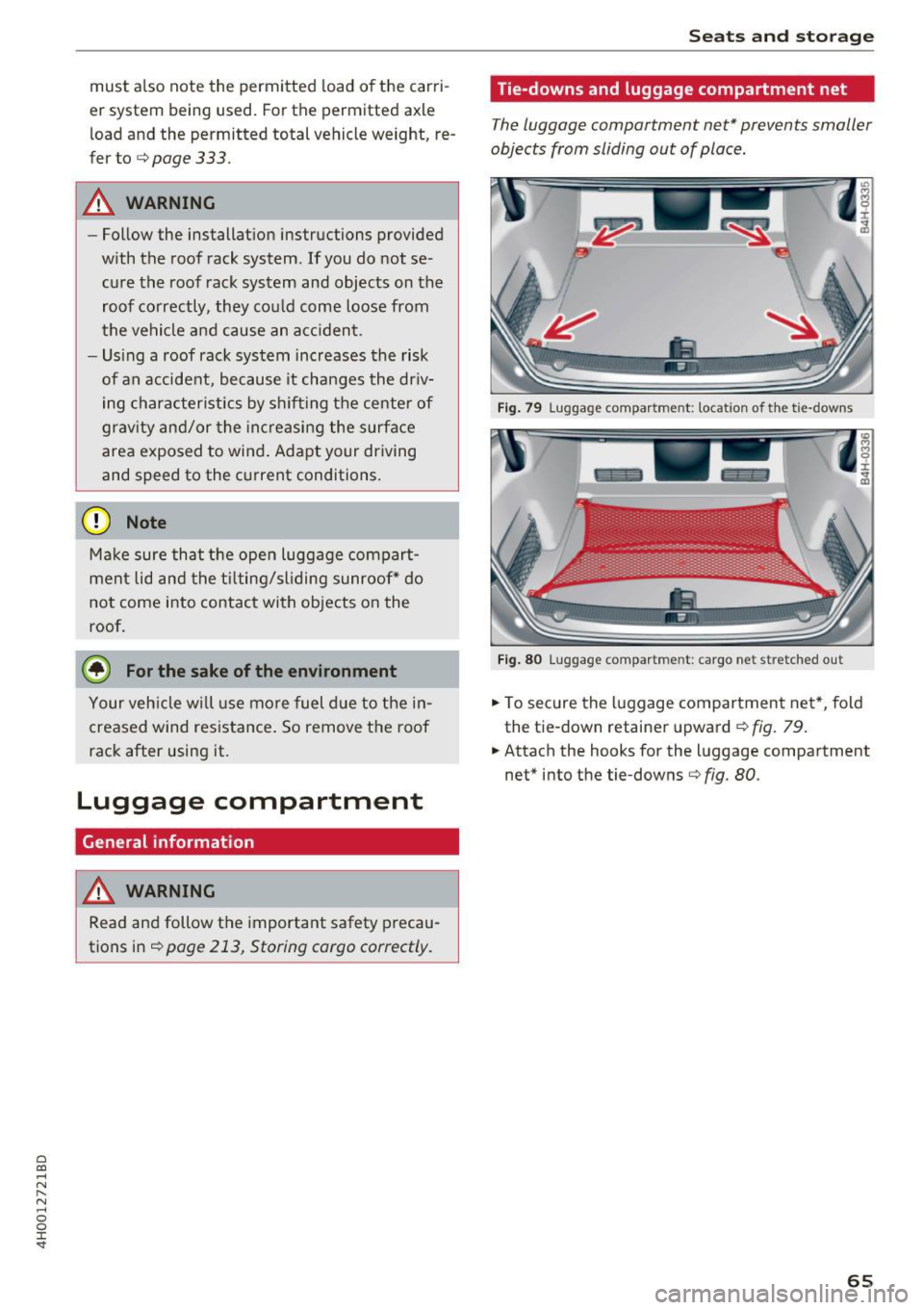
Tie-downs and luggage compartment net
The luggage compartment net* prevents smaller
objects from sliding out of place.
F ig . 79 Luggage compartment: location of th e tie-downs
F ig . 80 Luggage compa rtment: ca rgo net stretched out
.,. To secure the l uggage compartmen t net *, fold
the tie-down retainer upward¢
fig. 79.
.,. Attach the hooks for the luggage compartment
net" into the tie -downs¢
fig. 80.
65
Page 69 of 354
C) C0 ....
"' " "' .... 0 0 :r
-Only fold the bag up if it is dry.
- When transporting skis or snowboards,
tighten the securing strap between the
bindings.
- Lay skis in the bag with the points facing
forward and snowboards and ski pole points
facing the rear.
Refrigerator
Introduction
Applies to: vehicles with refrigerator
Clean the refrigerator before the first use ~ table
on page 308.
You can only switch the refrigerator on, if :
- the temperature in the luggage compartment
is less than 131
° F (55 °(). If the refrigerator is
switched on , it will automatically switch off if
the temperature in the luggage compartment
exceeds 131
° F (55 °(). If the temperature
goes back below 131
° F (55 °(), the refrigera
tor will automatically switch on again.
- The charge level of the vehicle battery is suffi.
cient. The refrigerator is automatically switch
ed off if the electrical system voltage falls be
low the spec ified minimum value. This prevents
the vehicle battery from discharging . The re
frigerator automatically switches back on if th e
electrical system voltage increases again, for
example after starting the vehicle.
When the cooling function is working optimally,
the cooling function reaches 43° F
(+6 °C) and
the free zing function reaches 21 ° F
(-6 °C). The
cooling temperature in the refrigerator also de
pends on the luggage compartment tempera
ture. When the temperature in the luggage com
partment is high, there may only be a limited
cooling effect.
.&, WARNING
-
To avoid any injury risks to the passengers
caused by the refrigerator, the following safe
ty precautions must be followed:
Seats and storage
-The maximum load capacity for the freezer
is
5.5 lbs (2 .5 kg).
- Never overload the refrigerator. There is a
risk of injury in the event of a collision or
sudden braking.
- The refrigerator cover must always be
closed and locked while driving. The refrig
erator contents could enter the vehicle inte
rior during a collision or sudden braking ma
neuver, which increases the risk of injury.
- Never store flammable fluids, gas contain
ers and similar objects in the refrigerator
due to the risk of an explosion . This also ap
plies to goods and products that can emit
volatile or flammable gases.
-At temperatures of 32° F
(0 °() and lower,
frozen liquid inside glass containers can
cause the containers to burst.
(D Note
- The ventilation openings for the refrigerator
are at the rear panel trim panel in the lug
gage compartment and must not be cov
ered.
- If the refrigerator is not functioning correct
ly, turn it off to prevent any damage. Have it
checked by an authorized Audi dealer or au
thorized Audi Service Facility.
Operation
Applies to: vehicles with refrigerator
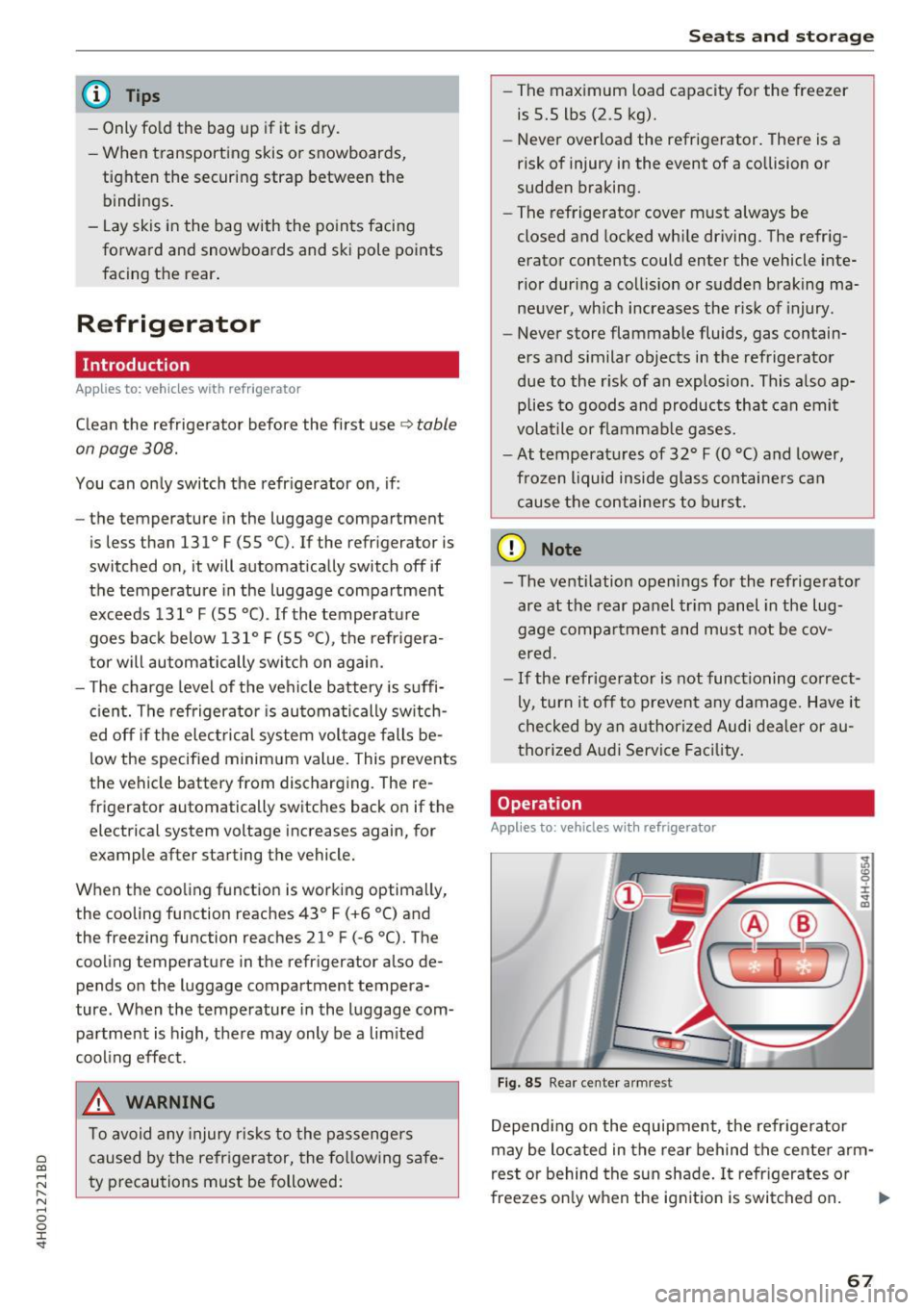
Fig. 85 Rear center armres t
Depending on the equipment , the refrigerator
may be located in the rear behind the center arm
rest or behind the sun shade. It refrigerates or
freezes only when the ignition is switched on. ..,.
67
Page 70 of 354
Seats and storage
Opening and closing the refrigerator
.,. Pull the release lever CD<=? fig. 85 to open the
refrigerator .
.,. Push the cover back into its closed position to
close the refrigerator . The cover is closed cor
rectly if the re lease lever CD audibly engages.
Switching on/off
.,. Press the button @<=? fig. 85 to switch the
cooling function on or off. The symbo l in the
button lights up when the function is switched
on .
.,. Press the button @ to switch the freezer func
tion on or off. The symbol in the button lights
up when the function is switched on .
(D Tips
-To avoid a build-up of condensat ion, only
open the refrigerator cover as briefly and
quickly as possible.
- Do not p lace any warm food or drinks in the
refrigerator.
68
Page 74 of 354

Warm and cold
(D Note
To avoid damage to the heat ing e lements in
the seats, d o not kneel o n the seats or place
heavy loads o n a small a rea of t he seat.
Basic settings
The climate control system basic settings ore ac
cessed in the Infotainment system .
.,. Se lect: the ICARI fun cti on bu tto n > Car systems
contro l button > AC .
Rear seat settings*
Wh en th is func tion is selec ted, a ll se tt in gs for
t he rea r can b e adju ste d t hroug h the cli mate co n
t rol system in the cockpit. The cli mate con trol
sys tem sett in gs cannot be adjus ted in the rear
seat at the same time. This fu nction switches off
after a certa in period of time or when one of the
d ia ls in the cockpit is pressed.
Auto recirculation*
T he sensit iv ity level of the au toma tic r ecircula
tion mode can be set at various levels from
Off to
Max. Whe n recirculation mode la> I is switched on,
the air rec irculat io n is contro lled automatically.
If the w indows fog up, press t he
I@ FRON T I but
ton .
Footwell temperature
You can a dju st the footwell temperature so that
it is coo le r or warmer .
Solar roof*
Parking ven tila tion i s co nt rolled a utoma tically in
t he
Auto settin g.
W hen the ig nitio n is swi tched o ff, solar-powered
p ark ing ventil ation may swi tch on, as long as
- there is sufficient sunlight,
- the outside temperature is not too low,
- the sunroof is closed or tilted and
-Auto (I nfo tainment system) is set
72
Steering wheel heating
Applies to: vehicles with steering wheel heating
The steering wheel rim con be heated .
Fig. 88 Steering co lumn : steeri ng w hee l heati ng b utto n
.,. Pres s the [i] butt on to sw itch st eering w heel
he atin g on/o ff. The mess age
Steering wheel
heating on /Steering wheel heating off
ap
pears in the instrument cluster disp lay .
The tempe rature is m ainta ined at a constant lev
e l when s tee ring wheel hea ting is switc hed on .
The steer ing whee l hea ting sett ings are stored
a utom atically and assig ned t o the rem ote c ontro l
k ey th at is in use.
Page 78 of 354

Driving
-If physical limitations prevent you from sit
ting 10 in (25 cm) or more from the steer
ing wheel, check with your authorized Audi
dealer to see if adaptive equipment is avail
able .
- If the steering wheel is aligned with your
face, the supplemental driver's airbag can
not prov ide as much protection in an acci
dent. Always make sure that the steering
wheel is aligned with your chest.
-Always hold the steering wheel with your
hands at the 9 o'clock and 3 o'clock posi
tions to reduce the risk of personal injury if
the driver's airbag deploys.
- Never hold the steer ing wheel at the 12
o'clock position or with your hands inside
the steering wheel rim or on the steering
wheel hub . Holding the steering wheel the
wrong way can cause serious injuries to the hands, arms and head if the driver's airbag
deploys.
Entry assistance
Easy seat entry makes it easier to enter and exit the vehicle by adjusting the steering column au
tomatically.
• In the Infotainment system, select the !CAR I
function button > Car systems control button >
Vehicle settings> Seats> Driver's seat> Easy
seat entry> On.
When easy seat entry is switched on, the steering
column goes back up into the park position when
the ignition is switched off. After entering the ve
hicle, the steering column returns to the stored position once the ignition is switched on .
76
Starting and stopping
the engine
Starting the engine
The ! S TAR T ENGINE S T OPI button switches the
ignition on and starts the engine .
Fig. 90 Cente r conso le: START ENGINE STOP but ton
Switching the ignition on/off
• To switch the ignit ion on or off, press the
!START ENGINE STOPI button . Do not press the
brake pedal while doing this.
Starting the engine
• Press the brake pedal¢.&_.
• Press the
I START ENGINE STOP I button
¢
fig . 90 . The engine will start .
If the engine does not start immediately, the
starting procedure stops automatically after a
short time . Repeat the starting process .
Start/Stop system
Read the information in¢ page 78 , Start/Stop
system.
A WARNING
To reduce the risk of poisoning, never allow
the engine to run in confined spaces .
(D Note
Avoid high engine speed, full throttle, and
heavy engine load if the engine has not
reached operating temperature yet. You could
-
damage the engine. .,..
Page 162 of 354
Audi connect
- Destination setup in your MMI using your
myAudi A cco unt ¢ page 167 or online map
v iew
¢ page 171.
-Traffic inf orm ation (Sir ius ): rece ive informa
tion about accidents, road construction and
other incidents
¢ page 175
Audi connect services on the phone
App lies to: ve hicles w ith Audi co nnect
The fo llow ing Audi connect services are currently
ava ilable :
- Storing contacts on your computer using your
m yAudi Acco unt and loading the contacts into
the MMI directory
¢ page 153
Wi-Fi hotspot
Appl ies to: ve hicles w ith Audi co nnect
You can use the MMI as a Wi-Fi hotspot to con
nect up to eight wireless devices to the Internet. While driving, restricted use of non-secured,
light, small wireless devices is only possible from the rear of the vehicle.
.,. Select: the (fa) button > Setting s control but-
ton
> W i-Fi setting s.
The follow ing settings can be modified in the Wi
Fi setting s
menu:
Wi-Fi acti ve
The MMI Wi -Fi hotspot is deactivated at the fac
tory. Your Wi-Fi hotspot must be activated and
visible to establish a connection between your ve h icle and your wireless device.
- Off : the MMI Wi-Fi hotspot is deactivated. An
Internet connection is not possib le.
- Vis ible : the MMI Wi-Fi hotspot is active and can
be used to connect to the Internet.
- In visi ble: the MMI Wi -Fi hotspot is active but
not visible to other devices. A connection can
not be established with a new w ireless device.
The Wi -Fi connection between your vehicle and
your wireless device ( laptop, cell phone) is en
crypted . To establish a connection, you must en
ter the following settings when setting up your
wire less device. You can change them if necessa
ry.
1 6 0 -
Netwo rk ID (SSID ):
name o f the Wi -Fi net
work .
-Enc ryption t ype : WEP, WPA or WPA2
- Pa ssword : depending on the encryp tion type, a
passwo rd may be generated in the MMI that is
used to encrypt the wireless connection. The
password can be changed . Be sure to se lect a
secure password. For the WEP encrypt ion type,
the password must be exactly 13 characters.
For the WPA or the WPA2 encrypt ion types, the
password must be at least
8 (maximum of 63)
characters .
-Apply sett ings : the modified settings are ap
plied to the MMI. You must then update the
changes in your mob ile w ireless device .
A WARNING
-As the d river, do not allow usage of the Wi
Fi hotspot to distract yo u from driv ing , as
this could increase the r isk of an accide nt.
- It is o nly safe to use laptops and similar mo
bi le devices when the veh icle is stationary
because, like a ll loose objects, they cou ld be
thrown around the inside of the vehicle in a
crash and cause serious injuries . Store these
types of devices securely while driving.
- Do not use any wire less devices on the front
seats within range of the airbags while dr iv
ing. Also read the warnings in the chapter
¢page 207.
(D Note
-Under some conditions, certain mobile devi
ces and ope rating systems may automati
cally sw itch from your vehicle's Wi-Fi hot
spot to the device's mobile data connection.
I n that event, standard text and data usage
rates would apply while the device's mobile
data connection is in use. Please refer to
doc umentation provided by your mobile de
vice's manufacture and your data car rier for
d etails, related te rms and pr iva cy sta te
ment .
- Yo u ar e responsib le for all precautions ta k
en for data pro te ct ion, anti-virus protection
and protection against loss of data on mo
bile devices that are used to access the In-
ternet through the Wi-Fi hotspot. ..,.
Page 164 of 354
Audi connect
Data u sage info
The numbe r of data packets that are sent and re
ceived through the M MI is displayed . You can re
set the data usage information to zero using the
Reset d ata u sage option .
Start automatic configuration
An online profile is set up and configu red auto
mat ica lly. The connection settings that you
changed manua lly are reset to the defau lt set
tings.
Online status overview
An on line status overview with information abo ut
your data connect io n (such as the cell phone
service provider) is shown in the Infotainment
disp lay .
Sw itching the data connection module off
The data connection module is sw itched off. An
I n ternet connect ion is no longe r poss ible.
Network sett ings
Under Login , select Auto to log into a network
automatically or select
Manu al to select from a
list of networks w ith in range. The available net
works in the area can be selected i n the
Network
se lection
list. Th is function is on ly availab le when
Manual Login is set.
Serial number (IMEi)
The se rial number for the MMI that is installed is
d isplayed .
A WARNING
-As the driver, do not allow usage of the Wi
Fi hotspot to dist ract you from d riving, as
t h is could inc rease the risk of an accident.
- It is only safe to use tab lets and s imilar mo
bile devi ces when the vehicle is s tat ionary
because, like all loose objects, they could be
thrown aro und the i nside of the vehicle
when invo lved in an accident and can cause
serious injuries. Store these types of devices
sec urely whi le driving.
- Do not use any w ireless devices on the front
seats w ith in range of the a irbags while d riv-
162
ing . Also read the warnings in the chapter
¢page 207 .
(D Note
You are responsible for all precaut ions taken
for data p rotection, anti-virus protection and
protection against loss o f data on mobi le de
v ices that are used to access the Internet
through the W i-F i hotspot.
(D Tips
- When using On line map view, you are
prompted again to allow roam ing before
connect ing to a foreign mob ile network.
- The speed of the data connection may vary
depending on the veh icle location, the cov
erage area of your cell phone service provid
er and if the recommended p rovider is used
or not .
- A data connection cannot be established if
incorrect data is ente red in the
Connection
s ettings .
-The W i-F i hotspot recept ion quality depends
on the sig nal st rengt h and the availabi lity of
the mobile network. You can obtain more
information from your cell phone se rvice
prov ider.
About Audi connect
Audi connect services
App lies to: vehicles wi th Audi connect
(D Tips
-You can only use services supported by Aud i
co nnect if you have the optional MMI Nav i
gation pl us equ ipme nt and Audi connect.
- Audi connect is designed for use only with
the p rovided Aud i SIM card . Rece iving data
packets from t he Internet w ill quickly in
c rease the vo lume of d ata used. Fo r more
information, contac t Aud i connect custome r
support at 877 -SOS -AUD I (2834).
- Th e Aud i connec t se rvices are availab le in
the USA. Audi connect serv ices are currently
not avai lable i n Canada or in Mexico. ..,.
Page 186 of 354

Media drive s and conn ections
Wi-Fi audio player
Applies to: ve hicles w ith Wi- Fi audio p laye r
Wireless media players (such as smartphones)
can be connected via Wi-Fi hotspots and control
led with the MMI. You can access the media cen
ter on your media player using an UPnP server
opp or an UPnPIDLNA server integrated in the
media player .
Requirements: the Wi-Fi function for the media
player and the MMI must be act ivated. A network
connection must be established ¢
page 161. An
UPn P serve r mus t be installed on your W i- Fi me
d ia p laye r.
- Connecting th eWi-Fi audio p lay er: select the
I MEDIAi b utton> Source cont rol button> Wi-Fi
aud io play er(?)' =>
page 189, fig . 198. A mes
sage will appear in the Infotai nment display
saying there is no W i- F i audio player connec ted
to the system . The access data for the Wi- Fi
hotspot is disp layed .
- Se lect t he same settings on the w ireless med ia
player that are used for the Wi -Fi hotspot .
-Starting the Wi •Fi audio pl ayer : start an UPnP
server app or a llow media sharing on yo ur de
vice . The first song in the med ia center on your
Wi -Fi audio p layer begins playing .
-Operating the Wi-Fi audio player : the media
player is operated through the MMI
¢page 189.
A WARNING
-As the driver, do not allow usage of the Wi
Fi hotspot to distract you from driving, as
this could increase the risk of an accident.
- It is only safe to use laptops and similar mo
bile devices when the vehicle is stat ionary
because, like all loose objects, they could be
th row n aro und the i nside of the vehicle in a
c rash and cause se rious inju ries. Store these
types of devices se curely whi le dr iving.
- Do not use any w ireless devices on th e front
seats w ithin range of t he a irbags while d riv
ing. Also read the warn ings i n the chap ter
¢page 207.
184
(D Note
Always fo llow the information found in¢(!) in
Wi -Fi hotspot on page 160.
@ Tips
- Read and follow the notes about Aud i con
nect before sta rting it¢
page 162.
-Th e Wi- Fi connec tion is reconf igure d when
inserting or removin g the Audi SI M card in
t h e SIM card reader . There may be a tempo
ra ry interr upt ion in audio playback, depend
ing on the media player.
- In ve hicles w ithout A udi connect*, the use
of the Wi-Fi hotspot is on ly possible fo r the
Wi-Fi audio player*. A data co nnect ion to
t h e Internet cannot be established .
- Depending on the wireless media player,
network or media access may need to be ap
proved on the device or a program may need
to be sta rted .
- Check fo r any connection requests on your
wi reless media player .
- To avoid interrupt io ns during playback, de
act ivate the powe r sav ing funct ion on the
wi reless media player or connec t it to a
charger.
- The loading times for the audio data depend
on the media player used and the numbe r of
files that it contains .
- A max imum of 2,000 ent ries per directory
are d isp layed in the Infota inment disp lay.
- For more informat ion on Wi-Fi audio players
and supported dev ices, visi t
www.audiusa.com or cont act an a uth orized
Audi de aler or author ized Audi Service Fa
ci lity.
Page 209 of 354
Driving safety
Basics
Safe driving habits
Please remember -safety first!
This chapter contains important information,
tips, instructions and warnings that you need to
read and observe for your own safety, the safety
of your passengers and others . We have summar
ized here what you need to know about safety
belts, airbags, child restraints as well as child
safety. Your safety is for us
priority number 1. Al
ways observe the information and warnings in
this section - for your own safety as well as that
of your passengers.
The information in this section applies to all
model versions of your vehicle. Some of the fea
tures descr ibed in this sections may be standard
equipment on some models, or may be optional
equipment on others. If you are not sure, ask
your authorized Audi dealer.
A WARNING
- Always make sure that you follow the in
structions and heed the WARNINGS in this
Manual. It is in your interest and in the in
terest of your passengers .
-
-Always keep the complete Owner's Litera
ture in your Audi when you lend or sell your
vehicle so that this important information
will always be available to the driver and
passengers.
- Always keep the Owner's literature handy so
that you can find it easily if you have ques
tions.
Safety equipment
The safety features are part of the occupant re
straint system and work together to help reduce the risk of injury in a wide variety of accident sit
uations.
~ Your safety and the safety of your passengers
~ should not be left to chance. Advances in tech-,..._
~ nology have made a var iety of features available 0
~ to help reduce the risk of injury in an accident. '
The following is a list of just a few of the safety
features in your Audi:
- sophisticated safety belts for driver and all pas-
senger seat ing pos itions,
- safety belt pretensioners,
- safety belt force limiters for the front seats,
- safety belt height adjustment systems for the
front seats,
- front airbags,
- knee airbags for the front seats
- side airbags in the front seats and outer rear
seats,
- side curtain airbags,
- special LATCH anchorages for child restraints,
- head restraints for each seating position,
- adjustable steering column.
These individual safety features, can work to gether as a system to help protect you and your
passengers in a w ide range of accidents . These
features cannot work as a system if they are not
always correctly adjusted and correctly used.
Safety is everybody's responsibility!
Important things to do before driving
Safety is everybody 's job! Vehicle and occupant
safety always depends on the informed and care
ful driver .
For your safety and the safety of your passen
gers,
before driving always:
.,. Make sure that all lights and signals are operat
ing correctly .
.,. Make sure that the tire pressure is correct.
.,. Make sure that all windows are clean and afford
good visibility to the outside .
.,. Secure all luggage and other items carefully
c:c.> page 65, c:c.> page 63 .
.,. Make sure that nothing can interfere with the
pedals.
.,. Adjust front seat, head restraint and mirrors
correctly for your height.
.,. Instruct passengers to adjust the head re
straints according to their height.
.,. Make sure to use the right child restraint cor
rectly to protect children
¢ page 248, Child
safety. ..,.
207