key AUDI A8 2017 Owner's Manual
[x] Cancel search | Manufacturer: AUDI, Model Year: 2017, Model line: A8, Model: AUDI A8 2017Pages: 354, PDF Size: 88.68 MB
Page 65 of 354
C) C0 ....
"' " "' .... 0 0 :r
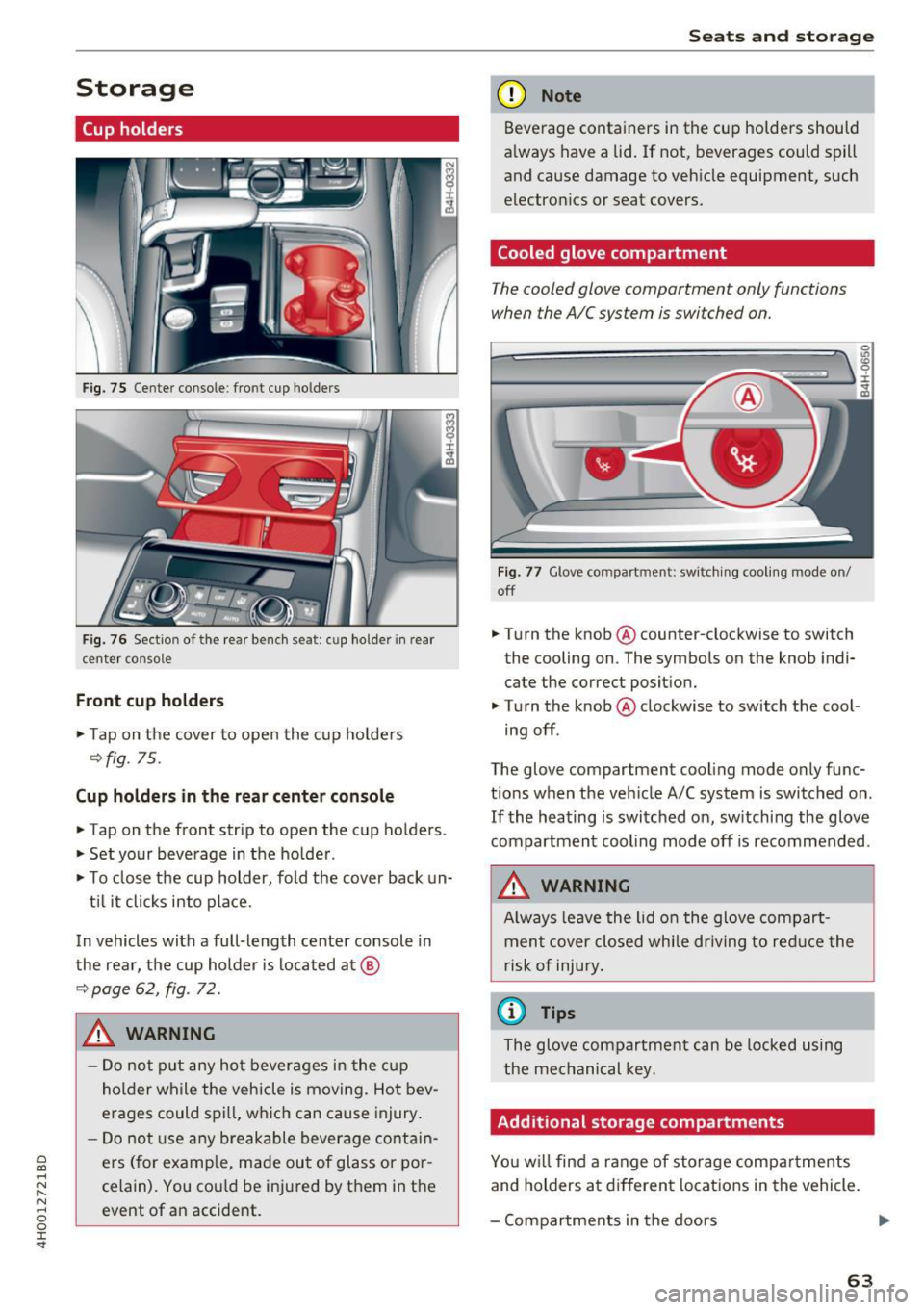
Cup holders
Fig. 75 Center co nsole : fro nt cup ho lders
F ig. 76 Sect io n of th e re ar bench se at: cu p ho lder in rear
center co nso le
Front cup holders
.. Tap on the cover to open the cup ho lde rs
Q fig. 75.
Cup holder s in the rear center console
.. Tap on the front strip to open the cup holders .
.. Set your beverage in the ho lder .
.. To close the cup holder , fold the cover back un-
t il it clicks into place.
In vehicles with a full-length center console in
the rear, the cup holder is located at @
9page 62, fig . 72.
A WARNING
-
- Do not p ut any hot beverages in the c up
holder while the vehicle is moving. Hot bev
erages could spill, wh ich can cause injury .
- Do not use any breakable beverage contain
ers (for example, made out of glass or po r
celain). You cou ld be injured by them in the
event of an accident .
Seats and storag e
(D Note
Beverage containers in the cup holders should
a lways have a lid . If not , beverages could spill
and cause damage to vehicle equipment, such
electron ics or seat covers.
Cooled glove compartment
T he cooled glove compartment only functions
when the AIC system is swi tched on.
Fig . 77 G love co mpart ment: swi tching cooling mode o n/
off
.. Turn the knob @counter-clockwise to switch
the cooling on . The symbols on the knob ind i·
cate the correct posit ion.
.. Turn the knob @clockwise to switch the cool ·
ing off .
The glove compartment cooling mode only func
t ions when the veh icle A/C system is switched on .
If the heating is switched on, switching the glove
compartmen t cooling mode off is recommended .
_& WARNING
Always leave the lid o n the glove compart
ment cover closed while dr iving to red uce the
risk of injury .
a) Tips
The glove compartment can be locked using
the mechanical key.
Additional storage compartments
Yo u w ill find a range of storage compa rtments
and holders at different locations in the vehicle.
- Compartments in the doors
IJ,,
63
Page 71 of 354

0 co .... N ,..... N .... 0 0 :c '
climate control
Description
The climate con trol system warms, coo ls and re
moves humidity from the air in the vehicle inte ri
or. It is the most effective when the w indows and
sunroof* are closed. If there is a bu ild-up of heat
i n side the veh icle, ven tilat ion can he lp to speed
up the cooling process .
In a ll heating mode functions, except for defrost,
the blower on ly switches to a higher speed once
the eng ine coolant has reached a sufficient tem
perature.
Pollutant filt er
The po llutant filter removes pollutants such as
d ust and pollen from the air.
Key recognition
The clima te control settings are automatically
s tored and assig ned to th e remo te contro l key
that is in use.
& WARNING
Poo r visibility can lead to accidents.
- For safer d riving, keep all windows free of
ice, snow and fo g.
- B ecome familia r as quickly as possible wi th
the correct use and function of the cl imate
contro l system, especially with the defrost
ing and defogging function.
- When the temperat ure is below freezing,
only use the windsh ield washer system after
Warm and cold
the windshield has been warmed by the cli
mate control system. The washer fluid could
freeze on the windshie ld and impair visib ili
ty .
(D Note
-If you suspect that the climate contro l sys
tem is damaged, switch the system off to
prevent further damage and have it checked
by an authorized Aud i dealer o r authorized
Aud i Serv ice Facility.
- Repa irs to the Aud i climate control system
require special technical know ledge and
special tools . See an autho rized Aud i dea le r
or authorized Audi Service Fac ility.
@ For the sake of the environment
Reducing the amount of fuel used also re
duces the amount of pollu tan ts that enter the
ai r.
@ Tips
- To prevent interference with the heat ing
and coo lin g output and to prevent the wi n
dows from fogging over , the air intake in
fro nt of the windshie ld m ust be free of i ce,
snow o r leave s.
- Condensat ion from the coo ling system c an
dr ip and fo rm a pudd le of w ater un der t he
vehicle. Th is i s n orm al and does not me an
t here is a lea k.
- T he e nergy m anagemen t sy stem may tem
por arily swi tch off cert ain fu nctions, s uch a s
the seat heating * or rear window defogger .
T hese systems are ava ila ble again as soon
as the energy supply has been restored.
69
Page 79 of 354

0 co .... N ,..._
N .... 0 0 :c '
-Some noise after starting the engine is nor
mal and is no cause for concern.
- If you leave the vehicle with the ignition
switched on, the ignition will switch off af
ter a certain amount of time. Make sure that
electrical equipment such as the exterior
lights are switched off.
Stopping the engine
"'Bring the vehicle to a full stop.
"'Select the P or N selector lever position.
"'Press the
I START ENGINE STOPI button
r::?v page 76, fig. 90.
Steering lock
The steering locks when you turn the engine off
using the
I START ENGINE STOPI button and
open the driver's door. The locked steering helps
prevent vehicle theft.
Emergency off function
If it is absolutely necessary, the engine can also
be turned off while driving in the R, Dor S selec
tor lever position at speeds below 6 mph (10 km/
h). To stop the engine, press and hold the
I START ENGINE STOPI button and also press the
brake pedal.
& WARNING
-Never turn off the engine before the vehicle
has come to a complete stop. The full func
tion of the brake booster and the power
steering is not guaranteed. You must use
more force to turn or brake. Because you
cannot steer and brake as you usually
would, this could lead to accidents and seri
ous injuries .
- Always take the key with you whenever you
leave your vehicle. Otherwise, the engine
could be started or electrical equipment
such as the power windows could be operat
ed. This can lead to serious injury.
- For safety reasons, always park the vehicle
with the selector lever in the P position.
Driving
Otherwise, there is the risk that the vehicle
could roll unintentionally.
@ Note
If the engine has been under heavy load for
an extended period of time, heat builds up in
the engine compartment after the engine is
switched off and there is a risk of damaging
the engine. For this reason, let the engine run
at idle for approximately two minutes before
shutting it off.
(D Tips
After the engine has been switched off, the
radiator fan can continue to run for up to 10
minutes -even with the ignition switched off .
It can also switch on again after some time if
the coolant temperature rises as the result of
heat buildup or if the engine is already warm
and the engine compartment is also heated
by the sun's rays.
Messages in the instrument cluster display
Turn off ignition before leaving car
This message appears and a warning tone sounds
if you open the driver's door when the ignition is
switched on.
Press brake pedal to start engine
This message appears when you press the
I START ENGIN E STOP ! button to start the engine
and do not press the brake pedal while doing so .
The engine can only be started when the brake
pedal is pressed.
= Key not in vehicle?
This indicator light turns on and this message ap
pears if the ignition key was removed from the
vehicle when the engine was running. If the igni
tion key is no longer in the vehicle, you cannot switch on the ignition or start the engine once
you stop it. You also cannot lock the vehicle from
the outside.
Shift to P, otherwise vehicle can roll away.
Doors do not lock if lever is not in P.
77
Page 80 of 354

Driving
This driver message appears for safety reasons if
the transmission has not be en shifted to the P
position when you switch the ign ition off. Move
the selector lever to the P posit ion. Otherwise the
ve hicle is not protected from ro lling and it cannot
be locked .
II Key is not re cognized. Hold ba ck of ke y
aga inst marked area. See owner's manual
If t he indicator light t urns on and this message
appears, there is a malfunction ~
page 78.
Turn off ignition before leaving car
This message appea rs if the dr iver 's door is
opened while the ignition is switched on . A lways
sw itch off the ignition if you are leaving the vehi
cle.
Shift to P and turn off ignition befor e leaving
car, otherwi se vehicle c an roll away
This message appears if the driver 's door is
ope ned while the ignition is switched on and the
transmission has not been shifted to the P posi
tion . Sh ift the t ransm iss ion into the P posit io n
a nd turn off the ignition if yo u are leav ing the ve
h icle. O therwise t he vehi cle co uld rol l.
Starting the engine when there is a
malfunction
It may not be possible to start the engine under
certain circumstances, for example if the battery
in the vehicle key is drained, if interference is af
fected the key or if there is a system malfunc
tion.
N
c::==== =~
±
- ------- ~
Fig . 9 1 Cente r conso le/ re m ote cont ro l key: sta rt ing the
eng ine if t here is a malf u nction
Requirement: the message K ey is not recog
nized . Hold back of key against marked area.
78
See owner's manual must appear and the II in
dicator light must tu rn on .
.,. Hold the remote cont rol key vertically in the lo
ca tion i ndicated
t1>) ~ fig. 91.
.,. Press the brake pedal.
.,. Press the I S TAR T
ENGINE ST OP I button . The
eng ine will start.
.,. Drive to an authori zed Audi dealer or author
ized Aud i Service Facility immediately to have
the malfu nction corrected .
(D Tips
You can view the message aga in by pressing
the lS TAR T
ENGI NE ST OP I button .
Start/Stop system
Description
Applies to: vehicles with Start/Stop system
The S ta rt/Stop sys tem can help increase fue l
eco nomy and reduce CO2 emissions .
In Sta rt/S top mode, the eng ine s huts off auto
ma tically when the vehicle is stopped, such as a t
a traffic light . The ignition rema ins switched on
duri ng th is stop phase . The engine w ill restart
automat ica lly when needed .
The last Start/S top system setting is restored
when the ignition is sw itched on .
Basic requirements for Start /Stop mode
- Th e driver 's doo r must be closed .
- Th e driver 's seat belt much be fas tened.
- The hood must be closed.
- The vehicle m ust have driven faster than
2.5 mph (4 km/h) since the last t ime it stop
ped.
- A trailer m ust not be hitched to the vehicle .
A WARNING
-Never turn off the engine before the vehicle
has come to a complete stop. The full func
t ion of the bra ke booster and the power
steer ing is not guaranteed. You must use
mo re fo rce to tu rn o r bra ke. Be cause you
canno t stee r and bra ke as y ou usually
Page 84 of 354

Driving
During emergency braking, your vehicle will
brake similar to heavy braking. ESC and the
associated components (ABS, ASR, EDL)
cannot overcome the laws of physics. In cor
ners and when road or weather conditions
are bad, a full brake application can cause
the vehicle to skid or the rear end to swerve,
which increases the risk of an accident.
- If the power supply fails, you cannot set the
parking brake if it is released. In this case,
park the vehicle on level ground and secure
it by placing the selector lever in the P posi
tion. See an authorized Audi dealer or au
thorized Audi Service Facility for assistance.
- Always take the vehicle key with you when leaving your vehicle, even for a short period
of time. This applies particularly when chil
dren remain in the vehicle . Otherwise chil
dren could start the engine, release the
parking brake or operate electrical equip
ment such as power windows, which in
creases the risk of an accident.
- No one should remain in the vehicle when it is locked -especially children. Locked doors
make it more difficult for emergency work
ers to get into the vehicle, which puts lives
at risk.
(D Tips
When stopping at a traffic signal or stopping in city traffic, you can set the parking brake
manually. The vehicle does not have to be
held with the brake pedal. The parking brake
eliminates the tendency to creep when a se
lector lever position is engaged. As soon as
you press the accelerator pedal, the parking brake releases automatically and your vehicle
starts to move
c> page 82.
(D} Tips
-Occasional noises when the parking brake is
set and released are normal and are not a
cause for concern.
- The parking brake goes through a self-test
cycle at regular intervals when the vehicle is
stopped. Any noises associated with this are normal.
82
- If there is a power failure, the parking brake
will not set if it is released, and it will not release if it is set ¢&. . See an authorized
Audi dealer or authorized Audi Service Fa cility for assistance .
Starting from a stop
Various convenience and safety functions may be
available when the vehicle begins driving, de
pending on vehicle equipment .
Starting on hills with the parking brake set
Requirement: the driver 's door must be closed
and the driver's safety belt must be fastened.
.,. To start driving comfortably when on a hill, set
the parking brake and begin driving as usual.
The braking force of the parking brake does not
release automatically until the wheels build up
enough driving force.
Starting on hills with hill hold assist
Hill hold assist makes it easier to start on hills.
Requirement: the driver's door must be closed
and the engine must be running.
.,. To activate hill hold assist, press and hold the
brake pedal for several seconds. The vehicle
must be in an uphill direction of travel.
After releasing the brake pedal, the braking pow
er is maintained for a brief moment
c> &. to pre
vent the vehicle from rolling back when starting.
During this time, you can easily begin to move
your vehicle.
&_ WARNING
A ppl ies to: ve hicles with hill hold assist
- If you do not begin driving immediately or
the engine stalls after releasing the brake
pedal, your vehicle may begin to roll back
ward. Press the brake pedal or set the park
ing brake immediately .
- The intelligen t technology of hill hold assist
cannot overcome the limitations imposed by
natural physical laws. The increased comfort
offered by hill hold assist should not cause
you to take safety risks .
Page 101 of 354
C) C0 ....
"' " "' .... 0 0 :r
to a distance of 164
ft (SO m) when traveling at
62 mph (100 km/h), for examp le (time between :
1.8 seconds).
~-- --~ Dist a nce 4: This setting corresponds
to a distance of 210
ft (64 m) when traveling at
62 mph (100 km/h), (time distance of 2.3 sec
onds).
A WARNING
Following other vehicles too closely increases
the risk of coll isions and ser ious personal in
jury.
- Setting short distances to the traffic ahead
reduces the t ime and distance available to
br ing your vehicle to a safe stop and makes
it even mo re necessary to pay close atten
t ion to traffic.
- Always obey applicable traffic laws, use
good j udgment, and select a safe following
distance for the traffic, road and weather
condit ions .
@ Tips
- Di stance 3
is set automatically each time
you switch the ignition on.
- Your settings are automatically stored and
assigned to the remote control key being
used.
Selecting the driving mode
A pp lies to: ve hicles with Audi adaptive cruise co ntrol
.,. Se lect the des ired driving mode in dr ive se lect
c> page 110 .
@ Tips
Your se ttings a re au toma tical ly s to red and as
signed to the remote control key being used.
A ss ist
Driver intervention request
App lies to : vehicles wit h Aud i ada ptive cr uise control
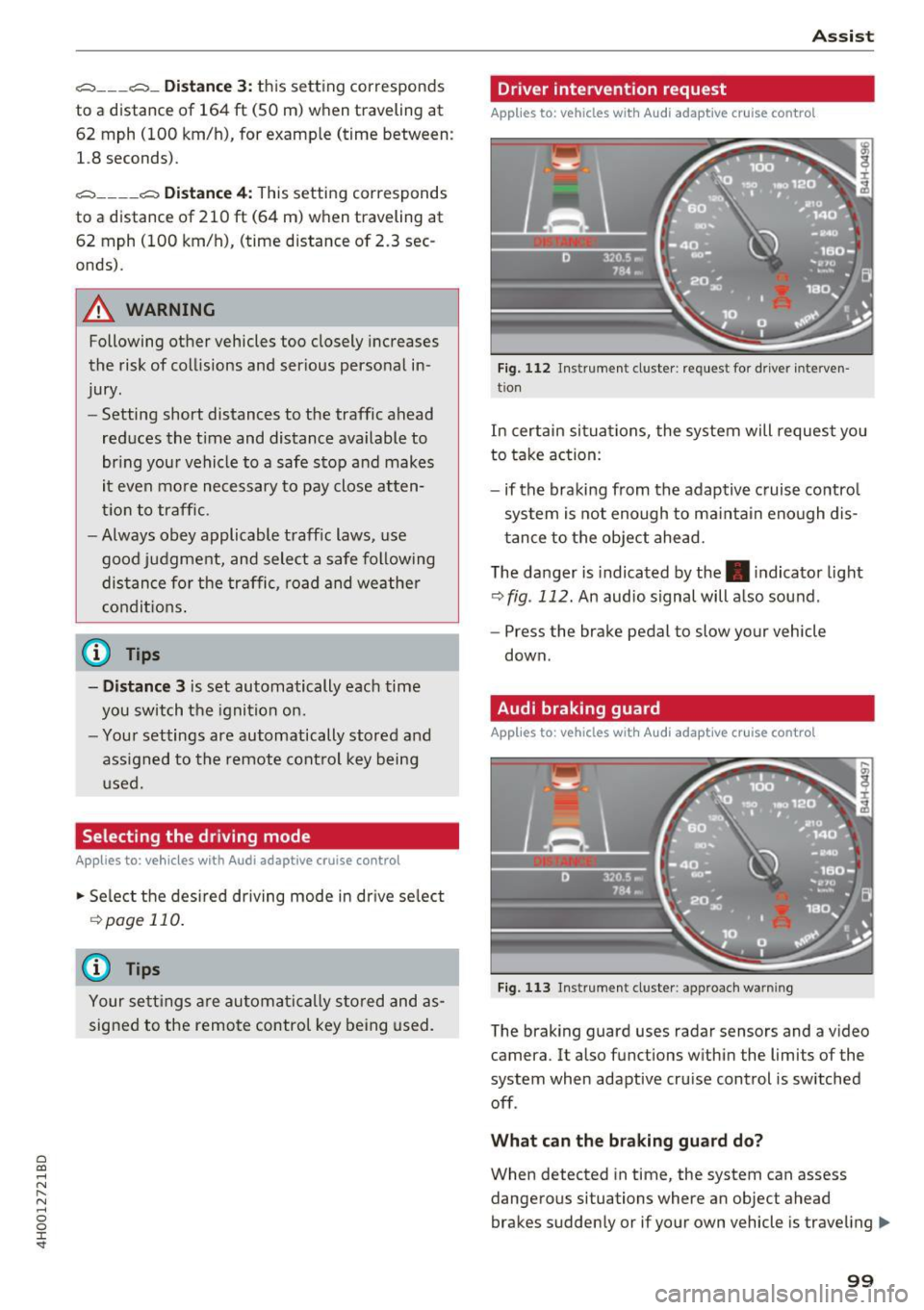
Fig. 112 Instrume nt cl uster : request fo r drive r in terven
tio n
In certain situa tions, the system will request you
to take action:
- if the braking from the adap tive cruise contro l
system is not enough to ma intain eno ugh dis
t ance to the object ahead.
The da nger is indicated by the. indicator light
r:!> fig . 112. An audio signal will a lso sound .
- Press the brake pedal to slow your vehicle
down.
Audi braking guard
Appl ies to: vehicles wit h Audi ada ptive cr uise control
Fig. 113 Instrument cluster : approach wa rnin g
The braking guard uses radar sensors and a v ideo
camera. It also functions within the limits of the
system when adaptive cru ise control is switched
off .
Wh at can the b raking guard do?
When detected in time, the system can assess
dangerous situations where an object ahead
brakes suddenly or if your own vehicle is traveling .,..
99
Page 103 of 354
0 co .... N ,..._
N .... 0 0 :c '
Applies to: vehicles with Audi adaptive cruise contro l
.,. Se lect: t he I CAR I fu nction bu tton > Car systems
co ntro l bu tton > Driver a ssist > Audi braking
guard .
System -
Switch the bra kin g g ua rd On/ Off. When
you swit ch the ig nition on, the message
Braking
guard: Off
appears if t he sys tem is switched o ff.
Early warning -The distance and approac h warn
i ngs i n the display can be sw itched
On/ Off.
@ Tips
- Your settings are automatically stored and
ass igned to the remote cont rol key bei ng
used.
- If you restric t or sw itch off the ESC, the
braking gua rd also sw itches itself off
¢ page 12 7.
- Switch braking guard off when yo u are load
i ng t he ve hicle on to a vehicle ca rr ier, t rain,
shi p or other type o f transportation. This
c a n p reven t undesired w arnings from the
br akin g guard system.
Messages
Applies to: veh icles with Audi adaptive cruise control
Braking guard: Off
This message appea rs if the sys tem is switc hed
off through the In fota inme nt system . Otherwise ,
if the system is tur ned off, the informa tion ap
pears every time shortly after the start of t he
tr ip.
The message also appears if the system is not
avai la bl e d ue to a ma lfunction or if the ESC is
switched off~
page 127. If this is the case, the
system w ill not prov ide warnings about a possi
b le co llision.
Braking guard : engaged
This message appea rs if a sha rp bra ke press ure
was applied due to an ac ute wa rn ing.
ACC: unavailable
ACC and Audi braking guard: Unavailable Assist
T
he system cannot gua rantee that it will detect
objects co rrectly and is sw itched off . The sensors
have been moved or are faulty. The p re sense
funct ions may a lso be affected . D rive to an au
t h ori zed Audi dea ler or authorized Audi Service
Facility immed iate ly to have the malfunction cor
rected .
ACC: Currently unavailable. No sensor vis ion
ACC and Audi braking guard: Cu rrently unavail
able. No sensor vision
Th is mess age appears if the senso r view i s ob
str ucted, for examp le by leaves, snow , heavy
spray or dirt. Clean the sensors¢
page 94 ,
fig . 104.
ACC : Currently unavailabl e. Gradient too steep
The road exceeds the maximum poss ible angle
fo r safe adaptive c ruise cont rol operat io n. Adap
t ive cr uise control is sw itched off.
ACC: only available in D, Sor M
Se lect the D, Sor M selector leve r pos ition.
ACC : Currently unavailable. Parking brake ap •
plied
The ad apt ive cr uise cont rol system sw itches off
a utoma tica lly if the parking brake is se t.
ACC: Currently unavailable . Stability control
( ESC) input .
This message appears if the Electronic Stab iliza
t ion Control (ESC) is taking action to stab ilize the
vehicle . In t his case, adaptive cruise control
switches off automatically .
ACC off: manual control!
This message appears when adaptive cruise con
trol cannot set the parking brake. P ress the brake
pedal to prevent the vehicle from ro lling.
• ••
T h ree white do ts appear if a setting canno t be se
l ecte d w it h t he oper ati ng leve r. For ex ample, this
h appens if a daptive cr uise con trol c annot sta rt
driv ing a utomat ica lly in stop -and -go traff ic be
ca use the dr iver has not fastene d their safety
belt . ..,.
101
Page 106 of 354
Ass is t
Messag es in the instrument cluster display
If the active lane ass ist switches off automatica l
ly, the indicator lig ht in the display turns off and
one of the following messages appears:
Audi acti ve lan e ass ist : Cur rently un availabl e.
No camera vie w
This message appears if the camera is unable to
detect the lines. This co uld happen if :
- The camera field of view
9page 103, fig . 115 is
dirty or cove red in ice . Clean this area on the
windshield .
- The camera field of v iew is fogged over . Wait
unt il the fog has cleared before sw itch ing the
active lane assist on again .
- The system has been unable to detect the lanes for an extended period of time d ue to road con
ditions. Switch a ctive lane assist back on when
the lines are mo re visible .
Audi acti ve lan e ass ist : Cu rrently un available
There is a temporary active lane assist ma lf u nc
tion . Try sw itching the act ive lane assist on aga in
later.
Audi active lane a ssist : System fault!
Dr ive to an a utho rized Aud i dea le r or a uthorized
Aud i Serv ice Facility immediately to have t he
malfunction corrected.
Audi active lane a ssist : Please take over steering
This message appea rs if you are not steering by
yourself . If th is is the case, active lane assist does
no t swi tch off, but it is "not ready" to provide a
warn ing . The system ca n he lp you keep the veh i
cle in the lane. However, yo u are responsib le for
d riving the vehicle and must steer it yo ursel f.
Setting the vibration warning
Applies to: ve hicles with Audi active lane assist
.,. Se lect : the ICARI function button > Car systems
contro l button > Driver a ssist > Audi acti ve
lane ass ist .
V ibration warning
You can switch the additional vibration wa rni ng
in the steering wheel o n or off.
104
@ Tips
Your settings are automatically stored and as
signed to the remote contro l key being used.
Audi side assist
Description
App lies to: vehicles with A udi side ass ist
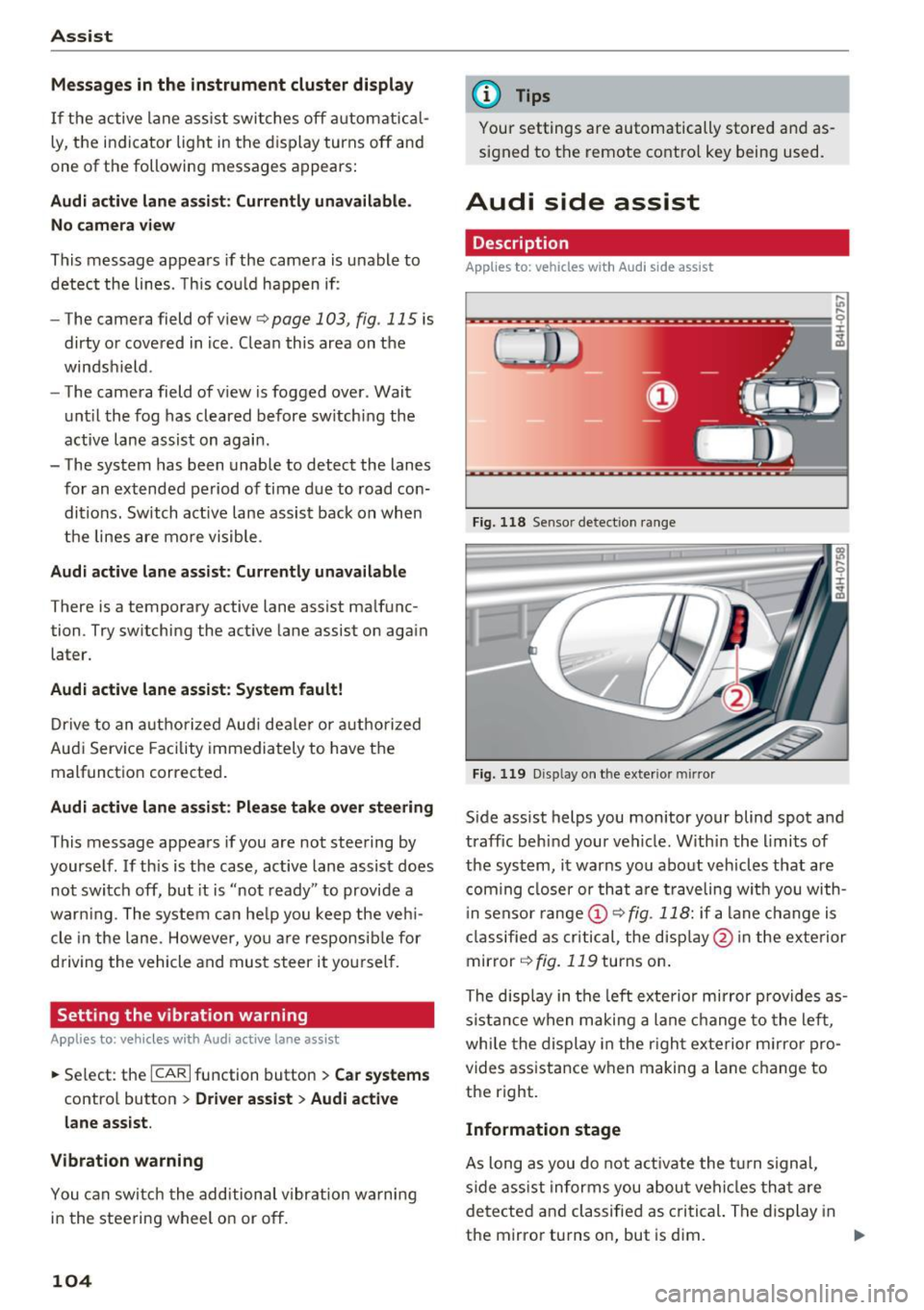
Fi g. 118 Senso r detect ion ra nge
Fig. 119 D isp lay on t he exterio r mirr or
Side assist helps you monitor your blind spot and
traffic behind your vehicle. W ithin the limits of
the system, it warns you abo ut vehicles that are
coming closer or th at a re t raveling wit h you with
i n senso r range @
9 fig. 118: if a lane c hange is
classified as cri tical, the disp lay @ in the exte rior
mirror
9 fig. 119 turns on .
The disp lay in the left exte rio r mirror prov ides as
s ista nce when making a lane change to the left,
whi le the display in the r igh t exterior m irror pro
vides assistance w hen making a lane c hange to
the right.
Information stage
As long as you do not a ct iva te the t urn signal,
side ass ist informs you abou t vehi cles tha t are
detected a nd classified as c rit ical. The di splay in
the mirror turns on, but is dim. ""
Page 109 of 354
0 co .... N ,..... N .... 0 0 :c '
Appl ies to: ve hicles with Audi side assist
The display brightness can be adjusted in the In
fotainment system.
.. Se lect : the I CAR I function button > Car systems
contro l button > Driver ass ist > Audi side as
sist .
The display brightness ad justs automat ica lly to
the br ightness of the surroundings, both in the
i n formation and in the warning stage . In very
dark or very bright sur roundings, the automatic
ad ju stment will set t he d isp lay to the m inimum
or maxim um level. In such cases, you may no tice
no change when adjus ting the b rightness, o r the
change may only be no tic eable once the s ur
r o undings change .
Ad just the b rig ht ness to a level where the d isp lay
in t he inform ation stage wi ll no t dis rup t your
view ahead. If you change the bright ness, the dis
p lay in the ex terior mirror will brief ly show the
b rightness level in the information stage . The
brightness of the warning stage is linked to the
brightness in the informat ion stage and is ad just
ed along w ith the information stage.
(D Tips
- Side assist is not active wh ile you are ma k
i ng the ad justment.
- Your settings are automatically store d and
ass igned to the remote control key being
used.
Messages
A ppl ies to: ve hicles with Audi side assist
If s ide ass ist switches off by itself, the LED in the
button turns off and a message will appear in the
i nstr ument cluster d is pl ay :
Audi side assist: Currently unavailable . No
sensor vision
The rada r senso rs' vision is affected . Do not cover
the area in front of the senso rs with bike wheels ,
sticke rs, dirt o r othe r objects . Clean t he a rea in
fr on t of the senso rs , if necess ary
c> page 105,
fig. 1 21 .
Assist
Audi side assist: currently unavailable
S id e assist c annot be sw itched on at this time be
ca use there is a ma lfunction ( for example, the
battery c harge leve l may be too low).
Audi side assist: System fault!
T he system canno t gua rantee that it will detect
vehicle s cor rec tly and it has switc hed off. The
senso rs have been moved or are f aulty. H ave the
system checked by an au thorized Audi dealer o r
autho rized Audi Serv ice Facility soon.
Audi side assist: Unavailable when towing
S ide ass ist swit ches off automatically when a fac
tory -inst alled tra ile r hi tch is con necte d to the
electrical connec tor on the t rai ler . There is no
guarantee the system will switch off when using
a retrofitted trailer hitch. Do not use side assist
when towing a trai ler.
Night vision assist with
pedestrian and wild
animal detection
Description
App lies to : vehicles wit h night vision assist
The night vision assist can detect, highlight and,
if necessary, warn about pedestrians and large wild animals.
N ight v ision assist w ith pedestrian and w ild ani
mal detection assists you at nig ht by using an in
frared camera to monitor the a rea in front of
your vehicle, within the limits of the system. It can d isplay objects up to a distance of approxi
mately 1000 feet (300 m) . The thermal image
de te cted by the camera is show n in the inst ru
ment cluster d is pla y. Warm areas appear lighter
and co ld areas appear d arker.
107
Page 114 of 354
Ass is t
Selecting the driving mode
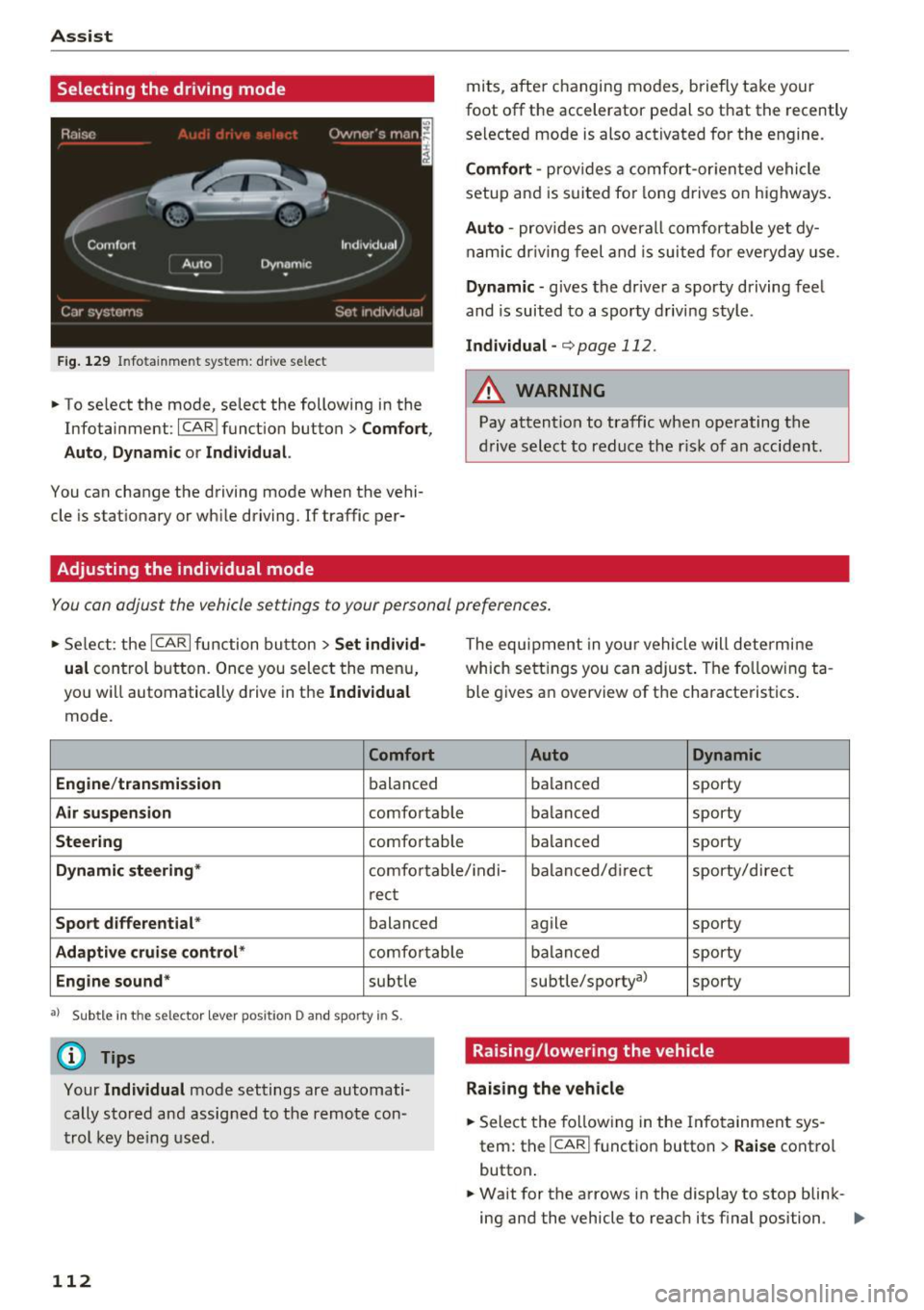
Fig . 129 In fotainme nt system: drive se lect
• To se lect the mode, select the following in the
Infotainment :
ICARI function button> C omfort ,
Auto , Dynam ic
or Individua l.
You can change the driving mode when the vehi
cle is stat ionary or wh ile driving. If traffic per-
Adjusting the individual mode
mits, after changing modes, briefly take your
foot off the accelerator pedal so that the recently
se lected mode is also activated for the engine.
Comf ort -prov ides a comfort-or iented vehicle
setup and is s uited fo r long drives on highways.
Auto -provides an overa ll comfortab le yet dy
nam ic dr iving feel and is suited for everyday use.
Dynamic -gives the dr ive r a sporty driving feel
and is suited to a sporty driving style .
Indivi dual -¢ page 112 .
_& WARNING
Pay attention to traff ic when ope rating the
d rive select to reduce the r isk of an accident .
-
You can adjust the vehicle settings to your personal preferences .
• Se lect : the ICARI function button > Set indi vid·
ual
control button . Once you select the menu,
yo u will automatically drive in the
Individual
mode .
Comfort
Engine /t ransmi ssion
balanced
Air su spension comfo rtable
Steering comfortable The equipment in your vehicle will determine
which sett
ings you can adjust. The fo llowing ta
ble gives an overview of the characteristics .
Auto Dynamic
balanced sporty
balanced sporty
balanced sporty
Dynamic steering
* comfortable/ i ndi- ba la need/d irect sporty/direct
r ect
Spo rt differ ential * balanced
Adaptiv e cruise con trol * comfo rtable
Engine sound* subtle
a l Sub tle in the sele ctor leve r posi tio n D and sp orty in S.
(D Tips
Your Indi vidua l mode settings are automati
cally stored and assig ned to the remote con
trol key be ing used .
112 agile
sporty
balanced sporty
subtle/sportyal sporty
Raising/lowering the vehicle
Raising the vehicle
.. Select the fo llowing in the Info tainment sys
tem: the
ICAR I function button> Raise contro l
button .
.. Wait for the arrows in the display to stop blink-
ing and the vehicle to reach i ts f inal position . ..,.