steering wheel AUDI A8 2017 Owner's Manual
[x] Cancel search | Manufacturer: AUDI, Model Year: 2017, Model line: A8, Model: AUDI A8 2017Pages: 354, PDF Size: 88.68 MB
Page 124 of 354
Parking system s
You can choose between three different views in
this mode.
.,. To cross park, parallel park or position the vehi
cle in front of a tra iler*, press the control but
ton ® on the contro l pane l repeatedly unt il the
symbol for the des ired mode is selected .
Perpendicular parking
Applies to: ve hicles w ith perip hera l cameras
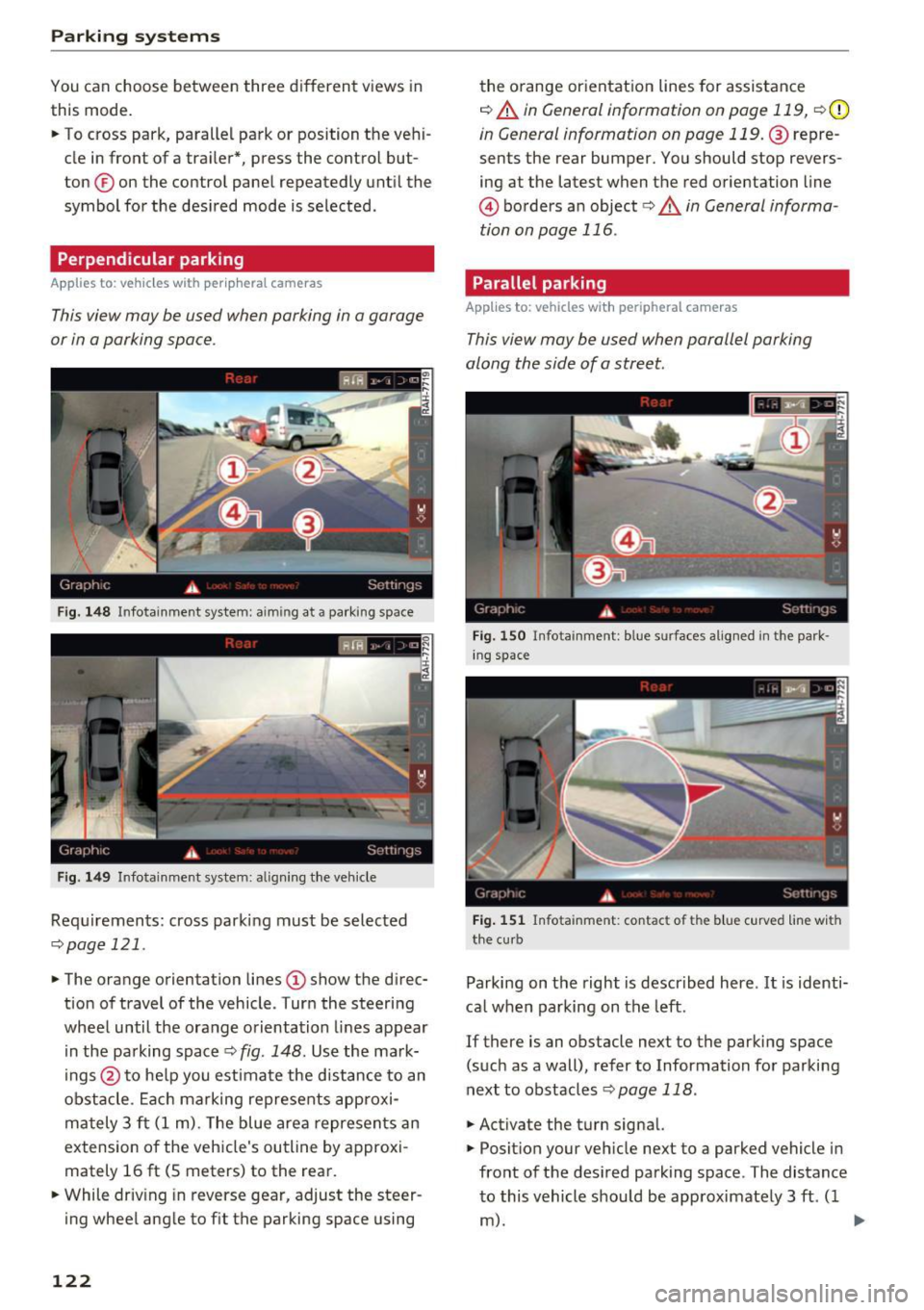
This view may be used when parking in a garage
or in a parking space .
Fig . 14 8 Infotainment system: aiming at a parking space
Fig . 149 Infotainment system: aligning the veh icle
Requ irements: cross parki ng must be selected
q page 121 .
.,. The orange orientation lines (D show the d irec
tion of travel of the vehicle . Turn the steering
wheel until the orange orientation lines appear i n the pa rking space
¢ fig. 148 . Use the ma rk
ings @to he lp you estimate the distance to an
obstacle . Ea ch marking represents approxi
ma tely 3 ft (1 m). The blue area represents an
extension o f the vehicle's outline by approxi
mately 16
ft (S meters) to the rear.
.,. While driv ing in reverse gear, adjust the steer
ing wheel angle to f it the parking space using
122
the o range or ientation lines for assistance
q A in General information on page 119, q (D
in General information on page 119. @repre
sents the rear bumper. You should stop revers
ing at the latest when the red o rientation line
@ borders an object<=>.&. in General informa
tion on page 116.
Parallel parking
App lies to: vehicles wit h peripheral cameras
This view may be used when parallel parking
along the side of a street.
Fi g. 15 0 In fota inment: blue surfaces alig ned in the park
in g space
Fig. 151 Infota inment: contact of the blue c urved line w ith
the cu rb
Parking on the right is descr ibed here . It is identi
ca l when parking on the left.
If there is an obstacle next to the parking space (such as a wall), refer to Information fo r parking
next to obstacles
q page 118 .
.,. Activate the turn signal.
.,. Posit ion your veh icle next to a parked vehicle in
front of the des ired park ing space . The distance
to this vehicle should be approximate ly 3 ft. ( 1
m). ..,.
Page 125 of 354
.. Turn the Infotainment system on and shift into
reverse gear. The parking system is turned on
and the
Cross park ing view is displayed.
.. Press the control button on the Infotainment
unit @¢
page 118, fig. 138. The Para llel pa rk
ing
view is displayed .
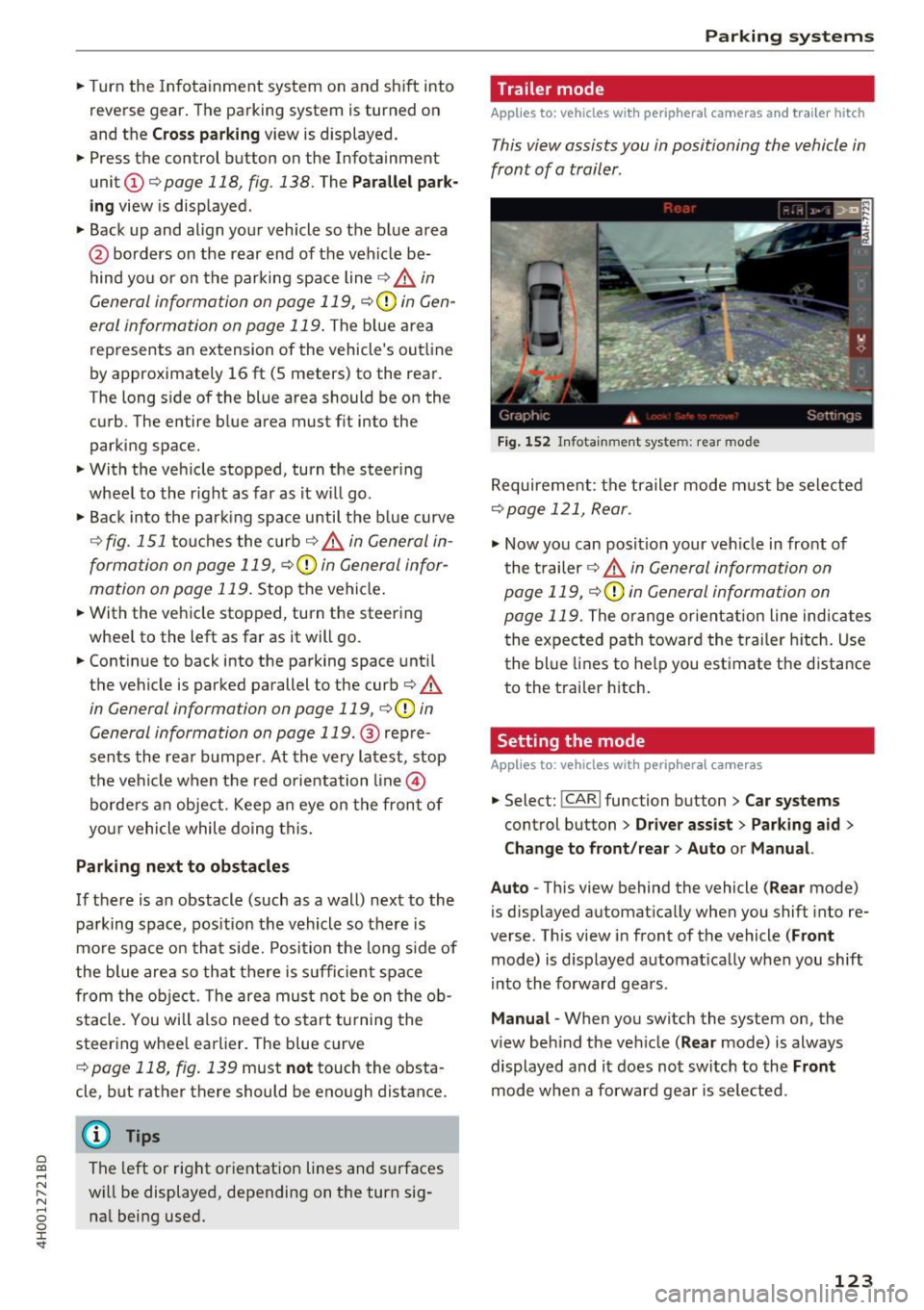
.. Back up and align your vehicle so the blue area
@ borders on the rear end of the vehicle be
hind you or on the parking space line¢.,&.
in
General information on page 119, ¢(Din Gen
eral information on page 119 .
The blue area
rep resents an extension of the vehicle's outline
by approximately 16 ft (5 meters) to the rear .
The long s ide of the blue area should be on the
curb. The entire b lue area must f it into the
parking space .
.. With the vehicle stopped, turn the steering
wheel to the r ight as far as it w ill go .
.. Back into the parking space until the b lue curve
¢
fig . 151 touches the cu rb ¢.,&. in General in
formation on page 119, ¢(Din General infor
mation on page 119.
Stop the vehicle .
.. With the vehicle stopped, turn the steering
whee l to the left as far as it will go.
.. Continue to back into the parking space until
the vehicle is parked parallel to the curb¢
/A
in General information on page 119, ¢(Din
General information on page 119.@
repre
sents the rear bumper . At the very latest, stop
the vehicle when the red o rie ntation line@
bo rders an object . Keep an eye on the front of
you r vehicle while doing this.
Parking next to obstacles
If there is an obstacle (such as a wall) next to the
parking space, pos ition the vehicle so t here is
mo re space on that side. Position the long s ide of
the blue area so that there is s ufficient space
from the obje ct. The area must not be on the ob
stacle . You will also need to start tu rning the
steering whee l earlier. The blue curve
¢
page 118, fig . 139 must n ot touch the obsta
cle, but rather there should be enough distance.
@ Tips
C)
~ The left or right orientation lines and surfaces
"' ~ w ill be displayed, depending on the turn sig-
8 na l being used. 0 :r
Trailer mode
Applies to : vehicles wit h peripheral cameras a nd tra iler hitch
This view assists you in positioning the vehicle in
front of a trailer .
Fig. 15 2 In fotainment system: rear mo de
Requirement: the trailer mode m ust be selected
¢page 121, Rear .
.,. Now yo u can posit ion your ve hicle in front of
the t railer
¢ .,&. in General information on
page 119,
¢ (Din General information on
page 119.
The orange orient ation line indicates
the expected path toward the trailer h itch. Use
the blue lines to help you est imate the distance
to the trailer hitch.
Setting the mode
Applies to : vehicles wit h peripheral ca meras
.,. Select: !CAR ! function button> Car systems
control button > Driver assi st > Pa rking aid >
Change to front /re ar > Auto or Manual.
Auto -
This view behind the vehicle (Rear mode)
is d isplayed automat ically when you shift into re
verse. Th is view in front of the vehicle
( Front
mode) is d isplayed automat ica lly when you shift
i n to the forward gea rs.
Manu al -When you switch the system on, the
view beh ind the ve hicle
(Rear mode) is always
displayed and it does not switch to the
Front
mode when a forward gear is se lected .
123
Page 128 of 354
Intelligent Technology
Intelligent Technology
Electronic Stabilization
Control (ESC)
Description
The ESC increases driving safety . It reduces the
risk of s lipping and improves driving stabi lity.
ESC detects critical situations such as when the
veh icle is oversteer ing and understeering or the
wheels are spinning. The vehicle is stabilized by
apply ing the brakes or reducing eng ine torque .
When ESC engages, the
Ji] ind icator light blinks
in the inst rument cluste r.
The fo llow ing systems are integrated in the ESC:
Anti -lock b raking system (ABS)
ABS prevents the whee ls from locking when brak
i n g . The vehicle can sti ll be steered even d uring
hard brak ing. Apply steady press ure to the brake
pedal. Do not pump the pedal. A puls ing in the
brake pedal indicates that the system is acting to
stabilize the vehicle.
Brake a ssi st sy stem
The brake assist system can dec rease braking dis
tance. It increases brak ing power when the driver
presses the brake pedal quick ly in emergency sit
uations . You must press and hold the brake pedal
until the dangerous situat io n is over . In veh icles
w ith adapt ive c ruise control*, the bra ke assis t
system is more sensitive if the distance detected
to the veh icle dr iv ing ahead is too small. On
ve hicles w ith act ivated and functi oni ng night vi
sion assist*, the brake assist system can respond
more sensit ively if there is a warning .
Anti-slip regulation (ASR)
A SR red uces eng ine power when the d rive wheels
begin s pinning and ad apts the force to the road
conditions. This makes it easier to sta rt, acceler
ate and dr ive up hi lls.
Electronic differential lock (EDL )
EDL applies the brakes to a wheel that sta rts
sp inning and t ransfe rs t he d rive powe r to t he
o ther d riving w heels. This f unct ion is not av aila
b le at higher speeds .
126
In extreme cases, ED L automat ically switches off
to keep the b rake on the braked whee l from over
heating. The veh icle is still working correct ly. ED L
will switc h on again automatically when condi
tions have returned to normal.
Steering recommendat ion
The E SC he lps to stabili ze the vehicle by changing
the steering torque.
I n veh icles with dyna mic steer ing*, ESC a lso
helps to sta bilize the s teer ing in cr it ica l situa
tions.
Selective wheel torque control
Se lective wheel to rque cont rol is used when d riv
i ng on curves.
The fro nt wheel on the ins ide of the curve or bo th
whee ls on the inside of the curve are braked se
l ectively as needed. This allows more pre cise d riv
i ng in cu rves. The applicab le system may no t ac ti
vate when dr iv ing in we t or snowy condi tio ns.
Automatic post -collision braking system
The "automat ic post-coll is io n braking system"
can help to reduce the risk of sl iding and of addi
tiona l co llisions after an acc iden t. If the a irbag
c ontro l modu le detects a collision above a cer tain
vehicle speed, the ve hicle is braked by the ESC.
The veh icle does not b rake automatically if:
- the drive r presses the acce lerator pedal, or
- the bra king force generate d by the pressed
brake pedal is greater than the b raking force
that would be in itiated by the system, or
- the ESC, the bra ke system or the vehicle electri
cal system are not functioning.
A WARNING
- The ESC and its integ rated systems can not
overcome the lim its imposed by natura l
p hys ica l laws. Th is is es pec ially impor tan t
on s lippery or wet roads. If the system s be
g in a cting to stabilize yo ur vehicle, you
should immedi ately alte r your speed to
match the road and tra ffi c conditions. Do
not let t he i ncreased safety provi ded tempt
Page 131 of 354
0 co .... N ,..._
N .... 0 0 :c '
brak ing effect during the first 250 mi
(400 km). They must be "broken in" first.
However, you can compensate for the
sl ightly reduced braking force by pressing
firmly on the brake pedal. Avoid heavy brak
ing dur ing the b reak-in per iod.
- Certa in weather and operat ing cond it ions
such as dr iving t hrough water, d riving in
heavy ra in or d riving after washing your ve
hicle ca n impair the effectiveness of the
bra kes . In the w inter, ice may b uild up on
the brake pads, rotors and drums . Check
these components by braking carefu lly. Ap
plying the brakes carefu lly several times
dr ies the brakes and removes ice bu ild-up.
- The effic iency of the brakes can also be im
paired by driving for long st retches on roads
cove red w ith salt without using the b rakes.
Yo u can remove sa lt deposits from the
bra ke rotors and pads by caref ully applyi ng
the brakes severa l t imes .
- If the front spoiler is damaged or you install
another spoiler, ma ke sure the front wheel
bra kes are vent ilated prope rly. O therwise,
the br ake system could overheat, wh ic h re
duces the ir effectiveness.
- Failure of a brake circui t impai rs b raking
perfo rmance, whi ch incre ases bra king dis
tance . Avoi d driving the vehicle and have it
towed it to the nearest author ized Audi
dealer or authorized A udi Se rvice Facility .
- If the bra ke booster is not wor king, you will
have to press m uch ha rder on the bra ke
peda l to compensate for the lack of the
booster.
(D Note
- Never let the brakes "rub" by pressing the
pedal lightly when braking is not actually
necessary. This causes the brakes to over
heat and inc reases braking d istance and
causes wear.
- Before driving downh ill a long distance on a
steep h ill, decrease your speed and select a
l ower gear. This makes use of the engine
braking effect and relieves the brakes . If Intellig
ent Technology
you need to bra ke ad ditiona lly, bra ke in in
terva ls and not continuous ly .
(D Tips
- If the brake boos ter is not wor king, you
must press the brake peda l with much more
force than normal.
- If you retrof it your vehicle with a front spo il
er, wheel covers or simi lar items, make su re
that the air f low to the front wheels is not
inter rupted. Otherwise the b rake system
can become too hot.
Electromechanical
steering., dynamic
steering
The electromechanical steering supports the
driver's steering movements.
Power s teer ing adapts electronically based on
the ve hicle speed .
Indicator lights and messages
• Do not dr ive vehicle: Steering defective
If this indicator light turns on and stays on and
t hi s message appears, the power steering may
have failed.
Stop the vehicle in a safe location as soon as pos s ible. Do
not cont inue drivi ng. See an authorized
Audi dealer or authorized Audi Service Fac il ity for
ass ista nce.
l;rj Steering: System fault You can continue
driving
If the indicator light turns on and the message
appears, the steering wheel may be more d iffi
cu lt to move or m ore sensitive than usual. The
steering wheel may also be at an angle when
driv ing stra ight .
Drive slowly to an a uthorized Audi dea ler or au
thori zed Audi Serv ice Facility to have the mal
funct ion corrected .
'T-ij Dynamic stee ring: Initializing
If the indicato r ligh t is blinking and this mess age
appe ars, dynamic steering* is be ing ini tialized. .,.
129
Page 132 of 354

Intelligent Technology
The stee ring wheel will be easy to move after
starting the engine . Re-initialization might be
necessary if the steering whee l was moved hard
t o the lef t and right wh ile the vehicle was not
mov ing. The display turns off if the initialization
was successful.
(D Tips
- If the. or
1;:r- ij ind icator light only stays on
for a short time, you may continue driving.
- The dynamic steering stability systems
c> page 126 are not available in the event of
a system ma lfunction.
- For additional informat ion on dynamic
steering, refer to
c> page 110.
All wheel drive (quattro)
In all wheel drive, all four wheels are powered .
General information
In a ll wheel drive, the driving power is divided be
tween a ll four wheels . T his happens automatical
ly depending on your driving behavior as well as
t he current road cond itions. Also see
c> page 126, Electronic Stabilization Control
(ESC) .
With the sport differential*, power distri
bution to the rear whee ls is variable and can be
ad ju sted using the dr ive select
c> page 110.
The all wheel drive concept is designed for h igh
eng ine power. Your ve hicle is exceptionally pow
erful and has excellent driving characterist ics
both under norma l dr iv ing condit ions and on
snow a nd ice. Always read and fo llow safety pre
cautions
c> .&. .
Winter tires
By us ing all w heel d rive , yo ur vehicle has good
forward mot ion w ith standa rd t ires in winter con
d itions . However, in winter we recommend us ing
w in ter o r all season t ires o n all fo ur wheels, be
cause this will improve the b raking effect .
Snow chains
If there are snow chai n laws, snow chains must
a lso be used on vehicles with all w heel d rive
c> page 298, Snow chains .
130 Replacing tires
Fo
r vehicles wi th a ll wheel d rive, o nly wheels with
the same ro ll ing circ umfe rence sho uld be used .
Avo id using tires with different tread depths
c> page 290, New tires or wheels .
Offroad vehicle?
You r A udi is not an off road vehicle -there is not
enough ground clearance. For th is reason, avoid
difficult terrain .
A WARNING
- Also, in ve hicles with all wheel drive, adapt
your driving sty le to the current road and
traffic conditions. Do not let the increased
safety provided tempt you into taking r isks,
because this increases the risk of an acc i
dent.
- The braking ab ility of your vehicle is limited
to the traction of the wheels . In this way, it
is not different from a two wheel d rive vehi
cle. Do not be tempted to accelerate to a high speed when the road is s lippery, be
c a use th is i ncreases the r is k of an accident.
- Note that on wet st reets, the front wheels
c a n " hydroplane " if driv ing at speed s tha t
are too high. Unlike front wheel drive
vehicles, t he engine does not rev higher sud
de nly when the vehicle begins hydroplan ing.
For this reason, adapt yo ur speed to the
road conditions to reduce the risk of an acci
dent.
Energy management
The starting ability is optimized
The energy management system manages the
electrical energy distribution and optimizes the
availability of electrical energy for starting the
engine.
When a vehicle with a conventiona l energy sys
tem is no t drive n for a long t ime, the veh icle bat
te ry is drained by equ ipment (fo r example, the
i mmob ilizer). In certa in circ umstances, there
could may not be enough energy to start the en
gine.
Page 136 of 354

Multi Media Interface
Multi Media Interface
Traffic safety information
Audi recommends performing certain Infotain
ment system functions, such as entering a desti nation, only when the vehicle is stationary . Al
ways be prepared to stop operat ing the Infotain
ment system in the interest of your safety and
the safety of other road users.
_& WARNING
Only use the Infotainment system when traf
fic cond itions permit and always in a way that
allows you to maintain complete control over
your vehicle.
Introduction
The Multi Media Interface, or MMI for short ,
combines various systems for communication ,
navigation and entertainment in your Audi. You
can operate the MMI using the MMI control pan
el, the multifunction steering wheel or the voice
recognition system*.
F ig. 154 MMI control panel with MMl touch control pad
MMI control panel overview
(D MMI touch control pad . . . . . . . . . 136
@ Buttons for open ing menus
directly . . . . . . . . . . . . . . . . . . . . . . 135
@ On/Off knob . . . . . . . . . . . . . . . . . 134
@ Arrow buttons . . . . . . . . . . . . . . . . 135
® Control buttons . . . . . . . . . . . . . . . 135
@ Control knob . . . . . . . . . . . . . . . . . 135
(J) IBACK!bu tton . . . . . . . . . . . . . . . . 135
134
Switching the MMI on
and off
The MMI switches on and off automatically with
the ignition. It can also be switched on or off
manually .
-Switching on manually : press the On/Off knob
@ briefly
c;, page 134, fig. 154. Or: press the
! MENU ! button or one of the buttons to directly
open the menus @,=;,
page 135, fig . 155.
When the system is switched on, the last menu
that was selected is displayed and the last audio
source that was selected begins play ing .
-Switching off manually: press and hold the
On/Off knob @
c;, page 134, fig. 154 until the
MMI switches off. If the MMI has been switch
ed off manually, it does
not switch on again au
tomatically the next time the ignition is switch
ed on .
The MMI can still be operated for approximately
ten minutes after switching the ignition off. If
you do not press any buttons or the control knob
on the MMI control panel with in this t ime, the
MMI switches off automatically.
(D Tips
-The MMI switches off automatically if the
engine is not running and the vehicle bat
tery is low.
- There may be delays when extending or re
tracting the display.
Adjusting the volume
The volume of an audio source or a system mes
sage (for example, from the voice recognition
system) can be adjusted directly while the sound
is ploying using the On/Off knob.
- Increasing or decreasing the volume: turn the
On/Off knob@¢
page 134, fig. 154 to the
right or left .
-Muting or pausing: press the On/Off knob@
c;, page 134, fig. 154 briefly . Or: turn the On/
Off knob to the left . ..,.
Page 210 of 354
Driving safety
• Sit properly in your seat and make sure that
your passengers do the same
c:> page 54, Seats
and storage.
• Fasten your safety belt and wear it properly . Al
so instruct your passengers to fasten their safe
ty belts properly
c:> page 218 .
What impairs driving safety?
Safe driving is directly related to the condition of
the vehicle, the driver as well as the driver 's abili
ty to concentrate on the road without being dis
tracted .
The driver is responsible for the safety of the ve
hicle and all of its occupants. If your ability to
drive is impaired, safety risks for everybody in the
vehicle increase and you also become a hazard to
everyone else on the road
c:> Li').. Therefore :
• Do not let yourself be distracted by passengers
or by using a cellular telephone .
• NEVER drive when your driving ability is im
paired (by medications, alcohol, drugs, etc.).
• Observe all traffic laws, rules of the road and
speed limits and plain common sense.
• ALWAYS adjust your speed to road, traffic and
weather conditions.
• Take frequent breaks on long trips. Do not drive
for more than two hours at a stretch.
• Do NOT drive when you are tired, under pres
sure or when you are stressed.
A WARNING
Impaired driving safety increases the risk of
ser ious personal injury and death whenever a
vehicle is being used.
208
Correct passenger
seating positions
Proper seating position for the driver
The proper driver seating position is important
for safe, relaxed driving.
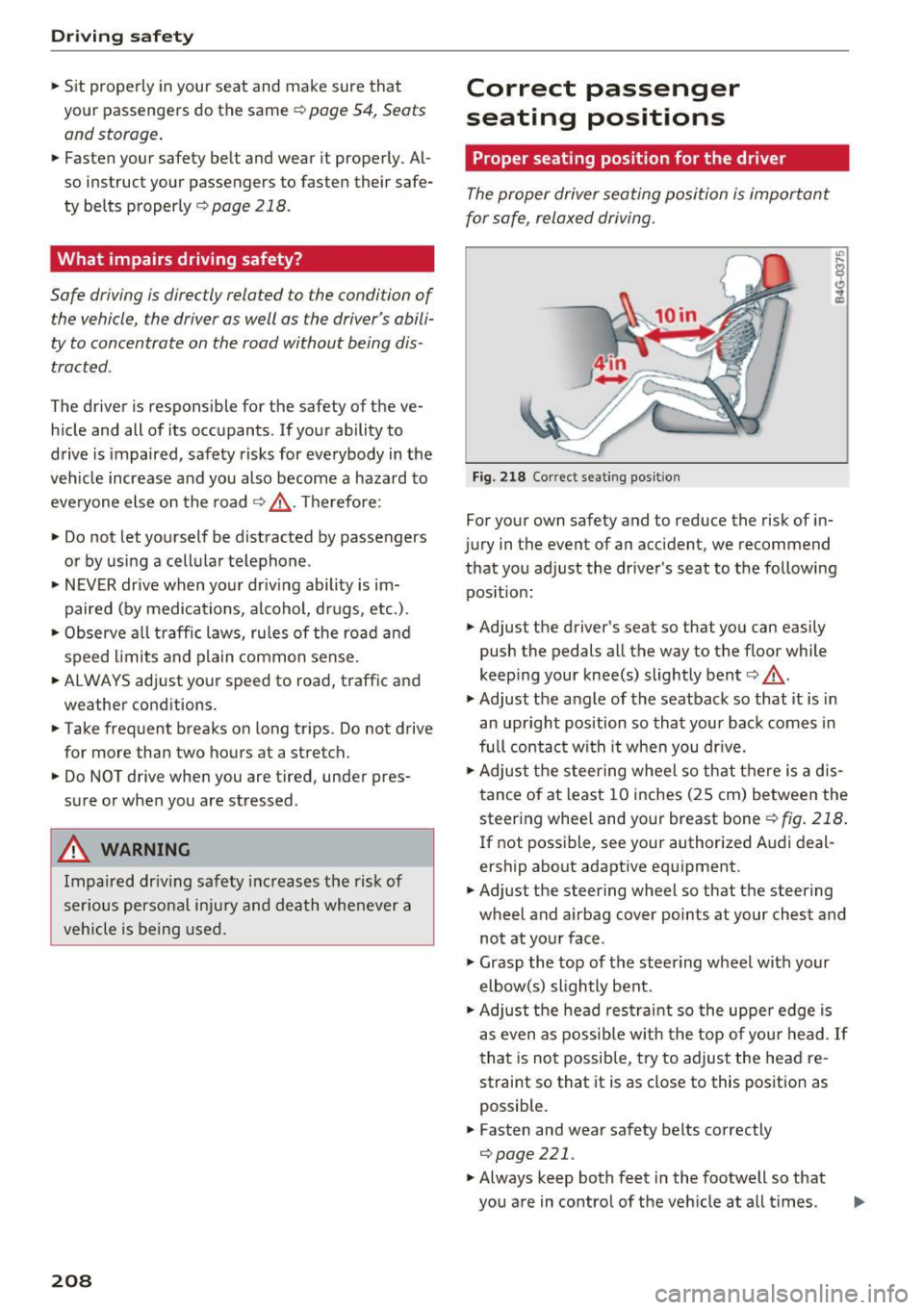
Fig. 218 Correct seating posit ion
For your own safety and to reduce the risk of in
jury in the event of an accident, we recommend
that you adjust the driver's seat to the following position:
• Adjust the driver's seat so that you can easily
push the pedals all the way to the floor while
keeping your knee(s) slightly bent
c:> .&_ .
• Adjust the angle of the seatback so that it is in
an upright position so that your back comes in
full contact with it when you drive.
• Adjust the steering wheel so that there is a d is
tance of at least 10 inches (25 cm) between the
steering wheel and your breast bone
r::!) fig. 218.
If not possible, see your authorized Audi deal
ership about adaptive equipment.
• Adjust the steering wheel so that the steering
wheel and airbag cover points at your chest and
not at your face.
• Grasp the top of the steering wheel with your
elbow(s) slightly bent.
• Adjust the head restraint so the upper edge is
as even as possible with the top of your head .
If
that is not possible, try to adjust the head re
straint so that it is as close to this position as
possible.
• Fasten and wear safety belts correctly
c:>poge 221.
• Always keep both feet in the footwell so that
you are in control of the vehicle at all t imes .
Page 211 of 354
0 co .... N ,..... N .... 0 0 :c '
driver's seat, see ¢
page 54.
A WARNING
Drivers who are unbelted, out of position or
too close to the airbag can be seriously in
jured by an airbag as it unfolds. To help re
duce the risk of serious personal injury:
- Always adjust the driver's seat and the
steering wheel so that there are at least 10 inches (25 cm) between your breastbone
and the steering wheel.
- Always adjust the driver's seat and the
steering wheel so that there are at least
4 inches (10 cm) between the knees and the
lower part of the instrument panel.
- Always hold the steering wheel on the out
side of the steering wheel rim with your
hands at the 9 o'clock and 3 o'clock posi
tions to help reduce the risk of personal in
jury if the driver's airbag inflates.
- Never hold the steering wheel at the
12 o 'clock position or with your hands at
other positions inside the steering wheel
rim or on the steering wheel hub. Holding
the steering wheel the wrong way can cause
serious injuries to the hands, arms and head if the driver's airbag inflates.
- Pointing the steering wheel toward your face decreases the ability of the supplemen
tal driver's airbag to protect you in a colli
sion.
- Always sit in an upright position and never
lean against or place any part of your body
too close to the area where the airbags are
located.
- Before driving, always adjust the front seats and head restraints properly and make sure
that all passengers are properly restrained.
- Never adjust the seats while the vehicle is
moving . Your seat may move unexpectedly
and you could lose control of the vehicle.
- Never drive with the backrest reclined or
tilted far back! The farther the backrests are
tilted back, the greater the risk of injury due
to incorrect positioning of the safety belt
and improper seating position.
Driving safety
- Children must always ride in child seats
¢
page 248. Special precautions apply
when installing a child seat on the front passenger seat¢
page 226.
Proper seating position for the front
passenger
T he proper front passenger seating position is
important for safe, relaxed driving .
For your own safety and to reduce the risk of in
jury in the event of an accident, we recommend
that you adjust the seat for the front passenger
to the following position :
... Adjust the angle of the seatback so that it is in
an upright position and your back comes in full
contact with it whenever the vehicle is moving.
... Adjust the head restraint so the upper edge is
as even as possible with the top of your head.
If
that is not possible, try to adjust the head re
straint so that it is as close to this position as
possible ¢
page 210.
... Keep both feet flat on the floor in front of the
front passenger seat.
... Fasten and wear safety belts correctly
¢page 221.
For detailed information on how to adjust the
front passenger's seat, see ¢
page 54.
A WARNING
-Front seat passengers who are unbelted, out
of position or too close to the airbag can be
seriously injured or killed by the airbag as it
unfolds . To help reduce the risk of serious
personal injury:
- Passengers must always sit in an upright po
sition and never lean against or place any part of their body too close to the area
where the airbags are located.
- Passengers who are unbelted, out of posi
tion or too close to the airbag can be seri
ously injured by an airbag as it unfolds with
great force in the blink of an eye . ..,
209
Page 221 of 354
C) C0 ....
"' ,....
"' .... 0 0 :r
that come on, could lead to persona l injury.
Why use safety belts?
Frontal collisions and the law of physics
Frontal crashes create very strong forces for peo
ple riding in vehicles .
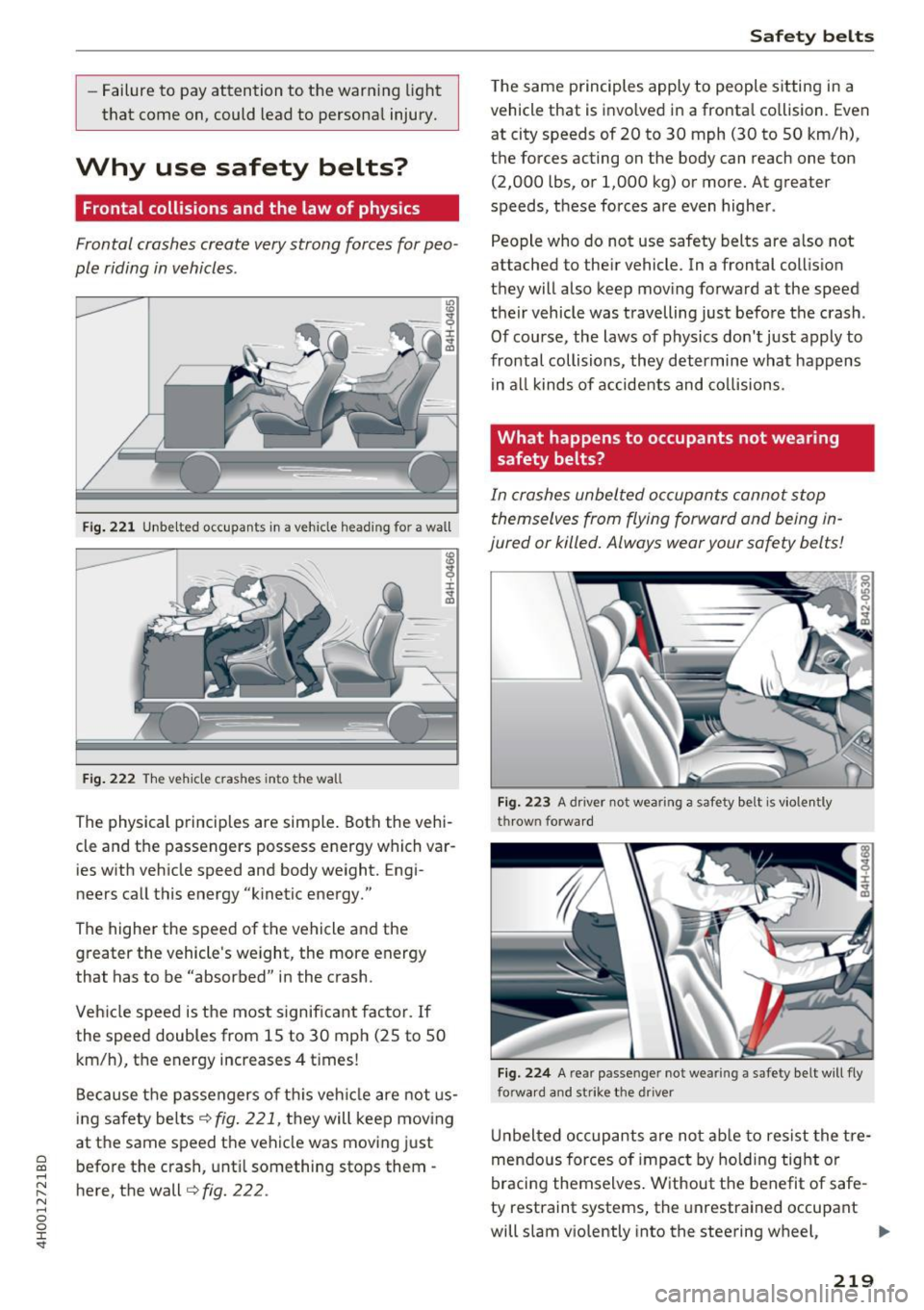
Fig. 221 Unbelted occupants in a vehicle heading for a wall
Fig. 222 The vehicle crashes into the wall
The physical principles are simple. Both the vehi
cle and the passengers possess energy which var ies with vehicle speed and body weight. Engi
neers call this energy "kinetic energy."
The higher the speed of the vehicle and the greater the vehicle's we ight, the more energy
that has to be "absorbed" in the crash.
Veh icle speed is the most significant factor. If
the speed doubles from 15 to 30 mph (25 to 50
km/h), the energy increases 4 t imes!
Because the passengers of this vehicle are not us
ing safety belts
¢fig. 221, they will keep moving
at the same speed the vehicle was moving just
before the crash, until something stops them -
here, the wall¢
fig. 222 .
Safety belts
The same p rinciples apply to people sitting in a
vehicle that is invo lved in a fronta l co llision. Even
at city speeds of 20 to 30 mph (30 to 50 km/h),
the forces acting on the body can reach one ton
(2,000 lbs, or 1,000 kg) or more. At greater
speeds, these forces are even higher.
People who do not use safety belts are a lso not
attached to the ir vehicle. In a frontal collis ion
they will also keep moving forward at the speed
their vehicle was travelling just before the crash .
Of course, the laws of physics don't just apply to
frontal collisions, they determine what happens in all kinds of accidents and collisions .
What happens to occupants not wea ring
safety belts?
In crashes unbelted occupants cannot stop
themselves from flying forward and being in
jured or killed. Always wear your safety belts!
Fig. 223 A dr iver not wearing a safety belt is violently
thrown forward
Fig . 224 A rear passe nger not wearing a safety belt will fly
forwa rd and strike the driver
Unbelted occupants are not able to resist the tre
mendous forces of impact by holding tight or
bracing themselves . Without the benefit of safe
ty restraint systems, the unrestrained occupant
will slam v iolently into the steering wheel,
Ill>-
219
Page 228 of 354
Airbag syste m
Airbag system
Important information
Importance of wearing safety belts and
sitting properly
Airbags are only supplemental restraints . For
airbags to do their job, occupants must always
properly wear their safety belts and be in a prop
er seating position.
For your safety and the safety of your passen
ge rs , before driving off, always :
"' Adjust the driver's seat and steering wheel
properly ¢
page 208,
"'Adjust the front passenge r's seat properly
¢ page 54,
"'Wear safety belts p roperly ¢ page 220,
"' Always properly use the proper child restraint
to protect children ¢
page 248.
In a coll is io n, airbags mus t inflate within the
blink of an eye and wi th considerab le force . The
supp lemental airbags can cause injuries if the
driv er or th e front s eat passeng er is not s eated
properly. Therefore in order to he lp the airbag to
do its job, it is important, both as a dr iver and as
a passenger to sit properly at all t imes.
By keeping room between your body and the
steering whee l and the front of the passenger
compartment, the a irbag can inflate fully and
completely and provide supplemental protect ion
in certain frontal collisions¢
page 208, Correct
passenger seating positions .
For details on the
operation of the seat adjustment con trols
¢ page 54.
It's especially important that children are proper
ly restra ined
¢ page 248 .
There is a lot that the driver and the passengers
can and must do to help the ind iv idual safety fea
tures installed in your Audi work together as a
system .
Proper seating posit ion is important so that the
front airbag on the drive r side can do its job. If
you have a physical impairment or cond ition that
prevents you from s itting properly on the driver
seat with the safety be lt properly fastened and
226
reaching the peda ls, or if yo u have concerns w ith
regard to the function or operation of the Ad
vanced Airbag System, please contact your a u
thori zed Audi dea ler or qua lified workshop, or
ca ll Audi Customer Relations at 1-800-822-2834
for poss ib le modifications to your vehicle .
When the airbag system dep loys, a gas generator
will fill the airbags, break open the padded cov ers, and infla te between the steering wheel and
the driver and between the instrument panel and
t h e front passenger . The airbags w il l deflate im
med iate ly after deployment so that the front oc
cupants can see t hrou gh the windsh ie ld again
without i nterruption.
All of th is takes p lace in the b link of an eye, so
fast that many people don't even rea lize that the
a irbags have deployed. The airbags a lso infla te
with a g re at deal of force and nothing should be
i n the ir way when they deploy. Front airbags in
combination with properly worn safety belts slow
down and limit the occupant 's forward move
ment . Together they he lp to prevent the driver
and front seat passenger from hitting pa rts of
the ins ide of the vehicle while reduc ing the fo rces
acting on the occupant dur ing the cras h. In th is
way they help to reduce the risk of injury to the
head and uppe r body i n the crash . Airbags do not
protect the arms or the lower pa rts of the body.
Both front airbags will not inflate in all frontal
collisions . The t riggering of the a irbag system de
pends on the veh icle decelerat ion rate caused by
t h e coll is io n and regis tered by the ele ctroni c con
tro l unit . If this ra te is be low the refe rence value
programmed in to the contro l unit, the airbags
will not be trigge red, even tho ugh the car may be
badly damaged as a resu lt of the co llision. Vehi
cle damage, rep air costs or even the lack of vehi
cle damage is not necessarily an indication of
whether an a irbag should inflate or not .
Since the circumstances will vary cons iderab ly
between one co llision and another, it is not possi
ble to define a range of veh icle speeds that will
cover every poss ible kind and angle of impact
that w ill always t rigger t he a irbags . Important
factors i nclude, for examp le, the nat ure (hard or
soft) of the object which the ca r hits, the angle of
i mp act , vehicle speed , etc. The front airbags will .,.