light AUDI A8 2017 Manual Online
[x] Cancel search | Manufacturer: AUDI, Model Year: 2017, Model line: A8, Model: AUDI A8 2017Pages: 354, PDF Size: 88.68 MB
Page 175 of 354
Route criteria
Au to rerouting (traff ic):
when auto rerouting is
On , the route is automatically adjusted based on
TMC traffic information. If the MM I does not cal
culate a detour even though you have se lected
dynamic route
On and a traffic jam was reported
on the ca lculated route, then the detour the sys
tem calculated would take more time than the
time spent wa it ing in the traff ic jam .
Alternati ve route s: when the fun ction is On , up
to three suggested routes and their criteria ap pear in the Infotainment d isplay in the side
menu . After chang ing to map view, the new route
that was calculated according to your cr iteria is
hi ghlighted. Yo u can select the poss ib le routing
i n the alte rnative routes by turning and press ing
the cont rol knob .
Route option s: you can se lect a Short , Fas t or
Mix ed route .
Highway /Toll road /Fe rry : select the Minimize
option you do not want the navigation system to
include highways, toll roads o r ferries when cal
culating a ro ute.
T ime rest ricted roads : using the Minim ize func
tion will exclude t ime restricted roads, such as
pedestrian zones, from the route ca lculation .
When
Auto i s selected , the M MI decides if the
time rest ricted roads s hou ld be included when
calculat ing the ro ute guidance based on the en
tr ies stored in the navigation data .
Seasonal clo sing : using the Minimize function
will exclude seasona l closings, su ch as mountai n
passes, from the route calcu lation . When
Auto is
se lected, the MMI decides if the seasonal re
stricted roads should be included when calc ulat
ing the route guidance based on th e entries stor
ed in the navigation data .
Map colors
Day/Night :
the map is displayed with a light/
dark background.
Auto : when t he lights switch on, the map co lors
~ sw itch from day to night . .... N ,..._
N .... 0 0
~ l) Only po ssible in th e 2D map view
Na vigation
O rientation
North 1
l:
the map orienta tion is facing north.
Dir. of travel : the map orientat ion is in the direc
t ion of t ravel. At a sca le of 62 mi les (100 km) ,
the map is or iented to t he no rth for eas ier o rien
tation.
Auto : at a scale up to 3 miles (5 km), the map
o rientation is in the direction of travel. At a scale
greate r than 3 miles (5 km), the map is oriented
to the no rth.
Map type
D estination :
the destination is marked with a
c h ecke red flag . The map indicates the destina
t ion and is o riented to the north.
2D: the current veh icle position is displayed. The
map or ientation corresponds to the sett ing in the
Map orientation menu ~ page 173.
3D : when th is function is switched on, the cur
rent vehicle pos ition is displayed in a three-di
mensional terrain map and the map or ientat ion
is set automat ica lly to the
Dir. of travel. At a
sca le of 100 km and la rger, the map is o riented
to the no rth. At a sca le between 30 -100 meters,
the d isplay will show three-d imens iona l city
models and landmarks will be shown at a scale of
30 -200 meters.
Ov ervi ew : the entire route from the veh icle loca
t ion to the destina tion is disp layed on the map.
T he map scale depends on the length of the
route. The map is oriented to the north.
Map disp lay
Online map view 9 page 171
Map content
Map contents such as traffic information, favor
ites or restaurants can be displayed (~) or hid
den .
The functions in the
Map content menu depend
on the map d isplay that is selected .
IJl,
173
Page 182 of 354
Media drive s and conn ections
Media drives and
connections
Introduction
There are various media drives and connections
ava ilable in the MMI. For example, you can play
aud io/video* f iles through the Jukebox, or you
can connect a portable device to the Audi music i n terface* a nd ope rate it through the MM I.
Notes
General information
Med ia and format restrictions :
the MMI (includ
ing the SD card reader and the USB storage de
vice connect ion*) was tested w ith a var iety of
p roducts and media on the market . However ,
there may be cases where ind iv idual devices or
media and audio/video* files may not be recog
n iz ed, may play on ly w ith restrict ions or may no t
p lay at a ll.
The MM I media dr ives do not suppo rt Windows
Media Audio 9 Vo ice, Windows Media Audio 9
L oss less and Windows Media
9 Profess ional for
mats .
Digital Right s Managem ent : please note that
the audio/v ideo* files are subjec t to copyright
p rotection .
The med ia drives do not play f iles that are pro
tected by ORM and that are ident ified with the
symbo l~ -
Data s ecurity : Never store important data on the
memory cards, the Jukebox, CDs/DVDs or porta
b le aud io devices . A udi is not responsib le for
damaged or lost files and med ia.
Lo ad ing t imes : the more files/folders/playlists
that a re on a storage medium, the longer it w ill
take to load the audio/v ideo* fi les . Audi recom
mends using storage media that on ly conta in au
d io/video files*. To decrease the t ime it takes to
load audio/video fi les*, create subfo lders (for ex
ample, for the artist or album). The loading time
will also increase when importing files.
A dditional information : when playing, audio
fi les are automatically displayed with any addi-
180
tiona l information that is stored (such as the ar
tist, track and album cover) . If this information is
not avai lab le on the storage medium, the MMI
will check Gracenote . However, in some cases,
the addit ional information may not be d isplayed .
Restri cted functionalit y: if functionality is re
stricted, reset the
Media setting s to the factory
default settings
c> page 206.
Reset the Jukebox to the factory defau lt settings
if functiona lity is restricted
c> page 206.
Fo r information abo ut the propert ies of s upport
ed med ia and fi le formats, see
c> page 186 .
(D Note
Always fo llow the information found in c> (D in
Wi-Fi
hotspot on page 160.
CD/DVD operation
CD /DVD and fo rmat re striction s:
the functionali
ty of individua l storage media may be limited due
to the variety of b lank CDs/DVDs available and
the various capacities . Aud io CDs or video DVDs
with copy protection, CDs/DVDs that do not con
form to the standard and mult isess ion CDs may
have l imited playback or may not play at all. Audi
r ecommends finaliz ing the recording process
whe n creat ing mult isess io n CDs . Mult isess ion is
not supported for DVDs .
Handling CDs/DVDs and th e DV D dri ve: To en
sure good, h igh-quality sound reproduction and
to prevent damage to the dr ive or disc reading er
r ors, always store CDs/DVDs in a protective
s leeve and do not expose them to direct s unlight.
Do
not u se:
- Damaged, dirty or sc ratched CDs/DVDs
- Single CDs/DVDs (3 inch/8 cm diameter)
- CD/DVDs that are not round
- CDs/DVDs w ith labels
- Protective rings
- Clean ing CDs
Thermal protection switch : CD/DVD playback
may be tempora rily unavailable if o utside tem
peratures a re extremely hot or co ld. A thermal
Page 184 of 354
Media drive s and conn ections
DVD changer
Applies to: vehicles w ith DVD changer
The DVD changer is located in the glove com
partment.
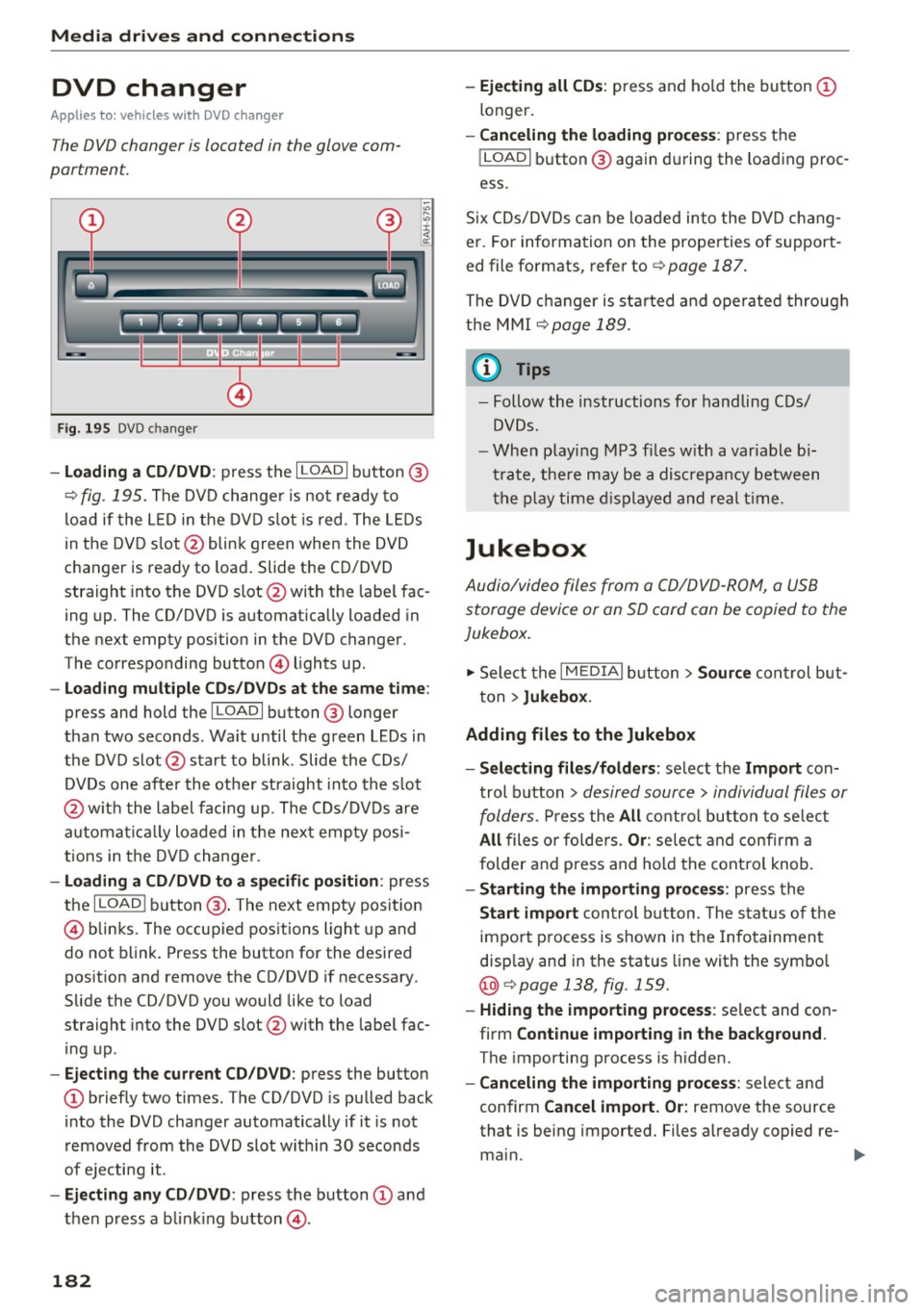
@
F ig . 195 DVD c hanger
- Loading a CD /DVD : press the I LOADI button @
¢
fig. 195. The DVD change r is not ready to
load if the L ED in the DVD slot is red . The LEDs
in the DVD s lot @ blink green when the DVD
changer is ready to load . Slide the CD/DVD
straight into the DVD slot @with the labe l fac
ing up. The CD/DVD is automat ica lly loaded in
the next empty position in the DVD changer .
The corresponding button © lights up .
-Loading mul tiple CD s/ DV Ds at the same t ime :
press and hold the I LOAD I button @ longer
than two seconds . Wait until the green LEDs in
the DVD slot @start to blink . Slide the CDs/
DVDs one after the othe r straight into the s lot
@ wit h the label facing up. The CDs/DVDs are
a utomat ica lly loaded in the nex t empty posi
tions in the DVD changer .
-Loading a CD /DVD to a specific position : press
the
I L OAD I button @. The next empty pos it ion
© blinks. The occupied positions light up and
do not b link . Press the button for the desired
position and remove the CD/DVD if necessary .
Slide the CD/DVD you would like to load
straight into the DVD slot @with the labe l fac
ing up .
-Ejecting the current CD/DVD : press the button
CD briefly two times. The CD/DVD is pu lled back
i nto the DVD changer automatically if it is not
removed from the DVD slot w ith in 30 seconds
of ejecting it .
-Ejecting any CD /DVD : press the b utton CD and
then press a blink ing button @.
182
-Ejecting all CD s: press and ho ld the button CD
longer .
-Canceling the load ing pro ce ss: press the
!LOAD I button @ again d uring the loading proc
ess.
S ix CDs/DVDs can be loaded into the DVD chang
er. For information on the properties of support
ed file fo rmats, refer to ¢
page 187.
The DVD c hanger is sta rted and oper ated throug h
the MMI
¢ page 189.
(1} Tips
-Follow the instructions fo r handling C Ds/
DVDs.
- Whe n playi ng MP3 f iles w ith a variable b i
t rate, t he re may be a disc repancy between
t h e p lay time d isplayed and real t ime.
Jukebox
Audio/video files from a CD/DVD -ROM, a USB
storage device or an SD card can be copied to the
Jukebox.
... Select the I MEDIAi button> Source con trol b ut
ton >
Jukebox.
Adding fil es to the Jukebox
- Select ing files /fold ers :
select the Import con
trol b utton >
desired source > individual files or
folders.
P ress the All c o ntro l butto n to se lec t
All files o r fo lde rs. Or : selec t and confirm a
folder and press and hold the contro l knob.
- Starting the importing proc ess: press the
Start import con trol b utton . T he stat us o f the
import p rocess is shown in the Infotainment
disp lay and in the status line with the symbo l
@¢page 138, fig . 159.
- Hid ing the importing proce ss: se lect and con
firm
Continue importing in the background .
The importing process is hidden.
- Canceling the impo rt ing process : select and
confirm
Can cel import. Or : remove the source
that is being imported. Files a lready copied re-
ma in.
Ill>-
Page 187 of 354

C) C0 ....
"' " "' .... 0 0 :r
Introduction
Applies to: ve hicles with Audi music interface
You can connect a portable device (such as an
MP3 player) to the Audi music interface using a
special adapter cable* and operate the device through the MMI.
.,-.,.
F ig. 1 96 Adapter cables
® iPod adapter cable* /iPod adapter cab le plus*
® 3.5-mm stereo jack adapter c able*
© Mini USB adapte r cab le*
@ Micro USB adapter cab le*
© USB adapter cable *
® AV adapter cable*
@ Adapter cable for App le dev ices w ith Lightning
connector*
You can p urchase the adapter cable from an au
thor ized Audi or at specialty stores.
(D Note
- Han dle the adapter cab le carefully . Do not
a llow it to be pinched.
- Ext reme ly h igh or l ow temperatures that
can occ ur inside vehicles can damage porta
ble devices or affect their performance .
Never leave a portable audio dev ice in the
vehicle in extremely high or low tempera
tures .
(D Tips
Be sure to pay attent io n to a ny messages on
your cell p ho ne when connect ing it w it h the
USB / Mini USB / Micro USB a dapte r cable. In
Media drives and connections
some c ases, i t may not be possi ble to access
the au dio files on your cell phone.
Setup
Applies to : vehicles wi th Audi music interface
The Au di music interfa ce is located inside the
center armrest.
Fig. 19 7 Connecti ng t he po rtab le dev ice
Requireme nt: T he center a rmrest is fo lded open .
-Connecting the adapter cable: connect the
adapte r cable* @¢
fig. 197 to the port on the
Aud i mus ic interface
(D and then co nnect it to
the portable audio device ® (such as an iPod) .
-Disconnecting the adapter cable from the
Audi music interface :
disconnect the connector
from t he Aud i mus ic interface wh ile press ing
th e re lease tab @.
-Disconnecting the iPod adapter cable (plus)*
from the iPod :
disconnect the iPod connec tor
from the iPod while p ressing the release tabs
@ .
The media are started and operated through the
p ort able device or the MMI, depending on the de
vice being used
¢page 189.
Q) Note
Remove t he c onnector fro m the Aud i music
i nterface carefully so it is not damaged.
@ Tips
- Do not use USB extension cab les or adapt
ers. T hey may impa ir the fu nctionality .
- Functionality is not guaranteed for portable
devices that do not meet the USB 2.0 s peci
fication .
- USB hubs are not suppo rted.
185
Page 188 of 354

Media drive s and conn ections
- Other iPod versions s uch as the iPod shuffle
cannot be connected to the iPod adapter ca
ble (plus)* . Connect these devices using the
optional 3.5 mm stereo jack adapter cable*.
- For video p layback, you can also connect
your iPod using the AV adapter cable*. You
also need an Apple AV cable to do this. For
more information on the App le AV cable, re
fer to your iPod user guide .
- The Apple Lightning connector does not
support v ideo p layback. - iPod/
iPhone malfunctions a lso affect the
operation of the MMI. Reset your iPod/
iPhone if this happens.
- For impo rtant information on operating
your iPod/ iPhone, refer to the user guide for
the device. Audi recommends updating the
iPod/ iPhone software to the latest version.
- For more information about the Aud i mus ic
interface and supported devices, v is it
www .audi.com /bluetooth or contact an au
thorized Aud i dealer .
Supported media and file formats
Overview
The DVD drive , the Jukebox, the SD card reader
and the USB storage device* connection support
the following audio/v ideo file properties:
Audio files Video files
Supported SD cards:
with a capacity up to 32 GB
media DVD drive: audio CDs (up to 80 minutes); CD-RO Ms with a capacity up to 700 MB;
DVD±R/RW; standard video DVDs and audio DVDs that are compatible with DVD v id-
eo
Audi music interface : portable devices (such as iPods, USB storage dev ices*)
File system SD/SDHC/ MMC memory cards
USB storage device*:
FAT or FAT32 file system, maximum 4 partitions
DVD drive : Joliet (sing le session and multisess ion CDs; single sess ion DVDs only);
UD F
Metadata Album, track, artist, yea r, genre
and commentar ies for MP3-/
WMA-/M4A files
Embedded album covers up to
800x800 px. (GIF, JPEG, PNG)
Format MP EG- 1/-2
Windows MP EG 2/4 MPEG 1/2 ISO- ISO- W indows
Layer-3 Med ia Au- MPEG4; MPEG4 H. Media Vid-
dio 8 and 9 DivX 3, 4 264 eo 9
and S; Xvid (MPEG4
AVC)
File extension .m p3 .wma; .m4a; .mpg; .av 1 .mp4; .wmv;
.asf .m4b; .mpeg .m4v; .asf
.aac .mov
Play .M3U; .PLS; .WPL
lists
186
Page 199 of 354
C) C0 ....
"' " "' .... 0 0 :r
the music/video files are deleted and the
M edi a
setting s
are reset .
Resetting the func tions to the fac tory defau lt
settings does not a ffect the M MI.
System update
The RSE software can be updated by DVD, USB or
SD ca rd using the system update feature.
Contact an author ized Audi dealer or author ized
Aud i Service Facility for additional information
about the
System updat e.
Data encryption
You can protect the list of destinations with a personal password. If the unit is replaced, you
can only transfer your pe rsonal data to the new
RSE un it using your passwo rd . If you do not as
sign a personal passwo rd, "MMI3G" is stored in
the RSE automatically as the password.
Version inform ation
Information on the software version of the RSE
and the navigat ion database is displayed .
Headphones
Wireless headphones
Applies to: vehicles with Rea r Seat Entertainment
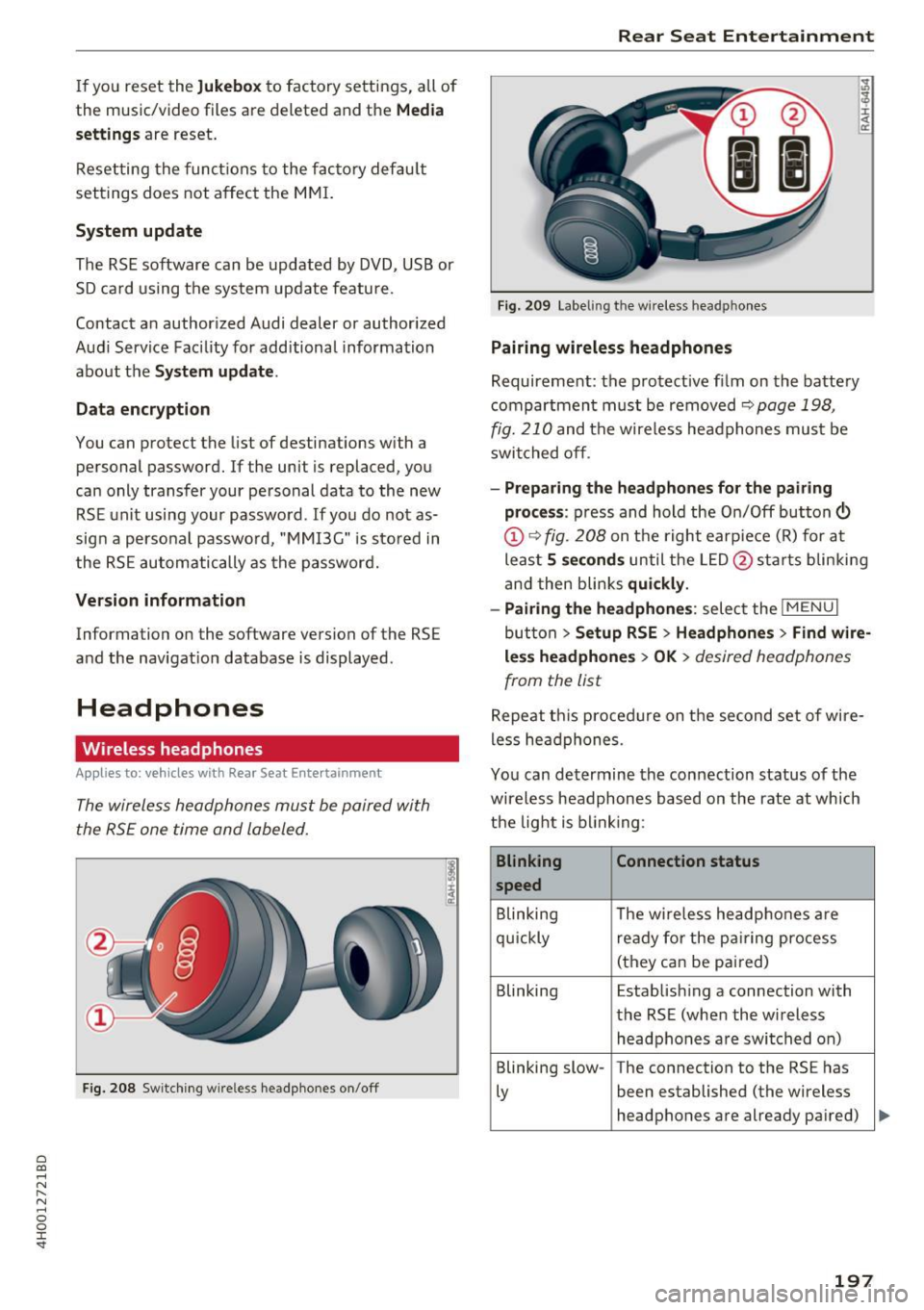
The wireless headphones mus t be paired with
the RSE one time and labeled.
F ig. 208 Switching wire less he adphones on /off
Rear Seat Entertainment
Fig. 20 9 Labeling th e w ireless head phones
Pairing wir eless headphones
Requirement: the protective film on the batte ry
compartment must be removed
~ page 198,
fig. 210
and the wireless headphones mus t be
swit ched off .
-Pr eparing the headphones fo r the pairing
pro ce ss :
press and hold the On/Off button©
@¢ fig . 208 on t he right earp iece (R) for at
leas t
5 seconds until the L ED @ starts b linking
and then blinks
quickl y.
- Pairing th e headphone s:
select the !M ENUI
button > Se tup RSE > Headphone s> Find w ire
le ss headphone s > OK >
desired headphones
from the list
Repeat t his procedure on the second set of wire
less headphones .
You can determine the connection status of the
wireless headphones based on the rate at which
the light is b link ing :
Blinking Connection statu s
speed
B linking The w ireless headphones are
qu ickly ready for the p airing process
(they can be pai red)
Blinking Estab lishing a connection with
the RSE (when the w ireless
headphones a re switched on)
Blinking slow -The connection to the RS E has
Ly been established (the wireless
headphones are already pa ired)
197
Page 200 of 354
Rear Seat Entertainment
Labeling the wireless headphones
-Attach the supplied label CD or@ c::> fig. 209 on
the inside of the left/right wire less head
phones.
La beling the w ireless headphones:
CD Wireless headphones label (paired with the
left RSE display)
@ Wireless headphones label (paired with the
right RSE display)
Switching wireless headphones on/off
- Switching on:
to switch the wire less head
phones on, press the On/Off button
CD
9 fig. 208 on the right earpiece (R) for approxi
mately
3 seconds and release it once the LED
@ starts blinking . The light @will blink s lowly
once the connection to the wireless head phones has been established.
- Switching off : to switch the wireless head
phones off, press and hold the On/Off button
CD until the LED @turns off.
The wireless headphones switch off automatical ly about five minutes after the RSE switches off.
Disconnect wireless headphones
You can delete the pairing between the wireless
headphones and the RSE if yo u need to switch
out the headphones o r change the pairing .
- Select:
I M ENU I button> Setup RSE control but
ton
> Headphones > Delete wireless head
phones.
A WARNING
- For safety reasons, as the driver, only use
the headphones when the vehicle is station
ary to reduce the r isk of a crash .
- When driving, store the headphones secure
ly so that they do not move around in the
vehicle interior when braking or in a crash.
- Maintain a moderate volume leve l when lis
tening to audio playback through the head
phones. Continuous exposure to extreme
volume levels may result in loss of hearing.
198
-
@ Tips
-If the wire less headphones were already
paired, the connection to the headphones
will be reestablished after switching the
RSE on if the headphones are sw itched on.
- The RSE only supports wireless headphones
from your authorized Audi dealer.
- Audio/video output through the wire less
headphones stops during the pairing proc
ess.
- The pairing process must be done separate
ly for the left and right w ireless head
phones. The wireless headphones are as
signed to the left or right RSE display de
pend ing on the side of the RSE control unit
where you started the pairing process. The
pairing between the wireless headphones
and the lef t/r ight RSE display is ide ntifi ed
with a label.
- Volume that is too high or too low is auto
matically adjusted to a preset leve l when
the wireless headphones are connected.
Charging and changing the battery
Applies to: vehicles with Rear Seat Entertainment
If the light on the wireless headphones turns
red the batteries are low and need to be charg-
,
ed or replaced .
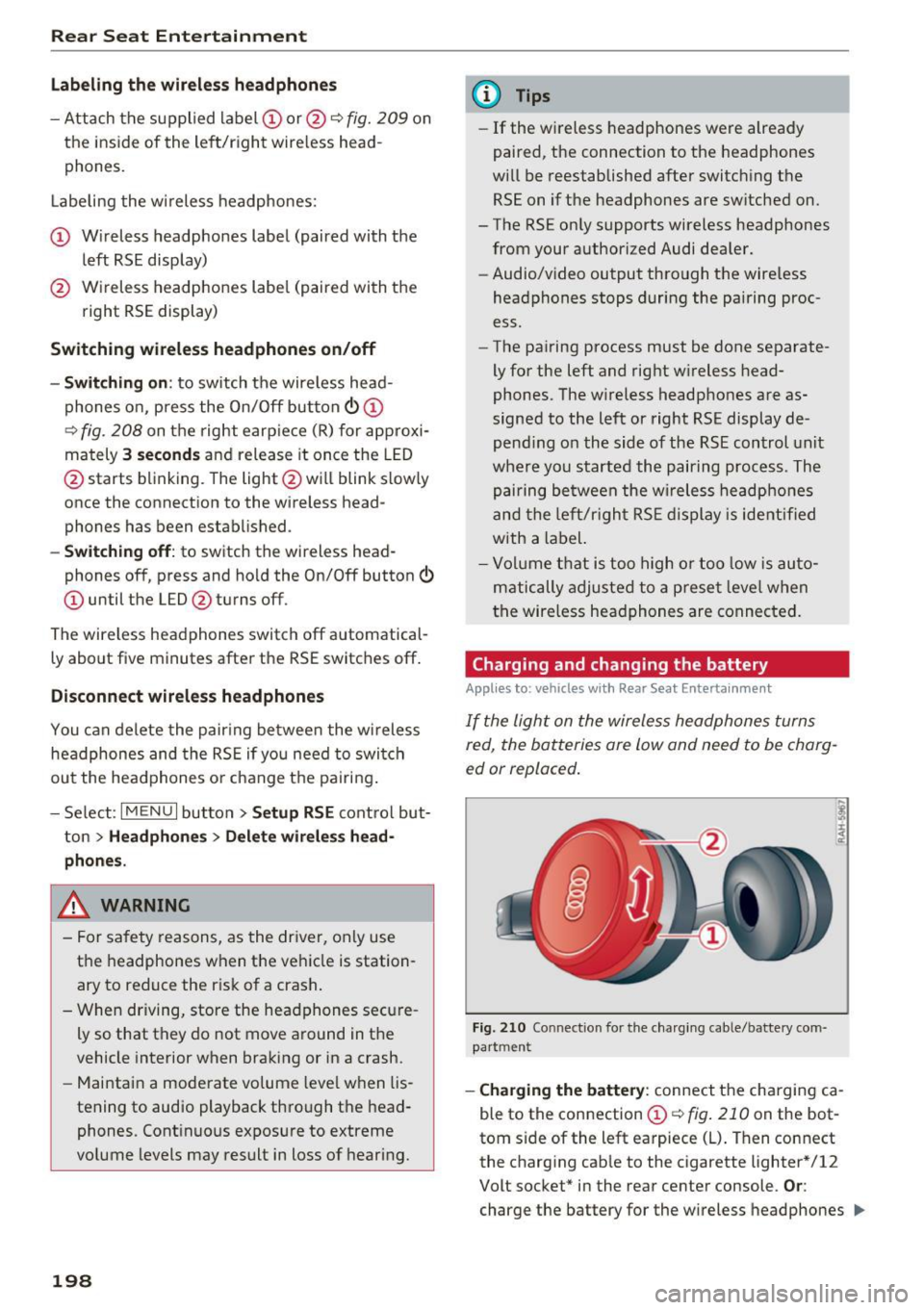
Fig. 210 Connec tion for the charg ing cable/battery com
partm ent
-Charging the battery : connect the charging ca
ble to the connection
CD c::> fig . 210 on the bot
tom side of the left earpiece (L) . Then connect
the charging cable to the cigarette lighter * /12
Volt socket* in the rear center console.
Or:
charge the battery for the wireless headphones .,.
Page 201 of 354

0 co .... N ,..... N .... 0 0 :c '
Audi music interface ¢
page 185.
-Ch angin g th e batt erie s: turn the cover @
¢ fig. 210 on the left earpiece (L) to the left/
right and change the batteries as labeled in the
battery compartment. Then attach the cover
back on to the left earpiece (L).
You can identify the charge status of the battery
¢
table on page 199 based on the blinking
speed
of the L ED in the charging cable connec
tion ©¢
fig. 210 .
Blinking fre- Charge status
quency
Blinking The batteries are charging.
Remains on The batteries are charged.
Blinking An error occurred while charg-
quickly ing .
..&, WARNING
-Do not use damaged rechargeable batteries.
T h is increases the r isk of an explos ion.
- T he headphones can become warm when
the batteries a re charg ing and increase the
risk of inj ury.
- Do not cha rge standard batteries with the
charg ing cable. This increases the risk of an
exp losion .
- Be careful when using the c igarette lighter.
Inattentive or unsupervised use of the c iga
ret te lighter can cause burns.
- T he cigarette lighter/sockets and any elec
trical accessories connected to them func
tion only when the ignition is switched on .
Using the cigarette lighter/sockets or elec
trical accessories incorrectly can lead to se rious injur ies or cause a f ire. To reduce the
risk of injuries, never leave children unat
tended in the vehicle with the vehicle key.
(D Note
- Do not charge the batteries in the wireless
headphones when the engine is not run
ning. This w ill dra in the vehicle battery.
- For wireless headphones, only use batteries
that are approved for that type of device,
for example NiMH batteries with a min i-
R ear S eat Ent ertainm ent
mum capacity of 550 mAh in AAA size that
are suitable for quick charging.
~ For the sa ke of the environment
Batter ies contain polluting substances. They
must be disposed of using methods that wi ll
not harm the environment. Do not dispose of
them in househo ld trash .
(D Tips
The charging time for the included rechargea
ble batteries is approximate ly three to four
hours and may increase by approximately 25
percent if the batteries are in use while charg
ing .
Headphones connected by cable
App lies to: vehicles wit h Rear Seat Enterta inmen t
The headphone connections ore located on the
RS£ control uni t.
Fig. 211 Conn ecting w ired headphones
"'I nsert th e headphone connecto r into the left or
r ight jack ©¢
fig. 211 on the RSE control pan
el.
The unit is equ ipped w ith 3.5 mm stereo jacks .
The w ireless headphones sw itch off automatical
ly about five minutes after the cable headphones
are connected .
(D Tips
Volume that is too high or too low is auto matically ad justed to a preset level when the
wired headphones are connected .
199
Page 206 of 354

System settings
System settings
Setting the time and
date
You can set the clock time manually or using the
CPS.
Fig. 215 Sett ing a time zone
.,. Select : the I MENU I button > the upper left Time
control button (D <=> fig . 215.
Time source
GPS
'ti: the Time and Date are set by GPS based
on the
Time zone that was se lected manually. Al
ways remember to set the new
Time zone i n the
MMI when the vehicle enters a different t ime
zone.
Manual : you can set the Time and Date manually
using the respective function . Press the control
knob. Set the
Time or the Date manually by turn
ing and pressing the control knob.
Automatic daylight saving time*
When daylight saving time is sw itched On , the
time is moved forward or back automatically by
one hour when daylight sav ing time begins or
ends.
Man. daylight sav. time
When this function is switched On , an hour is
added to the set
Time.
Time zone
When selecting the appropriate time zone, a
sampling of countr ies in this zone will be listed .
204
Time format
If you select 24h , the clock will display, for ex
amp le,
13:00. If you select AM/PM , the clock
will display, for example,
1:00 PM.
Date format
If you select DD.MM , the date will display, fo r ex
ample,
31.12 . If you sele ct MM/DD , the date
will display, for example,
12/31.
Adjusting the sound
The sound distribution and volume of the MMI
can be adjusted individually. The settings depend
on vehicle equipment .
Fig. 216 Sound settings
Fig. 217 Adjusti ng the ba la n ce/fader
.,. Select: !T ONEI button.
(D GALA*/ DSP* / DSP [BOSE]*/ DSP [Bang
& Olufsen]*
- GALA (Speed-dependent volume increase) *:
select and confirm Active /Inactive for the ad
justment of playback volume to the level of
noise inside the vehicle.
-Sound focus (adjusting the sound distribu
tion) *:
select and confirm All (symmetrical
Page 209 of 354
Driving safety
Basics
Safe driving habits
Please remember -safety first!
This chapter contains important information,
tips, instructions and warnings that you need to
read and observe for your own safety, the safety
of your passengers and others . We have summar
ized here what you need to know about safety
belts, airbags, child restraints as well as child
safety. Your safety is for us
priority number 1. Al
ways observe the information and warnings in
this section - for your own safety as well as that
of your passengers.
The information in this section applies to all
model versions of your vehicle. Some of the fea
tures descr ibed in this sections may be standard
equipment on some models, or may be optional
equipment on others. If you are not sure, ask
your authorized Audi dealer.
A WARNING
- Always make sure that you follow the in
structions and heed the WARNINGS in this
Manual. It is in your interest and in the in
terest of your passengers .
-
-Always keep the complete Owner's Litera
ture in your Audi when you lend or sell your
vehicle so that this important information
will always be available to the driver and
passengers.
- Always keep the Owner's literature handy so
that you can find it easily if you have ques
tions.
Safety equipment
The safety features are part of the occupant re
straint system and work together to help reduce the risk of injury in a wide variety of accident sit
uations.
~ Your safety and the safety of your passengers
~ should not be left to chance. Advances in tech-,..._
~ nology have made a var iety of features available 0
~ to help reduce the risk of injury in an accident. '
The following is a list of just a few of the safety
features in your Audi:
- sophisticated safety belts for driver and all pas-
senger seat ing pos itions,
- safety belt pretensioners,
- safety belt force limiters for the front seats,
- safety belt height adjustment systems for the
front seats,
- front airbags,
- knee airbags for the front seats
- side airbags in the front seats and outer rear
seats,
- side curtain airbags,
- special LATCH anchorages for child restraints,
- head restraints for each seating position,
- adjustable steering column.
These individual safety features, can work to gether as a system to help protect you and your
passengers in a w ide range of accidents . These
features cannot work as a system if they are not
always correctly adjusted and correctly used.
Safety is everybody's responsibility!
Important things to do before driving
Safety is everybody 's job! Vehicle and occupant
safety always depends on the informed and care
ful driver .
For your safety and the safety of your passen
gers,
before driving always:
.,. Make sure that all lights and signals are operat
ing correctly .
.,. Make sure that the tire pressure is correct.
.,. Make sure that all windows are clean and afford
good visibility to the outside .
.,. Secure all luggage and other items carefully
c:c.> page 65, c:c.> page 63 .
.,. Make sure that nothing can interfere with the
pedals.
.,. Adjust front seat, head restraint and mirrors
correctly for your height.
.,. Instruct passengers to adjust the head re
straints according to their height.
.,. Make sure to use the right child restraint cor
rectly to protect children
¢ page 248, Child
safety. ..,.
207