low beam AUDI A8 2017 Owners Manual
[x] Cancel search | Manufacturer: AUDI, Model Year: 2017, Model line: A8, Model: AUDI A8 2017Pages: 354, PDF Size: 88.68 MB
Page 11 of 354
C) C0 ....
"' ,....
"' .... 0 0 :r
Instrument cluster
Instrument cluster overview
The instrument cluster is the central information center for the driver.
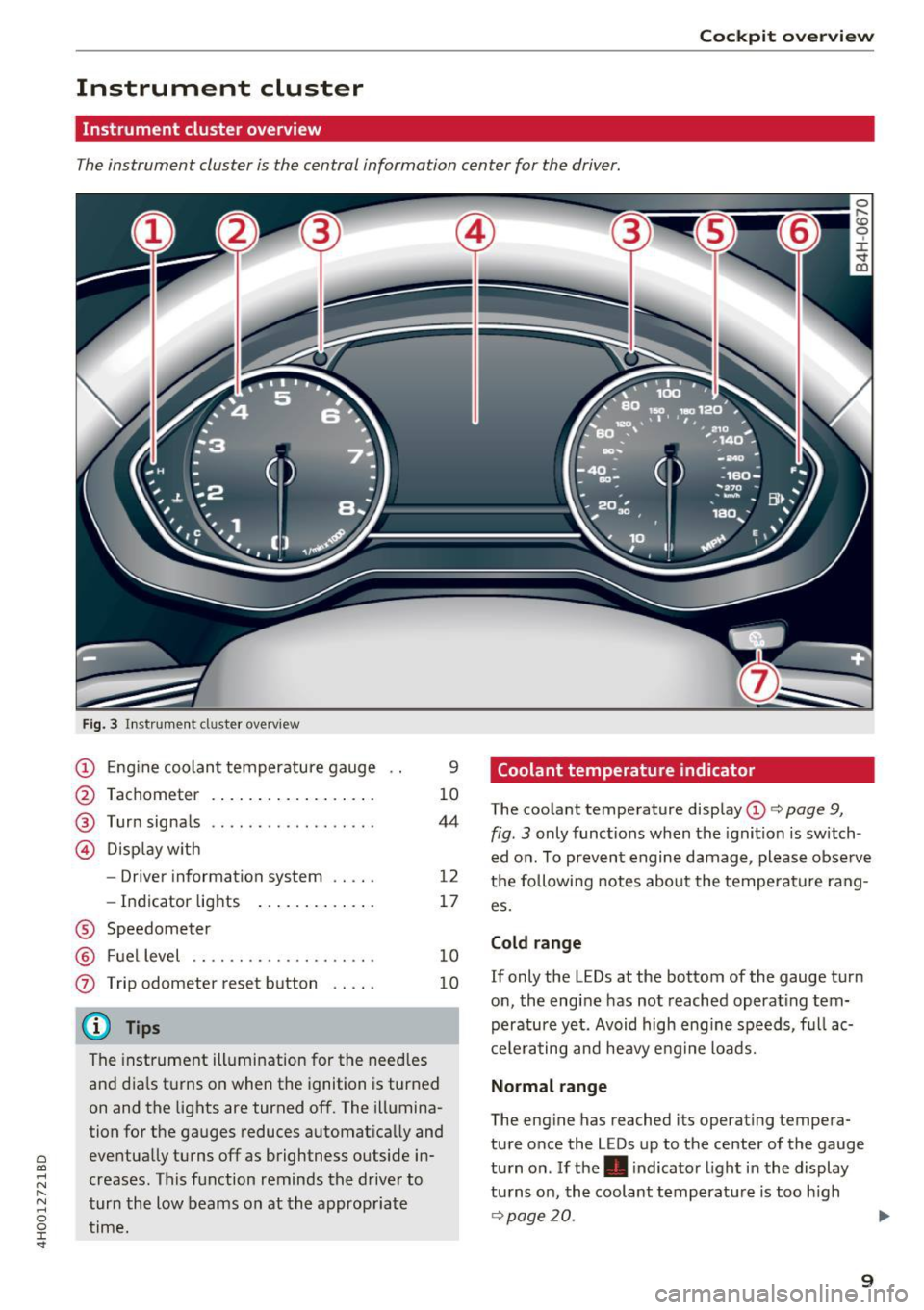
Fig. 3 In strume nt cl us ter overview
CD Eng ine coolan t temperature gauge
@ Tachometer . .. .. . .... ... .. .. .
®
© Turn signals
D isp lay w ith
- Driver information system .... .
- In dicator lights ..... ... .. .. .
® Speedometer
@ Fuel level .. ... ... .... ..... .. .
0 Trip odometer reset b utton .... .
(D Tips
9
10
44
12
17
10
10
The instrument illumination for the need les
and dia ls t urns on when the ignition is turned
on and the lights are turned off. The illumina
tion for the ga uges reduces automat ica lly and
eventua lly turns off as brightness outside in
creases. This function reminds the drive r to
t ur n t he low beams on at the appropriate
time.
Coolant temperature indicator
The coola nt tempe rature disp lay CD c> page 9,
fig. 3 only func tions when the ignit ion is switch
ed o n. To preven t engine damage , please obse rve
t h e following notes abo ut the temperatu re rang
es.
Cold range
If only the LEDs at the bottom of the gauge t urn
o n, the eng ine has not reached operat ing tem
perature yet . Avoid high eng ine speeds, f ull ac
c e le ra ting and heavy e ng ine loads.
Normal range
The eng ine has reached its operating tempera
ture o nce the LEDs up to the center of the gauge
tu rn o n. If the . indica to r li ght i n the display
tu rns on, the coolant temperat ure is too h igh
¢ page 20.
9
Page 21 of 354
0 co .... N ,..... N .... 0 0 :c '
¢page 21
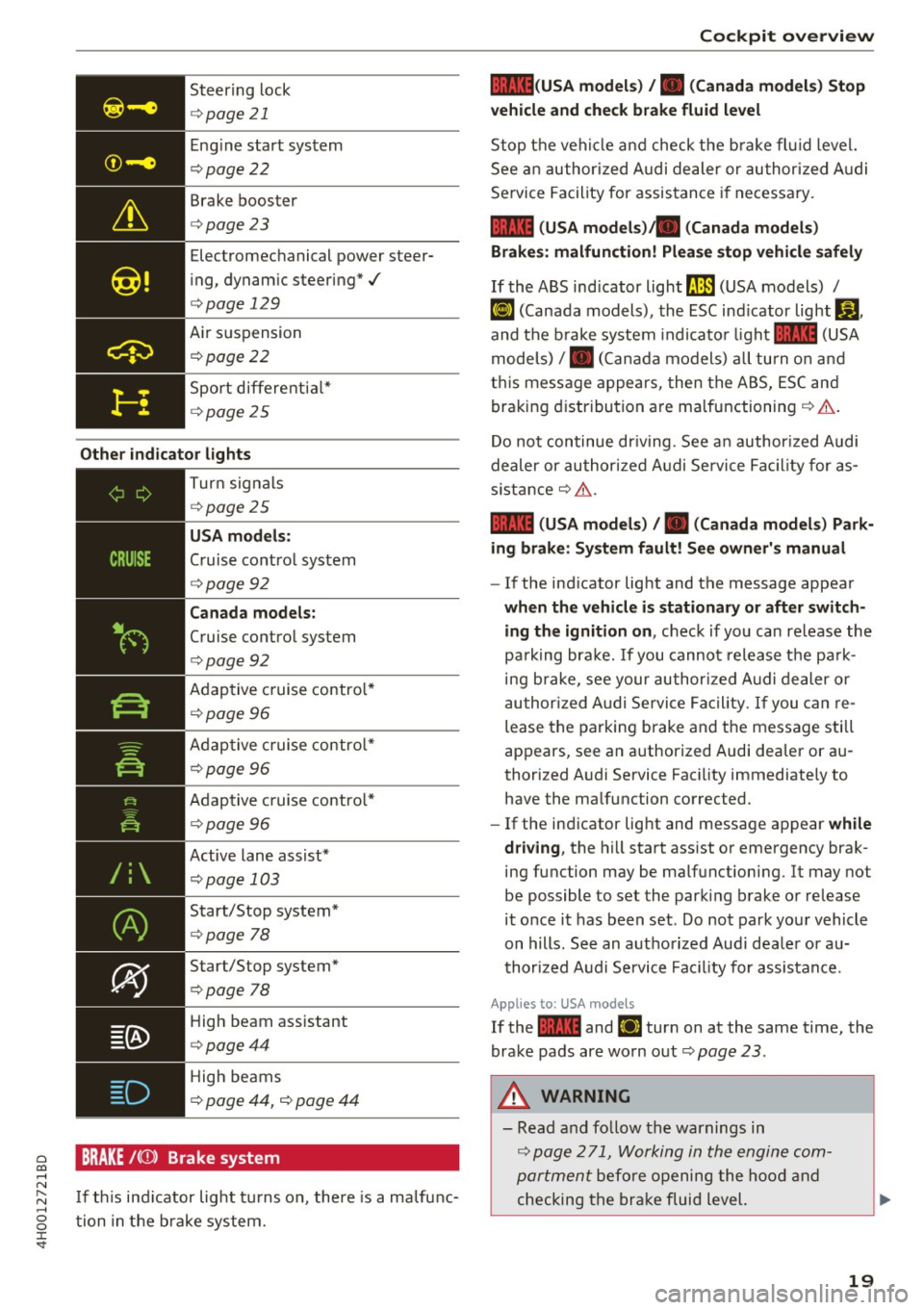
Eng ine start system
¢ page22
Brake booster
<=>page23
Electromechanical power steer
i ng, dynam ic steering*./
<=> page 129
Air suspension
¢ poge22
Sport differe ntia l*
¢ poge 25
Other indi cator lights
-------------
Turn sig na ls
¢ poge25
USA mod els :
Cruise contro l system
<=>page 92
Can ada model s:
Cruise control system
<=>page 92
Adaptive c ruise contro l*
¢ page 96
Adaptive c ruise contro l*
¢ page 96
Adaptive c ruise contro l*
¢page 96
Active lane assist*
¢page 103
Start/Stop system*
¢page 78
Start/Stop system*
<=>page 78
High beam ass istant
<=> poge44
High beams
¢ page 44, <=> page 44
BRAKE /((J)) Brake system
I f th is ind icator light tu rns on, there is a malfunc
tion in the brake system.
Coc kpit o ve rv iew
llll (USA model s) /. (Canada model s) Stop
v ehicle and che ck brake fl uid le vel
Stop t he veh icle a nd check t he b rake fl uid level.
See an author ized A udi dealer or author ized A udi
Service Facility for assistance if necessary.
1111 (USA mod els) ta (Canada model s)
Brakes : malfunction! Plea se sto p vehi cle safel y
If the ABS ind icator light ll.JJJ (USA models) /
~ (Canada models), the ESC ind icator light Bl ,
and the b rake system indicato r light 1111 (USA
models) /. (Can ada models) all turn o n and
t hi s message appea rs, then the ABS, ESC and
braking d istribution are malfunctioning ¢&. .
Do not continue dr iv ing. See a n author ized Audi
dealer or authori zed A udi Se rvice Fac il ity for as
s istance ¢&. .
1111 (USA mod els) /. (Canada mod els) Park
ing brake : S ys tem fault! See owner' s manual
- If the ind icator light and the message appear
when the vehicle is stationary or after switch
ing the ignition on ,
check if you can re lease the
pa rk ing bra ke. If you cannot release the pa rk
ing brake , see your author ized Audi dealer or
au thor ized Audi Se rvice Fa cil ity. I f you can re
lease the parking brake and the message still
appears, see an authorized Audi dealer or au
thorized Audi Service Faci lity immediately to
have the malfunction corrected.
- If the indicator light and message appear
while
dri ving ,
the hill start ass ist or emergency brak
ing function may be malfunctioning. It may not
be possible to set the parking brake or release
it once it has been set . Do not park you r vehicle
on hills. See an authorized Audi dea le r or a u
thori zed A udi Service Fac ility for assistance.
App lies to: USA mode ls
If the 1111 and Ei1 tur n on at the same time, the
brake pads are worn out
¢ page 2 3 .
.&, WARNING
-Read and fo llow the warnings in
¢ page 2 71, Working in the engine com
portment
befo re opening the hood and
checking the brake fluid level.
19
Page 27 of 354
0 co .... N ,..._
N .... 0 0 :c '
Audi Service Facility immediately to have the
malfunct ion corrected.
fi. D Light/rain sensor
El Automatic headl ights / automatic wipers :
System fault
The light/ra in sensor is malfunction ing.
The low beams remain switched on at all times
for safety reasons when the light switch is in the
AU TO position. You can continue to turn the
lights on and
off using the light switch . You can
still control all functions that are independent of
the ra in sensor through the windshield w iper lev
er .
Drive to an authori zed Aud i dea ler or authorized
Audi Service Facility immediately to have the malfunct ion corrected.
!-: Sport differential
A ppl ies to: ve hicles with sport differential
Ill Sport differential : System fault
There is a malfunction with the spo rt differentia l.
Dr ive to an authorized Aud i dea le r o r a uthorized
Aud i Service Facility immediately to have the
malfunct ion corrected.
Ill Sport differential : Overheating
The transm ission temperature has increased s ig
ni ficantly due to the sporty driving manne r. D rive
in a less sporty manner until the temperature re
turns to the normal range and the indic ator light
switches of .
& WARNING
-
Contact your authori zed A udi dealer or a
qualified workshop if the sport differentia l is
faulty or malfunctioning. The repair must be
performed by trained personnel using the cor
rect o il in order to ensure safety.
Coc kpit o ve rv iew
¢ Q Turn signals
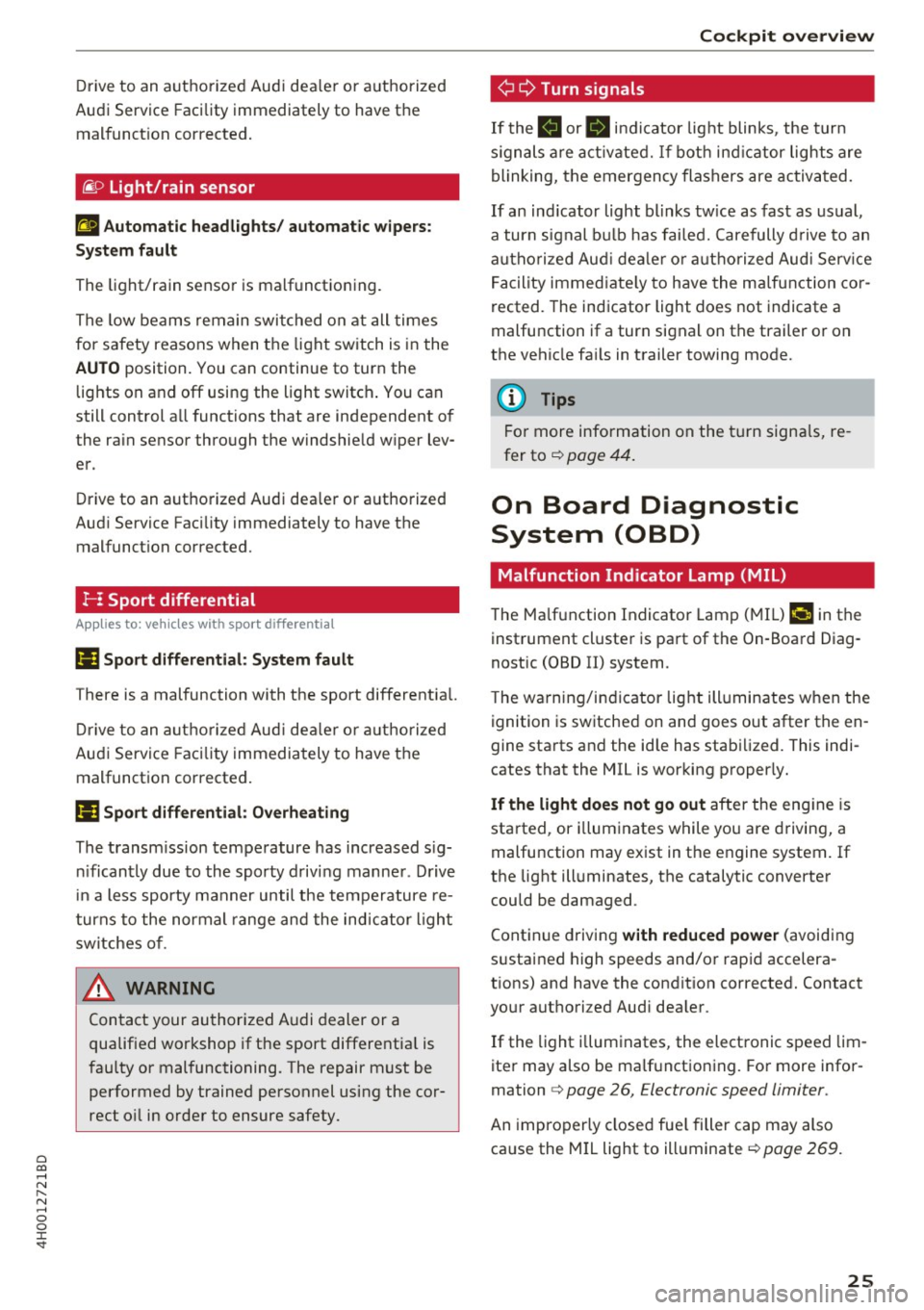
If the . or B indicator light blinks , the turn
s ignals a re act ivated. If bot h ind icator lights are
blinking, the emergency flashers are activated.
If an ind icator light blinks tw ice as fast as usual,
a turn signal bu lb has fai led. Carefully d rive to an
autho riz e d Aud i dea le r or authorized Aud i Serv ice
F acility immed iate ly to have the ma lfunction co r
rected . The indicator light does not indicate a
malfunction if a turn signal on the trailer or on
the vehicle fa ils in trailer towing mode.
(D Tips
Fo r more information on the turn signa ls, re
fer to<=>
page 44.
On Board Diagnostic
System (OBD)
Malfunction Indicator Lamp (MIL)
The Ma lfunction Indicator Lamp (MI L) ¢,ij in the
inst rument cluster is part of the On-Boa rd Diag
nostic (OBD II) system .
T he wa rning/indicator light ill uminates when the
ignition is sw itched on and goes out after the en
gine starts and the idle has stabilized. This indi
cates that the MIL is working properly.
If the li ght do es not go out after the eng ine is
sta rted, or i lluminates while you are driving, a
malfunction may exist in the engine system. If
the lig ht illuminates, the catalytic converter
could be damaged.
Cont inue driving
with reduced power (avoiding
s ustained high speeds and/o r rapid accelera
tions) and have the condit ion corrected. Contact
your authori zed Aud i dea ler .
If the light i llum inates, the elect ronic speed lim
iter may also be malf unct ion ing. For more infor
mation
c> page 26, Electronic speed limiter .
An improperly closed fue l filler cap may also
ca use the MIL light to illuminate ¢
page 269.
25
Page 45 of 354

C) C0 ....
"' ,....
"' .... 0 0 :r
Exterior Lighting
Switching the headlights on and off
Fig. 44 I nstrument pane l: l ig ht sw itc h w ith all -weather
li g hts
The headlights only wo rk when the ignition is
sw itche d on. While sta rting the engine or when
switching off the ignition, the headlights will go
off and only the side marker lig hts will be on .
I f the sys tem is not operati ng p roperly, a warning
symbol in the dr ive r informa tion d ispl ay is dis
p layed
.::> page 24 .
Light switch --r;..-
T u rn the swi tch ~ fig . 44 to the co rresponding
position . When the lights are switched on, the
:o o:
symbol turns on .
0 - The lights a re off or the daytime runni ng
l ights are on :
-USA models: The daytime running lig hts will
come on automatically when the ignition is on
and the light sw itch
c:> fig . 44 is in the O posi
t ion or the
AUTO position (only i n day light con
di tions). The
Daytime running lights function
can be turned o n and off i n the MM I
c:> page 45, i=> .&,.
-Canada models : The dayt ime runn ing lights
will come on au toma tically when t he igni tion is
on a nd the light swi tch
c:> fig . 44 is in the O po
s ition, the
:oo : pos ition or the AUTO position
(o nly in daylig ht conditions)
c::> &. .
AUTO -Automat ic he ad lights sw itch on and off
de pend ing on br igh tness, for example in tw ilight,
d uring rain or in tunne ls
c:> &. .
Lights and V ision
:oo: -Side ma rker ligh ts
iD -Low beam hea dlights
~ -All-weather lig hts
l2!l -Rear fog lights*. When the rear fog lights are
on, the symbol
O* on the sw itch will i lluminate .
All-weather lights
The front lights a re adjus ted au toma tic a lly so
that you are less likely to see g lare from your ow n
head lig hts, for example when d riving on a wet
road.
Automatic dynamic headlight range control*
Yo ur vehicle is equ ipped wi th a headlight r ange
contro l system so tha t the head lig hts do not
blind oncoming t raffic if the vehicle load
c h anges . The hea dlight range also ad justs auto
matically when brak ing and acce lerating .
Light functions
The following light funct ions are available de
p ending on veh icle equipment and o nly fu nction
whe n the light switch is in t he AUTO position.
You can deactivate these functions in the MMI under
Audi adaptive light c:> page 45 .
Static cornering light* -the cornering light
switches on automatically when the steering
whee l is turned at a certai n angle at s peeds up to
app roximately 44 mph (70 km/h) and when the
turn s ignal is activated at speeds up to approxi
mately 25 mph (40 km/h) . The area to t he side of
t h e ve hicle is illuminated better w hen turning.
Dynamic curve light * -the curve lig ht adapts it
self to the curves in the road .
Highway l ight function* -this function adapts
the lig hting for highway driving based on vehicle
speed .
A WARNING
---Automatic headlights are only int ended to
assist the driver. They do no t relieve the
driver of his responsib ility to check the
headligh ts and to turn them on manually
ac co rdi ng to t he cur rent light a nd v is ib ili ty
condi tio ns . Fo r example, fog c annot be
43
Page 46 of 354
Lights and Vision
detected by the light sensors. So always
switch on the headlights gD under these
weather conditions and when driving in the
dark .
- Crashes can happen when you cannot see
the road ahead and when you cannot be
seen by other motorists . Always turn on the
headlights so that you can see ahead and so
that others can see your car from the back.
- The rear fog lights should only be turned on in accordance with traffic regulation, as the
lights are bright for following traffic.
- Please observe legal regulations when using
the lighting systems described .
(D Tips
-The light sensor* for automatic dynamic
headlight range control* is located in the
rear view mirror mount . You should there
fore not apply any stickers to the windshield
in this area in order to prevent malfunctions
or failures .
- In the event of a light sensor malfunction,
the driver is notified in the instrument clus
ter display~
page 25.
- You will hear a warning tone if you open the
driver door when the exterior lights are
switched on.
- In cool or damp weather, the inside of the
headlights, turn signals and tail lights can
fog over due to the temperature difference
between the inside and outside. They will
clear shortly after switching them on. This
does not affect the service life of the light ing .
44
Turn signal and high beam lever
The turn signal lever operates the turn signals,
the high beams and the headlight flasher .
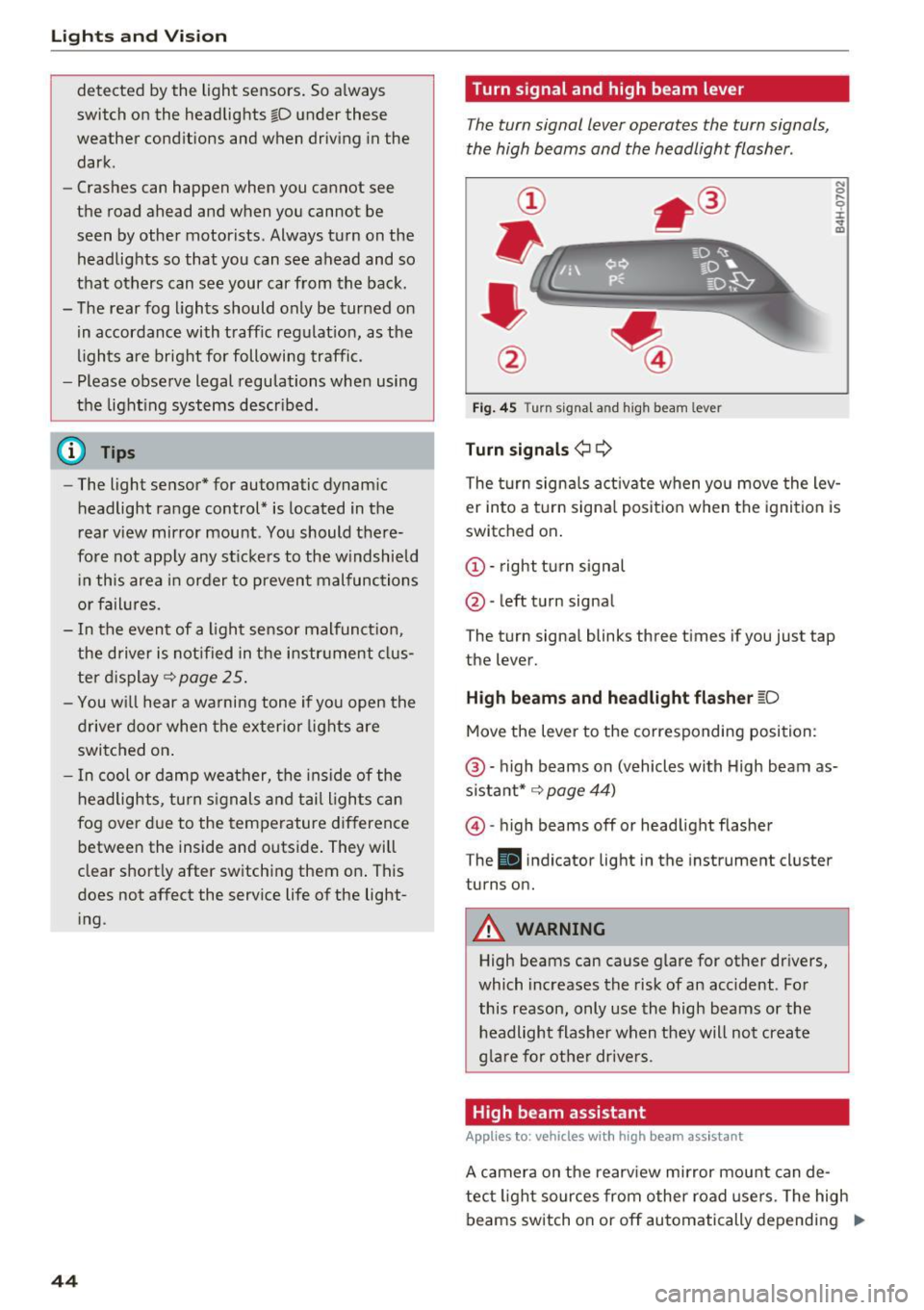
Fig. 45 Turn signal an d high beam leve r
Turn signals¢ Q
N 0 .... 0 :i: .. m
The turn signals activate when you move the lev
er into a turn signal position when the ignition is
switched on.
© -right turn signal
@-left turn signal
The turn signal blinks three times if you just tap
the lever.
High beams and headlight flasher ~D
Move the lever to the corresponding position:
@ -high beams on (vehicles with High beam as
sistant* ~
page 44)
@)-high beams off or headlight flasher
T he
Iii indicator light in the instrument cluster
turns on.
A WARNING
High beams can cause glare for other drivers,
which increases the risk of an accident . For
this reason, only use the high beams or the
headlight flasher when they will not create
glare for other drivers .
High beam assistant
Applies to: vehicles with high beam assistant
A camera on the rearview mirror mount can de-
tect light sources from other road users. The high
beams switch on or off automatically depending
ll>
Page 47 of 354
on the position of vehicles driving ahead and on
coming vehicles, the vehicle speed and other en
vironmental and traffic conditions.
Activating high beam assistant
Requirement: the light switch must be set to the
AUTO position and the high beam assistant must
be switched on in the Infotainment system
¢page 45.
.,. To activate the high beam assistant , tap the
lever forward @. T he
II indicator light ap
pears in the instrument cluster display and the
high beam assistant is switched on/off auto
matically. The
Ill indicator light also turns on if
the high beams are switched on.
Switching the high beams on/off manually
If the high beams did not switch on/off automat
ically as expected, you may switch them on or off
manually instead:
.,. To switch the high beams on manually, tap the
lever forward @. T he indicator light
Ill turns
on .
.,. To switch the high beams off manually, pu ll the
lever back@. The h igh beam assistant is deac
tivated.
Operating the headlight flasher
.,. To operate the headlight flasher when the high
beam assistant is activated and high beams are
switched off, pu ll the lever back @. The high
beam assistant rema ins active.
Messages in the instrument cluster display
Headlight assist: System fault!
Drive to an authorized Aud i dea le r or authorized
Aud i Service Facility immediately to have the
malfunction corrected. You can still switch the
high beams on or off manually.
Headlight assist: Unavailable No camera view
The camera view is blocked, for example by a
sticker or debris.
o The sensor is located between the interior rearco
~ view mirror and the windshield. Do not place any ,..._
~ stickers in this area on the windshield.
0 0 :c '
A WARNING
High beam assistant is only intended to assist
the driver. The driver is still respons ible for
controlling the headlights and switching
them manua lly depending on light and visibi l
it y conditions. It may be necessary to operate
them manually in situations such as:
- I n adverse weather conditions such as fog,
heavy rain, blowing snow or spraying water.
- On roads where oncoming traffic may be
pa rtia lly obscured, such as expressways.
- When there are road users that do not have
sufficient lighting, such as bicyclers or
vehicles with dirty tail lamps .
- I n tight curves and on steep hills.
- In poorly lit areas.
- W ith strong reflectors, such as signs.
- If the area of the w indshield near the sensor
is fogged over, dirty, icy or covered with a
sticker .
Adjusting the exterior lighting
The functions ore adjusted in the Infotainment
system .
.,. Select: !CAR ! function button > Car systems
control button > Vehicle settings > Exterior
lighting .
Automatic headlights
You can adjus t the following settings in the Au
tomatic headlights
menu:
Headlights activation time -you can adjust if the
headlights switch on
Early, Medium or Late ac
cording to the sensitivity of the light sensor.
Headlight assist* -you can switch the h igh beam
ass istant*
On and Off .
Daytime running lights*
USA models :
the daytime running lights can be
switched on/off. Select
On or Off.
Canada models:
this function cannot be switched
off. They activate automatically each time the ig -
nition is switched on .
ll>
45
Page 53 of 354

0 co .... N ,..... N .... 0 0 :c '
on.
C leaning the headlights. The headlight washer
system operates only when the low beam head lights are switched on.
If you move the lever to
position @, the headlights and the night vision
assist camera* are cleaned at intervals.
A WARNING
- The rain sensor is only intended to assist the
driver. The driver may still be responsible
for manually sw itching the wipers on based
on v is ibility conditions .
- The w indshield may not be treated with wa
ter-repelling windsh ield coating agents . Un
favorable conditions, such as wetness, dark ness, and when the sun is low, can cause in
creased g lare, which increases the risk of an
acc ident. W iper blade chatter is a lso poss i
ble.
- Prope rly f unction ing windsh ield wiper
blades are required fo r a clear view and safe
driving
c:> page 51, Replacing the wiper
blades.
(D Note
- If there is frost, make su re t he windshie ld
wiper blades are not fro zen to the wind
shield. Sw itching on the windshield wipers
when the blades are frozen to the wind
shield can damage the wiper blades.
- Prior to using a car wash, the windshield
wiper system must be switched
off (lever in
pos ition
@ ). This prevents the wipers from
switching on un intent ionally and causing
damage to the w indshield w iper system .
- The windshield wipers switch
off when the
i gnition is sw itched off. You can activate the
windsh ield wipers after the ign it ion is
switched back on by moving the winds hield
wiper lever to any posit ion.
- Worn o r dirty windshield wiper blades result
i n streak ing . This can affect the ra in sensor
funct ion. Check you r windshield wiper
blades regu larly.
Light s and Vision
-The washer fluid nozz les for the windshield
washer system are heated at low tempera
t u res when the ign ition is on .
- When stopping tempo rari ly, such as at a
traffic light, the speed of the windshield
w ipers automatically reduces by one level.
Cleaning the wiper blades
Clean the wiper b lades when you see w iper
streaks . Clean the wiper blades with a soft towel
and glass cleane r.
.. Place the windshie ld w iper arms in the service
position
c:> page 51.
.. Fold the windshield w iper arms away from the
w indshield .
A WARNING
Dirty windshie ld wiper b lades can impa ir vi
sion, wh ich increases the ris k of an acciden t.
Replacing the wiper blades
The service position is set in the Infotainment
system .
Fig. 57 Removing winds hield wiper b lades
Wind shi eld wiper se rvice po sition /b lade
r epl ace ment po sit ion
~
~
M 0 :i: ... m
.. Switch the ignition off and move the windshield
w iper lever to position @briefly
c::> page 50,
fig. 56. The windshield wipers move into the
serv ice position .
.. To br ing the wiper b lades back into the original
position, switch the ignition on and ope rate the
w indshield w iper lever.
You can also turn the service posit io n on or off in
the Infotainment system: ..,_
51
Page 82 of 354

Driving
-The interior temperature differs from the tem
perature se lected in the A/C system.
- The windshield is being defrosted~
page 71.
-The brake pedal is pressed seve ral t imes in a
row.
- The vehicle ba tte ry charge leve l is too low.
- Power consumption is high .
Ignition is switched off automaticall y
To prevent the veh icle battery from drain ing, the
ignit ion will switch off
automatically under the
following conditions:
- The vehicle must have already been driven.
- The Start/Stop system has stopped the engine.
- T he driver's door must be open .
- T he driver's safety be lt mus t be unb uck led.
- The brake pedal must not be p ressed .
- The vehicle must be stationary .
In this case, the activated low beam is replaced
by the parking light. The parking lights will
sw itch off after app roximately 30 minutes or
when you lock the vehicle .
If the Start/Stop system has not turned off the
engine or if you have sw itched the Start/Stop sys
tem off manually, the ignition will not be auto mat ically switched off and the engine w ill conti n
ue to ru n ~ & .
A WARNING
To red uce the risk of poisoning, neve r allow
t he engine to r un i n confined s paces.
(D Tips
If you select the D, N or S selector lever posi
tion after shifting into reverse, the vehicle
m ust be driven faste r than 6 mph (10 km/h)
in orde r fo r the engine to switch off again.
80
-
Manually switching the Start /Stop system
off /on
Appl ies to : vehicles wi th Start/Stop sys te m
If you do not wish to us e th e system, you con
switch i t off manually.
Fig . 93 Ce nte r console: Start/Stop system butto n
.,. To switch the Start/Stop-System off/on man
ually, press the
l (A) ~I button. The LED in the but
ton turns on when the system is switched off.
0) Tips
If yo u switch the system off d uring a stop
phase, the engine will start aga in automati
cally .
Messages in the instrument cluster display
Applies to : vehicles wit h Start/Stop syste m
Start-stop system deactivated: Please restart
engine manually
This message appears w hen spec ific cond itions
are not me t during a stop phase. The S tart/S top
system will
not b e a ble to re sta rt the eng ine. If
the D or R se lector lever positions were engaged,
P will be selected a utomat ically . The eng ine must
be started with the
I START ENGI NE STOPI but
ton.
Start -stop system: System fault! Currently
unavailable
There is a ma lfunction in the Start/Stop system.
Drive the vehicle to an authorized Audi dealer or
aut horized Serv ice Facility as soon as possible to
have the malfunction corrected .
Page 110 of 354

Ass is t
Highlighting detected pedestrians and wild
animals
A pplies to: ve hicles w ith night vi sion ass ist
F ig. 123 Instrument cluster: yellow highl ighted pedes
trians
F ig. 124 Instrument cluster: symbol when the infrared im
age is not vi sible
With in the limits of the system, the night vision
assist can detect pedestria ns and w ild an imals
that are between approximately 32 ft (10 m) and 295
ft (90 m) in front of the vehicle and within
the detection zone . Within the limits of the sys
tem
q poge 109, a pedestrian or wild an imal de
tected when the low beams are switched on is
highlighted in yellow
q fig. 123. Animal recogni
tion is not active with in h ighly developed areas.
The system only detects large wild animals such
as deer.
@ Tips
If another display such as navigation replaces
the night vision assist image, the~,, symbol
appears in a tab
q fig . 124 . You can access
night vision ass ist using the mult ifunct ion
steer ing whee l buttons
q page 11.
108
Pedestrian and wild animal warning
App lies to : vehicles wit h night vision assis t
Fig. 125 Instrument cluster: @ pedest rian warning, @
wild anim al warn ing
Fig . 126 Instr ument clus ter: @pedestria n warning/ @
wild animal warning, when the nigh t vision ass ist im age is
not selected in the instru ment cluster display
Image in the instrument cluster /Head-up
di spl ay *
If there are pedestrians or wild an imals in an
area in front of your vehicle that is classified as
cr itical, the system will direct your attention to
th is:
- Pedestrians or wild anima ls are highlighted in
red and the corresponding symbol. or.
turns on~
fig. 125 .
- There is also an audible signal.
The area classified as c ritical is based on the veh i
cle speed and the steeri ng wheel angle . Pedes
trian and wild animal warning enco urages you to
pay more attention.
If the night vision assist image is rep laced by an
othe r d isplay (such as the on-board compute r),
the red. or. in dicator light~
fig. 126 will
appear if there is a pedestrian or wild anima l
warning.
Page 111 of 354
C) C0 ....
"' ,....
"' .... 0 0 :r
night vision assist content is activated,. or.
will appear in the Head-up display".
Marking light*
To direct the driver's attention to a pedestrian,
the headlights can flash on the pedestrian three
times in a row when there is a pedestrian warn
ing.
This occurs at speeds above approximately 35 mph (60 km/h) if you are outside of illuminat
ed areas and no detected vehicles are shown. The
high beam assistant* controls the marking light*
c::> page 44, High beam assistant .
The marking light is not used for wild animals.
General information
Applies to: vehicles with night vision assist
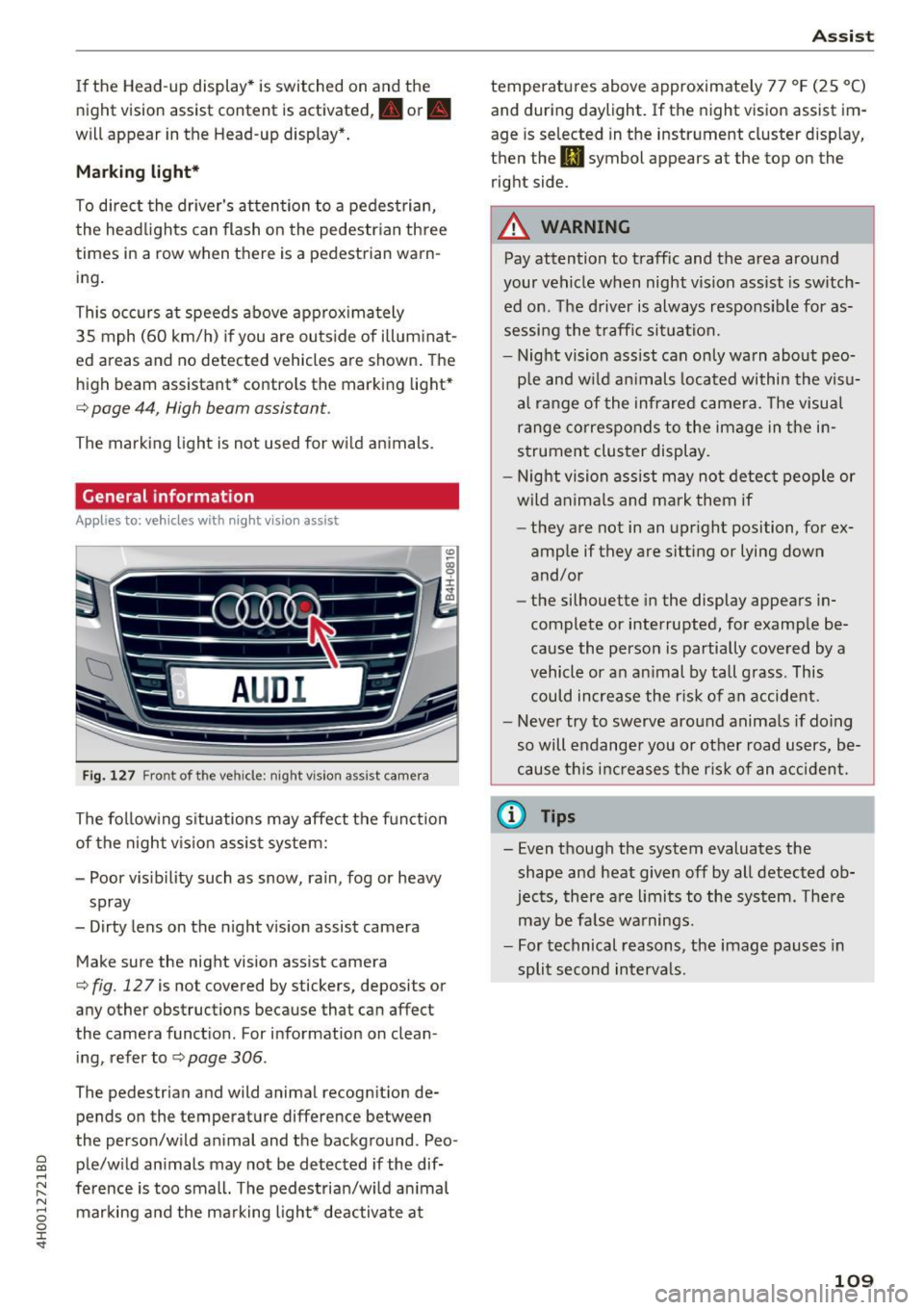
Fig. 127 Front of the vehicle: night vision ass ist came ra
The following situations may affect the function
of the night vision assist system:
- Poor visibility such as snow, rain, fog or heavy
spray
- Dirty lens on the night vision assist camera
Make sure the night vision assist camera
c::>fig. 127 is not covered by stickers, deposits or
any other obstructions because that can affect
the camera function . For information on clean
ing , refer to
c::> page 306 .
The pedestrian and wild anima l recogn it ion de
pends on the temperature difference between
the person/wild anima l and the background . Peo
ple/wild animals may not be detected if the dif
ference is too small. The pedestrian/wild animal marking and the marking light* deactivate at
Assist
temperatures above approximately 77 °F (25 °C)
and during daylight. If the night vision assist im
age is selected in the instrument cluster display,
then the
II symbol appears at the top on the
right side.
A WARNING
-Pay attention to traffic and the area around
your vehicle when night vision assist is switch
ed on. The driver is always responsible for as
sessing the traffic situation.
- Night vision assist can only warn about peo
ple and wild animals located within the visu
al range of the infrared camera. The visual
range corresponds to the image in the in
strument cluster display.
- Night vision assist may not detect people or
wild animals and mark them if
- they are not in an upright position, for ex
amp le if they are sitting or lying down
and/or
- the silhouette in the display appears in
complete or interrupted, for example be
cause the person is partially covered by a
vehicle or an animal by tall grass. This
could increase the risk of an accident.
- Never try to swerve around animals if doing
so will endanger you or other road users, be
cause this increases the risk of an accident.
(l'} Tips
- Even though the system evaluates the
shape and heat given off by all detected ob
jects, there are limits to the system . There
may be false warnings.
- For technical reasons, the image pauses in
split second intervals.
-
109