roof AUDI A8 2017 Owners Manual
[x] Cancel search | Manufacturer: AUDI, Model Year: 2017, Model line: A8, Model: AUDI A8 2017Pages: 354, PDF Size: 88.68 MB
Page 4 of 354
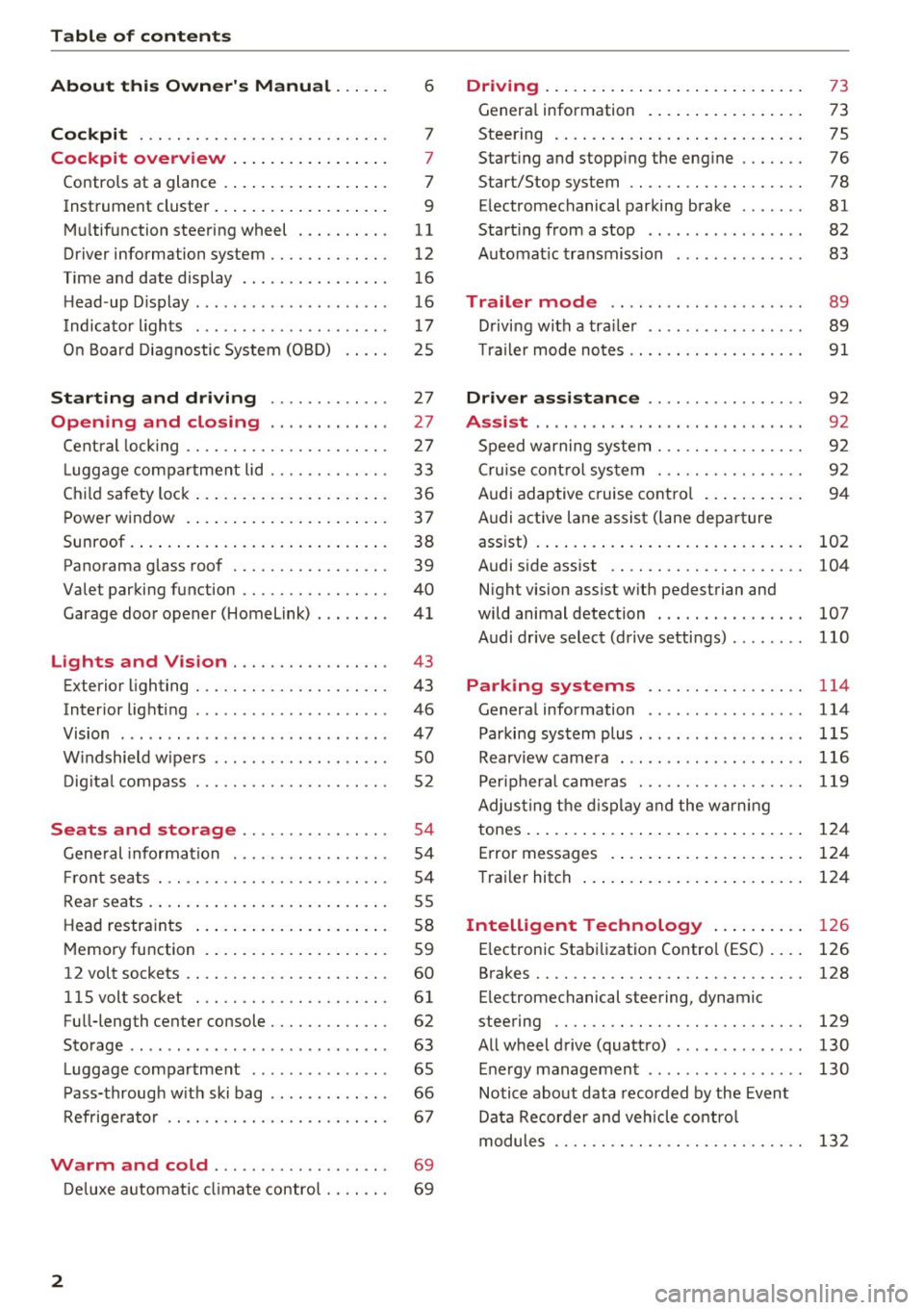
Table of contents
About this Owner's Manual ... .. .
Cockpit ... .. ............... .... .. .
Cockpit overview ................ .
Controls at a glance ... .......... .. .. .
Instrument cluster .. .......... .. .. .. .
Multifunction steering wheel ... .. .. .. .
Driver information system ............ .
Time and date display ...... ... .. .... .
H ead-up Display .... .. .. ..... ... .. .. .
Indicato r lights . ................ ... .
On Board Diagnostic System (OBD) .... .
Starting and driving ............ .
Opening and closing .. .... .... .. .
Central locking .... ........... .... .. .
L uggage compartment lid ...... .... .. .
Child safety lock ........... ..... .. .. . 6
7
7
7
9
11
12
16
16
17
25
27
27
27
33
36
Power
window . . . . . . . . . . . . . . . . . . . . . . 37
Sunroof. .. ... ... .. .......... .. .. .. . 38
Panorama glass roof . . . . . . . . . . . . . . . . . 39
Valet parking function . . . . . . . . . . . . . . . .
40
Garage door opener (Homelink) . . . . . . . . 41
L ights and Vision . . . . . . . . . . . . . . . . . 43
Exterior lighting . . . . . . . . . . . . . . . . . . . . . 43
Interior lighting . . . . . . . . . . . . . . . . . . . . . 46
V1s1on . . . . . . . . . . . . . . . . . . . . . . . . . . . . . 47
Windshield wipers . . . . . . . . . . . . . . . . . . . SO
Digital compass . . . . . . . . . . . . . . . . . . . . . 52
Seats and storage . . . . . . . . . . . . . . . . 54
General information . . . . . . . . . . . . . . . . . 54
Front seats . . . . . . . . . . . . . . . . . . . . . . . . . 54
Rear seats . . . . . . . . . . . . . . . . . . . . . . . . . . 55
Head restraints . . . . . . . . . . . . . . . . . . . . .
58
Memory function . . . . . . . . . . . . . . . . . . . . 59
12 volt sockets . . . . . . . . . . . . . . . . . . . . . . 60
llSvoltsocket .............. .... ... 61
Full-length center console. . . . . . . . . . . . . 62
Sto rage . . . . . . . . . . . . . . . . . . . . . . . . . . . . 63
Luggage compartment . . . . . . . . . . . . . . . 65
Pass-through with ski bag . . . . . . . . . . . . . 66
Refrigerator . . . . . . . . . . . . . . . . . . . . . . . . 67
Warm and cold . . . . . . . . . . . . . . . . . . . 69
Deluxe automatic climate control . . . . . . . 69
2
Driving ..... .. .. .. .. ... .......... . .
General information . .... .......... . .
Steering .......... .. .. . .......... . .
Start ing and stopping the eng ine ..... . .
Start/Stop system .. .. ............. . .
E le ctromechanical parking brake ...... .
Start ing from a stop .. ........ ..... . .
Automat ic transmission
Trailer mode .. .. .. ........ ..... . .
D rivin g with a trailer .. .............. .
T raile r mode notes .. .. ............. . .
Driver assistance .. .............. .
Assist .... .. .. .. .. .. ... .. ... ... .. . .
Speed warning system ... ........... . .
Cruise control system .... .......... . .
Audi adaptive cruise control .......... .
Audi active lane assist (lane departure 73
73
75
76
78
81
82
83
89
89
91
92
92
92
92
94
assist) . . . . . . . . . . . . . . . . . . . . . . . . . . . . . 102
Audi side assist . . . . . . . . . . . . . . . . . . . . . 104
N ight vision assist w ith pedestrian and
wild animal detection . . . . . . . . . . . . . . . .
107
Audi drive select (drive settings) . . . . . . . . 110
Parking systems . . . . . . . . . . . . . . . . . 114
General information . . . . . . . . . . . . . . . . . 114
Parking system plus ........ ....... ... 115
Rearv iew camera . . . . . . . . . . . . . . . . . . . . 116
Peripheral cameras . . . . . . . . . . . . . . . . . . 119
Adjus ting the display and the warning
tones. . . . . . . . . . . . . . . . . . . . . . . . . . . . . .
124
Error messages . . . . . . . . . . . . . . . . . . . . . 124
T railer hitch . . . . . . . . . . . . . . . . . . . . . . . . 124
Intelligent Technology . . . . . . . . . . 126
E lectronic Stabilization Control (ESC) . . . . 126
Brakes . . . . . . . . . . . . . . . . . . . . . . . . . . . . . 128
E lectromechanical steering, dynamic
steering . . . . . . . . . . . . . . . . . . . . . . . . . . .
129
All wheel drive (quattro) . . . . . . . . . . . . . . 130
Energy management . . . . . . . . . . . . . . . . . 130
Notice about data recorded by the Event
Data Recorder and vehicle control
modules . . . . . . . . . . . . . . . . . . . . . . . . . . .
132
Page 40 of 354
Opening and clo sin g
- When locking the vehicle from outside, the
vehicle must be unoccupied since the win
dows can no longer be opened in an emer
gency .
(D Tips
-Using sw itches @ and @, the driver can a l
so operate the power sun shades* in the
side windows.
- After turning the ignition off you can still
open and close the windows for approxi
mately 10 minutes . The power windows do
not switch off until the driver's door or front
passenger's doo r has been opened .
Correcting power window malfunctions
You can reactivate the one-touch up/down func
tion if it malfunctions.
• Pull the power window sw itch up until the win
dow is comp letely ra ised.
• Release the sw itch and pull it up again for at
least one second.
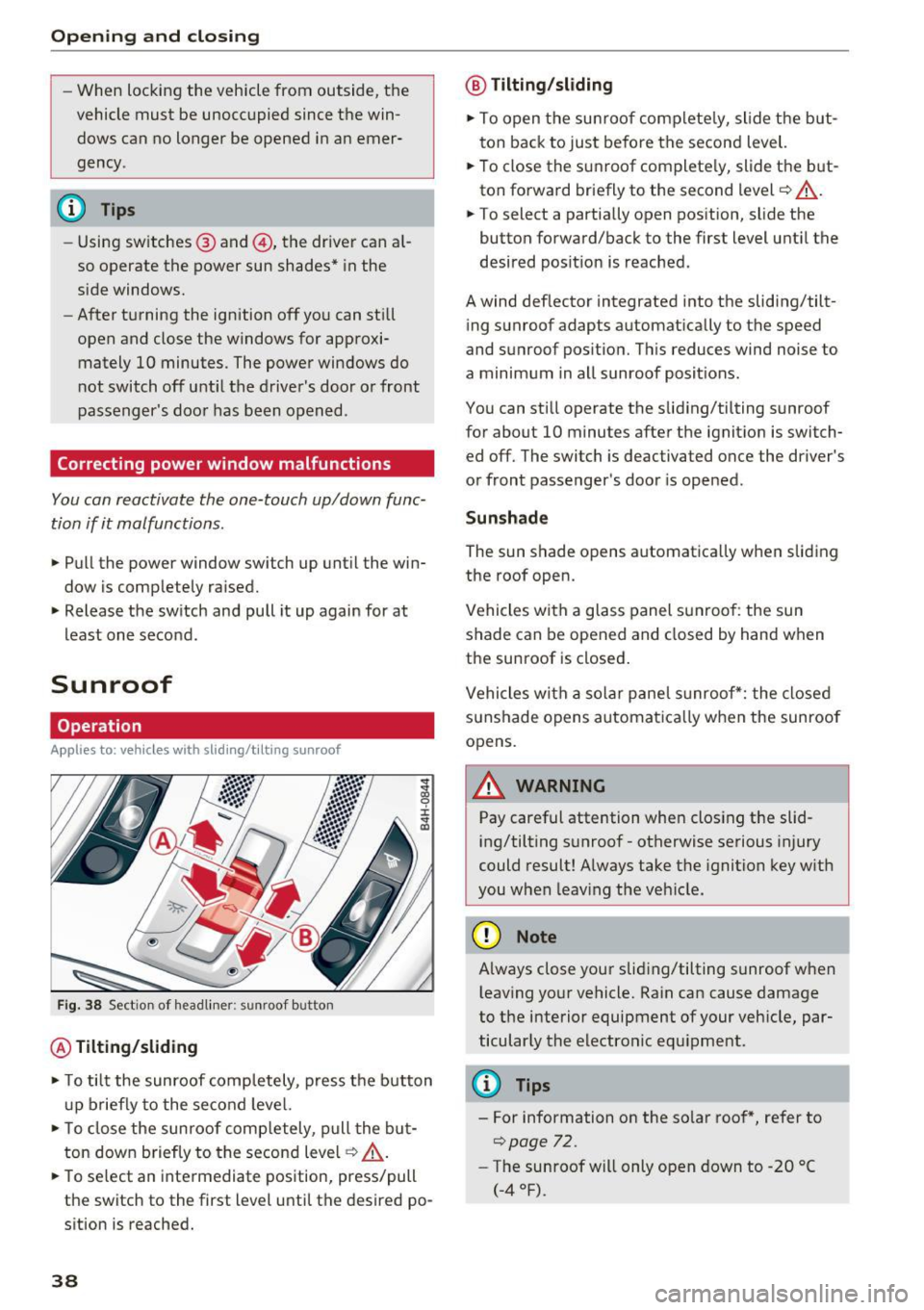
Sunroof
Operation
Applies to: vehicles with slid ing/tilting sunroof
Fig . 3 8 Sect ion of head liner: sunroof button
@ Tilting /sliding
• To tilt the sunroof comp letely, press the button
u p briefly to the second level.
• To close the sunroof comp letely, p ull the but
ton down briefly to the second level¢ .&_ .
• To se lect an intermediate pos ition, press/pull
the switch to the first level until the desired po
sition is reached.
38
@ T ilting /slidin g
• To open the sunroof complete ly, slide the but
ton back to just before the second level.
• To close the s unroof complete ly, slide the b ut
ton forward briefly to the second level¢.&_ .
• To select a partially open position, slide the
button forward/back to the first level until the
desired pos it ion is reached.
A wind deflector integrated into the sliding/tilt ing sunroof adapts automatically to the speed
and sunroof pos ition. Th is reduces wind noise to
a minimum in all sunroof posit ions.
You can still operate the sliding/tilting sunroof
for about 10 minutes after the ignit ion is switch
ed off. The switch is deactivated once the driver's
or front passenger's door is ope ned.
Sunshad e
The sun shade opens automatica lly when sliding
the roof open.
Vehicles with a glass panel sunroof : the sun
shade can be opened and closed by hand when
the sunroof is closed .
Vehicles with a solar panel s unroof*: the closed
sunshade opens automatica lly when the sunroof
opens.
11. WARNING
Pay careful attention when clos ing the slid
ing/tilting sunroof - otherwise serious injury
could result! Always take the ignition key w ith
you when leav ing the veh icle.
(D Note
-
Always close your sliding/tilting sunroof when
l eav ing yo ur vehicle. Rain can cause damage
to the interior equipment of your vehicle, par ticular ly the electronic equ ipment.
(D Tips
- For information on the so lar roof *, refer to
¢page 72.
- The sunroof w ill only open down to -20 °(
(-4°F).
Page 41 of 354
C) C0 ....
"' " "' .... 0 0 :r
Applies to: vehicles with s liding/tilting sunroof
If the sun roof detects an object in its path when
it is clos ing, it w ill open ag ain au tomati cally. In
this case, you can close the roof w ith the power
emergency closing function.
.. Wi thin five seconds af te r the su nroof opens au
tomat ically, pull the swit ch unt il t he roo f
cl oses .
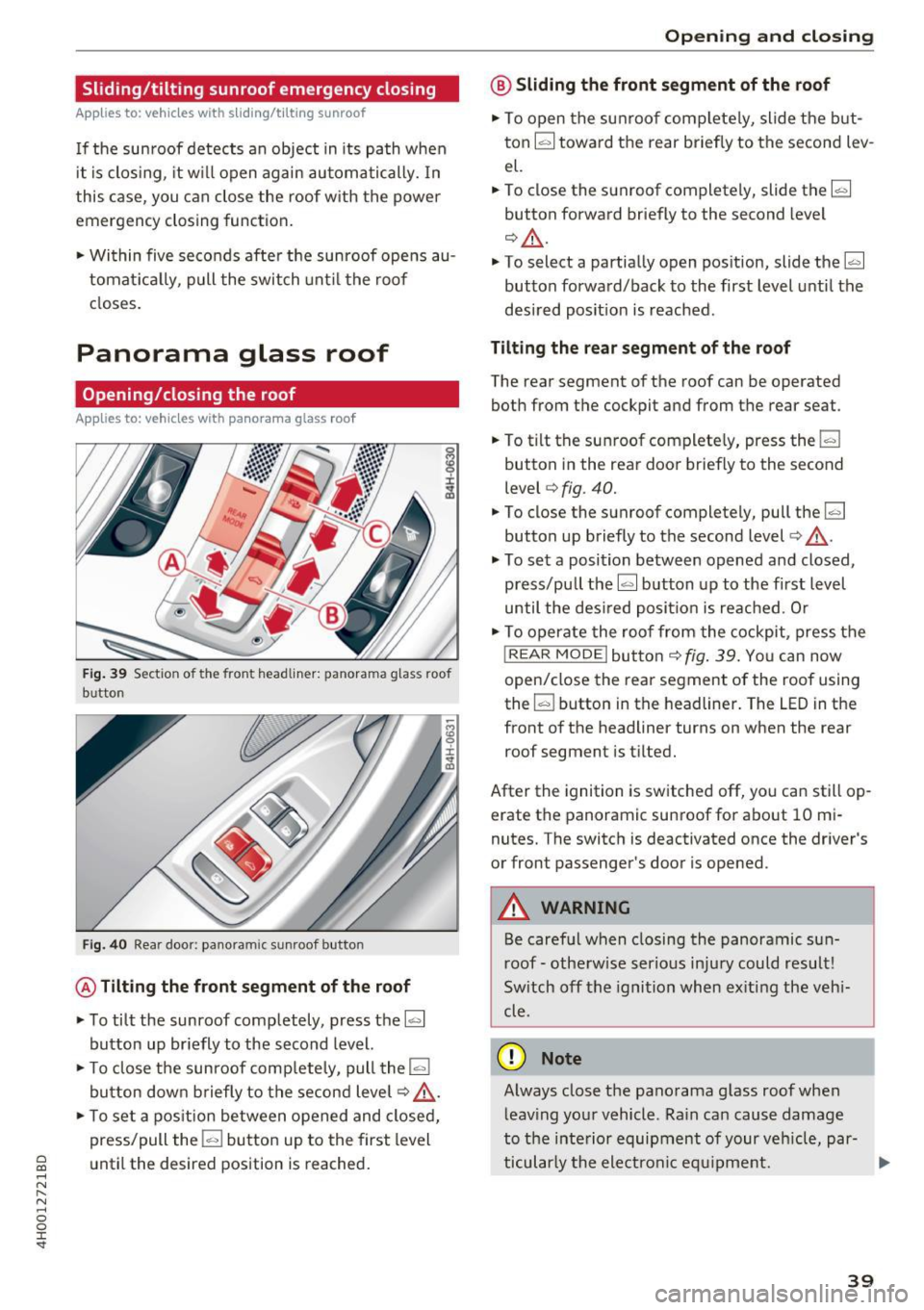
Panorama glass roof
Opening/closing the roof
Applies to: vehicles with panorama glass roof
Fig. 39 Sect io n of the front headlin er: pa norama g lass roof
b u tton
Fi g. 40 Rea r doo r: pa noram ic sunroo f button
@ Tilting the front segment of the roof
.. To tilt the sunroof completely, press the~
button up br iefly to the second level.
.. To close the sunroof comp lete ly, pull the
la.I
bu tton down b rief ly to t he se cond level q ,& .
.. To set a pos ition between opened and closed,
press/pull the
l-"'I bu tto n up to the first level
until the des ired position is reached .
Opening and closing
@ Sliding the front segment of the roof
.. To open the su nroof com plete ly, slide the but
ton ~ tow ard t he rear briefly to the second lev
el.
.. To close the sun roof completely, slide the~
button forward briefly to the second level
¢ _&. .
.. To select a partially open pos ition, slide the~
button forwa rd/back to the first level unti l the
desi red posit ion is reached .
Tilting the rear segment of the roof
The rear segment of t he roof can be operated
both from the cockpit and from the rear seat .
.. To t ilt the sun roof complete ly, press the
l-"'I
button i n the rear doo r briefly to the second
level ¢
fig. 40 .
.. To close the sunroof completely, pull the~
button up briefly to the second level
c:> ,& .
.. To set a position between opened and closed,
press/pu ll the~ button up to the first level
until the des ired posi tion i s re ach ed. O r
.. To o perate the roof fro m the cockpit, press the
! REAR MODE !but to n
¢ fig . 39 . Yo u can now
open/close the rear segment of the roof using
the ~ button in t he headliner . The
LED in t he
front of the headliner turns on when the rear
roof segment is t ilted .
After the ignition is sw itche d off, you can still op
erate the panoramic sun roof for about 10 m i
nutes. The switch is deactivated once the dr iver's
or front passenger's doo r is opened.
A WARNING
Be caref ul when closing the panoramic su n
r oof -oth erwise ser ious in ju ry could resul t!
Sw itch off t he igni tion when ex iting the veh i
cle .
(D Note
Always close the pano rama g lass roof when
l eav ing yo ur vehicle . R ain ca n cause damage
to the inte rior equip ment of your ve hicle, par-
ticu larly the electron ic eq uipm ent . .,,.
39
Page 42 of 354
Opening and clo sin g
@ Tips
- The panorama roof will on ly open down to
-4°F (-20°).
-To prevent both roof segments from co llid -
i ng with one another, you do not need to
- tilt the rear roof segment if the front roof
segment is already open.
- close the front roof segment if the rear
roof segment is already tilted.
Opening/closing the sun shade
Applies to: veh icles with panorama glass roof
© Front sun shade
• To open the sun shade completely, slide the~
button backward to the second level
¢ page 39, fig. 39 .
• To close the sun shade completely, slide the~
button forward briefly to the second level.
• To se lect a partially open position, slide the
l:c ... l
button to the first level until the sun shade has
reached the desired position.
© Rear sun shade
• To open the sun shade comple tely, press the li,. I
button in the rear door briefly down to the sec
ond leve l
9 page 39, fig. 40 .
• To close the sun shade completely, p ull the ~
button up to the second level¢.&_ .
• To se lect a partially open position, press/pull
the~ button to the f irst level until the desired
pos ition is reached . Or
• To ope rate the sun shade from the cockp it,
press the
I REAR MODEi b utton 9 page 39,
fig. 39.
You can now open/close the rear su n
shade using the
I;] bu tton in the headliner.
_& WARNING
Be careful when closing t he panoramic sun
roof -otherwise serious injury could result!
Switch off the ign ition when exiting the vehi
cle.
40
-
Roof segments/sun shade emergency
closing
Applies to: vehicles with pano rama glass roof
If the roo f segment o r su n shade detects an ob
ject in its path when it is closing, it will open
again automatically . In this case, you can then
close it wit h the power emergency closing func
tion.
• Withi n five seconds after the roof segment or
sun shade opens automat ica lly, pull the switch
until it closes.
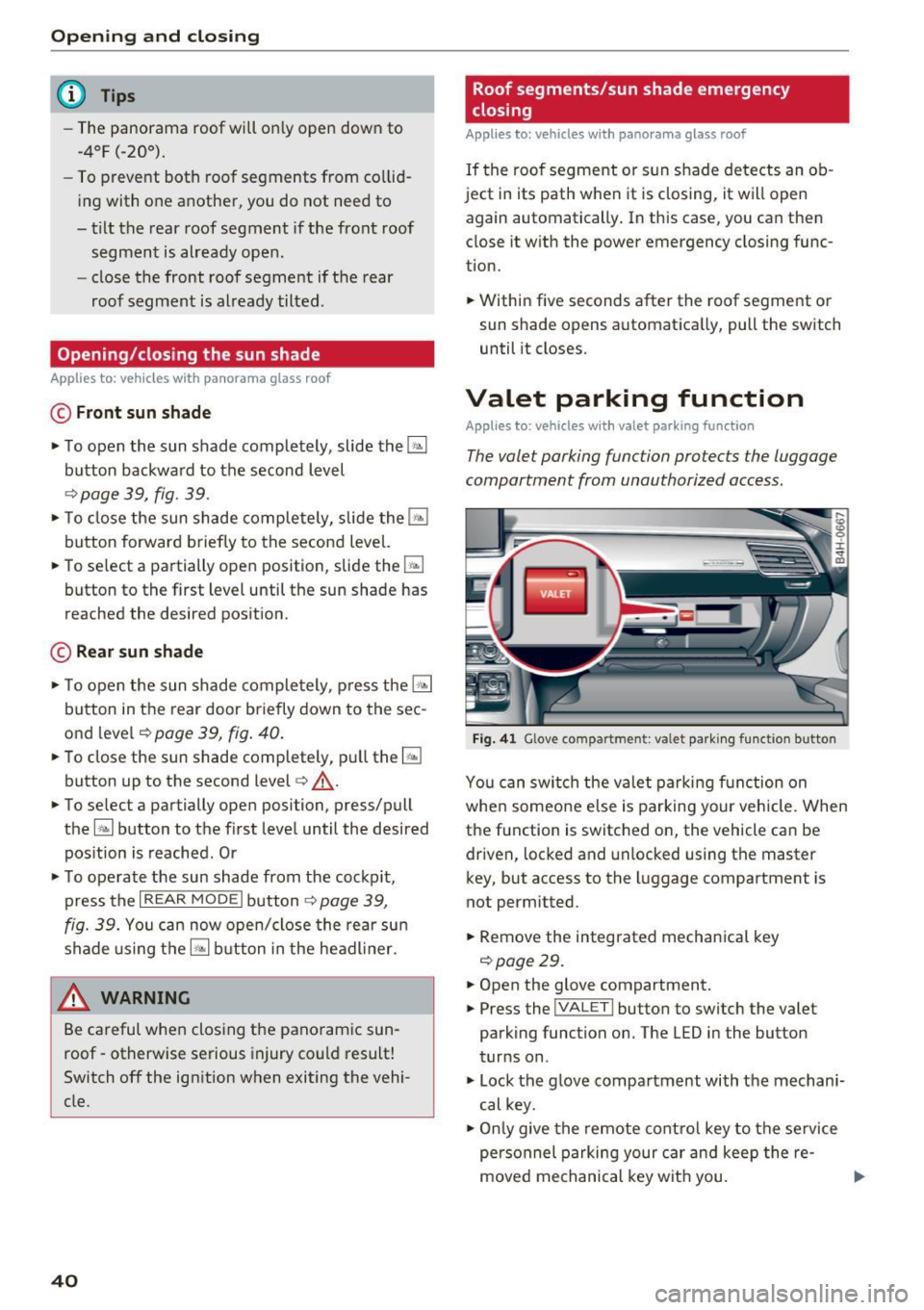
Valet parking function
Applies to: vehicles with valet parking function
The valet parking function protects the luggage
compartment from unauthorized access.
Fig. 4 1 Glove compartment: va le t pa rkin g functio n button
Yo u can switch the va let parking function on
whe n someo ne else is parking your vehicle. When
the function is switched on, the vehicle can be
driven, locked and unlocked using the master
key, but access to the luggage compartment is
not permitted.
• Remove the integrated mechanical key
9 page29.
• Open the glove compartment.
• Press the
I VALET I button to switch the valet
parking function on . The LED in the button
turns on .
• Lock the g love compartment with the mechani
cal key.
• Onl y give the remote cont ro l key to the se rvice
personnel parking your car and keep the re-
moved mechanical key wit h you. .,.
Page 66 of 354
Seats and storage
-Net in the front passenger footwell
- Glasses holder in the headliner (near the rear-
view mirror)
- Storage compartments under the center arm
rest
- Compartments* on the backrests of the front
seats
- Garment hooks above the rear doors
- Compartment behind the rear center armrest
(on vehicles without a pass-through* or refrig
erator*)
- Cell phone holder* in the right rear door
- Bag hooks* in the luggage compartment
A WARNING
- When driving, do not leave any hard objects
on the rear window shelf or allow your pet
to sit on the shelf. They could become a haz
ard for vehicle occupants in the event of
sudden braking or a crash.
- Any articles of clothing that you have hung
up must not interfere with the driver's view.
The coat hooks are designed only for light
weight clothing . Never hang any clothing
with hard, pointed or heavy objects in the
pockets on the coat hooks. During sudden
braking or in an accident -especially if the
airbag is deployed -these objects could in
jure any passengers inside the vehicle.
- To reduce the risk of personal injury in an
accident or sudden stop, always keep the glove compartment closed while driving.
- Read and follow all WARNINGS
~ page 244, Important safety instructions
on the side airbag system.
- Hang clothes in such a way that they do not
impair the driver's vision.
- The coat hooks must only be used for light
weight clothing. Do not leave any heavy or
sharp edged objects in the pockets which
may interfere with the side curtain airbag
deployment and can cause personal injury in
a crash .
- Do not use coat hangers for hanging cloth
ing on the coat hooks as this can interfere
with proper deployment of the side curtain
airbags in an accident.
64
- Do not hang heavy objects on the coat
hooks, as they could cause personal injury in
a sudden stop.
(D Note
Objects on the rear shelf that rub against the
rear window can damage the rear window de
fogger wires .
(D Tips
-A vent slot is located between the shelf and
the rear window. Do not block the vent with
any items you may place on the rear window
shelf .
- Do not place bulky items on the rear window
shelf as they could restrict or block the driv
er's vision in the rear view mirror.
Roof rack
App lies to : vehicles wit h roof rack
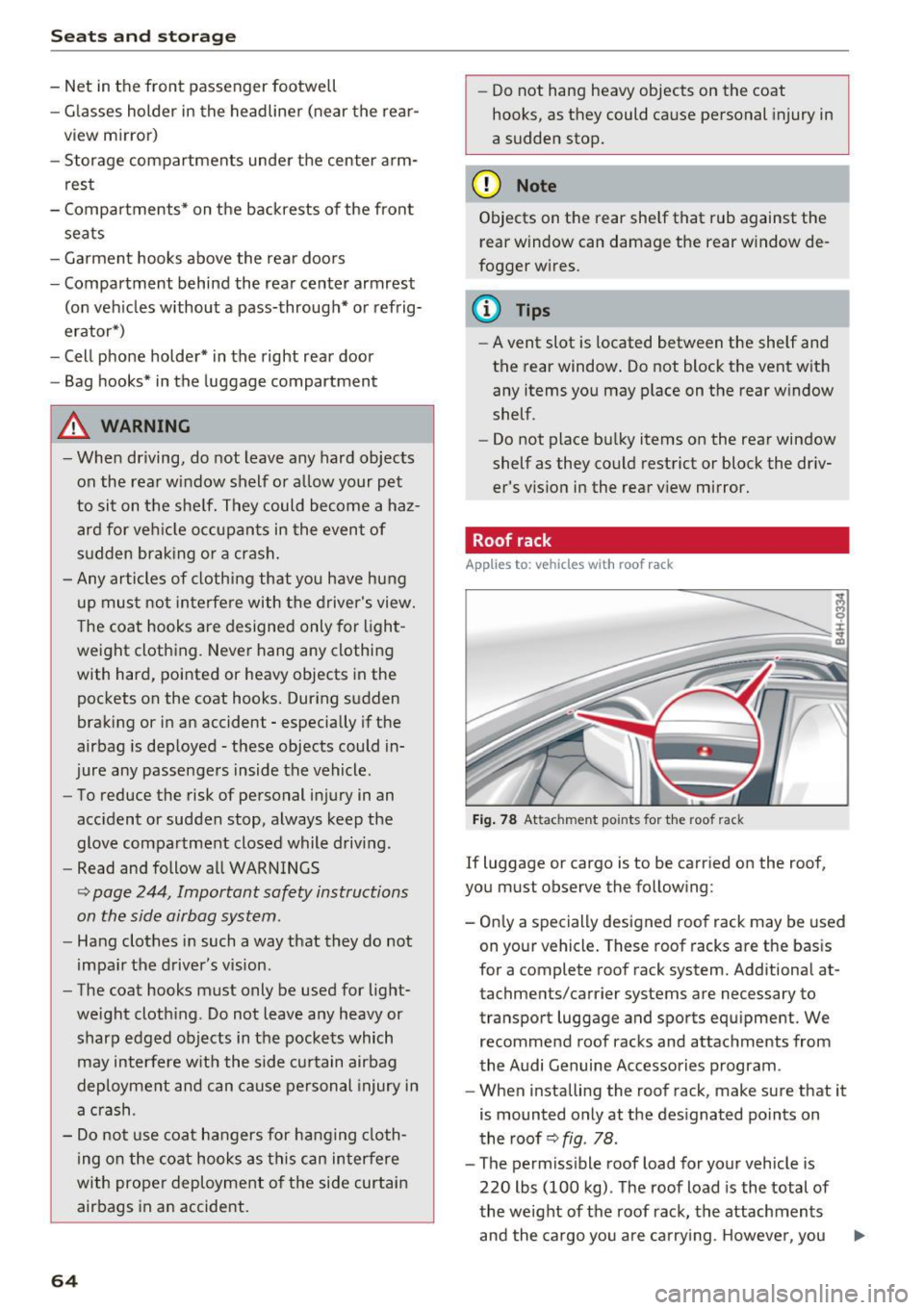
Fig. 78 Attachment po ints for the roof rack
If luggage or cargo is to be carried on the roof,
you must observe the following:
- Only a specially designed roof rack may be used
on your vehicle. These roof racks are the basis
for a complete roof rack system. Additional at
tachments/carrier systems are necessary to
transport luggage and sports equipment. We
recommend roof racks and attachments from
the Audi Genuine Accessories program .
- When installing the roof rack, make sure that it
is mounted only at the designated points on
the roof ~
fig. 78 .
-The permissible roof load for your vehicle is
220 lbs (100 kg) . The roof load is the total of
the weight of the roof rack, the attachments
and the cargo you are carrying . However, you ..,.
Page 67 of 354
C) C0 ....
"' ,-...
"' .... 0 0 :r
er system being used. For the permitted axle
l oad and the permitted total vehicle weight, re
fer to¢
page 333.
A WARNING
-Follow the installat ion instructions provided
with the roof rack system. If you do not se
c ur e the roof rack system and objects on the
roof correctly, they co uld come loose from
t he ve hicl e a nd cau se a n acci den t.
- Us ing a roof rac k system increases th e risk
of an accide nt, because it changes the dr iv
ing chara cteristics by s hift ing t he center of
grav ity an d /or the in cre asi ng the surface
area exposed to win d. Adapt your driving
and speed to the c urrent conditions.
@) Note
Ma ke sure th at the open lugg age compar t
ment lid an d the t ilting/sliding sunroof* do
no t come into contac t wi th objects on the
roof .
@) For the sake of the environment
Your veh icle w ill use mo re fuel d ue to the in
creased wind resistance . So
remove t h e roof
rack after using it.
Luggage compartment
General information
& WARNING
Read and follow the important safety precau
tions in~
page 213, Storing cargo correctly.
Seats and storag e
Tie-downs and luggage compartment net
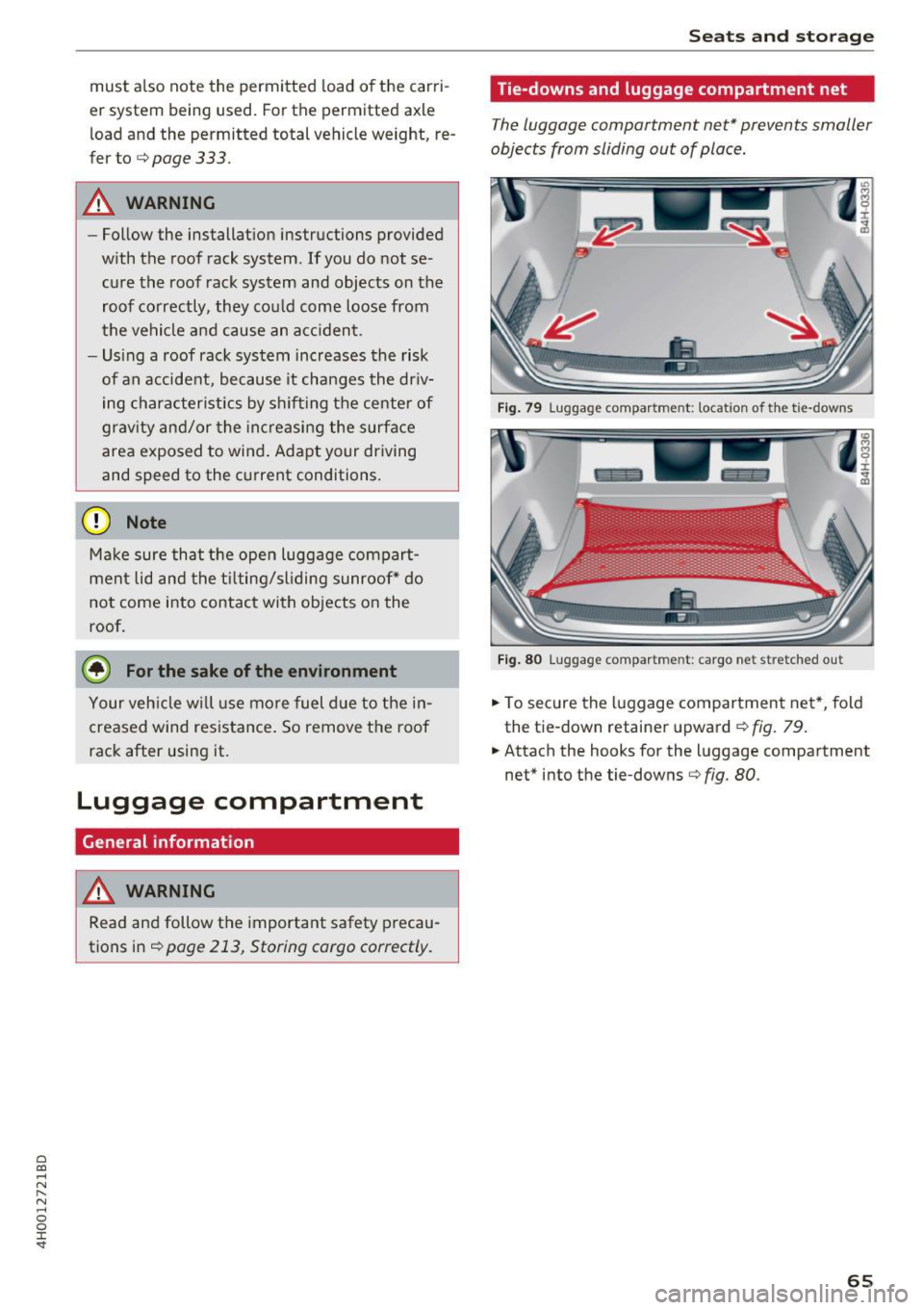
The luggage compartment net* prevents smaller
objects from sliding out of place.
F ig . 79 Luggage compartment: location of th e tie-downs
F ig . 80 Luggage compa rtment: ca rgo net stretched out
.,. To secure the l uggage compartmen t net *, fold
the tie-down retainer upward¢
fig. 79.
.,. Attach the hooks for the luggage compartment
net" into the tie -downs¢
fig. 80.
65
Page 71 of 354

0 co .... N ,..... N .... 0 0 :c '
climate control
Description
The climate con trol system warms, coo ls and re
moves humidity from the air in the vehicle inte ri
or. It is the most effective when the w indows and
sunroof* are closed. If there is a bu ild-up of heat
i n side the veh icle, ven tilat ion can he lp to speed
up the cooling process .
In a ll heating mode functions, except for defrost,
the blower on ly switches to a higher speed once
the eng ine coolant has reached a sufficient tem
perature.
Pollutant filt er
The po llutant filter removes pollutants such as
d ust and pollen from the air.
Key recognition
The clima te control settings are automatically
s tored and assig ned to th e remo te contro l key
that is in use.
& WARNING
Poo r visibility can lead to accidents.
- For safer d riving, keep all windows free of
ice, snow and fo g.
- B ecome familia r as quickly as possible wi th
the correct use and function of the cl imate
contro l system, especially with the defrost
ing and defogging function.
- When the temperat ure is below freezing,
only use the windsh ield washer system after
Warm and cold
the windshield has been warmed by the cli
mate control system. The washer fluid could
freeze on the windshie ld and impair visib ili
ty .
(D Note
-If you suspect that the climate contro l sys
tem is damaged, switch the system off to
prevent further damage and have it checked
by an authorized Aud i dealer o r authorized
Aud i Serv ice Facility.
- Repa irs to the Aud i climate control system
require special technical know ledge and
special tools . See an autho rized Aud i dea le r
or authorized Audi Service Fac ility.
@ For the sake of the environment
Reducing the amount of fuel used also re
duces the amount of pollu tan ts that enter the
ai r.
@ Tips
- To prevent interference with the heat ing
and coo lin g output and to prevent the wi n
dows from fogging over , the air intake in
fro nt of the windshie ld m ust be free of i ce,
snow o r leave s.
- Condensat ion from the coo ling system c an
dr ip and fo rm a pudd le of w ater un der t he
vehicle. Th is i s n orm al and does not me an
t here is a lea k.
- T he e nergy m anagemen t sy stem may tem
por arily swi tch off cert ain fu nctions, s uch a s
the seat heating * or rear window defogger .
T hese systems are ava ila ble again as soon
as the energy supply has been restored.
69
Page 74 of 354

Warm and cold
(D Note
To avoid damage to the heat ing e lements in
the seats, d o not kneel o n the seats or place
heavy loads o n a small a rea of t he seat.
Basic settings
The climate control system basic settings ore ac
cessed in the Infotainment system .
.,. Se lect: the ICARI fun cti on bu tto n > Car systems
contro l button > AC .
Rear seat settings*
Wh en th is func tion is selec ted, a ll se tt in gs for
t he rea r can b e adju ste d t hroug h the cli mate co n
t rol system in the cockpit. The cli mate con trol
sys tem sett in gs cannot be adjus ted in the rear
seat at the same time. This fu nction switches off
after a certa in period of time or when one of the
d ia ls in the cockpit is pressed.
Auto recirculation*
T he sensit iv ity level of the au toma tic r ecircula
tion mode can be set at various levels from
Off to
Max. Whe n recirculation mode la> I is switched on,
the air rec irculat io n is contro lled automatically.
If the w indows fog up, press t he
I@ FRON T I but
ton .
Footwell temperature
You can a dju st the footwell temperature so that
it is coo le r or warmer .
Solar roof*
Parking ven tila tion i s co nt rolled a utoma tically in
t he
Auto settin g.
W hen the ig nitio n is swi tched o ff, solar-powered
p ark ing ventil ation may swi tch on, as long as
- there is sufficient sunlight,
- the outside temperature is not too low,
- the sunroof is closed or tilted and
-Auto (I nfo tainment system) is set
72
Steering wheel heating
Applies to: vehicles with steering wheel heating
The steering wheel rim con be heated .
Fig. 88 Steering co lumn : steeri ng w hee l heati ng b utto n
.,. Pres s the [i] butt on to sw itch st eering w heel
he atin g on/o ff. The mess age
Steering wheel
heating on /Steering wheel heating off
ap
pears in the instrument cluster disp lay .
The tempe rature is m ainta ined at a constant lev
e l when s tee ring wheel hea ting is switc hed on .
The steer ing whee l hea ting sett ings are stored
a utom atically and assig ned t o the rem ote c ontro l
k ey th at is in use.
Page 76 of 354

Driving
Economical and environmentally-friendly
driving
The amount of fue l consumption, the environ
mental impact and the wear to the engine,
brak es and tir es d epends mostly on your driving
style. W ith an anticipatory and economic driv ing
style, fuel consumption can be reduced by ap proximately 10-15% . The following tips will help
you conserve the environment and your money at the same time .
Anticip atory d riving
A vehicle uses the most fuel when acce lerating.
When you drive with ant ic ipat ion , you do not
need to brake as often and so you accelerate less .
When possible, let your ve hicle coast w ith a
g ear
e ngag ed ,
for example , when you notice that the
next traffic light is red. This produ ces a n eng ine
b raking effect, which helps to protect the brakes
and tires and reduces the emissions and fuel con
sumption to zero (f uel shut-off during decelera
tion).
Shift effici ently
An effective way to save f uel is to upshift earlie r.
Staying in a gear too long uses fue l unnecessari
ly. Press down on the accelerator pedal slowly
and avoid "k ick-down".
Avoid full acceleration
You sho uld rare ly t ravel at the maximum vehicle
speed. High speeds cause a disp roportiona tely
h igh increase in fuel consumption, emissions and
traffic noise . Slower driving saves fuel.
Reduce idling time
The Start-Stop system * helps to reduce the id ling
time automatically . In vehicles witho ut the Start
S top sys tem* , it is efficient to switch the eng ine
off when stopped at ra ilroad cross ings a nd long
red lights . Stopping t he engine for 30 -40 sec
onds already saves more fuel than the amount of
extra fuel needed to restart the eng ine .
It takes a very long time in idle to wa rm the en
gine up to operating temperature . Wea r and
emissions are especially high in the warm -up
phase. Therefore, yo u should begin driving im-
74
mediate ly after s tarting the engine . Avoid high
RPMs whi le doing this.
Have maintenance performed regularly
By having maintenance pe rformed regu la rly on
you r vehicle, you can help to reduce fuel con
s u mption before you even sta rt to drive. The
maintenance condition of your vehicle not on ly
affects traffic safety and long-term value but al
so impacts fuel consumption. A poorly main
ta ined engine can lead to fuel consumption that
i s 10% higher than normal.
Avo id short trip s
The engine and exha ust cleaning system must
reach their optima l operating temperature to ef
fect ive ly reduce consumpt ion and emissions.
A cold engine uses a d isproportionately high
amount of fue l. The engine reaches operating
temperat ure and cons umption no rmalizes on ly
after approximate ly four kilometers.
Check the tire pre ssure
To save fuel, ma ke sure the tires are always in
flated to t he corre ct pressure
¢ page 291 . The
fuel consumption can increase by 5% if the pres
sure is only 0 .5 bar too low. Due to the increased
roll ing resistance, low tire pressures w ill also
lead to greater tire wear and will affect driving
behavior.
D rive with summer tires when possib le because
th is can increase fue l economy by up to 10%.
Eliminate unnecessary we ight
Since eve ry po und of extra weight increases f uel
consump tion, it pays to remove any unnecessa ry
weight .
A roof rac k increases the w ind resis tan ce on the
vehicle and shou ld be removed when it is not
needed . You will save approximately 12% o f you r
fuel when at speeds from 62-75 mph (100-120 km/h) .
Save energy
The eng ine d rives the genera tor , which gene rates
e lectric ity; the fuel consumpt ion also increases
with t he demand for e lec tricity . T he refore, switch ..,_
Page 143 of 354
0 co .... N ,..... N .... 0 0 :c '
Appl ies to: vehicles with vo ice recog nitio n system
You con operate many Infotainment functions
conveniently by speaking .
Requirement: the ignition and the MM I must be
switched on~
page 134 , there must be no phone
call in progress and the parking system m ust not
be active .
~ Switching on : briefly press the~ button @
~ page 11, fig. 7 on the m ultif unction steering
whee l* and say the desired command after the
Beep .
~ Switching off : press and hold the l2;J button .
Or: press any button on the MMI control panel.
~ Canceling : press the 10, I button and say a new
command.
Or : say the command Canc el.
Input as sistance
The system gu ides you through the input with
visua l and audio feedback .
-Vi su al input a ssistance : after turning on voice
recognition, a d isplay with a select ion of possi
ble commands appears in the Infotainment dis
play . The command d isplay can be turned on or
off in the ma in menu using the
S etup MMI con
t rol button.
- Aud io input assi stance : to have the possible
commands read, turn the voice recognition sys
tem o n and say
Help .
For the system to underst and you:
Speak clearly and distinct ly at a normal volume.
Speak louder when driving faster.
Emphasize the words in the commands even ly
and do not leave long pauses .
D o not speak a command when the voice recogni
tion system is mak ing an anno uncement.
C lose the doors, the windows a nd the sunroof* to
reduce background noise . Make su re that passen
gers are not speaking when you are giving a voice
command.
Voice recognition system
Do not d irect the air vents toward the hands free
microphone, which is on the roof headliner near
the front inte rior lights .
Only use the system from the dr iver's seat be
ca use the hands free microphone is directed to
ward that seat .
Additional settings
Additional settings, such as individual speech
training
based on yo ur voice, the Command dis
play
or the prompt volume , can be adjusted in
the main men u using the
Setup MMI control but
ton
~ page 205.
A WARNING
--Direct your full attention to dr iv ing. As the
driver, you have complete responsibility for
safety in traff ic. Only use the functions in
such a way that you a lways maintain com
plete control over your vehicle in all traffic
situa tions.
- Do not use the voice recognition system in
emergencies beca use your voice may change
in stressfu l situations. It may ta ke longe r to
dia l the numbe r or the sys tem may not be
a ble to dia l it at all. Dia l the emergency
number manually.
@ Tips
- The d ialog pauses w hen the re is a n incom
ing phone call and will con tinue if yo u ig
nore the cal l. T he d ia log ends if you answer
the ca ll.
- Yo u can select an item in the list using ei
ther the vo ice recogn it io n sys tem or the
cont rol knob.
Command overview
information
Applies to: vehicles with voice recogn it ion system
The following overv iews describe the commands
that can be used to operate the MMI using the
vo ice recognit io n system .
Alternative commands are separated by a
" I", for
example, say:
Telephone I (or) Na vigation I (or)
Rad io . .,..
141