remote AUDI A8 2018 User Guide
[x] Cancel search | Manufacturer: AUDI, Model Year: 2018, Model line: A8, Model: AUDI A8 2018Pages: 356, PDF Size: 54.71 MB
Page 43 of 356
lL t:0 ....
"' ......
"' .... 0 0 :c '
va let parking function is switched on :
-1""'1 button in the driver's door
-I ""' I button on the remote control key
- Handle in the rear lid
When the valet parking function is switched on,
the message
Valet parking activated appears in
the instrument cluster display when you switch
the ignition on.
Garage door opener (Homelink)
Description
Ap plies to: vehicl es with garage door opener (Homeli nk)
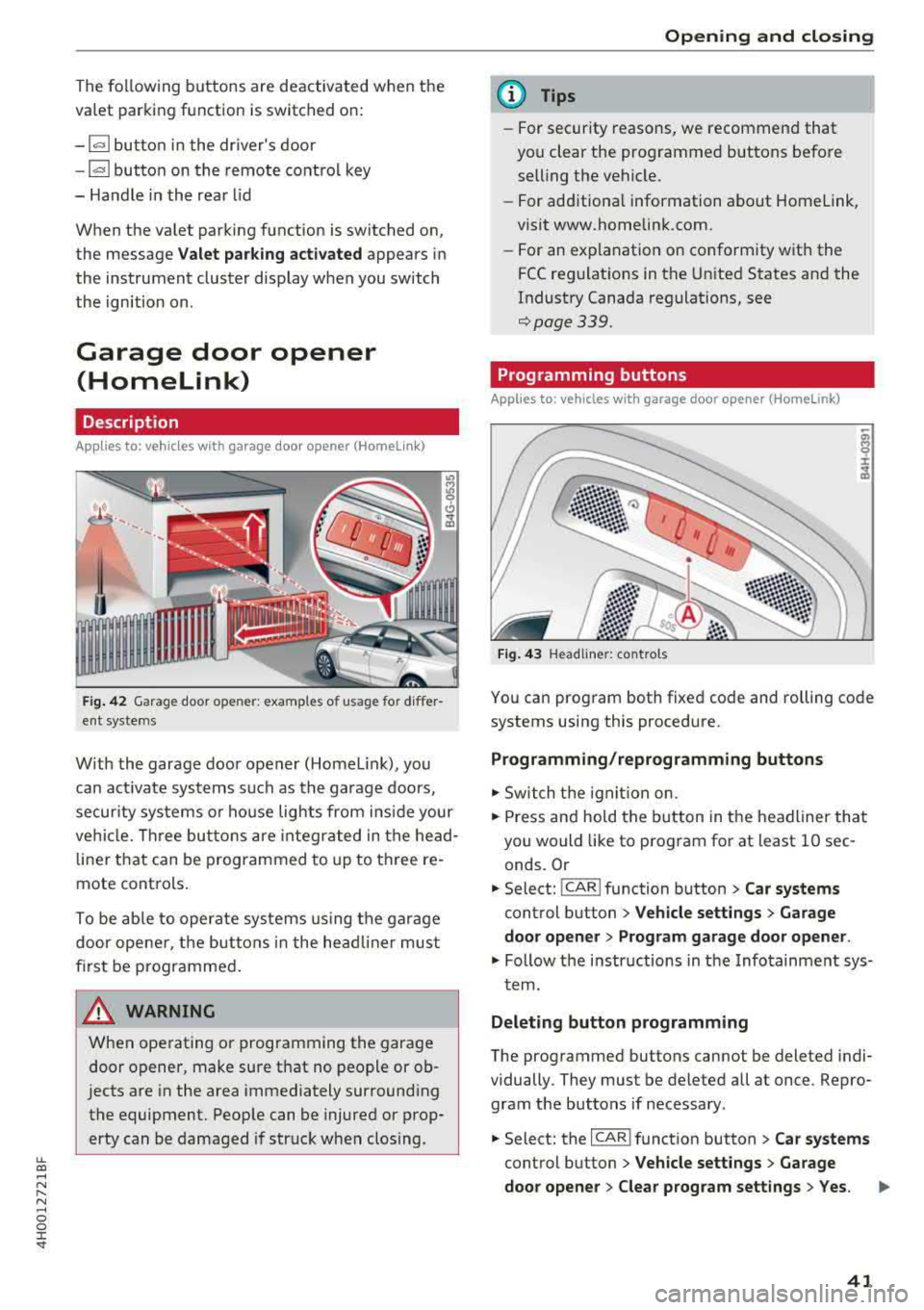
Fig. 42 Garage door opene r: examples o f usage for differ
ent systems
W ith the garage door opener (Homel ink), you
can activate systems such as the garage doors,
security systems or house lights from ins ide your
vehicle. Three buttons are integrated in the head
liner that can be programmed to up to three re
mote controls.
To be able to operate systems using the garage
door opener, the buttons in the headliner must
first be programmed .
A WARNING
When operating or programming the garage
door opener, make sure that no people or ob
jects are in the area immediately surrounding
the equipment. People can be injured or prop erty can be damaged if struck when closing.
Opening and closing
(D Tips
-For security reasons, we recommend that
you clear the programmed buttons before selling the vehicle.
- For add itiona l information about Homelink,
visit www.homelink.com.
- For an explanation on conformity with the
FCC regulations in the United States and the
Industry Canada regulations, see
¢page 339.
Programming buttons
App lies to: vehicles with garage door opener (Home link)
Fig. 43 Headliner: controls
You can program both fixed code and rolling code
systems using this procedure.
Programming/reprogramming buttons
.. Switch the ignit ion on.
.. Press and hold the button in the headliner that
you would like to program for at least 10 sec
onds. Or
.. Select: ! CAR ! function button> Car systems
control button > Vehicle settings > Garage
door opener > Program garage door opener.
.. Follow the instr uctions in the Infotainment sys-
tem.
Deleting button programming
The programmed buttons cannot be deleted indi
vidually. They must be deleted all at once. Repro
gram the buttons if necessary .
.. Select: the ICAR !function button> Car systems
control button > Vehicle settings > Garage
door opener > Clear program settings
> Yes.
41
Page 52 of 356
Lights and Vision
Retracting the rear door sunshades*
~ To re tract the sunshade from the driver's seat,
press the left/right rear power window switch
~ in the driver's door.
~ To retract the sunshade from the rear of the
vehicle,
press the power window switch Q;;; in
the left/right rear door.
You can adjust the settings for the rear sunshade
so the shade retracts automatically when you se
lect the reverse gear. Select:
CAR function button
> Car systems control button > Vehicle settings
> Automatic rear blind > On. The settings are au
tomatically stored and assigned to the remote
control key. T he sunshade is extended again as
soon as the vehicle is traveling forward at a speed
greater than 9 mph (15 km/h) if the ignition has
not been switched off in the meantime .
&_ WARNING
Always pay careful attention when closing the
sunshades. Pinching could cause serious inju
ries.
@ Tips
- Pressing the l~•~l button several times in a
r ow can trigger the overload protection. The
sunshade can on ly be extended/retracted
again after a brief waiting period.
- The rear window sunshade only functions
when the vehicle interior is warmer than
14°F (-10°().
Vanity mirror in the rear
Appl ies to: ve hicles w ith vanity mirro rs in th e rear
Fig. 55 Rear headl iner: vanity m irror
50
~ Press the button to fold the mirror open. The
mirror lighting turns on automatically .
~ To change the mirror's angle, move it forward/
back with your hand.
Windshield wipers
Switching the windshield wipers on
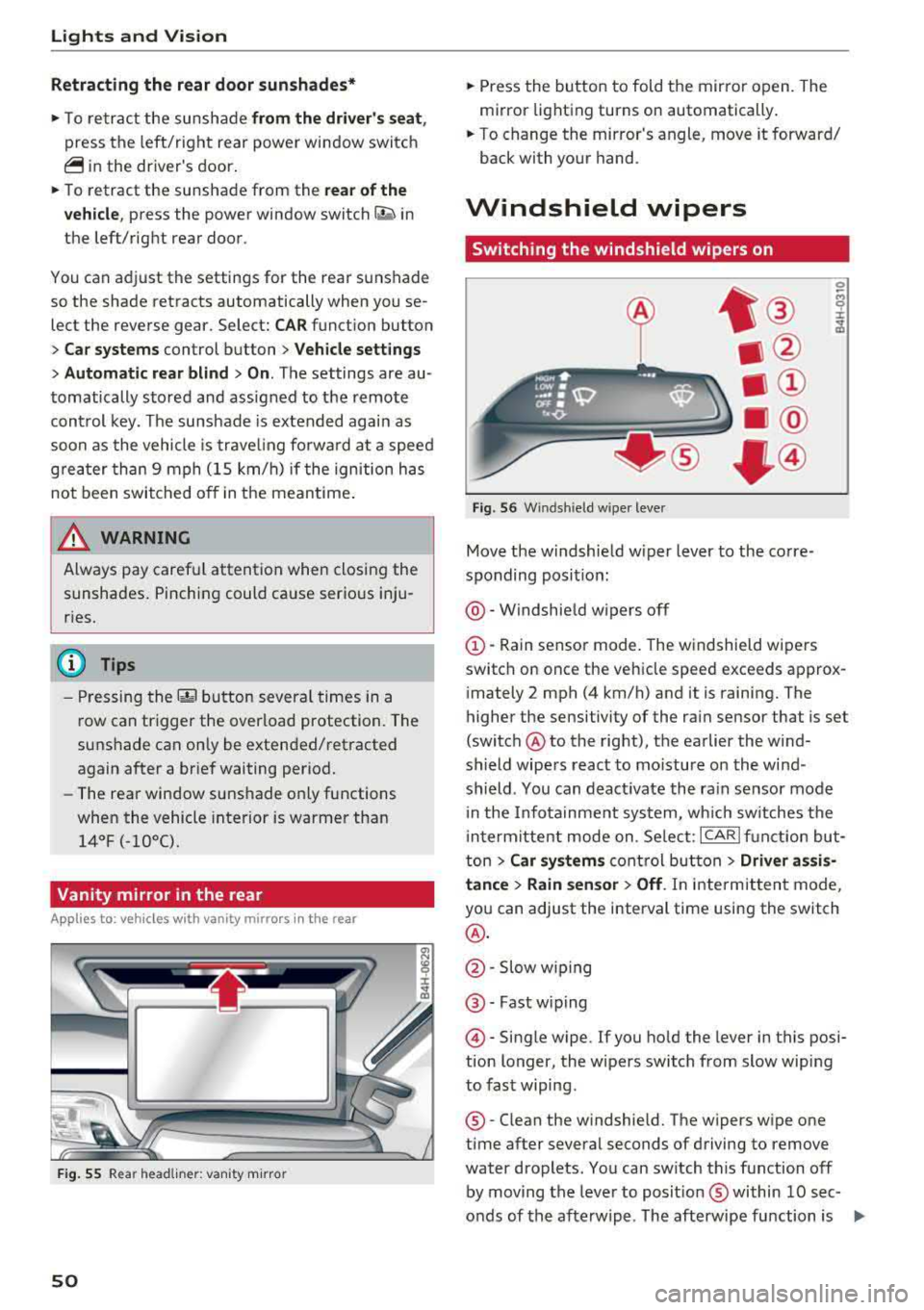
Fig . 56 Windsh ield w iper lever
Move the windshield w iper lever to the corre
sponding posit ion:
@ -Windshield wipers off
G)-Rain sensor mode. The windshield wipers
switch on once the vehicle speed exceeds approx
imately 2 mph (4 km/h) and it is raining. The
higher the sensitivity of the rain sensor that is set
(switch @to the right), the earlier the wind
shield wipers react to mo isture on the wind
shield. You can deact ivate the rain sensor mode
i n the Infotainment system, which sw itches the
i ntermittent mode on. Se lect:
ICARI function but
ton
> Car systems control button > Driver assis·
tance
> Rain sensor> Off. In intermittent mode,
you can adjust the interval time using the switch
@.
@ -Slow wiping
@ -Fast w iping
@ -Single wipe. If you hold the lever in this posi
tion longer, the wipers switch from slow wiping
to fast wiping.
®-Clean the windshield. The wipers wipe one
time after several seconds of driving to remove
water droplets. You can sw itch this function off
by moving the lever to posit ion ® within
10 sec
onds of the afterwipe . The afterwipe function is
IJII>
Page 54 of 356
Lights and Vision
,.. Switch the windshield wipers off (position@
~page 50, fig. 56).
,.. Select: the ICARI function button > Car systems
control button > Service & control> Wiper
change position. > On.
Removing the wiper blade
,.. Fold the windshield wiper arm away from the
windshield.
,.. Press the locking knob@ c:> fig. 57 on the wiper
blade . Hold the wiper blade firmly.
,.. Remove the wiper blade in the direction of the
arrow.
Installing the wiper blade
,.. Insert the new wiper blade into the mount on
the wiper arm @until it clicks into place.
,.. Place the wiper arm back on the windshield.
,.. Turn the service position off.
.,&. WARNING
For safety reasons, the windshield wiper
blades should be replaced once or twice each
year.
@ Note
- The windshield wiper blades must only be
folded away when in the service position! Otherwise, you risk damaging the paint on
the hood or the windshield wiper motor.
- You should not move your vehicle or press
the windshield wiper lever when the wiper
arms are folded away from the windshield.
The windshield wipers would move back in
to their original position and could damage
the hood and windshield.
- You can also use the service position, for ex
ample, if you want to protect the windshield
from icing by using a cover.
- You cannot activate the service position
when the hood is open.
52
Digital compass
Switching the compass on and off
Applies to: vehicles with digital compass
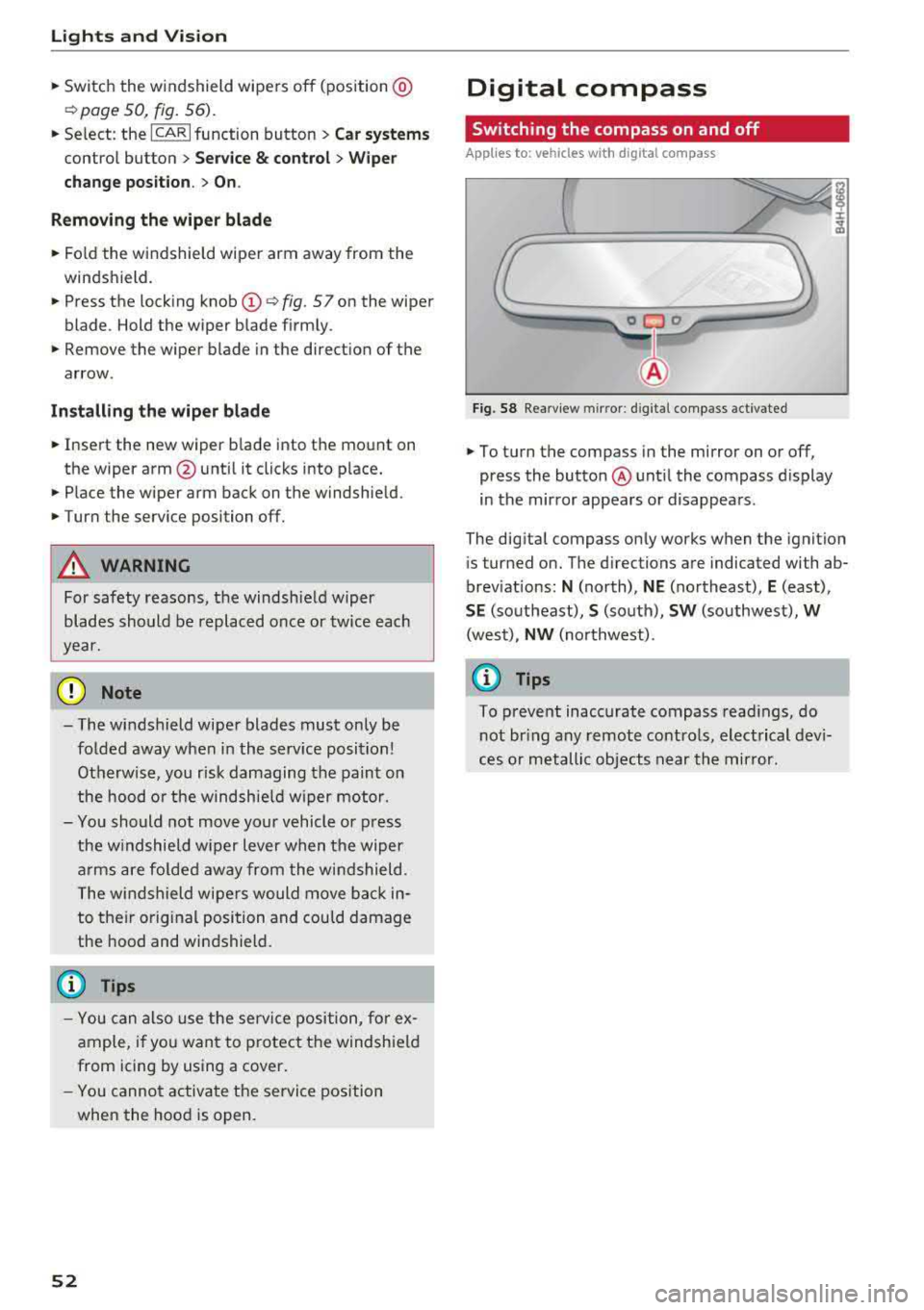
Fig. 58 Rearview mirror : d ig ital compass activated
,.. To turn the compass in the mirror on or off,
press the button @ until the compass display
in the mirror appears or disappears.
The digital compass only works when the ignition is turned on. The directions are indicated with ab
breviations:
N (north), NE (northeast), E (east),
SE (southeast), S (south), SW (southwest), W
(west),
NW (northwest) .
(D Tips
To prevent inaccurate compass readings, do
not bring any remote controls, electrical devi
ces or metallic objects near the mirror.
Page 59 of 356
lL t:0 ....
"' " "' .... 0 0 :c '
the left/right button @ unti l the leg support
reaches the desired position.
.,. To angle the leg support so that it is more up
right/more recl ined or to move it forward/back,
adjusting the front passenger's seat according
ly .
Adjust ing the f ront pa ssenge r's seat
.,. Make s ure that the front passenger's seat ad
justment is switched on in the Infotainment system
c:> page 58.
.,. To activate the front passenger's seat adjust
ment, press the button ®·
.,. To adjust the front passenger's seat forward/
back, press the butto n© forward/back.
.,. To move the front p assenger's seat up/down,
press the button © upward/downwa rd.
.,. To adjust the front passenger's seat back rest so
that is more upright/more reclined, press the
button ®forward/back.
.,. Applies to vehicles with reclining seat*: to ad
just the reclining/standard seat position, press and hold the button
@ /(D until the front pas
senger's seat reaches its end posit ion .
,&. WARNING
-The power seats can also be adjusted w hen
the igni tion is switched
o ff. For this reason,
children should never be left unattended in
the vehicle beca use they cou ld be injured.
-Be careful whe n adj usting the sea t. Unsu
pervised or c areless seat adjustment can
pinch fingers or hands ca using injur ies .
-Applies to vehicles with reclining seat* :
-Do not use the front passenger's seat for
seating when it is in the recl ining posit ion.
This inc reases the risk of ser ious injury or
death.
-Never adjust the reclining position when
the front passenger's seat is occupied .
This inc reases the risk of injury.
-Do not tilt the display if the driver's v iew
of the right exterio r mirror w ill be ob
s tructed .
-Make sure the area between the leg sup
port and the front passenger's seat back-
S eats and storag e
rest is clear before fo ld ing the leg support
in so that you are not p inched.
(D Tips
-T he massage function switches off auto
matically after approximate ly 10 minutes .
-If you cannot adjust the reclining seat* or
the front passenger's seat from the rear, it
is possib le that:
-the front passenger's seat memory func
tion is switched
off c:> page 59, or
-the child safety lock is switched on (the ~
button c:> page 3 7 or the r ight t button
c:> page 37 is tu rned on in the d river's
door), or
-the front passenger seat adj ustment is
switched
off in the Infota inment system
c:>page 58 .
Massage function remote control
Appl ies to: vehicles wit h reclinin g seat an d massa ge function
Fig . 66 Remote control: recli ning seat massage funct ions
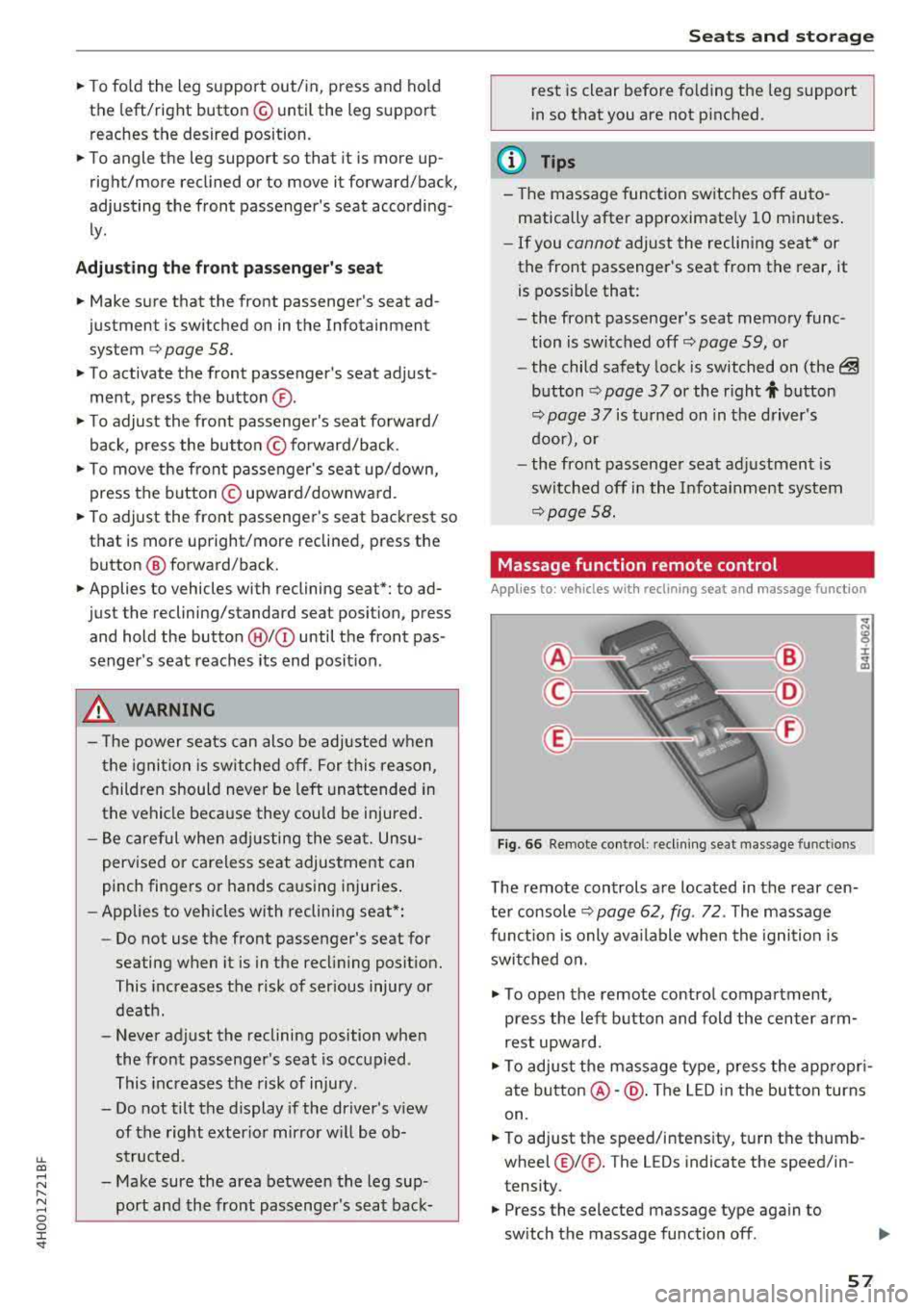
T he remote controls are located in the rear cen
te r console
c:> page 62, fig. 72 . The massage
func tion is only ava ilable when the igni tion is
swi tched on.
.,. To open the remote co ntro l compartment,
press the left b utton and fold the center arm
rest upwa rd.
.,. To adjus t the massage type, press the app ropr i
ate
button @-@ . The LED in the button turns
on.
.,. To adjust the speed/i ntens ity, tu rn the thumb
wheel@I® . The LEDs indicate the speed/in
tensity.
.,. Press the selected massage type again to
sw itch the massage function
off .
57
Page 61 of 356
u. co .... N
" N .... 0 0 :c '
sides with both hands and slide it upward unti l
you fee l it click into place.
~ To move the head restraint down, press the
button (small
arrow)¢ fig. 68 and slide the
head restraint downward.
A WARNING
Always read and follow the applicab le wa rn
ings
¢page 211.
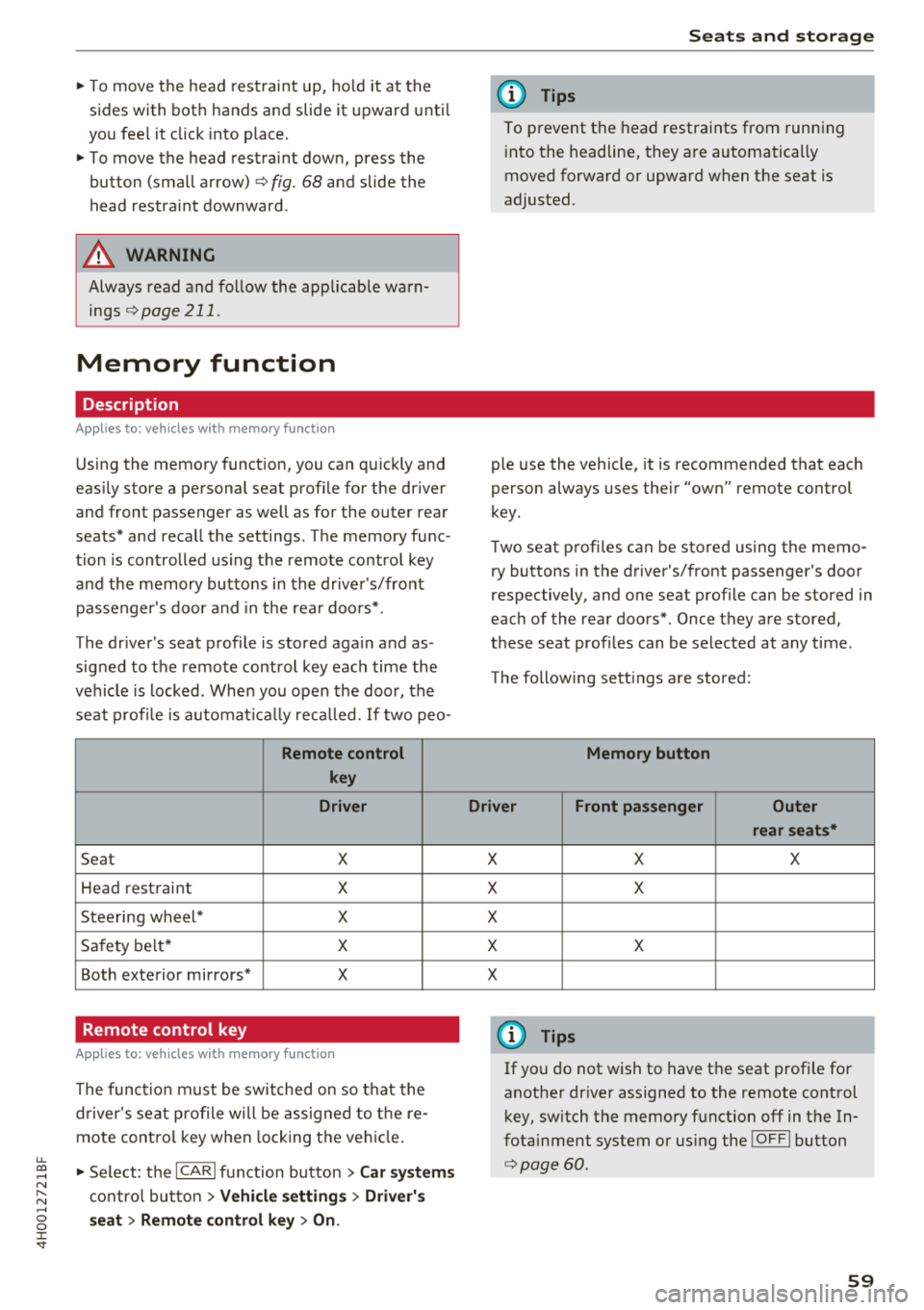
Memory function
Description
Applies to: vehicles with memory function
-
Using the memory function, you can quickly and
eas ily store a personal seat profile for the driver
and front passenger as well as for the outer rear
seats* and recall the settings. The memory func
tion is controlled us ing the remote control key
and the memory buttons in the drive r's/front
passenger's door and in the rea r doo rs*.
The driver's seat profile is stored again and as
signed to the remote control key each time the
ve hicle is locked. When you open the door, the
seat profi le is automat ica lly reca lled. If two pea-
Remote control
key
Driver
Seat X
Hea d rest raint X
Steering wheel* X
Sa fety belt* X
Both exterior mirrors* X
Remote control key
Applies to: vehicles with memory function
The functio n must be switched on so that the
d river's seat p rofile will be assig ned to t he re
mote cont rol key w hen locking the vehicle .
~ Select: the ICARI function button > Car systems
contro l bu tton > Vehicl e setting s > Driver' s
s eat > Remo te control ke y > On.
Seat s and sto rag e
(D Tips
To prevent the head restraints from running
i nto the headline, they are automatically
moved forward or upward when the seat is
adjusted.
ple use the vehicle, it is recommended that each
person always uses the ir "own" remote control
key.
T wo seat profiles can be stored using the memo
ry buttons in the driver's/front passenger's door
respectively, and one seat profile can be stored in
each of the rear doors*. Once they are stored,
these seat profiles can be selected at any time.
The following sett ings are stored:
Memory button
Driver Front passenger Outer rear seats*
X X X
X X
X X X
X
(D Tips
If yo u do not wish to have t he seat profi le for
another dr iver assigned to the remote cont rol
key, sw itch the memory function
off in the In
fotai nment system or using the
!O FF ! button
¢page 60.
59
Page 64 of 356
Seats and stor age
dried out complete ly before using the
socket again .
-Devices connected to the vehicle behave dif
ferent ly than when they are connected to a
regu lar power supply. Therefore, connected
devices can become hot dur ing operation,
wh ich can increase the risk of injury .
-There is a risk of injury when using adapters
and extension cords, because the child safe
ty on t he socket is switched off and the
socket is powered w ith current .
-To reduce the risk of fatal injury, do not in
sert any conductive objects, such as knitting
need les, into the contacts on the socket.
-T o reduce the risk of injury, switch off any
connected electr ical devices if the socket
has switched off d ue to overheating.
(D Note
- Also read the operating manuals for the
connected dev ices .
- Do not connect any lamps that contain neon
tubes . Due to technical reasons, this can
cause malf unct ions in the lamp .
- Do not connect any 230 volt dev ices to the
115 volt socket . The device can be dam
aged . Check the permitted voltage of the
device accord ing to the type label.
- With some power supply units, such as for
l aptops, switching them on disables the
in
teg rated ove rcur rent shutdown . In this
case, disconnec t the power s upply un it from
the electrical equipment and reconnect
af
ter approximately 10 seconds .
(D Tips
-Devices that are not shie lded or devices ne ar
the rear w indow antenna can ca use mal
functions in the radio, TV area or in the vehi
cle electrical system .
- T he functions on some devices may be limit
ed d ue to the low power output (wattage).
62
Full-Length center
console
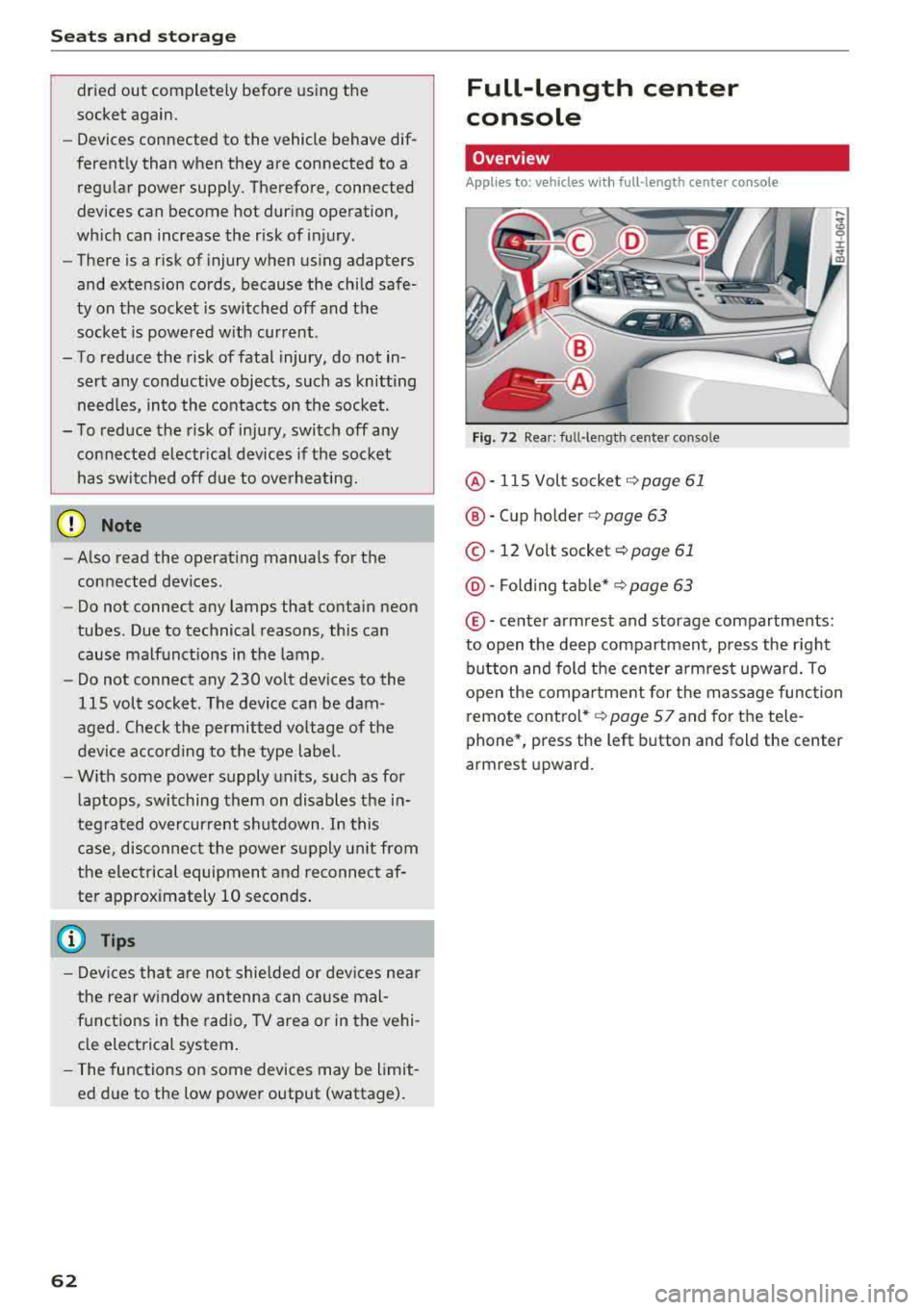
Overview
Applies to: vehicles with full-length center co nsole
F ig. 72 Rea r: ful l-leng th center console
@ -115 Volt socket c:;, page 61
®-Cup ho lder c:;, page 63
© -12 Volt socket c:;, page 61
@ -Fo ld ing t able* c:;, page 63
© -ce nter armrest and storage compartments:
to open the deep compartment, press the right b utton and fold the center a rmrest upward. To
open the compa rtment for the massage function
remote cont rol*
c:;, page S 7 and for the tele
phone*, press the left button and fold the center
armrest upward.
Page 71 of 356
u. co .... N
" N .... 0 0 :c '
climate control
Description
The climate control system warms, cools and re
moves humidity from the air in the vehicle interi
or. It is the most effective when the windows and
sunroof* are closed. If there is a build-up of heat inside the vehicle, ventilation can help to speed
up the cooling process .
In all heating mode functions, except for defrost,
the blower only switches to a higher speed once
the engine coolant has reached a sufficient tem
perature .
Pollut ant filt er
The po llutant filter removes pollutants such as
dust and pollen from the air.
Ke y r eco gnition
The climate control settings are a utomatically
stored and assigned to the remote control key
that is in use .
A WARNING
Poor visibility can lead to accidents.
- For safer driving, keep all windows free of
ice, snow and fog .
- Become familiar as quickly as possible with
the correct use and function of the climate contro l system, especially with the defrost
ing and defogging function.
- When the temperature is below freezing,
only use the windshield washer system after
Warm and c old
the windshield has been warmed by the cli
mate control system. The washer fluid could
freeze on the windshield and impair visibili
ty .
@ Note
-If you suspect that the climate contro l sys
tem is damaged, switch the system off to
prevent further damage and have it checked
by an authorized Audi dealer or authorized
Aud i Serv ice Facility.
- Repa irs to the Aud i climate control system
require special technical knowledge and
special tools . See an authorized Aud i dealer
or authorized Audi Serv ice Fac ility .
@ For the s ake of the environment
Reducing the amount of fuel used also re
duces the amount of pollutants that enter the
a ir .
(D Tips
- To prevent interference with the heat ing
and cooling output and to prevent the win
dows from fogging over, the a ir intake in
fro nt of t he w indshie ld must be free of ice,
snow or leaves.
- Condensat ion from the coo ling system can
dr ip and form a pudd le of water under the
veh icle . T h is is no rma l and does not mean
there is a leak .
- Th e energy management system may tem
porarily switch off certain functions, suc h as
the seat heating* or rear window defogger .
T hese systems are avai lable again as soon
as the energy supply has been restored.
69
Page 74 of 356
Warm and cold
(D Note
To avoid damage to the heating elements in
the seats, do not kneel on the seats or place
heavy loads on a small area of the seat.
Basic settings
The climate control system basic settings ore ac
cessed in the Infotainment system.
,.. Select: the ICARI function button > Car systems
control button > AC.
Rear seat settings*
When this function is selected, all settings for
the rear can be adjusted through the climate con
trol system in the cockpit. The climate control
system settings cannot be adjusted in the rear
seat at the same time. This function switches off
after a certain period of time or when one of the
dials in the cockpit is pressed.
Auto recirculation*
The sensit ivity level of the automatic recircula
tion mode can be set at various levels from
Off to
Sensitive. When recirculation mode 1~ 1 is switch
ed on, the air recirculation is controlled automat
ically. If the windows fog up, press the
I ® FRONT I
button.
Footwell temperature
You can adjust the footwell temperature so that
it is cooler or warmer .
Solar roof*
Parking ventilation is controlled automatically in
the
Auto setting.
When the ignition is switched off, solar-powered
parking ventilation may switch on, as long as
- there is sufficient sunlight,
- the outside temperature is not too low,
- the sunroof is closed or tilted and
-Auto (Infotainment system) is set
72
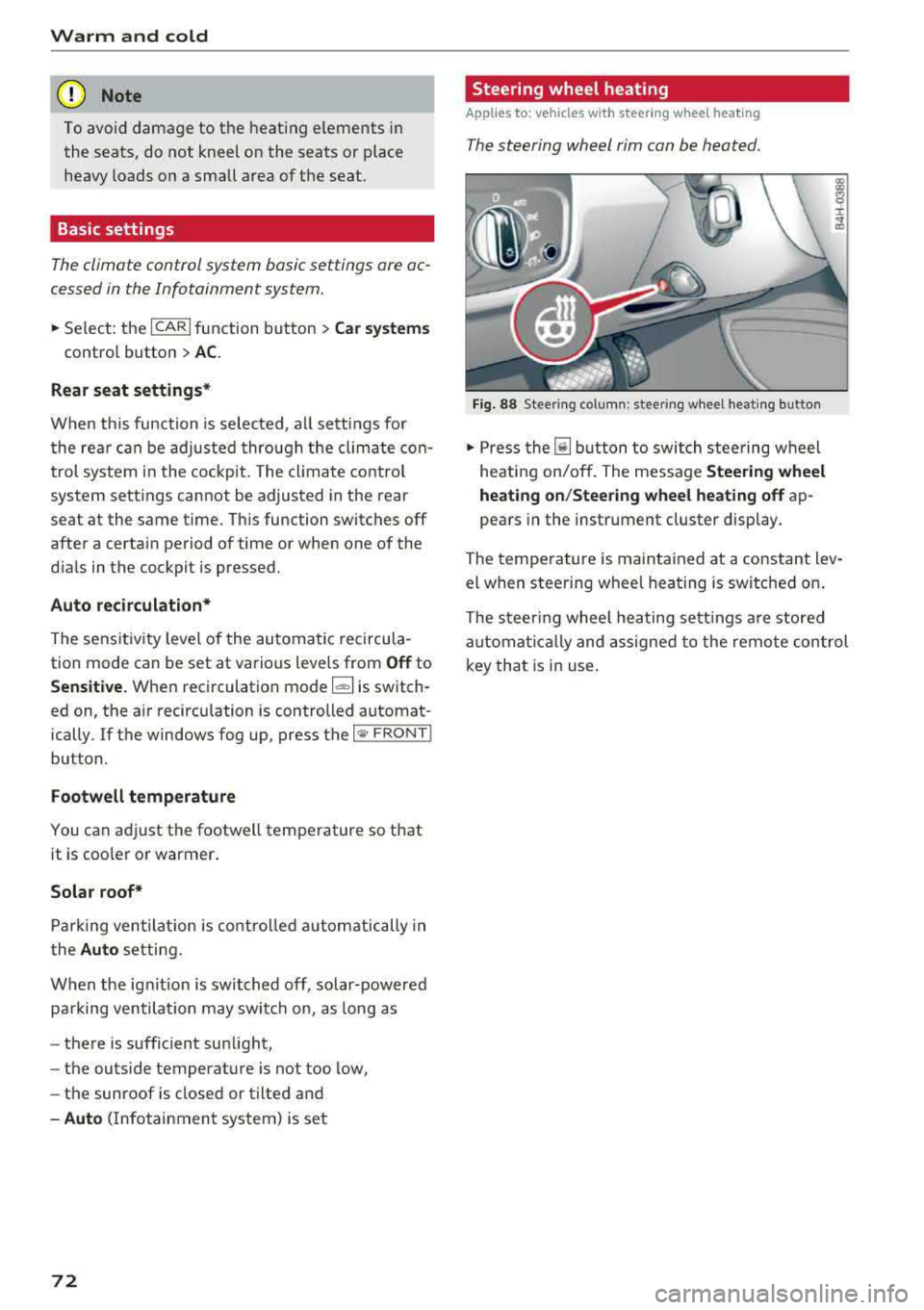
Steering wheel heating
Applies to: vehicles with steering wheel heating
The steering wheel rim can be heated .
Fig. 88 Steering column: steering wheel heating button
,.. Press the [il button to switch steering wheel
heating on/off. The message
Steering wheel
heating on/Steering wheel heating off
ap
pears in the instrument cluster display.
The temperature is maintained at a constant lev
el when steering wheel heating is switched on.
The steering wheel heating settings are stored
automat ical ly and assigned to the remote control
key that is in use.
Page 80 of 356
Driving
Shift to P, otherwise vehicle can roll away.
Doors do not lock if lever is not in
P.
This driver message appears fo r safety reasons if
the transmission has not been shifted to the P
position when you switch the ignition off. Move
the selector lever to the P position . Otherwise the
veh icle is not protected from ro lling and it cannot
be locked.
(I Key is not recognized. Hold back of key
against marked area. See owner's manual
If the i ndicator light turns on and this message
appears, there is a
malfunction ~ page 78.
Turn off ignition before leaving car
This message appears if the driver's door is
ope ned while the ignition is switched on . Always
sw itch off the ignition if you are leavi ng the vehi
cle .
Shift to P and turn off ignition before leav ing
car, otherwise vehicle can roll away
This message appears if the driver's door is
opened while the ignition is switched on and the
transmission has not been shifted to the P posi
tion . Shift the transm iss ion into the P posit ion
and turn off the ign ition if you are leaving the ve
h icle . Otherwise the vehicle could roll.
Starting the engine when there is a
malfunction
It may not be possible to start the engine under
certain circumstances, for example if the battery
in the vehicle key is drained, if interference is af
fected the key or if there is a system malfunc
tion .
c:====== ~
~ _____ ___ ci5
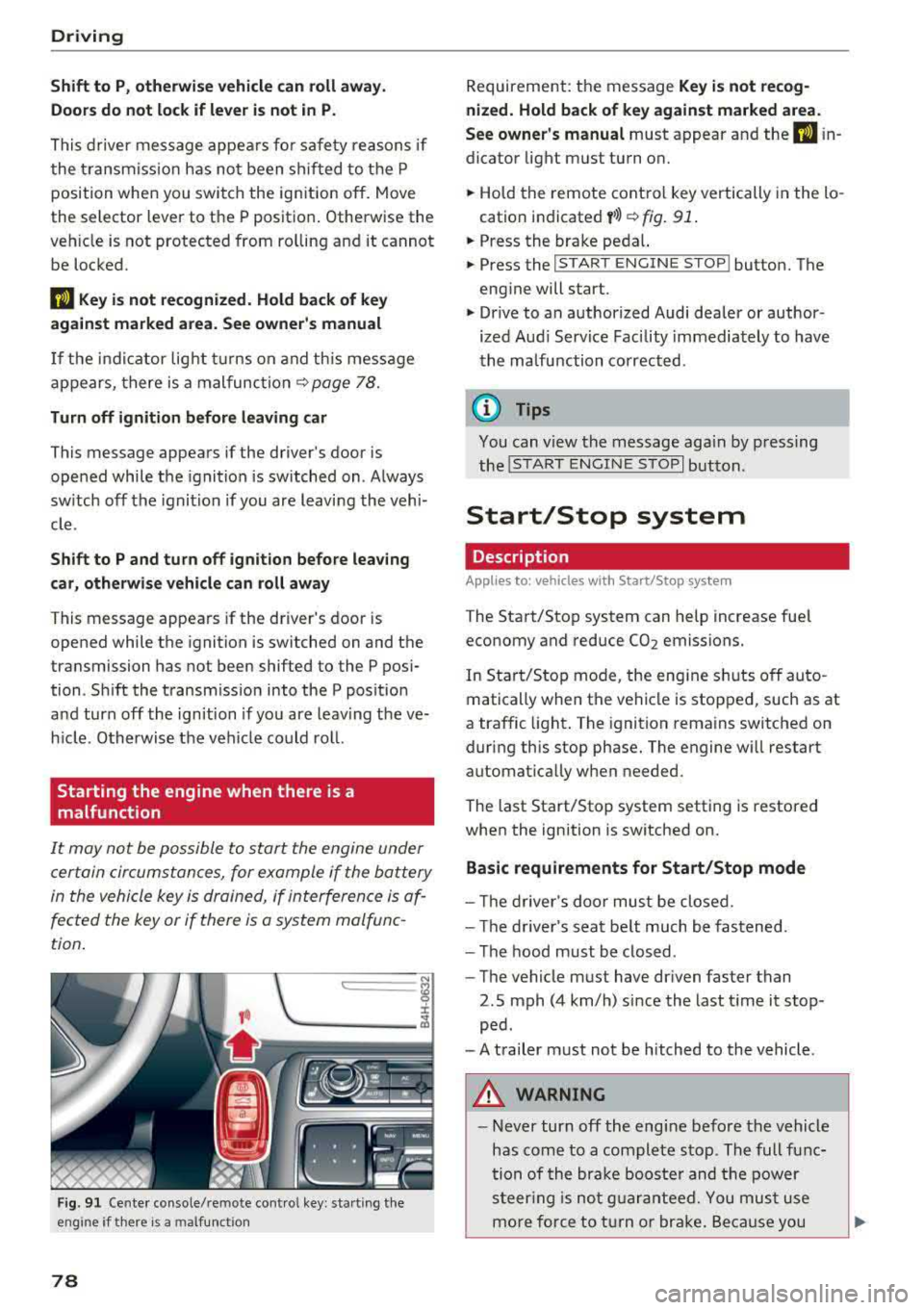
Fig . 91 Cente r console/remote cont ro l key : sta rt ing the
eng ine
if t here is a malfunc tion
78
Requirement: the message Key is not recog
nized. Hold back of key against marked area .
See owner's manual
must appear and the (I i n
dicator light must turn on.
.,. Hold the remote control key vertically in the lo
cation indicated
y >l) ~ fig. 91 .
.,. Press the brake peda l.
.,. Press the I START ENGINE STOPI button. The
engine will start.
.,. Drive to an authorized Audi dealer or author
ized Aud i Serv ice Facility immediately to have
the malfunction corrected .
(0 Tips
You can v iew the message aga in by pressing
the
I S TAR T ENGINE STOP I button.
Start/Stop system
Description
Applies to: vehicles with Start/Stop syste m
The Start/Stop system can help increase fuel
economy and reduce CO2 emissions.
In Start/Stop mode, the eng ine s hut s off auto
matically when the vehicle is stopped, such as at
a traffic light . The ignition remains switched on
during this stop phase. The engine w ill restart
automat ically w hen needed.
The last Start/Stop system setting is restored
when the ignition is switched on.
Basic requirements for Start/Stop mode
- Th e driver's door must be closed.
- The driver's seat belt much be fastened.
- The hood must be closed .
- The vehicle must have dr iven faster than
2.5 mph (4 km/h) since the last t ime it stop
ped .
- A trailer must not be hitched to the vehicle .
A WARNING
-Never turn off the eng ine before the vehicle
has come to a complete stop . The full func
tion of the brake booster and the power
steering is not guaranteed. You must use
more force to turn or brake. Because you
Page 102 of 356
Ass is tance sy stem s
~-~ ---Di sta nce 1: this setting corresponds
to a distance of 92 ft (28 m) when traveling at 62
mph (100 km/h), for example (time between: 1
second) .
~-- ~--Di stan ce 2: this setting corresponds
to a distance of 118
ft (36 m) when traveling at
62 mph (100 km/h), for example (time between:
1.3 seconds) .
~--- ~-Distance 3: this setting corresponds
to a distance of
164 ft (SO m) when traveling at
62 mph (100 km/h), for example (time between:
1.8 seconds) .
~--- -~ Distance 4 : This setting corresponds
to a distance of 210
ft (64 m) when traveling at
62 mph (100 km/h), (time d istance of 2.3 sec
onds).
A WARNING
Following other vehicles too closely increases
the risk of collisions and ser ious personal in
jury .
- Setting short distances to the traffic ahead
reduces the time and distance available to
br ing your vehicle to a safe stop and makes
it eve n mo re necessary to pay close atten
t ion to traffic.
- Always obey applicable traffic laws, use
good judgment, and select a safe following
distance fo r the traffic, road and weather
cond itio ns.
(D Tips
-Distance 3 is set automatically each time
you switch the ignit ion on.
-Your settings are automatically stored and
assigned to the remote control key being
used.
Selecting the driving mode
Applies to: vehicles with Audi adaptive cruise control
.. Se lect the des ired driving mode in dr ive se lect
¢ page 111 .
100
@ Tips
Your settings are automatically stored and as
signed to the remote contro l key being used.
Driver intervention request
Applies to: vehicles with Audi adaptive cruise control
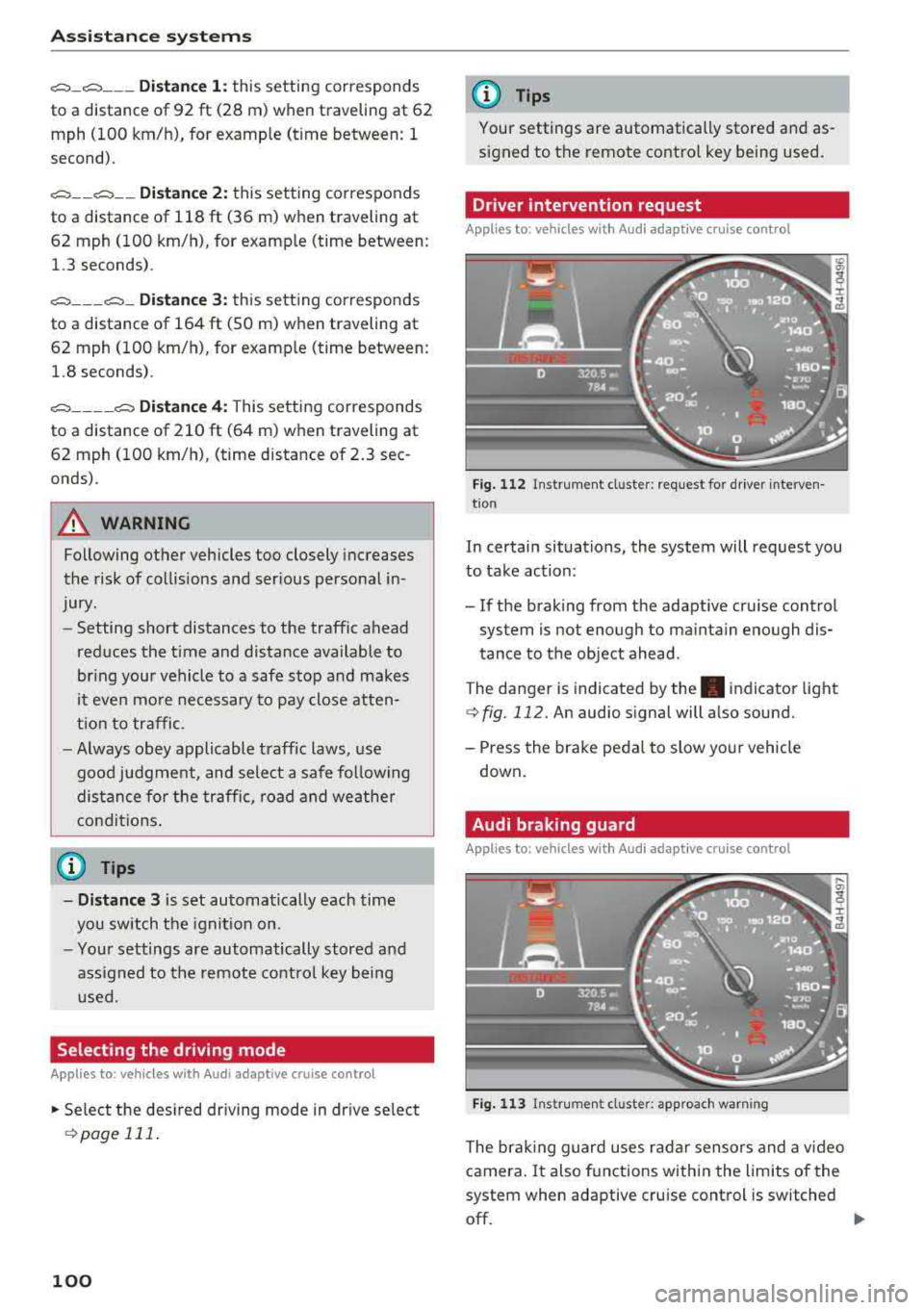
Fig . 112 Instrument cluster : request for driver interven·
t ion
In certain situations, the system will request you
to take action:
- If the braking from the adaptive cru ise control
system is not enough to ma inta in enough dis
tance to the object ahead.
The danger is indicated by
the . indicator light
¢fig. 112. An audio signal will also sound.
- Press the brake peda l to slow yo ur vehicle
down .
Audi braking guard
Applies to: vehicles with Aud i adaptive cruise control
F ig . 113 In strume nt cl us ter: approach warning
The brak ing guard uses radar sensors and a video
camera .
It also functions within the limits of the
system when adaptive cru ise cont rol is switched
off.
IIJ,,