towing AUDI A8 2018 User Guide
[x] Cancel search | Manufacturer: AUDI, Model Year: 2018, Model line: A8, Model: AUDI A8 2018Pages: 356, PDF Size: 54.71 MB
Page 94 of 356

Trailer towing
may have to use more force late r to move the
lever out of the P position .
92
Page 109 of 356
u. co .... N
" N .... 0 0 :c '
spot", at the latest .
© Vehicles you are passing
If you slowly pass a veh icle that side assist has
detected (the d ifference in speed be twee n the
ve hicle and your ve hicle is less than 9 mph (15
km/h)), the disp lay in the exterior mirror turns
on as soon as the vehicle enters your blind spot .
The display will not tu rn on if you quic kly pass a
ve hicl e that side assist has detected (the diffe r
ence in speed is greater t han 9 mp h (1 5 km/h)).
Functional limitations
The rada r senso rs a re desig ned to detect the left
a n d right adjacent lanes when the road lanes a re
the normal wid th . In some s ituat ions, the d isplay
i n the exterior mir ror may turn on even tho ugh
there is no vehicle located in the area that is criti
cal for a lane change. For example:
- If the lanes a re n arrow o r if yo u are driv ing on
the edge of your lane . If this is the case, the
system may have detected a vehicle in another
l ane that is no t adjacent to your c urrent lane .
- If you are dr iving through a cu rve . Side assist
may react to a vehicle that is one lane over
from the adjacent lane .
-If side assist reacts to other objects (such as
high or displaced guard rails) .
- In poor weat her condit ions . The side assis t
functions are limited.
D o not cove r the rada r
senso rs ~ fig. 121 with
s tickers, deposi ts, bicycle whee ls o r othe r ob
jects , beca use they w ill impair the f unct ion . Do
not use side assist when towing a trailer . For in
formation on clean ing,
see ~ page 306 .
A WARNING
- Always pay atte ntion to traffic and to the
area around yo ur vehicle. Side assist cannot
replace a dr iver's attention . The dr iver alone
is a lways responsible for lane changes and
s imi lar d riving maneuvers .
- In some situat ions, the system may not
func tion or its funct io n may be lim ited . For
example:
-
A ss istance systems
- if vehicles are approach ing or being left
behind very q uick ly. The disp lay may not
turn o n in time.
- In poor weat her condit ions such as heavy
r ain, snow or heavy m ist .
- On very w ide lanes, in tight curves, or if
the re is a rise i n the road surface. Veh icles
i n the ad jacent lane may not be detected
because they are outside of the sensor
range.
- Aud i side assist cannot detect all vehicles
under all conditions, which can increase the
r isk of acc idents .
- Please note that s ide ass ist only d isp lays ap
proaching vehicles or vehicles in yo ur blind
spo t if your ve hicle is traveling a t least
19 mph (30 km/h).
- In ce rtain s ituations, the system may not
wo rk or its f unct io n may be lim ited . For ex
a m ple:
- The display may not turn on at the r ight
time if vehicles are approach ing or pass ing
very quickly.
- In poor weat he r con dit ions, such as heavy
rain, snow or fog .
- In very wide lanes, in tig ht c urves or whe n
there are slopes in the roadway, vehicles
i n the ne ighbor ing lanes may not be de
tected because they are o utside of the
senso r range.
@ Note
The sensors can be d isp laced by impacts or
damage to the bumper, wheel housing and u nderbody. This ca n impair the system. Have
an a uth or ized Audi dea ler or author ized Audi
Service Fac il ity check the ir fu nct io n.
(D Tips
- If the w indow glass i n the dr iver's door or
fro nt passenger's door has bee n tinted, the
disp lay in the ex ter ior m irro r may be inco r
rect .
- For an ex plana tion on co nform ity w ith the
FCC reg ulat io ns in the U nited S ta tes and the
Indus try Cana da regulat io ns, see
~page 339.
107
Page 110 of 356
Assistance systems
Switching on/off
Applies to: ve hicles w ith Aud i side ass ist
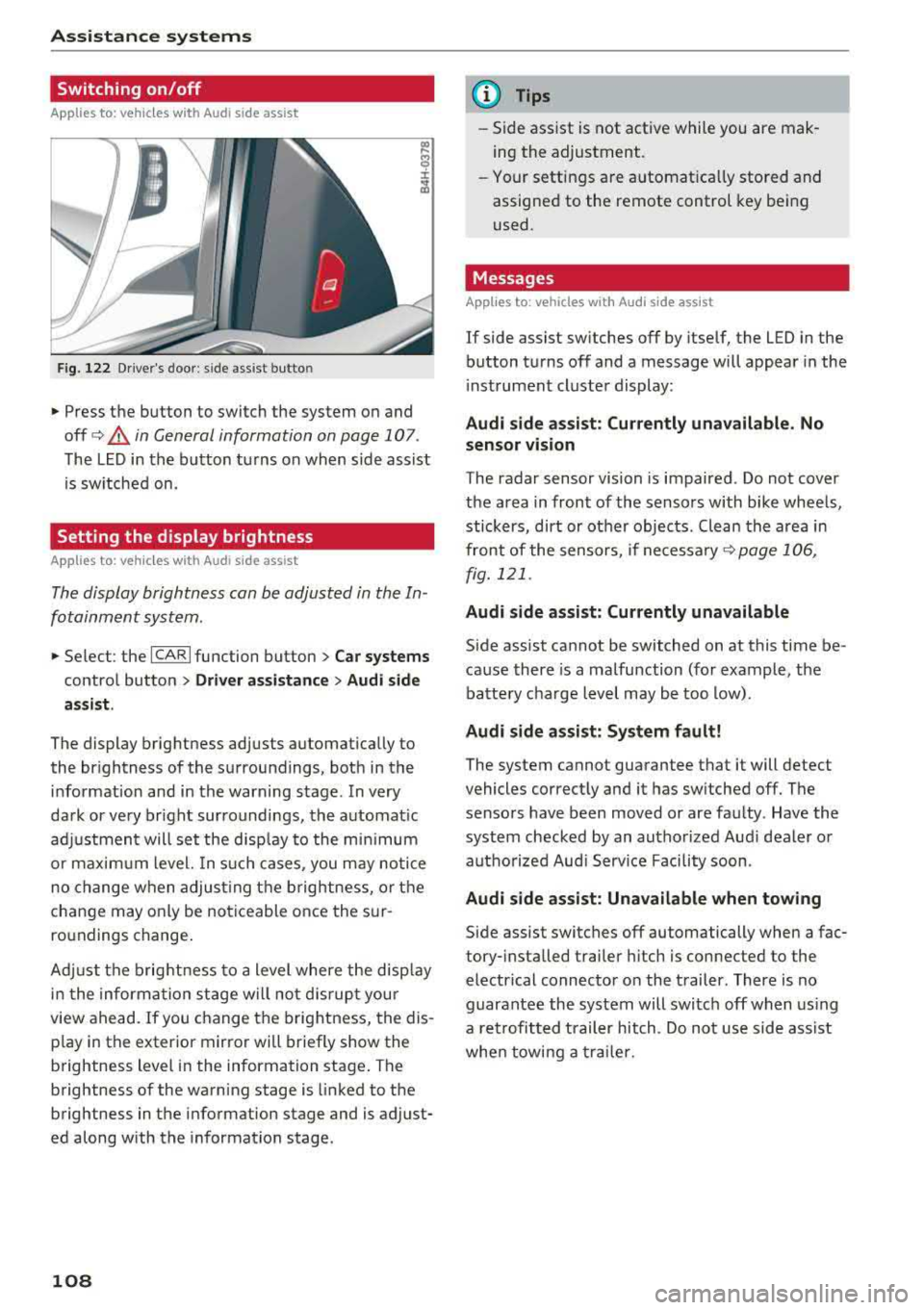
F ig. 122 Driver's door : side ass ist butto n
• Press the button to switch the system on and
off
c> .&, in General information on page 107 .
The LED in the button turns on when side assist
is sw itched on.
Setting the display brightness
App lies to: ve hicles with Aud i side ass is t
The display brightness can be adjusted in the In
fotainment system .
• Select : the ICARI function button > Car systems
control button > Driver assistance > Audi side
assist .
The display brightness adjusts automatically to
the br ightness of the surroundings, both in the
information and in the warning stage . In very
dark or very br ight surroundings, the automat ic
adj ustment will set the disp lay to the minim um
or maximum level. In such cases , you may notic e
no change when adjust ing the brightness, or the
change may only be noticeable once the sur
ro undings change .
Adj ust the brightness to a level where the disp lay
i n the information stage will no t disrupt your
view ahead.
If you change the brightness, the dis
p lay in the exter ior mirror wi ll briefly show the
brightness lev el in the information stage . T he
brightness of the warning stage is linked to the
brightness in the information stage and is adjust
ed along with the information stage.
108
@ Tips
-Side assist is not active while you are mak
ing the adjustment .
- Your settings are automat ica lly stored and
assigned to the remote control key being
used .
Messages
Applies to : vehicles wi th Audi side ass ist
If side assist switches off by itself, the LED in the
button turns off and a message will appear in the
i nstrument cluster display:
Audi side assist: Currently unavailable. No
sensor vision
The radar sensor vision is impaired . Do not cover
the area in front of the sensors with bike wheels,
stickers, dirt or ot her objects . Clean the area in
front of the sensors, if
necessary ¢ page 106,
fig. 121 .
Audi side assist: Currently unavailable
Side assist cannot be switched on at this time be
cause there is a malfunction (for example, the
battery charge level may be too low).
Audi side assist: System fault!
The system cannot guarantee that it will detect
vehicles correctly and it has switched off. The
sensors have been moved or are faulty . Have the
system checked by an authorized Audi dealer or
autho rized Aud i Serv ice Facility soon.
Audi side assist: Unavailable when towing
Side assist switches off automatically when a fac
tory- installed trailer hitch is connected to the
electrical connector on the trailer. There is no
guarantee the system will switch off when using
a retrofitted trailer hitch. Do not use side ass ist
when towing a trailer.
Page 117 of 356
u. co .... N
" N .... 0 0 :c '
General information
A pp lies to: ve hicles with pa rk in g system p lus/rearview cam
era/peripheral camera
Depending on your vehicle 's equipment, various
pa rking aids wi ll help you when parking and ma
ne uvering.
The
p arki ng sys tem plu s assists you when park
ing by aud ibly and visua lly indicating objects de
tected in front of and behind the vehicle
¢ page 116.
The re arv ie w ca mer a shows the area beh ind the
veh icle in the Infotainment system d isplay. This
d isplay assists you when you are cross or parallel
pa rking
¢ page 117 . The park ing system p lus
functions are also available
¢ page 116.
The periph eral ca mera s give var ious views to
h e lp you whe n pa rking or maneuver ing
¢ page 120. T he pa rking system pl us functions
are also availab le
¢ page 116.
& WARNING
-Always look for traffic and check the area
around your vehicle by looking at it direct ly
as well. The parking system cannot replace
the driver's attent ion. The driver is always
responsible when enter ing or leav ing a park
ing space and during similar maneuvers.
- Please note that some surfaces, such as
clothing, are not detected by the system .
-
-Sensors and cameras have blind spots in
wh ich people and objects cannot be detect
ed . Be especially caut ious of small children
and animals .
- The sensors can be displaced by impacts or
damage to the radiator gr ille, bumper,
wheel housing and the underbody . The park
ing system may be impa ired as a result.
Have a n author ized A udi dealer or author
ized Audi Serv ice Facility check their func
tion .
- Make s ure the senso rs a re not obstructed by
stickers, deposits o r other materia ls. If they
are, the sensor function could be impaired.
For additiona l information on cleaning, see
¢ page 306.
Parking syste m s
@ Note
-Some objects are not detected or disp layed
by the system under certain circumstances:
- objects such as barrier cha ins, tra iler draw
bars, vertical po les or fences
- objects above the sensors such as wall ex
tensions
- objects with certain surfaces or structures
such as cha in link fences or powder snow
- If you continue driving closer to a low ob
ject, it may disappear from the sensor range . Note that you will no longer be
wa rned about t his obstacle.
(D Tips
-The system may provide a warning even
tho ugh the re are no obstacles in the cover
age area in some situations, such as:
- certain road surfaces or when there is tall
grass
- externa l ultrasonic sources such as from
cleaning vehicles
- in heavy rain, snow, or th ick vehicle ex
haust
- We recommend tha t you practice par king in
a traffic-free location or parking lot to be
come fami liar with the system . W hen doing
this, there sho uld be good light and weath
er conditions.
- You can change the volume and pitch of the
signa ls as well as the
display ¢ page 125.
-Please refer to the instructions for towing a
trai ler located in
r:!:> page 125 .
-What appears in the infotainment display is
somewhat time-delayed .
- T he sensors m ust be kept clean and free of
snow and ice for the parking aid to operate .
115
Page 299 of 356
....
"' -N .... N
-0
0
J: ..
-Tires on a vehicle that has
been overloaded can fail sud
denly, including a blowout and
sudden deflation, causing loss
of control and a crash.
-Always make sure that the to
tal load being transported -
including the weight of a trail
er hitch and the tongue
weight of a loaded trailer -
does not make the vehicle
heavier than the vehicle's
Gross Vehicle Weight Rating.
Determining correct load
limit
Use the example below to calcu
late the total weight of the pas
sengers and luggage or other
things that you plan to transport so that you can make sure that
your vehicle will not be overload ed.
Steps for Determining Correct Load Limit
1. Locate the statement "THE
COMBINED WEIGHT OF OCCU
PANTS AND CARGO SHOULD
NEVER EXCEED XXX KG OR XXX
LBS " on your vehic le 's placard
(tire inflation pressure label)
¢ page 293, fig. 266 .
Wheels
2. Determine the combined
weight of the driver and passengers that will be riding in
your vehicle.
3. Subtract the combined weight of the driver and passengers
from "XXX" kilograms or "XXX"
pounds shown on the sticker
¢ page 293, fig . 266 .
4. The resulting figure equals the
available amount of cargo and luggage load capacity. For ex
ample, if the
"XXX" amount
equals
1400 lbs. and there wil l
be five
150 lbs . passengers in
your vehicle, the amount of
available cargo and luggage
load capacity is 650 lbs.
(1400-750 (5 X 150) = 650
lbs .)
5. Determine the combined
weight of luggage and cargo
being loaded on the vehicle.
That weight may not safely ex
ceed the available cargo and
luggage load capacity calculat
ed in Step 4.
6. If your vehicle will be towing a trailer, load from your trailer
will be transferred to your ve
hicle. Consult this manual to
determine how this reduces
.,.
297
Page 315 of 356
u. co .... N
" N .... 0 0 :c '
c ident.
- The factory-supplied jack is intended on ly
for your vehicle m odel. Under no circum
stances should it be used to lift heavy
vehicles or other loads; you r isk injuring
yourself .
- Never start the en gine when the vehicle is
ra ised, which could cause an accident .
- Support the veh icle secure ly w ith appropr i
ate stands if work is to be performed under
neath the vehicle; otherwise, there is a po
tent ial risk for in ju ry .
- Never use the jack supplied with your Audi
on another vehicle, particularly on a heav ier
one . The jack is only suitable for use on the
vehicle it came w it h .
(D Tips
The vehicle jack* in your vehicle is mainte
na nee -free .
Replacing wheels
Before changing a wheel
Observe the following precautions for your own
and your passenger's safety when changing a
wheel.
.,. After yo u experience a tire fail ure, pull the car
we ll away from moving t raffic and t ry to rea ch
level g round before you s top ¢&, .
.,. All passengers sho uld lea ve the ca r and move
to a saf e location (for instance, be hind t he
guardrai l) ¢ &, .
.,. Engage the parking brake to prevent you r vehi
cle from rol ling
unintentionally ¢ A_.
.,. Move selector lever to position P ¢ A_.
.,. If you a re towing a trailer, unh itch the trailer
from your ve hicle.
.,. Take the jack and the spare tire ou t of the lug
gage compa rtment
¢ page 312.
A WARNING
You or your passengers cou ld be inju red wh ile
chang ing a wheel if you do not follow these
safety precautions :
Emergenc y ass is tanc e
-If you have a flat tire, move a safe distance
off the road. Turn off the eng ine, turn the
emergency flashers on and use other warn ing dev ices to alert other motorists .
- Make sure that passengers wait in a safe
p lace away from the vehicle and well away
from the road and traff ic .
- To help prevent the veh icle from moving
suddenly and possib ly slipping off the jack ,
always fu lly set the par king brake and block
the front and back of the wheel diagonally
opposite the wheel being changed. W hen
one front w heel is li fted off the gro und,
p lacing the Au tom atic Transmi ssion in P
(Park) will
not p revent the vehicle from
mov ing.
- Before you change a wheel, be sure the
g ro u nd is leve l and firm. If necessary, use a
sturdy board under the jack .
- Always s tore the vehicle tool ki t, the jack
an d the replaced tire in the luggage com
pa rtment ¢
page 213 .
(D Tips
Befo re c hangin g the wheel, you mus t activ ate
the jacking mode, so that the a utomat ic con
tro ls for the Adaptive Air Suspension do not
make it more di fficult to lift the vehicle with
the jack
¢ page 315 .
Changing a wheel
When you change a wheel , follow the sequence
described below step -by-step and in exactly that
order .
1. Activate the vehicle jack mode ¢ page 315 .
2. Remove the de corative wheel cover *. For
more detai ls see
a lso ¢ page 314, Decora
tive wheel covers
or ¢ page 314, Wheels
with wheel bolt caps .
3. Loosen the wheel bolts ¢ page 315 .
4. Loca te t he p roper mount ing point for the
jac k and alig n the jack be low that po int
¢page 315 or ¢ page 316.
S. Rai se the ca r wi th the jack ¢ page 315 or
¢page 316 .
313
Page 329 of 356
u. co .... N
" N .... 0 0 :c '
General
This chapter is intended for trained emergency
crews and working personnel who have the nec
essary tools and equipment to perform these
operations.
Starting by pushing or
towing
~ Note
Vehicles with an automatic transmission can
not be started by pushing or towing.
Starting with jumper
cables
If necessary, the engine can be started by con
necting it to the battery of another vehicle .
If the engine should fail to start because of a dis
charged or weak battery, the battery can be con
nected to the battery of
another vehicle, using a
pair of jumper cables to start the engine.
Jumper cables
Use only jumper cables of sufficiently large cross
section
to carry the starter current safely. Refer
to the manufacturer's specifications.
Use only jumper cables with
insulated terminal
clamps which are distinctly marked :
plus(+) cable in most cases colored red
minus(-) cable
in most cases colored black.
A WARNING -
Batteries contain electricity, acid, and gas.
Any of these can cause very serious or fatal in
jury. Follow the instructions below for safe
handling of your vehicle's battery .
-Always shield your eyes and avoid leaning
over the battery whenever possible.
-A dead battery can freeze at temperatures
around 32 °F (0 °C) . If the vehicle battery is
frozen, you must thaw it before connecting
the jump start cables. If you do not, this in-
Emergency situations
creases the risk of an explosion and chemi
cal burns. After jump starting the vehicle,
drive to an authorized Audi dealer or author ized Audi Service Facility immediately to
have the vehicle battery checked.
- Do not allow battery acid to contact eyes or
skin . Flush any contacted area with water
immediately.
- Improper use of a booster battery to start a
vehicle may cause an explosion .
- Vehicle batteries generate explosive gases .
Keep sparks, flame and lighted cigarettes
away from batteries.
- Do not try to jump start any vehicle with a
low acid level in the battery .
- The voltage of the booster battery must also
have a 12-Volt rating . The capacity (Ah) of
the booster battery should not be lower
than that of the discharged battery. Use of
batteries of different voltage or substantial
ly different "Ah " rating may cause an explo
sion and personal injury.
- Never charge a frozen battery. Gas trapped
in the ice may cause an explosion.
- Never charge or use a battery that has been
frozen. The battery case may have be weak
ened.
- Use of batteries of different voltage or sub
stantially different capacity (Ah) rating may
cause an explosion and injury. The capacity
(Ah) of the booster battery should not be
lower than that of the discharged battery.
- Before you check anything in the engine
compartment, always read and heed all
WARNINGS
c>page 272.
@ Note
- Applying a higher voltage booster battery
will cause expensive damage to sensitive
electronic components, such as control
units, relays, radio, etc.
- There must be no electrical contact between
the vehicles as otherwise current could al
ready start to flow as soon as the positive
( + ) terminals are connected.
327
Page 331 of 356
-When connecting jumper cables, make sure
that they cannot get ca ught in any mov ing
parts in the engine compartment.
- Before you check anything in the engine
compartment, a lways read and heed a ll
WARNINGS
¢ page 272.
(D Note
Impro per hook-u p of jum per cables can ru in
the generato r.
- Always connect P OSITIVE( +) to POSITIV E
( + ), and NEGATIVE( -) to NEGATIVE( -)
g round post of the battery manager contro l
unit.
- Check that a ll sc rew p lugs on the battery
cells are sc rewed in firmly . If not, t ighten
pl ugs p rior to connect ing clamp on negative
b atte ry te rmi nal.
- Please note t hat the procedure fo r con nect
i ng a jumper cab le as desc ribed above ap
p lie s specifica lly to the case of yo ur vehicle
b eing ju mp starte d. When you are g iv ing a
ju mp s tart to ano ther vehicle, do
not con
n ect th e neg ative( -) ca b le to the neg ative
(-) t ermin al on t he disch arged batte ry @
¢ fig . 290. Instead, securely connect the
negat ive(- ) cab le to either a solid metal
component that is f irm ly bolted to the en
gine block o r to the engine bloc k itself. If
the battery that is be ing c ha rged does not
vent to the outs ide, escap ing batte ry gas
could ignite and ex plod e!
Towing with a tow truck
General hints
Yo ur Audi requires special h andling for towing .
The follow ing informa tion is to be used by com
mercia l tow tr uck o pera tors who know how to op
e rat e the ir equip men t sa fely.
- Never tow your Audi. Towing will cause dam
age to the engine and transmission.
- Never wrap the safety chains or winch cables
~ around the brake lines. ....
~ -To prevent unnecessary damage, your Audi N
8 must be transported with a flatbed truck. 0 :c '
-To load the vehicle on to the flatbed, use the
towing loop found in the vehicle tools and at
tach to the front or rear anchorage
¢ page 329 and c> page 330.
A WARNING
A veh icle being towed is not safe for passen
ge rs. Neve r allow a nyo ne to ride in a vehicl e
b eing towed, fo r any reason.
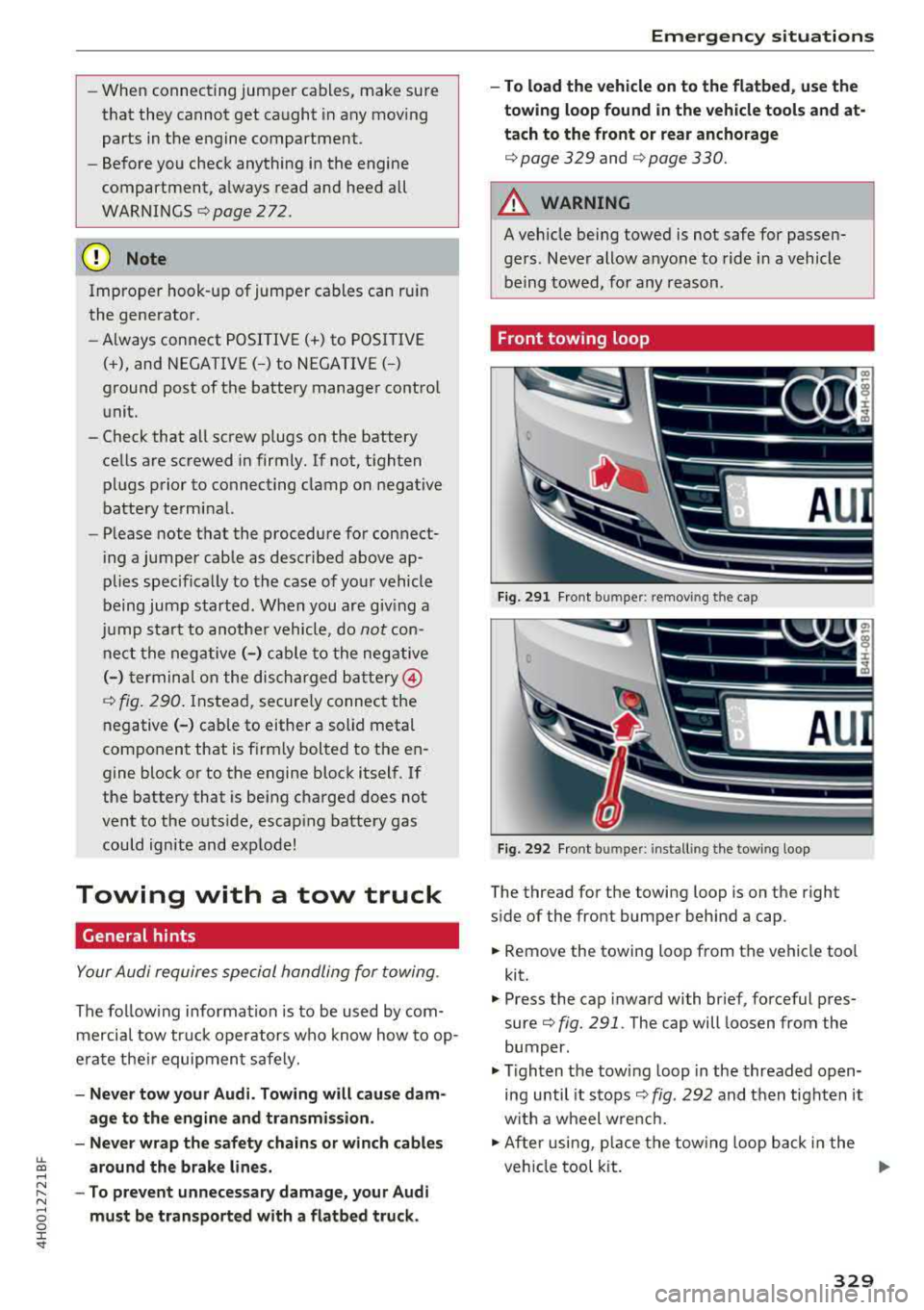
Front towing loop
Fi g. 291 Fron t bu mpe r: removing t he cap
Fig. 292 Fron t bu mpe r: insta llin g the tow ing loop
The thread for the towing loop is on the right
s ide of the front bumper beh ind a cap.
.,. Remove the towing loo p from the vehicle too l
kit.
.,. Press the cap inward with brief, forceful pres
sure
c> fig. 291 . The cap will loosen from the
bumper.
.,. T igh ten the tow ing loop in the threaded open
ing until it stops
c> fig. 292 and t hen tighten it
w ith a wheel w re nc h .
.,. Afte r usi ng, p lace the tow ing loop b ack in the
veh icle tool kit.
IJJ>-
329
Page 332 of 356
Emergency situations
& WARNING
If the towing loop is not tightened until it
stops when installing, the threads may be
pulled out when towing the vehicle and that
could cause an accident.
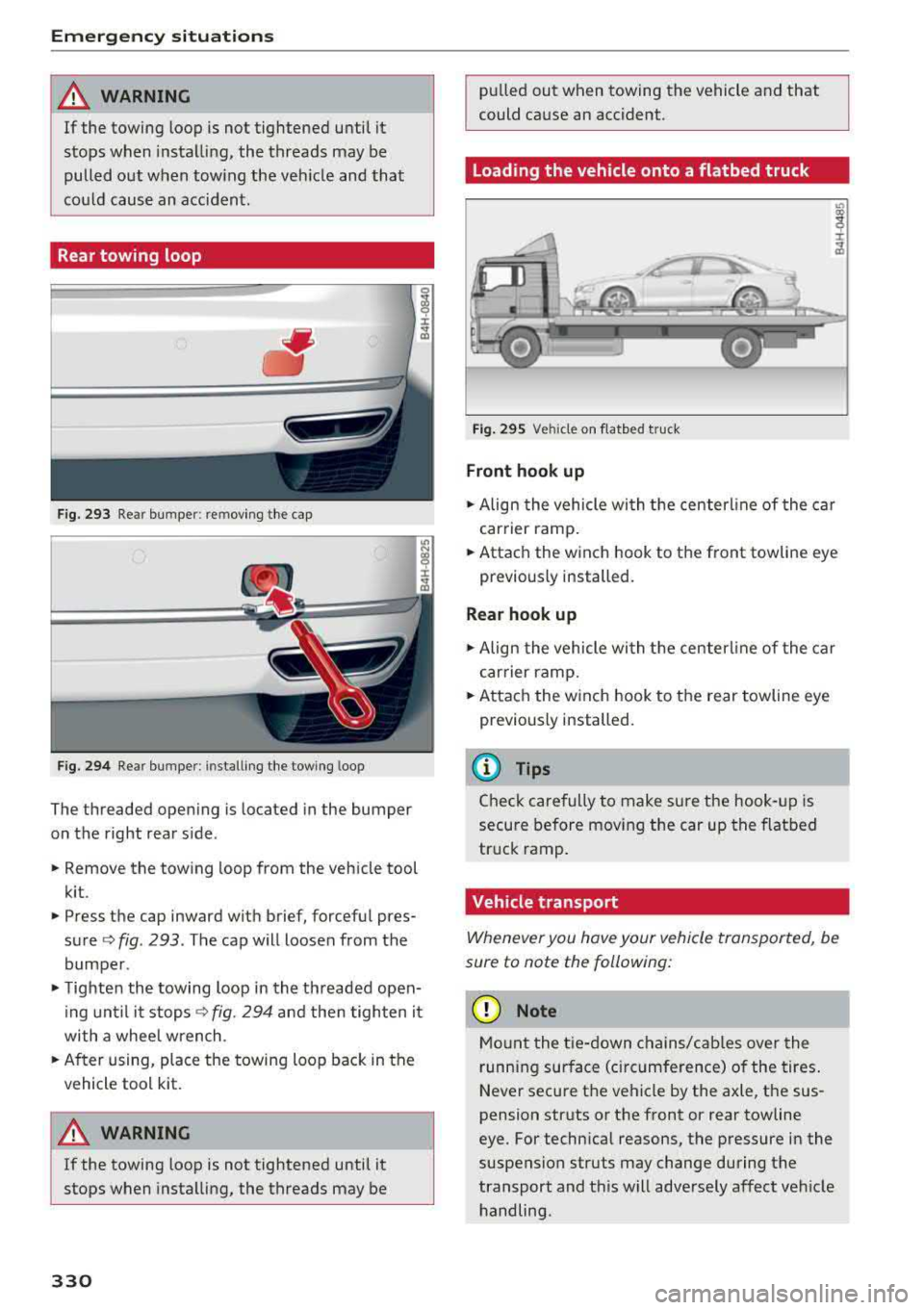
Rear towing loop
Fig. 293 Rear bumper: re moving the cap
Fig. 294 Rear bumper : installi ng the towing loop
The threaded opening is located in the bumper
on the right rear side .
• Remove the towing loop from the vehicle tool
kit .
• Press the cap inward with brief, forceful pres
sure ¢
fig. 293 . The cap will loosen from the
bumper .
• Tighten the towing loop in the threaded open
ing until it
stops¢ fig. 294 and then tighten it
with a whee l wrench .
• After using, place the towing loop back in the
vehicle tool kit.
A WARNING
If the towing loop is not tightened until it
stops when installing, the threads may be
330
-
pulled out when towing the vehicle and that
could cause an accident .
Loading the vehicle onto a flatbed truck
Fig. 295 Vehicle on f latbed tru ck
Front hook up
• Align the vehicle with the centerline of the car
carrier ramp.
• Attach the winch hook to the front towline eye
previously installed.
Rear hook up
• Align the vehicle wi th the centerl ine of the car
carrier ramp.
• Attach the w inch hook to the rear towline eye
previously installed.
@ Tips
Check carefully to make sure the hook-up is
secure before moving the car up the flatbed
truck ramp.
Vehicle transport
Whenever you hove your vehicle transported, be
sure to note the following:
(D Note
Mount the tie-down chains/cables over the
running surface (ci rcumference) o f the tires.
Never secure the vehicle by the axle, the sus
pension struts or the front or rear towline
eye. For technical reasons, the pressure in the
suspension struts may change during the
transport and this will adversely affect vehicle handling.
Page 338 of 356
Consumer Information
Consumer Information
Warranty coverages
Your Audi is covered by the following warran
tie s:
- New Vehicle Limited Warranty
- Limited Warranty Against Corrosion Perfora-
tion
- Emissions Control System Warranty
- Emissions Performance Warranty
- California Emissions Con trol Warranty (USA
vehicles only)
- California Emissions Performance Warranty
(USA vehicles only)
Detailed information regarding your warranties
can be found in your
Warranty & Maintenance
booklet .
Operating your vehicle
outside the U.S.A. or
Canada
Government regulati ons in the United States and
Canada require that automobi les meet specific
emission regulations and safety standards.
Therefore, vehicles built for the U.S.A. and Cana
da differ from vehicles sold in other countries.
If you plan to take your vehicle outside the conti
nenta l limits of the United States or Canada,
there is the possibility that:
- un leaded fue ls for vehicles with catalytic con
verter may not be available;
- fuel may have a conside rably lower octane rat
ing . Improper fuel may cause engine damage;
- se rvice may be inadequate due to lack of proper
service facilities, tools or testing equipment;
- r eplacement parts may not be readily available.
- Nav igat ion systems for veh icles built for the
U .S .A . and Canada w ill not necessarily work in
Europe, and may not wo rk in other count ries
outside North America.
336
@ Note
Audi cannot be responsib le for mechanical
damage that could resu lt from inadequate
fuel, service or parts ava ilability.
Audi Service Repair
Manuals and Literature
Audi Official Factory Service Manuals and Litera
ture are published as soon as poss ible after mod
el introduction. Se rvice manuals and literature
are available to order from the Audi Technical Lit
erature Ordering Center at:
www.audi.techliterature.com
Maintenance
General
Your vehicle has been designed to help keep
maintenance requirements to a minimum. How
ever, a certain amount of regular maintenance is
still necessary to assure your vehicle's safety,
economy and reliability . For detailed vehicle
maintenance consult your Warranty & Mainte
nance booklet .
Under difficult operating conditions, for exam
ple at extremely low outside temperatures, in
very dusty regions, when towing a trailer very fre
quently, etc. , some service wo rk shou ld be per
fo rm ed between the intervals specified. This ap
plies particularly to:
- oil changes , and
- cleaning or replac ing the a ir filter .
@ For the sake of the environment
By regularly maintain ing your vehicle, you
help make sure that em iss ion standards are
maintained, thus minimizing adverse effects
on the enviro nment .
Important considerations for you and your
vehicle
The increasing use of electronics, sophisticated
fuel injection and emission control systems, and
the generally increasing technica l complexity of
.,,.