climate settings AUDI A8 2021 User Guide
[x] Cancel search | Manufacturer: AUDI, Model Year: 2021, Model line: A8, Model: AUDI A8 2021Pages: 362, PDF Size: 99.29 MB
Page 138 of 362
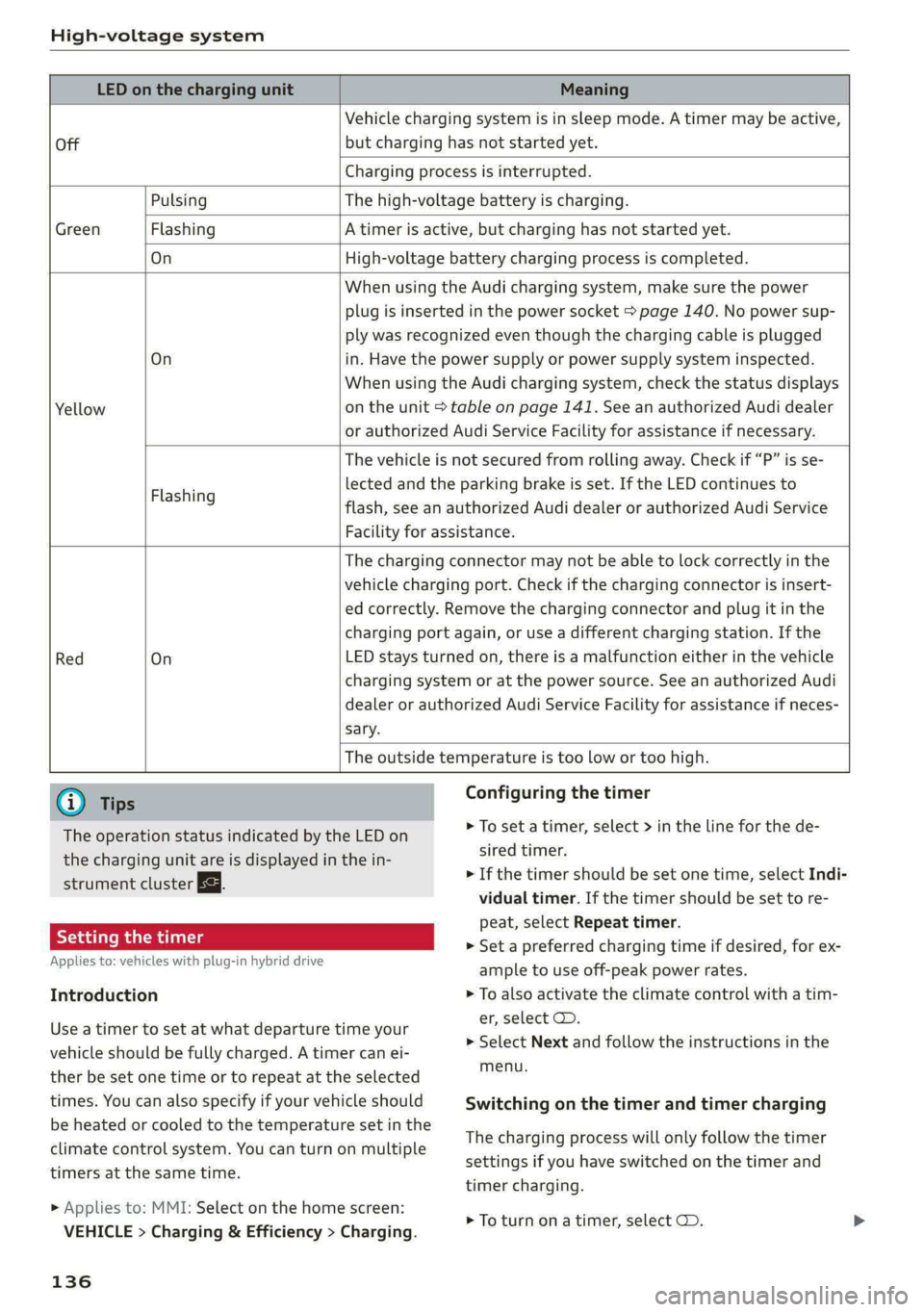
High-voltage system
LED on the charging unit Meaning
Off
Vehicle charging system is in sleep mode. A timer may be active,
but charging has not started yet.
Charging process is interrupted.
Pulsing The high-voltage battery is charging.
Green Flashing A timer is active, but charging has not started yet.
On High-voltage battery charging process is completed.
On
Yellow
When using the Audi charging system, make sure the power
plug is inserted in the power socket > page 140. No power sup-
ply was recognized even though the charging cable is plugged
in. Have the power supply or power supply system inspected.
When using the Audi charging system, check the status displays
on the unit > table on page 141. See an authorized Audi dealer
or authorized Audi Service Facility for assistance if necessary.
Flashing
The vehicle is not secured from rolling away. Check if “P” is se-
lected and the parking brake is set. If the LED continues to
flash, see an authorized Audi dealer or authorized Audi Service
Facility for assistance.
Red On
The charging connector may not be able to lock correctly in the
vehicle charging port. Check if the charging connector is insert-
ed correctly. Remove the charging connector and plug it in the
charging port again, or use a different charging station. If the
LED stays turned on, there is a malfunction either in the vehicle
charging system or at the power source. See an authorized Audi
dealer or authorized Audi Service Facility for assistance if neces-
sary.
The outside temperature is too low or too high.
@ Tips
The operation status indicated by the LED on
the charging unit are is displayed in the in-
strument cluster Es.
Setting the timer
Applies to: vehicles with plug-in hybrid drive
Introduction
Configuring the timer
> To set a timer, select > in the line for the de-
sired timer.
> If the timer should be set one time, select Indi-
vidual timer. If the timer should be set to re-
peat, select Repeat timer.
> Set a preferred charging time if desired, for ex-
ample to use off-peak power rates.
> To also activate the climate control with a tim-
er, select CD.
Use a timer to set at what departure time your
vehicle should be fully charged. A timer can ei-
ther be set one time or to repeat at the selected
times. You can also specify if your vehicle should
be heated or cooled to the temperature set in the
climate control system. You can turn on multiple
timers at the same time.
> Applies to: MMI: Select on the home screen:
VEHICLE > Charging & Efficiency > Charging.
136
> Select Next and follow the instructions in the
menu.
Switching on the timer and timer charging
The charging process will only follow the timer
settings if you have switched on the timer and
timer charging.
> To turn ona timer, select CD.
Page 281 of 362

4N0012721BF
Checking and Filling
> Wait approximately two minutes.
» Applies to MMI: Select on the home screen: VE-
HICLE > Settings & Service > Oil level.
> Read the oil level in the display. Add engine oil
if the bar in the oil level indicator is just below
“min” > page 279.
@) Note
If the engine oil level is too low or too high,
there is a risk of engine damage.
@) Tips
The oil level indicator in the display is only an
informational display. If the oil level is too
low, a minimum oil warning appears in the in-
strument cluster. Add oil and close the hood.
The current oil level will be displayed on the
MMI the next time the ignition is switched on.
@) Tips
The engine oil consumption may be up to
0.5 quart/600 miles (0.5 liter/1,000 km), de-
pending on driving style and operating condi-
tions. Consumption may be higher during the
first 3,000 miles (5,000 km). The engine oil
level must be checked regularly. It is best to
check each time you refuel your vehicle and
before long drives.
— Because of the lubrication and cooling of
the engine, combustion engines consume
oil. The oil consumption varies depending
on the engine and may change during the
service life of the engine. Engines generally
consume more oil at the beginning during
the break-in period. Then oil consumption
stabilizes after the break-in period.
— Under normal conditions, oil consumption
depends on the quality and viscosity of the
oil, the engine RPM, the climate conditions,
and the road conditions. The dilution of oil
from condensation or fuel residue as well as
the age of the oil also play a role. Because
engine wear increases with mileage, oil con-
sumption will increase again over time until
it may be necessary to replace worn compo-
nents.
— Because all these variables play a role, it is
not possible to define an oil consumption
standard. Therefore, the oil level must be
checked regularly.
— If you believe that your engine has in-
creased its oil consumption, contact an au-
thorized Audi dealer or authorized Audi
Service Facility to determine the cause.
Please note that an exact oil consumption
measurement must be done with the neces-
sary care and accuracy and may take time.
An authorized Audi dealer or authorized
Audi Service Facility is trained in accurately
measuring the oil consumption.
— You can find information on engine oil and
engine oil capacities for the USA at www.
audiusa.com/help/maintenance, or for Can-
ada at www.audi.ca/ca/web/en/
customer-area/care-and-maintenance/
audi-service-schedules.html, or call
800-822-2834.
Adding engine oil
RAZ-0013|
Fig. 182 Engine compartment: engine oil filling opening
cover (example)
Observe the safety precautions > page 274, Gen-
eral information.
> Turn the engine off.
> Open the hood > page 276.
>» Unscrew the cap %~ for the engine oil filler
opening > fig. 182.
> Carefully add 0.5 quart (0.5 liter) of the correct
oil > page 277.
> Close the engine oil filler opening cap.
> Close the hood > page 276.
> Restart the ignition after two minutes and read
the current oil level in the MMI > page 278,
Checking the engine oil level.
279
Page 360 of 362

Index
Vehicle jacks. « sie sc emcee e eww oe em ves 317
Lifting points...... 2.0.0... eee eee eee 321
Tire change Mode.... 1... eee eee sees 319
VehIClE Keys ¢ « sas x = heen ¢ o hake oP eee 41,45
Vehicle Sound... . 6... cece eee eee eee 116
Vehicle start systeM.... 2.2.0.2... eee 118
Vehicle toolkit... 0.0... 0... eee eee eee 317
VeMEILAtIOMS, « 6 cess « cnennic = 1 cena a @ ammo wa 100
VIEW DUBE OMI + 3 seco © x saouawe 2 x cameo osama oo 13
Voiceriiaibs «2 viciine 2 x owas eo snvem 2 x amin 0 3 a 217
Voice recognition system ..............065 34
BxXHOE Maly escse = mucana we wweanan x execone 6 x ena 35
Operating ....... 0... ccc eee eee eee ee 34
WwW
Wall mount clip...........0... ce eee eee 145
Warning lights
refer to Indicator lights.................. 7
Washing matte finish paint.............. 310
Wave band
refer to Frequency band............... 242
Weights ........... 0.0 cece eee eee ee 344
Wheel bolts............ 000 c cece 304
ANti-Cheft cas s nuwa & s Been & + eRS oe Sew 320
Tightening specification............... 323
Wheels x isasis a i snniss o a nauasa s & aninass wo eomnene @ 289
Cleaning 312
Glossary of tire and loading terminology.. 292
Loose wheel warning.................. 304
REPIAGIG s sxannce » seanens oo eee co sien oe o ete 319
Tire pressure monitoring system........ 308
Tires and vehicle load limits............ 302
Wheel wrench’: « seas: s + gem « x sewn 2 2 seme 317
Wi-Fi
Hotspot:settings:s. ss wie a 6 owen ae aie a 225
Using ahotspot................--000- 223
Wild animal recognition................ 159
Window and mirror heating............. 105
Windows
Child safety lock.............02-000000- 51
Cleaning and removingice............. 312
Convenience opening and closing......... 53
Defrosting ........-. 600 c eee eee eee 102
Opening and closing................... 52
POWEPWINdOWSins « 2 caves x s waves 4s eaure 4 es 52
358
Windshield
Cleaning..... 22.2... cece eee eee eee 66
also refer to Windshield................ 66
Windshield washer system..........- 66, 287
Reservoir capacityies « + sass +o wesw + 3 meen 344
Windshield wipers.................00-0- 66
Winter operation
Auxiliary climate control............... 104
Car washes ....... 0.0.00 cece cece 310
COGLIFG SYSTEM: « 2 wees s x eee ss meee ese 281
Defrosting the windows............... 102
Rear window defogger................ 102
Removing ice from windows............ 312
Seat heating. « = scr. sa wee. a eee @ © wees 102
Snow chains............ 00sec eens 305
Steering wheel heating................ 104
Surface heating «wees «sees se ewes a 4 ear 103
THRCSiis so ceontens 6 sccrees +o onemeite aw oman © 9 oom 305
Vehicle battery (12 Volt)............... 285
Windshield washer system............. 287
WINEEPEIRES 2 osu 5 ¢ ean so mem a yeaa ee 305
Wireless Apple CarPlay
refer to Audi smartphone interface...... 261
Wireless charging...............+-+05- 213