phone AUDI A8 2021 User Guide
[x] Cancel search | Manufacturer: AUDI, Model Year: 2021, Model line: A8, Model: AUDI A8 2021Pages: 362, PDF Size: 99.29 MB
Page 33 of 362
4N0012721BF
Touch displays
Displaying content without the app
> To share content using screen mirroring, use
the function on your mobile device and select
the desired screen in the rear.
> To share content via HDMI, connect the play-
back device to the screen using the HDMI cable
and select HMI on the screen.
Audio playback
Sound can be played through the vehicle speak-
ers or in headphones. Wired and wireless head-
phones can be connected.
> To play sound through the vehicle speakers,
press &&.
> To use wired headphones, use the headphone
jack@®.
> To use wireless headphones, press } and select
the desired Bluetooth headphones.
Integrated Help
You can find more information and assistance in
the integrated Help content.
> Press the button @) 9 page 30, fig. 21.
> Press @ for integrated Help.
Using the holder
Applies to: vehicles with screens in rear
RAZ-1085}
ap
[i
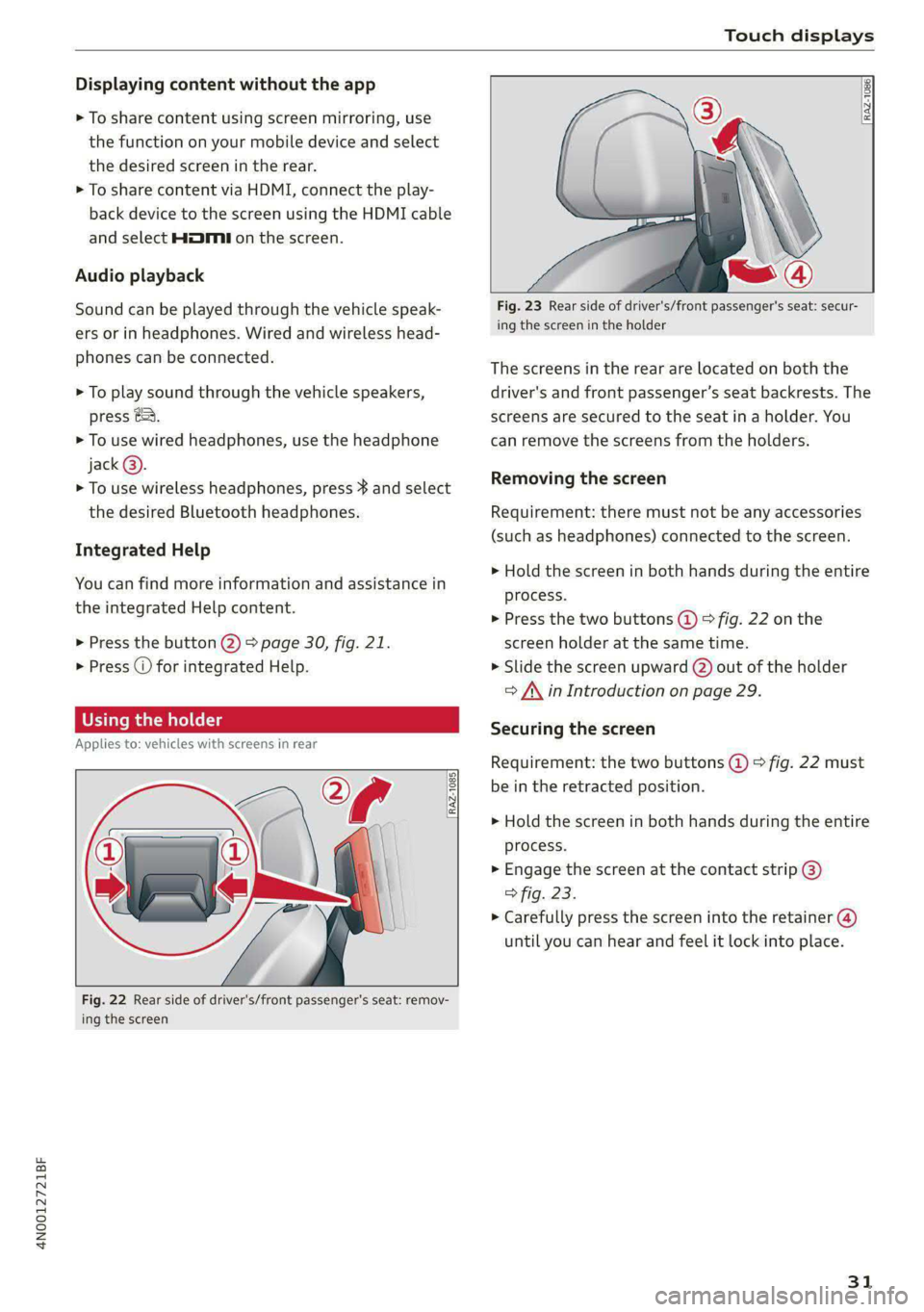
Fig. 22 Rear side of driver's/front passenger's seat: remov-
ing the screen
RAZ-1086,
Fig. 23 Rear side of driver's/front passenger's seat: secur-
ing the screen in the holder
The screens in the rear are located on both the
driver's and front passenger’s seat backrests. The
screens are secured to the seat in a holder. You
can remove the screens from the holders.
Removing the screen
Requirement: there must not be any accessories
(such as headphones) connected to the screen.
> Hold the screen in both hands during the entire
process.
> Press the two buttons (@) > fig. 22 on the
screen holder at the same time.
> Slide the screen upward (2) out of the holder
> A\ in Introduction on page 29.
Securing the screen
Requirement: the two buttons @ © fig. 22 must
be in the retracted position.
> Hold the screen in both hands during the entire
process.
» Engage the screen at the contact strip @)
> fig. 23.
> Carefully press the screen into the retainer (@)
until you can hear and feel it lock into place.
31
Page 34 of 362
Touch displays
Tilting the holder
Applies to: vehicles with screens in rear
©
a
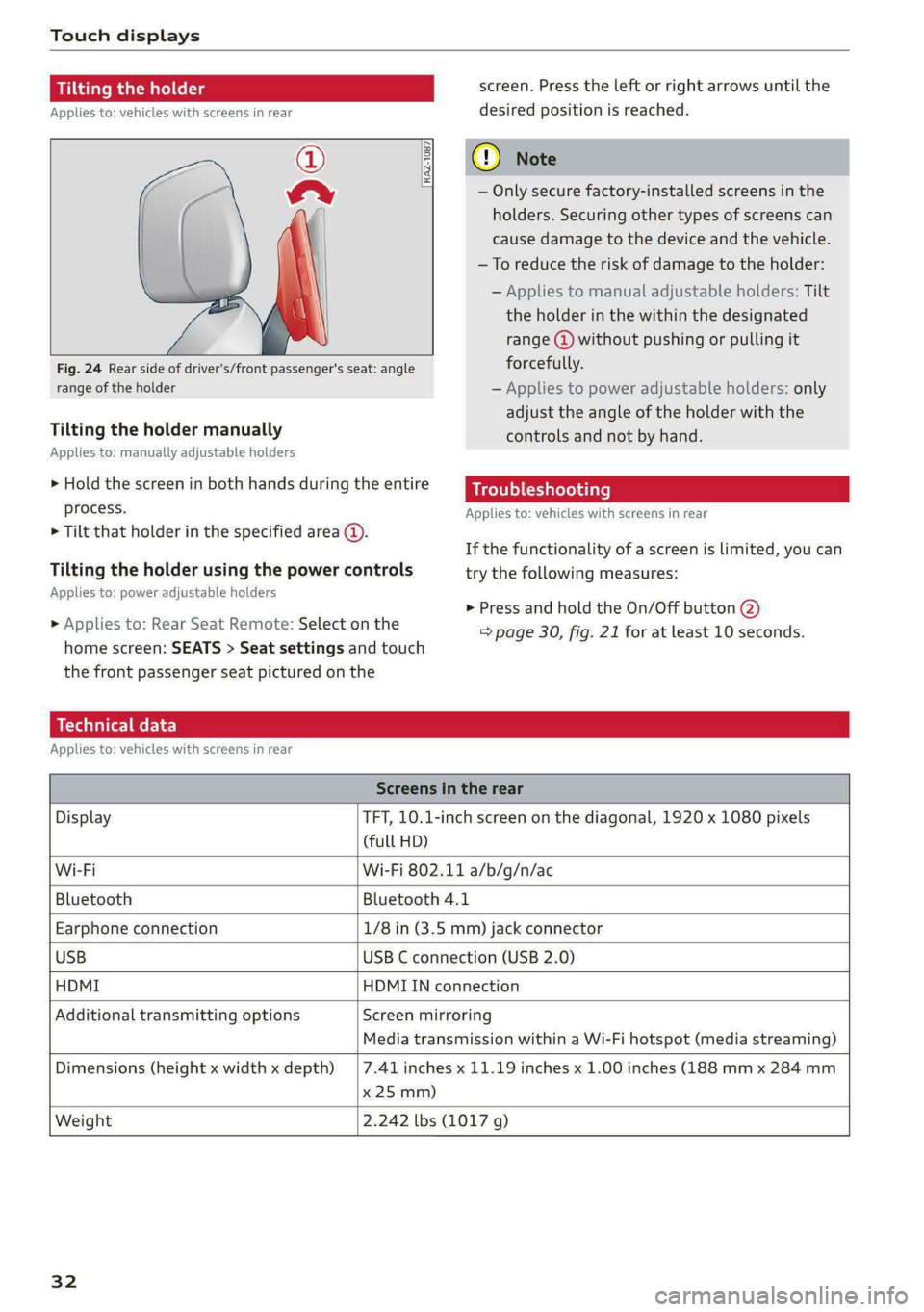
Fig. 24 Rear side of driver's/front passenger's seat: angle
range of the holder
[RAZ-1087
Tilting the holder manually
Applies to: manually adjustable holders
> Hold the screen in both hands during the entire
process.
> Tilt that holder in the specified area @.
Tilting the holder using the power controls
Applies to: power adjustable holders
» Applies to: Rear Seat Remote: Select on the
home screen: SEATS > Seat settings and touch
the front passenger seat pictured on the
screen. Press the left or right arrows until the
desired position is reached.
@) Note
— Only secure factory-installed screens in the
holders. Securing other types of screens can
cause damage to the device and the vehicle.
—To reduce the risk of damage to the holder:
— Applies to manual adjustable holders: Tilt
the holder in the within the designated
range @) without pushing or pulling it
forcefully.
— Applies to power adjustable holders: only
adjust the angle of the holder with the
controls and not by hand.
Troubleshooting
Applies to: vehicles with screens in rear
If the functionality of a screen is limited, you can
try the following measures:
> Press and hold the On/Off button @)
=> page 30, fig. 21 for at least 10 seconds.
Technical data
Applies to: vehicles with screens in rear
Screens in the rear
Display TFT, 10.1-inch screen on the diagonal, 1920 x 1080 pixels
(full HD)
Wi-Fi Wi-Fi 802.11 a/b/g/n/ac
Bluetooth Bluetooth 4.1
Earphone connection 1/8 in (3.5 mm) jack connector
USB USB C connection (USB 2.0)
HDMI HDMIIN connection
Additional transmitting options Screen mirroring
Media transmission within a Wi-Fi hotspot (media streaming)
Dimensions (height x width x depth)
x 25 mm)
7.41 inches x 11.19 inches x 1.00 inches (188 mm x 284 mm
Weight 2.242 lbs (1017 g)
32
Page 36 of 362
Voice recognition system
Voice recognition system
General information
Applies to: vehicles with voice recognition system
You can operate many functions in the vehicle
easily using voice commands.
Using the voice recognition system optimally
> Speak clearly and distinctly at a normal volume.
Speak louder when driving faster.
> Emphasize the words in the commands evenly
and do not leave long pauses.
> Close the doors, the windows, and the sunroof*
to reduce background noise. Make sure that
passengers are not speaking when you are giv-
ing a voice command.
> Do not direct the vents toward the hands-free
microphone, which is in the roof headliner near
the front interior lights.
> Only the driver should speak to the system, be-
cause the handsfree microphone is aimed to-
ward this seating position.
ZA\ WARNING
— Direct your full attention to driving. As the
driver, you have complete responsibility for
safety in traffic. Only use the functions in
such a way that you always maintain com-
plete control over your vehicle in all traffic
situations.
— Do not use the voice recognition system in
emergencies because your voice may change
in stressful situations. The system may take
longer to dial the number or may not be
able to dial it at all. Dial the emergency
number manually.
G) Tips
There are no voice guidance* prompts when a
dialog is active.
34
Description
Operating the voice recognition system
Applies to: vehicles with voice recognition system
iS] (2) ie
>| |
STEN
Daa) re
Neer) a
Connect 5
Pre)
oy c a
ey
Cesc >
coy
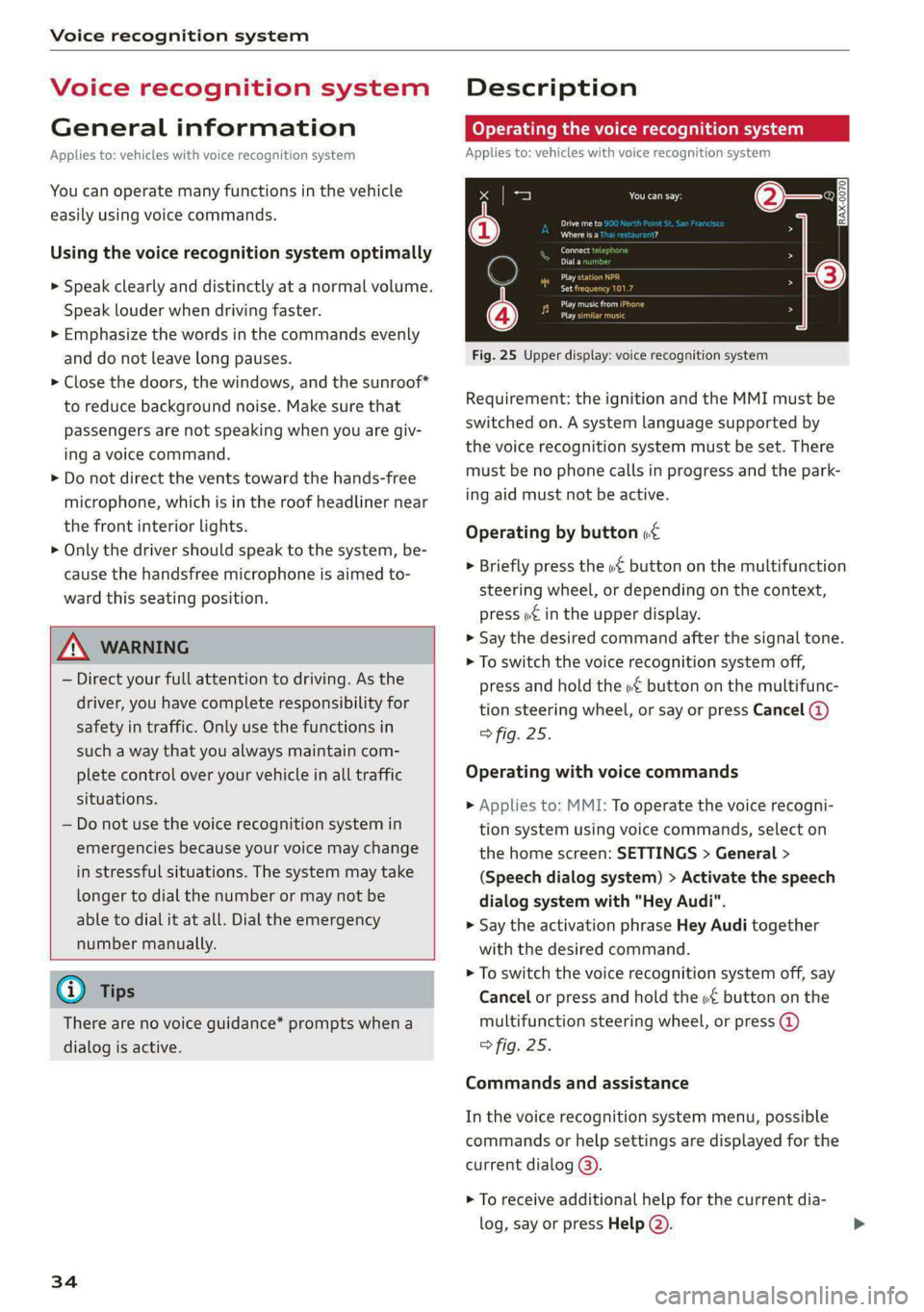
Fig. 25 Upper display: voice recognition system
Requirement: the ignition and the MMI must be
switched on. A system language supported by
the voice recognition system must be set. There
must be no phone calls in progress and the park-
ing aid must not be active.
Operating by button «¢
> Briefly press the «€ button on the multifunction
steering wheel, or depending on the context,
press we in the upper display.
> Say the desired command after the signal tone.
> To switch the voice recognition system off,
press and hold the «€ button on the multifunc-
tion steering wheel, or say or press Cancel (@)
> fig. 25.
Operating with voice commands
> Applies to: MMI: To operate the voice recogni-
tion system using voice commands, select on
the home screen: SETTINGS > General >
(Speech dialog system) > Activate the speech
dialog system with "Hey Audi".
> Say the activation phrase Hey Audi together
with the desired command.
> To switch the voice recognition system off, say
Cancel or press and hold the «£ button on the
multifunction steering wheel, or press @)
> fig. 25.
Commands and assistance
In the voice recognition system menu, possible
commands or help settings are displayed for the
current dialog @).
> To receive additional help for the current dia-
log, say or press Help (2).
Page 37 of 362

4N0012721BF
Voice recognition system
> To pause voice recognition, say or press Pause
@). To reactivate voice recognition, press ()
again or briefly press the «€ button on the mul-
tifunction steering wheel.
Additional functions
Applies to: vehicles with voice recognition system
Command during voice output
If the function is switched on, you can simply say
a new command during a prompt.
> Applies to: MMI: Select on the home screen:
SETTINGS > General > Speech dialog system >
Allow commands during voice output.
Online recognizer
Applies to: vehicles with online recognizer
You can activate the online recognizer for addi-
tional functions and to improve the results of
voice recognition. A supported menu language
must be selected. When there is an active Inter-
net connection, the spoken command is evaluat-
ed in the vehicle and online.
> When you switch on the voice recognition sys-
tem for the first time, a menu for the online
recognizer will open, or
» Applies to MMI: Select on the home screen:
SETTINGS > General > Speech dialog system >
Consent to online speech recognizer.
> Read the licensing agreements and accept
them.
Amazon Alexa
Applies to: vehicles with Amazon Alexa Integration
You can activate Amazon Alexa to access certain
functions. A reduced number of commands for
Amazon Alexa are available during this.
Requirement: you must be logged in to your
myAudi account in the vehicle. The online recog-
nizer must be activated. A system language that
is supported by both the voice recognition system
and Amazon Alexa must be selected.
> Applies to: MMI: Select on the home screen:
USER > Connect to Amazon Alexa.
> Follow the instructions in the display.
>» Applies to: MMI: To operate Amazon Alexa us-
ing voice commands, select on the home
screen: SETTINGS > General > (Speech dialog
system) > Activate the speech dialog system
with "Hey Audi".
>» Say the activation phrase “Alexa” together with
the desired command.
() Note
Read the information about Audi connect, and
be sure to note the connectivity costs section
=@ in General information on page 222.
@ Tips
Audi provides access to services from third
party providers. Permanent availability cannot
be guaranteed, because that depends on the
third party provider.
External voice operation
Applies to: vehicles with external speech dialog system
You can access and control the voice operation on
a connected mobile device through your vehicle.
Switching external voice operation on or off
Requirement: the ignition and the MMI must be
switched on. A cell phone must be connected to
the MMI with the Handsfree profile > page 209.
The mobile device being connected must have
voice control that can be controlled externally.
There must be no phone calls in progress and the
parking aid must not be active.
> To switch on the external voice operation, press
and hold the «€ button longer on the multifunc-
tion steering wheel.
> To switch off the external voice operation, press
and hold the «€ button longer on the multifunc-
tion steering wheel or press Cancel.
Using external voice operation
» Say the desired command after the signal tone.
> To reactivate voice recognition when it is
paused, press the w£ button briefly on the mul-
tifunction steering wheel or press Resume.
@) Tips
Audi simply provides access to control your
cell phone with voice operation and does not
35
>
Page 39 of 362
![AUDI A8 2021 User Guide 4N0012721BF
Global functions
Global functions
Additional function
buttons
Fig. 26 Right side of the multifunction steering wheel
{ 58-0431]
Fig. 27 MMI On/Off knob with joystick functi](/img/6/57605/w960_57605-38.png "AUDI A8 2021 User Guide 4N0012721BF
Global functions
Global functions
Additional function
buttons
Fig. 26 Right side of the multifunction steering wheel
{ 58-0431]
Fig. 27 MMI On/Off knob with joystick functi")
4N0012721BF
Global functions
Global functions
Additional function
buttons
Fig. 26 Right side of the multifunction steering wheel
{ 58-0431]
Fig. 27 MMI On/Off knob with joystick function
Adjusting the volume
You can adjust the volume of an audio source or a
system message (for example, from the voice
recognition system) when the sound is playing.
> To increase or decrease the volume, turn the
right
thumbwheel @) © fig. 26 upward or
downward, or turn the On/Off knob @) 9 fig. 27
to the right or left.
> To mute, push the right thumbwheel or the
On/Off knob.
Selecting the previous/next track or station
> Press the <1 / DPI button @ or briefly press
the On/Off knob to the left/right.
Fast forward/rewind
> Press and hold the ld<1/ DD] button @, or
press the On/Off knob to the left or right until
the desired playback position is reached.
Quick access steering wheel button
Depending on vehicle equipment, the button @)
may provide quick access to various functions.
You can program the >K button with various func-
tions.
> To bring up the function that is currently set,
press the 3K button.
> To perform the function that is currently set,
press and hold the >K button, or:
> Applies to MMI: Select on the home screen: VE-
HICLE > Settings & Service > Steering wheel
button assignment.
» Select and confirm the desired function.
Switching the voice recognition system on or
off
w& button @), see > page 34.
Using the telephone functions
F button @), see > page 215.
ZA WARNING
Adjust the volume of the audio system so that
signals from outside the vehicle, such as po-
lice and fire sirens, can be heard easily at all
times.
37
Page 40 of 362
Personalization
Personalization
Users
(eT e e eeu)
Applies to: vehicles with personalized user settings
Depending on vehicle equipment and your coun-
try, your vehicle may be able to manage various
users in the MMI. Each user will be assigned the
settings that they last used.
Before you begin driving, you can select a user in
the MMI and load personalized Infotainment and
vehicle settings.
Possible users in the MMI:
— myAudi user: as a myAudi user, you can use
Audi connect services that require a myAudi ac-
count. Certain settings are transferred online to
your myAudi account. If you log into your
myAudi account in another vehicle, you can
load your settings in the other vehicle.
— Local user: as a local user, you can only store
settings in the current vehicle. Your settings
cannot be transferred to other vehicles. Audi
connect services that can only be used with a
myAudi account will not be available.
— Guest: as a guest, you can store settings in the
vehicle without changing the settings for other
users. Audi recommends only using the guest
user temporarily, because settings can be over-
written by other users.
Depending on vehicle equipment, the following
options may be used to detect the active user so
that the user settings can be loaded automatical-
ly before you start driving.
— Vehicle key
Requirement: the driver's door has been opened.
The detected user must be shown in the MMI.
Confirm the user shown, select another user
= page 38, or add another user > page 38.
ZA\ WARNING
It may not be possible to load Infotainment
and vehicle settings, or they may only load
partially. The driver is always responsible for
the Infotainment and vehicle settings in order
to reduce the risk of an accident.
38
G) Tips
— Certain Infotainment and vehicle settings
(such as mirrors, last radio stations) may be
stored, depending on vehicle equipment.
You can find additional information in the
MMI. Select on the home screen: SETTINGS
> General > Legal notes > About Audi con-
nect.
— Applies to: myAudi users: The stored set-
tings can only be transferred to vehicles
that are capable of receiving the transmit-
ted information. There may be restrictions
that prevent this, particularly in other coun-
tries.
— Applies to: myAudi users: The settings can
only be transferred and loaded when there
is coverage from the applicable mobile
phone service provider.
— Applies to: myAudi users with PIN protec-
tion switched on: If the MMI displays a de-
tected user but you simply start driving or
wait without entering the 4-digit PIN, then
the guest user will be selected. Some set-
tings for the detected myAudi user will be
transferred to the guest user.
OTe le le (a4
Applies to: vehicles with user management
Opening user management
Applies to: MMI
> Press USER on the home screen.
Selecting a user
Applies to: MMI
> Press on the desired user.
> Enter the 4-digit myAudi PIN, if necessary.
Adding myAudi users
Applies to MMI and Audi connect
Requirement: you must have successfully regis-
tered at my.audi.com and have created a 4-digit
myAudi PIN.
> Press Add user.
> Press Log in now to log in with your myAudi
credentials.
> Follow the system instructions.
Page 211 of 362
4N0012721BF
Telephone
Telephone
Introduction
Applies to: vehicles with telephone
You can operate various telephone functions easi-
ly through the MMI in your vehicle.
Depending on the country and the vehicle equip-
ment, the following options may be available:
— Connecting a cell phone with Bluetooth
— Using two telephones
— Using the Audi phone box
— Using the Rear Seat Remote
Z\ WARNING
— Medical experts warn that mobile devices
can interfere with the function of pacemak-
ers. Always maintain a minimum distance of
about 7.9 inches (20 cm) between the mo-
bile device antennas and the pacemaker.
— Do not carry the mobile device in a pocket
directly over the pacemaker when the
phone is switched on.
— Switch the mobile device off immediately
if you suspect it may be interfering with
the pacemaker.
— Do not use the voice recognition system*
= page 34 in emergencies because your
voice may change in stressful situations. The
system may take longer to dial the number
or may not be able to dial it at all. Dial the
emergency number manually.
— Switch your mobile device off in areas where
there is a risk of an explosion. These loca-
tions are not always clearly marked. This
may include gas stations, fuel and chemical
storage facilities or transport vehicles, or lo-
cations where fuel vapors (such as propane
or gasoline vapor in vehicles or buildings),
chemicals or large quantities of dust parti-
cles (such as flour, sawdust or metal) may
be present in the air. This also applies to all
other locations where you would normally
turn your vehicle engine off.
— The demands of traffic require your full at-
tention. Always read the chapter > page 20,
Traffic safety information.
— Observe the safety precautions > page 26,
Rear Seat Remote.
() Note
Read the information about Audi connect, and
be sure to note the connectivity costs section
=> page 222.
G Tips
— The Bluetooth connection range is limited
to inside the vehicle.
—Aselection of supported Bluetooth devices
can be found in the database for tested mo-
bile devices at www.audi.com/bluetooth.
Setup
Connecting a mobile phone via Bluetooth
Applies to: vehicles with telephone
Requirement: the vehicle must be stationary and
the ignition must be switched on. The Bluetooth
settings must be open on your mobile device dur-
ing the connection setup. The mobile device to be
connected must not be actively connected to any
other Bluetooth device. The MMI must only be
connected to one mobile device.
> Enable the Bluetooth function and visibility on
the MMI = page 264 and the mobile phone.
> Applies to: MMI: Select on the home screen:
PHONE.
> Applies to: Rear Seat Remote: Select on the
home screen: SETTINGS > Connect > ©.
> Follow the system instructions. The available
Bluetooth devices will be displayed after sever-
al seconds.
> Press on the desired mobile device in the list of
displayed Bluetooth devices.
> To update the list, press OQ.
A PIN for a secure Bluetooth connection will be
generated.
> Confirm the PIN on your mobile device.
> Follow the system instructions.
> Follow any additional system prompts in the
MMI or on the Rear Seat Remote* and on your
mobile phone. >
209
Page 212 of 362
Telephone
After connecting successfully
The cell phone contacts are automatically loaded
in the MMI. This process can take several mi-
nutes, depending on the number of contacts.
Applies to: vehicles with Rear Seat Remote: To
have contacts and call details displayed only on
the Rear Seat Remote display, activate privacy
mode > page 214/> page 218.
Depending on your cell phone and the connection
type, you can use the following functions in the
MMI:
Handsfree
Requirement: your cell phone must be connected
to the MMI via a Bluetooth Hands Free Profile
(Bluetooth HFP).
You can use the hands-free system. You can make
calls using the antenna on your mobile device.
Sending and receiving messages
See 9 page 219.
G) Tips
— Pay attention to any system prompts dis-
played on your mobile device or the MMI,
for example if the system should connect
automatically in the future. Depending on
the mobile device, you may need to down-
load contacts and confirm access to your
messages separately.
— You can also search for the MMI on your mo-
bile device using the Bluetooth device
search.
— You only have to pair your device one time.
Bluetooth devices that are already paired
automatically connect to the MMI when the
Bluetooth function is switched on, when
they are within range, and when the ignition
is switched on. The last connected mobile
device is given first priority.
— You can manage additional settings for con-
nected mobile devices in the Connected de-
vices menu > page 265.
— When leaving the vehicle, the Bluetooth
connection to the mobile device will auto-
matically disconnect. Depending on your
210
mobile device, phone calls in progress may
be automatically redirected from the MMI
to your mobile device so that you can con-
tinue the call on your phone.
eit aco 1c del
Applies to: vehicles with telephone, and Audi phone box
You can connect two mobile phones to the MMI
at the same time using the Bluetooth HFP, for ex-
ample a business phone and a private phone. You
can be reached in your vehicle through both mo-
bile phones.
Applies to: mobile devices with Bluetooth Mes-
sage Access Profile (MAP): You can send and re-
ceive messages with both mobile devices
=> page 219.
Connecting another mobile device
Requirement: a mobile device must be connected
to the MMI. and displayed in the Rear Seat Re-
mote* if available. The vehicle must be stationary
and the ignition must be switched on. The Blue-
tooth settings must be open on your mobile de-
vice during the connection setup. The mobile de-
vice to be connected must not be actively con-
nected to any other Bluetooth device.
> Enable the Bluetooth function and visibility on
the MMI = page 264 and the mobile phone.
> Applies to: MMI: Select on the home screen:
PHONE > C°, or
> Applies to: MMI: Select on the home screen:
SETTINGS > Connected devices > Telephone 1
or Telephone 2 > New connection.
> Applies to: Rear Seat Remote: Select on the
home screen: SETTINGS > [ > Connect.
> Follow the system instructions. The available
Bluetooth devices will be displayed after sever-
al seconds.
> Press on the desired mobile device in the list of
displayed Bluetooth devices.
> To update the list, press O.
A PIN for a secure Bluetooth connection will be
generated.
> Confirm the PIN on your mobile device.
> Follow the system instructions.
Page 213 of 362
4N0012721BF
Telephone
> Follow any additional system prompts in the
MMI or on the Rear Seat Remote* and on your
mobile phone.
After connecting successfully
See > page 210, After connecting successfully.
Switching between two mobile devices
Requirement: phone 1 and phone 2 must be con-
nected to the MMI. and displayed in the Rear
Seat Remote* if available.
> Applies to: MMI/Rear Seat Remote: Select on
the home screen: PHONE > J.
Read the information about Audi connect, and
be sure to note the connectivity costs section
=> page 222.
Disconnecting a mobile device
Applies to: vehicles with telephone
> To disconnect a Bluetooth device from the MMI,
use the Connected devices menu > page 265.
Using the Audi phone
box
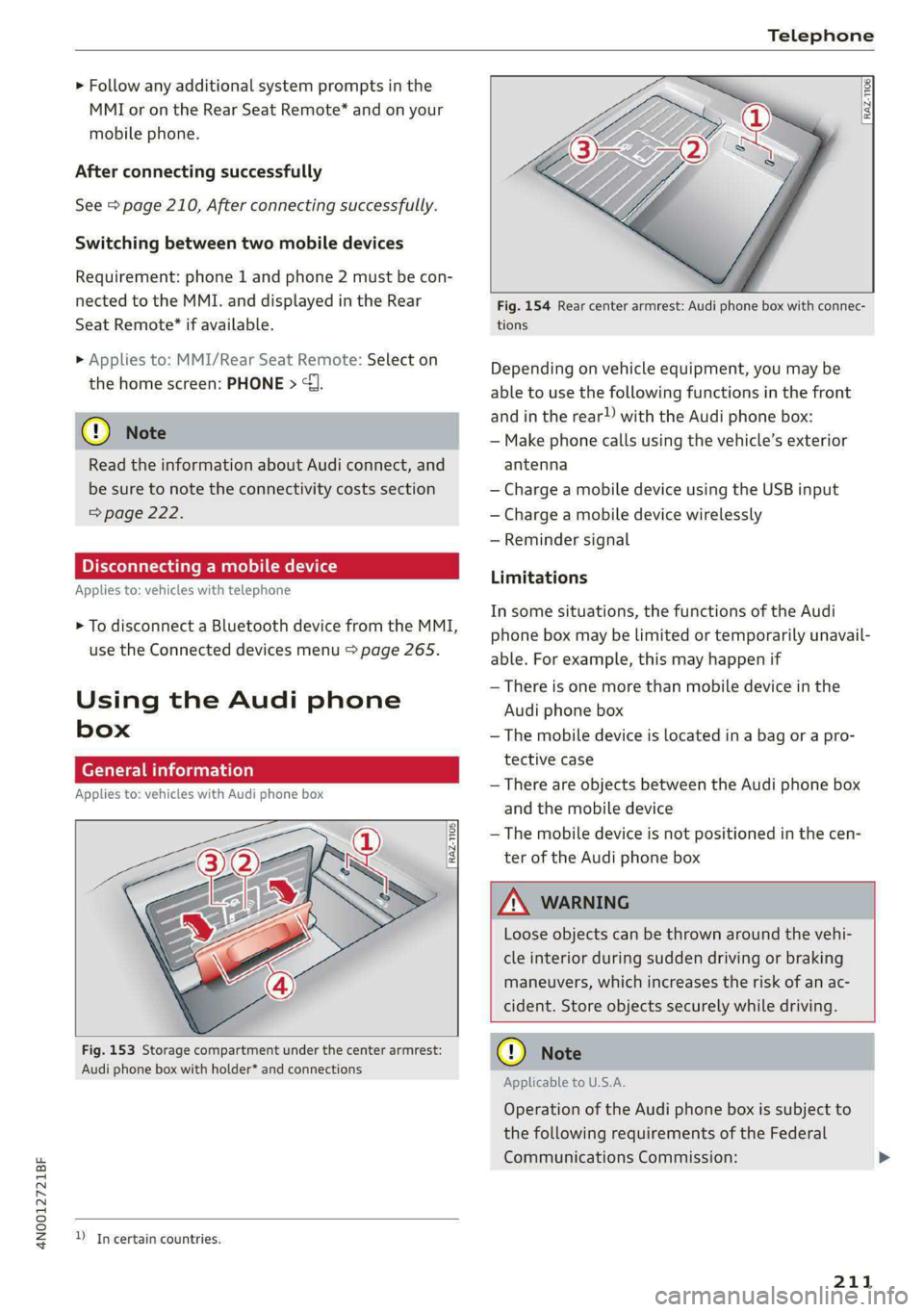
General information
Applies to: vehicles with Audi phone box
Fig. 153 Storage compartment under the center armrest:
Audi phone box with holder* and connections
D_Incertain countries.
RAZ-1106|
Fig. 154 Rear center armrest: Audi phone box with connec-
tions
Depending on vehicle equipment, you may be
able to use the following functions in the front
and in the rear!) with the Audi phone box:
— Make phone calls using the vehicle’s exterior
antenna
— Charge a mobile device using the USB input
— Charge a mobile device wirelessly
— Reminder signal
Limitations
In some situations, the functions of the Audi
phone box may be limited or temporarily unavail-
able. For example, this may happen if
— There is one more than mobile device in the
Audi phone box
— The mobile device is located in a bag or a pro-
tective case
— There are objects between the Audi phone box
and the mobile device
— The mobile device is not positioned in the cen-
ter of the Audi phone box
Loose objects can be thrown around the vehi-
cle interior during sudden driving or braking
maneuvers, which increases the risk of an ac-
cident. Store objects securely while driving.
Applicable to U.S.A.
Operation of the Audi phone box is subject to
the following requirements of the Federal
Communications Commission:
211
Page 214 of 362
Telephone
— This is a CONSUMER device.
— BEFORE USE, you MUST REGISTER THIS DE-
VICE with your wireless provider and have
your provider’s consent. Most wireless pro-
viders consent to the use of signal boosters.
Some providers may not consent to the use
of this device on their network. If you are
unsure, contact your service provider.
— You MUST operate this device with approved
antennas and cables as specified by the
manufacturer. Antennas MUST be installed
at least 20 cm (8 inches) from any person.
— You MUST cease operating this device im-
mediately if requested by the FCC or a li-
censed wireless service provider.
— WARNING: E911 location information may
not be provided or may be inaccurate for
calls served by using this device.
@) Note
Applicable to Canada
In Canada, operation of a Zone Enhancer,
such as an Audi phone box, is subject to the
following requirements of the Innovation,
Science and Economic Development Canada
(ISED):
— This is a CONSUMER device.
— BEFORE USE, you MUST meet all require-
ments set out in CPC-2-1-05. At the time of
printing this user manual, the CPC-2-1-05
client procedures circular of ISED Canada
was available at the following web page:
http://www.ic.gc.ca/eic/site/smt-gst.
nsf/eng/sf08942.html.
— You MUST operate this device with approved
antennas and cables as specified by the
manufacturer. Antennas MUST NOT be in-
stalled within 20 cm of any person.
— You MUST cease operating this device im-
mediately if requested by ISED or a licensed
wireless service provider.
— WARNING: £911 location information may
not be provided or may be inaccurate for
calls served by using this device.
@ Tips
The system complies with United States FCC
regulations and ISED regulations > page 341.
212
Making phone calls using the exterior
antenna
Applies to: vehicles with Audi phone box
With the Audi phone box, you can make calls us-
ing the exterior antenna on the vehicle. Using the
external antenna helps when there is a low signal
and also provides better reception quality.
Requirement: the ignition must be switched on.
Applies to: vehicles with front Audi phone box
» Fold open the holder for the Audi phone box (4)
=> page 211, fig. 153.
> To make phone calls through the vehicle's exte-
rior antenna using your mobile device, lay your
device with the rear side against the phone
symbol (2) in the center of the Audi phone box
and holder (@).
Applies to: vehicles with Audi phone box in the rear
> To make phone calls through the vehicle's exte-
rior antenna using your mobile device, lay your
device on the phone symbol @) > page 211,
fig. 154 in the center of the Audi phone box
with the display facing up.
Charging the battery using the USB input
Applies to: vehicles with Audi phone box
You can charge your mobile device using a special
USB adapter with the Audi phone box
=> page 252.
Requirement: the ignition must be switched on.
> To charge your mobile device via USB, connect it
to the USB input @ °% page 211,
fig. 153/> page 211, fig. 154.
G) Tips
— You can purchase a USB adapter from an au-
thorized Audi dealer or authorized Audi
Service Facility, or at specialty stores.
— Audi recommends using Audi Genuine Ac-
cessories. Audi has verified their reliability,
safety, and suitability.