warning AUDI A8 2021 Owners Manual
[x] Cancel search | Manufacturer: AUDI, Model Year: 2021, Model line: A8, Model: AUDI A8 2021Pages: 362, PDF Size: 99.29 MB
Page 326 of 362
Emergency assistance
ZA\ WARNING
— A drained battery can freeze at tempera-
tures around 32 °F (0 °C). If the vehicle bat-
tery is frozen, it must be thawed before con-
necting the jump start cables. If it is not,
the risk of an explosion and chemical burns
increases. After jump starting the vehicle,
drive to an authorized Audi dealer or author-
ized Audi Service Facility immediately to
have the vehicle battery checked.
— Read the warnings when working in the en-
gine compartment > page 274.
— Handling the jump start cables incorrectly
may cause the vehicle battery to explode
and lead to serious injuries.
@) Note
— Jump start cables can cause considerable
damage to the vehicle electrical system if
they are connected incorrectly.
— Plug-in hybrid drive: You must not give a
jump start with your vehicle. This could
cause significant damage to the electrical
system in your vehicle.
G) Tips
— There must be no contact between the
vehicles, or else voltage could flow when
connecting the positive terminal and drain
the vehicle battery of the vehicle providing
the jump start.
— The drained vehicle battery must be con-
nected correctly to the electrical system.
— Switch off electrical equipment that is not
needed.
324
Both jump start cables must be connected in the
correct order.
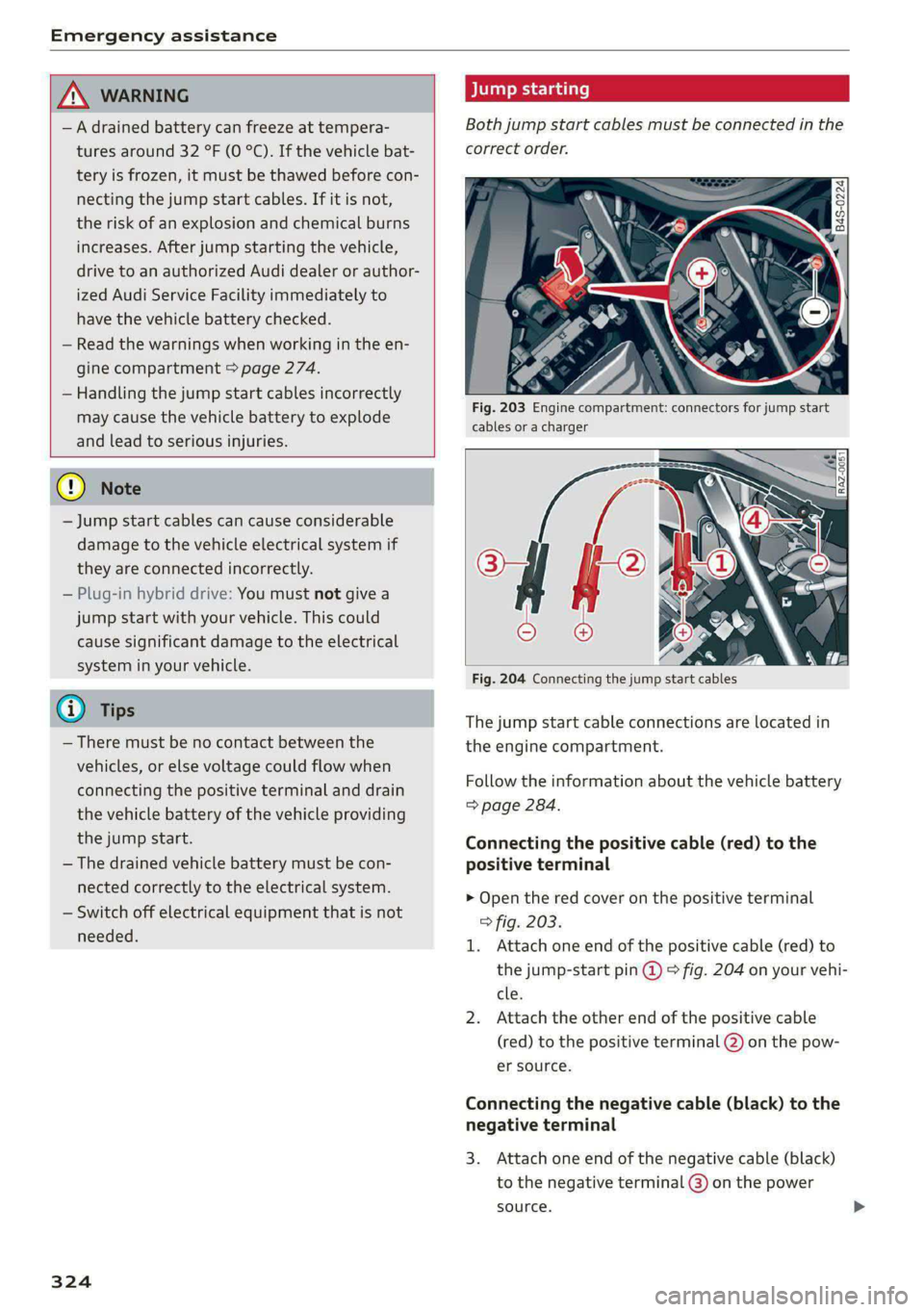
Fig. 203 Engine compartment: connectors for jump start
cables or a charger
Fig. 204 Connecting the jump start cables
T
he jump start cable connections are located in
the engine compartment.
Fi ollow the information about the vehicle battery
=> page 284.
Connecting the positive cable (red) to the
positive terminal
>
I.
Open the red cover on the positive terminal
> fig. 203.
Attach one end of the positive cable (red) to
the jump-start pin @ ° fig. 204 on your vehi-
cle.
Attach the other end of the positive cable
(red) to the positive terminal @ on the pow-
er source.
Connecting the negative cable (black) to the
n
3
egative terminal
. Attach one end of the negative cable (black)
to the negative terminal @) on the power
source. >
Page 327 of 362

4N0012721BF
Emergency assistance
4. Attach the other end of the negative cable
(black) to the jump-start pin @) on the vehi-
cle.
Starting the engine
> Start the engine in the vehicle giving the charge
and let it run at idle.
> Now start the engine in your vehicle, which has
the
drained battery.
> If the engine does not start, stop the starting
procedure after 10 seconds and then repeat it
after approximately 30 seconds.
> Turn on the rear window defogger in your vehi-
cle in order to reduce any voltage peaks that
may occur when disconnecting the jump start
cables. The headlights must be switched off.
> With the engines running, remove the cables in
reverse order of the way they were installed.
> Close the red cover on the positive terminal.
Z\ WARNING
— Never connect the jump start cable directly
to your vehicle battery. Only use the connec-
tions in the engine compartment.
— Do not touch the non-insulated parts of the
terminal clamps. The cable must also not
come into contact with vehicle components
that conduct electricity when it is connected
to the positive vehicle battery terminal. This
can cause a short circuit.
— The plugs on the battery cells must not be
opened.
— Keep ignition sources (such as open flames,
burning cigarettes, etc.) away from the vehi-
cle batteries to reduce the risk of an explo-
sion.
— Route the jump start cables so they cannot
get caught in the moving parts in the other
vehicle's engine compartment.
@ Note
Please note that the connecting process previ-
ously described for the jump start cables is in-
tended for when your vehicle is being jump
started.
@) Tips
Make sure that the connected jump start ca-
bles have sufficient contact with metal.
Towing
General information
You should only perform the steps that follow if
you have the necessary tools and technical ex-
pertise.
Towing requires a certain amount of practice.
Audi recommends contacting a towing company
to have the vehicle transported.
You should only have your vehicle towed by an-
other vehicle when disabled in exceptional cir-
cumstances. Inexperienced drivers should not
tow.
Notes on towing
When the engine is stopped, the transmission
will not be sufficiently lubricated if traveling at
high speeds and long distances:
— The maximum permitted towing speed is 30
mph (50 km/h).
— The maximum permitted towing distance is 30
miles (50 km).
Additional information on towing with a tow
truck
The vehicle may only be towed with the front axle
raised. Do not wrap any chains or cables around
the brake lines.
Tow bar and towing cable
The vehicle can be towed with a tow bar or tow-
ing cable. Both drivers should be familiar with
the special considerations when towing, especial-
ly when using a towing cable.
Always make sure the traction force does not ex-
ceed the permitted level and there are no shock
loading conditions. There is always the risk of the
coupling becoming overloaded when driving off-
road.
For the most safety and security, drive with a tow
bar. You should use a towing cable onlyifatow >
325
Page 328 of 362

Emergency assistance
bar is not available. Use a towing cable made of
synthetic elastic cable similar elastic material.
ZA WARNING
— Towing highly increases the risk of an acci-
dent, for example from colliding with the
towing vehicle.
— To reduce the risk of an accident, do not al-
low anyone to remain inside the vehicle
when it is being transported by a tow truck
or a special transporter.
@) Note
— If normal towing is not possible, for exam-
ple if the transmission is faulty or if the
towing distance is greater than 30 miles
(50 km), then transport the vehicle on a
special carrier.
— If the vehicle is towed by a tow truck at the
axle that is not permitted, this can cause se-
vere damage to the transmission.
— The vehicle must not be tow started for
technical reasons.
@) Tips
— If the power supply is interrupted, then it
will not be possible to move the selector
lever out of the "P" position. The parking
lock must be released using the emergency
release before towing the vehicle
=> page 112.
— Switch Audi pre sense* off > page 181 when
loading the vehicle onto a vehicle carrier,
train, ship, or other type of transportation,
or when towing the vehicle. This can prevent
an undesired intervention from the pre
sense* system.
— Follow the local legal regulations for tow-
ing.
Read and follow the important information under
=> page 325.
326
Preparations
> Only secure the towing cable or tow bar at the
designated towing loops > page 327,
=> page 327.
> Make sure the towing cable is not twisted. Oth-
erwise it could disconnect from the towing loop
while towing.
> Switch the emergency flashers on in both
vehicles > page 61. However, do not do this if it
prohibited by law.
Towing vehicle (front)
> Only start to drive when the towing cable is
taut.
> Press the brake pedal very carefully.
> Avoid sudden braking or driving maneuvers.
Vehicle being towed (rear)
> Make sure the ignition is switched on so that
the steering wheel is not locked and so that you
can use the turn signals, the horn, and the
windshield wipers if needed > A\.
> Switching it off before the vehicle has stopped
may impair the function of the brake booster
and power steering. You would then need to
use more force to steer and brake the vehicle.
> Release the parking brake > page 121.
> Select the “N” selector lever position.
> Make sure the towing cable is always taut.
ZA\ WARNING
— Never tow a vehicle using a tow bar or tow-
ing cable if the vehicle does not have electri-
cal power.
— If the vehicle runs out of power while it is
being towed, stop towing the vehicle imme-
diately and consult an authorized Audi deal-
er or qualified repair facility.
Page 329 of 362
4N0012721BF
Emergency assistance
Front towing loop
Rear towing loop
fry 3 o 2
i a
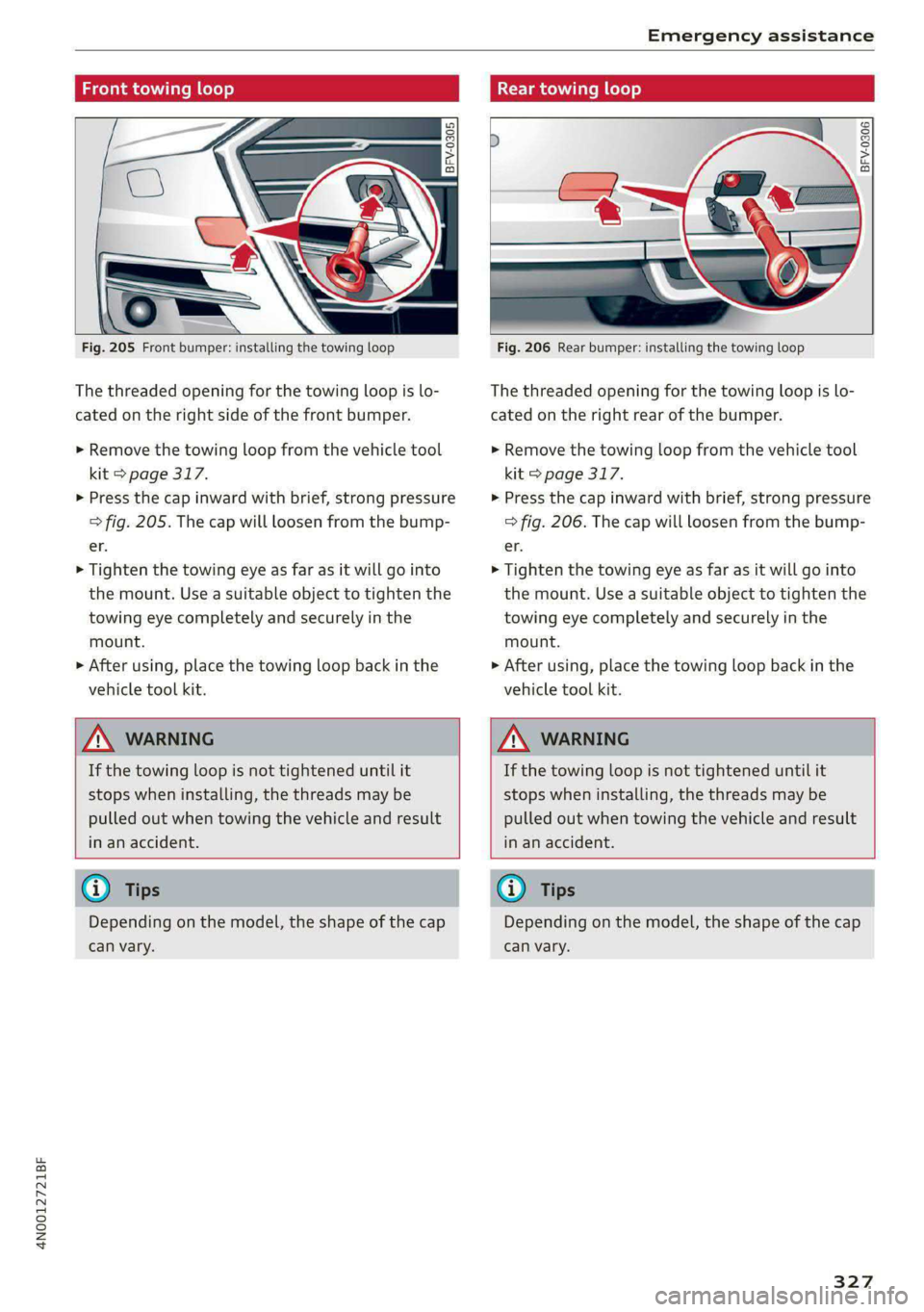
Fig. 205 Front bumper: installing the towing loop
The threaded opening for the towing loop is lo-
cated on the right side of the front bumper.
> Remove the towing loop from the vehicle tool
kit > page 317.
> Press the cap inward with brief, strong pressure
> fig. 205. The cap will loosen from the bump-
er.
> Tighten the towing eye as far as it will go into
the mount. Use a suitable object to tighten the
towing eye completely and securely in the
mount.
> After using, place the towing loop back in the
vehicle tool kit.
BFV-0306
Fig. 206 Rear bumper: installing the towing loop
The threaded opening for the towing loop is lo-
cated on the right rear of the bumper.
> Remove the towing loop from the vehicle tool
kit > page 317.
> Press the cap inward with brief, strong pressure
> fig. 206. The cap will loosen from the bump-
er.
> Tighten the towing eye as far as it will go into
the mount. Use a suitable object to tighten the
towing eye completely and securely in the
mount.
> After using, place the towing loop back in the
vehicle tool kit.
ZA WARNING
If the towing loop is not tightened until it
stops when installing, the threads may be
pulled out when towing the vehicle and result
in an accident.
ZA WARNING
If the towing loop is not tightened until it
stops when installing, the threads may be
pulled out when towing the vehicle and result
in an accident.
G) Tips
Depending on the model, the shape of the cap
can vary.
G) Tips
Depending on the model, the shape of the cap
can vary.
327
Page 330 of 362

Fuses and bulbs
Fig. 207 Left side of the cockpit: fuse panel cover (, left
footwell: fuse panel cover @)
Fig. 208 Left side of the luggage compartment: fuse panel
cover @) and clip @)
328
A fuse that has blown will have metal strips that
have burned through.
The fuses are located on the left front side of the
cockpit @), in the left footwell @), and in the left
side of the luggage compartment (3) behind the
side trim panel.
> Switch the ignition and all electrical equipment
off.
> Check the table that follows to see which fuse
belongs to the equipment.
> Remove the screwdriver from the vehicle tool
kit > page 317.
> Remove the appropriate cover.
> Remove the colored plastic clip from the fuse
panel, if necessary.
> Remove the clip from the upper right fuse pan-
el in the luggage compartment
> Remove the fuse using the clip.
> Replace the blown fuse only with a fuse that
has the same amp rating.
> Reinstall the plastic bracket.
> Install the cover.
Fuse color identification
Color Current rating
in amps
Black 1
Gray 2
Purple 3
Pink 4
Light brown 5
Brown LS
Red 10
Light blue 15
Yellow 20
White or transparent /|25
Light green 30
Teal 35
Orange 40
\, WARNING
Do not repair fuses and never replace a blown
fuse with one that has a higher amp rating.
Page 335 of 362

4N0012721BF
Data privacy
Data privacy
Privacy
notice
You can find information about responsibility for
data protection in the MMI.
Transmitted information
Applies to: MMI: Select on the home screen: SET-
TINGS > General > Legal notes > About Audi
connect.
Image recording
Surrounding area monitoring
Applies to: vehicles with surrounding area monitoring
The functionality of the park assist plus requires
detecting and evaluating the vehicle's path. This
is done by cameras installed permanently on the
vehicle that detect objects in the vehicle's sur-
roundings (such as obstacles or guard rails). The
live images from the cameras are transmitted to
the applicable control module.
The camera images are transferred to the respon-
sible control module for processing and may be
stored, depending on vehicle equipment. The
control
module analyzes the current camera im-
age using image evaluation software. This image
evaluation software detects anonymized techni-
cal measurements, such as distances to objects.
The control module evaluates these technical
measurements and makes it possible for the as-
sist systems to control the vehicle, if necessary.
Data memories
5 io. oO
2 x= + oO
Fig. 212 Driver's side footwell: connection port for the On
Board Diagnostic System (OBD)
Your vehicle is equipped with electronic control
modules for various vehicle systems such as the
airbags. These vehicle control modules store data
while driving normally that is required by an au-
thorized Audi dealer or authorized Audi Service
Facility for diagnosis and repair purposes. Only
certain types of data are recorded for a very short
period of time if a control module has detected a
system event. No noises, conversations, or im-
ages will be recorded in the vehicle.
The data may include information such as the ve-
hicle speed, the direction of travel, and informa-
tion about the brake system, or also the behavior
of the restraint system in the event of an acci-
dent. The stored data can be exported and down-
loaded with special devices, which must be con-
nected directly to the vehicle.
On Board Diagnostic System (OBD)
There is a diagnostic connector socket in the driv-
er's side footwell to read out the various control
modules and the event data recorder. Data re-
garding the function and condition of the elec-
tronic control modules is stored in the event
memory. Only have an authorized Audi dealer or
authorized Audi Service Facility read out and de-
lete the event memory.
ZA\ WARNING
— Incorrect use of the connection port for the
On Board Diagnostic System can cause mal-
functions, which can then result in accidents
and serious injuries.
— Only allow an authorized Audi dealer or au-
thorized Audi Service Facility to read out the
engine data.
h data recorder
Event Data Recorder
This vehicle is equipped with an Event Data Re-
corder (EDR). The main purpose of an EDR is to
record, in certain crash or near crash-like situa-
tions,
such as an airbag deployment or hitting a
road obstacle, data that will assist in understand-
ing how a vehicle's system performed. The EDR is
designed to record data related to vehicle dynam-
ics and safety systems for a short period of time, >
333
Page 341 of 362

4N0012721BF
Accessories and technical changes
Usually maintenance and repair work requires
special tools, measuring devices, and other
equipment that is available to trained vehicle
technicians in order to help ensure that your vehi-
cle and all of its systems operate correctly, relia-
bly, and safely. Performing work on the vehicle
incorrectly can impair the operation and reliabili-
ty of your vehicle and may void one or more of
your vehicle's warranties.
Technical Modifications
Interference with electronic components, their
software, the wiring, and data transfer may cause
malfunctions. Because of the way electronic com-
ponents are interconnected, such malfunctions
can also impair systems that are not directly in-
volved. This means that you risk both a substan-
tial reduction in the operational safety of your ve-
hicle and increased wear of vehicle components.
Some convenience functions, such as the conven-
ience turn signal function, individual door open-
ing function, and displays, can be reprogrammed
using special workshop equipment. If functions
are reprogrammed, the information and descrip-
tions about these functions in this Owner's Man-
ual may no longer apply to the changed func-
tions. Audi recommends that an authorized Audi
dealer or authorized Audi Service Facility perform
and verify any reprogramming procedures.
— Never perform any work in the engine com-
partment unless you know exactly how to
carry out the job and have the correct tech-
nical information and the correct tools.
— If you are uncertain about what to do, have
the work performed by an authorized Audi
dealer, an authorized Audi Service Facility,
or another qualified workshop. Serious per-
sonal injury may result from improperly per-
formed work.
ZA WARNING
Maintenance work, repairs, or technical modi-
fications to the vehicle (such as installing ad-
ditional equipment) that is not performed
correctly can cause serious injuries and in-
crease the risk of an accident.
Z\ WARNING
The engine compartment in any motor vehicle
is a potentially dangerous area and can cause
serious personal injury.
— Always use extreme caution when doing any
work in the engine compartment. Always
follow commonly accepted safety practices
and use common sense. Never risk personal
injury.
@) Note
— Maintenance work, repairs, or technical
modifications to the vehicle (such as instal-
ling additional equipment) that is not per-
formed correctly can cause vehicle damage.
— If emergency repairs must be performed,
take your vehicle to an authorized Audi deal-
er or authorized Audi Service Facility as soon
as possible.
— Audi is not liable for damage to the vehicle
resulting from failure to comply with these
guidelines.
@) For the sake of the environment
— Regular maintenance can help protect the
environment.
— Technical modifications to the vehicle can
have a negative impact on fuel consumption
and vehicle emissions.
@) For the sake of the environment
Certain components in your vehicle such as
undeployed airbag modules, pretensioners
and remote control batteries may contain Per-
chlorate Material - special handling may ap-
ply, See www.dtsc.ca.gov/hazardouswaste/
perchlorate. When the vehicle or parts of the
restraint system including airbag modules
and safety belts with pretensioners are scrap-
ped, all applicable laws and regulations must
be observed. Your authorized Audi dealer is
familiar with these requirements and we rec-
ommend that you have your dealer perform
this service for you.
339
Page 342 of 362
Accessories and technical changes
@) Tips
Because of your vehicle's aluminum body de-
sign, all service and repair procedures affect-
ing the body should be performed by an au-
thorized Audi dealer or authorized Audi Serv-
ice Facility, who will perform the work accord-
ing to Audi factory specifications. Only Audi
Genuine Parts are used when Audi experts
perform repair or service procedures. Failure
to use Audi Genuine Parts or Audi Genuine Ac-
cessories or performing repairs incorrectly
may result in severe vehicle damage, such as
corrosion.
Accessories and parts
Consult with an authorized Audi dealer or author-
ized Audi Service Facility before purchasing ac-
cessories or replacement parts. Audi recom-
mends having your vehicle serviced by an author-
ized Audi dealer or authorized Audi Service Facili-
ty and using Audi Genuine Parts and Audi Genu-
ine Accessories.
Audi does not endorse the use of products and
accessories that it has not evaluated, even if the
product is approved by a certified testing agency
or government agency.
ZA WARNING
— Installing unapproved accessories or incor-
rect replacement parts can cause vehicle
damage and can increase the risk of an acci-
dent.
— Never attach accessories, such as telephone
holders or cup holders, to the airbag covers
or within the airbag deployment zone, be-
cause this increases the risk of injury if the
airbag deploys.
— On vehicles that have factory-installed li-
cense plate brackets on the front of the ve-
hicle, the brackets may only be replaced
with ones that are the same size and made
of the same material. Do not install any li-
cense plate brackets on the front of vehicles
that do not have factory-installed brackets.
Otherwise, the function of the system could
be impaired.
340
@) Note
A correctly-installed exterior antenna is re-
quired for operating radio equipment in the
vehicle. Otherwise, the increased electromag-
netic waves can cause malfunctions in the ve-
hicle. Observe the regulations in the country
where the vehicle is being operated and the
instructions from the radio equipment manu-
facturer.
Reporting Safety Defects
Applicable to U.S.A.
If you believe that your vehicle
has a defect which could cause a
crash or could cause injury or
death, you should immediately in-
form the National Highway Traffic
Safety Administration (NHTSA) in
addition to notifying
Audi of America, Inc.
2200 Ferdinand Porsche Drive
Herndon, VA 20171
If NHTSA receives similar com-
plaints, it may open an investiga-
tion, and if it finds that a safety
defect exists in a group of
vehicles, it may order a recall and
remedy campaign. However,
NHTSA cannot become involved in
individual problems between you,
your dealer, or Audi of America,
Inc.
Page 344 of 362
Accessories and technical changes
conditions: (1) This device may not cause harmful
interference, and (2) this device must accept any
interference received, including interference that
may cause undesired operation.
FCC Part 15.21
Changes or modifications not expressly approved
by the party responsible for compliance could
void the user's authority to operate the equip-
ment.
RSS-Gen
This device contains licence-exempt transmit-
ter(s)/receiver(s) that comply with Innovation,
Science and Economic Development Canada’s li-
cence-exempt RSS(s). Operation is subject to the
following two conditions:
(1) This device may not cause interference; and
(2) This device must accept any interference, in-
cluding interference that may cause undesired
operation of the device.
RSS 102
Radiofrequency radiation exposure Information:
This equipment complies with FCC and ISED radi-
ation exposure limits set forth for an uncontrol-
led environment. This equipment should be in-
stalled and operated with minimum distance of
20 cm (8 inches) between the radiator and your
body. This transmitter must not be co-located or
operating in conjunction with any other antenna
or transmitter.
Class B devices
This equipment has been tested and found to
comply with the limits for a Class B digital device,
pursuant to part 15 of the FCC Rules. These lim-
its are designed to provide reasonable protection
against harmful interference in a residential in-
stallation. This equipment generates, uses and
can radiate radio frequency energy and, if not in-
stalled and used in accordance with the instruc-
tions, may cause harmful interference to radio
communications. However, there is no guarantee
that interference will not occur in a particular in-
stallation. If this equipment does cause harmful
interference to radio or television reception,
which can be determined by turning the equip-
342
ment off and on, the user is encouraged to try to
correct the interference by one or more of the
following measures:
— Reorient or relocate the receiving antenna.
— Increase the separation between the equip-
ment and receiver.
— Connect the equipment into an outlet on a cir-
cuit different from that to which the receiver is
connected.
— Consult the dealer or an experienced radio/TV
technician for help.
This Class B digital apparatus complies with
Canadian ICES-003.
Integrated Toll Module* - FCC (USA) and
ISED (Canada)
This device complies with FCC rules part 90 and
Innovation, Science, and Economic Development
Canada RSS-137. Operation is subject to the fol-
lowing two conditions: (1) This device may not
cause harmful interference, and (2) This device
must accept any interference that may be re-
ceived including interference that may cause un-
desired operation. WARNING: The transmitter
has been tested and complies with FCC and ISED
rules. Changes or modifications not expressly ap-
proved by the party responsible for compliance
could void the user’s authority to operate the de-
vice.
This equipment complies with FCC and ISED radi-
ation exposure limits set forth for an uncontrol-
led environment. End Users must follow the spe-
cific operating instructions for satisfying RF ex-
posure compliance. This transmitter must be at
least 20 cm (8 inches) from the user and must
not be co-ocated or operating in conjunction
with any other antenna or transmitter.
G) Tips
Additional information or supplements about
the radio systems based on the vehicle equip-
ment and country can be found on the follow-
ing website: www.audi.com/generalinfo
Page 347 of 362

4N0012721BF
Index
A
A/C cooling mode............ eee eee eee
A/C system refrigerant oil...............
Accelerator pedal.............2--00000-
also refer to Accelerator pedal..........
ACCESSOFICS 2. eee
Active lane assist
refer to Lane departure warning.........
refer to Lane guidance................
Active SuSpenSiOt es ¢ « ccs so ewe ss eewe ss
Adaptive cruise assist................04.
Cleaning the sensors.............0 0005
Adaptive cruise control
Predictive control..............000005
Adaptive speed assist
refer to Adaptive cruise assist..........
Adjusting the air distribution............
Adjusting the brightness.................
Adjusting the sound.................005
Adjusting the temperature..............
Adjusting the vents.................05.
Adjusting the volume..............00-00-
Adjusting the volume (announcements) ... .
Adjusting the welcome sound............
Airbag system... 2... ee eee eee
Air suspension..............00 000-00 ee
Alarm system
refer to Anti-theft alarm system..........
Alignment pin (changing the wheel).......
All-weather lights...............-.00000.
Allseasontires...............00 eee eee
All wheel drive
refer to quattro... .... eee eee eee
Amazon Alexa integration
Media playback.................00005
QPerating « « ses so secs oo moms 9 wa & ¥ BRE
AMI
refer to Audi music interface...........
Android Auto
refer to Audi smartphone interface......
Anti-lock braking system............0065
Anti-Slip Regulation.................05.
Antietheftalarmr system siccs oe owes oc cna «
Anti-theft wheel bolts..................
Apple CarPlay
refer to Audi smartphone interface...... 261
Aspect ratio
NidGO verse < ¢ seven & 5 seaRE ze SeHER Fo Bee 255; 257
ASR
refer to Anti-Slip Regulation............ 129
Audi adaptive light...............-..000- 58
Audi connect
MEFEPTONCONNECE: « «esses oo wesc ow xem ¥ v0 222
AUGIGriVe’SelECt ios: « « suas > gemy 2 x seme gee 124
Audi e-tron compact charging system..... 140
Adjusting the charging power level...... 140
Changing or attaching the power cable... 145
SECUCINGls » 5 seme ¢ 9 same < a eR Eee EOE ne 145
Status and malfunction indicators....... 141
Audi musiciintertace sas ss iwes se gee ay oo 252
UGGS iexsy: a 2 wares & & gee & 2 eR Ee ER 253
Audi phone BOX eis 5 y omnes 5 3 eas «8 ews 211
Audi presense........ 0.00 e cee eee eee 178
MGSSAGES saws + & cmer 9 ¢ cemes 9 o ews 8 9 ee 182
Audi pre sense front.............eeeeeee 179
Audi side assist
refer to Side assist............-.00000. 182
Audi smartphone interface.............. 261
Legaliinformationi. . soe. s + scars se cesses ¥ 266
Audi virtual cockpit
refer to Instrument cluster.............. 12
AUTO
Automatic headlights.................. 58
Climate control system..............5- 101
Auto Lock (central locking) ............... 41
Automatic climate control system
refer to Climate control system......... 100
Automatic luggage compartment lid.... 49,50
Automatic transmission...............- 109
Parking lock emergency release......... 112
Automatic wipe/wash system............. 66
Auxiliary climate control................ 104
Average consumption.................-- 16
Average speed ..... 0... cece ccc eee renee 16
B
Bag hooks........ 0... eee eee eee eee 97
Band
refer to Frequency band............... 242
345