lights AUDI A8 2021 Owner's Manual
[x] Cancel search | Manufacturer: AUDI, Model Year: 2021, Model line: A8, Model: AUDI A8 2021Pages: 362, PDF Size: 99.29 MB
Page 69 of 362
4N0012721BF
Lights and Vision
switched on again by moving the windshield
wiper lever to any position. The single wipe
function (lever in position @) also functions
when the ignition is switched off.
— Worn or dirty windshield wiper blades result
in streaking. This can affect the rain sensor
function. Check your windshield wiper
blades regularly.
— The washer fluid nozzles for the windshield
washer system are heated when the ignition
is on if the outside temperature is low.
— When stopping temporarily, such as at a
traffic light, the speed of the windshield
wipers automatically reduces by one level.
[eG ce a es ce wiper blades
B8V-0696]
Ae
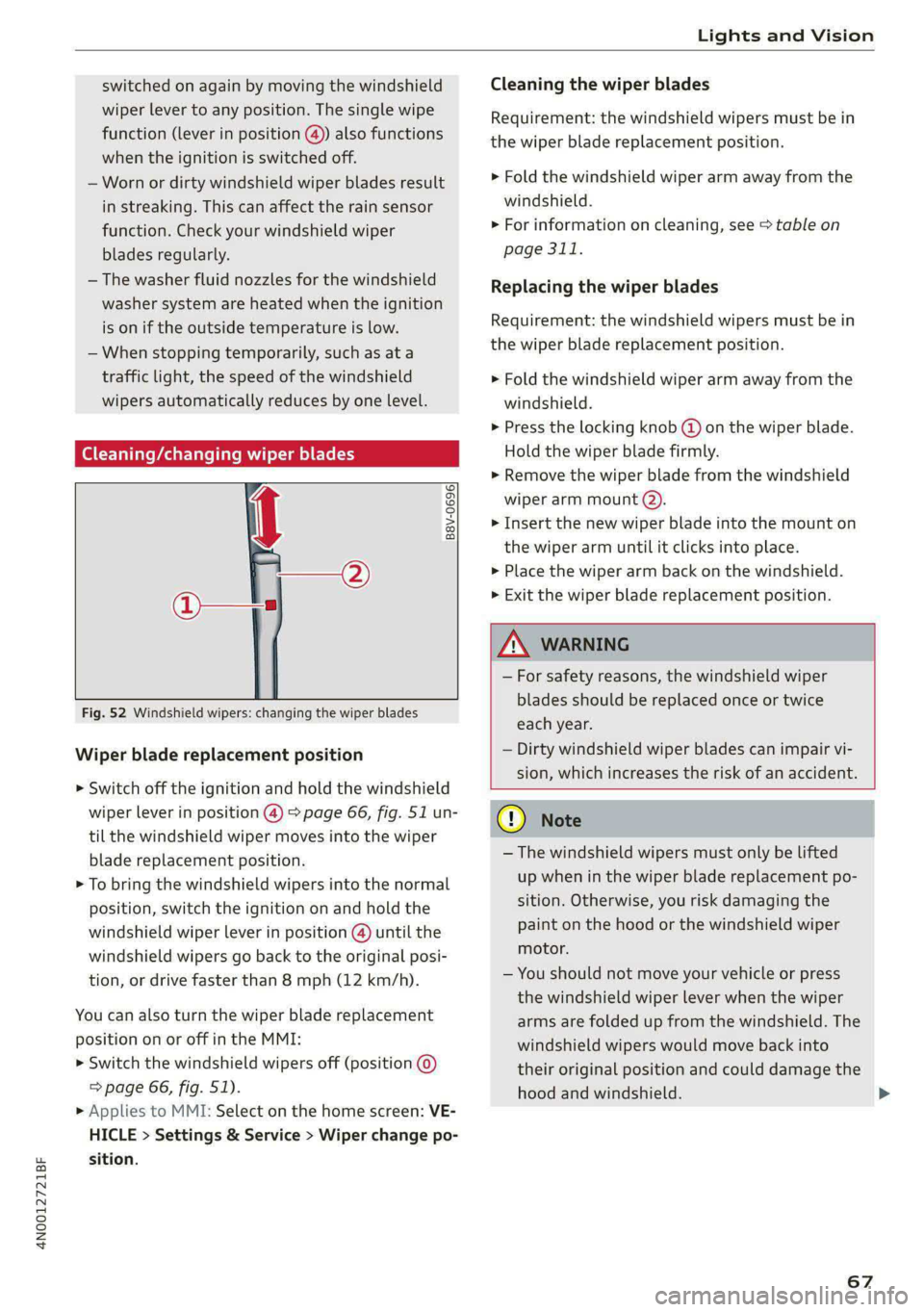
Fig. 52 Windshield wipers: changing the wiper blades
Wiper blade replacement position
> Switch off the ignition and hold the windshield
wiper lever in position @) > page 66, fig. 51 un-
til the windshield wiper moves into the wiper
blade replacement position.
> To bring the windshield wipers into the normal
position, switch the ignition on and hold the
windshield wiper lever in position @) until the
windshield wipers go back to the original posi-
tion, or drive faster than 8 mph (12 km/h).
You can also turn the wiper blade replacement
position on or off in the MMI:
> Switch the windshield wipers off (position @
=> page 66, fig. 51).
> Applies to MMI: Select on the home screen: VE-
HICLE > Settings & Service > Wiper change po-
sition.
Cleaning the wiper blades
Requirement: the windshield wipers must be in
the wiper blade replacement position.
> Fold the windshield wiper arm away from the
windshield.
> For information on cleaning, see > table on
page 311.
Replacing the wiper blades
Requirement: the windshield wipers must be in
the wiper blade replacement position.
> Fold the windshield wiper arm away from the
windshield.
> Press the locking knob @) on the wiper blade.
Hold the wiper blade firmly.
» Remove the wiper blade from the windshield
wiper arm mount (2).
> Insert the new wiper blade into the mount on
the wiper arm until it clicks into place.
> Place the wiper arm back on the windshield.
> Exit the wiper blade replacement position.
ZA WARNING
— For safety reasons, the windshield wiper
blades should be replaced once or twice
each year.
— Dirty windshield wiper blades can impair vi-
sion, which increases the risk of an accident.
@) Note
— The windshield wipers must only be lifted
up when in the wiper blade replacement po-
sition.
Otherwise, you risk damaging the
paint on the hood or the windshield wiper
motor.
— You should not move your vehicle or press
the windshield wiper lever when the wiper
arms are folded up from the windshield. The
windshield wipers would move back into
their original position and could damage the
hood and windshield.
67
>
Page 70 of 362

Lights and Vision
G) Tips
— You can also use the wiper blade replace-
ment position for other reasons, for exam-
ple if you want to protect the windshield
from icing by using a cover.
— You cannot activate the wiper blade replace-
ment position when the hood is open.
If the & indicator light turns on, then there is a
windshield wiper malfunction. The message that
is also displayed indicates the cause and possible
solutions. If one of the messages does not turn
off, drive immediately to an authorized Audi deal-
er or authorized Audi Service Facility to have the
malfunction repaired.
gS Automatic wipers: malfunction! See owner's
manual
The light/rain sensor is malfunctioning. You can
still control all functions that are not controlled
by the rain sensor using the windshield wiper lev-
er. Drive immediately to an authorized Audi deal-
er or authorized Audi Service Facility to have the
malfunction repaired.
Digital compass
Switching the compass on and off
Applies to: vehicles with digital compass
BFV-0288
Fig. 53 Rearview mirror: digital compass is switched on
68
> To turn the compass on or off, press the button
@ until the compass display in the mirror turns
on or off.
The digital compass only works when the ignition
is turned on. The directions are indicated with ab-
breviations: N (north), NE (northeast), E (east),
SE (southeast), S (south), SW (southwest), W
(west), NW (northwest).
G) Tips
To prevent inaccurate compass readings, do
not bring any remote controls, electrical devi-
ces or metallic objects near the mirror.
Page 71 of 362

4N0012721BF
Lights and Vision
Fig. 54 Magnetic zone map
The magnetic zone must be adjusted correctly for
the compass to read accurately.
> Press and hold the button @ > page 68, fig. 53
until the number of the magnetic zone appears
in the interior rearview mirror.
> Press the button () repeatedly to select the
correct magnetic zone. The selection mode
turns off after a few seconds.
Calibrating the co
Applies to: vehicles with digital compass
You must recalibrate the compass if it does not
display the correct direction.
> Press and hold the button @ untila C
=> page 68, fig. 53 appears in the rearview mir-
ror.
> Drive in a circle at about 6 mph (10 km/h) until
a direction is displayed in the rearview mirror.
B42-0405
To reduce the risk to yourself and other driv-
ers, calibrate the compass in an area where
there is no traffic.
69
Page 73 of 362

4N0012721BF
Sitting correctly and safely
— The distance between your upper body and the
steering wheel or instrument panel is at least
10 inches (25 cm)
— The distance between your knees and the in-
strument panel is at least 4 inches (10 cm)
— Your thighs are lightly supported by the front
surface of the seat
— The backrest is in an upright position and your
back
is resting against it
— You have a sufficient view of the area around
the vehicle
— You have a clear view of the instrument cluster,
indicator lights, and the head-up display*
Seat settings menu: quick access
If you press on the image of the driver's or front
passenger's seat in the climate control system
menu & page 100, fig. 89 @, you will go directly
to the seat settings for that seat.
ZA WARNING
— If you are too close to the steering wheel or
instrument panel, the airbag system cannot
provide the optimal protection, which in-
creases the risk of injury and death.
—To reduce the risk of injury in the event of
sudden braking maneuvers or accidents,
never drive with the backrest reclined very
far. The airbag system and seat belts can on-
ly provide optimal protection when the back-
rest is in an upright position and the driver
is wearing the seat belt correctly. If the
backrest is angled back too far, the safety
belt can shift to soft areas of the body, such
as the stomach, which increases the risk of
injury.
—To reduce the risk of an accident, only adjust
the seats when the vehicle is stationary.
— Be careful when adjusting the seat. Lack of
control or attention when adjusting can re-
sult in injuries due to pinching to vehicle oc-
cupants both in the front seats and rear
seats.
— Never place objects in the driver's footwell.
Objects could shift and enter the area
around the pedals, which could prevent you
from using them. You would then be unable
to use the pedals if sudden driving or brak-
ing maneuvers were needed, which increas-
es the risk of an accident.
— Make sure that the floor mats are always se-
curely attached.
—To reduce the risk of an accident, never place
additional floor mats or other floor covers
over the installed floor mats, because this
reduces the pedal's range of motion and can
impair pedal operation.
—To reduce the risk of injury, never place your
feet on the instrument panel, out of the
window, or on the seat surfaces. This also
applies to passengers in the rear seats.
G) Tips
At the same time, only move the respective
seat using the controls.
Pete ma Rice ee Lm m el ace) y
RAZ-0172
%
Fig. 55 Front seat: seat adjustment buttons
You can adjust the basic settings using the but-
tons.
The settings depend on the vehicle equipment.
Adjusting the seat position
> To move the seat forward or backward, push
the button @ forward or backward.
> To adjust the seat upward or downward, push
the rear section of the button @ upward or
downward.
> To adjust the seat surface, press the front part
of the button @) upward or downward.
Adjusting the backrests
> To move the backrest forward or backward,
press the button @) forward or backward.
71
Page 84 of 362

Sitting correctly and safely
rivets on clothing in the area where the safety
belt is worn. Otherwise, the safety belt could
be damaged.
Cm cele tL mre
a 3
z
2 =z x a.
B4H-0270
led while driving. Above certain speeds, addition-
al warning tones will sound.
Depending on the equipment, the safety belts in
the rear may also be monitored using the follow-
ing indicator lights:
aI - If this indicator light turns on, the safety
belt for the corresponding rear seat is not fas-
tened.
Ba - If this indicator light turns on, the safety
belt for the rear seat has been fastened.
OXIA) We mT Aad
B4G-0004
Fig. 71 Releasing the belt buckle from the belt latch
Observe the safety precautions > page 80.
Fastening the safety belt
> Pull the safety belt by the belt buckle evenly
across your chest and lap.
> Insert the belt buckle in the belt latch belong-
ing to the seat until it audibly engages
> fig. 70.
> Pull on the belt to make sure that the belt is se-
curely locked in the latch.
Unfastening the safety belt
> Press the red button on the belt latch > fig. 71.
The belt buckle will pop out.
> Guide the belt back by hand so that the safety
belt can roll up more easily.
Safety belt monitoring system
eB - If the indicator light turns on or flashes, a
safety belt is not fastened or it has been unbuck-
82
Fig. 72 Belt height adjustment for the front seats - safety
belt relay
> To move the belt higher, slide the safety belt re-
lay @ upward.
> To move the belt lower, press the release but-
ton @ and slide the safety belt relay @) down-
ward.
> To check if the safety belt relay is securely
locked in place, pull firmly on the belt.
G) Tips
You can also adjust the height of the front
seats to change the position of the safety
belts.
PN esata delay
Belt retractor lock
The safety belts on the rear seats and on the
front passenger seat are equipped with a belt re-
tractor lock.
> If you secure a child safety seat with a safety
belt, the belt retractor lock on the safety belt >
Page 104 of 362

Warm and cold
button or deactivate all three arrows. With °,
the air will be directed toward the windshield.
Applies to: vehicles with 4-zone automatic cli-
mate control: You can press J in the rear control
panel multiple times to adjust the air distribution
based on the direction of the arrow.
® Defrosting
The windshield and side windows are defrosted
or cleared of condensation as quickly as possible.
Align the outer air vents with the side windows.
The maximum amount of air flows mainly from
the vents below the windshield. Recirculation
mode switches off. The temperature should be
set at 72 °F (+22 °C) or higher. Depending on the
outside temperature, the A/C cooling mode may
automatically switch on.
& Rear window defogger
The rear window defogger only operates when
the engine is running. It switches off automati-
cally after 10 to 20 minutes, depending on the
outside temperature.
To prevent the rear window defogger from
switching off automatically, press and hold the
{® button for more than three seconds. It will re-
main on until the ignition is switched off.
Auto
/& Recirculation mode
In recirculation mode, the air inside the vehicle is
circulated and filtered. This prevents the unfil-
tered air outside the vehicle from entering the
vehicle interior > A\.
Pressing <> switches recirculation mode on or
off manually.
AUTO
When switched on, automatic recirculation <3
controls the recirculation mode automatically.
You must press the & button if fog forms on the
windows.
«? Seat heating
Applies to: vehicles with heated seats
The seat heating temperature can be set at mul-
tiple levels. Press w) once to switch on the highest
level. Press 4? again to decrease the temperature
one level at a time. The seat heating is switched
off if the button is not illuminated.
102
You can adjust the seat temperature balance®* in
the seat settings.
Applies to: surface heating: You can set whether
surfaces are also heated when the seat heating is
switched on > page 103.
2) Seat ventilation
Applies to: vehicles with seat ventilation
The seat ventilation intensity can be set to multi-
ple levels. Press 2) once to switch on the highest
level. Press 2) again to decrease the heat level
one level at a time. The seat ventilation is switch-
ed off if the button is not illuminated.
fz Foot heating
Applies to: vehicles with a reclining seat system and foot
heating
Fold out the leg support and select the setting
for the reclining seat in the Rear Seat Remote*
= page 75. You can now switch the foot heating
on or off with .
The foot heating intensity can be set at multiple
levels. Press 2 once to switch on the highest lev-
el. Press again to decrease the heat level one
level at a time. The foot heating is switched off if
the button is not illuminated.
The foot heating switches off automatically when
the leg support is folded in.
& Child safety lock*
If 8 lights up in the Rear Seat Remote*, the pa-
rental control is active and operation is locked
=> page 51.
“3 Ionizer
Applies to: vehicles with ionizer
Hazardous particles and germs in the air may be
reduced through ionization. This helps to im-
prove the air quality for individuals in the passen-
ger compartment.
&* Fragrance
Applies to: vehicles with fragrance function
The fragrance function will dispense a scent in
the vehicle interior. It is dispensed through the
front outer vents. This will produce a pleasant
scent. The fragrance is time-delayed, especially >
Page 106 of 362
Warm and cold
Steering wheel heating
Switching on and off
Applies to: vehicles with steering wheel heating
> Press @ to switch steering wheel heating on or
off.
You can also operate the steering wheel heating
using the multifunction steering wheel
=> page 37.
Messages
Applies to: vehicles with steering wheel heating
@ Steering wheel heating: on / Steering wheel
heating: off
This message appears if you have switched the
steering wheel heating on or off.
Steering wheel heating: malfunction! See own-
er's manual
If this message appears, there is a malfunction.
Drive immediately to an authorized Audi dealer
or authorized Audi Service Facility to have the
malfunction repaired.
Auxiliary climate control
Applies to: vehicles with auxiliary climate control
The auxiliary climate control system warms or
cools the vehicle interior. The vehicle will turn on
the auxiliary climate control system if needed,
depending on the last temperature that was set
with the climate control system controls. This
function can be used when the drive system is
switched off.
You can turn the auxiliary climate control system
on and off immediately in the MMI or set a timer.
Requirement: the charge level of the high-volt-
age battery must be sufficient.
G) Tips
— Using the auxiliary climate control while
charging can also reduce the charge level of
the high-voltage battery.
104
— Starting or stopping the vehicle will not
switch off the auxiliary climate control auto-
matically.
Applies to: vehicles with auxiliary climate control
Applies to: MMI: Select on the home screen: VE-
HICLE > Air conditioning > f.
Immediate start
You can immediately switch the auxiliary climate
control on and off using the — button. When this
function is switched on, a colored bar lights up
over the button and the remaining time is dis-
played.
The auxiliary climate control will run for a maxi-
mum of 30 minutes after the immediate start.
When charging with sufficient charging power,
the auxiliary climate control can run for up to 60
minutes.
Timer programming
You can set up and activate up to two timers for
the departure time.
> Select one timer.
> Set the date and press Next.
> Set the time (departure time) and press OK.
The timer will be activated automatically once
itis set.
> Set the second timer, if necessary.
By setting the departure time, you determine
when your vehicle should reach the desired tem-
perature. The departure time can be a maximum
of six days in the future. The auxiliary climate
control will continue to run approximately ten
minutes after the departure time is reached.
After switching off the ignition
Information about the active timer(s) will appear
on the upper display after switching off the igni-
tion. You can start the set climate control set-
tings immediately with the F button, or go to the
auxiliary climate control menu with the > button. >
Page 117 of 362
4N0012721BF
Driving
“= Battery Hold - The vehicle is driven predomi-
nantly with the combustion engine to maintain
the high-voltage battery charge level for as long
as possible.
If &% is displayed, the navigation route guidance
is active and the vehicle is taking the route data
into account for selecting the drive mode. The ve-
hicle will calculate what sections of the route
should be driven on using electric power in order
to achieve the most efficient driving style that is
possible. Electric driving is preferred for sections
of the route predicted to have lower speeds, such
as in towns or traffic jams.
Electric driving
The <$Y button will be green when EV mode is
switched on. The vehicle can be driven by the
electric motor if the conditions for this have been
met > page 115, Conditions for electric driving.
Conditions for electric driving
— The high-voltage battery charge level and tem-
perature must be sufficient.
— Driving program “S” must not be selected.
— The vehicle speed must be below approximately
85 mph (140 km/h).
— The accelerator pedal must not be pressed too
hard.
Indicator lights
Symbol | Meaning
EV mode is switched on and active.
You are driving only with electric
power.
porarily in standby mode. Once the
conditions are met again, electric
driving will resume.
EV mode is not available, because
the conditions for electric driving
have not been met.
The combustion engine is running.
tive.
EV mode is switched on, but is tem-
The Battery Hold hybrid mode is ac-
Meaning
The Auto Hybrid hybrid mode is ac-
tive.
The Auto Hybrid hybrid mode is ac-
tive. Navigation data will be consid-
ered.
@) Tips
— Depending on the driving style, the high-
voltage battery charge level may still go
down when in HOLD mode.
— When map data is outdated, no navigation
data will be considered.
— If you select a destination in the navigation
that is outside of the electric range, the ve-
hicle may exit EV mode.
ane Chua LEN
Applies to: vehicles with plug-in hybrid drive
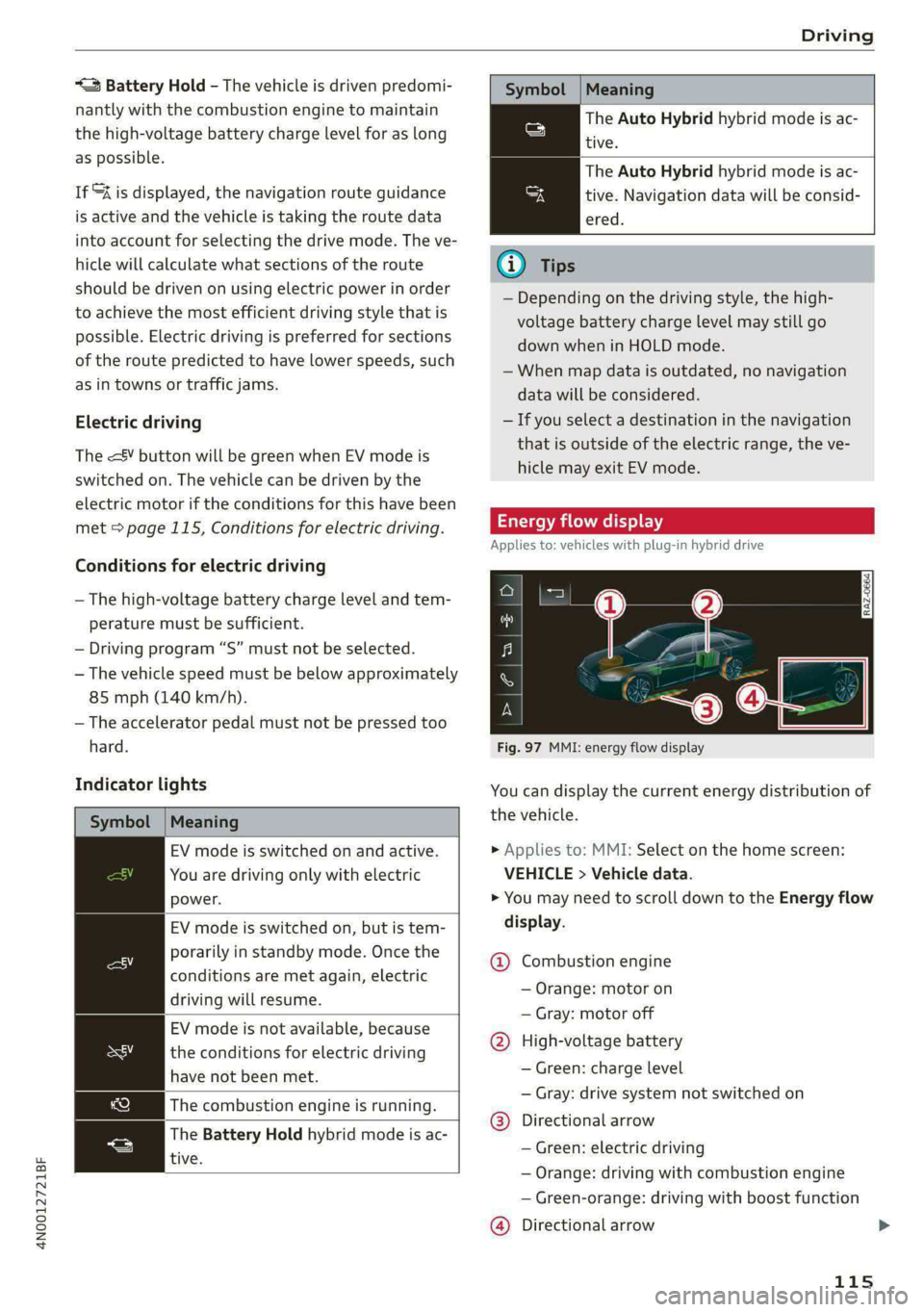
Fig. 97 MMI: energy flow display
You can display the current energy distribution of
the vehicle.
> Applies to: MMI: Select on the home screen:
VEHICLE > Vehicle data.
> You may need to scroll down to the Energy flow
display.
@ Combustion engine
— Orange: motor on
— Gray: motor off
@ High-voltage battery
— Green: charge level
— Gray: drive system not switched on
@®) Directional arrow
— Green: electric driving
— Orange: driving with combustion engine
— Green-orange: driving with boost function
@) Directional arrow
115
Page 119 of 362

4N0012721BF
Driving
— Avoid adding extra weight to the vehicle if pos-
sible, for example by not leaving roof racks or
bike racks installed when they are not needed.
— Make sure the tire pressure is correct.
— Have maintenance performed regularly on the
vehicle.
— Do not let the engine run while the vehicle
parked.
— Do not drive with winter tires during the summ-
er.
— Use the Start/Stop system.
— Utilize the engine braking effect.
— Avoid driving short distances when possible.
@) Tips
The amount of noise produced by the vehicle
can increase significantly when driving with a
sporty style. Show respect to others around
you and the environment with the way you op-
erate your vehicle, especially at night.
eh Me lele 4
Your vehicle is equipped with an intelligent ener-
gy management system for distributing electrici-
ty. This significantly improves the starting ability
and increases the vehicle battery life.
@ Tips
— If you drive short distances frequently, the
vehicle battery may not charge enough
while driving. As a result, convenience func-
tions for electrical equipment may be tem-
porarily unavailable.
— The vehicle battery will gradually drain if
the vehicle is not driven for long periods of
time, or if electrical equipment is used
when the engine is not running. To ensure
that the vehicle can still be started, the
electrical equipment will be limited or
switched off.
Messages
B Drive system: malfunction! Safely stop vehi-
cle
There is a malfunction in the drive system. The
brake booster and the power steering may stop
working. Stop the vehicle immediately or as soon
as possible and do not continue driving. Secure
the vehicle against rolling before exiting the vehi-
cle > page 108. Have the problem corrected by
an authorized Audi dealer or authorized Audi
Service Facility.
B Drive system: malfunction! Please contact
Service
There is a malfunction in the drive system. Drive
slowly to an authorized Audi dealer or authorized
Audi Service Facility to have the malfunction cor-
rected.
B Vehicle sound: malfunction! Pedestrians
cannot hear vehicle. Please contact Service
There is a malfunction in the vehicle sound func-
tion. Drive extremely carefully, since other road
users may not be able to hear your electric vehi-
cle. Drive to an authorized Audi dealer or author-
ized Audi Service Facility immediately to have the
malfunction corrected.
Other indicator lights
rg turns on, vehicle performance is limited,
for example because the combustion engine may
not be available. Also note the additional instruc-
tions in the instrument cluster.
Start/Stop system
Applies to: vehicles with Start/Stop system
The Start/Stop system can help increase fuel
economy and reduce CO2 emissions.
In Start/Stop mode, the engine shuts off auto-
matically when stopped, for example at a traffic
light. If certain conditions are met, the engine
may stop before the vehicle has come to a com-
plete stop. If you press the accelerator pedal
when this happens, the engine will start and driv-
ing power will be transmitted.
The ignition and important assist systems such
as the brake booster will remain available during
the Stop phase. The engine will restart automati-
cally when needed.
117
>
Page 122 of 362

Driving
— The braking force generated by the pressed
brake pedal is greater than the braking force
that
would be initiated by the system
— The ESC, the brake system, or the vehicle elec-
trical system is not functioning
ZA WARNING
— Only apply the brakes for the purpose of
cleaning the brake system when road and
traffic conditions permit. You must not en-
danger other road users and increase the
risk of an accident.
— Due to the risk of injury, only have an au-
thorized Audi dealer or authorized Audi
Service Facility work on the brake system.
Incorrect repairs could impair the function.
— Never let the vehicle roll while the engine is
stopped because this increases the risk of an
accident.
— During automatic braking maneuvers, the
brake pedal may move downward automati-
cally. To reduce the risk of injury, do not
place your foot under the brake pedal.
@) Note
— Never let the brakes “rub” by pressing the
pedal lightly when braking is not actually
necessary. This can cause the brakes to over-
heat and increases braking distance and
causes wear.
— Observe the important information for driv-
ing downhill > page 122. This especially ap-
plies when towing a trailer.
G@) Tips
— If you retrofit your vehicle with a front spoil-
er, wheel covers or similar items, make sure
that the air flow to the brakes is not ob-
structed. Otherwise the brake system can
overheat.
— Also refer to the information about brake
fluid > page 283.
Messages
GG i @ Brakes: malfunction! Stop vehicle
safely
120
There is a malfunction in the brake system. If
[S/ Bana B also turn on, there is a malfunc-
tion in the ABS, ESC, and braking distribution. If
the brake booster is not working, you have to use
much more force when braking the vehicle.
Do not continue driving. See an authorized Audi
dealer or authorized Audi Service Facility for as-
sistance. Read and follow the other safety pre-
cautions > A\.
fie 7 © Brake pads: wear limit reached. You
can continue driving. Please contact Service
The brake pads are worn. Drive to an authorized
Audi dealer or authorized Audi Service Facility as
soon as possible to have the malfunction correct-
ed.
Brake booster: limited functionality. You can
continue driving. Please contact Service
There is a brake booster malfunction. The brake
booster is available, but its effectiveness is re-
duced. The braking performance may be different
compared to the usual performance. Drive to an
authorized Audi dealer or authorized Audi Service
Facility immediately to have the malfunction cor-
rected.
Brake booster: deactivated. See owner's manual
The brake booster remains active for a brief peri-
od of time after switching off the ignition. Secure
the vehicle against rolling > page 108.
Other indicator lights
When you switch the ignition on, the GG / @®
indicator light turns on briefly to check the func-
tion. If the indicator light does not turn on, there
is a system malfunction.
1f Ba / @ stays on, there is a malfunction in
the brake system.
@- A high load was placed on the brakes from
driving downhill for a long period of time. Follow
the instructions in the message to utilize the en-
gine braking effect and to relieve the brakes.
ZA WARNING
If a malfunction occurs in the ABS, ESC, and
braking distribution, interventions that >