low oil pressure AUDI A8 2021 Owners Manual
[x] Cancel search | Manufacturer: AUDI, Model Year: 2021, Model line: A8, Model: AUDI A8 2021Pages: 362, PDF Size: 99.29 MB
Page 10 of 362
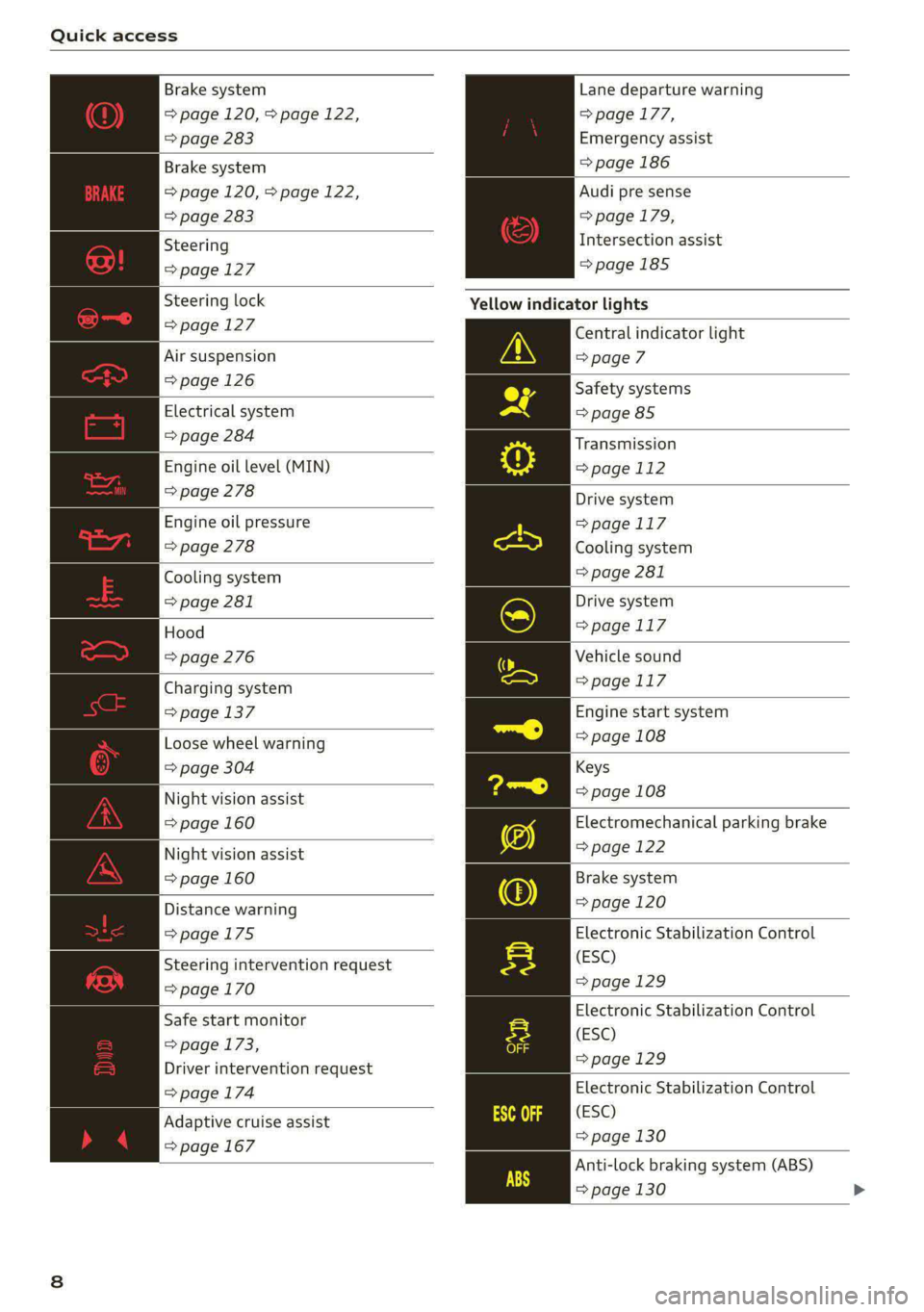
Quick access
Brake system
=> page 120, > page 122,
=> page 283
Lane departure warning
=> page 177,
Emergency assist
Brake system => page 186
=> page 120, > page 122,
=> page 283
Audi pre sense
=> page 179,
Intersection assist
=>page 185
Steering
=>page 127
Steering lock Yellow indicator lights
= page 127 Central indicator light
Air suspension > page 7
= page 126 Safety systems
Electrical system => page 85
=> page 284
Engine oil level (MIN)
=> page 278
Transmission
=>page 112
Drive system
=>page 117
Cooling system
> page 281
Engine oil pressure
=> page 278
Cooling system
=> page 281
Hood
=> page 276
Drive system
=>page 117
Vehicle sound
Charging system => page 117
= page 137 Engine start system
Loose wheel warning => page 108
=> page 304 Keys
Night vision assist => page 108
=> page 160 Electromechanical parking brake
Night vision assist => page 122
=> page 160 Brake system
Distance warning => page 120
=>page 175 Electronic Stabilization Control
(ESC)
=> page 129
Steering intervention request
=>page 170
Electronic Stabilization Control
(ESC)
=>page 129
Safe start monitor
=> page 173,
Driver intervention request
=> page 174 Electronic Stabilization Control
(ESC)
=> page 130
Anti-lock braking system (ABS)
=> page 130 >
Adaptive cruise assist
=> page 167
Page 18 of 362

Instrument cluster
When engine oil temperatures are low, the dis-
play --- °F (--- °C) appears in the instrument clus-
ter. The engine has reached its operating temper-
ature when the engine oil temperature is be-
tween 176 °F (80 °C) and 248 °F (120 °C) under
normal driving conditions. The engine oil temper-
ature may be higher if there is heavy engine load
and high temperatures outside. This is not a
cause for concern as long as the B or 2 indica-
tor lights do not turn on.
Boost indicator
Applies to: vehicles with boost indicator
Depending on vehicle equipment, the current en-
gine load (meaning the current boost pressure)
may be indicated by a bar in the instrument clus-
ter.
> Open the vehicle functions tab and switch to
the enhanced view > page 13.
Vehicle functions
The trip computer is displayed in the first tab of
the driver information system. Additional vehicle
functions can be accessed depending on the vehi-
cle equipment.
> Press the [=] button on the multifunction steer-
ing wheel.
— Trip computer > page 16
— Reduced display > page 14
— Reset trip odometer > page 15
— Energy flow display > page 115
—Lap times > page 158
— Lap statistics > page 159
On-board computer
Resetting values to zero
Requirement: the Consumption, Short-term
memory, or Long-term memory display must be
selected.
> To reset the values in one of the memories to
zero, press and hold the left thumbwheel on
16
the multifunction steering wheel for one sec-
ond, or
> Select on the instrument cluster: vehicle func-
tions tab > EI button > Reset mi.
Depending on the vehicle equipment, you can call
up the following displays in the on-board com-
puter one at a time by turning the left thumb-
wheel on the multifunction steering wheel:
— Time and date > page 263
— Plug-in hybrid drive: range display
— Average consumption > page 16
— Short-term memory overview
— Long-term memory overview
— Energy consumers > page 16
— Driver assistance
— Traffic sign recognition and traffic light infor-
mation
Short-term memory and long-term memory
The short-term memory collects driving informa-
tion from the time the ignition is switched on un-
til it is switched off. If you continue driving within
two hours after switching the ignition off, the
new values will be included when calculating the
current trip information.
Unlike the short-term memory, the long-term
memory is not erased automatically. You can se-
lect the time period for evaluating trip informa-
tion yourself.
Average consumption
The current consumption can be shown using a
bar graph. The average consumption stored in
the short-term memory is also displayed. If the
bar is green, your vehicle is saving energy (for ex-
ample, using recuperation).
Energy consumers
The Energy consumers view lists other equip-
ment that is currently affecting fuel consump-
tion. The display shows up to three equipment
items. The equipment using the most power is
listed first. If more than three items using power
are switched on, the equipment that is currently
using the most power is displayed. A gauge also
shows the current total consumption of all other
equipment.
Page 131 of 362
4N0012721BF
Driving dynamic
on curves. The vehicle is very responsive to steer-
ing. The settings depend on the selected Audi
drive select* mode.
Messages
t-3} Sport differential: malfunction! Please con-
tact Service
Drive immediately to an authorized Audi dealer
or authorized Audi Service Facility to have the
malfunction repaired.
r3] Sport differential: temperature too high.
Please adapt driving style
The transmission temperature has increased sig-
nificantly due to the sporty driving manner. Drive
in a less sporty manner until the temperature re-
turns to the normal range and the indicator light
switches of.
Z\ WARNING
Contact an authorized Audi dealer or author-
ized Audi Service Facility if the sport differen-
tial is faulty or malfunctioning. The repair
must be performed by trained personnel us-
ing
the correct oil in order to ensure safety.
Electronic Stabilization
Control
Electronic Stabilization Control (ESC) supports
driver safety. It reduces the risk of slipping and
improves driving stability. ESC detects critical sit-
uations, such as if the vehicle is oversteering or
understeering, or if the wheels are spinning.
The brakes are applied or the engine torque is re-
duced in order to stabilize the vehicle.
The following stabilization functions are integrat-
ed into the ESC, among others:
Anti-lock braking system (ABS)
ABS prevents the wheels from locking when brak-
ing. The vehicle can still be steered even during
hard braking. Apply steady pressure to the brake
pedal. Do not pump the pedal.
A pulsing in the brake pedal indicates that the
system is acting to stabilize the vehicle.
Anti-Slip Regulation (ASR)
ASR reduces drive power when the wheels begin
spinning and adapts the power to the road condi-
tions. This will increase the driving stability.
Electronic Differential Lock (EDL)
The EDL applies the brakes to wheels that are
slipping and transfers the drive power to the oth-
er wheels. This function is not available at higher
speeds.
In extreme cases, EDL automatically switches off
to keep the brake on the braked wheel from over-
heating. The vehicle is still functioning correctly.
EDL will switch on again automatically when con-
ditions have returned to normal.
Selective wheel torque control
Selective wheel torque control is used when driv-
ing on curves. Braking is targeted toward the
wheels on the inside of the curve as needed. This
allows more precise driving in curves.
Power steering
The ESC can also support vehicle stability
through steering.
ZA\ WARNING
—The ESC and its integrated systems cannot
overcome the limits imposed by natural
physical laws. This is especially important on
slippery or wet roads. If the systems begin
acting to stabilize your vehicle, you should
immediately alter your speed to match the
road and traffic conditions. Do not let the in-
creased safety provided tempt you into tak-
ing risks. This could increase your risk of a
collision.
— Please note the risk of a collision increases
when driving fast, especially through curves
and on slippery or wet roads, and when driv-
ing too close to objects ahead. There is still
a risk of accidents because the ESC and its
integrated systems cannot always prevent
collisions.
129
Page 276 of 362

Checking and Filling
cause overheating and damage to the catalytic
converter.
Malfunction Indicator Lamp (MIL)
If the S indicator light blinks or turns on, there
is a malfunction that is causing poor emissions
quality and that could damage the catalytic con-
verter. Drive slowly to an authorized Audi dealer
or authorized Audi Service Facility to have the
malfunction corrected.
The indicator light can also turn on if the fuel fill-
er cap is not closed correctly > page 271).
Engine compartment
General information
Special care is required if you are working in the
engine compartment
For work in the engine compartment, such as
checking and filling fluids, there is a risk of in-
jury, scalding, accidents, and burns. For this
reason, follow all the warnings and general
safety precautions provided in the following in-
formation. The engine compartment is a dan-
gerous area in the vehicle. > A.
Explanation of warnings (sticker in the engine
compartment):
®
Hot engine components!
Rotating parts!
The catalytic converter can be damaged
"127i if the oil level is too high!
Always follow the instructions in the op-
oA erating manual.
The radiator fan can switch on at any
i, time!
High voltage! Switch off the engine be-
5 fore coming into contact with any igni-
tion system components!
Applies to: vehicles with plug-in hybrid
drive: High voltage! The voltage in the
high-voltage system is high enough to
EN cause fatal injuries. Touching a damaged
high-voltage component can result in a
fatal electric shock.
D_ Depending on the engine and country
274
ZA\ WARNING
— Turn the engine off.
— Switch the ignition off.
— Set the parking brake.
— Select the “P” (Park) selector lever position.
— Allow the engine to cool.
— Keep children away from the engine com-
partment.
— Never spill fluids on a hot engine. These flu-
ids (such as the freeze protection contained
in the coolant) can catch fire.
— Avoid short circuits in the electrical system.
— Never reach into the radiator fan. The fan is
temperature-controlled and can turn on
suddenly, even when the ignition is switched
off.
— Never open the hood when there is steam or
coolant escaping from the engine compart-
ment, because there is a risk that you could
be burned. Wait until no steam or coolant is
escaping.
— Plug-in hybrid drive: The coolant expansion
tank cap is equipped with a seal that must
never be removed under any circumstances
= page 277, fig. 181. If the coolant expan-
sion tank for the high-voltage system is not
sealed, please contact an authorized Audi
dealer or authorized Audi Service Facility.
— Plug-in hybrid drive: The sealed cap must
only be opened by an authorized Audi dealer
or authorized Audi Service Facility.
—The cap on the coolant expansion tank must
never be opened when the coolant is hot.
The cooling system is under pressure. There
is a risk of burns
—To protect your face, hands, and arms from
hot steam or coolant, cover the cap with a
thick cloth when opening.
Page 280 of 362

Checking and Filling
For more information on the correct engine oil
for your vehicle, contact an authorized Audi deal-
er or authorized Audi Service Facility. Have the oil
changed by an authorized Audi dealer or author-
ized Service Facility.
Gi) Tips
Audi recommends using engine oils provided
by Audi Genuine Parts.
Messages
Engine oil pressure
= Turn off engine. Oil pressure too low
Stop driving and switch the engine off. Check the
engine oil level > page 278.
— If the engine oil level is too low, add engine oil
=> page 279. Only continue driving once the in-
dicator light turns off.
—If the engine oil level is correct and the indica-
tor light still turns on, turn the engine off and
do not continue driving. See an authorized Audi
dealer or authorized Audi Service Facility for as-
sistance.
Engine oil level
2 Please add oil immediately.
Stop driving and switch the engine off. Check the
engine oil level > page 278 and add engine oil
immediately > page 279.
3 Add max. x qt (x J) oil. You can continue
driving
Add the amount of oil shown immediately
=> page 279.
Reducing the oil level
= Please reduce oil level
There is too much oil in the engine and there is a
risk of damaging the catalytic converter or en-
gine. Drive to an authorized Audi dealer or au-
thorized Audi Service Facility immediately to have
engine oil extracted if necessary. Avoid high en-
gine speeds, full acceleration, and heavy engine
loads.
278
Engine oil sensor
=) Oil level sensor: oil change necessary. Please
contact Service
Fuel has entered the engine oil. This will cause
the engine oil level to rise slowly and the engine
oil quality to decrease. Do not extract engine oil
to reduce the level, because this will increase the
risk of engine damage. Drive to an authorized
Audi dealer or authorized Audi Service Facility im-
mediately to have engine oil extracted.
& Oil level system: malfunction! Please con-
tact Service
The sensor that checks the engine oil level has
malfunctioned. Drive immediately to an author-
ized Audi dealer or authorized Audi Service Facili-
ty to have the malfunction repaired.
2 Oil pressure sensor: malfunction! Please
contact Service
The sensor that checks the engine oil pressure
has malfunctioned. Drive immediately to an au-
thorized Audi dealer or authorized Audi Service
Facility to have the malfunction repaired.
Engine warm-up request
i Please drive to warm up engine
Fuel has entered the engine oil, either due to low
outside temperatures or frequent short drives.
Drive until the engine is warm so that the fuel in
the engine oil will evaporate. Avoid high engine
speeds, full accelerating, and heavy engine loads
when doing this.
@) Tips
The oil pressure warning B is not an oil level
indicator. Always check the oil level regularly.
Checking the engine oil level
The engine oil level can be checked in the MMI.
Observe the safety precautions > page 274, Gen-
eral information.
> Park the vehicle on a level surface.
> Shut the engine off when it is warm.
>» Switch only the ignition back on.
Page 285 of 362

4N0012721BF
Checking and Filling
> Push the release button again and remove the
cap completely.
> Add coolant mixed in the correct ratio
=> page 281 up to the MAX marking.
> Make sure that the fluid level remains stable.
Add more coolant if necessary.
> Turn the cap to the right to tighten it until you
feel resistance a second time.
Coolant loss usually indicates that there is a leak.
Immediately drive your vehicle to an authorized
Audi dealer or authorized Audi Service Facility
and have the cooling system inspected. If the
cooling system is not leaking, coolant loss can re-
sult from the coolant boiling due overheating
and then being forced out of the cooling system.
der any circumstances > page 277, fig. 181.
If the coolant expansion tank for the high-
voltage system is not sealed, please contact
an authorized Audi dealer or authorized
Audi Service Facility.
— When adding coolant, it may leak into the
inside of high-voltage components and
cause a short circuit, increasing the risk of
fire.
ZA WARNING
— The engine compartment in any vehicle is a
potentially dangerous area. Stop the engine,
switch the ignition off, and allow the engine
to cool before working in the engine com-
partment. Always follow the information
found in > page 274, General information.
— Never open the hood if you can see or hear
steam or coolant escaping from the engine
compartment. This increases the risk of
burns. The cooling system is under pressure.
When you no longer see or hear steam or
coolant escaping, you may open the engine
compartment with caution.
— When working in the engine compartment,
remember that the radiator fan can switch
on even if the ignition is switched off, which
increases the risk of injury.
— Coolant additive and coolant can be danger-
ous to your health. For this reason, store the
coolant in the original container and away
from children. There is a risk of poisoning.
CG) Note
Do not continue driving if the coolant expan-
sion tank is empty. Do not add any coolant,
because air could enter the cooling system
and damage the engine. See an authorized
Audi dealer or authorized Audi Service Facility
for assistance.
Brake fluid
BFV-0229|
ZA WARNING
Applies to: vehicles with plug-in hybrid drive
The coolant expansion tank for the high-volt-
age system may only be opened or filled by an
authorized Audi dealer or authorized Audi
Service Facility.
— The coolant expansion tank cap is equipped
with a seal that must never be removed un-
Fig. 184 Engine compartment: cap on brake fluid reservoir
Observe the safety precautions > page 274, Gen-
eral information.
Checking the brake fluid level
> Slide the cover that is located below the wind-
shield wipers on the driver's side toward the
windshield and remove the cover.
> Read the brake fluid level on the brake fluid res-
ervoir > page 277, fig. 181. The brake fluid lev-
el must be between the MIN and MAX markings
oA.
The brake fluid level is monitored automatically.
Messages
EG 7 @ Brakes: stop vehicle and check brake
fluid level
283
>
Page 294 of 362

Wheels
Glossary of tire and loading
terminology
Accessory weight
means the combined weight (in
excess of those standard items
which may be replaced) of auto-
matic transmission, power steer-
ing, power brakes, power win-
dows, power seats, radio, and
heater, to the extent that these
items are available as factory-in-
stalled equipment (whether in-
stalled or not).
Aspect ratio
means the ratio of the height to
the width of the tire in percent.
Numbers of 55 or lower indicate a
low sidewall for improved steer-
ing response and better overall
handling on dry pavement.
Bead
means the part of the tire that is
made of steel wires, wrapped or
reinforced by ply cords and that is
shaped to fit the rim.
Bead separation
means a breakdown of the bond
between components in the bead.
292
Cord
means the strands forming the
plies in the tire.
Cold tire inflation pressure
means the tire pressure recom-
mended by the vehicle manufac-
turer for a tire of a designated
size that has not been driven for
more than a couple of miles (kilo-
meters) at low speeds in the three
hour period before the tire pres-
sure is measured or adjusted.
Curb weight
means the weight of a motor ve-
hicle with standard equipment in-
cluding the maximum capacity of
fuel, oil, and coolant, air condi-
tioning and additional weight of
optional equipment.
Extra load tire
means a tire designed to operate
at higher loads and at higher in-
flation pressures than the corre-
sponding standard tire. Extra load
tires may be identified as “XL”,
“xl”, “EXTRA LOAD”, or “RF” on
the sidewall.
Page 304 of 362
Wheels
Z\ WARNING
Please note the important safe-
ty precautions regarding tire
pressure > page 299 and load
limits > page 302.
Tires and vehicle load limits
There are limits to the amount of
load or weight that any vehicle
and any tire can carry. A vehicle
that is overloaded will not handle
well and is more difficult to stop.
Overloading can not only lead to
loss of vehicle control, but can al-
so damage important parts of the
vehicle and can lead to sudden
tire failure, including a blowout
and sudden deflation that can
cause the vehicle to crash.
Your safety and that of your pas-
sengers also depends on making
sure that load limits are not ex-
ceeded. Vehicle load includes ev-
erybody and everything in and on
the vehicle. These load limits are
technically referred to as the vehi-
cle’s Gross Vehicle Weight Rating
(“GVWR”).
The “GVWR” includes the weight
of the basic vehicle, all factory in-
stalled accessories, a full tank of
fuel, oil, coolant and other fluids
302
plus maximum load. The maxi-
mum load includes the number of
passengers that the vehicle is in-
tended to carry (“seating capaci-
ty”) with an assumed weight of
150 lbs. (68 kg) for each passen-
ger at a designated seating posi-
tion and the total weight of any
uggage in the vehicle. If you tow
a trailer, the weight of the trailer
hitch and the tongue weight of
the loaded trailer must be includ-
ed as part of the vehicle load.
The Gross Axle Weight Rating
(“GAWR’”) is the maximum load
that can be applied at each of the
vehicle’s two axles.
The fact that there is an upper
limit to your vehicle’s Gross Vehi-
cle Weight Rating means that the
total weight of whatever is being
carried in the vehicle (including
the weight of a trailer hitch and
the tongue weight of the loaded
trailer) is limited. The more pas-
sengers in the vehicle or passen-
gers who are heavier than the
standard weights assumed mean
that less weight can be carried as
luggage.
The Gross Vehicle Weight Rating
and the Gross Axle Weight Rating >
Page 313 of 362
4N0012721BF
Care and cleaning
height and width of the inside of the car
wash.
ZA WARNING
—To reduce the risk of accidents, only wash
the vehicle when the ignition is off and fol-
low the instructions from the car wash oper-
ator.
—To reduce the risk of paint damage, do not
wash the vehicle in direct sunlight.
—To reduce the risk of damage, do not wash
decorative decals* with a pressure washer.
—To reduce the risk of damage to the surface,
do not use insect removing sponges, kitchen
sponges, or similar items.
— When washing matte finish painted vehicle
components:
—To reduce the risk of cuts, protect yourself
from sharp metal components when wash-
ing the underbody or the inside of the wheel
housings.
— After washing the vehicle, the braking effect
may be delayed due to moisture on the
brake rotors or ice in the winter. This in-
creases the risk of an accident. The brakes
must be dried with a few careful brake appli-
cations.
— To reduce the risk of damage to the sur-
face, do not use polishing agents or hard
wax.
— Never use protective wax. It can destroy
the matte finish effect.
@) Note — Do not place any stickers or magnetic
signs on vehicle components painted with
matte finish paint. The paint could be
damaged when the stickers or magnets
are removed.
— If you wash the vehicle in an automatic car
wash, you must fold the exterior mirrors in
to reduce the risk of damage to the mirrors.
Power folding exterior mirrors* must only
be folded in and out using the power folding (@) For the sake of the environment
function.
—To reduce the risk of damage to the rims
and tires, compare the width between the
wheels on your vehicle with the distance be-
tween the guide rails in the car wash.
—To reduce the risk of damage, compare the
height and width of your vehicle with the
Only wash the vehicle in facilities specially de-
signed for that purpose. This will reduce the
risk of dirty water contaminated with oil from
entering the sewer system.
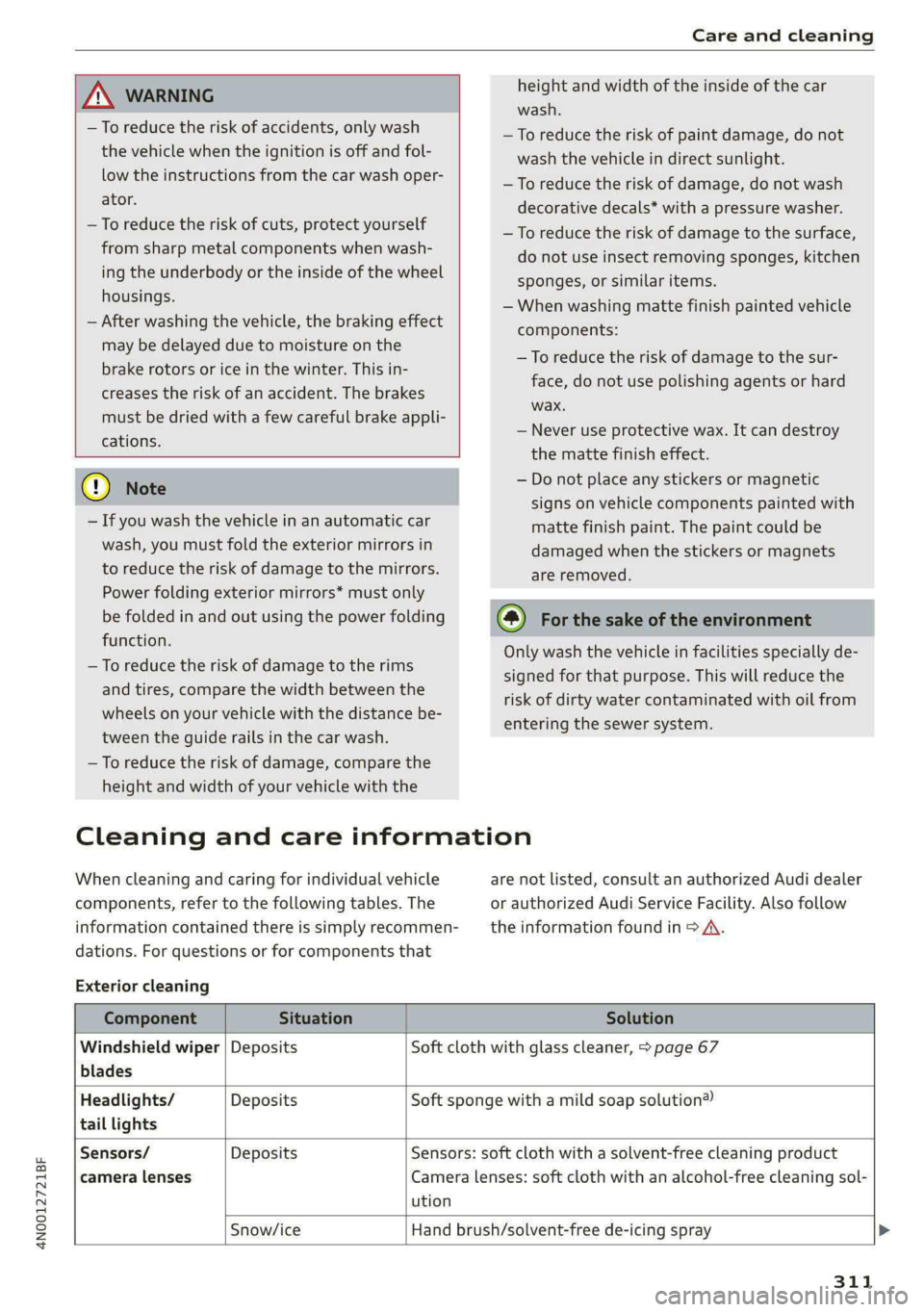
Cleaning and care information
When cleaning and caring for individual vehicle are not listed, consult an authorized Audi dealer
components, refer to the following tables. The or authorized Audi Service Facility. Also follow
information contained there is simply recommen- __ the information found in > A.
dations. For questions or for components that
Exterior cleaning
Component Situation Solution
Windshield wiper | Deposits Soft cloth with glass cleaner, > page 67
blades
Headlights/ Deposits Soft sponge with a mild soap solution®
tail lights
Sensors/ Deposits Sensors: soft cloth with a solvent-free cleaning product
camera lenses Camera lenses: soft cloth with an alcohol-free cleaning sol-
ution
Snow/ice Hand brush/solvent-free de-icing spray >
311
Page 331 of 362
4N0012721BF
Fuses and bulbs
This can cause damage to the electrical sys-
tem and increases the risk of fire.
Fuse panel (2) (brown)
() Note
If a new fuse burns out again shortly after you
have installed it, have the electrical system
checked as soon as possible by an authorized
Audi dealer or authorized Audi Service Facili-
ty.
@ Tips
— The following table does not list fuse loca-
tions that are not used.
— Some of the equipment listed in the follow-
ing tables applies only to certain model ver-
sions or certain optional equipment.
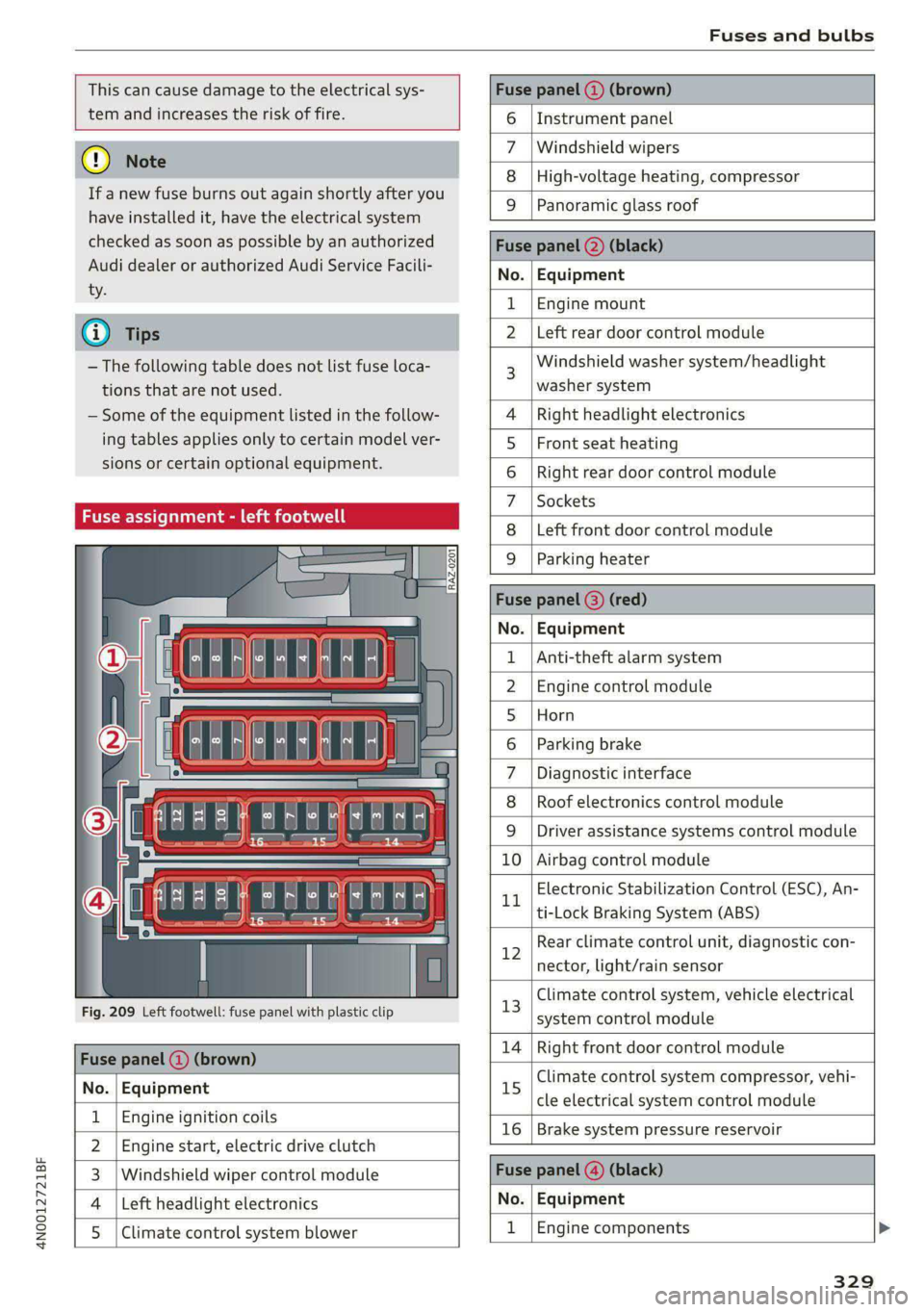
Fuse assignment - left footwell
Fig. 209 Left footwell: fuse panel with plastic clip
Fuse panel @ (brown)
No. | Equipment
Engine ignition coils
Engine start, electric drive clutch
Windshield wiper control module
Left headlight electronics
Ul
WIN)
eR
Climate control system blower
6 | Instrument panel
Windshield wipers
Zz
8 |High-voltage heating, compressor
9 Panoramic glass roof
Fuse panel (2) (black)
No. | Equipment
1 |Engine mount
N Left rear door control module
Windshield washer system/headlight
washer system
4 |Right headlight electronics
5 | Front seat heating
6 |Right rear door control module
7 |Sockets
8 | Left front door control module
9 |Parking heater
Fuse panel @) (red)
No. | Equipment
Anti-theft alarm system
Engine control module
Horn
Parking brake
Diagnostic interface
Roof electronics control module
WOlLOINI
DI
WIN]
rR
Driver assistance systems control module
10 | Airbag control module
Electronic Stabilization Control (ESC), An-
LL
ti-Lock Braking System (ABS)
Rear climate control unit, diagnostic con-
12
nector, light/rain sensor
Climate control system, vehicle electrical
13
system control module
14 | Right front door control module
Climate control system compressor, vehi-
15
cle electrical system control module
16 | Brake system pressure reservoir
Fuse panel (@) (black)
No. | Equipment
1 |Engine components
329