CHARGE CABLE AUDI E-TRON 2019 User Guide
[x] Cancel search | Manufacturer: AUDI, Model Year: 2019, Model line: E-TRON, Model: AUDI E-TRON 2019Pages: 310, PDF Size: 81.91 MB
Page 118 of 310
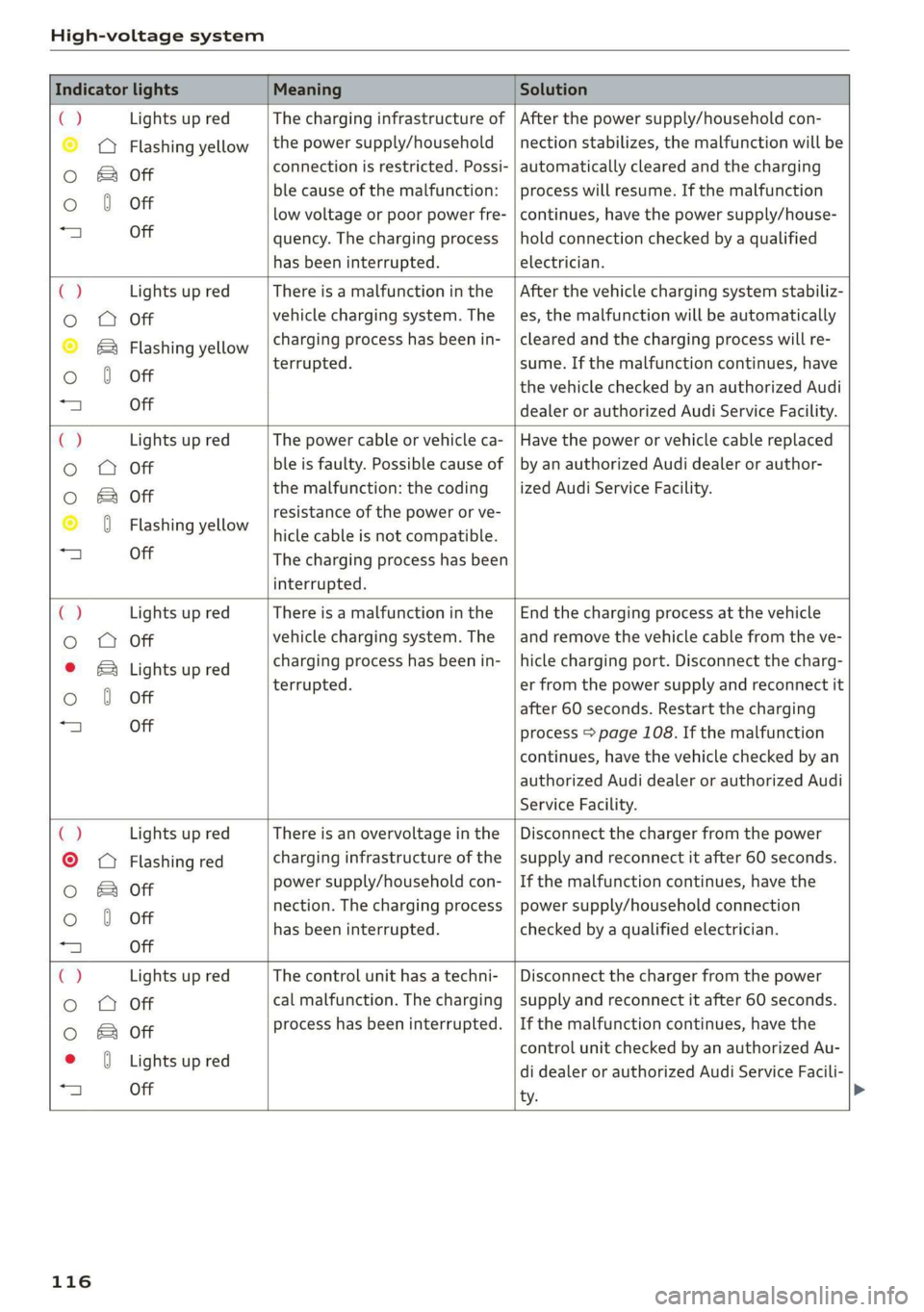
High-voltage system
Indicator lights Meaning Solution
ia Lights up red The charging infrastructure of | After the power supply/household con-
© © Flashing yellow |the power supply/household | nection stabilizes, the malfunction will be
Oo B of connection is restricted. Possi- | automatically cleared and the charging
o 8 of ble cause of the malfunction: | process will resume. If the malfunction
low voltage or poor power fre- | continues, have the power supply/house-
“4 Off quency. The charging process | hold connection checked by a qualified
has been interrupted. electrician.
4 Lights up red There is a malfunction inthe | After the vehicle charging system stabiliz-
o O Off vehicle charging system. The | es, the malfunction will be automatically
© B® Flashing yellow charging process has been in- | cleared and the charging process will re-
oO 6 Off terrupted. sume. If the malfunction continues, have
the vehicle checked by an authorized Audi
“A Off dealer or authorized Audi Service Facility.
C2 Lights up red The power cable or vehicle ca- | Have the power or vehicle cable replaced
o OQ Off ble is faulty. Possible cause of | by an authorized Audi dealer or author-
oO B otf the malfunction: the coding _| ized Audi Service Facility.
© 0 Flashing yellow resistance of the power or ve-
hicle cable is not compatible.
a) Off The charging process has been
interrupted.
€) Lights up red There is a malfunction in the | End the charging process at the vehicle
o OQ Off vehicle charging system. The | and remove the vehicle cable from the ve-
© B Lights up red charging process has been in- | hicle charging port. Disconnect the charg-
Oo 0 Off terrupted. er from the power supply and reconnect it
after 60 seconds. Restart the charging
“a Off process > page 108. If the malfunction
continues, have the vehicle checked by an
authorized Audi dealer or authorized Audi
Service Facility.
() Lights up red There is an overvoltage inthe | Disconnect the charger from the power
©
© Flashing red charging infrastructure of the | supply and reconnect it after 60 seconds.
Oo B of power supply/household con- | If the malfunction continues, have the
Oo 0 Off nection. The charging process | power supply/household connection
has been interrupted. checked by a qualified electrician.
=| Off
Ca Lights up red The control unit has atechni- | Disconnect the charger from the power
Oo QO Off cal malfunction. The charging | supply and reconnect it after 60 seconds.
0 & of process has been interrupted. | If the malfunction continues, have the
* 0 vightsupred control unit checked by an authorized Au-
25 see di dealer or authorized Audi Service Facili-
ty.
116
Page 135 of 310
4KE012721BB
Driving information
> Applies to: MMI: Select on the home screen:
VEHICLE > Driver assistance > (<3) > Night
vision assist.
> To set the desired contrast, move the slider.
G) Tips
Specific settings are stored automatically in
the active personal profile.
Messages
Applies to: vehicles with night vision assist
Night vision assist: currently unavailable.
See owner's manual
The system is not functioning correctly so it has
been switched off. If this malfunction persists,
drive immediately to an authorized Audi dealer or
authorized Audi Service Facility to have the mal-
function repaired.
Integrated Toll Module
Applies to: vehicles with Integrated Toll Module
Depending on the region, you can pay toll fees in
certain countries using the Integrated Toll Mod-
ule (ITM). It replaces a separate transponder for
detecting toll fees. The system electronics are in-
tegrated in the rearview mirror housing.
G) Tips
For an explanation on conformity with the
FCC regulations in the United States and the
Industry Canada regulations, see > page 289.
Applies to: vehicles with Integrated Toll Module
To use the ITM in toll zones, you must register it.
> Applies to: MMI: Select on the home screen:
VEHICLE > Settings & Service > Integrated Toll
Module.
> Note the Integrated Toll Module ID.
> To register the ITM, go to the displayed web ad-
dress and follow the instructions.
Depending on the number of passengers and the
region, a lower toll fee may be charged. You must
either enter the number of passengers in the
MMI or deactivate the ITM based on the laws ap-
plicable in the area where you are driving.
> To enter the number of passengers, select the
respective button.
> To activate or deactivate the ITM, press CD.
@) Tips
— The driver is responsible for specifying the
correct number of passengers and activat-
ing or deactivating the ITM.
— Malfunctions can occur when detecting tolls
if both the ITM and transponder are activat-
ed. Deactivate the system not being used or
remove it as necessary.
—If a rearview mirror is replaced, you must
register the new ITM and remove the old
ITM from the account.
Display
Applies to: vehicles with Integrated Toll Module
The selected number of passengers is displayed
in the MMI status bar > page 19.
The i symbol in the status bar and a notifica-
tion in the MMI will indicate if there is a faulty
connection between the ITM and the MMI or if
the ITM is faulty. If the connection interference
continues or the ITM is faulty, drive immediately
to an authorized Audi dealer or authorized Audi
Service Facility.
Programming the system
Applies to: vehicles with Integrated Toll Module
In certain areas, the ITM can be programmed to
the transponder previously used in the vehicle.
The ID number and possible discounts are trans-
ferred from the ITM.
You can find detailed information about the pro-
gramming process as well as additional informa-
tion about the ITM at www.itmsignup.com/Audi.
133
Page 174 of 310
Telephone
— Audi phone box with holder: open the Audi
phone box holder @). Position the mobile de-
vice so that the back of it is facing the @ symbol
@ between the Audi phone box and the holder.
Depending on the vehicle equipment, you may
then be able to use the following functions:
— Connect to the exterior vehicle antenna?)
— Wirelessly* charge the mobile device. Require-
ment: the ignition must be switched on. The
charging function must be switched on in the
MMI. You must have a Qi-capable2) mobile de-
vice.
You can also charge a mobile device using the
USB adapter: connect your mobile device to the
Audi music interface using a USB adapter cable
@ > page 220. You can charge your mobile de-
vice using specific USB adapters > page 220.
Reminder signal
When the device reminder signal is switched on,
you will be notified that your mobile device is still
in the Audi phone box when you leave the vehicle.
Requirement:
—A Qi-capable?) mobile device must be in the Au-
di phone box, or
— Your mobile device must be connected to the
Audi music interface by a USB adapter, and the
Audi smartphone interface must be active, or
— Your iPhone® must be connected to the MMI
via Bluetooth® > page 170 and must be charg-
ing through the Audi music interface using a
USB adapter.
Applies to: MMI: Select on the home screen: SET-
TINGS > General > Mobile device reminder sig-
nal.
The following settings are available:
— Signal tone
— Spoken cue”: this setting is switched on at the
factory.
— Off
Not available in every market. These are additional car
phone functions only in conjunction with Audi connect In-
fotainment*.
2) The Qi standard makes it possible to charge your mobile
device wirelessly.
172
— Show pop-ups*: when this function is switched
on, the charge status of your mobile device is
displayed. You will also be reminded not to for-
get your mobile device when leaving the vehi-
cle.
— Wireless charging*: when this function is
switched on, you can charge your Qi-capable
mobile device wirelessly in the Audi phone box.
ZA WARNING
— Loose objects can be thrown around the ve-
hicle interior during sudden driving or brak-
ing maneuvers, which increases the risk of
an accident. Store objects securely while
driving.
— The mobile device may become hot during
wireless charging. Pay attention to the tem-
perature of your mobile device and be care-
ful when removing it from the Audi phone
box.
— An alternating magnetic field is used for
wireless charging. Maintain a minimum dis-
tance of approximately 2.4 in (6 cm) to the
Audi phone box charging plate. The thresh-
olds for prolonged exposure at this distance
comply with ICNIRP1998. Therefore, inter-
actions such as irritation of sensory organs,
malfunctions of active implants (such as
pacemakers, infusion pumps, or neurosti-
mulators) or effects on passive implants
(such as prosthetic limbs) is highly unlikely.
If you have an implant, consult a medical
specialist if you have any questions. You can
also switch the function for wireless charg-
ing in the front* Audi phone box on and off
separately. You can continue to charge your
mobile device using a cable connection.
Page 175 of 310
4KE012721BB
Telephone
@) Note
Applicable to U.S.A.
Operation of the Audi phone box is subject to
the following requirements of the Federal
Communications Commission:
— This is a CONSUMER device.
— BEFORE USE, you MUST REGISTER THIS DE-
VICE with your wireless provider and have
your provider’s consent. Most wireless pro-
viders consent to the use of signal boosters.
Some providers may not consent to the use
of this device on their network. If you are
unsure, contact your service provider.
— You MUST operate this device with approved
antennas and cables as specified by the
manufacturer. Antennas MUST be installed
at least 20 cm (8 inches) from any person.
— You MUST cease operating this device im-
mediately if requested by the FCC or a li-
censed wireless service provider.
— WARNING: E911 location information may
not be provided or may be inaccurate for
calls served by using this device.
@) Note
Applicable to Canada
In Canada, operation of a Zone Enhancer,
such as an Audi Phone Box, is subject to the
following requirements of the Innovation,
Science and Economic Development Canada
(ISED):
— This is a CONSUMER device.
— BEFORE USE, you MUST meet all require-
ments set out in CPC-2-1-05.
— You MUST operate this device with approved
antennas and cables as specified by the
manufacturer. Antennas MUST NOT be in-
stalled within 20 cm of any person.
— You MUST cease operating this device im-
mediately if requested by ISED or a licensed
wireless service provider.
— WARNING: £911 location information may
not be provided or may be inaccurate for
calls served by using this device.
@) Tips
— The Audi phone box is not available in all
countries. For additional information, con-
tact an authorized Audi dealership.
— Only one mobile device at a time can be
charged wirelessly in the Audi phone box.
— Strong transmission quality cannot be guar-
anteed if more than one mobile device is in
the box.
— To reduce the risk of malfunctions, make
sure the mobile device is positioned correct-
ly in the Audi phone box.
— Make sure there are no objects between the
Audi phone box and the mobile device.
— Placing the mobile device in a bag or protec-
tive sleeve inside the Audi phone box can in-
terfere with the connection to the exterior
antenna.
— Metallic objects in the Audi phone box block
the wireless charging of your mobile device
and calls made using the exterior antenna.
—The maximum charging output is 5 watts.
— The charging time and temperature will vary
depending on the mobile device being used.
— You can purchase a USB adapter from an au-
thorized Audi dealer or authorized Audi
Service Facility, or at specialty stores.
— Audi recommends using Audi Genuine Ac-
cessories. Audi has verified their reliability,
safety, and suitability.
Using the telephone
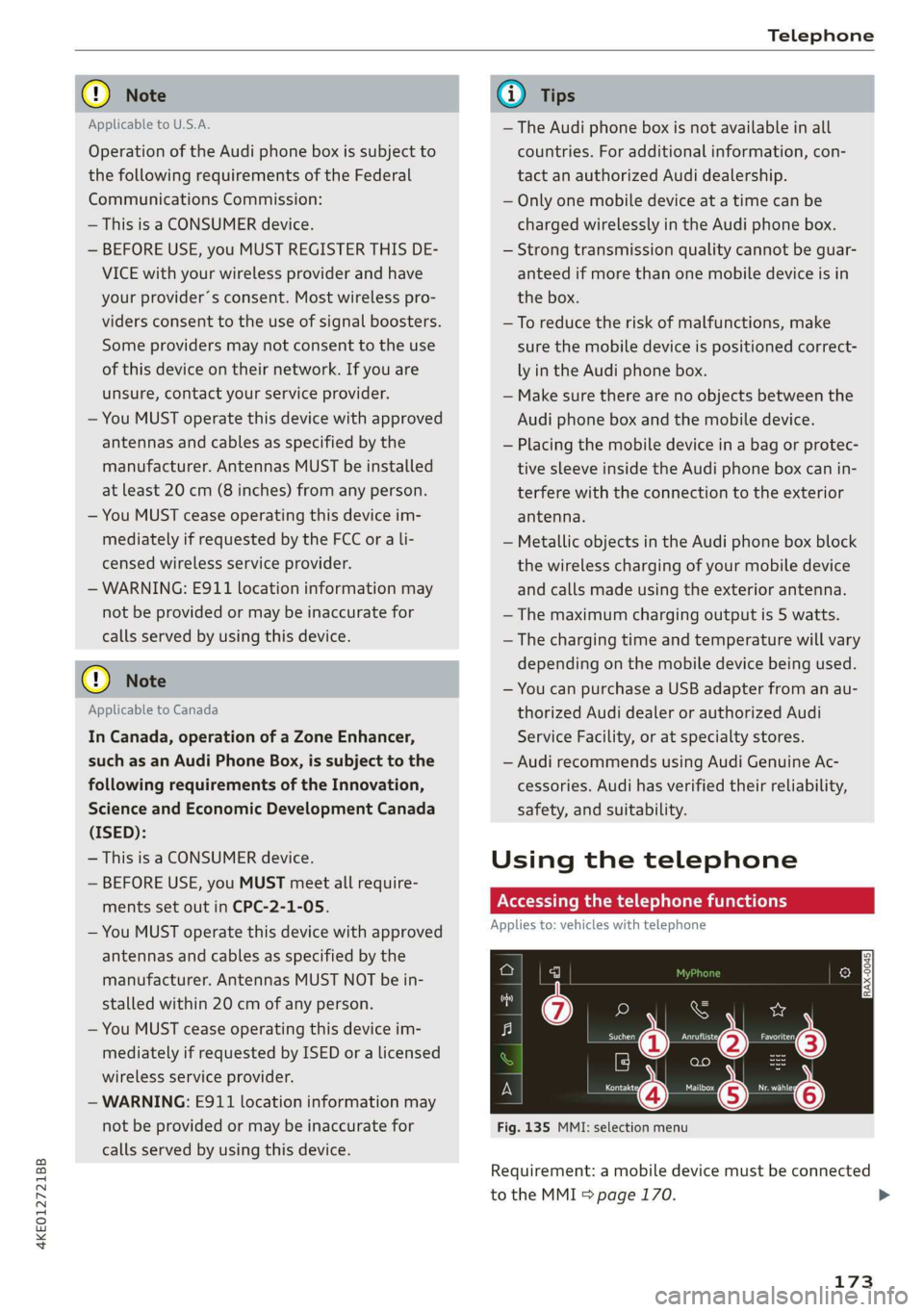
Accessing the telephone functions
Applies to: vehicles with telephone
e
min
Fig. 135 MMI: selection menu
Requirement: a mobile device must be connected
to the MMI 5 page 170.
173
>
Page 191 of 310
4KE012721BB
Audi connect
— Password: your cell phone service provider as-
signs the password for your online profile.
— Apply settings: saves the changed settings.
— Reset configuration: resets the connection set-
tings.
Data usage counter
Your current data usage is displayed.
— Reset counter: you can reset your usage statis-
tics to zero.
— Warning limit: you can set a warning limit for
your data usage (GB/MB).
Always follow the information found in > AV
in General information on page 184.
Always follow the information found in >@® in
General information on page 184.
For more information on roaming charges,
contact your cell phone service provider.
Wi-Fi settings
Applies to: vehicles with Wi-Fi hotspot
Requirement: the ignition must be switched on.
» Applies to: MMI: Select on the home screen:
SETTINGS > Connection settings > Wi-Fi
Depending on the country and the vehicle equip-
ment, the following functions may be available:
Wi-Fi
When the function is switched on, the MMI's Wi-
Fi hotspot is active and Wi-Fi devices can be con-
nected to the hotspot.
Wi-Fi hotspot settings
The Wi-Fi connection between the MMI and your
Wi-Fi device is encrypted. You can change the fol-
lowing information if needed.
D_ Not available in every market.
— Access point (SSID): name of the Wi-Fi hot-
spot.
— Password: a random password was set at the
factory in the MMI. The password can be
changed. The encryption method requires a
password to be at least eight characters long.
Choose a secure password.
— Visible to others: you can switch the visibility
of the Wi-Fi hotspot on or off.
Always follow the information found in > A\
in General information on page 184.
Always follow the information found in >@® in
General information on page 184.
Data plans)
Applies to: vehicles with data plans
Requirement: you must have created a myAudi
account at my.audi.com. Your vehicle must be
registered in your myAudi account.
You can purchase data plans at my.audi.com.
Always follow the information found in > A\
in General information on page 184.
Always follow the information found in >@ in
General information on page 184.
If driving out of the country, applicable data
plans must be purchased.
189
Page 222 of 310
Media
Amazon Alexa
Applies to: vehicles with Amazon Alexa Integration
You can play various Amazon Alexa content using
the MMI. The voice recognition system is used to
operate it.
Requirement: Amazon Alexa must be activated
=>page 25.
> Start Amazon Alexa using the voice recognition
system.
> Applies to: MMI: Select on the home screen:
MEDIA > Source > Amazon Alexa.
() Note
Read the information about Audi connect, and
be sure to note the connectivity costs section
=> page 184.
Multimedia connections
USB adapter cable
[RAH-9202
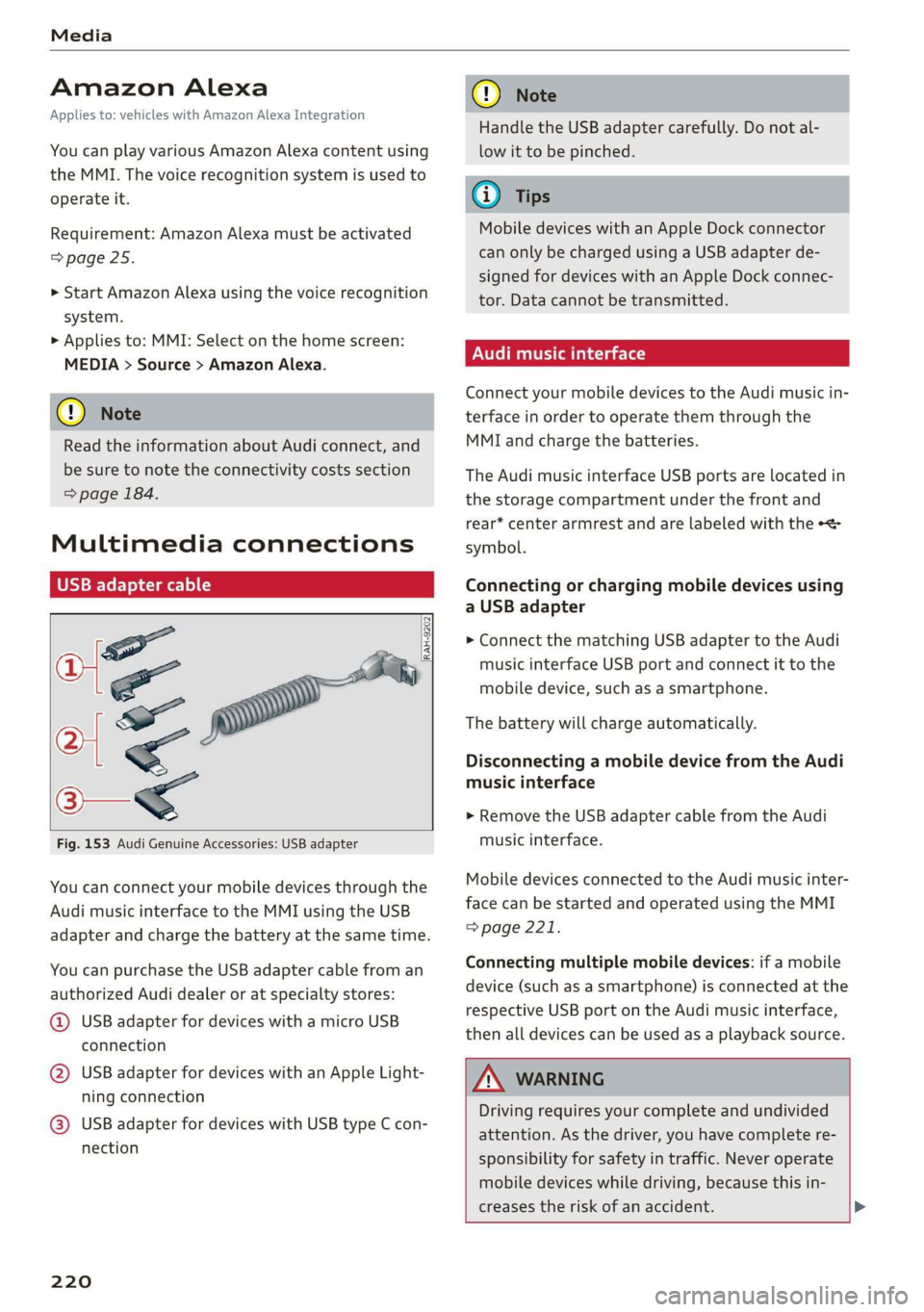
Fig. 153 Audi Genuine Accessories: USB adapter
You can connect your mobile devices through the
Audi music interface to the MMI using the USB
adapter and charge the battery at the same time.
You can purchase the USB adapter cable from an
authorized Audi dealer or at specialty stores:
@ USB adapter for devices with a micro USB
connection
@ USB adapter for devices with an Apple Light-
ning connection
@ USB adapter for devices with USB type C con-
nection
220
C@) Note
Handle the USB adapter carefully. Do not al-
low it to be pinched.
G) Tips
Mobile devices with an Apple Dock connector
can only be charged using a USB adapter de-
signed for devices with an Apple Dock connec-
tor. Data cannot be transmitted.
Audi music interface
Connect your mobile devices to the Audi music in-
terface in order to operate them through the
MMI and charge the batteries.
The Audi music interface USB ports are located in
the storage compartment under the front and
rear* center armrest and are labeled with the «<>
symbol.
Connecting or charging mobile devices using
a USB adapter
> Connect the matching USB adapter to the Audi
music interface USB port and connect it to the
mobile device, such as a smartphone.
The battery will charge automatically.
Disconnecting a mobile device from the Audi
music interface
> Remove the USB adapter cable from the Audi
music interface.
Mobile devices connected to the Audi music inter-
face can be started and operated using the MMI
=> page 221.
Connecting multiple mobile devices: if a mobile
device (such as a smartphone) is connected at the
respective USB port on the Audi music interface,
then all devices can be used as a playback source.
ZA\ WARNING
Driving requires your complete and undivided
attention. As the driver, you have complete re-
sponsibility for safety in traffic. Never operate
mobile devices while driving, because this in-
creases the risk of an accident. >
Page 232 of 310
Audi smartphone interface
— Some MMI functions are not available when — AUDI AG merely provides access to third
there is an active Audi smartphone interface party services through the MMI and does
connection. not assume any responsibility for the con-
— You cannot connect any mobile devices via tent of these services.
Bluetooth when an Apple CarPlay connec-
tion is active.
— Usage of the Audi smartphone interface de-
pends on the availability of services through
third party providers.
Troubleshooting
Applies to: vehicles with Audi smartphone interface
The information that follows lists some trouble-
shooting options. They depend on the equip-
ment.
Problem Solution
Audi smartphone
interface cannot be
opened.
Check the battery charge level on your smartphone.
Check the USB cable and use a different one if necessary.
Check if Android Auto or Apple CarPlay is available in the country where the vehi-
cle is being operated.
Android Auto: check if the Android Auto app is installed on your smartphone.
Connecting the
smartphone to the
MMI failed.
Make sure that you are using the correct USB adapter and check if the USB
adapter is connected correctly to your smartphone and the Audi music interface
=> page 220.
Apple CarPlay: check if Apple CarPlay is activated on your smartphone.
Android Auto: check in the Android Auto app if Android Auto permits new vehi-
cles.
Wireless connection: open the settings for Bluetooth and CarPlay on your
smartphone. Remove your vehicle. Open the connection manager in the MMI
=> page 232. Delete your smartphone in the Telephone 1 and Audi smartphone
interface submenus. Repeat the connection process. Restart the MMI
=> page 17. Restart your smartphone.
The smartphone is
not automatically
detected.
Make sure that you are using the correct USB adapter and check if the USB
adapter is connected correctly to your smartphone and the Audi music interface
=> page 220.
Check if the requirements needed to connect a smartphone have been met.
230
Page 278 of 310
Emergency assistance
overheating. Let the compressor cool down
for several minutes before using it again.
@) Tips
The ESC must not be limited or switched off
when driving with the collapsible spare tire
=> page 102.
Jump starting
The vehicle cannot be operated when the 12 Volt
vehicle battery is drained. Your vehicle must not
be jump started in this case. Contact an author-
ized Audi dealer or authorized Audi Service Facili-
ty.
@) Note
The vehicle battery must not be bridged using
conventional jump start methods.
— You may neither give nor receive a jump
start. Otherwise, the electronic systems in
the vehicle may be severely damaged.
—The jump start pins in the motor compart-
ment are designed specifically for qualified
technicians.
Towing
ee eeue lela)
You should only perform the steps that follow if
you have the necessary tools and technical ex-
pertise.
Towing requires a certain amount of practice. Au-
di recommends contacting a towing company to
have the vehicle transported.
You should only have your vehicle towed by an-
other vehicle when disabled in exceptional cir-
cumstances. Inexperienced drivers should not
tow.
Notes on towing
— The maximum permitted towing speed is 30
mph (50 km/h).
— The maximum permitted towing distance is 30
miles (50 km).
276
Additional information on towing with a tow
truck
The vehicle may only be towed with the front axle
raised. Do not wrap any chains or cables around
the brake lines.
Tow bar and towing cable
The vehicle can be towed with a tow bar or tow-
ing cable. Both drivers should be familiar with
the special considerations when towing, especial-
ly when using a towing cable.
Always make sure the traction force does not ex-
ceed the permitted level and there are no shock
loading conditions. There is always the risk of the
coupling becoming overloaded when driving off-
road.
For the most safety and security, drive with a tow
bar. You should use a towing cable only if a tow
bar is not available. Use a towing cable made of
synthetic elastic cable similar elastic material.
ZA WARNING
— Towing highly increases the risk of an acci-
dent, for example from colliding with the
towing vehicle.
—To reduce the risk of an accident, do not al-
low anyone to remain inside the vehicle
when it is being transported by a tow truck
or a special transporter.
@) Note
—Ifthe |_E| indicator light turns on, there is a
fault in the cooling circuit. The vehicle must
not be towed. The drive system can be se-
verely damaged.
— If normal towing is not possible, for exam-
ple if the transmission is faulty or if the
towing distance is greater than 30 miles
(50 km), then transport the vehicle on a
special carrier.
— If the vehicle is towed by a tow truck at the
axle that is not permitted, this can cause se-
vere damage to the transmission.
— Towing must not be used to charge the
high-voltage battery (recuperation), be-
cause this could result in major damages to
the tow vehicle or the vehicle being towed. >
Page 279 of 310
4KE012721BB
Emergency assistance
— The vehicle must not be tow started for
technical reasons.
@ Tips
— Switch Audi pre sense* off > page 153 when
loading the vehicle onto a vehicle carrier,
train, ship,
or other type of transportation,
or when towing the vehicle. This can prevent
an undesired intervention from the pre
sense* system.
— Follow the local legal regulations for tow-
ing.
Read and follow the important information under
=> page 276.
Preparations
> Only secure the towing cable or tow bar at the
designated towing loops > page 277,
=> page 278.
> Make sure the towing cable is not twisted. Oth-
erwise it could disconnect from the towing loop
while towing.
> Switch the emergency flashers on in both vehi-
cles > page 46. However, do not do this if it
prohibited by law.
Towing vehicle (front)
> Only start to drive when the towing cable is
taut.
> Press the brake pedal very carefully.
> Avoid sudden braking or driving maneuvers.
Vehicle being towed (rear)
> Make sure the ignition is switched on so that
the steering wheel is not locked and so that you
can use the turn signals, the horn, and the
windshield wipers if needed > A\.
> The brake booster only operates when the igni-
tion is switched on. Power steering only works
when the ignition is switched on and the vehicle
is rolling ). If the brake booster and power
steering are not functioning, you must press
D_ Requirement: the vehicle battery must have a sufficient
charge level.
the brake pedal much harder and use more
force to steer.
> Release the parking brake > page 93.
> Select the “N” selector lever position.
> Make sure the towing cable is always taut.
ZA\ WARNING
Never tow a vehicle using a tow bar or towing
cable if the vehicle does not have electrical
power.
Front towing loop
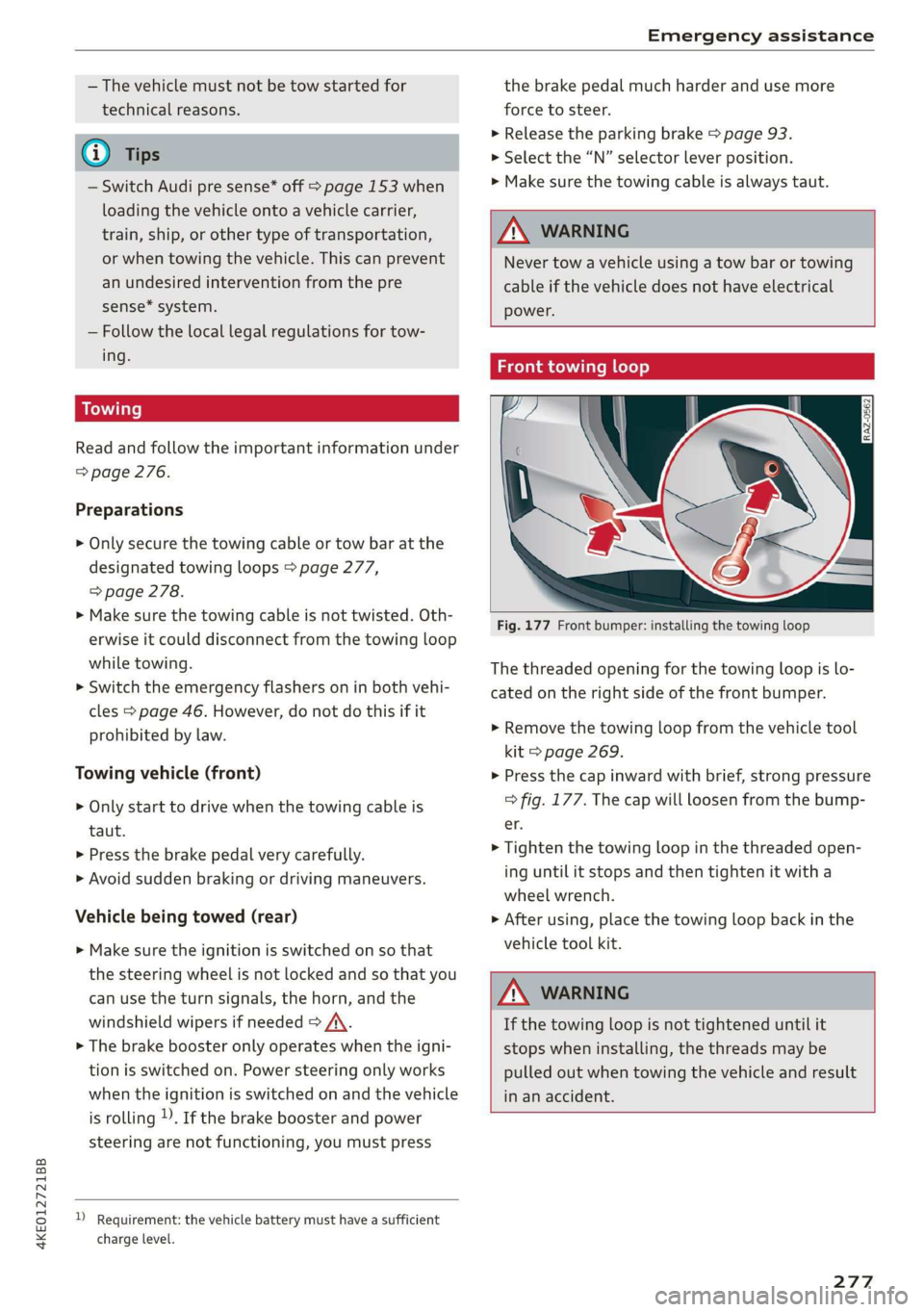
Fig. 177 Front bumper: installing the towing loop
The threaded opening for the towing loop is lo-
cated on the right side of the front bumper.
> Remove the towing loop from the vehicle tool
kit > page 269.
> Press the cap inward with brief, strong pressure
=> fig. 177. The cap will loosen from the bump-
er.
> Tighten the towing loop in the threaded open-
ing until it stops and then tighten it with a
wheel wrench.
> After using, place the towing loop back in the
vehicle tool kit.
ZA WARNING
If the towing loop is not tightened until it
stops when installing, the threads may be
pulled out when towing the vehicle and result
in an accident.
277
Page 295 of 310
4KE012721BB
Index
A
A/C cooling mode............. ee eee eee ee 82
Accelerator pedal.............--00000005 89
also refer to Accelerator pedal........... 89
ACCeSSOFICS . 6... eee 288
Active lane assist
refer to Lane departure warning......... 147
refer to Lane guidance................ 147
Adaptive cruise assist..............-000. 139
Cleaning the sensors...........00 ee eee 264
Predictive control.................... 137
Adaptive cruise control
refer to Adaptive cruise assist........... 139
Adaptive darnipers « wax ss eae 2» seme s oe 99
Adjusting the air distribution............. 82
Adjusting the brightness................. 48
Adjusting the sound..............-...0- 231
Adjusting the temperature............... 82
Adjusting the vents ...........0 cece eens 84
Adjusting the volume..............000005 26
Adjusting the volume (announcements) .... 231
Adjusting the welcome sound............ 231
Airbag SySteM « » ene s ews 4 5 Hemme tee Eee 64
Air quality display...............022-.08. 84
Air suspension...........0..0 000. ee eee 99
Airtransport........... 0.0.00 .00200 eee 104
Alarm system
refer to Anti-theft alarm system.......... 32
Alignment pin (changing the wheel)....... 269
All-weather lights.................00000. 44
ALSeaSOMtineSien. is 5: suse 6 samme «0 imevsnee ow we 258
All wheel drive
refer to quattro... . 2... cece eee eee 101
AMI
refer to Audi music interface........... 220
Android Auto
refer to Audi smartphone interface...... 229
Anti-freeze
Windshield washer system............. 241
Anti-lock braking system.............05. 101
Anti-Slip Regulation.................05. 102
Anti-theft alarm system ..........--..00-- 32
Anti-theft wheel bolts.................. 272
Apple CarPlay
refer to Audi smartphone interface...... 229
Aspect ratio (video) ..............0. 223,225
ASR
refer to Anti-Slip Regulation............ 101
Audi adaptive light..................000. 44
Audi connect
refer to connect............ee008 184,185
Audi drive select. .... 0.0... eee e eee eee eee 98
Audi e-tron compact charging system..... 114
Adjusting the charging power level...... 114
Changing or attaching the power cable... 118
SOGUIING*s « & cvsiane wo cranes = wiersie © eireten @ © on 119
Status and malfunction indicators....... 115
Audi music interface...............2.-- 220
AUTOM ESiscns x 5: scaniae 0 0 scones 0 atasene 0 a asouane 221
Audi phone BOX. weiss & scinie ev eerie ve emcene 171
Audi PreISONS@iics 4 + svnns ae maces os oes o 8 150
Messages ...... 00.0.0. cece eee eee eee 153
Audi side assist
refer to Side assist. ........0.. 0000000 154
Audi smartphone interface.............. 229
Legalinformation..........0...eebeee 233
Audi virtual cockpit
refer to Instrument cluster.............. 11
AUTO
Automatic headlights .................. 44
Climate control system..............0-. 82
Auto Lock (central locking) ............... 29
Automatic climate control
refer to Climate control system.......... 81
Automatic luggage compartment lid.... 36,37
Automatic wipe/wash system............. 50
Auxiliary climate control................. 84
AVErAGe CONSUMPTION 4 6 weieure o weceie ae waco 14
Average’Speed ic. i civ 6 x essen so cranes 6 w sre 14
B
BaqehOOKsts « scan
Charge level display.............0005 ee 11
Charging (12 Volt vehicle battery)....... 241
High-voltage batteryiews « ass ss gouy s x as 104
Vehicle battery (12 Volt)............... 240
Winter operation (12 Volt vehicle battery) . 240
Battery (vehicle)
refer to High-voltage battery........... 104
293