ECO mode AUDI E-TRON 2019 Owner's Manual
[x] Cancel search | Manufacturer: AUDI, Model Year: 2019, Model line: E-TRON, Model: AUDI E-TRON 2019Pages: 310, PDF Size: 81.91 MB
Page 166 of 310
Parking and maneuvering
If # is displayed, there is a system malfunction
and the display area represented by that symbol
is not available. The camera is not working in this
area.
If Nis displayed, the respective ultrasonic sensor
is icy or dirty. Clean the area in front of the sen-
sors > page 124, fig. 97.
If one of the symbols continues to be displayed,
drive immediately to an authorized Audi dealer or
authorized Audi Service Facility to have the mal-
function repaired.
ZA\ WARNING
— Follow the safety precautions and note the
limits of the assist systems, sensors, and
cameras > page 123.
— Sensors and cameras have spots in which
the surrounding area cannot be detected.
Objects, animals, and people may only be
detected with limitations may not be detect-
ed at all. Always monitor the traffic and the
vehicle's
surroundings directly and do not
become distracted.
©) Note
— The orange orientation lines @) show the di-
rection the rear of the vehicle will be travel-
ing, based on the steering wheel angle. The
front of the vehicle swings out more than
the rear of the vehicle. Maintain plenty of
distance so that an exterior mirror or a cor-
ner of the vehicle does not collide with any
obstacles.
— Keep enough distance from the curb to
avoid damage to the rims.
— Only use the images provided by the camera
on the rear of the vehicle when the luggage
compartment lid is completely closed. Make
sure any objects you may have mounted on
the luggage compartment lid do not block
the rearview camera.
G) Tips
— Applies to: vehicles with air suspension: The
accuracy of the orientation lines and blue
surfaces on the camera display decreases
when the vehicle is raised or lowered with
the air suspension.
— There is no distance warning for the rear
and the sides* when trailer towing mode is
detected. The front sensors remain activat-
ed. The visual display switches to trailer
mode. The rearview camera image will not
show the orientation lines and the blue sur-
faces. There is no guarantee the functions
will switch off when using a retrofitted trail-
er hitch.
Oe lee maleate
Applies to: vehicles with peripheral cameras
RAZ-0131
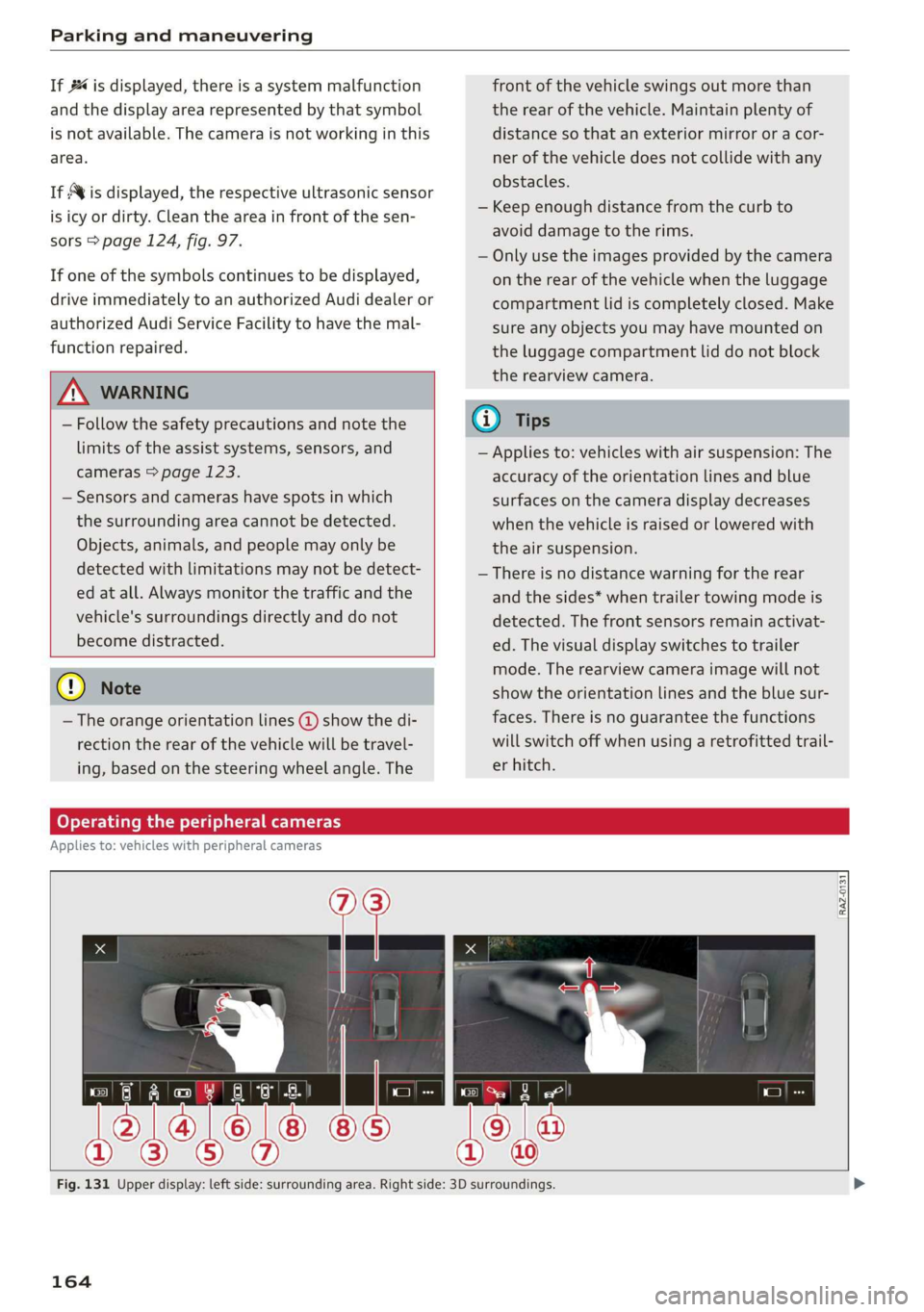
Fig. 131 Upper display: left side: surrounding area. Right side: 3D surroundings.
164
Page 186 of 310
Audi connect
Audi connect
General information
Depending on the country and the vehicle equip-
ment, the following functions may be available:
— Audi connect Infotainment
— Audi connect vehicle control
You can also find more information on Audi con-
nect
online at www.audiusa.com.
ZA\ WARNING
—To reduce the risk of an accident, only use
Audi connect services when road and traffic
conditions permit. Always read and follow
the notes in > page 17, Traffic safety infor-
mation.
— It is only safe to use tablets, laptops, mobile
devices and other similar devices when the
vehicle is stationary because, like all loose
objects, they could be thrown around the in-
side of the vehicle in a crash and cause seri-
ous injuries. Store these types of devices se-
curely while driving.
— As the driver, do not allow usage of the Wi-
Fi hotspot to distract you from driving, as
this could increase the risk of an accident.
— Do not use any wireless devices on the front
seats within range of the airbags while driv-
ing. Also read the warnings in the chapter
=> page 64, Airbag system.
—To reduce the risk of an accident, use the Au-
di connect Infotainment services with a Wi-
Fi hotspot only in the rear seat when the ve-
hicle is in motion, or only when the vehicle is
stationary.
@ Note
— Applies to: embedded SIM card usage: The
connection costs for Audi connect Infotain-
ment services are included in the price of
Audi connect Infotainment during the sub-
scription period with some exceptions.
Please note that there may be additional
charges when using some services. For ex-
ample, this applies to Internet radio/
podcasts or for Internet connections and
184
services that use the Wi-Fi hotspot, such as
online media sources. Depending on the
country, data plans may need to be pur-
chased for these services > page 189. For
additional information, see my.audi.com.
—Incertain situations, the Wi-Fi hotspot data
connection may be established as a replace-
ment for the SIM card on your Wi-Fi device.
This feature depends on the configuration
of your Wi-Fi device and operating system.
This could result in fees depending on your
cell phone service provider, especially if you
are using this feature while abroad. A flat
rate data plan is strongly recommended. For
more information, contact your cell phone
service provider or refer to the owner's man-
ual for your Wi-Fi device.
— You are responsible for all precautions taken
for data protection, anti-virus protection,
and protection against loss of data on mo-
bile devices that are used, for example, to
access the Internet through the Wi-Fi hot-
spot.
@ Tips
— The availability of services depends on the
subscription.
— AUDI AG provides access to services from
third party providers. Permanent availability
cannot be guaranteed, because that de-
pends on the third party provider.
— Use of the most up-to-date mobile network
standard is not available in every country.
Contact an authorized Audi dealer or au-
thorized Audi Service Facility or your cell
phone service provider for additional infor-
mation.
— Audi connect Infotainment services are only
available within the cell phone network cov-
erage from your cell phone service provider.
— Availability, scope, providers, screen display,
and costs of services may vary depending on
the country, model, model year, end device
and rates.
Page 210 of 310
Navigation
Map colors
— Automatic: the map display adapts to the light-
ing conditions (for example, by changing from
day to night when driving through a tunnel).
— Day or Night
Map orientation
— 2D map or 2D north up: the current vehicle po-
sition is displayed. The map is oriented in the
direction of travel or to the north.
— 3D map: the current vehicle position is shown
on a three-dimensional map and is oriented in
the direction of travel.
— Overview: the entire route from the vehicle po-
sition to the destination or the next stopover is
displayed on the map. The map is oriented to
the north.
Automatic zoom
— On: the map scale is adapted automatically de-
pending on the type of road being traveled (ex-
pressway, highway, other roads) so that you al-
ways have an optimal overview of the road
ahead. When route guidance is active, the scale
is adjusted automatically for a better detailed
view when there are upcoming maneuvers.
— Intersection: when route guidance is active, the
scale is adjusted automatically for a better de-
tailed view when there are upcoming maneu-
vers.
— Off
MMI map contents: you can switch the display of
additional information (such as POIs) on the map
in the upper display on or off.
— Always follow >@ for the following map con-
tent:
— 3D city model
— The weather forecast is displayed on a 3 mile (5
km) scale on the map.
Voice guidance
Voice guidance: you can adjust the navigation
prompts. With the Traffic setting, the MMI will
only give prompts if there are traffic incidents on
your route.
Voice guidance during phone call
208
Entertainment fader during navigation: the au-
dio playback volume is temporarily lowered when
navigation prompts are active.
Route criteria
You can adjust which route criteria should be al-
lowed or avoided for the route calculation.
HOV/carpool lanes
Highways
Toll roads
Ferries
e-tron route planner
This function can be switched on and off.
Route information
When this function is switched on and route
guidance is active, route information ®
=> page 199, fig. 143 is displayed. The next ma-
neuver will be displayed at the bottom. POIs and
traffic information will also be displayed. Press
route
information to display a preview of the next
maneuver on the map. You can switch the follow-
ing information on or off in route information.
— POIs along the route
— Traffic information
Personal route assistance
Personal route assistance is switched off at the
factory.
Your trips are recorded and destinations are sug-
gested by the MMI when this function is switched
on > page 201.
Trailer mode
Trailer mode is switched off at the factory.
When the function is switched on, the maximum
permitted speed for vehicles with trailers is in-
cluded during route guidance and the calculated
arrival time is adjusted accordingly. When the
function is switched on, the symbol @)
=> page 199, fig. 143 is displayed on the map.
Presentation mode
In presentation mode, the system simulates driv-
ing along the planned route without the vehicle >
Page 230 of 310
Media
— Special characters (such as those in ID3 tag
information) may display differently or may
not always display, depending on the sys-
tem language.
— Some MTP player functions are not support-
ed, such as rating music tracks and video
playback.
— The manufacturer of the storage device can
provide information about its “USB Device
Subclass”.
Troubleshooting
The information that follows lists some trouble-
shooting options. They depend on the equip-
ment.
Problem Solution
Audi music interface/Bluetooth
audio player: the mobile device is
not supported.
Read the instructions in the chapter > page 220, Multimedia
connections/> page 218, Bluetooth audio player. You can learn
about supported mobile devices in the Audi database for mobile
devices at www.audiusa.com/bluetooth.
Audi music interface: the mobile
device is not recognized as a
source.
For many mobile phones or mobile devices, playback is not possi-
ble when the battery level is too low (less than 5% charge level).
The mobile device will only be recognized as a media source in
the MMI after connecting if the battery charge level is sufficient.
Audi music interface: malfunc-
tions during audio playback
through an iPod/iPhone.
The Bluetooth audio player function is switched on. Switch this
function off > page 232 when you are not using the Bluetooth
audio player.
Audi music interface: audio play-
back through the connected mo-
bile device is not possible.
Make sure the USB mode M7P is selected in the settings on your
mobile device.
Bluetooth audio player: interfer-
ence with track display and audio
playback.
Playback interference can occur when using the Bluetooth audio
player if a music player app from a third party provider is open.
AUDI AG recommends using the integrated media player on your
Bluetooth device (such as a smartphone).
Online media: connection failed
between the MMI and the myAudi
app.
To establish a connection to the MMI, the MMI connection switch
must be switched on in the myAudi app status screen.
Online media: no playback of on-
line media.
Check if a suitable data plan has been purchased.
Wi-Fi hotspot: your Wi-Fi device is
disconnected from the Wi-Fi hot-
spot.
Make sure the network optimization functions are switched off in
the Wi-Fi settings or in the network settings for your Wi-Fi de-
vice. For additional information, refer to the user guide for your
Wi-Fi device.
228
Page 252 of 310

Wheels
by the tire manufacturer. This in-
formation is used to contact con-
sumers if a tire defect requires a
recall.
Vehicle capacity weight
means the rated cargo and lug-
gage load plus 150 lbs. (68 kilo-
grams) times the vehicle's desig-
nated seating capacity.
Vehicle maximum load on the
tire
means that load on an individual
tire that is determined by distrib-
uting to each axle its share of the
maximum loaded vehicle weight
and dividing by two.
Vehicle normal load on the tire
means that load on an individual
tire that is determined by distrib-
uting to each axle its share of the
curb weight, accessory weight,
and normal occupant weight (dis-
tributed in accordance with > ta-
ble on page 255) and dividing by
two.
Occupant loading and distri-
bution for vehicle normal load
for various designated seating
capacities
Refer to the tire inflation pressure
label > page 253, fig. 165 for the
250
number of seating positions. Re-
fer to the table > table on
page 255 for the number of peo-
ple that correspond to the vehicle
normal load.
New tires or wheels
Audi recommends having all work
on tires or wheels performed by
an authorized Audi dealer or au-
thorized Audi Service Facility.
These facilities have the proper
knowledge and are equipped with
the required tools and replace-
ment parts.
>New tires do not yet have the
optimal gripping properties.
Drive carefully and at moderate
speeds for the first 350 miles
(500 km) with new tires.
> Only use tires with the same de-
sign, size (rolling circumfer-
ence), and as close to the same
tread pattern as possible on all
four wheels.
>Do not replace tires individually.
At least replace both tires on the
same axle at the same time.
> Audi recommends that you use
Audi Original Tires. If you would
like to use different tires, please
note that the tires may perform >
Page 257 of 310
4KE012721BB
Wheels
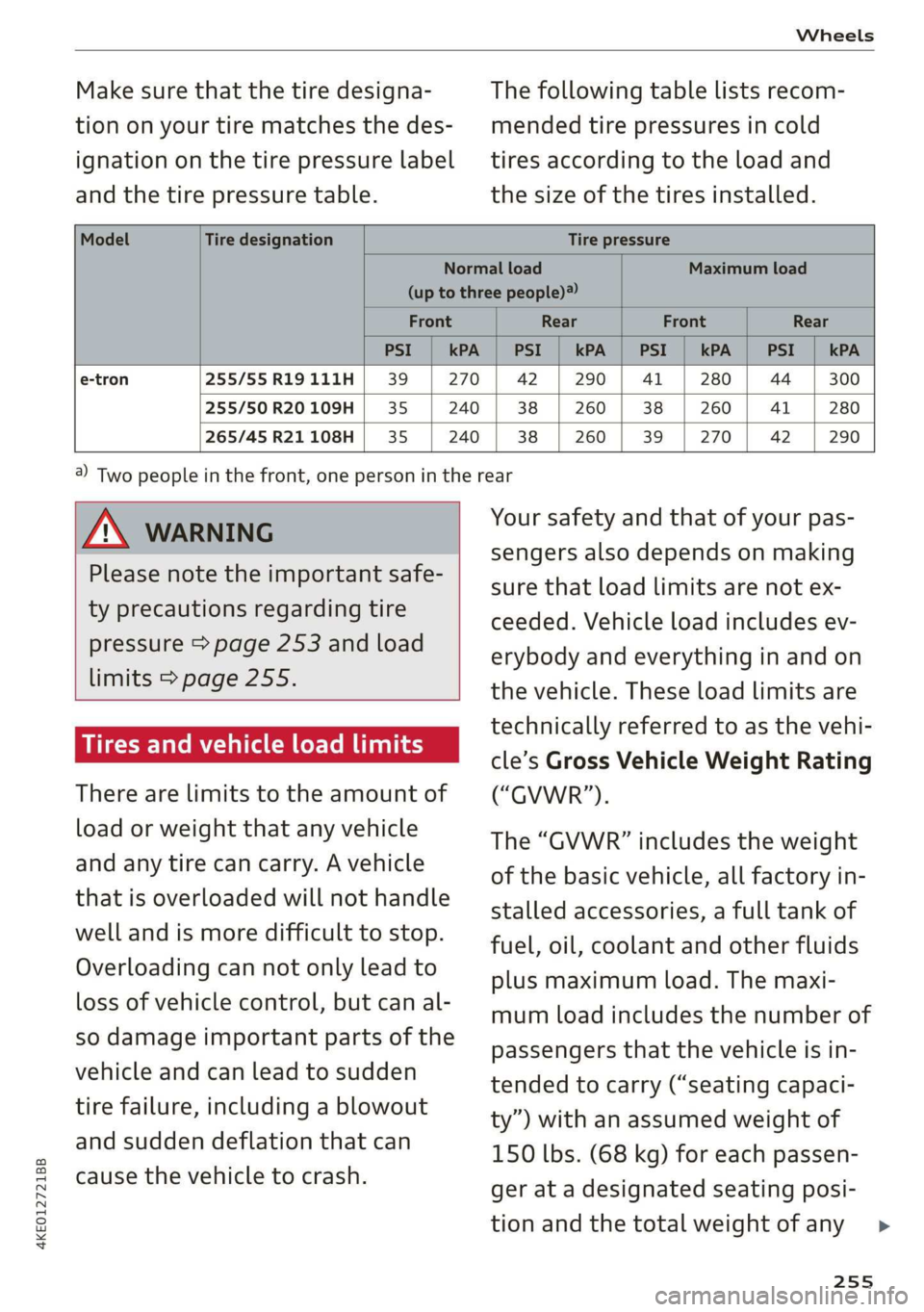
Make sure that the tire designa-
tion on your tire matches the des-
ignation on the tire pressure label
and the tire pressure table.
The following table lists recom-
mended tire pressures in cold
tires according to the load and
the size of the tires installed.
Model Tire designation Tire pressure
Normal load Maximum load
(up to three people)?
Front Rear Front Rear
PSI kPA PSI kPA | PSI kPA PSI kPA
e-tron 255/55 R19 111H 39 270 42 290 41 280 44 300
255/50 R20 109H 35: 240 38 260 38 260 41 280
265/45 R21 108H 35 240 38 260 39 270 42 290
Z\ WARNING
Please note the important safe-
ty precautions regarding tire
pressure > page 253 and load
limits > page 255.
Tires and vehicle load limits
There are limits to the amount of
load or weight that any vehicle
and any tire can carry. A vehicle
that is overloaded will not handle
well and is more difficult to stop.
Overloading can not only lead to
loss of vehicle control, but can al-
so damage important parts of the
vehicle and can lead to sudden
tire failure, including a blowout
and sudden deflation that can
cause the vehicle to crash.
a) Two people in the front, one person in the rear
Your safety and that of your pas-
sengers also depends on making
sure that load limits are not ex-
ceeded. Vehicle load includes ev-
erybody and everything in and on
the vehicle. These load limits are
technically referred to as the vehi-
cle’s Gross Vehicle Weight Rating
(“GVWR”).
The “GVWR” includes the weight
of the basic vehicle, all factory in-
stalled accessories, a full tank of
fuel, oil, coolant and other fluids
plus maximum load. The maxi-
mum load includes the number of
passengers that the vehicle is in-
tended to carry (“seating capaci-
ty”) with an assumed weight of
150 lbs. (68 kg) for each passen-
ger at a designated seating posi-
tion and the total weight of any
255
>
Page 288 of 310
Accessories and technical changes
Accessories and
technical changes
Warranty
Your vehicle is covered by various warranties:
— New Vehicle Limited Warranty
— Limited Warranty Against Corrosion Perforation
— Applies to: USA models: Kansas Safety Belt
Limited Warranty
You can find detailed information in your Warran-
ty & Maintenance Booklet.
Audi Literature Shop
Service information is made available as soon as
possible after a model is introduced and can be
ordered in the Audi Literature Shop: http://
literature.audiusa.com
Driving in other
countries
Government regulations in the United States and
Canada require motor vehicles to comply with
emissions regulations and safety standards.
Therefore, vehicles that were produced for the
U.S. and Canadian markets are different from ve-
hicles produced for other countries.
If you plan to use your vehicle outside of the
United States or Canada, it is possible that:
— Proper maintenance and repair work may not
be possible because special service equipment,
tools, or measuring devices needed for your ve-
hicle may not be available.
— Replacement parts may not always be availa-
ble.
— Navigation systems for vehicles built for the
U.S.A. and Canada will not necessarily work in
Europe, and may not work in other countries.
@) Note
Audi is not liable for damage to the vehicle re-
sulting from these country-specific differen-
ces.
286
Maintenance, repairs,
and technical modifi-
cations
Note the safety precautions > page 235, General
information and > page 273, Raising the vehicle.
General information
Due to the increasing complexity of technology in
these vehicles, as well as the safety and environ-
mental standards that apply, you can only per-
form a very limited amount of repairs and modifi-
cations to the vehicle yourself.
Proof of maintenance work may be required to
submit a claim within the warranty period.
We recommend that you have your vehicle serv-
iced by an authorized Audi dealer or authorized
Audi Service Facility and that Audi Genuine Parts
and Audi Genuine Accessories are used. This
helps to ensure that your vehicle's functionality,
performance, and safety are not impaired.
Maintenance and repairs
Your vehicle was designed to help keep mainte-
nance requirements to a minimum. Some regular
maintenance is required to help ensure that your
vehicle runs in a safe, economical, and reliable
manner. Please refer to your Warranty & Mainte-
nance Booklet for more detailed information
about vehicle maintenance.
When operating the vehicle under more extreme
operating conditions, for example when outside
temperatures are very low or in very dusty envi-
ronments, certain maintenance should be per-
formed between the specified intervals.
Usually maintenance and repair work requires
special tools, measuring devices, and other
equipment that is available to trained vehicle
technicians in order to help ensure that your vehi-
cle and all of its systems operate correctly, relia-
bly, and safely. Performing work on the vehicle
incorrectly can impair the operation and reliabili-
ty of your vehicle and may void one or more of
your vehicle's warranties.
Page 298 of 310
Index
Drive select
refer to Audi drive select.............0.. 98
Drive system. .... 20.2... 90
Audi drive select . cans 4 cicag at eaan ea ies 98
Emergency Off wv 2 x acne ov wews ye eeu 9 86
Switching on and off...............2005 86
Driving: OwntHills: cess» everene sania ee enero a 96
Driving programs « & sews 6 «eee os ees 88, 146
Driving through water...............004. 96
Driving time’: « s cose ¢ « eewy s nares Heme a sg 14
Driving tips
Driving through water...............00. 96
Efficient driving...............0000000. 91
Offrodd GriVinig < ees. yess as emus a wean ae 96
Uphill and downhill.................00. 96
Drivinig:up Hills: ¢ seus se oss ye ree yo ees 96
Dust filter
refer to Pollutant filter................. 84
DVD drive (media drives)................ 218
E
E-mail
MessageiOptionstn:. + « sss « « snemeue © « steceas + 179.
SettingS ... 0.6... cece eee eee 179
EDL
refer to Electronic Differential Lock...... 101
EDR
Event Data Recorder...............0.. 283
Efficiency assist =. « < sce: ss epee ye ees eee 135
Electrical system ..........-- 0s eee eee ee 239
Electricity
PEFer TO ENC cr » o san & 2 ees ¢ epee os 104
Electric motor
COOLANE wwe co aveana wa cana a 6 acenate © a anavar a 237
Electric ranges i « sca so were 6 ewe aw maa 204
Electromechanical parking brake.......... 93
Electronic Differential Lock.............. 102
Electronic immobilizer.............0.002. 33
Electronic Stabilization Control........... 101
Embedded SIM card................0055 185
Emergency assist.................0000- 158
Emergency assistance .......... 000s sees 269
Emergency braking function.............. 95
Emergency calliss so sisi se oesin so een 176,191
Emergency flasherst: « + ass 2 news ¢ wana ess 46
296
Emergency Mode «sce s veve ee ences ee eevee 90
Emergency operation
Doors... 2... ee eee 32
Luggage compartment lid............... 38
Panoramic glass roof...............2.4. 41
Energy
Current COMSUMPTION:. « 6 siesess s 6 eewcee & 6 soem 14
Reducing consumption................. 91
Energy recovery... 22.0.0 cece eee eee eee 90
Engine braking effect
refer to Recuperation................4. 90
Engine start system. ..............0.000. 87
Entry/exit lighting................--000- 46
ENMtry ASSISTANCE. « « senciw » 6 ssorane 0 canner 4 0 esos 58
also refer to Exit assistance............. 58
eSIM
refer to Embedded SIM card............ 185
Evasive steering assist.................- 152
Event Data Recorder (EDR).............. 283
Exit assistance... 0... eee eee eee 58
Exit warning.................0.00.00005 156
Exterior lighting.................022-00. 44
Exterior MIPPO0S ciwie so ccicee oo cere 6 weve oo 48
Folding settings ..............0000 0000s 30
External voice operation................. 25
F
Factory default settings
Multi Media Interface...............4. 232
Fast forwarding and rewinding (media file). 221
Fast forwarding (media files) ............ 221
FaStnOute’s a seca oo mee «2 mmm 9 6 em © eee 194
Favorites
Bluetooth.............. 000.0 e ee eee 233
NaVIGStOl sss « wes & > wee o x seme ¢ 5 ee 196
Telephone wssics so caves oo ssasens oo arenes 9 ¥ eee 174
Federal Communications Commission (FCC) . 289
File formats (media drives) .............. 227
FOG (WIRdOWS) zx x + sax © s coun ¢ 5 eee x 2 oe 83
Folding the rear seats.............-..00- 79
Footwell temperature............0..000. 84
For the sake of the environment
LOOKS ccs = = some 5 ¢ ene a eee x ee ee 235
Forward gear
FEPErtO Gears « easu ¢ s awe ¢ ¢ wees se wEEN 88
Page 300 of 310
Index
Immobilizer
refer to Electronic immobilizer........... 33
Indicator lights........ 2.0.0... cee eee eee 7
Inspection interval...............00200. 242
Instrumenticluster's « «cscs « esac vo stone vos 11.
Adjusting the layout................... 12
Cleaning’: ¢ = em. ¢ » awe s 2 ees es PER Ge Be 266
Enginewodes. < oss: os wens oe ewe 6 8 wae 233
On-board computer.............000000 14
Opebating’s = see « » asmm = 2 seme © 5 eam 2 ee 12
Personal profile ....... 0000 se ceee ee veee 11.
Service interval display................ 242
Software information...............-- 233
Switching tabs: « sci se sec eo mace a 2 cee 12
Switching the Views... veces ceune ee enue we 12
Vehicle functions...................00. 13
Version information..............0005 233
Instrument illumination..............00- 48
Integrated assistance................0-. 17
Integrated Toll Module................. 133
Intelligent search
NSViGatlOlios « = gene « ¢ anes = neem se BoE 194
Titerior UIGHtING s « cams sv vows 4 peas 0s we 47,48
Intermittent mode (windshield wipers) ..... 50
Internet
refertoconnect..........eeeeeee 184,185
Internet radio
refer
to Online radio.................. 213
Intersection assistant...............44. 157
IGWIZEM's « @ oops ¢ x cares 5 eee FE ws @ eee a 83
iPhone
refer to Audi music interface........... 220
J
JUMPp Starting aes « s cees < ees 5 x ween w + oes 276
K
K@Y = cassis + « eewis « © ees s # eg o He a se 29,33
Convenience opening and closing......... 40
Key replacement..............0000000. 33
Mechanical:key sss s 2 sews + a ewe x s oes x 33
Notirecognized « cscs oe cars a x sewn ow enews x 87
PANIC key... ccc eee eee eee eee eee 33
Replacing the battery................2. 35
Unlocking and locking.................. 34
Vehicle code... 1.0... cece eee ee eee 33
298
KeyUSC? sis ss snnaue vw amass occas @ eueimin o o eeee 28
KicksdOwn: « «esses 2 scees 4 a sourees & o onenion @ @ ae 89
L
Lane assist
refer to Lane departure warning......... 147
refer to Lane guidance................ 147
Lane departure warning................. 147
Cleaning the camera area.............. 264
Lane guidance sc ss sees ss tees s eevee sees 142
Laserscanner........... 000.0 e eee eee 124
Cleaning
EQUNCINGONEG Laas « 5 was.s 2 Saeea & ¢ ease Gs Ha 89
Leather care and cleaning............... 266
Legal information
License subscriptions................. 233
Software information................. 233
Software licenses...............000005 233
Version information.................. 233
License plate bracket................... 288
Lifting points (vehicle jack).............. 273
Light/rain sensor
Headlights: swe = sases 2 3 Hoam 5 x nee 5 E ge 44
Intermittent mode (windshield wipers).... 50
Lighting
Exterior
Interior
Lights... eect eee
Lights on the charging port
refer to Charging display............... 109
Listening to music
Fefer to M@diajeo. « x caves 5 s wees so we 217; 221
[Gad + seg « = secu © t seus 2s Hew ¢ 9 eee os 292
Locking and unlocking
By remote’control.. « s sses vs sews se cows vs 34
Using the lock cylinder................. 32
With the convenience key............... 34
Low beam headlights.................... 44
Luggage compartment.................. 77
COVET aise & & cain x s BGR 3 ¢ Rae FB Wee = 9 78
Increasing the size.............-.00 eee 79
also refer to Luggage compartment...... 77
Luggage compartment lid
Closing button.................0000005 36
General information................005 35
Page 306 of 310
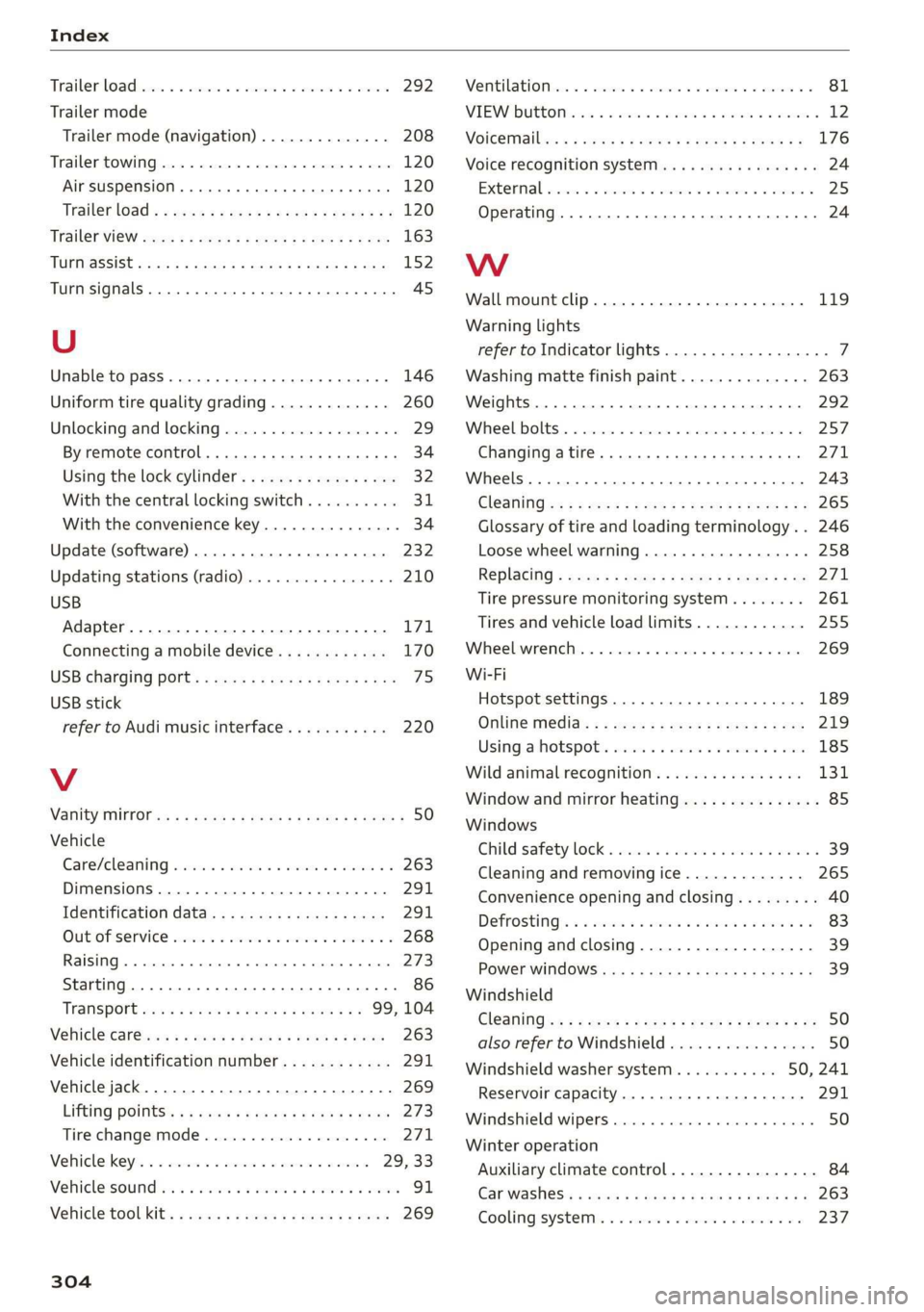
Index
Trailer load iiss: 2 x soos x anc a avcniins ww ances 292
Trailer mode
Trailer mode (navigation) .............. 208
Trailer towing........... 20.0 ee eee ee eee 120
Airsuspension......... 000 eee eee eee ee 120
Trailetload © 5 seme ¢s gage s nome s 2 ene xs 120
Trailer VieW coes s « qwee ¢ » ewe se oes s ree 163
TUPMQSSISE sacex os maces ¢ Haim 4 § Sate Fo eae 152
Turn signals ..... 00.0... cee cece eee 45
U
Unable to pass. 1... .. cee eee eee ee 146
Uniform tire quality grading............. 260
Unlocking and locking................-0. 29
By remote control... ....... cee cece eee 34
Using the lock cylinder................. 32
With the central locking switch.......... 3,
With the convenience key............... 34
Update (software) .............0.0.0 00 232
Updating stations (radio)................ 210
USB
Adapter... ... 0. cece eee eee eee 171
Connecting a mobile device............ 170
USB: Charging) POnt: « sma < s ceue 3 a ee 2 ae 75
USB stick
refer to Audi music interface........... 220
V
Vanity Mirror ss = = seme < © eeu = o wows + o eee ¢ 50
Vehicle
Care/cleaning sisi = wen es sever oo ween a a 263
Dimensions ..............002-00e eee 291
Identification data................... 291
QUEOTSERVIEE cscorce 2 a smmces w 2 saausite vx dasa ¥ 268
Raising « « vceieie s 6 sevies 9 4 serece o © een so wee 273
Starting. ........... 0.2... eee eee eee 86
TRANS POPE scsisy + eases ss meres = ees oe 99,104
Ve@hicl@-Car@iws « «cows s eee ss Hae ss pares 263
Vehicle identification number............ 291
Vehicle jack. .... 2... 2. eee eee eee 269
Lifting POINTES: « » ea se qawes sg nas + pee 273
Tire change mode...............-.005 271
Vehicle: keys: « «cscs v a saves ¥ a sevens ¥ teaver 29, 33
VeRicleisound hc x « inanens a x caamens 6 o comune + & aoweesa 91
Vehicle tool Kits: » sass x 2 equ « 2 anwwa 9 2 goes 269
304
Ventilationse:. «6 csiswos os aouxeas vo comin vo soteane w 81
MIEWIDUttOM Mics «i sina 2 namin a © anton 0 2 waKWe 12
Voicetnallin: « x casos x 2 mae x 2 sawe ¥ x eee 8 176
Voice recognition system. ss ccie sc ieee ces 24
Extermall secs ox asus 2 v aecvoue as asnsme x simesie 25
Operating.............. 0... eee eee eee 24
WwW
Wall mount clip............ 2... e eee eee 119
Warning lights
refer to Indicator lights.................. 7
Washing matte finish paint.............. 263
Weights ........ 2.0.0 c eee eee eee 292
Wihee Bolts. sseres 2 = smenene 2 a1 aime 2 a anno © 9 257
Changing atire......... cece eee eee 271
Wheels ....... 0.0... cece eee eee eee 243
ClOGNING «x = 2 wees = e ease = weeR oe rewE ees 265
Glossary of tire and loading terminology... 246
Loose wheel warning...............00 258
R@BISCIAG < scm « = yams s ¢ eames ¢ 2 meee x soe 271
Tire pressure monitoring system........ 261
Tires and vehicle load limits............ 255
Wheeliwremehic. . «wcrc oo sori ao asenone 2 ate 269
Wi-Fi
Hotspot settings ...............000005 189
Onlifie Media's s » awex s mews s eee x s eee 219
Using: ahotspotis scans x. coo so comune + 2 ee 185
Wild animal recognition................ 131
Window and mirror heating............... 85
Windows
Child safety lock « sis +o wea ¢ eae + wean a 39
Cleaning and removing ice............. 265
Convenience opening and closing......... 40
Defrosting:s + « sis + 6 semen ae oeses a een oo 83
Opening and closing...............20.. 39
Power windowS............000 eee cece 39
Windshield
Cl@ANING ss = = aewg Seen gc oewR ae deme FUE 50
also refer to Windshield................ 50
Windshield washer system..........- 50, 241
Reservoir capacity.................004 291
Windshield wipers...............000000- 50
Winter operation
Auxiliary climate control................ 84
Gar Washes: = esas x 2 meme x 2 ime SoH TEE 263
Cooling:systemi: « = esses «2 sews oo meee ooo 237