brake light AUDI E-TRON 2019 Owner's Manual
[x] Cancel search | Manufacturer: AUDI, Model Year: 2019, Model line: E-TRON, Model: AUDI E-TRON 2019Pages: 310, PDF Size: 81.91 MB
Page 145 of 310
4KE012721BB
Driver assistance
lane guidance is not active. This may be due to
the following reasons:
— The necessary lane marker lines have not been
detected (for example, in a construction zone
or because the lines are obstructed by snow,
dirt, water, or lighting)
— The lane is too narrow or too wide
— The curve is too narrow
— Visibility is obstructed by a rise or dip.
— The driver's hands are not on the steering
wheel
ZA WARNING
Follow the safety precautions and note the
limits of the assist systems, sensors, and
cameras > page 123.
@ Tips
— Always keep your hands on the steering
wheel. The driver is always responsible for
adhering to the regulations applicable in
the country where the vehicle is being oper-
ated.
— It is recommended to only switch on lane
guidance on well-constructed roads.
— Specific settings are stored automatically in
the active personal profile.
— The button -arrow- switches lane guidance
availability and the lane departure warning
on or off simultaneously, if lane guidance is
selected in the adaptive cruise assist set-
tings.
Setting the distance
Applies to: vehicles with adaptive cruise assist
B4M-0234
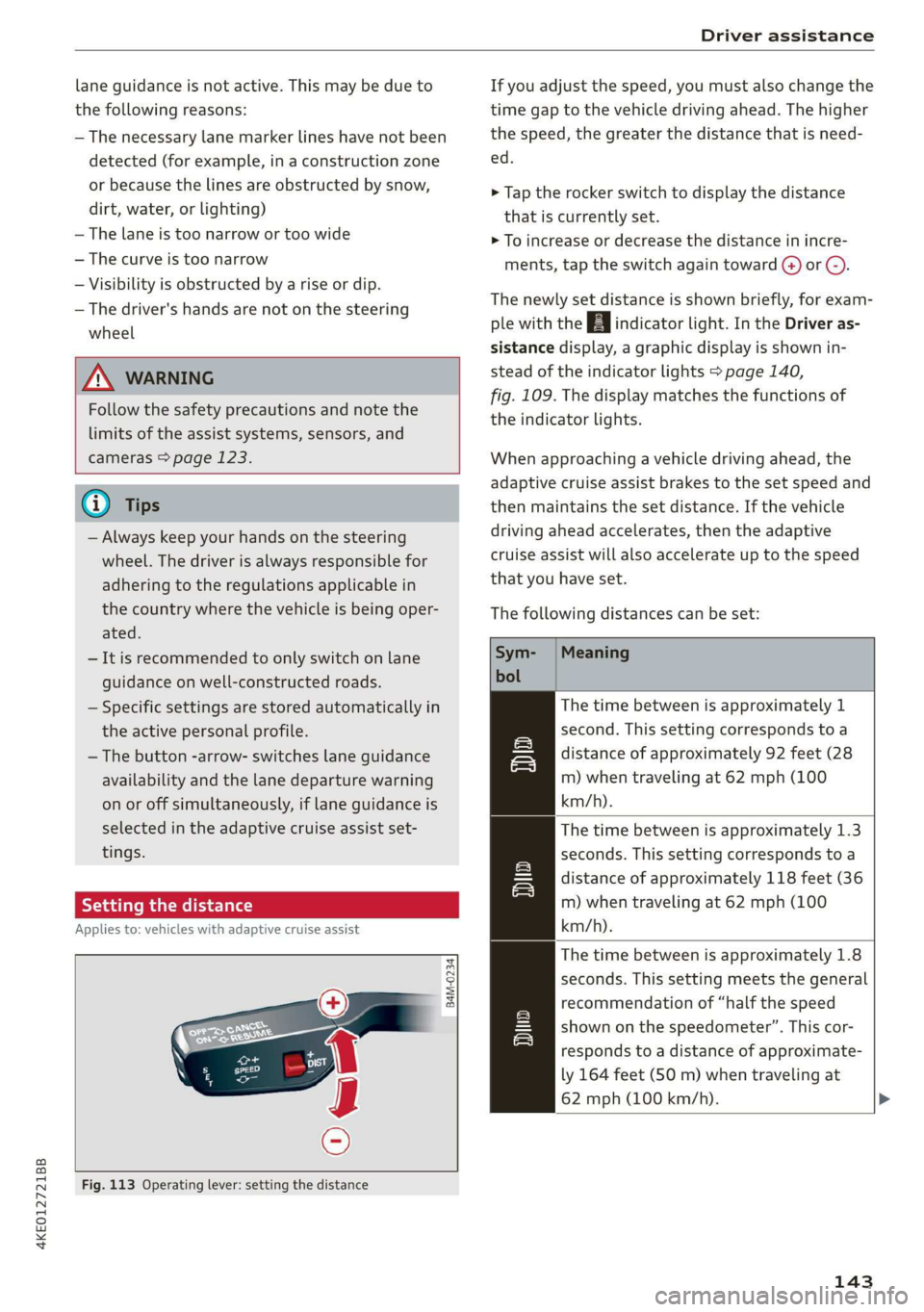
Fig. 113 Operating lever: setting the distance
If you adjust the speed, you must also change the
time gap to the vehicle driving ahead. The higher
the speed, the greater the distance that is need-
ed.
> Tap the rocker switch to display the distance
that is currently set.
> To increase or decrease the distance in incre-
ments, tap the switch again toward (4) or @).
The newly set distance is shown briefly, for exam-
ple with the indicator light. In the Driver as-
sistance display, a graphic display is shown in-
stead of the indicator lights > page 140,
fig. 109. The display matches the functions of
the indicator lights.
When approaching a vehicle driving ahead, the
adaptive cruise assist brakes to the set speed and
then maintains the set distance. If the vehicle
driving ahead accelerates, then the adaptive
cruise assist will also accelerate up to the speed
that you have set.
The following distances can be set:
Meaning
The time between is approximately 1
second. This setting corresponds to a
distance of approximately 92 feet (28
m) when traveling at 62 mph (100
km/h).
The time between is approximately 1.3
seconds. This setting corresponds toa
distance of approximately 118 feet (36
m) when traveling at 62 mph (100
km/h).
The time between is approximately 1.8
seconds. This setting meets the general
recommendation of “half the speed
shown on the speedometer”. This cor-
responds to a distance of approximate-
ly 164 feet (SO m) when traveling at
62 mph (100 km/h).
wT
143
Page 147 of 310
4KE012721BB
Driver assistance
Driving in stop-and-go traffic
Applies to: vehicles with adaptive cruise assist
> Press the brake pedal to slow your vehicle
down.
S 3 S z
ee
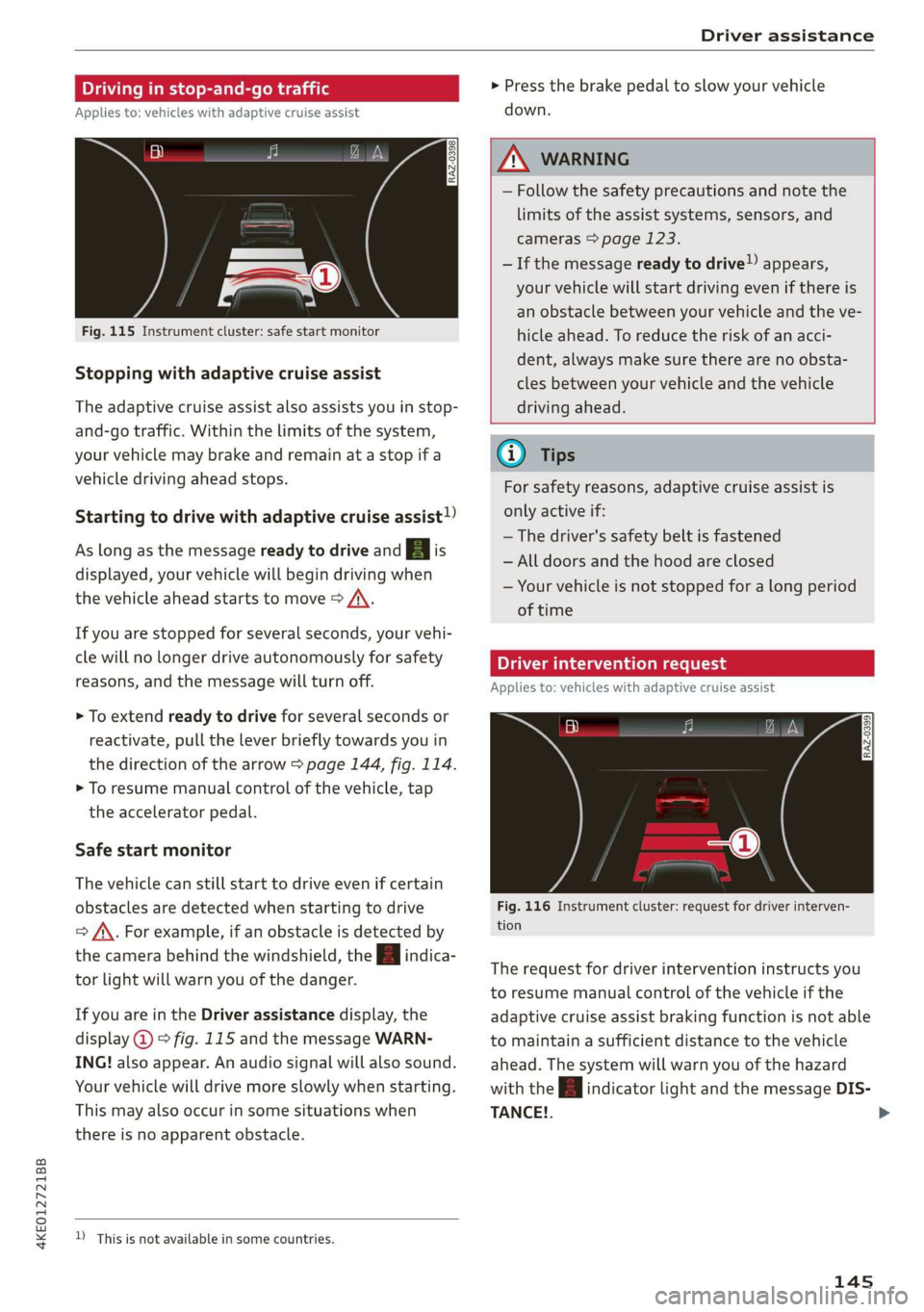
Fig. 115 Instrument cluster: safe start monitor
Stopping with adaptive cruise assist
The adaptive cruise assist also assists you in stop-
and-go traffic. Within the limits of the system,
your vehicle may brake and remain at a stop if a
vehicle driving ahead stops.
Starting to drive with adaptive cruise assist!)
As long as the message ready to drive and aA is
displayed, your vehicle will begin driving when
the vehicle ahead starts to move > /\.
If you are stopped for several seconds, your vehi-
cle will no longer drive autonomously for safety
reasons, and the message will turn off.
> To extend ready to drive for several seconds or
reactivate, pull the lever briefly towards you in
the direction of the arrow > page 144, fig. 114.
> To resume manual control of the vehicle, tap
the accelerator pedal.
Safe start monitor
The vehicle can still start to drive even if certain
obstacles are detected when starting to drive
=> /\. For example, if an obstacle is detected by
the camera behind the windshield, the a indica-
tor light will warn you of the danger.
If you are in the Driver assistance display, the
display @ © fig. 115 and the message WARN-
ING! also appear. An audio signal will also sound.
Your vehicle will drive more slowly when starting.
This may also occur in some situations when
there is no apparent obstacle.
D_ This is not available in some countries.
Z\ WARNING
— Follow the safety precautions and note the
limits of the assist systems, sensors, and
cameras > page 123.
— If the message ready to drive!) appears,
your vehicle will start driving even if there is
an obstacle between your vehicle and the ve-
hicle ahead. To reduce the risk of an acci-
dent, always make sure there are no obsta-
cles between your vehicle and the vehicle
driving ahead.
G) Tips
For safety reasons, adaptive cruise assist is
only active if:
— The driver's safety belt is fastened
— All doors and the hood are closed
— Your vehicle is not stopped for a long period
of time
Tamia e cme [sid
Applies to: vehicles with adaptive cruise assist
Fig. 116 Instrument cluster: request for driver interven-
tion
The request for driver intervention instructs you
to resume manual control of the vehicle if the
adaptive cruise assist braking function is not able
to maintain a sufficient distance to the vehicle
ahead. The system will warn you of the hazard
with the A indicator light and the message DIS-
TANCE!.
145
>
Page 148 of 310
Driver assistance
The display @ only appears when the Driver as-
sistance display is open in the on-board
computer > page 14.
ZA WARNING
Follow the safety precautions and note the
limits of the assist systems, sensors, and
cameras > page 123.
Adjusting the adaptive cruise assist
Applies to: vehicles with adaptive cruise assist
You can adjust the adaptive cruise assist to your
own preferences. The settings depend on the ve-
hicle equipment.
> Applies to: MMI: Select on the home screen:
VEHICLE > Driver assistance > (<3) > Adaptive
cruise assist.
Possible settings:
Lane guidance - If lane guidance is also active
when adaptive cruise assist control is active, you
can switch it on or off.
Driving program - Depending on the driving pro-
gram and the distance that are set, the vehicle
handling will be adjusted from Sport to Moder-
ate and the lane guidance haptic feedback will be
adjusted.
Store last distance - The last distance that was
set will be stored after the ignition is switched
off. If the distance is not stored, distance
(time distance of approximately 1.8 seconds) is
automatically preset every time the ignition is
switched on.
Applies to: vehicles with efficiency assist
Predictive control - When predictive control is
switched on, the system reacts automatically to
situations > page 137.
G) Tips
— In the efficiency* Audi drive select mode,
vehicle handling and the adaptive cruise as-
sist haptic feedback are also affected. The
Driving program can no longer be adjusted.
— Specific settings are stored automatically in
the active personal profile.
146
Messages
Applies to: vehicles with adaptive cruise assist
a | or is displayed when there is a malfunc-
tion, the adaptive cruise assist functions may be
unavailable or limited.
A message that indicates the cause and possible
solution may appear with some displays. The
weather conditions may be too poor or a sensor
may be covered. Clean the area in front of the
sensors > page 124, fig. 97 and try to turn on
the systems again later.
If the malfunction remains, drive to an author-
ized Audi dealer or authorized Audi Service Facili-
ty immediately to have the malfunction correct-
ed.
Applies to: vehicles with narrowed road assist
Narrow area
Depending on vehicle equipment, this message
appears in the Driver assistance display if the
adaptive cruise assist is adjusting the speed ina
narrow area, for example a construction zone.
ae Please take over steering and pay atten-
tion to traffic!
Be Please take over!
This message appears if steering activity is no
longer detected. Always keep your hands on the
steering wheel so you can be ready to steer at any
time.
Adaptive cruise assist: Please take over!
This message appears if the vehicle rolls back
when starting on a slight incline, even though the
systems are active. Press the brake pedal to pre-
vent the vehicle from rolling or starting to move.
Depending on the equipment, this message may
also appear if the driver does not take over steer-
ing after multiple requests for the driver to take
action. The adaptive cruise assist is switched off.
Applies to: vehicles with laser scanner
3] Adaptive cruise assist: limited availability.
See owner's manual
This message appears when the sensor view is
limited, for example, when weather conditions >
Page 160 of 310
Driver assistance
G) Tips
For an explanation on conformity with the
FCC regulations in the United States and the
Industry Canada regulations, see > page 289.
Emergency assist
Applies to: vehicles with emergency assist
General information
Within the limits of the system, the emergency
assist detects if the driver is inactive. In these in-
stances, the system warns the driver, assumes
control of the vehicle if necessary, and brings the
vehicle automatically to a stop in the lane.
Regardless of the speed, the emergency assist is
automatically available when the adaptive cruise
assist* is activated. When the adaptive cruise as-
sist* is deactivated, the system is only active at
speeds higher than approximately 40 mph
(65 km/h).
Emergency assist functions
Within the limits of the system, the emergency
assist monitors the driver’s steering, accelerator,
and brake pedal activity. Depending on the se-
verity of the situation, it may initiate visual, au-
dio, and haptic warnings in stages:
— Reduces the speed
— Messages
— Lowers the volume of the Infotainment system
— Audible warning
— Tightening of the safety belt
—A brief application of the brakes
If the driver remains inactive despite the warn-
ings, the emergency assist controls the vehicle
within the limits of the system:
— The Audi pre sense preemptive safety measures
are triggered > page 150.
— The vehicle will stay in the lane and will be
braked to a stop.
— As soon as the vehicle comes to a full stop, the
emergency flashers are activated and the vehi-
) This function is not available in every market and on all ve-
hicle equipment levels.
158
cle prepares for the vehicle passengers to be
rescued. The parking brake is set, “P” gear is
engaged, the doors are unlocked, and the inte-
rior lighting is activated. If there is no move-
ment for several seconds, the emergency call
will be made if necessary.
Overriding the emergency assist
You can override the emergency assist > A\:
— Move the steering wheel. Or
— Press the brake pedal. Or
— Press the accelerator pedal distinctly.
When stationary, you can end the emergency as-
sist by leaving the "P" position or releasing the
parking brake > page 93.
Switching the emergency assist on and off
The system can be switched on and off in the
MMI & page 126.
Messages
1g or is displayed when there is a malfunc-
tion, the emergency assist functions may be un-
available or may be limited.
A message that indicates the cause and possible
solution may appear with some displays. The
weather conditions may be too poor or a sensor
may be covered. Clean the area in front of the
sensors > page 124, fig. 97 and try to turn on
the systems again later.
If the malfunction remains, drive to an author-
ized Audi dealer or authorized Audi Service Facili-
ty immediately to have the malfunction correct-
ed.
ZX WARNING
— Follow the safety precautions and note the
limits of the assist systems, sensors, and
cameras > page 123.
— The emergency assist is an assist system
that should only be used in cases of emer-
gency to take over control of the vehicle and
bring it to a stop. >
Page 241 of 310
4KE012721BB
Checking and Filling
coolant in the original container and away
from children. There is a risk of poisoning.
@) Note
— Do not add coolant if the expansion tank is
empty. Air could enter the cooling system
and increase the risk of damage. If this is
the case, do not continue driving. See an au-
thorized Audi dealer or authorized Audi
Service Facility for assistance.
— If coolant must be added multiple times
within two months, drive immediately to an
authorized Audi dealer or authorized Audi
Service Facility because there is a risk of
damage.
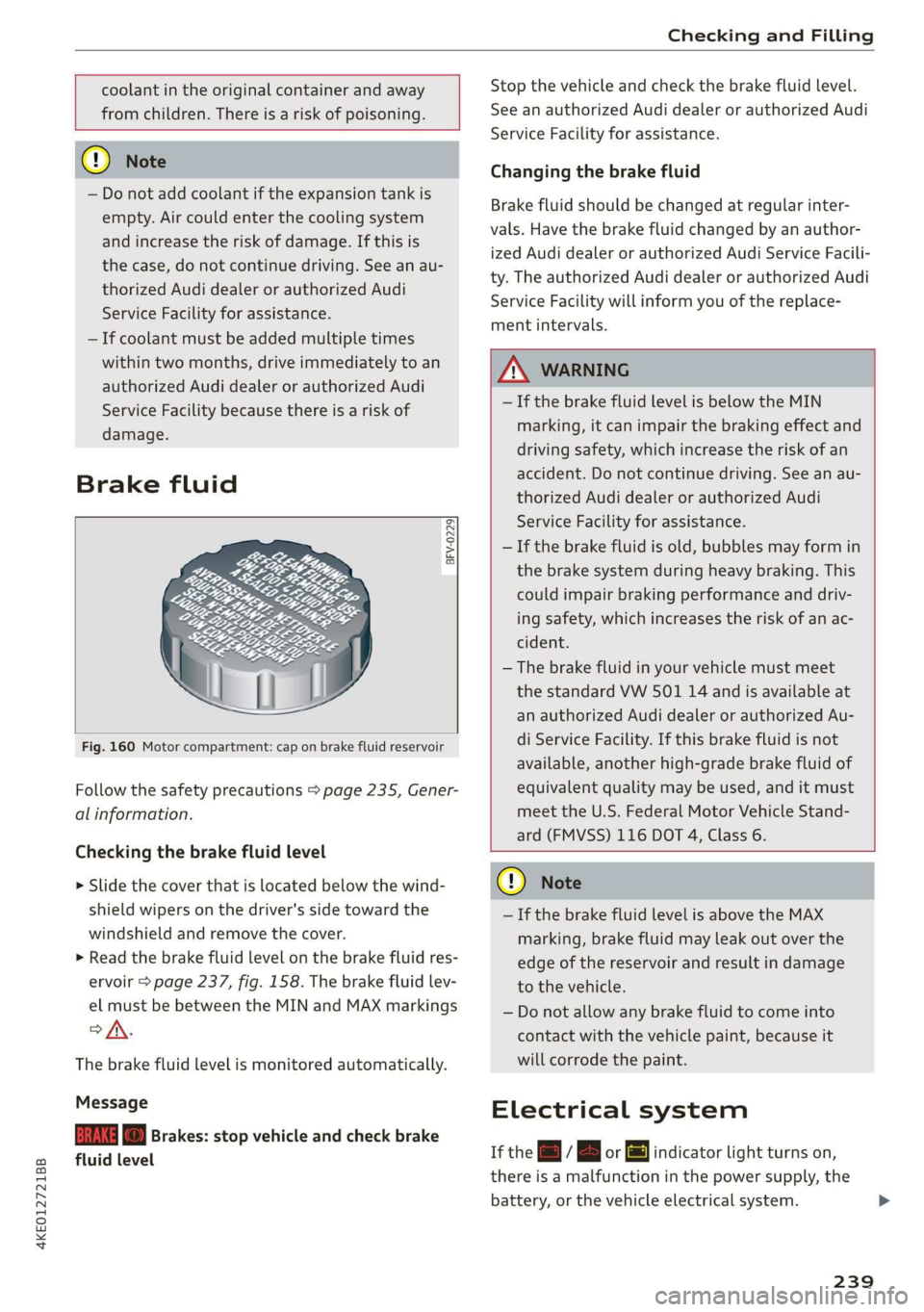
Brake fluid
BFV-0229|
Fig. 160 Motor compartment: cap on brake fluid reservoir
Follow the safety precautions > page 235, Gener-
al information.
Checking the brake fluid level
> Slide the cover that is located below the wind-
shield wipers on the driver's side toward the
windshield and remove the cover.
> Read the brake fluid level on the brake fluid res-
ervoir > page 237, fig. 158. The brake fluid lev-
el must be between the MIN and MAX markings
of.
The brake fluid level is monitored automatically.
Message
EG f) Brakes: stop vehicle and check brake
fluid level
Stop the vehicle and check the brake fluid level.
See an authorized Audi dealer or authorized Audi
Service Facility for assistance.
Changing the brake fluid
Brake fluid should be changed at regular inter-
vals. Have the brake fluid changed by an author-
ized Audi dealer or authorized Audi Service Facili-
ty. The authorized Audi dealer or authorized Audi
Service Facility will inform you of the replace-
ment intervals.
Z\ WARNING
— If the brake fluid level is below the MIN
marking, it can impair the braking effect and
driving safety, which increase the risk of an
accident. Do not continue driving. See an au-
thorized Audi dealer or authorized Audi
Service Facility for assistance.
— If the brake fluid is old, bubbles may form in
the brake system during heavy braking. This
could impair braking performance and driv-
ing safety, which increases the risk of an ac-
cident.
— The brake fluid in your vehicle must meet
the standard VW 501 14 and is available at
an authorized Audi dealer or authorized Au-
di Service Facility. If this brake fluid is not
available, another high-grade brake fluid of
equivalent quality may be used, and it must
meet the U.S. Federal Motor Vehicle Stand-
ard (FMVSS) 116 DOT 4, Class 6.
@) Note
— If the brake fluid level is above the MAX
marking, brake fluid may leak out over the
edge of the reservoir and result in damage
to the vehicle.
— Do not allow any brake fluid to come into
contact with the vehicle paint, because it
will corrode the paint.
Electrical system
If the =] / B or [ml indicator light turns on,
there is a malfunction in the power supply, the
battery, or the vehicle electrical system.
239
Page 266 of 310
Care and cleaning
height and width of the inside of the car
wash.
ZA WARNING
—To reduce the risk of accidents, only wash
the vehicle when the ignition is off and fol-
low the instructions from the car wash oper-
ator.
—To reduce the risk of cuts, protect yourself
from sharp metal components when wash-
ing the underbody or the inside of the wheel
housings.
— After washing the vehicle, the braking effect
may be delayed due to moisture on the
brake rotors or ice in the winter. This in-
creases the risk of an accident. The brakes
must be dried with a few careful brake appli-
cations.
—To reduce the risk of paint damage, do not
wash the vehicle in direct sunlight.
—To reduce the risk of damage, do not wash
decorative decals* with a pressure washer.
—To reduce the risk of damage to the surface,
do not use insect removing sponges, kitchen
sponges, or similar items.
— When washing matte finish painted vehicle
components:
— To reduce the risk of damage to the sur-
face, do not use polishing agents or hard
wax.
— Never use protective wax. It can destroy
the matte finish effect.
@) Note — Do not place any stickers or magnetic
signs on vehicle components painted with
matte finish paint. The paint could be
damaged when the stickers or magnets
are removed.
— If you wash the vehicle in an automatic car
wash, you must fold the exterior mirrors in
to reduce the risk of damage to the mirrors.
Power folding exterior mirrors* must only
be folded in and out using the power folding @) For the sake of the environment
function.
—To reduce the risk of damage to the rims
and tires, compare the width between the
wheels on your vehicle with the distance be-
tween the guide rails in the car wash.
—To reduce the risk of damage, compare the
height and width of your vehicle with the
Only wash the vehicle in facilities specially de-
signed for that purpose. This will reduce the
risk of dirty water contaminated with oil from
entering the sewer system.
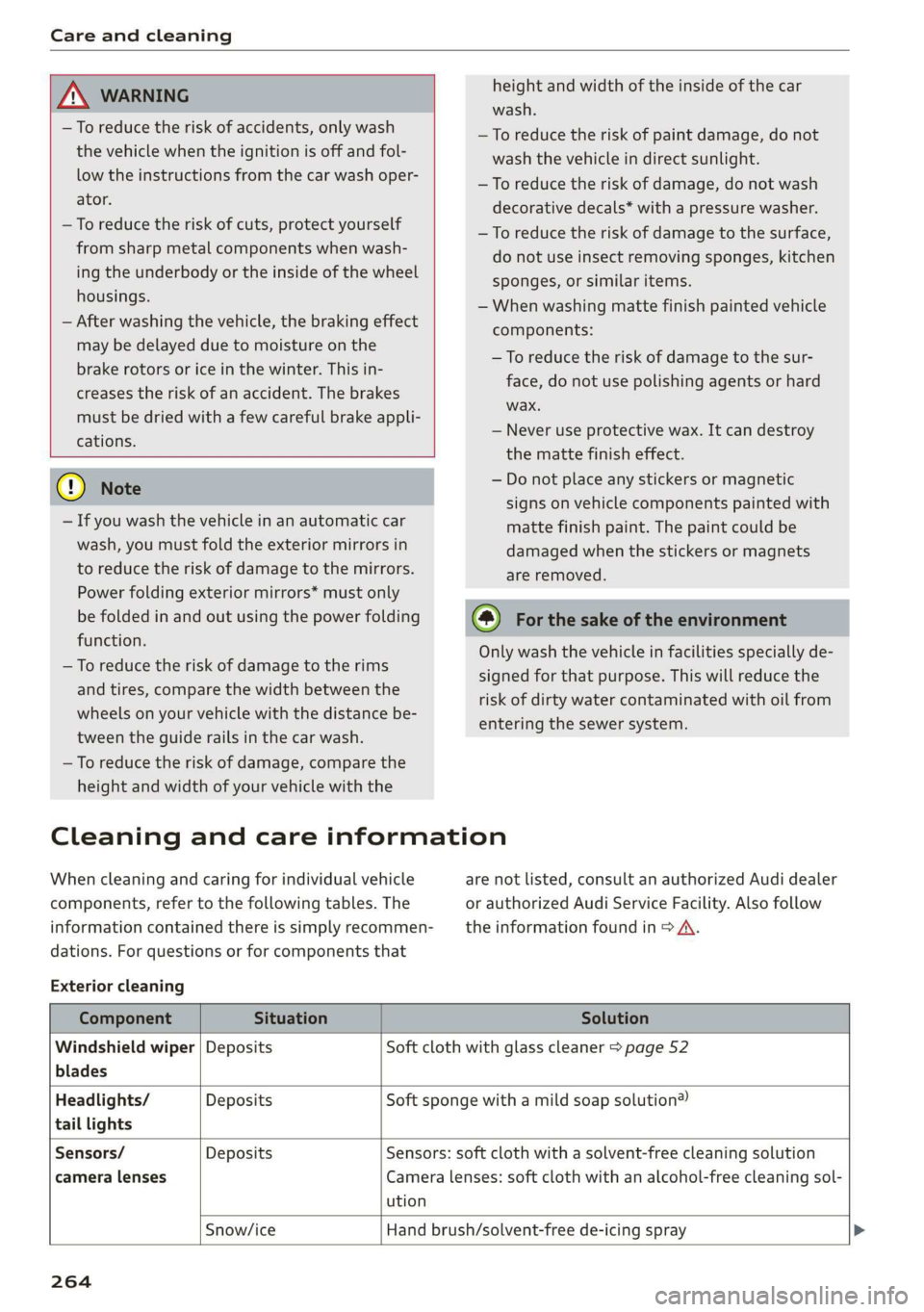
Cleaning and care information
When cleaning and caring for individual vehicle are not listed, consult an authorized Audi dealer
components, refer to the following tables. The or authorized Audi Service Facility. Also follow
information contained there is simply recommen- __ the information found in > A.
dations. For questions or for components that
Exterior cleaning
Component Situation Solution
Windshield wiper | Deposits Soft cloth with glass cleaner > page 52
blades
Headlights/ Deposits Soft sponge with a mild soap solution®
tail lights
Sensors/ Deposits Sensors: soft cloth with a solvent-free cleaning solution
camera lenses Camera lenses: soft cloth with an alcohol-free cleaning sol-
ution
Snow/ice Hand brush/solvent-free de-icing spray >
264
Page 278 of 310
Emergency assistance
overheating. Let the compressor cool down
for several minutes before using it again.
@) Tips
The ESC must not be limited or switched off
when driving with the collapsible spare tire
=> page 102.
Jump starting
The vehicle cannot be operated when the 12 Volt
vehicle battery is drained. Your vehicle must not
be jump started in this case. Contact an author-
ized Audi dealer or authorized Audi Service Facili-
ty.
@) Note
The vehicle battery must not be bridged using
conventional jump start methods.
— You may neither give nor receive a jump
start. Otherwise, the electronic systems in
the vehicle may be severely damaged.
—The jump start pins in the motor compart-
ment are designed specifically for qualified
technicians.
Towing
ee eeue lela)
You should only perform the steps that follow if
you have the necessary tools and technical ex-
pertise.
Towing requires a certain amount of practice. Au-
di recommends contacting a towing company to
have the vehicle transported.
You should only have your vehicle towed by an-
other vehicle when disabled in exceptional cir-
cumstances. Inexperienced drivers should not
tow.
Notes on towing
— The maximum permitted towing speed is 30
mph (50 km/h).
— The maximum permitted towing distance is 30
miles (50 km).
276
Additional information on towing with a tow
truck
The vehicle may only be towed with the front axle
raised. Do not wrap any chains or cables around
the brake lines.
Tow bar and towing cable
The vehicle can be towed with a tow bar or tow-
ing cable. Both drivers should be familiar with
the special considerations when towing, especial-
ly when using a towing cable.
Always make sure the traction force does not ex-
ceed the permitted level and there are no shock
loading conditions. There is always the risk of the
coupling becoming overloaded when driving off-
road.
For the most safety and security, drive with a tow
bar. You should use a towing cable only if a tow
bar is not available. Use a towing cable made of
synthetic elastic cable similar elastic material.
ZA WARNING
— Towing highly increases the risk of an acci-
dent, for example from colliding with the
towing vehicle.
—To reduce the risk of an accident, do not al-
low anyone to remain inside the vehicle
when it is being transported by a tow truck
or a special transporter.
@) Note
—Ifthe |_E| indicator light turns on, there is a
fault in the cooling circuit. The vehicle must
not be towed. The drive system can be se-
verely damaged.
— If normal towing is not possible, for exam-
ple if the transmission is faulty or if the
towing distance is greater than 30 miles
(50 km), then transport the vehicle on a
special carrier.
— If the vehicle is towed by a tow truck at the
axle that is not permitted, this can cause se-
vere damage to the transmission.
— Towing must not be used to charge the
high-voltage battery (recuperation), be-
cause this could result in major damages to
the tow vehicle or the vehicle being towed. >
Page 283 of 310
4KE012721BB
Fuses and bulbs
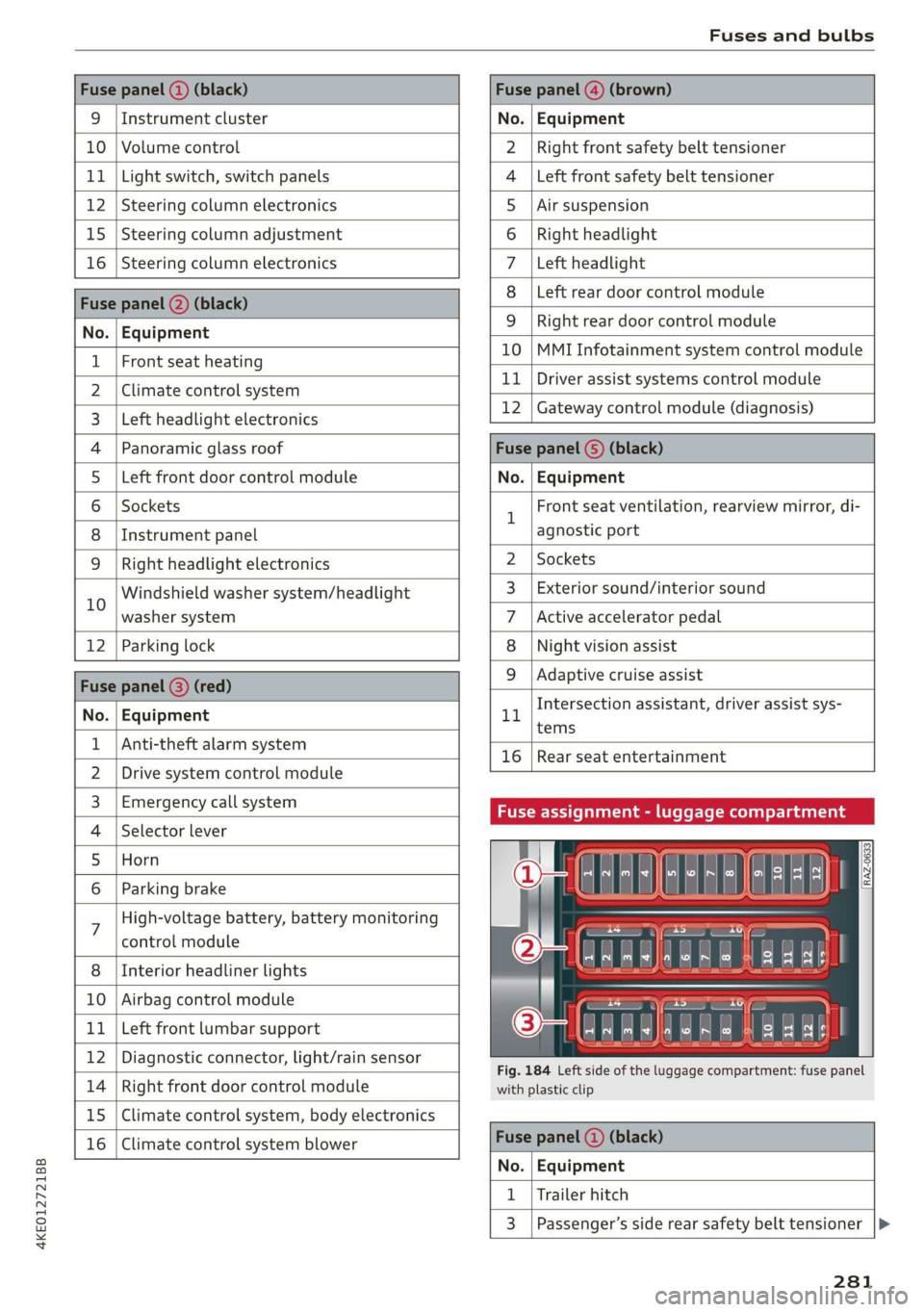
Fuse panel (2) (black) Fuse panel @) (brown)
9 |Instrument cluster No. | Equipment
10 | Volume control Right front safety belt tensioner
11 | Light switch, switch panels Left front safety belt tensioner
12 | Steering column electronics Air suspension
15 | Steering column adjustment Right headlight
16 | Steering column electronics Left headlight
Fuse panel (2) (black)
No. | Equipment
Left rear door control module
WOlOIN|
A)
Mm]
ALN
Right rear door control module
10 |MMI Infotainment system control module
1 |Front seat heating - -
2 |ehmmareconeral system 11 | Driver assist systems eantte) iene
Z | betvheadlightdlecironias 12 | Gateway control module (diagnosis)
4 |Panoramic glass roof Fuse panel 6) (black)
5 |Left front door control module No. | Equipment
6 | Sockets 1 Front seat ventilation, rearview mirror, di-
8 | Instrument panel agnostic port
9 | Right headlight electronics 2 | Sockets
iG Windshield washer system/headlight 3_| Exterior sound/interior sound
washer system 7 |Active accelerator pedal
12 | Parking lock 8 | Night vision assist
Fuse panel @ (red) 9 |Adaptive cruise assist
7 Intersection assistant, driver assist sys-
No. | Equipment 11
tems
1 {Anti-theft alarm system -
16 | Rear seat entertainment
2 |Drive system control module
3, | Emergency:callsystem Fuse assignment - luggage compartment
4 | Selector lever
5 |Horn 8
le
6 |Parking brake a
7 High-voltage battery, battery monitoring
control module
8 | Interior headliner lights
10 | Airbag control module
11 | Left front lumbar support
12 | Diagnostic connector, light/rain sensor
14 | Right front door control module
15 | Climate control system, body electronics
16 | Climate control system blower
7
ed ey
aE EEE
Fig. 184 Left side of the luggage compartment: fuse panel
with plastic clip
Fuse panel (4) (black)
No. | Equipment
1 | Trailer hitch
3 | Passenger’s side rear safety belt tensioner
281
Page 296 of 310
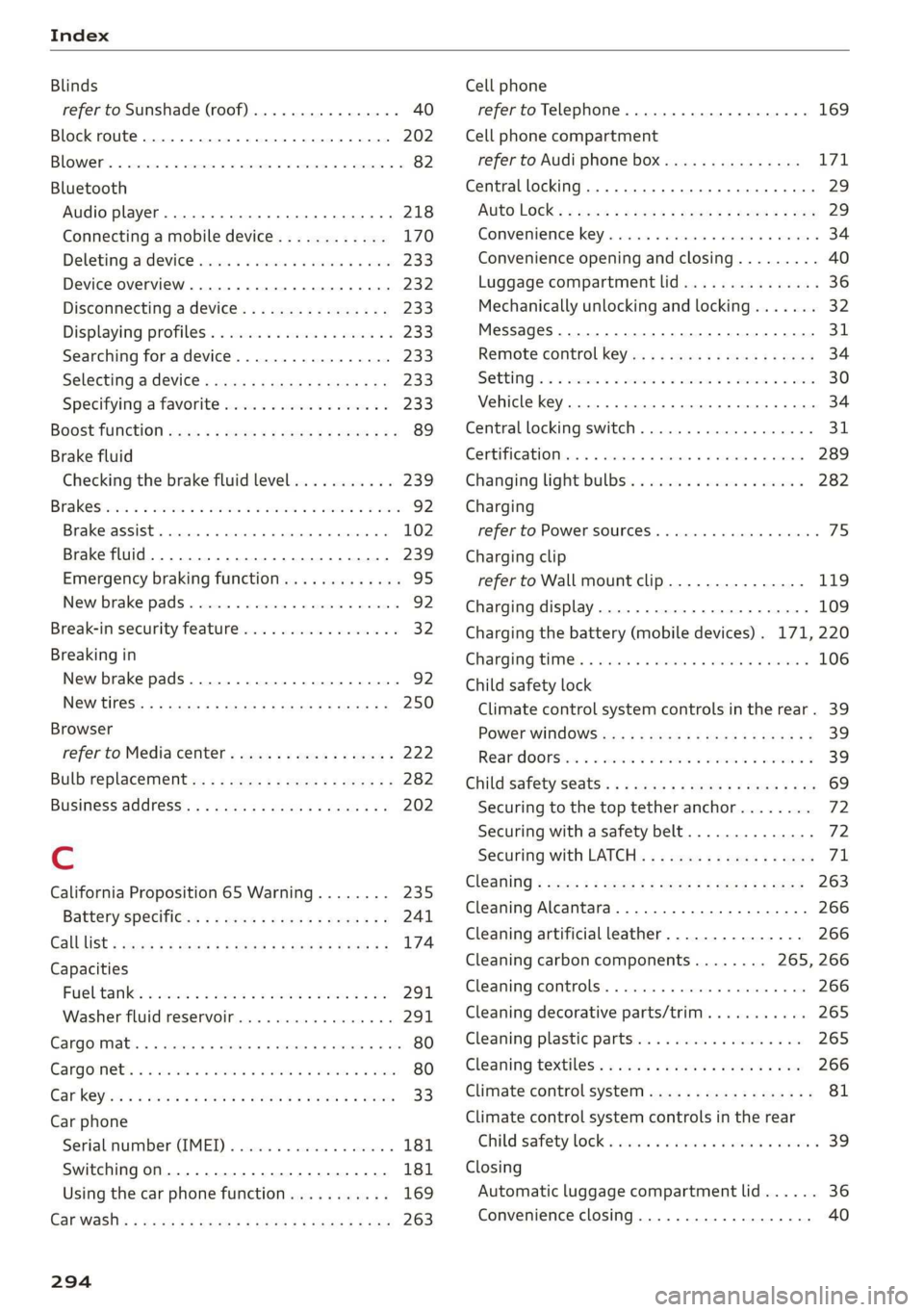
Index
Blinds
refer to Sunshade (roof) ............00-5 40
Block
route................ 00 cece eee 202
BLOWER. « sees su comers a enmeane wa nents a = swine = 82
Bluetooth
Audio player........... 0.00 e eee eee 218
Connecting a mobile device............ 170
Deleting
ardevice wii s 2 isnsins ov sucrose « sence 233
Device overVieW...... 6c eee ee eee eee 232
Disconnecting a device................ 233
Displaying profiles.................... 233
Searching fora device...............-. 233
Selecting adevice.............2eeeeee 233
Specifying a favorite.................. 233
BOOStTUNCTION owas x cee 2 sneer 2 eo ces ¢ 89
Brake fluid
Checking the brake fluid level........... 239
Brak Sicnes 2 x sree: vo cmv ow orien ow soe © o ooEKS 92
Brakerassist. scsmrs « acess» oi soz 4 0 omens « 102
Brake fluid. .................0..0000. 239
Emergency braking function............. 95
New brake pads..............---00000- 92
Break-in security feature................. 32
Breaking in
New brake pads............0.20200000- 92
NGW TIRES: « « noms 2 s saros & 9 cate gs eam a 250
Browser
refer to Mediacenter................4. 222
Bulb replacement.............--22+-05- 282
Business: address). «i ijei as jana a scan a va 202
Cc
California Proposition 65 Warning........ 235
Batteryspecific... =. eccs s sive s ween as: 241
GALLLISt « wea ¢ 2 aeee xs meee oe eee s Bee ee 174
Capacities
Fuebtanike, « secs 2 a oasan oo ssamon o wana oo ove 291
Washer fluid reservoir................- 291
Cangowmatc © « conse ws aussins 6 0 secs a a amass We ae 80
Cargoinets: « s soma 2s memew + wauim a 3 mam 6 @ oarae 80
Car key « s eeu oy ews y oeE 6 2 ween 6 Ewes 33
Car phone
Serialinumber(IMED) « wsscsce ao soteane ao sanaia 181
Switching on... ....... eee eee eee 181
Using the car phone function........... 169
Car WASH: = sass 5 x eee 5 feats sb eG EE 263
294
Cell phone
refer to Telephone...........-0e eee eae 169
Cell phone compartment
refer to Audi phone box............... 171
Central
locking ...... 0. cece eee eee eee 29
AUTO LOCK: » geese + sunems 2 seene & 3 donee & = Be 29
Convenience key « sscsu © cvenesie © erase wo vnscem 34
Convenience opening and closing......... 40
Luggage compartment lid............... 36
Mechanically unlocking and locking....... 32
Messages... 1.6... ce eee cece eee eee 31
Remote control keys: ss esas ss eves os ees 34
SettN's 6 e wanes a a saws «wo ones vo meen + 8 o8TH 30
Vehicle key... 6... ccc ee eee eee eee 34
Central locking switch.............000005 31
Centificat onto» a sess + x aneans ao somes o 6 mmm 289
Changing lightibulbs'. « ccs ss sew s 6 sesso 282
Charging
refer to Power sourceS............00 000s 75
Charging clip
refer to Wall mount clip............... 119
Charging display................---0000- 109
Charging the battery (mobile devices). 171, 220
Charging times. « sass. se savin s 2 wees © 2 sree 106
Child safety lock
Climate control system controls in the rear. 39
POWER WINK OWS inc ¢ & cme 5 ores 5 v eee 39
Rear doorsten « swe so mim 2 women n= ame wD 39
Child
safety seats........ 0... ce eee ee eee 69
Securing to the top tether anchor........ 72
Securing with a safety belt.............. 72
Securing with LATCH. ss sses ss eee se eee 71
Gl@aNiNG ¢ sere « s ewes 5 o eee se eee ce ees 263
Cleaning Alcantara.............-..0000. 266
Cleaning artificial leather............... 266
Cleaning carbon components........ 265, 266
Cleaning controls..............00 eee eee 266
Cleaning decorative parts/trim........... 265
Cleaning plastic parts.................. 265
Cleaning textiles: s ws + wees v ween oe eee 266
Climate control system ..............004. 81
Climate control system controls in the rear
Child safetylotk.o icvc os soci © sean © wows 39
Closing
Automatic luggage compartment lid...... 36
Convenience closing................045 40
Page 298 of 310
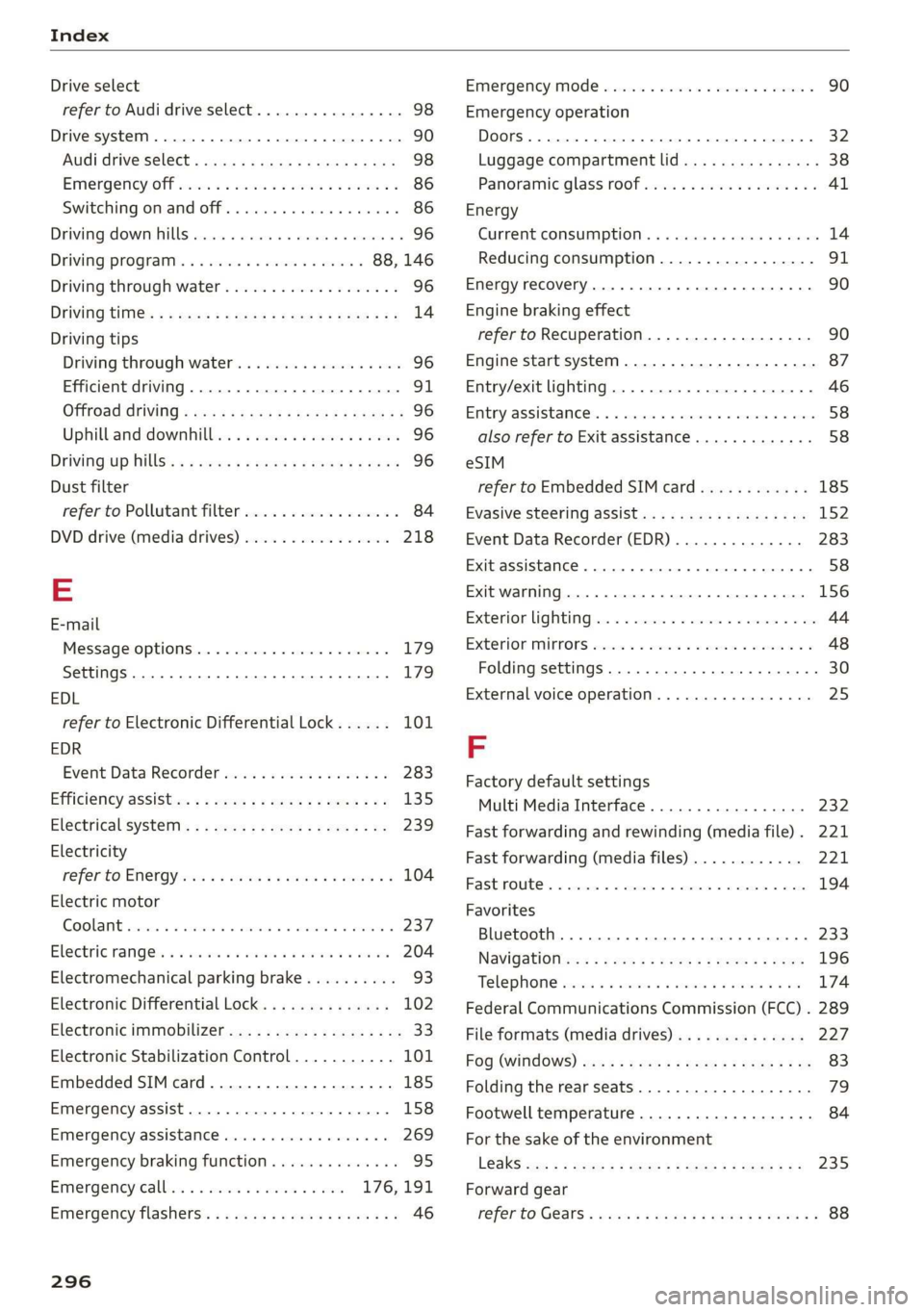
Index
Drive select
refer to Audi drive select.............0.. 98
Drive system. .... 20.2... 90
Audi drive select . cans 4 cicag at eaan ea ies 98
Emergency Off wv 2 x acne ov wews ye eeu 9 86
Switching on and off...............2005 86
Driving: OwntHills: cess» everene sania ee enero a 96
Driving programs « & sews 6 «eee os ees 88, 146
Driving through water...............004. 96
Driving time’: « s cose ¢ « eewy s nares Heme a sg 14
Driving tips
Driving through water...............00. 96
Efficient driving...............0000000. 91
Offrodd GriVinig < ees. yess as emus a wean ae 96
Uphill and downhill.................00. 96
Drivinig:up Hills: ¢ seus se oss ye ree yo ees 96
Dust filter
refer to Pollutant filter................. 84
DVD drive (media drives)................ 218
E
E-mail
MessageiOptionstn:. + « sss « « snemeue © « steceas + 179.
SettingS ... 0.6... cece eee eee 179
EDL
refer to Electronic Differential Lock...... 101
EDR
Event Data Recorder...............0.. 283
Efficiency assist =. « < sce: ss epee ye ees eee 135
Electrical system ..........-- 0s eee eee ee 239
Electricity
PEFer TO ENC cr » o san & 2 ees ¢ epee os 104
Electric motor
COOLANE wwe co aveana wa cana a 6 acenate © a anavar a 237
Electric ranges i « sca so were 6 ewe aw maa 204
Electromechanical parking brake.......... 93
Electronic Differential Lock.............. 102
Electronic immobilizer.............0.002. 33
Electronic Stabilization Control........... 101
Embedded SIM card................0055 185
Emergency assist.................0000- 158
Emergency assistance .......... 000s sees 269
Emergency braking function.............. 95
Emergency calliss so sisi se oesin so een 176,191
Emergency flasherst: « + ass 2 news ¢ wana ess 46
296
Emergency Mode «sce s veve ee ences ee eevee 90
Emergency operation
Doors... 2... ee eee 32
Luggage compartment lid............... 38
Panoramic glass roof...............2.4. 41
Energy
Current COMSUMPTION:. « 6 siesess s 6 eewcee & 6 soem 14
Reducing consumption................. 91
Energy recovery... 22.0.0 cece eee eee eee 90
Engine braking effect
refer to Recuperation................4. 90
Engine start system. ..............0.000. 87
Entry/exit lighting................--000- 46
ENMtry ASSISTANCE. « « senciw » 6 ssorane 0 canner 4 0 esos 58
also refer to Exit assistance............. 58
eSIM
refer to Embedded SIM card............ 185
Evasive steering assist.................- 152
Event Data Recorder (EDR).............. 283
Exit assistance... 0... eee eee eee 58
Exit warning.................0.00.00005 156
Exterior lighting.................022-00. 44
Exterior MIPPO0S ciwie so ccicee oo cere 6 weve oo 48
Folding settings ..............0000 0000s 30
External voice operation................. 25
F
Factory default settings
Multi Media Interface...............4. 232
Fast forwarding and rewinding (media file). 221
Fast forwarding (media files) ............ 221
FaStnOute’s a seca oo mee «2 mmm 9 6 em © eee 194
Favorites
Bluetooth.............. 000.0 e ee eee 233
NaVIGStOl sss « wes & > wee o x seme ¢ 5 ee 196
Telephone wssics so caves oo ssasens oo arenes 9 ¥ eee 174
Federal Communications Commission (FCC) . 289
File formats (media drives) .............. 227
FOG (WIRdOWS) zx x + sax © s coun ¢ 5 eee x 2 oe 83
Folding the rear seats.............-..00- 79
Footwell temperature............0..000. 84
For the sake of the environment
LOOKS ccs = = some 5 ¢ ene a eee x ee ee 235
Forward gear
FEPErtO Gears « easu ¢ s awe ¢ ¢ wees se wEEN 88