mirror AUDI E-TRON 2019 Owner's Manual
[x] Cancel search | Manufacturer: AUDI, Model Year: 2019, Model line: E-TRON, Model: AUDI E-TRON 2019Pages: 310, PDF Size: 81.91 MB
Page 166 of 310
Parking and maneuvering
If # is displayed, there is a system malfunction
and the display area represented by that symbol
is not available. The camera is not working in this
area.
If Nis displayed, the respective ultrasonic sensor
is icy or dirty. Clean the area in front of the sen-
sors > page 124, fig. 97.
If one of the symbols continues to be displayed,
drive immediately to an authorized Audi dealer or
authorized Audi Service Facility to have the mal-
function repaired.
ZA\ WARNING
— Follow the safety precautions and note the
limits of the assist systems, sensors, and
cameras > page 123.
— Sensors and cameras have spots in which
the surrounding area cannot be detected.
Objects, animals, and people may only be
detected with limitations may not be detect-
ed at all. Always monitor the traffic and the
vehicle's
surroundings directly and do not
become distracted.
©) Note
— The orange orientation lines @) show the di-
rection the rear of the vehicle will be travel-
ing, based on the steering wheel angle. The
front of the vehicle swings out more than
the rear of the vehicle. Maintain plenty of
distance so that an exterior mirror or a cor-
ner of the vehicle does not collide with any
obstacles.
— Keep enough distance from the curb to
avoid damage to the rims.
— Only use the images provided by the camera
on the rear of the vehicle when the luggage
compartment lid is completely closed. Make
sure any objects you may have mounted on
the luggage compartment lid do not block
the rearview camera.
G) Tips
— Applies to: vehicles with air suspension: The
accuracy of the orientation lines and blue
surfaces on the camera display decreases
when the vehicle is raised or lowered with
the air suspension.
— There is no distance warning for the rear
and the sides* when trailer towing mode is
detected. The front sensors remain activat-
ed. The visual display switches to trailer
mode. The rearview camera image will not
show the orientation lines and the blue sur-
faces. There is no guarantee the functions
will switch off when using a retrofitted trail-
er hitch.
Oe lee maleate
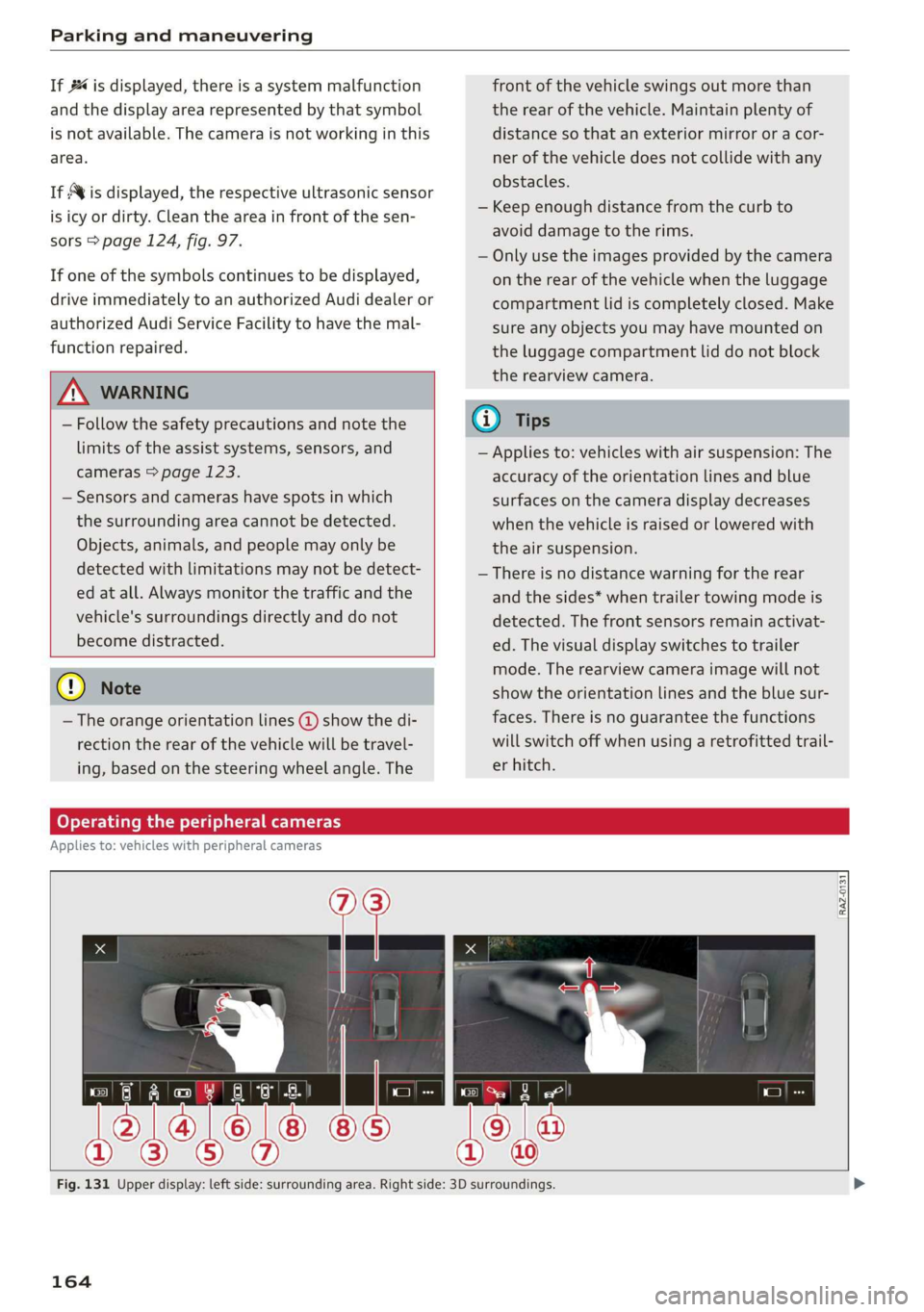
Applies to: vehicles with peripheral cameras
RAZ-0131
Fig. 131 Upper display: left side: surrounding area. Right side: 3D surroundings.
164
Page 266 of 310
Care and cleaning
height and width of the inside of the car
wash.
ZA WARNING
—To reduce the risk of accidents, only wash
the vehicle when the ignition is off and fol-
low the instructions from the car wash oper-
ator.
—To reduce the risk of cuts, protect yourself
from sharp metal components when wash-
ing the underbody or the inside of the wheel
housings.
— After washing the vehicle, the braking effect
may be delayed due to moisture on the
brake rotors or ice in the winter. This in-
creases the risk of an accident. The brakes
must be dried with a few careful brake appli-
cations.
—To reduce the risk of paint damage, do not
wash the vehicle in direct sunlight.
—To reduce the risk of damage, do not wash
decorative decals* with a pressure washer.
—To reduce the risk of damage to the surface,
do not use insect removing sponges, kitchen
sponges, or similar items.
— When washing matte finish painted vehicle
components:
— To reduce the risk of damage to the sur-
face, do not use polishing agents or hard
wax.
— Never use protective wax. It can destroy
the matte finish effect.
@) Note — Do not place any stickers or magnetic
signs on vehicle components painted with
matte finish paint. The paint could be
damaged when the stickers or magnets
are removed.
— If you wash the vehicle in an automatic car
wash, you must fold the exterior mirrors in
to reduce the risk of damage to the mirrors.
Power folding exterior mirrors* must only
be folded in and out using the power folding @) For the sake of the environment
function.
—To reduce the risk of damage to the rims
and tires, compare the width between the
wheels on your vehicle with the distance be-
tween the guide rails in the car wash.
—To reduce the risk of damage, compare the
height and width of your vehicle with the
Only wash the vehicle in facilities specially de-
signed for that purpose. This will reduce the
risk of dirty water contaminated with oil from
entering the sewer system.
Cleaning and care information
When cleaning and caring for individual vehicle are not listed, consult an authorized Audi dealer
components, refer to the following tables. The or authorized Audi Service Facility. Also follow
information contained there is simply recommen- __ the information found in > A.
dations. For questions or for components that
Exterior cleaning
Component Situation Solution
Windshield wiper | Deposits Soft cloth with glass cleaner > page 52
blades
Headlights/ Deposits Soft sponge with a mild soap solution®
tail lights
Sensors/ Deposits Sensors: soft cloth with a solvent-free cleaning solution
camera lenses Camera lenses: soft cloth with an alcohol-free cleaning sol-
ution
Snow/ice Hand brush/solvent-free de-icing spray >
264
Page 269 of 310
4KE012721BB
Care and cleaning
— The Audi e-tron charging system must only
be cleaned when the control unit is com-
pletely disconnected from the power supply
and from the vehicle.
@) Note
— Headlights and tail lights
— Never clean headlights or tail lights with a
dry cloth or sponge.
— Do not use any cleaning products that con-
tain alcohol, because they could cause
cracks to form.
— Wheels
— Never use any paint polish or other abra-
sive materials.
— Damage to the protective layer on the
rims, such as stone chips or scratches,
must be repaired immediately.
— Camera lenses
— Never use warm or hot water to remove
snow or ice from the camera lens. This
could cause the lens to crack.
— Never use abrasive cleaning materials or
alcohol to clean the camera lens. This
could cause scratches and cracks.
— Laser scanner
— Never use abrasive cleaning materials to
clean the laser scanner. This could cause
scratches and cracks.
— Door windows
— Remove snow and ice on windows and ex-
terior mirrors with a plastic scraper. To re-
duce the risk of scratches, move the scra-
per only in one direction and not back and
forth.
— Never remove snow or ice from door win-
dows and mirrors using warm or hot water
because this could cause cracks to form.
—To reduce the risk of damage to the rear
window defogger, do not apply any stick-
ers on the heating wires on the inside of
the window.
— Decorative parts and trim
— Never use chrome care or cleaning prod-
ucts.
— Paint
—To reduce the risk of scratches, the vehi cle
must be free of dirt and dust before pol-
ishing or waxing.
—To prevent paint damage, do not polish
wax the vehicle in direct sunlight.
or
— To reduce the risk of paint damage, do not
polish away rust spots.
— Remove cosmetics and sunscreen immedi-
ately because they could damage the
paint.
— Decorative decals
—To reduce the risk of damage, do not use
any rough powder or abrasive cleaning
products.
— To reduce the risk of damage, do not pol-
ish decorative decals that have a matte
printed finish.
— Due to the risk of damage, do not use a
or
n
ice scraper to remove snow and ice on win-
dows with decorative decals on them.
— Displays and instrument cluster
— Make sure that the display and instrument
cluster are switched off and have cooled
down before cleaning. To switch off the
upper and lower display, select on the
MMI home screen: SETTINGS > Display &
brightness > MMI > Screen cleaning.
— Displays, the instrument cluster, and the
trim surrounding it must not be cleaned
with dry cleaning methods because they
could become scratched.
— Make sure no fluids enter the spaces be-
tween the instrument cluster and the
trim, because that could cause damage
— Controls
— Make sure that no fluids enter the con-
trols, because this could cause damage
— Safety belts
— Do not remove the safety belts to clean
them.
— Never clean safety belts or their compo:
nents with chemicals or with corrosive flu-
ids or solvents and never allow sharp ob-
jects to come into contact with the safety
belts. This could cause damage to the belt
webbing.
267
>
Page 282 of 310
Fuses and bulbs
— Some of the equipment listed in the follow-
ing tables applies only to certain model ver-
sions or certain optional equipment.
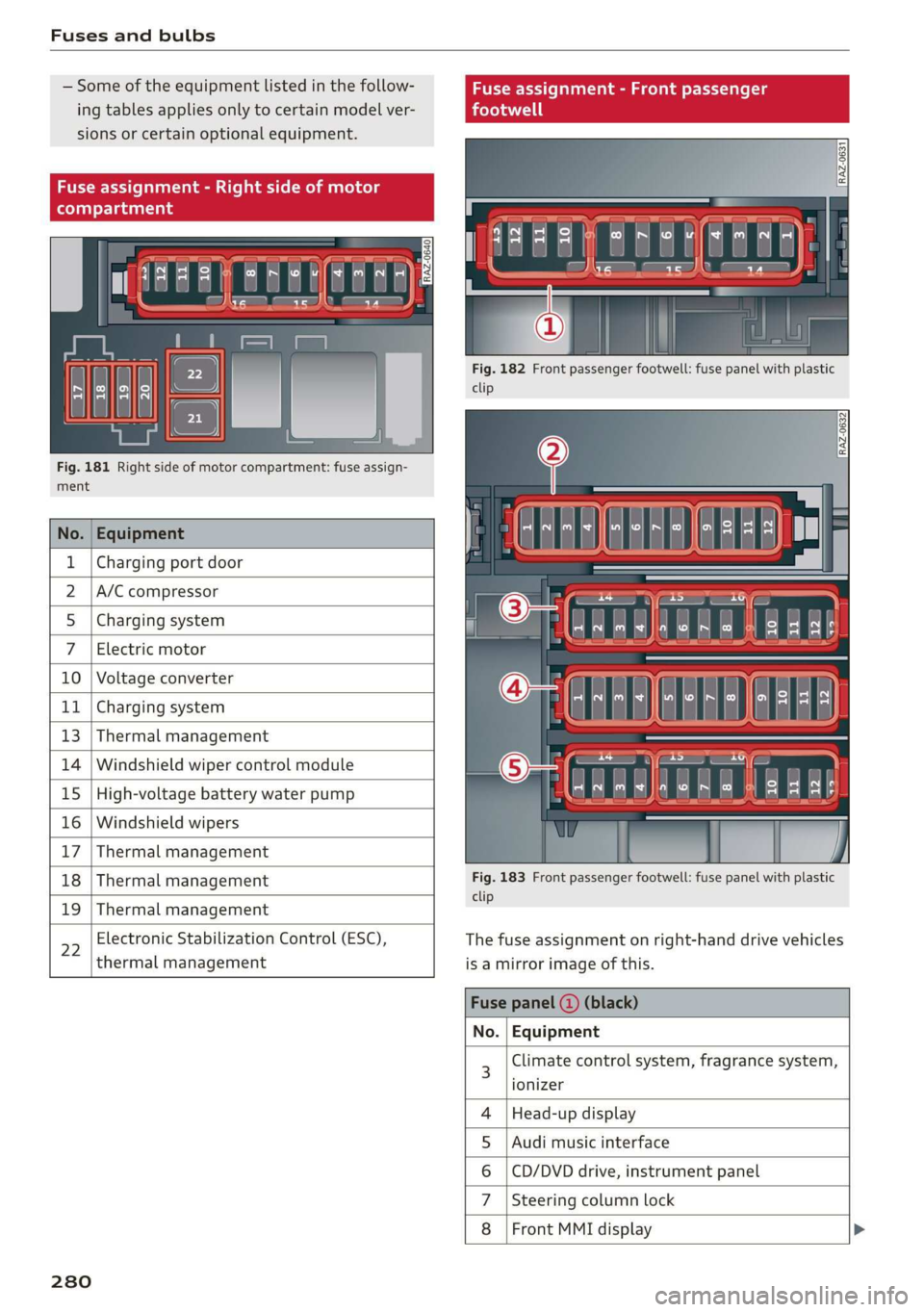
Fig. 181 Right side of motor compartment: fuse assign-
ment
No. Equipment
Charging port door
A/C compressor
Charging system
Electric motor
10 Voltage converter
11 Charging system
13 Thermal management
14 Windshield wiper control module
15 High-voltage battery water pump
16 Windshield wipers
17 Thermal management
18 Thermal management
19 Thermal management
22
Electronic Stabilization Control (ESC),
thermal management
280
Fig. 182 Front passenger footwell: fuse panel with plastic
clip
Fig. 183 Front passenger footwell: fuse panel with plastic
clip
The fuse assignment on right-hand drive vehicles
is a mirror image of this.
Climate control system, fragrance system,
ionizer
Head-up display
Audi music interface
CD/DVD drive, instrument panel
Steering column lock
Front MMI display >
OlN|
A)
uy
sA
Page 283 of 310
4KE012721BB
Fuses and bulbs
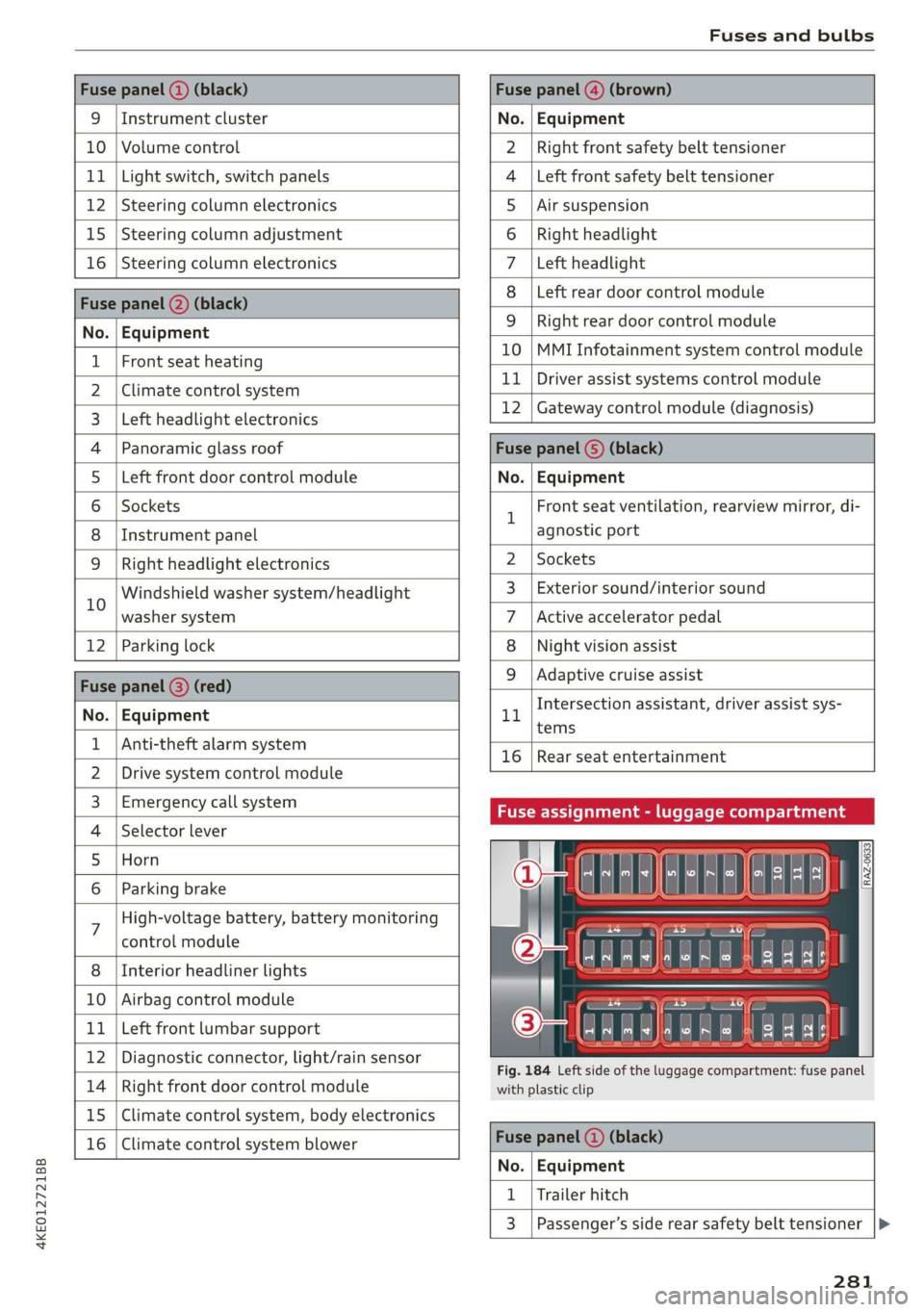
Fuse panel (2) (black) Fuse panel @) (brown)
9 |Instrument cluster No. | Equipment
10 | Volume control Right front safety belt tensioner
11 | Light switch, switch panels Left front safety belt tensioner
12 | Steering column electronics Air suspension
15 | Steering column adjustment Right headlight
16 | Steering column electronics Left headlight
Fuse panel (2) (black)
No. | Equipment
Left rear door control module
WOlOIN|
A)
Mm]
ALN
Right rear door control module
10 |MMI Infotainment system control module
1 |Front seat heating - -
2 |ehmmareconeral system 11 | Driver assist systems eantte) iene
Z | betvheadlightdlecironias 12 | Gateway control module (diagnosis)
4 |Panoramic glass roof Fuse panel 6) (black)
5 |Left front door control module No. | Equipment
6 | Sockets 1 Front seat ventilation, rearview mirror, di-
8 | Instrument panel agnostic port
9 | Right headlight electronics 2 | Sockets
iG Windshield washer system/headlight 3_| Exterior sound/interior sound
washer system 7 |Active accelerator pedal
12 | Parking lock 8 | Night vision assist
Fuse panel @ (red) 9 |Adaptive cruise assist
7 Intersection assistant, driver assist sys-
No. | Equipment 11
tems
1 {Anti-theft alarm system -
16 | Rear seat entertainment
2 |Drive system control module
3, | Emergency:callsystem Fuse assignment - luggage compartment
4 | Selector lever
5 |Horn 8
le
6 |Parking brake a
7 High-voltage battery, battery monitoring
control module
8 | Interior headliner lights
10 | Airbag control module
11 | Left front lumbar support
12 | Diagnostic connector, light/rain sensor
14 | Right front door control module
15 | Climate control system, body electronics
16 | Climate control system blower
7
ed ey
aE EEE
Fig. 184 Left side of the luggage compartment: fuse panel
with plastic clip
Fuse panel (4) (black)
No. | Equipment
1 | Trailer hitch
3 | Passenger’s side rear safety belt tensioner
281
Page 297 of 310
4KE012721BB
Index
HOO « cnsvecs 2 v citvace ow eneaene oo somes ve soto ¥ 236
Luggage compartment lid............... 36
Luggage compartment lid with foot motion . 37
Panoramic glass roofs. «esc se eevee eae 40
Sunshade (roof)... 2.2.0.6. eee eee 40
WINdOWS : soce = ¢ xews 2 y cee xs eee 5 oes 39
Closing aid (power closing doors).......... 29
Cockpit dimming...............002-000 48
Cockpit (overview) ....... 0.000 c cece ee eee 6
Collapsible spare tire
Inflating....... 2... eee eee eee ee eee 275
Collapsible tire
refer to Collapsible spare tire........... 2715
GOlGr MUMBEN: ¢ sees 5 xy ream sy eee 5 e eR « 291
Comfort auxiliary climate control.......... 85
Coming home/Leaving home
refer to Entry/exit lighting.............. 46
Compartments: < s ceau ze ee@s so eRe eb eS 76
Compass inthe mirror................00- 53
Compliance ........ 6.0... cece eee eee ee 289
Configuration wizard.................00. 17
CONME Cie. va nce & mene a moms @ a ee @ sue 184
Data plans... .... 2. ee eee eee eee 189
Data Privatyiee = « news ¢ x eng s eae a 5 eee 285
Emmengeneyseall ssc «a ssi 6 svensewe + syacene 191,
Infotainment...............-.-0 eee eee 185
Infotainment services............00005 185
Online roadside assistance............. 192
Vehicle control services................ 186
Connected devices
Device overvieW.... 0... cece e ee ee eee 232
Connections
referto Media............--.+++- 217,221
Consumer information.................- 286
Consumption
Reducing « svar es senw e waen @ o wee ey wee 91
Consumption (energy) ...............0005 14
Contacts
Add destinations ssw: « x cima © 2 aves @ 2 sone 203
Importing and exporting.............. 181
Memory capacity............000e eae 181
Opening (business card)............... 175
Updatinginthe MMI.................. 181
Convenience key............00 020 e sees 29
Convenience closing. ..........0eeee eee 40
also refer to Vehicle key..............-- 33
Convenience opening and closing
Windows or panoramic glass roof........ 40
Cooling mode..... 0.2... eee eee eee 82
Cooling system
Coolant... ... eee ee eee 237
Coolant l6VEl sence 2 5 seen s cage 2 eevee ga 238
Cornering
light: =» sees ¢ 2 eese 2» ewan ss es 44
Cross traffic assist (intersection assistant)... 157
Cruise control system
refer to Speed control systems.......... 134
Cup Holdets es « « sven ¢ ¢ een se eee x e sees 75
Current consumption.................... 14
D
Data plans... 0... eee eee eee 189
Data Privacy....... 0... cece eee eee 285
Date... eee 14
Daytime running lights.................. 44
Declaration of compliance............... 289
DEF (instrument cluster) ..............004 11
Demo mode
refer to Presentation mode............. 207
Destination on the map..............0.. 198
Detailsts os sscmve o vam 2 2 amore ao ansome oy ave 197
Determining correct load limit........... 256
Digital: cOMpaSs sew: : 2 sees c= reas ve een se 53
Dimensions ...........-..0 0c e eee eee ee 291
Dimming the exterior mirrors............. 49
Dimming the rearview mirror............. 49
Directory
Settings........... 002.2 eee eee eee 181
also refer to ContactS..............00. 175
Display
Gleanings « « exes = > eavane « esecnie ow ears owe 266
Disposalicne is « scsswa se suns « @ mnenes oe mae ow 286
DiStaNCC rss « ¢ eames = o sage s ¥ eeupe & 2 Hee x 14
DIStanGe WARNING, ames 3 « says se gems «eR 147
Doors
Childisatety lock eric. ss cio so ween a ewes « 39
Door contact switch................200. 47
Mechanically unlocking and locking....... 32
Power closing/closing aid............... 29
Driver information system................ 12
Drives
refer toMed idles « «wees sv eww 6 owen 217,221
295
Page 301 of 310
4KE012721BB
Index
Mechanically unlocking
Opening and closing.................0.
Opening and closing with foot motion..... 37
Power opening and closing.............. 36
Lumbar'support waco: 2s ees ev wees ee eerwe as 56
M
Maintenance « sige a + cewe «2 cee ge ewe a es 286
Maintenance intervals « nw. 6 i gic ae cere a 242
Manually releasing the charging connector. 111
Manually releasing the charging unit cover. 111
Map
Changing the scale...........00.e eee 198
Display cosee + a ssowsoe = semais 2 4 onaesms x aerate & 200
Operating ........ 0... ce eee eee eee 199
Setting the destination................ 198
Map preview.............-.0 2000-0 eee 197
Map update................ 020. e ee eee 204
QNUIME seers « « seers & e eee 5 2 eS & HEE FS 205
SD card/USB connection............... 205
Massage TUNCtiON. « ssa ss esi se owe ¥ 6 orem 56
Front... 2... eee eee eee eee 57
Matrix LED headlights.................-. 45
Mechanical:-key’. « « esscos ss caune oo aware © v cere 33
Medicis: 2 = acess: a © vonses a @ mewn 2 © cose 217,221.
Drives... ee 217
Supported formats...............0005 227
Media
center................ eee eee ee 222
Memory card
SD card reader (MMI) « « ewes sc ees an es 217
Supported types and formats........... 227
Mennory functioniie: « 2 sews x ¢ amen 5 meee eo: 63
Menu language
refer to Setting the language........... 231
Messagesi. « eciis + wean a 6 mans w 6 aaa oo we 178
Mirror cOMpaSS « wes + ¢ esas so sees eo eee vs 53
Mirrors
Adjusting exterior mirrors............0-. 48
Dimming................0 00002 e eee 49
Nanlity MUFROT sxc 2 = mown 2 seers « o eeoes gee 50
MMI
refer to Multi Media Interface........... 17
Mobile device
refer to Telephone...........-.0eee ee 169
Mobile phone network
Connection settings.................. 182
Motor compartment
Opening and closing the hood.......... 236
OVERVIEW eeu 3 2 soupy < @ emiees ¢ esate Go ee 237
Safety precautions: . sicsc. sven 2s wen ae 235
Storage compartment..............-... 76
Mountain passes... 0... ... eee eee eee 96
Mountaininoads:. « « secs « « erence» 2 sestane » 6 soene 96
Multifunction steering wheel
Buttons... ..... cee ee ee 12,26
Operating: < = ssn < : seen es sonnet dome s ee 12
Programming buttons.................. 26
Voice recognition system............... 24
Multi Media Interface................085 17
Menus and symbols.............00+-00- 18
Operating’s « « wss6 s secu = s sees & & wens 2 15,18
Switching the displays on or off.......... 17
Mutting (Mute) secs se ences oe ences oo cena oo eee 26
MYAUGI s « scimvs «6 eens 2s ents 2 & eee 2 weceale 27
myAudi navigation................. 193, 197
N
NarrOW APES s « eewn ss weue swoon as wee ae 146
Natural
leather care and cleaning......... 266
Navigation ....... 66... cee cece eee eee 193
Better rout@scs << sews eo es do eg e cae 206
Calli gprs so meena « i soieasen © o onewowe mraten wo 197
Changing the scale................0-. 197
also:referto Map: « wim + x wows 2 neee se ne 199
Navigation database
Version'information . . . ico ce caren so ens 233
Navigation (instrument cluster).......... 201
NHTSAc: = swiss « = seu = ¢ sous 4 x teats & Sees g 288
Night vision aSsist'; « sean 5 «wean ss ween avi 13)
Cleaning the camera...............00. 264
Notification:center’s ¢ sas 3 ¢ caw 2s gauss wars 19
O
OdOMCters cacy « & cees 5 o exw 5 ¢ eee 7 e ews 13
RESCUING fests 6 & srecine 6 o aiorsus 6 @ nureons wo eaNUEDK 13
Office address
refer to Business address.............. 202
Offroad
refer to Offroad driving...............+- 96
Offroad driving...............e eee e eee 96
OFF (climate control system) .............. 82
299
Page 306 of 310
Index
Trailer load iiss: 2 x soos x anc a avcniins ww ances 292
Trailer mode
Trailer mode (navigation) .............. 208
Trailer towing........... 20.0 ee eee ee eee 120
Airsuspension......... 000 eee eee eee ee 120
Trailetload © 5 seme ¢s gage s nome s 2 ene xs 120
Trailer VieW coes s « qwee ¢ » ewe se oes s ree 163
TUPMQSSISE sacex os maces ¢ Haim 4 § Sate Fo eae 152
Turn signals ..... 00.0... cee cece eee 45
U
Unable to pass. 1... .. cee eee eee ee 146
Uniform tire quality grading............. 260
Unlocking and locking................-0. 29
By remote control... ....... cee cece eee 34
Using the lock cylinder................. 32
With the central locking switch.......... 3,
With the convenience key............... 34
Update (software) .............0.0.0 00 232
Updating stations (radio)................ 210
USB
Adapter... ... 0. cece eee eee eee 171
Connecting a mobile device............ 170
USB: Charging) POnt: « sma < s ceue 3 a ee 2 ae 75
USB stick
refer to Audi music interface........... 220
V
Vanity Mirror ss = = seme < © eeu = o wows + o eee ¢ 50
Vehicle
Care/cleaning sisi = wen es sever oo ween a a 263
Dimensions ..............002-00e eee 291
Identification data................... 291
QUEOTSERVIEE cscorce 2 a smmces w 2 saausite vx dasa ¥ 268
Raising « « vceieie s 6 sevies 9 4 serece o © een so wee 273
Starting. ........... 0.2... eee eee eee 86
TRANS POPE scsisy + eases ss meres = ees oe 99,104
Ve@hicl@-Car@iws « «cows s eee ss Hae ss pares 263
Vehicle identification number............ 291
Vehicle jack. .... 2... 2. eee eee eee 269
Lifting POINTES: « » ea se qawes sg nas + pee 273
Tire change mode...............-.005 271
Vehicle: keys: « «cscs v a saves ¥ a sevens ¥ teaver 29, 33
VeRicleisound hc x « inanens a x caamens 6 o comune + & aoweesa 91
Vehicle tool Kits: » sass x 2 equ « 2 anwwa 9 2 goes 269
304
Ventilationse:. «6 csiswos os aouxeas vo comin vo soteane w 81
MIEWIDUttOM Mics «i sina 2 namin a © anton 0 2 waKWe 12
Voicetnallin: « x casos x 2 mae x 2 sawe ¥ x eee 8 176
Voice recognition system. ss ccie sc ieee ces 24
Extermall secs ox asus 2 v aecvoue as asnsme x simesie 25
Operating.............. 0... eee eee eee 24
WwW
Wall mount clip............ 2... e eee eee 119
Warning lights
refer to Indicator lights.................. 7
Washing matte finish paint.............. 263
Weights ........ 2.0.0 c eee eee eee 292
Wihee Bolts. sseres 2 = smenene 2 a1 aime 2 a anno © 9 257
Changing atire......... cece eee eee 271
Wheels ....... 0.0... cece eee eee eee 243
ClOGNING «x = 2 wees = e ease = weeR oe rewE ees 265
Glossary of tire and loading terminology... 246
Loose wheel warning...............00 258
R@BISCIAG < scm « = yams s ¢ eames ¢ 2 meee x soe 271
Tire pressure monitoring system........ 261
Tires and vehicle load limits............ 255
Wheeliwremehic. . «wcrc oo sori ao asenone 2 ate 269
Wi-Fi
Hotspot settings ...............000005 189
Onlifie Media's s » awex s mews s eee x s eee 219
Using: ahotspotis scans x. coo so comune + 2 ee 185
Wild animal recognition................ 131
Window and mirror heating............... 85
Windows
Child safety lock « sis +o wea ¢ eae + wean a 39
Cleaning and removing ice............. 265
Convenience opening and closing......... 40
Defrosting:s + « sis + 6 semen ae oeses a een oo 83
Opening and closing...............20.. 39
Power windowS............000 eee cece 39
Windshield
Cl@ANING ss = = aewg Seen gc oewR ae deme FUE 50
also refer to Windshield................ 50
Windshield washer system..........- 50, 241
Reservoir capacity.................004 291
Windshield wipers...............000000- 50
Winter operation
Auxiliary climate control................ 84
Gar Washes: = esas x 2 meme x 2 ime SoH TEE 263
Cooling:systemi: « = esses «2 sews oo meee ooo 237