brake AUDI E-TRON 2019 Workshop Manual
[x] Cancel search | Manufacturer: AUDI, Model Year: 2019, Model line: E-TRON, Model: AUDI E-TRON 2019Pages: 310, PDF Size: 81.91 MB
Page 271 of 310
4KE012721BB
Emergency assistance
Emergency assistance
General information
> Park the vehicle as far as possible from moving
traffic in the event of a breakdown. In the event
of a flat tire, park the vehicle ona level surface.
If you are ona steep hill, be especially careful.
> Set the parking brake.
> Switch the emergency flashers on.
> Have the passengers exit the vehicle. They
should move to a safe place, for example be-
hind a guard rail.
Z\ WARNING
Follow the steps given above. This is for your
protection and the for the safety of others on
the road.
Equipment
Vehicle tool kit, tire
vehicle jack
Applies to: vehicles with the vehicle tool kit, tire mobility kit,
and vehicle jack
yi aYaLaL eae Tale|
AZ-0636
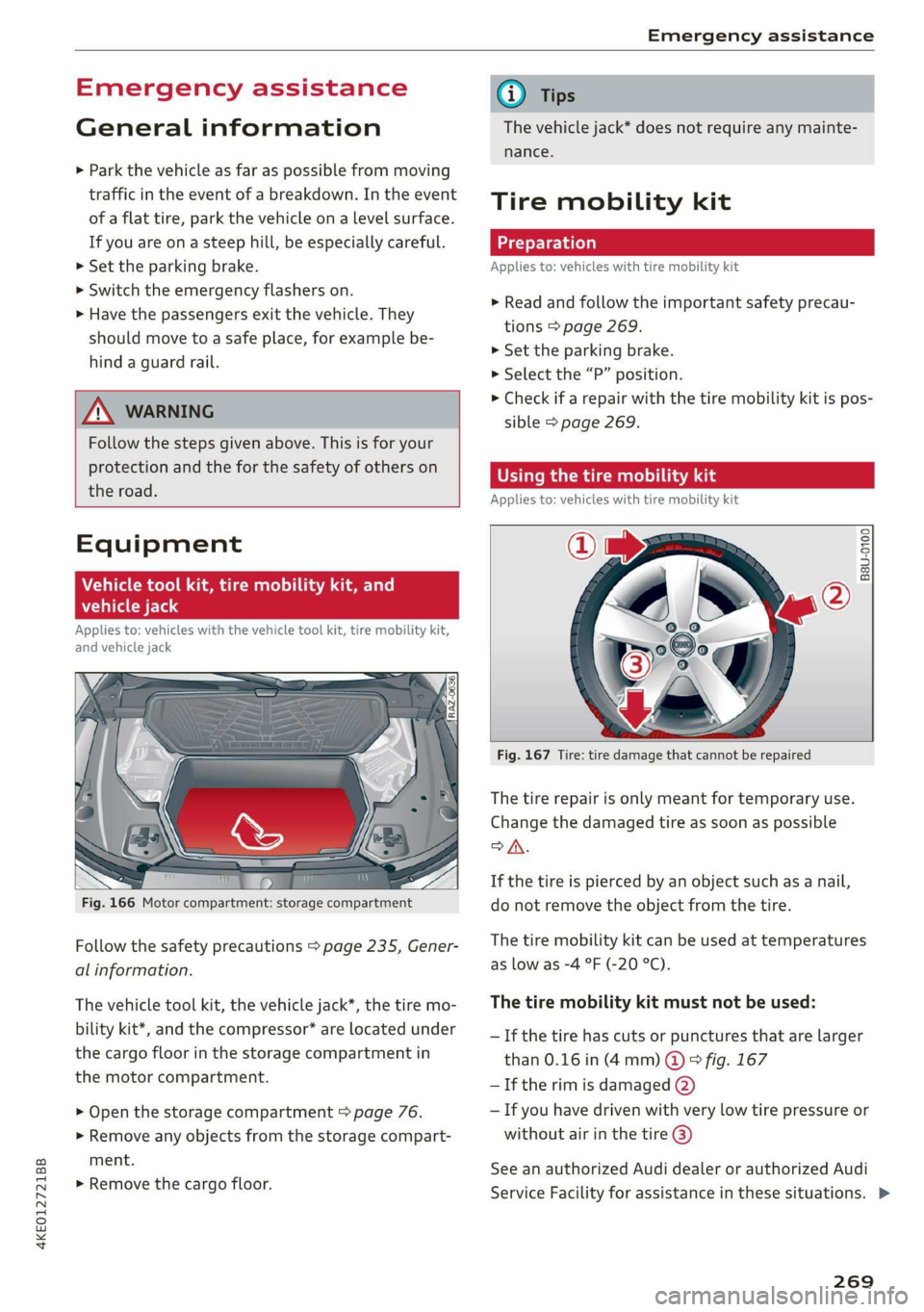
Fig. 166 Motor compartment: storage compartment
Follow the safety precautions > page 235, Gener-
al information.
The vehicle tool kit, the vehicle jack*, the tire mo-
bility kit*, and the compressor* are located under
the cargo floor in the storage compartment in
the motor compartment.
> Open the storage compartment > page 76.
> Remove any objects from the storage compart-
ment.
> Remove the cargo floor.
G) Tips
The vehicle jack* does not require any mainte-
nance.
Tire mobility kit
Applies to: vehicles with tire mobility kit
> Read and follow the important safety precau-
tions > page 269.
>» Set the parking brake.
> Select the “P” position.
> Check if a repair with the tire mobility kit is pos-
sible > page 269.
UE Raimi) LaLa
Applies to: vehicles with tire mobility kit
B8U-0100
Fig. 167 Tire: tire damage that cannot be repaired
The tire repair is only meant for temporary use.
Change the damaged tire as soon as possible
SA.
If the tire is pierced by an object such as a nail,
do not remove the object from the tire.
The tire mobility kit can be used at temperatures
as low as -4 °F (-20 °C).
The tire mobility kit must not be used:
—If the tire has cuts or punctures that are larger
than 0.16 in (4 mm) @ © fig. 167
— If the rim is damaged (2)
— If you have driven with very low tire pressure or
without air in the tire @)
See an authorized Audi dealer or authorized Audi
Service Facility for assistance in these situations. >
269
Page 273 of 310
4KE012721BB
Emergency assistance
> Inflate the tire to between 29 psi (200 kPA)
and 36 psi (250 kPA) and read the pressure on
the gauge.
> If this tire pressure is not reached, remove the
filler hose. Drive slowly approximately 33 feet
(10 m) forward or in reverse so that the sealant
can be distributed in the tire. Inflate the tire
again > A\.
ZA\ WARNING
— Read and follow the manufacturer's safety
precautions on the compressor and in the in-
structions on the bottle of sealant.
— Ifa tire pressure of 29 psi (200 kPA) cannot
reached after inflating for 6 minutes, then
the tire is too severely damaged. Do not con-
tinue driving.
— If the tire cannot be repaired with the tire
sealant, see an authorized Audi dealer or au-
thorized Audi Service Facility for assistance.
@) Tips
Do not operate the compressor for more than
six minutes continuously, or it can overheat.
Once the compressor has cooled, you can con-
tinue to use it.
CeeTnn eas]
Applies to: vehicles with tire mobility kit
> Affix the sticker that says "max. 50 mph (max.
80 km/h)" that is provided with the tire mobili-
ty kit within the driver's field of vision.
> Stop the vehicle after driving for about 10 mi-
nutes and check the tire pressure.
> If the tire pressure is lower than 19 psi (130
kPA), then the tire is too severely damaged. Do
not continue driving.
Nv WARNING
Pay attention to the following after repairing
the tire:
— Do not drive faster than 50 mph (80 km/h).
— Avoid hard acceleration or braking and driv-
ing fast around curves.
— The vehicle may become more difficult to
control.
— If the tire is too severely damaged, see an
authorized Audi dealer or authorized Audi
Service Facility for assistance.
(@) For the sake of the environment
You can give the used tire sealant bottle to an
authorized Audi dealer or authorized Audi
Service Facility for disposal.
G) Tips
Remember to obtain a new bottle of sealant
from an authorized Audi dealer or authorized
Audi Service Facility after repairing a tire.
Changing a tire
You must complete the preparation before
changing a tire.
> Read and follow the important safety precau-
tions > page 269.
> Set the parking brake.
> Select the “P” position.
> When towing a trailer: disconnect the trailer
from your vehicle.
> Lay out the vehicle tool kit > page 269 and the
spare tire > page 275.
> Applies to: vehicles with air suspension: Select
on the home screen: VEHICLE > Settings &
Service > Air suspension: wheel change.
> Switch the ignition off.
Z\ WARNING
When using the vehicle jack* on a road with a
steep hill or when offroad, you must take ex-
tra precautions to prevent the vehicle from
rolling. Use suitable objects to block the front
and
back of the wheel that is diagonal from
the wheel with the flat tire.
271
Page 276 of 310

Emergency assistance
Removing and installing a wheel
@ Rg tT
“% © oO
B8K-1477
Fig. 176 Wheel: alignment pin in the top hole
Removing a wheel
>» Remove the top wheel bolt completely using
the hex socket in the screwdriver handle from
the vehicle tool kit > fig. 175 and place it ona
clean surface.
> Then install the alignment pin from the vehicle
tool kit in the empty wheel bolt hole by hand
> fig. 176.
> Remove the rest of the wheel bolts.
>» Remove the wheel >(). The alignment pin re-
mains in the hole while doing this.
Installing a wheel
Read the directions on > page 274 when instal-
ling unidirectional tires.
> Slide the wheel on over the alignment pin >@.
> Install the wheel bolts and tighten them gently
using the hex socket.
» Remove the alignment pin and tighten the re-
maining wheel bolt.
> Carefully lower the vehicle using the vehicle
jack*.
> Tighten the wheel bolts in a diagonal pattern
using the wheel wrench.
274
The wheel bolts must be clean and loosen and
tighten easily. Check the contact surfaces for the
wheel and hub. Contaminants on these surfaces
must be removed before installing the wheel.
ZA\ WARNING
— Read and follow the important information
and notes under > page 250.
— Never use the hex socket in the screwdriver
handle to tighten the wheel bolts. Using the
hex socket will not achieve the required
tightening torque, which increases the risk
of an accident.
©) Note
When removing or installing the wheel, the
rim
could hit the brake rotor and damage the
rotor. Work carefully and have a second per-
son help you.
Unidirectional tires
A unidirectional tire profile is identified by arrows
on the tire sidewall that point in the running di-
rection. You must always maintain the specified
running direction. This is necessary to ensure the
tire's optimal performance in regard to adhesion,
running noise, and friction, and to reduce the risk
of
hydroplaning.
To benefit fully from the advantages of the uni-
directional tire design, you should replace faulty
tires as soon as possible and restore the correct
running direction on all of the tires.
> Reinstall the caps on the wheel bolts if necessa-
ry.
> Store the vehicle tool kit in its designated
place.
> If the removed wheel does not fit in the spare
wheel well, store it securely in the luggage
compartment > page 77.
> Check the tire pressure on the installed wheel
as soon as possible.
> Correct the tire pressure and store it in the MMI
=> page 262.
Page 278 of 310
Emergency assistance
overheating. Let the compressor cool down
for several minutes before using it again.
@) Tips
The ESC must not be limited or switched off
when driving with the collapsible spare tire
=> page 102.
Jump starting
The vehicle cannot be operated when the 12 Volt
vehicle battery is drained. Your vehicle must not
be jump started in this case. Contact an author-
ized Audi dealer or authorized Audi Service Facili-
ty.
@) Note
The vehicle battery must not be bridged using
conventional jump start methods.
— You may neither give nor receive a jump
start. Otherwise, the electronic systems in
the vehicle may be severely damaged.
—The jump start pins in the motor compart-
ment are designed specifically for qualified
technicians.
Towing
ee eeue lela)
You should only perform the steps that follow if
you have the necessary tools and technical ex-
pertise.
Towing requires a certain amount of practice. Au-
di recommends contacting a towing company to
have the vehicle transported.
You should only have your vehicle towed by an-
other vehicle when disabled in exceptional cir-
cumstances. Inexperienced drivers should not
tow.
Notes on towing
— The maximum permitted towing speed is 30
mph (50 km/h).
— The maximum permitted towing distance is 30
miles (50 km).
276
Additional information on towing with a tow
truck
The vehicle may only be towed with the front axle
raised. Do not wrap any chains or cables around
the brake lines.
Tow bar and towing cable
The vehicle can be towed with a tow bar or tow-
ing cable. Both drivers should be familiar with
the special considerations when towing, especial-
ly when using a towing cable.
Always make sure the traction force does not ex-
ceed the permitted level and there are no shock
loading conditions. There is always the risk of the
coupling becoming overloaded when driving off-
road.
For the most safety and security, drive with a tow
bar. You should use a towing cable only if a tow
bar is not available. Use a towing cable made of
synthetic elastic cable similar elastic material.
ZA WARNING
— Towing highly increases the risk of an acci-
dent, for example from colliding with the
towing vehicle.
—To reduce the risk of an accident, do not al-
low anyone to remain inside the vehicle
when it is being transported by a tow truck
or a special transporter.
@) Note
—Ifthe |_E| indicator light turns on, there is a
fault in the cooling circuit. The vehicle must
not be towed. The drive system can be se-
verely damaged.
— If normal towing is not possible, for exam-
ple if the transmission is faulty or if the
towing distance is greater than 30 miles
(50 km), then transport the vehicle on a
special carrier.
— If the vehicle is towed by a tow truck at the
axle that is not permitted, this can cause se-
vere damage to the transmission.
— Towing must not be used to charge the
high-voltage battery (recuperation), be-
cause this could result in major damages to
the tow vehicle or the vehicle being towed. >
Page 279 of 310
4KE012721BB
Emergency assistance
— The vehicle must not be tow started for
technical reasons.
@ Tips
— Switch Audi pre sense* off > page 153 when
loading the vehicle onto a vehicle carrier,
train, ship,
or other type of transportation,
or when towing the vehicle. This can prevent
an undesired intervention from the pre
sense* system.
— Follow the local legal regulations for tow-
ing.
Read and follow the important information under
=> page 276.
Preparations
> Only secure the towing cable or tow bar at the
designated towing loops > page 277,
=> page 278.
> Make sure the towing cable is not twisted. Oth-
erwise it could disconnect from the towing loop
while towing.
> Switch the emergency flashers on in both vehi-
cles > page 46. However, do not do this if it
prohibited by law.
Towing vehicle (front)
> Only start to drive when the towing cable is
taut.
> Press the brake pedal very carefully.
> Avoid sudden braking or driving maneuvers.
Vehicle being towed (rear)
> Make sure the ignition is switched on so that
the steering wheel is not locked and so that you
can use the turn signals, the horn, and the
windshield wipers if needed > A\.
> The brake booster only operates when the igni-
tion is switched on. Power steering only works
when the ignition is switched on and the vehicle
is rolling ). If the brake booster and power
steering are not functioning, you must press
D_ Requirement: the vehicle battery must have a sufficient
charge level.
the brake pedal much harder and use more
force to steer.
> Release the parking brake > page 93.
> Select the “N” selector lever position.
> Make sure the towing cable is always taut.
ZA\ WARNING
Never tow a vehicle using a tow bar or towing
cable if the vehicle does not have electrical
power.
Front towing loop
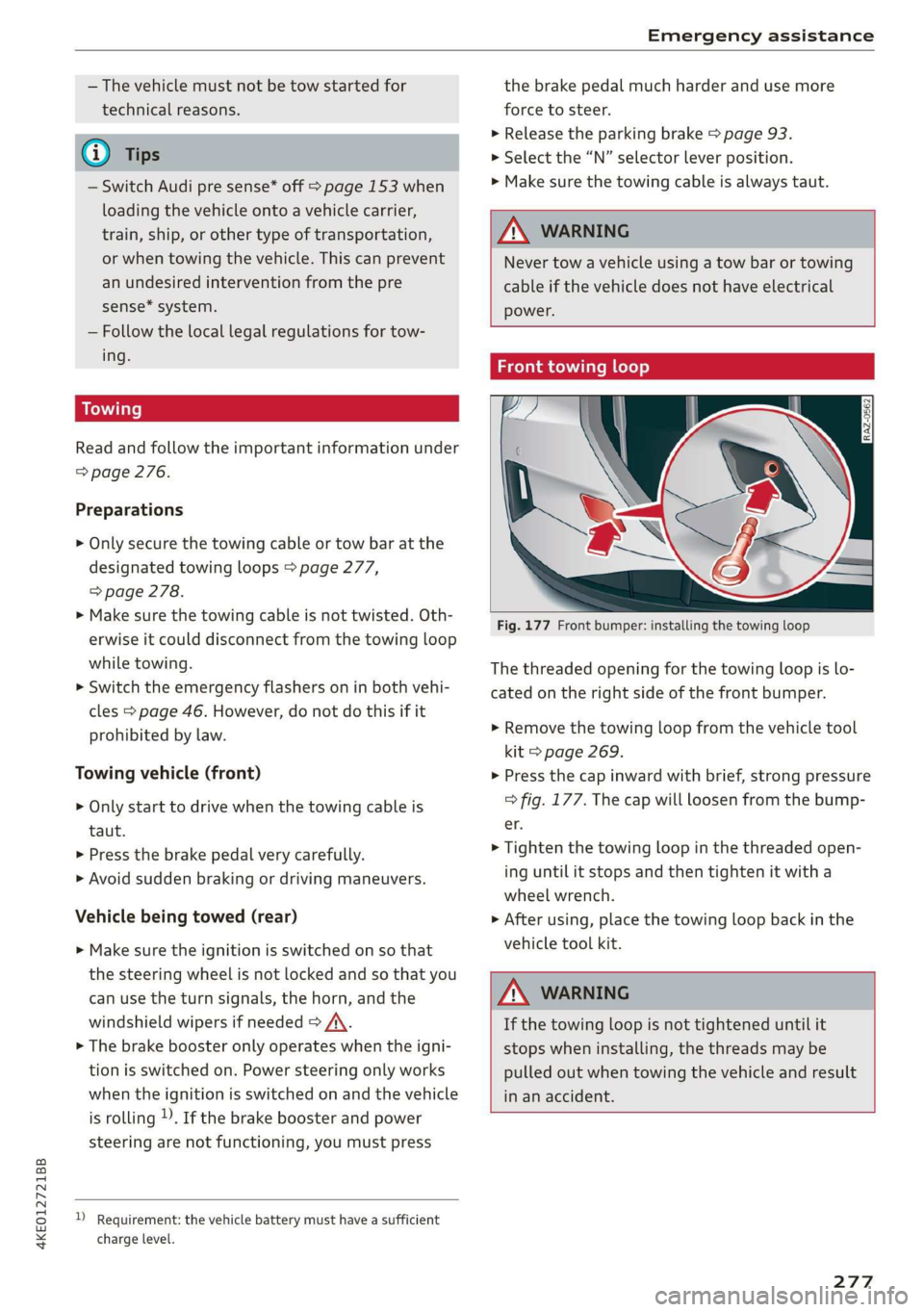
Fig. 177 Front bumper: installing the towing loop
The threaded opening for the towing loop is lo-
cated on the right side of the front bumper.
> Remove the towing loop from the vehicle tool
kit > page 269.
> Press the cap inward with brief, strong pressure
=> fig. 177. The cap will loosen from the bump-
er.
> Tighten the towing loop in the threaded open-
ing until it stops and then tighten it with a
wheel wrench.
> After using, place the towing loop back in the
vehicle tool kit.
ZA WARNING
If the towing loop is not tightened until it
stops when installing, the threads may be
pulled out when towing the vehicle and result
in an accident.
277
Page 283 of 310
4KE012721BB
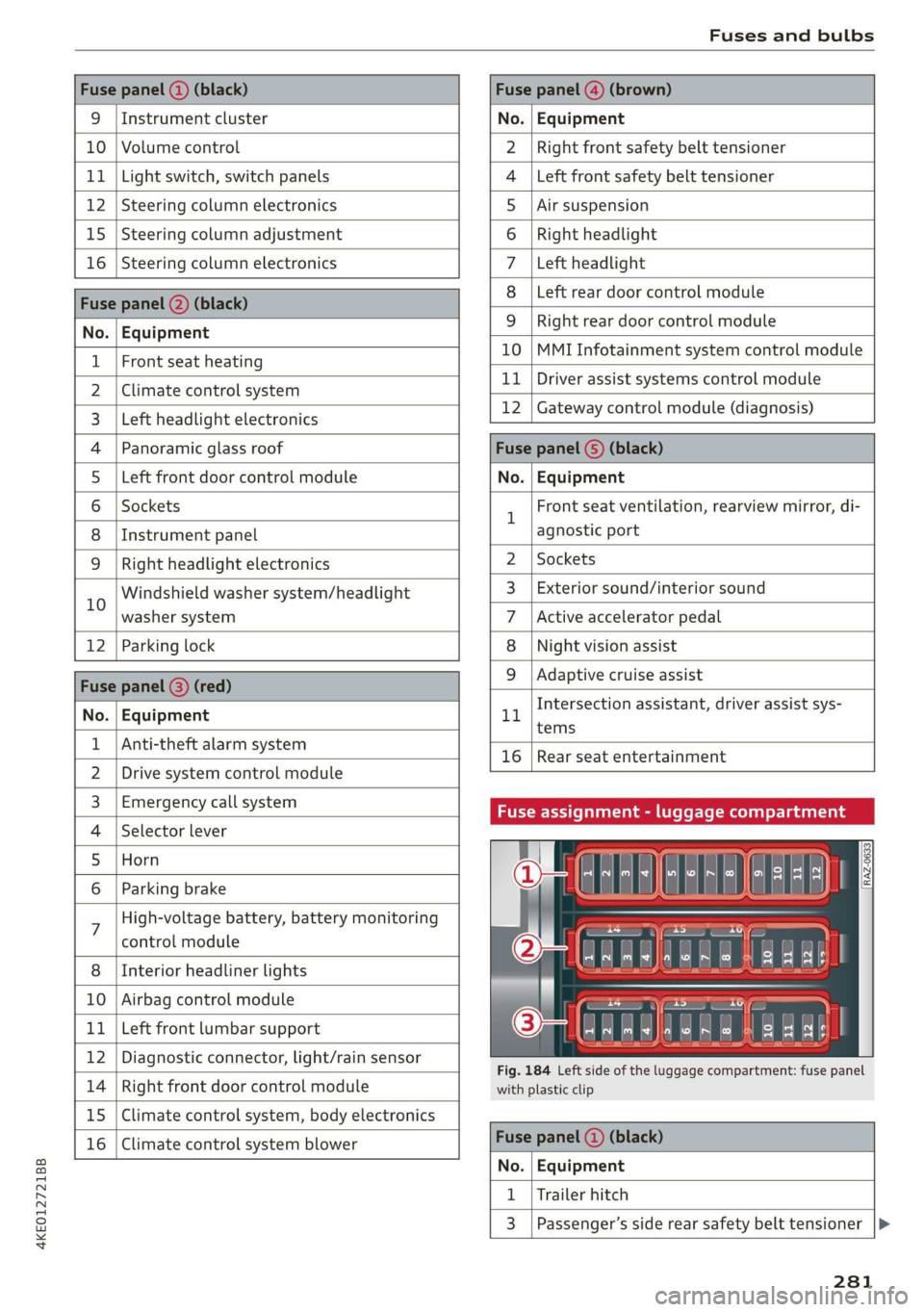
Fuses and bulbs
Fuse panel (2) (black) Fuse panel @) (brown)
9 |Instrument cluster No. | Equipment
10 | Volume control Right front safety belt tensioner
11 | Light switch, switch panels Left front safety belt tensioner
12 | Steering column electronics Air suspension
15 | Steering column adjustment Right headlight
16 | Steering column electronics Left headlight
Fuse panel (2) (black)
No. | Equipment
Left rear door control module
WOlOIN|
A)
Mm]
ALN
Right rear door control module
10 |MMI Infotainment system control module
1 |Front seat heating - -
2 |ehmmareconeral system 11 | Driver assist systems eantte) iene
Z | betvheadlightdlecironias 12 | Gateway control module (diagnosis)
4 |Panoramic glass roof Fuse panel 6) (black)
5 |Left front door control module No. | Equipment
6 | Sockets 1 Front seat ventilation, rearview mirror, di-
8 | Instrument panel agnostic port
9 | Right headlight electronics 2 | Sockets
iG Windshield washer system/headlight 3_| Exterior sound/interior sound
washer system 7 |Active accelerator pedal
12 | Parking lock 8 | Night vision assist
Fuse panel @ (red) 9 |Adaptive cruise assist
7 Intersection assistant, driver assist sys-
No. | Equipment 11
tems
1 {Anti-theft alarm system -
16 | Rear seat entertainment
2 |Drive system control module
3, | Emergency:callsystem Fuse assignment - luggage compartment
4 | Selector lever
5 |Horn 8
le
6 |Parking brake a
7 High-voltage battery, battery monitoring
control module
8 | Interior headliner lights
10 | Airbag control module
11 | Left front lumbar support
12 | Diagnostic connector, light/rain sensor
14 | Right front door control module
15 | Climate control system, body electronics
16 | Climate control system blower
7
ed ey
aE EEE
Fig. 184 Left side of the luggage compartment: fuse panel
with plastic clip
Fuse panel (4) (black)
No. | Equipment
1 | Trailer hitch
3 | Passenger’s side rear safety belt tensioner
281
Page 285 of 310

4KE012721BB
Data privacy
Data privacy
Image recording
Surrounding area monitoring
Applies to: vehicles with surrounding area monitoring
Some vehicle functions require the vehicle’s path
to be detected and evaluated. This is done by
cameras installed permanently on the vehicle
that detect objects in the vehicle's surroundings
(such as obstacles or guard rails). The live images
from the cameras are transmitted to the applica-
ble control module.
The camera images are transmitted to the appli-
cable control module and stored for processing.
The control module analyzes the current camera
image using image evaluation software. This im-
age evaluation software detects anonymized
technical measurements, such as distances to ob-
jects. The control module evaluates these techni-
cal measurements and makes it possible for the
assist systems to control the vehicle, if necessary.
Data memories
General information
Many electronic components in your vehicle con-
tain a data memory. These data memories store
technical information temporarily or permanent-
Vehicle control modules
while driving normally that is required by an au-
thorized Audi dealer or authorized Audi Service
Facility for diagnosis and repair purposes. Only
certain types of data are recorded for a very short
period of time if a control module has detected a
system event. No noises, conversations, or im-
ages will be recorded in the vehicle.
The data may include information such as the ve-
hicle speed, the direction of travel, and informa-
tion about the brake system, or also the behavior
of the restraint system in the event of an acci-
dent. The stored data can be exported and down-
loaded with special devices, which must be con-
nected directly to the vehicle.
On Board Diagnostic System (OBD)
There is a diagnostic connector socket in the driv-
er's side footwell to read out the various control
modules and the event data recorder. Data re-
garding the function and condition of the elec-
tronic control modules is stored in the event
memory. Only have an authorized Audi dealer or
authorized Audi Service Facility read out and de-
lete the event memory.
Z\, WARNING
— Incorrect use of the connection port for the
On Board Diagnostic System can cause mal-
functions, which can then result in accidents
and serious injuries.
— Only allow an authorized Audi dealer or au-
thorized Audi Service Facility to read out the
motor data.
s
|
B4H-0657
Fig. 185 Driver's side footwell: connection port for the On
Board Diagnostic System (OBD)
Your vehicle is equipped with electronic control
modules for various vehicle systems such as the
airbags. These vehicle control modules store data
Crash data recorder
Event Data Recorder
This vehicle is equipped with an Event Data Re-
corder (EDR). The main purpose of an EDR is to
record, in certain crash or near crash-like situa-
tions, such as an airbag deployment or hitting a
road obstacle, data that will assist in understand-
ing how a vehicle's system performed. The EDR is
designed to record data related to vehicle dynam-
ics and safety systems for a short period of time,
typically 30 seconds or less. The EDR in this vehi-
cle is designed to record such data as: >
283
Page 286 of 310
Data privacy
— How various systems in your vehicle were oper-
ating;
— Whether or not the driver and passenger safety
belts were buckled/fastened;
— How far (if at all) the driver was depressing the
accelerator and/or brake pedal; and,
— How fast the vehicle was traveling.
These data can help provide a better understand-
ing of the circumstances in which crashes and in-
juries occur. NOTE: EDR data are recorded by your
vehicle only if a non-trivial crash situation occurs;
no data are recorded by the EDR under normal
driving conditions and no personal data (e.g.
name, gender, age, and crash location) are re-
corded. However, other parties, such as law en-
forcement, could combine the EDR data with the
type of personally identifying data routinely ac-
quired during a crash investigation.
To read data recorded by an EDR, special equip-
ment is required, and access to the vehicle or the
EDR is needed. In addition to the vehicle manu-
facturer, other parties, such as law enforcement,
that have the special equipment, can read the in-
formation if they have access to the vehicle or the
EDR.
Assist system monitor
This vehicle is equipped with an Assist System
Monitor (ASM). The ASM collects data that is not
stored by the EDR in the event of an accident. The
main task of the ASM is to make it possible to un-
derstand the role and the behavior of the assist
systems in these accident situations. In addition
to the data that the EDR stores, the ASM records
data related to the assist systems starting sever-
al seconds before the accident or near-accident.
The data collected by ASM depends on the equip-
ment and may include the following information:
status information of the assist systems (for ex-
ample, if they are switched on or off, system
events, etc.), control interventions (for example,
by ESC, ABS, Audi pre sense’, etc.), and assist
systems settings (such as speed settings).
Special devices and access to the vehicle or to the
ASM are necessary in order to read the data from
the ASM memory. In addition to the vehicle man-
ufacturer, third parties such as law enforcement
284
authorities can also read and analyze the stored
data if they have access to the vehicle or to the
ASM.
Data usage
Audi can read out the information stored in the
data memories or similar data, or give this infor-
mation to third parties, especially in the follow-
ing situations:
— If the vehicle owner or lessee agrees
— If there is an official request from the police
— Ifa court or authorities request it
If legally permitted, Audi can also use the data
for analysis of vehicle operation and safety per-
formance or provide this data to third parties for
research purposes.
Transmitted information
aN Cla ata ae fy
>
Applies to: MMI: Select on the home screen:
SETTINGS > (Data management) > Privacy.
Requirement: the ignition must be switched on.
Location, vehicle, and personal data are transmit-
ted when using Audi connect services.
Allowing sending of data
When this function is switched on, the data mod-
ule for using all Audi connect services is active.
When this function is switched off, the data con-
nection will be limited or deactivated depending
on vehicle equipment. The majority of Audi con-
nect
services will not be available.
The following interfaces are not affected by this
setting: Bluetooth, Bluetooth Low Energy (BLE),
Wi-Fi connection, Audi smartphone interface
(ASI), Near Field Communication (NFC), charging
communication (e-tron), Electronic Toll Collect
(ETC), if equipped.
@) Note
You are responsible for all precautions taken
for data protection, anti-virus protection, and >
Page 296 of 310
Index
Blinds
refer to Sunshade (roof) ............00-5 40
Block
route................ 00 cece eee 202
BLOWER. « sees su comers a enmeane wa nents a = swine = 82
Bluetooth
Audio player........... 0.00 e eee eee 218
Connecting a mobile device............ 170
Deleting
ardevice wii s 2 isnsins ov sucrose « sence 233
Device overVieW...... 6c eee ee eee eee 232
Disconnecting a device................ 233
Displaying profiles.................... 233
Searching fora device...............-. 233
Selecting adevice.............2eeeeee 233
Specifying a favorite.................. 233
BOOStTUNCTION owas x cee 2 sneer 2 eo ces ¢ 89
Brake fluid
Checking the brake fluid level........... 239
Brak Sicnes 2 x sree: vo cmv ow orien ow soe © o ooEKS 92
Brakerassist. scsmrs « acess» oi soz 4 0 omens « 102
Brake fluid. .................0..0000. 239
Emergency braking function............. 95
New brake pads..............---00000- 92
Break-in security feature................. 32
Breaking in
New brake pads............0.20200000- 92
NGW TIRES: « « noms 2 s saros & 9 cate gs eam a 250
Browser
refer to Mediacenter................4. 222
Bulb replacement.............--22+-05- 282
Business: address). «i ijei as jana a scan a va 202
Cc
California Proposition 65 Warning........ 235
Batteryspecific... =. eccs s sive s ween as: 241
GALLLISt « wea ¢ 2 aeee xs meee oe eee s Bee ee 174
Capacities
Fuebtanike, « secs 2 a oasan oo ssamon o wana oo ove 291
Washer fluid reservoir................- 291
Cangowmatc © « conse ws aussins 6 0 secs a a amass We ae 80
Cargoinets: « s soma 2s memew + wauim a 3 mam 6 @ oarae 80
Car key « s eeu oy ews y oeE 6 2 ween 6 Ewes 33
Car phone
Serialinumber(IMED) « wsscsce ao soteane ao sanaia 181
Switching on... ....... eee eee eee 181
Using the car phone function........... 169
Car WASH: = sass 5 x eee 5 feats sb eG EE 263
294
Cell phone
refer to Telephone...........-0e eee eae 169
Cell phone compartment
refer to Audi phone box............... 171
Central
locking ...... 0. cece eee eee eee 29
AUTO LOCK: » geese + sunems 2 seene & 3 donee & = Be 29
Convenience key « sscsu © cvenesie © erase wo vnscem 34
Convenience opening and closing......... 40
Luggage compartment lid............... 36
Mechanically unlocking and locking....... 32
Messages... 1.6... ce eee cece eee eee 31
Remote control keys: ss esas ss eves os ees 34
SettN's 6 e wanes a a saws «wo ones vo meen + 8 o8TH 30
Vehicle key... 6... ccc ee eee eee eee 34
Central locking switch.............000005 31
Centificat onto» a sess + x aneans ao somes o 6 mmm 289
Changing lightibulbs'. « ccs ss sew s 6 sesso 282
Charging
refer to Power sourceS............00 000s 75
Charging clip
refer to Wall mount clip............... 119
Charging display................---0000- 109
Charging the battery (mobile devices). 171, 220
Charging times. « sass. se savin s 2 wees © 2 sree 106
Child safety lock
Climate control system controls in the rear. 39
POWER WINK OWS inc ¢ & cme 5 ores 5 v eee 39
Rear doorsten « swe so mim 2 women n= ame wD 39
Child
safety seats........ 0... ce eee ee eee 69
Securing to the top tether anchor........ 72
Securing with a safety belt.............. 72
Securing with LATCH. ss sses ss eee se eee 71
Gl@aNiNG ¢ sere « s ewes 5 o eee se eee ce ees 263
Cleaning Alcantara.............-..0000. 266
Cleaning artificial leather............... 266
Cleaning carbon components........ 265, 266
Cleaning controls..............00 eee eee 266
Cleaning decorative parts/trim........... 265
Cleaning plastic parts.................. 265
Cleaning textiles: s ws + wees v ween oe eee 266
Climate control system ..............004. 81
Climate control system controls in the rear
Child safetylotk.o icvc os soci © sean © wows 39
Closing
Automatic luggage compartment lid...... 36
Convenience closing................045 40
Page 298 of 310
Index
Drive select
refer to Audi drive select.............0.. 98
Drive system. .... 20.2... 90
Audi drive select . cans 4 cicag at eaan ea ies 98
Emergency Off wv 2 x acne ov wews ye eeu 9 86
Switching on and off...............2005 86
Driving: OwntHills: cess» everene sania ee enero a 96
Driving programs « & sews 6 «eee os ees 88, 146
Driving through water...............004. 96
Driving time’: « s cose ¢ « eewy s nares Heme a sg 14
Driving tips
Driving through water...............00. 96
Efficient driving...............0000000. 91
Offrodd GriVinig < ees. yess as emus a wean ae 96
Uphill and downhill.................00. 96
Drivinig:up Hills: ¢ seus se oss ye ree yo ees 96
Dust filter
refer to Pollutant filter................. 84
DVD drive (media drives)................ 218
E
E-mail
MessageiOptionstn:. + « sss « « snemeue © « steceas + 179.
SettingS ... 0.6... cece eee eee 179
EDL
refer to Electronic Differential Lock...... 101
EDR
Event Data Recorder...............0.. 283
Efficiency assist =. « < sce: ss epee ye ees eee 135
Electrical system ..........-- 0s eee eee ee 239
Electricity
PEFer TO ENC cr » o san & 2 ees ¢ epee os 104
Electric motor
COOLANE wwe co aveana wa cana a 6 acenate © a anavar a 237
Electric ranges i « sca so were 6 ewe aw maa 204
Electromechanical parking brake.......... 93
Electronic Differential Lock.............. 102
Electronic immobilizer.............0.002. 33
Electronic Stabilization Control........... 101
Embedded SIM card................0055 185
Emergency assist.................0000- 158
Emergency assistance .......... 000s sees 269
Emergency braking function.............. 95
Emergency calliss so sisi se oesin so een 176,191
Emergency flasherst: « + ass 2 news ¢ wana ess 46
296
Emergency Mode «sce s veve ee ences ee eevee 90
Emergency operation
Doors... 2... ee eee 32
Luggage compartment lid............... 38
Panoramic glass roof...............2.4. 41
Energy
Current COMSUMPTION:. « 6 siesess s 6 eewcee & 6 soem 14
Reducing consumption................. 91
Energy recovery... 22.0.0 cece eee eee eee 90
Engine braking effect
refer to Recuperation................4. 90
Engine start system. ..............0.000. 87
Entry/exit lighting................--000- 46
ENMtry ASSISTANCE. « « senciw » 6 ssorane 0 canner 4 0 esos 58
also refer to Exit assistance............. 58
eSIM
refer to Embedded SIM card............ 185
Evasive steering assist.................- 152
Event Data Recorder (EDR).............. 283
Exit assistance... 0... eee eee eee 58
Exit warning.................0.00.00005 156
Exterior lighting.................022-00. 44
Exterior MIPPO0S ciwie so ccicee oo cere 6 weve oo 48
Folding settings ..............0000 0000s 30
External voice operation................. 25
F
Factory default settings
Multi Media Interface...............4. 232
Fast forwarding and rewinding (media file). 221
Fast forwarding (media files) ............ 221
FaStnOute’s a seca oo mee «2 mmm 9 6 em © eee 194
Favorites
Bluetooth.............. 000.0 e ee eee 233
NaVIGStOl sss « wes & > wee o x seme ¢ 5 ee 196
Telephone wssics so caves oo ssasens oo arenes 9 ¥ eee 174
Federal Communications Commission (FCC) . 289
File formats (media drives) .............. 227
FOG (WIRdOWS) zx x + sax © s coun ¢ 5 eee x 2 oe 83
Folding the rear seats.............-..00- 79
Footwell temperature............0..000. 84
For the sake of the environment
LOOKS ccs = = some 5 ¢ ene a eee x ee ee 235
Forward gear
FEPErtO Gears « easu ¢ s awe ¢ ¢ wees se wEEN 88