steering wheel AUDI E-TRON 2019 Workshop Manual
[x] Cancel search | Manufacturer: AUDI, Model Year: 2019, Model line: E-TRON, Model: AUDI E-TRON 2019Pages: 310, PDF Size: 81.91 MB
Page 224 of 310
Media
> To switch between radio and media, select the
button > Switch to radio/Switch to media.
@ Tips
— For safety reasons, the video image is only
displayed when the vehicle is stationary. On-
ly the sound from the video plays while driv-
ing.
— Applies to: multifunction steering wheel:
Depending on the selected function, opera-
tion through the MMI may be required.
3 g 5
Ig BS
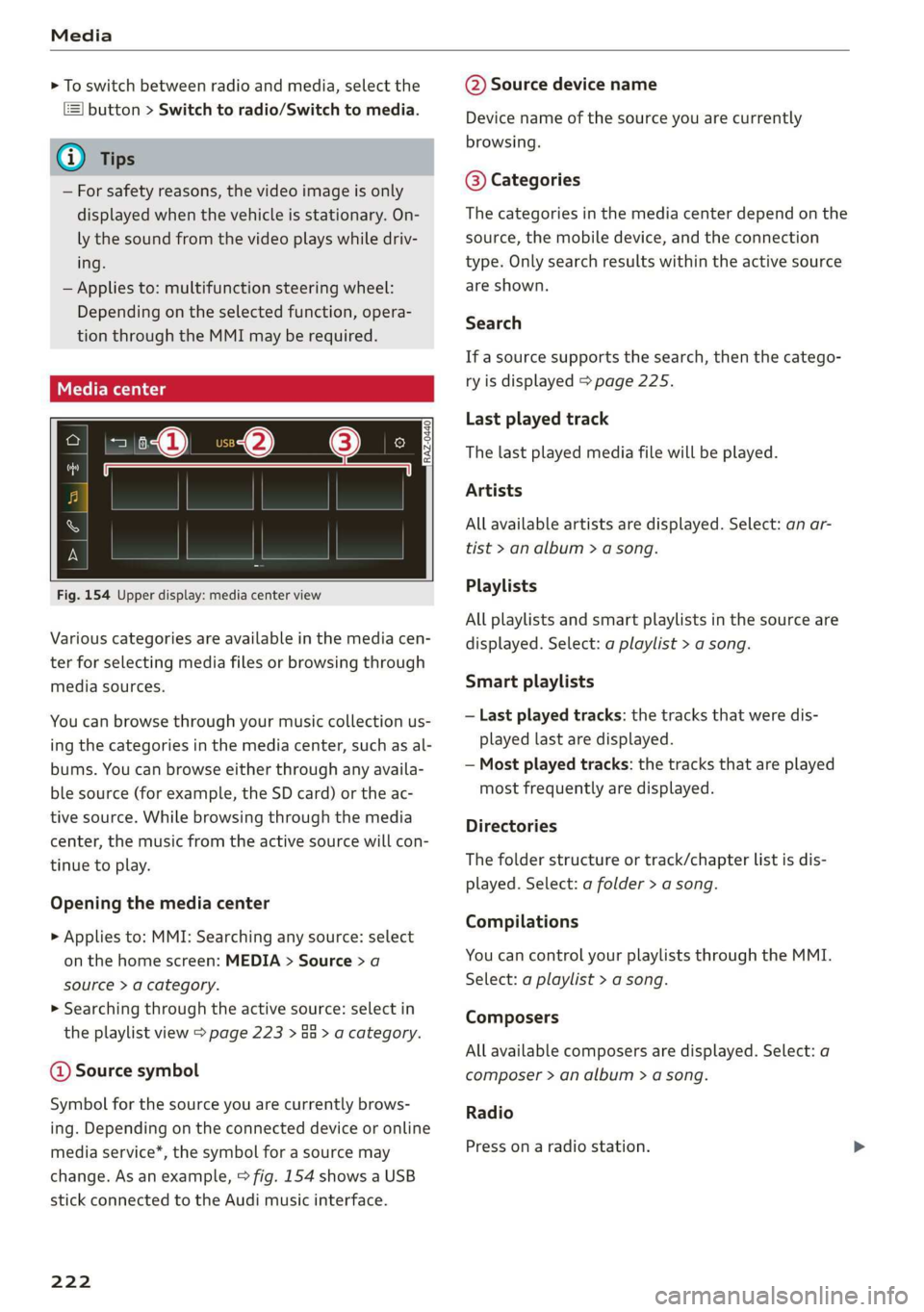
Fig. 154 Upper display: media center view
Various categories are available in the media cen-
ter for selecting media files or browsing through
media sources.
You can browse through your music collection us-
ing
the categories in the media center, such as al-
bums. You can browse either through any availa-
ble source (for example, the SD card) or the ac-
tive source. While browsing through the media
center, the music from the active source will con-
tinue to play.
Opening the media center
> Applies to: MMI: Searching any source: select
on the home screen: MEDIA > Source > a
source > a category.
> Searching through the active source: select in
the playlist view > page 223 > an > a category.
@ Source symbol
Symbol for the source you are currently brows-
ing. Depending on the connected device or online
media service*, the symbol for a source may
change. As an example, > fig. 154 shows a USB
stick connected to the Audi music interface.
222
@ Source device name
Device name of the source you are currently
browsing.
@® Categories
The categories in the media center depend on the
source, the mobile device, and the connection
type. Only search results within the active source
are shown.
Search
If a source supports the search, then the catego-
ry is displayed > page 225.
Last played track
The last played media file will be played.
Artists
All available artists are displayed. Select: an ar-
tist
> an album > a song.
Playlists
All playlists and smart playlists in the source are
displayed. Select: a playlist > a song.
Smart playlists
— Last played tracks: the tracks that were dis-
played last are displayed.
— Most played tracks: the tracks that are played
most frequently are displayed.
Directories
The folder structure or track/chapter list is dis-
played. Select: a folder > a song.
Compilations
You can control your playlists through the MMI.
Select: a playlist > a song.
Composers
All available composers are displayed. Select: a
composer > an album > a song.
Radio
Press ona radio station.
Page 235 of 310
4KE012721BB
Additional settings
the mobile device is connected with the vehicle’s
Wi-Fi hotspot.
Audi smartphone interface
You can connect your smartphone to the MMI
=> page 229.
@) Note
Always follow the information found in
=> page 184.
Connection options
Connecting a device
Requirement: Bluetooth visibility must be acti-
vated in the MMI > page 232 and mobile device.
> Select a menu item, for example Telephone 1.
> To search for and connect your mobile device,
press the New connection button > page 170.
Selecting a connected device
> Select a menu item, for example Telephone 1.
> Select your mobile device from the list of con-
nected devices. The connection will be made.
Disconnecting a connected device
> Select a menu item, for example Telephone 1.
> Press on the connected mobile device. The se-
lected device will be disconnected from the
MMI.
Additional options
Depending on the selected function, additional
options
may be available.
> Press and hold a Bluetooth device until the Op-
tions menu is displayed.
> Select one of the items in the menu.
Bluetooth profiles
You can switch desired profiles on or off.
Favorite*
To set a paired mobile device as the default
phone, activate this function.
When the mobile device is in range and the Blue-
tooth function on the mobile device and in the
MMI is switched on, the default phone will be
given priority over the other Bluetooth devices
and will be connected directly to the MMI.
Legal information
General information
Information on the software licenses can be
found online at www.audi.com/softwareinfo.
ieee mm awe
> Applies to: MMI: Select on the home screen:
SETTINGS > General.
License subscription
Version information
Legal information
Possible options:
— Software information
— About Audi connect
Audi smartphone interface
Applies to: vehicles with Audi smartphone interface
Requirement: a smartphone must be connected
to the MMI page 229.
> Applies to: MMI: Select on the home screen:
SETTINGS > Connected devices > Audi smart-
phone interface.
> Press and hold an item until the associated op-
tions are displayed.
> Press Legal notes.
sida area
Requirement: the vehicle must be stationary.
> Applies to: vehicles with multifunction steering
wheel: Select in the instrument cluster: Vehicle
functions tab > page 12.
> Press the [=] button on the multifunction steer-
ing wheel until the display appears.
233
>
Page 254 of 310
Wheels
not permitted can lead to ve-
hicle damage or accidents.
—If you install wheel covers on
the vehicle, make sure they al-
low enough air circulation to
cool the brake system. If they
do not, this could increase the
risk of an accident.
Tire wear and damage
B4H-0415
a
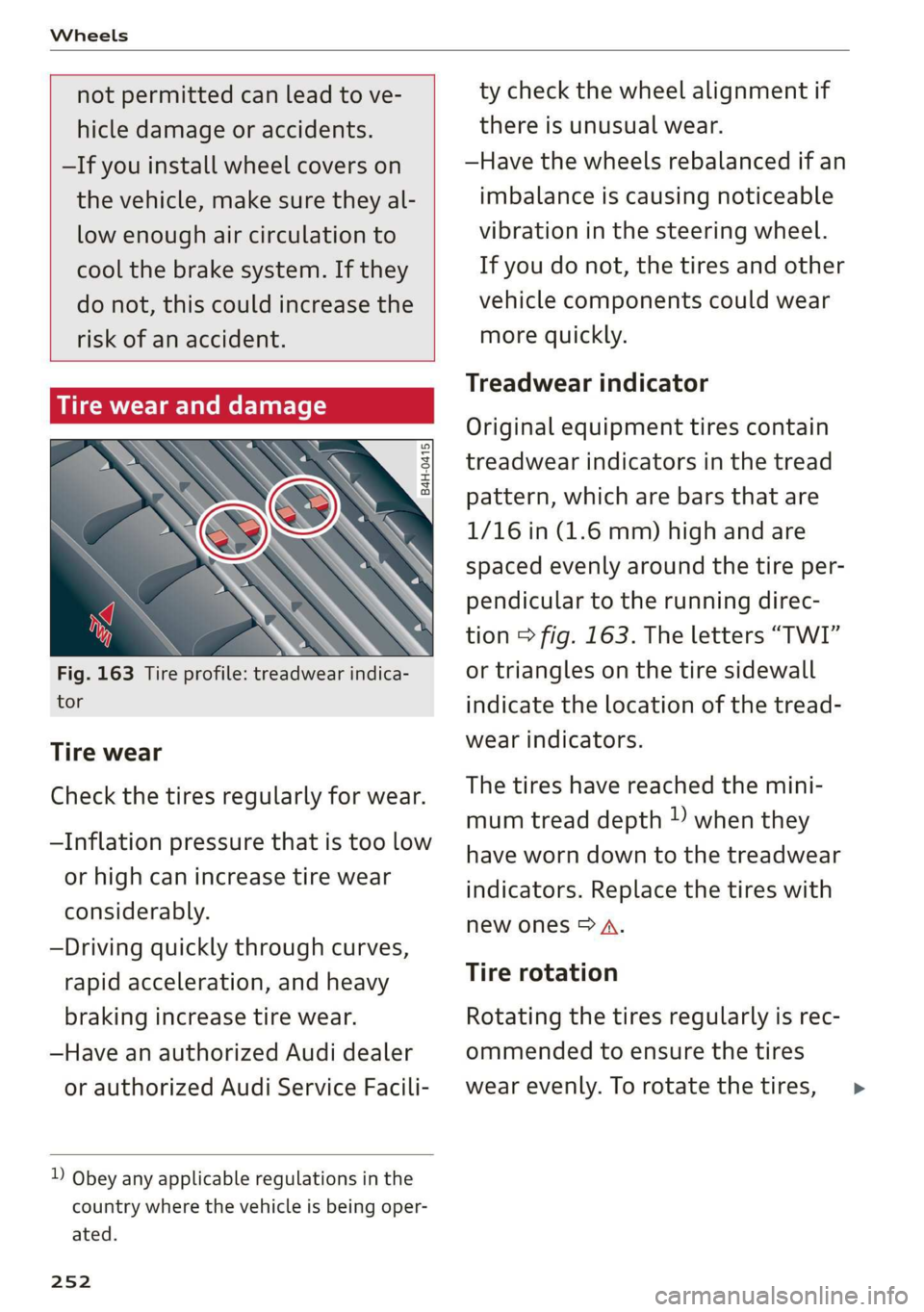
Fig. 163 Tire profile: treadwear indica-
tor
Tire wear
Check the tires regularly for wear.
—Inflation pressure that is too low
or high can increase tire wear
considerably.
—Driving quickly through curves,
rapid acceleration, and heavy
braking increase tire wear.
—Have an authorized Audi dealer
or authorized Audi Service Facili-
) Obey any applicable regulations in the
country where the vehicle is being oper-
ated.
252
ty check the wheel alignment if
there is unusual wear.
—Have the wheels rebalanced if an
imbalance is causing noticeable
vibration in the steering wheel.
If you do not, the tires and other
vehicle components could wear
more quickly.
Treadwear indicator
Original equipment tires contain
treadwear indicators in the tread
pattern, which are bars that are
1/16 in (1.6 mm) high and are
spaced evenly around the tire per-
pendicular to the running direc-
tion > fig. 163. The letters “TWI”
or triangles on the tire sidewall
indicate the location of the tread-
wear indicators.
The tires have reached the mini-
mum tread depth !) when they
have worn down to the treadwear
indicators. Replace the tires with
new ones > A.
Tire rotation
Rotating the tires regularly is rec-
ommended to ensure the tires
wear evenly. To rotate the tires, >
Page 260 of 310
Wheels
— Always have damaged rims repaired by an
authorized Audi dealer or authorized Audi
Service Facility. Never repair or disassemble
rims yourself, because this increases the risk
of an accident.
Loose wheel warning
Applies to: vehicles with loose wheel warning
Within the limits of the system, the loose wheel
warning in the instrument cluster warns you if
one or more wheels are loose.
Using the ABS sensors, the loose wheel warning
system compares the vibration characteristics of
the individual tires. If one or more wheels are
loose, it will be indicated in the instrument clus-
ter display with the fi indicator light and a mes-
sage. If only one wheel is affected, the location
of that wheel will be indicated.
Messages
fl Wheel bolts loose. Please safely stop the ve-
hicle and check all wheel bolts!
Loose wheel warning for at least one wheel > A\.
Check the wheel bolts on all wheels with the
wheel wrench (vehicle tool kit). Have the tighten-
ing specification checked as soon as possible with
a torque wrench. Drive carefully until then. For
the correct tightening specification, see
=> page 274, Finishing.
fl Wheel assessment active. Please continue
driving carefully
After this message appears and you have checked
the wheel bolts, the assessment phase begins
when the vehicle is in motion. This may take sev-
eral minutes.
fl Loose wheel warning: malfunction! See
owner's manual
There is a system malfunction. Drive immediately
to an authorized Audi dealer or authorized Audi
Service Facility to have the malfunction repaired.
258
Z\ WARNING
Wheel bolts that are tightened incorrectly can
become loose and result in loss of vehicle con-
trol, which increases the risk of an accident.
— If a message appears, reduce your speed im-
mediately and avoid any hard steering or
braking maneuvers. Stop as soon as possible
and check the wheel bolts.
— Check your wheels for damage. Have the
damaged wheels checked and/or replaced
immediately by an authorized Audi dealer or
authorized Audi Service Facility.
— Under certain conditions (such as a sporty
driving style, winter conditions, or unpaved
roads), the message may be delayed.
— The driver is responsible for ensuring that
the wheels are attached correctly.
G) Tips
— The loose wheel warning system can also
stop working when there is an ESC malfunc-
tion.
— Using snow chains may result in a system
malfunction.
Winter tires significantly improve the vehicle's
handling when driving in winter conditions. Be-
cause of their construction (width, compound,
tread pattern), summer tires provide less traction
on ice and snow.
> Use winter tires on all four wheels.
> Only use winter tires that are approved for your
vehicle.
> Please note that the maximum permitted
speed may be lower with winter tires > A\ in
General information on page 243. An author-
ized Audi dealer or authorized Audi Service Fa-
cility can inform you about the maximum per-
mitted speed for your tires.
> Check the tire pressure after installing wheels
= page 253.
The effectiveness of winter tires is reduced great-
ly when the tread is worn down to a depth of
0.16 in (4 mm). The characteristics of winter tires >
Page 263 of 310
4KE012721BB
Wheels
check your tires as soon as possible, and inflate
them to the proper pressure. Driving ona signifi-
cantly under-inflated tire causes the tire to over-
heat and can lead to tire failure. Under-inflation
also reduces fuel efficiency and tire tread life,
and may affect the vehicle's handling and stop-
ping ability.
Please note that the TPMS is not a substitute for
proper tire maintenance, and it is the driver's re-
sponsibility to maintain correct tire pressure,
even if under-inflation has not reached the level
to trigger illumination of the TPMS low tire pres-
sure telltale.
Your vehicle has also been equipped with a TPMS
malfunction indicator to indicate when the sys-
tem is not operating properly. The TPMS mal-
function indicator is combined with the low tire
pressure telltale. When the system detects a
malfunction, the telltale will flash for approxi-
mately one minute and then remain continuously
illuminated. This sequence will continue upon
subsequent vehicle start-ups as long as the mal-
function exists.
When the malfunction indicator is illuminated,
the system may not be able to detect or signal
low tire pressure as intended. TPMS malfunctions
may occur for a variety of reasons, including the
installation of replacement or alternate tires or
wheels on the vehicle that prevent the TPMS
from functioning properly. Always check the
TPMS malfunction telltale after replacing one or
more tires or wheels on your vehicle to ensure
that the replacement or alternate tires and
wheels allow the TPMS to continue to function
properly.
a Meee ee Muir Melee
appears
The tire pressure indicator in the instrument
cluster informs you if the tire pressure is too low
or if there is a system malfunction.
Using the ABS sensors, the tire pressure monitor-
ing system compares the tire tread circumference
and vibration characteristics of the individual
tires. If the pressure changes in one or more
tires, this is indicated in the instrument cluster
display with an indicator light @ and a message.
If only one tire is affected, the location of that
tire will be indicated.
The tire pressures must be stored again each
time you change the pressures (switching be-
tween partial and full load pressure) or after
changing or replacing a tire on your vehicle
=> page 262. The tire pressure monitoring system
only monitors the tire pressure you have stored.
Refer to the tire pressure label for the recom-
mended tire pressure for your vehicle
=> page 253, fig. 165.
Tire tread circumference and vibration character-
istics can change and cause a tire pressure warn-
ing if:
— The tire pressure in one or more tires is too low
— The tires have structural damage
— The tire was replaced or the tire pressure was
changed and it was not stored > page 262
— Tires that are only partially used are replaced
with new tires
Indicator lights
@ - Loss of pressure in at least one tire > A\.
Check the tires and replace or repair if necessary.
Check and correct the pressures of all four tires
and store the pressure again > page 262.
is (Tire Pressure Monitoring System) Tire pres-
sure: malfunction! See owner's manual. If i
appears after switching the ignition on or while
driving and the @ indicator light in the instru-
ment cluster blinks for approximately one minute
and then stays on, there is system malfunction.
Try to store the correct tire pressures
= page 262. In some cases, you must drive for
several minutes after storing the pressures until
the indicator light turns off. If the indicator light
does turn off or turns on again after a short peri-
od of time, drive to an authorized Audi dealer or
authorized Audi Service Facility immediately to
have the malfunction corrected.
ZX WARNING
— If the tire pressure indicator appears in the
display, reduce your speed immediately and
avoid any hard steering or braking
261
Page 279 of 310
4KE012721BB
Emergency assistance
— The vehicle must not be tow started for
technical reasons.
@ Tips
— Switch Audi pre sense* off > page 153 when
loading the vehicle onto a vehicle carrier,
train, ship,
or other type of transportation,
or when towing the vehicle. This can prevent
an undesired intervention from the pre
sense* system.
— Follow the local legal regulations for tow-
ing.
Read and follow the important information under
=> page 276.
Preparations
> Only secure the towing cable or tow bar at the
designated towing loops > page 277,
=> page 278.
> Make sure the towing cable is not twisted. Oth-
erwise it could disconnect from the towing loop
while towing.
> Switch the emergency flashers on in both vehi-
cles > page 46. However, do not do this if it
prohibited by law.
Towing vehicle (front)
> Only start to drive when the towing cable is
taut.
> Press the brake pedal very carefully.
> Avoid sudden braking or driving maneuvers.
Vehicle being towed (rear)
> Make sure the ignition is switched on so that
the steering wheel is not locked and so that you
can use the turn signals, the horn, and the
windshield wipers if needed > A\.
> The brake booster only operates when the igni-
tion is switched on. Power steering only works
when the ignition is switched on and the vehicle
is rolling ). If the brake booster and power
steering are not functioning, you must press
D_ Requirement: the vehicle battery must have a sufficient
charge level.
the brake pedal much harder and use more
force to steer.
> Release the parking brake > page 93.
> Select the “N” selector lever position.
> Make sure the towing cable is always taut.
ZA\ WARNING
Never tow a vehicle using a tow bar or towing
cable if the vehicle does not have electrical
power.
Front towing loop
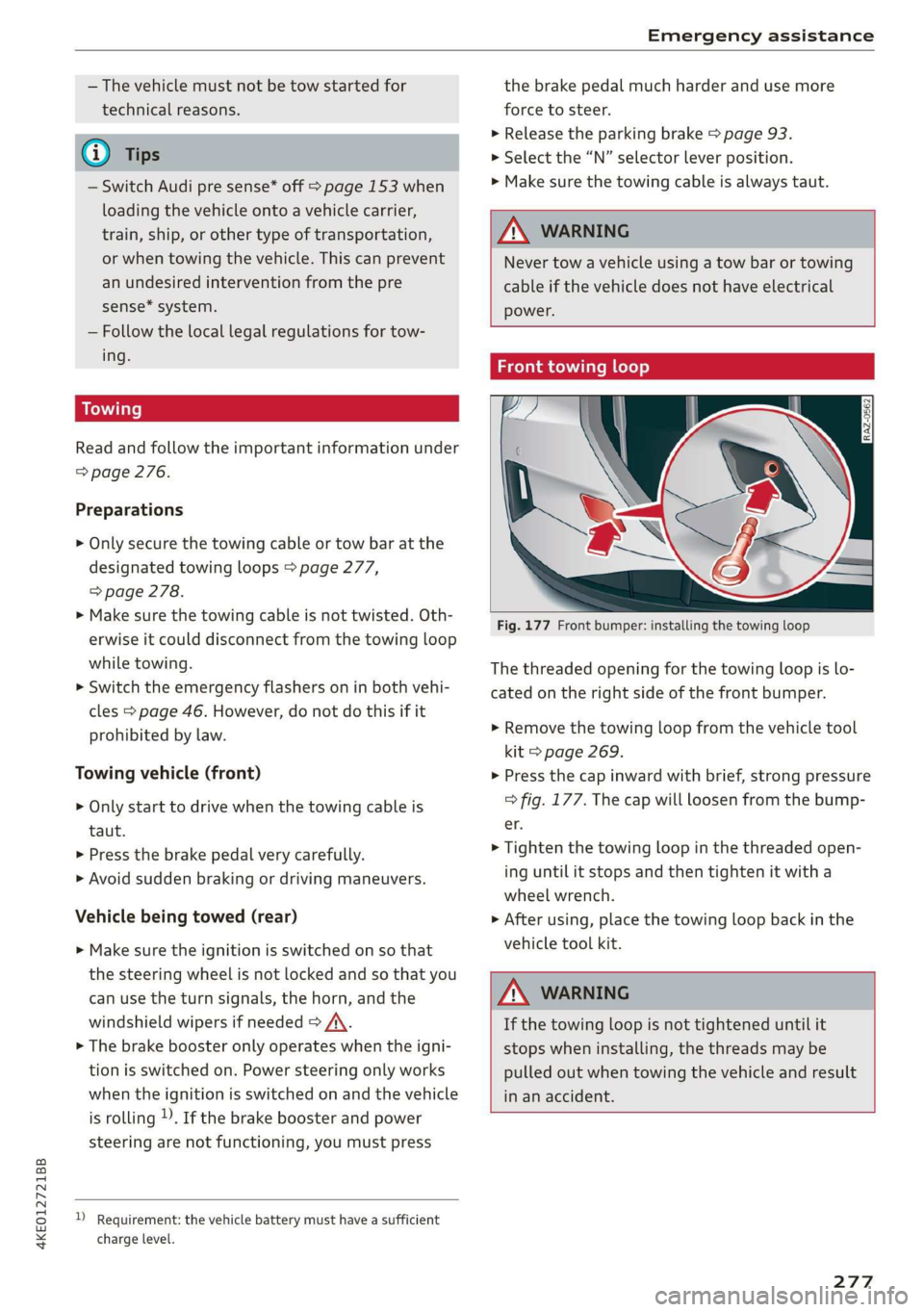
Fig. 177 Front bumper: installing the towing loop
The threaded opening for the towing loop is lo-
cated on the right side of the front bumper.
> Remove the towing loop from the vehicle tool
kit > page 269.
> Press the cap inward with brief, strong pressure
=> fig. 177. The cap will loosen from the bump-
er.
> Tighten the towing loop in the threaded open-
ing until it stops and then tighten it with a
wheel wrench.
> After using, place the towing loop back in the
vehicle tool kit.
ZA WARNING
If the towing loop is not tightened until it
stops when installing, the threads may be
pulled out when towing the vehicle and result
in an accident.
277
Page 299 of 310
4KE012721BB
FraQranGe ices 2s ewes 2 2 comes ¥ 6 ssvoee w & eee 83, 84
Free text search
Media... . 0... cece eee eee eee 225
RodiGven « 3 savon ¢ @ sama se nave 4 2 BeAD 7 ae 212
also refer to Intelligent search.......... 194
Freeze protection
COOLAM Brees 5 x snswas ox seems oo cmseens a 2 mena o 237
Eronticenterarmrest « sce 2 x came 2 0 mes 3 wa 58
Front passenger’s seat adjustment
FRONESs « scomene « ¢ exeseus © #2 aneeem 2 8 manors nw amaze «0 58
Rear... cece eee 58
Fuel
Fuel tank Capacity’: « sas « x gaan x «meme x 2 291
Fueling
Fuel tank capacity...............00005 291
G
Garage door'opener' sss kiss ss eee se veess 41
Garivierit HOOKS: < neues se ees 5 o ou ¥ a 77
GAWR
refer to Gross Axle Weight Rating (GAWR) . 292
Gear's 2 sues « 2 euwa xo eee 7 a geen 2 Keres 4 we 88
Glossary of tire and loading terminology... 246
GLOVE COMPAIMENE asec ss aces s & Hee = bee 77
Gross Axle Weight Rating (GAWR)........ 292
Gross Vehicle Weight Rating (GVWR)...... 292
GVWR
refer to Gross Vehicle Weight
Rating (GVWR) aces 0 2 sues & 2 wai 2 o coum 292
H
Handstree's « sees « 2 gawn « came © neem 4 2 new 169
Head-up display
AGjUSEING ics & & esesees ve soeees en secon wo muons a 23
Adjusting the brightness................ 48
Operating s x semen se ewes s ¥ meee v HEE os es 23.
Headlight range control...............005 44
Headlights
Cleaning « + sess « = sews ¢ e ees ce eee ee 264
Headlight range control..............4. 44
Washer systemM......... 2-0. e eee eee eee 50
Head restraints
ACIUSTING x: « » wees & & ean «eee Be mee ee 60
Removing and installing................ 60
Heated rear Window scies ¢ «mwas x ¢ caw 9 2 ee 83
Heated steering wheel................... 83
H@AGING bins oe somes & amiss 6 erie oon Desa sw He 81
High-voltage battery................005 104
Advanced charging settings............ 111
Audi e-tron compact charging system.... 114
Charging cc : s ewes = = eee = x eee 105, 108
Charging display on the vehicle......... 109
Charging equipment................0. 112
Charging :triethods « sce x «seus & x cease © « 105
Charging ports on the vehicle........... 105
Charging time..............0.020000. 106
Connecting the charging cable.......... 108
Messages while driving................ 112
Not running for long periods of time..... 107
Quick Charging ss ¢ sees +s seen se reese 2? 105
Setting the charging target............ 110
Setting the timer.................005. 111
Transporting charging equipment....... 113
High-voltage system ...... 0... eee eee 104
High beams
High beam assistant................... 45
Highway lights: «sce: ss eees sv eeea s weeees 44
Hill descent assist.............0 00-0 97
Hill hold assist... 0.0... ccc eee eee 95
also refer to Hill hold assist............. 95
HOlG:4SSISts 2 « acas 2 5 sawn 2B ieee 2 aeRA 4 BE 94
also refer to Hold assist................ 94
Hold Assist
refer to Hold assist..............000 005 94
Home
refer to Home address.............04. 202
Hommerad@nessy. «a wise » oxeeonee « stieeaun a wanes 202
HomeLink
refer to Garage door opener............. 41
Home screen... 2... eee eee eee ee 16
ORIN s & cosuves 2 at cesvecs 2 a animes oo emer 2 8 aero © orate 6
Hotspot
refer to Wi-Fi...........0.-. 0c eee eee 189
I
Idle
(eer to. Gals « eaee ss eens sv eens spews es 88
Ignition
Switching on and off...............0-0- 86
Imbalance (Wheels) yi iv isas s neu a sean a 252
297
Page 301 of 310
4KE012721BB
Index
Mechanically unlocking
Opening and closing.................0.
Opening and closing with foot motion..... 37
Power opening and closing.............. 36
Lumbar'support waco: 2s ees ev wees ee eerwe as 56
M
Maintenance « sige a + cewe «2 cee ge ewe a es 286
Maintenance intervals « nw. 6 i gic ae cere a 242
Manually releasing the charging connector. 111
Manually releasing the charging unit cover. 111
Map
Changing the scale...........00.e eee 198
Display cosee + a ssowsoe = semais 2 4 onaesms x aerate & 200
Operating ........ 0... ce eee eee eee 199
Setting the destination................ 198
Map preview.............-.0 2000-0 eee 197
Map update................ 020. e ee eee 204
QNUIME seers « « seers & e eee 5 2 eS & HEE FS 205
SD card/USB connection............... 205
Massage TUNCtiON. « ssa ss esi se owe ¥ 6 orem 56
Front... 2... eee eee eee eee 57
Matrix LED headlights.................-. 45
Mechanical:-key’. « « esscos ss caune oo aware © v cere 33
Medicis: 2 = acess: a © vonses a @ mewn 2 © cose 217,221.
Drives... ee 217
Supported formats...............0005 227
Media
center................ eee eee ee 222
Memory card
SD card reader (MMI) « « ewes sc ees an es 217
Supported types and formats........... 227
Mennory functioniie: « 2 sews x ¢ amen 5 meee eo: 63
Menu language
refer to Setting the language........... 231
Messagesi. « eciis + wean a 6 mans w 6 aaa oo we 178
Mirror cOMpaSS « wes + ¢ esas so sees eo eee vs 53
Mirrors
Adjusting exterior mirrors............0-. 48
Dimming................0 00002 e eee 49
Nanlity MUFROT sxc 2 = mown 2 seers « o eeoes gee 50
MMI
refer to Multi Media Interface........... 17
Mobile device
refer to Telephone...........-.0eee ee 169
Mobile phone network
Connection settings.................. 182
Motor compartment
Opening and closing the hood.......... 236
OVERVIEW eeu 3 2 soupy < @ emiees ¢ esate Go ee 237
Safety precautions: . sicsc. sven 2s wen ae 235
Storage compartment..............-... 76
Mountain passes... 0... ... eee eee eee 96
Mountaininoads:. « « secs « « erence» 2 sestane » 6 soene 96
Multifunction steering wheel
Buttons... ..... cee ee ee 12,26
Operating: < = ssn < : seen es sonnet dome s ee 12
Programming buttons.................. 26
Voice recognition system............... 24
Multi Media Interface................085 17
Menus and symbols.............00+-00- 18
Operating’s « « wss6 s secu = s sees & & wens 2 15,18
Switching the displays on or off.......... 17
Mutting (Mute) secs se ences oe ences oo cena oo eee 26
MYAUGI s « scimvs «6 eens 2s ents 2 & eee 2 weceale 27
myAudi navigation................. 193, 197
N
NarrOW APES s « eewn ss weue swoon as wee ae 146
Natural
leather care and cleaning......... 266
Navigation ....... 66... cee cece eee eee 193
Better rout@scs << sews eo es do eg e cae 206
Calli gprs so meena « i soieasen © o onewowe mraten wo 197
Changing the scale................0-. 197
also:referto Map: « wim + x wows 2 neee se ne 199
Navigation database
Version'information . . . ico ce caren so ens 233
Navigation (instrument cluster).......... 201
NHTSAc: = swiss « = seu = ¢ sous 4 x teats & Sees g 288
Night vision aSsist'; « sean 5 «wean ss ween avi 13)
Cleaning the camera...............00. 264
Notification:center’s ¢ sas 3 ¢ caw 2s gauss wars 19
O
OdOMCters cacy « & cees 5 o exw 5 ¢ eee 7 e ews 13
RESCUING fests 6 & srecine 6 o aiorsus 6 @ nureons wo eaNUEDK 13
Office address
refer to Business address.............. 202
Offroad
refer to Offroad driving...............+- 96
Offroad driving...............e eee e eee 96
OFF (climate control system) .............. 82
299
Page 302 of 310
Index
On-board computer’. . 2 ccc oe eee ee eae es 14
On Board Diagnostic System (OBD)........ 283
Online destination
refer to Point of interest............... 196
Online map
refer to Satellite map................. 204
Online media........ cee eee eee ee 219
Onlimerradio « sero < + sons 1 samen 6 a comms a 213
also refer to Online radio.............. 213
Online roadside assistance.............. 192
Online services
refer toconnect................. 184,185
Online system update................0. 232
Opening........ 2... cee eee eee eee eee 29
Automatic luggage compartment lid...... 36
Convenience opening ............eee eee 40
HOOd .. 0... ee 236
Luggage compartment lid............... 36
Luggage compartment lid with foot motion . 37
Panoramic glass roof................005 40
Sunshade (roof) .................000005 40
WindOWS's « sees = ¢ aewa ¢ ¢ eee +o owes vo we 39
Opening and closing
refer to Unlocking and locking........ 29, 34
Operating
Head-up display.................00000. 23
Instrument cluster............02-.005- 12
Multifunction steering wheel............ 12
Multi Media Interface............... 15,18
TEXUAINBUE:: + = haw ¥ 5 HESS & BROS Es BORE GE Re 21
Touch display 2 cswss ae ome x 2 avesme 2 2 aries 15
Voice recognition system............... 24
Optional equipment number............. 291.
Options
Media... ... 0... eee eee eee 225
NA@VIGAtIGKias < ¢ eeaie so aemx ¢ seme g 2 Reem 207
RadiO sce so sewwess eo cera « 2 ownecm 2 a oe eo 2 215
Outside
NnOise’s « sews sx ewe x a maw oe wad 91,
Overview (COCKpit)'s « « weeny a s saws » s awa a ve 6
P
Paifitidatiage@is « « seus 2 x weau 2 e eee 5 2 nem 265
Paint number................0.0 eee eee 291
Panic button. .............2...0.00 000 33
PANIC button. ..................000 000 33)
Panic Tumetions. « erences « x seers = x enone «a susan = 0 33
300
Panoramic glass roof................2.0. 40
Convenience opening and closing......... 40
Emergenicy closing =. : ¢ eies ss eee es eee 41
Quickopening sec 2 < wwcne ov werna 2 a wae oe 4l
Parental control
DVD scsnce x 2 vnesnis «i sesteie w wtieuens of ements oni 226
Parkiingiaidinas « + nevus « o swiasen © evenenoye « esate s 160
Cleaning the sensors and camera........ 264
Peripheral cameras........ 000.000 eee 162
Rearview Camera sein so cenas so canes wecees 162
Trailer View... 22... 0. cee eee eee 163
Parking aids
AGjUStING axe ¢ 5 waag + Ken G3 Ades Gs Sees 167
Parking and maneuvering..............- 160
Parking brake
refer to Electromechanical parking brake.. 93
Parking heater
refer to Auxiliary climate control......... 84
Parking lightS ccs « » sus sy oem se eee ee ee 44
Parking lock
PEPE TO GOANS « wines oo ceca + eoaseme sv eeRE 88
Parking systems
Parking system plus...............00. 160
Partition M@E cesses aawsse o x cists a 0 caounes 6 W aeesn 79
Passethnough « sccsie « eases v wenn w 6 wenn o 6 ove 79
PathiSt: « = mews su saw o geeu ao eae & see eB e 16
Pause (media files). «us % 5 ceia ds vee es 221
PédallS sec << naen = s Heme 5 2 See se Se & coe 89
Pedestrian detection................... 131
Perchlorate ..... 0.0... cee eee eee eee 286
Peripheral cameras............---000-5 162
Personal route assistance............... 201
Phone
Answering/ending acall............... 176
Connecting acell phone............... 170
Connecting a second mobile device...... 171
Disconnecting a mobile device.......... 171
SEttilGS saws « = newer x E eee e E eee ee ee 180
Phonebook
refer to: Contacts ees ss wees «2 news ae ee 175
Playback (iie@dia) ws «= seis 5 emg & & tem « 221
Point of interest: . : oce. ss sees se eeea sees 196
Point of interest search...............0. 196
also refer to Point of interest........... 196
POLISHING ies = nase s = peme se Heme + 2 HOGS se 265
Page 305 of 310
4KE012721BB
Index
Steering wheel
Adjusting... 2.0... eee eee eee eee 59)
also refer to Multifunction steering wheel. . 12
Steering wheel heating................-. 83
Steps for determining correct load limit... 256
Stopover (navigation) .................. 198
SEOFAQEN «success » 0 renanue 0 © verse e « vxenaue 4m oneae 76
Storage compartment. 00.6 6 cece wo seni vo 77
Storage compartment in motor compartment .76
Storagenets. + coms. so sere sv een vv aoe «2 O08 77
Stored stations
refer to Favorites. ..... 0.00... cece eee 212
Streaming
refer to Online media................. 219
Subtitles(DVD) wicesss w simone « 6 aissean ow siatane 4 225
Sunshade
Rear window/rear doors................ 50
also refer to Sunshade (roof)............ 40
Suirishiade (rOGf), wees sy eam s exes seem eg 40
SUN VISOFS 2... 2 ee ee eee ee 50
Suspension.........0..0..0 0.02.02 e eee 99
AUGi-GriVe SCLECE soy 2 x eares ¢ «eee 3 s eres 99
SWap Call ass < se aes se nace se yews = 2 oes = 177
Symbols
Charging equipment...............0.. 112
Navigation. « + cicis so name so nner «ome © 199
Traffic... 2... eee 206
also refer to Indicator lights.............. 7
SYNC (climate control system)............ 82
System settings .................0.000. 231,
T
Tail lights
Cleaning = ¢ seis + © seems 3 s sees te news ee 264
Technical data s « sem « » memes x o sees s yey 291,
Technical modifications................. 286
Telephone .......... 0c cece eee eee eee 169
Audi phone box............---0e ee eee 171
DialingsanUMben « ssesie ¢ & caine 6 6 eae wane 176
Options during a phone call............ 177
Playing MUSIC = « sew 2 x news x o oRURE 8 ee 218
Temperature display (outside temperature) .. 13
Text iNPUt.. 6... eee eee eee 2:1,
Text messages
Message options..................004 178
SOCtingsS wsnw s x aon ¢ KawR Fo EER ¥ E ReveD 8 178
also refer to Text messages............ 178
THES OWNS i: & sieeve 2 2 scone x 2 seo 2 a meee ow ers 80
Tightening specification
Wheel Doltsiass « «acini + a snason + « exewene + veers 274
Tightening specification (wheel bolts) ..... 274
THITIGS: 2 cece: 2 2 emis vo ome oo oe a SAE ow 14
Timer (high-voltage battery)............. 111,
Tire Mobility System (tire repair set)....... 269
THOS oe tee 243
CHANGING ss « x mows ¢ @ neem 3 were o momma & 271
Loose wheel warning...............00 258
Low-profile tires. ....... 0... eee eee eee 259
Repaitisets: « 2 cows « eam 4 « yeu s x nwo a a 8
Semuice lif ks © a snes © senete © veto oH stems
Tire pressure
Tire pressure monitoring system .... 260, 261
Tire pressure table.................006. 254
Tire pressure (trailer towing)........... 120
Treadwear indicators.................. 252
Unidirectional.................0. 245,274
Uniform tire quality grading............ 260
Tires and wheels
Glossary of tire and loading terminology .. 246
Tires and vehicle load limits............ 255
Toll Module
refer to Integrated Toll Module......... 133
WOObes cxccse: a 2 amon xo eee @ eo 6 2 ERTS @ 2 269
FOOL PSkemve suo « 2 ome as anwen 2 awe ee 17
Top tether anchor (securing the child safety
SCAt) hs oo cise wt wens o : acawens oo sean earn ee 72
Touch display
Adjusting feedback.................4.. 17
OPEStING ss < o awa s Hae 8 x RARE gE ORR gE 15
TOWING... cee eee 276
Towing loop.........-... eee eee ee 277,278
TPMS
Tire pressure monitoring system........ 261
Traffic information. .............. eee 206
Traffic jam assist
refer to Adaptive cruise assist........... 139
Traffic light information................ 130
Traffic sign recognition............0000. 128
Traffic SIGNS 6... eee eee 131
303