USB port AUDI E-TRON 2019 Owners Manual
[x] Cancel search | Manufacturer: AUDI, Model Year: 2019, Model line: E-TRON, Model: AUDI E-TRON 2019Pages: 310, PDF Size: 81.91 MB
Page 77 of 310
4KE012721BB
Stowing and using
Stowing and using
Power sources
When the ignition is switched on, you may be
able to use the electric power sources for exter-
nal devices, depending on the vehicle equipment.
12 volt sockets
You can connect electrical accessories to the 12
volt sockets. The power usage must not exceed
120 watts.
The 12 volt sockets are labeled with the & or
12V symbol. They are located in the front center
console*, in the rear* and on the side trim panel
in the luggage compartment”*.
USB ports
Applies to: vehicles with USB input
You can charge mobile devices using the USB
ports. The USB ports are labeled with the «> or
(4 symbol or CHARGE ONLY.
Cup holders
Applies to: vehicles with cup holders
ZA WARNING
—To reduce the risk of fatal injury, store all
connected devices securely when driving so
that they do not move around inside the ve-
hicle when braking or in the event of an acci-
dent.
— Incorrect usage can lead to serious injuries
or burns. To reduce the risk of injuries, never
leave children unattended in the vehicle
with the key.
YY Note
— Read the operating manuals for the con-
nected devices.
—To reduce the risk of damage to the vehicle
electrical system, never attempt to charge
the vehicle battery by connecting accesso-
ries that provide power to the power sour-
ces.
— Do not connect any device whose network
class (voltage) does not match the network
class designed for the socket.
— Disconnect the connectors from the power
sources carefully to reduce the risk of dam-
aging them.
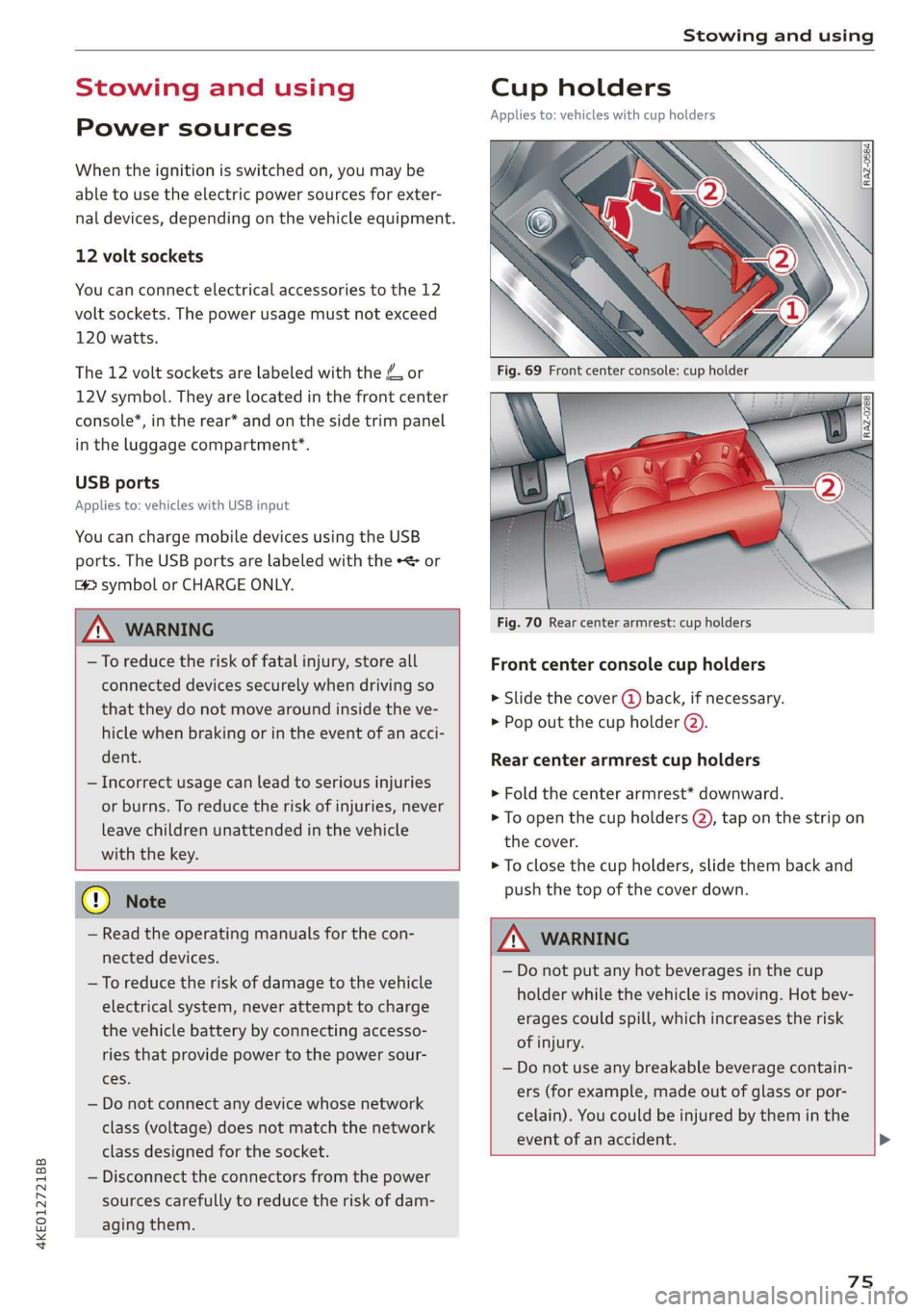
Fig. 70 Rear center armrest: cup holders
Front center console cup holders
> Slide the cover @ back, if necessary.
> Pop out the cup holder (2).
Rear center armrest cup holders
> Fold the center armrest* downward.
> To open the cup holders (2), tap on the strip on
the cover.
> To close the cup holders, slide them back and
push the top of the cover down.
ZX WARNING
— Do not put any hot beverages in the cup
holder while the vehicle is moving. Hot bev-
erages could spill, which increases the risk
of injury.
— Do not use any breakable beverage contain-
ers (for example, made out of glass or por-
celain). You could be injured by them in the
event of an accident.
75
Page 183 of 310
4KE012721BB
Telephone
— Ringtone”: available ringtones are played using
the Ringtone function. Press on an entry in the
list.
— Microphone input level: you can adjust the mi-
crophone input level using the slider.
Turn on car phone or data module
Applies to: vehicles with car phone/data module
When this function is switched on, you can use
the car phone or data module.
As long as the car phone was not turned off sepa-
rately the last time it was used, it will turn on au-
tomatically when the ignition is switched on.
Edit voicemail number
You can change your voicemail number.
Enable VoLTE
When this function is switched on, Voice over
LTE* will be supported.
Network settings
— Login to mobile phone network: select to log
into your cell phone service provider network
automatically or manually.
— Manual network selection: Requirement: the
data module must be switched on and Login to
mobile phone network must be set to Manual.
Select a network manually from the list of
available networks at the present location.
Car phone serial number (IMEI):
Applies to: vehicles with car phone
The serial number (IMEI) of your car phone is dis-
played.
@ Tips
— Several mobile devices can be paired with
the MMI, but only two* mobile devices can
be actively connected.
—To delete all paired Bluetooth devices, the
Bluetooth function can be reset to the fac-
tory default settings > page 232.
Directory settings
Applies
to: vehicles with telephone
> Applies to: MMI: Select on the home screen:
PHONE > Contacts > <2.
Switching between two mobile devices
Requirement: telephone 1 and telephone 2 must
be connected.
Switch telephones: the device name of your ac-
tive mobile device is displayed. You can switch
the phone by pressing the button.
The directory for the selected phone will be dis-
played.
Hide grayed-out contacts
When this function is switched on, contacts that
have no phone numbers stored for them will be
hidden.
Sort order
You can sort the contacts in alphabetical order by
Last name or First name.
Download contacts
Requirement: a mobile device must be connected
to the MMI.
To update the contacts in the MMI, you can man-
ually download your mobile device contacts. De-
pending on the mobile device, you may need to
disconnect and reconnect the Bluetooth connec-
tion to update the contacts.
Memory capacity
You can manage up to 23,000 contacts. You can
also download up to 5,000 contacts from maxi-
mum four mobile devices. You can also import up
to 3,000 contacts from a storage medium.
Importing and exporting contacts
Requirement: an SD card must be in the SD card
reader* = page 217 or a USB storage device must
be connected to the Audi music interface
=> page 220.
181
Page 184 of 310
Telephone
Contacts in vCard format (.vcf) can be imported
or exported from the MMI.
— Importing contacts from a storage medium:
Select: Import contacts > Search for import
data > SD card 1 or USB device 1/USB device 2
> desired contacts or Select all contacts > Start
import.
— Exporting contacts to a storage device: Re-
quirement: Only previously imported contacts
can be exported. Select: Export contacts > Find
source for exporting > SD card 1 or USB device
1/USB device 2 > desired contacts or Select all
contacts > Start export.
@ Tips
— Always read and follow the chapter on Audi
connect > page 184.
— For more information about the myAudi ac-
count, visit my.audi.com.
— The imported contacts are stored in the lo-
cal MMI memory.
— Never save important data on memory cards
or USB storage devices. Audi is not responsi-
ble for damaged or lost files and media.
— Contacts that were downloaded from a mo-
bile device cannot be exported.
— There should be no other files or folders on
the storage medium containing the contacts
to be imported.
— Apple devices and MTP devices (such as
smartphones) are not recognized as USB
storage devices.
Mobile phone network settings
Applies to: vehicles with telephone
Applies to: MMI: Select on the home screen: SET-
TINGS > Connection settings > Mobile phone
network.
Troubleshooting
Applies to: vehicles with telephone
The information that follows lists some trouble-
shooting options. They depend on the equip-
ment.
182
Switching the car phone or data module on*
Applies to: vehicles with car phone/data module
See > page 181.
Instrument cluster
WC) areda)
Applies to: vehicles with multifunction steering wheel and
telephone
In the instrument cluster display, you can control
the MMI functions with the multifunction steer-
ing wheel. For operation, see > page 12 and
=> page 26, Additional function buttons.
Requirement: the Telephone tab must be select-
ed in the instrument cluster.
> Press the [=] button.
Possible options:
— Call list: Requirement: the call list must con-
tain a phone number.
— Favorites: Requirement: favorites must be stor-
ed in the MMI.
— Switch telephones: Requirement: two cell
phones must be connected to the MMI.
— Back to call: Requirement: there must be a call
in progress.
G) Tips
— The call list can only be edited via the MMI.
— Depending on the selected function, it may
be necessary to use the MMI.
Page 206 of 310
Navigation
Depending on availability, colored markings on
the map indicate the probability of open parking
spaces.
Green | High probability
Medium probability
Red Low probability
Read the information about Audi connect, and
be sure to note the connectivity costs section
=@ in General information on page 184.
Orange
Satellite map
Applies to: vehicles with navigation system and satellite map
You can display the navigation map with satel-
lite images.
Requirement: the MMI must be connected to the
Internet > page 184, Audi connect.
> Applies to: MMI: Select on the home screen:
NAVIGATION > <2} > Map settings > Satellite
map).
The map view is based on data packets received
from the Internet in the form of satellite images,
which are then combined with the roadways from
the > page 199, fig. 143 standard map view.
Read the information about Audi connect, and
be sure to note the connectivity costs section
=@ in General information on page 184.
~The satellite map») is updated regularly
whenever the function is opened. The proc-
ess may take several seconds.
— When the satellite map display is switched
on )) with the 3D position map type, the dis-
play automatically switches to the 2D map
type when driving through tunnels.
D AUDI AG provides access to services from third party pro-
viders. Permanent availability cannot be guaranteed, be-
cause that depends on the third party provider.
204
— Depending on the Internet connection, the
standard map may also be displayed when
the satellite map is switched on).
Electric range
Applies to: vehicles with navigation system and electric range
display
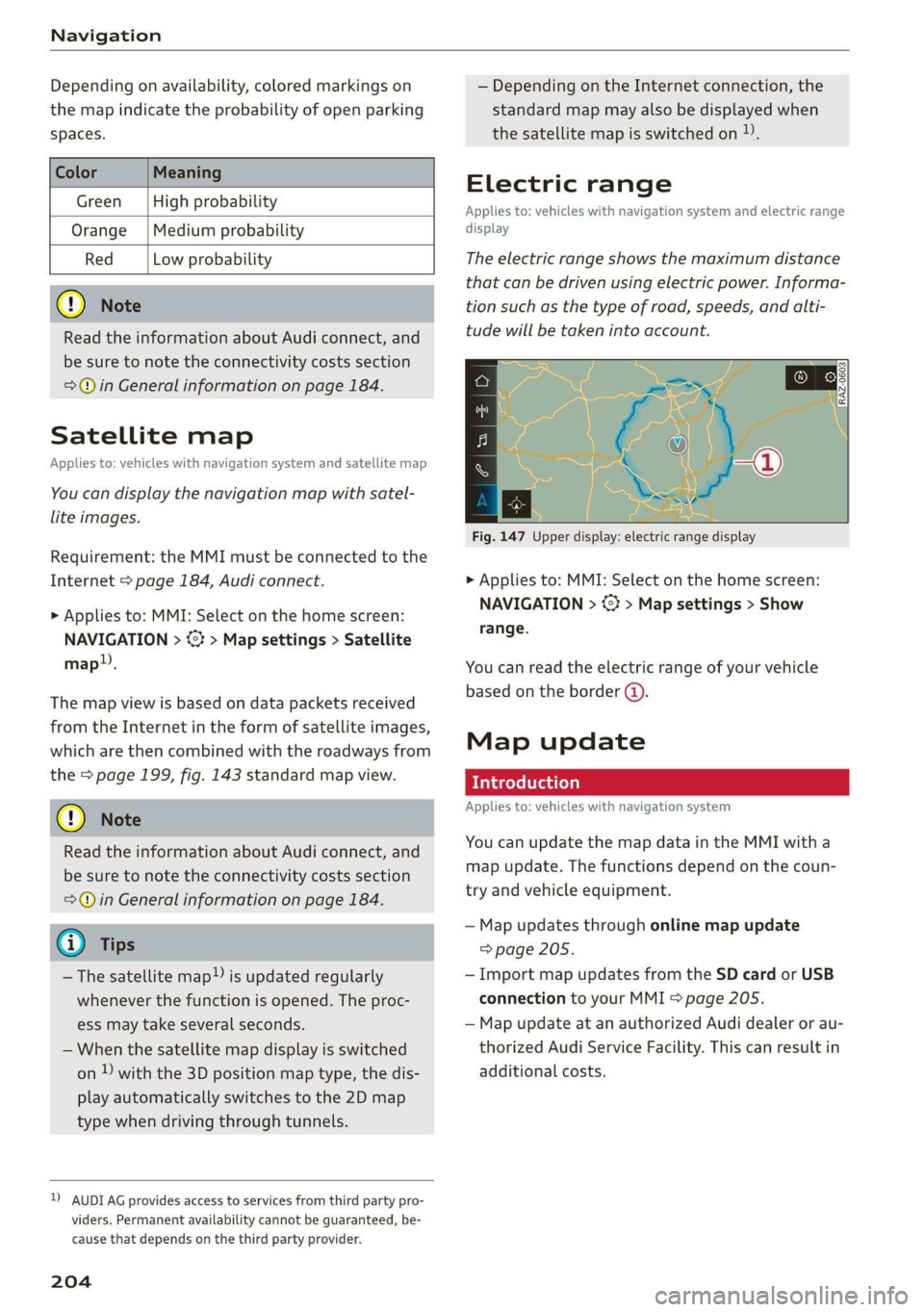
The electric range shows the maximum distance
that can be driven using electric power. Informa-
tion such as the type of road, speeds, and alti-
tude will be taken into account.
Fig. 147 Upper display: electric range display
> Applies to: MMI: Select on the home screen:
NAVIGATION > %} > Map settings > Show
range.
You can read the electric range of your vehicle
based on the border (@).
Map update
Introduction
Applies to: vehicles with navigation system
You can update the map data in the MMI with a
map update. The functions depend on the coun-
try and vehicle equipment.
— Map updates through online map update
=> page 205.
— Import map updates from the SD card or USB
connection to your MMI > page 205.
— Map update at an authorized Audi dealer or au-
thorized Audi Service Facility. This can result in
additional costs.
Page 207 of 310
4KE012721BB
Navigation
Online map update
Applies to: vehicles with MMI, navigation system, and Audi
connect Infotainment
Using map update online, you can update the
map material in your navigation system directly
from your vehicle.
Using your vehicle position, the MMI identifies
regions which you are frequently in. Based on
this, update data for these regions are available
for your MMI.
Start map update
Applies to: MMI
Requirement: the MMI must be connected to the
Internet > page 184, Audi connect.
> A notification for a map update will appear in
the upper display.
> If the option Automatic online map update
= page 205 is switched on, the MMI will start
the map update. Or:
> Press on the notification. Or: access the notifi-
cation in the notification center on > page 19
and press on the notification.
> If the Automatic online map update option
=> page 205 is switched off, press on Allow
once or Always allow.
The MMI will start the map update. The progress
of the download and installation will be shown in
the upper display.
When the update has ended, a notification will
be displayed.
@) Note
Read the information about Audi connect, and
be sure to note the connectivity costs section
=@ in General information on page 184.
@ Tips
Because of the high volume of data, down-
loading large country packages or the whole
package to your PC from your myAudi ac-
count, storing it on an SD card or a USB stick,
and then importing it to your MMI is recom-
mended > page 205.
Map update using an SD card or USB
connection
Applies to: vehicles with MMI, navigation system, and Audi
connect Infotainment
With the map update, you can update the map
material in your navigation system.
Requirement: you must have created a myAudi
account at my.audi.com. Your vehicle must be
registered in your myAudi account.
Prepare map update
> Download the map update at my.audi.com and
store it on an SD card or on a USB flash drive.
For additional information, visit my.audi.com.
Start map update
Requirement: a map update for your vehicle must
be on an SD card or a USB flash drive.
> Insert the SD card in your vehicle's SD card
reader > page 217. Or: connect the USB flash
drive to the Audi music interface > page 220. A
notification for a map update will appear in the
upper display.
> Press on the notification. Or: access the notifi-
cation in the notification center on > page 19
and press on the notification. The update pack-
age is shown.
> Press Next. The installation status is shown in
the upper display.
> When the update has ended, a notification will
be displayed.
Map updates settings
Applies to: vehicles with a navigation system and Audi con-
nect Infotainment
> Applies to: MMI: Select on the home screen:
SETTINGS > System maintenance.
Automatic online map update: when the func-
tion is switched on, map updates will be auto-
matically downloaded and installed.
® Note
Read the information about Audi connect, and
be sure to note the connectivity costs section
=>@©) in General information on page 184.
205
Page 219 of 310
4KE012721BB
Media
Media
General information
There are various media drives and connections
available in the MMI. For example, you can play
media files using the SD card reader or connect
your mobile devices to the Audi music interface
and operate them through the MMI.
Media and format restrictions: the MMI (includ-
ing the SD card reader and the USB storage de-
vice connection*) was tested with a variety of
products and media available in the market.
However, there may be cases where individual de-
vices or media and audio/video files may not be
recognized, may play only with restrictions, or
may not play at all.
Restricted functionality: reset the Media to the
factory default settings if functionality is restrict-
ed.
Digital Rights Management: please note that
the
audio/video files are subject to copyright pro-
tection.
The media drives do not play files that are pro-
tected by DRM and are identified with the symbol
&.
Data security: never store important data on SD
cards, CDs/DVDs, or mobile devices. Audi AG is
not responsible for damaged or lost files and me-
dia.
Loading times: the more files/folders/playlists
there are on a storage medium, the longer it will
take to load. To reduce the amount of time it
takes the audio/video files to load, use a storage
medium that only contains audio/video files, and
create subfolders (for example, for each artist or
album).
Additional information: when playing, audio
files are automatically displayed with any addi-
tional information that is stored (such as the ar-
tist, track and album cover). If this information is
not available on the storage medium, the MMI
will check the Gracenote metadata database.
However, in some cases, the additional informa-
tion may not be displayed.
CG) Note
Read the information about Audi connect, and
be sure to note the connectivity costs section
=@ in General information on page 184.
SD card reader
The SD card reader is in the storage compartment
under the front center armrest.
Inserting the SD card
> The angled corner of the SD card must face to-
ward the right front side when being inserted.
>» Slide the SD card into the card reader slot until
the SD card clicks into place.
The SD card reader is accessed and operated
through the MMI = page 221.
® Note
— Only use one-piece SD cards. If adapter
cards (SD cards with more than one piece)
are used, the card could fall out of the
adapter when driving because of vibrations.
Individual pieces could then become stuck
in the drive and impair the functionality.
—To reduce the risk of damaging drives and
data carriers, always keep data carriers ina
sleeve and never expose them to direct sun-
light.
DVD drive
General information
The functionality of individual storage mediums
may be limited due to the variety of blank CDs/
DVDs available and the various capacities. Audio
CDs or video DVDs with copy protection, CDs/
DVDs that do not conform to the standard, and
multisession CDs may have limited playback or
may not play at all. AUDI AG recommends finaliz-
ing the recording process when creating multi-
session CDs. Multisession DVDs are not support-
ed.
217
>
Page 222 of 310
Media
Amazon Alexa
Applies to: vehicles with Amazon Alexa Integration
You can play various Amazon Alexa content using
the MMI. The voice recognition system is used to
operate it.
Requirement: Amazon Alexa must be activated
=>page 25.
> Start Amazon Alexa using the voice recognition
system.
> Applies to: MMI: Select on the home screen:
MEDIA > Source > Amazon Alexa.
() Note
Read the information about Audi connect, and
be sure to note the connectivity costs section
=> page 184.
Multimedia connections
USB adapter cable
[RAH-9202
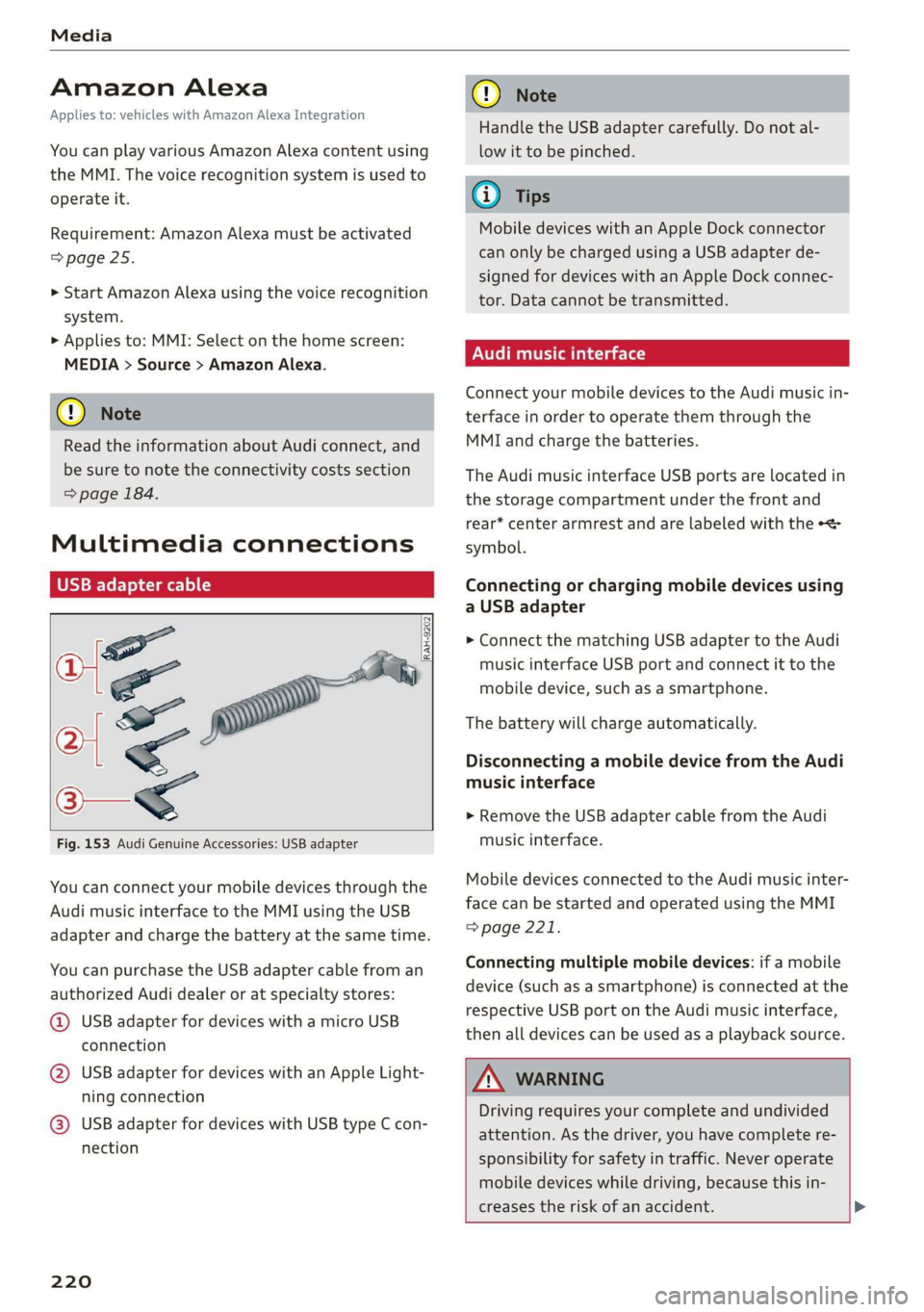
Fig. 153 Audi Genuine Accessories: USB adapter
You can connect your mobile devices through the
Audi music interface to the MMI using the USB
adapter and charge the battery at the same time.
You can purchase the USB adapter cable from an
authorized Audi dealer or at specialty stores:
@ USB adapter for devices with a micro USB
connection
@ USB adapter for devices with an Apple Light-
ning connection
@ USB adapter for devices with USB type C con-
nection
220
C@) Note
Handle the USB adapter carefully. Do not al-
low it to be pinched.
G) Tips
Mobile devices with an Apple Dock connector
can only be charged using a USB adapter de-
signed for devices with an Apple Dock connec-
tor. Data cannot be transmitted.
Audi music interface
Connect your mobile devices to the Audi music in-
terface in order to operate them through the
MMI and charge the batteries.
The Audi music interface USB ports are located in
the storage compartment under the front and
rear* center armrest and are labeled with the «<>
symbol.
Connecting or charging mobile devices using
a USB adapter
> Connect the matching USB adapter to the Audi
music interface USB port and connect it to the
mobile device, such as a smartphone.
The battery will charge automatically.
Disconnecting a mobile device from the Audi
music interface
> Remove the USB adapter cable from the Audi
music interface.
Mobile devices connected to the Audi music inter-
face can be started and operated using the MMI
=> page 221.
Connecting multiple mobile devices: if a mobile
device (such as a smartphone) is connected at the
respective USB port on the Audi music interface,
then all devices can be used as a playback source.
ZA\ WARNING
Driving requires your complete and undivided
attention. As the driver, you have complete re-
sponsibility for safety in traffic. Never operate
mobile devices while driving, because this in-
creases the risk of an accident. >
Page 223 of 310
4KE012721BB
Media
@) Note
— Pull the cable out of the Audi music inter-
face carefully so that the USB ports are not
damaged.
— Use a USB extension cable to connect devi-
ces that have an integrated USB connector
(such as a USB stick) to reduce the risk of
damage to your USB device and the Audi
music interface.
— Extremely high or low temperatures that
can occur inside vehicles can damage mobile
devices and/or impair their performance.
Never leave mobile devices in the vehicle in
extremely high or low temperatures.
@ Tips
— Always follow the information found in
=> page 75.
— When you switch the ignition off, the USB
ports are still supplied with power until the
energy management intervenes.
— Do not use an additional adapter cable or
USB extension cable to connect mobile devi-
ces to the Audi music interface that already
have a cable or that must be connected with
a USB adapter cable (> page 220, fig. 153).
Using an additional adapter or US extension
cable may impair functionality.
— Functionality is not guaranteed for mobile
devices that do not conform to the USB 2.0
specification.
— USB hubs are not supported.
— Video playback through the Audi music in-
terface is not supported on Apple and MTP
devices (such as smartphones).
— iPod or iPhone malfunctions also affect the
operation of the MMI. Reset your mobile de-
vice in these situations.
— Audi recommends updating the iPod or
iPhone software to the latest version. Refer
to your mobile device owner's manual for
more information.
— The USB adapter on the Audi music inter-
face will support iPod touch or iPhone devi-
ces from the 5th generation or newer with
the lightning connector.
— For more information about the Audi music
interface and supported devices, check the
Audi database for mobile devices at www.
audiusa.com/mp3 or contact an authorized
Audi dealer or authorized Audi Service Fa-
cility.
Playing media
The following sources can be selected depending
on the vehicle equipment:
— Amazon Alexa > page 220
—SD card > page 217.
— USB © page 220.
— DVD drive > page 218
— Connect external device: you can connect ex-
ternal devices via Bluetooth and use the Blue-
tooth audio player > page 218, or you can con-
nect an external device directly to the Audi mu-
sic interface > page 220.
— Connect online media > page 219.
Accessing media
Playing media files using the MMI
> Applies to: MMI: Select on the home screen:
MEDIA > Source > a source. Depending on the
connected device or online media service”, the
symbol for a source may change. The device
name may be displayed (for example: my-
Phone).
> Select a track from the categories in the media
center > page 222.
Playing media files using the multifunction
steering wheel
Requirement: a media drive must contain media
files > page 221.
> Select the Radio/Media tab using the multi-
function steering wheel.
> Turn the left thumbwheel to display the play-
list.
> To switch to a different source, press the [=|
button.
> To select a media file or a source, turn and
press the left thumbwheel.
221
Page 224 of 310
Media
> To switch between radio and media, select the
button > Switch to radio/Switch to media.
@ Tips
— For safety reasons, the video image is only
displayed when the vehicle is stationary. On-
ly the sound from the video plays while driv-
ing.
— Applies to: multifunction steering wheel:
Depending on the selected function, opera-
tion through the MMI may be required.
3 g 5
Ig BS
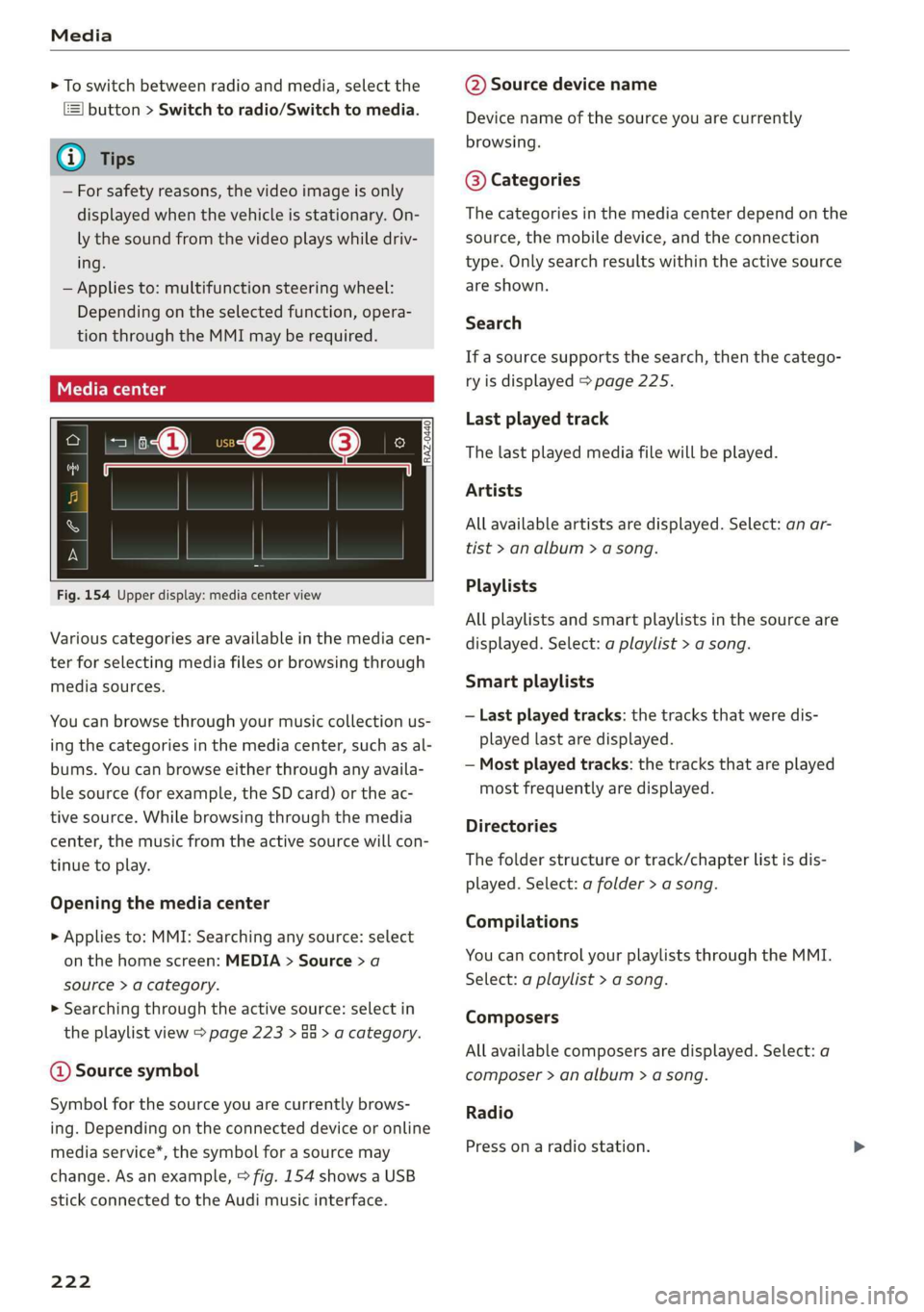
Fig. 154 Upper display: media center view
Various categories are available in the media cen-
ter for selecting media files or browsing through
media sources.
You can browse through your music collection us-
ing
the categories in the media center, such as al-
bums. You can browse either through any availa-
ble source (for example, the SD card) or the ac-
tive source. While browsing through the media
center, the music from the active source will con-
tinue to play.
Opening the media center
> Applies to: MMI: Searching any source: select
on the home screen: MEDIA > Source > a
source > a category.
> Searching through the active source: select in
the playlist view > page 223 > an > a category.
@ Source symbol
Symbol for the source you are currently brows-
ing. Depending on the connected device or online
media service*, the symbol for a source may
change. As an example, > fig. 154 shows a USB
stick connected to the Audi music interface.
222
@ Source device name
Device name of the source you are currently
browsing.
@® Categories
The categories in the media center depend on the
source, the mobile device, and the connection
type. Only search results within the active source
are shown.
Search
If a source supports the search, then the catego-
ry is displayed > page 225.
Last played track
The last played media file will be played.
Artists
All available artists are displayed. Select: an ar-
tist
> an album > a song.
Playlists
All playlists and smart playlists in the source are
displayed. Select: a playlist > a song.
Smart playlists
— Last played tracks: the tracks that were dis-
played last are displayed.
— Most played tracks: the tracks that are played
most frequently are displayed.
Directories
The folder structure or track/chapter list is dis-
played. Select: a folder > a song.
Compilations
You can control your playlists through the MMI.
Select: a playlist > a song.
Composers
All available composers are displayed. Select: a
composer > an album > a song.
Radio
Press ona radio station.
Page 229 of 310
4KE012721BB
Media
— PIN entry for parental control will be locked PIN can only be reset by an authorized Audi
for approximately one minute if you enter dealer.
the incorrect PIN three times in a row. The
Supported media and file formats
CONTA
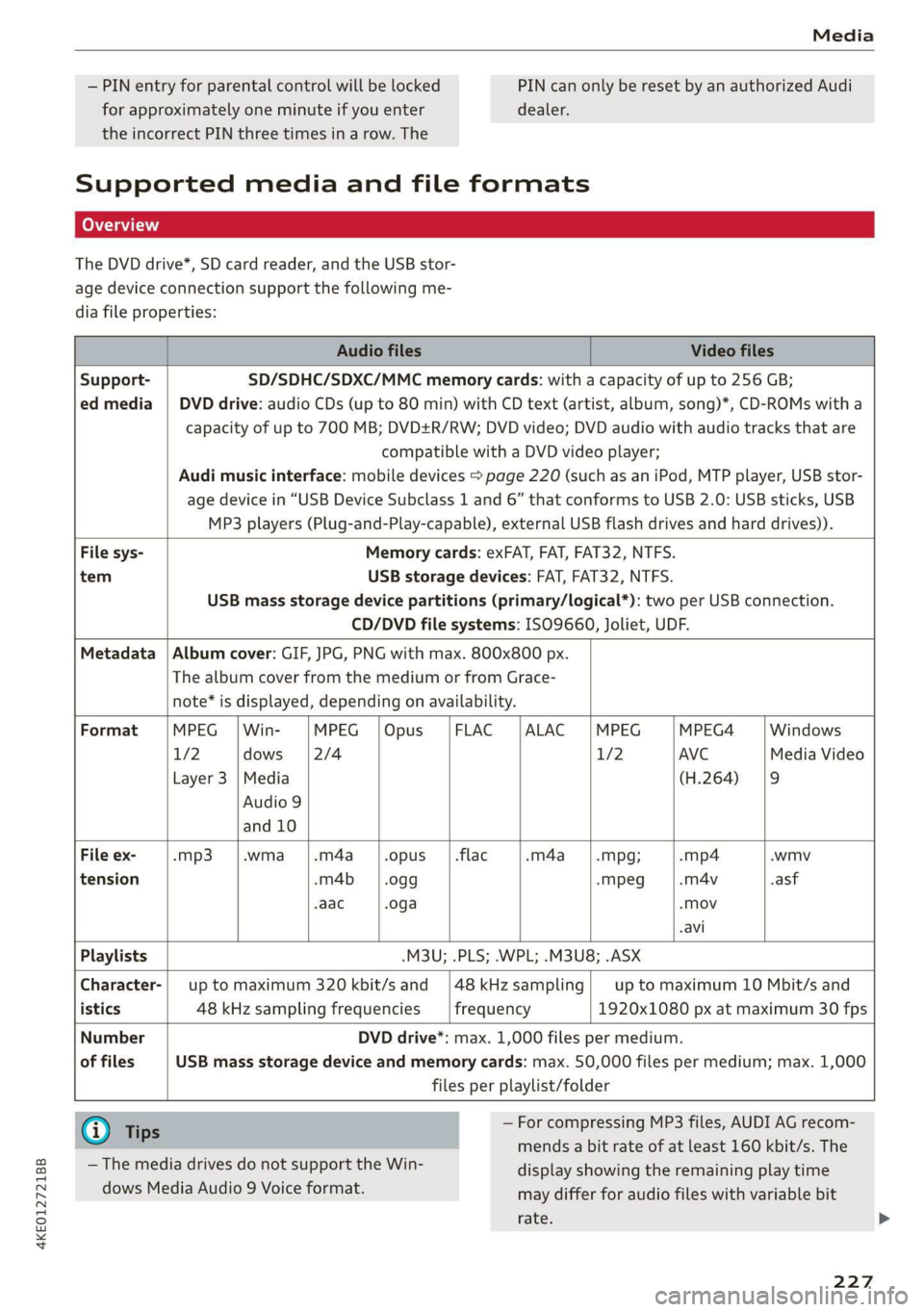
The DVD drive*, SD card reader, and the USB stor-
age device connection support the following me-
dia file properties:
Audio files Video files
Support- SD/SDHC/SDXC/MMC memory cards: with a capacity of up to 256 GB;
ed media | DVD drive: audio CDs (up to 80 min) with CD text (artist, album, song)*, CD-ROMs with a
capacity of up to 700 MB; DVD+R/RW; DVD video; DVD audio with audio tracks that are
compatible with a DVD video player;
Audi music interface: mobile devices > page 220 (such as an iPod, MTP player, USB stor-
age device in “USB Device Subclass 1 and 6” that conforms to USB 2.0: USB sticks, USB
MP3 players (Plug-and-Play-capable), external USB flash drives and hard drives)).
File sys- Memory cards: exFAT, FAT, FAT32, NTFS.
tem USB storage devices: FAT, FAT32, NTFS.
USB mass storage device partitions (primary/logical*): two per USB connection.
CD/DVD file systems: ISO9660, Joliet, UDF.
Metadata | Album cover: GIF, JPG, PNG with max. 800x800 px.
The album cover from the medium or from Grace-
note* is displayed, depending on availability.
Format MPEG | Win- MPEG |Opus |FLAC |ALAC |MPEG MPEG4 Windows
1/2 dows [2/4 1/2 AVC Media Video
Layer 3 |Media (H.264) |9
Audio 9
and 10
File ex- -mp3 |.wma |.m4a_|.opus __|.flac -m4a_——|.mpg; -mp4 .wmv
tension -m4b | .ogg -Mpeg -m4v asf
-aac .oga -Mov
-avi
Playlists .M3U; .PLS; .WPL; .M3U8; .ASX
Character-| up to maximum 320 kbit/s and |48kHzsampling| up to maximum 10 Mbit/s and
istics 48 kHz sampling frequencies frequency 1920x1080 px at maximum 30 fps
Number DVD drive*: max. 1,000 files per medium.
of files USB mass storage device and memory cards: max. 50,000 files per medium; max. 1,000
files per playlist/folder
@) Tips — For compressing MP3 files, AUDI AG recom-
mends a bit rate of at least 160 kbit/s. The
display showing the remaining play time
may differ for audio files with variable bit
rate.
— The media drives do not support the Win-
dows Media Audio 9 Voice format.
227