lane assist AUDI E-TRON 2019 Owners Manual
[x] Cancel search | Manufacturer: AUDI, Model Year: 2019, Model line: E-TRON, Model: AUDI E-TRON 2019Pages: 310, PDF Size: 81.91 MB
Page 5 of 310
4KE012721BB
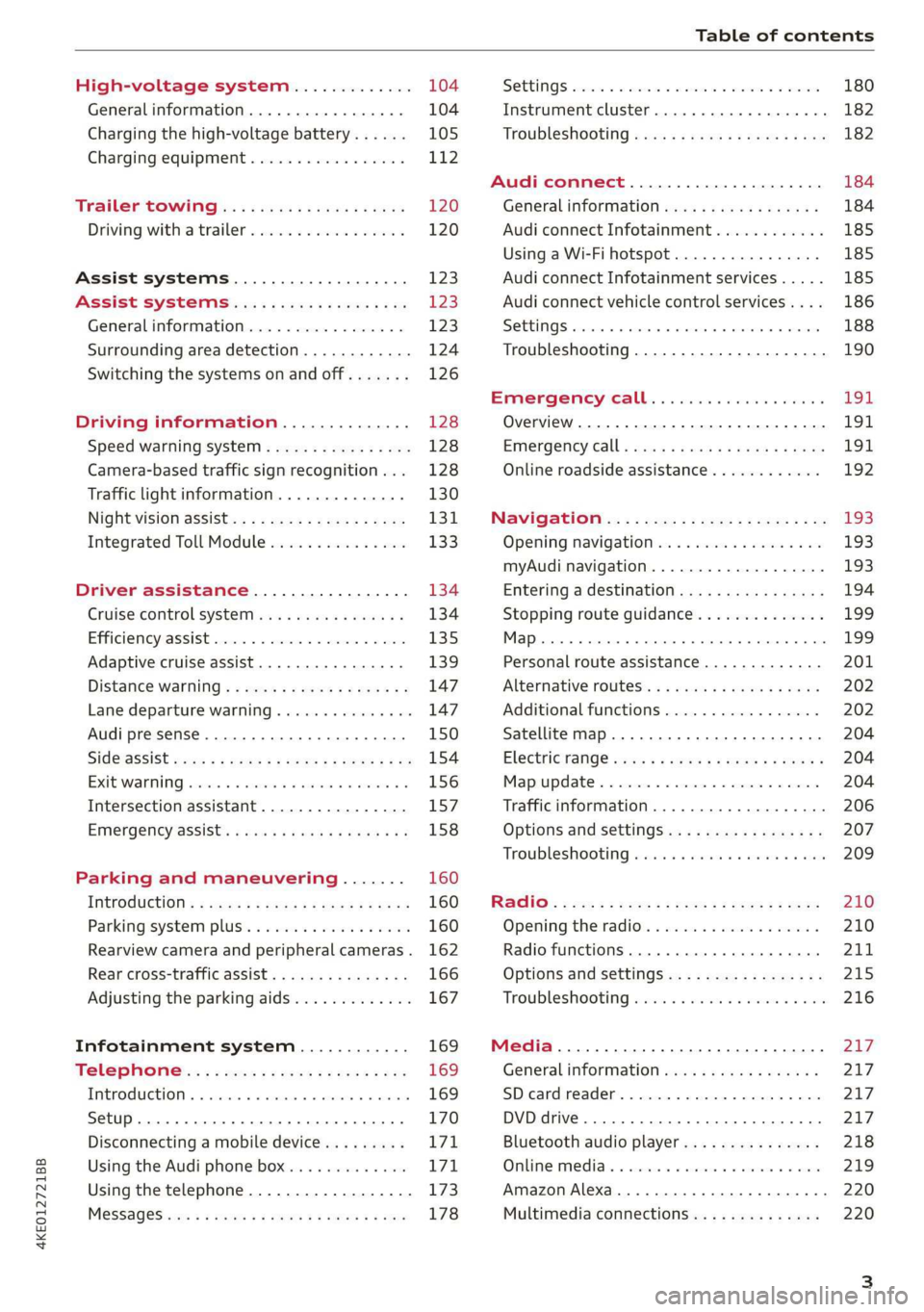
Table of contents
High-voltage system............. 104
Generalinformation................. 104
Charging the high-voltage battery...... 105
Charging equipment................. 112
Trailer towing.................0.-. 120
Driving with atrailer................. 120
Assist systems................... 123
ASSIST SYSTEMS ic: 6 & cas 5c cae 5 ow i238
General information................. 123
Surrounding area detection............ 124
Switching the systems on and off....... 126
Driving information.............. 128
Speed warning system..............-- 128
Camera-based traffic sign recognition... 128
Traffic light information.............. 130
NightiVision aSSistix = «xem : s ases : soe 131
Integrated Toll Module............... 133
Driver assistance................. 134
Cruise control system's.o. « cees ss rows ss 134
Efficiency assist...............--005. 135
Adaptive cruise assist................ 139
Distance warning .............e0e000. 147
Lane departure warning............... 147
Audi presense........... 0. cece eee 150
SIG@iASSISE sew: » 2 cues = y ewe ae AeA Ge we 154
EXIEWAPniNng sive «6 ccerane 2 @ soeee «0 cuesime @ 6 156
Intersection assistant................ 157
Emergency assist... ....:seeceeeevees 158
Parking and maneuvering....... 160
IRCROAWECION « = eas x o sees 5 o eee ge oe 160
Parking system plus...............00. 160
Rearview camera and peripheral cameras. 162
Rear cross-traffic assist............... 166
Adjusting the parking aids............. 167
Infotainment system............ 169
Telephone... - es.s =) gees be eens ces 169
TEROMUCLION 5 scoane a vanes » 6 nani + 6 exeemn 169
Setup... eee eee eee eee 170
Disconnecting a mobile device......... 171
Using the Audi phone box............. 171
Using the telephone.................. 173
M@SSAG@S ves s x sere + & ewe ¢ o eee § eee 178
SOPGINGS sacs +o aeowens w evewens a x euswoe a» eemeoe 180
Instrument cluster...............0008 182
Troubleshooting sacs ss sews + ¢ wae 3 x ew 182
Audi connect..................... 184
Generalinformation..............05- 184
Audi connect Infotainment............ 185
Using a Wi-Fi hotspot................ 185
Audi connect Infotainment services..... 185
Audi connect vehicle control services.... 186
SQECINOS cccssin ws eseuwie x priesens wm sores w 6 syenne 188
Troubleshooting..................5-. 190
Emergency call..................- 491,
Overview... .... 0... eee eee eee 191
EM@rgency Call + wsws « zaen 3 = suze 3 2 reR 191.
Online roadside assistance............ 192
Navigation. « : ssc < : soos sp eens ss 193
Opening navigation.................. 193
myAudi navigation.................0. 193
Entering adestination................ 194
Stopping route guidance.............. 199
MAP ieccsie 9 2 wxotiose 1 ssumene of 9 enwEem 4 ot tase & Oo we 199
Personal route assistance............. 201
‘Alternative roUtes:: « + wean 2 & wane 2 & eevwe 202
Additional functions................. 202
Satellite map.......... cc cece 204
Electric:range sass s x meas 5 ¢ cues ¥ ¢ mes 204
Mapruipdates. 2 caus + x res ao nenene 2 9 one 204
Traffic information...............0005 206
Options and settings................. 207
Troubleshooting wisi. cs vere ewer sv ere 209
RaGIO:: » acs ¢ = seen ¢ » ees y ¢ eS EE eee 210
Opening theradio'. « sas a 6 ssn s & sess 210
Radio functions..............0000005 211
Options and settings................. 215
Troubleshooting sis «6 ween oo wane 6 + eae 216
Media................. 0 eee eee eee 217
General information................. 217:
SD card reader.............-00000005 217
DVD drive... 2. . eee ee eee 217
Bluetooth audio player............... 218
Online media.......... ee eee eee eee 219
Amazon Alexa....... 0.00.0 ee eee eae 220
Multimedia connections.............. 220
Page 8 of 310
Quick access
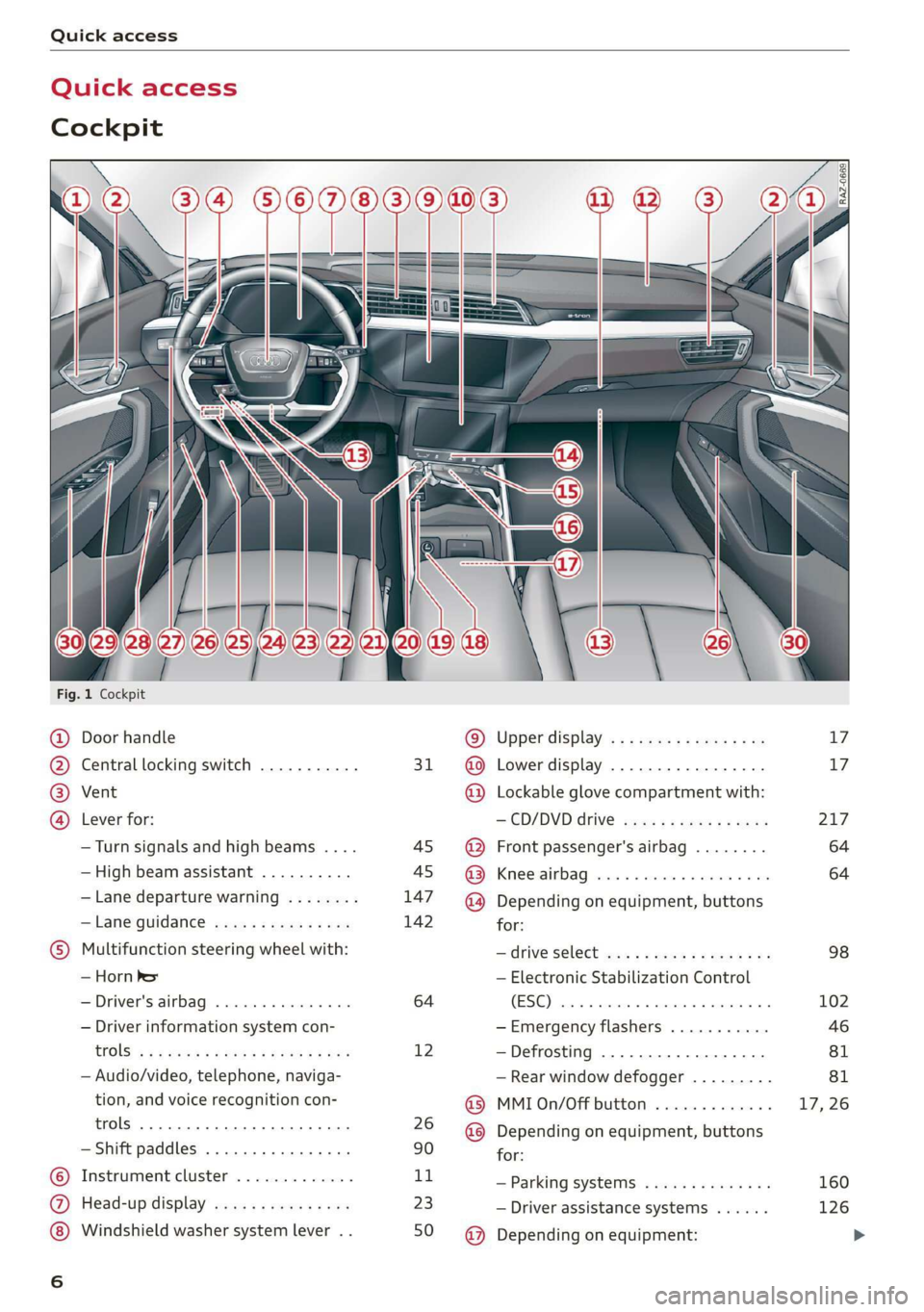
Quick access
Cockpit
Fig. 1 Cockpit
@ @ @ @
©C®
oa
Door handle
Central locking switch ...........
Vent
Lever for:
—Turn signals and high beams ....
— High beam assistant ..........
— Lane departure warning ........
—Lane guidance ...............
Multifunction steering wheel with:
— Horn Pe
— Driver's airbag .............0.
— Driver information system con-
CGS! « = 2 eeu go oes eee ez ee
— Audio/video, telephone, naviga-
tion, and voice recognition con-
trols... eee eee
— Shift paddles .............00.
Instrument cluster .............
Head-up display ...............
Windshield washer system lever . .
31
45 45
147
142
64
12
26
90
1,
23
50
© @ @ ® ® @ ® ®
@
Upper display, « « x sees x = aaa + ox
Lower display ................-
Lockable glove compartment with:
CD/DVD drive sess ¢ s saws 9 « ame
Front passenger's airbag ........
Kees AG wisn v 6 ores o soca oi ans
Depending on equipment, buttons
for:
— ‘drive SelGCt sce ss gewy so eee a oe
— Electronic Stabilization Control
(ESE) sess co ssenionn as comune «of auanane 0
—Emergency flashers ...........
—Defrosting ..................
— Rear window defogger .........
MMI On/Off button .............
Depending on equipment, buttons
for:
— Parking systems ..............
— Driver assistance systems ......
Depending on equipment:
17 17
217
64
64
98
102
Page 10 of 310
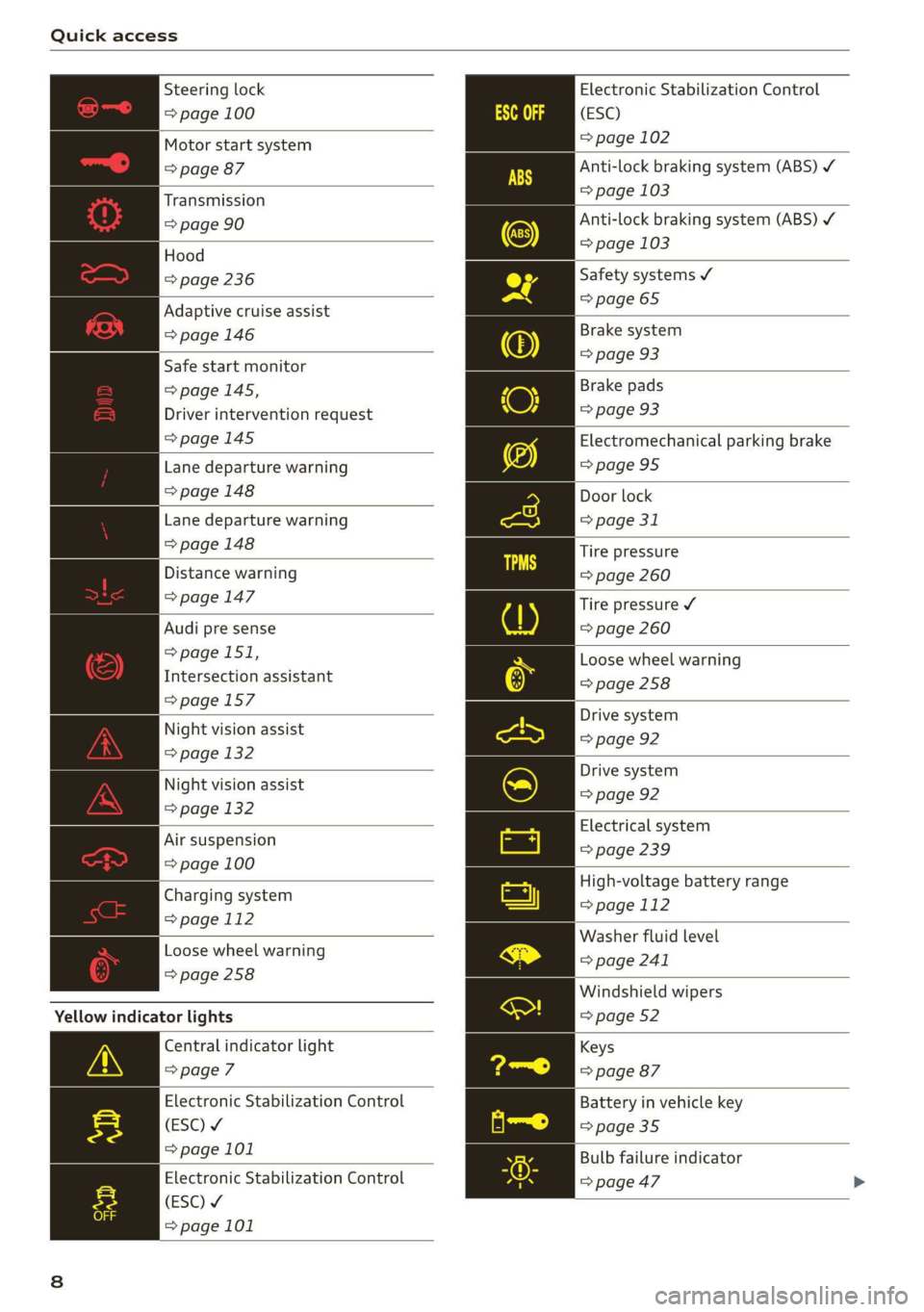
Quick access
Electronic Stabilization Control
(ESC)
= page 102
Anti-lock braking system (ABS) ¥
=> page 103
Anti-lock braking system (ABS) ¥
=> page 103
Steering lock
=> page 100
Motor start system
=> page 87
Transmission
=> page 90
| Hood
=> page 236 Safety systems ¥
> 65
Adaptive cruise assist page
= page 146 Brake system
=> page 93
Safe start monitor pag
=> page 145,
Driver intervention request
=>page 145
Brake pads
=> page 93
Electromechanical parking brake
Lane departure warning =>page 95
=> page 148 Door lock
Lane departure warning => page 31
=> page 148 Tire pressure
Distance warning => page 260
> page 147 Tire pressure ¥
Audi pre sense => page 260
=> page 151,
Intersection assistant
=>page 157
Loose wheel warning
=> page 258
Drive system
Night vision assist => page 92
=> page 132
Drive system
Night vision assist => page 92
=> page 132
Electrical system
Air suspension => page 239
=> page 100
High-voltage battery range
=> page 112
Washer fluid level
=> page 241
Charging system
=> page 112
Loose wheel warning
=>page 258
Windshield wipers
=> page 52
Yellow indicator lights
Central indicator light
=> page 7
Electronic Stabilization Control
(ESC) ¥
=>page 101
Keys
=> page 87
Battery in vehicle key
= page 35
Bulb failure indicator
Electronic Stabilization Control > page 47
(ESC) ¥
=> page 101
Page 11 of 310
4KE012721BB
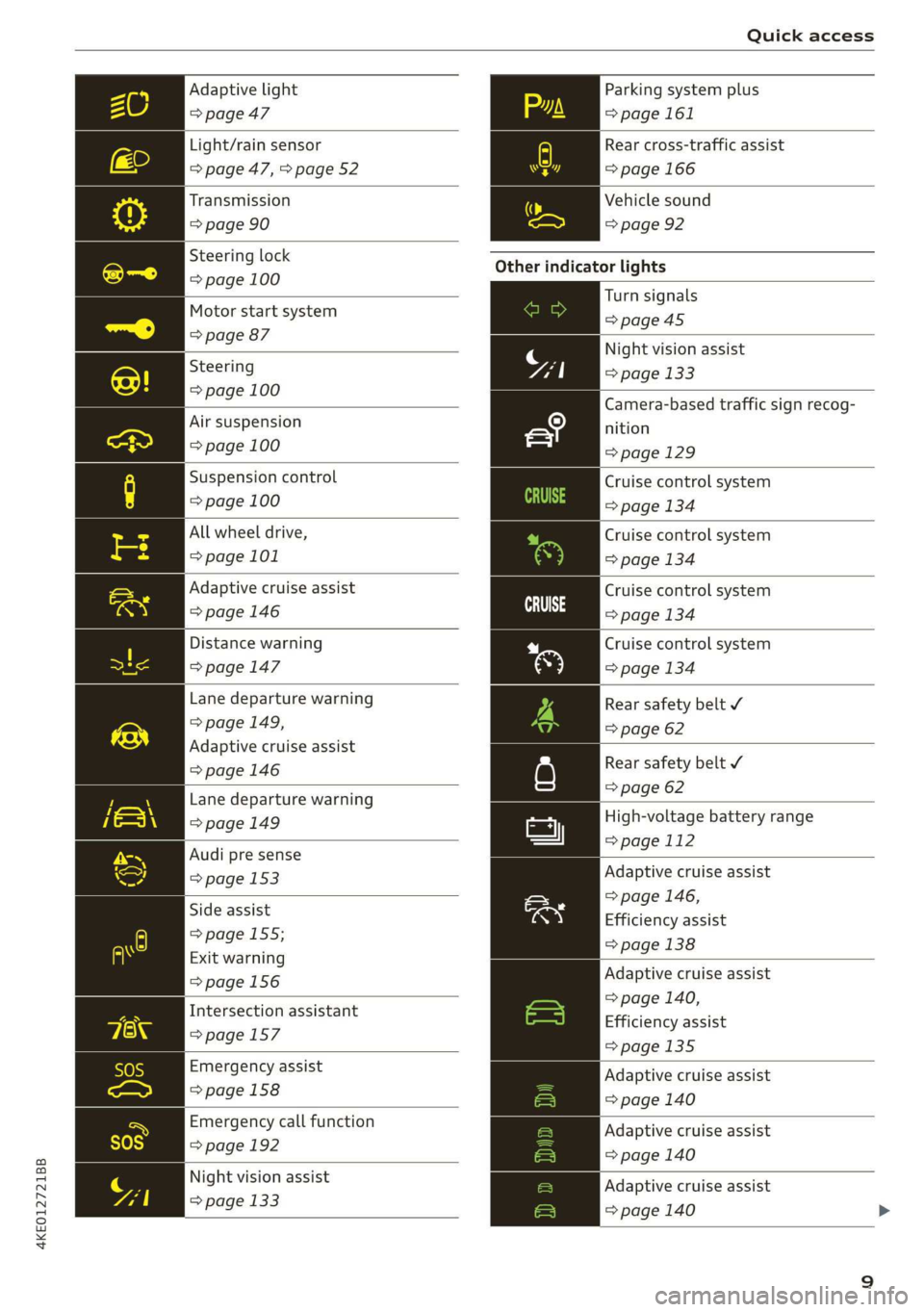
Quick access
Adaptive light
=> page 47
Light/rain sensor
=> page 47, > page 52
Transmission
=> page 90
Steering lock
=> page 100
Motor start system
=> page 87
Steering
=> page 100
Air suspension
=> page 100
Suspension control
=> page 100
All wheel drive,
=> page 101
Adaptive cruise assist
=> page 146
Distance warning
=>page 147
Lane departure warning
=> page 149,
Adaptive cruise assist
=>page 146
Lane departure warning
=> page 149
Audi pre sense
=> page 153
Side assist
=> page 155;
Exit warning
=>page 156
Intersection assistant
=>page 157
Emergency assist
> page 158
Emergency call function
=> page 192
Night vision assist
=> page 133
Parking system plus
= page 161
Rear cross-traffic assist
= page 166
Vehicle sound
=> page 92
Other indicator lights
Turn signals
=>page 45
Night vision assist
=> page 133
Camera-based traffic sign recog-
nition
=> page 129
Cruise control system
=> page 134
Cruise control system
=> page 134
Cruise control system
CE age 134
Cruise control system
=> page 134
Rear safety belt ¥
=> page 62
Rear safety belt ¥
=> page 62
High-voltage battery range
=>page 112
Adaptive cruise assist
=> page 146,
Efficiency assist
=> page 138
Adaptive cruise assist
=> page 140,
Efficiency assist
>page 135
Adaptive cruise assist
=> page 140
Adaptive cruise assist
=> page 140
Adaptive cruise assist
=> page 140
Page 12 of 310
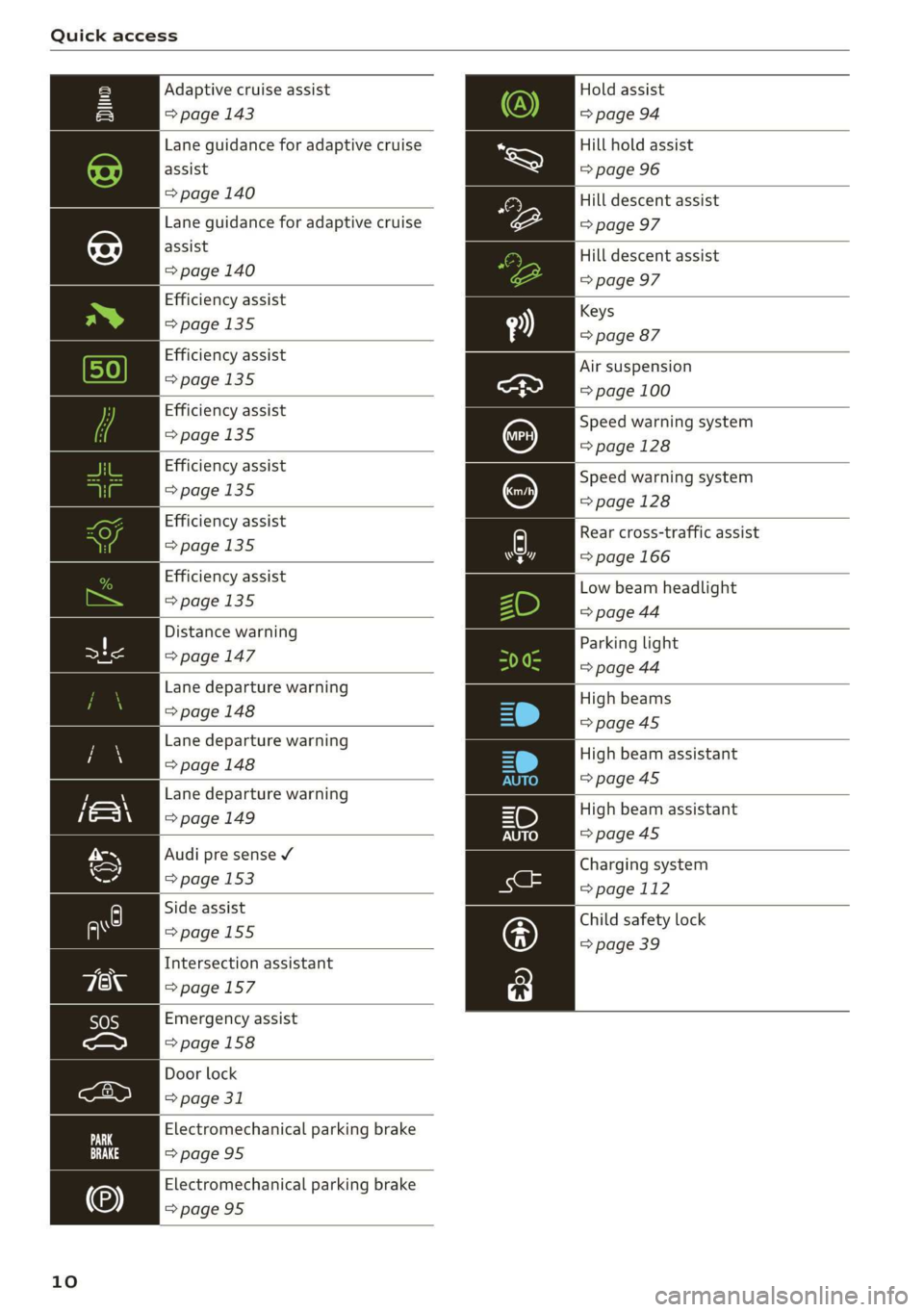
Quick access
Hold assist
=> page 94
Hill hold assist
=> page 96
Adaptive cruise assist
=> page 143
Lane guidance for adaptive cruise
assist
> page 140 Hill descent assist
Lane guidance for adaptive cruise => page 97
assist
=> page 140
Hill descent assist
=> page 97
Efficiency assist
Keys
>page 135
=> page 87
Efficiency assist
>page 135
Efficiency assist
>page 135
Efficiency assist
=>page 135
Air suspension
=> page 100
Speed warning system
=> page 128
Speed warning system
=>page 128
Low beam headlight
=> page 44
Efficiency assist
>page 135
Distance warning
a => page 147
Lane departure warning
=>page 148
Parking light
=> page 44
High beams
=>page 45
Lane departure warning
> page 148 High beam assistant
=>page 45
Lane departure warning
=> page 149 High beam assistant
=>page 45
Audi pre sense ¥
Charging system
=> page 153 ang
=> page 112
Child safety lock
=> page 39
Side assist
=>page 155
Intersection assistant
=>page 157
Emergency assist
=>page 158
Door lock
> page 31
Electromechanical parking brake
=>page 95
Electromechanical parking brake
=>page 95
10
Efficiency assist A Rear cross-traffic assist
=> page 135 7] => page 166
Page 48 of 310
Lights and Vision
Operating the headlight flasher
> To operate the headlight flashers, pull the lever
back @) > page 45, fig. 37. If the high beam as-
sistant is activated, but the high beams were
not turned off, the high beam assistant remains
activated.
ZA\ WARNING
— Follow the safety precautions and note the
limits of the assist systems, sensors, and
cameras > page 123.
— High beam assistant is only intended to as-
sist the driver. The driver is still responsible
for controlling the headlights and may need
to switch them on and off manually depend-
ing on light and visibility conditions.
— High beams can cause glare for other driv-
ers, which increases the risk of an accident.
For this reason, only use the high beams or
the headlight flasher when they will not cre-
ate glare for other drivers.
@) Tips
Specific settings are stored automatically in
the active personal profile.
Adjusting the exterior lighting
You can adjust the exterior lighting separately.
The settings depend on the vehicle equipment.
> Applies to: MMI: Select on the home screen:
VEHICLE > Light & Visibility > Exterior light-
ing.
Automatic headlights
You can adjust the following settings in the Auto-
matic
headlights menu:
Activation time - You can adjust if the headlights
switch on Early, Medium, or Late according to
the sensitivity of the light sensor.
High beam assistant - You can switch the high
beam assistant on and off.
Entry/exit lighting
When it is dark, the Entry/exit lighting illumi-
nates the area around the vehicle when unlocking
46
the vehicle and after switching off the ignition
and opening the driver's door. The entry/exit
lighting only works when it is dark and the light
switch is in the AUTO light function.
Daytime running lights
USA models: the daytime running lights can be
switched on and off.
Canada models: the daytime running lights can-
not be switched off. The lights activate automati-
cally each time the ignition is switched on.
@ Tips
Specific settings are stored automatically in
the active personal profile.
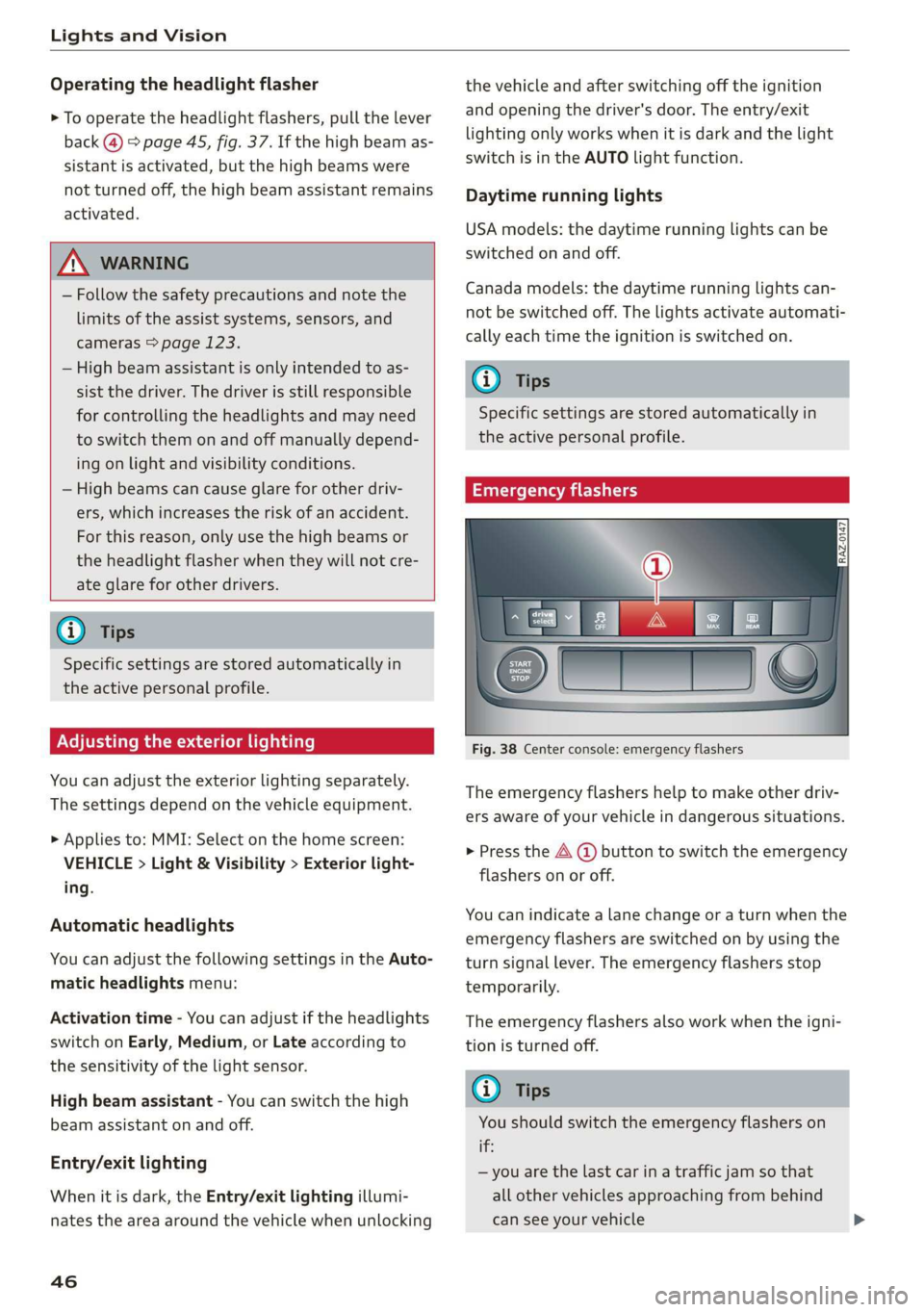
Emergency flashers
Fig. 38 Center console: emergency flashers
The emergency flashers help to make other driv-
ers aware of your vehicle in dangerous situations.
> Press the A @ button to switch the emergency
flashers on or off.
You can indicate a lane change or a turn when the
emergency flashers are switched on by using the
turn signal lever. The emergency flashers stop
temporarily.
The emergency flashers also work when the igni-
tion is turned off.
@ Tips
You should switch the emergency flashers on
if:
— you are the last car in a traffic jam so that
all other vehicles approaching from behind
can see your vehicle
Page 125 of 310
4KE012721BB
Assist systems
Assist systems
General information
Sica eel delay
ZA WARNING
— As the driver, you are always completely re-
sponsible for all driving tasks. The assist
systems cannot replace the driver's atten-
tion. Give your full attention to driving the
vehicle, and be ready to intervene in the
traffic situation at all times.
— Activate the assist systems only if the sur-
rounding conditions permit it. Always adapt
your driving style to the current visual,
weather, road, and traffic conditions.
— Unexpected steering or braking interven-
tions may be initiated by the assist systems.
Note the information on storing luggage
items correctly > page 77.
— For the assist systems to be able to react
correctly, the function of the sensors and
cameras must not be restricted. Note the in-
formation on sensors and cameras
=>page 124 or > page 125.
G) Tips
— Pay attention to applicable local regulations
relating to driving tasks, leaving space for
emergency vehicles, vehicle distance, speed,
parking location, wheel placement, etc. The
driver is always responsible for following
the laws that are applicable in the location
where the vehicle is being operated.
— You can cancel a steering or braking inter-
vention by the system by braking or acceler-
ating noticeably, steering, or deactivating
the respective assist system.
— Always check the assist systems settings be-
fore driving. The settings could have been
changed, for example, by other drivers or if
another personal profile was used.
System limitations
ZA\ WARNING
—The use of an assist system cannot over-
come the natural laws of physics. A collision
cannot be prevented in certain circumstan-
ces.
— Warnings, messages, or indicator lights may
not be displayed or initiated on time or cor-
rectly, for example, if vehicles are approach-
ing very fast.
— Corrective interventions by the assist sys-
tems, such as steering or braking interven-
tions, may not be sufficient or they may not
occur. Always be ready to intervene.
@) Tips
— Due to the system limitations when detect-
ing the surrounding area, the systems may
warn or intervene unexpectedly or too late
in certain situations. The assist systems may
also interpret a driving maneuver incorrectly
and then warn the driver unexpectedly.
— The systems may not function as expected
in unusual driving situations, such as driving
offroad, on unpaved roads, on loose ground,
on inclines, or on grooves in the road.
— The systems may not function correctly in
unclear traffic situations, such as turning
lanes, exit ramps, construction zones, rises
or dips that obstruct visibility, intersections,
toll stations, or city traffic.
—In trailer mode, some assist systems may be
limited, may not react as usual, or may be
unavailable. Please refer to the instructions
for towing a trailer located in > page 120.
— If accessories have been mounted on the
steering wheel, the ability for the steering
systems to react may be limited.
123
Page 127 of 310
Assist systems
4KE012721BB
Q) Note —The side area ©)* is detected and evaluated
when passing. There may have been
— Obstacles may disappear from the detection changes to the surrounding area after
area when approaching them, even if they switching the ignition off and on again, af-
were already detected. Under certain cir- ter opening the doors, or if the vehicle is left
cumstances, the detection and display of stationary for a period of time. In this case,
certain surfaces and objects may be limited: the area will appear black until the area has
— Items and objects above the coverage been detected and evaluated.
area, for example cars parked bumper-to- — Applies to: vehicles with laser scanner: The
bumper, half-open garage doors, or hang- possible emissions are below the threshold
ing objects that do not touch the ground for class 1 lasers.
— Low obstacles — For an explanation on conformity with the
— Thin or narrow objects, such as barrier FCC regulations in the United States and the
chains, foliage, poles or fences Industry Canada regulations, see
— Projecting objects, such as trailer draw => page 289.
bars
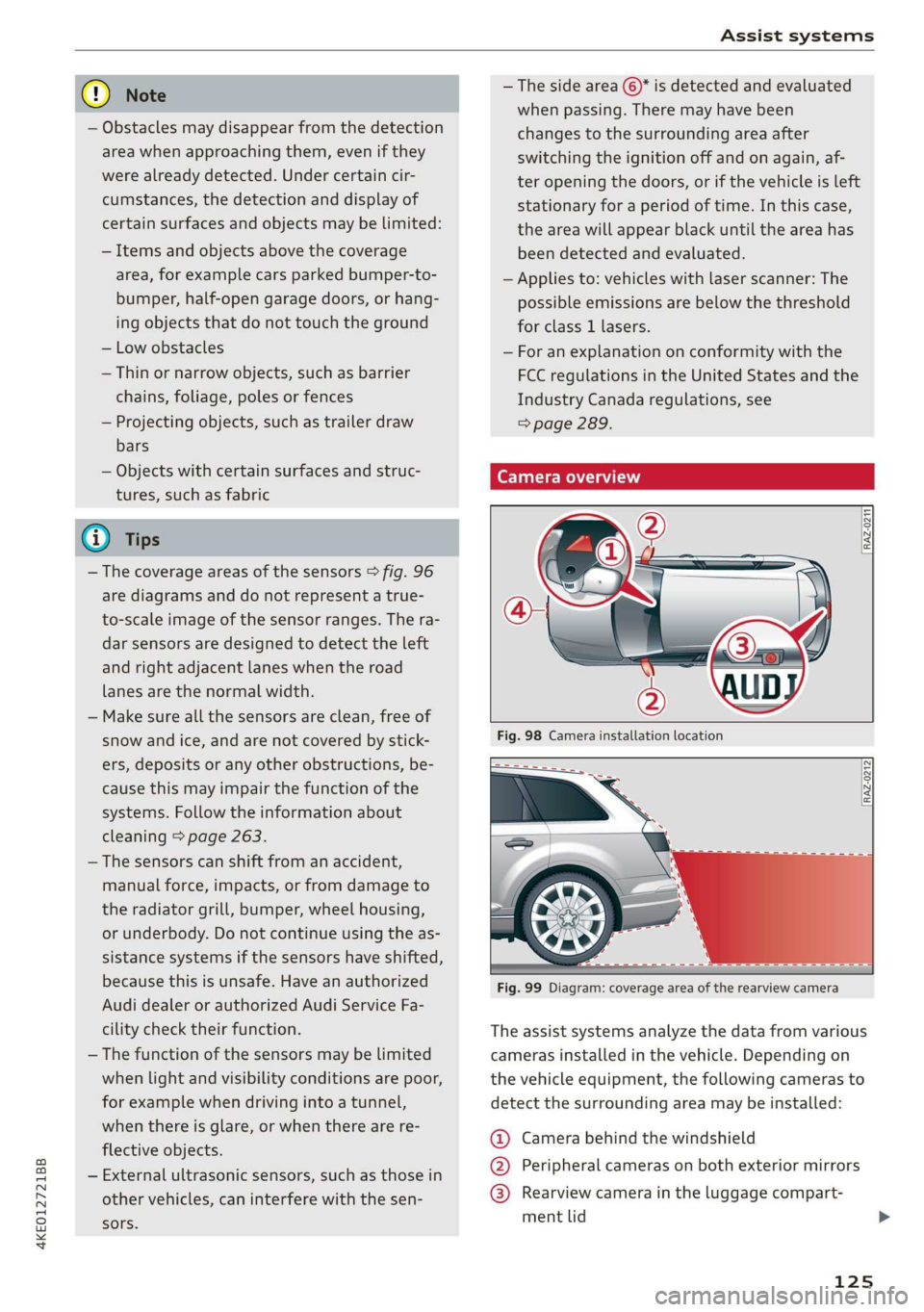
— Objects with certain surfaces and struc- Camera overview
tures, such as fabric
@ Tips
— The coverage areas of the sensors > fig. 96
are diagrams and do not represent a true-
to-scale image of the sensor ranges. The ra-
dar sensors are designed to detect the left
and right adjacent lanes when the road
lanes
are the normal width.
[RAZ-0271
— Make sure all the sensors are clean, free of
snow and ice, and are not covered by stick-
ers, deposits or any other obstructions, be-
cause this may impair the function of the
systems. Follow the information about
cleaning > page 263.
— The sensors can shift from an accident,
manual force, impacts, or from damage to
the radiator grill, bumper, wheel housing,
or underbody. Do not continue using the as-
sistance systems if the sensors have shifted,
because this is unsafe. Have an authorized
Audi dealer or authorized Audi Service Fa-
[RAZ-0212
cility check their function. The assist systems analyze the data from various
— The function of the sensors may be limited cameras installed in the vehicle. Depending on
when light and visibility conditions are poor, the vehicle equipment, the following cameras to
for example when driving into a tunnel, detect the surrounding area may be installed:
when there is glare, or when there are re-
flective objects.
— External ultrasonic sensors, such as those in
other vehicles, can interfere with the sen-
sors.
@ Camera behind the windshield
@ Peripheral cameras on both exterior mirrors
@® Rearview camera in the luggage compart-
ment lid
125
Page 136 of 310
Driver assistance
Driver assistance
Cruise control system
Applies to: vehicles with cruise control system
The cruise control system assists the driver in
maintaining a constant speed above approxi-
mately 15 mph (20 km/h). The system maintains
the desired speed by braking and accelerating.
ZA WARNING
— Always pay attention to the traffic around
your vehicle when the cruise control system
is in operation. As the driver, you are always
responsible for controlling your vehicle
speed and the distance between your vehicle
and
other vehicles.
— For safety reasons, cruise control should not
be used in the city, in stop-and-go traffic, on
winding roads, and when road conditions are
poor (such as ice, fog, gravel, heavy rain,
and conditions that could lead to hydroplan-
ing), because this increases the risk of an ac-
cident.
— Switch the cruise control off temporarily
when driving in turning lanes, highway exits,
or in construction zones.
—To reduce the risk of an accident, you should
only resume the stored speed if it is suitable
for the current traffic conditions.
C) Note
Before driving downhill a long distance ona
steep hill, decrease your speed and use the
braking effect of recuperation > page 90. This
reduces the load on the brakes.
@) Tips
The brake lights turn on when the brakes are
applied automatically.
134
Switching the system on
Applies to: vehicles with cruise control system
BFV-0220
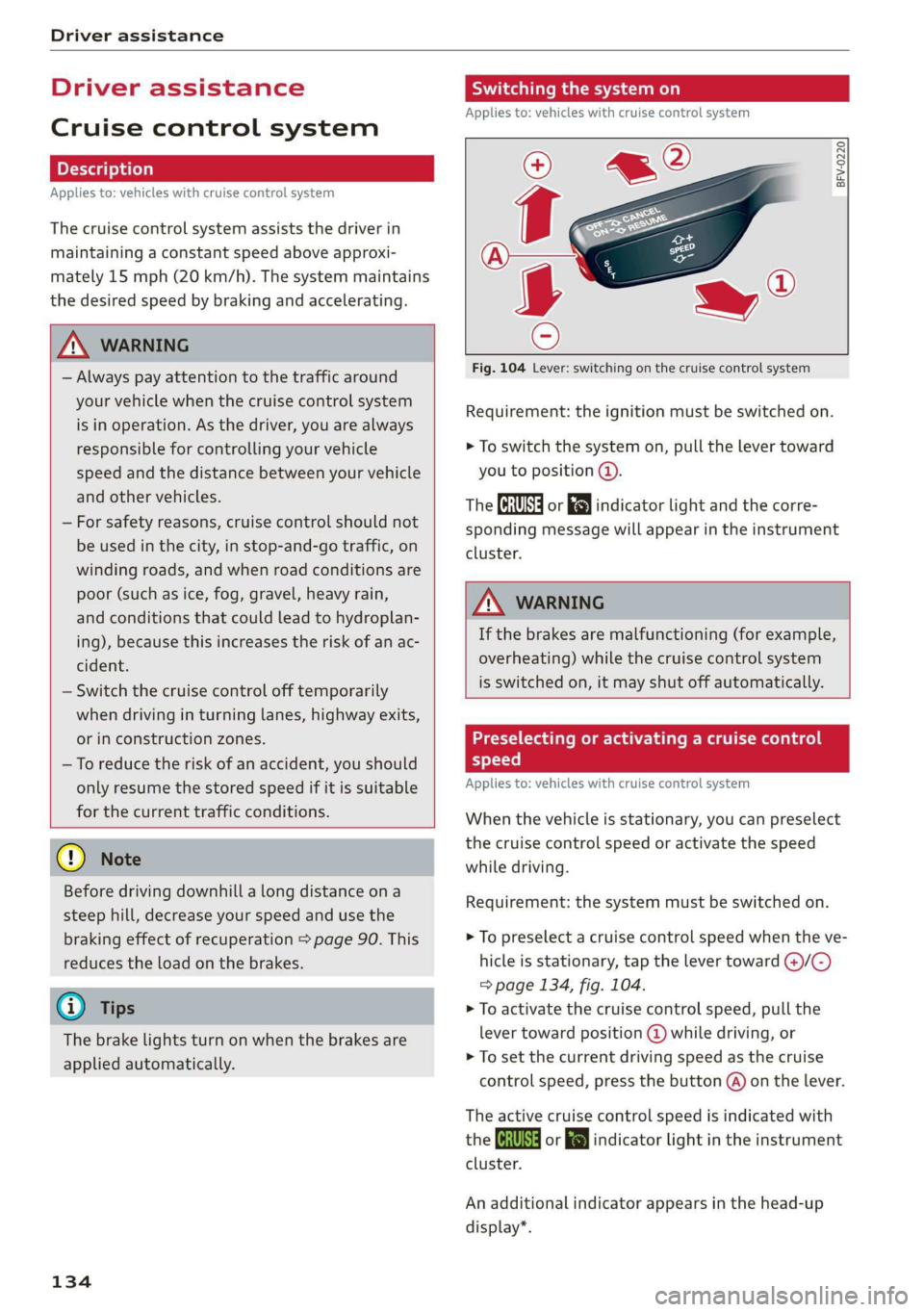
Fig. 104 Lever: switching on the cruise control system
Requirement: the ignition must be switched on.
> To switch the system on, pull the lever toward
you to position @.
The Ga or 8) indicator light and the corre-
sponding message will appear in the instrument
cluster.
A WARNING
If the brakes are malfunctioning (for example,
overheating) while the cruise control system
is switched on, it may shut off automatically.
Preselecting or activating a cruise control
speed
Applies to: vehicles with cruise control system
When the vehicle is stationary, you can preselect
the cruise control speed or activate the speed
while driving.
Requirement: the system must be switched on.
> To preselect a cruise control speed when the ve-
hicle is stationary, tap the lever toward @)/C)
=> page 134, fig. 104.
> To activate the cruise control speed, pull the
lever
toward position @ while driving, or
> To set the current driving speed as the cruise
control speed, press the button @) on the lever.
The active cruise control speed is indicated with
the Gs or kl indicator light in the instrument
cluster.
An additional indicator appears in the head-up
display*.
Page 141 of 310
4KE012721BB
Driver assistance
Adaptive cruise assist
General information
Applies to: vehicles with adaptive cruise assist
Depending on the vehicle equipment, the adap-
tive cruise assist may consist of the following
functions:
Within the limits of the system, the adaptive
speed and distance control assists the driver in
controlling the speed and the set distance to the
vehicle driving ahead. If the system detects a ve-
hicle driving ahead, the adaptive cruise assist can
brake and accelerate your vehicle within the lim-
its of the system. On open roads with no traffic, it
functions like a cruise control system. The stored
speed is maintained. When approaching a vehicle
driving ahead, the adaptive cruise assist auto-
matically brakes to match that vehicle's speed
and then maintains the set distance as much as
possible. As soon as the system does not detect a
vehicle driving ahead, adaptive cruise assist ac-
celerates up to the set speed.
The additional lane guidance assists the driver
with corrective steering in order to stay in the
lane. You can adjust if the adaptive cruise assist
will provide support with lane guidance
= page 142, Switching lane guidance on and off.
In stop-and-go traffic and in traffic jams, the ve-
hicle may brake to a full stop and then may also
start driving again automatically under certain
conditions.
Applies to: vehicles with efficiency assist: Predic-
tive control can adjust the speed based on traffic
and road conditions > page 137, Predictive con-
trol.
Follow the safety precautions and note the
limits of the assist systems, sensors, and
cameras > page 123.
For an explanation on conformity with the
FCC regulations in the United States and the
Industry Canada regulations, see > page 289.
Applies to: vehicles with adaptive cruise assist
2 2
oS
g 2 © oO
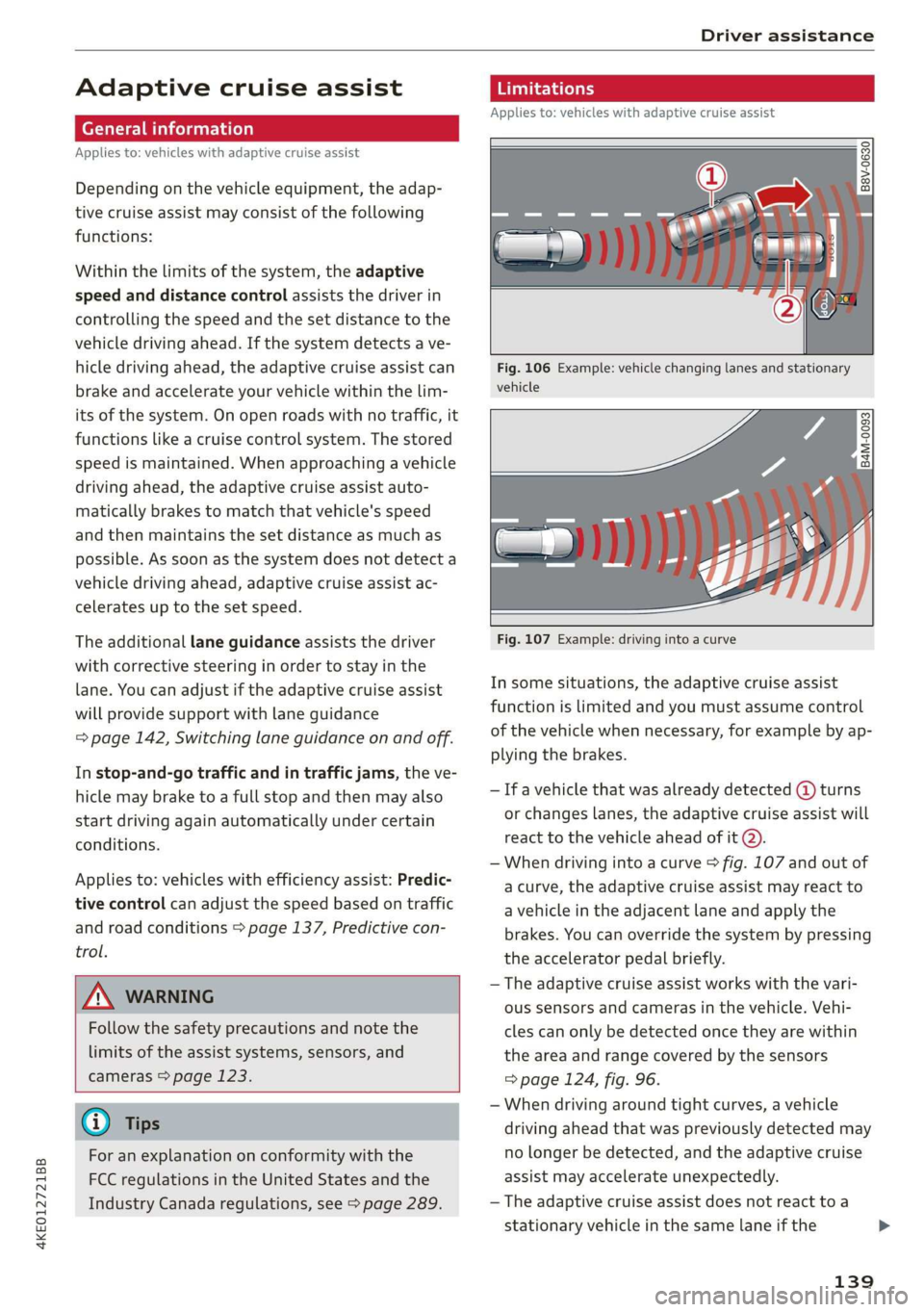
Fig. 106 Example: vehicle changing lanes and stationary
vehicle
Fig. 107 Example: driving into a curve
In some situations, the adaptive cruise assist
function is limited and you must assume control
of the vehicle when necessary, for example by ap-
plying the brakes.
— If a vehicle that was already detected @ turns
or changes lanes, the adaptive cruise assist will
react to the vehicle ahead of it @).
— When driving into a curve > fig. 107 and out of
a curve, the adaptive cruise assist may react to
a vehicle in the adjacent lane and apply the
brakes. You can override the system by pressing
the accelerator pedal briefly.
— The adaptive cruise assist works with the vari-
ous sensors and cameras in the vehicle. Vehi-
cles can only be detected once they are within
the area and range covered by the sensors
=> page 124, fig. 96.
— When driving around tight curves, a vehicle
driving ahead that was previously detected may
no longer be detected, and the adaptive cruise
assist may accelerate unexpectedly.
— The adaptive cruise assist does not react toa
stationary vehicle in the same lane if the
139
>