page AUDI E-TRON 2019 Owners Manual
[x] Cancel search | Manufacturer: AUDI, Model Year: 2019, Model line: E-TRON, Model: AUDI E-TRON 2019Pages: 310, PDF Size: 81.91 MB
Page 7 of 310
4KE012721BB
About this Owner's Manual
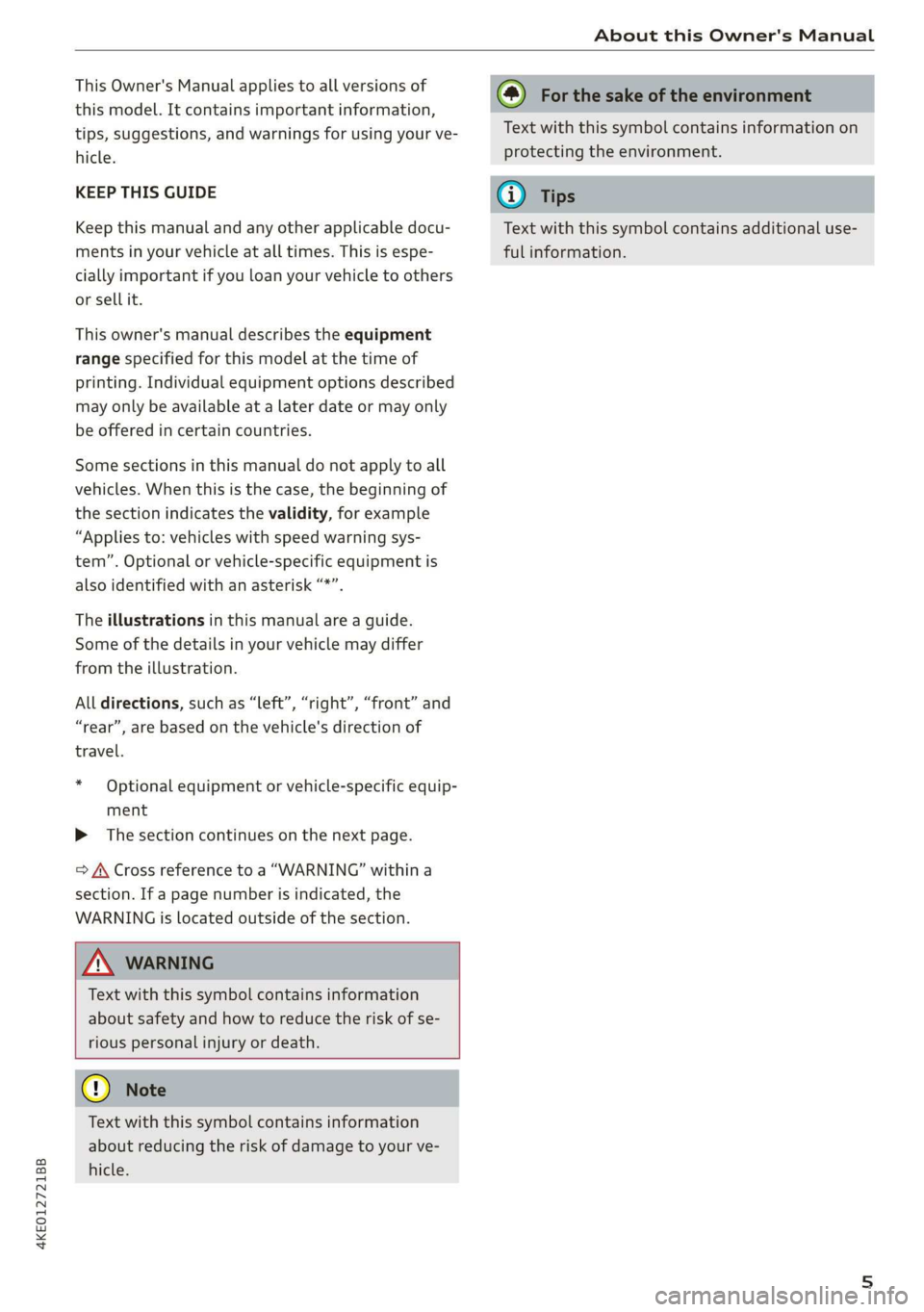
This Owner's Manual applies to all versions of
this model. It contains important information,
tips, suggestions, and warnings for using your ve-
hicle.
KEEP THIS GUIDE
Keep this manual and any other applicable docu-
ments in your vehicle at all times. This is espe-
cially important if you loan your vehicle to others
or sell it.
This owner's manual describes the equipment
range specified for this model at the time of
printing. Individual equipment options described
may only be available at a later date or may only
be offered in certain countries.
Some sections in this manual do not apply to all
vehicles. When this is the case, the beginning of
the section indicates the validity, for example
“Applies to: vehicles with speed warning sys-
tem”. Optional or vehicle-specific equipment is
also identified with an asterisk “*”.
The illustrations in this manual are a guide.
Some of the details in your vehicle may differ
from the illustration.
All directions, such as “Left”, “right”, “front” and
“rear”, are based on the vehicle's direction of
travel.
* — Optional equipment or vehicle-specific equip-
ment
» The section continues on the next page.
=> A\ Cross reference to a “WARNING” within a
section. If a page number is indicated, the
WARNING is located outside of the section.
ZA WARNING
Text with this symbol contains information
about safety and how to reduce the risk of se-
rious personal injury or death.
@) Note
Text with this symbol contains information
about reducing the risk of damage to your ve-
hicle.
(@) For the sake of the environment
Text with this symbol contains information on
protecting the environment.
@) Tips
Text with this symbol contains additional use-
ful information.
Page 9 of 310
4KE012721BB
Quick access
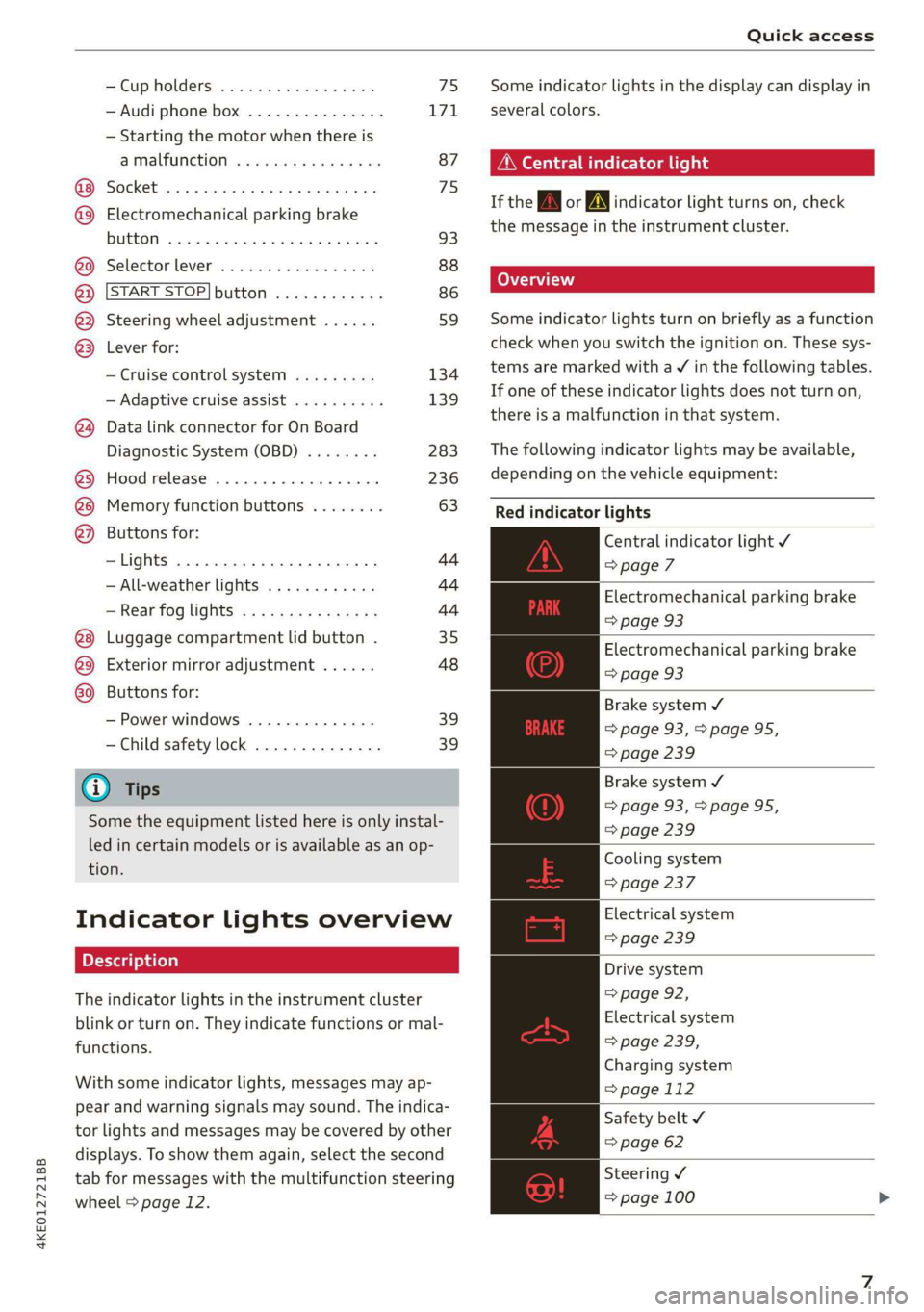
Cup Holders: « sesccces < ence wo esenene 75
— Audi phone box ............... 171
— Starting the motor when there is
@ MMALRUNCHION: ¢ « sais 9 v nara x 2 ae 87
Socket ........00002 cece ee eee 75
@ Electromechanical parking brake
button ....... 0... 0c eee 93
@0 Selector lever ................. 88
@) [START STOP] button ............ 86
@) Steering wheel adjustment ...... 59
@3) Lever for:
— Cruise control system ......... 134
— Adaptive cruise assist .......... 139
@ Data link connector for On Board
Diagnostic System (OBD) ........ 283
@3) Hood release ................-. 236
@8 Memory function buttons ........ 63
@) Buttons for:
—Lights ...............2..000. 44
—All-weather lights ............ 44
— Rear fog lights ............... 44
Luggage compartment lid button . 35
@9) Exterior mirror adjustment ...... 48
G9 Buttons for:
— Power windows .............. 39
— Child safety lock .............. 39
@ Tips
Some the equipment listed here is only instal-
led in certain models or is available as an op-
tion.
Indicator lights overview
The indicator lights in the instrument cluster
blink or turn on. They indicate functions or mal-
functions.
With some indicator lights, messages may ap-
pear and warning signals may sound. The indica-
tor lights and messages may be covered by other
displays. To show them again, select the second
tab for messages with the multifunction steering
wheel © page 12.
Some indicator lights in the display can display in
several colors.
A\ Central indicator light
If the wA or indicator light turns on, check
the message in the instrument cluster.
Some indicator lights turn on briefly as a function
check when you switch the ignition on. These sys-
tems are marked with a V in the following tables.
If one of these indicator lights does not turn on,
there is a malfunction in that system.
The following indicator lights may be available,
depending on the vehicle equipment:
Red indicator lights
Central indicator light ¥
=> page 7
Electromechanical parking brake
=> page 93
Electromechanical parking brake
=> page 93
Brake system ¥
=> page 93, > page 95,
=> page 239
Brake system 4
=> page 93,>page 95,
=> page 239
Cooling system
=> page 237
Electrical system
=> page 239
Drive system
=> page 92,
Electrical system
=> page 239,
Charging system
=>page 112
Safety belt
=> page 62
Steering ¥
=> page 100
Page 10 of 310
Quick access
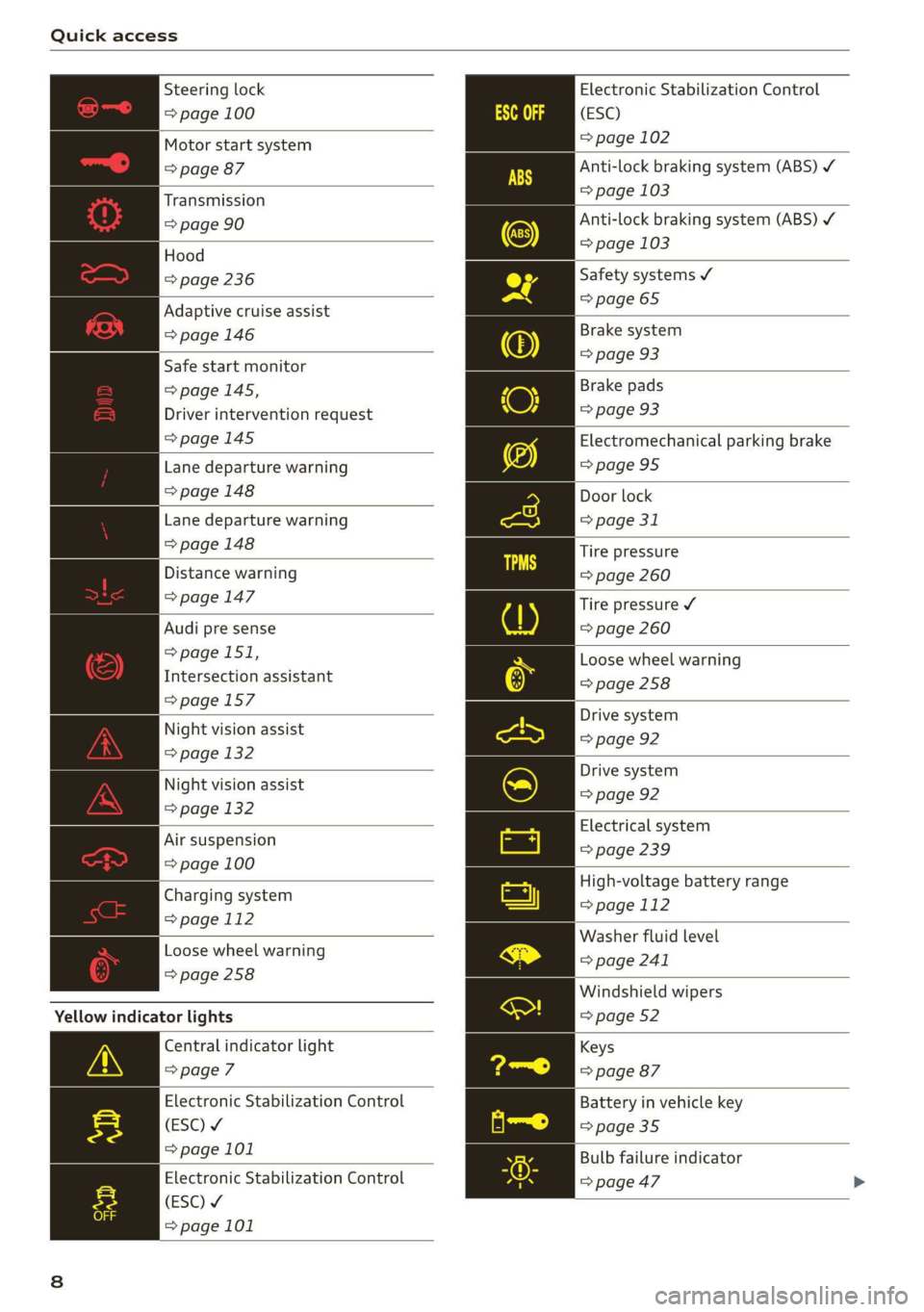
Electronic Stabilization Control
(ESC)
= page 102
Anti-lock braking system (ABS) ¥
=> page 103
Anti-lock braking system (ABS) ¥
=> page 103
Steering lock
=> page 100
Motor start system
=> page 87
Transmission
=> page 90
| Hood
=> page 236 Safety systems ¥
> 65
Adaptive cruise assist page
= page 146 Brake system
=> page 93
Safe start monitor pag
=> page 145,
Driver intervention request
=>page 145
Brake pads
=> page 93
Electromechanical parking brake
Lane departure warning =>page 95
=> page 148 Door lock
Lane departure warning => page 31
=> page 148 Tire pressure
Distance warning => page 260
> page 147 Tire pressure ¥
Audi pre sense => page 260
=> page 151,
Intersection assistant
=>page 157
Loose wheel warning
=> page 258
Drive system
Night vision assist => page 92
=> page 132
Drive system
Night vision assist => page 92
=> page 132
Electrical system
Air suspension => page 239
=> page 100
High-voltage battery range
=> page 112
Washer fluid level
=> page 241
Charging system
=> page 112
Loose wheel warning
=>page 258
Windshield wipers
=> page 52
Yellow indicator lights
Central indicator light
=> page 7
Electronic Stabilization Control
(ESC) ¥
=>page 101
Keys
=> page 87
Battery in vehicle key
= page 35
Bulb failure indicator
Electronic Stabilization Control > page 47
(ESC) ¥
=> page 101
Page 11 of 310
4KE012721BB
Quick access
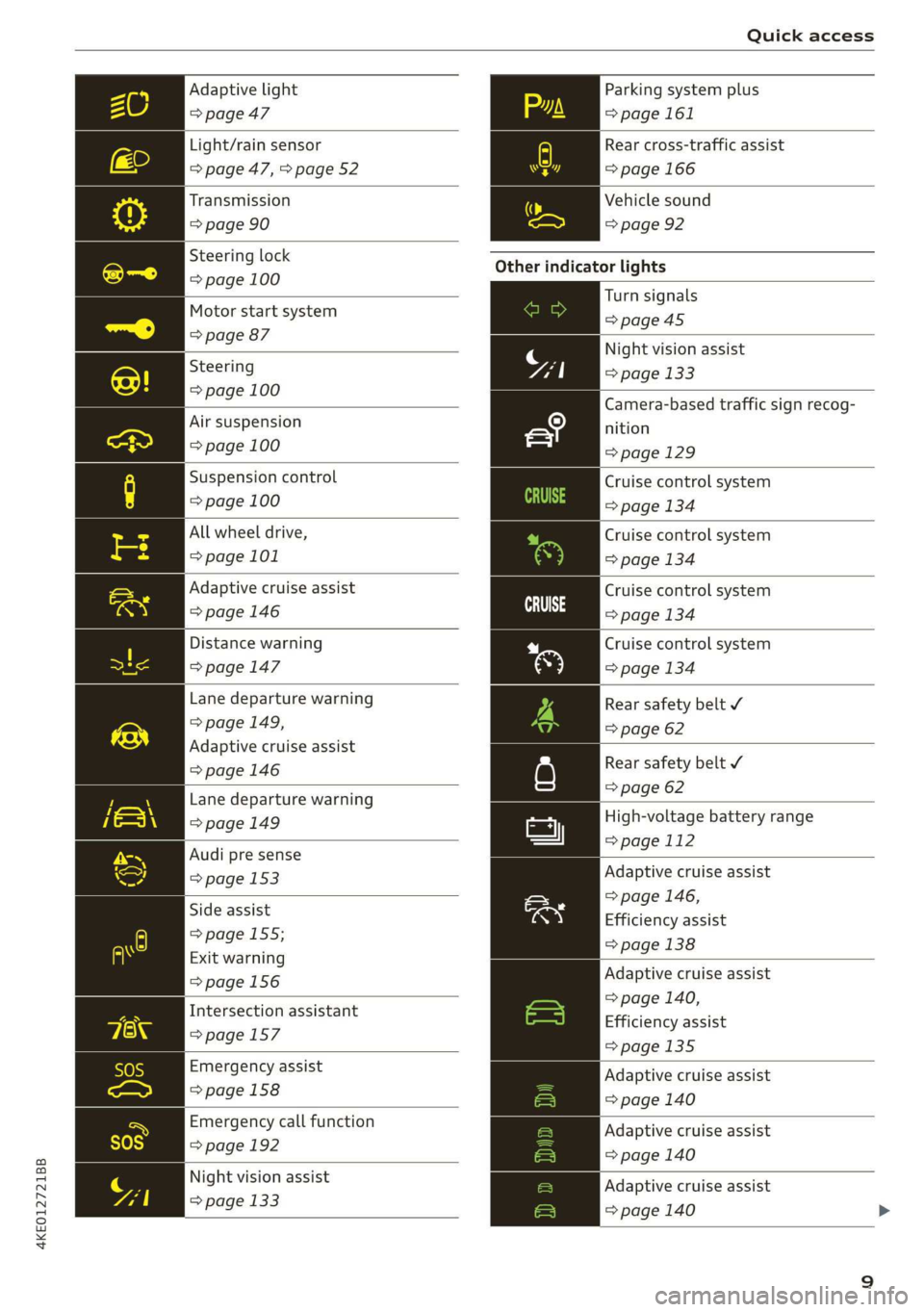
Adaptive light
=> page 47
Light/rain sensor
=> page 47, > page 52
Transmission
=> page 90
Steering lock
=> page 100
Motor start system
=> page 87
Steering
=> page 100
Air suspension
=> page 100
Suspension control
=> page 100
All wheel drive,
=> page 101
Adaptive cruise assist
=> page 146
Distance warning
=>page 147
Lane departure warning
=> page 149,
Adaptive cruise assist
=>page 146
Lane departure warning
=> page 149
Audi pre sense
=> page 153
Side assist
=> page 155;
Exit warning
=>page 156
Intersection assistant
=>page 157
Emergency assist
> page 158
Emergency call function
=> page 192
Night vision assist
=> page 133
Parking system plus
= page 161
Rear cross-traffic assist
= page 166
Vehicle sound
=> page 92
Other indicator lights
Turn signals
=>page 45
Night vision assist
=> page 133
Camera-based traffic sign recog-
nition
=> page 129
Cruise control system
=> page 134
Cruise control system
=> page 134
Cruise control system
CE age 134
Cruise control system
=> page 134
Rear safety belt ¥
=> page 62
Rear safety belt ¥
=> page 62
High-voltage battery range
=>page 112
Adaptive cruise assist
=> page 146,
Efficiency assist
=> page 138
Adaptive cruise assist
=> page 140,
Efficiency assist
>page 135
Adaptive cruise assist
=> page 140
Adaptive cruise assist
=> page 140
Adaptive cruise assist
=> page 140
Page 12 of 310
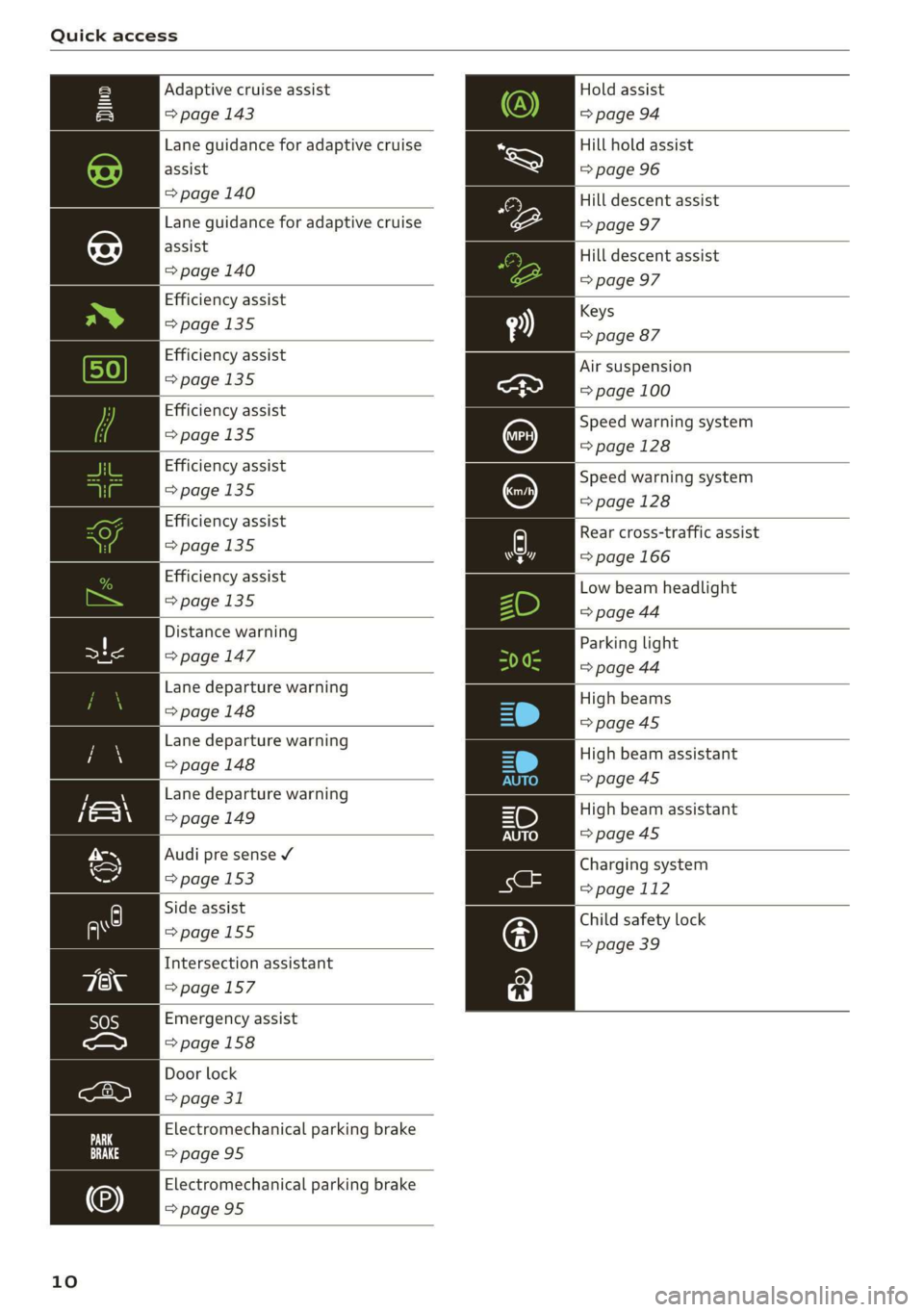
Quick access
Hold assist
=> page 94
Hill hold assist
=> page 96
Adaptive cruise assist
=> page 143
Lane guidance for adaptive cruise
assist
> page 140 Hill descent assist
Lane guidance for adaptive cruise => page 97
assist
=> page 140
Hill descent assist
=> page 97
Efficiency assist
Keys
>page 135
=> page 87
Efficiency assist
>page 135
Efficiency assist
>page 135
Efficiency assist
=>page 135
Air suspension
=> page 100
Speed warning system
=> page 128
Speed warning system
=>page 128
Low beam headlight
=> page 44
Efficiency assist
>page 135
Distance warning
a => page 147
Lane departure warning
=>page 148
Parking light
=> page 44
High beams
=>page 45
Lane departure warning
> page 148 High beam assistant
=>page 45
Lane departure warning
=> page 149 High beam assistant
=>page 45
Audi pre sense ¥
Charging system
=> page 153 ang
=> page 112
Child safety lock
=> page 39
Side assist
=>page 155
Intersection assistant
=>page 157
Emergency assist
=>page 158
Door lock
> page 31
Electromechanical parking brake
=>page 95
Electromechanical parking brake
=>page 95
10
Efficiency assist A Rear cross-traffic assist
=> page 135 7] => page 166
Page 13 of 310
4KE012721BB
Instrument cluster
Instrument cluster overview
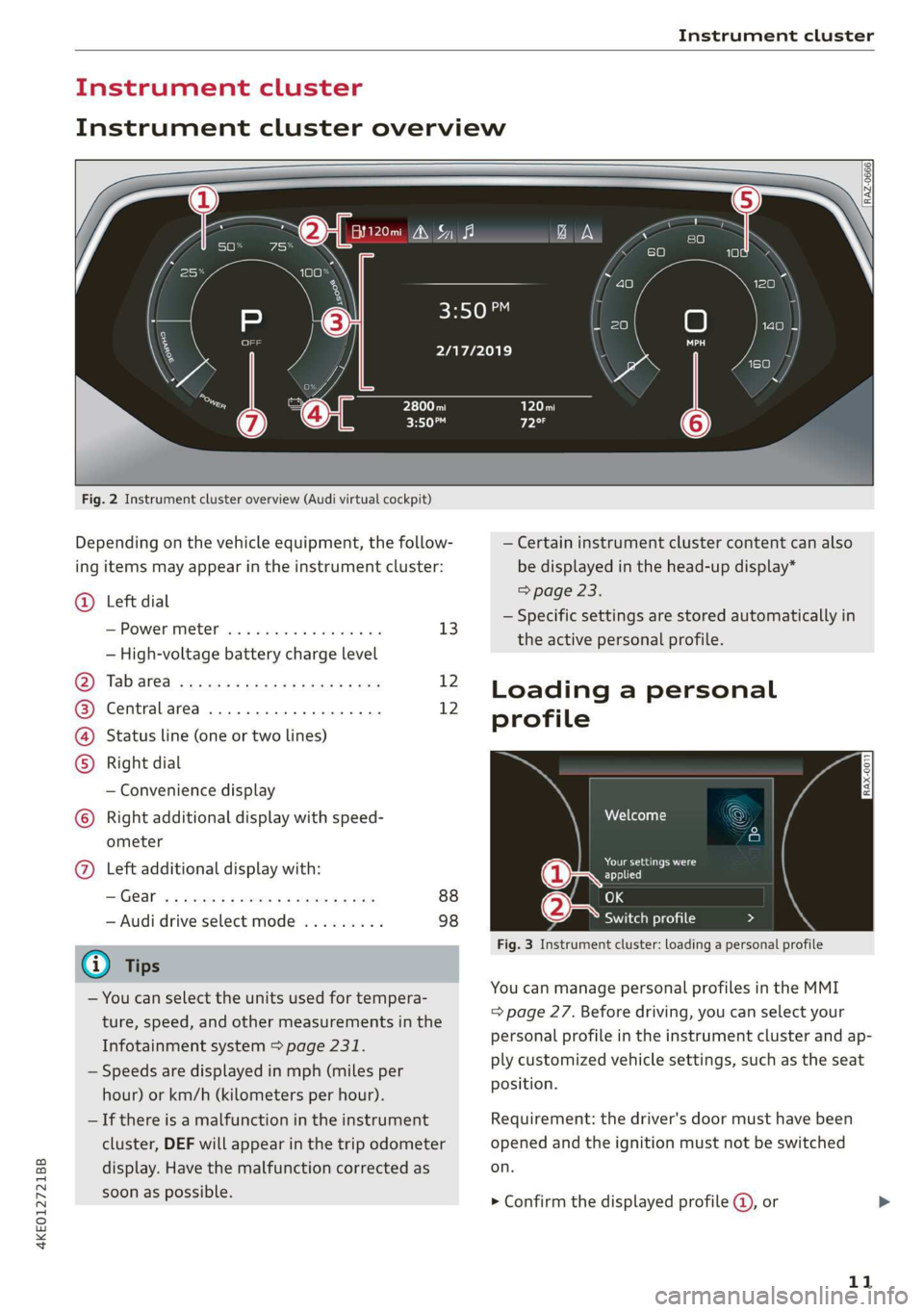
Fig. 2 Instrument cluster overview (Audi virtual cockpit)
Depending on the vehicle equipment, the follow-
ing items may appear in the instrument cluster:
@ Left dial
S:Powerimetert sia se seco a v seen ov 13
— High-voltage battery charge level
Oy Tab areal sess = ewe ¢ x oxen 2 2 ee 12
@) Centralarea .............0.000. 12
(4) Status line (one or two lines)
Right dial
— Convenience display
) Right additional display with speed-
ometer
@) Left additional display with:
IGG « 2 eee s 5 ee +e eee 9 ce 88
— Audi drive select mode ......... 98
@) Tips
— You can select the units used for tempera-
ture, speed, and other measurements in the
Infotainment system > page 231.
— Speeds are displayed in mph (miles per
hour) or km/h (kilometers per hour).
— If there is a malfunction in the instrument
cluster, DEF will appear in the trip odometer
display. Have the malfunction corrected as
soon as possible.
2/17/2019
— Certain instrument cluster content can also
be displayed in the head-up display*
=> page 23.
— Specific settings are stored automatically in
the active personal profile.
Loading a personal
profile
iy Aten
Darren ad
applied
(eae Switch profile Da 7 N
Fig. 3 Instrument cluster: loading a personal profile
You can manage personal profiles in the MMI
= page 27. Before driving, you can select your
personal profile in the instrument cluster and
ap-
ply customized vehicle settings, such as the seat
position.
Requirement: the driver's door must have been
opened and the ignition must not be switched
on.
> Confirm the displayed profile @, or
11
Page 14 of 310
Instrument cluster
> To load another profile, select and confirm
Switch profile 2).
> Select and confirm the desired profile. The
user-specific settings will load.
> To cancel the seat, mirror, and steering column
adjustment, select Cancel.
@) Tips
For more information and usage options for
personal profiles, see > page 27.
Operating
S| S| 9] ny S| cc
3:50™
2/17/2019
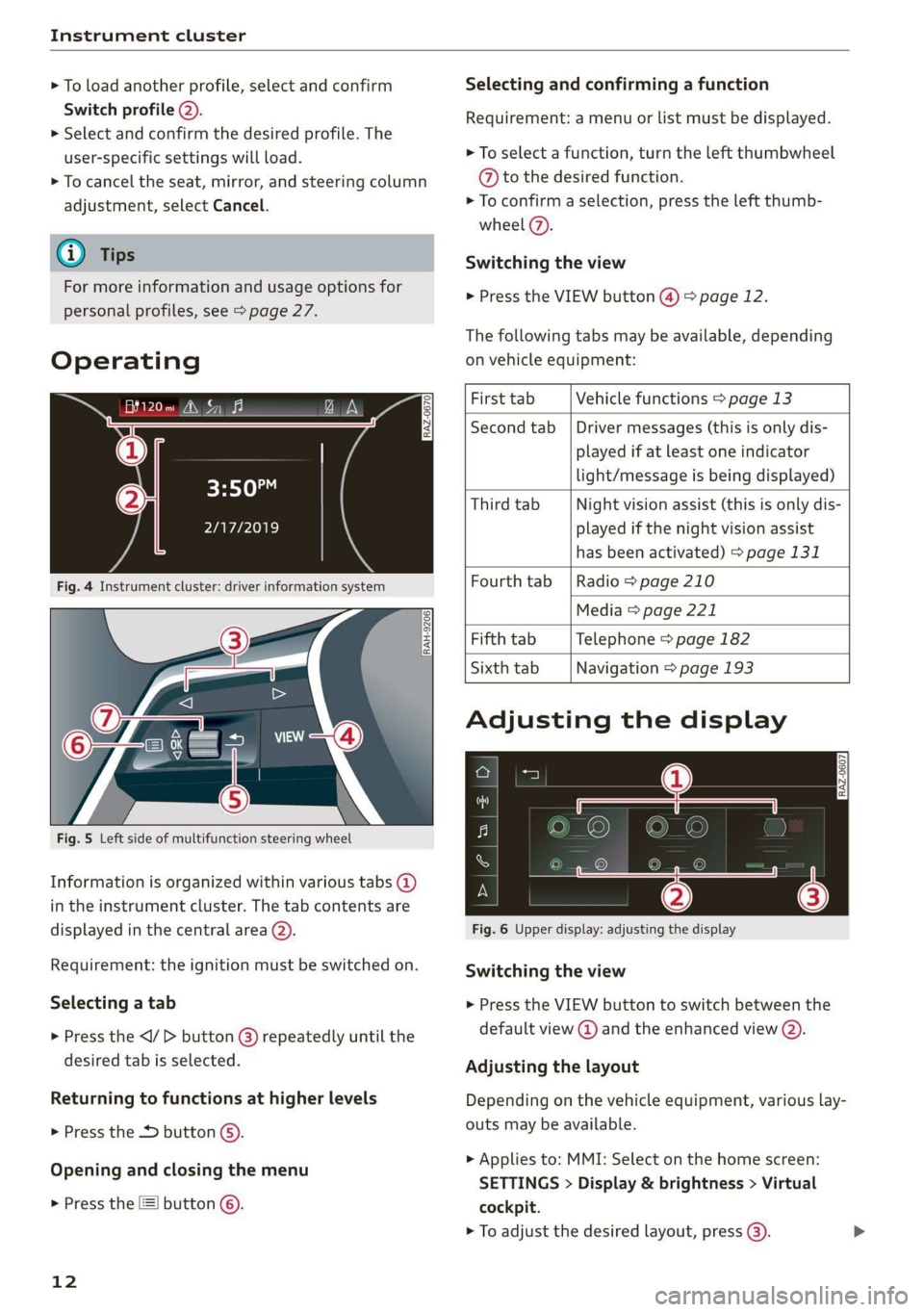
Fig. 4 Instrument cluster: driver information system
RAH-9206|
Fig. 5 Left side of multifunction steering wheel
Information is organized within various tabs @)
in the instrument cluster. The tab contents are
displayed in the central area (2).
Requirement: the ignition must be switched on.
Selecting a tab
> Press the button @) repeatedly until the
desired tab is selected.
Returning to functions at higher levels
> Press the D button ©).
Opening and closing the menu
> Press the [=] button ©.
12
Selecting and confirming a function
Requirement: a menu or list must be displayed.
> To select a function, turn the left thumbwheel
@ to the desired function.
> To confirm a selection, press the left thumb-
wheel (7).
Switching the view
> Press the VIEW button @) > page 12.
The following tabs may be available, depending
on vehicle equipment:
First tab Vehicle functions > page 13
Second tab | Driver messages (this is only dis-
played if at least one indicator
light/message is being displayed)
Third tab Night vision assist (this is only dis-
played if the night vision assist
has been activated) > page 131
Fourth
tab | Radio > page 210
Media > page 221
Fifth tab Telephone > page 182
Sixth tab Navigation > page 193
Adjusting the display
S| 3| S| iS
| ec
Fig. 6 Upper display: adjusting the display
Switching the view
> Press the VIEW button to switch between the
default view @ and the enhanced view ().
Adjusting the layout
Depending on the vehicle equipment, various lay-
outs may be available.
> Applies to: MMI: Select on the home screen:
SETTINGS > Display & brightness > Virtual
cockpit.
> To adjust the desired layout, press (3).
Page 15 of 310
4KE012721BB
Instrument cluster
Adjusting the additional display
Depending on the vehicle equipment, the addi-
tional displays that can be selected may vary.
> Applies to: MMI: Select on the home screen:
SETTINGS > Display & brightness > Virtual
cockpit > Configure.
> Select the desired additional display.
Reducing the display
Depending on the vehicle equipment, you can
hide the central area in the instrument cluster.
> Select on the instrument cluster: vehicle func-
tions tab > E] button > Reduced display.
Power meter
[RAZ-0574]
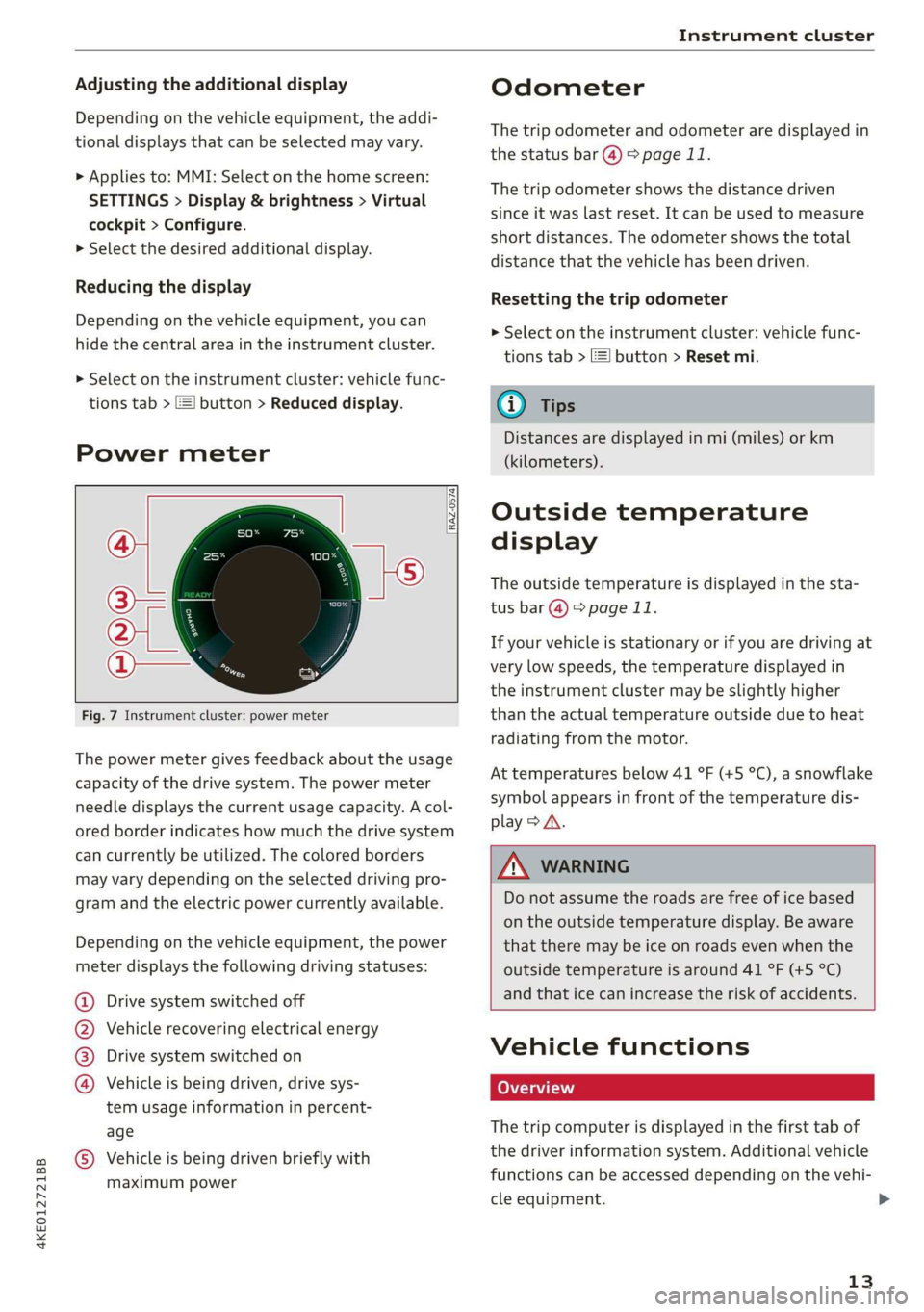
Fig. 7 Instrument cluster: power meter
The power meter gives feedback about the usage
capacity of the drive system. The power meter
needle displays the current usage capacity. A col-
ored border indicates how much the drive system
can currently be utilized. The colored borders
may vary depending on the selected driving pro-
gram and the electric power currently available.
Depending on the vehicle equipment, the power
meter displays the following driving statuses:
Drive system switched off
Vehicle recovering electrical energy
Drive system switched on
®©&O Vehicle is being driven, drive sys-
tem usage information in percent-
age
@ Vehicle is being driven briefly with
maximum power
Odometer
The trip odometer and odometer are displayed in
the status bar @) > page 11.
The trip odometer shows the distance driven
since it was last reset. It can be used to measure
short distances. The odometer shows the total
distance that the vehicle has been driven.
Resetting the trip odometer
> Select on the instrument cluster: vehicle func-
tions tab > I button > Reset mi.
@) Tips
Distances are displayed in mi (miles) or km
(kilometers).
Outside temperature
display
The outside temperature is displayed in the sta-
tus bar @) 9 page 11.
If your vehicle is stationary or if you are driving at
very low speeds, the temperature displayed in
the instrument cluster may be slightly higher
than the actual temperature outside due to heat
radiating from the motor.
At temperatures below 41 °F (+5 °C), a snowflake
symbol appears in front of the temperature dis-
play > A\.
Z\ WARNING
Do not assume the roads are free of ice based
on the outside temperature display. Be aware
that there may be ice on roads even when the
outside temperature is around 41 °F (+5 °C)
and that ice can increase the risk of accidents.
Vehicle functions
The trip computer is displayed in the first tab of
the driver information system. Additional vehicle
functions can be accessed depending on the vehi-
cle equipment.
13
>
Page 16 of 310
![AUDI E-TRON 2019 Owners Manual Instrument cluster
> Press the =] button on the multifunction steer-
ing wheel.
— On-board computer > page 14
— Charging > page 108
— Reduced display > page 13
— Reset trip odometer >](/img/6/57624/w960_57624-15.png "AUDI E-TRON 2019 Owners Manual Instrument cluster
> Press the =] button on the multifunction steer-
ing wheel.
— On-board computer > page 14
— Charging > page 108
— Reduced display > page 13
— Reset trip odometer >")
Instrument cluster
> Press the =] button on the multifunction steer-
ing wheel.
— On-board computer > page 14
— Charging > page 108
— Reduced display > page 13
— Reset trip odometer > page 13
On-board computer
Resetting values to zero
Requirement: the Consumption, Short-term
memory, or Long-term memory display must be
selected.
> To reset the values in one of the memories to
zero, press and hold the left thumbwheel on
the multifunction steering wheel for one sec-
ond, or
> Select on the instrument cluster: vehicle func-
tions tab > [=] button > Reset mi.
Depending on the vehicle equipment, you can call
up the following displays in the on-board com-
puter one at a time by turning the left thumb-
wheel on the multifunction steering wheel:
—Time and date > page 231
— Range display > page 91
— Average consumption > page 14
— Short-term memory overview
— Long-term memory overview
— Driver assistance
— Traffic sign recognition > page 128
Short-term memory and long-term memory
The short-term memory collects driving informa-
tion from the time the ignition is switched on un-
til it is switched off. If you continue driving within
two hours after switching the ignition off, the
new values will be included when calculating the
current trip information.
Unlike the short-term memory, the long-term
memory is not erased automatically. You can se-
lect the time period for evaluating trip informa-
tion yourself.
14
Average consumption
The current consumption can be shown using a
bar graph. The average consumption stored in
the short-term memory is also displayed. If the
bar is green, your vehicle is saving energy using
the following methods:
— Recuperation: electrical energy can be stored in
the battery when the vehicle is coasting or driv-
ing downhill. The bar drops down into the neg-
ative part of the scale.
G) Tips
The date, time of day, and time and date for-
mat can be set in the Infotainment system
= page 231.
Page 19 of 310
4KE012721BB
Touch displays
> Press the SETTINGS button.
> If the General button is not displayed, swipe
toward the left or right with one finger until it
appears.
> Press the General button.
> If the Date & time button is not displayed,
swipe upward or downward with one finger un-
tilit appears.
> Press the Date & time button.
@) Tips
If a menu or symbol is in parentheses in the
path, for example, (General) or (%23), then it is
an optional menu item that does not need to
be used in every system.
You can adjust or turn off the MMI touch display
feedback.
> Applies to MMI: Select on the home screen:
SETTINGS > Display & brightness > MMI.
Possible settings:
— Brightness
— Touchscreen Feedback
Multi Media Interface
Ne MCL
Audi recommends performing certain Infotain-
ment system functions, such as entering a desti-
nation, only when the vehicle is stationary. Al-
ways be prepared to stop operating the Infotain-
ment system in the interest of your safety and
the safety of other road users.
ZA WARNING
Only use the Infotainment system when road,
traffic, weather, and visibility conditions per-
mit and always in a way that allows you to
maintain complete control over your vehicle.
G) Tips
Certain functions are not available while driv-
ing.
Sy isealiae Mela Me) me) ai
Switching the MMI on or off
> To switch the MMI off, press and hold the
On/Off knob > page 26, fig. 21 until the up-
per
display and all Infotainment system func-
tions are switched off.
> To switch the MMI on, press the On/Off knob.
Restarting the MMI
>» Press and hold the On/Off knob for at least 10
seconds.
Switching displays on or off
> To switch the upper display off, press [Jon the
lower display.
> To switch the upper display on, touch the upper
display or press [Jon the lower display.
> To switch both displays on or off, press and hold
[oJ on the lower display.
Introduction
You can display and operate Infotainment system
and vehicle functions using both of the Multi Me-
dia Interface (MMI) touch displays.
Configuration wizard
After starting for the first time, the configuration
wizard helps you to set up the vehicle, for exam-
ple to set the desired system language and con-
nect
a telephone.
> Follow the instructions in the display.
> Applies to: MMI: To access the configuration
wizard at a later time, select on the home
screen: HELP > Configuration wizard.
Tool tips
Tool tips are displayed on the upper display after
starting for the first time. They introduce various
MMI functions to you.
> Follow the instructions in the display.
> Applies to: MMI: To access the tool tips at a lat-
er time, select on the home screen: SETTINGS
> Help > Show tool tips.
> Applies to: MMI: To receive additional tool tips,
select on the home screen: HELP > Tool tips >
Basic information or Expert information.
17