tool AUDI E-TRON 2019 Owners Manual
[x] Cancel search | Manufacturer: AUDI, Model Year: 2019, Model line: E-TRON, Model: AUDI E-TRON 2019Pages: 310, PDF Size: 81.91 MB
Page 19 of 310
4KE012721BB
Touch displays
> Press the SETTINGS button.
> If the General button is not displayed, swipe
toward the left or right with one finger until it
appears.
> Press the General button.
> If the Date & time button is not displayed,
swipe upward or downward with one finger un-
tilit appears.
> Press the Date & time button.
@) Tips
If a menu or symbol is in parentheses in the
path, for example, (General) or (%23), then it is
an optional menu item that does not need to
be used in every system.
You can adjust or turn off the MMI touch display
feedback.
> Applies to MMI: Select on the home screen:
SETTINGS > Display & brightness > MMI.
Possible settings:
— Brightness
— Touchscreen Feedback
Multi Media Interface
Ne MCL
Audi recommends performing certain Infotain-
ment system functions, such as entering a desti-
nation, only when the vehicle is stationary. Al-
ways be prepared to stop operating the Infotain-
ment system in the interest of your safety and
the safety of other road users.
ZA WARNING
Only use the Infotainment system when road,
traffic, weather, and visibility conditions per-
mit and always in a way that allows you to
maintain complete control over your vehicle.
G) Tips
Certain functions are not available while driv-
ing.
Sy isealiae Mela Me) me) ai
Switching the MMI on or off
> To switch the MMI off, press and hold the
On/Off knob > page 26, fig. 21 until the up-
per
display and all Infotainment system func-
tions are switched off.
> To switch the MMI on, press the On/Off knob.
Restarting the MMI
>» Press and hold the On/Off knob for at least 10
seconds.
Switching displays on or off
> To switch the upper display off, press [Jon the
lower display.
> To switch the upper display on, touch the upper
display or press [Jon the lower display.
> To switch both displays on or off, press and hold
[oJ on the lower display.
Introduction
You can display and operate Infotainment system
and vehicle functions using both of the Multi Me-
dia Interface (MMI) touch displays.
Configuration wizard
After starting for the first time, the configuration
wizard helps you to set up the vehicle, for exam-
ple to set the desired system language and con-
nect
a telephone.
> Follow the instructions in the display.
> Applies to: MMI: To access the configuration
wizard at a later time, select on the home
screen: HELP > Configuration wizard.
Tool tips
Tool tips are displayed on the upper display after
starting for the first time. They introduce various
MMI functions to you.
> Follow the instructions in the display.
> Applies to: MMI: To access the tool tips at a lat-
er time, select on the home screen: SETTINGS
> Help > Show tool tips.
> Applies to: MMI: To receive additional tool tips,
select on the home screen: HELP > Tool tips >
Basic information or Expert information.
17
Page 106 of 310
High-voltage system
High-voltage system
General information
Introduction
All work done on the high-voltage system must
only be performed by certified high-voltage tech-
nicians at authorized Audi dealers or authorized
Audi Service Facilities in accordance with Audi
guidelines.
The high-voltage system is composed of the fol-
lowing high-voltage components, among other
things: the high-voltage battery, the power elec-
tronics, the electric motors, the high-voltage A/C
compressor, the high-voltage heater, the charg-
ing system and charging port as well as the or-
ange high-voltage wiring.
The high-voltage battery is located on the vehicle
underbody and does not require any maintenance
from the driver.
ZA WARNING
The voltage in the high-voltage system is life-
threatening. Touching a damaged high-volt-
age component can result in a fatal electric
shock. The components in the high-voltage
system are marked with a warning label which
warns against the high-voltage.
— The voltage level in the high-voltage system
is still dangerous and potentially life-threat-
ening when the ignition is switched off.
— Never perform work on the orange high-
voltage cables or on other high-voltage
components. Only authorized repair facili-
ties that are certified may perform work on
the high-voltage system.
— Never damage, alter or remove the orange
high-voltage cable or disconnect it from the
high-voltage system.
— Never perform any work using cutting, shap-
ing or sharp-edged tools or heat sources
near the high-voltage system and high-volt-
age cables.
104
— Gases that escape from the high-voltage
battery can be poisonous or flammable.
— Damage to the high-voltage battery could
cause the high-voltage battery to leak im-
mediately or in the future, and poisonous or
flammable gases could escape. Do not in-
hale the gases!
— Do not expose yourself to any leaking fluids
and do not come into contact with them.
— The high-voltage battery electrolyte fluid is
caustic. If electrolyte fluid comes into con-
tact with the skin, flush the affected area for
at least 15 minutes with clean water. Then
wash the affected area with soap. Have the
affected area examined by a medical profes-
sional.
— In the event of a technical emergency, in-
form the responders that the vehicle is
equipped with a high-voltage battery.
@) Note
The high-voltage system can be damaged if
the vehicle underbody comes into contact
with the ground. Immediately drive your vehi-
cle to an authorized repair facility and have it
inspected.
Vehicle transport
This section contains information you should
know about transporting your vehicle.
A lithium-ion high-voltage battery system equip-
ped in your vehicle has passed test 38.3 in ac-
cordance with the UN Tests and Criteria hand-
book and is manufactured in accordance with a
quality management program. The vehicle may
be transported with the high-voltage battery in-
stalled as conventional class 9 hazardous materi-
als without additional official authorization for
air and sea shipment (current law IATA-DGR and
IMDG code 01.01.2018).
Page 252 of 310

Wheels
by the tire manufacturer. This in-
formation is used to contact con-
sumers if a tire defect requires a
recall.
Vehicle capacity weight
means the rated cargo and lug-
gage load plus 150 lbs. (68 kilo-
grams) times the vehicle's desig-
nated seating capacity.
Vehicle maximum load on the
tire
means that load on an individual
tire that is determined by distrib-
uting to each axle its share of the
maximum loaded vehicle weight
and dividing by two.
Vehicle normal load on the tire
means that load on an individual
tire that is determined by distrib-
uting to each axle its share of the
curb weight, accessory weight,
and normal occupant weight (dis-
tributed in accordance with > ta-
ble on page 255) and dividing by
two.
Occupant loading and distri-
bution for vehicle normal load
for various designated seating
capacities
Refer to the tire inflation pressure
label > page 253, fig. 165 for the
250
number of seating positions. Re-
fer to the table > table on
page 255 for the number of peo-
ple that correspond to the vehicle
normal load.
New tires or wheels
Audi recommends having all work
on tires or wheels performed by
an authorized Audi dealer or au-
thorized Audi Service Facility.
These facilities have the proper
knowledge and are equipped with
the required tools and replace-
ment parts.
>New tires do not yet have the
optimal gripping properties.
Drive carefully and at moderate
speeds for the first 350 miles
(500 km) with new tires.
> Only use tires with the same de-
sign, size (rolling circumfer-
ence), and as close to the same
tread pattern as possible on all
four wheels.
>Do not replace tires individually.
At least replace both tires on the
same axle at the same time.
> Audi recommends that you use
Audi Original Tires. If you would
like to use different tires, please
note that the tires may perform >
Page 260 of 310
Wheels
— Always have damaged rims repaired by an
authorized Audi dealer or authorized Audi
Service Facility. Never repair or disassemble
rims yourself, because this increases the risk
of an accident.
Loose wheel warning
Applies to: vehicles with loose wheel warning
Within the limits of the system, the loose wheel
warning in the instrument cluster warns you if
one or more wheels are loose.
Using the ABS sensors, the loose wheel warning
system compares the vibration characteristics of
the individual tires. If one or more wheels are
loose, it will be indicated in the instrument clus-
ter display with the fi indicator light and a mes-
sage. If only one wheel is affected, the location
of that wheel will be indicated.
Messages
fl Wheel bolts loose. Please safely stop the ve-
hicle and check all wheel bolts!
Loose wheel warning for at least one wheel > A\.
Check the wheel bolts on all wheels with the
wheel wrench (vehicle tool kit). Have the tighten-
ing specification checked as soon as possible with
a torque wrench. Drive carefully until then. For
the correct tightening specification, see
=> page 274, Finishing.
fl Wheel assessment active. Please continue
driving carefully
After this message appears and you have checked
the wheel bolts, the assessment phase begins
when the vehicle is in motion. This may take sev-
eral minutes.
fl Loose wheel warning: malfunction! See
owner's manual
There is a system malfunction. Drive immediately
to an authorized Audi dealer or authorized Audi
Service Facility to have the malfunction repaired.
258
Z\ WARNING
Wheel bolts that are tightened incorrectly can
become loose and result in loss of vehicle con-
trol, which increases the risk of an accident.
— If a message appears, reduce your speed im-
mediately and avoid any hard steering or
braking maneuvers. Stop as soon as possible
and check the wheel bolts.
— Check your wheels for damage. Have the
damaged wheels checked and/or replaced
immediately by an authorized Audi dealer or
authorized Audi Service Facility.
— Under certain conditions (such as a sporty
driving style, winter conditions, or unpaved
roads), the message may be delayed.
— The driver is responsible for ensuring that
the wheels are attached correctly.
G) Tips
— The loose wheel warning system can also
stop working when there is an ESC malfunc-
tion.
— Using snow chains may result in a system
malfunction.
Winter tires significantly improve the vehicle's
handling when driving in winter conditions. Be-
cause of their construction (width, compound,
tread pattern), summer tires provide less traction
on ice and snow.
> Use winter tires on all four wheels.
> Only use winter tires that are approved for your
vehicle.
> Please note that the maximum permitted
speed may be lower with winter tires > A\ in
General information on page 243. An author-
ized Audi dealer or authorized Audi Service Fa-
cility can inform you about the maximum per-
mitted speed for your tires.
> Check the tire pressure after installing wheels
= page 253.
The effectiveness of winter tires is reduced great-
ly when the tread is worn down to a depth of
0.16 in (4 mm). The characteristics of winter tires >
Page 271 of 310
4KE012721BB
Emergency assistance
Emergency assistance
General information
> Park the vehicle as far as possible from moving
traffic in the event of a breakdown. In the event
of a flat tire, park the vehicle ona level surface.
If you are ona steep hill, be especially careful.
> Set the parking brake.
> Switch the emergency flashers on.
> Have the passengers exit the vehicle. They
should move to a safe place, for example be-
hind a guard rail.
Z\ WARNING
Follow the steps given above. This is for your
protection and the for the safety of others on
the road.
Equipment
Vehicle tool kit, tire
vehicle jack
Applies to: vehicles with the vehicle tool kit, tire mobility kit,
and vehicle jack
yi aYaLaL eae Tale|
AZ-0636
Fig. 166 Motor compartment: storage compartment
Follow the safety precautions > page 235, Gener-
al information.
The vehicle tool kit, the vehicle jack*, the tire mo-
bility kit*, and the compressor* are located under
the cargo floor in the storage compartment in
the motor compartment.
> Open the storage compartment > page 76.
> Remove any objects from the storage compart-
ment.
> Remove the cargo floor.
G) Tips
The vehicle jack* does not require any mainte-
nance.
Tire mobility kit
Applies to: vehicles with tire mobility kit
> Read and follow the important safety precau-
tions > page 269.
>» Set the parking brake.
> Select the “P” position.
> Check if a repair with the tire mobility kit is pos-
sible > page 269.
UE Raimi) LaLa
Applies to: vehicles with tire mobility kit
B8U-0100
Fig. 167 Tire: tire damage that cannot be repaired
The tire repair is only meant for temporary use.
Change the damaged tire as soon as possible
SA.
If the tire is pierced by an object such as a nail,
do not remove the object from the tire.
The tire mobility kit can be used at temperatures
as low as -4 °F (-20 °C).
The tire mobility kit must not be used:
—If the tire has cuts or punctures that are larger
than 0.16 in (4 mm) @ © fig. 167
— If the rim is damaged (2)
— If you have driven with very low tire pressure or
without air in the tire @)
See an authorized Audi dealer or authorized Audi
Service Facility for assistance in these situations. >
269
Page 273 of 310
4KE012721BB
Emergency assistance
> Inflate the tire to between 29 psi (200 kPA)
and 36 psi (250 kPA) and read the pressure on
the gauge.
> If this tire pressure is not reached, remove the
filler hose. Drive slowly approximately 33 feet
(10 m) forward or in reverse so that the sealant
can be distributed in the tire. Inflate the tire
again > A\.
ZA\ WARNING
— Read and follow the manufacturer's safety
precautions on the compressor and in the in-
structions on the bottle of sealant.
— Ifa tire pressure of 29 psi (200 kPA) cannot
reached after inflating for 6 minutes, then
the tire is too severely damaged. Do not con-
tinue driving.
— If the tire cannot be repaired with the tire
sealant, see an authorized Audi dealer or au-
thorized Audi Service Facility for assistance.
@) Tips
Do not operate the compressor for more than
six minutes continuously, or it can overheat.
Once the compressor has cooled, you can con-
tinue to use it.
CeeTnn eas]
Applies to: vehicles with tire mobility kit
> Affix the sticker that says "max. 50 mph (max.
80 km/h)" that is provided with the tire mobili-
ty kit within the driver's field of vision.
> Stop the vehicle after driving for about 10 mi-
nutes and check the tire pressure.
> If the tire pressure is lower than 19 psi (130
kPA), then the tire is too severely damaged. Do
not continue driving.
Nv WARNING
Pay attention to the following after repairing
the tire:
— Do not drive faster than 50 mph (80 km/h).
— Avoid hard acceleration or braking and driv-
ing fast around curves.
— The vehicle may become more difficult to
control.
— If the tire is too severely damaged, see an
authorized Audi dealer or authorized Audi
Service Facility for assistance.
(@) For the sake of the environment
You can give the used tire sealant bottle to an
authorized Audi dealer or authorized Audi
Service Facility for disposal.
G) Tips
Remember to obtain a new bottle of sealant
from an authorized Audi dealer or authorized
Audi Service Facility after repairing a tire.
Changing a tire
You must complete the preparation before
changing a tire.
> Read and follow the important safety precau-
tions > page 269.
> Set the parking brake.
> Select the “P” position.
> When towing a trailer: disconnect the trailer
from your vehicle.
> Lay out the vehicle tool kit > page 269 and the
spare tire > page 275.
> Applies to: vehicles with air suspension: Select
on the home screen: VEHICLE > Settings &
Service > Air suspension: wheel change.
> Switch the ignition off.
Z\ WARNING
When using the vehicle jack* on a road with a
steep hill or when offroad, you must take ex-
tra precautions to prevent the vehicle from
rolling. Use suitable objects to block the front
and
back of the wheel that is diagonal from
the wheel with the flat tire.
271
Page 274 of 310
Emergency assistance
Removing the caps
B4L-1337
Bp .
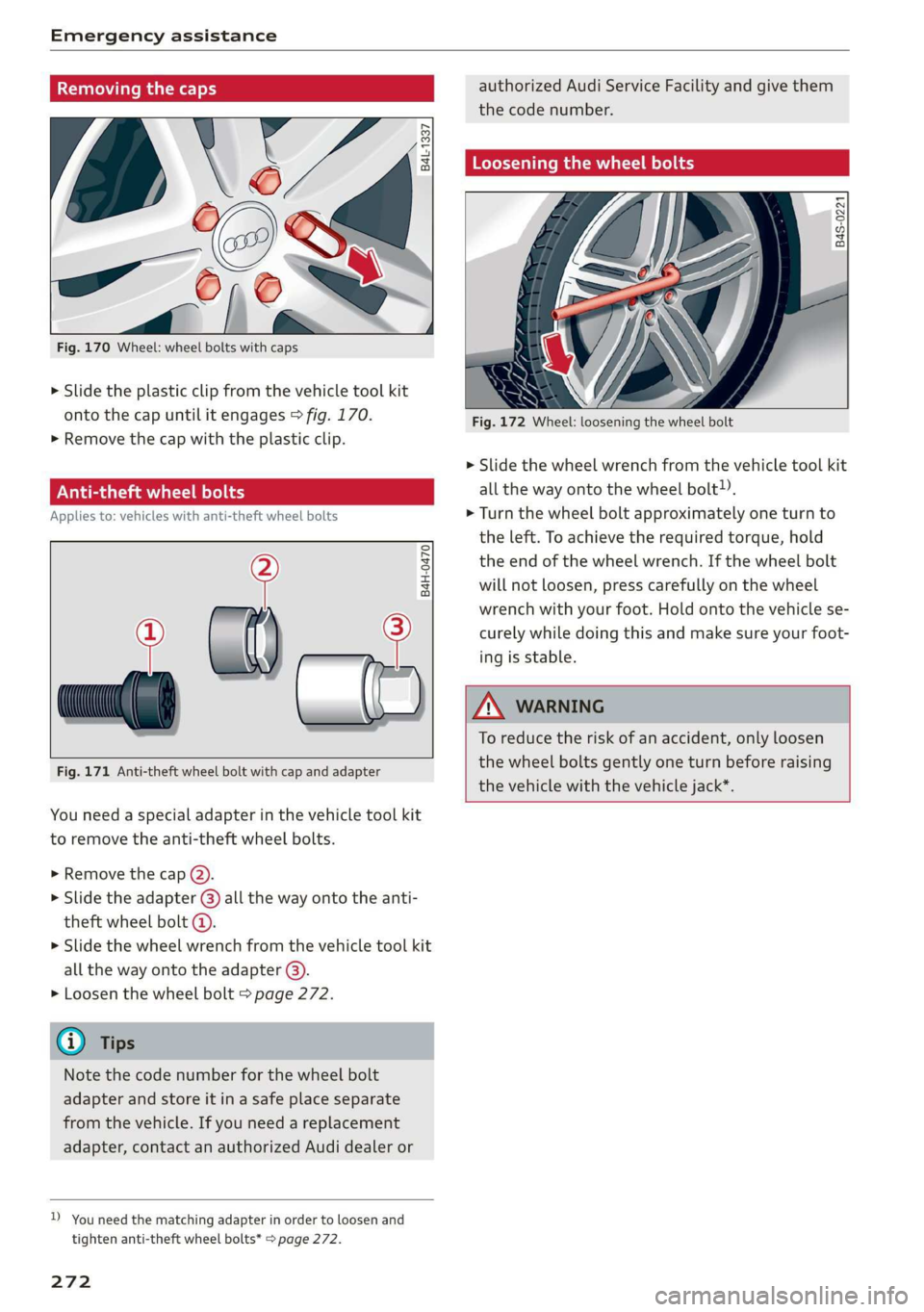
Fig. 170 Wheel: wheel bolts with caps
> Slide the plastic clip from the vehicle tool kit
onto the cap until it engages > fig. 170.
>» Remove the cap with the plastic clip.
ONT LL An el
Applies to: vehicles with anti-theft wheel bolts
°
® al) — 2
B4H-0470
Fig. 171 Anti-theft wheel bolt with cap and adapter
You need a special adapter in the vehicle tool kit
to remove the anti-theft wheel bolts.
> Remove the cap (2).
> Slide the adapter @) all the way onto the anti-
theft wheel bolt @.
> Slide the wheel wrench from the vehicle tool kit
all the way onto the adapter @).
> Loosen the wheel bolt > page 272.
G) Tips
Note the code number for the wheel bolt
adapter and store it in a safe place separate
from the vehicle. If you need a replacement
adapter, contact an authorized Audi dealer or
D_ You need the matching adapter in order to loosen and
tighten anti-theft wheel bolts* page 272.
272
authorized Audi Service Facility and give them
the code number.
Loosening the wheel bolts
B4S-0221
Fig. 172 Wheel: loosening the wheel bolt
> Slide the wheel wrench from the vehicle tool kit
all the way onto the wheel bolt).
> Turn the wheel bolt approximately one turn to
the left. To achieve the required torque, hold
the end of the wheel wrench. If the wheel bolt
will not loosen, press carefully on the wheel
wrench with your foot. Hold onto the vehicle se-
curely while doing this and make sure your foot-
ing is stable.
ZA WARNING
To reduce the risk of an accident, only loosen
the wheel bolts gently one turn before raising
the vehicle with the vehicle jack*.
Page 275 of 310
4KE012721BB
Emergency assistance
Raising the vehicle
Applies to: vehicles with vehicle jack
RAZ-0258
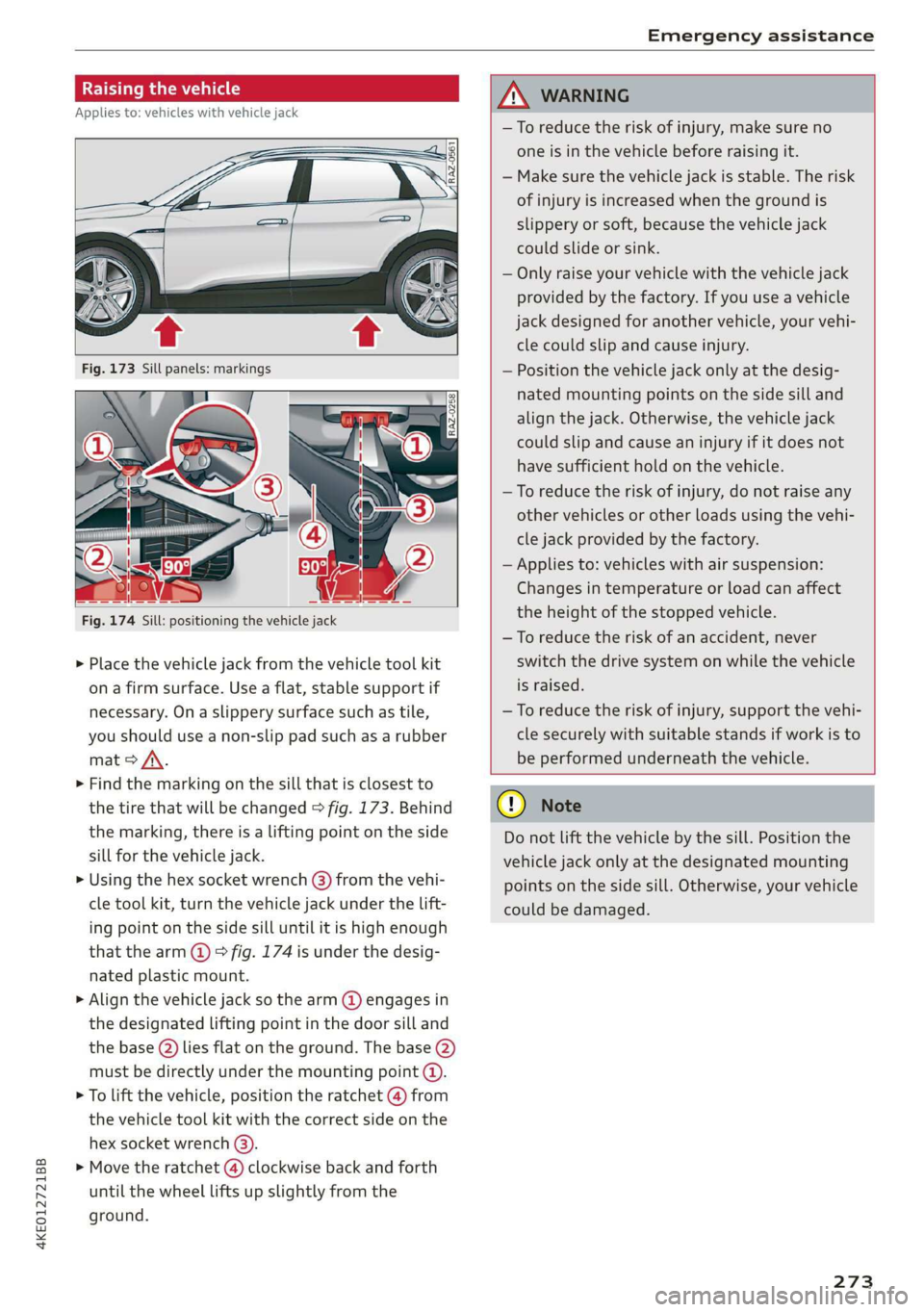
Fig. 174 Sill: positioning the vehicle jack
> Place the vehicle jack from the vehicle tool kit
ona firm surface. Use a flat, stable support if
necessary. On a slippery surface such as tile,
you should use a non-slip pad such as a rubber
mat > /\.
> Find the marking on the sill that is closest to
the tire that will be changed > fig. 173. Behind
the marking, there is a lifting point on the side
sill for the vehicle jack.
» Using the hex socket wrench (3) from the vehi-
cle tool kit, turn the vehicle jack under the lift-
ing point on the side sill until it is high enough
that the arm @ © fig. 174 is under the desig-
nated plastic mount.
> Align the vehicle jack so the arm @ engages in
the designated Lifting point in the door sill and
the base () lies flat on the ground. The base (2)
must be directly under the mounting point (@).
> To lift the vehicle, position the ratchet @ from
the vehicle tool kit with the correct side on the
hex socket wrench (3).
> Move the ratchet (@) clockwise back and forth
until the wheel lifts up slightly from the
ground.
ZX WARNING
—To reduce the risk of injury, make sure no
one is in the vehicle before raising it.
— Make sure the vehicle jack is stable. The risk
of injury is increased when the ground is
slippery or soft, because the vehicle jack
could slide or sink.
— Only raise your vehicle with the vehicle jack
provided by the factory. If you use a vehicle
jack designed for another vehicle, your vehi-
cle could slip and cause injury.
— Position the vehicle jack only at the desig-
nated mounting points on the side sill and
align the jack. Otherwise, the vehicle jack
could slip and cause an injury if it does not
have sufficient hold on the vehicle.
—To reduce the risk of injury, do not raise any
other vehicles or other loads using the vehi-
cle jack provided by the factory.
— Applies to: vehicles with air suspension:
Changes in temperature or load can affect
the height of the stopped vehicle.
—To reduce the risk of an accident, never
switch the drive system on while the vehicle
is raised.
—To reduce the risk of injury, support the vehi-
cle securely with suitable stands if work is to
be performed underneath the vehicle.
@) Note
Do not lift the vehicle by the sill. Position the
vehicle jack only at the designated mounting
points on the side sill. Otherwise, your vehicle
could be damaged.
273,
Page 276 of 310

Emergency assistance
Removing and installing a wheel
@ Rg tT
“% © oO
B8K-1477
Fig. 176 Wheel: alignment pin in the top hole
Removing a wheel
>» Remove the top wheel bolt completely using
the hex socket in the screwdriver handle from
the vehicle tool kit > fig. 175 and place it ona
clean surface.
> Then install the alignment pin from the vehicle
tool kit in the empty wheel bolt hole by hand
> fig. 176.
> Remove the rest of the wheel bolts.
>» Remove the wheel >(). The alignment pin re-
mains in the hole while doing this.
Installing a wheel
Read the directions on > page 274 when instal-
ling unidirectional tires.
> Slide the wheel on over the alignment pin >@.
> Install the wheel bolts and tighten them gently
using the hex socket.
» Remove the alignment pin and tighten the re-
maining wheel bolt.
> Carefully lower the vehicle using the vehicle
jack*.
> Tighten the wheel bolts in a diagonal pattern
using the wheel wrench.
274
The wheel bolts must be clean and loosen and
tighten easily. Check the contact surfaces for the
wheel and hub. Contaminants on these surfaces
must be removed before installing the wheel.
ZA\ WARNING
— Read and follow the important information
and notes under > page 250.
— Never use the hex socket in the screwdriver
handle to tighten the wheel bolts. Using the
hex socket will not achieve the required
tightening torque, which increases the risk
of an accident.
©) Note
When removing or installing the wheel, the
rim
could hit the brake rotor and damage the
rotor. Work carefully and have a second per-
son help you.
Unidirectional tires
A unidirectional tire profile is identified by arrows
on the tire sidewall that point in the running di-
rection. You must always maintain the specified
running direction. This is necessary to ensure the
tire's optimal performance in regard to adhesion,
running noise, and friction, and to reduce the risk
of
hydroplaning.
To benefit fully from the advantages of the uni-
directional tire design, you should replace faulty
tires as soon as possible and restore the correct
running direction on all of the tires.
> Reinstall the caps on the wheel bolts if necessa-
ry.
> Store the vehicle tool kit in its designated
place.
> If the removed wheel does not fit in the spare
wheel well, store it securely in the luggage
compartment > page 77.
> Check the tire pressure on the installed wheel
as soon as possible.
> Correct the tire pressure and store it in the MMI
=> page 262.
Page 277 of 310
4KE012721BB
Emergency assistance
> The wheel bolt tightening specification must be
120 ft lbs (160 Nm). Have it checked as soon as
possible with a torque wrench. Drive carefully
until then.
> Have the faulty wheel replaced as quickly as
possible.
Collapsible spare tire
Applies to: vehicles with collapsible spare tire
The collapsible spare tire is intended for short-
term use only. Have the damaged tire checked
and replaced if necessary by an authorized Audi
dealer or authorized Audi Service Facility as soon
as possible.
There are some restrictions on the use of the col-
lapsible spare tire. The collapsible spare tire has
been designed specifically for your type of vehi-
cle. Do not replace it with the collapsible spare
tire from another type of vehicle.
The collapsible spare tire is located in the lug-
gage compartment under the cargo floor cover.
Requirement: the vehicle tool kit > page 269 and
the compressor must be laid out.
Removing
> Lift the cargo floor using the handle.
> Turn the handwheel counter-clockwise and re-
move it.
> Remove the cover.
> Remove the collapsible spare tire.
You must inflate the collapsible spare tire before-
hand in order to use it.
Inflating
> Remove the valve cap from the collapsible
spare tire.
> Tighten the compressor hose on the collapsible
spare tire valve.
> Connect the compressor hose to a vehicle sock-
et and switch it on.
> Let the compressor run until the specified value
on the tire pressure sticker is reached
> page 253, fig. 165>©.
> Screw the valve cap back onto the valve.
Returning to storage
> Remove the valve cap to drain the air.
» Wait several hours before placing the collapsi-
ble spare tire in the spare wheel well. Only then
will it fold down completely so that you can
store it securely.
> Then screw the valve cap back onto the valve.
> Secure the collapsible spare tire with the cover
and the handwheel.
> Fold the cargo floor cover back into place.
Snow chains
Using snow chains on the collapsible spare tire is
not permitted for technical reasons.
If you have to drive with snow chains and a rear
tire fails, mount the collapsible spare tire in place
of a front tire. Install the snow chains on the
front tire that you removed, and install that in
place of the rear tire that failed.
ZA\ WARNING
— Only use the collapsible spare tire in emer-
gencies and drive very carefully, especially if
it is more than six years old.
— The compressor and the hose can become
very hot during operation which increases
the risk of burn injuries.
— After installing a collapsible spare tire, the
tire pressure must be checked as quickly as
possible to reduce the risk of an accident.
— Do not drive faster than 50 mph (80 km/h)
with the collapsible spare tire. Driving faster
than that increases the risk of an accident.
—To reduce the risk of an accident, avoid hard
acceleration or braking and driving fast
around curves with the collapsible spare
tire.
— Never drive using more than one collapsible
spare tire, because this increases the risk of
an accident.
— Normal tires or winter tires must not be
mounted on the collapsible spare tire rim.
@) Note
The compressor must be switched off after six
minutes at the most to reduce the risk of
275
>