exterior mirror AUDI E-TRON 2020 User Guide
[x] Cancel search | Manufacturer: AUDI, Model Year: 2020, Model line: E-TRON, Model: AUDI E-TRON 2020Pages: 316, PDF Size: 85.96 MB
Page 170 of 316

Parking and maneuvering
@ Use the blue markings to help you estimate
the distance to an obstacle. Each marking
represents approximately 3 feet (1 meter).
The blue area represents an extension of the
vehicle's outline by approximately 16 feet (5
meters) to the rear.
@® You can recognize the rear bumper in the
lower display.
@ You should stop driving in reverse when the
red orientation line touches the edge of an
object, at the latest.
Trailer view
Applies to: vehicles with trailer view
The trailer view > fig. 129 assists you in position-
ing the vehicle in front of a trailer.
— Applies to: vehicles with peripheral cameras:
Switch to the Rear view > page 169, fig. 130.
— Select Trailer view in the upper display when
the parking aid is active |---|.
Now you can position your vehicle in front of the
trailer. The orange orientation line ©) > fig. 129
indicates the expected path toward the trailer
hitch. Use the blue markings © to help you esti-
mate the distance to the trailer hitch. Each mark-
ing represents approximately 1 foot (0.30 me-
ters). The width of the blue surface represents
the maximum steering wheel angle.
Symbols
If 2/&9/< is displayed and the display area
represented by that symbol is not available, then
the camera on the that side is not available. The
power exterior mirrors may have been folded in
or a door or the luggage compartment lid may
have been opened.
If # is displayed, there is a system malfunction
and the display area represented by that symbol
is not available. The camera is not working in this
area.
If Avis displayed, the respective ultrasonic sensor
is icy or dirty. Clean the area in front of the sen-
sors > page 129.
If one of the symbols continues to be displayed,
drive immediately to an authorized Audi dealer or
168
authorized Audi Service Facility to have the mal-
function repaired.
ZA\ WARNING
— Observe the safety precautions and note the
limits of the assist systems, sensors, and
cameras > page 127.
— Sensors and cameras have spots in which
the surrounding area cannot be detected.
Objects, animals, and people may only be
detected with limitations may not be detect-
ed at all. Always monitor the traffic and the
vehicle's surroundings directly and do not
become distracted.
@) Note
— The orange orientation lines @ show the di-
rection the rear of the vehicle will be travel-
ing, based on the steering wheel angle. The
front of the vehicle swings out more than
the rear of the vehicle. Maintain plenty of
distance so that an exterior mirror or a cor-
ner of the vehicle does not collide with any
obstacles.
— Keep enough distance from the curb to
avoid damage to the rims.
— Only use the images provided by the camera
on the rear of the vehicle when the luggage
compartment lid is completely closed. Make
sure any objects you may have mounted on
the luggage compartment lid do not block
the rearview camera.
G) Tips
— Applies to: vehicles with air suspension: The
accuracy of the orientation lines and blue
surfaces on the camera display decreases
when the vehicle is raised or lowered with
the air suspension.
— There is no distance warning for the rear
and the sides* when trailer towing mode is
detected. The front sensors remain activat-
ed. The visual display switches to trailer
mode. There is no guarantee the functions
will be deactivated when using a retrofitted
trailer hitch.
Page 271 of 316

4KE012721BE
Care and cleaning
height and width of the inside of the car
wash.
—To reduce the risk of paint damage, do not
wash the vehicle in direct sunlight.
—To reduce the risk of damage, do not wash
decorative decals* with a pressure washer.
—To reduce the risk of damage to the surface,
do not use insect removing sponges, kitchen
sponges, or similar items.
— When washing matte finish painted vehicle
components:
ZA WARNING
—To reduce the risk of accidents, only wash
the vehicle when the ignition is off and fol-
low the instructions from the car wash oper-
ator.
—To reduce the risk of cuts, protect yourself
from sharp metal components when wash-
ing the underbody or the inside of the wheel
housings.
— After washing the vehicle, the braking effect
may be delayed due to moisture on the
brake rotors or ice in the winter. This in-
creases the risk of an accident. The brakes
must be dried with a few careful brake appli-
cations.
— To reduce the risk of damage to the sur-
face, do not use polishing agents or hard
wax.
— Never use protective wax. It can destroy
the matte finish effect.
@) Note — Do not place any stickers or magnetic
signs on vehicle components painted with
matte finish paint. The paint could be
damaged when the stickers or magnets
are removed.
— If you wash the vehicle in an automatic car
wash, you must fold the exterior mirrors in
to reduce the risk of damage to the mirrors.
Power folding exterior mirrors* must only
be folded in and out using the power folding (@) For the sake of the environment
function.
—To reduce the risk of damage to the rims
and tires, compare the width between the
wheels on your vehicle with the distance be-
tween the guide rails in the car wash.
Only wash the vehicle in facilities specially de-
signed for that purpose. This will reduce the
risk of dirty water contaminated with oil from
entering the sewer system.
—To reduce the risk of damage, compare the
height and width of your vehicle with the
Cleaning and care information
When cleaning and caring for individual vehicle are not listed, consult an authorized Audi dealer
components, refer to the following tables. The or authorized Audi Service Facility. Also follow
information contained there is simply recommen- __ the information found in > A.
dations. For questions or for components that
Exterior cleaning
Component Situation Solution
Windshield wiper | Deposits Soft cloth with glass cleaner > page 52
blades
Headlights/ Deposits Soft sponge with a mild soap solution®
tail lights
Sensors/ Deposits Sensors: soft cloth with a solvent-free cleaning solution
camera lenses Camera lenses: soft cloth with an alcohol-free cleaning sol-
ution
Snow/ice Hand brush/solvent-free de-icing spray >
269
Page 288 of 316

Fuses and bulbs
Fuse panel (a) (black) Fuse panel (4) (brown)
9 |Instrument cluster No. | Equipment
10 | Volume control 2 | Right front safety belt tensioner
11 | Light switch, switch panels 4 |Left front safety belt tensioner
12 | Steering column electronics 5 |Air suspension/suspension control
15 | Steering column adjustment 6 |Right headlight
16 | Steering wheel heating 7 |Left headlight
Fuse panel @) (black) 8 Left rear door control module
No. Equipment 9 |Right rear door control module
1 |Front seat heating 10 | Infotainment system control module
2 |Cimatecantral system 11 | Driver assistance systems control module
3 | Left headlight electronics 12 | Diagnostic intentawe
4 |Panoramic glass roof Fuse panel (5) (black)
5 |Left front door control module No. | Equipment
6 | Sockets 1 Seat electronics, front seat ventilation,
8 | Instrument panel rearview mirror, diagnostic connection
9 | Right headlight electronics 2 Vehicle electrical system control module,
Windshield washer system/headlight diagnostic interface
10 washer system 3 | Exterior sound generator
12 | Parking lock 5 | Electric drive
- 7 |Active accelerator pedal
iss cares) 8 | Night vision assist
Baia Equipment 9 |Adaptive cruise assist
1 | Anti thettalarmisystem Intersection assistant, driver assist sys-
2 |Drive system control module 11 terns
3 | Emergency call system 15 |USB input
4 | Selector lever
5 [Horn eer ggage comp:
6 |Parking brake
7 High-voltage battery, battery monitoring iB ° 5] 5 ny ~ a (a |
control module A) LD.
8 | Roof electronics control module
10 | Airbag control module
11 | Left front lumbar support
12 | Diagnostic connector, light/rain sensor
14 | Right front door control module
15 | Climate control system, body electronics Fig. 183 Left side of the luggage compartment: fuse panel
16 | Climate control system blower with plastic clip >
286
Page 289 of 316
4KE012721BE
Fuses and bulbs
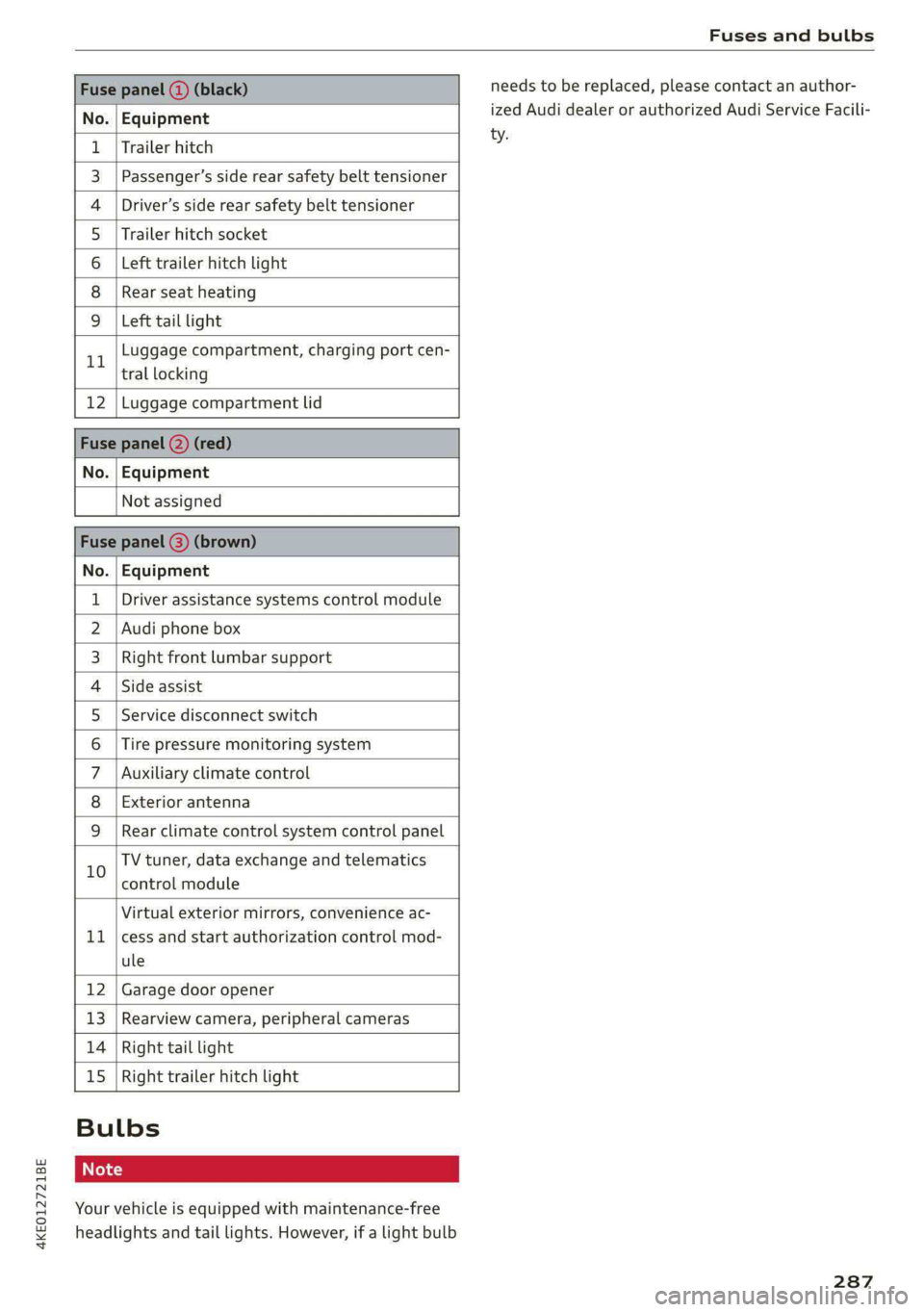
Fuse panel (3) (black)
No. Equipment
Trailer hitch
Passenger’s side rear safety belt tensioner
Driver’s side rear safety belt tensioner
Trailer hitch socket
Left trailer hitch light
Rear seat heating
Ola;
AD)
M/A]
W]e
Left tail light
Luggage compartment, charging port cen-
11 tral locking
12 | Luggage compartment lid
Fuse panel @) (red)
No. | Equipment
Not assigned
Fuse panel (8) (brown)
No. | Equipment
1 | Driver assistance systems control module
2 | Audi phone box
3 | Right front lumbar support
4 | Side assist
5 | Service disconnect switch
6 |Tire pressure monitoring system
7 |Auxiliary climate control
8 | Exterior antenna
9 | Rear climate control system control panel
Bb oO
TV tuner, data exchange and telematics
control module
LL
Virtual exterior mirrors, convenience ac-
cess and start authorization control mod-
ule
12 Garage door opener
13. Rearview camera, peripheral cameras
14 Right tail light
15
Right trailer hitch light
Bulbs
Your vehicle is equipped with maintenance-free
headlights and tail lights. However, if a light bulb
needs to be replaced, please contact an author-
ized Audi dealer or authorized Audi Service Facili-
ty.
287
Page 303 of 316

4KE012721BE
Climate control system controls in the rear
Child safety lock... . 0... ccc eee eee eee 39
Closing
Automatic luggage compartment lid...... 37
Convenience closing..............-.... 40
HOO « sess eu oxsanne no seman ow eatetess cence 241
Luggage compartment lid............... 36
Luggage compartment lid with foot motion . 38
Panoramic glass roof................... 41
Sunshade (roof) ..............00 sees Al
WINOWS « nore » ¢ soyee 5 2 ewe x saueR 5 2 Re 39
Closing aid (power closing doors).......... 29
COckPIEGIMIMING s = secs ¢ & caiwes + © Hanes + Fee 49
Cockpit (overview) ..............0 000s eee 6
Collapsible sparetire................0.. 280
Collapsible tire
refer to Collapsible spare tire........... 280
Color code... 22.6... cece ee eee eee eee 297
Comfort auxiliary air conditioning.......... 86
Coming home/Leaving home
refer to Entry/exit lighting.............. 47
Compartments...........0 002. e eee eee 76
Compass inthe mirror..............00005 54
Compliance. ....... eee eee eee eee 295
Configuration wizard . ccc... eww eae es 17
CONMCCb is oo somes 2c cence 3 sewn 2 8 ee @ 8 aS 187
Data plans... ..... eee eee eee 192
Data Phivaty'ax s «meee sv oem s bees s gee 290
Emergency: call sscsss ¢ 0 west sv wawa » wenn x 194
Infotainment....................000. 187
Infotainment services. . ..0... ce. s eae 188
Online roadside assistance............. 195
Vehicle control services............005- 189
Connected devices
Device overvieW........--..00-- eee eee 237
Connections
referto Media................--- 222,226
Consumer information.................. 292
Consumption
REGUGING = gaan = 2 game
Contacts
Add destination ¢ sce x ¢ nea «a eases 4 2 cee 207
Importing and exporting.............. 184
Memory capacity. .... 0.0... cee eee eae 184
Opening (business card)............... 178
Updating imthe:MMI:. « «cece « sane © werose 184
Convenience key). «2 esse ov eis ov ema ee ee 29
Convenience closing................005 40
also refer to Vehicle key..............-. 33
Convenience opening and closing
Windows or panoramic glass roof........ 40
Cooling Mode:w« ss ceca ss eee ve pee ee eR 83
Cooling system
Coolant sesess oo serene « o sonme ao eens a 8 eee o 242
Coolant level. ........ 0. cece eee eee ee 243
Cornering light....... 2.0.0... cee eee eae 45
Cross traffic assist (intersection assistant) .. 162
Cruise controlisystemis « « icasis + « wares + weve 139
Gup holders cies s & scien 9 & eases oe ars os RE 75
Current consumption so. «esc s s eee es ces 14
D
Data plans see: « 2 ees go ewe v Seen ce eee 192
Data PRIVACY « cass 4 s eames fc See oa ee 290
Date... eee eee eee eee 14
SOtting’: + wean « x uome se ees a 2 BOE ge ee 236
Daytime running lights.................. 45
Declaration of compliance............... 295
DEF (instrument cluster)................. 11
Demo mode
refer to Presentation mode............. 211
Destination onthe map................. 202
Details... 6.0.2... eee eee 201
Determining correct load limit........... 262
Digital compass.............0 eee eee eee 54
DiMeMSIONS!. + sis a cessans 6 2 seawiiee ow ave 6 297
Dimming the exterior mirrors............. 50
Dimming the rearview mirror............. 50
Directory
SOTHINGS: cosine « i: sess + mewsnw & srnees we 0 suouses 184
also refer to Contacts..............0.. 178
Display
Cleaning « < ¢ swas + > ses yo eees te wees eo: 270
Disposal. ... 0.0.0... cee eee eee eee eee 292
Distance... 2.2.2... eee eee eee 14
Distance warning............-+..eee0ee 152
Doors
Child safety lock. ........ 0. sce eee ee 39
Door cofitact’Switch » + sews + s says x ae = 48
Mechanically unlocking and locking....... 32
Power closing/closing aid............... 29
301
Page 307 of 316
4KE012721BE
Index
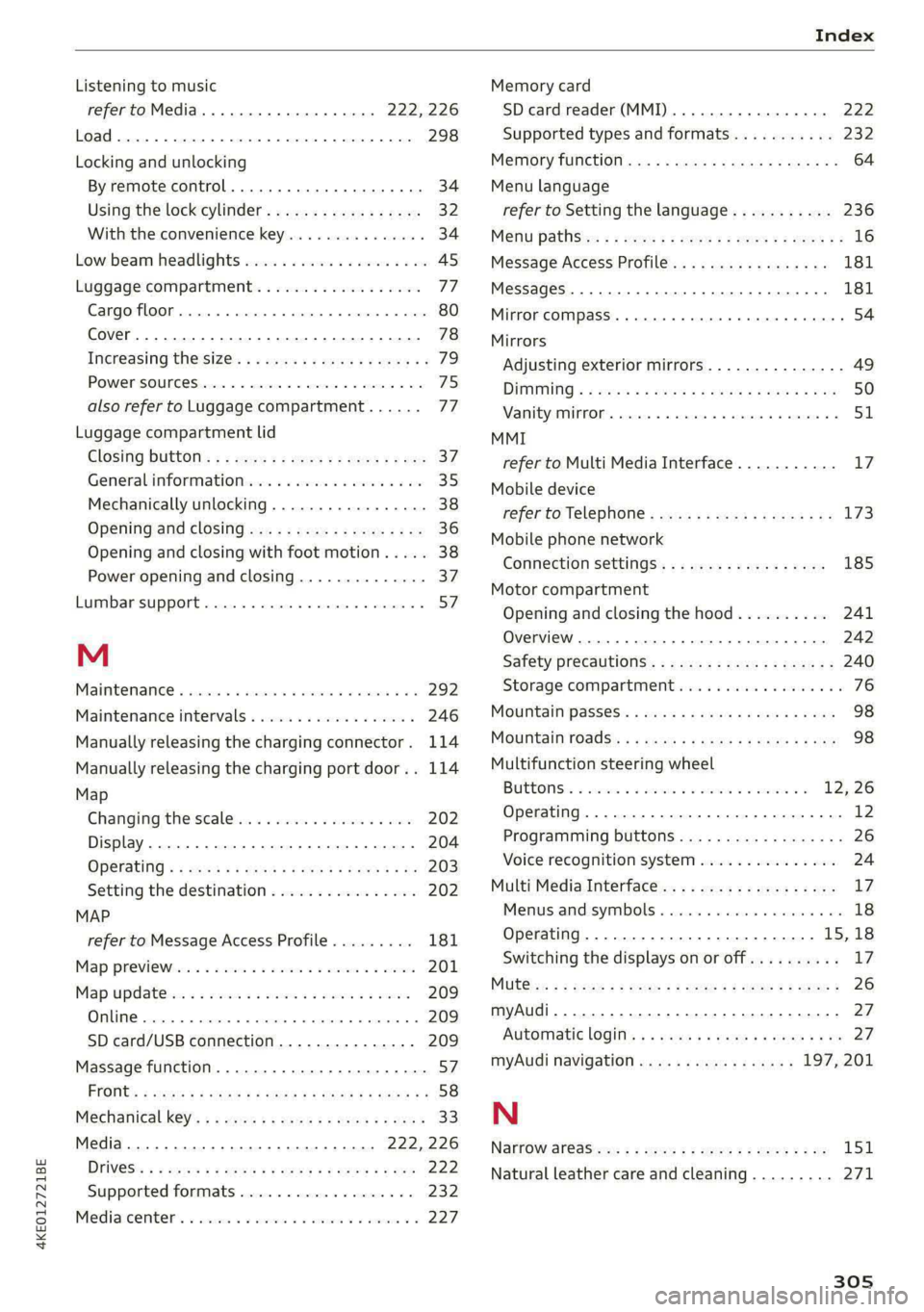
Listening to music
refertoMedia.............0ee eee 222,226
Load... 2.2... eee eee 298
Locking and unlocking
By remote control............00 cece ee 34
Using the lock cylinder...............05 32
With the convenience key............... 34
Low. beam headlights visu. so cews ov ones oo ses 45
Luggage compartment.................. 77
Cargo floor. ...... eee eee eee 80
Cover... eee eee eee eee 78
Increasing the size... 61... cee eee eee 79
POWEPSOUNCESxcccie. oo sine ow mri ww enetiede wwe 75
also refer to Luggage compartment...... 77
Luggage compartment lid
Closing bUttON : ¢ s ses +e eves se een ce vee 37
Generalinformation...............000- 35
Mechanically unlocking..............0-. 38
Opening and closing................... 36
Opening and closing with foot motion..... 38
Power opening and closing.............. 37
Lumbar support.............-.000 2-000 57
M
Maintenance « sresive sv srvice vv avers ve asaeata 0 8 292
Maintenance intervals.................. 246
Manually releasing the charging connector. 114
Manually releasing the charging port door.. 114
Map
Changing the scale..........cc0ee eee 202
Display... 2... eee eee eee 204
Operating « s sees ss ees ss eee se eee ee we 203
Setting the destination................ 202
MAP
refer to Message Access Profile......... 181
Map Previewer ssc os wasen oo man os wwrine 201
Map Updates « 2 sewn ss ween ov mee 2 a eee 209
ORL ennsss 6 oxeriexe © 0 aunsesn oo ennnece am coouene a 209
SD card/USB connection............... 209
Massage function...............-000 eee 57
PRrOnts 2 seess x = sie x 2 ees 7 8 eee ee eae Fe 58
Mechanical keys » 2 wow s y mew ss mews gy eee 33
Media......... 0... cc eee 222, 226
DIiVGS': + 2 osu « 2 goa 3 2 yee 2 Yee 2 a ew 222
Supported formats............-....-. 232
Mediacenter’s « csisccs +o cscs « « somine 0 © asoeune oo 227
Memory card
SD card reader (MMI) .............0005 222
Supported types and formats........... 232
Memory fUNCtION cas + = eons se reas xo Rees ee 64
Menu language
refer to Setting the language........... 236
Menu paths: < ¢ ees se ewes ae pees ee een ee 16
Message Access Profile...........-...0- 181
MessageS..... 1... 0-00 eee cece eee ee 181
Mirror COMPASS... 1... cece eee eee 54
Mirrors
Adjusting exterior mirrors............... 49
DIMMING ¢ ¢ sews s & ewe 4 x mows + eae 2 HIE 50
MaNTEYZOTITOR. creams» « snsem » 9 wet oo enue x 6 51
MMI
refer to Multi Media Interface........... 17
Mobile device
refer to Telephone............00eee eee 173
Mobile phone network
Connection settings...............005 185
Motor compartment
Opening and closing the hood.......... 241
Overview... ..... cece cece eee eee eee 242
Safety precautions................2.-. 240
Storage
compartment............00e00 76
MOUGNtain pPasseses « wees ss news oy aoe ewe 98
MOUNTAIN TOAdS's: « & sem = & sews = x neues +o ee 98
Multifunction steering wheel
Buttons: « sxisess os swiss @ 3 omar ao ena oa 12, 26
Operating...................0.00.0000. 12
Programming buttons.................- 26
Voice recognition system............... 24
Multi Media Interface................... “7
Menus.and symbols « wscsa «occa © cence «nn 18
Operating................2.02.000. 15,18
Switching the displays on or off.......... 17
MUlt@ icy: « 2 ame « 5 sews s 2 Wem 2 2 eee & ee 8 26
myAudi..
2.2... ee eee eee 27
Automatic login: « « sess ¢ s ame ¢ ¢ wens s ¢ os 27
myAudi navigation................. 197,201
N
Narrow areaSien: s = ees gs sea yo seen es 151
Natural leather care and cleaning......... 271
305