heating AUDI E-TRON 2020 User Guide
[x] Cancel search | Manufacturer: AUDI, Model Year: 2020, Model line: E-TRON, Model: AUDI E-TRON 2020Pages: 316, PDF Size: 85.96 MB
Page 120 of 316

High-voltage system
Control unit overview
© | On/Off button ®, charging power lev-
el and LED
@© __ |Status LED:
a Power supply/household
connection
& | Vehicle
0 Control panel
@ © {Reset
Adjusting the charging power level
The control unit automatically recognizes the
voltage and the available current strength. You
can set whether you would like to charge with full
or reduced charging power. The last setting that
Control unit: status and malfunction indicators
was selected will be saved and used again the
next time the vehicle is charged. If multiple
items are connected to the power circuit, the
charging current may be reduced when charging
at a power outlet. This can help to prevent the
electrical equipment from overheating.
Before charging, always check if the charging
power setting that was selected last is still suita-
ble.
—To set the charging power level, press the ()
button ©) > fig. 91 for at least two seconds.
After the charging power level is set, the status
LEDs ©, and (will flash green one time. The
selected value (50% or 100%) is displayed on the
left or right side of the ® button.
Indicator lights Meaning Solution
O Green The charger is ready to charge, | Starting the charging process
O O off but is not charging. => page 111.
O & off
O 0 of
9 Off
O Flashing green _| The vehicle is being charged
O 0 Off with the ground conductor
O B orf monitor activated.
O 0 of
9 Off
O Flashing green | The power cable has overheat- | After the cable cools down, the malfunc-
© a Yellow ed. Possible cause of the mal- | tion will be automatically cleared. Until it
O Bor function: a multi-phase socket | cools down, charging performance will be
O 06 off is being used in single-phase | reduced. If the malfunction continues,
mode. The charging perform- | have the power supply/household con-
9 Off ance will be reduced. nection checked by a qualified electrician.
Go Flashing green |The control unit has overheat- | After the control unit cools down, the
O 0 Off ed. The charging performance | malfunction will be automatically
O & otf will be reduced. cleared. Never leave the control panel in
@ 8 Yellow direct sunlight for long periods or time.
Until it cools down, charging perform-
9 Off ance will be reduced. If the malfunction
continues, have the control unit checked
by an authorized Audi dealer or author-
ized Audi Service Facility.
118
Page 141 of 316
4KE012721BE
Driver assistance
Driver assistance
Cruise control system
Applies to: vehicles with cruise control system
The cruise control system assists the driver in
maintaining a constant speed above approxi-
mately 15 mph (20 km/h). The system maintains
the desired speed by braking and accelerating.
ZA WARNING
— Always pay attention to the traffic around
your vehicle when the cruise control system
is in operation. As the driver, you are always
responsible for controlling your vehicle
speed and the distance between your vehicle
and
other vehicles.
— For safety reasons, cruise control should not
be used in the city, in stop-and-go traffic, on
winding roads, and when road conditions are
poor (such as ice, fog, gravel, heavy rain,
and conditions that could lead to hydroplan-
ing), because this increases the risk of an ac-
cident.
— Switch the cruise control off temporarily
when driving in turning lanes, highway exits,
or in construction zones.
—To reduce the risk of an accident, you should
only resume the stored speed if it is suitable
for the current traffic conditions.
() Note
Before driving downhill a long distance ona
steep hill, decrease your speed and use the
braking effect of recuperation > page 92. This
reduces the load on the brakes.
@) Tips
The brake lights turn on when the brakes are
applied automatically.
Switching the system on
Applies to: vehicles with cruise control system
BFV-0220
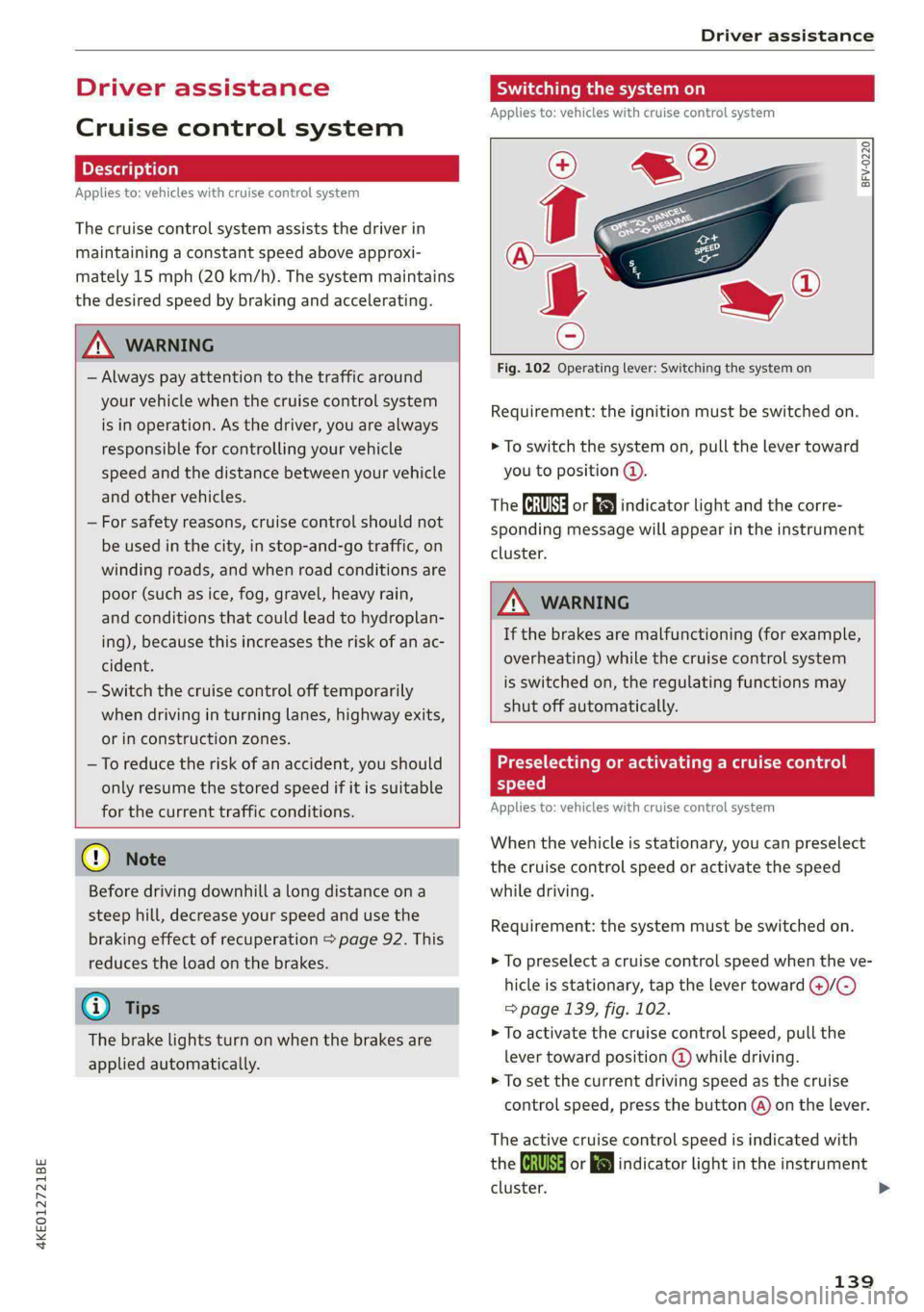
Fig. 102 Operating lever: Switching the system on
Requirement: the ignition must be switched on.
> To switch the system on, pull the lever toward
you to position ©.
The Gia or i$) indicator light and the corre-
sponding message will appear in the instrument
cluster.
ZA\ WARNING
If the brakes are malfunctioning (for example,
overheating) while the cruise control system
is switched on, the regulating functions may
shut off automatically.
estate Rem lad lite: Rag ena)
speed
Applies to: vehicles with cruise control system
When the vehicle is stationary, you can preselect
the cruise control speed or activate the speed
while driving.
Requirement: the system must be switched on.
> To preselect a cruise control speed when the ve-
hicle is stationary, tap the lever toward @)/G)
=> page 139, fig. 102.
> To activate the cruise control speed, pull the
lever
toward position @ while driving.
> To set the current driving speed as the cruise
control speed, press the button @) on the lever.
The active cruise control speed is indicated with
the Gg or kl indicator light in the instrument
cluster. >
139
Page 142 of 316

Driver assistance
An additional indicator appears in the head-up
display*.
Changing the cruise control speed
Applies to: vehicles with cruise control system
Requirement: the system must be switched on.
> To increase or decrease the cruise control speed
in small increments, tap the lever up to the
first level toward @)/G) 9 page 1339, fig. 102.
> To increase or decrease the cruise control speed
in larger increments, tap the lever up to the
second level toward @)/G).
> To increase or decrease the cruise control speed
continuously, tap and hold the lever at the first
or second level toward @)/G).
Overriding or deactivating the cruise
control speed
Applies to: vehicles with cruise control system
You can override or deactivate the cruise control
system. When you deactivate the system, your
cruise control speed will be stored and you can
resume that speed.
Requirement: The system is switched on and the
regulated speed is activated.
Overriding
> To temporarily override the cruise control
speed, press the accelerator pedal.
> To resume the stored regulated speed, remove
your foot from the accelerator pedal.
If you override the cruise control system for a
long period of time, the cruise control system
will be deactivated. The (Usd or [RM indicator
light will be displayed and the cruise control
speed will be saved.
Deactivating
> To deactivate the cruise control speed, press
the lever toward @) (not locked into place)
=> page 139, fig. 102, or
> Press the brake pedal.
140
ZA WARNING
Resting your foot on the accelerator pedal
could override the cruise control. This will pre-
vent braking interventions by the system.
See me Lai
Applies to: vehicles with cruise control system
When you switch the system off, the cruise con-
trol speed will be erased.
Requirement: the system must be switched on.
> To switch the system off, press the lever to-
ward @) (locked into place) > page 139,
fig. 102, or
> Switch the ignition off.
Applies to: vehicles with cruise control system
Gg / fg) Speed control system: currently un-
available. See owner's manual
If the indicator light turns on and this message
appears, the cruise control system has been deac-
tivated. There is a temporary malfunction, for ex-
ample the brakes are overheating. Switch the
cruise control system on again later.
Efficiency assist
Applies to: vehicles with efficiency assist
Efficiency assist can assist the driver with predic-
tive information in order to reduce fuel consump-
tion. Depending on vehicle equipment, the sys-
tem may access data from the navigation system,
the camera behind the windshield, and the radar
sensors.
If you remove your foot from the accelerator ped-
al, the efficiency assist can trigger recuperation
based on the situation.
Adjusting the efficiency assist
You can adjust efficiency assist functions individ-
ually. The settings depend on the vehicle equip-
ment.
— Recuperation > page 93.
Page 274 of 316
Care and cleaning
@) Note
— Headlights and tail lights
— Never clean the headlights or tail lights
with a dry cloth or sponge because the
lights could be damaged.
— Do not use any cleaning products that con-
tain alcohol, because they could cause
cracks to form.
— Wheels
— Never use any paint polish or other abra-
sive materials.
— Damage to the protective layer on the
rims, such as stone chips or scratches,
must be repaired immediately.
— Camera lenses
— Never use warm or hot water to remove
snow or ice from the camera lens. This
could cause the lens to crack.
— Never use abrasive cleaning materials or
alcohol to clean the camera lens. This
could cause scratches and cracks.
— Laser scanner
— Never use abrasive cleaning materials to
clean the laser scanner. This could cause
scratches and cracks.
— Door windows
— Remove snow and ice on windows and ex-
terior mirrors with a plastic scraper. To re-
duce the risk of scratches, move the scra-
per only in one direction and not back and
forth.
— Never remove snow or ice from door win-
dows and mirrors using warm or hot water
because this could cause cracks to form.
—To reduce the risk of damage to the rear
window defogger, do not apply any stick-
ers on the heating wires on the inside of
the window.
— Decorative parts and trim
— Never use chrome care or cleaning prod-
ucts.
— Paint
—To reduce the risk of scratches, the vehicle
must be free of dirt and dust before pol-
ishing or waxing.
272
— To prevent paint damage, do not polish or
wax the vehicle in direct sunlight.
—To reduce the risk of paint damage, do not
polish away rust spots.
— Remove cosmetics and sunscreen immedi-
ately because they could damage the
paint.
— Decorative decals
—To reduce the risk of damage, do not use
any rough powder or abrasive cleaning
products.
— To reduce the risk of damage, do not pol-
ish decorative decals that have a matte or
printed finish.
— Due to the risk of damage, do not use an
ice scraper to remove snow and ice on win-
dows with decorative decals on them.
— Displays and instrument cluster
— Make sure that the display and instrument
cluster are switched off and have cooled
down before cleaning. To switch the upper
and lower display off, select in the MMI
home screen: SETTINGS > Display &
brightness > MMI > Screen cleaning.
— Displays, the instrument cluster, and the
trim surrounding it must not be cleaned
with dry cleaning methods because they
could become scratched.
— Make sure no fluids enter the spaces be-
tween the instrument cluster and the
trim, because that could cause damage.
— Controls
— Make sure that no fluids enter the con-
trols, because this could cause damage.
— Safety belts
— Do not remove the safety belts to clean
them.
— Never clean safety belts or their compo-
nents with chemicals or with corrosive flu-
ids or solvents and never allow sharp ob-
jects to come into contact with the safety
belts. This could cause damage to the belt
webbing.
— If there is damage to the webbing, the
connections, the retractors, or the buck-
les, have them replaced by an authorized >
Page 275 of 316
4KE012721BE
Care and cleaning
Audi dealer or authorized Audi Service Fa-
cility.
— Textiles, artificial leather, and Alcantara
— Never treat artificial leather or Alcantara
with leather care products, solvents, floor
polish, shoe polish, spot remover, or simi-
lar products.
— Have a cleaning specialist remove stub-
born stains to reduce the risk of damage.
— Never use steam cleaners, brushes, hard
sponges, etc. when cleaning.
— Do not turn on the seat heating* to dry
the seat.
— Objects with sharp edges, such as zippers
or rivets on clothing or belts, can cause
damage to the surface.
— Open hook and loop fasteners, for exam-
ple on clothing, can damage seat covers.
Make sure hook and loop fasteners are
closed.
— Natural leather
— Never treat leather with solvents, floor
polish, shoe polish, spot remover or simi-
lar products.
— Objects with sharp edges, such as zippers
or rivets on clothing or belts, can cause
damage to the surface.
— Never use steam cleaners, brushes, hard
sponges, etc. when cleaning.
— Do not turn on the seat heating* to dry
the seat.
—To help prevent the leather from fading,
do not leave the vehicle in direct sunlight
for long periods of time. If leaving the ve-
hicle parked for long periods of time, you
should cover the leather to protect it from
direct sunlight.
— Wall mount clip
— Do not us any abrasive cleaning products
or any that contain alcohol, because these
increase the risk of discoloration.
@) Tips
— Insects are easier to remove from paint that
has been freshly waxed.
— Regular waxing can prevent rust spots from
forming.
— Decorative decals can age due to environ-
mental conditions, which can result in dam-
age such as brittleness. The color may fade
if exposed to excessive sunlight.
Taking your vehicle out
of service
If you would like to take your vehicle out of serv-
ice for a Long period of time, contact an author-
ized Audi dealer or authorized Audi Service Facili-
ty. You can receive information about the meas-
ures to take depending on the conditions for tak-
ing the vehicle out of service (duration, location,
etc.).
273
Page 283 of 316

4KE012721BE
Emergency assistance
@) Note
The compressor must be switched off after six
minutes at the most to reduce the risk of
overheating. Let the compressor cool down
for several minutes before using it again.
G) Tips
The ESC must not be limited or switched off
when driving with the collapsible spare tire
=>page 105.
Jump starting
The vehicle cannot be operated when the 12 Volt
vehicle battery is drained. Your vehicle must not
be jump started in this case. Contact an author-
ized Audi dealer or authorized Audi Service Facili-
ty.
@) Note
The vehicle battery must not be bridged using
conventional jump start methods.
— You may neither give nor receive a jump
start. Otherwise, the electronic systems in
the vehicle may be severely damaged.
— The jump start pins in the motor compart-
ment are designed specifically for qualified
technicians.
Towing
General information
You should only perform the steps that follow if
you have the necessary tools and technical ex-
pertise.
Towing requires a certain amount of practice.
Audi recommends contacting a towing company
to have the vehicle transported.
You should only have your vehicle towed by an-
other vehicle when disabled in exceptional cir-
cumstances. Inexperienced drivers should not
tow.
Notes on towing
— The maximum permitted towing speed is 30
mph (50 km/h).
— The maximum permitted towing distance is 30
miles (50 km).
Additional information on towing with a tow
truck
The vehicle may only be towed with the front axle
raised. Do not wrap any chains or cables around
the brake lines.
Tow bar and towing cable
The vehicle can be towed with a tow bar or tow-
ing cable. Both drivers should be familiar with
the special considerations when towing, especial-
ly when using a towing cable.
Always make sure the traction force does not ex-
ceed the permitted level and there are no shock
loading conditions. There is always the risk of the
coupling becoming overloaded when driving off-
road.
For the most safety and security, drive with a tow
bar. You should use a towing cable only if a tow
bar is not available. Use a towing cable made of
synthetic elastic cable similar elastic material.
Z\ WARNING
— Towing highly increases the risk of an acci-
dent, for example from colliding with the
towing vehicle.
—To reduce the risk of an accident, do not al-
low anyone to remain inside the vehicle
when it is being transported by a tow truck
or a special transporter.
® Note
—Ifthe /E| indicator light turns on, there is a
fault in the cooling circuit. The vehicle must
not be towed. The drive system can be se-
verely damaged.
— If normal towing is not possible, for exam-
ple if the transmission is faulty or if the
towing distance is greater than 30 miles
(50 km), then transport the vehicle on a
special carrier.
— If the vehicle is towed by a tow truck at the
axle that is not permitted, this can cause se-
vere damage to the transmission.
281
>
Page 288 of 316

Fuses and bulbs
Fuse panel (a) (black) Fuse panel (4) (brown)
9 |Instrument cluster No. | Equipment
10 | Volume control 2 | Right front safety belt tensioner
11 | Light switch, switch panels 4 |Left front safety belt tensioner
12 | Steering column electronics 5 |Air suspension/suspension control
15 | Steering column adjustment 6 |Right headlight
16 | Steering wheel heating 7 |Left headlight
Fuse panel @) (black) 8 Left rear door control module
No. Equipment 9 |Right rear door control module
1 |Front seat heating 10 | Infotainment system control module
2 |Cimatecantral system 11 | Driver assistance systems control module
3 | Left headlight electronics 12 | Diagnostic intentawe
4 |Panoramic glass roof Fuse panel (5) (black)
5 |Left front door control module No. | Equipment
6 | Sockets 1 Seat electronics, front seat ventilation,
8 | Instrument panel rearview mirror, diagnostic connection
9 | Right headlight electronics 2 Vehicle electrical system control module,
Windshield washer system/headlight diagnostic interface
10 washer system 3 | Exterior sound generator
12 | Parking lock 5 | Electric drive
- 7 |Active accelerator pedal
iss cares) 8 | Night vision assist
Baia Equipment 9 |Adaptive cruise assist
1 | Anti thettalarmisystem Intersection assistant, driver assist sys-
2 |Drive system control module 11 terns
3 | Emergency call system 15 |USB input
4 | Selector lever
5 [Horn eer ggage comp:
6 |Parking brake
7 High-voltage battery, battery monitoring iB ° 5] 5 ny ~ a (a |
control module A) LD.
8 | Roof electronics control module
10 | Airbag control module
11 | Left front lumbar support
12 | Diagnostic connector, light/rain sensor
14 | Right front door control module
15 | Climate control system, body electronics Fig. 183 Left side of the luggage compartment: fuse panel
16 | Climate control system blower with plastic clip >
286
Page 289 of 316
4KE012721BE
Fuses and bulbs
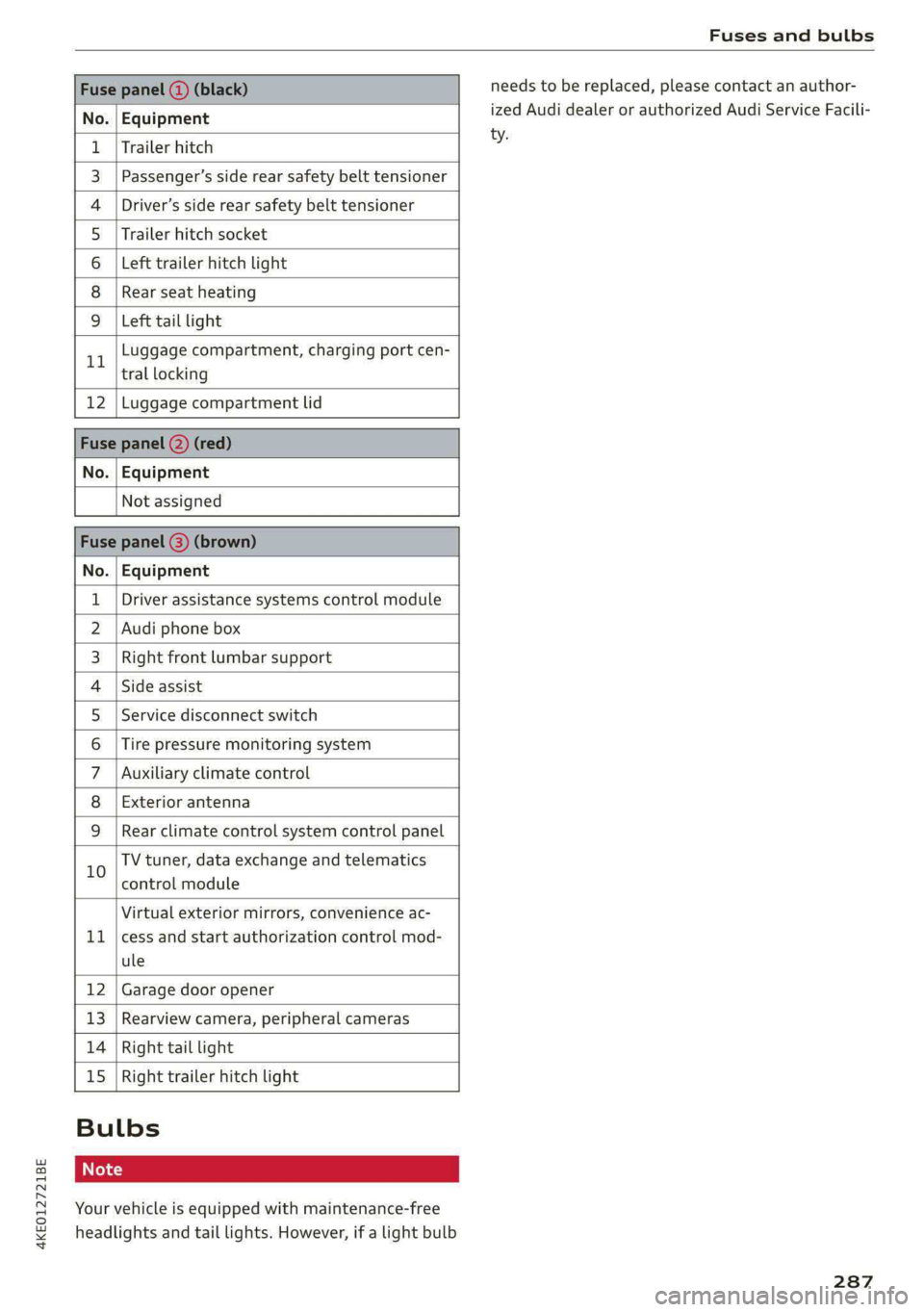
Fuse panel (3) (black)
No. Equipment
Trailer hitch
Passenger’s side rear safety belt tensioner
Driver’s side rear safety belt tensioner
Trailer hitch socket
Left trailer hitch light
Rear seat heating
Ola;
AD)
M/A]
W]e
Left tail light
Luggage compartment, charging port cen-
11 tral locking
12 | Luggage compartment lid
Fuse panel @) (red)
No. | Equipment
Not assigned
Fuse panel (8) (brown)
No. | Equipment
1 | Driver assistance systems control module
2 | Audi phone box
3 | Right front lumbar support
4 | Side assist
5 | Service disconnect switch
6 |Tire pressure monitoring system
7 |Auxiliary climate control
8 | Exterior antenna
9 | Rear climate control system control panel
Bb oO
TV tuner, data exchange and telematics
control module
LL
Virtual exterior mirrors, convenience ac-
cess and start authorization control mod-
ule
12 Garage door opener
13. Rearview camera, peripheral cameras
14 Right tail light
15
Right trailer hitch light
Bulbs
Your vehicle is equipped with maintenance-free
headlights and tail lights. However, if a light bulb
needs to be replaced, please contact an author-
ized Audi dealer or authorized Audi Service Facili-
ty.
287
Page 305 of 316
4KE012721BE
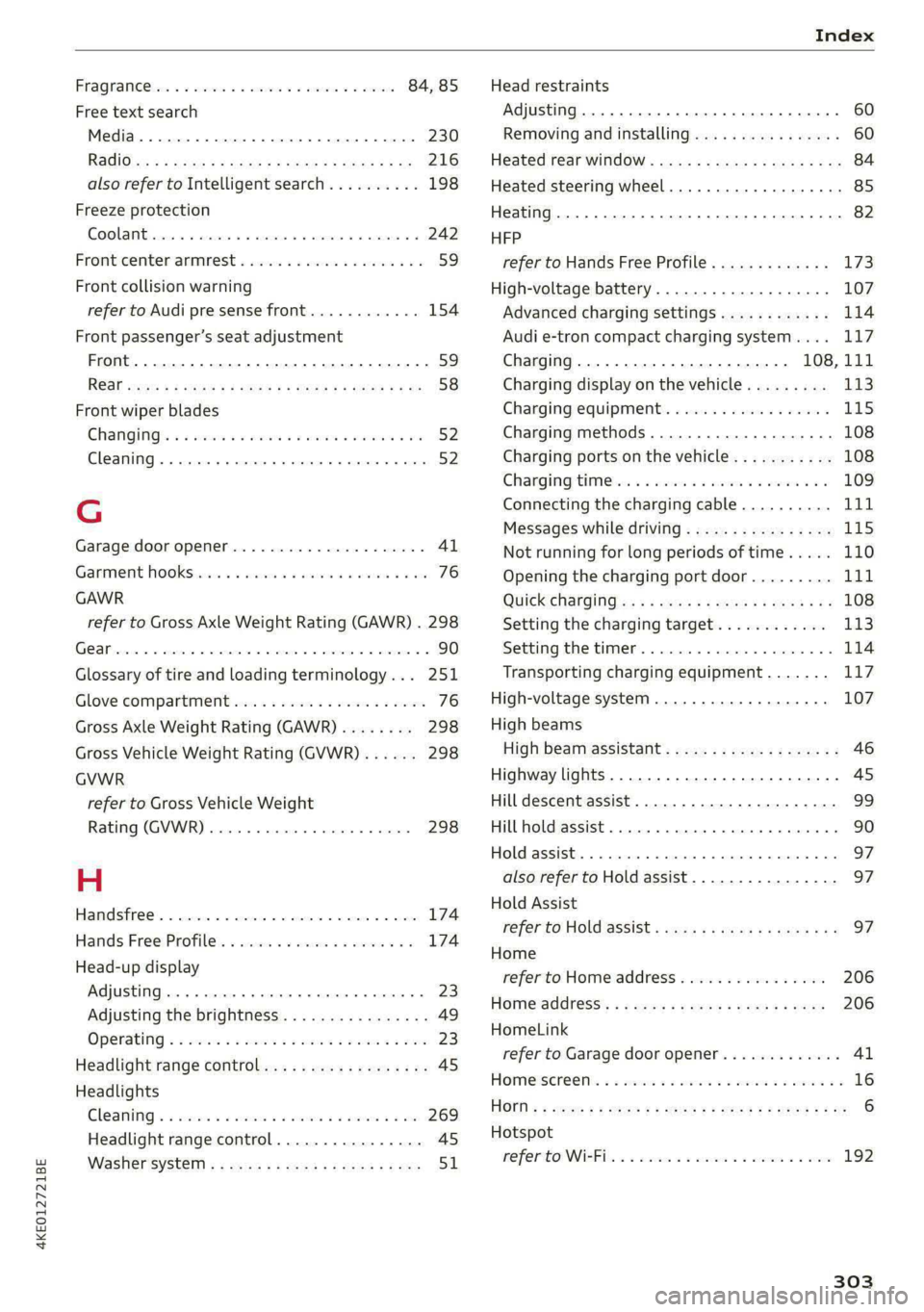
Index
FRAQTANGCC bse 2s cwcsue 0 2 comewas w 6 estes ¥ & ssoens 84, 85
Free text search
Media... .... 2. cece eee eee eee eee 230
RediGisu « 3 savas @ sien & E RaUR ¢ E ReUOR £ Be 216
also refer to Intelligent search.......... 198
Freeze protection
GOOLAN Brees so amsias a x cess sv emecene ow nena a 242
Fronticenter armrest « sso ss see os wees oo 59
Front collision warning
refer to Audi pre sense front............ 154
Front passenger’s seat adjustment
Front... 0. cece ee eee 59
ROGE exces ¢ = sqeys & 2 teams & 2 aes xo Ete x Be 58
Front wiper blades
CHANGING’: «seas sw ewes ee tee ee oe 52
Cleaning... 0... cece eee ee eee eee eee 52
G
Garage door opener.............--00000- 41
Garment HOOKS nie so aussie 6 a suasnee ox annie «a oe 76
GAWR
refer to Gross Axle Weight Rating (GAWR) . 298
(Cl 90
Glossary of tire and loading terminology... 251
Glove compartment..............-00000- 76
Gross Axle Weight Rating (GAWR)........ 298
Gross Vehicle Weight Rating (GVWR)...... 298
GVWR
refer to Gross Vehicle Weight
Rating (GVWR)............. cece eee 298
H
Handsfree... . 2... cee eee eee 174
Hands.FreetProfile:. sence «0 wsisase « + canoe 0 6 174
Head-up display
Adjusting... 2.0.0... e cece eee 23
Adjusting the brightness................ 49
Operating « « sss 2 2 secs oo meme o wamN & ¥ BHR 23
Headlight range control................0. 45
Headlights
GLEAMING ss seswns 6 & sumsins aw suwsere @ & somvens @ & ame 269
Headlight range control................ 45
Washer syStert x « swe s « mews 2 2 eke 2 2 ee 51
Head restraints
Adjusting... .... 0. cee eee eee 60
Removing and installing................ 60
Heated rear window............-.000000e 84
Heated steering wheel.............00000e 85
Heating......... 0... c eee eee eee eee 82
HFP
refer to Hands Free Profile............. 173
High-voltage battery................005 107
Advanced charging settings............ 114
Audi e-tron compact charging system.... 117
Charging............-. eee eee eee 108,111
Charging display on the vehicle......... 113
Charging equipment.................- 115
Charging methods...............-.05. 108
Charging ports on the vehicle........... 108
GChargingtimMeter « sewn a 6 wenn sw ee ooo 109
Connecting the charging cable.......... 111
Messages while driving..............-. 115
Not running for long periods of time..... 110
Opening the charging port door......... 111
QUICK Charging as = sees ss eees ts ews eo: 108
Setting the charging target............ 113
SELCIMGCME CHET. « ansvnce ou annsaue » w arnimre & we 114
Transporting charging equipment....... 117
High-voltage system.............00 00 ee 107
High beams
High beam assistant..............-.... 46
Highway lights..............0...0000005 4S
Hill descent assist................00000. 99
Hill hold assist... 0.0... cc eee ee eee 90
HOld.assiSti. « » ansces 2 a seers + m cnneans a a sxamnie «ox 97
also refer to Hold assist..........-...-. 97
Hold Assist
refer to Hold assist & esas ce caws ee pawn ee 97
Home
refer to Home address................ 206
Homeraddress’: sy cwon + 2 gow 3 game w e eam 206
HomeLink
refer to Garage door opener............. 41
HOMe@ISErEON:: « & seems oo setae ow ecco won oo 16
HOMN « ¢ sees 2 & ees os swe oo eee es eee Be 6
Hotspot
MO PEP TONNER: 2 x seawee oo snenewe i amaestes wavs 192
303
Page 310 of 316

Index
Removing the caps (wheel bolts)......... 277
REPAailS saion o & naena os wa oF eK 6 BRR oo 292
Repeats = s cses = eas 4 i sien oy ceo ge ee 228
Replacement key. « i ec ess een ge eer se ore 33
Replacement parts..............-02 ee ee 294
Replacing fuses ...........0.e cece eee 284
Reporting Safety Defects................ 294
Reverse gear
PefeP tO Gal's « s mass = ¢ neues 5 a aes s 2 ees 90
RIMS 2... eee 262
Cleaning’s < « ccs =» goes te eewe es oes eos 270
Road Cartieh wxsex + wean x 2 mame oe Roum a ge 102
Rolling ability
Electromechanical parking brake......... 96
ICL aSSIStiecss cs ssawens sv winenne » 0 soanane a 9 exnitone 97
Transmission idle...................00. 91
Roof
refer to Panoramic glass roof............ 41
Roof lodd «= seen s enema ¢ eaues 8 ¢ wees 5 toes 298
Roof rack... 2... eee eee eee eee 80
also refer to Roof rack..............000- 80
Route guidance
SEOPPIING secvees sv sxoess ov exams & a cavers vo ome 203
also refer to Navigation............... 197
Route planner (e-tron)............000 00 202
Running direction (tires)................ 279
S
Safety beltSiesccs 2 a aces vw cece < womens wv nec & 61
Cleaning..... 2.0... 6c cece eee eee eee 271
LOGKINGicws = & worms = 2 eee & 2 eee £ o ome ee 72
Securing child safety seats.............. 72
Satellite:map « sess = 2 evar ee wesw 2 wasn © 208
Screen
refer to Touch display................0. 15
Serewd river's « o wweis 6 o wane 6 eae ae sore ve 274
SDieard reader (MMI) sie. ss scons oe sani vo 222
Search-area (POD) sews « s wees x y cee x 2 nese 200
Search for charging station
refer to Online Points of Interest........ 200
Search function
refer to Free text search............... 230
Seatheating vveisi « « cao © 6 maven « weno © wrewess 84
Seats
Adjusting the front seats............... 57
Cleaning « < ¢ ses ss sees co ees ce ease es 271
308
FOlGINGsecers «a cserens w= mwenecs «ws mnavees ww eee eH 79
Front passenger’s seat adjustment....... 59
Head restraints... ...0.. eee cece eee eee 60
Massage-FUnction wccnes scence se oem oe ere 57
Memory function............00 eee eee 64
Resetting the position.................. 58
Storing’a seatiprofile « sicis « «sete «x owas a « 64
Seat Ventilation: ss ssws seas x s wae 2 es 84
Selecting a source (media).............. 226
Selector levers » = wens 2 » wer 5 os meme: > eer 90
Self-learning navigation
refer to Personal route assistance....... 205
Sensors
Coverage areas
Locations........ 0.0... 0c eee eee eee
Service interval display..............00. 246
Setting measurement units.............. 236
SOtbINGSions «sms +o cei meen ¢ mane ev BH 236
Announcements and tones............. 236
BlWGtoOth ; « = sees y = sees =p eewe se eee 237
Daterand timers «x sess sx swan x awa 2s 236
Language.............. ce eee eee ee 236
Measurement units..............00005 236
Mediates <6 nai se ames 6 wa os ween as wen 231
Navigation.............0 02sec eee eee 211
R&GIG
SyStEM . 6. eee ete eee 236
Time zone... 22... eee eee eee 236
WiFFUHOtspOt © cases x « cares ¢ © awe 2 8 pew e 192
Setting the charging target.............. 113
Setting the language................00. 236
Setting the time..............--.000005 236
Shade
Rear window/rear doors..............-. 51
Shift paddles
Adjusting recuperation................. 93
Ship carrier's » awn s eeaes + yews « ween so oe 102
Shortcut
referto Shortcuts’. « svc ee ees so ores a oe 20
Shorteutsevs 2 2 soscve se even 2 o eween ¥ x wea © 8s 20
SHUffl@ sos s = eerom « = nes 5 e eeen ee cee eee 228
Side@aSSiSticcs x ¢ seve + ¢ ceewe & 2 eee Be ee 158
Cleaning’SeNSOLs: soi. ss exe e ecomes & wanes 269
SIM at « 3 ses os neces vo seme vy Pre ey sees 188
SiriusXM alert notifications.............. 217