language AUDI E-TRON 2020 User Guide
[x] Cancel search | Manufacturer: AUDI, Model Year: 2020, Model line: E-TRON, Model: AUDI E-TRON 2020Pages: 316, PDF Size: 85.96 MB
Page 233 of 316
4KE012721BE
Media
Play
The selected track or all tracks in the folder will
be displayed.
Language!)
You can set the language manually. The availabil-
ity of the language and audio format depend on
the video DVD.
Subtitles)
You can manually select subtitles for playback.
The languages available depend on the DVD.
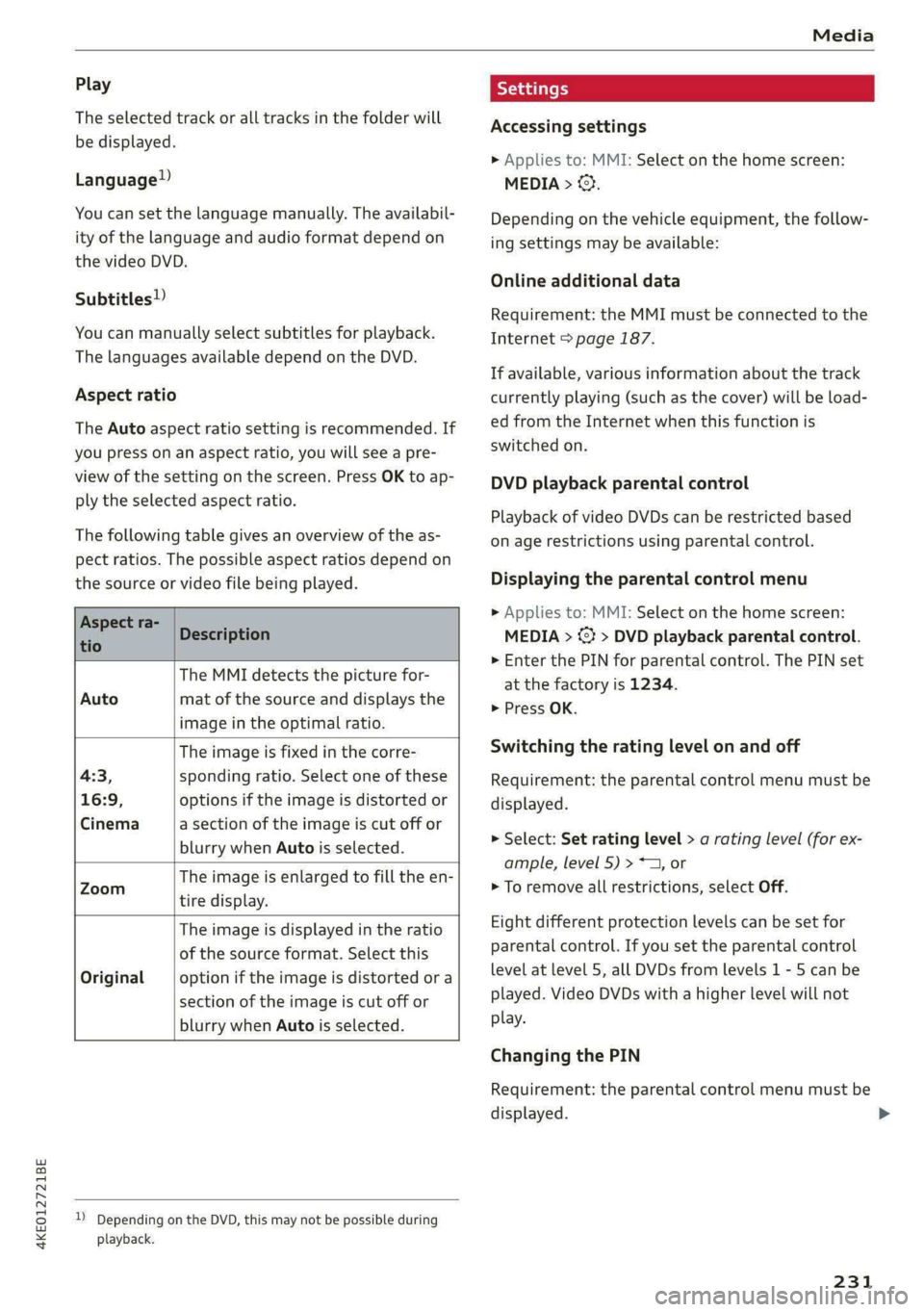
Aspect ratio
The Auto aspect ratio setting is recommended. If
you press on an aspect ratio, you will see a pre-
view of the setting on the screen. Press OK to ap-
ply the selected aspect ratio.
The following table gives an overview of the as-
pect ratios. The possible aspect ratios depend on
the source or video file being played.
peee co Description
tio
The MMI detects the picture for-
Auto mat of the source and displays the
image in the optimal ratio.
The image is fixed in the corre-
4:3, sponding ratio. Select one of these
16:9, options if the image is distorted or
Cinema a section of the image is cut off or
blurry when Auto is selected.
The image is enlarged to fill the en-
Zoom 5a
tire display.
The image is displayed in the ratio
of the source format. Select this
Original option if the image is distorted or a
section of the image is cut off or
blurry when Auto is selected.
)) Depending on the DVD, this may not be possible during
playback.
Settings
Accessing settings
> Applies to: MMI: Select on the home screen:
MEDIA > ©}.
Depending on the vehicle equipment, the follow-
ing settings may be available:
Online additional data
Requirement: the MMI must be connected to the
Internet > page 187.
If available, various information about the track
currently playing (such as the cover) will be load-
ed from the Internet when this function is
switched on.
DVD playback parental control
Playback of video DVDs can be restricted based
on age restrictions using parental control.
Displaying the parental control menu
> Applies to: MMI: Select on the home screen:
MEDIA > ©} > DVD playback parental control.
> Enter the PIN for parental control. The PIN set
at the factory is 1234.
> Press OK.
Switching the rating level on and off
Requirement: the parental control menu must be
displayed.
>» Select: Set rating level > a rating level (for ex-
ample, level 5) > *1, or
> To remove all restrictions, select Off.
Eight different protection levels can be set for
parental control. If you set the parental control
level at level 5, all DVDs from levels 1 - 5 can be
played. Video DVDs with a higher level will not
play.
Changing the PIN
Requirement: the parental control menu must be
displayed.
231
>
Page 235 of 316
4KE012721BE
Media
@) Tips
— The media sources do not support the Win-
dows Media Audio 9 Voice format.
— For compressing MP3 files, AUDI AG recom-
mends a bit rate of at least 160 kbit/s. The
display showing the remaining play time
may differ for audio files with variable bit
rate.
— Special characters (such as those in ID3 tag
information) may display differently or may
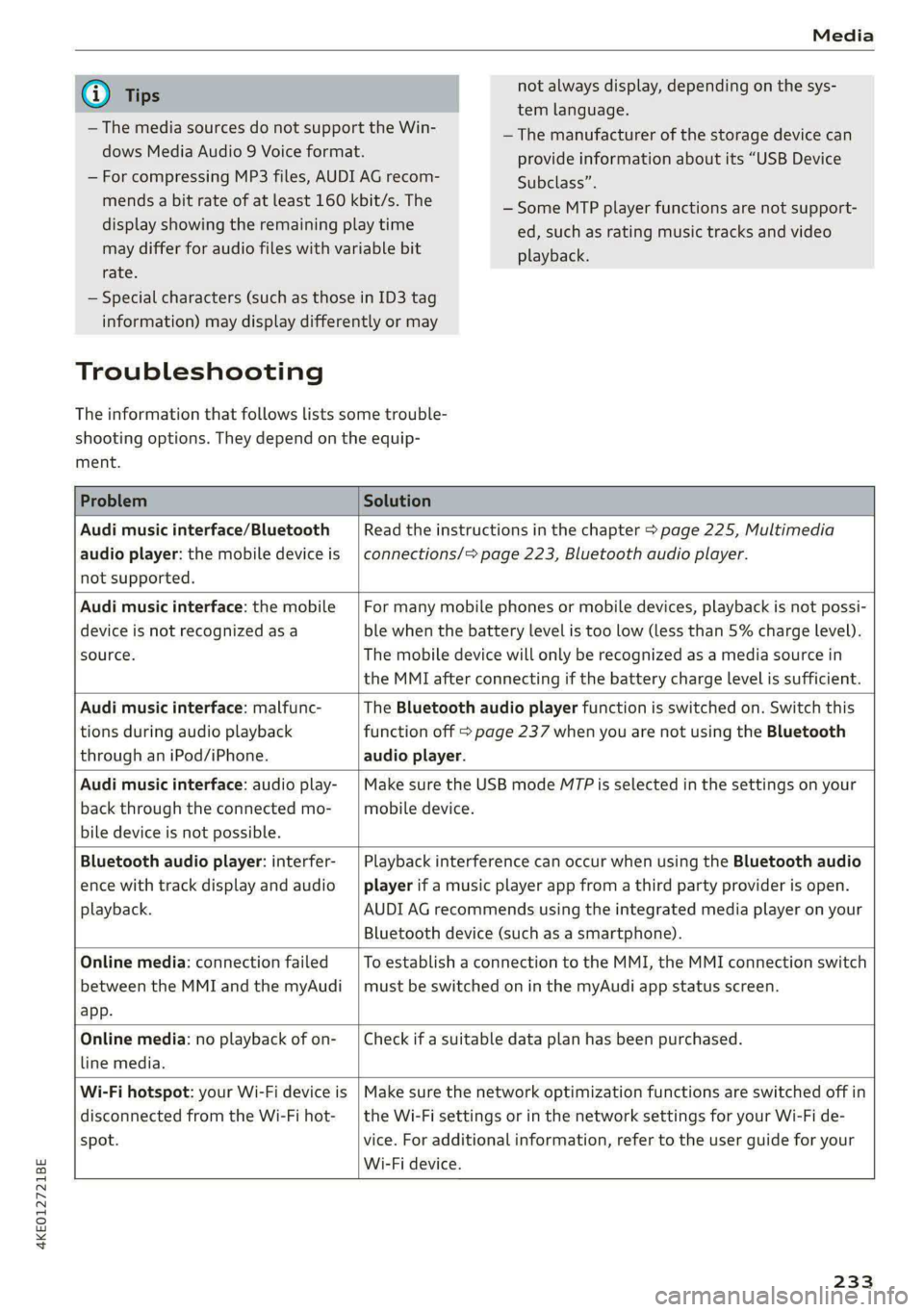
Troubleshooting
The information that follows lists some trouble-
shooting options. They depend on the equip-
not always display, depending on the sys-
tem language.
—The manufacturer of the storage device can
provide information about its “USB Device
Subclass”.
— Some MTP player functions are not support-
ed, such as rating music tracks and video
playback.
ment.
Problem Solution
Audi music interface/Bluetooth
audio player: the mobile device is
not supported.
Read the instructions in the chapter > page 225, Multimedia
connections/> page 223, Bluetooth audio player.
Audi music interface: the mobile
device is not recognized as a
source.
For many mobile phones or mobile devices, playback is not possi-
ble when the battery level is too low (less than 5% charge level).
The mobile device will only be recognized as a media source in
the MMI after connecting if the battery charge level is sufficient.
Audi music interface: malfunc-
tions during audio playback
through an iPod/iPhone.
The Bluetooth audio player function is switched on. Switch this
function off > page 237 when you are not using the Bluetooth
audio player.
Audi music interface: audio play-
back through the connected mo-
bile device is not possible.
Make sure the USB mode M7P is selected in the settings on your
mobile device.
Bluetooth audio player: interfer-
ence with track display and audio
playback.
Playback interference can occur when using the Bluetooth audio
player if a music player app from a third party provider is open.
AUDI AG recommends using the integrated media player on your
Bluetooth device (such as a smartphone).
Online media: connection failed
between the MMI and the myAudi
app.
To establish a connection to the MMI, the MMI connection switch
must be switched on in the myAudi app status screen.
Online media: no playback of on-
line media.
Check if a suitable data plan has been purchased.
Wi-Fi hotspot: your Wi-Fi device is
disconnected from the Wi-Fi hot-
spot.
Make sure the network optimization functions are switched off in
the Wi-Fi settings or in the network settings for your Wi-Fi de-
vice. For additional information, refer to the user guide for your
Wi-Fi device.
233
Page 236 of 316
Audi smartphone interface
Audi smartphone
interface
Setup
Applies to: vehicles with Audi smartphone interface
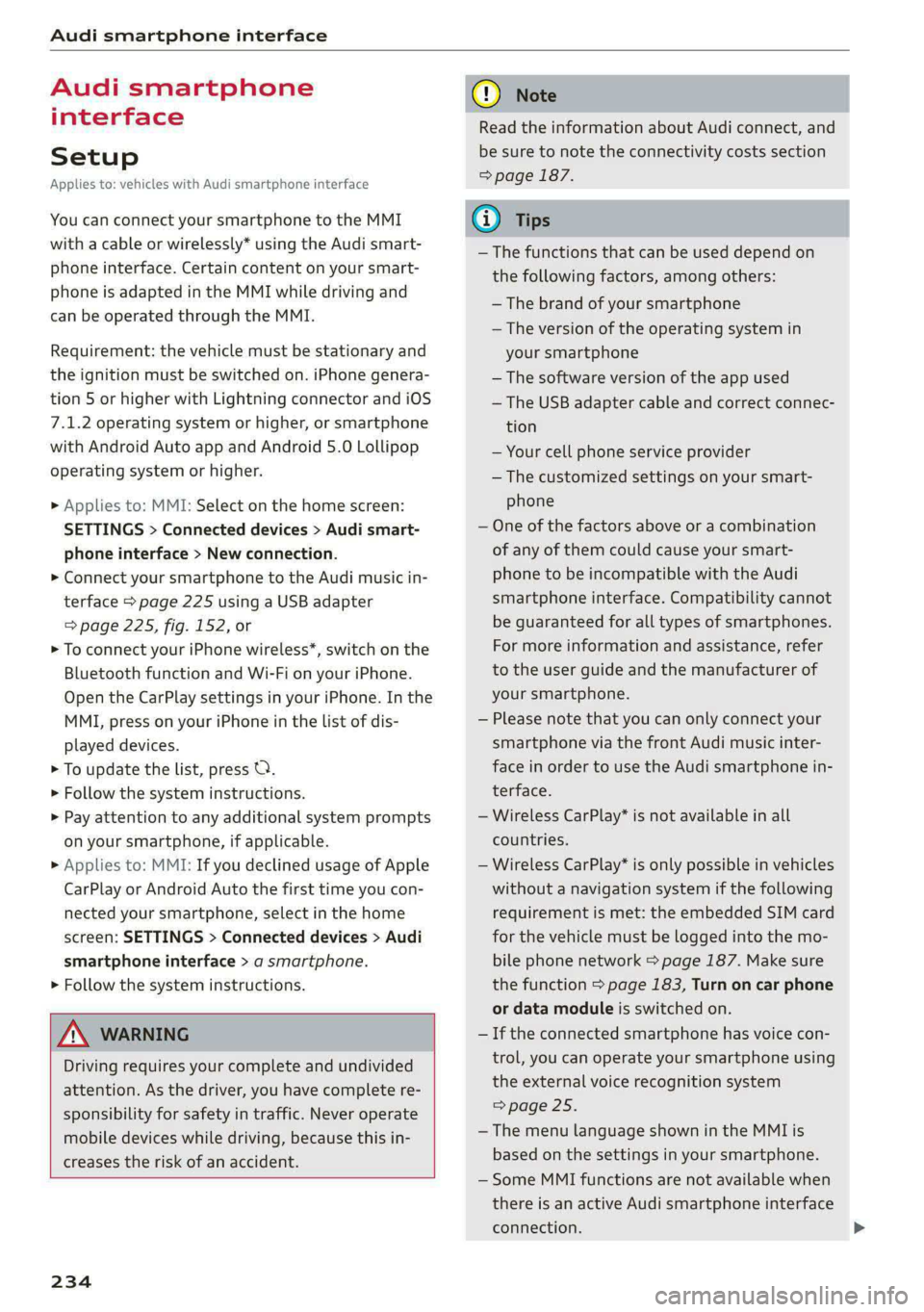
You can connect your smartphone to the MMI
with a cable or wirelessly* using the Audi smart-
phone interface. Certain content on your smart-
phone is adapted in the MMI while driving and
can be operated through the MMI.
Requirement: the vehicle must be stationary and
the ignition must be switched on. iPhone genera-
tion 5 or higher with Lightning connector and iOS
7.1.2 operating system or higher, or smartphone
with Android Auto app and Android 5.0 Lollipop
operating system or higher.
> Applies to: MMI: Select on the home screen:
SETTINGS > Connected devices > Audi smart-
phone interface > New connection.
> Connect your smartphone to the Audi music in-
terface > page 225 using a USB adapter
=> page 225, fig. 152, or
> To connect your iPhone wireless*, switch on the
Bluetooth function and Wi-Fi on your iPhone.
Open the CarPlay settings in your iPhone. In the
MMI, press on your iPhone in the list of dis-
played devices.
> To update the list, press O.
> Follow the system instructions.
> Pay attention to any additional system prompts
on your smartphone, if applicable.
> Applies to: MMI: If you declined usage of Apple
CarPlay or Android Auto the first time you con-
nected your smartphone, select in the home
screen: SETTINGS > Connected devices > Audi
smartphone interface > a smartphone.
> Follow the system instructions.
Z\ WARNING
Driving requires your complete and undivided
attention. As the driver, you have complete re-
sponsibility for safety in traffic. Never operate
mobile devices while driving, because this in-
creases the risk of an accident.
234
@) Note
Read the information about Audi connect, and
be sure to note the connectivity costs section
=> page 187.
@) Tips
— The functions that can be used depend on
the following factors, among others:
— The brand of your smartphone
— The version of the operating system in
your smartphone
— The software version of the app used
— The USB adapter cable and correct connec-
tion
— Your cell phone service provider
— The customized settings on your smart-
phone
— One of the factors above or a combination
of any of them could cause your smart-
phone to be incompatible with the Audi
smartphone interface. Compatibility cannot
be guaranteed for all types of smartphones.
For more information and assistance, refer
to the user guide and the manufacturer of
your smartphone.
— Please note that you can only connect your
smartphone via the front Audi music inter-
face in order to use the Audi smartphone in-
terface.
— Wireless CarPlay* is not available in all
countries.
— Wireless CarPlay* is only possible in vehicles
without a navigation system if the following
requirement is met: the embedded SIM card
for the vehicle must be logged into the mo-
bile phone network > page 187. Make sure
the function > page 183, Turn on car phone
or data module is switched on.
— If the connected smartphone has voice con-
trol, you can operate your smartphone using
the external voice recognition system
=> page 25.
— The menu language shown in the MMI is
based on the settings in your smartphone.
— Some MMI functions are not available when
there is an active Audi smartphone interface
connection.
Page 238 of 316
Additional settings
Additional settings
System settings
Introduction
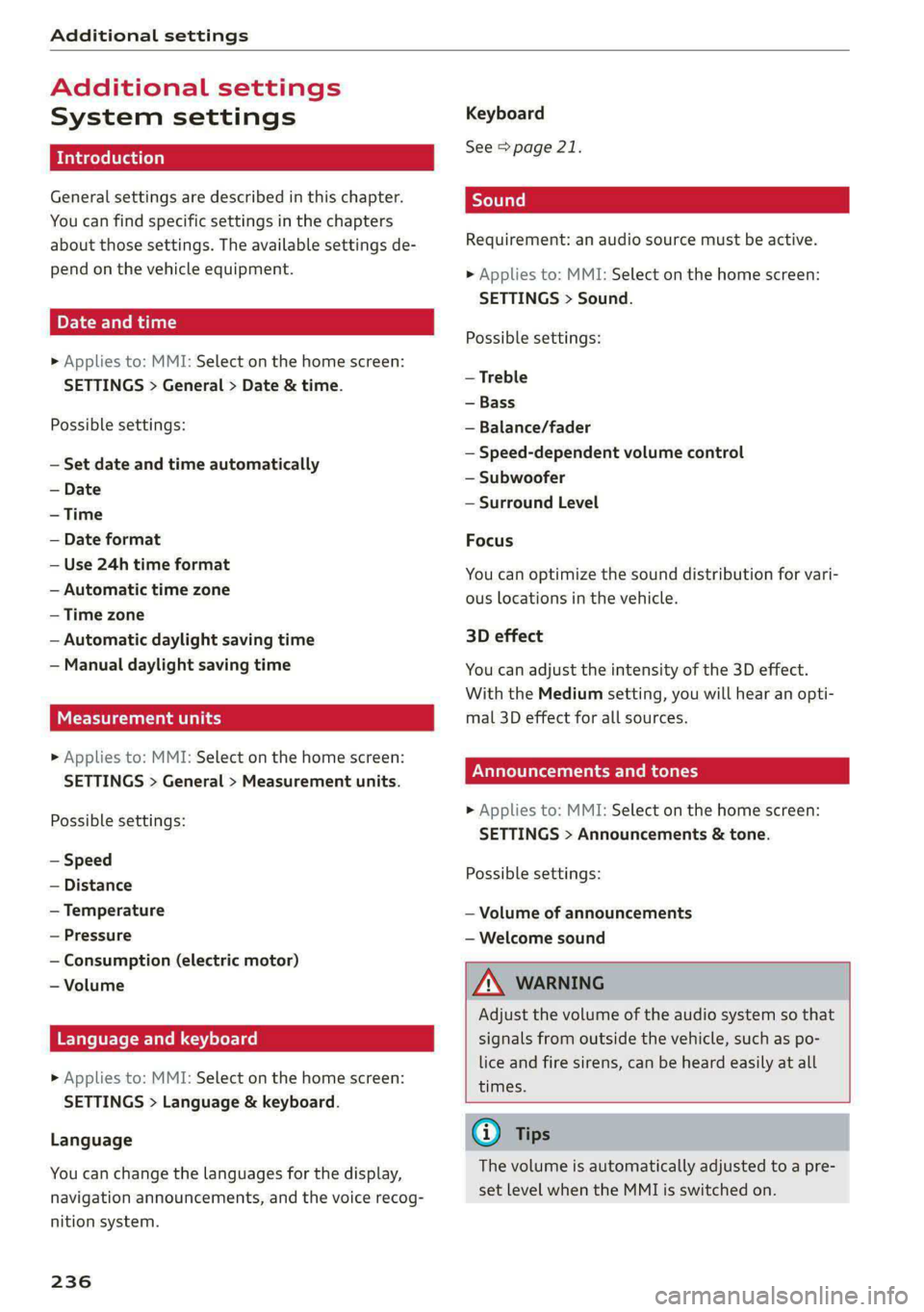
General settings are described in this chapter.
You can find specific settings in the chapters
about those settings. The available settings de-
pend on the vehicle equipment.
Date and time
» Applies to: MMI: Select on the home screen:
SETTINGS > General > Date & time.
Possible settings:
— Set date and time automatically
— Date format
— Use 24h time format
— Automatic time zone
— Time zone
— Automatic daylight saving time
— Manual daylight saving time
Measurement units
> Applies to: MMI: Select on the home screen:
SETTINGS > General > Measurement units.
Possible settings:
— Speed
— Distance
— Temperature
— Pressure
— Consumption (electric motor)
— Volume
Language and keyboard
> Applies to: MMI: Select on the home screen:
SETTINGS > Language & keyboard.
Language
You can change the languages for the display,
navigation announcements, and the voice recog-
nition system.
236
Keyboard
See > page 21.
Requirement: an audio source must be active.
> Applies to: MMI: Select on the home screen:
SETTINGS > Sound.
Possible settings:
— Treble
— Bass
— Balance/fader
— Speed-dependent volume control
— Subwoofer
— Surround Level
Focus
You can optimize the sound distribution for vari-
ous locations in the vehicle.
3D effect
You can adjust the intensity of the 3D effect.
With the Medium setting, you will hear an opti-
mal 3D effect for all sources.
Plea ee ely
» Applies to: MMI: Select on the home screen:
SETTINGS > Announcements & tone.
Possible settings:
— Volume of announcements
— Welcome sound
ZA WARNING
Adjust the volume of the audio system so that
signals from outside the vehicle, such as po-
lice and fire sirens, can be heard easily at all
times.
Gi) Tips
The volume is automatically adjusted to a pre-
set level when the MMI is switched on.
Page 307 of 316
4KE012721BE
Index
Listening to music
refertoMedia.............0ee eee 222,226
Load... 2.2... eee eee 298
Locking and unlocking
By remote control............00 cece ee 34
Using the lock cylinder...............05 32
With the convenience key............... 34
Low. beam headlights visu. so cews ov ones oo ses 45
Luggage compartment.................. 77
Cargo floor. ...... eee eee eee 80
Cover... eee eee eee eee 78
Increasing the size... 61... cee eee eee 79
POWEPSOUNCESxcccie. oo sine ow mri ww enetiede wwe 75
also refer to Luggage compartment...... 77
Luggage compartment lid
Closing bUttON : ¢ s ses +e eves se een ce vee 37
Generalinformation...............000- 35
Mechanically unlocking..............0-. 38
Opening and closing................... 36
Opening and closing with foot motion..... 38
Power opening and closing.............. 37
Lumbar support.............-.000 2-000 57
M
Maintenance « sresive sv srvice vv avers ve asaeata 0 8 292
Maintenance intervals.................. 246
Manually releasing the charging connector. 114
Manually releasing the charging port door.. 114
Map
Changing the scale..........cc0ee eee 202
Display... 2... eee eee eee 204
Operating « s sees ss ees ss eee se eee ee we 203
Setting the destination................ 202
MAP
refer to Message Access Profile......... 181
Map Previewer ssc os wasen oo man os wwrine 201
Map Updates « 2 sewn ss ween ov mee 2 a eee 209
ORL ennsss 6 oxeriexe © 0 aunsesn oo ennnece am coouene a 209
SD card/USB connection............... 209
Massage function...............-000 eee 57
PRrOnts 2 seess x = sie x 2 ees 7 8 eee ee eae Fe 58
Mechanical keys » 2 wow s y mew ss mews gy eee 33
Media......... 0... cc eee 222, 226
DIiVGS': + 2 osu « 2 goa 3 2 yee 2 Yee 2 a ew 222
Supported formats............-....-. 232
Mediacenter’s « csisccs +o cscs « « somine 0 © asoeune oo 227
Memory card
SD card reader (MMI) .............0005 222
Supported types and formats........... 232
Memory fUNCtION cas + = eons se reas xo Rees ee 64
Menu language
refer to Setting the language........... 236
Menu paths: < ¢ ees se ewes ae pees ee een ee 16
Message Access Profile...........-...0- 181
MessageS..... 1... 0-00 eee cece eee ee 181
Mirror COMPASS... 1... cece eee eee 54
Mirrors
Adjusting exterior mirrors............... 49
DIMMING ¢ ¢ sews s & ewe 4 x mows + eae 2 HIE 50
MaNTEYZOTITOR. creams» « snsem » 9 wet oo enue x 6 51
MMI
refer to Multi Media Interface........... 17
Mobile device
refer to Telephone............00eee eee 173
Mobile phone network
Connection settings...............005 185
Motor compartment
Opening and closing the hood.......... 241
Overview... ..... cece cece eee eee eee 242
Safety precautions................2.-. 240
Storage
compartment............00e00 76
MOUGNtain pPasseses « wees ss news oy aoe ewe 98
MOUNTAIN TOAdS's: « & sem = & sews = x neues +o ee 98
Multifunction steering wheel
Buttons: « sxisess os swiss @ 3 omar ao ena oa 12, 26
Operating...................0.00.0000. 12
Programming buttons.................- 26
Voice recognition system............... 24
Multi Media Interface................... “7
Menus.and symbols « wscsa «occa © cence «nn 18
Operating................2.02.000. 15,18
Switching the displays on or off.......... 17
MUlt@ icy: « 2 ame « 5 sews s 2 Wem 2 2 eee & ee 8 26
myAudi..
2.2... ee eee eee 27
Automatic login: « « sess ¢ s ame ¢ ¢ wens s ¢ os 27
myAudi navigation................. 197,201
N
Narrow areaSien: s = ees gs sea yo seen es 151
Natural leather care and cleaning......... 271
305
Page 310 of 316

Index
Removing the caps (wheel bolts)......... 277
REPAailS saion o & naena os wa oF eK 6 BRR oo 292
Repeats = s cses = eas 4 i sien oy ceo ge ee 228
Replacement key. « i ec ess een ge eer se ore 33
Replacement parts..............-02 ee ee 294
Replacing fuses ...........0.e cece eee 284
Reporting Safety Defects................ 294
Reverse gear
PefeP tO Gal's « s mass = ¢ neues 5 a aes s 2 ees 90
RIMS 2... eee 262
Cleaning’s < « ccs =» goes te eewe es oes eos 270
Road Cartieh wxsex + wean x 2 mame oe Roum a ge 102
Rolling ability
Electromechanical parking brake......... 96
ICL aSSIStiecss cs ssawens sv winenne » 0 soanane a 9 exnitone 97
Transmission idle...................00. 91
Roof
refer to Panoramic glass roof............ 41
Roof lodd «= seen s enema ¢ eaues 8 ¢ wees 5 toes 298
Roof rack... 2... eee eee eee eee 80
also refer to Roof rack..............000- 80
Route guidance
SEOPPIING secvees sv sxoess ov exams & a cavers vo ome 203
also refer to Navigation............... 197
Route planner (e-tron)............000 00 202
Running direction (tires)................ 279
S
Safety beltSiesccs 2 a aces vw cece < womens wv nec & 61
Cleaning..... 2.0... 6c cece eee eee eee 271
LOGKINGicws = & worms = 2 eee & 2 eee £ o ome ee 72
Securing child safety seats.............. 72
Satellite:map « sess = 2 evar ee wesw 2 wasn © 208
Screen
refer to Touch display................0. 15
Serewd river's « o wweis 6 o wane 6 eae ae sore ve 274
SDieard reader (MMI) sie. ss scons oe sani vo 222
Search-area (POD) sews « s wees x y cee x 2 nese 200
Search for charging station
refer to Online Points of Interest........ 200
Search function
refer to Free text search............... 230
Seatheating vveisi « « cao © 6 maven « weno © wrewess 84
Seats
Adjusting the front seats............... 57
Cleaning « < ¢ ses ss sees co ees ce ease es 271
308
FOlGINGsecers «a cserens w= mwenecs «ws mnavees ww eee eH 79
Front passenger’s seat adjustment....... 59
Head restraints... ...0.. eee cece eee eee 60
Massage-FUnction wccnes scence se oem oe ere 57
Memory function............00 eee eee 64
Resetting the position.................. 58
Storing’a seatiprofile « sicis « «sete «x owas a « 64
Seat Ventilation: ss ssws seas x s wae 2 es 84
Selecting a source (media).............. 226
Selector levers » = wens 2 » wer 5 os meme: > eer 90
Self-learning navigation
refer to Personal route assistance....... 205
Sensors
Coverage areas
Locations........ 0.0... 0c eee eee eee
Service interval display..............00. 246
Setting measurement units.............. 236
SOtbINGSions «sms +o cei meen ¢ mane ev BH 236
Announcements and tones............. 236
BlWGtoOth ; « = sees y = sees =p eewe se eee 237
Daterand timers «x sess sx swan x awa 2s 236
Language.............. ce eee eee ee 236
Measurement units..............00005 236
Mediates <6 nai se ames 6 wa os ween as wen 231
Navigation.............0 02sec eee eee 211
R&GIG
SyStEM . 6. eee ete eee 236
Time zone... 22... eee eee eee 236
WiFFUHOtspOt © cases x « cares ¢ © awe 2 8 pew e 192
Setting the charging target.............. 113
Setting the language................00. 236
Setting the time..............--.000005 236
Shade
Rear window/rear doors..............-. 51
Shift paddles
Adjusting recuperation................. 93
Ship carrier's » awn s eeaes + yews « ween so oe 102
Shortcut
referto Shortcuts’. « svc ee ees so ores a oe 20
Shorteutsevs 2 2 soscve se even 2 o eween ¥ x wea © 8s 20
SHUffl@ sos s = eerom « = nes 5 e eeen ee cee eee 228
Side@aSSiSticcs x ¢ seve + ¢ ceewe & 2 eee Be ee 158
Cleaning’SeNSOLs: soi. ss exe e ecomes & wanes 269
SIM at « 3 ses os neces vo seme vy Pre ey sees 188
SiriusXM alert notifications.............. 217