park assist AUDI E-TRON 2020 Owners Manual
[x] Cancel search | Manufacturer: AUDI, Model Year: 2020, Model line: E-TRON, Model: AUDI E-TRON 2020Pages: 316, PDF Size: 85.96 MB
Page 5 of 316
4KE012721BE
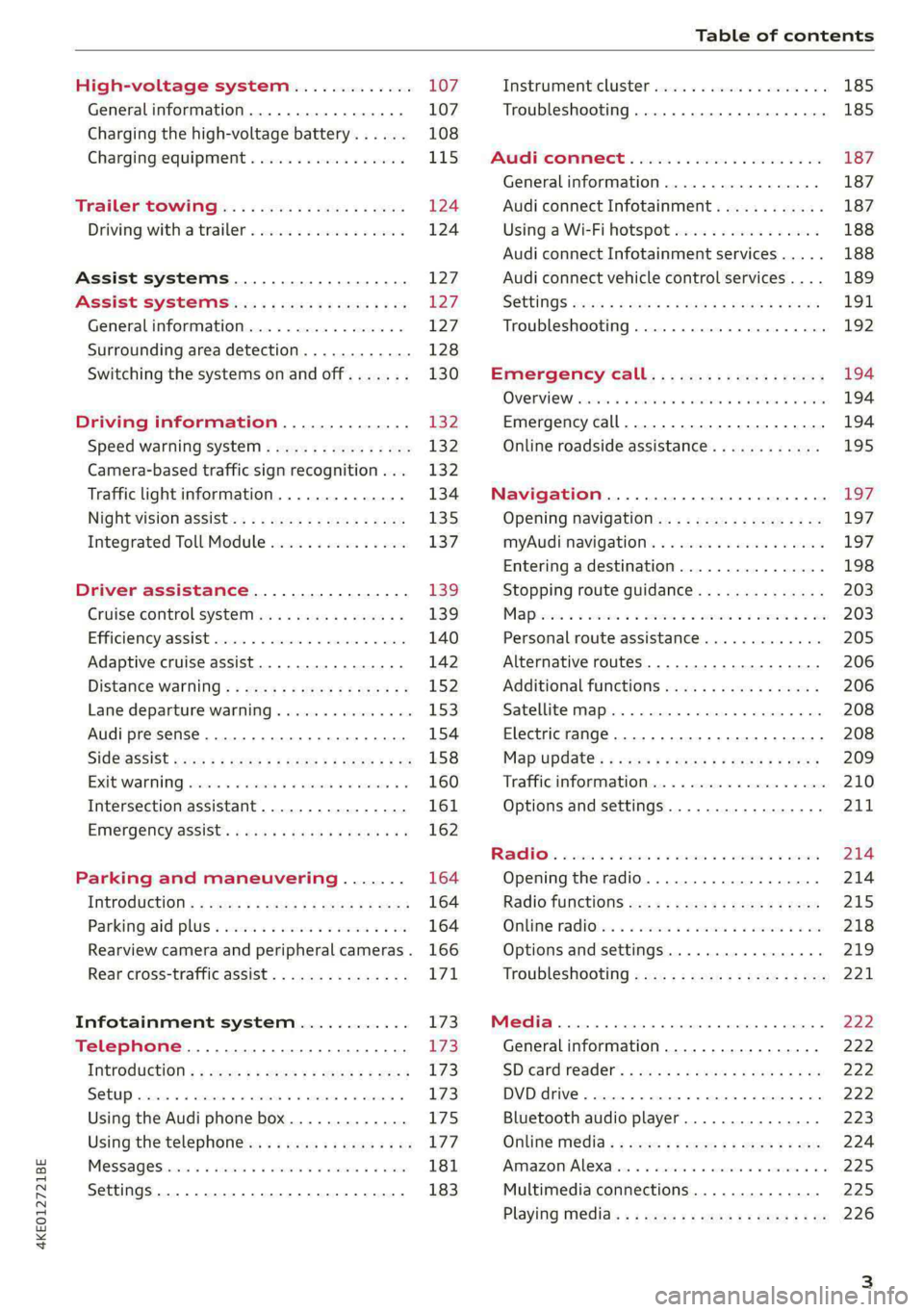
Table of contents
High-voltage system............. 107
Generalinformation................. 107
Charging the high-voltage battery...... 108
Charging equipment................. 115
Trailer ROwilne is «i wows «seas gs eeees 124
Driving witha trailer................. 124
Assist systems................... 127:
ASSIST SYSTCINIS§ 65 6 i onws 5 can so oe iZ7
General information................. 127
Surrounding area detection............ 128
Switching the systems on and off....... 130
Driving information.............. 132
Speed warning system..............-- 132
Camera-based traffic sign recognition... 132
Traffic light information.............. 134
Nightivision aSSiSti=x = «wm : » ase y s eon 135
Integrated Toll Module............... 137
Driver assistance................. 139
Cruise control system............00-5 139
Efficiency assist.............02.-000. 140
Adaptive cruise assist................ 142
Distance warning ..............00005. 152,
Lane departure warning............... 153
Audi presense...........0 cece eee 154
Sid@vassist sews: = s sexs = 2 sews & e Ae & ne 158
EXIE Warning sire x 6 cera oo were @ @ eee os 160
Intersection assistant................ 161
Emergency assist... ....:seeceeeevees 162
Parking and maneuvering....... 164
ThitrOdUCtiON « s sees ¢ = sees 5 ¢ sere ge ees 164
Parking‘aid plus « sissies avis oe aretes so aoe 164
Rearview camera and peripheral cameras. 166
Rear cross-traffic assist............... 171
Infotainment system............ L73
Telephone....................005- 173
INtROGUCtION « 2 sees » y sees 9 2 gees s 5 aes 173
SOLUP scsvine a 6 sssnase 2 0 soeaam + 6 oewoan © 6 coesern < 173
Using the Audi phone box............. 175
Using the telephone..............0005 177
MOSSAQCSiecies «i ssnsis 6 v suite + 0 oxime + 8 aie 181
Settings............0 0.0 ..0..00000. 183
Instrument cluster..............2.--- 185
Troubleshooting.................00 ee 185
AUP CONNECE « 6:65. 6 ev ee ews se os 187
General information................. 187
Audi connect Infotainment............ 187
Using a Wi-Fi hotspot................ 188
Audi connect Infotainment services..... 188
Audi connect vehicle control services.... 189
SGttiNGS mows ¢ » news © eww ¢ wor a 6 ateneg 191
Troubleshooting............... eee eee 192
Emergency call................... 194
OVERVIEW sscor xe creer wu eueiane & x cman © & ares 194
Emergency call..............-.000005 194
Online roadside assistance............ 195
Navigation....................000. Lg?
Opening navigation.................. 197
myAudi navigation...............0005 197
Entering a destination................ 198
Stopping route guidance.............. 203
Mapes 2 o socases 2 3 omer o 3 omrnom wo eau @ 3 vee 203
Personal route assistance............. 205
Alternative routes.............2.-04. 206
Additional functions...............-. 206
Satellite map........... 0.0.0.2 eee 208
Electric range... . 6... cece eee eee 208
Map‘update: « sees ys agus ye ees vo ees 209
Traffic information.................00- 210
Options and settings................- 211
RaACHON. seve. = soso we wien 4 weanene oe weaves 214
Opening the radio................... 214
Radio functions wc s 2 ees © s seen os reese 215
Onllime tadiOven « 2 senses av sewsece ov somes a im 218
Options and settings...............0. 219
TROUDIESHOOtING san ¢ x xoam « + some & 2 eo 221
Media............... 0. cece eee 222
General information................. 222
SDicard reader's + wees + 2 wows se wees s Gos 222
DVD drive...... 0... eee eee eee 222
Bluetooth audio player............... 223
Online Média « ¢ ese. ye cee ge eee ee eae 224
Amazon Alexa... ..... cee eee eee ee eee 225
Multimedia connections.............. 225
Playing media..............00--0000- 226
Page 8 of 316
Quick access
Quick access
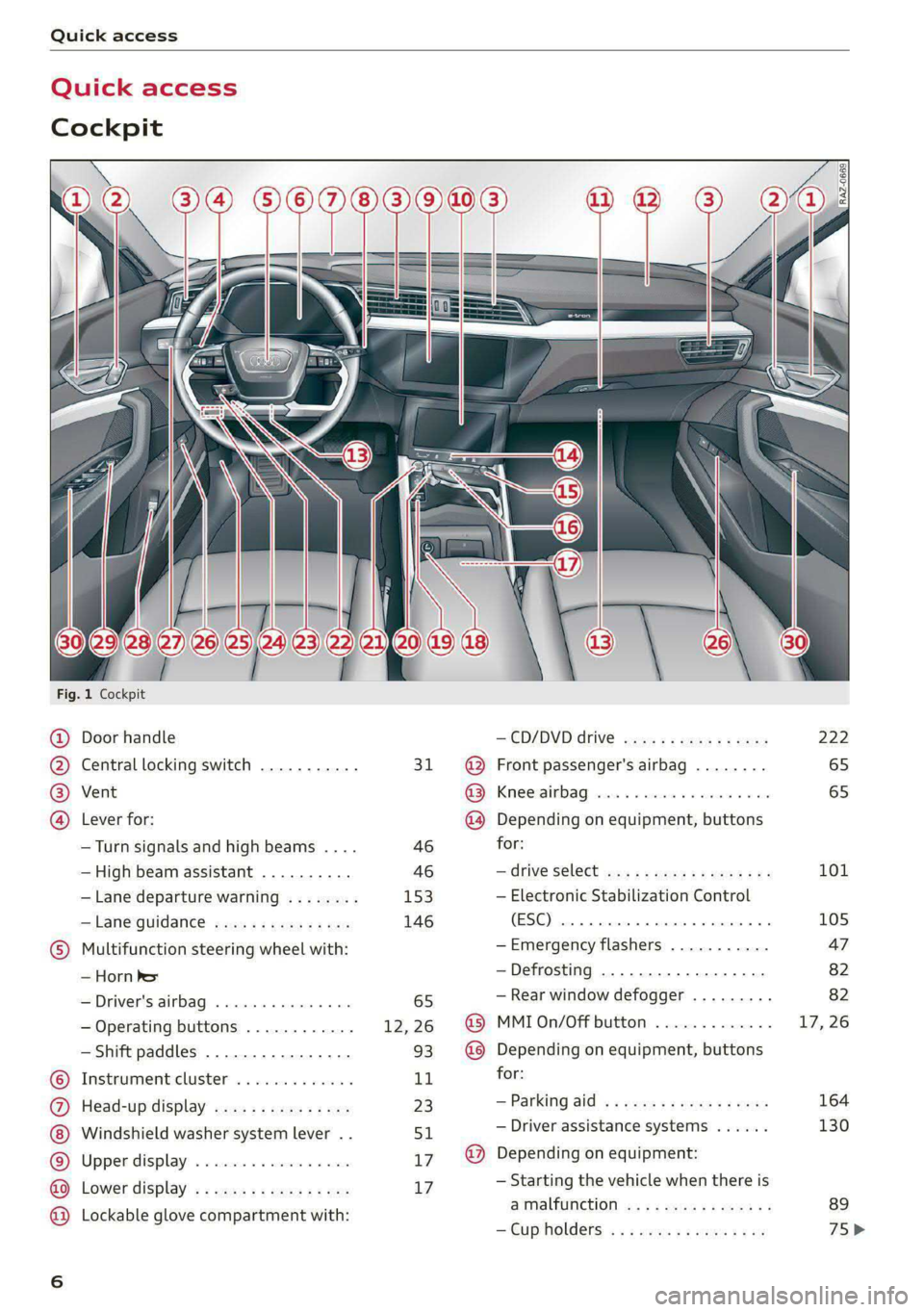
Cockpit
Fig. 1 Cockpit
@ @ @ @
©
OO©CO®O
Door handle
Central locking switch ...........
Vent
Lever for:
—Turn signals and high beams ....
— High beam assistant ..........
— Lane departure warning ........
—Lane guidance ...............
Multifunction steering wheel with:
— Horn Pes
— Driver's airbag ...............
— Operating buttons ............
— Shift paddles ................
Instrument:cluster’ . . wc ee wees
Head-up display ...............
Windshield washer system lever ..
Upper display: « « csi «x ceva 6 # seen
Lower display .................
Lockable glove compartment with:
31
46 46
153
146
— CD/DVD drive 2s: : = news ss sees
@ Front passenger's airbag ........
@ Knee airbag ...................
@ Depending on equipment, buttons
for:
— ‘drive Select wis ss wens so ews we
— Electronic Stabilization Control
(ESE) ces us exes ao samme 0 a orenimn 0
—Emergency flashers ...........
—Defrosting ..................
— Rear window defogger .........
@ MMI On/Off button .............
@ Depending on equipment, buttons
for:
—Parking aid «eevee scenes ceca
— Driver assistance systems ......
@) Depending on equipment:
— Starting the vehicle when there is
STSLUICEION sag x 2 canes ye cme &
— Cup holders: « «2 sors se ness coe
222
65
65
101
105
164
130
Page 9 of 316
4KE012721BE
Quick access
— Audi musicinterface .......... 225
— Audi phone box ............... 175
—SDcardreader ............... 222
SOGKEE vcs sw isiness x x seein sw oem a ws 75
@ Electromechanical parking brake
BUtEON acces ox comme: « 2 sure 2 3 conte © 96
@® Selector lever ..............00. 90
@) [START STOP] button ............ 88
@) Steering wheel adjustment ...... 59
@3) Lever for:
— Cruise control system ......... 139
— Adaptive cruise assist .......... 142
@4 Connection port for the On Board
Diagnostic System (OBD) ........ 288
@3) Hood release ..........-..-0005 241
@8 Memory function buttons ........ 64
@) Buttons for:
PELIQHES ac x 2 wsvcene ao esezoss vo aenere @ s 45
—All-weather lights ............ 45
Luggage compartment lid button . 35
@9) Exterior mirror adjustment ...... 49
69 Buttons for:
— Power windows ............0. 39
—Child safety lock .............. 39
G) Tips
Some the equipment listed here is only instal-
led in certain models or is available as an op-
tion.
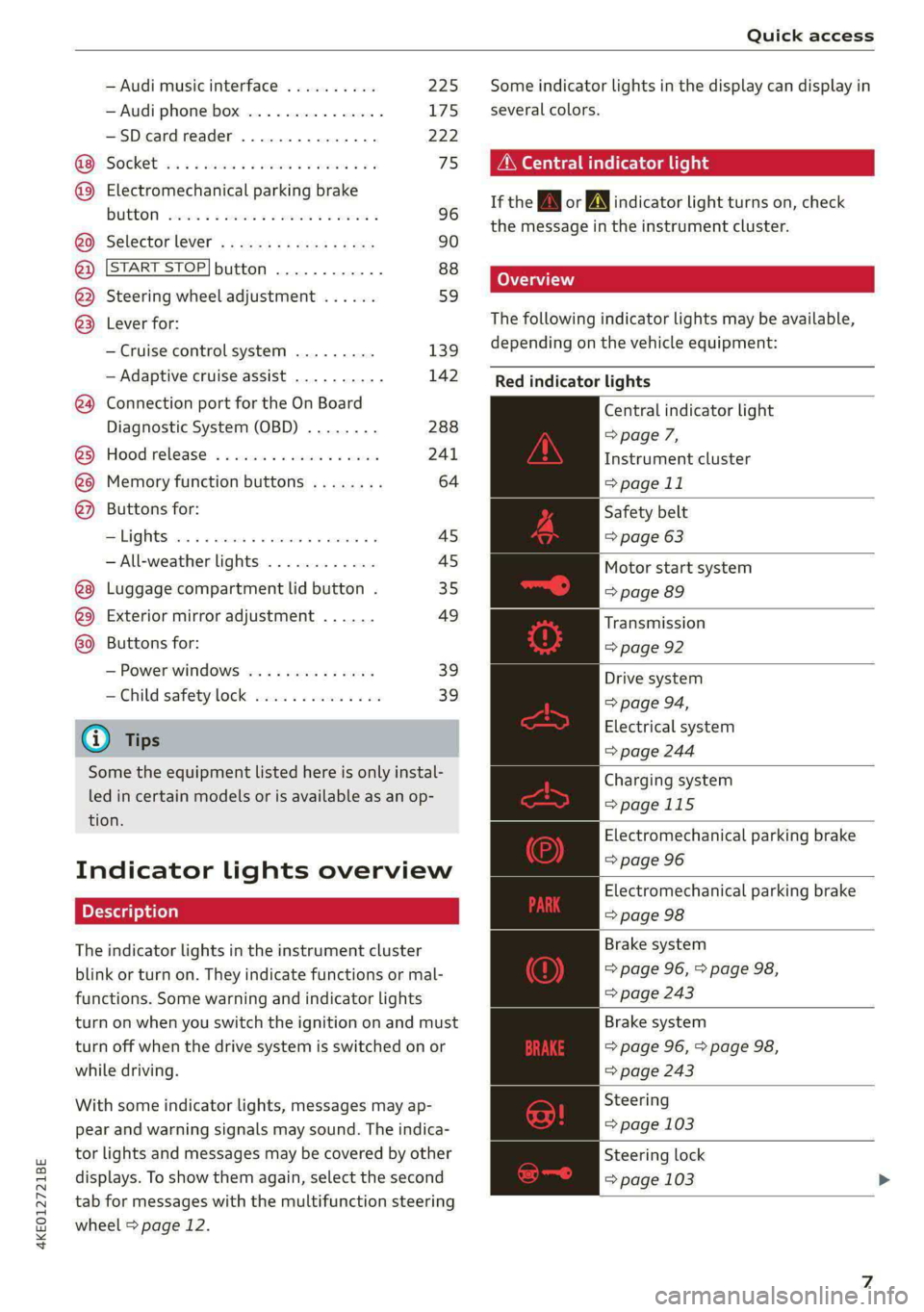
Indicator lights overview
The indicator lights in the instrument cluster
blink or turn on. They indicate functions or mal-
functions. Some warning and indicator lights
turn on when you switch the ignition on and must
turn off when the drive system is switched on or
while driving.
With some indicator lights, messages may ap-
pear and warning signals may sound. The indica-
tor lights and messages may be covered by other
displays. To show them again, select the second
tab for messages with the multifunction steering
wheel > page 12.
Some indicator lights in the display can display in
several colors.
A\ Central indicator light
If the A or indicator light turns on, check
the message in the instrument cluster.
The following indicator lights may be available,
depending on the vehicle equipment:
Red indicator lights
Central indicator light
=> page 7,
Instrument cluster
=> page 11
Safety belt
=> page 63
Motor start system
=> page 89
Transmission
=> page 92
Drive system
=> page 94,
Electrical system
=> page 244
Charging system
=>page 115
Electromechanical parking brake
=> page 96
Electromechanical parking brake
=> page 98
Brake system
=> page 96, > page 98,
=> page 243
Brake system
=> page 96, > page 98,
=> page 243
Steering
=> page 103
Steering lock
=> page 103
Page 10 of 316
Quick access
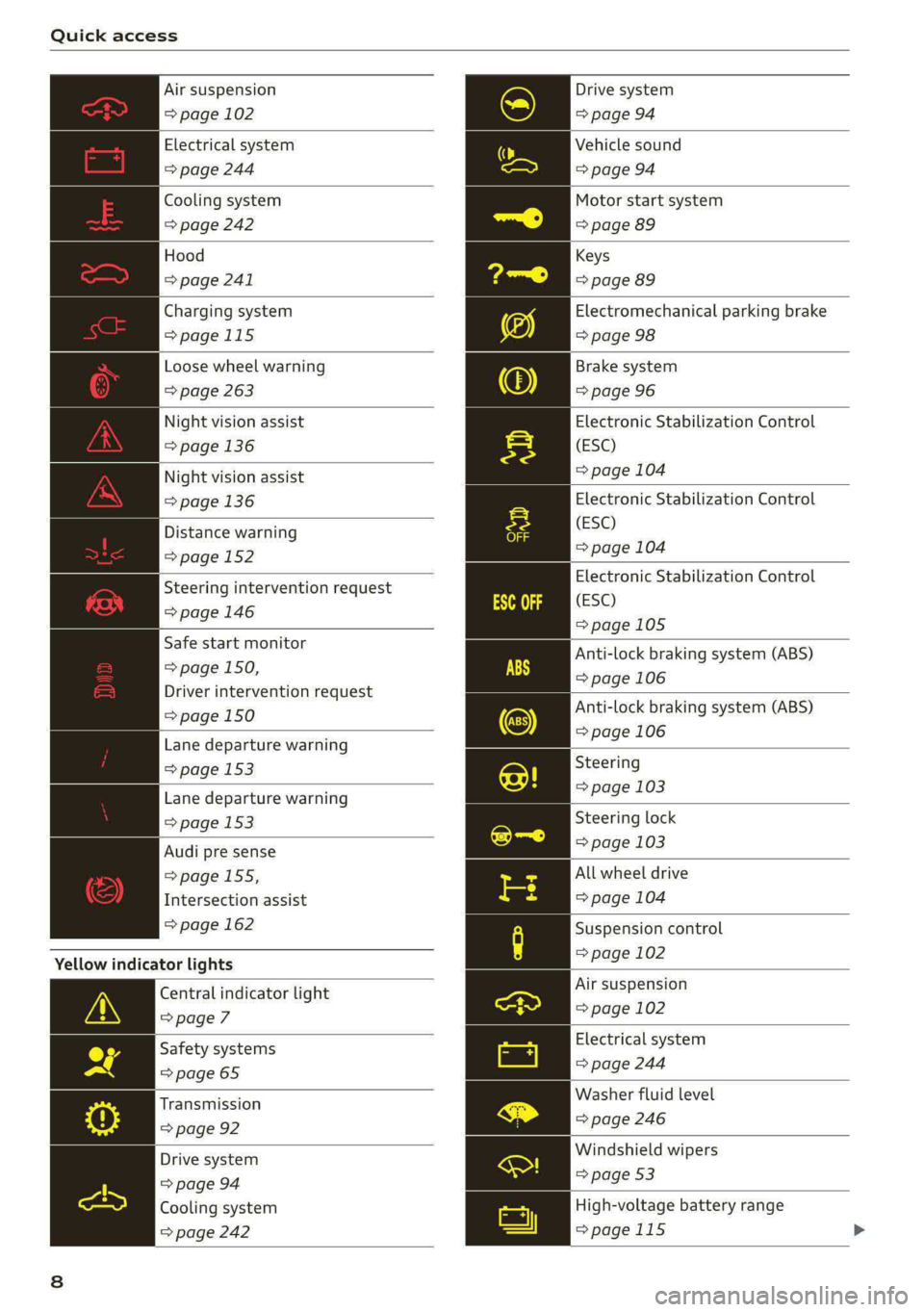
Air suspension
=> page 102
Electrical system
=> page 244
Cooling system
=> page 242
Hood
=> page 241
Charging system
=>page 115
Loose wheel warning
=> page 263
Night vision assist
=> page 136
Night vision assist
=>page 136
Distance warning
=> page 152
Steering intervention request
=> page 146
Safe start monitor
=> page 150,
Driver intervention request
=> page 150
Lane departure warning
=> page 153
Lane departure warning
= page 153
Audi pre sense
=> page 155,
Intersection assist
=> page 162
Yellow indicator lights
Central indicator light
=> page 7
Safety systems
=> page 65
Transmission
=> page 92
Drive system
=> page 94
Cooling system
=> page 242
Drive system
=> page 94
Vehicle sound
=> page 94
Motor start system
=> page 89
Keys
=> page 89
Electromechanical parking brake
=> page 98
Brake system
=> page 96
Electronic Stabilization Control
(ESC)
=> page 104
Electronic Stabilization Control
(ESC)
=> page 104
Electronic Stabilization Control
(ESC)
=>page 105
Anti-lock braking system (ABS)
=> page 106
Anti-lock braking system (ABS)
=> page 106
Steering
=> page 103
Steering lock
=> page 103
All wheel drive
=> page 104
Suspension control
= page 102
Air suspension
=> page 102
Electrical system
=> page 244
Washer fluid level
=> page 246
Windshield wipers
=> page 53
High-voltage battery range
>page 115
Page 11 of 316

4KE012721BE
Quick access
Parking aid
=> page 166
Tire pressure
=> page 265
Tire pressure
=>page 265
Loose wheel warning
=> page 263
Bulb failure indicator
=>page 47
Adaptive light
> page 47
Light/rain sensor
=> page 47, > page 53
Door lock
=> page 31
Battery in vehicle key
> page 35
Night vision assist
=> page 137
Intersection assistant
=> page 162
Side assist
=> page 160;
Exit warning
=> page 160
Rear cross-traffic assist
=>page 171
Adaptive cruise assist
=>page 151
Steering intervention request
=> page 146, >page 154
Lane departure warning
=>page 154
Distance warning
=> page 152
Audi pre sense
=>page 158
Emergency assist
=> page 162
Emergency call function
=>page 195
Other indicator lights
Rear safety belt
=> page 63
Hold assist
=> page 97
Hill descent assist
=> page 99
Low beam headlight
=>page 45
Parking light
=>page 45
Turn signals
=> page 46, > page 47
Cruise control system
=> page 139
Cruise control system
=>page
139
Efficiency assist
=> page 140
Efficiency assist
=> page 140
Efficiency assist
=> page 140
Efficiency assist
=> page 140
Efficiency assist
= page 140
Efficiency assist
=> page 140
Adaptive cruise assist
=> page 143,
Efficiency assist
=> page 140
Adaptive cruise assist
=> page 143
Adaptive cruise assist
=> page 143
Adaptive cruise assist
=> page 143
Lane guidance for adaptive cruise
assist
=> page 143
Page 12 of 316

Quick access
Lane departure warning
=> page 153
High beams
=> page 46
High beam assistant
=> page 46
Rear safety belt
=> page 63
Convenience key
=> page 89
Electromechanical parking brake
=> page 98
Electromechanical parking brake
=> page 98
Hold assist
=> page 98
Hill descent assist
=> page 99
Air suspension
=> page 102
Charging system
=>page 115
High-voltage battery range
>page 115
Parking aid
=> page 166
High beam assistant
=> page 46
Door lock
> page 31
Child safety lock
=> page 39
Speed warning system
=> page 132
Speed warning system
> page 132
Camera-based traffic sign recog-
nition
=> page 133
10
Night vision assist
=> page 137
Cruise control system
=>page 139
Cruise control system
=> page 139
Intersection assistant
=> page 162
Side assist
=> page 160
Distance warning
=> page 152
Rear cross-traffic assist
=>page 171
Adaptive cruise assist
=page 151,
Efficiency assist
=> page 147
Adaptive cruise assist
=> page 148
Lane guidance for adaptive cruise
assist
= page 143
Lane departure warning
=> page 153
Lane departure warning
=>page 154
Audi pre sense
=>page 158
Emergency assist
=> page 162
Page 47 of 316

4KE012721BE
Lights and Vision
Lights and Vision
Exterior lighting
Switching the lights on and off
Fig. 35 Instrument panel: light button module
© Light sensor
Press and hold @ until the desired light function
is selected. The selected function is displayed
briefly in the instrument cluster. When switching
on the ignition, the AUTO light function is auto-
matically selected.
— AUTO - The automatic headlights adapt to the
surrounding brightness automatically. The day-
time running lights* will automatically turn on.
In vehicles for certain markets, you can switch
the automatic daytime running lights* on and
off in the MMI.
— 20 - You can switch the low beam headlights on
manually once the ignition is switched on.
— 2 - You can switch the parking lights on at
speeds below 20 mph (32 km/h).
— USA models: OFF - You can switch off all light
functions at speeds below 6 mph (10 km/h).
— Canada models: OFF - You can switch off all
light functions when the ignition is switched off
while the vehicle is stationary.
When the low beam headlights or parking lights
are switched on, the respective Ba or EB indica-
tor light appears in the instrument cluster.
@ All-weather lights 2
The headlights automatically adjust so that there
will be less glare, for example when the road sur-
face is wet.
Automatic headlight range control
Your vehicle is equipped with automatic head-
light range control. It reduces glare for oncoming
traffic if the vehicle load changes. The headlight
range adjusts automatically.
Audi adaptive light
Applies to: vehicles with adaptive light
Audi adaptive light provides better visibility when
driving in the dark. The lights are adapted to the
road conditions based on speed, such as when
driving on expressways, rural roads, at intersec-
tions, and around curves. The adaptive light only
functions when the automatic headlights are ac-
tivated.
Z\ WARNING
— Observe the safety precautions and note the
limits of the assist systems, sensors, and
cameras > page 127.
— Automatic headlights are only intended to
assist the driver. They do not relieve the
driver of responsibility to check the head-
lights and to turn them on manually based
on the current light and visibility conditions.
For example, fog cannot be detected by the
light sensors. So always switch on the low
beams ZO under these weather conditions
and when driving in the dark.
@ Tips
— If the vehicle battery has been discharging
for a while, the parking light may switch off
automatically. Avoid using the parking
lights for several hours.
— Follow the regulations applicable to the
country where you are operating the vehicle
when stopping the vehicle and when using
the lighting systems.
— Only the front headlights turn on when the
daytime running lights are switched on*. In
vehicles in certain markets, the tail lights
will also turn on.
—Incool or damp weather, the inside of the
headlights, turn signals, and tail lights can
fog
over due to the temperature difference
between the inside and outside. They will
clear shortly after switching them on. This
4s
>
Page 48 of 316

Lights and Vision
does not affect the service life of the light-
ing.
— When the parking lights are switched on
and the ignition is switched off, the 200-} sym-
bol appears in the light switch module.
Turn signal and high beam lever
BFV-0012
Fig. 36 Lever: switching on the turn signal and high beams
The lever operates the turn signals, the high
beams and the headlight flasher.
Turn signals (>>
The turn signal activates when you move the lev-
er into a turn signal position when the ignition is
switched on. The respective a or B indicator
light flashes.
@ Right turn signal
@ Left turn signal
The turn signal blinks three times if you tap the
lever (convenience turn signal).
If an indicator light blinks twice as fast as usual,
a turn signal bulb has failed. Carefully drive to an
authorized Audi dealer or authorized Audi Service
Facility immediately to have the malfunction cor-
rected.
High beams 20 and headlight flasher
> Move the lever to the corresponding position:
@) High beams on (vehicles with high beam assis-
tant*) > page 46
@ High beams off or headlight flasher
The EJ indicator light in the instrument cluster
turns on.
46
AN WARNING
High beams can cause glare for other drivers,
which increases the risk of an accident. For
this reason, only use the high beams or the
headlight flasher when they will not create
glare for other drivers.
item
Applies to: vehicles with high beam assistant
The high beam assistant automatically turns the
high beams on or off depending on the surround-
ing conditions.
A camera on the rearview mirror mount can de-
tect light sources from other road users. The high
beams switch on or off automatically depending
on the position of vehicles driving ahead and on-
coming vehicles, the vehicle speed as well as oth-
er environmental factors and traffic conditions.
Switching on the high beam assistant
Requirement: the AUTO light function must be
selected and the high beam assistant must be
switched on in the MMI > page 47.
> To activate the high beam assistant, tap the
lever
forward (@) > page 46, fig. 36. The fag i
dicator light appears in the instrument cluster
display and the high beams are switched on or
off automatically. The Ed indicator light turns
on if the high beams are switched on.
Switching the high beams on or off manually
If the high beams did not switch on or off as ex-
pected, you may switch them on or off manually
instead:
> To switch the high beams on manually, tap the
lever
forward @) > page 46, fig. 36. The =O] in-
dicator light turns on.
> To switch the high beams off manually, pull the
lever
back @) > page 46, fig. 36. The high beam
assistant is deactivated.
Operating the headlight flasher
> To operate the headlight flashers, pull the lever
back @) > page 46, fig. 36. If the high beam
headlights are not switched on, the high beam
assistant will remain activated.
Page 92 of 316

Driving
pedal and always shift into “P” when the ve-
hicle is stopped.
— If you leave the vehicle, switch the ignition
off and take the key with you. This is espe-
cially important when leaving persons or an-
imals in the vehicle. Otherwise, the vehicle
could start unintentionally, the parking
brake could release, or electronic equipment
could activate, which increases the risk of an
accident.
— No persons or animals should be left in a
locked vehicle. Locked doors make it more
difficult for emergency workers to enter the
vehicle, which puts lives at risk.
— If you do not begin driving immediately af-
ter releasing the brake pedal, your vehicle
may begin to roll backward. Press the brake
pedal or set the parking brake immediately.
@) Note
If you have to stop on an incline, always press
the brake pedal to hold the vehicle in place to
reduce the risk of the vehicle rolling back-
ward. Do not try to hold the vehicle in place
by pressing and holding the accelerator pedal.
The transmission can overheat, which increas-
es the risk of damage.
Hill hold assist
If you take your foot off of the brake pedal when
driving on hills, the braking force will be held for
several seconds. At that time, you can start driv-
ing without the vehicle rolling backward.
Requirement: the driver's door must be closed,
the drive system must be active, and the vehicle
must be traveling uphill.
> To activate hill hold assist, press and hold the
brake pedal for several seconds while the vehi-
cle is stationary.
Use the hold assist > page 97 when the braking
force should be applied for more than several
seconds.
90
ZA WARNING
— If you do not begin driving immediately af-
ter releasing the brake pedal, your vehicle
may begin to roll backward. Press the brake
pedal
or set the parking brake immediately.
— The hill hold assist cannot hold the vehicle
on inclines in every scenario (for example,
on slippery or icy ground).
Gears and driving programs
RAZ-0570
i
Fig. 83 Center console: hand rest with selector lever
The selector Lever is located on the side of the
hand rest. You can operate the selector lever us-
ing your thumb and index finder. Operation is
similar to a vehicle with an automatic transmis-
sion.
The gears are displayed next to the hand rest.
— P (Park)
— R (Reverse)
—N (Neutral)
—D (Drive)
Selecting a gear
Requirement: the ignition must be switched on.
— Bring the vehicle to a full stop and press the
brake pedal.
—To select the nearest gear, move the selector
lever forward or back until you feel the first
pressure point.
—To skip a gear (for example, move from “D” to
“R”), move the selector lever past the pressure
point in the desired direction.
— The label next to the selector lever for the se-
lected gear will light up.
Page 94 of 316
Driving
Requirements
— Driving program “S” > page 91 or the dynamic
Audi drive select* mode must be selected
=> page 101.
— The boost function is available > page 91.
Using Launch Control
— Press the brake pedal with your left foot and
hold it all the way down for at least one second.
— With the brake pedal pressed, press the accel-
erator pedal all the way down with your right
foot at the same time.
— As soon as the colored edge of the power meter
actively flashes, remove your foot from the
brake pedal.
ZA WARNING
Only use Launch Control when road and traffic
conditions allow it and other road users will
not be endangered or impacted by your driv-
ing and the vehicle's acceleration. The driving
wheels could spin and the vehicle could
swerve, especially on slick or slippery road
surfaces, which increases the risk of an acci-
dent.
@) Note
When accelerating using Launch Control, all
vehicle components are subject to heavy
loads. This can result in increased wear.
G) Tips
After accelerating using the Launch Control,
the temperature of some vehicle components
may increase greatly. If that happens, the
function will not be available for a few mi-
nutes to reduce the risk of damage. After a
cool-down period, Launch Control will be
available again.
Messages
& Transmission: malfunction! Safely stop vehi-
cle
Do not continue driving. Stop the vehicle as soon
as possible in a safe location and secure it so it
92
does not roll. See an authorized Audi dealer or
authorized Audi Service Facility for assistance.
i] Selector lever: malfunction! Gear change on-
ly possible if using both shift paddles.
There is a system malfunction in the selector lev-
er. You can continue driving with restricted func-
tion. The selector lever is not working. Gears can
only be selected by tapping both shift paddles at
the same time when the vehicle is stationary. The
“P” gear is automatically engaged when you
switch off the drive system. Drive to an author-
ized Audi dealer or authorized Audi Service Facili-
ty immediately to have the malfunction correct-
ed.
i P button: malfunction! Auto P when engine
off. Please contact Service
There is a malfunction in the "P" button on the
selector lever. The “P” gear is automatically en-
gaged when you switch off the drive system.
Drive to an authorized Audi dealer or authorized
Audi Service Facility immediately to have the
malfunction corrected.
i Danger of rolling away! P not possible.
Please apply parking brake
The parking lock can no longer be engaged. Drive
to an authorized Audi dealer or authorized Audi
Service Facility immediately to have the malfunc-
tion corrected.
Drive system
ada ee tee Tn)
Vehicles with an electric drive system are pow-
ered by an electric motor. The drive power de-
pends on the temperature and the charge level of
the high-voltage battery.
The vehicle is able to recover energy by using “re-
cuperation”. The electric drive system operates
like a generator and converts a large portion of
kinetic energy into electrical energy that is stored
in the high-voltage battery. The vehicle is braked
during recuperation, which is similar to the >