USB AUDI E-TRON 2021 User Guide
[x] Cancel search | Manufacturer: AUDI, Model Year: 2021, Model line: E-TRON, Model: AUDI E-TRON 2021Pages: 308, PDF Size: 83.91 MB
Page 221 of 308
![AUDI E-TRON 2021 User Guide 4KE012721BF
Media
Cel Me staieig
Teco Re is
a] | 3
| x 2
ES
Fig. 147 Upper display: media center
There are various categories available in the me-
dia center. You can also search for](/img/6/57622/w960_57622-220.png "AUDI E-TRON 2021 User Guide 4KE012721BF
Media
Cel Me staieig
Teco Re is
a] | 3
| x 2
ES
Fig. 147 Upper display: media center
There are various categories available in the me-
dia center. You can also search for")
4KE012721BF
Media
Cel Me staieig
Teco Re is
a] | 3
| x 2
ES
Fig. 147 Upper display: media center
There are various categories available in the me-
dia center. You can also search for media files
across sources. The current music track continues
playing while you search the MMI.
Opening the media center
> Applies to: MMI: Select on the home screen:
MEDIA > Source > a source > a category.
@ Source symbol
The symbol for the source that is currently in use
is displayed. Depending on the connected device,
the symbol for the source may change. As an ex-
ample, a USB stick is shown connected to the
Audi music interface.
@ Source device name
The device name of the source that is currently in
use is displayed.
@® Categories
The media center will display categories depend-
ing on the connected device, the selected source
content, and the connection type.
Last played tracks
The last played media file will be played.
Artists
All available artists are displayed.
> Select: an artist > an album > a song.
Playlists
All playlists and smart playlists in the source are
displayed.
> Select: a playlist > a song.
Smart playlists
Last played tracks: the tracks that were dis-
played last are displayed.
Most played tracks: the tracks that are played
most frequently are displayed.
Folders
The folder structure or track/chapter list is dis-
played.
> Select: a folder > a song.
Compilations
You can control your compilations through the
MMI.
> Select: a compilation > a song.
Composers
All available composers are displayed.
> Select: ad composer > an album > a song.
iTunes Radio
>» Press on a radio station.
Audio books
You can control your audio books on the MMI.
> Press on an audio book.
Podcasts
You can control your podcasts through the MMI.
> Select: a podcast > a podcast episode.
Genres
All available genres are displayed.
>» Select: a genre > an artist > an album > a song.
Videos
All available video files are displayed.
> Press on a video.
Tracks
All available tracks are displayed.
> Press ona track.
219
Page 225 of 308
4KE012721BF
Media
Online additional data
Requirement: the MMI must be connected to the
Internet. A data plan must be available
=> page 190.
When the function is switched on, additional in-
formation (such as album cover, artist, track) will
be loaded depending on the availability from the
different providers.
DVD playback parental cntrl.
Playback of video DVDs can be restricted based
on age restrictions using parental control.
Displaying the DVD parental control menu
> Applies to: MMI: Select on the home screen:
MEDIA > ©} > DVD playback parental cntrl..
> Enter the PIN for parental control. The PIN set
at the factory is 1234.
> Press OK.
Switching the rating level on and off
Requirement: the DVD parental control menu
must be displayed.
> Select: Set rating level > select a rating level
(for example, level 5) > *2, or:
> To remove all restrictions, press Off.
Eight different protection levels can be set for
parental control. If you set the parental control
level at level 5, all DVDs from levels 1 - 5 can be
played. Video DVDs with a higher level will not
play.
Changing the PIN
Requirement: the DVD parental control menu
must be displayed.
> Select: Change PIN > enter a new PIN for pa-
rental control > OK.
> Repeat the entry and press OK.
@) Tips
— Not all video DVDs have parental control.
— The protection levels for the parental con-
trol are based on the US standards from the
Motion Picture Association of America
(MPAA). Note that the age levels for video
DVDs in European countries may differ.
— PIN entry for parental control will be locked
for approximately one minute if you enter
the incorrect PIN three times in a row. The
PIN can only be reset by an authorized Audi
dealer.
Supported media and file formats
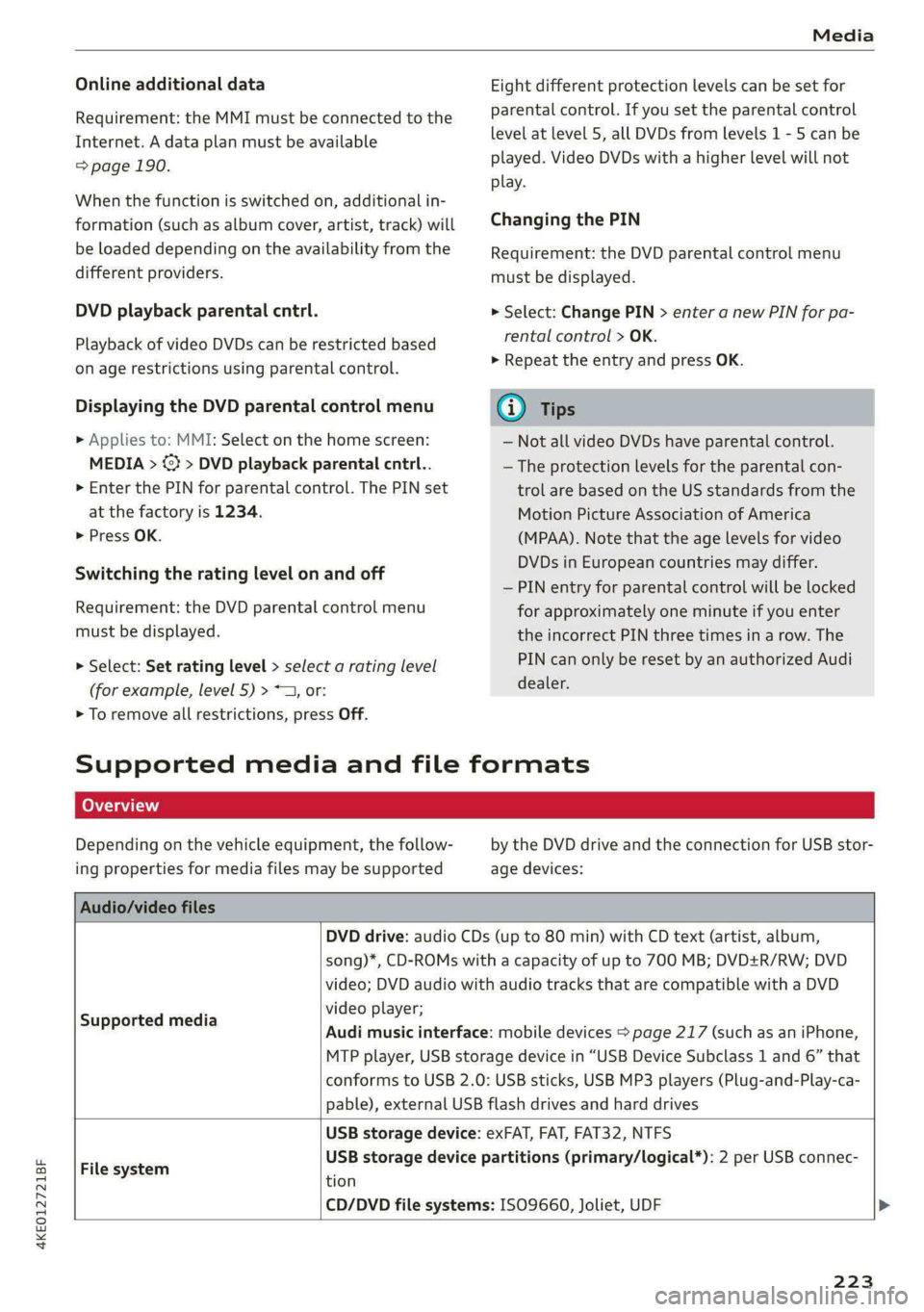
Depending on the vehicle equipment, the follow-
ing properties for media files may be supported
by the DVD drive and the connection for USB stor-
age devices:
Audio/video files
DVD drive: audio CDs (up to 80 min) with CD text (artist, album,
song)*, CD-ROMs with a capacity of up to 700 MB; DVD+R/RW; DVD
video; DVD audio with audio tracks that are compatible with a DVD
video player;
Audi music interface: mobile devices > page 217 (such as an iPhone,
MTP player, USB storage device in “USB Device Subclass 1 and 6” that
conforms to USB 2.0: USB sticks, USB MP3 players (Plug-and-Play-ca-
pable), external USB flash drives and hard drives
Supported media
USB storage device: exFAT, FAT, FAT32, NTFS
USB storage device partitions (primary/logical*): 2 per USB connec-
File system .
tion
CD/DVD file systems: ISO9660, Joliet, UDF >
223
Page 226 of 308
Media
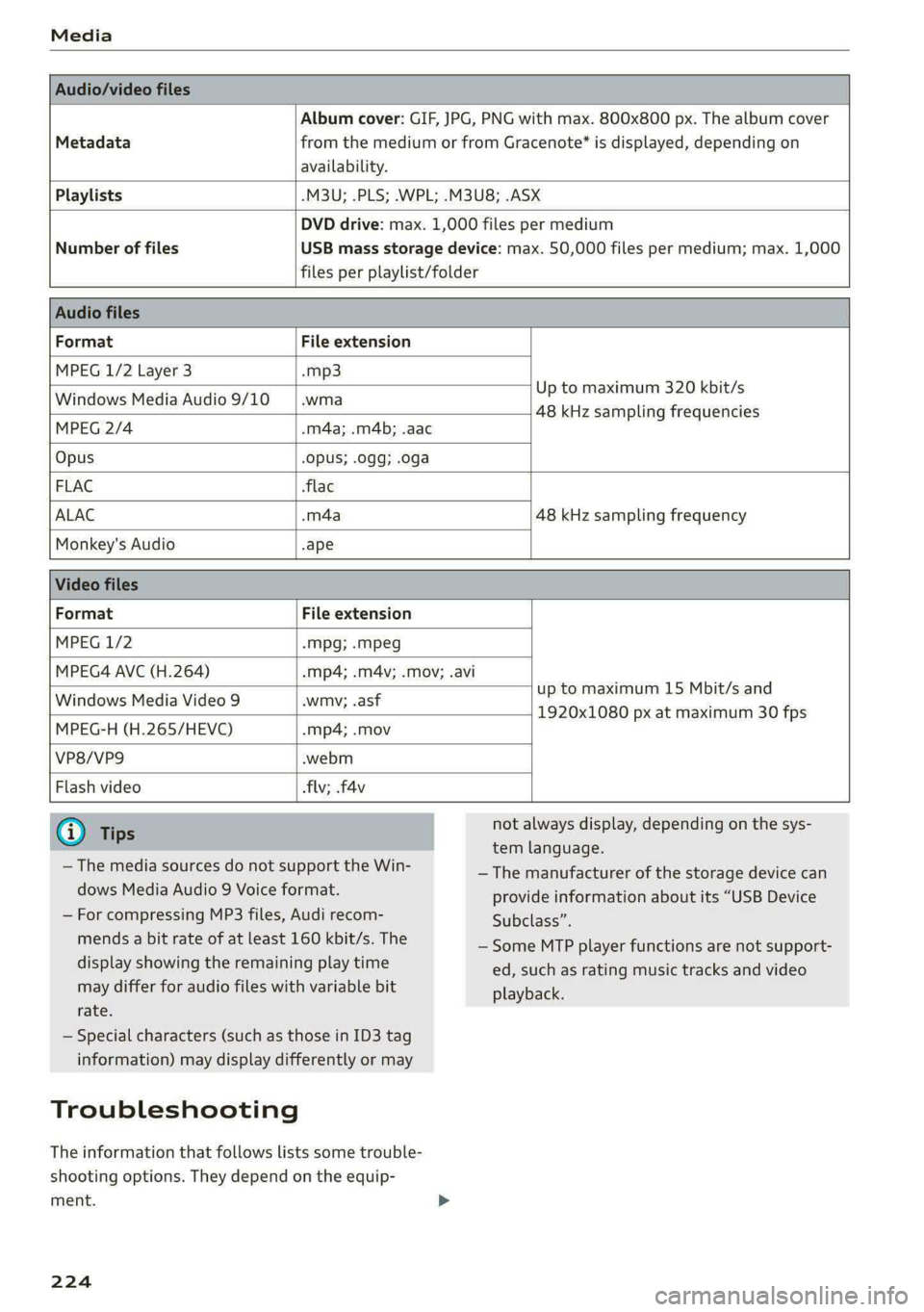
Album cover: GIF, JPG, PNG with max. 800x800 px. The album cover
Metadata from the medium or from Gracenote®* is displayed, depending on
availability.
Playlists -M3U; .PLS; .WPL; .M3U8; .ASX
Number of files
DVD drive: max. 1,000 files per medium
USB mass storage device: max. 50,000 files per medium; max. 1,000
files per playlist/folder
Format File extension
MPEG 1/2 Layer 3 -mp3
Windows Media Audio 9/10 .wma
Up to maximum 320 kbit/s
MPEG 2/4 -m4a; .m4b; .aac
48 kHz sampling frequencies
Opus Opus; .0gg; .oga
FLAC flac
ALAC .m4a 48 kHz sampling frequency
Monkey's Audio -ape
Format File extension
MPEG 1/2 -Mpg; -mpeg
MPEG4 AVC (H.264) mp4; .m4v; .mov; .avi
up to maximum 15 Mbit/s and
1920x1080 px at maximum 30 fps
Windows Media Video 9 wmv; .asf
MPEG-H (H.265/HEVC) mp4; .mov
VP8/VP9 webm
Flash video flv; .f4v
— The media sources do not support the Win-
dows Media Audio 9 Voice format.
— For compressing MP3 files, Audi recom-
mends a bit rate of at least 160 kbit/s. The
display showing the remaining play time
may differ for audio files with variable bit
rate.
— Special characters (such as those in ID3 tag
information) may display differently or may
Troubleshooting
The information that follows lists some trouble-
shooting options. They depend on the equip-
ment.
224
not always display, depending on the sys-
tem language.
— The manufacturer of the storage device can
provide information about its “USB Device
Subclass”.
— Some MTP player functions are not support-
ed, such as rating music tracks and video
playback.
Page 227 of 308
4KE012721BF
Media
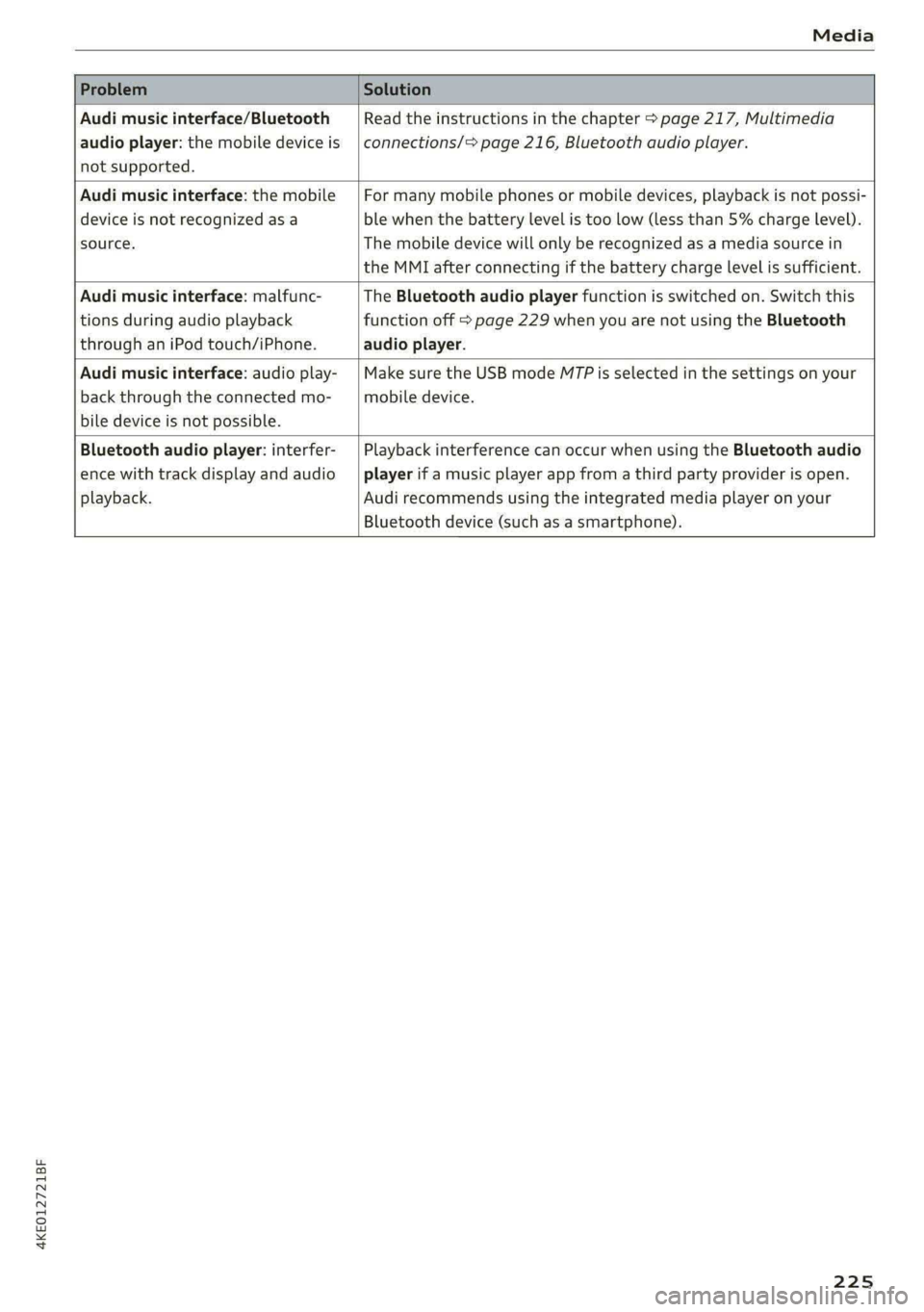
Problem Solution
Audi music interface/Bluetooth
audio player: the mobile device is
not supported.
Read the instructions in the chapter > page 217, Multimedia
connections/> page 216, Bluetooth audio player.
Audi music interface: the mobile
device is not recognized as a
source.
For many mobile phones or mobile devices, playback is not possi-
ble when the battery level is too low (less than 5% charge level).
The mobile device will only be recognized as a media source in
the MMI after connecting if the battery charge level is sufficient.
Audi music interface: malfunc-
tions during audio playback
through an iPod touch/iPhone.
The Bluetooth audio player function is switched on. Switch this
function off > page 229 when you are not using the Bluetooth
audio player.
Audi music interface: audio play-
back through the connected mo-
bile device is not possible.
Make sure the USB mode M7P is selected in the settings on your
mobile device.
Bluetooth audio player: interfer-
ence with track display and audio
playback.
Playback interference can occur when using the Bluetooth audio
player if a music player app from a third party provider is open.
Audi recommends using the integrated media player on your
Bluetooth device (such as a smartphone).
225
Page 228 of 308
Audi smartphone interface
Audi smartphone
interface
Setup
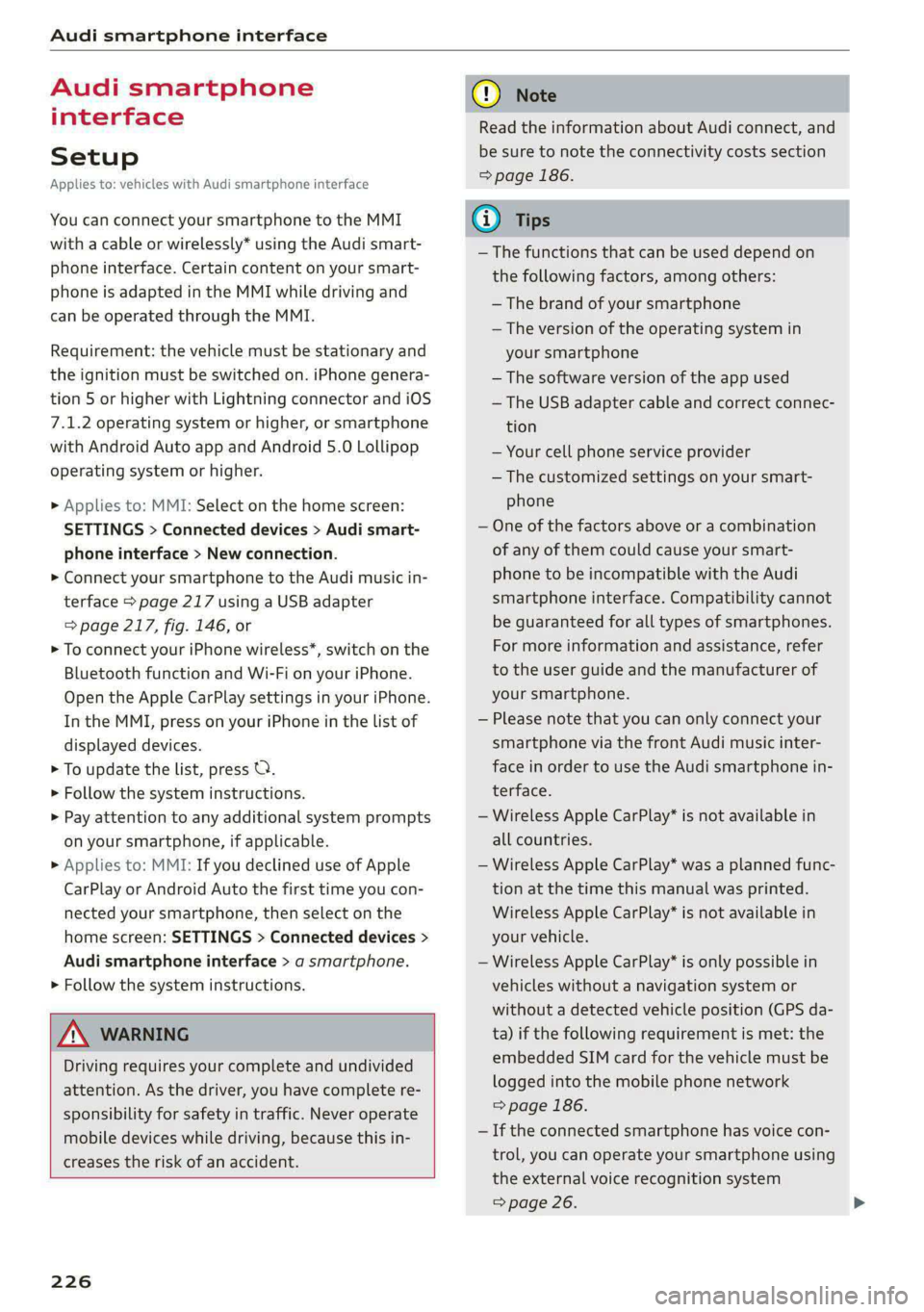
Applies to: vehicles with Audi smartphone interface
You can connect your smartphone to the MMI
with a cable or wirelessly* using the Audi smart-
phone interface. Certain content on your smart-
phone is adapted in the MMI while driving and
can be operated through the MMI.
Requirement: the vehicle must be stationary and
the ignition must be switched on. iPhone genera-
tion 5 or higher with Lightning connector and iOS
7.1.2 operating system or higher, or smartphone
with Android Auto app and Android 5.0 Lollipop
operating system or higher.
> Applies to: MMI: Select on the home screen:
SETTINGS > Connected devices > Audi smart-
phone interface > New connection.
> Connect your smartphone to the Audi music in-
terface > page 217 using a USB adapter
=> page 217, fig. 146, or
> To connect your iPhone wireless*, switch on the
Bluetooth function and Wi-Fi on your iPhone.
Open the Apple CarPlay settings in your iPhone.
In the MMI, press on your iPhone in the list of
displayed devices.
> To update the list, press O.
> Follow the system instructions.
> Pay attention to any additional system prompts
on your smartphone, if applicable.
> Applies to: MMI: If you declined use of Apple
CarPlay or Android Auto the first time you con-
nected your smartphone, then select on the
home screen: SETTINGS > Connected devices >
Audi smartphone interface > a smartphone.
> Follow the system instructions.
Z\ WARNING
Driving requires your complete and undivided
attention. As the driver, you have complete re-
sponsibility for safety in traffic. Never operate
mobile devices while driving, because this in-
creases the risk of an accident.
226
@) Note
Read the information about Audi connect, and
be sure to note the connectivity costs section
=> page 186.
@) Tips
— The functions that can be used depend on
the following factors, among others:
— The brand of your smartphone
— The version of the operating system in
your smartphone
— The software version of the app used
— The USB adapter cable and correct connec-
tion
— Your cell phone service provider
— The customized settings on your smart-
phone
— One of the factors above or a combination
of any of them could cause your smart-
phone to be incompatible with the Audi
smartphone interface. Compatibility cannot
be guaranteed for all types of smartphones.
For more information and assistance, refer
to the user guide and the manufacturer of
your smartphone.
— Please note that you can only connect your
smartphone via the front Audi music inter-
face in order to use the Audi smartphone in-
terface.
— Wireless Apple CarPlay* is not available in
all countries.
— Wireless Apple CarPlay* was a planned func-
tion at the time this manual was printed.
Wireless Apple CarPlay* is not available in
your vehicle.
— Wireless Apple CarPlay* is only possible in
vehicles without a navigation system or
without a detected vehicle position (GPS da-
ta) if the following requirement is met: the
embedded SIM card for the vehicle must be
logged into the mobile phone network
=> page 186.
— If the connected smartphone has voice con-
trol, you can operate your smartphone using
the external voice recognition system
=> page 26.
Page 229 of 308
4KE012721BF
Audi smartphone interface
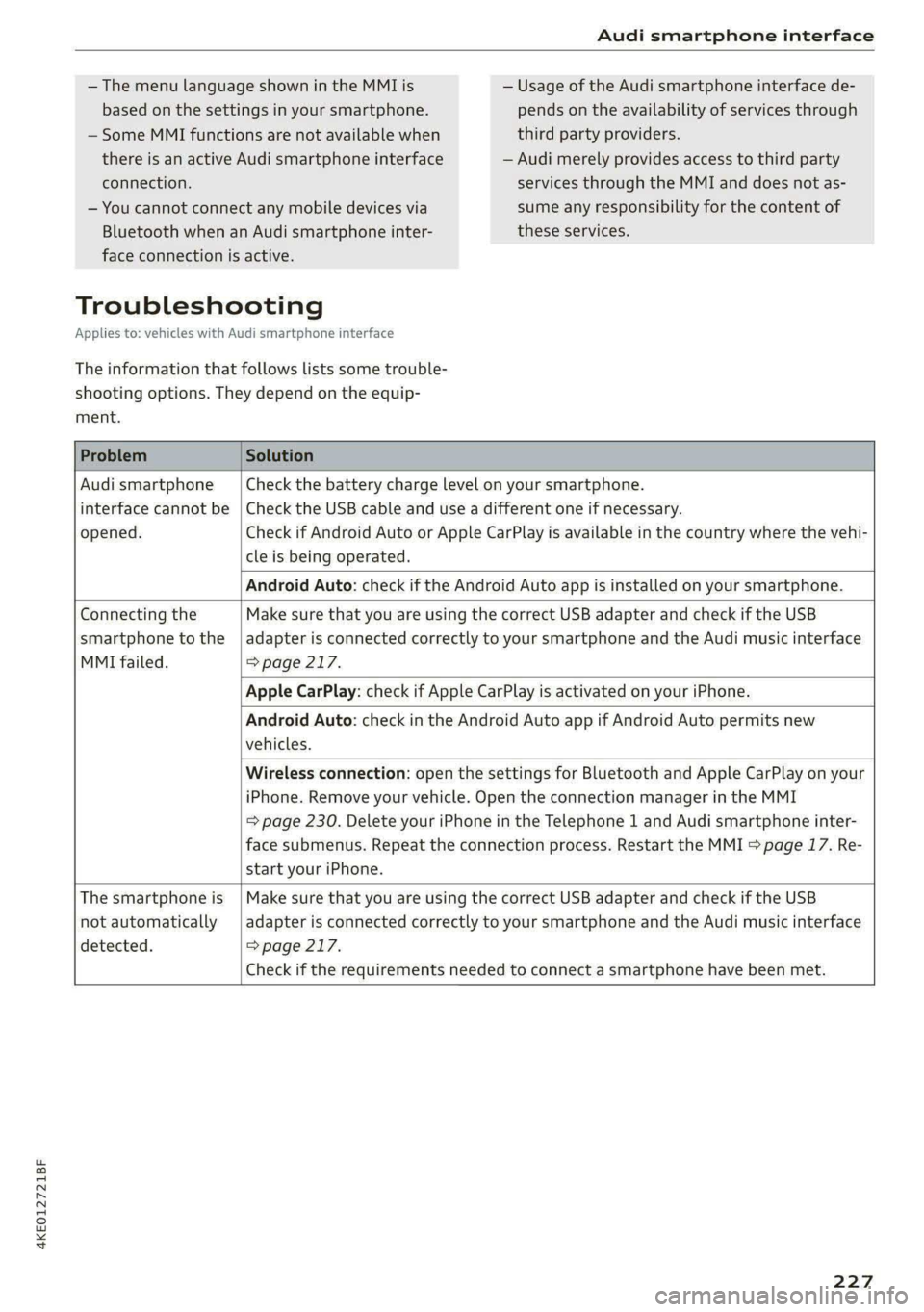
— The menu language shown in the MMI is
based on the settings in your smartphone.
— Some MMI functions are not available when
there is an active Audi smartphone interface
— Usage of the Audi smartphone interface de-
pends on the availability of services through
third party providers.
— Audi merely provides access to third party
connection.
— You cannot connect any mobile devices via
Bluetooth when an Audi smartphone inter-
services through the MMI and does not as-
sume any responsibility for the content of
these services.
face connection is active.
Troubleshooting
Applies to: vehicles with Audi smartphone interface
The information that follows lists some trouble-
shooting options. They depend on the equip-
ment.
Problem Solution
Audi smartphone
interface cannot be
opened.
Check the battery charge level on your smartphone.
Check the USB cable and use a different one if necessary.
Check if Android Auto or Apple CarPlay is available in the country where the vehi-
cle is being operated.
Android Auto: check if the Android Auto app is installed on your smartphone.
Connecting the
smartphone to the
MMI failed.
Make sure that you are using the correct USB adapter and check if the USB
adapter is connected correctly to your smartphone and the Audi music interface
=> page 217.
Apple CarPlay: check if Apple CarPlay is activated on your iPhone.
Android Auto: check in the Android Auto app if Android Auto permits new
vehicles.
Wireless connection: open the settings for Bluetooth and Apple CarPlay on your
iPhone. Remove your vehicle. Open the connection manager in the MMI
= page 230. Delete your iPhone in the Telephone 1 and Audi smartphone inter-
face submenus. Repeat the connection process. Restart the MMI > page 17. Re-
start your iPhone.
The smartphone is
not automatically
detected.
Make sure that you are using the correct USB adapter and check if the USB
adapter is connected correctly to your smartphone and the Audi music interface
=> page 217.
Check if the requirements needed to connect a smartphone have been met.
227
Page 280 of 308

Fuses and bulbs
— The following table does not list fuse loca-
tions that are not used.
— Some of the equipment listed in the follow-
ing tables applies only to certain model ver-
sions or certain optional equipment.
[RAZ-0876 Fig. 175 Front passenger footwell: fuse panel with plastic
clip
Fig. 174 Right side of the motor compartment: fuse panel
with plastic clip
No. | Equipment
Charging port door
Climate control system compressor
High-voltage battery
High-voltage charger
Thermal management
NO)
a)
BR)
Nye
Electric drive system
B B High-voltage charger
13 | Thermal management
Fig. 176 Front passenger footwell: fuse panel with plastic 14 | Windshield washer system control module atip
15 | High-voltage battery water pump
16 | Windshield wipers The fuse assignment on right-hand drive vehicles
is a mirror image of this.
17 | Thermal management
18 | Thermal management
19 | Thermal management No. | Equipment
21 | Electronic Stabilization Control (ESC) 4 Climate control system, fragrance system,
lonizer
4 |Head-up display
5 |Audi music interface, USB input
6 |DVD drive
7 |Steering column lock
8 |Upper/lower display >
278
Page 281 of 308
4KE012721BF
Fuses and bulbs
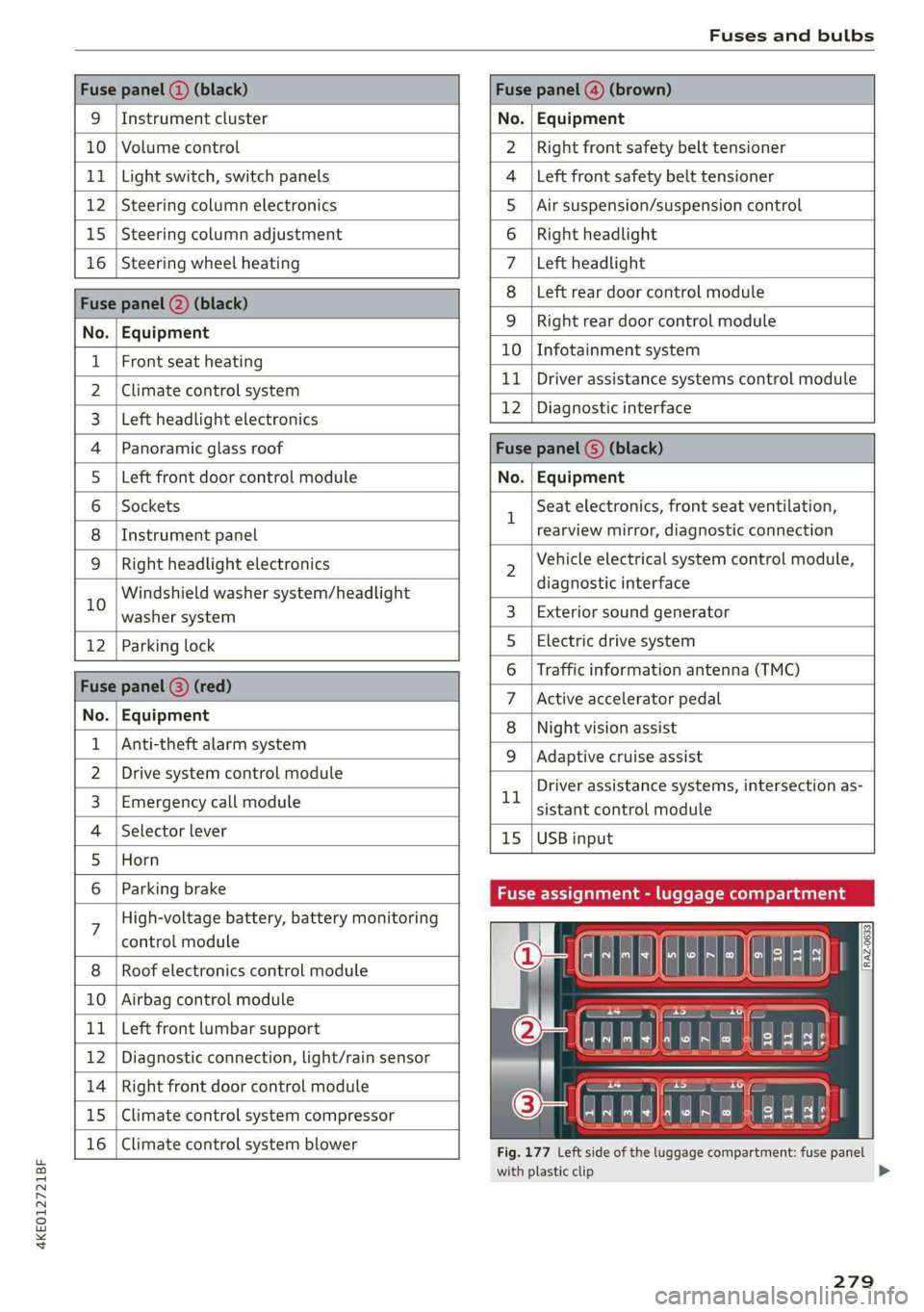
Fuse panel (2) (black) Fuse panel (4) (brown)
9 |Instrument cluster No. | Equipment
10 | Volume control Right front safety belt tensioner
11 | Light switch, switch panels Left front safety belt tensioner
12 | Steering column electronics Air suspension/suspension control
15 |Steering column adjustment Right headlight
16 | Steering wheel heating Left headlight
Fuse panel 2) (black)
Left rear door control module
No. | Equipment
WOl/@OIN|
A)
M|AILN
Right rear door control module
10 | Infotainment system
1 |Front seat heating - -
> |Cimateconerl system 11 Exe Sealealite systems control module
3 |Left headlight electronics 12 | Diagnostic interface
4 |Panoramic glass roof Fuse panel (5) (black)
5 |Left front door control module No. | Equipment
6 | Sockets 1 Seat electronics, front seat ventilation,
8 | Instrument panel rearview mirror, diagnostic connection
9 | Right headlight electronics 2 Vehicle electrical system control module,
Windshield washer system/headlight diagnostic interface
10 washer system 3 | Exterior sound generator
12 | Parking lock 5 | Electric drive system
raven 6 | Traffic information antenna (TMC)
Fuse panel (8) (re
ueeiP eed) 7 |Active accelerator pedal
No. | Equi it
o. atipmen 8 | Night vision assist
1 |Anti-theft alarm system - - -
9 |Adaptive cruise assist
2 |Drive system control module , - . -
ll Driver assistance systems, intersection as-
3_| Emergency call module sistant control module
4 | Selector lever 15 |USB input
5 |Horn
6 | Parking brake Fuse assignment - luggage compa
7 High-voltage battery, battery monitoring
control module
8 | Roof electronics control module
10 | Airbag control module
11 | Left front lumbar support
12 | Diagnostic connection, light/rain sensor
14 | Right front door control module
15 | Climate control system compressor
16 | Climate control system blower
5 iF
| | eo ed oO
' rR mae Y= ae
aR EE
Fig. 177 Left side of the luggage compartment: fuse panel
with plastic clip
279
>
Page 295 of 308
4KE012721BF
Index
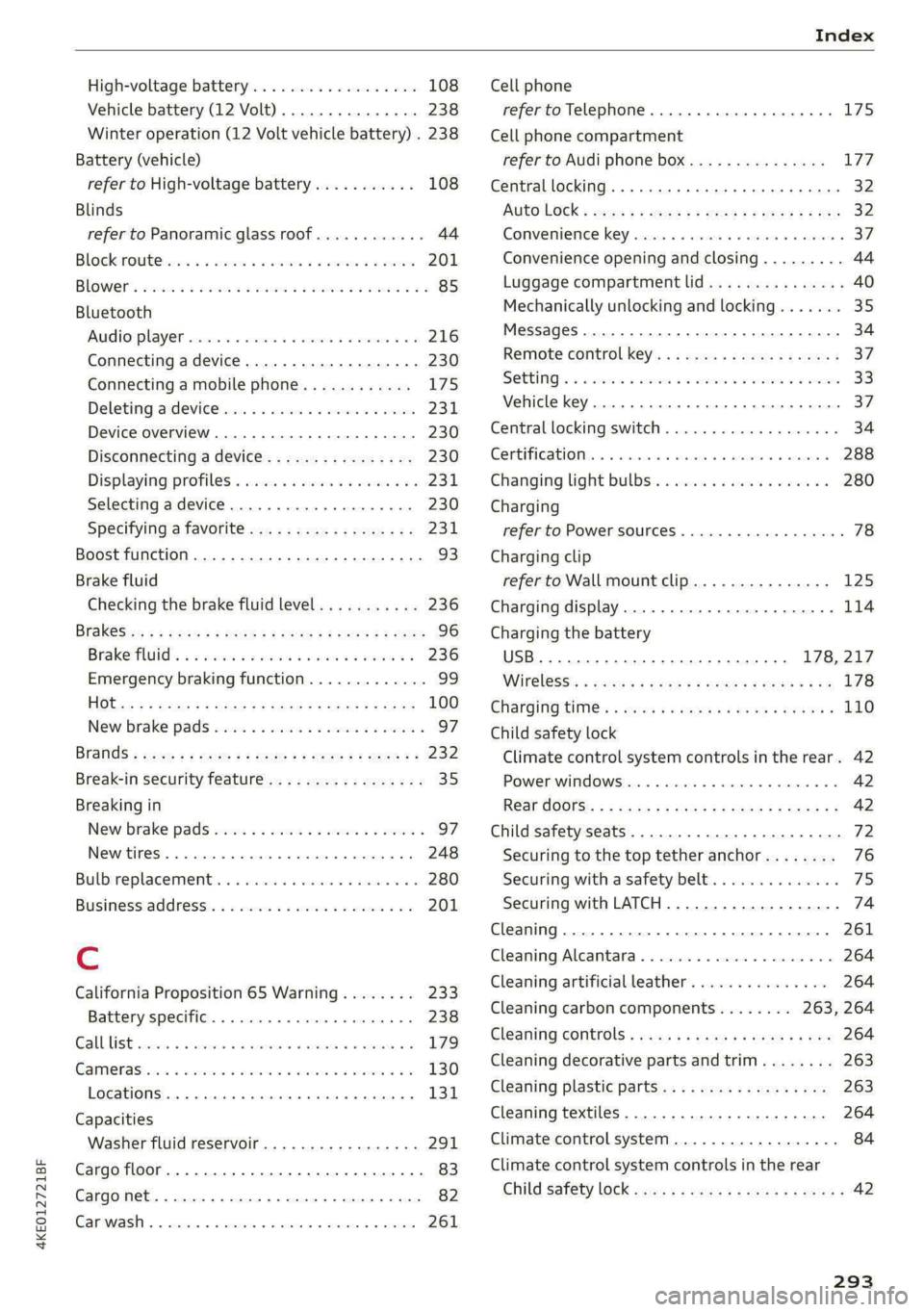
High-voltage battery.................. 108
Vehicle battery (12 Volt)............... 238
Winter operation (12 Volt vehicle battery) . 238
Battery (vehicle)
refer to High-voltage battery........... 108
Blinds
refer to Panoramic glass roof............ 44
Block TOU C cms & oscars ao aes oe eeeee & wae 201
BLOWERS woven: ae onsen 2 2 comes 2 2 cme ooo avo 85
Bluetooth
Audio playeh sre x 6 ceca ve wacene ao erties ow 216
Connecting adevice...............0-0- 230
Connecting a mobile phone............ 175
Deleting a device
Device overview..............02.0000-
Disconnecting adevice................ 230
Displaying/profiles « sscvie + » ensue 6 « seowee sv 6 231
Selecting adevice.............0..000. 230
Specifying a favorite.................. 23:1
Boost function...................000 eee 93
Brake fluid
Checking the brake fluid level........... 236
BrakeSiss « ¢ sas s & ewes 5 hee oe eee se eS 96
Brake tluidis ss sass 2 maim o wana ys won ee 236
Emergency braking function............. 99
HGCisu ¢ s sayou & @ Sayan % § MaWE ¢ & BaeoR 5 SeRDR 100
New brake pads..........-...--0000005 97
Brands = wee s 2 owen x ¢ eeu < eee 2 tom FE 232
Break-in security feature...............-. 35
Breaking in
New brake pads..............--0000005 97
ING WEEITOSE. « sxctons co sucesin wo semen oe 6 azectinn on a 248
Bulbireplacementss. «x issn s « sesrve + & arent w vo 280
Business'address’s « « sss os wows oo mewn ow 201
{.
California Proposition 65 Warning........ 233
Battery specific........... cece 238
GALLUISE cesses » sense @ © amscans a o omens a 6 emNEAU & 179
GaMOKaSiiwse 2 wim + mem o 6 emu ee om a Yo 130
Locations ..... 2... ee eee eee e ee eee 131
Capacities
Washer fluid reservoir................. 291
Cargo floor. ....... eee eee eee eee 83
Cargonet....... 2... eee eee ee 82
Garwash «5 sce so aspen «ome oo iene: © stents 261
Cell phone
refer to Telephone...........-.0eee eee 175
Cell phone compartment
refer to Audi phone box............... 177
Central locking....... eee eee cree eens 32
AULOILOGK « coos 2 5 canes 5 5 ten so ees Go eG 32
Convenience key sie + « soccais 2 6 seve + 6 sone « 37
Convenience opening and closing......... 44
Luggage compartment lid............... 40
Mechanically unlocking and locking....... 35
MessageS ......--. 0c cece eects 34
Remote control key.........0eee eee eee 37
SeGUING): © wwe: s 2 wesems x arene @ een aH ewe 33
Vehicle key... 0... cece eee ee eee ee 37
Central locking switch................5-5 34
Gentifieatiomis a < cvessus eo mano we wannew © a caste 288
Changing light bulbs................0.. 280
Charging
refer to Power sourceS.........--.000005 78
Charging clip
refer to Wall mount clip............... 125
Charging display...............2--000-- 114
Charging the battery
USB... eee 178, 217
Wirelessi. « wos « < auc a 2 sogee 4 2 mee 2 2 oe 178
Charging times « eves sz eee ee eews e ewewse 110
Child safety lock
Climate control system controls in the rear. 42
Power windows.............2.020 eee 42
Rear dGGFSs: « s saan x « seme as eee oo ew eo 42
Child safety seats.............0..000 eee 72
Securing to the top tether anchor........ 76
Securing with a safety belt.............. 75
Securing with LATCH..............--00. 74
Cleaning........... eee eee 261
Cleaning Alcantara................0000. 264
Cleaning artificial leather............... 264
Cleaning carbon components........ 263, 264
Cleaning controls « ses ss eens se cee s 6 ves 264
Cleaning decorative parts andtrim........ 263
Cleaning plastic parts.................. 263
Cleaning textiles...................... 264
Climate control system ...............0-- 84
Climate control system controls in the rear
CHINA SARELY LOCK wer ss saan ¢ seen Fo eee 2 42
293
Page 300 of 308
Index
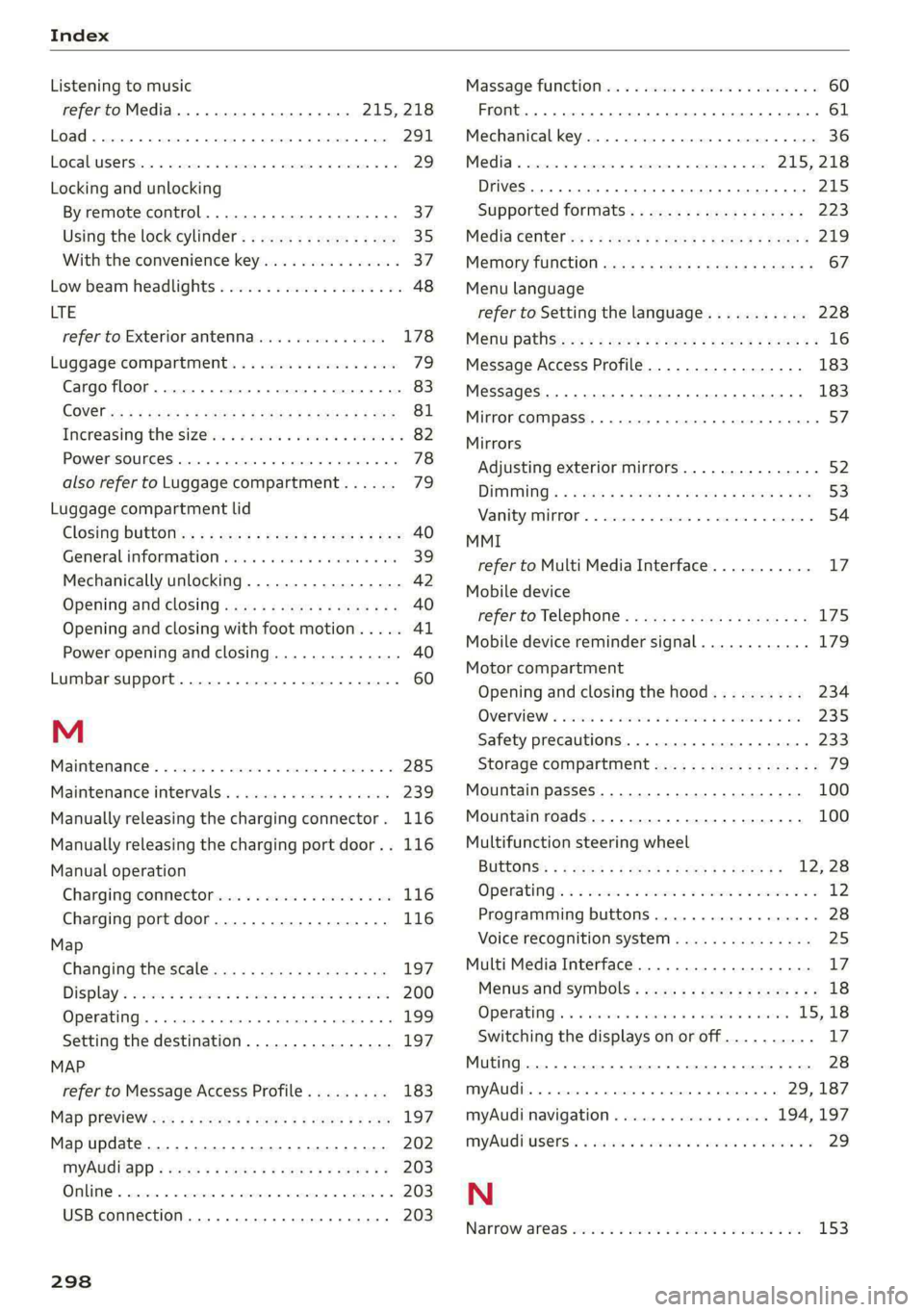
Listening to music
refer to Media.............0000ee 215, 218
Load... 22... eee 291
EOGAUUSERS Ia: © cnences o + seem « 6 wpnnwe © a seem ww 8 29
Locking and unlocking
By remote control................00005 37
Using the lock cylinder................. 35
With the convenience key............... 37
Low beam headlights..................0, 48
LTE
refer to Exterior antenna.............. 178
Luggage compartment: si cscs 6 6 sana 6 8 es 79
Cargo floor........ 2... eee eee eee eee 83
COVER iss < = meus & § eeteS & EG FE RG 2 ie 81
Increasing the size... .. 22... eee eee eee 82
Power SOUrCeS ... 1... eee eee 78
also refer to Luggage compartment...... 73,
Luggage compartment lid
Closing bUttON ss ; « ssa¢s sacks pees eee 40
General information ...........0..00008 39
Mechanically unlocking...............-. 42
Opening and closing.................-. 40
Opening and closing with foot motion..... 41
Power opening and closing.............. 40
Lumbar support....................0005 60
M
Maintenance’. « since = + coin 2s wow © ners © 6 285
Maintenance intervals... .siec se wae a 6 ecauee 239
Manually releasing the charging connector. 116
Manually releasing the charging port door.. 116
Manual operation
Charging connector.............-.++-- 116
Charging port door..............0000. 116
Map
Changing the scale................... 197
Displays ccssc s 2 nese
Operating ......... 0. cee eee eee eee 199
Setting the destination................ 197
MAP
refer to Message Access Profile......... 183
Map PrevieW as = i xews + y eee + v OFS Fv oe 197
Map update................0 20-00 202
MYAUI APP + meus se cea se meee se mee ve 203
OMNME & sncrane « « oweasm «woes @ wespenue o muetem 203
USB
connection........... 00 eee e eae 203
298
Massage function...............-0020e ee 60
Front... 2. eee eee 61
Mechanical key............00 00000 e ee eee 36
Media cmesces mo emia w 5 saoreas 6 5 ewes a oe 215, 218
Drives... 2... cece eee eee eee eee eee 215
Supported formats.................-- 223
Média cette an < » muon « x amex x wees = ree 9 219
Memory function. ........... eee eee eee ee 67
Menu language
refer to Setting the language........... 228
Meritt pathic: « » seen 2 o meme y oes se ReeR ee 16
Message Access Profile................- 183
MessageS ..... 2... eee eee ee 183
Mirror compass.......- 00-00-0020 eee eeee $7:
Mirrors
Adjusting exterior mirrors.............-. 52
DIMMING: = exes s + meres o = worm a x wees se ve 53
Vani tyZAnOk'. « sccrwos « a soncess © x snanenn @ 0 samene 3 54
MMI
refer to Multi Media Interface........... 17
Mobile device
referto Telephone...........-eeeeeeee 175
Mobile device reminder signal............ 179
Motor compartment
Opening and closing the hood.......... 234
OVERVIEWS. secs: a 2 omeees oe amen @ 8 ewes @ 2 235
Safety precautions..............000005 233
Storage compartment................2. 79
Mountain passes.................0.00. 100
Mountain roads................00000 0s 100
Multifunction steering wheel
BUEGONSS: ¢ x seas x 5 eas 3 eae ee He ee 12; 28
Operating’ « = wees 2 wom so weseme so ee ww 12
Programming buttons...............05- 28
Voice recognition system............... 25.
Multi Media Interface................... 17
Menus and symbols..............2+-04- 18
Operating’. «owes «+ sence» 6 avarcie s ¥ sere 15,18
Switching the displays on or off.......... 17
Muting.......... 0.0.00 cee eee eee ee eee 28
myAudi..... eee eee eee 29,187
myAudi navigation................. 194, 197
MYAUGEUSENSs. « saccis o eee we ewe a wee es 29
N
Narrow ar@aS wesc oo een oo een vem oo oe 153