warning light AUDI E-TRON 2021 Repair Manual
[x] Cancel search | Manufacturer: AUDI, Model Year: 2021, Model line: E-TRON, Model: AUDI E-TRON 2021Pages: 308, PDF Size: 83.91 MB
Page 147 of 308
4KE012721BF
Driver assistance
— The system works with the various sensors and
cameras in the vehicle. Vehicles can only be de-
tected once they are within the area and range
covered by the sensors > page 130, fig. 90.
— When driving around tight curves, a vehicle
driving ahead that was previously detected may
no longer be detected, and the adaptive cruise
assist may accelerate unexpectedly.
— The system does not react to a stationary vehi-
cle in the same lane if it expects that you can
easily drive around the stationary vehicle by
turning the steering wheel.
— The system cannot react to stationary objects,
such as vehicles at the end of a traffic jam, es-
pecially when traveling at high speeds.
— The system has a limited ability to detect
vehicles that are a short distance ahead, off to
the side of your vehicle, or moving into your
lane.
— Objects that are difficult to detect, such as mo-
torcycles, vehicles with high ground clearance,
or vehicles with an overhanging load, may be
detected late or not detected at all.
— The system does not respond to people, ani-
mals, or objects that are crossing or approach-
ing from the opposite direction.
ZA WARNING
Observe the safety precautions and note the
limits of the assist systems, sensors, and
cameras > page 129.
Applies to: vehicles with adaptive cruise assist
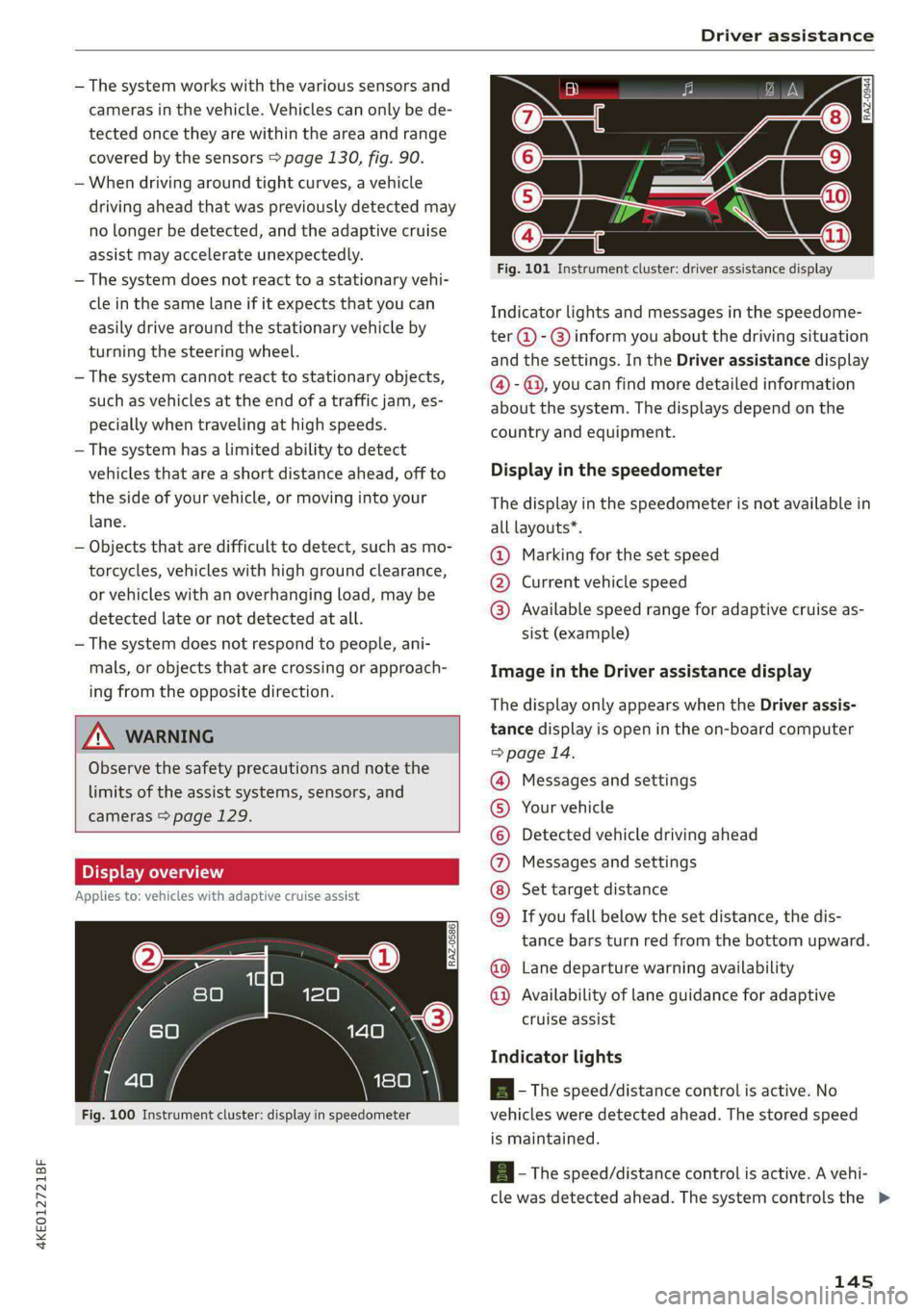
Fig. 100 Instrument cluster: display in speedometer
Fig. 101 Instrument cluster: driver assistance display
Indicator lights and messages in the speedome-
ter @ - @ inform you about the driving situation
and the settings. In the Driver assistance display
@- @, you can find more detailed information
about the system. The displays depend on the
country and equipment.
Display in the speedometer
The display in the speedometer is not available in
all layouts*.
@ Marking for the set speed
@® Current vehicle speed
@® Available speed range for adaptive cruise as-
sist (example)
Image in the Driver assistance display
The display only appears when the Driver assis-
tance display is open in the on-board computer
> page 14.
Messages and settings
Your vehicle
Detected vehicle driving ahead
Messages and settings
Set target distance
If you fall below the set distance, the dis-
tance bars turn red from the bottom upward.
Lane departure warning availability
O©©
©©0OO®
Availability of lane guidance for adaptive
cruise assist
Indicator lights
A - The speed/distance control is active. No
vehicles were detected ahead. The stored speed
is maintained.
A - The speed/distance control is active. A vehi-
cle was detected ahead. The system controls the >
145
Page 148 of 308
Driver assistance
speed and distance from the vehicle driving
ahead, and accelerates and brakes automatically.
Al - The speed/distance control is active but the
vehicle is not ready to drive. A vehicle was de-
tected ahead. Your vehicle is stationary and will
not start driving automatically.
BS - The speed/distance control is active but the
vehicle is not ready to drive. No vehicles were de-
tected ahead. Your vehicle is stationary and will
not start driving automatically.
a - The automatic braking is not enough to
maintain a sufficient distance from a vehicle driv-
ing ahead. You must intervene > page 152, Driv-
er intervention request.
> 4] - Lane guidance is active.
> 4] - Lane guidance is switched on but not active.
> 4| - The limits of the system have been reached.
Take over steering.
A if ey) - The indicator light turns on if the
steering intervention request is providing a warn-
ing. Always keep your hands on the steering
wheel so you can be ready to steer at any time
=> page 148.
A WARNING
Observe the safety precautions and note the
limits of the assist systems, sensors, and
cameras > page 129.
Using adaptive cruise assist
Applies to: vehicles with adaptive cruise assist
RAZ-0096
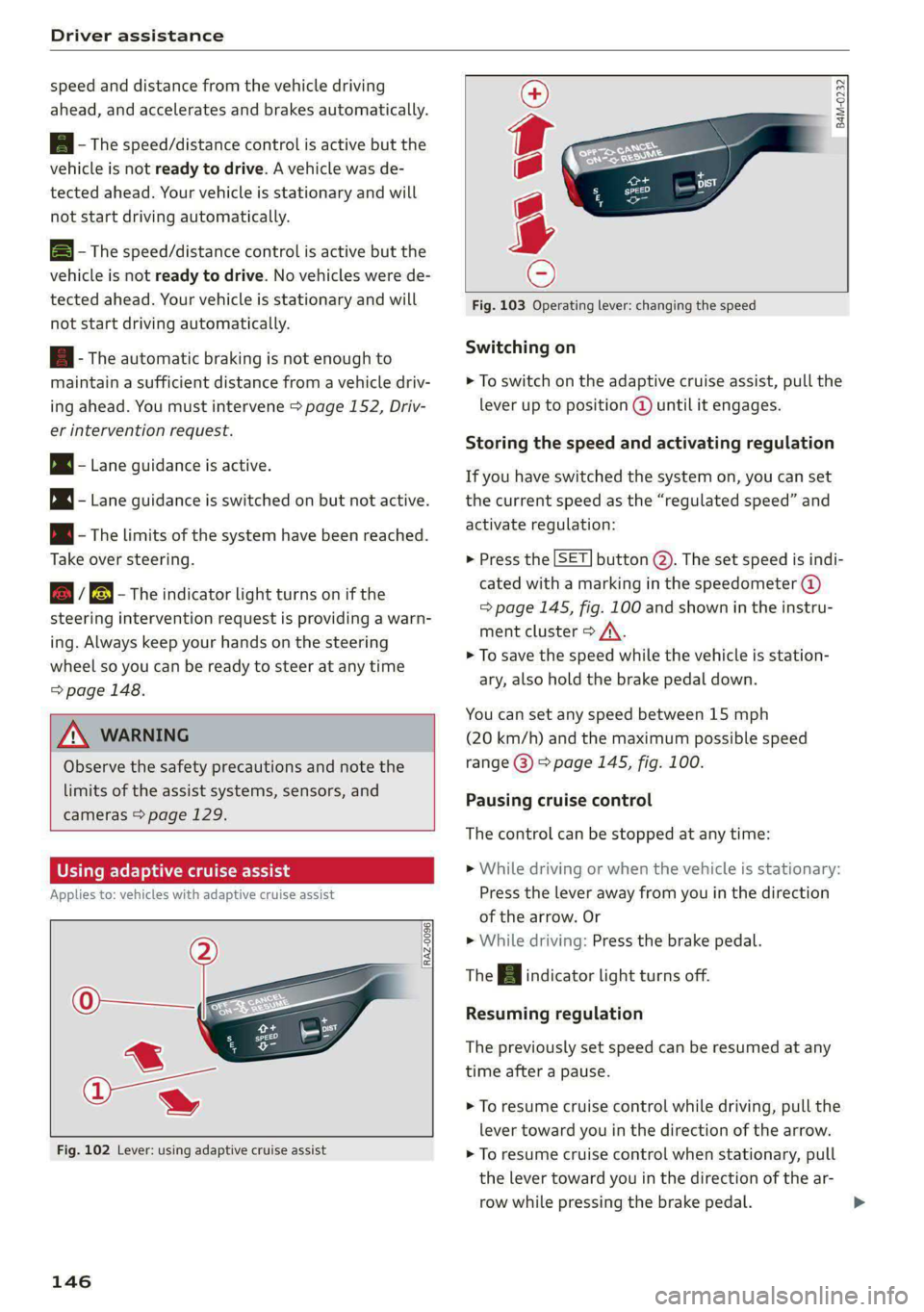
Fig. 102 Lever: using adaptive cruise assist
146
B4M-0232
Fig. 103 Operating lever: changing the speed
Switching on
> To switch on the adaptive cruise assist, pull the
lever up to position @ until it engages.
Storing the speed and activating regulation
If you have switched the system on, you can set
the current speed as the “regulated speed” and
activate regulation:
> Press the [SET] button (2). The set speed is indi-
cated with a marking in the speedometer @)
=> page 145, fig. 100 and shown in the instru-
ment cluster > /\.
> To save the speed while the vehicle is station-
ary, also hold the brake pedal down.
You can set any speed between 15 mph
(20 km/h) and the maximum possible speed
range @) > page 145, fig. 100.
Pausing cruise control
The control can be stopped at any time:
>» While driving or when the vehicle is stationary:
Press the lever away from you in the direction
of the arrow. Or
» While driving: Press the brake pedal.
The a indicator light turns off.
Resuming regulation
The previously set speed can be resumed at any
time after a pause.
> To resume cruise control while driving, pull the
lever
toward you in the direction of the arrow.
> To resume cruise control when stationary, pull
the lever toward you in the direction of the ar-
row while pressing the brake pedal.
Page 149 of 308
4KE012721BF
Driver assistance
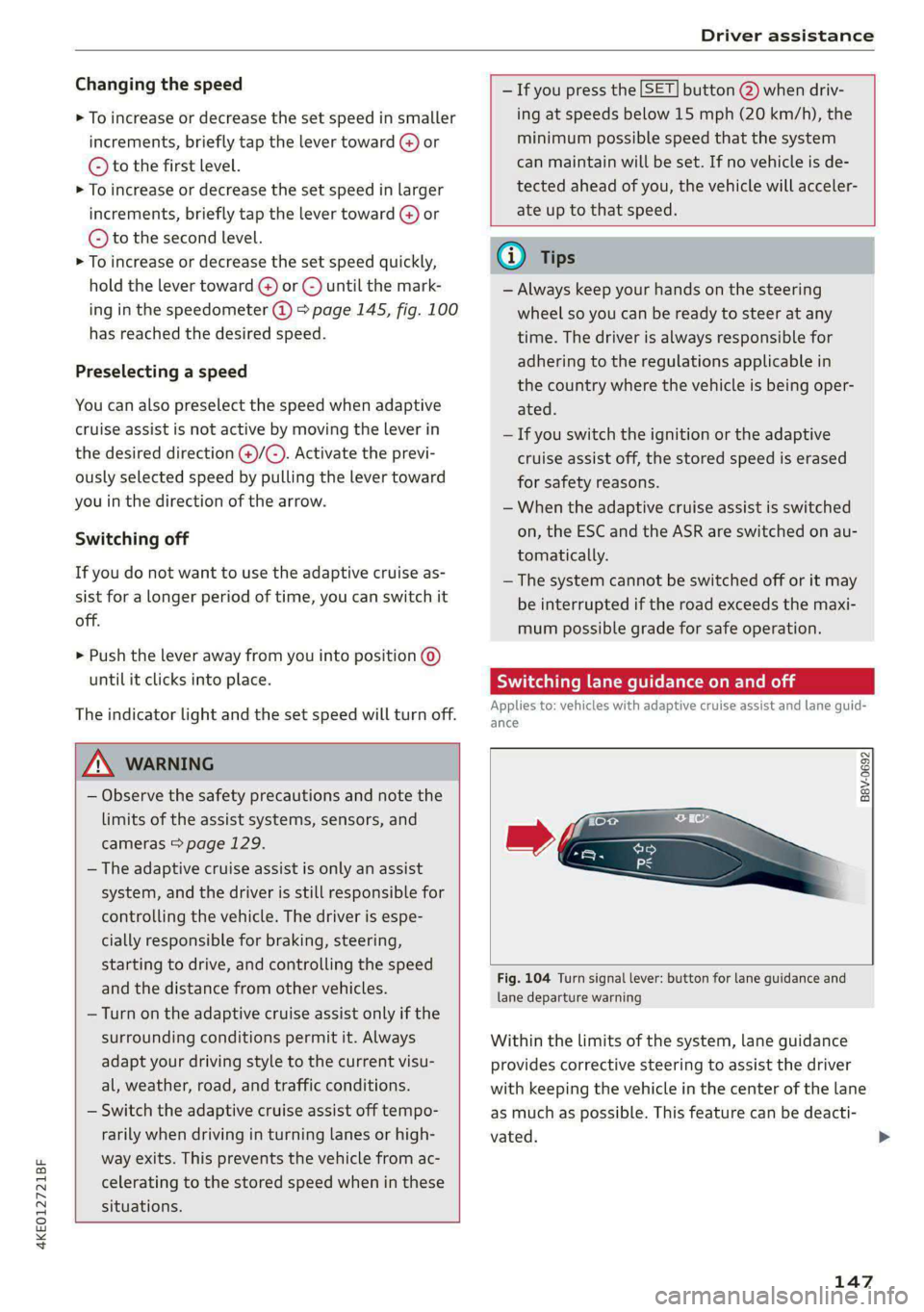
Changing the speed
> To increase or decrease the set speed in smaller
increments, briefly tap the lever toward (@) or
© to the first level.
> To increase or decrease the set speed in larger
increments, briefly tap the lever toward @) or
© to the second level.
> To increase or decrease the set speed quickly,
hold the lever toward @) or ©) until the mark-
ing in the speedometer @) > page 145, fig. 100
has reached the desired speed.
Preselecting a speed
You can also preselect the speed when adaptive
cruise assist is not active by moving the lever in
the desired direction @)/@). Activate the previ-
ously selected speed by pulling the lever toward
you in the direction of the arrow.
Switching off
If you do not want to use the adaptive cruise as-
sist for a longer period of time, you can switch it
off.
> Push the lever away from you into position ©
until it clicks into place.
The indicator light and the set speed will turn off.
Z\ WARNING
— Observe the safety precautions and note the
limits of the assist systems, sensors, and
cameras > page 129.
— The adaptive cruise assist is only an assist
system, and the driver is still responsible for
controlling the vehicle. The driver is espe-
cially responsible for braking, steering,
starting to drive, and controlling the speed
and the distance from other vehicles.
— Turn on the adaptive cruise assist only if the
surrounding conditions permit it. Always
adapt your driving style to the current visu-
al, weather, road, and traffic conditions.
— Switch the adaptive cruise assist off tempo-
rarily when driving in turning lanes or high-
way exits. This prevents the vehicle from ac-
celerating to the stored speed when in these
situations.
— If you press the [SET] button @) when driv-
ing at speeds below 15 mph (20 km/h), the
minimum possible speed that the system
can maintain will be set. If no vehicle is de-
tected ahead of you, the vehicle will acceler-
ate up to that speed.
@ Tips
— Always keep your hands on the steering
wheel so you can be ready to steer at any
time. The driver is always responsible for
adhering to the regulations applicable in
the country where the vehicle is being oper-
ated.
— If you switch the ignition or the adaptive
cruise assist off, the stored speed is erased
for safety reasons.
— When the adaptive cruise assist is switched
on, the ESC and the ASR are switched on au-
tomatically.
— The system cannot be switched off or it may
be interrupted if the road exceeds the maxi-
mum possible grade for safe operation.
Switching lane guidance on and off
Applies to: vehicles with adaptive cruise assist and lane guid-
ance
BaVv-0692
Fig. 104 Turn signal lever: button for lane guidance and
lane departure warning
Within the limits of the system, lane guidance
provides corrective steering to assist the driver
with keeping the vehicle in the center of the lane
as much as possible. This feature can be deacti-
vated. >
147
Page 150 of 308
Driver assistance
Ina traffic jam, lane guidance also helps with
leaving a space for emergency vehicles )) by
steering your vehicle as close to the edge of your
lane as possible.
Switching lane guidance on and off
Requirement: lane guidance must be preselected
in the MMI > page 152.
> To activate or deactivate the availability of the
lane guidance, press the button on the turn sig-
nal lever > fig. 104.
The system will assist the driver by providing cor-
rective steering only when adaptive cruise assist
is actively regulating and availability is switched
on.
Overview of displays and lane guidance
limitations
The availability of lane guidance is shown with in-
dicator lights and with arrows @i) > page 145,
fig. 101 in the Driver assistance display.
> 4 - Lane guidance is active.
> 4 - This indicator light turns on if the limits of
the system have been reached (for example, the
system’s steering force is not sufficient to handle
tight curves). Take over steering.
ri turns white, lane guidance is switched on
but is not active. This may occur due to the fol-
lowing system limits or situations:
— The necessary lane marker lines have not been
detected (for example, in a construction zone
or because the lines are obstructed by snow,
dirt, water, or lighting)
— The lane is too narrow or too wide
— The curve is too narrow
— Visibility is obstructed by a rise or dip.
— The driver's hands are not on the steering
wheel
— The turn signal was activated.
Steering intervention request
If no steering activity is detected or the limits of
the system are reached, the driver steering inter-
vention request will alert the driver using audio
D_ In certain countries.
148
and visual signals, such as & or fy. Take over
the steering and keep your hands on the steering
wheel so that you will be ready to steer at any
time. The system will become inactive after a
short time and will only be active again later.
If the driver does not take over steering, adaptive
cruise assist will be canceled. If the vehicle is
equipped with emergency assist and it is ready to
function, it will be activated if possible
=> page 164.
ZA WARNING
Observe the safety precautions and note the
limits of the assist systems, sensors, and
cameras > page 129.
@ Tips
— Always keep your hands on the steering
wheel so you can be ready to steer at any
time. The driver is always responsible for
adhering to the regulations applicable in
the country where the vehicle is being oper-
ated.
— Audi recommends only switching on lane
guidance on well-constructed roads.
—The > fig. 104 button switches lane guid-
ance availability and the lane departure
warning on or off simultaneously, if lane
guidance is preset in the adaptive cruise as-
sist settings.
Predictive control
Applies to: vehicles with adaptive cruise assist and efficiency
assist
53] | Se | x ac
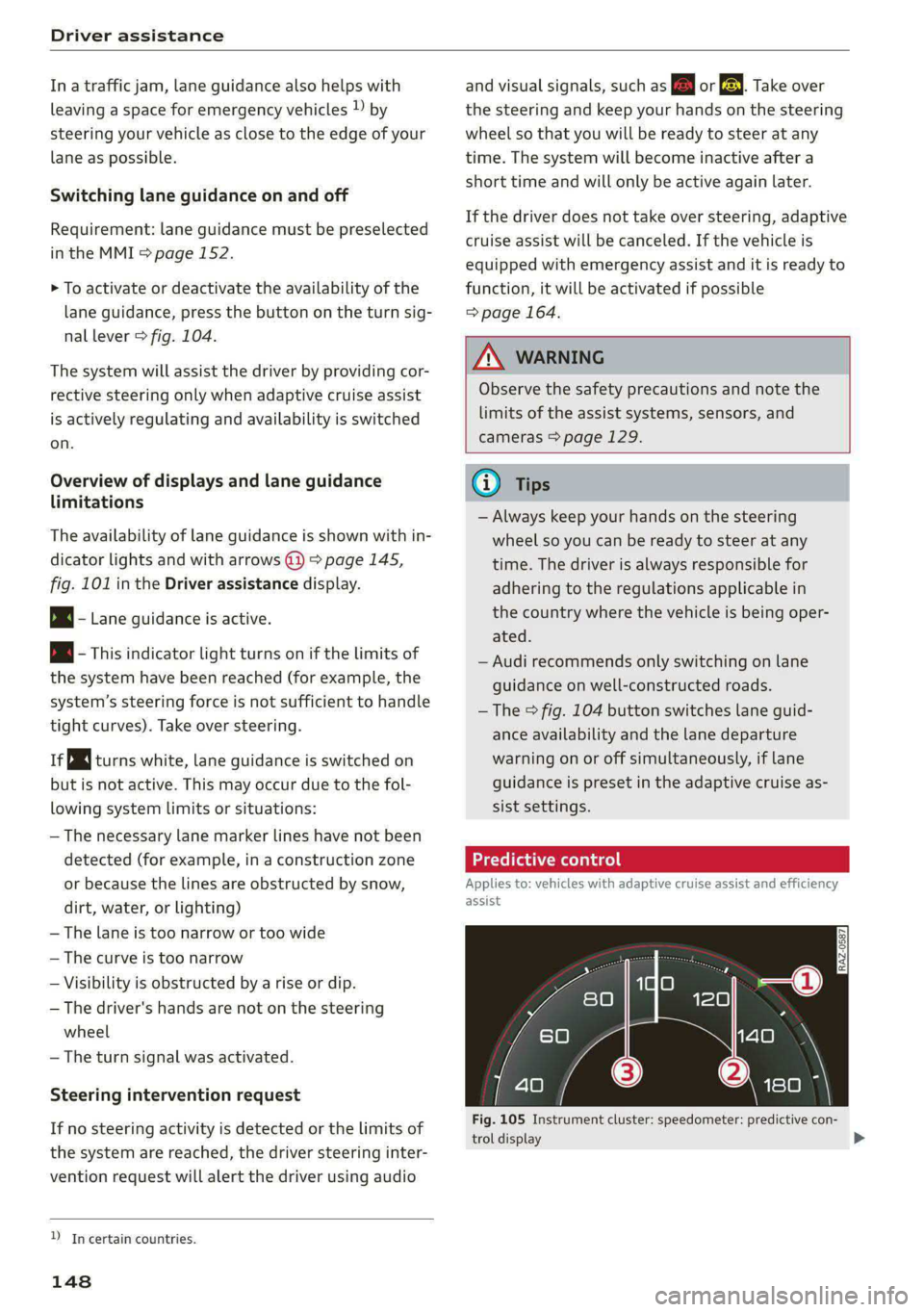
Fig. 105 Instrument cluster: speedometer: predictive con-
trol display
Page 151 of 308
4KE012721BF
Driver assistance
With predictive control, efficiency assist adapts
the set speed in adaptive cruise control (@) based
on detected speed limits and the upcoming
route. Once the system no longer detects any in-
cidents, adaptive cruise control will accelerate
back up to the last speed that the driver set. Af-
ter switching on the ignition, the availability of
predictive control is indicated by a message when
the adaptive cruise assist is first activated.
Incident symbols indicate the situation to which
predictive control is reacting > page 143, Situa-
tion symbols.
Requirements
— Predictive control is switched on in the MMI
=> page 152.
— The adaptive cruise assist must be actively reg-
ulating > page 146.
— The system can only react to speed limits that
are 15 mph (20 km/h) or higher.
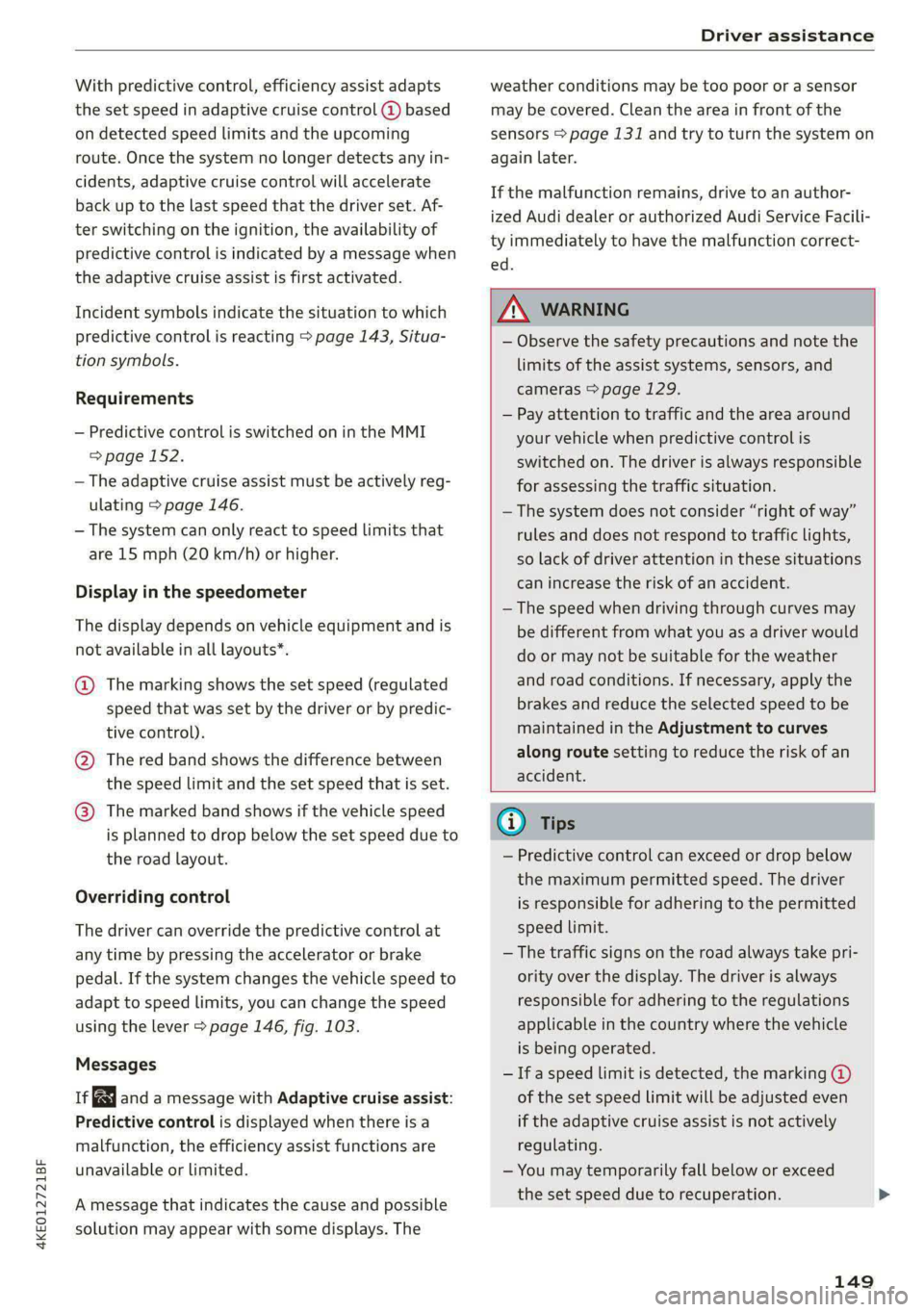
Display in the speedometer
The display depends on vehicle equipment and is
not available in all layouts”.
@ The marking shows the set speed (regulated
speed that was set by the driver or by predic-
tive control).
@ The red band shows the difference between
the speed limit and the set speed that is set.
@ The marked band shows if the vehicle speed
is planned to drop below the set speed due to
the road layout.
Overriding control
The driver can override the predictive control at
any time by pressing the accelerator or brake
pedal. If the system changes the vehicle speed to
adapt to speed limits, you can change the speed
using the lever > page 146, fig. 103.
Messages
ia and a message with Adaptive cruise assist:
Predictive control is displayed when there is a
malfunction, the efficiency assist functions are
unavailable or limited.
A message that indicates the cause and possible
solution may appear with some displays. The
weather conditions may be too poor or a sensor
may be covered. Clean the area in front of the
sensors > page 131 and try to turn the system on
again later.
If the malfunction remains, drive to an author-
ized Audi dealer or authorized Audi Service Facili-
ty immediately to have the malfunction correct-
ed.
ZA\ WARNING
— Observe the safety precautions and note the
limits of the assist systems, sensors, and
cameras > page 129.
— Pay attention to traffic and the area around
your vehicle when predictive control is
switched on. The driver is always responsible
for assessing the traffic situation.
—The system does not consider “right of way”
rules and does not respond to traffic lights,
so lack of driver attention in these situations
can increase the risk of an accident.
— The speed when driving through curves may
be different from what you as a driver would
do or may not be suitable for the weather
and road conditions. If necessary, apply the
brakes and reduce the selected speed to be
maintained in the Adjustment to curves
along route setting to reduce the risk of an
accident.
(i) Tips
— Predictive control can exceed or drop below
the maximum permitted speed. The driver
is responsible for adhering to the permitted
speed limit.
— The traffic signs on the road always take pri-
ority over the display. The driver is always
responsible for adhering to the regulations
applicable in the country where the vehicle
is being operated.
— Ifa speed limit is detected, the marking @
of the set speed limit will be adjusted even
if the adaptive cruise assist is not actively
regulating.
— You may temporarily fall below or exceed
the set speed due to recuperation.
149
Page 154 of 308
Driver assistance
Starting to drive with adaptive cruise assist)
As long as the message ready to drive and a is
displayed, your vehicle will begin driving when
the vehicle ahead starts to move > /\.
If you are stopped for several seconds, your vehi-
cle will no longer drive autonomously for safety
reasons, and the message will turn off.
> To extend ready to drive for several seconds or
reactivate, pull the lever briefly towards you in
the direction of the arrow > page 151, fig. 107.
> To resume manual control of the vehicle, tap
the accelerator pedal.
Safe start monitor
The vehicle can still start to drive even if certain
obstacles are detected when starting to drive
=> /\. If the surrounding area detection detects
an obstacle, you will be alerted to the danger by
the A indicator light.
If you are in the Driver assistance display, the
display @ © fig. 108 and the message Warning!
will also appear. An audio signal will also sound.
Your vehicle will drive more slowly when starting.
This may also occur in some situations when
there is no apparent obstacle.
>» Press the brake pedal to slow your vehicle
down.
ZA WARNING
— Observe the safety precautions and note the
limits of the assist systems, sensors, and
cameras > page 129.
— If the message ready to drive) appears,
your vehicle will start driving even if there is
an obstacle between your vehicle and the ve-
hicle ahead. To reduce the risk of an acci-
dent, always make sure there are no obsta-
cles between your vehicle and the vehicle
driving ahead.
@) Tips
For safety reasons, adaptive cruise assist is
only active if:
D_ This is not available in some countries.
152
— The driver's safety belt is fastened
— All doors and the hood are closed
— Your vehicle is not stopped for a long period
of time
al 3 3
iF Ny Pe fac
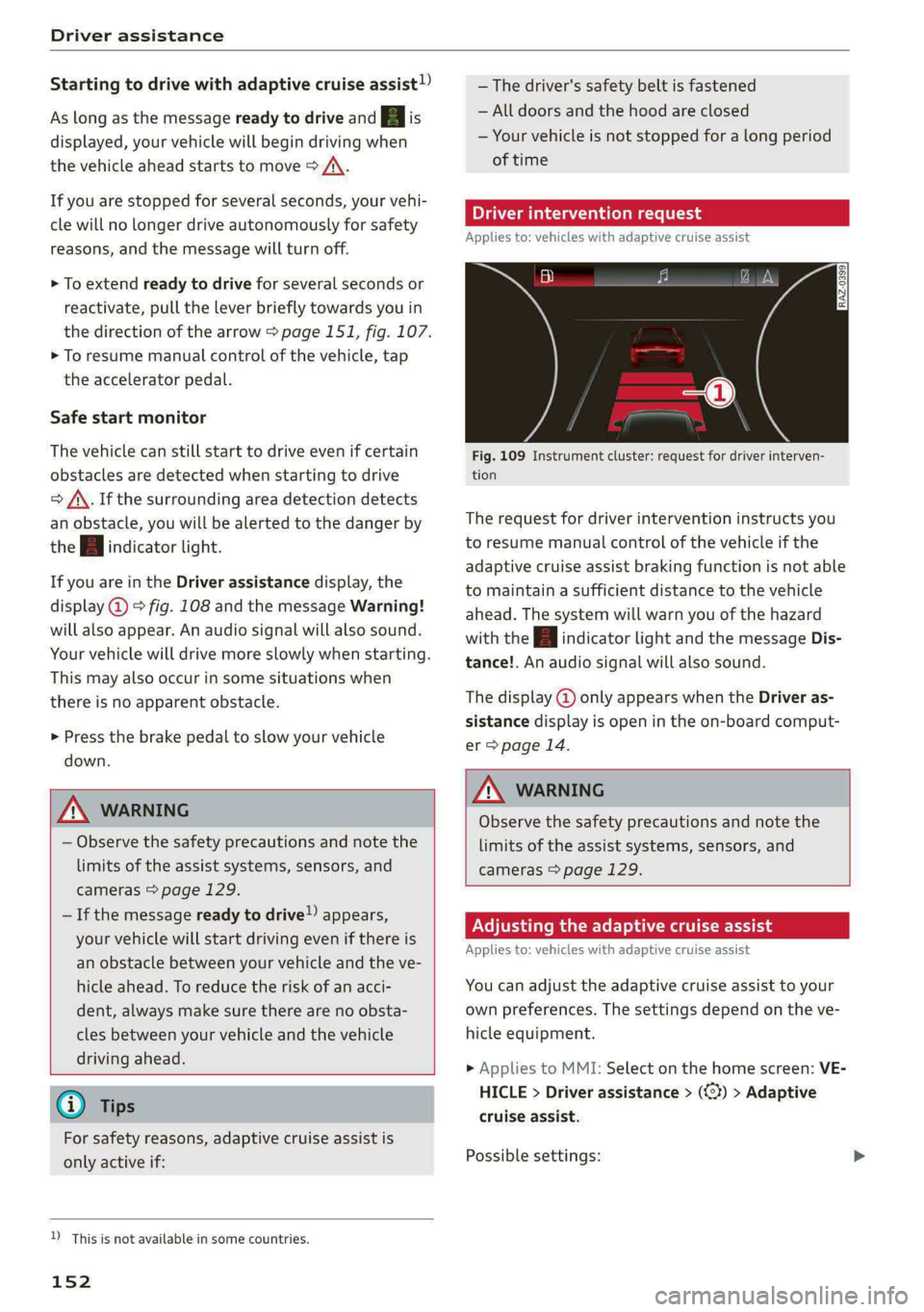
Fig. 109 Instrument cluster: request for driver interven-
tion
The request for driver intervention instructs you
to resume manual control of the vehicle if the
adaptive cruise assist braking function is not able
to maintain a sufficient distance to the vehicle
ahead. The system will warn you of the hazard
with the A indicator light and the message Dis-
tance!. An audio signal will also sound.
The display @ only appears when the Driver as-
sistance display is open in the on-board comput-
er > page 14.
ZA\ WARNING
Observe the safety precautions and note the
limits of the assist systems, sensors, and
cameras > page 129.
Adjusting the adaptive cruise assist
Applies to: vehicles with adaptive cruise assist
You can adjust the adaptive cruise assist to your
own preferences. The settings depend on the ve-
hicle equipment.
> Applies to MMI: Select on the home screen: VE-
HICLE > Driver assistance > (<3) > Adaptive
cruise assist.
Possible settings:
Page 156 of 308
![AUDI E-TRON 2021 Repair Manual Driver assistance
Distance warning
Applies to: vehicles with distance warning
S| iS 9] nN ‘|
ja
Applies to: vehicles with adaptive cruise assist
Fig. 110 Instrument cluster: display of](/img/6/57622/w960_57622-155.png "AUDI E-TRON 2021 Repair Manual Driver assistance
Distance warning
Applies to: vehicles with distance warning
S| iS 9] nN ‘|
ja
Applies to: vehicles with adaptive cruise assist
Fig. 110 Instrument cluster: display of")
Driver assistance
Distance warning
Applies to: vehicles with distance warning
S| iS 9] nN ‘|
ja
Applies to: vehicles with adaptive cruise assist
Fig. 110 Instrument cluster: display of the current dis-
tance
RAZ-0400
Applies to: vehicles with adaptive cruise assist:
Fig. 111 Instrument cluster: distance warning
General information
At speeds above approximately 40 mph (65
km/h), this function measures the distance to the
vehicle ahead as time. If the distance falls below
the warning threshold, the system warns you of
the hazard with the f indicator light.
Image in the Driver assistance display
Applies to: vehicles with adaptive cruise assist
The display only appears if the Driver assistance
display is selected on the on-board computer
=> page 14 and the adaptive cruise assist is not
actively controlling the vehicle.
@) Detected vehicle driving ahead
@ Use the markings to help you estimate the
distance to an obstacle. Each marking repre-
sents approximately one second.
@) Set warning threshold. Depending on the set-
tings, the display will be colored in from the
bottom to the top.
@ The actual distance is smaller than the set
distance and you will be informed about the
danger.
154
Adjusting the distance warning
The system can be switched on and off in the
MMI > page 132.
You can adjust the distance warning threshold to
your preferences. The settings depend on the ve-
hicle equipment.
— Applies to MMI: Select on the home screen: VE-
HICLE > Driver assistance > (3) > Distance
warning
Messages
ir or 3! is displayed when there is a malfunc-
tion, the distance warning functions may be un-
available or may be limited.
A message that indicates the cause and possible
solution may appear with some displays. The
weather conditions may be too poor or a sensor
may be covered. Clean the area in front of the
sensors > page 131 and try to turn the system on
again later.
If the malfunction remains, drive to an author-
ized Audi dealer or authorized Audi Service Facili-
ty immediately to have the malfunction correct-
ed.
ZA\ WARNING
Observe the safety precautions and note the
limits of the assist systems, sensors, and
cameras > page 129.
G) Tips
— The driver is always responsible for adhering
to the regulations applicable in the country
where the vehicle is being operated.
— You may fall below the warning threshold
briefly when passing or when quickly ap-
proaching a vehicle driving ahead. There is
no warning in this scenario. A warning is giv-
en only if you fall below the warning thresh-
old for an extended period of time.
Page 157 of 308
4KE012721BF
Driver assistance
Lane departure warning
General information
Applies to: vehicles with lane departure warning
The lane departure warning can detect lane
marker lines within the limits of the system. If
you are approaching a detected lane marker and
it appears likely that you will leave the lane, the
system can warn you with corrective steering and
a steering wheel vibration, if necessary.
The system functions in the speed range of ap-
proximately 40 mph - 155 mph (65 km/h -
250 km/h).
ZX WARNING
Observe the safety precautions and note the
limits of the assist systems, sensors, and
cameras > page 129.
Applies to: vehicles with lane departure warning
B8V-0692
Fig. 112 Turn signal lever: lane departure warning button
RAZ-0107
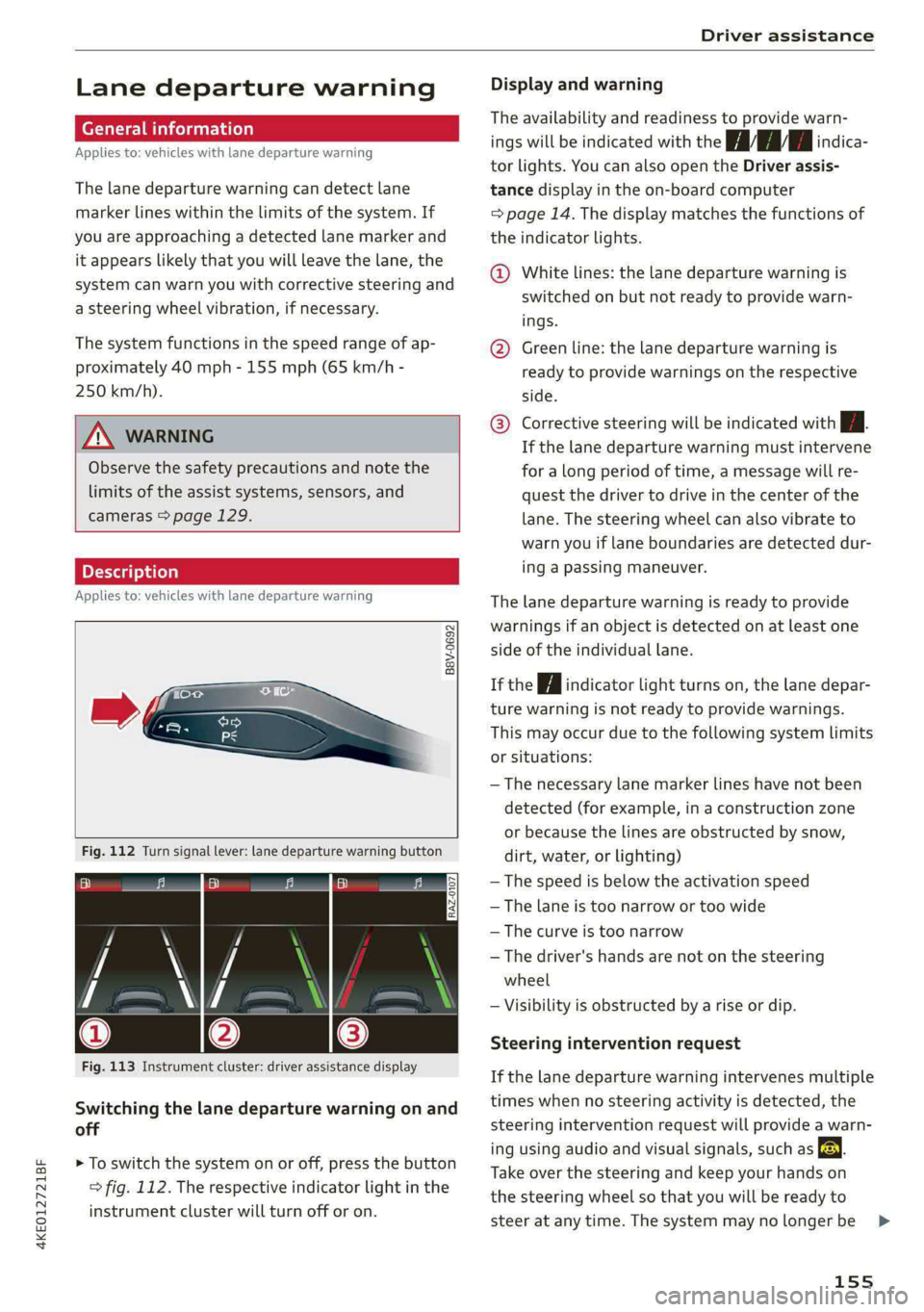
Fig. 113 Instrument cluster: driver assistance display
Switching the lane departure warning on and
off
> To switch the system on or off, press the button
=> fig. 112. The respective indicator light in the
instrument cluster will turn off or on.
Display and warning
The availability and readiness to provide warn-
ings will be indicated with the HH indica-
tor lights. You can also open the Driver assis-
tance display in the on-board computer
=> page 14. The display matches the functions of
the indicator lights.
@ White lines: the lane departure warning is
switched on but not ready to provide warn-
ings.
@ Green line: the lane departure warning is
ready to provide warnings on the respective
side.
® Corrective steering will be indicated with i.
If the lane departure warning must intervene
for a long period of time, a message will re-
quest the driver to drive in the center of the
lane. The steering wheel can also vibrate to
warn you if lane boundaries are detected dur-
ing a passing maneuver.
The lane departure warning is ready to provide
warnings if an object is detected on at least one
side of the individual lane.
If the | i | indicator light turns on, the lane depar-
ture warning is not ready to provide warnings.
This may occur due to the following system limits
or situations:
— The necessary lane marker lines have not been
detected (for example, in a construction zone
or because the lines are obstructed by snow,
dirt, water, or lighting)
— The speed is below the activation speed
— The lane is too narrow or too wide
—The curve is too narrow
— The driver's hands are not on the steering
wheel
— Visibility is obstructed by a rise or dip.
Steering intervention request
If the lane departure warning intervenes multiple
times when no steering activity is detected, the
steering intervention request will provide a warn-
ing using audio and visual signals, such as EE.
Take over the steering and keep your hands on
the steering wheel so that you will be ready to
steer at any time. The system may no longer be
155
>
Page 159 of 308
4KE012721BF
Driver assistance
— Audi pre sense basic can react during emergen-
cy and dangerous braking maneuvers and un-
stable driving situations (such as oversteering
or understeering).
— Audi pre sense front) can detect an impending
frontal impact and react with warnings, braking
interventions, and preemptive safety measures
for the vehicle occupants.
— Audi pre sense rear monitors the rear traffic
behind your vehicle and can react to an impend-
ing rear impact.
— Audi pre sense side can detect an impending
side impact from cross-traffic and vehicles com-
ing from the side, and can initiate preemptive
safety measures.
— The swerve assist can help you to steer the ve-
hicle around an obstacle during an evasive ma-
neuver that is detected as critical.
— The turn assist can detect vehicles in the oppo-
site lane as critical during a turning maneuver
and react with braking maneuvers.
ONT olga met Tn Lehr
Applies to: vehicles with Audi pre sense
Depending on the vehicle speed and the vehicle
equipment, the following functions may be initi-
ated in certain situations:
— Visual and audio warnings
— Reversible tensioning of safety belts
— Closing the windows and panoramic glass roof
— Adjusting the seats
— Other preemptive safety measures by individual
systems
Z\ WARNING
Observe the safety precautions and note the
limits of the assist systems, sensors, and
cameras > page 129.
G) Tips
— Depending on the risk situation that is de-
tected and the selected Audi drive select*
mode, not all preemptive safety measures
may be initiated under certain circumstan-
D_ This is not available in some countries.
ces. Certain functions can be adjusted or
skipped if necessary.
— Audi pre sense may be restricted or unavail-
able under certain circumstances, for exam-
ple if:
— There are passengers with unfastened
safety belts
— After turning on the ignition, as long as
the & indicator light is on.
— When driving in reverse.
— There is an airbag control module mal-
function
— System functions may not be available if
the ESC is limited or switched off, or if
there is a malfunction.
Audi pre sense basic
Applies to: vehicles with Audi pre sense basic
Audi pre sense basic is automatically active at
speeds of approximately 20 mph (30 km/h) and
higher. Audi pre sense basic can trigger preemp-
tive safety measures during emergency braking
and dangerous braking maneuvers as well as in
unstable driving situations, such as oversteering
or understeering > page 157, Audi pre sense pre-
emptive safety measures.
The message Audi pre sense Bo will warn you
about the danger.
ZA WARNING
Observe the safety precautions and note the
limits of the assist systems, sensors, and
cameras > page 129.
ONT Reel g
Applies to: vehicles with Audi pre sense front
Within the limits of the system, Audi pre sense
front can warn about an impending front end col-
lision and brake the vehicle strongly, if necessary.
The system uses the camera behind the wind-
shield and is available at speeds above approxi-
mately 6 mph (10 km/h).
157
Page 161 of 308
4KE012721BF
ZA WARNING
— Observe the safety precautions and note the
limits of the assist systems, sensors, and
cameras > page 129.
— Audi pre sense rear does not react to pedes-
trians, animals, crossing objects, and ob-
jects not detected as vehicles.
G@) Tips
— Audi pre sense rear functions switch off
when trailer mode is detected. There is no
guarantee the functions will switch off
when using a retrofitted trailer hitch.
— Audi pre sense rear functions may also
switch off if there is a malfunction in the
side assist system.
Audi pre sense side
Applies to: vehicles with Audi pre sense side
Within the limits of the system, Audi pre sense
can warn about impending collisions with cross-
traffic and vehicles approaching from the side,
and trigger Audi pre sense preemptive safety
measures.
The system uses additional sensors in the front
and rear areas and is active at speeds up to ap-
proximately 35 mph (60 km/h).
ZA WARNING
— Observe the safety precautions and note the
limits of the assist systems, sensors, and
cameras > page 129.
— Audi pre sense side does not react to pedes-
trians, animals, and objects not detected as
vehicles.
@ Tips
— The Audi pre sense side functions are limit-
ed when trailer mode is detected.
— The Audi pre sense side functions may also
switch off if there is a malfunction in the in-
tersection assistant*.
Driver assistance
Raia
Applies to: vehicles with swerve assist
The swerve assist can help you to steer the vehi-
cle around an obstacle detected in a critical area.
If you avoid an obstacle after the acute warning,
then the swerve assist assists you by applying
slight steering adjustment to correct your steer-
ing wheel angle as long as you are actively steer-
ing. The swerve assist is available at speeds be-
tween approximately 30 mph and 90 mph
(50 km/h - 150 km/h).
Z\ WARNING
— Observe the safety precautions and note the
limits of the assist systems, sensors, and
cameras > page 129.
— Swerve assist does not react to pedestrians,
animals, crossing objects, and objects not
detected as vehicles.
@ Tips
— System functions may not be available if the
ESC is limited or switched off, or if there is a
malfunction.
— An indicator in the instrument cluster will
inform you when there is an intervention.
ee
Applies to: vehicles with turn assist
When turning left, turn assist can help to reduce
the risk of a collision with an oncoming vehicle by
using braking action to keep your vehicle in its
lane. The function is only available when the turn
signal is turned on and at speeds up to maximum
of 6 mph (10 km/h).
ZA WARNING
— Observe the safety precautions and note the
limits of the assist systems, sensors, and
cameras > page 129.
— The turn assist does not react to pedes-
trians, animals, crossing objects, and ob-
jects not detected as vehicles. >
159