108 AUDI E-TRON 2021 Owners Manual
[x] Cancel search | Manufacturer: AUDI, Model Year: 2021, Model line: E-TRON, Model: AUDI E-TRON 2021Pages: 308, PDF Size: 83.91 MB
Page 5 of 308
4KE012721BF
Table of contents
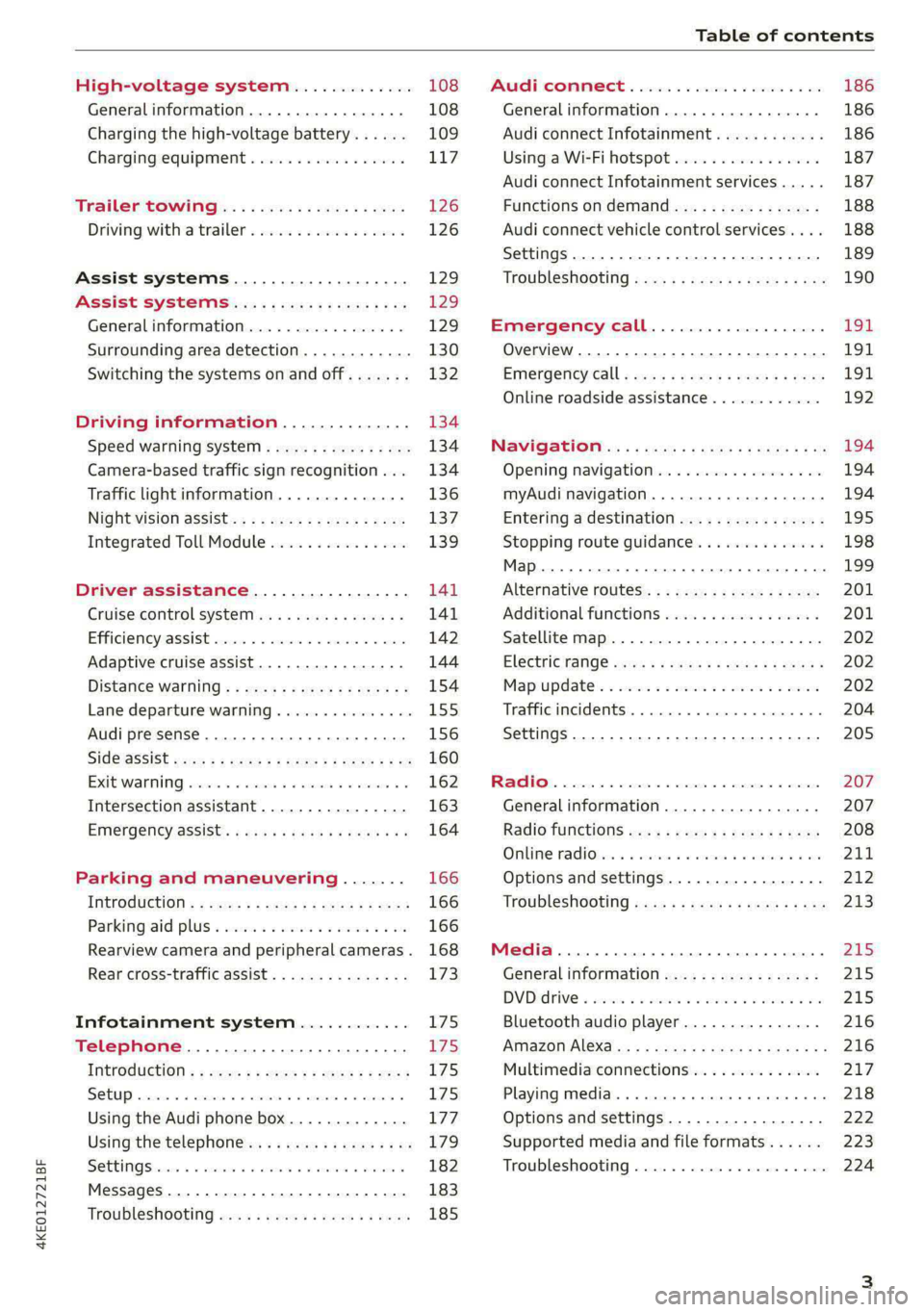
High-voltage system............. 108
General information................. 108
Charging the high-voltage battery...... 109
Charging equipment................. 117
Trailer ROwilne is «i wows «seas gs eeees 126
Driving witha trailer................. 126
Assist systems................... 129
ASSIST SYSTCINIS§ 65 6 i onws 5 can so oe 129:
General information................. 129
Surrounding area detection............ 130
Switching the systems on and off....... 132
Driving information.............. 134
Speed warning system..............-- 134
Camera-based traffic sign recognition... 134
Traffic light information.............. 136
Nightivision aSSiSti=x = «wm : » ase y s eon 137
Integrated Toll Module............... 139
Driver assistance................. 141
Cruise control system............00-5 141
Efficiency assist.............02.-000. 142
Adaptive cruise assist................ 144
Distance warning ..............00005. 154
Lane departure warning............... 155
Audi presense...........0 cece eee 156
Sid@vassist sews: = s sexs = 2 sews & e Ae & ne 160
EXIE Warning sire x 6 cera oo were @ @ eee os 162
Intersection assistant................ 163
Emergency assist... ....:seeceeeevees 164
Parking and maneuvering....... 166
IMEROUWECION « = ems x y ses 5 o were 2 x ews 166
Parking‘aid plus « sissies avis oe aretes so aoe 166
Rearview camera and peripheral cameras. 168
Rear cross-traffic assist............... 173
Infotainment system............ L75
Telephone....................005- t75
INtROGUCtION « 2 sees » y sees 9 2 gees s 5 aes 175
SOLUP scsvine a 6 sssnase 2 0 soeaam + 6 oewoan © 6 coesern < 175
Using the Audi phone box............. 177
Using the telephone..............0005 179
SOUS cass os awusse oo means o & seanoe @ seeMaRD & 182
Messages .............0 000200 e eee 183
ThOubLESHOOtING ices s weces s eeee ss pee 185
PRCT COMMBCE 's. cosves 5 6 sivas 6 6 snes 8 oo 186
General information................- 186
Audi connect Infotainment............ 186
Using a Wi-Fi hotspot................ 187
Audi connect Infotainment services..... 187
Functions on demand................ 188
Audi connect vehicle control services.... 188
Settings............. 0.0.00 002 eee 189
TRGUBIESHOOLING sass ¢ scm s 3 Hae 5 tee 190
Emergency call................... 191,
Overview... 12.0... eee eee eee 191
Emergenicy'call « css s sees 6 s gems © + eeu 191
Online roadside assistance............ 192
NaViGGationtc: « « meus « & seu sc poms + «oe 194
Opening navigation............0..005 194
myAudi navigation...............000. 194
Entering a destination................ 195
Stopping route guidance.............. 198
Map... .. see cece eee eee 199
Alternative
routes.............2-.00. 201
Additional functions................. 201
Satellite map.......... 2.0... ee eee 202
Electric:ranGe ccs «2 was ss eee ys ees 202
Map update’: « snes os anes 2s oiws oo ews 202
Traffic incidents ........ 0.0... cece eee 204
Settings............0..0 0.0202 205
Radio...... 02... eee eee ee 207
Generalinformation................. 207
Radio functions sas ss sees ss peee ss Hews 208
Online radiObi. «sacs x x sere @ armen 6 one 211
Options and settings................. 212
Troubleshooting zass x s eae s 3 come & a aw 213
Media........... 0. cece eee ee 215
General information................. 215
DVDidrive « sisi 2 5 semen 2 6 were 2 8 women 2 oe 215
Bluetooth audio player............... 216
Amazon Alexa.........0..:ee eee ee eee 216
Multimedia connections.............. 217
Playing media. ....... 0. cece ee eee eee 218
Options and settings................. 222
Supported media and file formats...... 223
Troubleshooting...............-.0005 224
Page 110 of 308
High-voltage system
High-voltage system
General information
Introduction
All work done on the high-voltage system must
only be performed by certified high-voltage tech-
nicians at authorized Audi dealers or authorized
Audi Service Facilities in accordance with Audi
guidelines.
The high-voltage system is composed of the fol-
lowing high-voltage components, among other
things: the high-voltage battery, the power elec-
tronics, the electric motors, the high-voltage A/C
compressor, the high-voltage heater, the charg-
ing system and charging port as well as the or-
ange high-voltage wiring.
The high-voltage battery is located on the vehicle
underbody and does not require any maintenance
from the driver.
ZA WARNING
The voltage in the high-voltage system is high
enough to cause fatal injuries. Touching a
damaged high-voltage component can result
in a fatal electric shock. The components in
the high-voltage system are marked with a
warning label which warns against the high-
voltage.
— The voltage level in the high-voltage system
is still dangerous and potentially life-threat-
ening when the ignition is switched off.
— Never perform work on the orange high-
voltage cables or on other high-voltage
components. Only authorized repair facili-
ties that are certified may perform work on
the high-voltage system.
— Never damage, alter or remove the orange
high-voltage cable or disconnect it from the
high-voltage system.
— Never perform any work using cutting, shap-
ing or sharp-edged tools or heat sources
near the high-voltage system and high-volt-
age cables.
— Gases that escape from the high-voltage
battery can be poisonous or flammable.
— Damage to the high-voltage battery could
cause the high-voltage battery to leak im-
mediately or in the future, and poisonous or
flammable gases could escape. Do not in-
hale the gases!
— Do not expose yourself to any leaking fluids
and do not come into contact with them.
— The high-voltage battery electrolyte fluid is
caustic. If electrolyte fluid comes into con-
tact with the skin, flush the affected area for
at least 15 minutes with clean water. Then
wash the affected area with soap. Have the
affected area examined by a medical profes-
sional.
— In the event of a technical emergency, in-
form the responders that the vehicle is
equipped with a high-voltage battery.
108
@) Note
The high-voltage system can be damaged if
the vehicle underbody comes into contact
with the ground. Immediately drive your vehi-
cle to an authorized repair facility and have it
inspected.
Page 153 of 308
4KE012721BF
Driver assistance
ZA WARNING
Observe the safety precautions and note the
limits of the assist systems, sensors, and
cameras > page 129.
@) Tips
— When setting the distance, the driver is re-
sponsible for adhering to any applicable le-
gal regulations.
— Depending on the selected driving program
and distance, driving behavior when acceler-
ating may vary from moderate to sporty
=> page 152, Adjusting the adaptive cruise
assist.
— The distances provided are specified values.
Depending on the driving situation and how
the vehicle ahead is driving, the actual dis-
tance may be more or less than these target
distances.
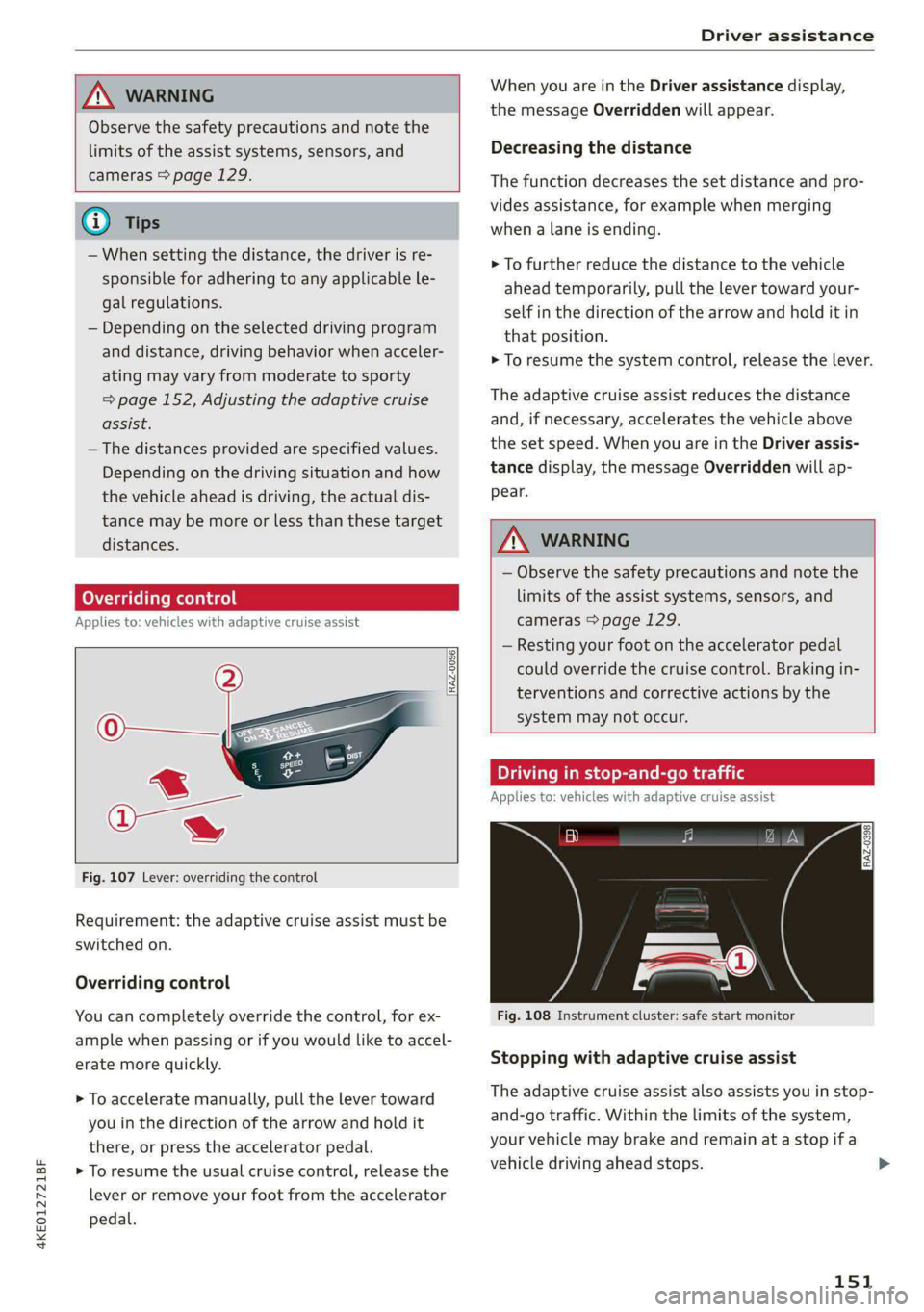
Overriding control
Applies to: vehicles with adaptive cruise assist
[RAZ-0096]
Fig. 107 Lever: overriding the control
Requirement: the adaptive cruise assist must be
switched on.
Overriding control
You can completely override the control, for ex-
ample when passing or if you would like to accel-
erate more quickly.
> To accelerate manually, pull the lever toward
you in the direction of the arrow and hold it
there, or press the accelerator pedal.
> To resume the usual cruise control, release the
lever or remove your foot from the accelerator
pedal.
When you are in the Driver assistance display,
the message Overridden will appear.
Decreasing the distance
The function decreases the set distance and pro-
vides assistance, for example when merging
when a lane is ending.
> To further reduce the distance to the vehicle
ahead temporarily, pull the lever toward your-
self in the direction of the arrow and hold it in
that position.
> To resume the system control, release the lever.
The adaptive cruise assist reduces the distance
and, if necessary, accelerates the vehicle above
the set speed. When you are in the Driver assis-
tance display, the message Overridden will ap-
pear.
Z\ WARNING
— Observe the safety precautions and note the
limits of the assist systems, sensors, and
cameras > page 129.
— Resting your foot on the accelerator pedal
could override the cruise control. Braking in-
terventions and corrective actions by the
system may not occur.
Driving in stop-and-go traffic
Applies to: vehicles with adaptive cruise assist
Fig. 108 Instrument cluster: safe start monitor
Stopping with adaptive cruise assist
The adaptive cruise assist also assists you in stop-
and-go traffic. Within the limits of the system,
your vehicle may brake and remain at a stop if a
vehicle driving ahead stops.
151
>
Page 154 of 308
Driver assistance
Starting to drive with adaptive cruise assist)
As long as the message ready to drive and a is
displayed, your vehicle will begin driving when
the vehicle ahead starts to move > /\.
If you are stopped for several seconds, your vehi-
cle will no longer drive autonomously for safety
reasons, and the message will turn off.
> To extend ready to drive for several seconds or
reactivate, pull the lever briefly towards you in
the direction of the arrow > page 151, fig. 107.
> To resume manual control of the vehicle, tap
the accelerator pedal.
Safe start monitor
The vehicle can still start to drive even if certain
obstacles are detected when starting to drive
=> /\. If the surrounding area detection detects
an obstacle, you will be alerted to the danger by
the A indicator light.
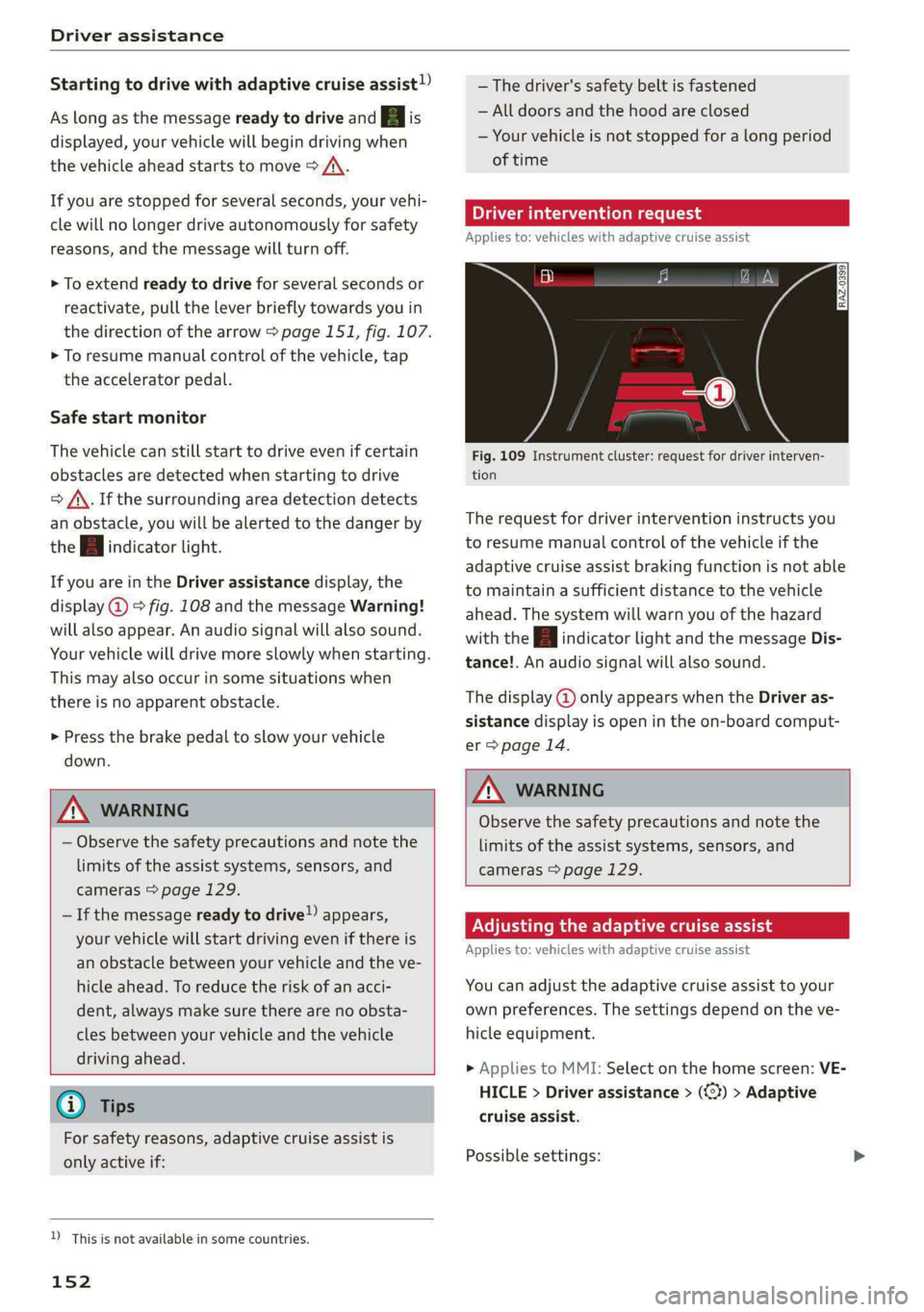
If you are in the Driver assistance display, the
display @ © fig. 108 and the message Warning!
will also appear. An audio signal will also sound.
Your vehicle will drive more slowly when starting.
This may also occur in some situations when
there is no apparent obstacle.
>» Press the brake pedal to slow your vehicle
down.
ZA WARNING
— Observe the safety precautions and note the
limits of the assist systems, sensors, and
cameras > page 129.
— If the message ready to drive) appears,
your vehicle will start driving even if there is
an obstacle between your vehicle and the ve-
hicle ahead. To reduce the risk of an acci-
dent, always make sure there are no obsta-
cles between your vehicle and the vehicle
driving ahead.
@) Tips
For safety reasons, adaptive cruise assist is
only active if:
D_ This is not available in some countries.
152
— The driver's safety belt is fastened
— All doors and the hood are closed
— Your vehicle is not stopped for a long period
of time
al 3 3
iF Ny Pe fac
Fig. 109 Instrument cluster: request for driver interven-
tion
The request for driver intervention instructs you
to resume manual control of the vehicle if the
adaptive cruise assist braking function is not able
to maintain a sufficient distance to the vehicle
ahead. The system will warn you of the hazard
with the A indicator light and the message Dis-
tance!. An audio signal will also sound.
The display @ only appears when the Driver as-
sistance display is open in the on-board comput-
er > page 14.
ZA\ WARNING
Observe the safety precautions and note the
limits of the assist systems, sensors, and
cameras > page 129.
Adjusting the adaptive cruise assist
Applies to: vehicles with adaptive cruise assist
You can adjust the adaptive cruise assist to your
own preferences. The settings depend on the ve-
hicle equipment.
> Applies to MMI: Select on the home screen: VE-
HICLE > Driver assistance > (<3) > Adaptive
cruise assist.
Possible settings:
Page 226 of 308
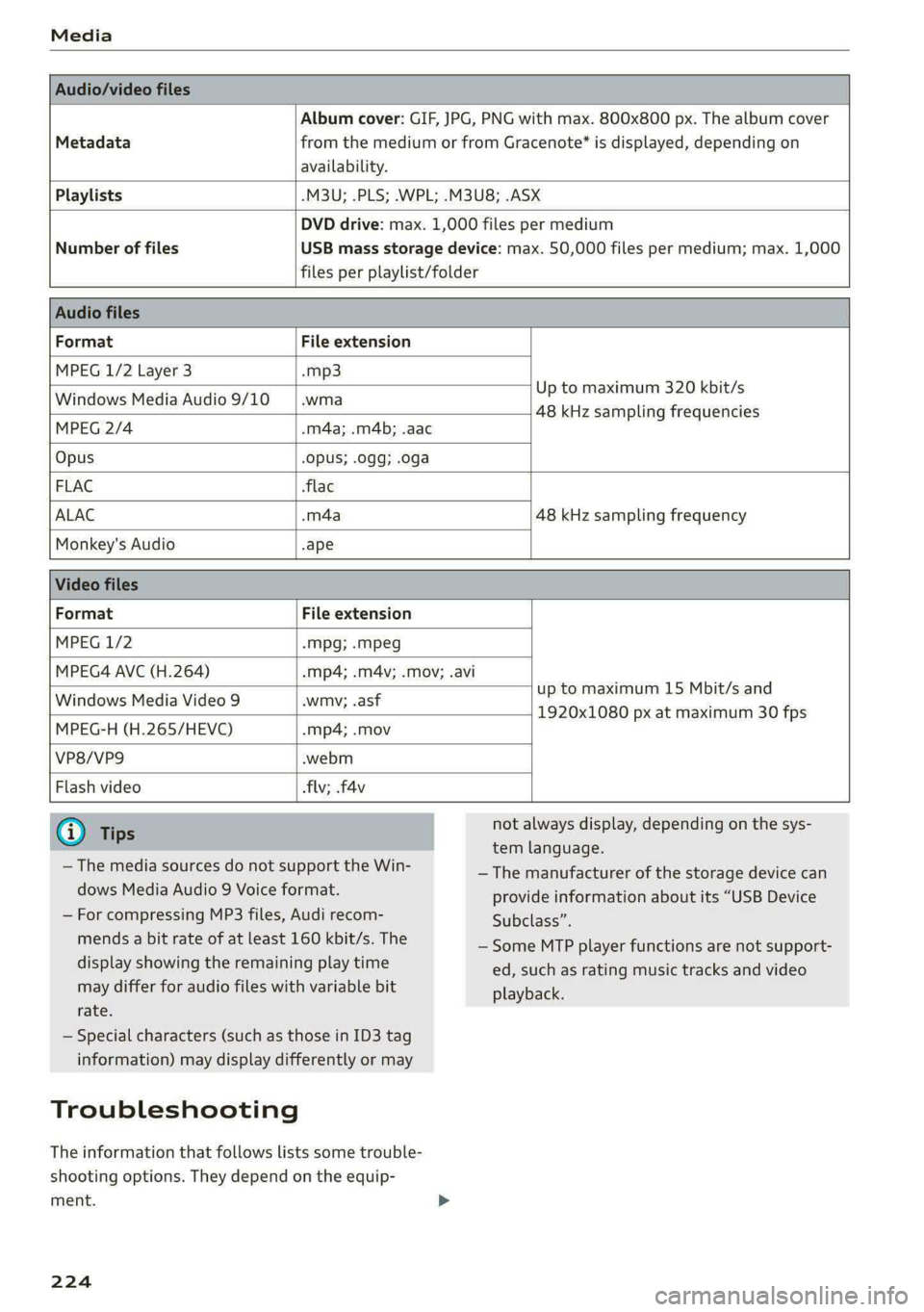
Media
Album cover: GIF, JPG, PNG with max. 800x800 px. The album cover
Metadata from the medium or from Gracenote®* is displayed, depending on
availability.
Playlists -M3U; .PLS; .WPL; .M3U8; .ASX
Number of files
DVD drive: max. 1,000 files per medium
USB mass storage device: max. 50,000 files per medium; max. 1,000
files per playlist/folder
Format File extension
MPEG 1/2 Layer 3 -mp3
Windows Media Audio 9/10 .wma
Up to maximum 320 kbit/s
MPEG 2/4 -m4a; .m4b; .aac
48 kHz sampling frequencies
Opus Opus; .0gg; .oga
FLAC flac
ALAC .m4a 48 kHz sampling frequency
Monkey's Audio -ape
Format File extension
MPEG 1/2 -Mpg; -mpeg
MPEG4 AVC (H.264) mp4; .m4v; .mov; .avi
up to maximum 15 Mbit/s and
1920x1080 px at maximum 30 fps
Windows Media Video 9 wmv; .asf
MPEG-H (H.265/HEVC) mp4; .mov
VP8/VP9 webm
Flash video flv; .f4v
— The media sources do not support the Win-
dows Media Audio 9 Voice format.
— For compressing MP3 files, Audi recom-
mends a bit rate of at least 160 kbit/s. The
display showing the remaining play time
may differ for audio files with variable bit
rate.
— Special characters (such as those in ID3 tag
information) may display differently or may
Troubleshooting
The information that follows lists some trouble-
shooting options. They depend on the equip-
ment.
224
not always display, depending on the sys-
tem language.
— The manufacturer of the storage device can
provide information about its “USB Device
Subclass”.
— Some MTP player functions are not support-
ed, such as rating music tracks and video
playback.
Page 240 of 308
Checking and Filling
authorized Audi dealer or authorized Audi
Service Facility for assistance.
Battery
eae elec acl)
Because of the complex power supply, all work on
batteries such as disconnecting, replacing, etc.,
should only be performed by an authorized Audi
dealer or authorized Audi Service Facility > A\.
Batteries with different technologies are instal-
led in your vehicle:
— 12 volt vehicle battery (for example, for basic
power supply) > page 238, 12 Volt vehicle bat-
tery
— High-voltage battery (for example, for electric
drive system, climate control) > page 108, In-
troduction
Not running the vehicle for long periods of
time
When the vehicle is not used for long periods, the
12 Volt vehicle battery will drain little by little. To
ensure that the vehicle can still be started, the
electrical equipment will be limited or switched
off. Some convenience functions, such as interior
lighting or power seat adjustment, may not be
available under certain circumstances. The con-
venience functions will be available again when
you establish drive ready mode.
Even when electrical equipment is switched off,
the equipment can still drain the 12 Volt vehicle
battery if the vehicle is not driven for long peri-
ods of time. Deep draining results in a chemical
reaction that destroys the inside of the battery.
To reduce the risk of this, the battery must be
charged monthly by an authorized Audi dealer or
authorized Audi Service Facility > page 239. Con-
tact an authorized Audi dealer or authorized Audi
Service Facility for more information.
Winter operation
Cold weather places an especially high load on
the 12 Volt vehicle battery. Have the battery
checked by an authorized Audi dealer or author-
238
ized Audi Service Facility before cold weather be-
gins.
ZA WARNING
All work on the battery or electrical system in
your vehicle can result in injuries, chemical
burns, accidents, or burns. Because of this, all
work must be performed only by an author-
ized Audi dealer or authorized Audi Service Fa-
cility.
ZA WARNING
California Proposition 65 Warning:
— Battery posts, terminals and related acces-
sories contain lead and lead compounds,
chemicals known to the State of California
to cause cancer and reproductive harms.
Wash hands after handling.
@) Note
If the vehicle will be parked for long periods
of time, protect the 12 Volt vehicle battery
against the cold so that it will not “freeze”
and become damaged. Have the battery
charged by an authorized Audi dealer or au-
thorized Audi Service Facility > page 239,
Charging the 12 Volt vehicle battery.
AAO) CM alate ey pan-18 7
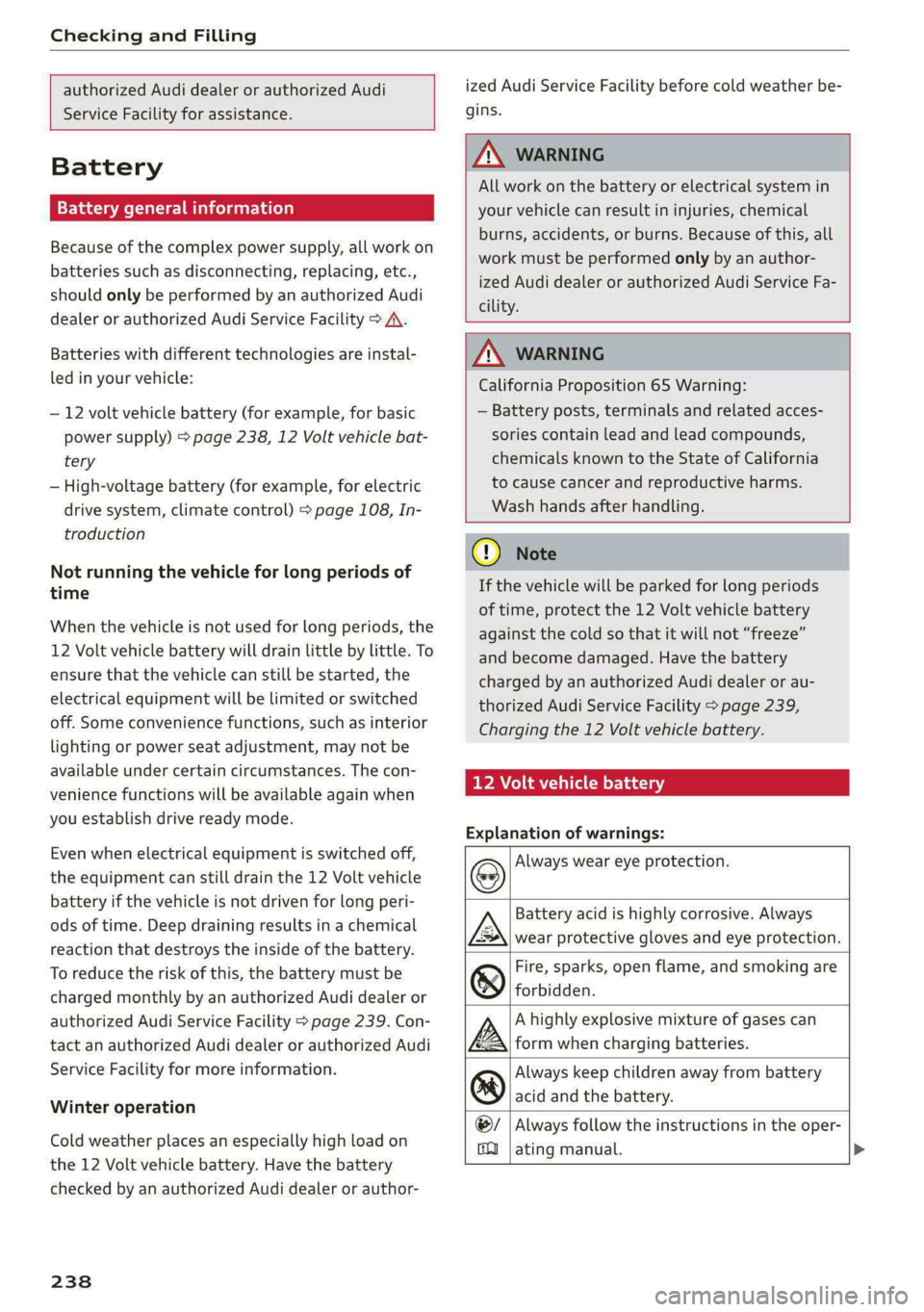
Explanation of warnings:
Always wear eye protection.
Battery acid is highly corrosive. Always
wear protective gloves and eye protection.
Fire, sparks, open flame, and smoking are
forbidden.
A highly explosive mixture of gases can
form when charging batteries.
Always keep children away from battery
acid and the battery.
Always follow the instructions in the oper-
se
@
> @
PE
©
ating manual. >
Page 255 of 308
Wheels
Make sure that the tire designa-
tion on your tire matches the des-
ignation on the tire pressure label
and the tire pressure table.
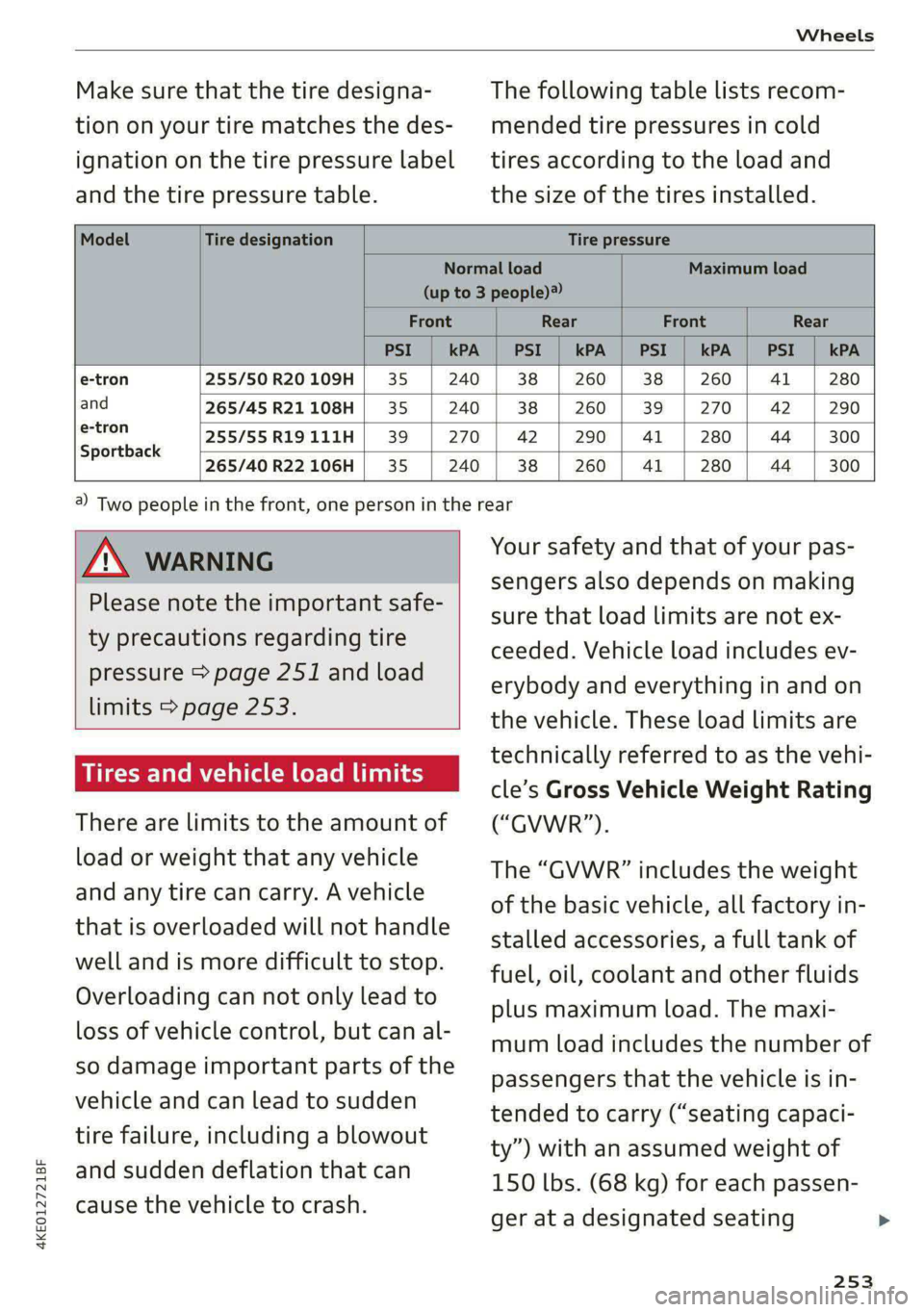
The following table lists recom-
mended tire pressures in cold
tires according to the load and
the size of the tires installed.
Model Tire designation Tire pressure
Normal load Maximum load
(up to 3 people)?
Front Rear Front Rear
PSI kPA PSI kPA PSI kPA PSI kPA
e-tron 255/50 R20 109H 35 240 38 260 38 260 41 280
and 265/45 R21 108H 35 240 38 260 39 270 42 290
e-tron 255/55R19111H| 39 | 270 | 42 | 290 | 41 | 280 | 44 | 300
Sportback
265/40 R22 106H 35 240 38 260 Al 280 44 300
4KE012721BF
Z\ WARNING
Please note the important safe-
ty precautions regarding tire
pressure > page 251 and load
limits > page 253.
Tires and vehicle load limits
There are limits to the amount of
load or weight that any vehicle
and any tire can carry. A vehicle
that is overloaded will not handle
well and is more difficult to stop.
Overloading can not only lead to
loss of vehicle control, but can al-
so damage important parts of the
vehicle and can lead to sudden
tire failure, including a blowout
and sudden deflation that can
cause the vehicle to crash.
@) Two people in the front, one person in the rear
Your safety and that of your pas-
sengers also depends on making
sure that load limits are not ex-
ceeded. Vehicle load includes ev-
erybody and everything in and on
the vehicle. These load limits are
technically referred to as the vehi-
cle’s Gross Vehicle Weight Rating
(“GVWR”).
The “GVWR” includes the weight
of the basic vehicle, all factory in-
stalled accessories, a full tank of
fuel, oil, coolant and other fluids
plus maximum load. The maxi-
mum load includes the number of
passengers that the vehicle is in-
tended to carry (“seating capaci-
ty”) with an assumed weight of
150 lbs. (68 kg) for each passen-
ger at a designated seating
253
Page 295 of 308
4KE012721BF
Index
High-voltage battery.................. 108
Vehicle battery (12 Volt)............... 238
Winter operation (12 Volt vehicle battery) . 238
Battery (vehicle)
refer to High-voltage battery........... 108
Blinds
refer to Panoramic glass roof............ 44
Block TOU C cms & oscars ao aes oe eeeee & wae 201
BLOWERS woven: ae onsen 2 2 comes 2 2 cme ooo avo 85
Bluetooth
Audio playeh sre x 6 ceca ve wacene ao erties ow 216
Connecting adevice...............0-0- 230
Connecting a mobile phone............ 175
Deleting a device
Device overview..............02.0000-
Disconnecting adevice................ 230
Displaying/profiles « sscvie + » ensue 6 « seowee sv 6 231
Selecting adevice.............0..000. 230
Specifying a favorite.................. 23:1
Boost function...................000 eee 93
Brake fluid
Checking the brake fluid level........... 236
BrakeSiss « ¢ sas s & ewes 5 hee oe eee se eS 96
Brake tluidis ss sass 2 maim o wana ys won ee 236
Emergency braking function............. 99
HGCisu ¢ s sayou & @ Sayan % § MaWE ¢ & BaeoR 5 SeRDR 100
New brake pads..........-...--0000005 97
Brands = wee s 2 owen x ¢ eeu < eee 2 tom FE 232
Break-in security feature...............-. 35
Breaking in
New brake pads..............--0000005 97
ING WEEITOSE. « sxctons co sucesin wo semen oe 6 azectinn on a 248
Bulbireplacementss. «x issn s « sesrve + & arent w vo 280
Business'address’s « « sss os wows oo mewn ow 201
{.
California Proposition 65 Warning........ 233
Battery specific........... cece 238
GALLUISE cesses » sense @ © amscans a o omens a 6 emNEAU & 179
GaMOKaSiiwse 2 wim + mem o 6 emu ee om a Yo 130
Locations ..... 2... ee eee eee e ee eee 131
Capacities
Washer fluid reservoir................. 291
Cargo floor. ....... eee eee eee eee 83
Cargonet....... 2... eee eee ee 82
Garwash «5 sce so aspen «ome oo iene: © stents 261
Cell phone
refer to Telephone...........-.0eee eee 175
Cell phone compartment
refer to Audi phone box............... 177
Central locking....... eee eee cree eens 32
AULOILOGK « coos 2 5 canes 5 5 ten so ees Go eG 32
Convenience key sie + « soccais 2 6 seve + 6 sone « 37
Convenience opening and closing......... 44
Luggage compartment lid............... 40
Mechanically unlocking and locking....... 35
MessageS ......--. 0c cece eects 34
Remote control key.........0eee eee eee 37
SeGUING): © wwe: s 2 wesems x arene @ een aH ewe 33
Vehicle key... 0... cece eee ee eee ee 37
Central locking switch................5-5 34
Gentifieatiomis a < cvessus eo mano we wannew © a caste 288
Changing light bulbs................0.. 280
Charging
refer to Power sourceS.........--.000005 78
Charging clip
refer to Wall mount clip............... 125
Charging display...............2--000-- 114
Charging the battery
USB... eee 178, 217
Wirelessi. « wos « < auc a 2 sogee 4 2 mee 2 2 oe 178
Charging times « eves sz eee ee eews e ewewse 110
Child safety lock
Climate control system controls in the rear. 42
Power windows.............2.020 eee 42
Rear dGGFSs: « s saan x « seme as eee oo ew eo 42
Child safety seats.............0..000 eee 72
Securing to the top tether anchor........ 76
Securing with a safety belt.............. 75
Securing with LATCH..............--00. 74
Cleaning........... eee eee 261
Cleaning Alcantara................0000. 264
Cleaning artificial leather............... 264
Cleaning carbon components........ 263, 264
Cleaning controls « ses ss eens se cee s 6 ves 264
Cleaning decorative parts andtrim........ 263
Cleaning plastic parts.................. 263
Cleaning textiles...................... 264
Climate control system ...............0-- 84
Climate control system controls in the rear
CHINA SARELY LOCK wer ss saan ¢ seen Fo eee 2 42
293
Page 298 of 308
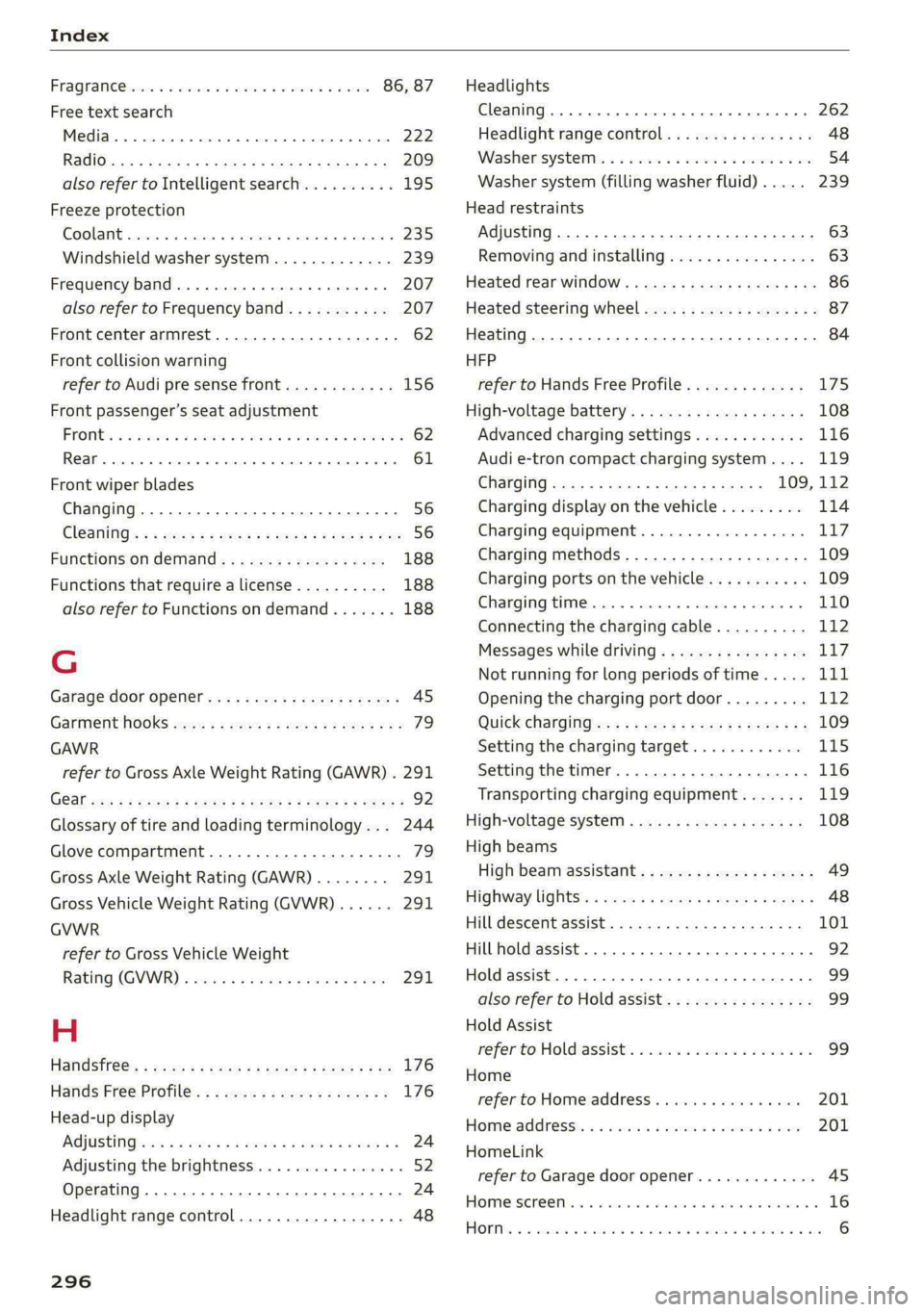
Index
FRAQKAMNCCb scons a secswin «+ cwevne vo eeu v shew 86, 87
Free text search
Media.... 2... cece eee eee eee 222
R&Oterax ¢ = sans ¢ = Sots ¢ ¥ Hae 7 eRe gE 209
also refer to Intelligent search.......... 195
Freeze protection
COOLANE sncosns « 0 ences x 0 oman + 6 orem = ut aemawe 235
Windshield washer system............. 239
Frequency band.............e eee eee eee 207
also refer to Frequency band........... 207
Front center armrest............2....00. 62
Front collision warning
refer to Audi pre sense front............ 156
Front passenger’s seat adjustment
FROME so sees oo nase 3 a nen 2 wae ae MREO wo 62
Rear... eee eee eee 61
Front wiper blades
Changing.......... eee eee eee ee 56
ClOANING s « = eee = « neues to Hewat Bea ee 56
Functions ondemand............--..-- 188
Functions that require a license.......... 188
also refer to Functions on demand....... 188
G
Garage door opener.............--+2200- 45
Garment HOOKS ec
GAWR
refer to Gross Axle Weight Rating (GAWR) . 291
GOat sce: 2 s gome 2 x wee ey BES GF Be Ge ees 92
Glossary of tire and loading terminology... 244
Glove compartment..............-00000- 79
Gross Axle Weight Rating (GAWR)........ 291
Gross Vehicle Weight Rating (GVWR)...... 291
GVWR
refer to Gross Vehicle Weight
Ratirig (GVWR) « sce « 2 eevee x « caus 8 2 eeu 291.
H
Handsfree: = 2can s gems sv seen ey eee ee ee 176
Hands Free Profile.................-.-- 176
Head-up display
AG\OStING an se meas x pwan ee wees s wenn os 24
Adjusting the brightness................ 52
Operating ............ 0.0 e eee eee eee 24
Headlight range control................0. 48
296
Headlights
Cleaning....... 06... cece eee eee ee eee 262
Headlight range control................ 48
Washerisystem). «2 escioe ence ee eee ¥ 6 oe 54
Washer system (filling washer fluid) .... . 239
Head restraints
Adjusting... 0.0... 0.00 e cece eee eee 63
Removing and installing................ 63
Heated rear window.............0eee eee 86
Heated steering wheel................0.. 87
Heating..............0 0.2 cee eee eee 84
HFP
refer to Hands Free Profile............. 175
High-voltage battery................... 108
Advanced charging settings............ 116
Audi e-tron compact charging system.... 119
GHAGING scas + = sevou x = Saree 3 5 eee a 109, 112
Charging display on the vehicle......... 114
Charging equipment................0- 117
Charging methods...............-.... 109
Charging ports on the vehicle........... 109
Charging time...............0. eee ee 110
Connecting the charging cable.......... 112
Messages while driving................ 11/7
Not running for long periods of time..... Lit
Opening the charging port door......... 112
QUICK CHANGING ews « « eos s quem x 2 Beme Bs 109
Setting the charging target............ 115
Setting the timer..................0.. 116
Transporting charging equipment....... 119
High-voltage system.............0.005- 108
High beams
High beam assistant................... 49
Highway lights’: s scsn ss ease # weee sz oes x 48
Hill.descentassist, ¢ cca ceeasssiaaases 101
Hill hold assist... 0.0... cc cece e eee eee ee 92
Hold assist... 0.2... eee eee 99
also refer to Hold assist..............-. 99
Hold Assist
Hefer'to HOldassists. wave + wins av waren evo 99
Home
refer to Home address............00 0s 201
Home.addresss « « ssc « « wenn 3 « wwe 6 o owe 201
HomeLink
refer to Garage door opener............. 45
HOMEISEFEC Mises so seis « ononans wa crowns 4 ooes 16
HOBM: 5 3 aceases oo aera & 3 anos «wae @ % aMweaM 6 2 O88 6