roof rack AUDI E-TRON 2021 Owners Manual
[x] Cancel search | Manufacturer: AUDI, Model Year: 2021, Model line: E-TRON, Model: AUDI E-TRON 2021Pages: 308, PDF Size: 83.91 MB
Page 4 of 308
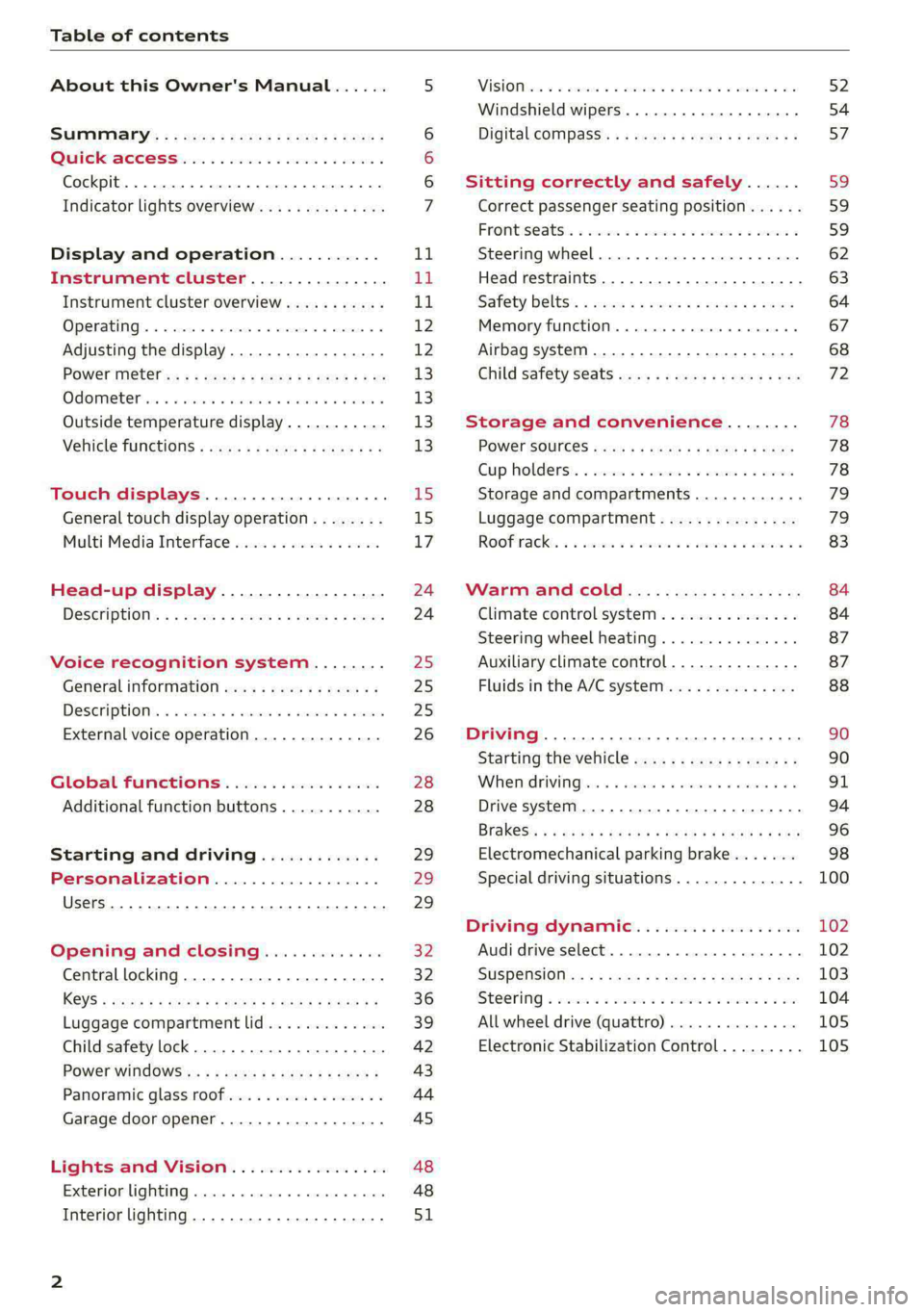
Table of contents
About this Owner's Manual......
SUMIMAry: < = exe : eens: Seen cs sens
QutckeaeCe ssh: «i esis se ois a eaves @
Cockpit. ...... 0... eee eee eee eee
Indicator lights overview...........4..
Display and operation...........
Instrument cluster...............
Instrument cluster overview...........
Operating. ecccuse w+ were oo wens oo ayes 9 ¥
Adjusting the display.................
POWErMe@tel ss « » wees = 5 gees ey ewe xe
OdOMeter sic oo sisiecs a werner » ome ee irae «
Outside temperature display...........
Vehicle functions « sce. ss saes ae sees aes
Touch displays....................
General touch display operation........
Multi Media Interface................
Head-up display..................
DeSGriptlOlls « ¢ sans a ¢ wee a ¢ saws § eae
Voice recognition system........
General information..............4..
DESCRIPTION. 4 & wisevus sa stenius ow aresiue 6 ¥ renin
External voice operation..............
Global Functions’. vc. 6s css se cess
Additional function buttons...........
Starting and driving.............
Personalization..................
Luggage compartment lid.............
Child safety lock........... 00. cece eee
POWEF WINdOWS:: « x sso ¥ 2 eure 9 2 ea
Panoramic glass:n00fiecis < « svsvine so siswes «
Garage door opener...........-.00005
Lights and Vision.................
EXEROPLUGHELAG, soosece « » enscet oo snsuein © 0 asee
Interior lighting..............-...0--
NOD
OO
11
ga:
11 12 12 13 13 13
13
15
15
17
24 24
25
25
25
26
28
28
29
29 29
32 32
36 39
42 43
44
45
48
48
51
ViSIOM i & & soscone wo coasaie 3 w aeeeane © w cease ow 52
Windshield wipers...............000 54
Digital COMPdSS's s s wae se wees se ees ve 57
Sitting correctly and safely...... 59
Correct passenger seating position...... 59
Frontis@ats:. = csv 2» ewes 2 o wom ws eon © 59
SLESKIMG WHEEL eseiince 4 0 eowcene s sontone o 6 axottene 62
Head restraints...................05. 63
Safety belts's « sso: s swans 5 ¢ eeies 5 2 awn 64
Memory function.............. 00s eee 67
Airbag system...............2220005 68
Child
safety seats ..........00 eee eae 72
Storage and convenience........ 78
POWEr SOUFCES seis = = eeu 2 + cee 2 + Hes 78
Cup Rolders': « sis ss ems os ence ee eee 78
Storage and compartments............ 79
Luggage compartment............... 79
Roofirackss + ¢ sseis eevee ev ena oo ween eo 83
Warm and cold.................6. 84
Climate control system............... 84
Steering wheel heating.............-. 87
Auxiliary climate control.............- 87
Fluids in the A/C system.............. 88
Driving ........... 0. cee ee eee 90
Starting the vehicle................-. 90
When:driving jac: 2 + srcwie sv snsine oo earn vos 91
Drive system. ......... 0.0.00 .002000. 94
Brakesi: « « sia < anne 3 gene 3 x nOuR Fs cee 96
Electromechanical parking brake....... 98
Special driving situations.............. 100
Driving dynamic.................. 102
Audi drive select..............000000. 102
SUSPeNSION ss « = seus + < HeeS 4c REER x BRE 103
StOGFING « wicca x cases « 2 oresess a cae © H Lod 104
All wheel drive (quattro).............. 105
Electronic Stabilization Control......... 105
Page 56 of 308
Lights and Vision
If the glass on an automatic dimming mirror
breaks, electrolyte can leak out. This liquid
damages plastic surfaces and paint. Clean
this liquid as quickly as possible, for example
with a wet sponge.
— If the light reaching the rearview mirror is
obstructed, the automatic dimming mirror
will not function correctly,
— The automatic dimming mirrors do not dim
when the interior lighting is turned on or
the reverse gear is selected.
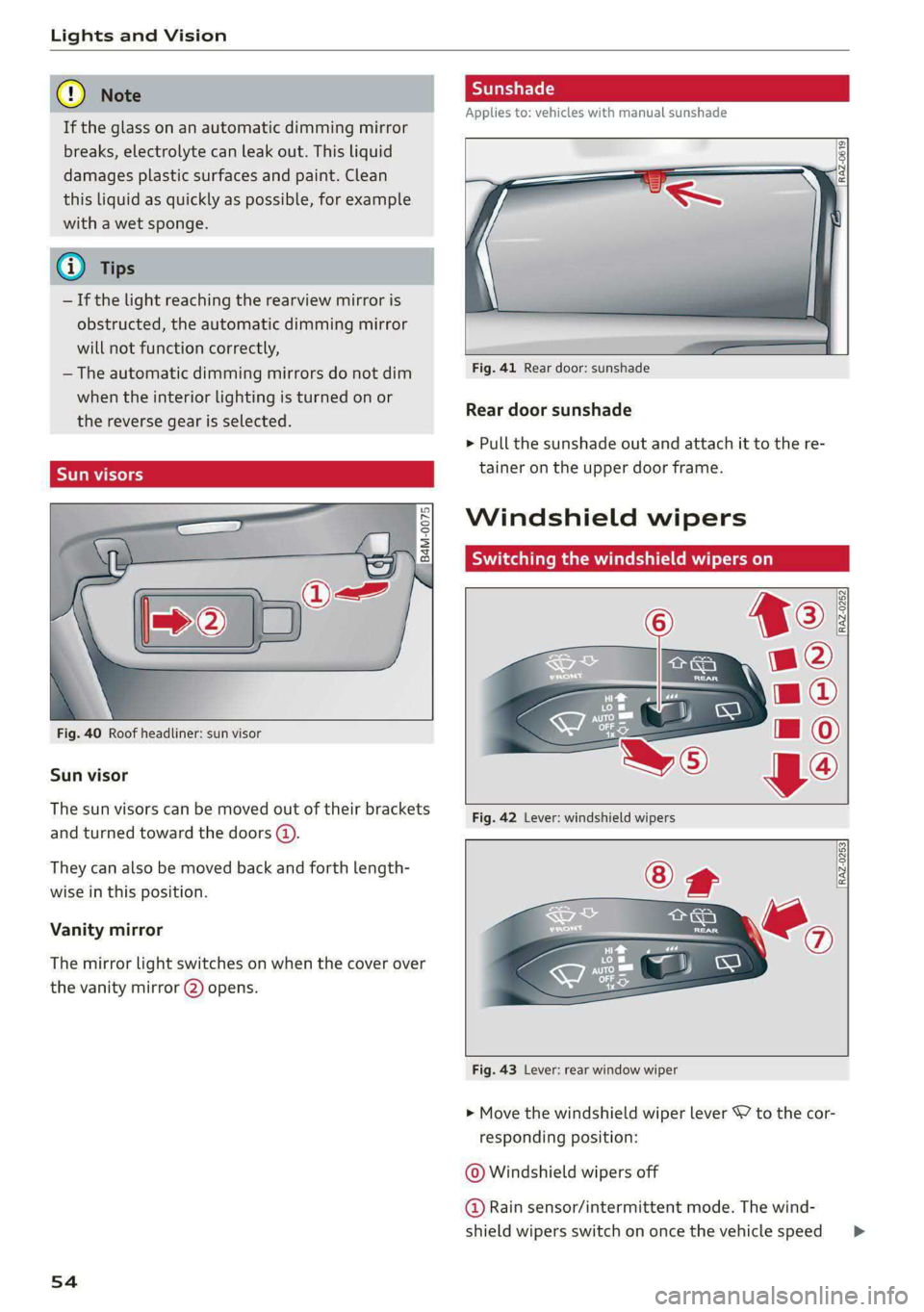
Sun visors
Fig. 40 Roof headliner: sun visor
Sun visor
The sun visors can be moved out of their brackets
and turned toward the doors @).
They can also be moved back and forth length-
wise in this position.
Vanity mirror
The mirror light switches on when the cover over
the vanity mirror @) opens.
54
Applies to: vehicles with manual sunshade
Fig. 41 Rear door: sunshade
Rear door sunshade
> Pull the sunshade out and attach it to the re-
tainer on the upper door frame.
Windshield wipers
Switching the windshield wipers on
RAZ-0253
Fig. 43 Lever: rear window wiper
> Move the windshield wiper lever 7 to the cor-
responding position:
© Windshield wipers off
@ Rain sensor/intermittent mode. The wind-
shield wipers switch on once the vehicle speed >
Page 85 of 308

4KE012721BF
Storage and convenience
Tie-downs
There are tie-downs (a) in the luggage compart-
ment to secure pieces of luggage and objects.
>» Use the tie-downs to secure the cargo.
Cargo net
Applies to: vehicles with cargo net
Use the cargo net (2) to secure lighter objects in
the luggage compartment
> Fold the clip for the tie-downs upward.
> Attach the hooks for the cargo net to the tie-
downs.
Cargo floor
Depending on vehicle equipment, there may be a
removable box under the cargo floor.
> To remove the cargo floor, pull the entire cargo
floor toward the back of the vehicle.
> To insert the cargo floor, lay the cargo floor into
the guide and then slide it toward the backrest
all the way until it stops.
Roof rack
General information
Applies to: vehicles with roof rack mount
Fig. 77 Roof rail: mounting points
If luggage or cargo is to be carried on the roof,
you must observe the following:
— These roof racks are the basis for a complete
roof rack system. Only roof racks that are suita-
ble for your vehicle may be used. Audi recom-
mends roof racks and attachments from the
Audi Genuine Accessories program.
— Make sure the roof rack is mounted on the vehi-
cle only at the specified locations @.
— Note the permitted axle load, permitted total
weight, and permitted roof load of your vehicle
= page 291. The roof load is the total of the
weight of the roof rack, the attachments and
the cargo you are carrying. However, you must
also note the permitted load of the carrier sys-
tem being used.
Z\ WARNING
— Follow the installation instructions provided
with the roof rack system. If you do not se-
cure the roof rack system and objects on the
roof correctly, they could come loose from
the vehicle and cause an accident.
—The risk of an accident increases when using
a roof rack system, because it changes the
driving characteristics by shifting the center
of gravity and/or the increasing the surface
area exposed to wind. You may need to
adapt your driving style and speed to the
current conditions.
® Note
Make sure that the luggage compartment lid
and the panoramic glass roof* do not come in-
to contact with objects on the roof when they
are open.
(@) For the sake of the environment
Energy usage will increase because of the in-
creased wind resistance. Remove the roof rack
when you are no longer using it.
83
Page 98 of 308
Driving
ZA\ WARNING
Other road users may not be able to defini-
tively hear electric vehicles when they are
driving. This increases the risk of an accident
particularly when driving in areas with little
traffic, when maneuvering, or when driving in
reverse.
ient and environmentally-friendly
i}
Your driving style greatly influences the amount
of fuel and energy consumed, the environmental
impact, and the wear on the motor, brakes, and
tires. Note the following information for efficient
and environmentally-conscious driving:
— Select the Audi drive select* efficiency mode.
— Turn off electrical equipment that is not need-
ed, for example seat heating*.
— Anticipate upcoming traffic situations while
driving to avoid unnecessary acceleration and
braking.
— Avoid driving at high speeds.
— Avoid adding extra weight to the vehicle if pos-
sible, for example by not leaving roof racks or
bike racks installed when they are not needed.
— Make sure the tire pressure is correct.
— Have maintenance performed regularly on the
vehicle.
— Do not drive with winter tires during the summ-
er.
— Brake early and evenly to use recuperation.
Messages
B Drive system: malfunction! Safely stop vehi-
cle
There is a malfunction in the drive system. The
vehicle can no longer be driven. Park the vehicle
in a safe location as soon as possible. Secure the
vehicle against rolling before exiting the vehicle
= page 91. See an authorized Audi dealer or au-
thorized Audi Service Facility for assistance.
B Drive system: malfunction! Please contact
Service
96
There is a malfunction in the drive system. Drive
slowly to an authorized Audi dealer or authorized
Audi Service Facility to have the malfunction cor-
rected.
oO Drive system: warning! Limited performance
The driving power is limited. The high-voltage
battery may not be sufficiently charged or is at
the operating temperature threshold, for exam-
ple, when the outside temperatures are extreme-
ly cold.
BS Vehicle sound: malfunction! Pedestrians
cannot hear vehicle. Please contact Service
There is a malfunction in the vehicle sound func-
tion. Drive extremely carefully, since other road
users may not be able to hear your electric vehi-
cle. Drive to an authorized Audi dealer or author-
ized Audi Service Facility immediately to have the
malfunction corrected.
Brakes
ere el eiy
You can apply the vehicle's brakes using the brake
pedal.
Operating noise
Noises may occur when braking depending on the
speed, braking force, and outside conditions such
as temperature and humidity.
When the vehicle is stationary, the brake system
performs system tests at regular intervals. This
can cause brief noise and haptic feedback effects
on the brake pedal.
Braking effect
The response time from the brakes depends on
the weather and environmental conditions. To
ensure the optimal braking effect, the brake sys-
tem is cleaned at regular intervals. This is done
by applying the brake pads to the brake rotors for
a short period of time when driving at high
speeds when the windshield wipers are switched
on.
If the brake system becomes damp, for example
after driving in heavy rain, the braking effect may >
Page 209 of 308

4KE012721BF
Radio
Radio
General information
Selecting the radio
ey
ney) os 2 )
\) ea
102.9 1) 2 FM-HDB
(3) OME 4)
aa
e my 106.7 ama
mee
eo £0010 0—=@)
Saray fa
RAX-0190)
ca
Fig. 143 Upper display: SiriusXM channel list
Depending on the vehicle equipment, the radio
may support the FM and SiriusXM (satellite radio)
frequency bands. Using the HD Radio receiver* al-
so allows you to receive radio stations on the FM
bands in digital format.
Depending on the vehicle equipment and the se-
lected station list, the following information will
be displayed:
@ Station list
Shows the stations that are currently availa-
ble. The station list updates automatically.
@ Stations
For example, the station name may be dis-
played depending on availability.
@ HD Radio technology
FM stations that can be received by digital ra-
dio are marked with the HD Radio technology
symbol H).
If reception quality declines, the radio will
automatically switch to the analog FM sta-
tion depending on availability.
@ Additional audio programs
Digital HD Radio stations may contain multi-
ple additional audio programs. If you lose re-
ception, the additional audio programs will
be muted since they can no longer be re-
ceived.
© Radio ID
Your radio ID and contact data for your satel-
lite radio provider are displayed.
Channel number
% No reception e®
The station cannot be received.
In addition to the symbols for the usual frequen-
cy bands, the following information may also be
available depending on vehicle equipment:
Symbol | Description
The station provides information in
the background for an online station
alternative. Online station tracking
must be switched on for this
=> page 213.
The station is received through the In-
ternet.
The system attempts to receive the
station/podcast through the Internet.
G@) Tips
— Contact the SiriusXM* provider if you would
like to receive satellite programming.
— Buildings, tunnels, bridges, open areas, oth-
er vehicles or objects on the vehicle roof can
affect reception.
— Satellite radio* is not available in all re-
gions.
Adjusting the radio using the MMI
> Applies to: MMI: To set a frequency band, select
on the home screen: RADIO > Source a catego-
ry.
> Applies to: MMI: To set a station, select on the
home screen: RADIO > Source > a category >a
station/podcast*.
> To select a frequency, follow the instructions
under > page 209, Free text search.
Adjusting the radio using the multifunction
Tare maa 118
Requirement: radio mode must be on.
207
>
Page 248 of 308
Wheels
Production options weight
means the combined weight of
those installed regular production
options weighing over 5 lbs.
(2.3 kg) in excess of those stand-
ard items which they replace, not
previously considered in curb
weight or accessory weight, in-
cluding heavy duty brakes, ride
levelers, roof rack, heavy duty
battery, and special trim.
Radial ply tire
means a pneumatic tire in which
the ply cords that extend to the
beads are laid at substantially
90 degrees to the centerline of
the tread.
Recommended inflation
pressure
see > page 244, Cold tire infla-
tion pressure.
Reinforced tire
means a tire designed to operate
at higher loads and at higher in-
flation pressures than the corre-
sponding standard tire. Rein-
forced tires may be identified as
“XL”, “xl”, “EXTRA LOAD”, or “RF”
on the sidewall.
246
Rim
means a metal support for a tire
or a tire and tube assembly upon
which the tire beads are seated.
Rim diameter
means nominal diameter of the
bead seat. If you change your
wheel size, you will have to pur-
chase new tires to match the new
rim diameter.
Rim size designation
means rim diameter and width.
Rim width
means nominal distance between
rim flanges.
Sidewall
means that portion of a tire be-
tween the tread and bead.
Speed rating (letter code)
means the speed at which a tire is
designed to be driven for extend-
ed periods of time. The ratings
range from 93 mph (150 km/h)
to 186 mph (298 km/h) > table
on page 242. You may not find
this information on all tires be-
cause it is not required by law.
The speed rating letter code,
where applicable, is molded on
the tire sidewall and indicates the >
Page 303 of 308
4KE012721BF
Replacement parts.............-.00000- 287
Replacing fuses ........ 000 esc ce eee ees 277
Reporting Safety Defects................ 287
Reverse gear
refer to Gear's « ssc » waver 6 owe es eter 92
RIMS:s ss sesccie = o secece oo ee 2 ween eo a eo 255
Cleaning ....... 0... cece cece eee 263
Road Garnier crs ao sumene 2 3 omme o wneno © woe 103
ROLLING 2 sccmnes 2 snece ev mice ee anaes =n aerene @ ¥ 91
Rolling ability
Electromechanical parking brake......... 98
Hold assist....................0.00005 99
Transmission idle’s « 2 wees + ease 2 5 pea o 5 we 93
Roof
refer to Panoramic glass roof............ 44
ROOFLOA « swisins as sxawes oo orosaun oo imaeen ow a 291
Roofifackeuws s ¢ geen ss news sy ewes ¢ oREES ¢ ae 83
also refer to Roof rack..............0--. 83
Route guidance
StOpPiINg...... cece eee eee eee eee 198
also refer to Navigation............... 194
Raeute planner (@-trOn): « «cows oe coen sc eee 198
Running direction (tires)...........00005 272
S
Safety belts. ........ 0... cee eee eee eee 64
Cleaning « ¢ ecews ¢ 2 sews ¢ e seems co oem ee os 264
LOCKING ire = = wosicens w= coevece « © eweere © w cireuene ou ee 75
Securing child safety seats.............. 75
Satellite map... 2.2... eee eee eee 202
Screen
refer to Touch display..............000. 15
Screwdriver .......... 0c c eee e eee eee 267
Search function
refer to Free text search............... 222
Seat heating............ 0. eee eee eee 86
Seats
Adjusting the front seats............... 60
Cleaning « « sess vs ewes ow seen 2 a sure & o oe 264
Folding
Front passenger’s seat adjustment....... 62
Head restraints: « sisi so oun 2 x svemve © 2 ome 63
Massage function.............. eee eee 60
Memory function..............2-.0 eee 67
Resetting the position.................. 61
Storing aseat profile................... 67
Seatventilationrc «cow «x cecsoee wx awavous oo as 86
Securing the vehicle ............c0eeeeees 91
Selecting a source (media).............. 218
Selector lever's « saws « x warms s g eres ag es g 92
Sensors
Coverage areas aves. w 3 saves w 2 coms o 0 ous 130
Locations..... 00.0.0... ce eee ee eee 131
Service interval display..............0.. 239
Setting measurement units.............. 228
SOCLINGS’s 5 2 ssees w & come © o cone so meses oH Hee 228
Announcements and tones............. 228
Bluetooth........................005 229
Datetaniel tim@iss s ¢ wusu s ¢ eeens « ¢ caves a 2s 228
Dit CORY. cesses x © cance 4 o memes ow memes % sree 183
E-mail... eee eee 184
LANGUAGE sce x + mewn x 2 eS 4 2 EEE 4 2 ce 228
Measurement:umitsice 6 2 cance so namie x + anne 228
Media... .. 2... cee eee eee eee eee 222
NaVigatioOnies + « sac = « sat ¢ x news se ees 205
Radi@iavsns x © suns ov svarene sw amma © x xno Wa 0 213
Sound .......... 0000 eee eee eee eee 228
SYStEM s < s dawg < fae & @ Hotes GY Here ¥ oe 228
Telephone :evccsie = seceses o = eierewe = 4 aoeuene © v eeeve 182
Text MesSageS... 1.2... cee eee eee 183
TIME ZONGicas « s awe 3 y Gee + EES Ge eR 228
WWicEi OTSPOE acces 2 6 cee ov ee a coe oo 189
Setting the charging target.............. 115
Setting the language...............-... 228
Setting the time ss ¢ ¢ ees ss pees cv teas 9? 228
Shift paddles
Adjusting recuperation................. 95
Ship ¢arriet > sees <= ewe s 5 eews =e ewe ee oe 103
SHOp)s = = ews ¢ o ees 2 o ees ge teen gs eee 188
Shortcut
referto Shortcuts « sess a seas ss ova sean 21
SHOPteUtss « < means = nwa ov ewe yy BeeE Ge 21
SHUfElGnye = = soem : seems ¢ SRR GE ReGH s Fe 220
Side assist... .............0 00000 c eee 160
Cleaning the sensors...........00e0 00 262
SIMPGStG 's seus x + emmys xs eae ge Ree ee GOR 187
Sliding/tilting sunroof
refer to Panoramic glass roof............ 44
Smart Favorites
refer to PresetS.........-..00--00 eee 210
Smartphone
refer to Telephone.............02e0 00s 175
301