airbag AUDI Q2 2021 Owner´s Manual
[x] Cancel search | Manufacturer: AUDI, Model Year: 2021, Model line: Q2, Model: AUDI Q2 2021Pages: 364, PDF Size: 87.77 MB
Page 152 of 364
Intelligent technology
Dynamic power management
While the vehicle is moving, this function distrib
utes the available power to the various electrical
components and systems according to their re
quirements. It ensures that on-board systems do
not consume more electrical power than is being
generated,
and thus maintains the maximum
possible vehicle battery power level.
® Note
- The power management system is not able
to overcome the given physical limits.
Please remember that the power and life of
the vehicle battery are limited.
- If the indicator lamp
|3 ^page
31 appears,
the starting ability may be impaired.
Starting ability has first priority.
Short trips, city traffic and low temperatures all
place a heavy load on the vehicLe battery. In
these conditions a large amount of power is
con
sumed,
but only
a
small amount is supplied. The
situation is also critical if electrical equipment is
in use when the engine is not running. In this
case power is consumed when none is being
gen
erated.
In these situations you will be aware that the
power management system is intervening to
con
trol the distribution of electrical power.
When the vehicle is parked for long periods
If
you
do not drive your vehicle for a period of
several days or weeks, the power management
will gradually shut off the on-board systems one
by one, or reduce the amount of current they are
using.
This limits the amount of power consumed
and helps to ensure reliable starting even after a
long period. Certain convenience features, such
as remote controL unlocking, may not be availa
ble.
These functions will be restored when you
switch on the ignition and start the engine.
150
With the engine switched off
If
you
listen to the radio or use the other info
tainment functions when the engine is not
run
ning,
this will discharge the vehicle battery.
The infotainment display will show a warning
message before the battery power drops to a Lev
el where the starting ability is impaired. This
message warns you that the system you are using
will soon be switched off automatically. You
should therefore start the engine if
you
wish to
continue using the system.
When the engine is running
Although the alternator generates electrical
power, the vehicle battery can still become dis
charged while the vehicle is being driven. This can
occur when a lot of power is being consumed but
only
a
small amount supplied, especially if the
vehicle battery is not fully charged initially.
To restore the necessary energy balance, the sys
tem
will
then temporarily shut off the electrical
components that are using a lot of power, or re
duce the current they are consuming. Heating
systems in particular use a Large amount of elec
trical power. If
you
notice, for instance, that the
seat heating* or the rear window heater is not
working,
they may have been temporarily switch
ed off or regulated to a lower heat output. These
systems will be available again as soon as
suffi
cient electrical power is available.
You may also notice that the engine runs at a
slightly faster idling speed. This is quite normal,
and no cause for concern. The increased idling
speed allows the alternator to meet the greater
power requirement and charge the vehicLe bat
tery at the same time.
Information saved in the
control units
The vehicle is fitted in the factory with electronic
control units that, among other things, control
the engine and the gearbox. The controL units al
so monitor the exhaust system and the airbags.
The control units continually analyse data rele
vant to the vehicLe while you are driving. In the •
Page 153 of 364
Intelligent technology
CO
< o rN
iv
rN
t-H
o < 00
event of faults or anomalies in the vehicLe data,
only these data are saved. As a rule, faults are
shown by the warning lamps in the instrument
cluster.
Data saved in the control units can only be read
and analysed with special equipment.
A qualified workshop is only able to recognise
and deal with faults by using the relevant saved
data.
Among other things, the saved data may
contain the following information:
- Data relating to the engine and the gearbox
-Speed
- Direction of travel
- Braking force
- Seat belt warning system data
The control units installed will not under any cir
cumstances record conversations in the vehicle.
Event data recorder
Your vehicLe is not equipped with an event data
recorder.
In an event data recorder, information about the
vehicle is temporarily saved. In the event of an
accident, you can therefore obtain detaiLed infor
mation about the course of events. On vehicles
with an airbag system, accident-related data
such as impact speed, seat belt status, seat
posi
tions and trigger times can be saved. The exact
information saved depends on the manufacturer.
The installation of an event data recorder is sub
ject to the agreement of the vehicle's owner. This
process is governed by legislation in some coun
tries.
Reprogramming control units
All data for controlling components are saved in
the control units. Some convenience features,
such as one-touch signalling, single door unlock
ing and display messages can be reprogrammed
using special workshop equipment. If any
con
venience features are reprogrammed, the infor
mation in this Owner's Manual will no longer be
accurate for the features that have been
changed.
We recommend having the reprogram
ming approved.
Your Audi dealer will be able to provide you with
information about possibLe reprogramming op
tions.
Event memory
There is a diagnostic connection for reading out
the event memory Located in the
footweLL
on the
driver's side of the vehicle. Information regard
ing the operation and status of the vehicle's elec
tronic control units is stored in the event memo
ry. The event memory should only be read out
and erased by
a
qualified workshop.
A WARNING
The diagnostic connection must not be used
for other purposes. Incorrect use can cause
malfunctions - risk of accident!
151
Page 202 of 364
Audi connect (infotainment)
- Audi connect (infotainment) enables you to
access the Twitter service. Audi cannot
guarantee that these services will be availa
ble indefinitely; this is the responsibility of
Twitter.
Travel guide
Applies to: vehicles with Audi connect (infotainment)
Using the Audi MMI connect app, you can store
special destinations
on
your mobile device (e.g.
smartphone) and
use
them for route guidance
on the MMI.
Important:
The Audi MMI connect app must have been in
stalled and started on your mobile device.
You must be logged in to your myAudi account in
the Audi MMI connect app and must have selec
ted your vehicle.
The Wi-Fi function must be activated on your mo
bile device and on the MMI.
A network connection must be set up on the MMI
opage
203.
*•
Select:
|MENU|
button
>
Audi connect
>
left
control button > Category Information
>
Trav
el.
After you call up the travel guide, you will be
shown travel tips for the area you are currently
in.
These include current ratings and the category
they belong to.
•
Press the left control button to change the cat
egory (e.g. bars nearby).
A WARNING
- MobiLe devices, tablet and laptop computers
and devices of
a
similar weight can only be
operated safely when the vehicle is station
ary. Like any loose object, they can be cata
pulted through the vehicle in an accident
and cause serious injuries. Always make sure
that such devices are securely stowed while
you are driving.
- No Wi-Fi devices may be used from the front
seats in the areas around the airbags while
the vehicle is being driven. Please also ob
serve the safety warnings in the chapter on
tapage
282, Front airbags.
® CAUTION
Please always observe the information
•=>©
in
Wi-Fi hotspot on page 202.
© Note
- Measurement units, language settings and
times are displayed on the infotainment dis
play according to the how they are set in the
system settings
^>page
255.
Audi connect (infotainment) in the
navigation system
Applies to: vehicles with navigation system and Audi connect
(infotainment)
•
Select:
|MENU|
button
>
Audi connect
>
left
control button > Navigation.
The following Audi connect infotainment services
are currently available:
- Navigation with Google Earth and Google
Street View
opage
222.
- Online point of interest search with speech
dialogue system (e.g. restaurants): For
plan
ning a route using the MMI control console
^page
212 and the speech dialogue system
^>page
164.
- Adding a destination to your MMI via your
myAudi account or Google Maps
^>page
222.
- Online traffic information: Up-to-the-minute
reception of information on accidents,
road
works and other incidents
^>page
226.
- myAudi special destinations: Personal special
destinations can be imported to your MMI di
rectly in the vehicle as an online update
•=>
page 224.
- Map update: Navigation map updates can be
imported directly into the vehicle via SD card or
as an online update*
ipage
223.
© Note
- The Audi connect infotainment map update
service using an SD card allows you to find
out which software version is installed in
your vehicle. You can then check whether a
200
Page 206 of 364
Audi connect (infotainment)
•
Select:
1MENU[
button
>
Telephone
>
right
con
trol button
>
Wi-Fi settings.
The following settings can be made:
Wi-Fi
The Wi-Fi hotspot is deactivated when the vehicle
leaves the factory. Switch the Wi-Fi hotspot on
before establishing an Internet connection be
tween your vehicle and your Wi-Fi device.
-
on:
The
MMI's
Wi-Fi hotspot is activated and
visible to other devices. You can connect your
Wi-Fi device to the MMI.
- off: The MMI's Wi-Fi hotspot is deactivated.
Wi-Fi devices will not be able to connect to the
Internet.
Network
key
The Wi-Fi connection between your vehicle and
the Wi-Fi device (laptop or mobile phone) is en
crypted.
Before a connection can be established,
you must enter the following values/settings
when setting up your Wi-Fi device (these values
can be edited as required):
-Access point
(SSID):
Name of the Wi-Fi net
work.
- Password: A random MMI password is set at
the factory. This password can be changed. The
encryption type WPA2 requires the password to
be at least 8 characters
long.
Please select
a
se
cure password.
- Discoverability: To switch the discoverability of
your Wi-Fi network on
([vj)
or off.
Network
search15
A list of the Wi-Fi networks available near you is
displayed.
Connection to personal hotspot15
The Wi-Fi hotspot of the MMI is activated. The
MMI can establish an Internet connection to a
personal Wi-Fi hotspot (e.g. smartphone). You
can search for your personal hotspot and connect
to the MMI using Network search. For more in
formation,
please refer to
^>page
195.
Not available in all markets.
This mode is not available if your own mini SIM
card is inserted in the SIM card reader.
A<
i
WARNING
- The Audi connect infotainment services
should only be used via a Wi-Fi hotspot
when the vehicle is stationary or from the
rear seats if the vehicLe is in motion - risk of
accident!
- Mobile devices, tablet and laptop computers
and devices of
a
similar weight can only be
operated safely when the vehicle is station
ary. Like any loose object, they can be cata
pulted through the vehicle in an accident
and cause serious injuries. Always make sure
that such devices are securely stowed while
you are driving.
- No Wi-Fi devices may be used from the front
seats in the areas around the airbags while
the vehicLe is being driven. Please also ob
serve the safety warnings in the chapter on
<3>page
282, Front airbags.
- Do not allow the features of the Wi-Fi hot-
spot to distract you from watching the traf
fic - taking your eyes off the road can cause
an accident.
© CAUTION
- Depending on the configuration of the Wi-Fi
device you are using (refer to the operating
manual of your Wi-Fi device for more de
tails),
the SIM card of the device may be
used in certain cases to provide the data
connection for Internet-supported apps and
services which use the MMI Wi-Fi hotspot.
Depending on your network provider, you
may be charged for this service, especially if
you are using the system abroad. We there
fore strongly recommend that you use an
unlimited data
plan.
For more information,
contact your service provider. Some exam
ple cases are described below:
- Data plan expired/used up
- Data plan not valid abroad •
202
Page 208 of 364
Audi connect (infotainment)
Audi connect (MMI)
With the Audi connect (MMI) function, you can
allow or deny the use of Audi connect infotain
ment services if the connection is
set
to no re
quest or with request.
Wi-Fi devices*
You can use the Wi-Fi devices function to allow
or deny a connection to the Internet.
Connection settings
Depending on the SIM card used, the connection
may be configured automatically. However, these
settings can be changed. For more information,
contact your service provider.
- APN: The system access point depends on your
mobile network service provider and is assigned
automatically.
- User name: The user name for your online pro
file is assigned by your mobile network service
provider.
- Password: The password for your online profile
is assigned by your mobile network service pro
vider.
- Use settings: The changed connection settings
are
stored.
Reset configuration
An online profile is created and configured auto
matically. The Connection settings you have
changed manually are reset to the default set
tings.
/Sy
WARNING
- Do not allow the features of the Wi-Fi hot-
spot to distract you from watching the traf
fic - taking your eyes off the road can cause
an accident.
- Mobile devices, tablet and laptop computers
and devices of a similar weight can only be
operated safely when the vehicle is station
ary. Like any loose object, they can be cata
pulted through the vehicle in an accident
and cause serious injuries. Always make sure
that such devices are securely stowed while
you are driving.
- No Wi-Fi devices may be used from the front
seats in the areas around the airbags while
the vehicle is being driven. Please also ob
serve the safety warnings in the chapter on
^>page
282, Front airbags.
© CAUTION
Please always observe the information
•=>©
in
Wi-Fi hotspot on page 202.
© Note
- According to the factory settings, the data
connection will be interrupted initially when
you travel abroad to protect you from unex
pected roaming charges. If you want to use
Audi connect infotainment services abroad,
you must first activate the Data roaming
option.
- For more information on roaming charges,
contact your service provider.
- Further information can be found on the In
ternet at www.audi.com.
General notes on Audi
connect (infotainment)
Audi connect infotainment services
Applies to: vehicles with Audi connect (infotainment)
-The mobile phone standard LTE* is not
available for use in all countries. For further
information, please consult an Audi dealer
or your mobile network service provider.
- Whether Audi connect infotainment serv
ices can be used depends on the availability
of services provided by third parties.
- Audi connect infotainment services are only
available within the mobiLe network area
covered
by
your network provider.
- The availability, scope, provider and price of
the services offered can vary, as can the way
in which the services are displayed on the
screen.
These variations depend on your
country, model, model year, device and mo
bile phone contract.
204
Page 242 of 364
Media
Depending on the device you are using, the me
dia are started and operated using the mobile de
vice
or
the MMI.
©
i
Note
- Pay attention to any connection queries on
your Bluetooth device.
-You can bond several Bluetooth audio play
ers to the MMI system; however only one
connection can be active at
a
time.
- The system supports the Bluetooth proto
cols AVRCP (1.0/1.3/1.4) and A2DP.
- Please consider the volume control on your
Bluetooth device. Audi recommends setting
the volume of mobile devices to maximum
when they are being used as Bluetooth au
dio players.
- Which media functions (e.g. random play
back) are supported depends on the Blue
tooth device you are using.
- For more information on which devices are
supported,
please go online (e.g.
www.audi.com/bluetooth) or contact an
Audi dealer.
Wi-Fi audio players
Applies to: vehicles with Wi-Fi
The
MMI's Wi-Fi audio player media source al
lows you to connect and operate your Wi-Fi me
dia player (e.g. smartphone) to play music wire
lessly from your player's media centre.
The
me
dia player is connected via the vehicle's Wi-Fi
hotspot. A
UPnP
server app or an integrated
UPnP/DLNA
server on the media player is re
quired to
access
the media centre of your media
player.
Important: The Wi-Fi function of the media play
er must be switched on. The Audi MMI connect
app or
a
UPnP server app must be installed on
your media player. Or: You must be using a
UPnP/DLNA server integrated in the media play
er.
-
To
connect a media player: Select the |MEDIA|
button.
Press the left control button repeatedly
until the source overview
^>page
243 is dis
played.
Select and confirm Wi-Fi audio player
® tapage
243, Fig. 200.
- You may need to select and confirm Wi-Fi off >
Activate Wi-Fi to switch Wi-Fi on in the MMI.
Select Wi-Fi settings if necessary. Use the set
tings of the Wi-Fi hotspot for the media player
you are using.
- To start the Wi-Fi audio player: Start the Audi
MMI connect app or
a
UPnP server app, or ena
ble media sharing on your media player.
To use the media player: The media player is op
erated using the MMI.
- Press the left control button repeatedly until
the menu item Folders appears. Select and
con
firm Folders.
- To play music from a media player: Select and
confirm Media centre.
Internet radio: See
^>page
239.
(7) CAUTION
Please always observe the information
>=>©/n
Wi-Fi hotspot on page 202.
(T)
Note
- Inserting or removing the mini SIM card
from the SIM card reader* causes the Wi-Fi
connection to be reconfigured. This may •
A
WARNING
- Do not allow the features of the Wi-Fi hot-
spot to distract you from watching the traf
fic - taking your eyes off the road can cause
an accident.
- Mobile devices, tablet and Laptop computers
and devices of
a
similar weight can only be
operated safely when the vehicle is station
ary. Like any Loose object, they can be cata
pulted through the vehicle in an accident
and cause serious injuries. Always make sure
that such devices are securely stowed while
you are driving.
- No Wi-Fi devices may be used from the front
seats in the areas around the airbags while
the vehicle is being driven. Please also ob
serve the safety warnings on
^>page
282,
Front airbags.
238
Page 244 of 364
Media
The following options may be available depend
ing on the information displayed (e.g. the sta
tion/track currently playing):
- Sound settings: Refer to
^>page
260.
- Wi-Fi settings: Refer to
Opage
201, Wi-Fi hot-
spot.
- Connection manager: Refer to
<>page
257.
- Additional options may be available depending
on the active online media service or Internet
radio function.
A WARNING
- Mobile devices, tablet and laptop computers
and devices of
a
similar weight can only be
operated safely when the vehicle is station
ary. Like any Loose object, they can be cata
pulted through the vehicle in an accident
and cause serious injuries. Always make sure
that such devices are securely stowed while
you are driving.
- No Wi-Fi devices may be used from the front
seats in the areas around the airbags while
the vehicle is being driven. Please also ob
serve the safety warnings on
^>page
282,
Front airbags.
© CAUTION
- Please always observe the information
•=>©
in Wi-Fi hotspot on page 202.
- In order to use online media, you generally
have
to
set up an account with an online
media service, which may lead
to
additional
costs,
especially if
you
are using the service
abroad.
© Note
- Depending on the Internet connection and
network
load,
playback of the online media
services may be interrupted.
- Whether online media and Internet radio
can be used depends on the availability
of
services provided by third parties.
- AUDI AG only enables you
to
access online
media services via the MMI system and ac
cepts no responsibility for the content of
online media services.
- Please always note the information in the
chapter
^>page
204, General notes on Audi
connect (infotainment).
- Depending on the mobile device you are us
ing,
you may experience interruptions
in
media playback when using the Audi MMI
connect app. To avoid interruptions, keep
the Audi MMI connect app running in the
foreground and do not lock the screen on
your mobile device.
- Audi dealerships will be able
to
provide you
with further information on online media.
Multimedia connections
USB adapters for Audi music interface or
USB charging socket
Depending on the vehicle equipment, you may be
able
to
connect your mobile devices (e.g. smart-
phones, MP3 players)
to
the Audi music interface
or the
USB
charging socket using the special
USB
adapters.
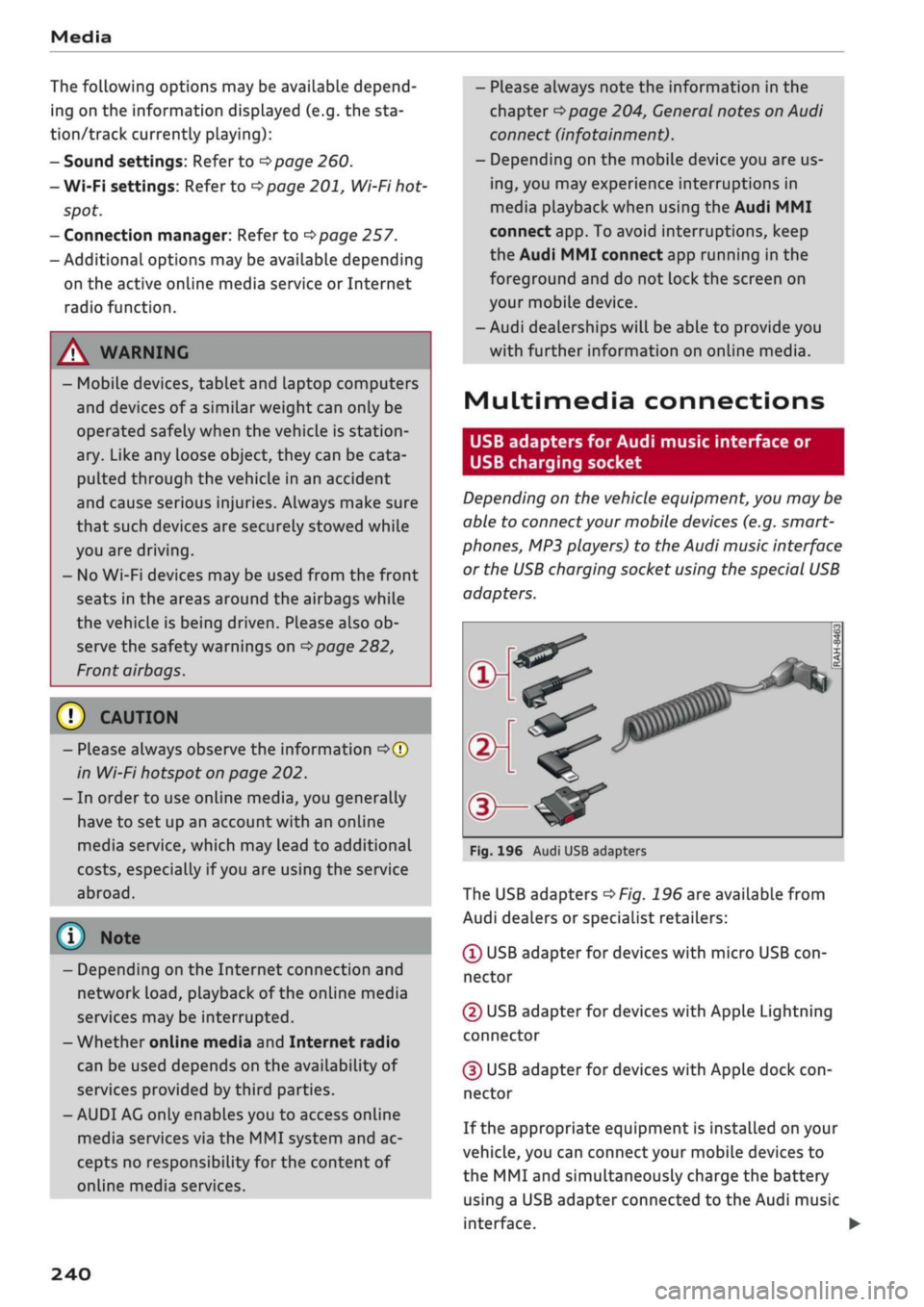
<
Fig.
196 Audi USB adapters
The USB adapters
^>Fig.
196 are available from
Audi dealers or specialist retailers:
® USB adapter for devices with micro USB
con
nector
© USB adapter for devices with Apple Lightning
connector
© USB adapter for devices with Apple dock
con
nector
If the appropriate equipment is installed on your
vehicle, you can connect your mobiLe devices
to
the MMI and simultaneously charge the battery
using a USB adapter connected
to
the Audi music
interface.
•
240
Page 269 of 364
Safe driving
CO
<
O
rN
iv
rN
•-i
00
Correct sitting positions
Correct driving position
The
correct driving position is important for safe
driving.
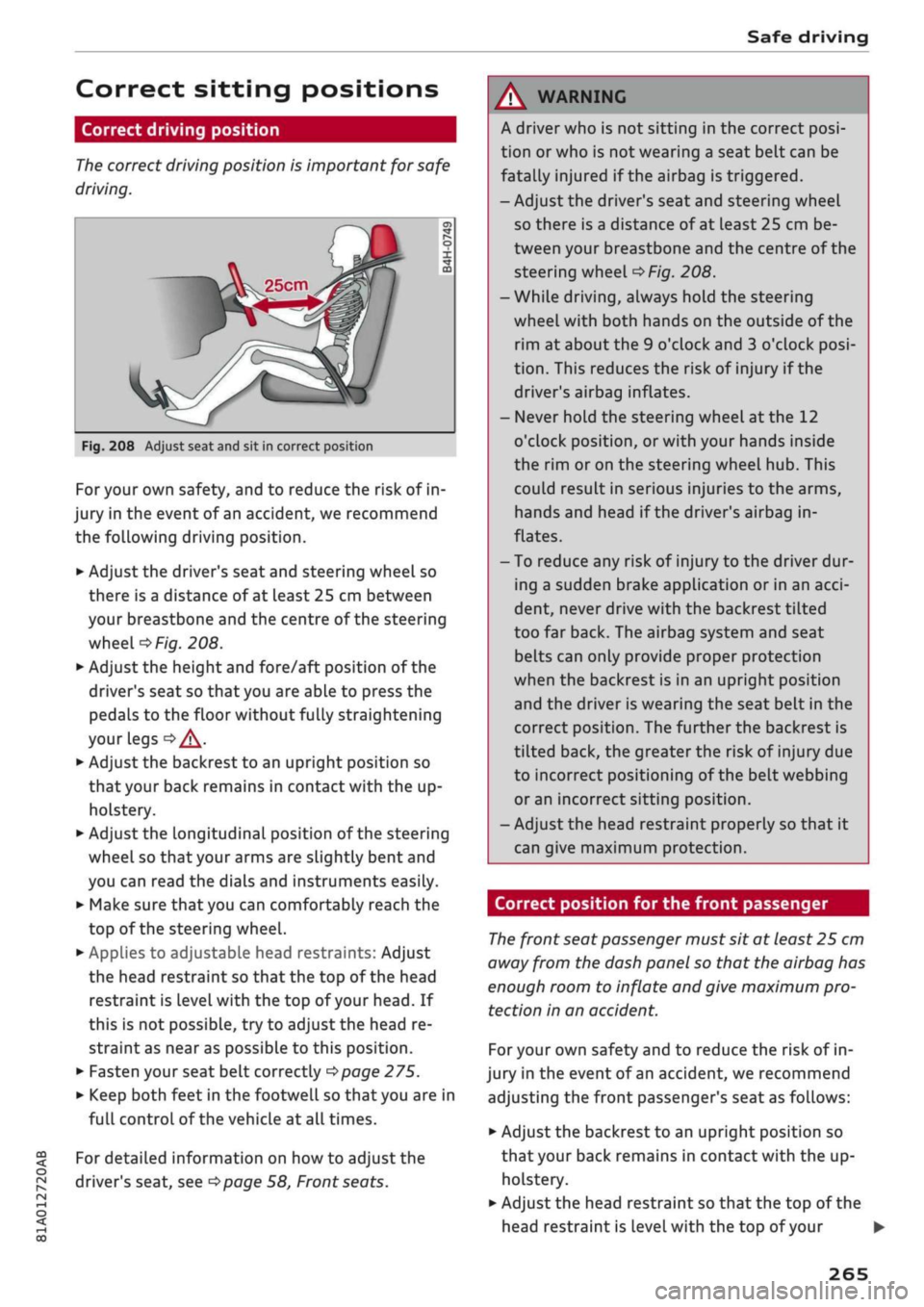
25cm
Fig.
208 Adjust seat and sit in correct position
For your own safety, and to reduce the risk of in
jury in the event of an accident, we recommend
the following driving position.
•
Adjust the driver's seat and steering wheel so
there is a distance of at least 25 cm between
your breastbone and the centre of the steering
wheel
o>F/g.
208.
•
Adjust the height and fore/aft position of the
driver's seat so that you are able to press the
pedals to the floor without fully straightening
your legs
oA.
•
Adjust the backrest to an upright position so
that your back remains in contact with the up
holstery.
*•
Adjust the longitudinal position of the steering
wheel so that your arms are slightly bent and
you can read the dials and instruments easily.
•
Make sure that you can comfortably reach the
top of the steering wheel.
•
AppLies to adjustable head restraints: Adjust
the head restraint so that the top of the head
restraint is
level
with the top of your head. If
this is not possible, try to adjust the head re
straint as near as possible to this position.
•
Fasten your seat belt correctly
^>page
275.
•
Keep both feet in the footwell so that you are in
full controL of the vehicle at all times.
For detailed information on how to adjust the
driver's seat, see
^>page
58, Front seats.
A WARNING
A driver who is not sitting in the correct
posi
tion or who is not wearing a seat belt can be
fatally injured
if
the airbag is triggered.
- Adjust the driver's seat and steering wheel
so there is a distance of at least 25 cm be
tween your breastbone and the centre of the
steering wheel
^>Fig.
208.
-While driving, always hold the steering
wheel with both hands on the outside of the
rim at about the 9 o'clock and 3 o'clock
posi
tion.
This reduces the risk of injury if the
driver's airbag inflates.
- Never hold the steering wheel at the 12
o'clock position, or with your hands inside
the rim or on the steering wheel hub. This
could result in serious injuries to the arms,
hands and head if the driver's airbag in
flates.
- To reduce any risk of injury to the driver dur
ing a sudden brake application or in an
acci
dent, never drive with the backrest tilted
too far back. The airbag system and seat
belts can only provide proper protection
when the backrest is in an upright position
and the driver is wearing the seat belt in the
correct position. The further the backrest is
tilted back, the greater the risk of injury due
to incorrect positioning of the belt webbing
or an incorrect sitting position.
- Adjust the head restraint properly so that it
can give maximum protection.
Correct position for the front passenger
The
front seat passenger must sit at least 25 cm
away from the dash panel so that the airbag has
enough room to inflate and give maximum pro
tection in an accident.
For your own safety and to reduce the risk of in
jury in the event of
an
accident, we recommend
adjusting the front passenger's seat as follows:
•
Adjust the backrest to an upright position so
that your back remains in contact with the up
holstery.
•
Adjust the head restraint so that the top of the
head restraint is level with the top of your
265
Page 270 of 364
Safe driving
head.
If this is not possible, try to adjust the
head restraint as near as possible to this
posi
tion.
•
Keep both feet in the footwell in front of the
seat.
•
Fasten your seat belt correctly
^>page
277.
In exceptional cases you can disable the front
passenger's airbag via the key-operated switch*
^>page
288.
For detailed information on how to adjust the
front passenger's seat, see
^page
58, Front
seats.
A WARNING
A passenger who is not sitting in the correct
position or who is not wearing a seat belt can
be fatally injured if the airbag is triggered.
- Adjust the front passenger's seat so there is
a distance of at least 25 cm between your
breastbone and the dash panel.
- Always keep your feet on the floor when the
vehicle is moving; never rest them on the in
strument panel, out of the window or on the
seat. If
you
sit in an incorrect position, you
increase your risk of injury in the event of
sudden braking or an accident. If the airbag
is triggered, you could sustain potentially
fatal injuries by sitting out of position.
- To reduce the risk of injury to the front pas
senger in the case of sudden braking or an
accident, the passenger should never travel
in a moving vehicle with the backrest re
clined.
The airbag system and seat belt can
only provide proper protection when the
backrest is in an upright position and the
passenger is wearing the seat belt in the
correct position. The further the backrest is
tilted back, the greater the risk of injury due
to incorrect positioning of the belt webbing
or
an incorrect sitting position.
- Always adjust the head restraints properly
for maximum protection.
Correct position for rear passengers
Rear seat passengers should sit upright with
both feet on the floor and wear their seat belts
properly whenever the vehicle is moving.
To reduce any risk of injury in the event of sudden
braking or an accident, passengers in the rear
seats must observe the following:
•
Before carrying passengers on the rear seats,
puLl
the head restraints on the occupied seats
all the way up
^>page
59.
• Keep both feet in the footwell in front of the
rear seat.
•
Fasten your seat belt correctly
^page
278.
•
Use appropriate child restraint systems for
chil
dren travelling in the vehicle
^>page
267.
/K
WARNING
Rear passengers sitting out of position can
suffer severe injuries.
- Always adjust the head restraints to the
fully raised position for maximum protec
tion.
- Seat belts only offer maximum protection
when the backrest is in an upright position
and the passengers are wearing the seat
belts properly. By not sitting upright, rear
passengers increase the risk of injury due to
incorrect positioning of the seat belt web
bing.
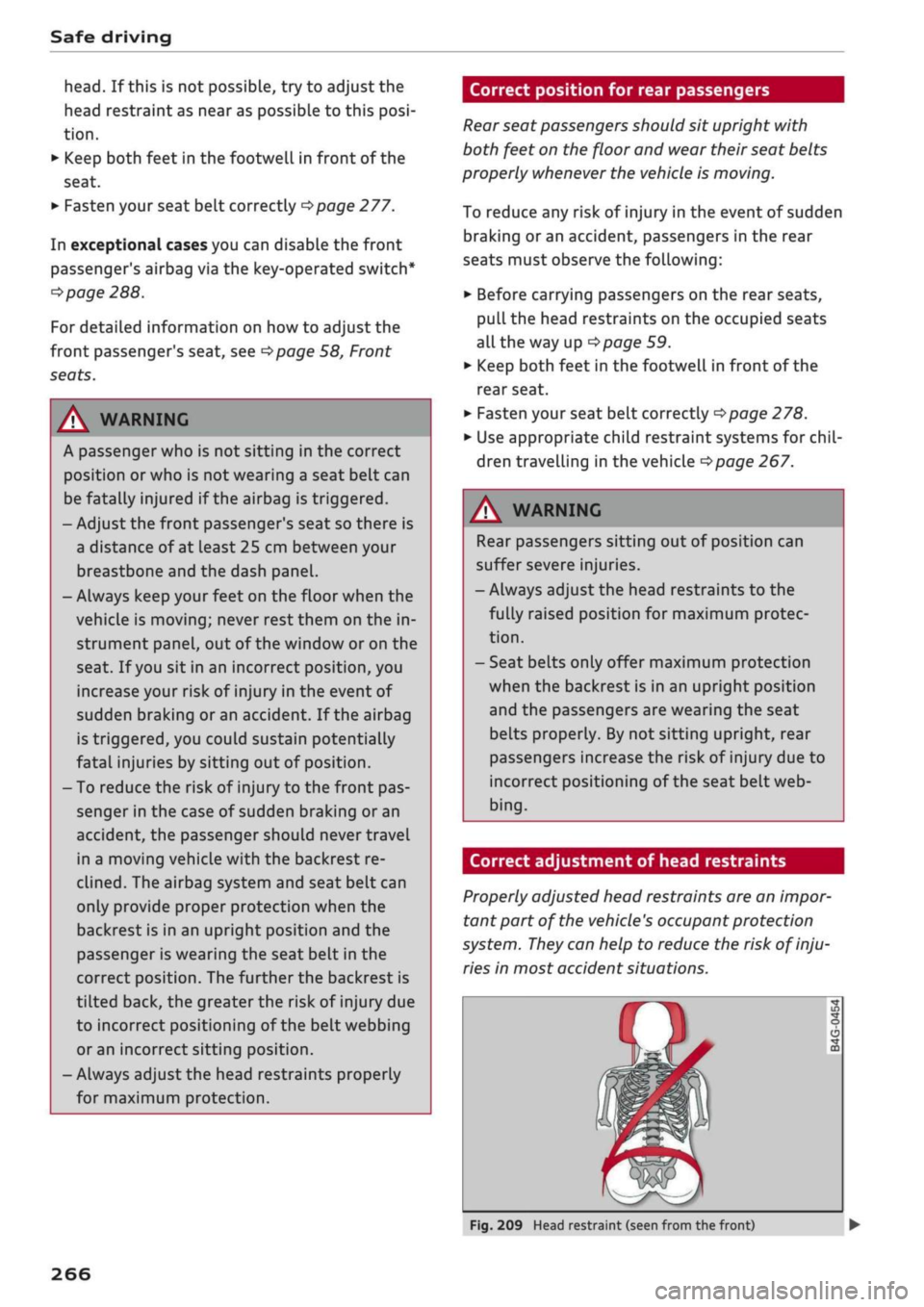
Correct adjustment of head restraints
Properly adjusted head restraints are an
impor
tant part of the vehicle's occupant protection
system.
They
can help to reduce the risk of inju
ries in most accident situations.
Fig.
209 Head restraint (seen from the front)
266
Page 271 of 364
Safe driving
CO
< o rN
iv
rN
t-H
o < 00
The head restraints must be adjusted properly to
provide maximum protection.
•
Adjust the front head restraints so that the top
of the head restraint is level with the top of
your head. If this is not possibLe, try to adjust
the head restraint as near as possibLe to this
position.
•
Before carrying passengers on the rear seats,
pull
the head restraints on the occupied seats
all the way up
^>page
59.
For more information on how to adjust the head
restraints, see
^page
58.
A WARNING
- Travelling with the head restraints removed
or incorrectly adjusted increases the risk of
severe injuries.
- Incorrectly adjusted head restraints can also
increase the risk of injury during sudden or
unexpected braking or other manoeuvres.
Examples of incorrect seating positions
Occupants can suffer
severe
or fatal injuries if
they sit in an incorrect position while the vehicle
is moving.
Seat belts can only provide maximum protection
if the belt webbing is positioned correctly. Sitting
out of position greatly reduces the effectiveness
of the seat belts and increases the risk of injury
since the belt webbing is not worn in the position
for which it is designed. The driver is responsible
for the safety of all vehicle occupants, especially
for children.
•
Never allow anyone to sit out of position while
the vehicle is moving
•=>
A..
The following list shows just some examples of
incorrect sitting positions which can be danger
ous to all occupants. The List is not complete, but
will help to make you aware of possible dangers
which can be avoided.
Therefore, whenever the vehicle is moving:
- Never stand up in the vehicle.
- Never stand on the seats.
- Never kneel on the seats.
- Never travel with the backrest reclined too far.
- Never lean against the dash panel.
- Never lie down on the rear seat.
- Never sit on the front edge of
a
seat.
- Never sit sideways.
- Never lean out of the window.
- Never put your feet out of the window.
- Never put your feet on the dash panel.
- Never put your feet on the seat cushion.
- Never ride in the footwell.
- Never travel on a seat without wearing the seat
belt.
- Never climb into the luggage compartment.
WARNING
Sitting out of position increases the risk of se
vere injuries.
- Sitting out of position exposes the occu
pants to potentially fatal injuries if, for in
stance, the airbags inflate and strike an oc
cupant who is not seated in one of the prop
er positions.
- Before starting a trip, sit in the correct
posi
tion and stay in this position as Long as the
vehicle is moving. Before every trip, make
sure all passengers are sitting in the correct
positions and remain correctly seated at all
times
^page
58, Front seats.
Child seats
Safety notes for using child seats
To
reduce the risk of injury in the event of
an
ac
cident, children must always use child restraint
systems when travelling in the car.
Please note the information in this Owner's
Man
ual when installing and using child seats. Follow
the manufacturer's instructions and observe any
statutory requirements.
For safety reasons, we recommend that child
seats be installed on the rear seats. You should
only use a child seat on the front passenger seat
in exceptional circumstances. •
267