charging AUDI Q2 2021 Owner´s Manual
[x] Cancel search | Manufacturer: AUDI, Model Year: 2021, Model line: Q2, Model: AUDI Q2 2021Pages: 364, PDF Size: 87.77 MB
Page 247 of 364
Media
CO
<
o
rN
IV
rN
i—i
o
<
•H
00
- To charge a mobile device using
a
USB adapt
er: Connect your mobile device®
^>Fig.
198
to
the charging socket® using
the
appropriate
USB adapter©.
- To disconnect
the
USB adapter from
the
charging socket: Detach
the
USB adapter©
^Fig.
198
from
the
USB charging socket.
- To disconnect mobile devices with Apple dock
connector: With
the
release tabs
©
^>page
240,
Fig.
196
pressed, detach
the
Apple
dock connector from
the
Apple device.
A WARNING
Today's driving conditions require your full
at
tention.
As
the
driver, you have full responsi
bility
for
the
safety
of
the vehicle
and
other
road users. Never use mobile devices while
the vehicle
is
moving
-
risk
of
accident!
!
)
CAUTION
-To avoid damaging
the
connection
on the
Audi music interface, please take care when
unplugging
the
connector from
the
AUX
in
put
or the
USB charging socket.
- Very high
or
very
low
temperatures
(a
com
mon occurrence
in a
car's interior)
can
cause
damage
to
mobile devices and/or impair
their performance. Please
do not
leave your
mobile devices
in the
vehicle when
the
tem
perature
is
very high
or
very
low.
© Note
- When you switch
off
the ignition,
the
USB
ports will continue
to be
supplied with pow
er as Long as
the
energy management sys
tem does
not
intervene.
- USB charging sockets marked
ICHARGEONLYI
cannot transfer data
and
are intended
for
charging only.
-
Do not
use
any
additional USB extension
ca
bles
or
adapters when connecting mobile
devices which must
be
connected
to the USB
charging
socket
©^F/g.
198
via
a USB
adapter
(^>page
240);
this could cause per
formance issues.
- The AUX adapter cable
is
available from
Audi dealers
or
specialist retailers.
- USB hubs
are not
supported.
- Please refer
to the
operating instructions
of
your mobile device
for
important informa
tion
on its
operation.
-
It
cannot
be
guaranteed that
all
mobile
de
vices will function without
any
problems.
- Using
a
mobile device with
the
engine
switched
off
will drain
the
vehicle's battery.
- Audi recommends setting
the
volume
of
a
mobile device connected
to the
AUX input
to
about
70 % of
maximum.
Playing media
Calling
up
media
You
can start
and
operate various types
of
media
via
the MMI
control console.
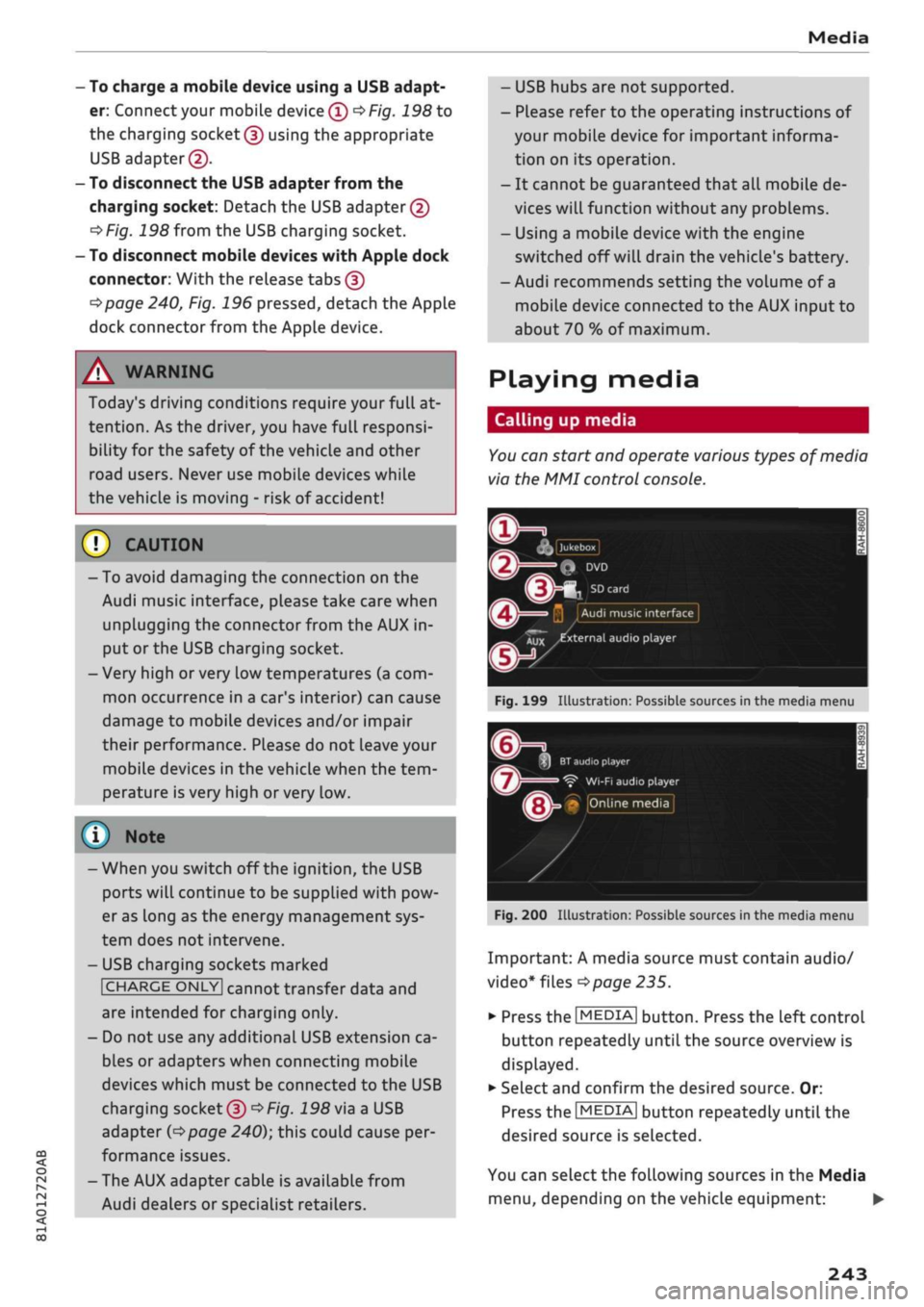
| Jukebox
I
Q
DVD
Audi
music interface
Xux
^external
audio player
Fig.
199
Illustration:
Possible sources
in the
media menu
3H
BT
audio
playe
Ç"
WI-FI
audio player
• Online media
Fig.
200
Illustration:
Possible sources
in the
media menu
Important:
A
media source must contain audio/
video*
files
^>page
235.
*•
Press
the
I
MEDIA|
button. Press
the
left control
button repeatedly until
the
source overview
is
displayed.
•
Select and confirm
the
desired source.
Or:
Press
the|MEDIA|
button repeatedly until
the
desired source
is
selected.
You
can
select
the
following sources
in the
Media
menu,
depending
on the
vehicle equipment:
•
243
Page 259 of 364

System settings
System settings
Setting the time and
date
The
time can be set manually or via
GPS*
• Select:
|MENU|
button > Settings
>
left control
button > MMI settings > Date & time.
•
Or: Select:
|MENU|
button > Car
>
left control
button
>
Vehicle settings > Date & time.
Set automatically
The time and date are automatically updated
when this function is switched on
0.
Time
Important: The Set automatically function must
be deactivated.
Press the rotary pushbutton. You can adjust the
time manually by turning and pressing the rotary
pushbutton.
Date
Important: The Set automatically function must
be deactivated.
Press the rotary pushbutton. You can adjust the
date manually by turning and pressing the rotary
pushbutton.
Time zone
When selecting the correct time zone, a list of
corresponding countries is displayed as an exam
ple.
Automatic time zone*
When this function is activated
(vf,
the time is au
tomatically adjusted to the relevant time zone.
Automatic summer time*
When this function is activated
0,
the time is au
tomatically adjusted from normal time to sum
mer time.
Time format
When this option is set to 24h, for example
13:00 will be displayed as the time. When
it
is
set to AM/PM, for example 1:00 PM will be dis
played.
Date format
When this option is set to DD.MM.YYYY, for ex
ample
31.08.2017
will be displayed as the date.
When
it
is set to MM/DD/YYYY, for example
08/31/2017
will be displayed. When
it
is set to
YYYY-MM-DD, for example
2017-08-31
will be
displayed.
MMI settings
•
Select:
|MENU|
button > Settings > left control
button > MMI settings.
Language
You can change the language of the display along
with the language of the navigation cues* and
the speech dialogue system*.
The number of languages available depends on
the market.
Measurement units
The following measurement units are available:
- Speed (km/h or
mph)
- Distance (km or miles)
- Temperature (°C or °F)
- Consumption
(ltr/100
km,
mpg
(US),
mpg
(UK)
or
km/ltr)
- Capacity (litres, gallons)
Reminder signal
Applies to: vehicles with Audi phone box
Important: Your mobile phone must be Qi com
patible1^,
or
it
must be connected to the Audi
music interface
(l) ^page
177, Fig. 161 using a
USB adapter cable.
You can use the reminder signal to keep yourself
informed of the charging status of the mobile
•
CO
<
O
rN
iv
rN
t-H
o < 00
1}
The Qi standard enables you to charge your mobile phone
wirelessly.
255
Page 260 of 364

System settings
phone in the Audi phone box*. The following set
tings are available:
- off: Switches the reminder signal off.
-
sound:
A sound is played as the reminder
sig
nal.
- spoken: The reminder signal is spoken by the
system.
Reminder signal volume: You can adjust the
vol
ume of the reminder signal by turning the rotary
pushbutton.
Switch off pop-up: This function is switched off
at the factory. When this function is switched on
fcTf,
the messages about the charging status of
the mobile phone in the Audi phone box* on the
infotainment display will not appear. The re
minder not to forget the mobile phone when
leaving the vehicle will also be switched off.
Usage tips
Your MMI dispLays usage tips when this function
is switched on
5f.
They will appear less often as
time goes by.
Speech dialogue system
Applies to: vehicles with speech dialogue system
The following functions are available depending
on the equipment installed in your vehicLe:
Command display: The MMI displays possible
voice commands in the corresponding menu
when this function is switched on
Sf.
Short dialogue: When this function is switched
on
(vj,
the spoken cues are shortened.
Command during speech dialogue*: This option
is activated when the vehicle leaves the factory.
When this option is activated
(vf,
you can say a
new command while the system is giving a spo
ken cue, rather than waiting for the beep. When
this option is deactivated
O,
wait until you hear
the beep to say
a
command.
Volume: You can adjust the volume of the spoken
cues by turning the rotary pushbutton.
Individual speech training (only possibLe when
the vehicle is stationary): You can use the individ
ual speech training to adapt the speech dialogue
system to your voice or pronunciation so that the
speech dialogue system can then better recog
nise what you are saying. The individual speech
training prompts you to repeat 20 spoken phra
ses that consist of certain commands and blocks
of digits. If
you
would like to delete the stored
speech training setup, you can use the function
Reset individual speech training.
Display brightness
Display brightness: You can adjust the bright
ness of the infotainment display by turning the
rotary pushbutton.
Factory settings
You can reset the following functions to the fac
tory settings:
- Sound settings
- Radio
- Media settings
-Jukebox*
- Directory
-Telephone
- Bluetooth and Wi-Fi*
- Navigation settings*
- Navigation and online memory*
- Speech dialogue system*
- Message settings*
- Apps*
-Usage tips
-Audi connect*
- Audi smartphone interface*
You can select the desired options individually or
mark Select all entries. SeLect and confirm Re
store factory settings.
Please note that not only settings will be de
Leted
when you do this; saved data may also
be erased
256
Page 306 of 364
Checking and topping up fluids
the reservoir in certain circumstances and
cause damage to the vehicle.
- Brake fluid must not be allowed to come in
to contact with the vehicle's body, other
wise it will attack the paintwork.
©
For the sake of the environment
1?
Batteries contain toxic substances including
sulphuric acid and
lead.
PLease contact a
qualified workshop if
you
have any questions.
Battery
General warnings for batteries
Because of the complexity of the power supply,
any battery work, such as disconnection, replace
ment, etc. must be carried out by
a
qualified
workshop
^A-
The term "vehicle battery" refers to the 12 Volt
battery in your vehicle.
Explanation of warnings on vehicle battery:
m
Wear safety glasses!
Battery acid is extremely corrosive. Wear
protective gloves and safety glasses.
A
Keep open flames, sparks, uncovered
Lights and lit cigarettes away from the
battery!
A highly explosive mixture of gases may
~\
be given off when the battery is under
charge!
Keep children away from batteries and
battery
acid.
A WARNING
Any work on the batteries and electrical sys
tem in your vehicLe entails a risk of injury and
chemical burns in addition to danger of
acci
dent or fire. For this reason, you must have
the work carried out by a qualified workshop.
©
CA UTION
If the car is left standing for long periods,
protect the battery from frost. The battery
will be damaged irreparably if it is allowed to
freeze
^>page
303, Charging the vehicle
bat
tery.
Vehicle battery
The
term "vehicle battery" refers to the 12 Volt
battery in your vehicle.
If the vehicle is not used for long periods
If
you
do not drive your vehicle for a period of
several days or weeks, the power management
will gradually shut off the on-board systems one
by one, or reduce the amount of current they are
using.
This limits the amount of power consumed
and helps to ensure reliable starting even after a
long period
^>page
149. Certain convenience fea
tures,
such as interior lighting or electric seat ad
justment, may not be available. These functions
will be restored when you switch on the ignition
and start the engine.
Even though some systems are deactivated auto
matically, certain electrical equipment continues
to draw current even when the ignition is off. If
the vehicLe is left standing for long periods, this
can result in total battery discharge. If the
vehi
cle battery is allowed to discharge completely, an
internal
chemicaL
reaction damages the battery
irreparably. To avoid this, the vehicle battery
should be recharged at Least once a month
^>page
303. PLease contact a qualified workshop
if
you
have any questions.
Winter conditions
Cold weather is very hard on the vehicle battery.
The starting capacity may be reduced as a result.
For this reason, you should have the vehicle bat
tery checked by
a
qualified workshop before the
start of winter.
302
Page 307 of 364
Checking and topping up fluids
Charging the vehicle battery
CO
< o rN
iv
rN
t-H
o < 00
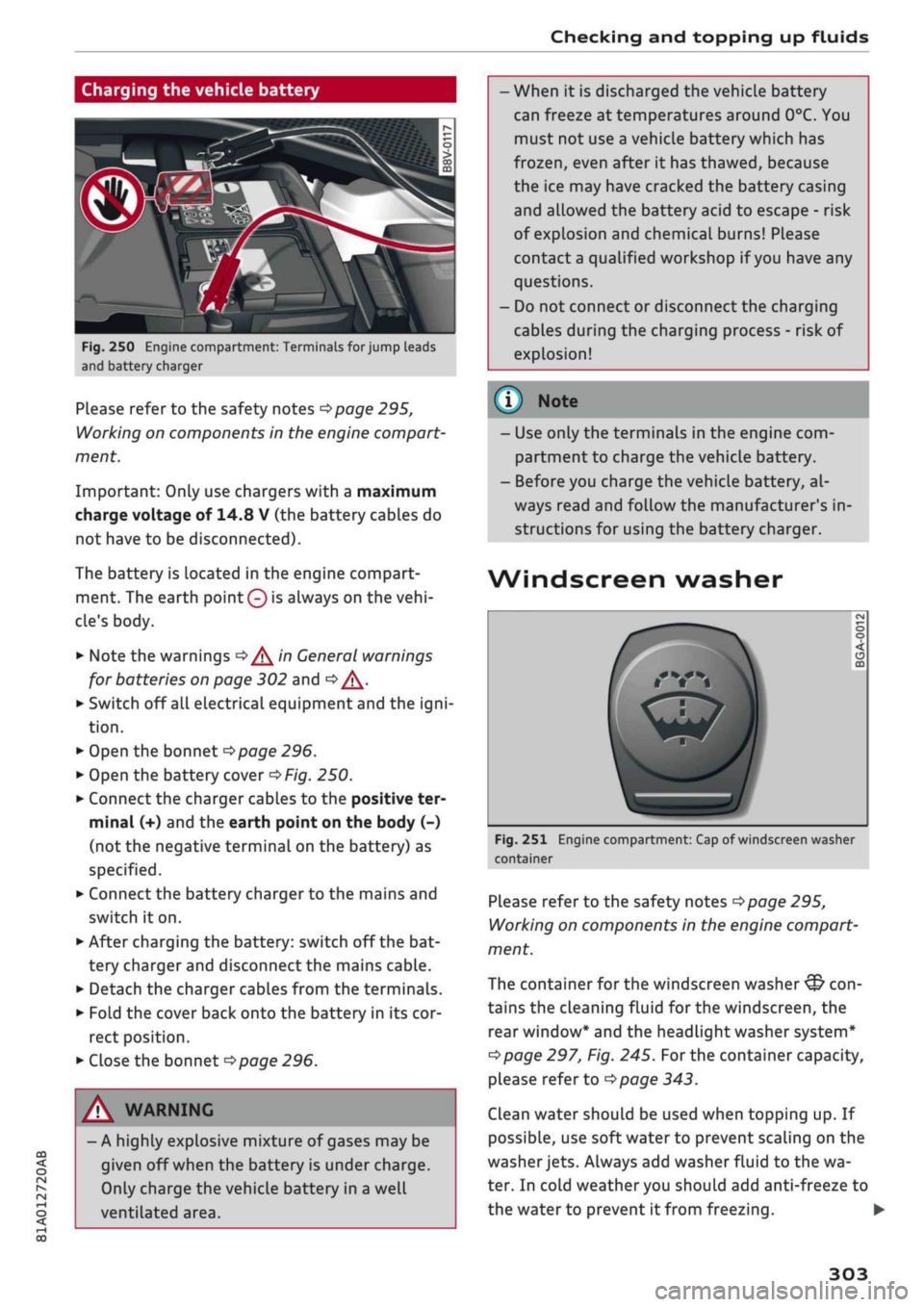
Fig.
250 Engine compartment: Terminals for jump leads
and battery charger
Please refer to the safety notes
^>page
295,
Working on components in the engine compart
ment.
Important: Only use chargers with a maximum
charge voltage of 14.8 V (the battery cables do
not have to be disconnected).
The battery is Located in the engine compart
ment. The earth
point 0
is always on the
vehi
cle's body.
•
Note the warnings
•=>/^
in General warnings
for batteries on page 302 and
Q/\.
•
Switch off all electrical equipment and the
igni
tion.
•
Open the bonnet
^>page
296.
•
Open the battery cover
^Fig.
250.
•
Connect the charger cables to the positive ter
minal (+) and the earth point on the body (-)
(not the negative terminal on the battery) as
specified.
•
Connect the battery charger to the mains and
switch it on.
•
After charging the battery: switch off the bat
tery charger and disconnect the mains cable.
•
Detach the charger cables from the terminals.
•
Fold the cover back onto the battery in its cor
rect position.
•
Close the bonnet
^>page
296.
A WARNING
- A highly explosive mixture of gases may be
given off when the battery is under charge.
Only charge the vehicle battery in a well
ventilated area.
- When it is discharged the vehicle battery
can freeze at temperatures around 0°C. You
must not use a vehicle battery which has
frozen,
even after it has thawed, because
the ice may have cracked the battery casing
and allowed the battery acid to escape - risk
of explosion and chemical burns! Please
contact
a
qualified workshop if
you
have any
questions.
- Do not connect or disconnect the charging
cables during the charging process - risk of
explosion!
© Note
- Use only the terminals in the engine com
partment to charge the vehicle battery.
- Before you charge the vehicle battery, al
ways read and follow the manufacturer's in
structions for using the battery charger.
Wind
screen washer
Fig.
251 Engine compartment: Cap of windscreen washer
container
Please refer to the safety notes
^>page
295,
Working on components in the engine compart
ment.
The container for the windscreen washer
&
con
tains the cleaning fluid for the windscreen, the
rear window* and the headlight washer system*
Opage
297, Fig. 245.
For
the container capacity,
please refer to
opage
343.
Clean water should be used when topping up. If
possible, use soft water to prevent scaling on the
washer
jets.
Always add washer fluid to the wa
ter. In cold weather you should add anti-freeze to
the water to prevent it from freezing. •
303
Page 350 of 364
Index
Personal hotspot 195
Setting up 196
Setup 191
Topping up data plan 197
Audi drive select 131
Audi magnetic ride
see Suspension control
131
Audi music interface 240
Audi music stream
see Wi-Fi 238
Audio files 243
Audio players
Bluetooth audio players 237
Wi-Fi audio players 238
Audio track 246
Audi phone box 177
Audi pre sense 120
Driver messages 119, 122
Settings 122
Audi side assist 127
Cleaning sensors 313
Driver messages
131
Rear cross-traffic assist 130
Audi smartphone interface 253, 258
Audi virtual cockpit
see Instrument cluster 12
AUTO
Automatic air conditioner 69
Automatic headlights 49
Auto Lock (central locking system) 37
Automatic air conditioner
see Air conditioner (automatic) 66, 69
Automatic gearbox 85
Back-up programme 92
DownhilL
speed control 89
Driving tips 88
Kick-down 90
Launch control programme 91
Malfunction 86
Manual gear selection (tiptronic mode) ... 90
Manual release of selector Lever (left-hand
drive) 93
Manual release of selector Lever (right-hand
drive) 94
Paddle levers 90
Selector lever 88
Selector lever Lock 86
Selector lever positions 86
AUX input
241,
242
Average fuel consumption 19, 20
Average speed 19, 20
Axle loads 343
B
BACK button 152
Background lighting 53
Balance (sound) 260
Bandages
see First-aid kit 318
Bass box 325, 326
Bass (sound) 260
Battery 302
Charge 149
Charging 303
In key 38
Winter conditions 302
Battery, charging (mobile devices) 177
Belts
see Seat belts 275
Bicycle racks (rear carrier systems) 99
Biodiesel 289
Bioethanol (fuel) 289
Blower
Automatic air conditioner 70
Heating/ventilation system and manual air
conditioner 67
Bluetooth
Audio players 237
Connecting a mobiLe phone 173
Remote SIM Access Profile 193
Settings 258
Boot
see Luggage compartment 272
Boot lid
Close button 44
Opening/dosing
electrically 44
Brakes 147
Brake assist system 145
Brake fluid 301
Brake pedal 272
Electro-mechanical parking brake 82
346
Page 351 of 364

Index
CO
< o rN
iv
rN
t-H
o <
•H
00
Emergency braking function 82
New brake pads 147
Browser
see Media centre 244
Bulb failure
Changing bulbs 334
Bulbs,
changing 334
Buttons
Assigning functions (multi-function steering
wheel) 17
Multi-function steering wheel 15, 18
Operating unit (MMI) 152
C
Cables (USB adapter/AUX adapter) 240
Calling up media 243
Call
list 179
CalL
options 187
Capacities
AdBlue 292
Fuel
tank 343
Washer fluid reservoir 343
Caps for wheel bolts, removing 321
Car care
Washing/cleaning 312
Care
see Cleaning 312
Car phone
172,188
Catalytic converter 295
CD drive 236
Central locking system 37
Cetane number (diesel) 289
Changing settings for additional dispLay .... 19
Charging
see Power sources 60
Charging battery 242
Charging battery (mobile devices) 241
Chassis number 342
Child lock 46
DVD 246
Child seats 267
Fitting 270
Cigarette Lighter 60
Classic view 17
Cleaning 312
Cleaning/de-icing windows 314
Cleaning/treating leather 315
Cleaning Alcantara 315
Cleaning carbon parts 314, 315
Cleaning controls and displays 314
Cleaning fabrics 315
Cleaning leatherette 315
Cleaning plastic parts 314
Closing
Panorama sun roof 48
Windows 46
see also Unlocking/locking 39, 40
Closing/opening
see Unlocking/locking 39, 40
Coasting mode 91
Coat hooks 61
Colour code 342
Coming home/leaving home
see Entry/exit lights 51
Commands (speech dialogue system) 164
Compact temporary spare wheel 324
Compartments 61
Conference calls 180
Connection manager 257
Connections
see Media 234, 243
Consumption (fuel) 19, 20, 342
Contacts 185
From another directory 258
Importing/exporting 187
Memory capacity 189
Storing as a destination
216
Control buttons (MMI operation) 154
Controls and displays (overview) 10
Control units 150
Convenience key
Manual operation 79
Starting/stopping the engine 76
Unlocking/locking 39
Convenience open/close 47
Cooling mode
Automatic air conditioner 69
Manual air conditioner 67
Cooling system
Anti-freeze 299
Checking coolant level 300
347
Page 360 of 364

Index
Technical data 342
Telephone 172
Audi phone box 177
Connecting 173
Dialling a number 179
Options during a call 180
Playing music 237
Settings 187
SIM card 176
Telephone mode 188
Temperature display
Coolant 12
Outside temperature 15
Temperature selection
Automatic air conditioner 69
Heating/ventilation system and manual air
conditioner 67
Tethering 195
Text messages 182
Tightening torque (wheel bolts) 324
Time 255
tiptronic (automatic gearbox) 85,90
TMC/TMCpro
see Traffic information 225
Tools 319
Top tether and ISOFIX (securing child seats) 271
Torque
Engine 344
Wheel bolts 324
Touch pad
see MMI touch 155
Tourist guide
see Travel guide 200
Tow-starting 328
Towing 96
Parking aids 144
Trailer weights 96, 343
Towing away 328
Tow-away protection 42
Towline anchorage 330, 331
TPMS
see Tyres 309
Traction control system (ASR) 145
Traffic announcements
see Traffic programme (TP) 229
Traffic avoidance 217
Traffic information 225, 226
Traffic jam assist 117
Traffic programme (TP) 229
Traffic sign recognition 108
Trailer mode (navigation) 217
Trailer stabilisation 97
Travel guide 200
Treble (sound) 260
Trip recorder, resetting 14
Turning light 49
Turn signals 50
Type plate 342
Tyre Mobility System (tyre repair kit) 319
Tyres 305
Changing 321
Directional tread 324
Inflation pressure 307
Low-profile tyres 309
quattro (four-wheel drive) 148
Repair kit 319
Service life 306
Tyre pressure loss indicator 309
Tyre pressure (towing a trailer) 96
Wear indicator 306
U
Unlocking/locking
By remote control 39
Using the central locking switch 40
With key 41
With the convenience key 39
Updating station List (radio) 231
USB charging socket 60, 242
USB stick
see Audi music interface 240, 241
V
Vehicle
Raising 322
Taking out of service 317
Vehicle data
Identification data 342
Version information 259
VIEW button 15
356